TESTING WITH MOCHA 
@revathskumar
ABOUT 
Rubyist / JavaScripter 
Yeoman Team Member / @keralarb / 
@keralajs 
Works at 
Blog at 
Twitter/Github - 
Google+: 
@whatznear 
blog.revathskumar.com 
@revathskumar 
+RevathSKumar
AGENDA 
Mocha Features 
BDD/TDD syntax 
Chai assert library 
Testing asynchronous code 
Testing in Node.js and Browser 
Grunt and gulp tasks
NEVER TRUST YOUR CODE
TESTING FRAMEWORKS 
Mocha 
Jasmine 
QUnit
MOCHA
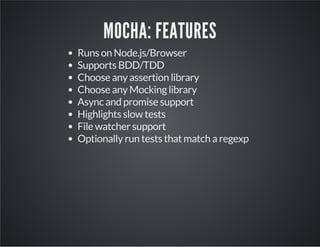
MOCHA: FEATURES 
Runs on Node.js/Browser 
Supports BDD/TDD 
Choose any assertion library 
Choose any Mocking library 
Async and promise support 
Highlights slow tests 
File watcher support 
Optionally run tests that match a regexp
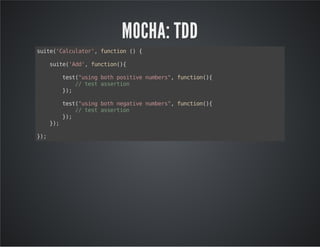
MOCHA: TDD 
suite('Calculator', function () { 
suite('Add', function(){ 
test("using both positive numbers", function(){ 
// test assertion 
}); 
test("using both negative numbers", function(){ 
// test assertion 
}); 
}); 
});
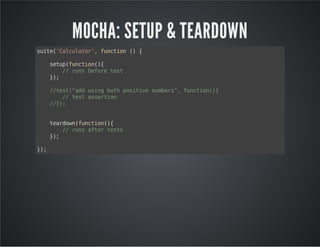
MOCHA: SETUP & TEARDOWN 
suite('Calculator', function () { 
setup(function(){ 
// runs before test 
}); 
//test("add using both positive numbers", function(){ 
// test assertion 
//}); 
teardown(function(){ 
// runs after tests 
}); 
});
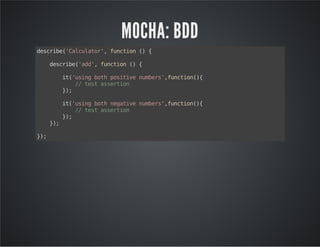
MOCHA: BDD 
describe('Calculator', function () { 
describe('add', function () { 
it('using both positive numbers',function(){ 
// test assertion 
}); 
it('using both negative numbers',function(){ 
// test assertion 
}); 
}); 
});
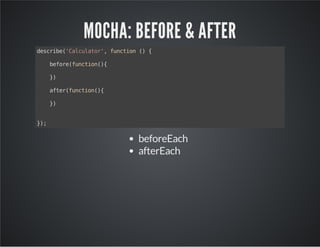
MOCHA: BEFORE & AFTER 
describe('Calculator', function () { 
before(function(){ 
}) 
after(function(){ 
}) 
}); 
beforeEach 
afterEach
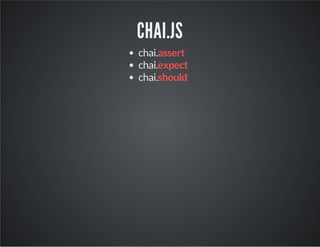
CHAI.JS 
chai.assert 
chai.expect 
chai.should
CHAI: ASSERT 
chai.assert(expression, [message]) 
chai.assert(actual, expected, [message]) 
ok() 
notOk() 
fail() 
isTrue() 
isFalse() 
isNUll()
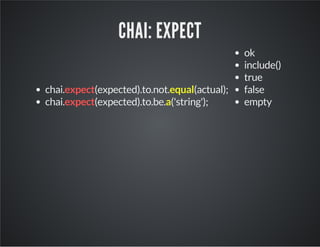
CHAI: EXPECT 
chai.expect(expected).to.not.equal(actual); 
chai.expect(expected).to.be.a('string'); 
ok 
include() 
true 
false 
empty
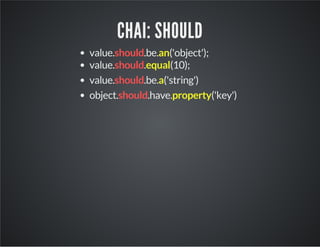
CHAI: SHOULD 
value.should.be.an('object'); 
value.should.equal(10); 
value.should.be.a('string') 
object.should.have.property('key')
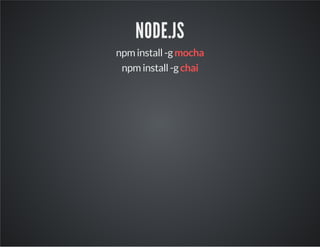
NODE.JS 
npm install -g mocha 
npm install -g chai
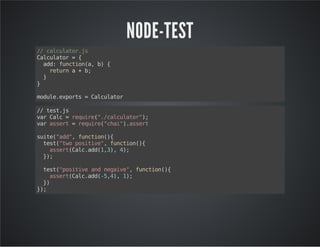
NODE-TEST 
// calculator.js 
Calculator = { 
add: function(a, b) { 
return a + b; 
} 
} 
module.exports = Calculator 
// test.js 
var Calc = require("./calculator"); 
var assert = require("chai").assert 
suite("add", function(){ 
test("two positive", function(){ 
assert(Calc.add(1,3), 4); 
}); 
test("positive and negaive", function(){ 
assert(Calc.add(-5,4), 1); 
}) 
});
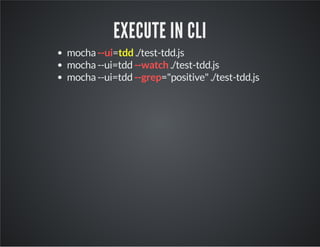
EXECUTE IN CLI 
mocha --ui=tdd ./test-tdd.js 
mocha --ui=tdd --watch ./test-tdd.js 
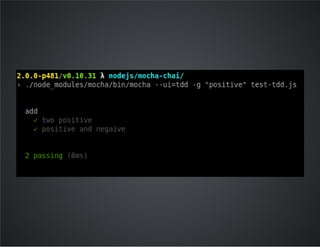
mocha --ui=tdd --grep="positive" ./test-tdd.js
BROWSER 
bower install mocha 
bower install chai
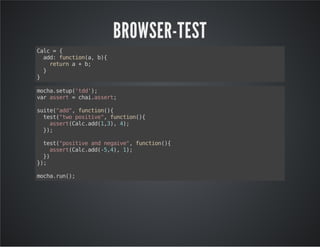
BROWSER-TEST 
Calc = { 
add: function(a, b){ 
return a + b; 
} 
} 
mocha.setup('tdd'); 
var assert = chai.assert; 
suite("add", function(){ 
test("two positive", function(){ 
assert(Calc.add(1,3), 4); 
}); 
test("positive and negaive", function(){ 
assert(Calc.add(-5,4), 1); 
}) 
}); 
mocha.run();
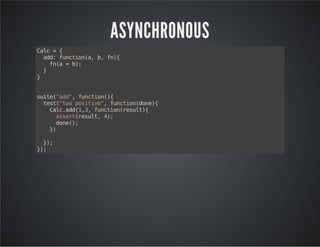
ASYNCHRONOUS 
Calc = { 
add: function(a, b, fn){ 
fn(a + b); 
} 
} 
suite("add", function(){ 
test("two positive", function(done){ 
Calc.add(1,3, function(result){ 
assert(result, 4); 
done(); 
}) 
}); 
});
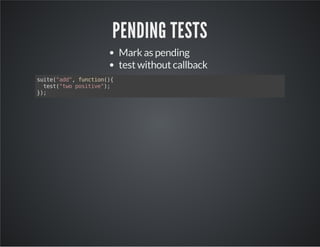
PENDING TESTS 
Mark as pending 
test without callback 
suite("add", function(){ 
test("two positive"); 
});
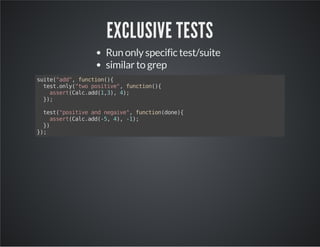
EXCLUSIVE TESTS 
Run only specific test/suite 
similar to grep 
suite("add", function(){ 
test.only("two positive", function(){ 
assert(Calc.add(1,3), 4); 
}); 
test("positive and negaive", function(done){ 
assert(Calc.add(-5, 4), -1); 
}) 
});
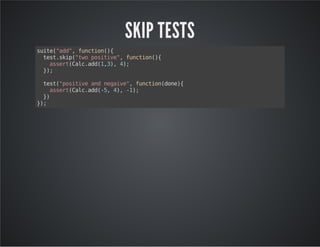
SKIP TESTS 
suite("add", function(){ 
test.skip("two positive", function(){ 
assert(Calc.add(1,3), 4); 
}); 
test("positive and negaive", function(done){ 
assert(Calc.add(-5, 4), -1); 
}) 
});
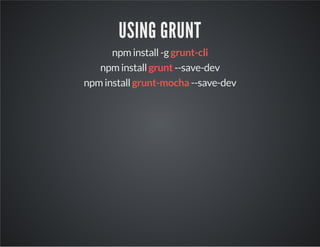
USING GRUNT 
npm install -g grunt-cli 
npm install grunt --save-dev 
npm install grunt-mocha --save-dev
GRUNT CONFIG 
module.exports = function(grunt) { 
grunt.loadNpmTasks('grunt-mocha'); 
grunt.initConfig({ 
mocha: { 
test: { 
src: ['tests/**/*.html'], 
}, 
} 
}); 
}
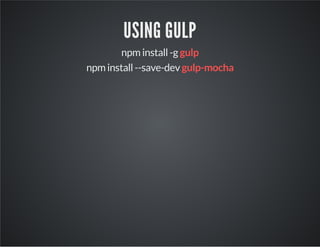
USING GULP 
npm install -g gulp 
npm install --save-dev gulp-mocha
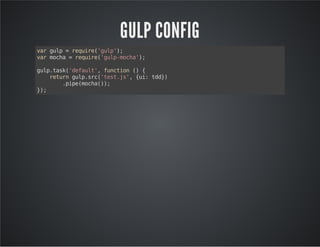
GULP CONFIG 
var gulp = require('gulp'); 
var mocha = require('gulp-mocha'); 
gulp.task('default', function () { 
return gulp.src('test.js', {ui: tdd}) 
.pipe(mocha()); 
});
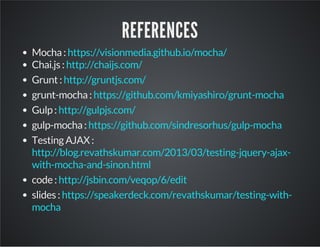
REFERENCES 
Mocha : 
Chai.js : 
Grunt : 
grunt-mocha : 
Gulp : 
gulp-mocha : 
Testing AJAX : 
code : 
slides : 
https://visionmedia.github.io/mocha/ 
http://chaijs.com/ 
http://gruntjs.com/ 
https://github.com/kmiyashiro/grunt-mocha 
http://gulpjs.com/ 
https://github.com/sindresorhus/gulp-mocha 
http://blog.revathskumar.com/2013/03/testing-jquery-ajax-with- 
mocha-and-sinon.html 
http://jsbin.com/veqop/6/edit 
https://speakerdeck.com/revathskumar/testing-with-mocha
QUESTIONS? 
Revath S Kumar 
@revathskumar 
http://blog.revathskumar.com

Unit testing with mocha

  • 1.
    TESTING WITH MOCHA @revathskumar
  • 2.
    ABOUT Rubyist /JavaScripter Yeoman Team Member / @keralarb / @keralajs Works at Blog at Twitter/Github - Google+: @whatznear blog.revathskumar.com @revathskumar +RevathSKumar
  • 3.
    AGENDA Mocha Features BDD/TDD syntax Chai assert library Testing asynchronous code Testing in Node.js and Browser Grunt and gulp tasks
  • 4.
  • 5.
  • 6.
  • 7.
    MOCHA: FEATURES Runson Node.js/Browser Supports BDD/TDD Choose any assertion library Choose any Mocking library Async and promise support Highlights slow tests File watcher support Optionally run tests that match a regexp
  • 8.
    MOCHA: TDD suite('Calculator',function () { suite('Add', function(){ test("using both positive numbers", function(){ // test assertion }); test("using both negative numbers", function(){ // test assertion }); }); });
  • 9.
    MOCHA: SETUP &TEARDOWN suite('Calculator', function () { setup(function(){ // runs before test }); //test("add using both positive numbers", function(){ // test assertion //}); teardown(function(){ // runs after tests }); });
  • 10.
    MOCHA: BDD describe('Calculator',function () { describe('add', function () { it('using both positive numbers',function(){ // test assertion }); it('using both negative numbers',function(){ // test assertion }); }); });
  • 11.
    MOCHA: BEFORE &AFTER describe('Calculator', function () { before(function(){ }) after(function(){ }) }); beforeEach afterEach
  • 12.
  • 13.
    CHAI: ASSERT chai.assert(expression,[message]) chai.assert(actual, expected, [message]) ok() notOk() fail() isTrue() isFalse() isNUll()
  • 14.
    CHAI: EXPECT chai.expect(expected).to.not.equal(actual); chai.expect(expected).to.be.a('string'); ok include() true false empty
  • 15.
    CHAI: SHOULD value.should.be.an('object'); value.should.equal(10); value.should.be.a('string') object.should.have.property('key')
  • 16.
    NODE.JS npm install-g mocha npm install -g chai
  • 17.
    NODE-TEST // calculator.js Calculator = { add: function(a, b) { return a + b; } } module.exports = Calculator // test.js var Calc = require("./calculator"); var assert = require("chai").assert suite("add", function(){ test("two positive", function(){ assert(Calc.add(1,3), 4); }); test("positive and negaive", function(){ assert(Calc.add(-5,4), 1); }) });
  • 18.
    EXECUTE IN CLI mocha --ui=tdd ./test-tdd.js mocha --ui=tdd --watch ./test-tdd.js mocha --ui=tdd --grep="positive" ./test-tdd.js
  • 20.
    BROWSER bower installmocha bower install chai
  • 21.
    BROWSER-TEST Calc ={ add: function(a, b){ return a + b; } } mocha.setup('tdd'); var assert = chai.assert; suite("add", function(){ test("two positive", function(){ assert(Calc.add(1,3), 4); }); test("positive and negaive", function(){ assert(Calc.add(-5,4), 1); }) }); mocha.run();
  • 23.
    ASYNCHRONOUS Calc ={ add: function(a, b, fn){ fn(a + b); } } suite("add", function(){ test("two positive", function(done){ Calc.add(1,3, function(result){ assert(result, 4); done(); }) }); });
  • 24.
    PENDING TESTS Markas pending test without callback suite("add", function(){ test("two positive"); });
  • 25.
    EXCLUSIVE TESTS Runonly specific test/suite similar to grep suite("add", function(){ test.only("two positive", function(){ assert(Calc.add(1,3), 4); }); test("positive and negaive", function(done){ assert(Calc.add(-5, 4), -1); }) });
  • 26.
    SKIP TESTS suite("add",function(){ test.skip("two positive", function(){ assert(Calc.add(1,3), 4); }); test("positive and negaive", function(done){ assert(Calc.add(-5, 4), -1); }) });
  • 27.
    USING GRUNT npminstall -g grunt-cli npm install grunt --save-dev npm install grunt-mocha --save-dev
  • 28.
    GRUNT CONFIG module.exports= function(grunt) { grunt.loadNpmTasks('grunt-mocha'); grunt.initConfig({ mocha: { test: { src: ['tests/**/*.html'], }, } }); }
  • 29.
    USING GULP npminstall -g gulp npm install --save-dev gulp-mocha
  • 30.
    GULP CONFIG vargulp = require('gulp'); var mocha = require('gulp-mocha'); gulp.task('default', function () { return gulp.src('test.js', {ui: tdd}) .pipe(mocha()); });
  • 31.
    REFERENCES Mocha : Chai.js : Grunt : grunt-mocha : Gulp : gulp-mocha : Testing AJAX : code : slides : https://visionmedia.github.io/mocha/ http://chaijs.com/ http://gruntjs.com/ https://github.com/kmiyashiro/grunt-mocha http://gulpjs.com/ https://github.com/sindresorhus/gulp-mocha http://blog.revathskumar.com/2013/03/testing-jquery-ajax-with- mocha-and-sinon.html http://jsbin.com/veqop/6/edit https://speakerdeck.com/revathskumar/testing-with-mocha
  • 32.
    QUESTIONS? Revath SKumar @revathskumar http://blog.revathskumar.com