




















www.questers.com
10 Useful Testing
Tools for Open
Source Projects
Peter Sabev
QA Manager
Questers
psabev@gmail.com
@BORIME4KA
www.linkedin.com/in/petersabev
www.facebook.com/peter.sabev
АКО ИМАХ ESP8266 ИЛИ ПОНЕ...
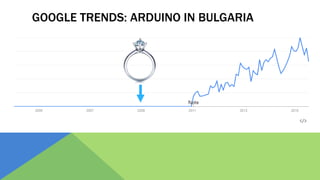
GOOGLE TRENDS: ARDUINO IN BULGARIA
1 час по-късно…
THE POWER OF COMMUNITY!
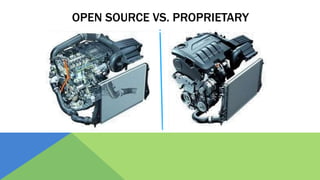
OPEN SOURCE VS. PROPRIETARY
• Всичко е публично (код,
тестове, бъгове, data flow и т.
н.)
• Лъсваш пред цял свят (но и ти
помагат да си оправиш
нещата).
• Хората, които тестват и
оправят бъгове, го правят ЗА
УДОВОЛСТВИЕ.
• Рядко нещо е публично. Никой
отвън не знае какво има отдолу,
как работи и кои данни къде
отиват.
• Ако тестовете ти са кофти,
продуктът ти също може да е
кофти и компанията губи пари и
имидж.
• Хората, които тестват и оправят
бъгове, го правят ЗА ПАРИ
OPEN SOURCE VS. PROPRIETARY
• Тестовете рядко зависят от
конкретен environment, setup
или конфигурация.
• Сензитивна информация
(пароли, device id, hostnames,
ports) се подава като
параметър, защото всичко е
публично.
• Тестовете са настроени да се
пускат в тестовата среда на
дадената компания.
• Сензитивната информация
обикновено не е проблем,
защото тестовете се пускат в
изолирана среда.
OPEN SOURCE VS. PROPRIETARY
• Всеки може да допринесе за
продукта и тестовете
• Нужен е добър механизъм да
отсееш хубавите неща от
боклука.
• При добре развито community,
нещата се тестват много
бързо от много хора, с много
гледни точки.
• Определена група
професионалисти (или не чак
такива) допринасят за
продукта и тестовете.
• Оправянето на проблеми
минава през по-дълъг процес
на одобрения, обикновено
фиксът се тества от един
човек и една гледна точка.
OPEN SOURCE VS. PROPRIETARY
• Хората тестват каквото си искат,
колкото си искат => част от
нещата може да са
неизтествани…
• Практически няма
централизирани tools, стратегия
за тестване и поради тази
причина static code analysis,
performance, security и др. се
тестват по-рядко.
Има ясна тестова стратегия и
тестов план
КАКВО Е НЕОБХОДИМО
ЗА КАЧЕСТВЕН OPEN SOURCE ПРОЕКТ?
• По-добра стратегия, процеси
и управление на тестовете!
• Continuous Integration и
Continuous Deployment са
изключително важни;
• Задължително Code Review;
• Подходящи интегрирани
testing tools.
Благодаря за
вниманието!
Въпроси?
Peter Sabev
QA Manager
www.psabev.info
psabev@gmail.com
www.facebook.com/peter.sabev
www.linkedin.com/in/petersabev
skype: psabev82
СИПВАМ С КОФАТА!
10 TESTING TOOLS
50
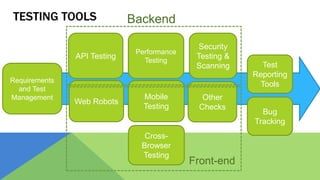
TESTING TOOLS
Requirements
and Test
Management
API Testing
Cross-
Browser
Testing
Mobile
Testing
Performance
Testing
Web Robots
Other
Checks
Test
Reporting
Tools
Security
Testing &
Scanning
Bug
Tracking
Backend
Front-end
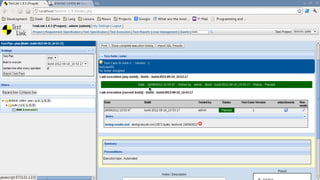
TOOL NO. 1:
TESTLINK
A GPL open source web-based
requirements and test management and
test execution system that allows
executing test cases and tracking test
results dynamically
http://testlink.org/
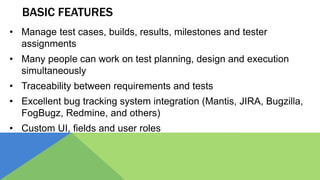
BASIC FEATURES
• Manage test cases, builds, results, milestones and tester
assignments
• Many people can work on test planning, design and execution
simultaneously
• Traceability between requirements and tests
• Excellent bug tracking system integration (Mantis, JIRA, Bugzilla,
FogBugz, Redmine, and others)
• Custom UI, fields and user roles
THE ALTERNATIVES
• Fitnesse (http://www.fitnesse.org/), acceptance testing and
team collaboration
• Tarantula (http://www.tarantula.fi/), modern tool for agile
software projects test management, has requirements, small
but growing community
• qaManager (http://qamanager.sourceforge.net/site/en/),
releases tracking, good reporting, keeps track of testing
cycles
TOOL NO. 2:
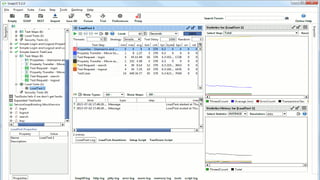
SoapUI is a free and open source
cross-platform tool that allows you to
easily and rapidly create and execute
automated functional, regression,
compliance,
and load tests
www.soapui.org
BASIC FEATURES
• Simple drag-drop test creation
• Complete test coverage for SOAP, WSDL, REST, JMS, db and
others
• Service mocking for SOAP, WSDL and REST
• HTTP recording and replaying
• Good load testing integration with LoadUI
• Plugins support
• Transform functional test into basic security test
THE ALTERNATIVES
• Advanced REST client
(https://chromerestclient.appspot.com/), Google Chrome
plugin for creating and testing custom HTTP requests
• Rest Assured (https://code.google.com/p/rest-assured/),
Testing and validating Java REST services in Ruby and Groovy
• Postman (www.getpostman.com), construct, send and save
requests quickly and analyze the responses sent by the API
TOOL NO. 3:
A suite of tools to automate web
browsers across many platforms.
www.seleniumhq.org
Selenium
BASIC FEATURES
• Consists of basic and advanced part
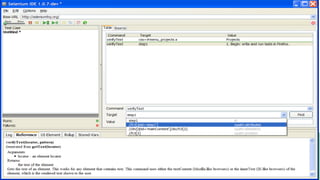
• Selenium IDE for simple automated scripts (a Firefox add-on)
• Selenium WebDriver for robust, browser-based regression automation
suites and tests
• Very big community, including adoption in many commercial products
• Supports Java, C#, Ruby, Python, Javascript, hundreds of other plugins
• Scalable and portable - same scripts can be run on multiple
environments (different number of machines, OS & browsers)
THE ALTERNATIVES
• Watir (http://watir.com/), open source (BSD) family of Ruby
libraries for automating web browsers
• WatiN (http://watin.org/), inspired by Watir but uses C#.
• Sikuli (http://www.sikuli.org/), screenshot based automation
• Canoo WebTest (http://webtest.canoo.com/), open source tool
using Java 5, Groovy 1.6 and HTMLUnit 2.4
• Webrat (https://rubygems.org/gems/webrat/), a Ruby gem
TOOL NO. 4:
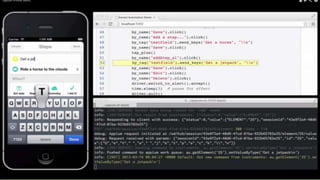
Appium aims to automate any mobile
app from any language and any test
framework, with full access to back-end
APIs and DBs from test code
http://appium.io/
BASIC FEATURES
• Free, open-source, big community
• Supports Selenium (i.e. tests can be written in Python, JS with Perl,
Node.js, Java, Ruby, PHP, C#, RobotFramework, Objective-C,
Clojure)
• Focus on both iOS and Android native, hybrid or mobile web apps
• Can be tested on real devices, simulators or emulators
• Aims full access to mobile backend (e.g. turning wi-fi on/off) and DB
• No need to recompile the apps tested
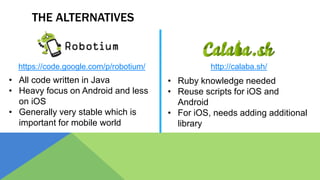
THE ALTERNATIVES
https://code.google.com/p/robotium/ http://calaba.sh/
• Ruby knowledge needed
• Reuse scripts for iOS and
Android
• For iOS, needs adding additional
library
• All code written in Java
• Heavy focus on Android and less
on iOS
• Generally very stable which is
important for mobile world
TOOL NO. 5:
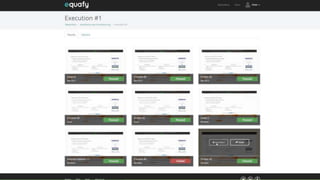
Cross browser testing on multiple browsers,
platforms and resolutions
www.equafy.com
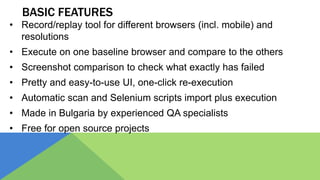
BASIC FEATURES
• Record/replay tool for different browsers (incl. mobile) and
resolutions
• Execute on one baseline browser and compare to the others
• Screenshot comparison to check what exactly has failed
• Pretty and easy-to-use UI, one-click re-execution
• Automatic scan and Selenium scripts import plus execution
• Made in Bulgaria by experienced QA specialists
• Free for open source projects
THE ALTERNATIVES
www.browserstack.com http://saucelabs.com/
• Cloud access to 1000’s of
device/browser combinations
• Developer tools included in the
browsers (such as Firebug, YSlow)
• Separate use / automate accounts
• Combines Selenium with JS unit
tests
• Very good integration with Appium
• Video recordings for all manual test
executions
TOOL NO. 6:
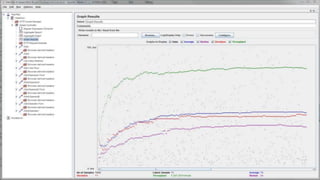
Apache JMeter™ application is
open source Java application
designed to load test functional
behavior and measure
performance.
http://jmeter.apache.org/
BASIC FEATURES
• 100% open source, Java
• Wide variety of server/protocol types to test with: HTTP, HTTPS,
SOAP, REST, FTP, DB via JDBC, LDAP, JMS, SMTP, POP3,
IMAP, MongoDB, TCP, native commands and shell scripts
• Multithreading scalable for heavy load on a server, group of
servers or network
• Core extensible with pluggable functions
• Caching and offline analysis/replaying of test results
THE ALTERNATIVES
• OpenSTA (http://opensta.org/), distributed testing architecture
for HTTP(S) heavy load tests with performance measurements
• Grinder (http://grinder.sourceforge.net/), load testing framework
with flexible scripting in Jython and Clojure
• Pylot (http://www.pylot.org/), has GUI and console modes
• Multi-Mechanize (http://testutils.org/multi-mechanize/), Python
• Gatling (http://gatling.io/) is an open-source load testing
framework based on Scala, Akka and Netty
TOOL NO. 7:
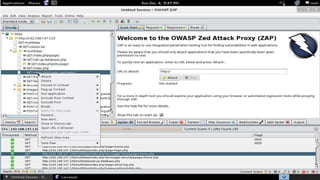
The Zed Attack Proxy (ZAP) is an
easy to use integrated
penetration testing tool for
finding vulnerabilities in web
applications.
https://www.owasp.org/index.ph
p/OWASP_Zed_Attack_Proxy_Pr
oject
BASIC FEATURES
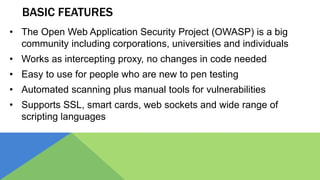
• The Open Web Application Security Project (OWASP) is a big
community including corporations, universities and individuals
• Works as intercepting proxy, no changes in code needed
• Easy to use for people who are new to pen testing
• Automated scanning plus manual tools for vulnerabilities
• Supports SSL, smart cards, web sockets and wide range of
scripting languages
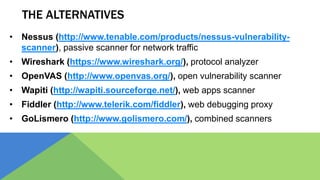
THE ALTERNATIVES
• Nessus (http://www.tenable.com/products/nessus-vulnerability-
scanner), passive scanner for network traffic
• Wireshark (https://www.wireshark.org/), protocol analyzer
• OpenVAS (http://www.openvas.org/), open vulnerability scanner
• Wapiti (http://wapiti.sourceforge.net/), web apps scanner
• Fiddler (http://www.telerik.com/fiddler), web debugging proxy
• GoLismero (http://www.golismero.com/), combined scanners
TOOL NO. 8:
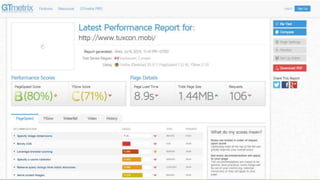
GTmetrix tells you a lot about your
website performance and gives
recommendations by combining
PageSpeed and YSlow scores.
www.gtmetrix.com
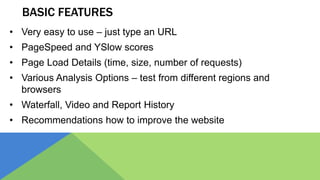
BASIC FEATURES
• Very easy to use – just type an URL
• PageSpeed and YSlow scores
• Page Load Details (time, size, number of requests)
• Various Analysis Options – test from different regions and
browsers
• Waterfall, Video and Report History
• Recommendations how to improve the website
THE ALTERNATIVES
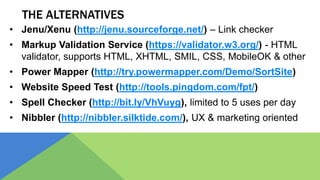
• Jenu/Xenu (http://jenu.sourceforge.net/) – Link checker
• Markup Validation Service (https://validator.w3.org/) - HTML
validator, supports HTML, XHTML, SMIL, CSS, MobileOK & other
• Power Mapper (http://try.powermapper.com/Demo/SortSite)
• Website Speed Test (http://tools.pingdom.com/fpt/)
• Spell Checker (http://bit.ly/VhVuyg), limited to 5 uses per day
• Nibbler (http://nibbler.silktide.com/), UX & marketing oriented
TOOL NO. 9:
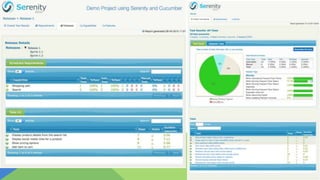
Serenity BDD helps you write better,
more effective automated acceptance
tests, and use these acceptance tests
to produce world-class test reports and
living documentation.
http://www.thucydides.info/
BASIC FEATURES
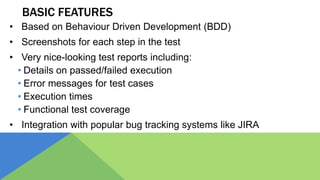
• Based on Behaviour Driven Development (BDD)
• Screenshots for each step in the test
• Very nice-looking test reports including:
• Details on passed/failed execution
• Error messages for test cases
• Execution times
• Functional test coverage
• Integration with popular bug tracking systems like JIRA
THE ALTERNATIVES
• Testopia (https://developer.mozilla.org/en-
US/docs/Mozilla/Bugzilla/Testopia), a generic tool for
tracking test cases, test management and test reporting
• Zephyr (http://zephyragile.com/), test management and
reporting platform, integrates with JIRA but can be used
standalone
• Sonar (http://www.sonarqube.org/), an open platform to
manage code quality, works great with Java/Maven/Jenkins
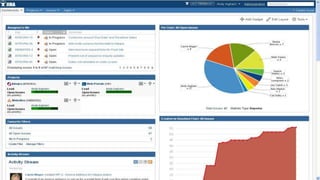
TOOL NO. 10:
The flexible and scalable issue tracker
for software teams.
https://www.atlassian.com/software/jira
BASIC FEATURES
• The most popular test management platform, free for open-source
• Mobile browser support, email subscriptions and notifications
• Highly customizable – gadgets, dashboards, filters, reports, workflows
• Custom issue types, fields, statuses and resolutions
• Massive plugin ecosystem, remote APIs
• Bulk issue modifications
• Wikipedia plus social network style collaboration
THE ALTERNATIVES
• Bugzilla (www.bugzilla.org), the open-source alternative to JIRA
• Mantis (www.mantisbt.org), open source, PHP/MySQL-based
• Trac (http://trac.edgewall.org/), Python based
• Redmine (www.redmine.org) – Ruby-based, GPL, cross-platform
• Trello (https://trello.com/), simple collaboration tool with boards
and cards, very useful for smaller projects
SPECIAL THANKS TO
Dimitar Topuzov
Slavy Slavov
Borislav Traykov
QA BEER?
https://www.facebook.com/groups/
qabulgaria/
Благодаря за
вниманието!
Въпроси?
Peter Sabev
QA Manager
www.psabev.info
psabev@gmail.com
www.facebook.com/peter.sabev
www.linkedin.com/in/petersabev
skype: psabev82

10 Useful Testing Tools for Open Source Projects @ TuxCon 2015

  • 1.
    www.questers.com 10 Useful Testing Toolsfor Open Source Projects Peter Sabev QA Manager Questers psabev@gmail.com @BORIME4KA www.linkedin.com/in/petersabev www.facebook.com/peter.sabev
  • 3.
    АКО ИМАХ ESP8266ИЛИ ПОНЕ...
  • 4.
  • 5.
  • 6.
    THE POWER OFCOMMUNITY!
  • 8.
    OPEN SOURCE VS.PROPRIETARY
  • 9.
    OPEN SOURCE VS.PROPRIETARY • Всичко е публично (код, тестове, бъгове, data flow и т. н.) • Лъсваш пред цял свят (но и ти помагат да си оправиш нещата). • Хората, които тестват и оправят бъгове, го правят ЗА УДОВОЛСТВИЕ. • Рядко нещо е публично. Никой отвън не знае какво има отдолу, как работи и кои данни къде отиват. • Ако тестовете ти са кофти, продуктът ти също може да е кофти и компанията губи пари и имидж. • Хората, които тестват и оправят бъгове, го правят ЗА ПАРИ
  • 10.
    OPEN SOURCE VS.PROPRIETARY • Тестовете рядко зависят от конкретен environment, setup или конфигурация. • Сензитивна информация (пароли, device id, hostnames, ports) се подава като параметър, защото всичко е публично. • Тестовете са настроени да се пускат в тестовата среда на дадената компания. • Сензитивната информация обикновено не е проблем, защото тестовете се пускат в изолирана среда.
  • 11.
    OPEN SOURCE VS.PROPRIETARY • Всеки може да допринесе за продукта и тестовете • Нужен е добър механизъм да отсееш хубавите неща от боклука. • При добре развито community, нещата се тестват много бързо от много хора, с много гледни точки. • Определена група професионалисти (или не чак такива) допринасят за продукта и тестовете. • Оправянето на проблеми минава през по-дълъг процес на одобрения, обикновено фиксът се тества от един човек и една гледна точка.
  • 12.
    OPEN SOURCE VS.PROPRIETARY • Хората тестват каквото си искат, колкото си искат => част от нещата може да са неизтествани… • Практически няма централизирани tools, стратегия за тестване и поради тази причина static code analysis, performance, security и др. се тестват по-рядко. Има ясна тестова стратегия и тестов план
  • 13.
    КАКВО Е НЕОБХОДИМО ЗАКАЧЕСТВЕН OPEN SOURCE ПРОЕКТ? • По-добра стратегия, процеси и управление на тестовете! • Continuous Integration и Continuous Deployment са изключително важни; • Задължително Code Review; • Подходящи интегрирани testing tools.
  • 14.
    Благодаря за вниманието! Въпроси? Peter Sabev QAManager www.psabev.info psabev@gmail.com www.facebook.com/peter.sabev www.linkedin.com/in/petersabev skype: psabev82
  • 15.
  • 16.
    TESTING TOOLS Requirements and Test Management APITesting Cross- Browser Testing Mobile Testing Performance Testing Web Robots Other Checks Test Reporting Tools Security Testing & Scanning Bug Tracking Backend Front-end
  • 17.
    TOOL NO. 1: TESTLINK AGPL open source web-based requirements and test management and test execution system that allows executing test cases and tracking test results dynamically http://testlink.org/
  • 18.
    BASIC FEATURES • Managetest cases, builds, results, milestones and tester assignments • Many people can work on test planning, design and execution simultaneously • Traceability between requirements and tests • Excellent bug tracking system integration (Mantis, JIRA, Bugzilla, FogBugz, Redmine, and others) • Custom UI, fields and user roles
  • 20.
    THE ALTERNATIVES • Fitnesse(http://www.fitnesse.org/), acceptance testing and team collaboration • Tarantula (http://www.tarantula.fi/), modern tool for agile software projects test management, has requirements, small but growing community • qaManager (http://qamanager.sourceforge.net/site/en/), releases tracking, good reporting, keeps track of testing cycles
  • 21.
    TOOL NO. 2: SoapUIis a free and open source cross-platform tool that allows you to easily and rapidly create and execute automated functional, regression, compliance, and load tests www.soapui.org
  • 22.
    BASIC FEATURES • Simpledrag-drop test creation • Complete test coverage for SOAP, WSDL, REST, JMS, db and others • Service mocking for SOAP, WSDL and REST • HTTP recording and replaying • Good load testing integration with LoadUI • Plugins support • Transform functional test into basic security test
  • 24.
    THE ALTERNATIVES • AdvancedREST client (https://chromerestclient.appspot.com/), Google Chrome plugin for creating and testing custom HTTP requests • Rest Assured (https://code.google.com/p/rest-assured/), Testing and validating Java REST services in Ruby and Groovy • Postman (www.getpostman.com), construct, send and save requests quickly and analyze the responses sent by the API
  • 25.
    TOOL NO. 3: Asuite of tools to automate web browsers across many platforms. www.seleniumhq.org Selenium
  • 26.
    BASIC FEATURES • Consistsof basic and advanced part • Selenium IDE for simple automated scripts (a Firefox add-on) • Selenium WebDriver for robust, browser-based regression automation suites and tests • Very big community, including adoption in many commercial products • Supports Java, C#, Ruby, Python, Javascript, hundreds of other plugins • Scalable and portable - same scripts can be run on multiple environments (different number of machines, OS & browsers)
  • 28.
    THE ALTERNATIVES • Watir(http://watir.com/), open source (BSD) family of Ruby libraries for automating web browsers • WatiN (http://watin.org/), inspired by Watir but uses C#. • Sikuli (http://www.sikuli.org/), screenshot based automation • Canoo WebTest (http://webtest.canoo.com/), open source tool using Java 5, Groovy 1.6 and HTMLUnit 2.4 • Webrat (https://rubygems.org/gems/webrat/), a Ruby gem
  • 29.
    TOOL NO. 4: Appiumaims to automate any mobile app from any language and any test framework, with full access to back-end APIs and DBs from test code http://appium.io/
  • 30.
    BASIC FEATURES • Free,open-source, big community • Supports Selenium (i.e. tests can be written in Python, JS with Perl, Node.js, Java, Ruby, PHP, C#, RobotFramework, Objective-C, Clojure) • Focus on both iOS and Android native, hybrid or mobile web apps • Can be tested on real devices, simulators or emulators • Aims full access to mobile backend (e.g. turning wi-fi on/off) and DB • No need to recompile the apps tested
  • 32.
    THE ALTERNATIVES https://code.google.com/p/robotium/ http://calaba.sh/ •Ruby knowledge needed • Reuse scripts for iOS and Android • For iOS, needs adding additional library • All code written in Java • Heavy focus on Android and less on iOS • Generally very stable which is important for mobile world
  • 33.
    TOOL NO. 5: Crossbrowser testing on multiple browsers, platforms and resolutions www.equafy.com
  • 34.
    BASIC FEATURES • Record/replaytool for different browsers (incl. mobile) and resolutions • Execute on one baseline browser and compare to the others • Screenshot comparison to check what exactly has failed • Pretty and easy-to-use UI, one-click re-execution • Automatic scan and Selenium scripts import plus execution • Made in Bulgaria by experienced QA specialists • Free for open source projects
  • 36.
    THE ALTERNATIVES www.browserstack.com http://saucelabs.com/ •Cloud access to 1000’s of device/browser combinations • Developer tools included in the browsers (such as Firebug, YSlow) • Separate use / automate accounts • Combines Selenium with JS unit tests • Very good integration with Appium • Video recordings for all manual test executions
  • 37.
    TOOL NO. 6: ApacheJMeter™ application is open source Java application designed to load test functional behavior and measure performance. http://jmeter.apache.org/
  • 38.
    BASIC FEATURES • 100%open source, Java • Wide variety of server/protocol types to test with: HTTP, HTTPS, SOAP, REST, FTP, DB via JDBC, LDAP, JMS, SMTP, POP3, IMAP, MongoDB, TCP, native commands and shell scripts • Multithreading scalable for heavy load on a server, group of servers or network • Core extensible with pluggable functions • Caching and offline analysis/replaying of test results
  • 40.
    THE ALTERNATIVES • OpenSTA(http://opensta.org/), distributed testing architecture for HTTP(S) heavy load tests with performance measurements • Grinder (http://grinder.sourceforge.net/), load testing framework with flexible scripting in Jython and Clojure • Pylot (http://www.pylot.org/), has GUI and console modes • Multi-Mechanize (http://testutils.org/multi-mechanize/), Python • Gatling (http://gatling.io/) is an open-source load testing framework based on Scala, Akka and Netty
  • 41.
    TOOL NO. 7: TheZed Attack Proxy (ZAP) is an easy to use integrated penetration testing tool for finding vulnerabilities in web applications. https://www.owasp.org/index.ph p/OWASP_Zed_Attack_Proxy_Pr oject
  • 42.
    BASIC FEATURES • TheOpen Web Application Security Project (OWASP) is a big community including corporations, universities and individuals • Works as intercepting proxy, no changes in code needed • Easy to use for people who are new to pen testing • Automated scanning plus manual tools for vulnerabilities • Supports SSL, smart cards, web sockets and wide range of scripting languages
  • 44.
    THE ALTERNATIVES • Nessus(http://www.tenable.com/products/nessus-vulnerability- scanner), passive scanner for network traffic • Wireshark (https://www.wireshark.org/), protocol analyzer • OpenVAS (http://www.openvas.org/), open vulnerability scanner • Wapiti (http://wapiti.sourceforge.net/), web apps scanner • Fiddler (http://www.telerik.com/fiddler), web debugging proxy • GoLismero (http://www.golismero.com/), combined scanners
  • 45.
    TOOL NO. 8: GTmetrixtells you a lot about your website performance and gives recommendations by combining PageSpeed and YSlow scores. www.gtmetrix.com
  • 46.
    BASIC FEATURES • Veryeasy to use – just type an URL • PageSpeed and YSlow scores • Page Load Details (time, size, number of requests) • Various Analysis Options – test from different regions and browsers • Waterfall, Video and Report History • Recommendations how to improve the website
  • 48.
    THE ALTERNATIVES • Jenu/Xenu(http://jenu.sourceforge.net/) – Link checker • Markup Validation Service (https://validator.w3.org/) - HTML validator, supports HTML, XHTML, SMIL, CSS, MobileOK & other • Power Mapper (http://try.powermapper.com/Demo/SortSite) • Website Speed Test (http://tools.pingdom.com/fpt/) • Spell Checker (http://bit.ly/VhVuyg), limited to 5 uses per day • Nibbler (http://nibbler.silktide.com/), UX & marketing oriented
  • 49.
    TOOL NO. 9: SerenityBDD helps you write better, more effective automated acceptance tests, and use these acceptance tests to produce world-class test reports and living documentation. http://www.thucydides.info/
  • 50.
    BASIC FEATURES • Basedon Behaviour Driven Development (BDD) • Screenshots for each step in the test • Very nice-looking test reports including: • Details on passed/failed execution • Error messages for test cases • Execution times • Functional test coverage • Integration with popular bug tracking systems like JIRA
  • 52.
    THE ALTERNATIVES • Testopia(https://developer.mozilla.org/en- US/docs/Mozilla/Bugzilla/Testopia), a generic tool for tracking test cases, test management and test reporting • Zephyr (http://zephyragile.com/), test management and reporting platform, integrates with JIRA but can be used standalone • Sonar (http://www.sonarqube.org/), an open platform to manage code quality, works great with Java/Maven/Jenkins
  • 53.
    TOOL NO. 10: Theflexible and scalable issue tracker for software teams. https://www.atlassian.com/software/jira
  • 54.
    BASIC FEATURES • Themost popular test management platform, free for open-source • Mobile browser support, email subscriptions and notifications • Highly customizable – gadgets, dashboards, filters, reports, workflows • Custom issue types, fields, statuses and resolutions • Massive plugin ecosystem, remote APIs • Bulk issue modifications • Wikipedia plus social network style collaboration
  • 56.
    THE ALTERNATIVES • Bugzilla(www.bugzilla.org), the open-source alternative to JIRA • Mantis (www.mantisbt.org), open source, PHP/MySQL-based • Trac (http://trac.edgewall.org/), Python based • Redmine (www.redmine.org) – Ruby-based, GPL, cross-platform • Trello (https://trello.com/), simple collaboration tool with boards and cards, very useful for smaller projects
  • 58.
    SPECIAL THANKS TO DimitarTopuzov Slavy Slavov Borislav Traykov
  • 60.
  • 61.
    Благодаря за вниманието! Въпроси? Peter Sabev QAManager www.psabev.info psabev@gmail.com www.facebook.com/peter.sabev www.linkedin.com/in/petersabev skype: psabev82