





Teens, Tweens, and Technology What Every Parent Needs to Know Kirsten Adams Tim Fish Merritt Livermore January 2010
 
 
Why... are you here?
4 take-aways 1.  It is our job to “prepare our children for their future, not our past.”  - Dan Pink 2.  Balance is the key. 3.  We are the parents, we make the rules. 4.  There is no single right way to manage technology in your home.
Teens, Tweens, and Tech A McDonogh continuum - Merritt Livermore
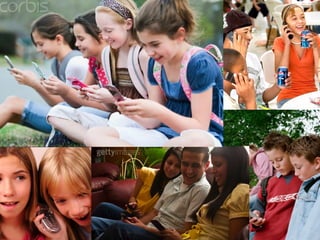
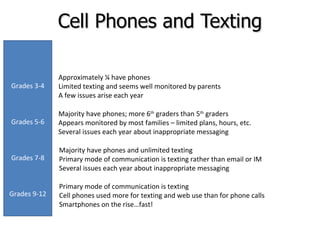
Cell Phones and Texting Majority have phones and unlimited texting Primary mode of communication is texting rather than email or IM Several issues each year about inappropriate messaging Primary mode of communication is texting Cell phones used more for texting and web use than for phone calls Smartphones on the rise…fast! Majority have phones; more 6 th  graders than 5 th  graders Appears monitored by most families – limited plans, hours, etc. Several issues each year about inappropriate messaging Approximately ¼ have phones Limited texting and seems well monitored by parents A few issues arise each year Grades 3-4 Grades 5-6 Grades 7-8 Grades 9-12
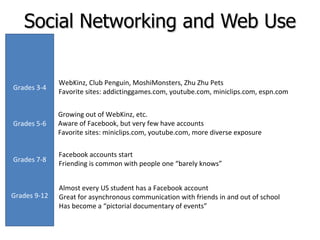
Social Networking and Web Use Facebook accounts start Friending is common with people one “barely knows” Almost every US student has a Facebook account Great for asynchronous communication with friends in and out of school Has become a “pictorial documentary of events” Growing out of WebKinz, etc. Aware of Facebook, but very few have accounts Favorite sites: miniclips.com, youtube.com, more diverse exposure WebKinz, Club Penguin, MoshiMonsters, Zhu Zhu Pets Favorite sites: addictinggames.com, youtube.com, miniclips.com, espn.com Grades 3-4 Grades 5-6 Grades 7-8 Grades 9-12
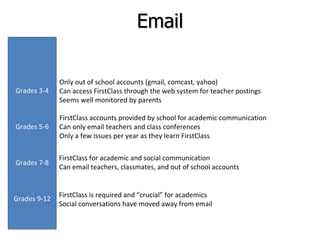
Email FirstClass for academic and social communication Can email teachers, classmates, and out of school accounts FirstClass is required and “crucial” for academics Social conversations have moved away from email FirstClass accounts provided by school for academic communication Can only email teachers and class conferences Only a few issues per year as they learn FirstClass Only out of school accounts (gmail, comcast, yahoo) Can access FirstClass through the web system for teacher postings Seems well monitored by parents Grades 3-4 Grades 5-6 Grades 7-8 Grades 9-12
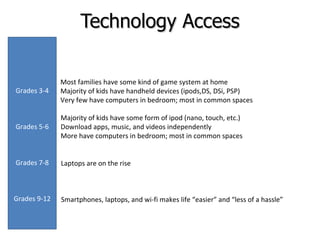
Technology Access Laptops are on the rise Smartphones, laptops, and wi-fi makes life “easier” and “less of a hassle” Majority of kids have some form of ipod (nano, touch, etc.) Download apps, music, and videos independently More have computers in bedroom; most in common spaces Most families have some kind of game system at home Majority of kids have handheld devices (ipods,DS, DSi, PSP) Very few have computers in bedroom; most in common spaces Grades 3-4 Grades 5-6 Grades 7-8 Grades 9-12
Now what...
Top Three Worries Ubiquitous access particularly on cell phones, ipod touch, DSi, psp Tips for parents Know what you are buying  Set Boundaries #3
Top Three Worries Constant Connectivity we are never alone Tips for parents Set Boundaries Require regular social interaction without technologyModel appropriate behavior #2
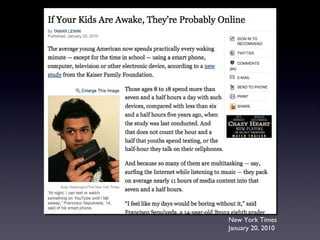
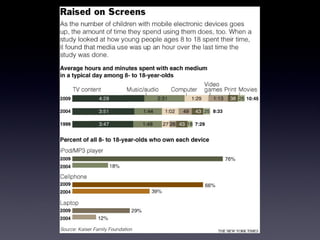
New York Times January 20, 2010
 
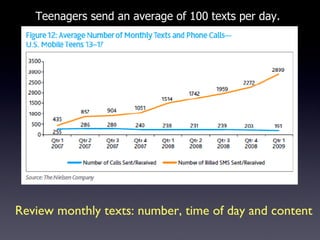
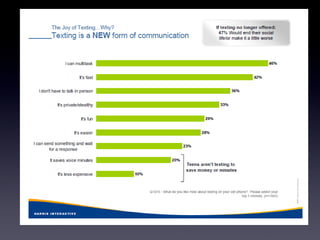
Teenagers send an average of 100 texts per day. Review monthly texts: number, time of day and content
 
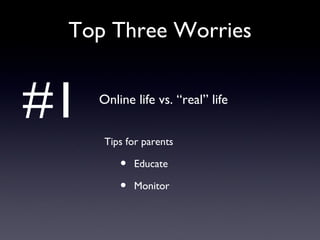
Top Three Worries Online life vs. “real” life Tips for parents Educate Monitor #1
How does McDonogh address technology concerns? Education and Conversation Clear Policies/Boundaries Gradual Introduction
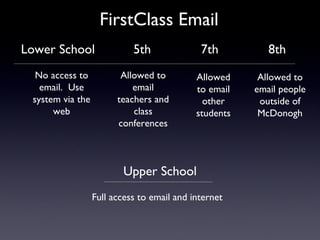
FirstClass Email Upper School Full access to email and internet Lower School 5th 7th 8th No access to email.  Use system via the web Allowed to email teachers and class conferences Allowed to email other students Allowed to email people outside of McDonogh
Don’t Let Technology Get Ahead of You!
Talk   to the other adults in your household to the parents of your children’s friends to the school and most importantly, to your child
Inspires Communication and Creativity Technology
Project 20/20 Mission Emmanuel Once a fan, always a fan... Lifelong learning Communication
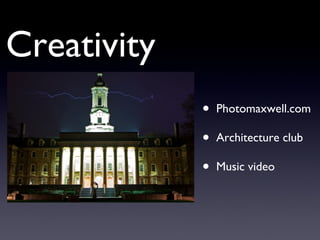
Photomaxwell.com Architecture club  Music video Creativity
Where are we headed?
Everything is everywhere forever.
Everything does everything
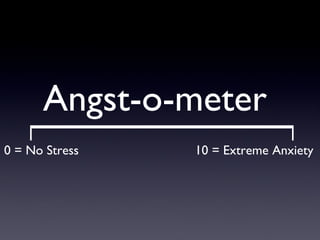
Angst-o-meter 0 = No Stress 10 = Extreme Anxiety

Teens, Tweens, and Technology

  • 1.
    Teens, Tweens, andTechnology What Every Parent Needs to Know Kirsten Adams Tim Fish Merritt Livermore January 2010
  • 2.
  • 3.
  • 4.
  • 5.
    4 take-aways 1. It is our job to “prepare our children for their future, not our past.” - Dan Pink 2. Balance is the key. 3. We are the parents, we make the rules. 4. There is no single right way to manage technology in your home.
  • 6.
    Teens, Tweens, andTech A McDonogh continuum - Merritt Livermore
  • 7.
    Cell Phones andTexting Majority have phones and unlimited texting Primary mode of communication is texting rather than email or IM Several issues each year about inappropriate messaging Primary mode of communication is texting Cell phones used more for texting and web use than for phone calls Smartphones on the rise…fast! Majority have phones; more 6 th graders than 5 th graders Appears monitored by most families – limited plans, hours, etc. Several issues each year about inappropriate messaging Approximately ¼ have phones Limited texting and seems well monitored by parents A few issues arise each year Grades 3-4 Grades 5-6 Grades 7-8 Grades 9-12
  • 8.
    Social Networking andWeb Use Facebook accounts start Friending is common with people one “barely knows” Almost every US student has a Facebook account Great for asynchronous communication with friends in and out of school Has become a “pictorial documentary of events” Growing out of WebKinz, etc. Aware of Facebook, but very few have accounts Favorite sites: miniclips.com, youtube.com, more diverse exposure WebKinz, Club Penguin, MoshiMonsters, Zhu Zhu Pets Favorite sites: addictinggames.com, youtube.com, miniclips.com, espn.com Grades 3-4 Grades 5-6 Grades 7-8 Grades 9-12
  • 9.
    Email FirstClass foracademic and social communication Can email teachers, classmates, and out of school accounts FirstClass is required and “crucial” for academics Social conversations have moved away from email FirstClass accounts provided by school for academic communication Can only email teachers and class conferences Only a few issues per year as they learn FirstClass Only out of school accounts (gmail, comcast, yahoo) Can access FirstClass through the web system for teacher postings Seems well monitored by parents Grades 3-4 Grades 5-6 Grades 7-8 Grades 9-12
  • 10.
    Technology Access Laptopsare on the rise Smartphones, laptops, and wi-fi makes life “easier” and “less of a hassle” Majority of kids have some form of ipod (nano, touch, etc.) Download apps, music, and videos independently More have computers in bedroom; most in common spaces Most families have some kind of game system at home Majority of kids have handheld devices (ipods,DS, DSi, PSP) Very few have computers in bedroom; most in common spaces Grades 3-4 Grades 5-6 Grades 7-8 Grades 9-12
  • 11.
  • 12.
    Top Three WorriesUbiquitous access particularly on cell phones, ipod touch, DSi, psp Tips for parents Know what you are buying Set Boundaries #3
  • 13.
    Top Three WorriesConstant Connectivity we are never alone Tips for parents Set Boundaries Require regular social interaction without technologyModel appropriate behavior #2
  • 14.
    New York TimesJanuary 20, 2010
  • 15.
  • 16.
    Teenagers send anaverage of 100 texts per day. Review monthly texts: number, time of day and content
  • 17.
  • 18.
    Top Three WorriesOnline life vs. “real” life Tips for parents Educate Monitor #1
  • 19.
    How does McDonoghaddress technology concerns? Education and Conversation Clear Policies/Boundaries Gradual Introduction
  • 20.
    FirstClass Email UpperSchool Full access to email and internet Lower School 5th 7th 8th No access to email. Use system via the web Allowed to email teachers and class conferences Allowed to email other students Allowed to email people outside of McDonogh
  • 21.
    Don’t Let TechnologyGet Ahead of You!
  • 22.
    Talk to the other adults in your household to the parents of your children’s friends to the school and most importantly, to your child
  • 23.
    Inspires Communication andCreativity Technology
  • 24.
    Project 20/20 MissionEmmanuel Once a fan, always a fan... Lifelong learning Communication
  • 25.
    Photomaxwell.com Architecture club Music video Creativity
  • 26.
    Where are weheaded?
  • 27.
  • 28.
  • 29.
    Angst-o-meter 0 =No Stress 10 = Extreme Anxiety

Editor's Notes

  • #8 In 7 years, goes from no use to primary mode of communication; transition occurs primarily in 6 th grade and by late MS, texting is primary mode of communication In MS, learning how to communicate with texting as well as how to communication with others – boy/girl communication; resolving conflicts independently – Issues of bullying and social exclusion can occur with technology: – we address it when we know -- having devices is like social capital; feeling left out because you don’t have the devices -- sending messages that are hurtful or misconstrued; better to speak in person -- taking risks -- online vs real persona – real character and online character should be the same -- lessons of permanence and safety Trends – less for phone calls unless talking with parents; more for text, email, web use, and paper writing Smartphones on rise – great tool for students on the go all the time
  • #9 Concept of social networking starts very young – linked to toys and stuffed animals By 7 th grade, accounts appear and by HS, everyone has them Texting and Facebook are the primary social communcation tools – Great for keeping up with classmates you don’t have classes with, friends out of school and international friends Impulse for US students to check FB and FirstClass oftent throughout day
  • #10 Use of email – starts as out of school > introduced in MS for academic purposes; monitored closely for appropriateness – teaching opportunities; becomes vital tool for US academic success; trend by US grades – as more students have cell phones, social communication moving away from email; email used only for business
  • #11 Children are exposed to handheld, wireless, social connection tools at young ages. Faster, more portable is the way to go to balance academic and social communication
  • #24 Make a handout -
  • #25 Make a handout -
  • #26 Make a handout -
  • #27 Make a handout -
  • #28 Make a handout -
  • #29 Make a handout -
  • #30 Make a handout -