IBM Social Digital Experiences
Nov 2013
Adam Ginsburg, Product Manager @aginsburg
Jonathan Booth, Senior Architect, Digital Experience Tooling

IBM SBT Webinar 13 Nov 2013
©
2013
Agenda



Background: Social Digital Experiences



Integration options



Deployment patterns



Developing custom solutions



Summary
5 Ways Social Media Takes Customer Relationships To The
Next Level (Forbes*):
●

●

●

●

●

1. Make it easy for people to share their story - find a way to let people
feel good and share their story about how your brand makes a difference in
their lives.
2. Leverage the social in social media. Social media serves as a tool
for those who may not have an outlet or support system to find one another.
3. Make it about the customer, not about the product. When you help
your customer via social media, you’re more likely to build a long-lasting
relationship — which will in turn propel your brand awareness and growth.
4. Take every opportunity to gain feedback. Lays (Potato Chips) teamed
up with Facebook to change the Like button to an “I’d eat that” button.
Crowdsourcing isn’t just a marketing tactic, it’s an extremely easy and
effective means of soliciting feedback about your product or service.
5. Break through barriers: If a heavily regulated medical company can
break down barriers and use social media to connect with customers on an
incredibly human level, then so can any business.

* Ref: http://www.forbes.com/sites/theyec/2012/12/24/5-ways-social-media-takescustomer-relationships-to-the-next-level-2
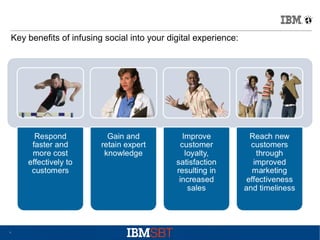
Key benefits of infusing social into your digital experience:

4
Agenda



Background: Social Web Experiences



Integration options



Deployment patterns



Developing custom solutions



Summary
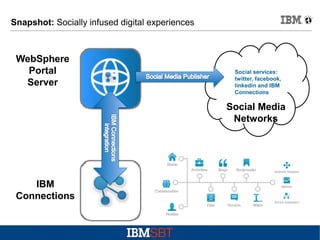
Snapshot: Socially infused digital experiences

WebSphere
Portal
Server

Social services:
twitter, facebook,
linkedin and IBM
Connections

Social Media
Networks

IBM
Connections
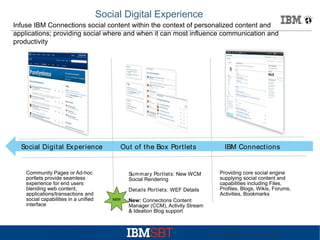
Social Digital Experience
Infuse IBM Connections social content within the context of personalized content and
applications; providing social where and when it can most influence communication and
productivity

Social Digital Ex perience

Community Pages or Ad-hoc
portlets provide seamless
experience for end users
blending web content,
applications/transactions and
social capabilities in a unified
interface

Out of the Box Portlets

Summary Portlets: New WCM
Social Rendering
Details Portlets: WEF Details
NEW

IBM Connections

Providing core social engine
supplying social content and
capabilities including Files,
Profiles, Blogs, Wikis, Forums,
Activities, Bookmarks

New: Connections Content
Manager (CCM), Activity Stream
& Ideation Blog support

IBM Web Experiences - © 2012 IBM Corporation
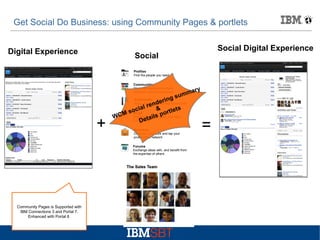
Get Social Do Business: using Community Pages & portlets
Digital Experience

Social Digital Experience

Social
Profiles
Find the people you need
Communities
Work with people who share
common roles and expertise

ar
umm
gs

rin
nde
l re &
ocia
l ts
o ande
M s Blogs your own ideas,rt learn
p
Present
WC
ails
fromDet
others

y

Bookmarks
Save, share, and discover bookmarks

+

Activities
Organize your work and tap your
professional network
Forums
Exchange ideas with, and benefit from
the expertise of others

Community Pages is Supported with
IBM Connections 3 and Portal 7.
Enhanced with Portal 8

=
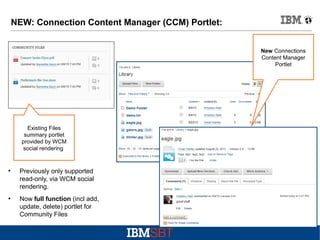
NEW: Connection Content Manager (CCM) Portlet:
New Connections
Content Manager
Portlet

Existing Files
summary portlet
provided by WCM
social rendering

●

●

Previously only supported
read-only, via WCM social
rendering.
Now full function (incl add,
update, delete) portlet for
Community Files
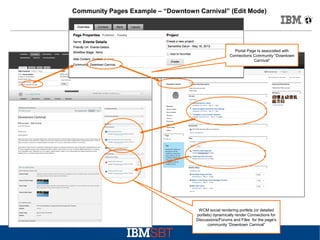
Community Pages Example – “Downtown Carnival” (Edit Mode)

Portal Page Is associated with
Connections Community “Downtown
Carnival”

WCM social rendering portlets (or detailed
portlets) dynamically render Connections for
Discussions/Forums and Files for the page's
community “Downtown Carnival”
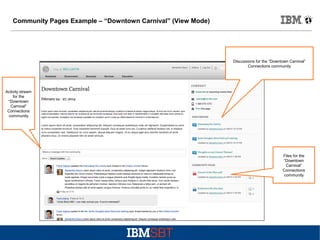
Community Pages Example – “Downtown Carnival” (View Mode)

Discussions for the “Downtown Carnival”
Connections community

Activity stream
for the
“Downtown
Carnival”
Connections
community

Files for the
“Downtown
Carnival”
Connections
community
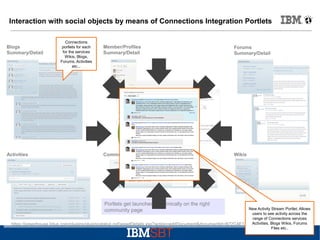
Interaction with social objects by means of Connections Integration Portlets

Blogs
Summary/Detail

Activities

Connections
portlets for each
for the services
Wikis, Blogs,
Forums, Activities
etc...

Member/Profiles
Summary/Detail

Forums
Summary/Detail

Community Overview

Wikis

Portlets get launched dynamically on the right
community page

New Activity Stream Portlet. Allows
users to see activity across the
range of Connections services
Activities, Blogs Wikis, Forums
https://greenhouse.lotus.com/plugins/plugincatalog.nsf/assetDetails.xsp?action=editDocument&documentId=B72C4E177060582285257B3A0053BB6F
Files etc..
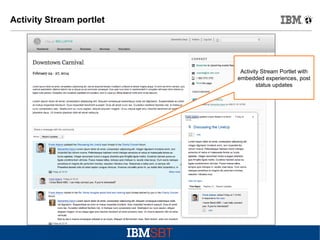
Activity Stream portlet

Activity Stream Portlet with
embedded experiences, post
status updates
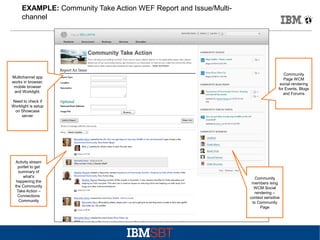
EXAMPLE: Community Take Action WEF Report and Issue/Multichannel

Multichannel app
works in browser,
mobile browser
and Worklight.

Community
Page WCM
social rendering
for Events, Blogs
and Forums

Need to check if
Worklight is setup
on Showcase
server

Activity stream
portlet to get
summary of
what's
happening the
the Community
Take Action –
Connections
Community

Community
members ising
WCM Social
rendering –
context sensitive
to Community
Page
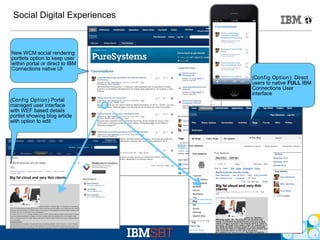
Social Digital Experiences

New WCM social rendering
portlets option to keep user
within portal or direct to IBM
Connections native UI
(Config Option): Direct
users to native FULL IBM
Connections User
interface
(Config Option) Portal
managed user interface
with WEF based details
portlet showing blog article
with option to edit

IBM Web Experiences - © 2012 IBM Corporation
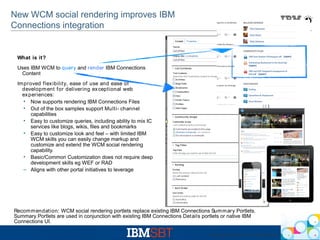
New WCM social rendering improves IBM
Connections integration

What is it?
Uses IBM WCM to query and render IBM Connections
Content
Improved flex ibility, ease of use and ease of
development for delivering ex ceptional web
ex periences:
• Now supports rendering IBM Connections Files
• Out of the box samples support Multi- channel
capabilities
• Easy to customize queries, including ability to mix IC
services like blogs, wikis, files and bookmarks
• Easy to customize look and feel – with limited IBM
WCM skills you can easily change markup and
customize and extend the WCM social rendering
capability.
• Basic/Common Customization does not require deep
development skills eg WEF or RAD
– Aligns with other portal initiatives to leverage

Recommendation: WCM social rendering portlets replace existing IBM Connections Sum mary Portlets.
Summary Portlets are used in conjunction with existing IBM Connections Details portlets or native IBM
Connections UI.
IBM Web Experiences - © 2012 IBM Corporation
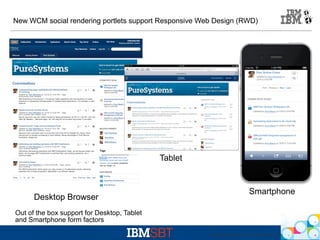
New WCM social rendering portlets support Responsive Web Design (RWD)

Tablet

Desktop Browser

Smartphone

Out of the box support for Desktop, Tablet
and Smartphone form factors
IBM Web Experiences - © 2012 IBM Corporation
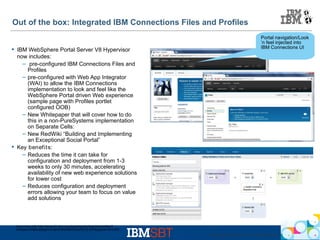
Out of the box: Integrated IBM Connections Files and Profiles
 IBM WebSphere Portal Server V8 Hypervisor
now includes:
– pre-configured IBM Connections Files and
Profiles
– pre-configured with Web App Integrator
(WAI) to allow the IBM Connections
implementation to look and feel like the
WebSphere Portal driven Web experience
(sample page with Profiles portlet
configured OOB)
– New Whitepaper that will cover how to do
this in a non-PureSystems implementation
on Separate Cells:
– New RedWiki “Building and Implementing
an Exceptional Social Portal”
 Key benefit s:
– Reduces the time it can take for
configuration and deployment from 1-3
weeks to only 30 minutes, accelerating
availability of new web experience solutions
for lower cost
– Reduces configuration and deployment
errors allowing your team to focus on value
add solutions

Portal navigation/Look
’n feel injected into
IBM Connections UI

Announce info http://www-01.ibm.com/common/ssi/cgi-bin/ssialias?
infotype=AN&subtype=CA&htmlfid=897/ENUS212-421&appname=USN
IBM Web Experiences - © 2012 IBM Corporation
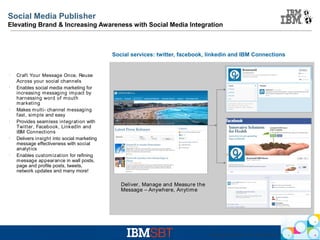
Social Media Publisher
Elevating Brand & Increasing Awareness with Social Media Integration

Social services: twitter, facebook, linkedin and IBM Connections

l

l

l

l

l

l

Craft Your Message Once, Reuse
Across your social channels
Enables social media marketing for
increasing messaging impact by
harnessing word of mouth
m arketing
Makes m ulti- channel messaging
fast, simple and easy
Provides seamless integration with
Twitter, Facebook, LinkedIn and
IBM Connections
Delivers insight into social marketing
message effectiveness with social
analytics
Enables customization for refining
m essage appearance in wall posts,
page and profile posts, tweets,
network updates and many more!

Deliver, Manage and Measure the
Message – Anywhere, Anytime

IBM Web Experiences - © 2012 IBM Corporation
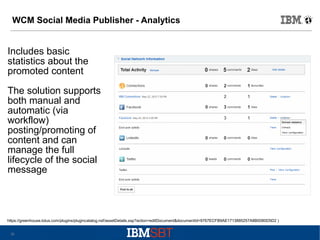
WCM Social Media Publisher - Analytics

Includes basic
statistics about the
promoted content
The solution supports
both manual and
automatic (via
workflow)
posting/promoting of
content and can
manage the full
lifecycle of the social
message

https://greenhouse.lotus.com/plugins/plugincatalog.nsf/assetDetails.xsp?action=editDocument&documentId=9767ECFB9AE1713885257A8B0080D5D2 )
20
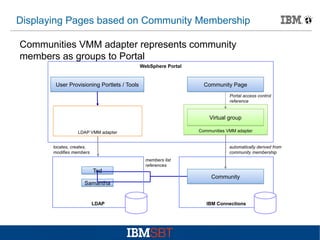
Displaying Pages based on Community Membership
Communities VMM adapter represents community
members as groups to Portal
WebSphere Portal

User Provisioning Portlets / Tools

Community Page
Portal access control
reference

Virtual group
Communities VMM adapter

LDAP VMM adapter
locates, creates,
modifies members

automatically derived from
community membership

Ted

members list
references

Community

Samantha

LDAP

IBM Connections
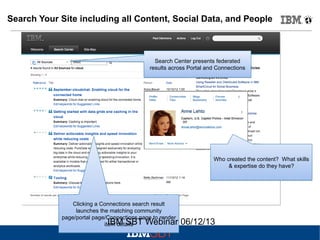
Search Your Site including all Content, Social Data, and People

Search Center presents federated
results across Portal and Connections

Who created the content? What skills
& expertise do they have?

Clicking a Connections search result
launches the matching community
page/portal page/Connections page to render
IBM SBT Webinar
item details

06/12/13
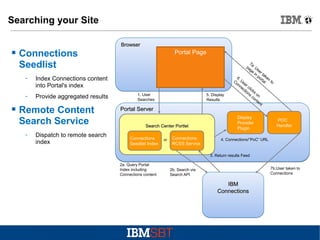
Searching your Site



Connections
Seedlist
­



Provide aggregated results

Portal Page

Index Connections content
into Portal's index

­

Browser

Remote Content
Search Service
­

Dispatch to remote search
index

1. User
Searches

5. Display
Results

Portal Server
Search Center Portlet
Connections
Seedlist Index

or

Connections
RCSS Service

7a
pa . U
ge se
in r ta
po ke
6.
rta n t
Co Us
o
l
er
nn
ec clic
tio ks
ns o
co n
nt
en
t

Display
Provider
Plugin

POC
Handler

4. Connections/”PoC” URL

3. Return results Feed
2a. Query Portal
Index including
Connections content

7b.User taken to
Connections

2b. Search via
Search API

IBM
Connections
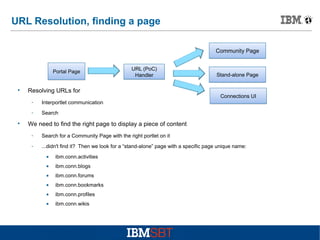
URL Resolution, finding a page
Community Page

Portal Page



Resolving URLs for
­

Stand-alone Page

Connections UI

Interportlet communication

­


URL (PoC)
Handler

Search

We need to find the right page to display a piece of content
­

Search for a Community Page with the right portlet on it

­

...didn't find it? Then we look for a “stand-alone” page with a specific page unique name:
•

ibm.conn.activities

•

ibm.conn.blogs

•

ibm.conn.forums

•

ibm.conn.bookmarks

•

ibm.conn.profiles

•

ibm.conn.wikis
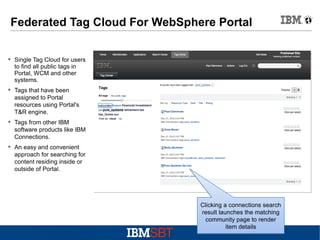
Federated Tag Cloud For WebSphere Portal
 Single Tag Cloud for users
to find all public tags in
Portal, WCM and other
systems.
 Tags that have been
assigned to Portal
resources using Portal's
T&R engine.
 Tags from other IBM
software products like IBM
Connections.
 An easy and convenient
approach for searching for
content residing inside or
outside of Portal.

Clicking a connections search
result launches the matching
community page to render
item details
Agenda



Background: Social Web Experiences



Integration options



Deployment patterns



Developing custom solutions



Summary
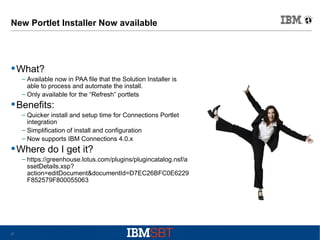
New Portlet Installer Now available

 What?
– Available now in PAA file that the Solution Installer is
able to process and automate the install.
– Only available for the “Refresh” portlets

 Benefits:
– Quicker install and setup time for Connections Portlet
integration
– Simplification of install and configuration
– Now supports IBM Connections 4.0.x

 Where do I get it?
– https://greenhouse.lotus.com/plugins/plugincatalog.nsf/a
ssetDetails.xsp?
action=editDocument&documentId=D7EC26BFC0E6229
F852579F800055063

27
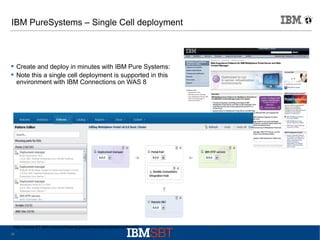
IBM PureSystems – Single Cell deployment

 Create and deploy in minutes with IBM Pure Systems:
 Note this a single cell deployment is supported in this
environment with IBM Connections on WAS 8

http://www-01.ibm.com/software/genservers/portal/server/hved/
28
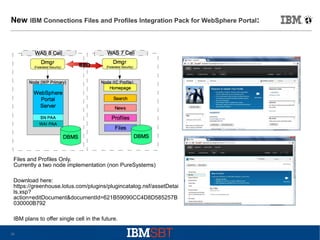
New

IBM Connections Files and Profiles Integration Pack for WebSphere Portal:

Files and Profiles Only.
Currently a two node implementation (non PureSystems)
Download here:
https://greenhouse.lotus.com/plugins/plugincatalog.nsf/assetDetai
ls.xsp?
action=editDocument&documentId=621B59090CC4D8D585257B
030000B792
IBM plans to offer single cell in the future.
29
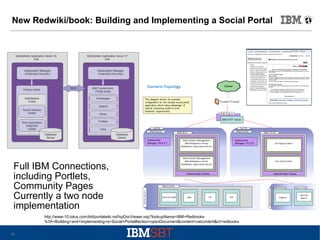
New Redwiki/book: Building and Implementing a Social Portal

Full IBM Connections,
including Portlets,
Community Pages
Currently a two node
implementation
http://www-10.lotus.com/ldd/portalwiki.nsf/xpDocViewer.xsp?lookupName=IBM+Redbooks
%3A+Building+and+Implementing+a+Social+Portal#action=openDocument&content=catcontent&ct=redbooks
30
Social Redbook Update Residency – Looking for your participationin
our redwiki team…

Check it out here
http://bit.ly/socialwikiresidency
●

31
Agenda



Background: Social Web Experiences



Integration options



Deployment patterns



Developing custom solutions



Summary
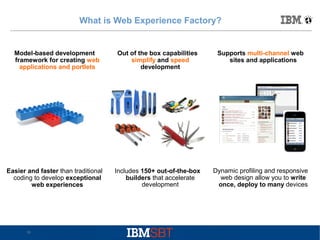
What is Web Experience Factory?

Model-based development
framework for creating web
applications and portlets

Easier and faster than traditional
coding to develop exceptional
web experiences

33

Out of the box capabilities
simplify and speed
development

Supports multi-channel web
sites and applications

Includes 150+ out-of-the-box
builders that accelerate
development

Dynamic profiling and responsive
web design allow you to write
once, deploy to many devices
Building portlets that access Connections

●

●

Connections provides a complete set of REST services for programmatic
access to functions
You can use the REST Service Call builder in Web Experience Factory
(WEF) to access any of these services
View, create, update, delete, search, add comments, etc.
●

●

The full range of WEF tools can then be used in your custom portlets:
●
●

●
●

Create mobile/multi-channel applications
Use any of the latest Responsive Web Design (RWD) tools from the WEF MultiChannel Feature Pack
Integrate with any other data source or back end in the same portlet
Use WEF with IBM Worklight to build an installed app with native device features
such as camera

© 2010 IBM Corporation
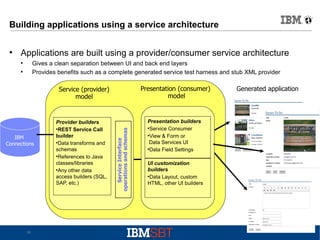
Building applications using a service architecture
●

Applications are built using a provider/consumer service architecture
Gives a clean separation between UI and back end layers
Provides benefits such as a complete generated service test harness and stub XML provider

●
●

Presentation (consumer)
model

IBM
Connections

35

Provider builders

REST Service Call
builder

Data transforms and
schemas

References to Java
classes/libraries

Any other data
access builders (SQL,
SAP, etc.)

Service Interface
operations and schemas

Service (provider)
model

Presentation builders

Service Consumer

View & Form or
Data Services UI

Data Field Settings
UI customization
builders

Data Layout, custom
HTML, other UI builders

Generated application
Examples of Connections custom portlets

●

Blogs viewing and commenting

●

Activity “To Do” entries integrated with DB-based application

●

Posting and retrieving Status Updates

●

Files access – view, edit, upload

© 2010 IBM Corporation
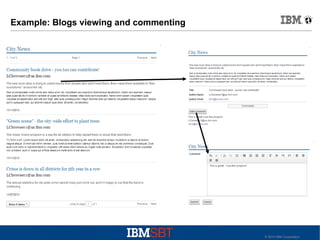
Example: Blogs viewing and commenting

© 2010 IBM Corporation
Using a Restructure Handler

●

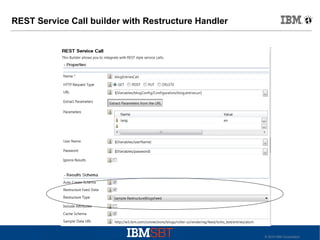
With the REST Service Call builder, you can use a “Restructure Handler”
to make the data more suitable for use in building the UI

●

Often this is used to flatten the data

●

Some of the published samples use this technique

●

●

●

A Java class takes the original XML data from the REST call and puts it
into the desired structure
This XML restructuring method is used both for:
●
Generating a schema
●
Transforming the data at runtime
You can have different handlers for different data sources (and not just
for Connections services)

© 2010 IBM Corporation
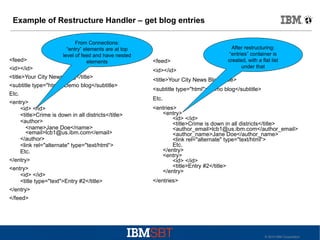
Example of Restructure Handler – get blog entries
From Connections:
“entry” elements are at top
level of feed and have nested
elements

<feed>
<id></id>
<title>Your City News Blog</title>
<subtitle type="html">Demo blog</subtitle>
Etc.
<entry>
<id> </id>
<title>Crime is down in all districts</title>
<author>
<name>Jane Doe</name>
<email>lcb1@us.ibm.com</email>
</author>
<link rel="alternate" type="text/html“>
Etc.
</entry>
<entry>
<id> </id>
<title type="text">Entry #2</title>
</entry>
</feed>

<feed>
<id></id>

After restructuring:
“entries” container is
created, with a flat list
under that

<title>Your City News Blog</title>
<subtitle type="html">Demo blog</subtitle>
Etc.
<entries>
<entry>
<id> </id>
<title>Crime is down in all districts</title>
<author_email>lcb1@us.ibm.com</author_email>
<author_name>Jane Doe</author_name>
<link rel="alternate" type="text/html“>
Etc.
</entry>
<entry>
<id> </id>
<title>Entry #2</title>
</entry>
</entries>

© 2010 IBM Corporation
REST Service Call builder with Restructure Handler

© 2010 IBM Corporation
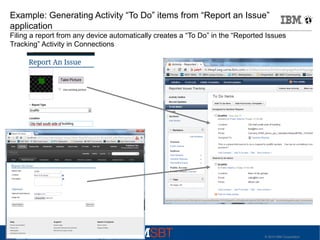
Example: Generating Activity “To Do” items from “Report an Issue”
application
Filing a report from any device automatically creates a “To Do” in the “Reported Issues
Tracking” Activity in Connections

© 2010 IBM Corporation
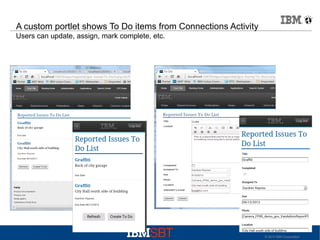
A custom portlet shows To Do items from Connections Activity
Users can update, assign, mark complete, etc.

© 2010 IBM Corporation
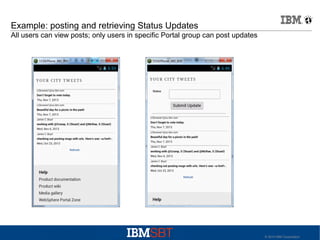
Example: posting and retrieving Status Updates
All users can view posts; only users in specific Portal group can post updates

© 2010 IBM Corporation
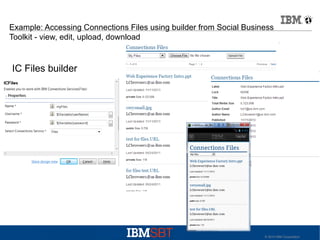
Example: Accessing Connections Files using builder from Social Business
Toolkit - view, edit, upload, download

IC Files builder

© 2010 IBM Corporation
Demo

© 2010 IBM Corporation
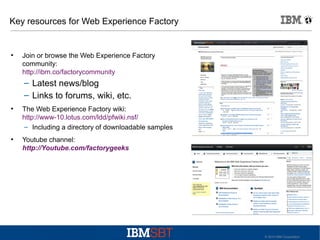
Key resources for Web Experience Factory

●

Join or browse the Web Experience Factory
community:
http://ibm.co/factorycommunity

– Latest news/blog
– Links to forums, wiki, etc.
●

●

The Web Experience Factory wiki:
http://www-10.lotus.com/ldd/pfwiki.nsf/
– Including a directory of downloadable samples
Youtube channel:
http://Youtube.com/factorygeeks

© 2010 IBM Corporation
Agenda


Background: Social Web Experiences



Integration options



Deployment patterns



Developing custom solutions



Summary
Summary
●

●

●

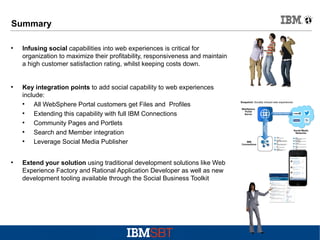
Infusing social capabilities into web experiences is critical for
organization to maximize their profitability, responsiveness and maintain
a high customer satisfaction rating, whilst keeping costs down.

Key integration points to add social capability to web experiences
include:
●
All WebSphere Portal customers get Files and Profiles
●
Extending this capability with full IBM Connections
●
Community Pages and Portlets
●
Search and Member integration
●
Leverage Social Media Publisher
Extend your solution using traditional development solutions like Web
Experience Factory and Rational Application Developer as well as new
development tooling available through the Social Business Toolkit
Additional Info
●

http://www.ibm.com/social-business

●

http://www-01.ibm.com/software/info/customerexperience/

●

http://www01.ibm.com/software/collaboration/products/intranetexperience/

●

http://www.ibm.com/software/websphere/portal/industry/

●

www.ibm.com/social-business/

●

Ibm.co/factorycommunity

●

http://www.ibm.com/cloud-computing/social/us/en/toolkit/

49
Backup

50
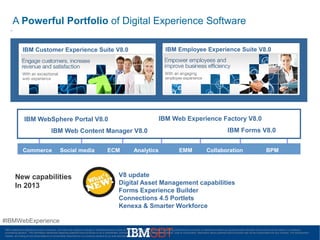
A Powerful Portfolio of Digital Experience Software
IBM Employee Experience Suite V8.0

IBM Customer Experience Suite V8.0

IBM Web Experience Factory V8.0

IBM WebSphere Portal V8.0

IBM Forms V8.0

IBM Web Content Manager V8.0
Commerce

Social media

New capabilities
In 2013

ECM

Analytics

EMM

Collaboration

BPM

V8 update
Digital Asset Management capabilities
Forms Experience Builder
Connections 4.5 Portlets
Kenexa & Smarter Workforce

#IBMWebExperience
IBM’s statements regarding its plans, directions, and intent are subject to change or withdrawal without notice at IBM’s sole discretion. Information regarding potential future products is intended to outline our general product direction and it should not be relied on in making a
purchasing decision. The information mentioned regarding potential future products is not a commitment, promise, or legal obligation to deliver any material, code or functionality. Information about potential future products may not be incorporated into any contract. The development,
release, and timing of any future features or functionality described for our products remains at our sole discretion.
Disclaimers
IBM’s statements regarding its plans, directions, and intent are subject to change or
withdrawal without notice at IBM’s sole discretion.
Information regarding potential future products is intended to outline our general product
direction and it should not be relied on in making a purchasing decision.
The information mentioned regarding potential future products is not a commitment,
promise, or legal obligation to deliver any material, code or functionality. Information about
potential future products may not be incorporated into any contract. The development,
release, and timing of any future features or functionality described for our products remains
at our sole discretion.
Performance is based on measurements and projections using standard IBM benchmarks in
a controlled environment. The actual throughput or performance that any user will
experience will vary depending upon many factors, including considerations such as the
amount of multiprogramming in the user’s job stream, the I/O configuration, the storage
configuration, and the workload processed. Therefore, no assurance can be given that an
individual user will achieve results similar to those stated here.

52

© 2013 IBM Corporation
Resources and Questions
●
●
●
●
●
●
●

53

Home page: http://ibmdw.net/social
SDK: http://ibmsbt.openntf.org
GitHub: https://github.com/OpenNTF/SocialSDK
StackOverflow: #ibmsbt
Twitter: @ibmsbt
YouTube: http://youtube.com/ibmsbt
Playground: http://bit.ly/sbtplayground

© 2013 IBM Corporation
Acknowledgements and Disclaimers
Availability: References in this presentation to IBM products, programs, or services do not imply that they will be available in all
countries in which IBM operates.
The workshops, sessions and materials have been prepared by IBM or the session speakers and reflect their own views. They are
provided for informational purposes only, and are neither intended to, nor shall have the effect of being, legal or other guidance or
advice to any participant. While efforts were made to verify the completeness and accuracy of the information contained in this
presentation, it is provided AS-IS without warranty of any kind, express or implied. IBM shall not be responsible for any damages arising
out of the use of, or otherwise related to, this presentation or any other materials. Nothing contained in this presentation is intended to,
nor shall have the effect of, creating any warranties or representations from IBM or its suppliers or licensors, or altering the terms and
conditions of the applicable license agreement governing the use of IBM software.
All customer examples described are presented as illustrations of how those customers have used IBM products and the results they
may have achieved. Actual environmental costs and performance characteristics may vary by customer. Nothing contained in these
materials is intended to, nor shall have the effect of, stating or implying that any activities undertaken by you will result in any specific
sales, revenue growth or other results.

© Copyright IBM Corporation 2013. All rights reserved.
– U.S. Government Users Restricted Rights - Use, duplication or disclosure restricted by GSA ADP Schedule Contract with
IBM Corp.
IBM, the IBM logo, ibm.com, Rational, the Rational logo, Telelogic, the Telelogic logo, Green Hat, the Green Hat logo, and other IBM
products and services are trademarks or registered trademarks of International Business Machines Corporation in the United States,
other countries, or both. If these and other IBM trademarked terms are marked on their first occurrence in this information with a
trademark symbol (® or ™), these symbols indicate U.S. registered or common law trademarks owned by IBM at the time this information
was published. Such trademarks may also be registered or common law trademarks in other countries. A current list of IBM trademarks is
available on the Web at “Copyright and trademark information” at www.ibm.com/legal/copytrade.shtml
Other company, product, or service names may be trademarks or service marks of others.

54

© 2013 IBM Corporation

Technology to deliver Exceptional Social Digital Experiences

  • 1.
    IBM Social DigitalExperiences Nov 2013 Adam Ginsburg, Product Manager @aginsburg Jonathan Booth, Senior Architect, Digital Experience Tooling IBM SBT Webinar 13 Nov 2013 © 2013
  • 2.
    Agenda  Background: Social DigitalExperiences  Integration options  Deployment patterns  Developing custom solutions  Summary
  • 3.
    5 Ways SocialMedia Takes Customer Relationships To The Next Level (Forbes*): ● ● ● ● ● 1. Make it easy for people to share their story - find a way to let people feel good and share their story about how your brand makes a difference in their lives. 2. Leverage the social in social media. Social media serves as a tool for those who may not have an outlet or support system to find one another. 3. Make it about the customer, not about the product. When you help your customer via social media, you’re more likely to build a long-lasting relationship — which will in turn propel your brand awareness and growth. 4. Take every opportunity to gain feedback. Lays (Potato Chips) teamed up with Facebook to change the Like button to an “I’d eat that” button. Crowdsourcing isn’t just a marketing tactic, it’s an extremely easy and effective means of soliciting feedback about your product or service. 5. Break through barriers: If a heavily regulated medical company can break down barriers and use social media to connect with customers on an incredibly human level, then so can any business. * Ref: http://www.forbes.com/sites/theyec/2012/12/24/5-ways-social-media-takescustomer-relationships-to-the-next-level-2
  • 4.
    Key benefits ofinfusing social into your digital experience: 4
  • 5.
    Agenda  Background: Social WebExperiences  Integration options  Deployment patterns  Developing custom solutions  Summary
  • 6.
    Snapshot: Socially infuseddigital experiences WebSphere Portal Server Social services: twitter, facebook, linkedin and IBM Connections Social Media Networks IBM Connections
  • 7.
    Social Digital Experience InfuseIBM Connections social content within the context of personalized content and applications; providing social where and when it can most influence communication and productivity Social Digital Ex perience Community Pages or Ad-hoc portlets provide seamless experience for end users blending web content, applications/transactions and social capabilities in a unified interface Out of the Box Portlets Summary Portlets: New WCM Social Rendering Details Portlets: WEF Details NEW IBM Connections Providing core social engine supplying social content and capabilities including Files, Profiles, Blogs, Wikis, Forums, Activities, Bookmarks New: Connections Content Manager (CCM), Activity Stream & Ideation Blog support IBM Web Experiences - © 2012 IBM Corporation
  • 8.
    Get Social DoBusiness: using Community Pages & portlets Digital Experience Social Digital Experience Social Profiles Find the people you need Communities Work with people who share common roles and expertise ar umm gs rin nde l re & ocia l ts o ande M s Blogs your own ideas,rt learn p Present WC ails fromDet others y Bookmarks Save, share, and discover bookmarks + Activities Organize your work and tap your professional network Forums Exchange ideas with, and benefit from the expertise of others Community Pages is Supported with IBM Connections 3 and Portal 7. Enhanced with Portal 8 =
  • 9.
    NEW: Connection ContentManager (CCM) Portlet: New Connections Content Manager Portlet Existing Files summary portlet provided by WCM social rendering ● ● Previously only supported read-only, via WCM social rendering. Now full function (incl add, update, delete) portlet for Community Files
  • 10.
    Community Pages Example– “Downtown Carnival” (Edit Mode) Portal Page Is associated with Connections Community “Downtown Carnival” WCM social rendering portlets (or detailed portlets) dynamically render Connections for Discussions/Forums and Files for the page's community “Downtown Carnival”
  • 11.
    Community Pages Example– “Downtown Carnival” (View Mode) Discussions for the “Downtown Carnival” Connections community Activity stream for the “Downtown Carnival” Connections community Files for the “Downtown Carnival” Connections community
  • 12.
    Interaction with socialobjects by means of Connections Integration Portlets Blogs Summary/Detail Activities Connections portlets for each for the services Wikis, Blogs, Forums, Activities etc... Member/Profiles Summary/Detail Forums Summary/Detail Community Overview Wikis Portlets get launched dynamically on the right community page New Activity Stream Portlet. Allows users to see activity across the range of Connections services Activities, Blogs Wikis, Forums https://greenhouse.lotus.com/plugins/plugincatalog.nsf/assetDetails.xsp?action=editDocument&documentId=B72C4E177060582285257B3A0053BB6F Files etc..
  • 13.
    Activity Stream portlet ActivityStream Portlet with embedded experiences, post status updates
  • 14.
    EXAMPLE: Community TakeAction WEF Report and Issue/Multichannel Multichannel app works in browser, mobile browser and Worklight. Community Page WCM social rendering for Events, Blogs and Forums Need to check if Worklight is setup on Showcase server Activity stream portlet to get summary of what's happening the the Community Take Action – Connections Community Community members ising WCM Social rendering – context sensitive to Community Page
  • 15.
    Social Digital Experiences NewWCM social rendering portlets option to keep user within portal or direct to IBM Connections native UI (Config Option): Direct users to native FULL IBM Connections User interface (Config Option) Portal managed user interface with WEF based details portlet showing blog article with option to edit IBM Web Experiences - © 2012 IBM Corporation
  • 16.
    New WCM socialrendering improves IBM Connections integration What is it? Uses IBM WCM to query and render IBM Connections Content Improved flex ibility, ease of use and ease of development for delivering ex ceptional web ex periences: • Now supports rendering IBM Connections Files • Out of the box samples support Multi- channel capabilities • Easy to customize queries, including ability to mix IC services like blogs, wikis, files and bookmarks • Easy to customize look and feel – with limited IBM WCM skills you can easily change markup and customize and extend the WCM social rendering capability. • Basic/Common Customization does not require deep development skills eg WEF or RAD – Aligns with other portal initiatives to leverage Recommendation: WCM social rendering portlets replace existing IBM Connections Sum mary Portlets. Summary Portlets are used in conjunction with existing IBM Connections Details portlets or native IBM Connections UI. IBM Web Experiences - © 2012 IBM Corporation
  • 17.
    New WCM socialrendering portlets support Responsive Web Design (RWD) Tablet Desktop Browser Smartphone Out of the box support for Desktop, Tablet and Smartphone form factors IBM Web Experiences - © 2012 IBM Corporation
  • 18.
    Out of thebox: Integrated IBM Connections Files and Profiles  IBM WebSphere Portal Server V8 Hypervisor now includes: – pre-configured IBM Connections Files and Profiles – pre-configured with Web App Integrator (WAI) to allow the IBM Connections implementation to look and feel like the WebSphere Portal driven Web experience (sample page with Profiles portlet configured OOB) – New Whitepaper that will cover how to do this in a non-PureSystems implementation on Separate Cells: – New RedWiki “Building and Implementing an Exceptional Social Portal”  Key benefit s: – Reduces the time it can take for configuration and deployment from 1-3 weeks to only 30 minutes, accelerating availability of new web experience solutions for lower cost – Reduces configuration and deployment errors allowing your team to focus on value add solutions Portal navigation/Look ’n feel injected into IBM Connections UI Announce info http://www-01.ibm.com/common/ssi/cgi-bin/ssialias? infotype=AN&subtype=CA&htmlfid=897/ENUS212-421&appname=USN IBM Web Experiences - © 2012 IBM Corporation
  • 19.
    Social Media Publisher ElevatingBrand & Increasing Awareness with Social Media Integration Social services: twitter, facebook, linkedin and IBM Connections l l l l l l Craft Your Message Once, Reuse Across your social channels Enables social media marketing for increasing messaging impact by harnessing word of mouth m arketing Makes m ulti- channel messaging fast, simple and easy Provides seamless integration with Twitter, Facebook, LinkedIn and IBM Connections Delivers insight into social marketing message effectiveness with social analytics Enables customization for refining m essage appearance in wall posts, page and profile posts, tweets, network updates and many more! Deliver, Manage and Measure the Message – Anywhere, Anytime IBM Web Experiences - © 2012 IBM Corporation
  • 20.
    WCM Social MediaPublisher - Analytics Includes basic statistics about the promoted content The solution supports both manual and automatic (via workflow) posting/promoting of content and can manage the full lifecycle of the social message https://greenhouse.lotus.com/plugins/plugincatalog.nsf/assetDetails.xsp?action=editDocument&documentId=9767ECFB9AE1713885257A8B0080D5D2 ) 20
  • 21.
    Displaying Pages basedon Community Membership Communities VMM adapter represents community members as groups to Portal WebSphere Portal User Provisioning Portlets / Tools Community Page Portal access control reference Virtual group Communities VMM adapter LDAP VMM adapter locates, creates, modifies members automatically derived from community membership Ted members list references Community Samantha LDAP IBM Connections
  • 22.
    Search Your Siteincluding all Content, Social Data, and People Search Center presents federated results across Portal and Connections Who created the content? What skills & expertise do they have? Clicking a Connections search result launches the matching community page/portal page/Connections page to render IBM SBT Webinar item details 06/12/13
  • 23.
    Searching your Site  Connections Seedlist ­  Provideaggregated results Portal Page Index Connections content into Portal's index ­ Browser Remote Content Search Service ­ Dispatch to remote search index 1. User Searches 5. Display Results Portal Server Search Center Portlet Connections Seedlist Index or Connections RCSS Service 7a pa . U ge se in r ta po ke 6. rta n t Co Us o l er nn ec clic tio ks ns o co n nt en t Display Provider Plugin POC Handler 4. Connections/”PoC” URL 3. Return results Feed 2a. Query Portal Index including Connections content 7b.User taken to Connections 2b. Search via Search API IBM Connections
  • 24.
    URL Resolution, findinga page Community Page Portal Page  Resolving URLs for ­ Stand-alone Page Connections UI Interportlet communication ­  URL (PoC) Handler Search We need to find the right page to display a piece of content ­ Search for a Community Page with the right portlet on it ­ ...didn't find it? Then we look for a “stand-alone” page with a specific page unique name: • ibm.conn.activities • ibm.conn.blogs • ibm.conn.forums • ibm.conn.bookmarks • ibm.conn.profiles • ibm.conn.wikis
  • 25.
    Federated Tag CloudFor WebSphere Portal  Single Tag Cloud for users to find all public tags in Portal, WCM and other systems.  Tags that have been assigned to Portal resources using Portal's T&R engine.  Tags from other IBM software products like IBM Connections.  An easy and convenient approach for searching for content residing inside or outside of Portal. Clicking a connections search result launches the matching community page to render item details
  • 26.
    Agenda  Background: Social WebExperiences  Integration options  Deployment patterns  Developing custom solutions  Summary
  • 27.
    New Portlet InstallerNow available  What? – Available now in PAA file that the Solution Installer is able to process and automate the install. – Only available for the “Refresh” portlets  Benefits: – Quicker install and setup time for Connections Portlet integration – Simplification of install and configuration – Now supports IBM Connections 4.0.x  Where do I get it? – https://greenhouse.lotus.com/plugins/plugincatalog.nsf/a ssetDetails.xsp? action=editDocument&documentId=D7EC26BFC0E6229 F852579F800055063 27
  • 28.
    IBM PureSystems –Single Cell deployment  Create and deploy in minutes with IBM Pure Systems:  Note this a single cell deployment is supported in this environment with IBM Connections on WAS 8 http://www-01.ibm.com/software/genservers/portal/server/hved/ 28
  • 29.
    New IBM Connections Filesand Profiles Integration Pack for WebSphere Portal: Files and Profiles Only. Currently a two node implementation (non PureSystems) Download here: https://greenhouse.lotus.com/plugins/plugincatalog.nsf/assetDetai ls.xsp? action=editDocument&documentId=621B59090CC4D8D585257B 030000B792 IBM plans to offer single cell in the future. 29
  • 30.
    New Redwiki/book: Buildingand Implementing a Social Portal Full IBM Connections, including Portlets, Community Pages Currently a two node implementation http://www-10.lotus.com/ldd/portalwiki.nsf/xpDocViewer.xsp?lookupName=IBM+Redbooks %3A+Building+and+Implementing+a+Social+Portal#action=openDocument&content=catcontent&ct=redbooks 30
  • 31.
    Social Redbook UpdateResidency – Looking for your participationin our redwiki team… Check it out here http://bit.ly/socialwikiresidency ● 31
  • 32.
    Agenda  Background: Social WebExperiences  Integration options  Deployment patterns  Developing custom solutions  Summary
  • 33.
    What is WebExperience Factory? Model-based development framework for creating web applications and portlets Easier and faster than traditional coding to develop exceptional web experiences 33 Out of the box capabilities simplify and speed development Supports multi-channel web sites and applications Includes 150+ out-of-the-box builders that accelerate development Dynamic profiling and responsive web design allow you to write once, deploy to many devices
  • 34.
    Building portlets thataccess Connections ● ● Connections provides a complete set of REST services for programmatic access to functions You can use the REST Service Call builder in Web Experience Factory (WEF) to access any of these services View, create, update, delete, search, add comments, etc. ● ● The full range of WEF tools can then be used in your custom portlets: ● ● ● ● Create mobile/multi-channel applications Use any of the latest Responsive Web Design (RWD) tools from the WEF MultiChannel Feature Pack Integrate with any other data source or back end in the same portlet Use WEF with IBM Worklight to build an installed app with native device features such as camera © 2010 IBM Corporation
  • 35.
    Building applications usinga service architecture ● Applications are built using a provider/consumer service architecture Gives a clean separation between UI and back end layers Provides benefits such as a complete generated service test harness and stub XML provider ● ● Presentation (consumer) model IBM Connections 35 Provider builders  REST Service Call builder  Data transforms and schemas  References to Java classes/libraries  Any other data access builders (SQL, SAP, etc.) Service Interface operations and schemas Service (provider) model Presentation builders  Service Consumer  View & Form or Data Services UI  Data Field Settings UI customization builders  Data Layout, custom HTML, other UI builders Generated application
  • 36.
    Examples of Connectionscustom portlets ● Blogs viewing and commenting ● Activity “To Do” entries integrated with DB-based application ● Posting and retrieving Status Updates ● Files access – view, edit, upload © 2010 IBM Corporation
  • 37.
    Example: Blogs viewingand commenting © 2010 IBM Corporation
  • 38.
    Using a RestructureHandler ● With the REST Service Call builder, you can use a “Restructure Handler” to make the data more suitable for use in building the UI ● Often this is used to flatten the data ● Some of the published samples use this technique ● ● ● A Java class takes the original XML data from the REST call and puts it into the desired structure This XML restructuring method is used both for: ● Generating a schema ● Transforming the data at runtime You can have different handlers for different data sources (and not just for Connections services) © 2010 IBM Corporation
  • 39.
    Example of RestructureHandler – get blog entries From Connections: “entry” elements are at top level of feed and have nested elements <feed> <id></id> <title>Your City News Blog</title> <subtitle type="html">Demo blog</subtitle> Etc. <entry> <id> </id> <title>Crime is down in all districts</title> <author> <name>Jane Doe</name> <email>lcb1@us.ibm.com</email> </author> <link rel="alternate" type="text/html“> Etc. </entry> <entry> <id> </id> <title type="text">Entry #2</title> </entry> </feed> <feed> <id></id> After restructuring: “entries” container is created, with a flat list under that <title>Your City News Blog</title> <subtitle type="html">Demo blog</subtitle> Etc. <entries> <entry> <id> </id> <title>Crime is down in all districts</title> <author_email>lcb1@us.ibm.com</author_email> <author_name>Jane Doe</author_name> <link rel="alternate" type="text/html“> Etc. </entry> <entry> <id> </id> <title>Entry #2</title> </entry> </entries> © 2010 IBM Corporation
  • 40.
    REST Service Callbuilder with Restructure Handler © 2010 IBM Corporation
  • 41.
    Example: Generating Activity“To Do” items from “Report an Issue” application Filing a report from any device automatically creates a “To Do” in the “Reported Issues Tracking” Activity in Connections © 2010 IBM Corporation
  • 42.
    A custom portletshows To Do items from Connections Activity Users can update, assign, mark complete, etc. © 2010 IBM Corporation
  • 43.
    Example: posting andretrieving Status Updates All users can view posts; only users in specific Portal group can post updates © 2010 IBM Corporation
  • 44.
    Example: Accessing ConnectionsFiles using builder from Social Business Toolkit - view, edit, upload, download IC Files builder © 2010 IBM Corporation
  • 45.
    Demo © 2010 IBMCorporation
  • 46.
    Key resources forWeb Experience Factory ● Join or browse the Web Experience Factory community: http://ibm.co/factorycommunity – Latest news/blog – Links to forums, wiki, etc. ● ● The Web Experience Factory wiki: http://www-10.lotus.com/ldd/pfwiki.nsf/ – Including a directory of downloadable samples Youtube channel: http://Youtube.com/factorygeeks © 2010 IBM Corporation
  • 47.
    Agenda  Background: Social WebExperiences  Integration options  Deployment patterns  Developing custom solutions  Summary
  • 48.
    Summary ● ● ● Infusing social capabilitiesinto web experiences is critical for organization to maximize their profitability, responsiveness and maintain a high customer satisfaction rating, whilst keeping costs down. Key integration points to add social capability to web experiences include: ● All WebSphere Portal customers get Files and Profiles ● Extending this capability with full IBM Connections ● Community Pages and Portlets ● Search and Member integration ● Leverage Social Media Publisher Extend your solution using traditional development solutions like Web Experience Factory and Rational Application Developer as well as new development tooling available through the Social Business Toolkit
  • 49.
  • 50.
  • 51.
    A Powerful Portfolioof Digital Experience Software IBM Employee Experience Suite V8.0 IBM Customer Experience Suite V8.0 IBM Web Experience Factory V8.0 IBM WebSphere Portal V8.0 IBM Forms V8.0 IBM Web Content Manager V8.0 Commerce Social media New capabilities In 2013 ECM Analytics EMM Collaboration BPM V8 update Digital Asset Management capabilities Forms Experience Builder Connections 4.5 Portlets Kenexa & Smarter Workforce #IBMWebExperience IBM’s statements regarding its plans, directions, and intent are subject to change or withdrawal without notice at IBM’s sole discretion. Information regarding potential future products is intended to outline our general product direction and it should not be relied on in making a purchasing decision. The information mentioned regarding potential future products is not a commitment, promise, or legal obligation to deliver any material, code or functionality. Information about potential future products may not be incorporated into any contract. The development, release, and timing of any future features or functionality described for our products remains at our sole discretion.
  • 52.
    Disclaimers IBM’s statements regardingits plans, directions, and intent are subject to change or withdrawal without notice at IBM’s sole discretion. Information regarding potential future products is intended to outline our general product direction and it should not be relied on in making a purchasing decision. The information mentioned regarding potential future products is not a commitment, promise, or legal obligation to deliver any material, code or functionality. Information about potential future products may not be incorporated into any contract. The development, release, and timing of any future features or functionality described for our products remains at our sole discretion. Performance is based on measurements and projections using standard IBM benchmarks in a controlled environment. The actual throughput or performance that any user will experience will vary depending upon many factors, including considerations such as the amount of multiprogramming in the user’s job stream, the I/O configuration, the storage configuration, and the workload processed. Therefore, no assurance can be given that an individual user will achieve results similar to those stated here. 52 © 2013 IBM Corporation
  • 53.
    Resources and Questions ● ● ● ● ● ● ● 53 Homepage: http://ibmdw.net/social SDK: http://ibmsbt.openntf.org GitHub: https://github.com/OpenNTF/SocialSDK StackOverflow: #ibmsbt Twitter: @ibmsbt YouTube: http://youtube.com/ibmsbt Playground: http://bit.ly/sbtplayground © 2013 IBM Corporation
  • 54.
    Acknowledgements and Disclaimers Availability:References in this presentation to IBM products, programs, or services do not imply that they will be available in all countries in which IBM operates. The workshops, sessions and materials have been prepared by IBM or the session speakers and reflect their own views. They are provided for informational purposes only, and are neither intended to, nor shall have the effect of being, legal or other guidance or advice to any participant. While efforts were made to verify the completeness and accuracy of the information contained in this presentation, it is provided AS-IS without warranty of any kind, express or implied. IBM shall not be responsible for any damages arising out of the use of, or otherwise related to, this presentation or any other materials. Nothing contained in this presentation is intended to, nor shall have the effect of, creating any warranties or representations from IBM or its suppliers or licensors, or altering the terms and conditions of the applicable license agreement governing the use of IBM software. All customer examples described are presented as illustrations of how those customers have used IBM products and the results they may have achieved. Actual environmental costs and performance characteristics may vary by customer. Nothing contained in these materials is intended to, nor shall have the effect of, stating or implying that any activities undertaken by you will result in any specific sales, revenue growth or other results. © Copyright IBM Corporation 2013. All rights reserved. – U.S. Government Users Restricted Rights - Use, duplication or disclosure restricted by GSA ADP Schedule Contract with IBM Corp. IBM, the IBM logo, ibm.com, Rational, the Rational logo, Telelogic, the Telelogic logo, Green Hat, the Green Hat logo, and other IBM products and services are trademarks or registered trademarks of International Business Machines Corporation in the United States, other countries, or both. If these and other IBM trademarked terms are marked on their first occurrence in this information with a trademark symbol (® or ™), these symbols indicate U.S. registered or common law trademarks owned by IBM at the time this information was published. Such trademarks may also be registered or common law trademarks in other countries. A current list of IBM trademarks is available on the Web at “Copyright and trademark information” at www.ibm.com/legal/copytrade.shtml Other company, product, or service names may be trademarks or service marks of others. 54 © 2013 IBM Corporation