How To Add Your Own OpenSocial Gadgets To IBM
Connections
Ryan Baxter, Software Engineer, IBM
IBM SBT Webinar 09/11/13
© 2013 IBM Corporation2
Disclaimers
IBM’s statements regarding its plans, directions, and intent are subject to change or
withdrawal without notice at IBM’s sole discretion.
Information regarding potential future products is intended to outline our general product
direction and it should not be relied on in making a purchasing decision.
The information mentioned regarding potential future products is not a commitment,
promise, or legal obligation to deliver any material, code or functionality. Information about
potential future products may not be incorporated into any contract. The development,
release, and timing of any future features or functionality described for our products remains
at our sole discretion.
Performance is based on measurements and projections using standard IBM benchmarks in
a controlled environment. The actual throughput or performance that any user will
experience will vary depending upon many factors, including considerations such as the
amount of multiprogramming in the user’s job stream, the I/O configuration, the storage
configuration, and the workload processed. Therefore, no assurance can be given that an
individual user will achieve results similar to those stated here.
© 2013 IBM Corporation3
OpenSocial Gadgets
● Use them to integrate into IBM Connections
● HTML, JavaScript, and CSS wrapped in XML
● Use the same technologies and libraries you are already familiar with
in gadgets
● Dojo, JQuery, Bootstrap, etc
● Make API requests using gadgets.io.makeRequest
● Requests go through a proxy on the Connections server
● Use makeRequest as oppsed to other XHR libraries
● Support for APIs protected by OAuth 2.0
● Gadget features provide gadget APIs for you to use in your application
© 2013 IBM Corporation4
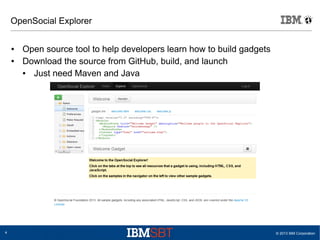
OpenSocial Explorer
● Open source tool to help developers learn how to build gadgets
● Download the source from GitHub, build, and launch
● Just need Maven and Java
© 2013 IBM Corporation5
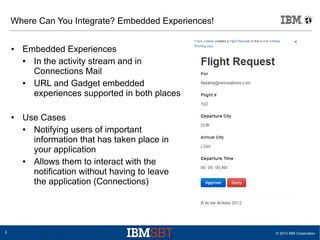
Where Can You Integrate? Embedded Experiences!
● Embedded Experiences
● In the activity stream and in
Connections Mail
● URL and Gadget embedded
experiences supported in both places
● Use Cases
● Notifying users of important
information that has taken place in
your application
● Allows them to interact with the
notification without having to leave
the application (Connections)
© 2013 IBM Corporation6
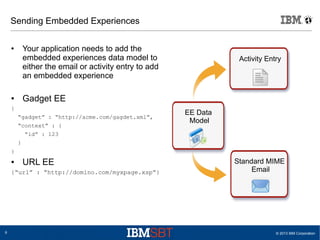
Sending Embedded Experiences
● Your application needs to add the
embedded experiences data model to
either the email or activity entry to add
an embedded experience
● Gadget EE
{
“gadget” : “http://acme.com/gagdet.xml”,
“context” : {
“id” : 123
}
}
● URL EE
{“url” : “http://domino.com/myxpage.xsp”}
Standard MIME
Email
Activity Entry
EE Data
Model
© 2013 IBM Corporation7
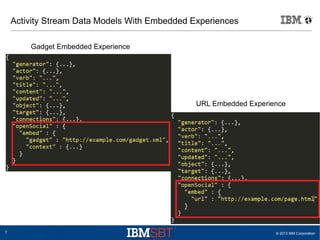
Activity Stream Data Models With Embedded Experiences
Gadget Embedded Experience
URL Embedded Experience
© 2013 IBM Corporation8
DEMO
© 2013 IBM Corporation9
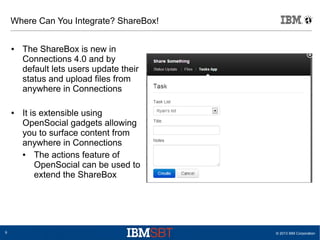
Where Can You Integrate? ShareBox!
● The ShareBox is new in
Connections 4.0 and by
default lets users update their
status and upload files from
anywhere in Connections
● It is extensible using
OpenSocial gadgets allowing
you to surface content from
anywhere in Connections
● The actions feature of
OpenSocial can be used to
extend the ShareBox
© 2013 IBM Corporation10
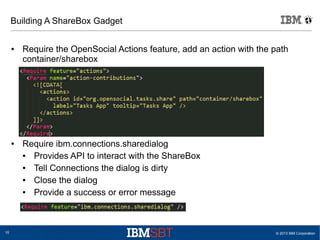
Building A ShareBox Gadget
● Require the OpenSocial Actions feature, add an action with the path
container/sharebox
● Require ibm.connections.sharedialog
● Provides API to interact with the ShareBox
● Tell Connections the dialog is dirty
● Close the dialog
● Provide a success or error message
© 2013 IBM Corporation11
DEMO
© 2013 IBM Corporation12
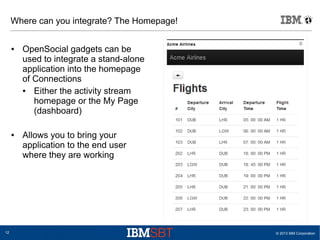
Where can you integrate? The Homepage!
● OpenSocial gadgets can be
used to integrate a stand-alone
application into the homepage
of Connections
● Either the activity stream
homepage or the My Page
(dashboard)
● Allows you to bring your
application to the end user
where they are working
© 2013 IBM Corporation13
DEMO
© 2013 IBM Corporation14
Placing Connections In Developer Mode
● By default, Connections will not let you render just any gadget
● The opensocial-config.xml file is where you can configure the security
around gadgets in Connections
● What if I don't put Connections in developer mode?
● You need to use a user that has been given the administrator J2EE
role in the Homepage app to add gadgets to Connections
● The main benefit is with EE testing in Connections Mail and the
activity stream, you don't need to explicitly approve those gadgets
● For gadgets rendered on the Homepage or in the ShareBox you will
need to use an Administrator UI
© 2013 IBM Corporation15
Developer Mode For Gadgets
● security/[whitelistEnabled] – true by default, set to false to disable, make
sure you set developer-hosts-whitelist/[allServers] to true as well
● developer/[enabled] – by default this is false, set it to true to enable the
developer bootstrap page
● developer/[allowSSOFeature] – Allows the gadgets to render on the
same domain as Connections giving them access to SSO cookies
● developer/[allowIntranetProxyAccess] – Allows the gadgets to access
resources on your intranet (your Websphere SSO domain)
● developer-hosts-whitelist/[allServers] – Set this to true to let ALL gadgets
render, not just the ones specified in the whitelist
© 2013 IBM Corporation16
Developer Mode For URL Embedded Experiences
● url-access/[urlWhitelistEnabled] – Whitelist which controls URL
embedded experiences, set this to false to disable this whitelist
© 2013 IBM Corporation17
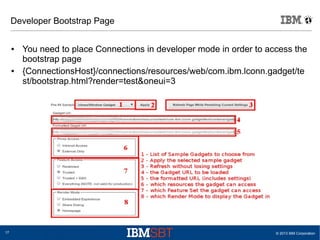
Developer Bootstrap Page
● You need to place Connections in developer mode in order to access the
bootstrap page
● {ConnectionsHost}/connections/resources/web/com.ibm.lconn.gadget/te
st/bootstrap.html?render=test&oneui=3
© 2013 IBM Corporation18
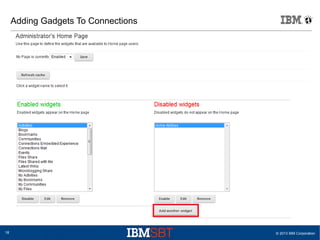
Adding Gadgets To Connections
© 2013 IBM Corporation19
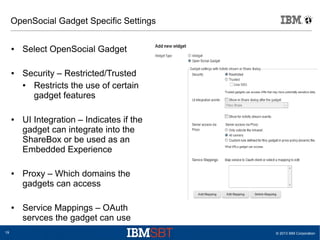
OpenSocial Gadget Specific Settings
● Select OpenSocial Gadget
● Security – Restricted/Trusted
● Restricts the use of certain
gadget features
● UI Integration – Indicates if the
gadget can integrate into the
ShareBox or be used as an
Embedded Experience
● Proxy – Which domains the
gadgets can access
● Service Mappings – OAuth
servces the gadget can use
© 2013 IBM Corporation20
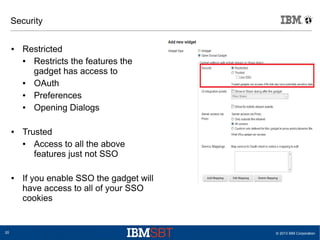
Security
● Restricted
● Restricts the features the
gadget has access to
● OAuth
● Preferences
● Opening Dialogs
● Trusted
● Access to all the above
features just not SSO
● If you enable SSO the gadget will
have access to all of your SSO
cookies
© 2013 IBM Corporation21
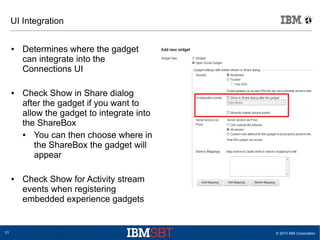
UI Integration
● Determines where the gadget
can integrate into the
Connections UI
● Check Show in Share dialog
after the gadget if you want to
allow the gadget to integrate into
the ShareBox
● You can then choose where in
the ShareBox the gadget will
appear
● Check Show for Activity stream
events when registering
embedded experience gadgets
© 2013 IBM Corporation22
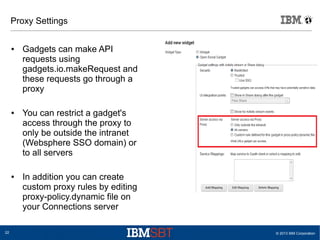
Proxy Settings
● Gadgets can make API
requests using
gadgets.io.makeRequest and
these requests go through a
proxy
● You can restrict a gadget's
access through the proxy to
only be outside the intranet
(Websphere SSO domain) or
to all servers
● In addition you can create
custom proxy rules by editing
proxy-policy.dynamic file on
your Connections server
© 2013 IBM Corporation23
DEMO
© 2013 IBM Corporation24
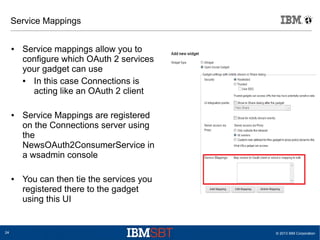
Service Mappings
● Service mappings allow you to
configure which OAuth 2 services
your gadget can use
● In this case Connections is
acting like an OAuth 2 client
● Service Mappings are registered
on the Connections server using
the
NewsOAuth2ConsumerService in
a wsadmin console
● You can then tie the services you
registered there to the gadget
using this UI
© 2013 IBM Corporation25
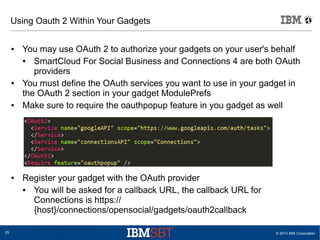
Using Oauth 2 Within Your Gadgets
● You may use OAuth 2 to authorize your gadgets on your user's behalf
● SmartCloud For Social Business and Connections 4 are both OAuth
providers
● You must define the OAuth services you want to use in your gadget in
the OAuth 2 section in your gadget ModulePrefs
● Make sure to require the oauthpopup feature in you gadget as well
● Register your gadget with the OAuth provider
● You will be asked for a callback URL, the callback URL for
Connections is https://
{host}/connections/opensocial/gadgets/oauth2callback
© 2013 IBM Corporation26
OAuth makeRequest Example
var params = {};
params[gadgets.io.RequestParameters.AUTHORIZATION] =
gadgets.io.AuthorizationType.OAUTH2;
params[gadgets.io.RequestParameters.OAUTH_SERVICE_NAME] =
'serviceName';
gadgets.io.makeRequest('url', function(response) {
if (response.oauthApprovalUrl) {
var onOpen = function() {};
var onClose = function() {};
var popup = new
gadgets.oauth.Popup(response.oauthApprovalUrl, null, onOpen,
onClose);
var click = popup.createOpenerOnClick();
click();
} else if (response.data) {
//We have data so lets use it!
} else {
gadgets.error('something went wrong');
}
}, params);
© 2013 IBM Corporation27
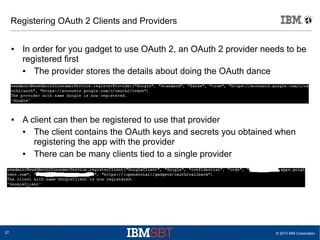
Registering OAuth 2 Clients and Providers
● In order for you gadget to use OAuth 2, an OAuth 2 provider needs to be
registered first
● The provider stores the details about doing the OAuth dance
● A client can then be registered to use that provider
● The client contains the OAuth keys and secrets you obtained when
registering the app with the provider
● There can be many clients tied to a single provider
© 2013 IBM Corporation28
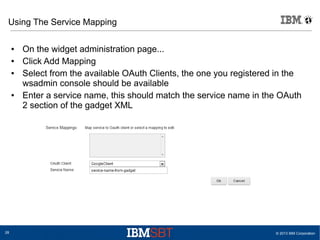
Using The Service Mapping
● On the widget administration page...
● Click Add Mapping
● Select from the available OAuth Clients, the one you registered in the
wsadmin console should be available
● Enter a service name, this should match the service name in the OAuth
2 section of the gadget XML
© 2013 IBM Corporation29
OpenSocial Resources
● Configuring OAuth: http://www-
10.lotus.com/ldd/lcwiki.nsf/xpDocViewer.xsp?
lookupName=IBM+Connections+4.0+documentation#action=openDocu
ment&res_title=Configuring_OAuth_for_gadgets_ic40&content=pdconte
nt
● Configuring Gadgets: http://www-
10.lotus.com/ldd/lcwiki.nsf/xpDocViewer.xsp?
lookupName=IBM+Connections+4.0+documentation#action=openDocu
ment&res_title=Administering_Home_page_widgets_ic40&content=pdco
ntent
● ShareBox Gadgets: http://www-
10.lotus.com/ldd/lcwiki.nsf/xpDocViewer.xsp?
lookupName=IBM+Connections+4.0+documentation#action=openDocu
ment&res_title=Adding_new_ways_to_share_content_ic40&content=pdc
ontent
© 2013 IBM Corporation30
OpenSocial Resources
● EE Gadgets For The Activity Stream: http://www-
10.lotus.com/ldd/lcwiki.nsf/dx/Building_Embedded_Experience_gadgets
_for_third-_party_IBM_Connections_Activity_Streams
● Developing Gadgets For Connections:
https://www.ibm.com/developerworks/lotus/documentation/osgadgetconn
ections4/index.html?ca=drs-
● Developing Gadgets For IBM's Social Business Platform:
http://ibmtvdemo.edgesuite.net/software/lotus/connect_2013/01-
Sunday/JMP102/JMP102.html
● OpenSocial Explorer: http://opensocial.github.io/explorer/
© 2013 IBM Corporation31
Resources and Questions
● Home page: http://ibmdw.net/social
● SDK: http://ibmsbt.openntf.org
● GitHub: https://github.com/OpenNTF/SocialSDK
● StackOverflow: #ibmsbt
● Twitter: @ibmsbt
● YouTube: http://youtube.com/ibmsbt
● Playground: http://bit.ly/sbtplayground
© 2013 IBM Corporation32
Acknowledgements and Disclaimers
© Copyright IBM Corporation 2013. All rights reserved.
– U.S. Government Users Restricted Rights - Use, duplication or disclosure restricted by GSA ADP Schedule Contract with
IBM Corp.
IBM, the IBM logo, ibm.com, Rational, the Rational logo, Telelogic, the Telelogic logo, Green Hat, the Green Hat logo, and other IBM
products and services are trademarks or registered trademarks of International Business Machines Corporation in the United States, other
countries, or both. If these and other IBM trademarked terms are marked on their first occurrence in this information with a trademark
symbol (® or ™), these symbols indicate U.S. registered or common law trademarks owned by IBM at the time this information was
published. Such trademarks may also be registered or common law trademarks in other countries. A current list of IBM trademarks is
available on the Web at “Copyright and trademark information” at www.ibm.com/legal/copytrade.shtml
Other company, product, or service names may be trademarks or service marks of others.
Availability: References in this presentation to IBM products, programs, or services do not imply that they will be available in all
countries in which IBM operates.
The workshops, sessions and materials have been prepared by IBM or the session speakers and reflect their own views. They are
provided for informational purposes only, and are neither intended to, nor shall have the effect of being, legal or other guidance or
advice to any participant. While efforts were made to verify the completeness and accuracy of the information contained in this
presentation, it is provided AS-IS without warranty of any kind, express or implied. IBM shall not be responsible for any damages arising
out of the use of, or otherwise related to, this presentation or any other materials. Nothing contained in this presentation is intended to,
nor shall have the effect of, creating any warranties or representations from IBM or its suppliers or licensors, or altering the terms and
conditions of the applicable license agreement governing the use of IBM software.
All customer examples described are presented as illustrations of how those customers have used IBM products and the results they
may have achieved. Actual environmental costs and performance characteristics may vary by customer. Nothing contained in these
materials is intended to, nor shall have the effect of, stating or implying that any activities undertaken by you will result in any specific
sales, revenue growth or other results.

How to add your own OpenSocial Gadgets to IBM Connections

  • 1.
    How To AddYour Own OpenSocial Gadgets To IBM Connections Ryan Baxter, Software Engineer, IBM IBM SBT Webinar 09/11/13
  • 2.
    © 2013 IBMCorporation2 Disclaimers IBM’s statements regarding its plans, directions, and intent are subject to change or withdrawal without notice at IBM’s sole discretion. Information regarding potential future products is intended to outline our general product direction and it should not be relied on in making a purchasing decision. The information mentioned regarding potential future products is not a commitment, promise, or legal obligation to deliver any material, code or functionality. Information about potential future products may not be incorporated into any contract. The development, release, and timing of any future features or functionality described for our products remains at our sole discretion. Performance is based on measurements and projections using standard IBM benchmarks in a controlled environment. The actual throughput or performance that any user will experience will vary depending upon many factors, including considerations such as the amount of multiprogramming in the user’s job stream, the I/O configuration, the storage configuration, and the workload processed. Therefore, no assurance can be given that an individual user will achieve results similar to those stated here.
  • 3.
    © 2013 IBMCorporation3 OpenSocial Gadgets ● Use them to integrate into IBM Connections ● HTML, JavaScript, and CSS wrapped in XML ● Use the same technologies and libraries you are already familiar with in gadgets ● Dojo, JQuery, Bootstrap, etc ● Make API requests using gadgets.io.makeRequest ● Requests go through a proxy on the Connections server ● Use makeRequest as oppsed to other XHR libraries ● Support for APIs protected by OAuth 2.0 ● Gadget features provide gadget APIs for you to use in your application
  • 4.
    © 2013 IBMCorporation4 OpenSocial Explorer ● Open source tool to help developers learn how to build gadgets ● Download the source from GitHub, build, and launch ● Just need Maven and Java
  • 5.
    © 2013 IBMCorporation5 Where Can You Integrate? Embedded Experiences! ● Embedded Experiences ● In the activity stream and in Connections Mail ● URL and Gadget embedded experiences supported in both places ● Use Cases ● Notifying users of important information that has taken place in your application ● Allows them to interact with the notification without having to leave the application (Connections)
  • 6.
    © 2013 IBMCorporation6 Sending Embedded Experiences ● Your application needs to add the embedded experiences data model to either the email or activity entry to add an embedded experience ● Gadget EE { “gadget” : “http://acme.com/gagdet.xml”, “context” : { “id” : 123 } } ● URL EE {“url” : “http://domino.com/myxpage.xsp”} Standard MIME Email Activity Entry EE Data Model
  • 7.
    © 2013 IBMCorporation7 Activity Stream Data Models With Embedded Experiences Gadget Embedded Experience URL Embedded Experience
  • 8.
    © 2013 IBMCorporation8 DEMO
  • 9.
    © 2013 IBMCorporation9 Where Can You Integrate? ShareBox! ● The ShareBox is new in Connections 4.0 and by default lets users update their status and upload files from anywhere in Connections ● It is extensible using OpenSocial gadgets allowing you to surface content from anywhere in Connections ● The actions feature of OpenSocial can be used to extend the ShareBox
  • 10.
    © 2013 IBMCorporation10 Building A ShareBox Gadget ● Require the OpenSocial Actions feature, add an action with the path container/sharebox ● Require ibm.connections.sharedialog ● Provides API to interact with the ShareBox ● Tell Connections the dialog is dirty ● Close the dialog ● Provide a success or error message
  • 11.
    © 2013 IBMCorporation11 DEMO
  • 12.
    © 2013 IBMCorporation12 Where can you integrate? The Homepage! ● OpenSocial gadgets can be used to integrate a stand-alone application into the homepage of Connections ● Either the activity stream homepage or the My Page (dashboard) ● Allows you to bring your application to the end user where they are working
  • 13.
    © 2013 IBMCorporation13 DEMO
  • 14.
    © 2013 IBMCorporation14 Placing Connections In Developer Mode ● By default, Connections will not let you render just any gadget ● The opensocial-config.xml file is where you can configure the security around gadgets in Connections ● What if I don't put Connections in developer mode? ● You need to use a user that has been given the administrator J2EE role in the Homepage app to add gadgets to Connections ● The main benefit is with EE testing in Connections Mail and the activity stream, you don't need to explicitly approve those gadgets ● For gadgets rendered on the Homepage or in the ShareBox you will need to use an Administrator UI
  • 15.
    © 2013 IBMCorporation15 Developer Mode For Gadgets ● security/[whitelistEnabled] – true by default, set to false to disable, make sure you set developer-hosts-whitelist/[allServers] to true as well ● developer/[enabled] – by default this is false, set it to true to enable the developer bootstrap page ● developer/[allowSSOFeature] – Allows the gadgets to render on the same domain as Connections giving them access to SSO cookies ● developer/[allowIntranetProxyAccess] – Allows the gadgets to access resources on your intranet (your Websphere SSO domain) ● developer-hosts-whitelist/[allServers] – Set this to true to let ALL gadgets render, not just the ones specified in the whitelist
  • 16.
    © 2013 IBMCorporation16 Developer Mode For URL Embedded Experiences ● url-access/[urlWhitelistEnabled] – Whitelist which controls URL embedded experiences, set this to false to disable this whitelist
  • 17.
    © 2013 IBMCorporation17 Developer Bootstrap Page ● You need to place Connections in developer mode in order to access the bootstrap page ● {ConnectionsHost}/connections/resources/web/com.ibm.lconn.gadget/te st/bootstrap.html?render=test&oneui=3
  • 18.
    © 2013 IBMCorporation18 Adding Gadgets To Connections
  • 19.
    © 2013 IBMCorporation19 OpenSocial Gadget Specific Settings ● Select OpenSocial Gadget ● Security – Restricted/Trusted ● Restricts the use of certain gadget features ● UI Integration – Indicates if the gadget can integrate into the ShareBox or be used as an Embedded Experience ● Proxy – Which domains the gadgets can access ● Service Mappings – OAuth servces the gadget can use
  • 20.
    © 2013 IBMCorporation20 Security ● Restricted ● Restricts the features the gadget has access to ● OAuth ● Preferences ● Opening Dialogs ● Trusted ● Access to all the above features just not SSO ● If you enable SSO the gadget will have access to all of your SSO cookies
  • 21.
    © 2013 IBMCorporation21 UI Integration ● Determines where the gadget can integrate into the Connections UI ● Check Show in Share dialog after the gadget if you want to allow the gadget to integrate into the ShareBox ● You can then choose where in the ShareBox the gadget will appear ● Check Show for Activity stream events when registering embedded experience gadgets
  • 22.
    © 2013 IBMCorporation22 Proxy Settings ● Gadgets can make API requests using gadgets.io.makeRequest and these requests go through a proxy ● You can restrict a gadget's access through the proxy to only be outside the intranet (Websphere SSO domain) or to all servers ● In addition you can create custom proxy rules by editing proxy-policy.dynamic file on your Connections server
  • 23.
    © 2013 IBMCorporation23 DEMO
  • 24.
    © 2013 IBMCorporation24 Service Mappings ● Service mappings allow you to configure which OAuth 2 services your gadget can use ● In this case Connections is acting like an OAuth 2 client ● Service Mappings are registered on the Connections server using the NewsOAuth2ConsumerService in a wsadmin console ● You can then tie the services you registered there to the gadget using this UI
  • 25.
    © 2013 IBMCorporation25 Using Oauth 2 Within Your Gadgets ● You may use OAuth 2 to authorize your gadgets on your user's behalf ● SmartCloud For Social Business and Connections 4 are both OAuth providers ● You must define the OAuth services you want to use in your gadget in the OAuth 2 section in your gadget ModulePrefs ● Make sure to require the oauthpopup feature in you gadget as well ● Register your gadget with the OAuth provider ● You will be asked for a callback URL, the callback URL for Connections is https:// {host}/connections/opensocial/gadgets/oauth2callback
  • 26.
    © 2013 IBMCorporation26 OAuth makeRequest Example var params = {}; params[gadgets.io.RequestParameters.AUTHORIZATION] = gadgets.io.AuthorizationType.OAUTH2; params[gadgets.io.RequestParameters.OAUTH_SERVICE_NAME] = 'serviceName'; gadgets.io.makeRequest('url', function(response) { if (response.oauthApprovalUrl) { var onOpen = function() {}; var onClose = function() {}; var popup = new gadgets.oauth.Popup(response.oauthApprovalUrl, null, onOpen, onClose); var click = popup.createOpenerOnClick(); click(); } else if (response.data) { //We have data so lets use it! } else { gadgets.error('something went wrong'); } }, params);
  • 27.
    © 2013 IBMCorporation27 Registering OAuth 2 Clients and Providers ● In order for you gadget to use OAuth 2, an OAuth 2 provider needs to be registered first ● The provider stores the details about doing the OAuth dance ● A client can then be registered to use that provider ● The client contains the OAuth keys and secrets you obtained when registering the app with the provider ● There can be many clients tied to a single provider
  • 28.
    © 2013 IBMCorporation28 Using The Service Mapping ● On the widget administration page... ● Click Add Mapping ● Select from the available OAuth Clients, the one you registered in the wsadmin console should be available ● Enter a service name, this should match the service name in the OAuth 2 section of the gadget XML
  • 29.
    © 2013 IBMCorporation29 OpenSocial Resources ● Configuring OAuth: http://www- 10.lotus.com/ldd/lcwiki.nsf/xpDocViewer.xsp? lookupName=IBM+Connections+4.0+documentation#action=openDocu ment&res_title=Configuring_OAuth_for_gadgets_ic40&content=pdconte nt ● Configuring Gadgets: http://www- 10.lotus.com/ldd/lcwiki.nsf/xpDocViewer.xsp? lookupName=IBM+Connections+4.0+documentation#action=openDocu ment&res_title=Administering_Home_page_widgets_ic40&content=pdco ntent ● ShareBox Gadgets: http://www- 10.lotus.com/ldd/lcwiki.nsf/xpDocViewer.xsp? lookupName=IBM+Connections+4.0+documentation#action=openDocu ment&res_title=Adding_new_ways_to_share_content_ic40&content=pdc ontent
  • 30.
    © 2013 IBMCorporation30 OpenSocial Resources ● EE Gadgets For The Activity Stream: http://www- 10.lotus.com/ldd/lcwiki.nsf/dx/Building_Embedded_Experience_gadgets _for_third-_party_IBM_Connections_Activity_Streams ● Developing Gadgets For Connections: https://www.ibm.com/developerworks/lotus/documentation/osgadgetconn ections4/index.html?ca=drs- ● Developing Gadgets For IBM's Social Business Platform: http://ibmtvdemo.edgesuite.net/software/lotus/connect_2013/01- Sunday/JMP102/JMP102.html ● OpenSocial Explorer: http://opensocial.github.io/explorer/
  • 31.
    © 2013 IBMCorporation31 Resources and Questions ● Home page: http://ibmdw.net/social ● SDK: http://ibmsbt.openntf.org ● GitHub: https://github.com/OpenNTF/SocialSDK ● StackOverflow: #ibmsbt ● Twitter: @ibmsbt ● YouTube: http://youtube.com/ibmsbt ● Playground: http://bit.ly/sbtplayground
  • 32.
    © 2013 IBMCorporation32 Acknowledgements and Disclaimers © Copyright IBM Corporation 2013. All rights reserved. – U.S. Government Users Restricted Rights - Use, duplication or disclosure restricted by GSA ADP Schedule Contract with IBM Corp. IBM, the IBM logo, ibm.com, Rational, the Rational logo, Telelogic, the Telelogic logo, Green Hat, the Green Hat logo, and other IBM products and services are trademarks or registered trademarks of International Business Machines Corporation in the United States, other countries, or both. If these and other IBM trademarked terms are marked on their first occurrence in this information with a trademark symbol (® or ™), these symbols indicate U.S. registered or common law trademarks owned by IBM at the time this information was published. Such trademarks may also be registered or common law trademarks in other countries. A current list of IBM trademarks is available on the Web at “Copyright and trademark information” at www.ibm.com/legal/copytrade.shtml Other company, product, or service names may be trademarks or service marks of others. Availability: References in this presentation to IBM products, programs, or services do not imply that they will be available in all countries in which IBM operates. The workshops, sessions and materials have been prepared by IBM or the session speakers and reflect their own views. They are provided for informational purposes only, and are neither intended to, nor shall have the effect of being, legal or other guidance or advice to any participant. While efforts were made to verify the completeness and accuracy of the information contained in this presentation, it is provided AS-IS without warranty of any kind, express or implied. IBM shall not be responsible for any damages arising out of the use of, or otherwise related to, this presentation or any other materials. Nothing contained in this presentation is intended to, nor shall have the effect of, creating any warranties or representations from IBM or its suppliers or licensors, or altering the terms and conditions of the applicable license agreement governing the use of IBM software. All customer examples described are presented as illustrations of how those customers have used IBM products and the results they may have achieved. Actual environmental costs and performance characteristics may vary by customer. Nothing contained in these materials is intended to, nor shall have the effect of, stating or implying that any activities undertaken by you will result in any specific sales, revenue growth or other results.