Technology in the
Classroom
An approach for integrating technology into
my classroom
Ian Navarro Valencia
Technology needs today
To help prepare
today’s students for
the workplace after
their graduation from
public school,
teachers should
include technology in
their lesson plans as
often as possible.
EDT 612 Presentation
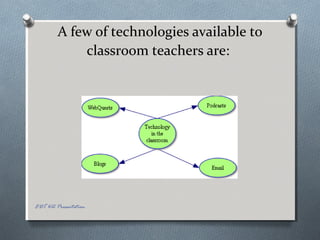
A few of technologies available to
classroom teachers are:
EDT 612 Presentation
WebQuests
WebQuests are applications that allow
student choice in exploring teacher-chosen
sites to learn about a topic. They usually
include some kind of a product that reflects
the student’s learning as well as a rubric or
evaluation. They are a good option when
considering including inquiry in a teacher’s
teaching units. Students are able to take
the direction they choose when gathering
the information by clicking on the links
included in the webquest. Once the
information is gathered the student can
choose his own product based on the
scoring rubric that is included with the
webquest.
EDT 612 Presentation
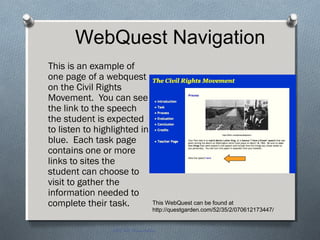
This is an example of
one page of a webquest
on the Civil Rights
Movement. You can see
the link to the speech
the student is expected
to listen to highlighted in
blue. Each task page
contains one or more
links to sites the
student can choose to
visit to gather the
information needed to
complete their task.
EDT 612 Presentation
This WebQuest can be found at
http://questgarden.com/52/35/2/070612173447/
WebQuest Navigation
WebQuest Evaluation
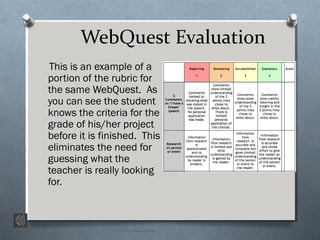
This is an example of a
portion of the rubric for
the same WebQuest. As
you can see the student
knows the criteria for the
grade of his/her project
before it is finished. This
eliminates the need for
guessing what the
teacher is really looking
for.
EDT 612 Presentation
Podcasts
A podcast is a digital media file that can
be downloaded to a personal
computer or a portable media player.
They are great for use in the
classroom because they:
O Are pre-recorded and can be viewed
as a class or an individual
O Can be sound or video
O Hundreds of options of topics to meet
almost any need
O Can enhance any unit by giving a
media presentation of the topic being
studied
O Are fun for students to view or listen to
EDT 612 Presentation
Podcast options
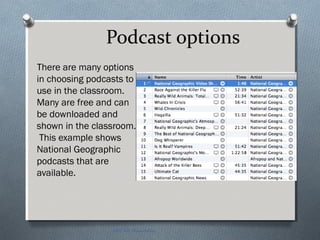
There are many options
in choosing podcasts to
use in the classroom.
Many are free and can
be downloaded and
shown in the classroom.
This example shows
National Geographic
podcasts that are
available.
EDT 612 Presentation
Blogs
“Blog” is the term coined
for web logs. They are a
place for students to post
their thoughts about a topic
the class is studying. They
post chronologically so
they make it easy for a
teacher to monitor the
posts.
EDT 612 Presentation
Blog options
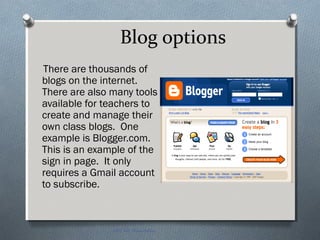
There are thousands of
blogs on the internet.
There are also many tools
available for teachers to
create and manage their
own class blogs. One
example is Blogger.com.
This is an example of the
sign in page. It only
requires a Gmail account
to subscribe.
EDT 612 Presentation
Email
Email is a tool most students use daily. It can also be used
for pen pals in the class and as a means for practicing
written communication skills. It’s a great alternative to
the telephone! One caution: it is impossible to monitor
and requires parent permission to include in the
curriculum. Be sure you check your district’s policy on
this internet tool.
EDT 612 Presentation
Conclusion
Technology can move our students
from the more traditional style of
learning to a classroom where they
are engaged in the learning
experience, have the most current
information available, and have
some control over what they learn
and how they demonstrate their
learning. This makes their learning
experience inquiry based and meet
the needs of the students of today.
It can help prepare the students for
their futures outside the classroom.
EDT 612 Presentation

Technology

  • 1.
    Technology in the Classroom Anapproach for integrating technology into my classroom Ian Navarro Valencia
  • 2.
    Technology needs today Tohelp prepare today’s students for the workplace after their graduation from public school, teachers should include technology in their lesson plans as often as possible. EDT 612 Presentation
  • 3.
    A few oftechnologies available to classroom teachers are: EDT 612 Presentation
  • 4.
    WebQuests WebQuests are applicationsthat allow student choice in exploring teacher-chosen sites to learn about a topic. They usually include some kind of a product that reflects the student’s learning as well as a rubric or evaluation. They are a good option when considering including inquiry in a teacher’s teaching units. Students are able to take the direction they choose when gathering the information by clicking on the links included in the webquest. Once the information is gathered the student can choose his own product based on the scoring rubric that is included with the webquest. EDT 612 Presentation
  • 5.
    This is anexample of one page of a webquest on the Civil Rights Movement. You can see the link to the speech the student is expected to listen to highlighted in blue. Each task page contains one or more links to sites the student can choose to visit to gather the information needed to complete their task. EDT 612 Presentation This WebQuest can be found at http://questgarden.com/52/35/2/070612173447/ WebQuest Navigation
  • 6.
    WebQuest Evaluation This isan example of a portion of the rubric for the same WebQuest. As you can see the student knows the criteria for the grade of his/her project before it is finished. This eliminates the need for guessing what the teacher is really looking for. EDT 612 Presentation
  • 7.
    Podcasts A podcast isa digital media file that can be downloaded to a personal computer or a portable media player. They are great for use in the classroom because they: O Are pre-recorded and can be viewed as a class or an individual O Can be sound or video O Hundreds of options of topics to meet almost any need O Can enhance any unit by giving a media presentation of the topic being studied O Are fun for students to view or listen to EDT 612 Presentation
  • 8.
    Podcast options There aremany options in choosing podcasts to use in the classroom. Many are free and can be downloaded and shown in the classroom. This example shows National Geographic podcasts that are available. EDT 612 Presentation
  • 9.
    Blogs “Blog” is theterm coined for web logs. They are a place for students to post their thoughts about a topic the class is studying. They post chronologically so they make it easy for a teacher to monitor the posts. EDT 612 Presentation
  • 10.
    Blog options There arethousands of blogs on the internet. There are also many tools available for teachers to create and manage their own class blogs. One example is Blogger.com. This is an example of the sign in page. It only requires a Gmail account to subscribe. EDT 612 Presentation
  • 11.
    Email Email is atool most students use daily. It can also be used for pen pals in the class and as a means for practicing written communication skills. It’s a great alternative to the telephone! One caution: it is impossible to monitor and requires parent permission to include in the curriculum. Be sure you check your district’s policy on this internet tool. EDT 612 Presentation
  • 12.
    Conclusion Technology can moveour students from the more traditional style of learning to a classroom where they are engaged in the learning experience, have the most current information available, and have some control over what they learn and how they demonstrate their learning. This makes their learning experience inquiry based and meet the needs of the students of today. It can help prepare the students for their futures outside the classroom. EDT 612 Presentation
  • 13.