By Siddharth Singh
Technical Presentation
Internetworking Models
 In 1977, the International Organization for
standardization (ISO)
 created the Open Systems Interconnection (OSI)
Reference Model.
 OSI Layer is meant for Networking manufacturers and
developers to provide them a standard based on which
they can make their products.
 All OSI Layers are independent from each other,
which makes introducing changes easier as no other
layers are effected.
Advantages of Reference Models
 Advantages of using the OSI layered model include, but
are not limited to, the following:
 Allows multiple-vendor development through
standardization of network components.
 Allows various types of network hardware and
software to communicate.
 Prevents changes in one layer from affecting other layers,
so it does not hamper development.
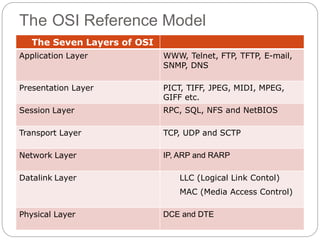
The OSI Reference Model
The Seven Layers of OSI
Application Layer WWW, Telnet, FTP, TFTP, E-mail,
SNMP, DNS
Presentation Layer PICT, TIFF, JPEG, MIDI, MPEG,
GIFF etc.
Session Layer RPC, SQL, NFS and NetBIOS
Transport Layer TCP, UDP and SCTP
Network Layer IP, ARP and RARP
Datalink Layer LLC (Logical Link Contol)
MAC (Media Access Control)
Physical Layer DCE and DTE
IP Subnetting
 There are loads of reasons in favor of subnetting.
Some of the benefits include:
 Reduced network traffic:- We all appreciate less traffic of
any kind. Networks are no different. Without trusty
routers, packet traffic could grind the entire network down
to a near standstill.
 Optimized network performance:- This is a result of
reduced network traffic.
 Simplified management:- It’s easier to identify and
isolate network problems in a group of smaller
connected networks than within one gigantic network.
 Facilitated spanning of large geographical distances:-
Because WAN links are considerably slower and more
expensive than LAN links, a single large network that
spans long distances can create problems in every arena
listed above.
How to Create Subnets
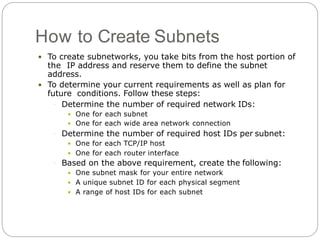
 To create subnetworks, you take bits from the host portion of
the IP address and reserve them to define the subnet
address.
 To determine your current requirements as well as plan for
future conditions. Follow these steps:
 Determine the number of required network IDs:
 One for each subnet
 One for each wide area network connection
 Determine the number of required host IDs per subnet:
 One for each TCP/IP host
 One for each router interface
 Based on the above requirement, create the following:
 One subnet mask for your entire network
 A unique subnet ID for each physical segment
 A range of host IDs for each subnet
Subnet Masks
 A subnet mask is a 32-bit value that allows the
recipient of IP packets to distinguish the network ID
portion of the IP address from the host ID portion of
the IP address.
 The default subnet masks for Classes A, B, and C.
These default masks cannot change.
 Default Subnet Mask
Class Format Default Subnet Mask
A network.node.node.node 255.0.0.0
B network.network.node.node 255.255.0.0
C network.network.network.node 255.255.255.0
Classless Inter-Domain Routing
(CIDR)
 It’s basically the method that ISPs (Internet
Service Providers) use to allocate an amount of
addresses to a company, a home—a customer.
 They provide addresses in a certain block size which
looks something like this: 192.168.10.32/28. This tell
you what is your subnet mask.
 For example a Class A default subnet mask is 255.0.0.0.
This means that the first byte of the subnet mask is all
ones (1s) or 11111111.
RAID Systems
 Redundant Array of Inexpensive Disks
 Basic idea is to connect multiple disks together to
provide
 large storage capacity
 faster access to reading data
 redundant data
 Many different levels of RAID systems
 differing levels of redundancy, error checking,
capacity, and cost
RAID Level-0 (Striping)
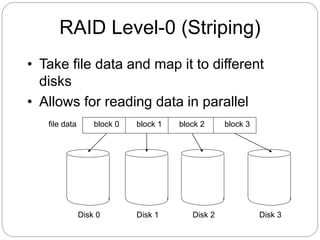
• Take file data and map it to different
disks
• Allows for reading data in parallel
file data block 1block 0 block 2 block 3
Disk 0 Disk 1 Disk 2 Disk 3
Parity
 Way to do error checking and correction
 Add up all the bits that are 1
 if even number, set parity bit to 0
 if odd number, set parity bit to 1
 To actually implement this, do an exclusive OR of
all the bits being considered
 Consider the following 2 bytes
byte parity
10110011 1
01101010 0
 If a single bit is bad, it is possible to correct it
Mirroring
 Keep to copies of data on two separate disks
 Gives good error recovery
 if some data is lost, get it from the other source
 Expensive
 requires twice as many disks
 Write performance can be slow
 have to write data to two different spots
 Read performance is enhanced
 can read data from file in parallel
RAID Level-1
 A complete file is stored on a single disk
 A second disk contains an exact copy of the
file
 Provides complete redundancy of data
 Read performance can be improved
 file data can be read in parallel
 Write performance suffers
 must write the data out twice
 Most expensive RAID implementation
 requires twice as much storage space
RAID Level-2
 Stripes data across disks similar to Level-0
 difference is data is bit interleaved instead of block
interleaved
 Uses ECC to monitor correctness of information
on disk
 Multiple disks record the ECC information to
determine which disk is in fault
 A parity disk is then used to reconstruct corrupted
or lost data
RAID Level-3
 One big problem with Level-2 are the disks
needed to detect which disk had an error
 Modern disks can already determine if there is an
error
 using ECC codes with each sector
 So just need to include a parity disk
 if a sector is bad, the disk itself tells us, and use the
parity disk to correct it
RAID Level-4
 Still use a single disk for parity
 Now the parity is calculated over data from
multiple blocks
 Level-2,3 calculate it over a single block
 If an error detected, need to read other blocks on
other disks to reconstruct data
RAID Level-5
 Level-5 stripes file data and check data over all
the disks
 no longer a single check disk
 no more write bottleneck
 Drastically improves the performance of multiple
writes
 they can now be done in parallel
 Slightly improves reads
 one more disk to use for reading
Active Directory (AD)
 Active Directory (AD) is a Microsoft technology
used to manage computers and other devices on
a network. It is a primary feature of Windows
Server, an operating system that runs both local
and Internet-based servers.
Benefits of Active Directory
 Hierarchical organizational structure.
 Multimaster Authentication & Multimaster
replication (the ability to access and modify AD
DS from multiple
points of administration)
 A single point of access to network resources.
 Ability to create trust relationships with external
networks running previous versions of Active
Directory and even Unix.
DNS
 The “Domain Name System”
 What Internet users use to reference anything by
name on the Internet
 The mechanism by which Internet software
translates names to attributes such as addresses
 DNS Port No 53
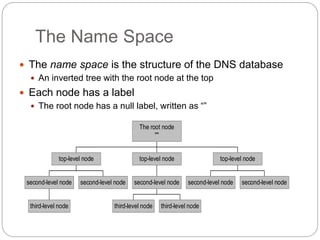
The Name Space
 The name space is the structure of the DNS database
 An inverted tree with the root node at the top
 Each node has a label
 The root node has a null label, written as “”
third-level node
second-level node second-level node
top-level node
third-level node third-level node
second-level node
top-level node
second-level node second-level node
top-level node
The root node
""
Domain Names
 A domain name is the sequence of labels from a node to the root,
separated by dots (“.”s), read left to right
 The name space has a maximum depth of 127 levels
 Domain names are limited to 255 characters in length
 A node’s domain name identifies its position in the name space
dakota
west
tornado
east www
nominum metainfo
com
berkeley nwu
edu gov
nato
int
army
mil
uu
net org
""
DHCP
 Dynamic Host Configuration Protocol
 Used for dynamic allocation of IP addresses
 used for hosts that run only client applications
 Allows for host-specific configuration parameters to
be delivered from a DHCP server to a host
 DHCP can also be used to convey permanent
IP address assignments to hosts
 Server interfaces need permanent addresses
because clients need to be able to reach them
 Also, router interfaces should have permanent
addresses for stability of routing data
IOPS (input/output operations per
second)
 IOPS is frequently referenced by storage vendors
to characterize performance in solid-state drives
(SSD), hard disk drives (HDD) and storage area
networks. However, an IOPS number is not an
actual benchmark, and numbers promoted by
vendors may not correspond to real-world
performance.
Regards, Siddharth Singh
Email ID : siddharth.3@yahoo.com
Thank You

Technical presentation

  • 1.
  • 2.
    Internetworking Models  In1977, the International Organization for standardization (ISO)  created the Open Systems Interconnection (OSI) Reference Model.  OSI Layer is meant for Networking manufacturers and developers to provide them a standard based on which they can make their products.  All OSI Layers are independent from each other, which makes introducing changes easier as no other layers are effected.
  • 3.
    Advantages of ReferenceModels  Advantages of using the OSI layered model include, but are not limited to, the following:  Allows multiple-vendor development through standardization of network components.  Allows various types of network hardware and software to communicate.  Prevents changes in one layer from affecting other layers, so it does not hamper development.
  • 4.
    The OSI ReferenceModel The Seven Layers of OSI Application Layer WWW, Telnet, FTP, TFTP, E-mail, SNMP, DNS Presentation Layer PICT, TIFF, JPEG, MIDI, MPEG, GIFF etc. Session Layer RPC, SQL, NFS and NetBIOS Transport Layer TCP, UDP and SCTP Network Layer IP, ARP and RARP Datalink Layer LLC (Logical Link Contol) MAC (Media Access Control) Physical Layer DCE and DTE
  • 5.
    IP Subnetting  Thereare loads of reasons in favor of subnetting. Some of the benefits include:  Reduced network traffic:- We all appreciate less traffic of any kind. Networks are no different. Without trusty routers, packet traffic could grind the entire network down to a near standstill.  Optimized network performance:- This is a result of reduced network traffic.  Simplified management:- It’s easier to identify and isolate network problems in a group of smaller connected networks than within one gigantic network.  Facilitated spanning of large geographical distances:- Because WAN links are considerably slower and more expensive than LAN links, a single large network that spans long distances can create problems in every arena listed above.
  • 6.
    How to CreateSubnets  To create subnetworks, you take bits from the host portion of the IP address and reserve them to define the subnet address.  To determine your current requirements as well as plan for future conditions. Follow these steps:  Determine the number of required network IDs:  One for each subnet  One for each wide area network connection  Determine the number of required host IDs per subnet:  One for each TCP/IP host  One for each router interface  Based on the above requirement, create the following:  One subnet mask for your entire network  A unique subnet ID for each physical segment  A range of host IDs for each subnet
  • 7.
    Subnet Masks  Asubnet mask is a 32-bit value that allows the recipient of IP packets to distinguish the network ID portion of the IP address from the host ID portion of the IP address.  The default subnet masks for Classes A, B, and C. These default masks cannot change.  Default Subnet Mask Class Format Default Subnet Mask A network.node.node.node 255.0.0.0 B network.network.node.node 255.255.0.0 C network.network.network.node 255.255.255.0
  • 8.
    Classless Inter-Domain Routing (CIDR) It’s basically the method that ISPs (Internet Service Providers) use to allocate an amount of addresses to a company, a home—a customer.  They provide addresses in a certain block size which looks something like this: 192.168.10.32/28. This tell you what is your subnet mask.  For example a Class A default subnet mask is 255.0.0.0. This means that the first byte of the subnet mask is all ones (1s) or 11111111.
  • 9.
    RAID Systems  RedundantArray of Inexpensive Disks  Basic idea is to connect multiple disks together to provide  large storage capacity  faster access to reading data  redundant data  Many different levels of RAID systems  differing levels of redundancy, error checking, capacity, and cost
  • 10.
    RAID Level-0 (Striping) •Take file data and map it to different disks • Allows for reading data in parallel file data block 1block 0 block 2 block 3 Disk 0 Disk 1 Disk 2 Disk 3
  • 11.
    Parity  Way todo error checking and correction  Add up all the bits that are 1  if even number, set parity bit to 0  if odd number, set parity bit to 1  To actually implement this, do an exclusive OR of all the bits being considered  Consider the following 2 bytes byte parity 10110011 1 01101010 0  If a single bit is bad, it is possible to correct it
  • 12.
    Mirroring  Keep tocopies of data on two separate disks  Gives good error recovery  if some data is lost, get it from the other source  Expensive  requires twice as many disks  Write performance can be slow  have to write data to two different spots  Read performance is enhanced  can read data from file in parallel
  • 13.
    RAID Level-1  Acomplete file is stored on a single disk  A second disk contains an exact copy of the file  Provides complete redundancy of data  Read performance can be improved  file data can be read in parallel  Write performance suffers  must write the data out twice  Most expensive RAID implementation  requires twice as much storage space
  • 14.
    RAID Level-2  Stripesdata across disks similar to Level-0  difference is data is bit interleaved instead of block interleaved  Uses ECC to monitor correctness of information on disk  Multiple disks record the ECC information to determine which disk is in fault  A parity disk is then used to reconstruct corrupted or lost data
  • 15.
    RAID Level-3  Onebig problem with Level-2 are the disks needed to detect which disk had an error  Modern disks can already determine if there is an error  using ECC codes with each sector  So just need to include a parity disk  if a sector is bad, the disk itself tells us, and use the parity disk to correct it
  • 16.
    RAID Level-4  Stilluse a single disk for parity  Now the parity is calculated over data from multiple blocks  Level-2,3 calculate it over a single block  If an error detected, need to read other blocks on other disks to reconstruct data
  • 17.
    RAID Level-5  Level-5stripes file data and check data over all the disks  no longer a single check disk  no more write bottleneck  Drastically improves the performance of multiple writes  they can now be done in parallel  Slightly improves reads  one more disk to use for reading
  • 18.
    Active Directory (AD) Active Directory (AD) is a Microsoft technology used to manage computers and other devices on a network. It is a primary feature of Windows Server, an operating system that runs both local and Internet-based servers.
  • 19.
    Benefits of ActiveDirectory  Hierarchical organizational structure.  Multimaster Authentication & Multimaster replication (the ability to access and modify AD DS from multiple points of administration)  A single point of access to network resources.  Ability to create trust relationships with external networks running previous versions of Active Directory and even Unix.
  • 20.
    DNS  The “DomainName System”  What Internet users use to reference anything by name on the Internet  The mechanism by which Internet software translates names to attributes such as addresses  DNS Port No 53
  • 21.
    The Name Space The name space is the structure of the DNS database  An inverted tree with the root node at the top  Each node has a label  The root node has a null label, written as “” third-level node second-level node second-level node top-level node third-level node third-level node second-level node top-level node second-level node second-level node top-level node The root node ""
  • 22.
    Domain Names  Adomain name is the sequence of labels from a node to the root, separated by dots (“.”s), read left to right  The name space has a maximum depth of 127 levels  Domain names are limited to 255 characters in length  A node’s domain name identifies its position in the name space dakota west tornado east www nominum metainfo com berkeley nwu edu gov nato int army mil uu net org ""
  • 23.
    DHCP  Dynamic HostConfiguration Protocol  Used for dynamic allocation of IP addresses  used for hosts that run only client applications  Allows for host-specific configuration parameters to be delivered from a DHCP server to a host  DHCP can also be used to convey permanent IP address assignments to hosts  Server interfaces need permanent addresses because clients need to be able to reach them  Also, router interfaces should have permanent addresses for stability of routing data
  • 24.
    IOPS (input/output operationsper second)  IOPS is frequently referenced by storage vendors to characterize performance in solid-state drives (SSD), hard disk drives (HDD) and storage area networks. However, an IOPS number is not an actual benchmark, and numbers promoted by vendors may not correspond to real-world performance.
  • 25.
    Regards, Siddharth Singh EmailID : siddharth.3@yahoo.com Thank You