Page  1
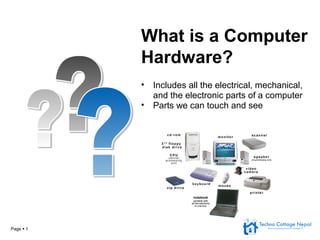
• Includes all the electrical, mechanical,
and the electronic parts of a computer
• Parts we can touch and see
What is a Computer
Hardware?
Page  2
Hardware – Different Types
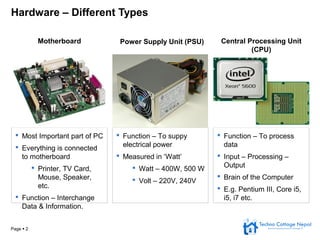
 Most Important part of PC
 Everything is connected
to motherboard
 Printer, TV Card,
Mouse, Speaker,
etc.
 Function – Interchange
Data & Information.
 Function – To suppy
electrical power
 Measured in ‘Watt’
 Watt – 400W, 500 W
 Volt – 220V, 240V
 Function – To process
data
 Input – Processing –
Output
 Brain of the Computer
 E.g. Pentium III, Core i5,
i5, i7 etc.
Motherboard Power Supply Unit (PSU) Central Processing Unit
(CPU)
Page  3
Hardware – Different Types
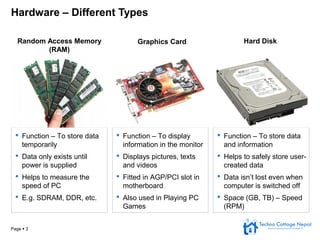
 Function – To store data
temporarily
 Data only exists until
power is supplied
 Helps to measure the
speed of PC
 E.g. SDRAM, DDR, etc.
 Function – To display
information in the monitor
 Displays pictures, texts
and videos
 Fitted in AGP/PCI slot in
motherboard
 Also used in Playing PC
Games
 Function – To store data
and information
 Helps to safely store user-
created data
 Data isn’t lost even when
computer is switched off
 Space (GB, TB) – Speed
(RPM)
Random Access Memory
(RAM)
Graphics Card Hard Disk
Page  4
Hardware – Different Types
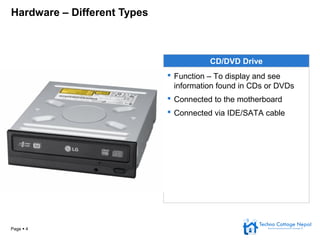
CD/DVD Drive
 Function – To display and see
information found in CDs or DVDs
 Connected to the motherboard
 Connected via IDE/SATA cable
Page  5
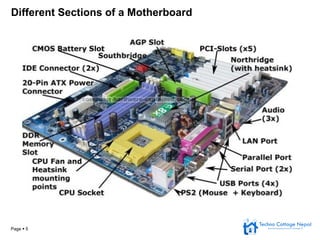
Different Sections of a Motherboard
Page  6
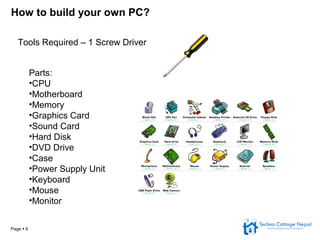
How to build your own PC?
Tools Required – 1 Screw Driver
Parts:
•CPU
•Motherboard
•Memory
•Graphics Card
•Sound Card
•Hard Disk
•DVD Drive
•Case
•Power Supply Unit
•Keyboard
•Mouse
•Monitor
Page  7
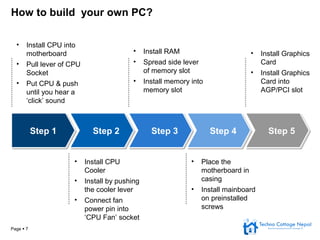
How to build your own PC?
• Install CPU into
motherboard
• Pull lever of CPU
Socket
• Put CPU & push
until you hear a
‘click’ sound
• Install RAM
• Spread side lever
of memory slot
• Install memory into
memory slot
• Install Graphics
Card
• Install Graphics
Card into
AGP/PCI slot
• Install CPU
Cooler
• Install by pushing
the cooler lever
• Connect fan
power pin into
‘CPU Fan’ socket
• Place the
motherboard in
casing
• Install mainboard
on preinstalled
screws
Step 1Step 1 Step 2Step 2 Step 3Step 3 Step 4Step 4 Step 5Step 5
Page  8
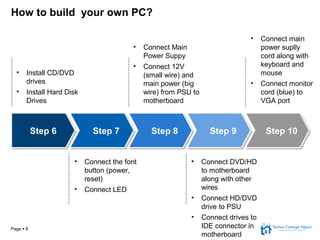
How to build your own PC?
• Install CD/DVD
drives
• Install Hard Disk
Drives
• Connect Main
Power Suppy
• Connect 12V
(small wire) and
main power (big
wire) from PSU to
motherboard
• Connect main
power suplly
cord along with
keyboard and
mouse
• Connect monitor
cord (blue) to
VGA port
• Connect the font
button (power,
reset)
• Connect LED
• Connect DVD/HD
to motherboard
along with other
wires
• Connect HD/DVD
drive to PSU
• Connect drives to
IDE connector in
motherboard
Step 6Step 6 Step 7Step 7 Step 8Step 8 Step 9Step 9 Step 10Step 10
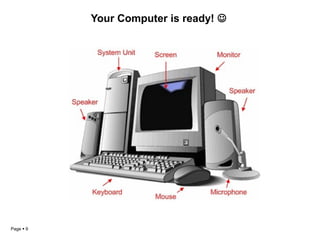
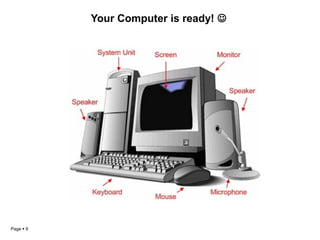
Your Computer is ready! 
Page  9
Your Computer is ready! 
Page  9

TCN Phase 1 - ITAP

  • 1.
    Page  1 •Includes all the electrical, mechanical, and the electronic parts of a computer • Parts we can touch and see What is a Computer Hardware?
  • 2.
    Page  2 Hardware– Different Types  Most Important part of PC  Everything is connected to motherboard  Printer, TV Card, Mouse, Speaker, etc.  Function – Interchange Data & Information.  Function – To suppy electrical power  Measured in ‘Watt’  Watt – 400W, 500 W  Volt – 220V, 240V  Function – To process data  Input – Processing – Output  Brain of the Computer  E.g. Pentium III, Core i5, i5, i7 etc. Motherboard Power Supply Unit (PSU) Central Processing Unit (CPU)
  • 3.
    Page  3 Hardware– Different Types  Function – To store data temporarily  Data only exists until power is supplied  Helps to measure the speed of PC  E.g. SDRAM, DDR, etc.  Function – To display information in the monitor  Displays pictures, texts and videos  Fitted in AGP/PCI slot in motherboard  Also used in Playing PC Games  Function – To store data and information  Helps to safely store user- created data  Data isn’t lost even when computer is switched off  Space (GB, TB) – Speed (RPM) Random Access Memory (RAM) Graphics Card Hard Disk
  • 4.
    Page  4 Hardware– Different Types CD/DVD Drive  Function – To display and see information found in CDs or DVDs  Connected to the motherboard  Connected via IDE/SATA cable
  • 5.
    Page  5 DifferentSections of a Motherboard
  • 6.
    Page  6 Howto build your own PC? Tools Required – 1 Screw Driver Parts: •CPU •Motherboard •Memory •Graphics Card •Sound Card •Hard Disk •DVD Drive •Case •Power Supply Unit •Keyboard •Mouse •Monitor
  • 7.
    Page  7 Howto build your own PC? • Install CPU into motherboard • Pull lever of CPU Socket • Put CPU & push until you hear a ‘click’ sound • Install RAM • Spread side lever of memory slot • Install memory into memory slot • Install Graphics Card • Install Graphics Card into AGP/PCI slot • Install CPU Cooler • Install by pushing the cooler lever • Connect fan power pin into ‘CPU Fan’ socket • Place the motherboard in casing • Install mainboard on preinstalled screws Step 1Step 1 Step 2Step 2 Step 3Step 3 Step 4Step 4 Step 5Step 5
  • 8.
    Page  8 Howto build your own PC? • Install CD/DVD drives • Install Hard Disk Drives • Connect Main Power Suppy • Connect 12V (small wire) and main power (big wire) from PSU to motherboard • Connect main power suplly cord along with keyboard and mouse • Connect monitor cord (blue) to VGA port • Connect the font button (power, reset) • Connect LED • Connect DVD/HD to motherboard along with other wires • Connect HD/DVD drive to PSU • Connect drives to IDE connector in motherboard Step 6Step 6 Step 7Step 7 Step 8Step 8 Step 9Step 9 Step 10Step 10
  • 9.
    Your Computer isready!  Page  9
  • 10.
    Your Computer isready!  Page  9