4. Start at the beginning
of the month
3. Even in a self-paced
course, set a schedule!
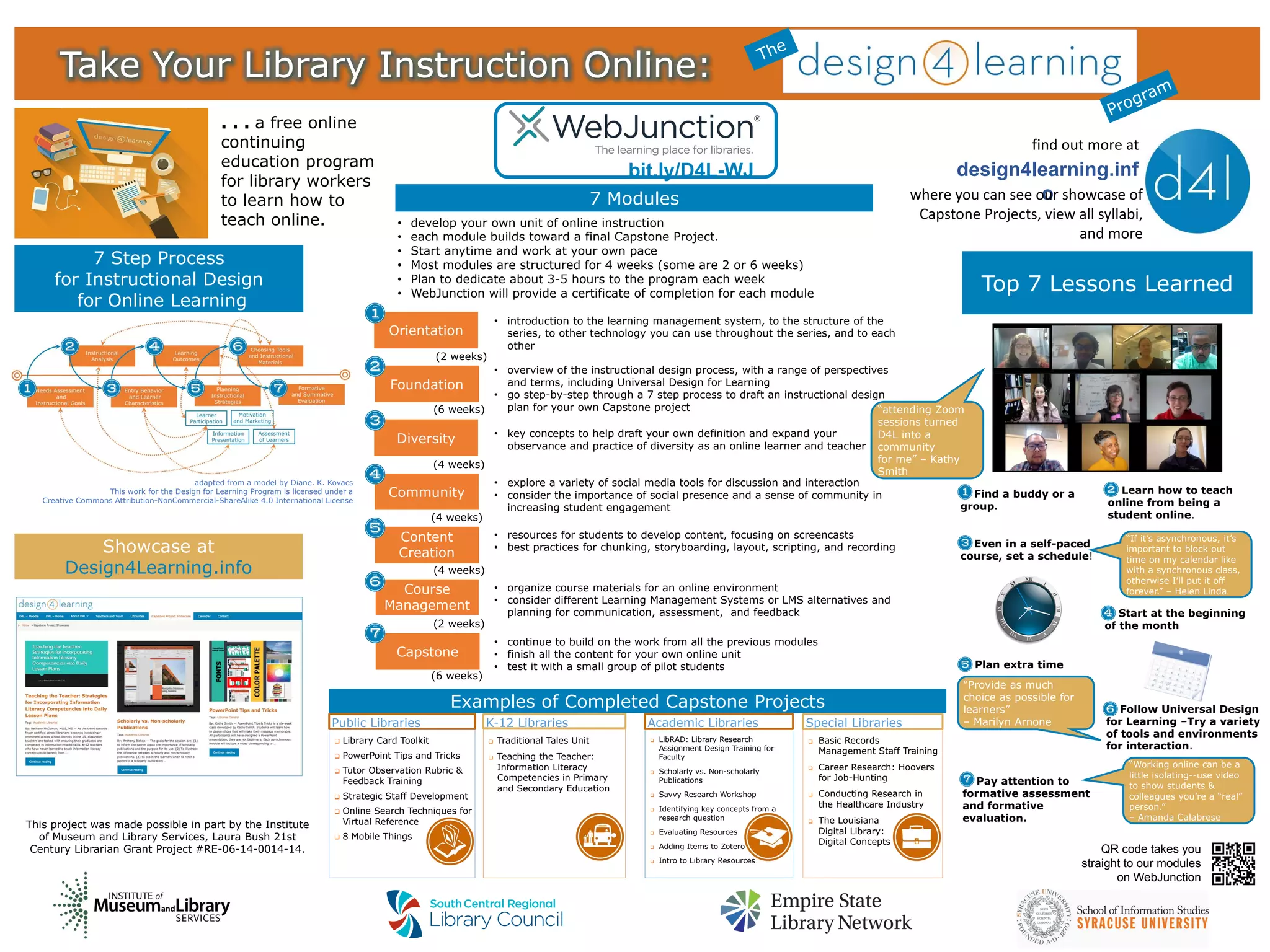
7 Step Process
for Instructional Design
for Online Learning
. . . a free online
continuing
education program
for library workers
to learn how to
teach online.
design4learning.inf
o
find out more at
where you can see our showcase of
Capstone Projects, view all syllabi,
and more
Showcase at
Design4Learning.info
Orientation
Foundation
Diversity
Course
Management
Capstone
Content
Creation
Community
Take Your Library Instruction Online:
• introduction to the learning management system, to the structure of the
series, to other technology you can use throughout the series, and to each
other
• overview of the instructional design process, with a range of perspectives
and terms, including Universal Design for Learning
• go step-by-step through a 7 step process to draft an instructional design
plan for your own Capstone project
• develop your own unit of online instruction
• each module builds toward a final Capstone Project.
• Start anytime and work at your own pace
• Most modules are structured for 4 weeks (some are 2 or 6 weeks)
• Plan to dedicate about 3-5 hours to the program each week
• WebJunction will provide a certificate of completion for each module
• key concepts to help draft your own definition and expand your
observance and practice of diversity as an online learner and teacher
• explore a variety of social media tools for discussion and interaction
• consider the importance of social presence and a sense of community in
increasing student engagement
• resources for students to develop content, focusing on screencasts
• best practices for chunking, storyboarding, layout, scripting, and recording
• organize course materials for an online environment
• consider different Learning Management Systems or LMS alternatives and
planning for communication, assessment, and feedback
• continue to build on the work from all the previous modules
• finish all the content for your own online unit
• test it with a small group of pilot students
(2 weeks)
(6 weeks)
(4 weeks)
(4 weeks)
(4 weeks)
(2 weeks)
(6 weeks)
Top 7 Lessons Learned
7. Pay attention to
formative assessment
and formative
evaluation.
1. Find a buddy or a
group.
2. Learn how to teach
online from being a
student online.
5. Plan extra time
6. Follow Universal Design
for Learning –Try a variety
of tools and environments
for interaction.
“Provide as much
choice as possible for
learners”
– Marilyn Arnone
“attending Zoom
sessions turned
D4L into a
community
for me” – Kathy
Smith
“If it’s asynchronous, it’s
important to block out
time on my calendar like
with a synchronous class,
otherwise I’ll put it off
forever.” – Helen Linda
“Working online can be a
little isolating--use video
to show students &
colleagues you’re a “real”
person.”
– Amanda Calabrese
This project was made possible in part by the Institute
of Museum and Library Services, Laura Bush 21st
Century Librarian Grant Project #RE-06-14-0014-14.
adapted from a model by Diane. K. Kovacs
This work for the Design for Learning Program is licensed under a
Creative Commons Attribution-NonCommercial-ShareAlike 4.0 International License
7 Modules
Examples of Completed Capstone Projects
Public Libraries
 Library Card Toolkit
 PowerPoint Tips and Tricks
 Tutor Observation Rubric &
Feedback Training
 Strategic Staff Development
 Online Search Techniques for
Virtual Reference
 8 Mobile Things
Special Libraries
 Basic Records
Management Staff Training
 Career Research: Hoovers
for Job-Hunting
 Conducting Research in
the Healthcare Industry
 The Louisiana
Digital Library:
Digital Concepts
 LibRAD: Library Research
Assignment Design Training for
Faculty
 Scholarly vs. Non-scholarly
Publications
 Savvy Research Workshop
 Identifying key concepts from a
research question
 Evaluating Resources
 Adding Items to Zotero
 Intro to Library Resources
K-12 Libraries Academic Libraries
 Traditional Tales Unit
 Teaching the Teacher:
Information Literacy
Competencies in Primary
and Secondary Education
bit.ly/D4L-WJ
QR code takes you
straight to our modules
on WebJunction

Take Your Library Instruction Online! The Design for Learning Program

  • 1.
    4. Start atthe beginning of the month 3. Even in a self-paced course, set a schedule! 7 Step Process for Instructional Design for Online Learning . . . a free online continuing education program for library workers to learn how to teach online. design4learning.inf o find out more at where you can see our showcase of Capstone Projects, view all syllabi, and more Showcase at Design4Learning.info Orientation Foundation Diversity Course Management Capstone Content Creation Community Take Your Library Instruction Online: • introduction to the learning management system, to the structure of the series, to other technology you can use throughout the series, and to each other • overview of the instructional design process, with a range of perspectives and terms, including Universal Design for Learning • go step-by-step through a 7 step process to draft an instructional design plan for your own Capstone project • develop your own unit of online instruction • each module builds toward a final Capstone Project. • Start anytime and work at your own pace • Most modules are structured for 4 weeks (some are 2 or 6 weeks) • Plan to dedicate about 3-5 hours to the program each week • WebJunction will provide a certificate of completion for each module • key concepts to help draft your own definition and expand your observance and practice of diversity as an online learner and teacher • explore a variety of social media tools for discussion and interaction • consider the importance of social presence and a sense of community in increasing student engagement • resources for students to develop content, focusing on screencasts • best practices for chunking, storyboarding, layout, scripting, and recording • organize course materials for an online environment • consider different Learning Management Systems or LMS alternatives and planning for communication, assessment, and feedback • continue to build on the work from all the previous modules • finish all the content for your own online unit • test it with a small group of pilot students (2 weeks) (6 weeks) (4 weeks) (4 weeks) (4 weeks) (2 weeks) (6 weeks) Top 7 Lessons Learned 7. Pay attention to formative assessment and formative evaluation. 1. Find a buddy or a group. 2. Learn how to teach online from being a student online. 5. Plan extra time 6. Follow Universal Design for Learning –Try a variety of tools and environments for interaction. “Provide as much choice as possible for learners” – Marilyn Arnone “attending Zoom sessions turned D4L into a community for me” – Kathy Smith “If it’s asynchronous, it’s important to block out time on my calendar like with a synchronous class, otherwise I’ll put it off forever.” – Helen Linda “Working online can be a little isolating--use video to show students & colleagues you’re a “real” person.” – Amanda Calabrese This project was made possible in part by the Institute of Museum and Library Services, Laura Bush 21st Century Librarian Grant Project #RE-06-14-0014-14. adapted from a model by Diane. K. Kovacs This work for the Design for Learning Program is licensed under a Creative Commons Attribution-NonCommercial-ShareAlike 4.0 International License 7 Modules Examples of Completed Capstone Projects Public Libraries  Library Card Toolkit  PowerPoint Tips and Tricks  Tutor Observation Rubric & Feedback Training  Strategic Staff Development  Online Search Techniques for Virtual Reference  8 Mobile Things Special Libraries  Basic Records Management Staff Training  Career Research: Hoovers for Job-Hunting  Conducting Research in the Healthcare Industry  The Louisiana Digital Library: Digital Concepts  LibRAD: Library Research Assignment Design Training for Faculty  Scholarly vs. Non-scholarly Publications  Savvy Research Workshop  Identifying key concepts from a research question  Evaluating Resources  Adding Items to Zotero  Intro to Library Resources K-12 Libraries Academic Libraries  Traditional Tales Unit  Teaching the Teacher: Information Literacy Competencies in Primary and Secondary Education bit.ly/D4L-WJ QR code takes you straight to our modules on WebJunction