TACKLING
SALESFORCE
TECHNICAL
DEBT
OZ LAVEE, CTO
Hosted by:
All lines are
muted for
optimal sound
quality
Submit your
questions in
the Q&A Box
This
session
is being
recorded
AGENDA
Technical Debt in Salesforce
—
The Cost of Technical Debt
—
Common Indicators of Technical
Debt
—
How to Reduce Technical Debt?
—
Live Demo
4
TECHNICAL DEBT: DEFINITION
In software development, technical
debt is the implied cost of additional
rework caused by choosing an easy
(limited) solution now, instead of
using a better approach that would
take longer.
https://en.wikipedia.org/wiki/Technical_debt
Do not avoid technical
debt
Control Technical Debt
If you have
everything
under control,
you’re not
moving fast
enough
Mario Andretti
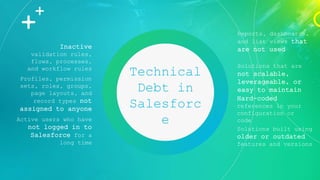
Technical
Debt in
Salesforc
e
Profiles, permission
sets, roles, groups,
page layouts, and
record types not
assigned to anyone
Inactive
validation rules,
flows, processes,
and workflow rules
Active users who have
not logged in to
Salesforce for a
long time
Reports, dashboards,
and list views that
are not used
Solutions built using
older or outdated
features and versions
Solutions that are
not scalable,
leverageable, or
easy to maintain
Hard-coded
references in your
configuration or
code
6
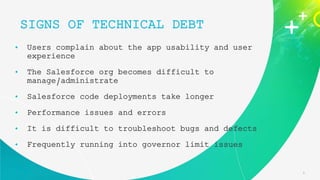
• Users complain about the app usability and user
experience
• The Salesforce org becomes difficult to
manage/administrate
• Salesforce code deployments take longer
• Performance issues and errors
• It is difficult to troubleshoot bugs and defects
• Frequently running into governor limit issues
SIGNS OF TECHNICAL DEBT
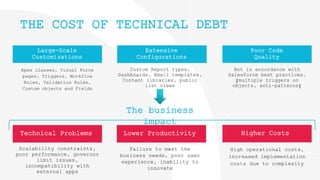
Poor Code
Quality
Extensive
Configurations
Large-Scale
Customizations
Apex classes, Visual Force
pages, Triggers, Workflow
Rules, Validation Rules,
Custom objects and Fields
Custom Report types,
Dashboards, Email templates,
Content libraries, public
list views
Not in accordance with
Salesforce best practices.
(multiple triggers on
objects, anti-patterns)
THE COST OF TECHNICAL DEBT
The business
impact
Technical Problems Lower Productivity Higher Costs
Scalability constraints,
poor performance, governor
limit issues,
incompatibility with
external apps
Failure to meet the
business needs, poor user
experience, inability to
innovate
High operational costs,
increased implementation
costs due to complexity
8
Poll Question
#1
Do you feel that
your Salesforce
org suffers from
technical debt?
9
WHY DOES IT HAPPEN?
So many little reasons…
• Project delivery pressure – quick and easy solutions to
meet deadlines
• Salesforce is so easy to customize, so why not?
• Siloed development processes / lack of governance
• The “if it isn’t broken, don’t fix it” approach
• Inherited an org with outdated and unused features and
functionalities
• Poor understanding of Salesforce design principles and
architectural best practices (anti-patterns)
• ‘Clean-up’ takes time and resources that admins, developers
and decision makers simply don’t have!
and let’s admit it – there is always something more
10
It’s time
to
take
action!
Reduce Salesforce
Technical Debt
In 4 steps
11
Poll Question
#2
Do you
proactively
tackle technical
debt?
12
Map Out the Key Business
Processes Managed in Salesforce
Today
o Create a list of the key decision makers and
“Salesforce super-users” from different teams
(Sales, Marketing, Service, etc.)
o Set meetings with each team to map the
processes they use
o Understand process variations for specific
scenarios
(Learn how variations occur for different product lines, team
members, etc.)
o Document your findings
1
13
Revisit users, roles and
permissions
o Control system administrator permissions
Remove people who are not qualified, and review with them how
a different access level can still give them all the
permissions they need
o Avoid using shared licenses
Various members login with the same username and password
o Use of Salesforce Optimizer
It will help you quickly assess your org’s sharing rules,
admin permissions, profiles, etc.
2
Some integrations are not represented as an installed
app.
Put on your detective hat to ensure nothing is missing!
Speak to all system admins, developers or CRM management
to ensure you have a full list of active integrations.
14
3 Manage your integrations, Apps and
syncs
o Find your Salesforce integrations
Enter your “Setup” and go to “Installed Packages”, where you
can quickly access your third-party apps
o Audit Your Existing Integrations
Understand (from the business users) what they are used for
and make sure they are configured properly
o Identify and Implement Needed Modifications
15
4
o Make a list of all standard and custom
objects being used in your Salesforce
instance
o Organize it into categories that make
sense to your team.
Here is our suggestion:
o Page Layouts
o List views
o Salesforce Apps
o Homepage
o Fields
o AppExchange Apps
o Reports
Clean up your Org!
Clean up time!!!
16
REDUCE TECHNICAL DEBT
WITH PANAYA FORESIGHT
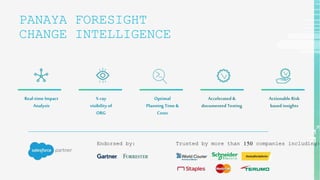
PANAYA FORESIGHT
CHANGE INTELLIGENCE
Endorsed by: Trusted by more than 150 companies including:
Real-time Impact
Analysis
X-ray
visibility of
ORG
Optimal
Planning Time &
Costs
Accelerated &
documented Testing
Actionable Risk
based insights
18
ASEESS YOUR ORG
Use the Org
Overview dashboard to
quickly get valuable
insights into your
Production org and make
educated decisions about
improving its maintenance
and health.
19
QUICKLY IDENTIFY TECHNICAL DEBT
Gain immediate access to
a complete list of fields
with related Technical
Debt indicators.
20
CLEAN UP YOUR ORG – WITHOUT RISK
Scope and analyze any
component you are about
to remove to avoid
inadvertently deleting
functionality that’s
still in use
+
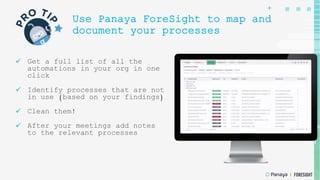
Use Panaya ForeSight to map and
document your processes
 Get a full list of all the
automations in your org in one
click
 Identify processes that are not
in use (based on your findings)
 Clean them!
 After your meetings add notes
to the relevant processes
22
LIVE DEMO
WATCH FORESIGHT IN
ACTION
Book your personalized
Org clean-up
demo
Panaya.com/start-demo/salesforce
Thank you
And have an easy
and productive
cleaning!
Panaya.com
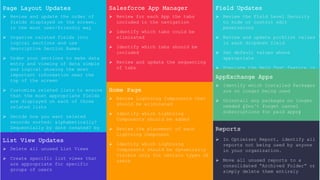
Page Layout Updates
 Review and update the order of
fields displayed on the screen,
in the most user-friendly way
 Organize related fields into
logical sections and use
descriptive Section Names
 Order your sections to make data
entry and viewing of data simple
and logical showing the most
important information near the
top of the screen
 Customize related lists to ensure
that the most appropriate fields
are displayed on each of those
related lists
 Decide how you want related
records sorted: alphabetically?
Sequentially by date created? by
last modified? Etc.
List View Updates
 Delete all unused List Views
 Create specific list views that
are appropriate for specific
groups of users
Salesforce App Manager
 Review for each App the tabs
included in the navigation
 Identify which tabs could be
eliminated
 Identify which tabs should be
included
 Review and update the sequencing
of tabs
Home Page
 Review Lightning Components that
should be eliminated
 Identify which Lightning
Components should be added
 Review the placement of each
Lightning Component
 Identify which Lightning
Components should be dynamically
visible only for certain types of
users
Field Updates
 Review the Field Level Security
to hide or control edit
permissions
 Review and update picklist values
in each dropdown field
 Set default values where
appropriate
 Populate the Help Text feature in
each field that your users find
confusing
AppExchange Apps
 Identify which Installed Packages
are no longer being used
 Uninstall any packages no longer
needed (Don’t forget cancel
subscriptions for paid apps)
Reports
 In Optimizer Report, identify all
reports not being used by anyone
in your organization.
 Move all unused reports to a
consolidated “Archived Folder” or
simply delete them entirely

Tackling Salesforce Technical Debt

  • 1.
  • 2.
    All lines are mutedfor optimal sound quality Submit your questions in the Q&A Box This session is being recorded
  • 3.
    AGENDA Technical Debt inSalesforce — The Cost of Technical Debt — Common Indicators of Technical Debt — How to Reduce Technical Debt? — Live Demo
  • 4.
    4 TECHNICAL DEBT: DEFINITION Insoftware development, technical debt is the implied cost of additional rework caused by choosing an easy (limited) solution now, instead of using a better approach that would take longer. https://en.wikipedia.org/wiki/Technical_debt Do not avoid technical debt Control Technical Debt If you have everything under control, you’re not moving fast enough Mario Andretti
  • 5.
    Technical Debt in Salesforc e Profiles, permission sets,roles, groups, page layouts, and record types not assigned to anyone Inactive validation rules, flows, processes, and workflow rules Active users who have not logged in to Salesforce for a long time Reports, dashboards, and list views that are not used Solutions built using older or outdated features and versions Solutions that are not scalable, leverageable, or easy to maintain Hard-coded references in your configuration or code
  • 6.
    6 • Users complainabout the app usability and user experience • The Salesforce org becomes difficult to manage/administrate • Salesforce code deployments take longer • Performance issues and errors • It is difficult to troubleshoot bugs and defects • Frequently running into governor limit issues SIGNS OF TECHNICAL DEBT
  • 7.
    Poor Code Quality Extensive Configurations Large-Scale Customizations Apex classes,Visual Force pages, Triggers, Workflow Rules, Validation Rules, Custom objects and Fields Custom Report types, Dashboards, Email templates, Content libraries, public list views Not in accordance with Salesforce best practices. (multiple triggers on objects, anti-patterns) THE COST OF TECHNICAL DEBT The business impact Technical Problems Lower Productivity Higher Costs Scalability constraints, poor performance, governor limit issues, incompatibility with external apps Failure to meet the business needs, poor user experience, inability to innovate High operational costs, increased implementation costs due to complexity
  • 8.
    8 Poll Question #1 Do youfeel that your Salesforce org suffers from technical debt?
  • 9.
    9 WHY DOES ITHAPPEN? So many little reasons… • Project delivery pressure – quick and easy solutions to meet deadlines • Salesforce is so easy to customize, so why not? • Siloed development processes / lack of governance • The “if it isn’t broken, don’t fix it” approach • Inherited an org with outdated and unused features and functionalities • Poor understanding of Salesforce design principles and architectural best practices (anti-patterns) • ‘Clean-up’ takes time and resources that admins, developers and decision makers simply don’t have! and let’s admit it – there is always something more
  • 10.
  • 11.
  • 12.
    12 Map Out theKey Business Processes Managed in Salesforce Today o Create a list of the key decision makers and “Salesforce super-users” from different teams (Sales, Marketing, Service, etc.) o Set meetings with each team to map the processes they use o Understand process variations for specific scenarios (Learn how variations occur for different product lines, team members, etc.) o Document your findings 1
  • 13.
    13 Revisit users, rolesand permissions o Control system administrator permissions Remove people who are not qualified, and review with them how a different access level can still give them all the permissions they need o Avoid using shared licenses Various members login with the same username and password o Use of Salesforce Optimizer It will help you quickly assess your org’s sharing rules, admin permissions, profiles, etc. 2
  • 14.
    Some integrations arenot represented as an installed app. Put on your detective hat to ensure nothing is missing! Speak to all system admins, developers or CRM management to ensure you have a full list of active integrations. 14 3 Manage your integrations, Apps and syncs o Find your Salesforce integrations Enter your “Setup” and go to “Installed Packages”, where you can quickly access your third-party apps o Audit Your Existing Integrations Understand (from the business users) what they are used for and make sure they are configured properly o Identify and Implement Needed Modifications
  • 15.
    15 4 o Make alist of all standard and custom objects being used in your Salesforce instance o Organize it into categories that make sense to your team. Here is our suggestion: o Page Layouts o List views o Salesforce Apps o Homepage o Fields o AppExchange Apps o Reports Clean up your Org! Clean up time!!!
  • 16.
  • 17.
    PANAYA FORESIGHT CHANGE INTELLIGENCE Endorsedby: Trusted by more than 150 companies including: Real-time Impact Analysis X-ray visibility of ORG Optimal Planning Time & Costs Accelerated & documented Testing Actionable Risk based insights
  • 18.
    18 ASEESS YOUR ORG Usethe Org Overview dashboard to quickly get valuable insights into your Production org and make educated decisions about improving its maintenance and health.
  • 19.
    19 QUICKLY IDENTIFY TECHNICALDEBT Gain immediate access to a complete list of fields with related Technical Debt indicators.
  • 20.
    20 CLEAN UP YOURORG – WITHOUT RISK Scope and analyze any component you are about to remove to avoid inadvertently deleting functionality that’s still in use
  • 21.
    + Use Panaya ForeSightto map and document your processes  Get a full list of all the automations in your org in one click  Identify processes that are not in use (based on your findings)  Clean them!  After your meetings add notes to the relevant processes
  • 22.
  • 23.
    Book your personalized Orgclean-up demo Panaya.com/start-demo/salesforce
  • 24.
    Thank you And havean easy and productive cleaning! Panaya.com
  • 25.
    Page Layout Updates Review and update the order of fields displayed on the screen, in the most user-friendly way  Organize related fields into logical sections and use descriptive Section Names  Order your sections to make data entry and viewing of data simple and logical showing the most important information near the top of the screen  Customize related lists to ensure that the most appropriate fields are displayed on each of those related lists  Decide how you want related records sorted: alphabetically? Sequentially by date created? by last modified? Etc. List View Updates  Delete all unused List Views  Create specific list views that are appropriate for specific groups of users Salesforce App Manager  Review for each App the tabs included in the navigation  Identify which tabs could be eliminated  Identify which tabs should be included  Review and update the sequencing of tabs Home Page  Review Lightning Components that should be eliminated  Identify which Lightning Components should be added  Review the placement of each Lightning Component  Identify which Lightning Components should be dynamically visible only for certain types of users Field Updates  Review the Field Level Security to hide or control edit permissions  Review and update picklist values in each dropdown field  Set default values where appropriate  Populate the Help Text feature in each field that your users find confusing AppExchange Apps  Identify which Installed Packages are no longer being used  Uninstall any packages no longer needed (Don’t forget cancel subscriptions for paid apps) Reports  In Optimizer Report, identify all reports not being used by anyone in your organization.  Move all unused reports to a consolidated “Archived Folder” or simply delete them entirely