Data Visualization
using Tableau
Raghu Kalyan Anna ICCTAC 2018
Agenda
• Github Integration
• Business Intelligence (BI)
• BI Magic Quadrant
• Popular Data Visualization Tools
• Tableau
• Tableau Hands On
• References
2
Github Integration
• Latest version of this presentation will be
definitely available in Github
• Along with PPT; Tableau session setup
document and Handout with Answers are
available here.
3
What is BI?
Business intelligence (BI) is a set of theories,
methodologies, architectures, and technologies that
transform raw data into meaningful and useful information
for business purposes. [Gnosis]
Business intelligence (BI) is an umbrella term that includes
the applications, infrastructure and tools, and best practices
that enable access to and analysis of information to
improve and optimize decisions and performance.
[Gartner]
4
What is BI? Contd..
A set of methodologies, processes, architectures, and
technologies that leverage the output of information
management processes for analysis, reporting,
performance management, and information delivery. [
Forrester]
Business Intelligence (BI) comprises the strategies and
technologies used by enterprises for the data analysis of
business information. BI technologies provide historical,
current and predictive views of business operations. [
Wikipedia]
5
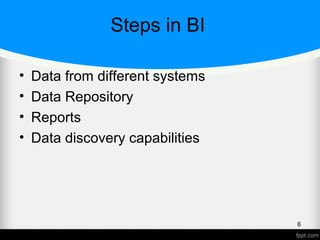
Steps in BI
• Data from different systems
• Data Repository
• Reports
• Data discovery capabilities
6
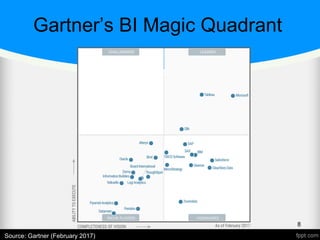
A word about Gartner
• Gartner is the world's leading information
technology research and advisory
company.
“We deliver the technology-related insight
necessary for our clients to make the right
decisions, every day” [Gartner]
7
8
Source: Gartner (February 2017)
Gartner’s BI Magic Quadrant
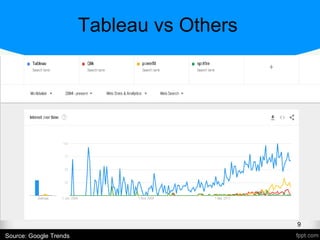
Tableau vs Others
9
Source: Google Trends
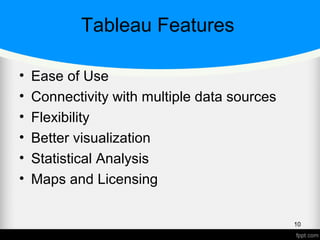
Tableau Features
• Ease of Use
• Connectivity with multiple data sources
• Flexibility
• Better visualization
• Statistical Analysis
• Maps and Licensing
10
Tableau Integrations
• Tableau Javascript API – excellent
integration with D3
• Tableau with R and Python using
• SCRIPT_BOOL
• SCRIPT_STR
• SCRIPT_INT
11
Dimensions and Measures
• Dimension
 Independent variable
 Discrete
 Also known as Categorical field
Example:- Month, Date
12
Dimensions and Measures Contd..
• Measure
 Dependent variable
 Aggregated field
 Continuous
 Also known as Metrics.
Example:- Profit (in numbers)
13
Tableau Products
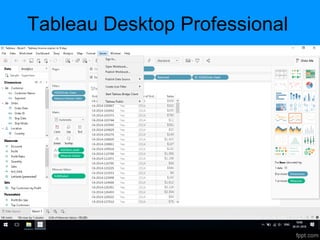
• Tableau Desktop – Develop and share
• Tableau Server – Enterprise level Web
• Tableau Online – BI in the cloud
• Tableau Reader – Free and only to view
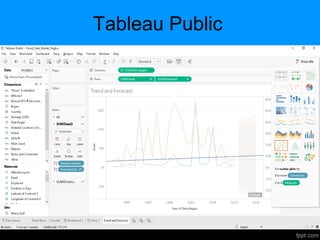
• Tableau Public – Free, publish interactive
online
• Tableau Desktop for Students – Starts
with 1 year free subscription
14
Tableau Data Types
• Boolean – True or False
• Whole Numbers – 200 or 30
• Decimal Numbers – 12.4
• Date/timestamp – Feb 1 2018 12:00 PM
• Text/String – Conference, IEEE
• Geographic Values – Country or Region
Name
15
Tableau Usage
• Connect to data
• Analyze data thru UI
• Create Visualization and Share
16
Tableau Menus
• File Menu
• Data Menu
• Worksheet Menu
• Dashboard Menu
• Story Menu
• Analysis Menu
17
Tableau Menus Contd..
• Map Menu
• Format Menu
• Server Menu
18
Tableau Public
Tableau Desktop Professional
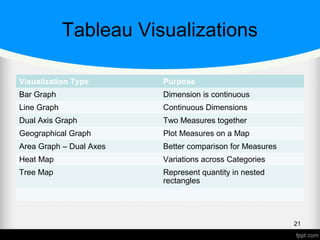
Tableau Visualizations
Visualization Type Purpose
Bar Graph Dimension is continuous
Line Graph Continuous Dimensions
Dual Axis Graph Two Measures together
Geographical Graph Plot Measures on a Map
Area Graph – Dual Axes Better comparison for Measures
Heat Map Variations across Categories
Tree Map Represent quantity in nested
rectangles
21
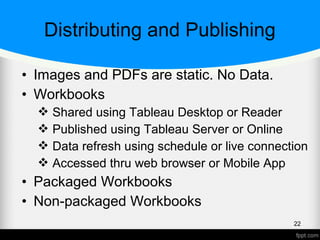
Distributing and Publishing
• Images and PDFs are static. No Data.
• Workbooks
 Shared using Tableau Desktop or Reader
 Published using Tableau Server or Online
 Data refresh using schedule or live connection
 Accessed thru web browser or Mobile App
• Packaged Workbooks
• Non-packaged Workbooks
22
Tableau Hands On
23
Getting Started
• Tableau Account
• Data Sources or workbooks downloaded
• Software installed – Any of
Tableau Public
Tableau Desktop
Tableau Desktop for Students
24
Saving and Publishing Data Sources
• Save Locally
• Publish to a Tableau Server or Tableau
Online
25
Hands On Demo
• Using the Data, create basic charts
• Sets, Filters, Cross Database Joins
• Trend Lines, Forecasting
• Dashboard and Story
• Maps, Calculations, Integrate with R
• Publish to Tableau Online, if account is
ready
26
Sets, Filters
• Session Exercise
• Any Data Set from provided list
• Create a Filter
• Create a Set and label it
27
Cross-Database Join
• Session Exercise
• Using Sample Superstore Orders and
Returns tables
• Create a Join – Inner or Left or Right
28
Data Blending
• Session Exercise
• Using Tableau datasets – Coffee chain
and Office City
• What kind of Join is this ?
29
Trend Lines, Forecasting
• Session Exercise
• Any existing Dataset
• Create Trend Line, Forecast from Analysis
Pane
• Exponential smoothing used internally for
Forecast
• Use Linear option for Trend Line
30
Dashboard and Story Points
• Session Exercise
• Illustrate using Tableau Public Earthquake
workbook
• Create additional Dashboard and Story
31
R integration
• Session Exercise
• Rstudio, Rconsole, Rserve library
• Table calculation to execute script using R
32
References
1. Gartner BI reports Reprint
2. Edureka Blog for Tableau
3. Tableau Learning
33

Tableau workshop during ICCTAC 2018

  • 1.
  • 2.
    Agenda • Github Integration •Business Intelligence (BI) • BI Magic Quadrant • Popular Data Visualization Tools • Tableau • Tableau Hands On • References 2
  • 3.
    Github Integration • Latestversion of this presentation will be definitely available in Github • Along with PPT; Tableau session setup document and Handout with Answers are available here. 3
  • 4.
    What is BI? Businessintelligence (BI) is a set of theories, methodologies, architectures, and technologies that transform raw data into meaningful and useful information for business purposes. [Gnosis] Business intelligence (BI) is an umbrella term that includes the applications, infrastructure and tools, and best practices that enable access to and analysis of information to improve and optimize decisions and performance. [Gartner] 4
  • 5.
    What is BI?Contd.. A set of methodologies, processes, architectures, and technologies that leverage the output of information management processes for analysis, reporting, performance management, and information delivery. [ Forrester] Business Intelligence (BI) comprises the strategies and technologies used by enterprises for the data analysis of business information. BI technologies provide historical, current and predictive views of business operations. [ Wikipedia] 5
  • 6.
    Steps in BI •Data from different systems • Data Repository • Reports • Data discovery capabilities 6
  • 7.
    A word aboutGartner • Gartner is the world's leading information technology research and advisory company. “We deliver the technology-related insight necessary for our clients to make the right decisions, every day” [Gartner] 7
  • 8.
    8 Source: Gartner (February2017) Gartner’s BI Magic Quadrant
  • 9.
  • 10.
    Tableau Features • Easeof Use • Connectivity with multiple data sources • Flexibility • Better visualization • Statistical Analysis • Maps and Licensing 10
  • 11.
    Tableau Integrations • TableauJavascript API – excellent integration with D3 • Tableau with R and Python using • SCRIPT_BOOL • SCRIPT_STR • SCRIPT_INT 11
  • 12.
    Dimensions and Measures •Dimension  Independent variable  Discrete  Also known as Categorical field Example:- Month, Date 12
  • 13.
    Dimensions and MeasuresContd.. • Measure  Dependent variable  Aggregated field  Continuous  Also known as Metrics. Example:- Profit (in numbers) 13
  • 14.
    Tableau Products • TableauDesktop – Develop and share • Tableau Server – Enterprise level Web • Tableau Online – BI in the cloud • Tableau Reader – Free and only to view • Tableau Public – Free, publish interactive online • Tableau Desktop for Students – Starts with 1 year free subscription 14
  • 15.
    Tableau Data Types •Boolean – True or False • Whole Numbers – 200 or 30 • Decimal Numbers – 12.4 • Date/timestamp – Feb 1 2018 12:00 PM • Text/String – Conference, IEEE • Geographic Values – Country or Region Name 15
  • 16.
    Tableau Usage • Connectto data • Analyze data thru UI • Create Visualization and Share 16
  • 17.
    Tableau Menus • FileMenu • Data Menu • Worksheet Menu • Dashboard Menu • Story Menu • Analysis Menu 17
  • 18.
    Tableau Menus Contd.. •Map Menu • Format Menu • Server Menu 18
  • 19.
  • 20.
  • 21.
    Tableau Visualizations Visualization TypePurpose Bar Graph Dimension is continuous Line Graph Continuous Dimensions Dual Axis Graph Two Measures together Geographical Graph Plot Measures on a Map Area Graph – Dual Axes Better comparison for Measures Heat Map Variations across Categories Tree Map Represent quantity in nested rectangles 21
  • 22.
    Distributing and Publishing •Images and PDFs are static. No Data. • Workbooks  Shared using Tableau Desktop or Reader  Published using Tableau Server or Online  Data refresh using schedule or live connection  Accessed thru web browser or Mobile App • Packaged Workbooks • Non-packaged Workbooks 22
  • 23.
  • 24.
    Getting Started • TableauAccount • Data Sources or workbooks downloaded • Software installed – Any of Tableau Public Tableau Desktop Tableau Desktop for Students 24
  • 25.
    Saving and PublishingData Sources • Save Locally • Publish to a Tableau Server or Tableau Online 25
  • 26.
    Hands On Demo •Using the Data, create basic charts • Sets, Filters, Cross Database Joins • Trend Lines, Forecasting • Dashboard and Story • Maps, Calculations, Integrate with R • Publish to Tableau Online, if account is ready 26
  • 27.
    Sets, Filters • SessionExercise • Any Data Set from provided list • Create a Filter • Create a Set and label it 27
  • 28.
    Cross-Database Join • SessionExercise • Using Sample Superstore Orders and Returns tables • Create a Join – Inner or Left or Right 28
  • 29.
    Data Blending • SessionExercise • Using Tableau datasets – Coffee chain and Office City • What kind of Join is this ? 29
  • 30.
    Trend Lines, Forecasting •Session Exercise • Any existing Dataset • Create Trend Line, Forecast from Analysis Pane • Exponential smoothing used internally for Forecast • Use Linear option for Trend Line 30
  • 31.
    Dashboard and StoryPoints • Session Exercise • Illustrate using Tableau Public Earthquake workbook • Create additional Dashboard and Story 31
  • 32.
    R integration • SessionExercise • Rstudio, Rconsole, Rserve library • Table calculation to execute script using R 32
  • 33.
    References 1. Gartner BIreports Reprint 2. Edureka Blog for Tableau 3. Tableau Learning 33