Tableau
Desktop & Server
Visually Analyze and Share Your
Data
What is Tableau?
2
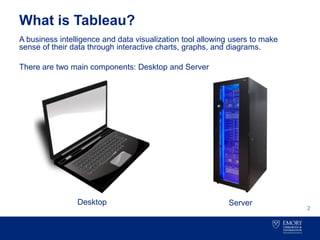
A business intelligence and data visualization tool allowing users to make
sense of their data through interactive charts, graphs, and diagrams.
There are two main components: Desktop and Server
Desktop Server
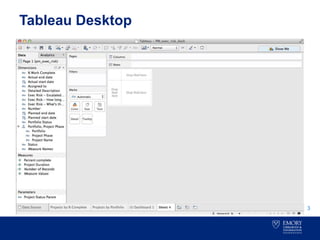
Tableau Desktop
3
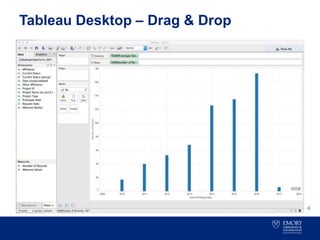
Tableau Desktop – Drag & Drop
4
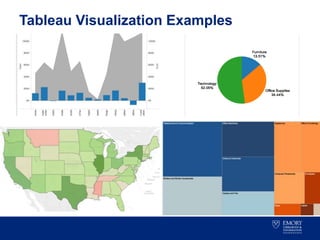
Tableau Visualization Examples
5
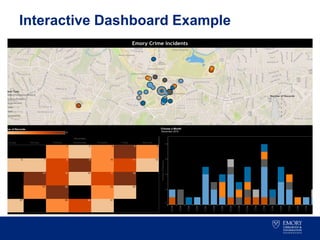
Interactive Dashboard Example
6
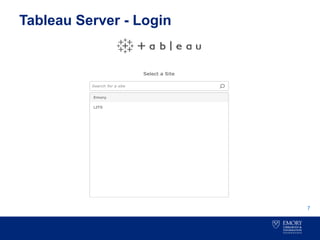
Tableau Server - Login
7
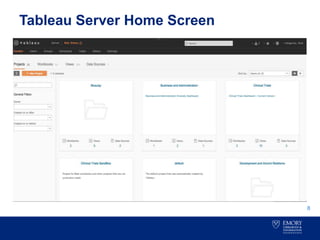
Tableau Server Home Screen
8
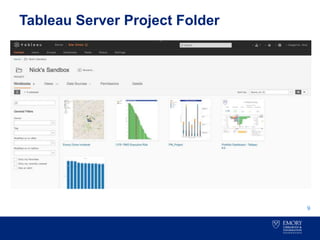
Tableau Server Project Folder
9
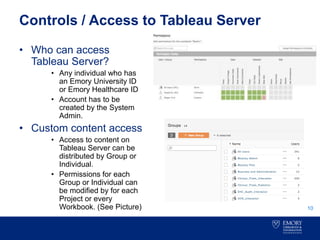
Controls / Access to Tableau Server
10
• Who can access
Tableau Server?
• Any individual who has
an Emory University ID
or Emory Healthcare ID
• Account has to be
created by the System
Admin.
• Custom content access
• Access to content on
Tableau Server can be
distributed by Group or
Individual.
• Permissions for each
Group or Individual can
be modified by for each
Project or every
Workbook. (See Picture)
Features of Tableau Desktop and Server
Desktop:
• Connect to and aggregate data.
• Flat files
• Databases
• Perform Joins and Blends
• Create insightful analysis.
• Drag and Drop functionality makes it easy to add and take away fields.
• Tell compelling stories with your data.
• Write custom calculations within your visualizations.
• Set up filters.
• Requires purchase of a license
• Year 1: $1,500 (Software 1,200 & 300 Maintenance)
• Year 2 & Beyond: $300 (Just Maintenance)
Server:
• Share insights and information.
• Share data, analyses, and visuals across all of Emory.
• Get feedback.
• Control access
• Server allows you to define who has access and at what level.
• Groups can be defined to quickly distribute access to large groups.
• Licenses for uploading content to share with others.
• Publisher License - $2,500 per year, billed monthly.
11
Support / Project Initiation
12
Tableau Licenses
• Both Desktop and Server Licenses are acquired centrally by
Emory’s Tableau Server Administrator.
– Requirements:
» Complete online Tableau Request Form.
» Provide a smart key for the hosting fee.
Support
• Library and Information Technology Services (LITS)
» Email and phone support during working hours.
• emorytableau-help@listserv.cc.emory.edu
» Bi-Annual upgrades to Tableau Server to add new features
and improvements.
Tableau
13
Questions

Tableau overview presentation

  • 1.
    Tableau Desktop & Server VisuallyAnalyze and Share Your Data
  • 2.
    What is Tableau? 2 Abusiness intelligence and data visualization tool allowing users to make sense of their data through interactive charts, graphs, and diagrams. There are two main components: Desktop and Server Desktop Server
  • 3.
  • 4.
    Tableau Desktop –Drag & Drop 4
  • 5.
  • 6.
  • 7.
  • 8.
  • 9.
  • 10.
    Controls / Accessto Tableau Server 10 • Who can access Tableau Server? • Any individual who has an Emory University ID or Emory Healthcare ID • Account has to be created by the System Admin. • Custom content access • Access to content on Tableau Server can be distributed by Group or Individual. • Permissions for each Group or Individual can be modified by for each Project or every Workbook. (See Picture)
  • 11.
    Features of TableauDesktop and Server Desktop: • Connect to and aggregate data. • Flat files • Databases • Perform Joins and Blends • Create insightful analysis. • Drag and Drop functionality makes it easy to add and take away fields. • Tell compelling stories with your data. • Write custom calculations within your visualizations. • Set up filters. • Requires purchase of a license • Year 1: $1,500 (Software 1,200 & 300 Maintenance) • Year 2 & Beyond: $300 (Just Maintenance) Server: • Share insights and information. • Share data, analyses, and visuals across all of Emory. • Get feedback. • Control access • Server allows you to define who has access and at what level. • Groups can be defined to quickly distribute access to large groups. • Licenses for uploading content to share with others. • Publisher License - $2,500 per year, billed monthly. 11
  • 12.
    Support / ProjectInitiation 12 Tableau Licenses • Both Desktop and Server Licenses are acquired centrally by Emory’s Tableau Server Administrator. – Requirements: » Complete online Tableau Request Form. » Provide a smart key for the hosting fee. Support • Library and Information Technology Services (LITS) » Email and phone support during working hours. • emorytableau-help@listserv.cc.emory.edu » Bi-Annual upgrades to Tableau Server to add new features and improvements.
  • 13.