Dr. Francisco M. Gonzalez-Longatt, fglongatt@ieee.org .Copyright © 2009 1/23
Allrightsreserved.Nopartofthispublicationmaybereproducedordistributedinanyformwithoutpermissionoftheauthor.
Copyright©2009.http:www.fglongatt.org.ve
Francisco M. Gonzalez-Longatt, Dr.Sc
Manchester, UK, September, 2009
Exercise:
Creating and Using Study Cases
P.M. Anderson 9 bus
Dr. Francisco M. Gonzalez-Longatt, fglongatt@ieee.org .Copyright © 2009 2/23
Allrightsreserved.Nopartofthispublicationmaybereproducedordistributedinanyformwithoutpermissionoftheauthor.
Copyright©2009.http:www.fglongatt.org.ve
This tutorial describes how to create a Study case for
simulations of the dynamic behavior of P.M. Anderson 9
bus test system.
Exercise:
Creating and Using Study Cases
P.M. Anderson 9 bus
Francisco M. Gonzalez-Longatt, Dr.Sc
fglogatt@fglongatt.org.ve
Manchester, September 2009
Dr. Francisco M. Gonzalez-Longatt, fglongatt@ieee.org .Copyright © 2009 3/23
Allrightsreserved.Nopartofthispublicationmaybereproducedordistributedinanyformwithoutpermissionoftheauthor.
Copyright©2009.http:www.fglongatt.org.ve
1. Introduction
Dr. Francisco M. Gonzalez-Longatt, fglongatt@ieee.org .Copyright © 2009 4/23
Allrightsreserved.Nopartofthispublicationmaybereproducedordistributedinanyformwithoutpermissionoftheauthor.
Copyright©2009.http:www.fglongatt.org.ve
1. Introduction
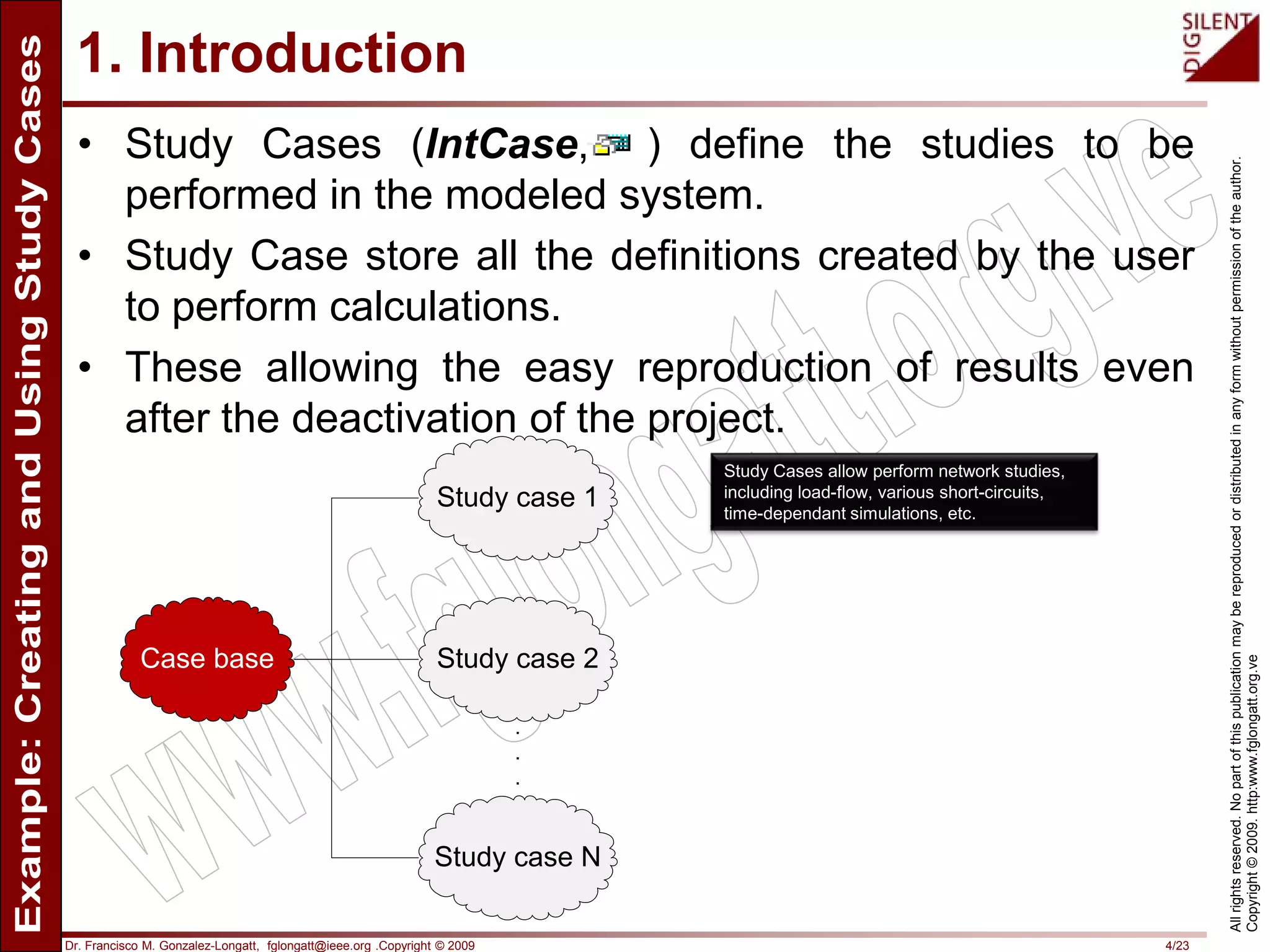
• Study Cases (IntCase, ) define the studies to be
performed in the modeled system.
• Study Case store all the definitions created by the user
to perform calculations.
• These allowing the easy reproduction of results even
after the deactivation of the project.
Case base
Study case 1
Study case 2
Study case N
.
.
.
Study Cases allow perform network studies,
including load-flow, various short-circuits,
time-dependant simulations, etc.
Dr. Francisco M. Gonzalez-Longatt, fglongatt@ieee.org .Copyright © 2009 5/23
Allrightsreserved.Nopartofthispublicationmaybereproducedordistributedinanyformwithoutpermissionoftheauthor.
Copyright©2009.http:www.fglongatt.org.ve
1. Introduction
• PowerFactory allow use of the objects stored inside
them objects to recognize:
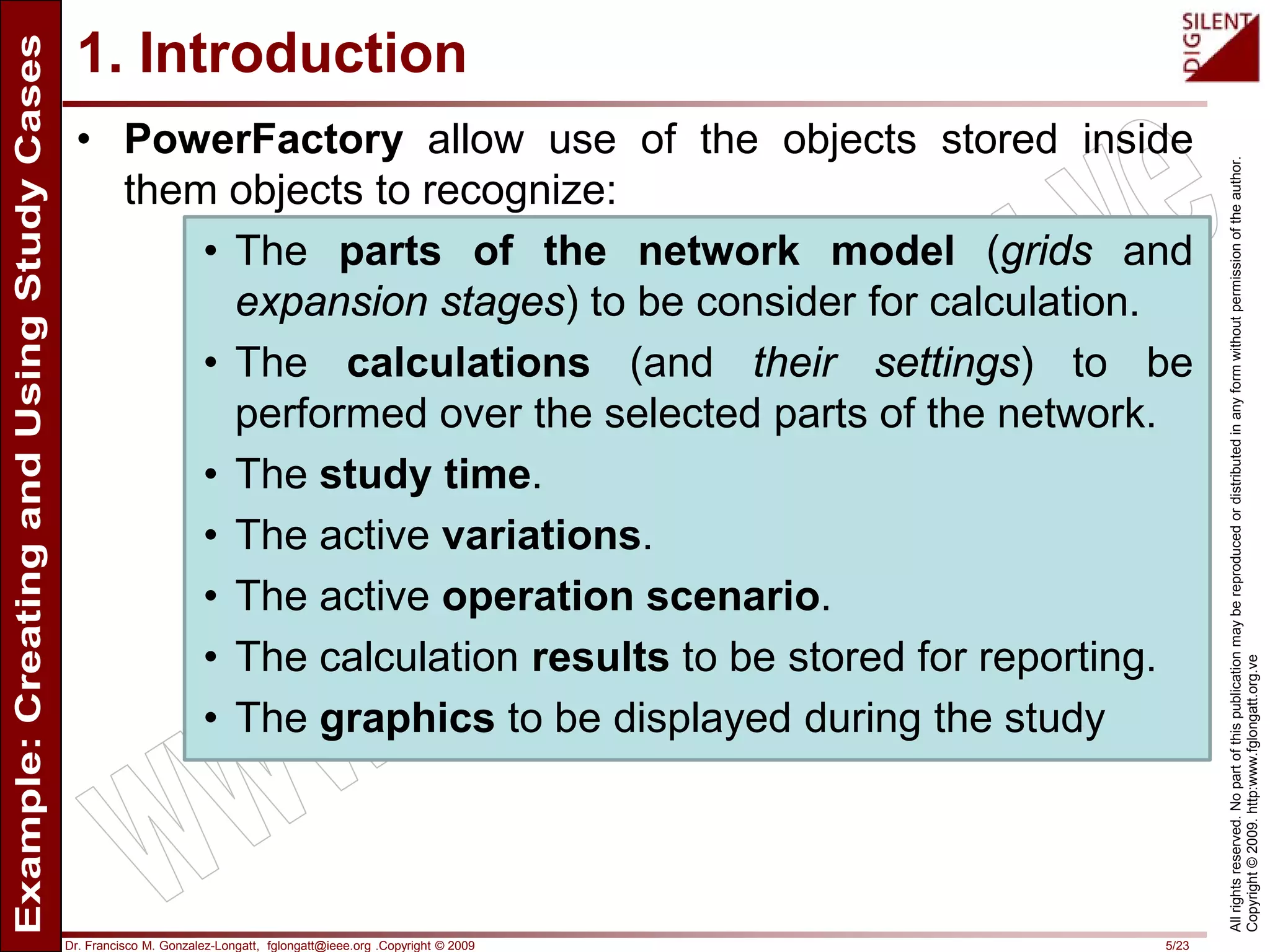
• The parts of the network model (grids and
expansion stages) to be consider for calculation.
• The calculations (and their settings) to be
performed over the selected parts of the network.
• The study time.
• The active variations.
• The active operation scenario.
• The calculation results to be stored for reporting.
• The graphics to be displayed during the study
Dr. Francisco M. Gonzalez-Longatt, fglongatt@ieee.org .Copyright © 2009 6/23
Allrightsreserved.Nopartofthispublicationmaybereproducedordistributedinanyformwithoutpermissionoftheauthor.
Copyright©2009.http:www.fglongatt.org.ve
1. Introduction
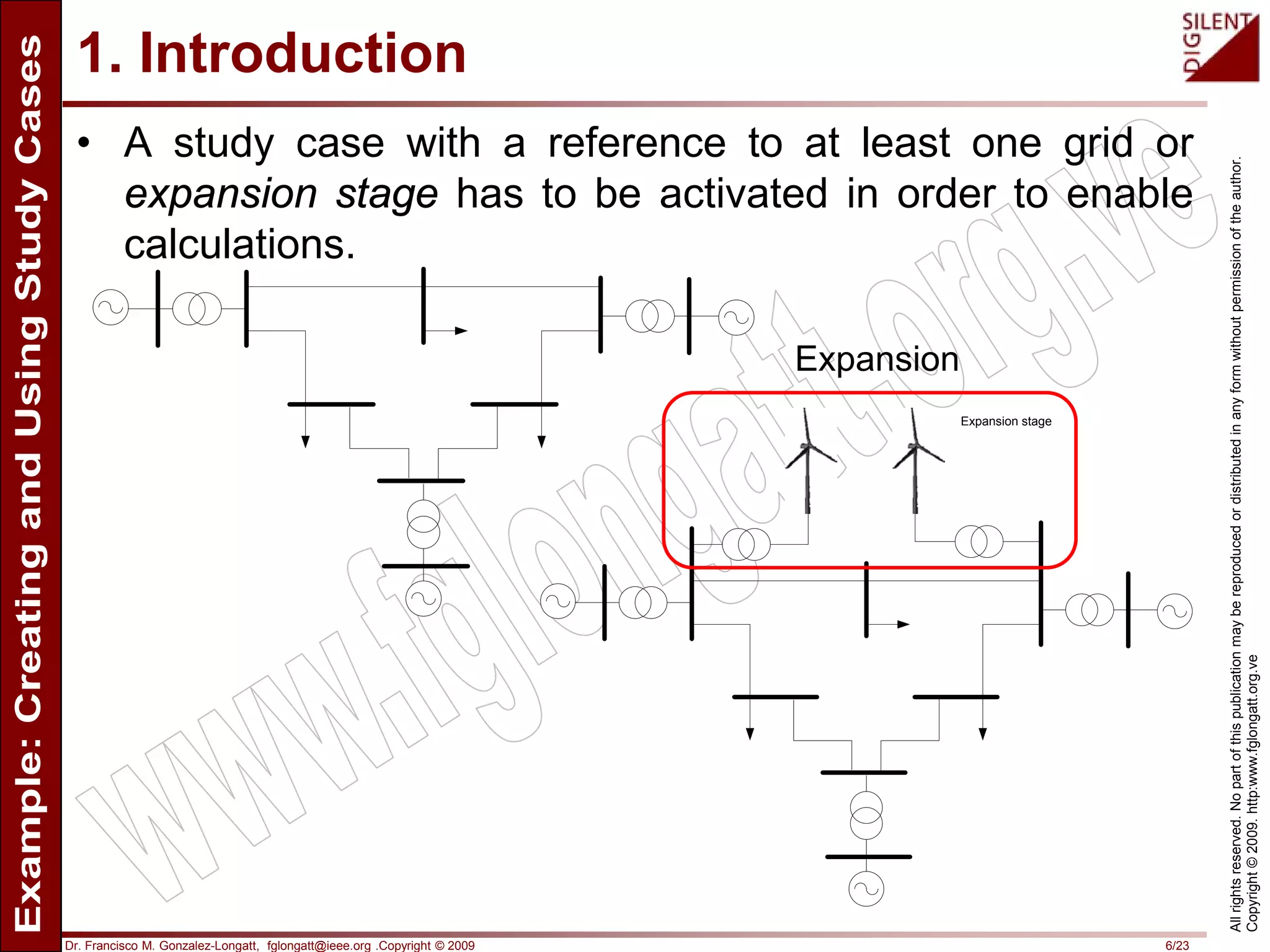
• A study case with a reference to at least one grid or
expansion stage has to be activated in order to enable
calculations.
Expansion stage
Expansion
Dr. Francisco M. Gonzalez-Longatt, fglongatt@ieee.org .Copyright © 2009 7/23
Allrightsreserved.Nopartofthispublicationmaybereproducedordistributedinanyformwithoutpermissionoftheauthor.
Copyright©2009.http:www.fglongatt.org.ve
1. Introduction
• A project that contains more than one grid, which has
several expansion stages for design alternatives, or
which uses different operation scenarios to model the
various conditions under which the system should
operate, requires multiple study cases.
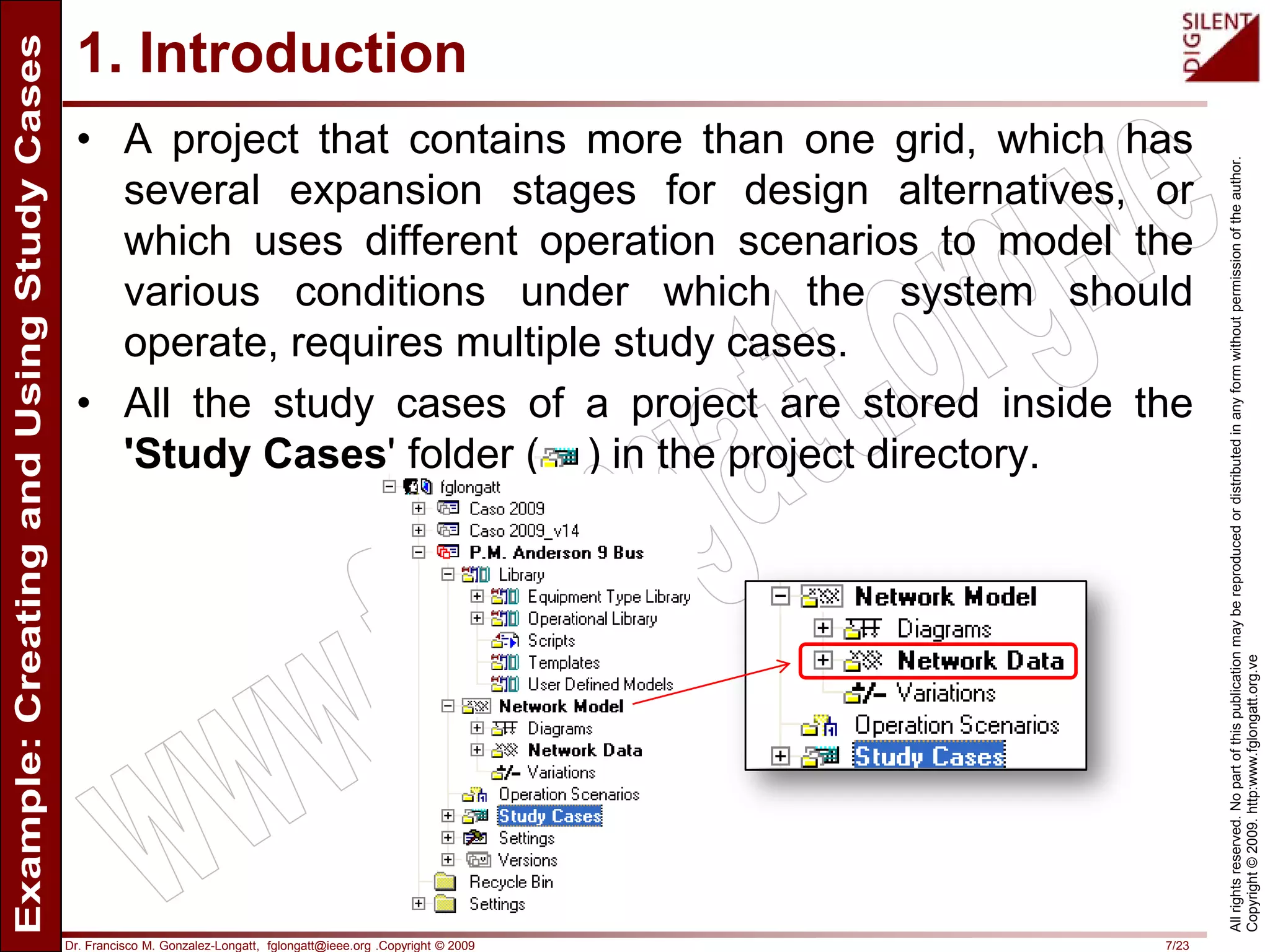
• All the study cases of a project are stored inside the
'Study Cases' folder ( ) in the project directory.
Dr. Francisco M. Gonzalez-Longatt, fglongatt@ieee.org .Copyright © 2009 8/23
Allrightsreserved.Nopartofthispublicationmaybereproducedordistributedinanyformwithoutpermissionoftheauthor.
Copyright©2009.http:www.fglongatt.org.ve
2. Creating a study
case
Dr. Francisco M. Gonzalez-Longatt, fglongatt@ieee.org .Copyright © 2009 9/23
Allrightsreserved.Nopartofthispublicationmaybereproducedordistributedinanyformwithoutpermissionoftheauthor.
Copyright©2009.http:www.fglongatt.org.ve
2. Creating and Using Study Cases
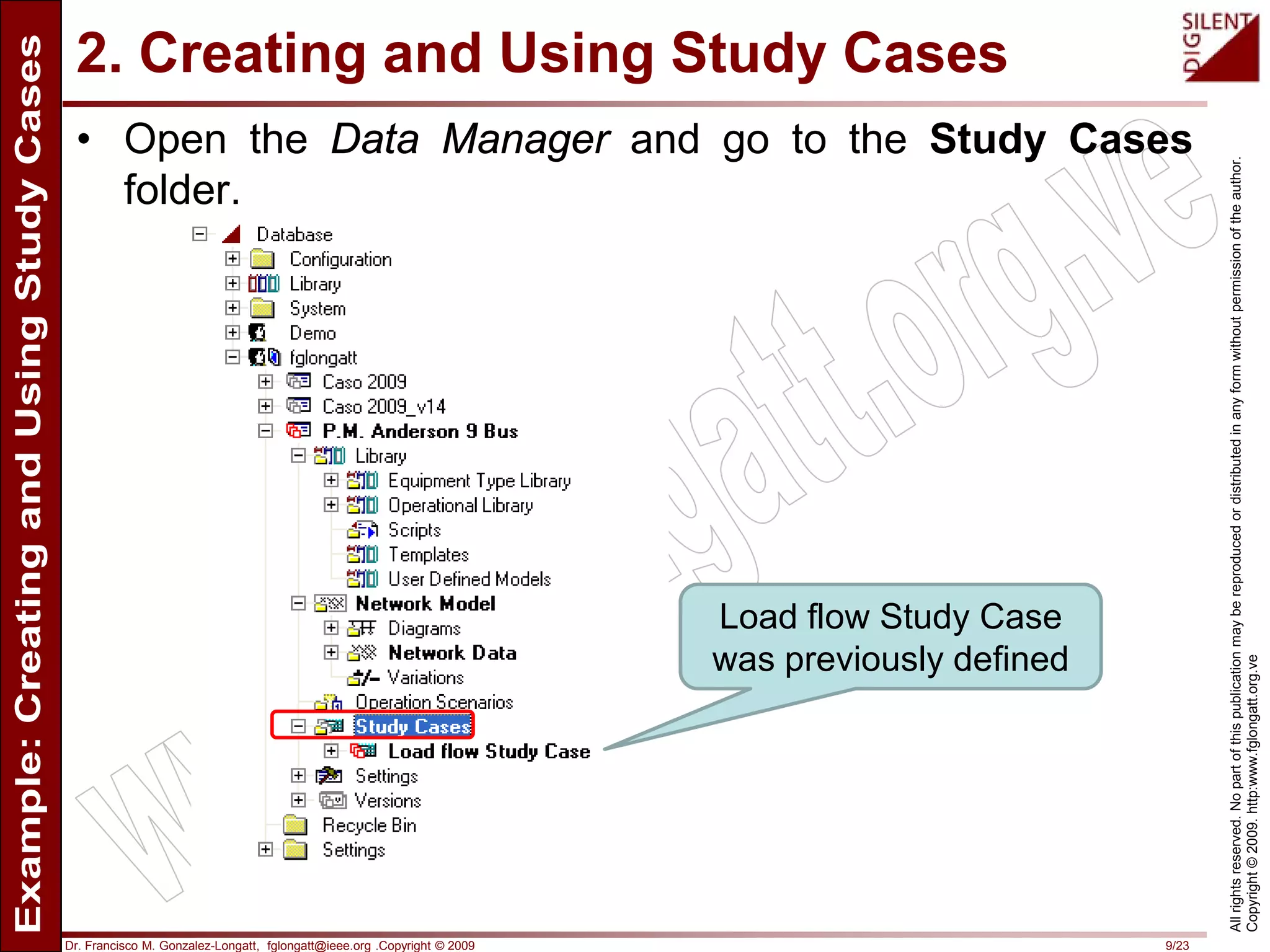
• Open the Data Manager and go to the Study Cases
folder.
Load flow Study Case
was previously defined
Dr. Francisco M. Gonzalez-Longatt, fglongatt@ieee.org .Copyright © 2009 10/23
Allrightsreserved.Nopartofthispublicationmaybereproducedordistributedinanyformwithoutpermissionoftheauthor.
Copyright©2009.http:www.fglongatt.org.ve
2. Creating and Using Study Cases
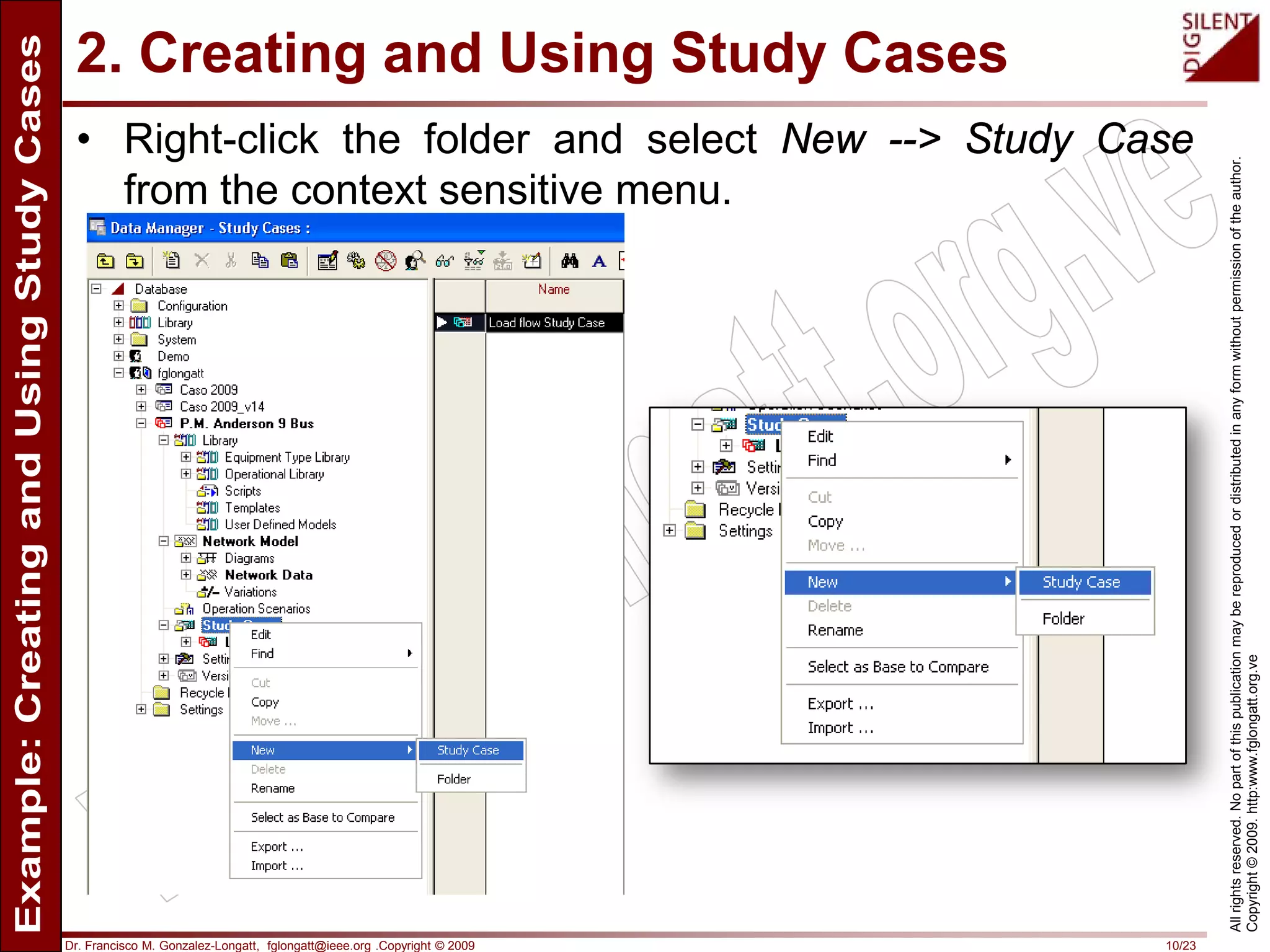
• Right-click the folder and select New --> Study Case
from the context sensitive menu.
Dr. Francisco M. Gonzalez-Longatt, fglongatt@ieee.org .Copyright © 2009 11/23
Allrightsreserved.Nopartofthispublicationmaybereproducedordistributedinanyformwithoutpermissionoftheauthor.
Copyright©2009.http:www.fglongatt.org.ve
2. Creating and Using Study Cases
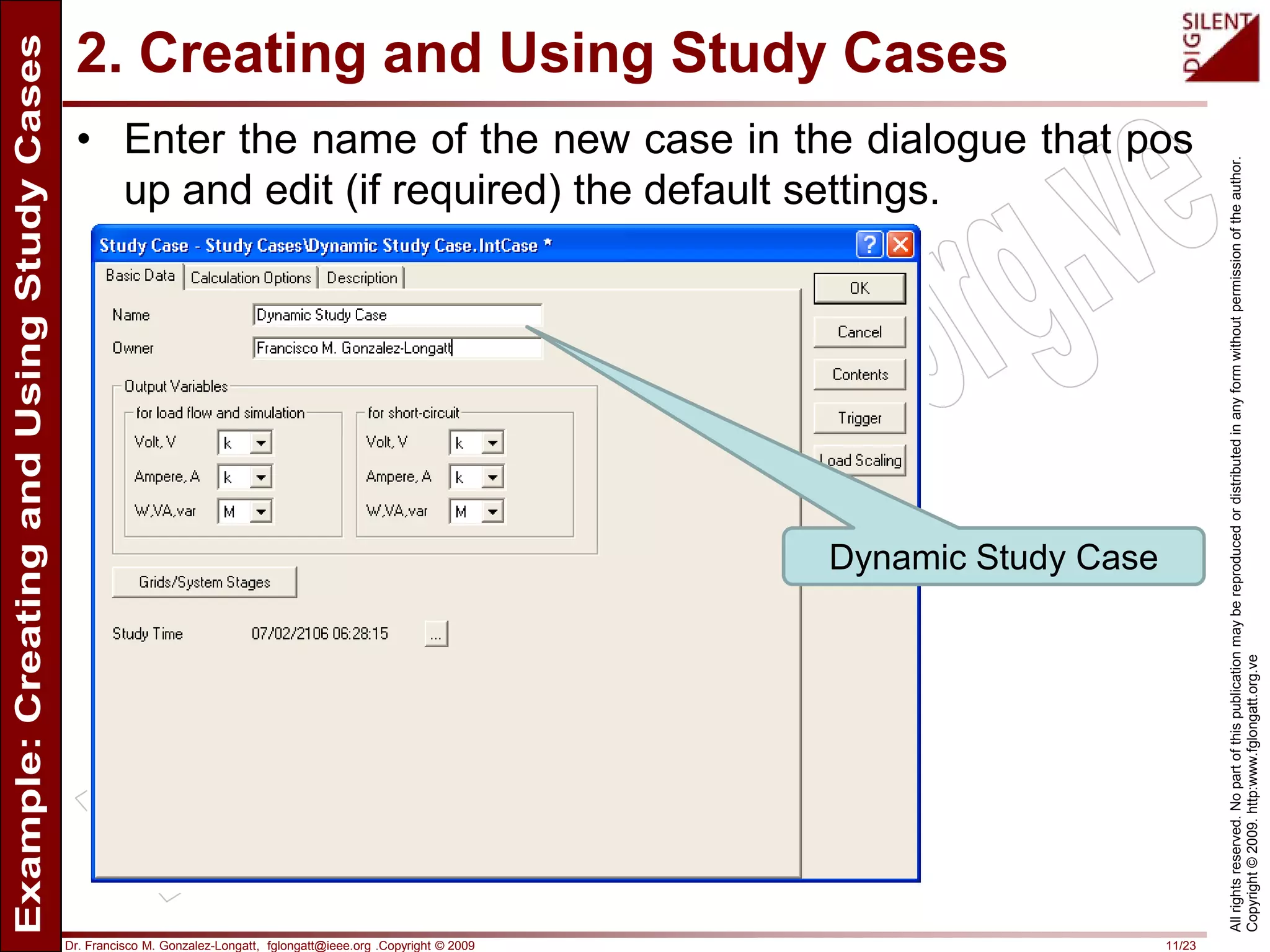
• Enter the name of the new case in the dialogue that pos
up and edit (if required) the default settings.
Dynamic Study Case
Dr. Francisco M. Gonzalez-Longatt, fglongatt@ieee.org .Copyright © 2009 12/23
Allrightsreserved.Nopartofthispublicationmaybereproducedordistributedinanyformwithoutpermissionoftheauthor.
Copyright©2009.http:www.fglongatt.org.ve
2. Creating and Using Study Cases
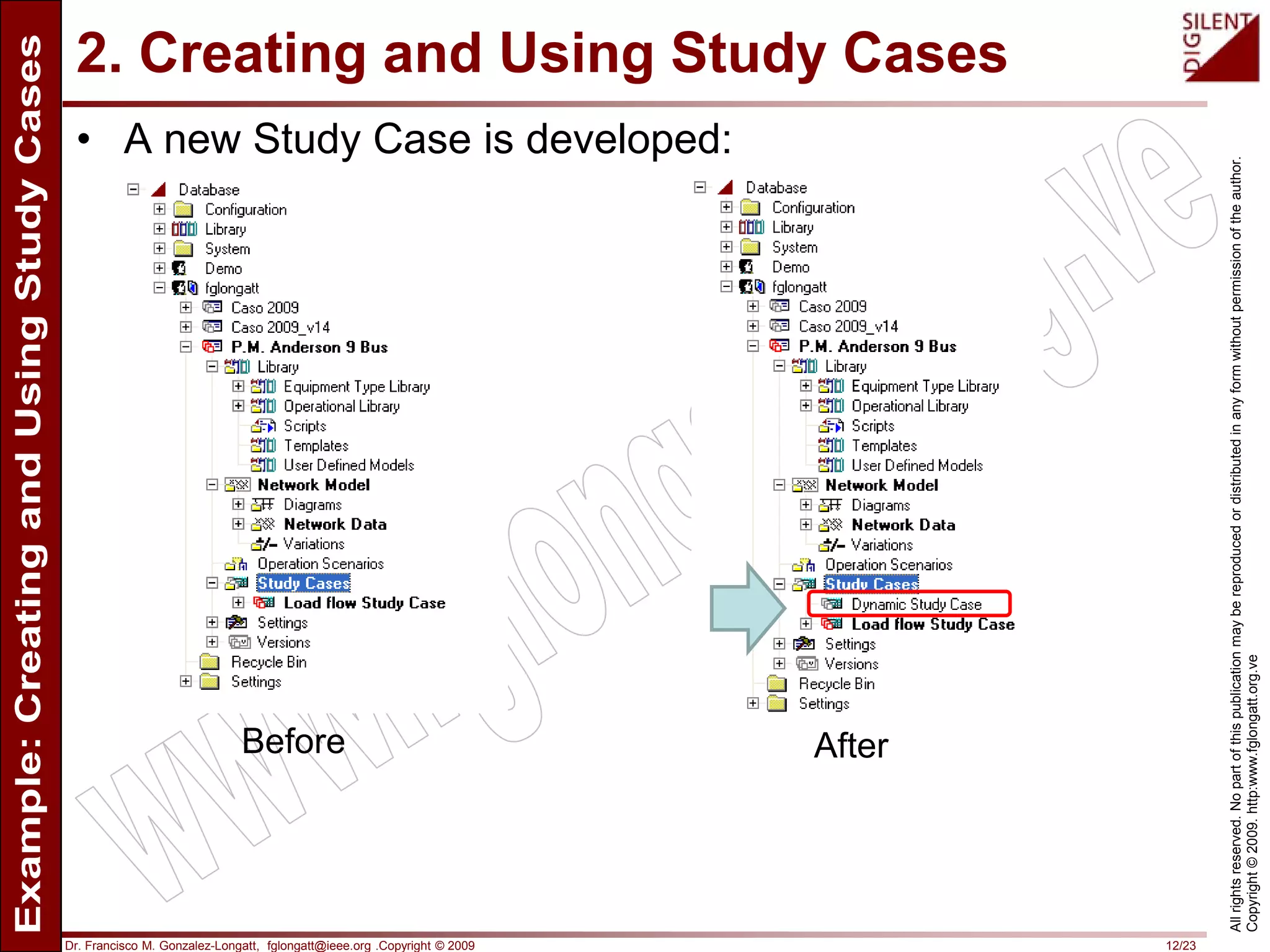
• A new Study Case is developed:
Before After
Dr. Francisco M. Gonzalez-Longatt, fglongatt@ieee.org .Copyright © 2009 13/23
Allrightsreserved.Nopartofthispublicationmaybereproducedordistributedinanyformwithoutpermissionoftheauthor.
Copyright©2009.http:www.fglongatt.org.ve
2. Creating and Using Study Cases
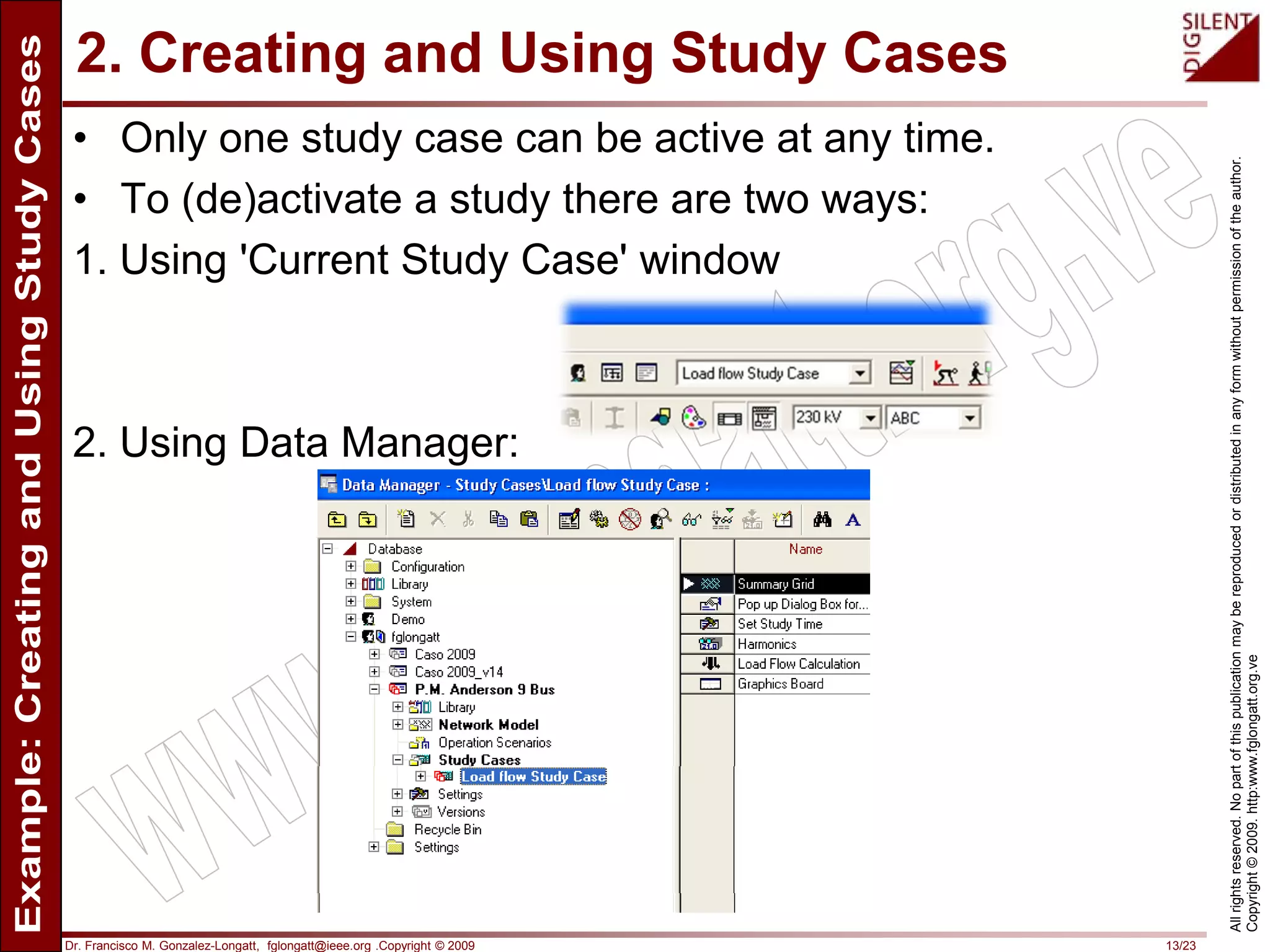
• Only one study case can be active at any time.
• To (de)activate a study there are two ways:
1. Using 'Current Study Case' window
2. Using Data Manager:
Dr. Francisco M. Gonzalez-Longatt, fglongatt@ieee.org .Copyright © 2009 14/23
Allrightsreserved.Nopartofthispublicationmaybereproducedordistributedinanyformwithoutpermissionoftheauthor.
Copyright©2009.http:www.fglongatt.org.ve
2. Creating and Using Study Cases
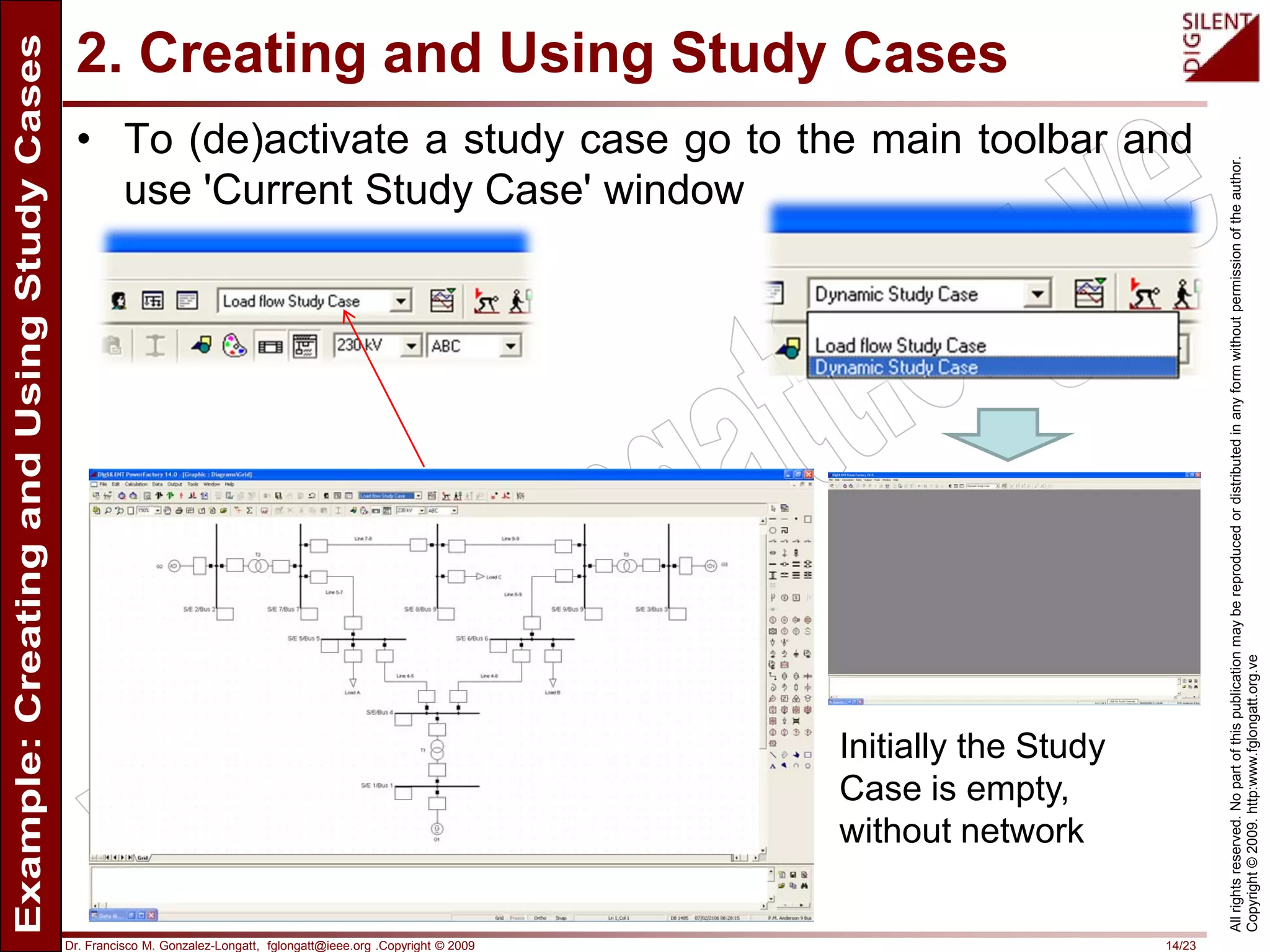
• To (de)activate a study case go to the main toolbar and
use 'Current Study Case' window
Initially the Study
Case is empty,
without network
Dr. Francisco M. Gonzalez-Longatt, fglongatt@ieee.org .Copyright © 2009 15/23
Allrightsreserved.Nopartofthispublicationmaybereproducedordistributedinanyformwithoutpermissionoftheauthor.
Copyright©2009.http:www.fglongatt.org.ve
2. Creating and Using Study Cases
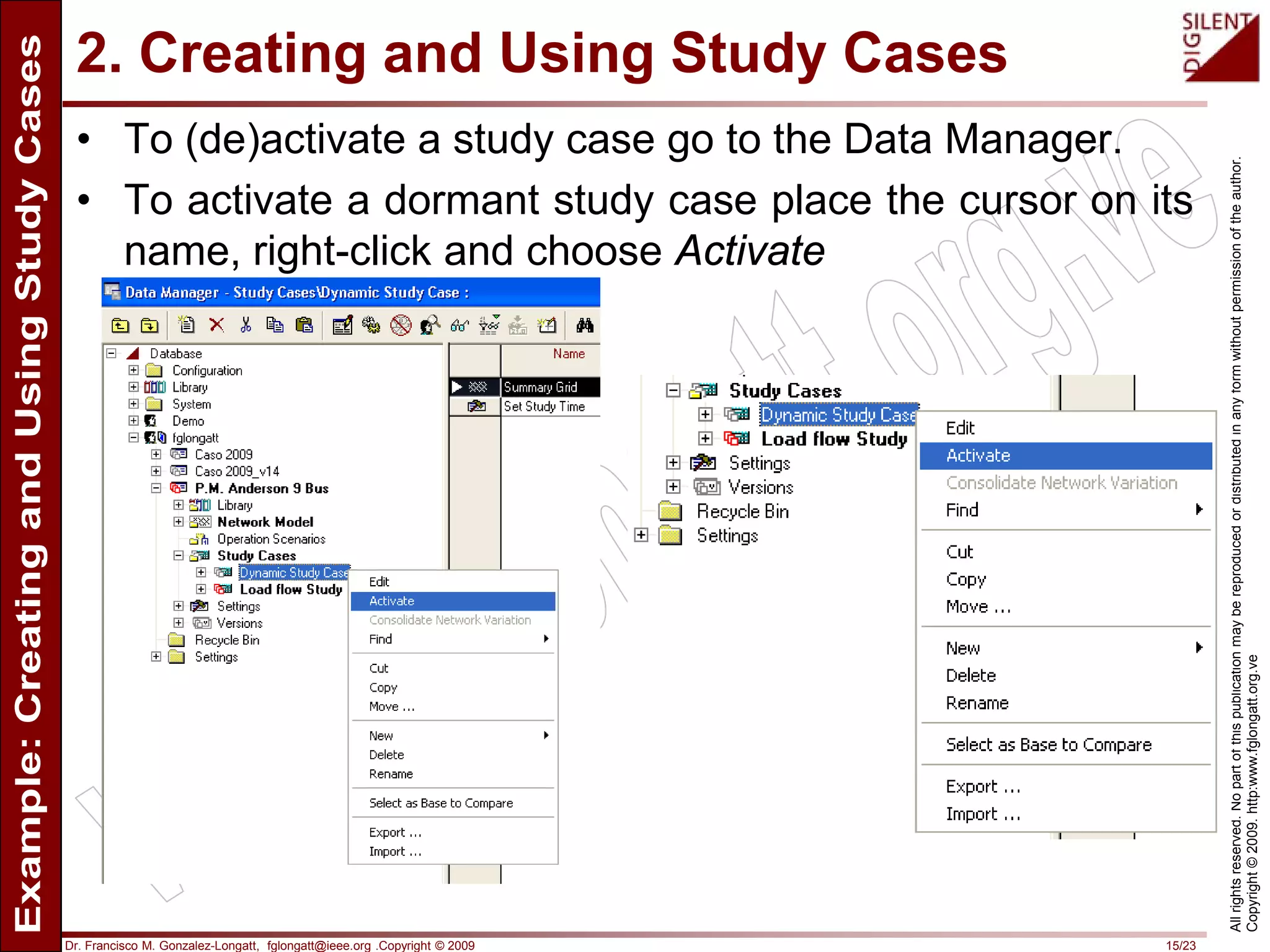
• To (de)activate a study case go to the Data Manager.
• To activate a dormant study case place the cursor on its
name, right-click and choose Activate
Dr. Francisco M. Gonzalez-Longatt, fglongatt@ieee.org .Copyright © 2009 16/23
Allrightsreserved.Nopartofthispublicationmaybereproducedordistributedinanyformwithoutpermissionoftheauthor.
Copyright©2009.http:www.fglongatt.org.ve
2. Creating and Using Study Cases
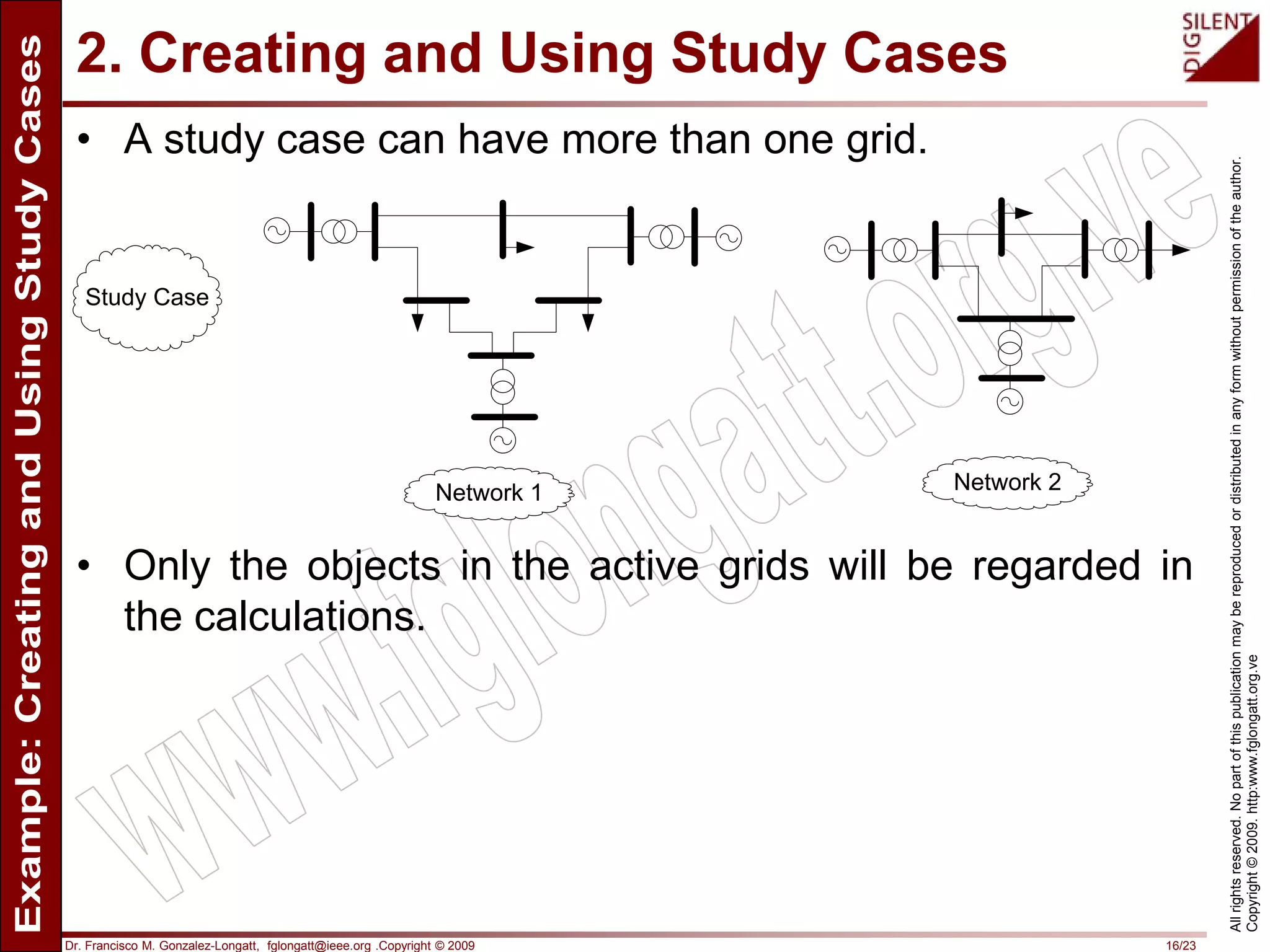
• A study case can have more than one grid.
• Only the objects in the active grids will be regarded in
the calculations.
Study Case
Network 1 Network 2
Dr. Francisco M. Gonzalez-Longatt, fglongatt@ieee.org .Copyright © 2009 17/23
Allrightsreserved.Nopartofthispublicationmaybereproducedordistributedinanyformwithoutpermissionoftheauthor.
Copyright©2009.http:www.fglongatt.org.ve
2. Creating and Using Study Cases
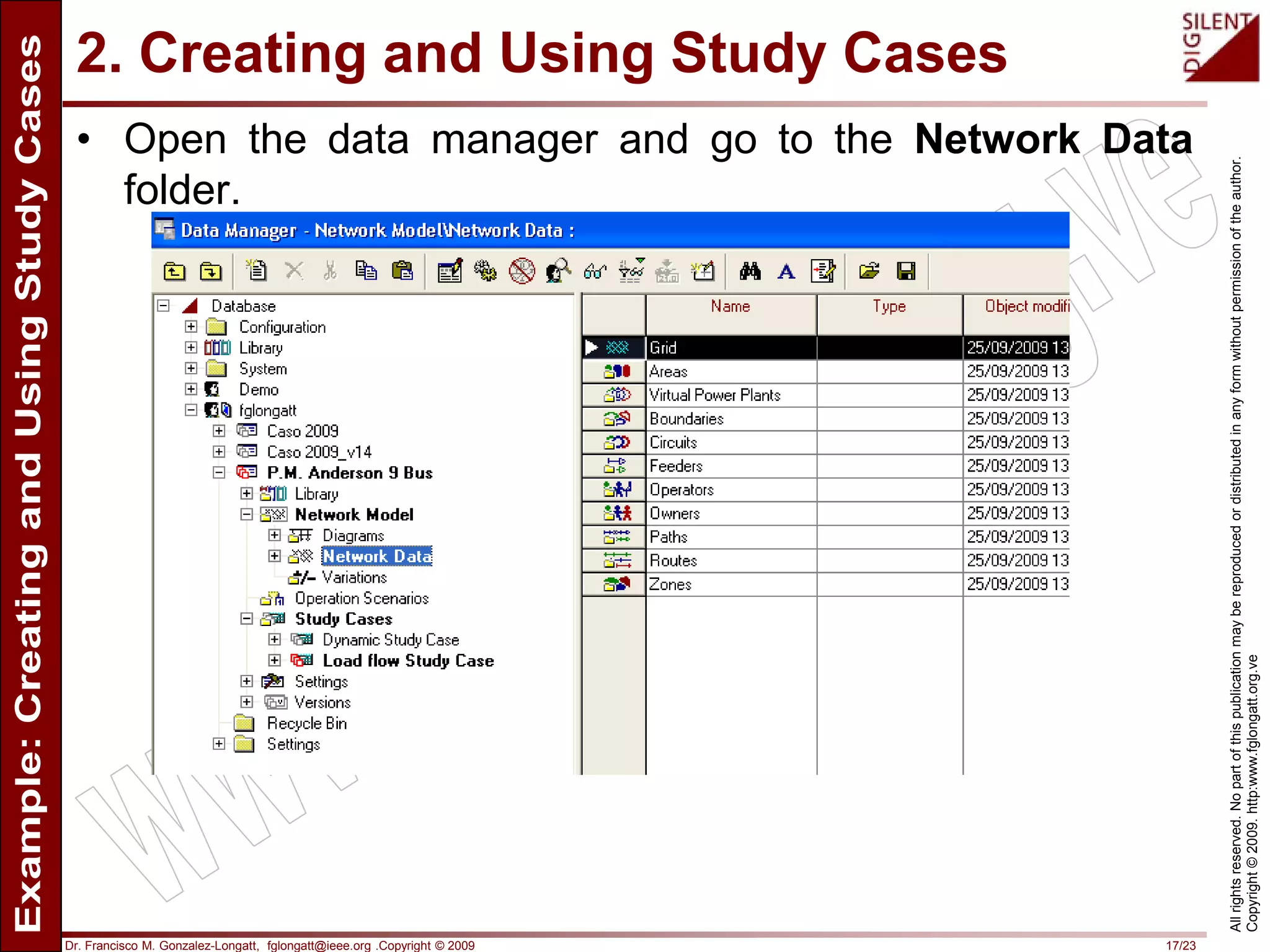
• Open the data manager and go to the Network Data
folder.
Dr. Francisco M. Gonzalez-Longatt, fglongatt@ieee.org .Copyright © 2009 18/23
Allrightsreserved.Nopartofthispublicationmaybereproducedordistributedinanyformwithoutpermissionoftheauthor.
Copyright©2009.http:www.fglongatt.org.ve
2. Creating and Using Study Cases
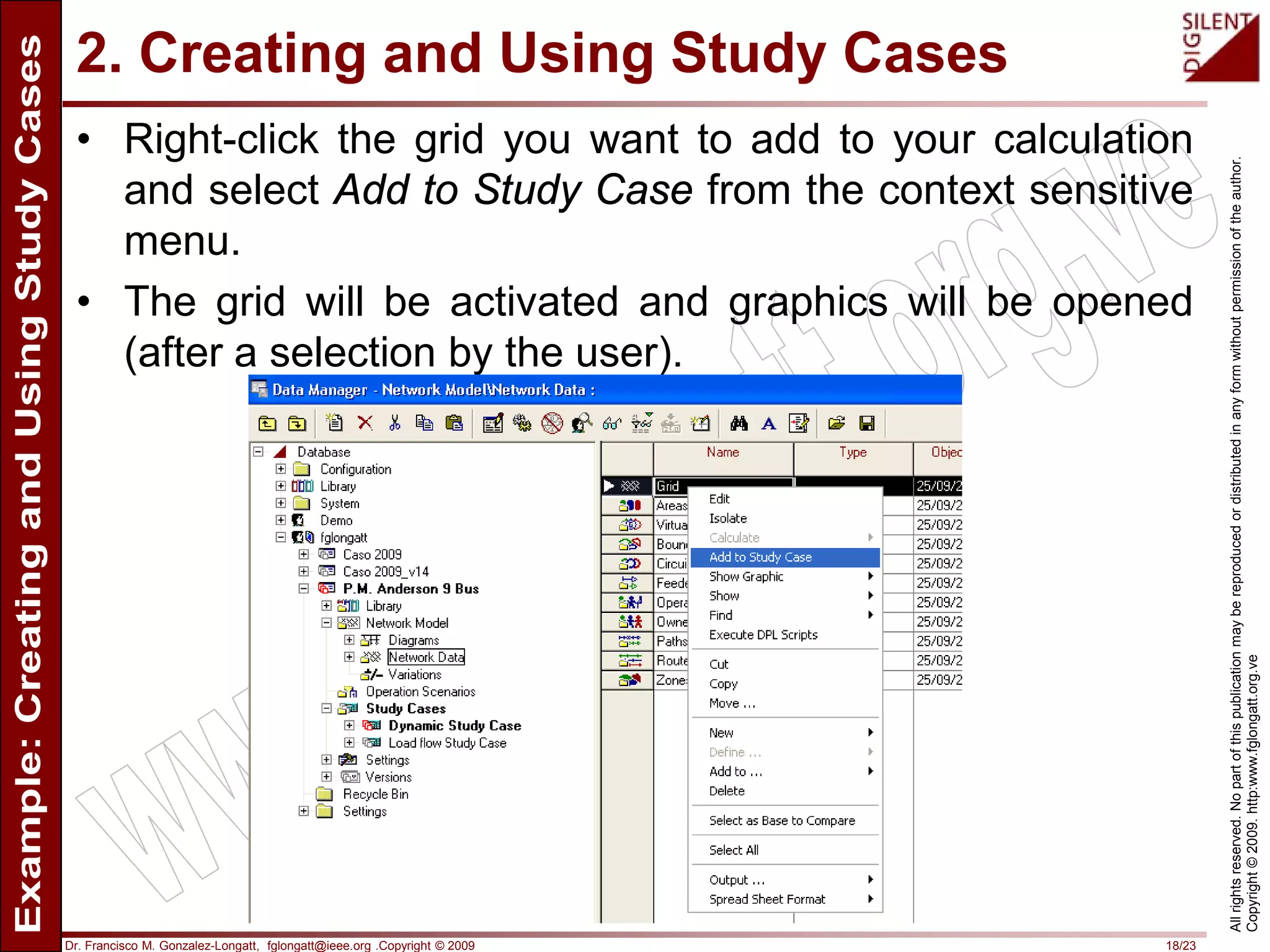
• Right-click the grid you want to add to your calculation
and select Add to Study Case from the context sensitive
menu.
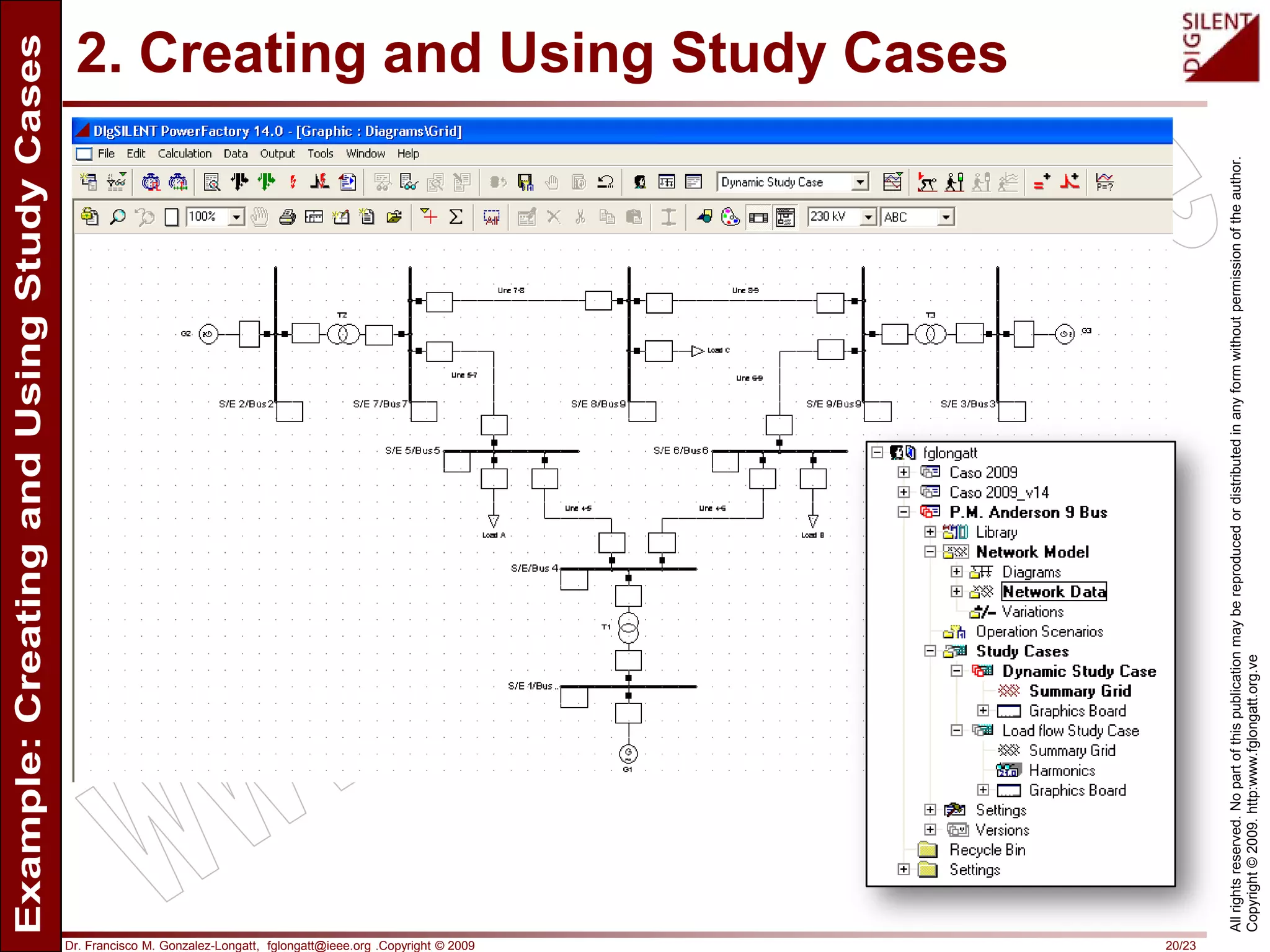
• The grid will be activated and graphics will be opened
(after a selection by the user).
Dr. Francisco M. Gonzalez-Longatt, fglongatt@ieee.org .Copyright © 2009 19/23
Allrightsreserved.Nopartofthispublicationmaybereproducedordistributedinanyformwithoutpermissionoftheauthor.
Copyright©2009.http:www.fglongatt.org.ve
2. Creating and Using Study Cases
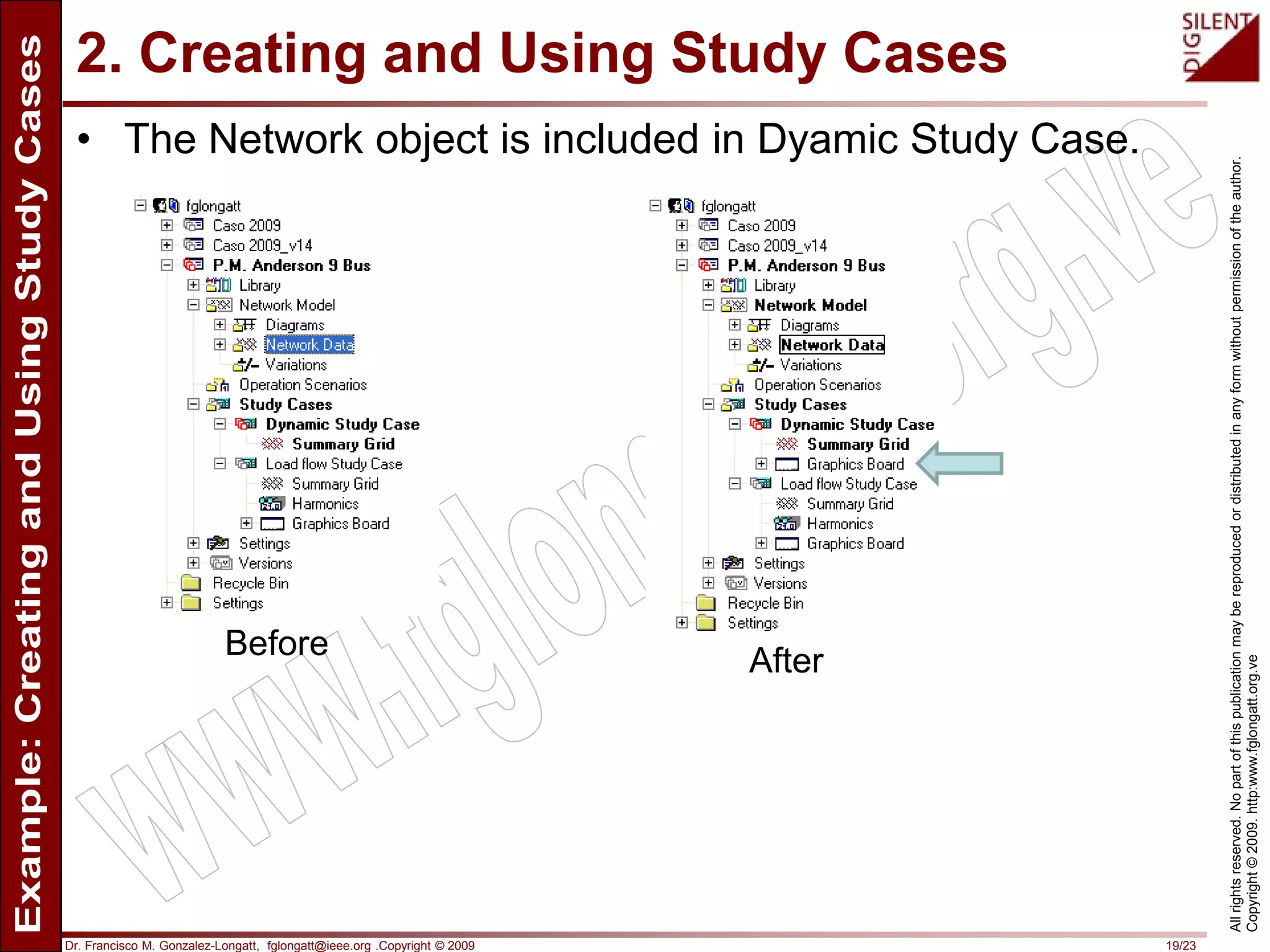
• The Network object is included in Dyamic Study Case.
Before After
Dr. Francisco M. Gonzalez-Longatt, fglongatt@ieee.org .Copyright © 2009 20/23
Allrightsreserved.Nopartofthispublicationmaybereproducedordistributedinanyformwithoutpermissionoftheauthor.
Copyright©2009.http:www.fglongatt.org.ve
2. Creating and Using Study Cases
Dr. Francisco M. Gonzalez-Longatt, fglongatt@ieee.org .Copyright © 2009 21/23
Allrightsreserved.Nopartofthispublicationmaybereproducedordistributedinanyformwithoutpermissionoftheauthor.
Copyright©2009.http:www.fglongatt.org.ve
2. Creating and Using Study Cases
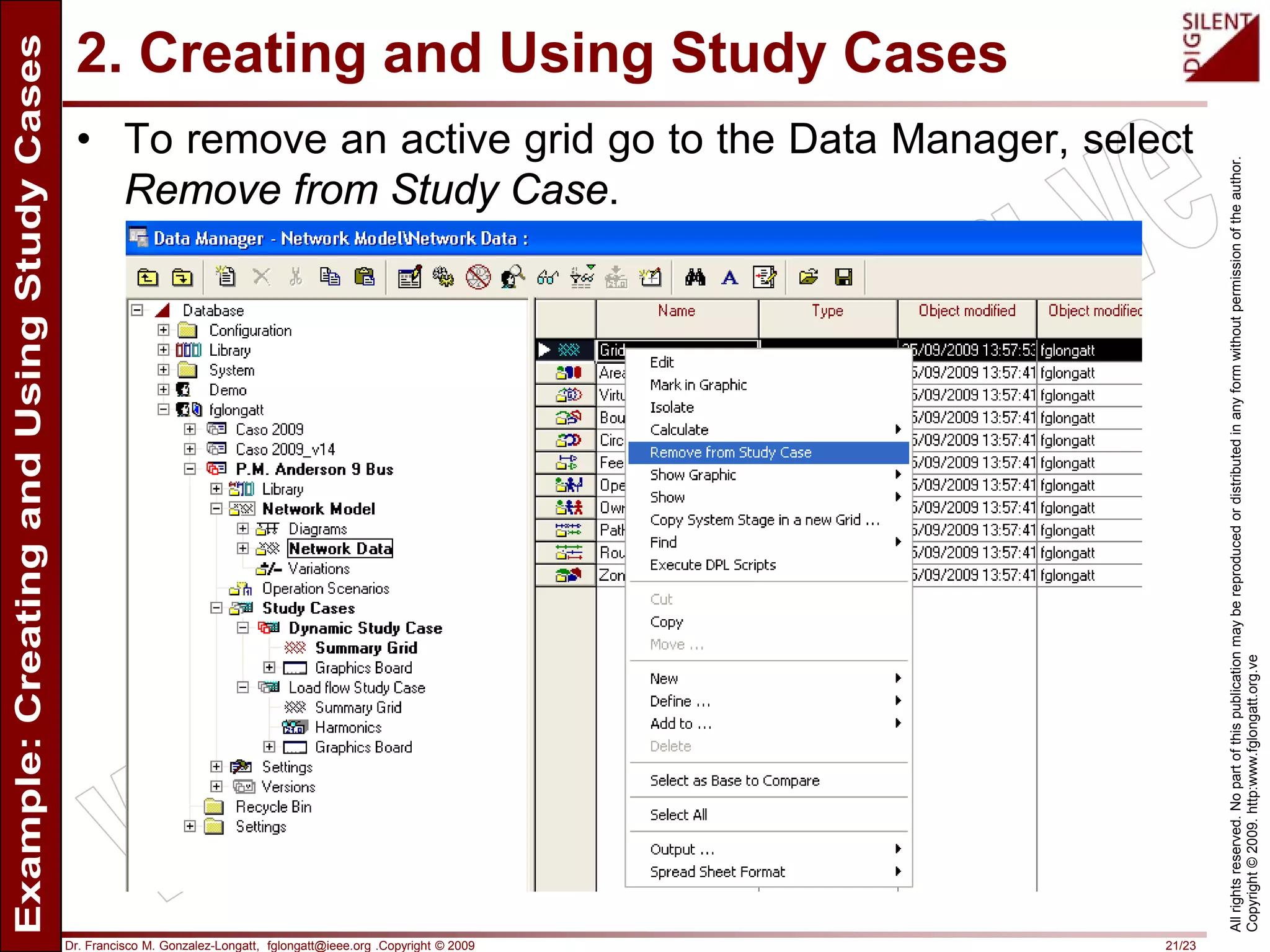
• To remove an active grid go to the Data Manager, select
Remove from Study Case.
Dr. Francisco M. Gonzalez-Longatt, fglongatt@ieee.org .Copyright © 2009 22/23
Allrightsreserved.Nopartofthispublicationmaybereproducedordistributedinanyformwithoutpermissionoftheauthor.
Copyright©2009.http:www.fglongatt.org.ve
Please visit:
http://www.fglongatt.org.ve
Comments and suggestion are welcome:
fglongatt@fglongatt.org.ve

Creating and Using Study Cases in DIgSILENT PowerFactory. Case P.M. Anderson 9 bus

  • 1.
    Dr. Francisco M.Gonzalez-Longatt, fglongatt@ieee.org .Copyright © 2009 1/23 Allrightsreserved.Nopartofthispublicationmaybereproducedordistributedinanyformwithoutpermissionoftheauthor. Copyright©2009.http:www.fglongatt.org.ve Francisco M. Gonzalez-Longatt, Dr.Sc Manchester, UK, September, 2009 Exercise: Creating and Using Study Cases P.M. Anderson 9 bus
  • 2.
    Dr. Francisco M.Gonzalez-Longatt, fglongatt@ieee.org .Copyright © 2009 2/23 Allrightsreserved.Nopartofthispublicationmaybereproducedordistributedinanyformwithoutpermissionoftheauthor. Copyright©2009.http:www.fglongatt.org.ve This tutorial describes how to create a Study case for simulations of the dynamic behavior of P.M. Anderson 9 bus test system. Exercise: Creating and Using Study Cases P.M. Anderson 9 bus Francisco M. Gonzalez-Longatt, Dr.Sc fglogatt@fglongatt.org.ve Manchester, September 2009
  • 3.
    Dr. Francisco M.Gonzalez-Longatt, fglongatt@ieee.org .Copyright © 2009 3/23 Allrightsreserved.Nopartofthispublicationmaybereproducedordistributedinanyformwithoutpermissionoftheauthor. Copyright©2009.http:www.fglongatt.org.ve 1. Introduction
  • 4.
    Dr. Francisco M.Gonzalez-Longatt, fglongatt@ieee.org .Copyright © 2009 4/23 Allrightsreserved.Nopartofthispublicationmaybereproducedordistributedinanyformwithoutpermissionoftheauthor. Copyright©2009.http:www.fglongatt.org.ve 1. Introduction • Study Cases (IntCase, ) define the studies to be performed in the modeled system. • Study Case store all the definitions created by the user to perform calculations. • These allowing the easy reproduction of results even after the deactivation of the project. Case base Study case 1 Study case 2 Study case N . . . Study Cases allow perform network studies, including load-flow, various short-circuits, time-dependant simulations, etc.
  • 5.
    Dr. Francisco M.Gonzalez-Longatt, fglongatt@ieee.org .Copyright © 2009 5/23 Allrightsreserved.Nopartofthispublicationmaybereproducedordistributedinanyformwithoutpermissionoftheauthor. Copyright©2009.http:www.fglongatt.org.ve 1. Introduction • PowerFactory allow use of the objects stored inside them objects to recognize: • The parts of the network model (grids and expansion stages) to be consider for calculation. • The calculations (and their settings) to be performed over the selected parts of the network. • The study time. • The active variations. • The active operation scenario. • The calculation results to be stored for reporting. • The graphics to be displayed during the study
  • 6.
    Dr. Francisco M.Gonzalez-Longatt, fglongatt@ieee.org .Copyright © 2009 6/23 Allrightsreserved.Nopartofthispublicationmaybereproducedordistributedinanyformwithoutpermissionoftheauthor. Copyright©2009.http:www.fglongatt.org.ve 1. Introduction • A study case with a reference to at least one grid or expansion stage has to be activated in order to enable calculations. Expansion stage Expansion
  • 7.
    Dr. Francisco M.Gonzalez-Longatt, fglongatt@ieee.org .Copyright © 2009 7/23 Allrightsreserved.Nopartofthispublicationmaybereproducedordistributedinanyformwithoutpermissionoftheauthor. Copyright©2009.http:www.fglongatt.org.ve 1. Introduction • A project that contains more than one grid, which has several expansion stages for design alternatives, or which uses different operation scenarios to model the various conditions under which the system should operate, requires multiple study cases. • All the study cases of a project are stored inside the 'Study Cases' folder ( ) in the project directory.
  • 8.
    Dr. Francisco M.Gonzalez-Longatt, fglongatt@ieee.org .Copyright © 2009 8/23 Allrightsreserved.Nopartofthispublicationmaybereproducedordistributedinanyformwithoutpermissionoftheauthor. Copyright©2009.http:www.fglongatt.org.ve 2. Creating a study case
  • 9.
    Dr. Francisco M.Gonzalez-Longatt, fglongatt@ieee.org .Copyright © 2009 9/23 Allrightsreserved.Nopartofthispublicationmaybereproducedordistributedinanyformwithoutpermissionoftheauthor. Copyright©2009.http:www.fglongatt.org.ve 2. Creating and Using Study Cases • Open the Data Manager and go to the Study Cases folder. Load flow Study Case was previously defined
  • 10.
    Dr. Francisco M.Gonzalez-Longatt, fglongatt@ieee.org .Copyright © 2009 10/23 Allrightsreserved.Nopartofthispublicationmaybereproducedordistributedinanyformwithoutpermissionoftheauthor. Copyright©2009.http:www.fglongatt.org.ve 2. Creating and Using Study Cases • Right-click the folder and select New --> Study Case from the context sensitive menu.
  • 11.
    Dr. Francisco M.Gonzalez-Longatt, fglongatt@ieee.org .Copyright © 2009 11/23 Allrightsreserved.Nopartofthispublicationmaybereproducedordistributedinanyformwithoutpermissionoftheauthor. Copyright©2009.http:www.fglongatt.org.ve 2. Creating and Using Study Cases • Enter the name of the new case in the dialogue that pos up and edit (if required) the default settings. Dynamic Study Case
  • 12.
    Dr. Francisco M.Gonzalez-Longatt, fglongatt@ieee.org .Copyright © 2009 12/23 Allrightsreserved.Nopartofthispublicationmaybereproducedordistributedinanyformwithoutpermissionoftheauthor. Copyright©2009.http:www.fglongatt.org.ve 2. Creating and Using Study Cases • A new Study Case is developed: Before After
  • 13.
    Dr. Francisco M.Gonzalez-Longatt, fglongatt@ieee.org .Copyright © 2009 13/23 Allrightsreserved.Nopartofthispublicationmaybereproducedordistributedinanyformwithoutpermissionoftheauthor. Copyright©2009.http:www.fglongatt.org.ve 2. Creating and Using Study Cases • Only one study case can be active at any time. • To (de)activate a study there are two ways: 1. Using 'Current Study Case' window 2. Using Data Manager:
  • 14.
    Dr. Francisco M.Gonzalez-Longatt, fglongatt@ieee.org .Copyright © 2009 14/23 Allrightsreserved.Nopartofthispublicationmaybereproducedordistributedinanyformwithoutpermissionoftheauthor. Copyright©2009.http:www.fglongatt.org.ve 2. Creating and Using Study Cases • To (de)activate a study case go to the main toolbar and use 'Current Study Case' window Initially the Study Case is empty, without network
  • 15.
    Dr. Francisco M.Gonzalez-Longatt, fglongatt@ieee.org .Copyright © 2009 15/23 Allrightsreserved.Nopartofthispublicationmaybereproducedordistributedinanyformwithoutpermissionoftheauthor. Copyright©2009.http:www.fglongatt.org.ve 2. Creating and Using Study Cases • To (de)activate a study case go to the Data Manager. • To activate a dormant study case place the cursor on its name, right-click and choose Activate
  • 16.
    Dr. Francisco M.Gonzalez-Longatt, fglongatt@ieee.org .Copyright © 2009 16/23 Allrightsreserved.Nopartofthispublicationmaybereproducedordistributedinanyformwithoutpermissionoftheauthor. Copyright©2009.http:www.fglongatt.org.ve 2. Creating and Using Study Cases • A study case can have more than one grid. • Only the objects in the active grids will be regarded in the calculations. Study Case Network 1 Network 2
  • 17.
    Dr. Francisco M.Gonzalez-Longatt, fglongatt@ieee.org .Copyright © 2009 17/23 Allrightsreserved.Nopartofthispublicationmaybereproducedordistributedinanyformwithoutpermissionoftheauthor. Copyright©2009.http:www.fglongatt.org.ve 2. Creating and Using Study Cases • Open the data manager and go to the Network Data folder.
  • 18.
    Dr. Francisco M.Gonzalez-Longatt, fglongatt@ieee.org .Copyright © 2009 18/23 Allrightsreserved.Nopartofthispublicationmaybereproducedordistributedinanyformwithoutpermissionoftheauthor. Copyright©2009.http:www.fglongatt.org.ve 2. Creating and Using Study Cases • Right-click the grid you want to add to your calculation and select Add to Study Case from the context sensitive menu. • The grid will be activated and graphics will be opened (after a selection by the user).
  • 19.
    Dr. Francisco M.Gonzalez-Longatt, fglongatt@ieee.org .Copyright © 2009 19/23 Allrightsreserved.Nopartofthispublicationmaybereproducedordistributedinanyformwithoutpermissionoftheauthor. Copyright©2009.http:www.fglongatt.org.ve 2. Creating and Using Study Cases • The Network object is included in Dyamic Study Case. Before After
  • 20.
    Dr. Francisco M.Gonzalez-Longatt, fglongatt@ieee.org .Copyright © 2009 20/23 Allrightsreserved.Nopartofthispublicationmaybereproducedordistributedinanyformwithoutpermissionoftheauthor. Copyright©2009.http:www.fglongatt.org.ve 2. Creating and Using Study Cases
  • 21.
    Dr. Francisco M.Gonzalez-Longatt, fglongatt@ieee.org .Copyright © 2009 21/23 Allrightsreserved.Nopartofthispublicationmaybereproducedordistributedinanyformwithoutpermissionoftheauthor. Copyright©2009.http:www.fglongatt.org.ve 2. Creating and Using Study Cases • To remove an active grid go to the Data Manager, select Remove from Study Case.
  • 22.
    Dr. Francisco M.Gonzalez-Longatt, fglongatt@ieee.org .Copyright © 2009 22/23 Allrightsreserved.Nopartofthispublicationmaybereproducedordistributedinanyformwithoutpermissionoftheauthor. Copyright©2009.http:www.fglongatt.org.ve Please visit: http://www.fglongatt.org.ve Comments and suggestion are welcome: fglongatt@fglongatt.org.ve