Dr. Francisco M. Gonzalez-Longatt, fglongatt@ieee.org .Copyright © 2009 1/23
Allrightsreserved.Nopartofthispublicationmaybereproducedordistributedinanyformwithoutpermissionoftheauthor.
Copyright©2009.http:www.fglongatt.org.ve
Francisco M. Gonzalez-Longatt, Dr.Sc
Manchester, UK, September, 2009
Tutorial:
Data Management in PowerFactory
Dr. Francisco M. Gonzalez-Longatt, fglongatt@ieee.org .Copyright © 2009 2/23
Allrightsreserved.Nopartofthispublicationmaybereproducedordistributedinanyformwithoutpermissionoftheauthor.
Copyright©2009.http:www.fglongatt.org.ve
This tutorial describes how data management is used in
PowerFactory: Version, Derived Projects, Operation
Scenarios,
Tutorial:
Data Management in PowerFactory
Francisco M. Gonzalez-Longatt, Dr.Sc
fglogatt@fglongatt.org.ve
Manchester, September 2009
Dr. Francisco M. Gonzalez-Longatt, fglongatt@ieee.org .Copyright © 2009 3/23
Allrightsreserved.Nopartofthispublicationmaybereproducedordistributedinanyformwithoutpermissionoftheauthor.
Copyright©2009.http:www.fglongatt.org.ve
1. Introduction
Dr. Francisco M. Gonzalez-Longatt, fglongatt@ieee.org .Copyright © 2009 4/23
Allrightsreserved.Nopartofthispublicationmaybereproducedordistributedinanyformwithoutpermissionoftheauthor.
Copyright©2009.http:www.fglongatt.org.ve
1. Introduction
• The project object is allows the user to perform
advanced management tasks such as:
– Versioning, (Versions)
– Deriving, (Derived Projects)
– Comparing,
– Merging
– and Sharing.
• It simplify the work in multi-user environments while
minimizing the amount of data.
Dr. Francisco M. Gonzalez-Longatt, fglongatt@ieee.org .Copyright © 2009 5/23
Allrightsreserved.Nopartofthispublicationmaybereproducedordistributedinanyformwithoutpermissionoftheauthor.
Copyright©2009.http:www.fglongatt.org.ve
1. Introduction
Main Features:
– Network data stored in single or multi-user database
– Network Modeller incl. Single Diagrams and Block
Diagrams
– Network Variations for expansion planning
– Operation Scenarios for operational data
– Network Model Versioning
– Network Model Sharing in multi-user environment
– User accounts, user groups, access rights
– Compare and Merge Tool
– Change Tracking
Dr. Francisco M. Gonzalez-Longatt, fglongatt@ieee.org .Copyright © 2009 6/23
Allrightsreserved.Nopartofthispublicationmaybereproducedordistributedinanyformwithoutpermissionoftheauthor.
Copyright©2009.http:www.fglongatt.org.ve
1. Introduction
• PowerFactory allow use of the objects stored inside
them objects to recognize:
• The parts of the network model (grids and
expansion stages) to be consider for calculation.
• The calculations (and their settings) to be
performed over the selected parts of the network.
• The study time.
• The active variations.
• The active operation scenario.
• The calculation results to be stored for reporting.
• The graphics to be displayed during the study
Dr. Francisco M. Gonzalez-Longatt, fglongatt@ieee.org .Copyright © 2009 7/23
Allrightsreserved.Nopartofthispublicationmaybereproducedordistributedinanyformwithoutpermissionoftheauthor.
Copyright©2009.http:www.fglongatt.org.ve
2. Creating Operation
Scenarios and
Expansion Stages
Dr. Francisco M. Gonzalez-Longatt, fglongatt@ieee.org .Copyright © 2009 8/23
Allrightsreserved.Nopartofthispublicationmaybereproducedordistributedinanyformwithoutpermissionoftheauthor.
Copyright©2009.http:www.fglongatt.org.ve
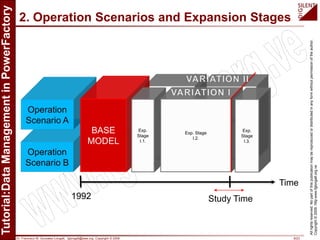
2. Operation Scenarios and Expansion Stages
1992 Study Time
Time
Dr. Francisco M. Gonzalez-Longatt, fglongatt@ieee.org .Copyright © 2009 9/23
Allrightsreserved.Nopartofthispublicationmaybereproducedordistributedinanyformwithoutpermissionoftheauthor.
Copyright©2009.http:www.fglongatt.org.ve
2. Operation Scenarios and Expansion Stages
1992 Study Time
Time
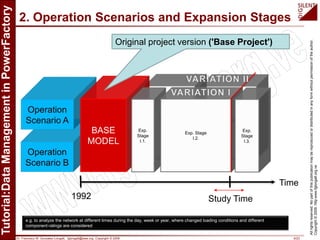
Original project version ('Base Project')
e.g. to analyze the network at different times during the day, week or year, where changed loading conditions and different
component ratings are considered
Dr. Francisco M. Gonzalez-Longatt, fglongatt@ieee.org .Copyright © 2009 10/23
Allrightsreserved.Nopartofthispublicationmaybereproducedordistributedinanyformwithoutpermissionoftheauthor.
Copyright©2009.http:www.fglongatt.org.ve
2. Operation Scenarios and Expansion Stages
1992 Study Time
Time
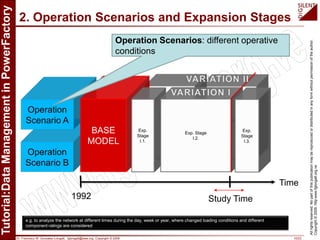
Operation Scenarios: different operative
conditions
e.g. to analyze the network at different times during the day, week or year, where changed loading conditions and different
component ratings are considered
Dr. Francisco M. Gonzalez-Longatt, fglongatt@ieee.org .Copyright © 2009 11/23
Allrightsreserved.Nopartofthispublicationmaybereproducedordistributedinanyformwithoutpermissionoftheauthor.
Copyright©2009.http:www.fglongatt.org.ve
2. Operation Scenarios and Expansion Stages
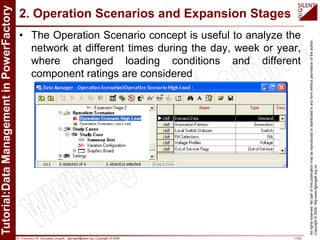
• The Operation Scenario concept is useful to analyze the
network at different times during the day, week or year,
where changed loading conditions and different
component ratings are considered
Dr. Francisco M. Gonzalez-Longatt, fglongatt@ieee.org .Copyright © 2009 12/23
Allrightsreserved.Nopartofthispublicationmaybereproducedordistributedinanyformwithoutpermissionoftheauthor.
Copyright©2009.http:www.fglongatt.org.ve
2. Operation Scenarios and Expansion Stages
1992 Study Time
Time
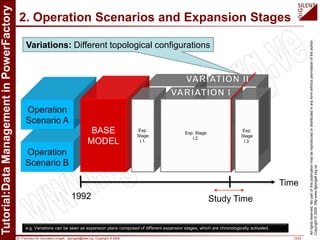
Variations: Different topological configurations
e.g. Variations can be seen as expansion plans composed of different expansion stages, which are chronologically activated.
Dr. Francisco M. Gonzalez-Longatt, fglongatt@ieee.org .Copyright © 2009 13/23
Allrightsreserved.Nopartofthispublicationmaybereproducedordistributedinanyformwithoutpermissionoftheauthor.
Copyright©2009.http:www.fglongatt.org.ve
2. Operation Scenarios and Expansion Stages
1992 Study Time
Time
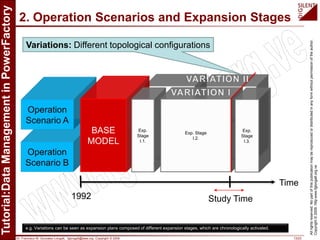
Variations: Different topological configurations
e.g. Variations can be seen as expansion plans composed of different expansion stages, which are chronologically activated.
Dr. Francisco M. Gonzalez-Longatt, fglongatt@ieee.org .Copyright © 2009 14/23
Allrightsreserved.Nopartofthispublicationmaybereproducedordistributedinanyformwithoutpermissionoftheauthor.
Copyright©2009.http:www.fglongatt.org.ve
2. Operation Scenarios and Expansion Stages
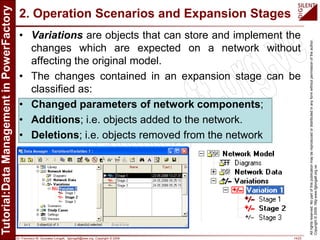
• Variations are objects that can store and implement the
changes which are expected on a network without
affecting the original model.
• The changes contained in an expansion stage can be
classified as:
• Changed parameters of network components;
• Additions; i.e. objects added to the network.
• Deletions; i.e. objects removed from the network
Dr. Francisco M. Gonzalez-Longatt, fglongatt@ieee.org .Copyright © 2009 15/23
Allrightsreserved.Nopartofthispublicationmaybereproducedordistributedinanyformwithoutpermissionoftheauthor.
Copyright©2009.http:www.fglongatt.org.ve
2. Operation Scenarios and Expansion Stages
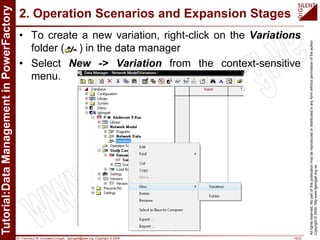
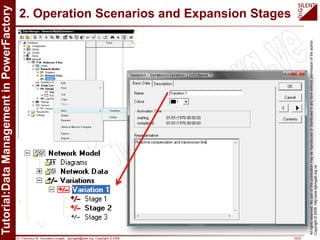
• To create a new variation, right-click on the Variations
folder ( ) in the data manager
• Select New -> Variation from the context-sensitive
menu.
Dr. Francisco M. Gonzalez-Longatt, fglongatt@ieee.org .Copyright © 2009 16/23
Allrightsreserved.Nopartofthispublicationmaybereproducedordistributedinanyformwithoutpermissionoftheauthor.
Copyright©2009.http:www.fglongatt.org.ve
2. Operation Scenarios and Expansion Stages
Dr. Francisco M. Gonzalez-Longatt, fglongatt@ieee.org .Copyright © 2009 17/23
Allrightsreserved.Nopartofthispublicationmaybereproducedordistributedinanyformwithoutpermissionoftheauthor.
Copyright©2009.http:www.fglongatt.org.ve
2. Operation Scenarios and Expansion Stages
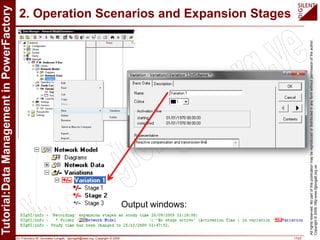
Output windows:
Dr. Francisco M. Gonzalez-Longatt, fglongatt@ieee.org .Copyright © 2009 18/23
Allrightsreserved.Nopartofthispublicationmaybereproducedordistributedinanyformwithoutpermissionoftheauthor.
Copyright©2009.http:www.fglongatt.org.ve
2. Operation Scenarios and Expansion Stages
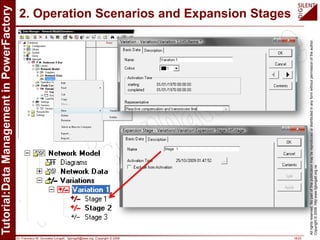
Stage 1
Dr. Francisco M. Gonzalez-Longatt, fglongatt@ieee.org .Copyright © 2009 19/23
Allrightsreserved.Nopartofthispublicationmaybereproducedordistributedinanyformwithoutpermissionoftheauthor.
Copyright©2009.http:www.fglongatt.org.ve
2. Operation Scenarios and Expansion Stages
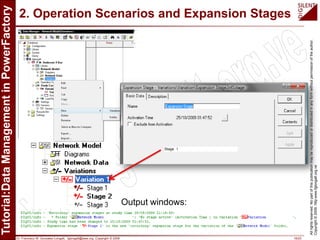
Stage 1
Output windows:
Dr. Francisco M. Gonzalez-Longatt, fglongatt@ieee.org .Copyright © 2009 20/23
Allrightsreserved.Nopartofthispublicationmaybereproducedordistributedinanyformwithoutpermissionoftheauthor.
Copyright©2009.http:www.fglongatt.org.ve
3. Base Project,
Versions and Derived
Projects
Dr. Francisco M. Gonzalez-Longatt, fglongatt@ieee.org .Copyright © 2009 21/23
Allrightsreserved.Nopartofthispublicationmaybereproducedordistributedinanyformwithoutpermissionoftheauthor.
Copyright©2009.http:www.fglongatt.org.ve
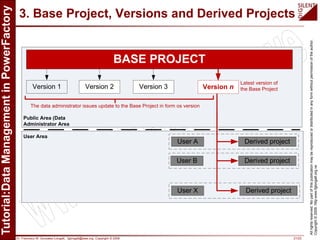
3. Base Project, Versions and Derived Projects
BASE PROJECT
Version 1 Version 2 Version 3
User A
User B
User X
Derived project
Derived project
Derived project
Version n
Public Area (Data
Administrator Area
User Area
Latest version of
the Base Project
The data administrator issues update to the Base Project in form os version
Dr. Francisco M. Gonzalez-Longatt, fglongatt@ieee.org .Copyright © 2009 22/23
Allrightsreserved.Nopartofthispublicationmaybereproducedordistributedinanyformwithoutpermissionoftheauthor.
Copyright©2009.http:www.fglongatt.org.ve
3. Base Project, Versions and Derived Projects
BASE PROJECT
Version 1 Version 2 Version 3
User A
User B
User X
Derived project
Derived project
Derived project
Version n
Public Area (Data
Administrator Area
User Area
Latest version of
the Base Project
The data administrator issues update to the Base Project in form os version
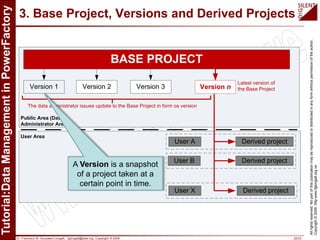
A Version is a snapshot
of a project taken at a
certain point in time.
Dr. Francisco M. Gonzalez-Longatt, fglongatt@ieee.org .Copyright © 2009 23/23
Allrightsreserved.Nopartofthispublicationmaybereproducedordistributedinanyformwithoutpermissionoftheauthor.
Copyright©2009.http:www.fglongatt.org.ve
3. Base Project, Versions and Derived Projects
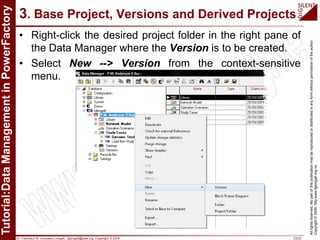
• Right-click the desired project folder in the right pane of
the Data Manager where the Version is to be created.
• Select New --> Version from the context-sensitive
menu.
Dr. Francisco M. Gonzalez-Longatt, fglongatt@ieee.org .Copyright © 2009 24/23
Allrightsreserved.Nopartofthispublicationmaybereproducedordistributedinanyformwithoutpermissionoftheauthor.
Copyright©2009.http:www.fglongatt.org.ve
3. Base Project, Versions and Derived Projects
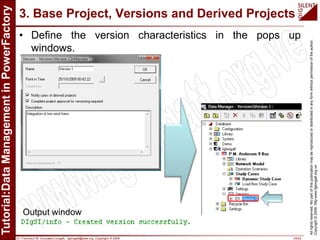
• Define the version characteristics in the pops up
windows.
Output window
Dr. Francisco M. Gonzalez-Longatt, fglongatt@ieee.org .Copyright © 2009 25/23
Allrightsreserved.Nopartofthispublicationmaybereproducedordistributedinanyformwithoutpermissionoftheauthor.
Copyright©2009.http:www.fglongatt.org.ve
4. Base Project, Versions and Derived Projects
BASE PROJECT
Version 1 Version 2 Version 3
User A
User B
User X
Derived project
Derived project
Derived project
Version n
Public Area (Data
Administrator Area
User Area
Latest version of
the Base Project
The data administrator issues update to the Base Project in form os version
Derived Project: A
'virtual copy‘ of the
original project version
('Base Project')
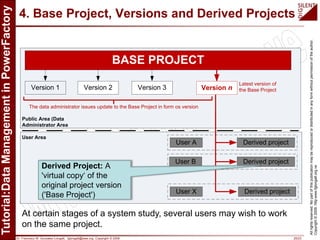
At certain stages of a system study, several users may wish to work
on the same project.
Dr. Francisco M. Gonzalez-Longatt, fglongatt@ieee.org .Copyright © 2009 26/23
Allrightsreserved.Nopartofthispublicationmaybereproducedordistributedinanyformwithoutpermissionoftheauthor.
Copyright©2009.http:www.fglongatt.org.ve
4. Base Project, Versions and Derived Projects
BASE PROJECT
Version 1 Version 2 Version 3
User A
User B
User X
Derived project
Derived project
Derived project
Version n
Public Area (Data
Administrator Area
User Area
Latest version of
the Base Project
The data administrator issues update to the Base Project in form os version
Derived Project: A
'virtual copy‘ of the
original project version
('Base Project')
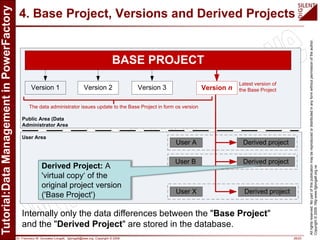
Internally only the data differences between the "Base Project"
and the "Derived Project" are stored in the database.
Dr. Francisco M. Gonzalez-Longatt, fglongatt@ieee.org .Copyright © 2009 27/23
Allrightsreserved.Nopartofthispublicationmaybereproducedordistributedinanyformwithoutpermissionoftheauthor.
Copyright©2009.http:www.fglongatt.org.ve
4. Base Project, Versions and Derived Projects
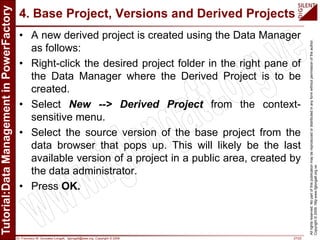
• A new derived project is created using the Data Manager
as follows:
• Right-click the desired project folder in the right pane of
the Data Manager where the Derived Project is to be
created.
• Select New --> Derived Project from the context-
sensitive menu.
• Select the source version of the base project from the
data browser that pops up. This will likely be the last
available version of a project in a public area, created by
the data administrator.
• Press OK.
Dr. Francisco M. Gonzalez-Longatt, fglongatt@ieee.org .Copyright © 2009 28/23
Allrightsreserved.Nopartofthispublicationmaybereproducedordistributedinanyformwithoutpermissionoftheauthor.
Copyright©2009.http:www.fglongatt.org.ve
Please visit:
http://www.fglongatt.org.ve
Comments and suggestion are welcome:
fglongatt@fglongatt.org.ve

Data Management in DIgSILENT PowerFactory 2010

  • 1.
    Dr. Francisco M.Gonzalez-Longatt, fglongatt@ieee.org .Copyright © 2009 1/23 Allrightsreserved.Nopartofthispublicationmaybereproducedordistributedinanyformwithoutpermissionoftheauthor. Copyright©2009.http:www.fglongatt.org.ve Francisco M. Gonzalez-Longatt, Dr.Sc Manchester, UK, September, 2009 Tutorial: Data Management in PowerFactory
  • 2.
    Dr. Francisco M.Gonzalez-Longatt, fglongatt@ieee.org .Copyright © 2009 2/23 Allrightsreserved.Nopartofthispublicationmaybereproducedordistributedinanyformwithoutpermissionoftheauthor. Copyright©2009.http:www.fglongatt.org.ve This tutorial describes how data management is used in PowerFactory: Version, Derived Projects, Operation Scenarios, Tutorial: Data Management in PowerFactory Francisco M. Gonzalez-Longatt, Dr.Sc fglogatt@fglongatt.org.ve Manchester, September 2009
  • 3.
    Dr. Francisco M.Gonzalez-Longatt, fglongatt@ieee.org .Copyright © 2009 3/23 Allrightsreserved.Nopartofthispublicationmaybereproducedordistributedinanyformwithoutpermissionoftheauthor. Copyright©2009.http:www.fglongatt.org.ve 1. Introduction
  • 4.
    Dr. Francisco M.Gonzalez-Longatt, fglongatt@ieee.org .Copyright © 2009 4/23 Allrightsreserved.Nopartofthispublicationmaybereproducedordistributedinanyformwithoutpermissionoftheauthor. Copyright©2009.http:www.fglongatt.org.ve 1. Introduction • The project object is allows the user to perform advanced management tasks such as: – Versioning, (Versions) – Deriving, (Derived Projects) – Comparing, – Merging – and Sharing. • It simplify the work in multi-user environments while minimizing the amount of data.
  • 5.
    Dr. Francisco M.Gonzalez-Longatt, fglongatt@ieee.org .Copyright © 2009 5/23 Allrightsreserved.Nopartofthispublicationmaybereproducedordistributedinanyformwithoutpermissionoftheauthor. Copyright©2009.http:www.fglongatt.org.ve 1. Introduction Main Features: – Network data stored in single or multi-user database – Network Modeller incl. Single Diagrams and Block Diagrams – Network Variations for expansion planning – Operation Scenarios for operational data – Network Model Versioning – Network Model Sharing in multi-user environment – User accounts, user groups, access rights – Compare and Merge Tool – Change Tracking
  • 6.
    Dr. Francisco M.Gonzalez-Longatt, fglongatt@ieee.org .Copyright © 2009 6/23 Allrightsreserved.Nopartofthispublicationmaybereproducedordistributedinanyformwithoutpermissionoftheauthor. Copyright©2009.http:www.fglongatt.org.ve 1. Introduction • PowerFactory allow use of the objects stored inside them objects to recognize: • The parts of the network model (grids and expansion stages) to be consider for calculation. • The calculations (and their settings) to be performed over the selected parts of the network. • The study time. • The active variations. • The active operation scenario. • The calculation results to be stored for reporting. • The graphics to be displayed during the study
  • 7.
    Dr. Francisco M.Gonzalez-Longatt, fglongatt@ieee.org .Copyright © 2009 7/23 Allrightsreserved.Nopartofthispublicationmaybereproducedordistributedinanyformwithoutpermissionoftheauthor. Copyright©2009.http:www.fglongatt.org.ve 2. Creating Operation Scenarios and Expansion Stages
  • 8.
    Dr. Francisco M.Gonzalez-Longatt, fglongatt@ieee.org .Copyright © 2009 8/23 Allrightsreserved.Nopartofthispublicationmaybereproducedordistributedinanyformwithoutpermissionoftheauthor. Copyright©2009.http:www.fglongatt.org.ve 2. Operation Scenarios and Expansion Stages 1992 Study Time Time
  • 9.
    Dr. Francisco M.Gonzalez-Longatt, fglongatt@ieee.org .Copyright © 2009 9/23 Allrightsreserved.Nopartofthispublicationmaybereproducedordistributedinanyformwithoutpermissionoftheauthor. Copyright©2009.http:www.fglongatt.org.ve 2. Operation Scenarios and Expansion Stages 1992 Study Time Time Original project version ('Base Project') e.g. to analyze the network at different times during the day, week or year, where changed loading conditions and different component ratings are considered
  • 10.
    Dr. Francisco M.Gonzalez-Longatt, fglongatt@ieee.org .Copyright © 2009 10/23 Allrightsreserved.Nopartofthispublicationmaybereproducedordistributedinanyformwithoutpermissionoftheauthor. Copyright©2009.http:www.fglongatt.org.ve 2. Operation Scenarios and Expansion Stages 1992 Study Time Time Operation Scenarios: different operative conditions e.g. to analyze the network at different times during the day, week or year, where changed loading conditions and different component ratings are considered
  • 11.
    Dr. Francisco M.Gonzalez-Longatt, fglongatt@ieee.org .Copyright © 2009 11/23 Allrightsreserved.Nopartofthispublicationmaybereproducedordistributedinanyformwithoutpermissionoftheauthor. Copyright©2009.http:www.fglongatt.org.ve 2. Operation Scenarios and Expansion Stages • The Operation Scenario concept is useful to analyze the network at different times during the day, week or year, where changed loading conditions and different component ratings are considered
  • 12.
    Dr. Francisco M.Gonzalez-Longatt, fglongatt@ieee.org .Copyright © 2009 12/23 Allrightsreserved.Nopartofthispublicationmaybereproducedordistributedinanyformwithoutpermissionoftheauthor. Copyright©2009.http:www.fglongatt.org.ve 2. Operation Scenarios and Expansion Stages 1992 Study Time Time Variations: Different topological configurations e.g. Variations can be seen as expansion plans composed of different expansion stages, which are chronologically activated.
  • 13.
    Dr. Francisco M.Gonzalez-Longatt, fglongatt@ieee.org .Copyright © 2009 13/23 Allrightsreserved.Nopartofthispublicationmaybereproducedordistributedinanyformwithoutpermissionoftheauthor. Copyright©2009.http:www.fglongatt.org.ve 2. Operation Scenarios and Expansion Stages 1992 Study Time Time Variations: Different topological configurations e.g. Variations can be seen as expansion plans composed of different expansion stages, which are chronologically activated.
  • 14.
    Dr. Francisco M.Gonzalez-Longatt, fglongatt@ieee.org .Copyright © 2009 14/23 Allrightsreserved.Nopartofthispublicationmaybereproducedordistributedinanyformwithoutpermissionoftheauthor. Copyright©2009.http:www.fglongatt.org.ve 2. Operation Scenarios and Expansion Stages • Variations are objects that can store and implement the changes which are expected on a network without affecting the original model. • The changes contained in an expansion stage can be classified as: • Changed parameters of network components; • Additions; i.e. objects added to the network. • Deletions; i.e. objects removed from the network
  • 15.
    Dr. Francisco M.Gonzalez-Longatt, fglongatt@ieee.org .Copyright © 2009 15/23 Allrightsreserved.Nopartofthispublicationmaybereproducedordistributedinanyformwithoutpermissionoftheauthor. Copyright©2009.http:www.fglongatt.org.ve 2. Operation Scenarios and Expansion Stages • To create a new variation, right-click on the Variations folder ( ) in the data manager • Select New -> Variation from the context-sensitive menu.
  • 16.
    Dr. Francisco M.Gonzalez-Longatt, fglongatt@ieee.org .Copyright © 2009 16/23 Allrightsreserved.Nopartofthispublicationmaybereproducedordistributedinanyformwithoutpermissionoftheauthor. Copyright©2009.http:www.fglongatt.org.ve 2. Operation Scenarios and Expansion Stages
  • 17.
    Dr. Francisco M.Gonzalez-Longatt, fglongatt@ieee.org .Copyright © 2009 17/23 Allrightsreserved.Nopartofthispublicationmaybereproducedordistributedinanyformwithoutpermissionoftheauthor. Copyright©2009.http:www.fglongatt.org.ve 2. Operation Scenarios and Expansion Stages Output windows:
  • 18.
    Dr. Francisco M.Gonzalez-Longatt, fglongatt@ieee.org .Copyright © 2009 18/23 Allrightsreserved.Nopartofthispublicationmaybereproducedordistributedinanyformwithoutpermissionoftheauthor. Copyright©2009.http:www.fglongatt.org.ve 2. Operation Scenarios and Expansion Stages Stage 1
  • 19.
    Dr. Francisco M.Gonzalez-Longatt, fglongatt@ieee.org .Copyright © 2009 19/23 Allrightsreserved.Nopartofthispublicationmaybereproducedordistributedinanyformwithoutpermissionoftheauthor. Copyright©2009.http:www.fglongatt.org.ve 2. Operation Scenarios and Expansion Stages Stage 1 Output windows:
  • 20.
    Dr. Francisco M.Gonzalez-Longatt, fglongatt@ieee.org .Copyright © 2009 20/23 Allrightsreserved.Nopartofthispublicationmaybereproducedordistributedinanyformwithoutpermissionoftheauthor. Copyright©2009.http:www.fglongatt.org.ve 3. Base Project, Versions and Derived Projects
  • 21.
    Dr. Francisco M.Gonzalez-Longatt, fglongatt@ieee.org .Copyright © 2009 21/23 Allrightsreserved.Nopartofthispublicationmaybereproducedordistributedinanyformwithoutpermissionoftheauthor. Copyright©2009.http:www.fglongatt.org.ve 3. Base Project, Versions and Derived Projects BASE PROJECT Version 1 Version 2 Version 3 User A User B User X Derived project Derived project Derived project Version n Public Area (Data Administrator Area User Area Latest version of the Base Project The data administrator issues update to the Base Project in form os version
  • 22.
    Dr. Francisco M.Gonzalez-Longatt, fglongatt@ieee.org .Copyright © 2009 22/23 Allrightsreserved.Nopartofthispublicationmaybereproducedordistributedinanyformwithoutpermissionoftheauthor. Copyright©2009.http:www.fglongatt.org.ve 3. Base Project, Versions and Derived Projects BASE PROJECT Version 1 Version 2 Version 3 User A User B User X Derived project Derived project Derived project Version n Public Area (Data Administrator Area User Area Latest version of the Base Project The data administrator issues update to the Base Project in form os version A Version is a snapshot of a project taken at a certain point in time.
  • 23.
    Dr. Francisco M.Gonzalez-Longatt, fglongatt@ieee.org .Copyright © 2009 23/23 Allrightsreserved.Nopartofthispublicationmaybereproducedordistributedinanyformwithoutpermissionoftheauthor. Copyright©2009.http:www.fglongatt.org.ve 3. Base Project, Versions and Derived Projects • Right-click the desired project folder in the right pane of the Data Manager where the Version is to be created. • Select New --> Version from the context-sensitive menu.
  • 24.
    Dr. Francisco M.Gonzalez-Longatt, fglongatt@ieee.org .Copyright © 2009 24/23 Allrightsreserved.Nopartofthispublicationmaybereproducedordistributedinanyformwithoutpermissionoftheauthor. Copyright©2009.http:www.fglongatt.org.ve 3. Base Project, Versions and Derived Projects • Define the version characteristics in the pops up windows. Output window
  • 25.
    Dr. Francisco M.Gonzalez-Longatt, fglongatt@ieee.org .Copyright © 2009 25/23 Allrightsreserved.Nopartofthispublicationmaybereproducedordistributedinanyformwithoutpermissionoftheauthor. Copyright©2009.http:www.fglongatt.org.ve 4. Base Project, Versions and Derived Projects BASE PROJECT Version 1 Version 2 Version 3 User A User B User X Derived project Derived project Derived project Version n Public Area (Data Administrator Area User Area Latest version of the Base Project The data administrator issues update to the Base Project in form os version Derived Project: A 'virtual copy‘ of the original project version ('Base Project') At certain stages of a system study, several users may wish to work on the same project.
  • 26.
    Dr. Francisco M.Gonzalez-Longatt, fglongatt@ieee.org .Copyright © 2009 26/23 Allrightsreserved.Nopartofthispublicationmaybereproducedordistributedinanyformwithoutpermissionoftheauthor. Copyright©2009.http:www.fglongatt.org.ve 4. Base Project, Versions and Derived Projects BASE PROJECT Version 1 Version 2 Version 3 User A User B User X Derived project Derived project Derived project Version n Public Area (Data Administrator Area User Area Latest version of the Base Project The data administrator issues update to the Base Project in form os version Derived Project: A 'virtual copy‘ of the original project version ('Base Project') Internally only the data differences between the "Base Project" and the "Derived Project" are stored in the database.
  • 27.
    Dr. Francisco M.Gonzalez-Longatt, fglongatt@ieee.org .Copyright © 2009 27/23 Allrightsreserved.Nopartofthispublicationmaybereproducedordistributedinanyformwithoutpermissionoftheauthor. Copyright©2009.http:www.fglongatt.org.ve 4. Base Project, Versions and Derived Projects • A new derived project is created using the Data Manager as follows: • Right-click the desired project folder in the right pane of the Data Manager where the Derived Project is to be created. • Select New --> Derived Project from the context- sensitive menu. • Select the source version of the base project from the data browser that pops up. This will likely be the last available version of a project in a public area, created by the data administrator. • Press OK.
  • 28.
    Dr. Francisco M.Gonzalez-Longatt, fglongatt@ieee.org .Copyright © 2009 28/23 Allrightsreserved.Nopartofthispublicationmaybereproducedordistributedinanyformwithoutpermissionoftheauthor. Copyright©2009.http:www.fglongatt.org.ve Please visit: http://www.fglongatt.org.ve Comments and suggestion are welcome: fglongatt@fglongatt.org.ve