© SAP AG 2000 O14 Upgrade WS 4.6B (Roland Hamm) / 1 AAcceleratedcceleratedSAPSAP
tp & R3trans
Roland Hamm
SAP AG
© SAP AG 2000 O14 Upgrade WS 4.6B (Roland Hamm) / 2 AAcceleratedcceleratedSAPSAP
Advanced Transport Management
 Contents:
 Transport directory naming conventions
 Transport tools and communication mechanisms
 Import process and troubleshooting
 Objectives:
At the end of this unit you will be able to:
 Outline the files in the transport directory
 Explain transport tools and their intercommunication
 Perform imports and troubleshooting with tp
 Clean-up the transport directory
© SAP AG 2000 O14 Upgrade WS 4.6B (Roland Hamm) / 3 AAcceleratedcceleratedSAPSAP
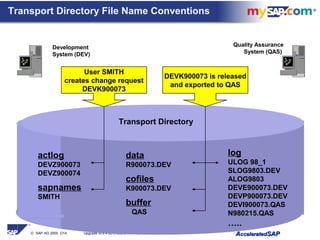
Transport Directory File Name Conventions
Development
System (DEV)
Transport Directory
actlog
DEVZ900073
DEVZ900074
sapnames
SMITH
data
R900073.DEV
cofiles
K900073.DEV
buffer
QAS
log
ULOG 98_1
SLOG9803.DEV
ALOG9803
DEVE900073.DEV
DEVP900073.DEV
DEVI900073.QAS
N980215.QAS
…..
User SMITH
creates change request
DEVK900073
DEVK900073 is released
and exported to QAS
Quality Assurance
System (QAS)
© SAP AG 2000 O14 Upgrade WS 4.6B (Roland Hamm) / 4 AAcceleratedcceleratedSAPSAP
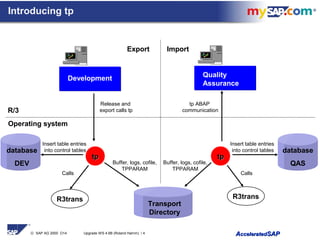
Introducing tp
R/3
Operating system
Transport
Directory
Export Import
Development
Buffer, logs, cofile,
TPPARAM
Quality
Assurance
Insert table entries
into control tables
Buffer, logs, cofile,
TPPARAM
Calls
Release and
export calls tp
tp ABAP
communication
tptp tptp
R3transR3trans
Calls
Insert table entries
into control tables database
QAS
database
DEV
© SAP AG 2000 O14 Upgrade WS 4.6B (Roland Hamm) / 5 AAcceleratedcceleratedSAPSAP
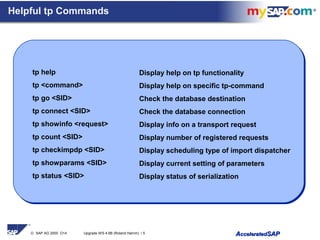
Helpful tp Commands
Display help on tp functionality
Display help on specific tp-command
Check the database destination
Check the database connection
Display info on a transport request
Display number of registered requests
Display scheduling type of import dispatcher
Display current setting of parameters
Display status of serialization
tp help
tp <command>
tp go <SID>
tp connect <SID>
tp showinfo <request>
tp count <SID>
tp checkimpdp <SID>
tp showparams <SID>
tp status <SID>
© SAP AG 2000 O14 Upgrade WS 4.6B (Roland Hamm) / 6 AAcceleratedcceleratedSAPSAP
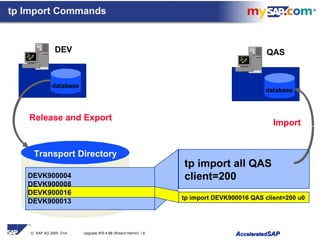
Transport Directory
tp import all QAS
client=200DEVK900004
DEVK900008
DEVK900016
DEVK900013
tp import DEVK900016 QAS client=200 u0
Import
QAS
Release and Export
DEV
database
database
tp Import Commands
© SAP AG 2000 O14 Upgrade WS 4.6B (Roland Hamm) / 7 AAcceleratedcceleratedSAPSAP
tp Commands for Accessing Buffers
tp showbuffer <SID>
tp addtobuffer <request> <SID> [u<digit(s)>]
tp delfrombuffer <request> <SID>
tp cleanbuffer <SID>
tp setstopmark <SID>
tp delstopmark <SID>
Buffer for QAS
TASK UMODE
----------------------------------------------------------------------------------------------
DEVK900048 8
DEVK900057
DEVK900053
STOPMARK Is a special entry (not a change request)
DEVK900069 2
© SAP AG 2000 O14 Upgrade WS 4.6B (Roland Hamm) / 8 AAcceleratedcceleratedSAPSAP
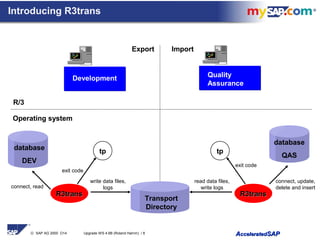
Introducing R3trans
R/3
Operating system
Export Import
Development Quality
Assurance
database
QAS
exit code
database
DEV
R3transR3trans R3transR3trans
connect, read
connect, update,
delete and insert
exit code
tptp
write data files,
logs
read data files,
write logs
Transport
Directory
© SAP AG 2000 O14 Upgrade WS 4.6B (Roland Hamm) / 9 AAcceleratedcceleratedSAPSAP
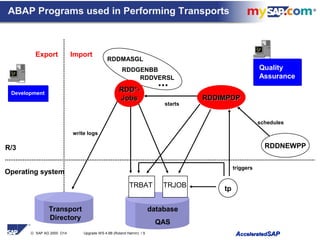
ABAP Programs used in Performing Transports
R/3
Operating system
Export Import
RDDMASGL
RDDGENBB
...
RDDVERSL
RDD*-RDD*-
JobsJobs RDDIMPDPRDDIMPDP
database
QAS
Development
Quality
Assurance
TRBAT TRJOB
write logs
tp
starts
triggers
schedules
RDDNEWPP
Transport
Directory
© SAP AG 2000 O14 Upgrade WS 4.6B (Roland Hamm) / 10 AAcceleratedcceleratedSAPSAP
1st 2nd 3rd 4th 5th 6th 7th 8th 9th
TASK DDIC | ACTIV | MAIN I | MC ACT | ADO I | LOG I | VERS F | XPRA | GENERA | UMODE
------------------------------------------------------------------------------------------------------------------------------------------------------------
DEVK900048 | | 1 | | | | 1793 | | |
DEVK900057 | | 1 | | | | 25 | | 23 |
DEVK900053 | | 1 | | | | 5 | | |
DEVK900069 1 | 1 | 1 | | | | 1 | | 1 |
DEVK900078 | | 1 | | | | 197 | | |
DEVK900083 | | 1 | | | | 25 | | 23 |
DEVK900087 | | 1 | | | | 5 | | |
DEVK900092 1 | 1 | 1 | | | | 1 | | 1 |
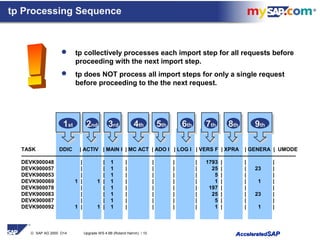
tp Processing Sequence
 tp collectively processes each import step for all requests before
proceeding with the next import step.
 tp does NOT process all import steps for only a single request
before proceeding to the the next request.
© SAP AG 2000 O14 Upgrade WS 4.6B (Roland Hamm) / 11 AAcceleratedcceleratedSAPSAP
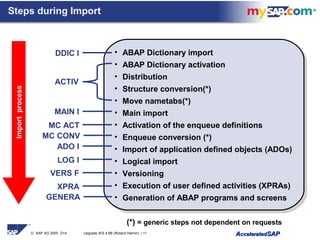
Steps during Import
• ABAP Dictionary import
• ABAP Dictionary activation
• Distribution
• Structure conversion(*)
• Move nametabs(*)
• Main import
• Activation of the enqueue definitions
• Enqueue conversion (*)
• Import of application defined objects (ADOs)
• Logical import
• Versioning
• Execution of user defined activities (XPRAs)
• Generation of ABAP programs and screens
• ABAP Dictionary import
• ABAP Dictionary activation
• Distribution
• Structure conversion(*)
• Move nametabs(*)
• Main import
• Activation of the enqueue definitions
• Enqueue conversion (*)
• Import of application defined objects (ADOs)
• Logical import
• Versioning
• Execution of user defined activities (XPRAs)
• Generation of ABAP programs and screens
DDIC I
ACTIV
MAIN I
ADO I
VERS F
XPRA
Importprocess
GENERA
LOG I
MC ACT
MC CONV
(*) = generic steps not dependent on requests
© SAP AG 2000 O14 Upgrade WS 4.6B (Roland Hamm) / 12 AAcceleratedcceleratedSAPSAP
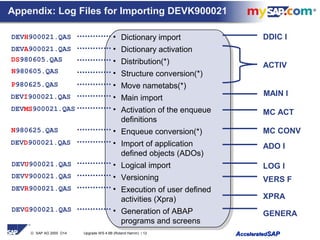
Appendix: Log Files for Importing DEVK900021
• Dictionary import
• Dictionary activation
• Distribution(*)
• Structure conversion(*)
• Move nametabs(*)
• Main import
• Activation of the enqueue
definitions
• Enqueue conversion(*)
• Import of application
defined objects (ADOs)
• Logical import
• Versioning
• Execution of user defined
activities (Xpra)
• Generation of ABAP
programs and screens
• Dictionary import
• Dictionary activation
• Distribution(*)
• Structure conversion(*)
• Move nametabs(*)
• Main import
• Activation of the enqueue
definitions
• Enqueue conversion(*)
• Import of application
defined objects (ADOs)
• Logical import
• Versioning
• Execution of user defined
activities (Xpra)
• Generation of ABAP
programs and screens
DDIC I
ACTIV
MAIN I
ADO I
VERS F
XPRA
DEVH900021.QAS
DEVA900021.QAS
DS980605.QAS
P980625.QAS
DEVI900021.QAS
DEVV900021.QAS
DEVR900021.QAS
DEVG900021.QAS
GENERA
LOG I
MC ACT
N980625.QAS
N980605.QAS
DEVMS900021.QAS
DEVD900021.QAS
DEVU900021.QAS
MC CONV
© SAP AG 2000 O14 Upgrade WS 4.6B (Roland Hamm) / 13 AAcceleratedcceleratedSAPSAP
tptp
ABAPABAPOSLevelOSLevel
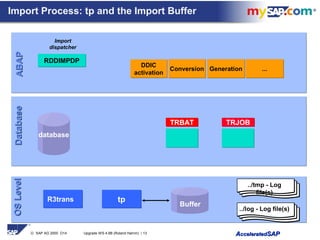
Import Process: tp and the Import Buffer
TRBATTRBAT TRJOBTRJOB
database
Buffer
RDDIMPDPRDDIMPDP
Import
dispatcher
DDIC
activation
DDIC
activation
ConversionConversion GenerationGeneration ......
../tmp - Log
file(s)
../log - Log file(s)
R3trans
DatabaseDatabase
© SAP AG 2000 O14 Upgrade WS 4.6B (Roland Hamm) / 14 AAcceleratedcceleratedSAPSAP
TRBATTRBAT TRJOBTRJOB
DatabaseDatabaseABAPABAPOSLevelOSLevel
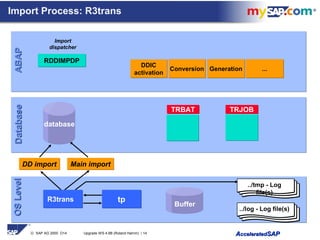
Import Process: R3trans
DD importDD import Main importMain import
../tmp - Log
file(s)
../log - Log file(s)
Buffer
tptpR3trans
RDDIMPDPRDDIMPDP
Import
dispatcher
DDIC
activation
DDIC
activation
ConversionConversion GenerationGeneration ......
database
© SAP AG 2000 O14 Upgrade WS 4.6B (Roland Hamm) / 15 AAcceleratedcceleratedSAPSAP
DatabaseDatabaseABAPABAPOSLevelOSLevel
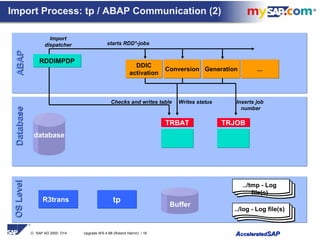
Triggers
TRBATTRBAT TRJOBTRJOB
RDDIMPDPRDDIMPDP
Import
dispatcher
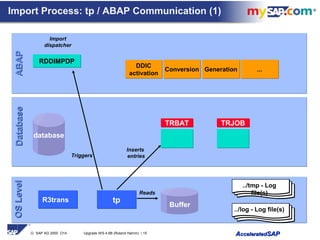
Import Process: tp / ABAP Communication (1)
Inserts
entries
Reads
DDIC
activation
DDIC
activation
ConversionConversion GenerationGeneration
../tmp - Log
file(s)
../log - Log file(s)
Buffer
......
tptpR3trans
database
© SAP AG 2000 O14 Upgrade WS 4.6B (Roland Hamm) / 16 AAcceleratedcceleratedSAPSAP
DatabaseDatabaseABAPABAPOSLevelOSLevel
TRBATTRBAT TRJOBTRJOB
RDDIMPDPRDDIMPDP
Import
dispatcher
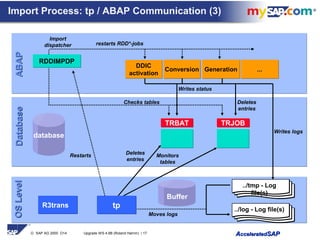
Import Process: tp / ABAP Communication (2)
starts RDD*-jobs
Inserts job
number
DDIC
activation
DDIC
activation
ConversionConversion GenerationGeneration
Writes status
../tmp - Log
file(s)
../log - Log file(s)
Checks and writes table
Buffer
......
tptpR3trans
database
© SAP AG 2000 O14 Upgrade WS 4.6B (Roland Hamm) / 17 AAcceleratedcceleratedSAPSAP
DatabaseDatabaseABAPABAPOSLevelOSLevel
Restarts
TRBATTRBAT TRJOBTRJOB
RDDIMPDPRDDIMPDP
Import
dispatcher
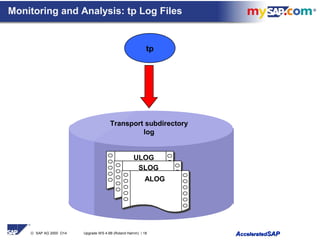
Import Process: tp / ABAP Communication (3)
restarts RDD*-jobs
Monitors
tables
Deletes
entries
DDIC
activation
DDIC
activation
ConversionConversion GenerationGeneration
Writes status
../tmp - Log
file(s)
../log - Log file(s)
Checks tables
Writes logs
Buffer
Moves logs
......
Deletes
entries
tptpR3trans
database
© SAP AG 2000 O14 Upgrade WS 4.6B (Roland Hamm) / 18 AAcceleratedcceleratedSAPSAP
Monitoring and Analysis: tp Log Files
ALOG
SLOG
ULOG
tp
Transport subdirectory
log
© SAP AG 2000 O14 Upgrade WS 4.6B (Roland Hamm) / 19 AAcceleratedcceleratedSAPSAP
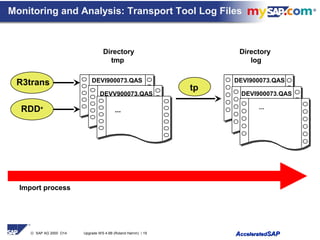
Monitoring and Analysis: Transport Tool Log Files
R3trans
RDD*
Directory
log
Directory
tmp
DEVI900073.QAS
DEVV900073.QAS
...
DEVI900073.QAS
DEVI900073.QAS
...
tp
Import process
© SAP AG 2000 O14 Upgrade WS 4.6B (Roland Hamm) / 20 AAcceleratedcceleratedSAPSAP
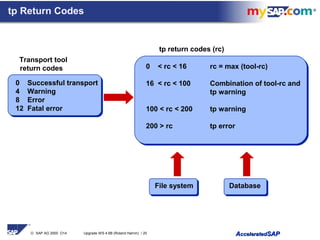
0 Successful transport
4 Warning
8 Error
12 Fatal error
tp Return Codes
0 < rc < 16 rc = max (tool-rc)
16 < rc < 100 Combination of tool-rc and
tp warning
100 < rc < 200 tp warning
200 > rc tp error
Transport tool
return codes
tp return codes (rc)
File system Database
© SAP AG 2000 O14 Upgrade WS 4.6B (Roland Hamm) / 21 AAcceleratedcceleratedSAPSAP
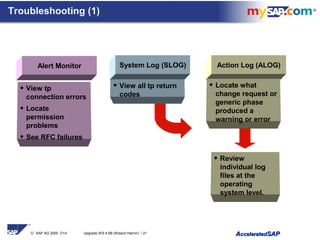
Troubleshooting (1)
Alert Monitor
• View tp
connection errors
• Locate
permission
problems
• See RFC failures
• Review
individual log
files at the
operating
system level.
System Log (SLOG) Action Log (ALOG)
• View all tp return
codes
• Locate what
change request or
generic phase
produced a
warning or error
© SAP AG 2000 O14 Upgrade WS 4.6B (Roland Hamm) / 22 AAcceleratedcceleratedSAPSAP
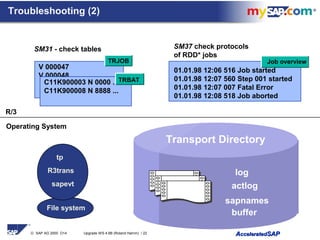
V 000047
V 000048
TRJOB
Transport Directory
C11K900003 N 0000 ...
C11K900008 N 8888 ...
TRBAT
Job overview
01.01.98 12:06 516 Job started
01.01.98 12:07 560 Step 001 started
01.01.98 12:07 007 Fatal Error
01.01.98 12:08 518 Job aborted
R/3
SM31 - check tables SM37 check protocols
of RDD* jobs
log
sapnames
actlog
buffer
tp
File system
sapevt
R3trans
Operating System
Troubleshooting (2)
© SAP AG 2000 O14 Upgrade WS 4.6B (Roland Hamm) / 23 AAcceleratedcceleratedSAPSAP
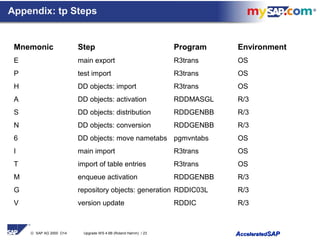
Appendix: tp Steps
Mnemonic Step Program Environment
E main export R3trans OS
P test import R3trans OS
H DD objects: import R3trans OS
A DD objects: activation RDDMASGL R/3
S DD objects: distribution RDDGENBB R/3
N DD objects: conversion RDDGENBB R/3
6 DD objects: move nametabs pgmvntabs OS
I main import R3trans OS
T import of table entries R3trans OS
M enqueue activation RDDGENBB R/3
G repository objects: generation RDDIC03L R/3
V version update RDDIC R/3
© SAP AG 2000 O14 Upgrade WS 4.6B (Roland Hamm) / 24 AAcceleratedcceleratedSAPSAP
A ddic activation T R3trans import of table entries
B TACOB activation of DD objects V version update
b backup W forwarding and linking K transports
C corr.release of C-sources X export of self defined objects
c kernel copy < enqueue type (SE07)
D import of selfdefined objects (SDO) > dequeue type (SE07)
d remove stopmark 1 start database
E main export 2 stop database
F export of C sources 3 start SAP system
G generation of repository objects 4 stop SAP system
H DD import 5 move reports
I main import 6 move nametabs
J new activator symbol 7 touch all reports
L R3trans import commandfile 8 reset SAP buffers
M enqueue activation ( lock DE (development environment)
N TACOB conversion of DD objects ) unlock DE
n TACOB conversion of MC objects { locksysX
P test import | locksys
Q execution of reports before put } unlocksys
R execution of reports after put (XPRA) ? unknown action
S distribution of DD objects
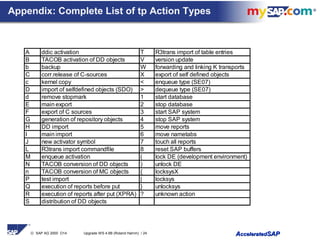
Appendix: Complete List of tp Action Types
© SAP AG 2000 O14 Upgrade WS 4.6B (Roland Hamm) / 25 AAcceleratedcceleratedSAPSAP
 Header JOBNAME Report Explanation
 =====================================================================
 X RDDDIC0L RDDDIC0L ADO export
 J RDDMASGL RDDMASGL Mass activator (new)
 B RDDTACOL RDDTACOL TACOB activator
 S RDDDIS0L RDDGENBB Distributor
 N RDDGEN0L RDDGENBB Import converter
 M RDDMASGL RDDMASGL Mass activator (Enqueue)
 Y(n) RDDGEN0L RDDGENBB Matchcode converter
 O RDDGEN0L RDDGENBB Batch converter (not in Upgrade)
 D RDDDIC1L RDDDIC1L ADO import
 V RDDVERSL RDDVERSL Create version
 R RDDEXECL RDDEXECL XPRA execution
 G RDDDIC3L RDDDIC3L Generation
Function
codes
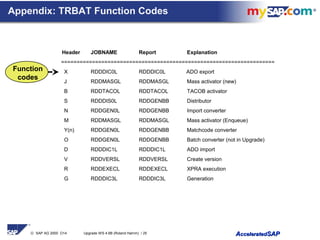
Appendix: TRBAT Function Codes
© SAP AG 2000 O14 Upgrade WS 4.6B (Roland Hamm) / 26 AAcceleratedcceleratedSAPSAP
Roland Hamm
SAP AG
Questions & Answers
tp & R3trans

T pn r3trans

  • 1.
    © SAP AG2000 O14 Upgrade WS 4.6B (Roland Hamm) / 1 AAcceleratedcceleratedSAPSAP tp & R3trans Roland Hamm SAP AG
  • 2.
    © SAP AG2000 O14 Upgrade WS 4.6B (Roland Hamm) / 2 AAcceleratedcceleratedSAPSAP Advanced Transport Management  Contents:  Transport directory naming conventions  Transport tools and communication mechanisms  Import process and troubleshooting  Objectives: At the end of this unit you will be able to:  Outline the files in the transport directory  Explain transport tools and their intercommunication  Perform imports and troubleshooting with tp  Clean-up the transport directory
  • 3.
    © SAP AG2000 O14 Upgrade WS 4.6B (Roland Hamm) / 3 AAcceleratedcceleratedSAPSAP Transport Directory File Name Conventions Development System (DEV) Transport Directory actlog DEVZ900073 DEVZ900074 sapnames SMITH data R900073.DEV cofiles K900073.DEV buffer QAS log ULOG 98_1 SLOG9803.DEV ALOG9803 DEVE900073.DEV DEVP900073.DEV DEVI900073.QAS N980215.QAS ….. User SMITH creates change request DEVK900073 DEVK900073 is released and exported to QAS Quality Assurance System (QAS)
  • 4.
    © SAP AG2000 O14 Upgrade WS 4.6B (Roland Hamm) / 4 AAcceleratedcceleratedSAPSAP Introducing tp R/3 Operating system Transport Directory Export Import Development Buffer, logs, cofile, TPPARAM Quality Assurance Insert table entries into control tables Buffer, logs, cofile, TPPARAM Calls Release and export calls tp tp ABAP communication tptp tptp R3transR3trans Calls Insert table entries into control tables database QAS database DEV
  • 5.
    © SAP AG2000 O14 Upgrade WS 4.6B (Roland Hamm) / 5 AAcceleratedcceleratedSAPSAP Helpful tp Commands Display help on tp functionality Display help on specific tp-command Check the database destination Check the database connection Display info on a transport request Display number of registered requests Display scheduling type of import dispatcher Display current setting of parameters Display status of serialization tp help tp <command> tp go <SID> tp connect <SID> tp showinfo <request> tp count <SID> tp checkimpdp <SID> tp showparams <SID> tp status <SID>
  • 6.
    © SAP AG2000 O14 Upgrade WS 4.6B (Roland Hamm) / 6 AAcceleratedcceleratedSAPSAP Transport Directory tp import all QAS client=200DEVK900004 DEVK900008 DEVK900016 DEVK900013 tp import DEVK900016 QAS client=200 u0 Import QAS Release and Export DEV database database tp Import Commands
  • 7.
    © SAP AG2000 O14 Upgrade WS 4.6B (Roland Hamm) / 7 AAcceleratedcceleratedSAPSAP tp Commands for Accessing Buffers tp showbuffer <SID> tp addtobuffer <request> <SID> [u<digit(s)>] tp delfrombuffer <request> <SID> tp cleanbuffer <SID> tp setstopmark <SID> tp delstopmark <SID> Buffer for QAS TASK UMODE ---------------------------------------------------------------------------------------------- DEVK900048 8 DEVK900057 DEVK900053 STOPMARK Is a special entry (not a change request) DEVK900069 2
  • 8.
    © SAP AG2000 O14 Upgrade WS 4.6B (Roland Hamm) / 8 AAcceleratedcceleratedSAPSAP Introducing R3trans R/3 Operating system Export Import Development Quality Assurance database QAS exit code database DEV R3transR3trans R3transR3trans connect, read connect, update, delete and insert exit code tptp write data files, logs read data files, write logs Transport Directory
  • 9.
    © SAP AG2000 O14 Upgrade WS 4.6B (Roland Hamm) / 9 AAcceleratedcceleratedSAPSAP ABAP Programs used in Performing Transports R/3 Operating system Export Import RDDMASGL RDDGENBB ... RDDVERSL RDD*-RDD*- JobsJobs RDDIMPDPRDDIMPDP database QAS Development Quality Assurance TRBAT TRJOB write logs tp starts triggers schedules RDDNEWPP Transport Directory
  • 10.
    © SAP AG2000 O14 Upgrade WS 4.6B (Roland Hamm) / 10 AAcceleratedcceleratedSAPSAP 1st 2nd 3rd 4th 5th 6th 7th 8th 9th TASK DDIC | ACTIV | MAIN I | MC ACT | ADO I | LOG I | VERS F | XPRA | GENERA | UMODE ------------------------------------------------------------------------------------------------------------------------------------------------------------ DEVK900048 | | 1 | | | | 1793 | | | DEVK900057 | | 1 | | | | 25 | | 23 | DEVK900053 | | 1 | | | | 5 | | | DEVK900069 1 | 1 | 1 | | | | 1 | | 1 | DEVK900078 | | 1 | | | | 197 | | | DEVK900083 | | 1 | | | | 25 | | 23 | DEVK900087 | | 1 | | | | 5 | | | DEVK900092 1 | 1 | 1 | | | | 1 | | 1 | tp Processing Sequence  tp collectively processes each import step for all requests before proceeding with the next import step.  tp does NOT process all import steps for only a single request before proceeding to the the next request.
  • 11.
    © SAP AG2000 O14 Upgrade WS 4.6B (Roland Hamm) / 11 AAcceleratedcceleratedSAPSAP Steps during Import • ABAP Dictionary import • ABAP Dictionary activation • Distribution • Structure conversion(*) • Move nametabs(*) • Main import • Activation of the enqueue definitions • Enqueue conversion (*) • Import of application defined objects (ADOs) • Logical import • Versioning • Execution of user defined activities (XPRAs) • Generation of ABAP programs and screens • ABAP Dictionary import • ABAP Dictionary activation • Distribution • Structure conversion(*) • Move nametabs(*) • Main import • Activation of the enqueue definitions • Enqueue conversion (*) • Import of application defined objects (ADOs) • Logical import • Versioning • Execution of user defined activities (XPRAs) • Generation of ABAP programs and screens DDIC I ACTIV MAIN I ADO I VERS F XPRA Importprocess GENERA LOG I MC ACT MC CONV (*) = generic steps not dependent on requests
  • 12.
    © SAP AG2000 O14 Upgrade WS 4.6B (Roland Hamm) / 12 AAcceleratedcceleratedSAPSAP Appendix: Log Files for Importing DEVK900021 • Dictionary import • Dictionary activation • Distribution(*) • Structure conversion(*) • Move nametabs(*) • Main import • Activation of the enqueue definitions • Enqueue conversion(*) • Import of application defined objects (ADOs) • Logical import • Versioning • Execution of user defined activities (Xpra) • Generation of ABAP programs and screens • Dictionary import • Dictionary activation • Distribution(*) • Structure conversion(*) • Move nametabs(*) • Main import • Activation of the enqueue definitions • Enqueue conversion(*) • Import of application defined objects (ADOs) • Logical import • Versioning • Execution of user defined activities (Xpra) • Generation of ABAP programs and screens DDIC I ACTIV MAIN I ADO I VERS F XPRA DEVH900021.QAS DEVA900021.QAS DS980605.QAS P980625.QAS DEVI900021.QAS DEVV900021.QAS DEVR900021.QAS DEVG900021.QAS GENERA LOG I MC ACT N980625.QAS N980605.QAS DEVMS900021.QAS DEVD900021.QAS DEVU900021.QAS MC CONV
  • 13.
    © SAP AG2000 O14 Upgrade WS 4.6B (Roland Hamm) / 13 AAcceleratedcceleratedSAPSAP tptp ABAPABAPOSLevelOSLevel Import Process: tp and the Import Buffer TRBATTRBAT TRJOBTRJOB database Buffer RDDIMPDPRDDIMPDP Import dispatcher DDIC activation DDIC activation ConversionConversion GenerationGeneration ...... ../tmp - Log file(s) ../log - Log file(s) R3trans DatabaseDatabase
  • 14.
    © SAP AG2000 O14 Upgrade WS 4.6B (Roland Hamm) / 14 AAcceleratedcceleratedSAPSAP TRBATTRBAT TRJOBTRJOB DatabaseDatabaseABAPABAPOSLevelOSLevel Import Process: R3trans DD importDD import Main importMain import ../tmp - Log file(s) ../log - Log file(s) Buffer tptpR3trans RDDIMPDPRDDIMPDP Import dispatcher DDIC activation DDIC activation ConversionConversion GenerationGeneration ...... database
  • 15.
    © SAP AG2000 O14 Upgrade WS 4.6B (Roland Hamm) / 15 AAcceleratedcceleratedSAPSAP DatabaseDatabaseABAPABAPOSLevelOSLevel Triggers TRBATTRBAT TRJOBTRJOB RDDIMPDPRDDIMPDP Import dispatcher Import Process: tp / ABAP Communication (1) Inserts entries Reads DDIC activation DDIC activation ConversionConversion GenerationGeneration ../tmp - Log file(s) ../log - Log file(s) Buffer ...... tptpR3trans database
  • 16.
    © SAP AG2000 O14 Upgrade WS 4.6B (Roland Hamm) / 16 AAcceleratedcceleratedSAPSAP DatabaseDatabaseABAPABAPOSLevelOSLevel TRBATTRBAT TRJOBTRJOB RDDIMPDPRDDIMPDP Import dispatcher Import Process: tp / ABAP Communication (2) starts RDD*-jobs Inserts job number DDIC activation DDIC activation ConversionConversion GenerationGeneration Writes status ../tmp - Log file(s) ../log - Log file(s) Checks and writes table Buffer ...... tptpR3trans database
  • 17.
    © SAP AG2000 O14 Upgrade WS 4.6B (Roland Hamm) / 17 AAcceleratedcceleratedSAPSAP DatabaseDatabaseABAPABAPOSLevelOSLevel Restarts TRBATTRBAT TRJOBTRJOB RDDIMPDPRDDIMPDP Import dispatcher Import Process: tp / ABAP Communication (3) restarts RDD*-jobs Monitors tables Deletes entries DDIC activation DDIC activation ConversionConversion GenerationGeneration Writes status ../tmp - Log file(s) ../log - Log file(s) Checks tables Writes logs Buffer Moves logs ...... Deletes entries tptpR3trans database
  • 18.
    © SAP AG2000 O14 Upgrade WS 4.6B (Roland Hamm) / 18 AAcceleratedcceleratedSAPSAP Monitoring and Analysis: tp Log Files ALOG SLOG ULOG tp Transport subdirectory log
  • 19.
    © SAP AG2000 O14 Upgrade WS 4.6B (Roland Hamm) / 19 AAcceleratedcceleratedSAPSAP Monitoring and Analysis: Transport Tool Log Files R3trans RDD* Directory log Directory tmp DEVI900073.QAS DEVV900073.QAS ... DEVI900073.QAS DEVI900073.QAS ... tp Import process
  • 20.
    © SAP AG2000 O14 Upgrade WS 4.6B (Roland Hamm) / 20 AAcceleratedcceleratedSAPSAP 0 Successful transport 4 Warning 8 Error 12 Fatal error tp Return Codes 0 < rc < 16 rc = max (tool-rc) 16 < rc < 100 Combination of tool-rc and tp warning 100 < rc < 200 tp warning 200 > rc tp error Transport tool return codes tp return codes (rc) File system Database
  • 21.
    © SAP AG2000 O14 Upgrade WS 4.6B (Roland Hamm) / 21 AAcceleratedcceleratedSAPSAP Troubleshooting (1) Alert Monitor • View tp connection errors • Locate permission problems • See RFC failures • Review individual log files at the operating system level. System Log (SLOG) Action Log (ALOG) • View all tp return codes • Locate what change request or generic phase produced a warning or error
  • 22.
    © SAP AG2000 O14 Upgrade WS 4.6B (Roland Hamm) / 22 AAcceleratedcceleratedSAPSAP V 000047 V 000048 TRJOB Transport Directory C11K900003 N 0000 ... C11K900008 N 8888 ... TRBAT Job overview 01.01.98 12:06 516 Job started 01.01.98 12:07 560 Step 001 started 01.01.98 12:07 007 Fatal Error 01.01.98 12:08 518 Job aborted R/3 SM31 - check tables SM37 check protocols of RDD* jobs log sapnames actlog buffer tp File system sapevt R3trans Operating System Troubleshooting (2)
  • 23.
    © SAP AG2000 O14 Upgrade WS 4.6B (Roland Hamm) / 23 AAcceleratedcceleratedSAPSAP Appendix: tp Steps Mnemonic Step Program Environment E main export R3trans OS P test import R3trans OS H DD objects: import R3trans OS A DD objects: activation RDDMASGL R/3 S DD objects: distribution RDDGENBB R/3 N DD objects: conversion RDDGENBB R/3 6 DD objects: move nametabs pgmvntabs OS I main import R3trans OS T import of table entries R3trans OS M enqueue activation RDDGENBB R/3 G repository objects: generation RDDIC03L R/3 V version update RDDIC R/3
  • 24.
    © SAP AG2000 O14 Upgrade WS 4.6B (Roland Hamm) / 24 AAcceleratedcceleratedSAPSAP A ddic activation T R3trans import of table entries B TACOB activation of DD objects V version update b backup W forwarding and linking K transports C corr.release of C-sources X export of self defined objects c kernel copy < enqueue type (SE07) D import of selfdefined objects (SDO) > dequeue type (SE07) d remove stopmark 1 start database E main export 2 stop database F export of C sources 3 start SAP system G generation of repository objects 4 stop SAP system H DD import 5 move reports I main import 6 move nametabs J new activator symbol 7 touch all reports L R3trans import commandfile 8 reset SAP buffers M enqueue activation ( lock DE (development environment) N TACOB conversion of DD objects ) unlock DE n TACOB conversion of MC objects { locksysX P test import | locksys Q execution of reports before put } unlocksys R execution of reports after put (XPRA) ? unknown action S distribution of DD objects Appendix: Complete List of tp Action Types
  • 25.
    © SAP AG2000 O14 Upgrade WS 4.6B (Roland Hamm) / 25 AAcceleratedcceleratedSAPSAP  Header JOBNAME Report Explanation  =====================================================================  X RDDDIC0L RDDDIC0L ADO export  J RDDMASGL RDDMASGL Mass activator (new)  B RDDTACOL RDDTACOL TACOB activator  S RDDDIS0L RDDGENBB Distributor  N RDDGEN0L RDDGENBB Import converter  M RDDMASGL RDDMASGL Mass activator (Enqueue)  Y(n) RDDGEN0L RDDGENBB Matchcode converter  O RDDGEN0L RDDGENBB Batch converter (not in Upgrade)  D RDDDIC1L RDDDIC1L ADO import  V RDDVERSL RDDVERSL Create version  R RDDEXECL RDDEXECL XPRA execution  G RDDDIC3L RDDDIC3L Generation Function codes Appendix: TRBAT Function Codes
  • 26.
    © SAP AG2000 O14 Upgrade WS 4.6B (Roland Hamm) / 26 AAcceleratedcceleratedSAPSAP Roland Hamm SAP AG Questions & Answers tp & R3trans

Editor's Notes

  • #4 As the transport control program tp runs on many different operating systems, restrictive naming conventions are required. Change requests are named &amp;lt;source SID&amp;gt;K9&amp;lt;5 digits&amp;gt;, where K9 indicates a customer request. The six digits (including the 9) are a serial number. The transport directory contains, for example, the following subdirectories: actlog with files named &amp;lt;source SID&amp;gt;Z&amp;lt;6 digits&amp;gt; recording each action on a request or task (for example, creation, release, or change of ownership). sapnames with files named after the user&amp;apos;s logon name. A file is created for each R/3 user who performs transport actions, and updated when the user releases a request. buffer with an import buffer for each R/3 System named after the SID. When a change request is released, the import buffer of target systems is updated. data with files named R9&amp;lt;5 digits &amp;gt;.&amp;lt;source SID&amp;gt; containing the exported objects, and files beginning with D9 if application defined objects (ADOs) are transported. cofiles with command files named K9&amp;lt;5 digits&amp;gt;.&amp;lt;source SID&amp;gt; (containing, for example, import steps to be performed) log with all log files, such as ULOGs, ALOGs, SLOGs, log files named &amp;lt;source SID&amp;gt;&amp;lt;action&amp;gt;9&amp;lt;5 digits&amp;gt;. &amp;lt;action SID&amp;gt; for each executed step, and log files named &amp;lt;action&amp;gt;&amp;lt;date&amp;gt;. &amp;lt;action SID&amp;gt; for steps that are collectively executed, for example, step N (structure conversion) and step P (move nametabs). For a list of possible actions and related letters, see the Appendix.
  • #5 The transport control program tp is a tool for controlling transports between R/3 Systems and for performing R/3 Release upgrades. tp tracks transports by controlling exports and imports of objects between R/3 Systems, ensures that the steps in exporting and importing objects are performed in the correct order, and ensures that imports into a target system are done in the same order as the exports from the source systems. tp is an operating system level tool using special programs (such as C programs), operating system commands, and ABAP programs in R/3. tp performs exports and imports separately. In the export phase, the objects to be transported are extracted from the database of the source system and stored in files in the transport directory. In the import phase, the objects are added to the database of the target system. An export should always take place immediately after the change request has been released, so that the objects can be freed for further modification. There is no automatic mechanism that imports a request into a target system immediately after export. In R/3 Releases before 3.1H (without TMS functionality), imports are performed using tp commands at the operating system level. After 3.1H, using the TMS, imports are instead performed from within R/3. Although most transport activities can be performed using TMS, you may find the need to use tp commands for exceptional cases. Because import buffers and import queues are identical, using tp and using TMS produces consistent results.
  • #6 tp commands are executed in the transport subdirectory bin by user &amp;lt;SID&amp;gt;adm, and are writtentp &amp;lt;command&amp;gt; [argument(s)] [option(s)] To display general information on the syntax of all tp calls, use tp help. To display a description of the syntax and function of a specific command, use tp &amp;lt;command&amp;gt; without any options. To display a count of all requests registered for import into a specific system, use tp count &amp;lt;SID&amp;gt;. To display the environmental variables required for logging on to the correct database of a specific system with the help of the values in the global parameter file, use tp go &amp;lt;SID&amp;gt;. Note that this command does not perform a connect; tp executes this command before a connect. To test whether a connection to an R/3 System&amp;apos;s database was successful, use tp connect &amp;lt;SID&amp;gt;. To display how the import dispatcher RDDIMPDP is scheduled for a specific R/3 system, use tp checkimpdp &amp;lt;SID&amp;gt;. To display all current settings of the parameter file, use tp showparams &amp;lt;SID&amp;gt;. To display status information on the serialization of a specific system, use tp status &amp;lt;SID&amp;gt;.
  • #7 Imports performed using tp at the operating system level should be restricted to exceptional cases, such as imports to multiple clients. There are two commands for importing to a target system using tp at the operating system level: tp import all &amp;lt;target SID&amp;gt; client=&amp;lt;client_number&amp;gt;. Analogous to the default import of TMS, this command imports all waiting change requests in the correct sequence (their export sequence). tp import &amp;lt;change request&amp;gt; &amp;lt;target SID&amp;gt; client=&amp;lt;client_number&amp;gt; u0. Analogous to the TMS preliminary import, this command enables you to give individual change requests priority. Importing individual requests is not recommended as the correct order of requests is not necessarily maintained, and thus newer versions of objects may be overwritten by older versions through the regular import of all waiting requests. To ensure that the objects imported through an individual transport are not overwritten by an older version, only use unconditional mode 0 (option u0) when starting individual imports. Using this mode is analogous to the TMS preliminary import and causes the change request to remain in the list of requests to be imported. When the regular transport takes place, the request will automatically be imported again in the export sequence. Individual imports only should be performed in exceptional cases. Processing imports out of order can result in severe inconsistencies in the target system. These are hard to diagnose. If you wanted to import single requests not as preliminary import (NOT recommended), you would use tp import &amp;lt;change request&amp;gt; &amp;lt;target SID&amp;gt; client=&amp;lt;client_number&amp;gt; (without the option u0).
  • #8 The contents of import buffer files in the transport subdirectory BUFFER are organized as a table. Each line contains information on a specific transport request that is specified in column TASK. One column includes the unconditional mode that is linked to the transport request. Other columns specify import actions. tp offers several commands for accessing buffers: tp showbuffer &amp;lt;SID&amp;gt; displays buffer entries. tp addtobuffer &amp;lt;change request&amp;gt; &amp;lt;target SID&amp;gt; registers the request as the last request to be imported. If the request has already been added for import, it is placed at the end of the queue. tp delfrombuffer &amp;lt;change request&amp;gt; &amp;lt;target SID&amp;gt; deletes a single request from the buffer. tp cleanbuffer &amp;lt;SID&amp;gt; removes successfully imported change requests from the buffer. This functionality is included in the command tp import all &amp;lt;target SID&amp;gt;. tp setstopmark &amp;lt;SID&amp;gt; places a stopmark at the end of a buffer so that subsequent tp import commands only process the requests that are located before the stopmark. tp delstopmark &amp;lt;SID&amp;gt; deletes the stopmark from a buffer.
  • #9 R3trans is a transport tool at the operating system level used to transport data between R/3 Systems. R3trans is also used when installing new R/3 Systems, performing R/3 Release updates, and for logical backups. R3trans is usually called by other programs such as tp and the upgrade control program R3up. For transports between R/3 Systems, to access the database, tp indirectly calls R3trans – by causing Unix to issue a forc(), Windows NT to issue a CreateProcess(), and AS/400 to issue a spawn(). During export, R3trans stores the object data extracted from the database in data files in the transport subdirectory data. The format of these data files, R3trans format, is independent of the platform. During import, R3trans reuses these data files. Direct use of R3trans is not supported but may be required in exceptional cases. In case of transports, R3trans should always be used through tp. Import steps differ for the different object types. Further activities may be required in addition to R3trans activities. tp ensures that all export and import steps, including R3trans activities, are completed successfully. Upward compatibility: R3trans writes data using a standard R/3 transport format. Thus you can export data with an old R3trans version and import data with a new version of R3trans. You can also transport between different databases or operating systems. Note that although exports and imports are independent of the R3trans version, the database platform, or the operating system, SAP does not support using tp or R3rans for transports between different R/3 Releases.
  • #10 Transport steps implemented using ABAP programs include activating the ABAP Dictionary, converting structures, and generating reports and screens. To execute these steps, tp use the tables TRBAT and TRJOB to communicate with the various ABAP programs. As these ABAP programs are run as background processes, there must be at least two background work processes running in R/3. When imports are performed, tp triggers the import dispatcher RDDIMPDP by sending the event SAP_TRIGGER_RDDIMPDP with the help of the tool sapevt. In client 000 and each client that is to receive imports, user DDIC must schedule the job RDDIMDP with event-based scheduling. RDDIMPDP can be scheduled by running the ABAP program RDDNEWPP. Normally, RDDIMPDP is automatically scheduled after a client copy. To verify if the required import dispatchers are scheduled, check the job overview using Transaction SM37. The correct name of the import dispatcher for each client is RDDIMPDP_CLIENT_&amp;lt;nnn&amp;gt; where nnn represents the client&amp;apos;s name. The corresponding event is SAP_TRIGGER_RDDIMPDP_CLIENT. tp and the background jobs needed for transports communicate using table TRBAT, which contains temporary data. tp inserts information into TRBAT specifying the steps to be performed for a specific request. tp then triggers RDDIMPDP to read TRBAT and execute the required programs as background jobs whose names start with RDD. For example, RDDMASGL is for mass activation, RDDGENDB for conversion, and RDDVERSL for versioning. Each RDD* job receives a job number that is recorded in table TRJOB. The jobs report their current status back to TRJOB.
  • #11 tp processes each import step collectively for all requests in the import queue. The required steps for each request are listed in the import buffer file. The contents of the buffer file is organized as a table. Each column represents an import step. The numbers in the columns indicate either if the import step is necessary, or the number of objects in the request that require the step. In the example above, first the import step DDIC is processed for requests where it is required (DEVK900069 and DEVK900092); then the ACTIV step (for DEVK900069 and DEVK900092); then the MAIN I step (for all requests); and so on. The &amp;apos;tp import all&amp;apos; command does NOT process all steps for one request before moving on to the steps for the next request. For example, if you detect an error in an object that has already been released, you correct the object and release it again. &amp;apos;Import all&amp;apos; then imports the whole buffer in the correct sequence and the faulty object is overwritten. Because the generation step is the last step and is performed only once for all objects in the requests, the faulty object does not affect your production system. Only the correct version of the report is activated and generated.
  • #12 ABAP Dictionary import with R3trans: All ABAP dictionary structural data is imported inactively, thus enabling you to import into an active R/3 System. Activation of ABAP dictionary and distribution: Runtime descriptions (nametabs) are written inactively. After activation and running logical checks for the new dictionary structures, the distribution program decides what actions are required to bring the new objects into the running system. Structure conversion: If necessary, changes are made to table structures. Move nametabs: After the new ABAP runtime objects are put into the active runtime environment, database structures are adjusted if necessary. From the beginning of this step until the end of the main import, inconsistencies may occur in the R/3 System that are removed at the end of the main import. Main import with R3trans: All data is imported and the R/3 System returns to a consistent state. Activation and conversion of enqueue objects: Objects that were not previously activated are activated in this separate step after the main import. They are used immediately in the running system. Import of application defined objects (ADOs): These objects include forms, styles, and printer definitions. Logical imports: This phase is currently not active and is ignored during the import process. The intentions of this phase will be to import data to a shadow client prior to performing required Customizing transactions in the target client. Versioning: Versions of Repository objects are only created on the R/3 System from which the objects was exported. However, the import process does modify the object’s Version counter which is incremented for all Repository objects during import. Execution of user-defined activities (XPRAs): XPRAs are objects that can be used to start reports in the target system. The XPRA object has the same name as the report. Generation of ABAP programs and screens: During this step, you can resume normal business activities in the system.
  • #14 The first step of an import process is the tp call, triggered by starting an import through TMS or by a ‘tp import’ command at operating system level. To ensure that all transport requests stored in the buffer begin the import process automatically, each time a ‘tp import’ call is made, a ‘tp setstopmark’ is executed. After the steps of the import process are completed, the command ‘tp delstopmark’ is performed automatically, and a ‘tp cleanbuffer’ deletes the transport requests from the import buffer. After all involved tools have finished their work, tp exits to the operating system level and writes a return code to the appropriate log file for the activity. For example, ‘tp import’ and ‘tp setstopmark’ commands are recorded in the ULOG file. Note: The command &amp;apos;tp import&amp;apos; is reentrant. If an error occurs during import, after you eliminate the error condition and restart tp, tp finds the correct point to restart. By default, tp aborts if one import phase receives a return code larger than 8. The TPPARAM parameter stoponerror defines what return code value should cause tp to abort.
  • #15 During the import process, tp reads the command file that includes all the necessary steps for the specific request and calls R3trans at the operating system level through a forc() for Unix systems, a CreateProcess() for Windows NT, or a spawn() for AS/400 environments. For each import step, tp passes a control file to the transport subdirectory tmp for use by R3trans. R3trans reads the corresponding data files in the transport subdirectory data and connects directly to the database to perform inserts or updates to the included objects. After R3trans finishes performing inserts or updates, it passes an exit code to tp. For each transport action, R3trans writes a log file in transport subdirectory tmp. After R3trans completes its work, tp moves this log file to the transport subdirectory log. During the import process, R3trans is called by the import steps ABAP dictionary import (for the import of ABAP dictionary definitions), and main import (for the import of table contents).
  • #16 For every transport request, tp writes an entry in table TRBAT. The import function currently being performed for the request is represented by a character. For a list of TRBAT function codes, see the Appendix. In the example below, there are 3 change requests waiting for DDIC activation in the table TRBAT. tp inserts a header entry to tell RDDIMPDP to start processing. Some activities that are independent of transport requests, such as distribution and structure conversion, only have a header entry in TRBAT. Return code 9999 indicates that the step is waiting to be performed. For the header entry, tp inserts a B (for &amp;quot;begin&amp;quot;) as return code. Request FunctionReturn CodeTimestampT11K904711 J999900000001T11K904712 J999900000002T11K904713 J999900000003 HEADER JB19983103143701 To trigger the transport daemon RDDIMPDP in R/3, tp uses the operating system level tool sapevt.
  • #17 When RDDIMPDP is started, it checks the table TRBAT to find out if there is an action to be performed such as mass activation, distribution, or table conversion. It sets the header entry to R (for &amp;quot;run&amp;quot;), and starts the appropriate RDD* program as a background task, reschedules itself, and exits. The activated program (in this example, the mass activator) sets the status of the first entry in TRBAT to active (return code 8888): Request FunctionReturn CodeTimestamp T11K904711 J888800000001 T11K904712 J999900000002 T11K904713 J999900000003 HEADER JR19983103143903 Each of the required background tasks receives a job number generated by R/3 background processing. This job number and the step ID are inserted into table TRJOB by the RDD* jobs.
  • #18 The background tasks write their return codes in TRBAT and delete the corresponding entry in TRJOB. Return codes of 12 or less indicate that the step is finished. In TRBAT, the column TIMESTMP contains the finishing time. When all the necessary actions are performed for all transport requests, the header entry is set to F (for &amp;quot;finished&amp;quot;) by the RDD* jobs. Request FunctionReturn CodeTimestamp T11K904711 J419983103144202 T11K904712 J019983103144357 T11K904713 J019983103144512 HEADER JF19983103144512 All the background jobs log the steps they perform either in the database or in transport subdirectory TMP. tp monitors the entries in TRBAT and TRJOB. When the header entry in TRBAT is set to F and TRJOB is empty, tp copies the logs of the completed steps from directory tmp to log and deletes the corresponding TRBAT entries. If problems are detected by tp when monitoring TRBAT and TRJOB, tp re-triggers RDDIMPDP through sapevt. RDDIMPDP automatically recognizes if a previous step is still active or was aborted by checking TRJOB and TRBAT. If a step was aborted, RDDIMPDP restarts this step. Two background work processes must be available.
  • #19 For long-running imports, it may be helpful to monitor the log files written at the operating system level. All logs in the transport environment are stored in the transport subdirectory log. These logs include logs created by tp (ULOG, SLOG and ALOG), and logs created by the various transport tools. The current ULOG file records all tp commands that are free of syntax errors, and is named using the name convention ULOG&amp;lt;YY&amp;gt;_&amp;lt;one digit&amp;gt;. Each line in the ULOG file represents a tp command. The SLOG file is used to monitor the transport activities of a specific R/3 System. It contains a general overview of performed imports indicating the return code and thus the success of each import. The name of the SLOG file can be set in the parameter file TPPARAM using the global parameter syslog. The default setting is SLOG&amp;lt;YY&amp;gt;&amp;lt;WW&amp;gt;.&amp;lt;SID&amp;gt;. The ALOG file records the return code for all transport steps handled in the common transport directory. The name of the ALOG file can be set in the parameter file TPPARAM using the global parameter alllog. The default value is ALOG&amp;lt;YY&amp;gt;&amp;lt;WW&amp;gt;.
  • #20 The various transport tools write a log for each transport action to the transport subdirectory tmp. After completion of the step, tp moves these logs from tmp to log. The log files are named &amp;lt;source SID&amp;gt;&amp;lt;action&amp;gt;&amp;lt;6 digits&amp;gt;.&amp;lt;target SID&amp;gt;, where the 6 digits are taken from the corresponding change request, and the performed action is represented by a single character (see also Appendix). Each log file contains a table with seven columns showing: The level for the transport protocol display in R/3. The possible levels are: Performed actions and return code Additional error messages End-user logs Details for developers and hotline Whether the text is information, a warning, an error, or a program abort. The language ID of the following text. The message type, that is, the work area relating to the information. The message ID in the related work area. The message text. Up to 1000 message texts for each work area are defined in the R/3 repository.
  • #21 tp receives return codes from all the transport tools involved in an import process. tp&amp;apos;s own return code following exit is interpreted as follows: 0 to 16 indicates the maximum values of all return codes from transport tools. 17 to 99 is a value that has been calculated from the return codes of the transport tools and a tp warning, for example, that the buffer of the target system has no write permission. 100 to 199 indicates warnings. Warnings mean that something went wrong and tp could not perform all tasks. 100 to 149 are &amp;quot;normal&amp;quot; tp warnings, for example, that RDDIMPDP cannot be triggered by sapevt. Return codes of 150 to 199 are rare and indicate incorrect operation by a user. For example, a return code of 152 is received if tp tries to import a request that is not included in the buffer. 200 or more indicates tp errors. For example, if a file could not be accessed as required by the import process, the return code is 212. More significant than the value of a return code is the accompanying text. To display the text of a specific tp return code, use the tp command tp explainrc &amp;lt;value of return code&amp;gt;.
  • #22 The first step in troubleshooting transport errors is to eliminate the obvious setup issues using the alert monitor, which records all TMS transport actions. To use the alert monitor, use Transaction STMS and choose Monitor  Alert monitor. The following information is displayed for each TMS function: the date and time, the user name, the TMS status message, and the target R/3 System. To display the full text of an error message, double-click on the error message. R/3 logs are shown in a tree structure with three-levels: The top level shows the SLOG file, used to monitor the transport activities of an R/3 System and determine the success of import requests. If import failures are recorded in the SLOG file, drill down to the ALOG file and locate what particular import step produced the return code listed in SLOG. From ALOG, to locate the log file for the specific request that produced the error and evaluate the cause of the problem, use either the import monitor or the relevant Change Organizer (the Workbench, Transport, or Customizing Organizer). All log files that are not dependent on a specific requests (such as the log files for structure conversion and nametab moving) cannot be displayed in R/3. An import may abort and yet the log files displayed in TMS reveal no errors. This means the error was produced by one of the request-independent steps. To locate the step that recorded a failure, check the transport directory on the operating system level.
  • #23 In R/3, check if the transport daemon RDDIMPDP is scheduled correctly and event-triggered. To check on the success of all related background processes (RDD*-jobs), go to the job overview (Transaction SM37). Monitor the job protocols. The import buffer in subdirectory buffer provides information about the progress and success of imports. Problems may result from wrong versions of tp or R3trans; tp not running (UNIX: ‘ps -ef | grep tp’); permission or share problems with the common transport directory; or not enough free disk space. When analyzing a problem, compare the logs and buffer entries with the entries in tables TRBAT and TRJOB (Transaction SM31). If required, insert the transport request or header in TRBAT (use the codes in the Appendix) and restart RDDIMPDP. If a communication problem between tp and R/3 is indicated, try calling sapevt on operation system level and see if it triggers RDDIMPDP.
  • #26 The function codes in TRBAT describe the actions being performed on a change request during import: B: Activating all dictionary objects in table TACOB with mass activation. D: Importing application defined objects (ADO). G: Generating reports and screens. J: Activating all dictionary objects – other than enqueue objects – with mass activation. M: Activating enqueue objects in the change request with mass activation. N: Converting all structure changes generated by the import and recorded in table TBATG, other than the structure changes to matchcode objects. O: Converting all structure changes recorded in the table TBATG and generated by actions in the online system and not by the import. R: Executing reports after put (XPRA). S: Distributing actions – required to transfer the new dictionary structures into the runtime environment – to different steps. X: Exporting application-defined objects. Y: Converting structure changes to matchcode objects which were generated by the import and are recorded in table TBATG. Note that actions B (TACOB activation), N, O, Y (structure conversion), and S (distribution program) only have header entries and no entries in field FUNCTION as they are change request independent.