Chapter 2
System development
What is a system?
A system is a collection of components that
interact to achieve a specific task.
A system Consist of 3 basic components
Input Process Output
Example: School
Input Process Output
Children,
Teachers.
Text Book,
Syllabus,
Management,
Building….
Teaching
and Learning
A well-educated students
Information System
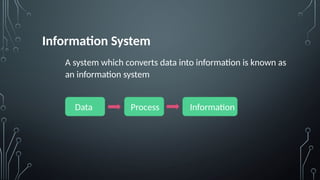
A system which converts data into information is known as
an information system
Data Process Information
There are two types of information system
1. Computer based (Automated)
Ex: Contact List
2. Manual information systems
Ex: School register
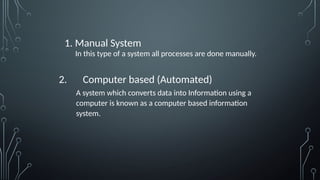
1. Manual System
In this type of a system all processes are done manually.
2. Computer based (Automated)
A system which converts data into Information using a
computer is known as a computer based information
system.
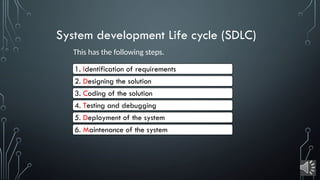
System development Life cycle (SDLC)
This has the following steps.
1. Identification of requirements
2. Designing the solution
3. Coding of the solution
4. Testing and debugging
5. Deployment of the system
6. Maintenance of the system
1. Identification of requirements
At this stage the system analyst will study the existing system
There are several methods of gathering information. Some of them are as follows;
1. Observation – The initially existing workflow of the system is observed as it is by
visiting , to gather information.
E.g. - Observation of issuing of books in a library
2. Interviews - discuss matters related to personal attitudes openly, it is useful to
identify personal requirements.
E.g. - Meet Librarian
3. Questionnaires -
4. Document sample collection – previous documents are observed
5. Prototyping – A model of the proposed system to be implemented is developed
and demonstrated to the staff and users for feedback
2. Designing the solution
Some activities related to the design process are as follows:
1. Identification of software and software architecture
2. User interface - what the user sees on the screen and preparation
for data storage
3. Identification of dependency of each sub-system
4. Deciding on the required hardware and software to run the system
5. Designing infrastructure for software, databases, user interfaces
3. Coding of the solution
Suitable Languages are selected, making the code simple
and efficient
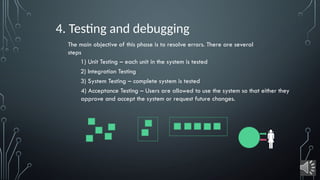
4. Testing and debugging
The main objective of this phase is to resolve errors. There are several
steps
1) Unit Testing – each unit in the system is tested
2) Integration Testing
3) System Testing – complete system is tested
4) Acceptance Testing – Users are allowed to use the system so that either they
approve and accept the system or request future changes.

5. Deployment of the system
Deployment (i.e. install and use) of the system which has been
tested and debugged is carried out at this stage.
There are different deployment approaches
to deploy a system. They are as follows:
Direct deployment
The existing system is totally terminated and the new system is
installed.
Parallel deployment
The existing and the new systems are used parallel for a certain
period.
Pilot deployment
Pilot deployment is about using the newly developed system in a
selected area.
Phased deployment
Here, the new system is deployed in stages. Success with each stage
leads to the next and in completing the new system, the old system is
completely replaced by the new.
6. Maintenance of the system
A system once installed and in the use for a certain period,
needs to be maintained well.
System Development Life cycle Models
There are several models of Systems Development Life
Cycle. Each model facilitates the system development in
different ways. Some example models are:
1. Waterfall Model - linear development.
2. Iterative Incremental Model - smaller portions at a time
(incremental).
3. Prototyping Model
4. Spiral Model
Thank you
ICTATOZ
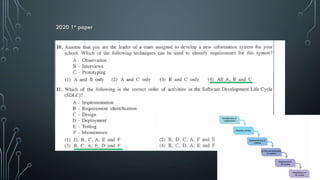
2020 1st
paper
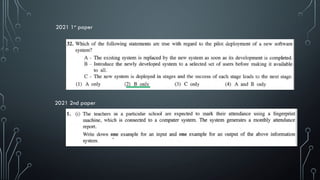
2021 1st
paper
2021 2nd paper
System Development life cycle for grade 11

System Development life cycle for grade 11

  • 1.
  • 2.
    What is asystem? A system is a collection of components that interact to achieve a specific task.
  • 3.
    A system Consistof 3 basic components Input Process Output
  • 4.
    Example: School Input ProcessOutput Children, Teachers. Text Book, Syllabus, Management, Building…. Teaching and Learning A well-educated students
  • 5.
    Information System A systemwhich converts data into information is known as an information system Data Process Information
  • 6.
    There are twotypes of information system 1. Computer based (Automated) Ex: Contact List 2. Manual information systems Ex: School register
  • 7.
    1. Manual System Inthis type of a system all processes are done manually. 2. Computer based (Automated) A system which converts data into Information using a computer is known as a computer based information system.
  • 8.
    System development Lifecycle (SDLC) This has the following steps. 1. Identification of requirements 2. Designing the solution 3. Coding of the solution 4. Testing and debugging 5. Deployment of the system 6. Maintenance of the system
  • 9.
    1. Identification ofrequirements At this stage the system analyst will study the existing system There are several methods of gathering information. Some of them are as follows; 1. Observation – The initially existing workflow of the system is observed as it is by visiting , to gather information. E.g. - Observation of issuing of books in a library 2. Interviews - discuss matters related to personal attitudes openly, it is useful to identify personal requirements. E.g. - Meet Librarian 3. Questionnaires - 4. Document sample collection – previous documents are observed 5. Prototyping – A model of the proposed system to be implemented is developed and demonstrated to the staff and users for feedback
  • 10.
    2. Designing thesolution Some activities related to the design process are as follows: 1. Identification of software and software architecture 2. User interface - what the user sees on the screen and preparation for data storage 3. Identification of dependency of each sub-system 4. Deciding on the required hardware and software to run the system 5. Designing infrastructure for software, databases, user interfaces
  • 11.
    3. Coding ofthe solution Suitable Languages are selected, making the code simple and efficient
  • 12.
    4. Testing anddebugging The main objective of this phase is to resolve errors. There are several steps 1) Unit Testing – each unit in the system is tested 2) Integration Testing 3) System Testing – complete system is tested 4) Acceptance Testing – Users are allowed to use the system so that either they approve and accept the system or request future changes. 
  • 13.
    5. Deployment ofthe system Deployment (i.e. install and use) of the system which has been tested and debugged is carried out at this stage.
  • 14.
    There are differentdeployment approaches to deploy a system. They are as follows: Direct deployment The existing system is totally terminated and the new system is installed. Parallel deployment The existing and the new systems are used parallel for a certain period. Pilot deployment Pilot deployment is about using the newly developed system in a selected area. Phased deployment Here, the new system is deployed in stages. Success with each stage leads to the next and in completing the new system, the old system is completely replaced by the new.
  • 15.
    6. Maintenance ofthe system A system once installed and in the use for a certain period, needs to be maintained well.
  • 16.
    System Development Lifecycle Models There are several models of Systems Development Life Cycle. Each model facilitates the system development in different ways. Some example models are: 1. Waterfall Model - linear development. 2. Iterative Incremental Model - smaller portions at a time (incremental). 3. Prototyping Model 4. Spiral Model
  • 17.
  • 18.
  • 19.