SYSTEM DESIGN
USE CASE DESIGN AND ANALYSIS
Ticketing Automation Bangladesh Team- Wild Spider
This Presentation will cover
I. All Actors of the System
II. Subsystems of the system
III. Use case with all actors with all subsystem
IV. Separate use case diagram of all
subsystems with all actors
V. Separate table of all use case of all sub
systems with actors
VI. Define the action of actors and system
response for all use case.
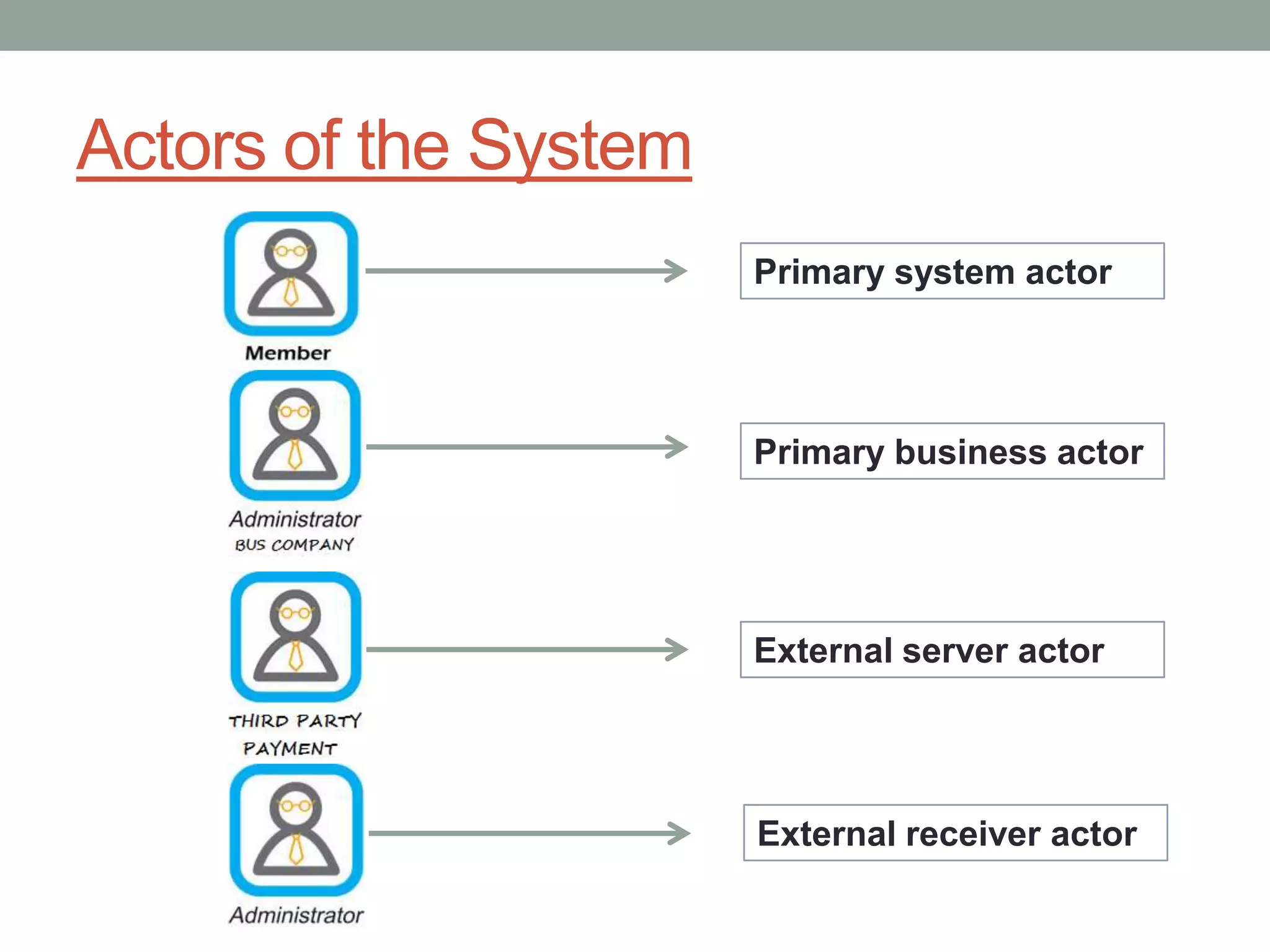
Actors of the System
Primary business actor
Primary system actor
External server actor
External receiver actor
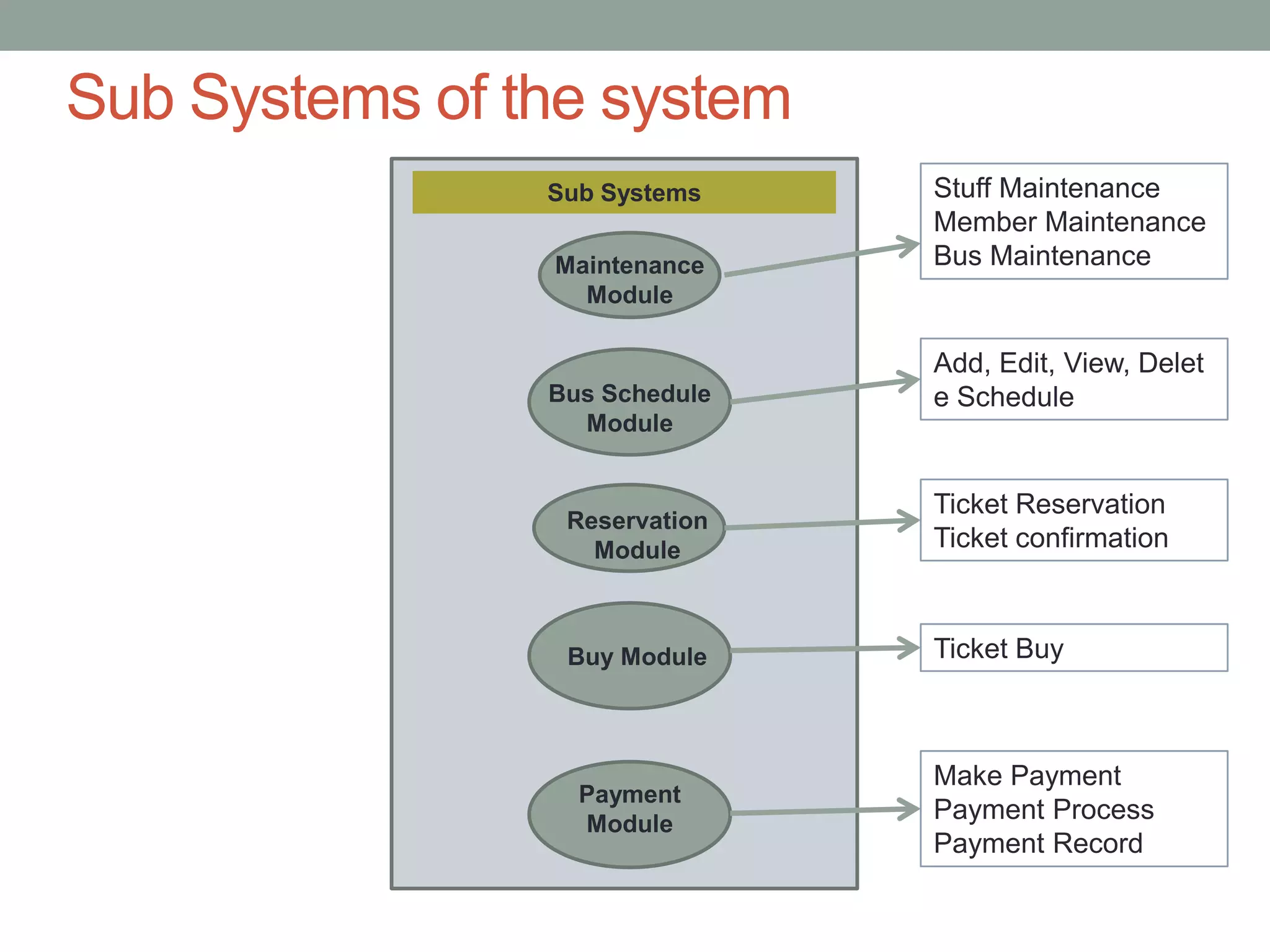
Sub Systems of the system
Sub Systems
Maintenance
Module
Reservation
Module
Buy Module
Payment
Module
Stuff Maintenance
Member Maintenance
Bus Maintenance
Ticket Reservation
Ticket confirmation
Ticket Buy
Make Payment
Payment Process
Payment Record
Bus Schedule
Module
Add, Edit, View, Delet
e Schedule
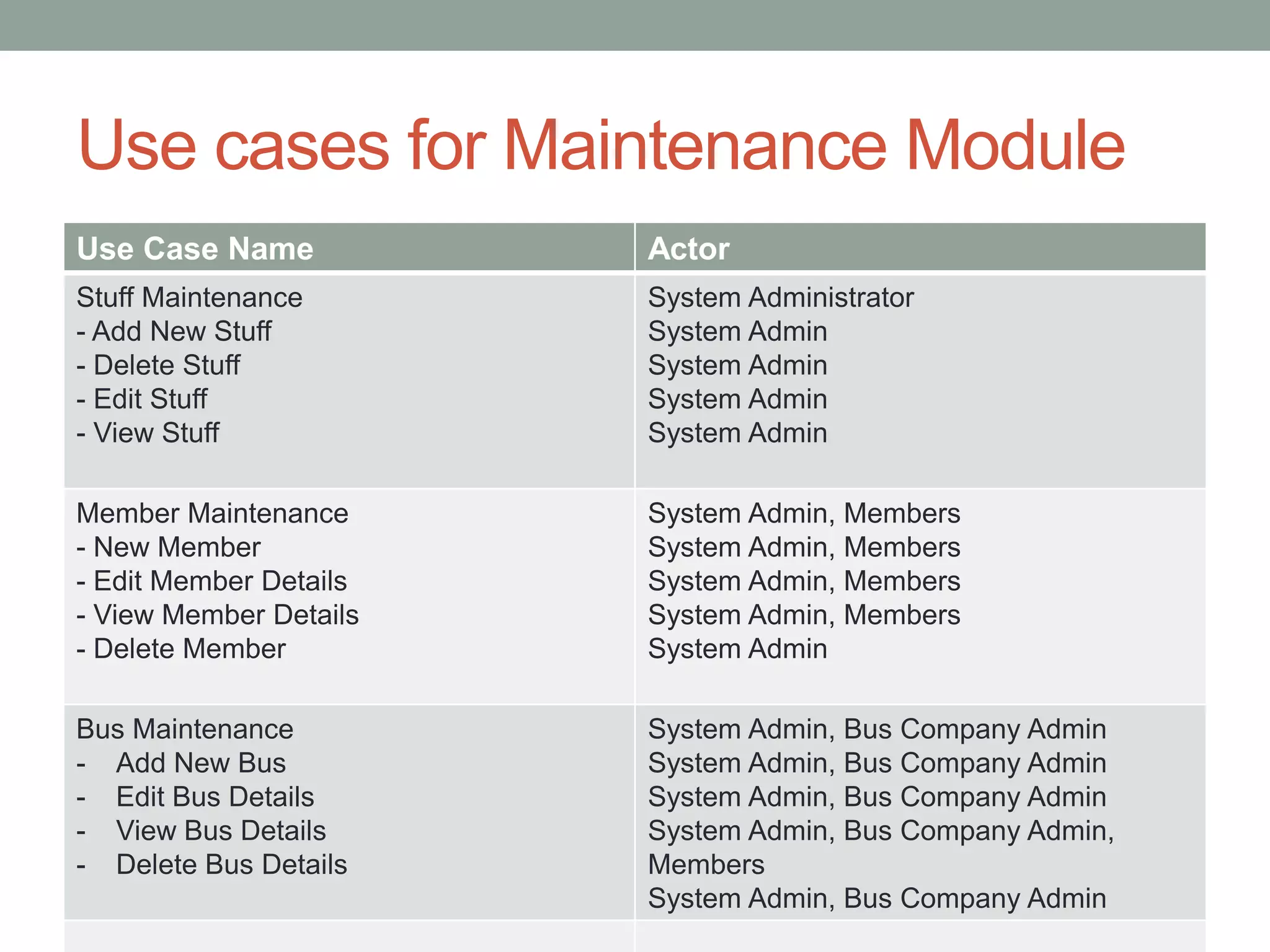
Use cases for Maintenance Module
Use Case Name Actor
Stuff Maintenance
- Add New Stuff
- Delete Stuff
- Edit Stuff
- View Stuff
System Administrator
System Admin
System Admin
System Admin
System Admin
Member Maintenance
- New Member
- Edit Member Details
- View Member Details
- Delete Member
System Admin, Members
System Admin
Bus Maintenance
- Add New Bus
- Edit Bus Details
- View Bus Details
- Delete Bus Details
System Admin, Bus Company Admin
System Admin, Bus Company Admin,
Members
System Admin, Bus Company Admin
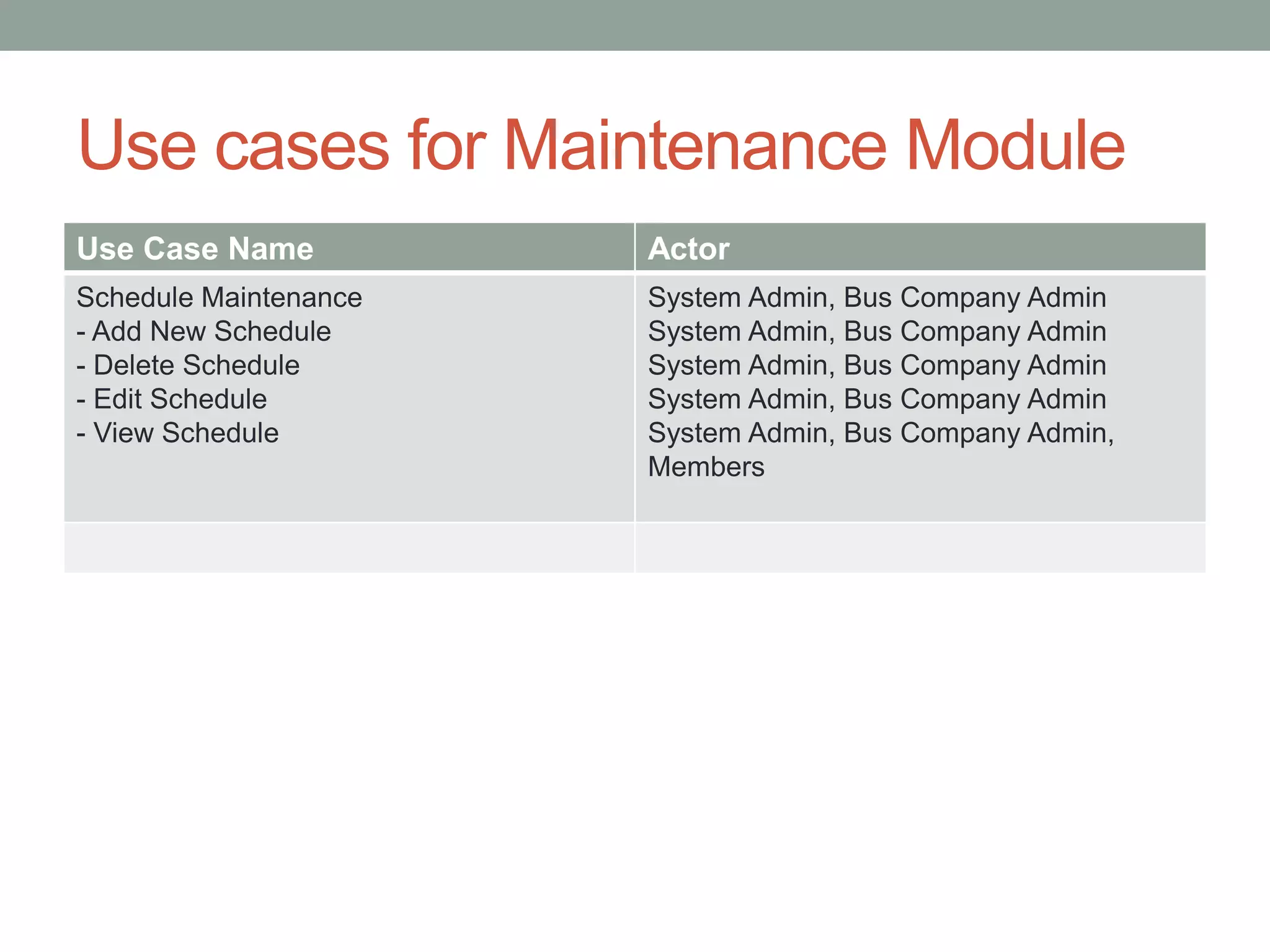
Use cases for Maintenance Module
Use Case Name Actor
Schedule Maintenance
- Add New Schedule
- Delete Schedule
- Edit Schedule
- View Schedule
System Admin, Bus Company Admin
System Admin, Bus Company Admin,
Members
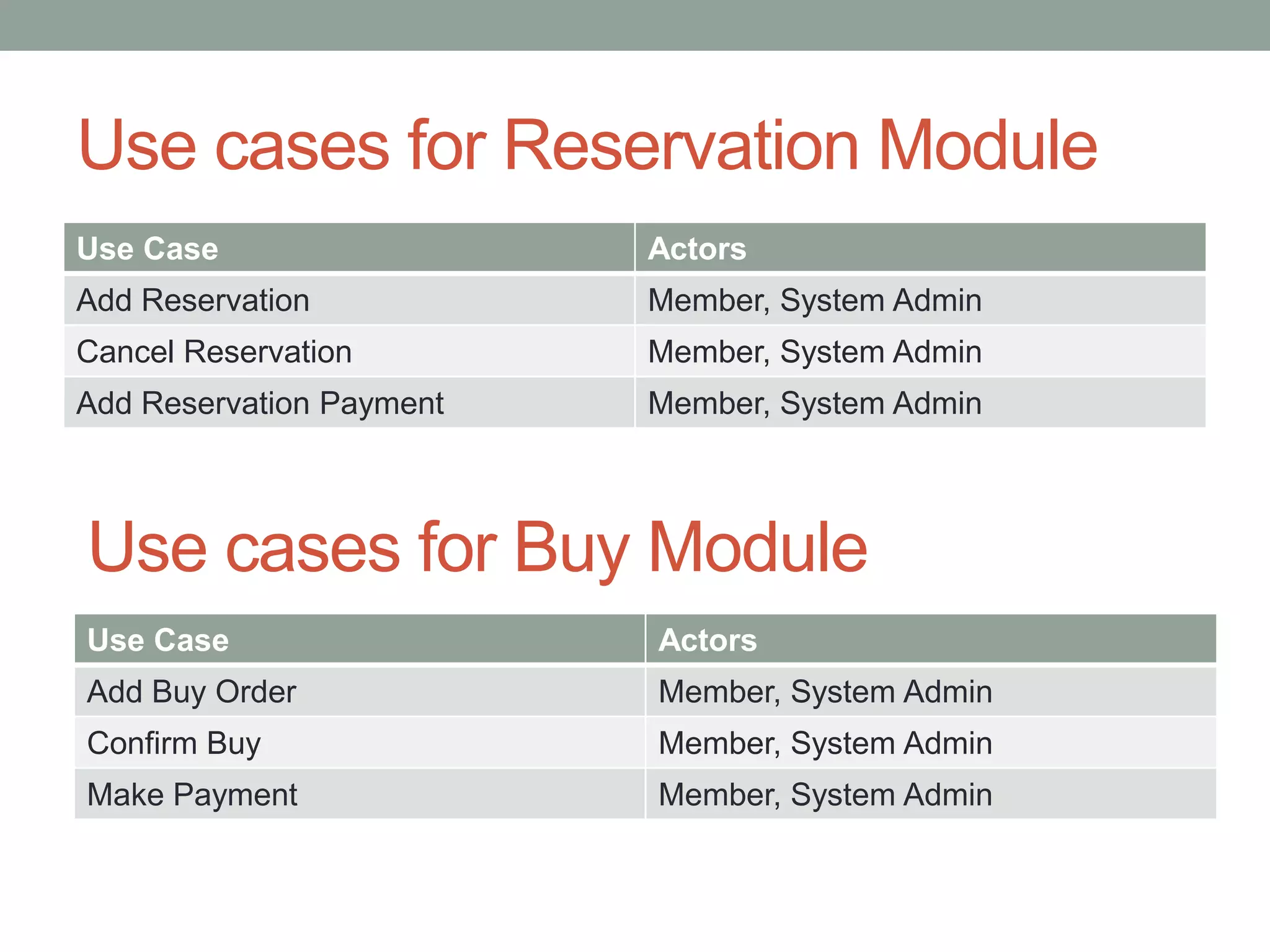
Use cases for Reservation Module
Use Case Actors
Add Reservation Member, System Admin
Cancel Reservation Member, System Admin
Add Reservation Payment Member, System Admin
Use Case Actors
Add Buy Order Member, System Admin
Confirm Buy Member, System Admin
Make Payment Member, System Admin
Use cases for Buy Module
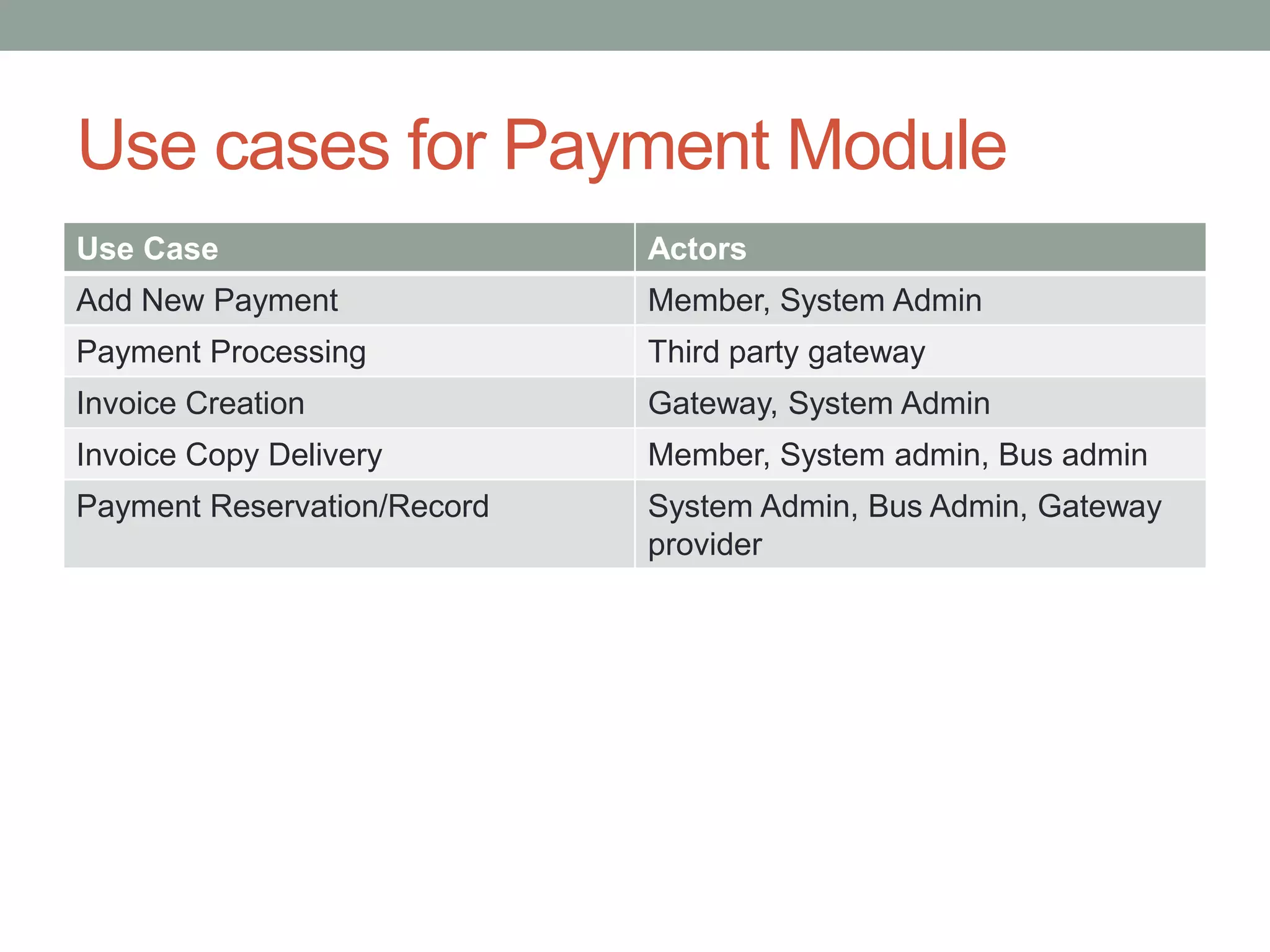
Use cases for Payment Module
Use Case Actors
Add New Payment Member, System Admin
Payment Processing Third party gateway
Invoice Creation Gateway, System Admin
Invoice Copy Delivery Member, System admin, Bus admin
Payment Reservation/Record System Admin, Bus Admin, Gateway
provider
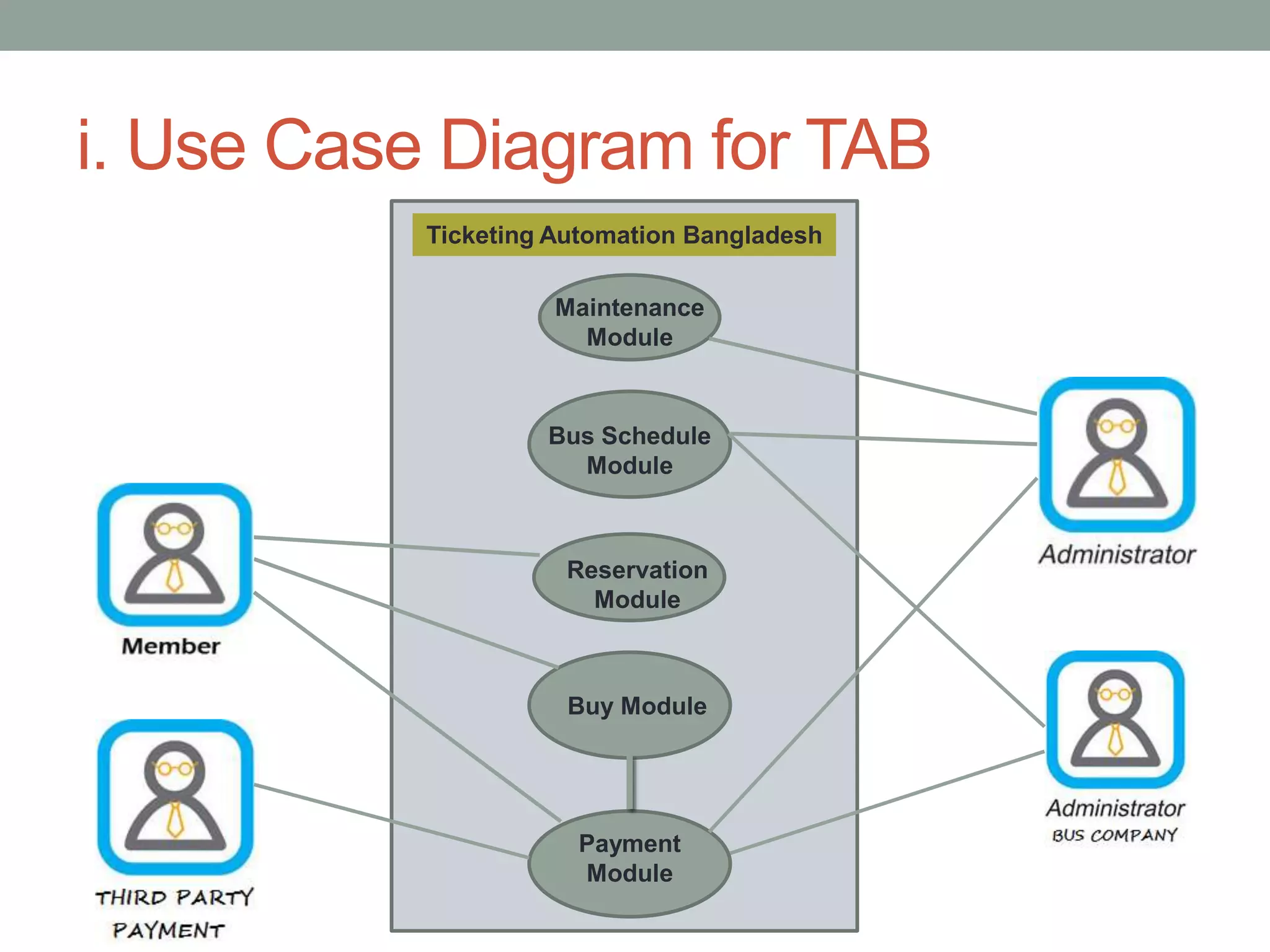
i. Use Case Diagram for TAB
Ticketing Automation Bangladesh
Maintenance
Module
Reservation
Module
Buy Module
Payment
Module
Bus Schedule
Module
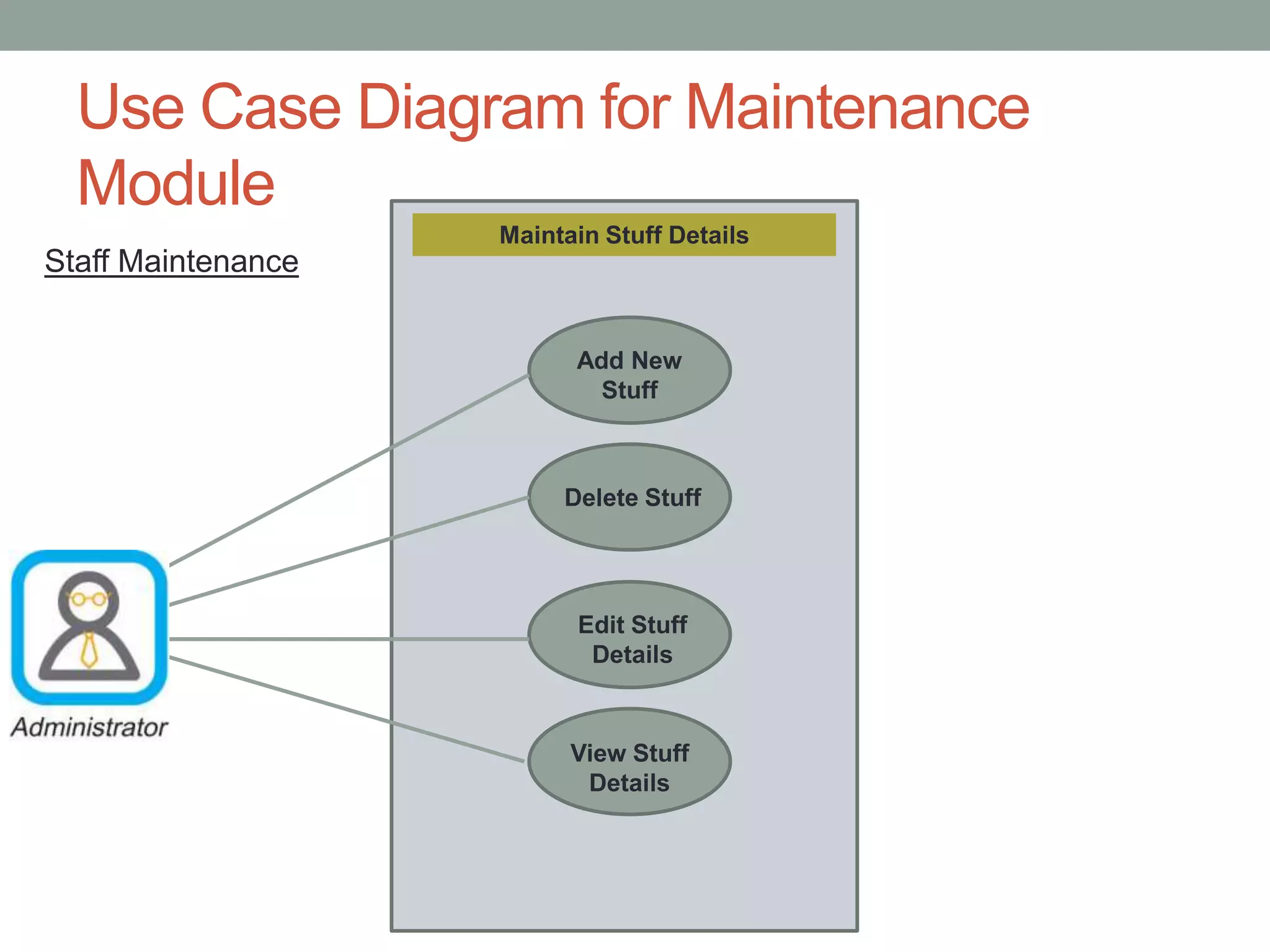
Use Case Diagram for Maintenance
Module
Maintain Stuff Details
Add New
Stuff
Delete Stuff
Edit Stuff
Details
View Stuff
Details
Staff Maintenance
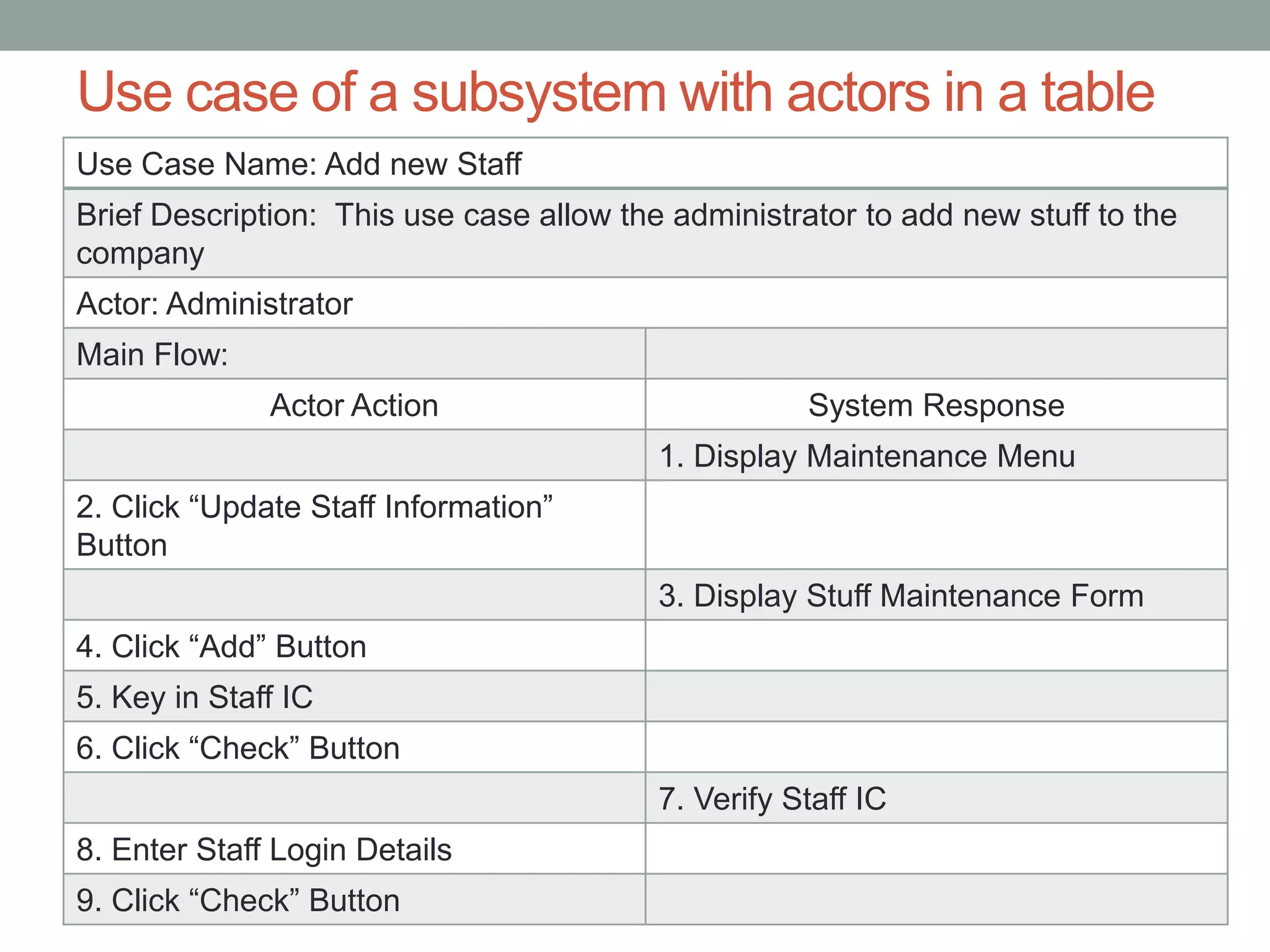
Use case of a subsystem with actors in a table
Use Case Name: Add new Staff
Brief Description: This use case allow the administrator to add new stuff to the
company
Actor: Administrator
Main Flow:
Actor Action System Response
1. Display Maintenance Menu
2. Click “Update Staff Information”
Button
3. Display Stuff Maintenance Form
4. Click “Add” Button
5. Key in Staff IC
6. Click “Check” Button
7. Verify Staff IC
8. Enter Staff Login Details
9. Click “Check” Button
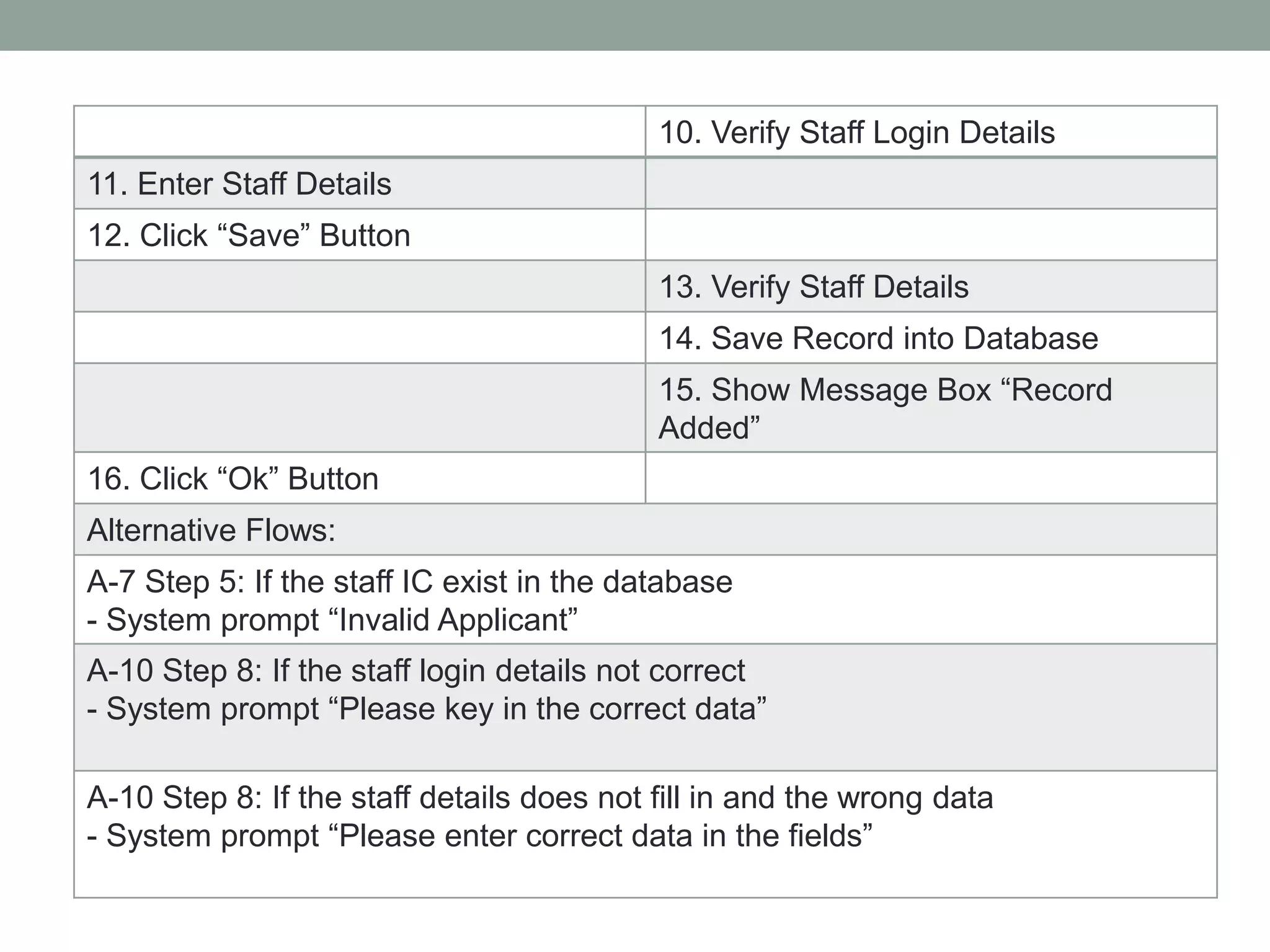
10. Verify Staff Login Details
11. Enter Staff Details
12. Click “Save” Button
13. Verify Staff Details
14. Save Record into Database
15. Show Message Box “Record
Added”
16. Click “Ok” Button
Alternative Flows:
A-7 Step 5: If the staff IC exist in the database
- System prompt “Invalid Applicant”
A-10 Step 8: If the staff login details not correct
- System prompt “Please key in the correct data”
A-10 Step 8: If the staff details does not fill in and the wrong data
- System prompt “Please enter correct data in the fields”
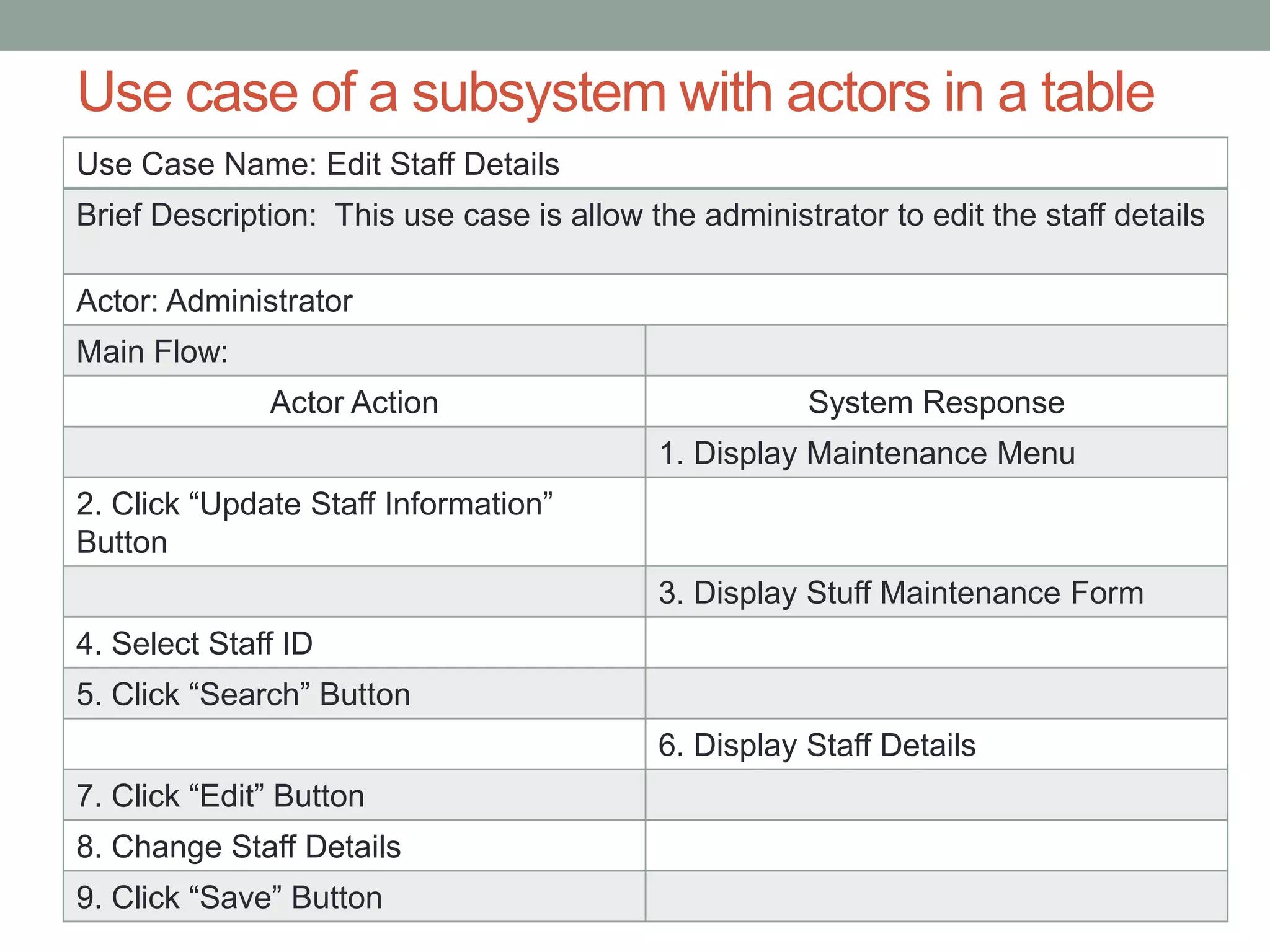
Use case of a subsystem with actors in a table
Use Case Name: Edit Staff Details
Brief Description: This use case is allow the administrator to edit the staff details
Actor: Administrator
Main Flow:
Actor Action System Response
1. Display Maintenance Menu
2. Click “Update Staff Information”
Button
3. Display Stuff Maintenance Form
4. Select Staff ID
5. Click “Search” Button
6. Display Staff Details
7. Click “Edit” Button
8. Change Staff Details
9. Click “Save” Button
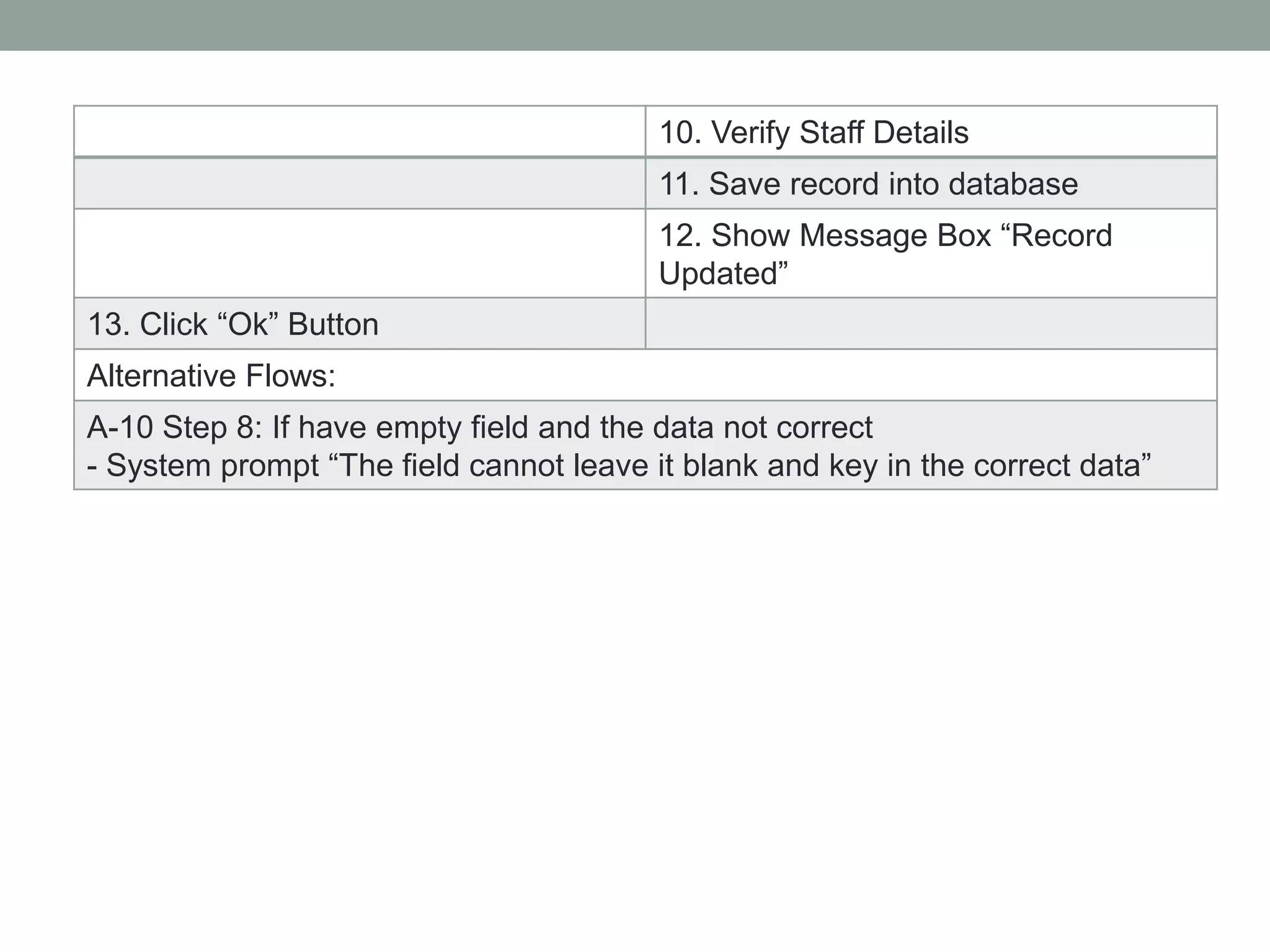
10. Verify Staff Details
11. Save record into database
12. Show Message Box “Record
Updated”
13. Click “Ok” Button
Alternative Flows:
A-10 Step 8: If have empty field and the data not correct
- System prompt “The field cannot leave it blank and key in the correct data”
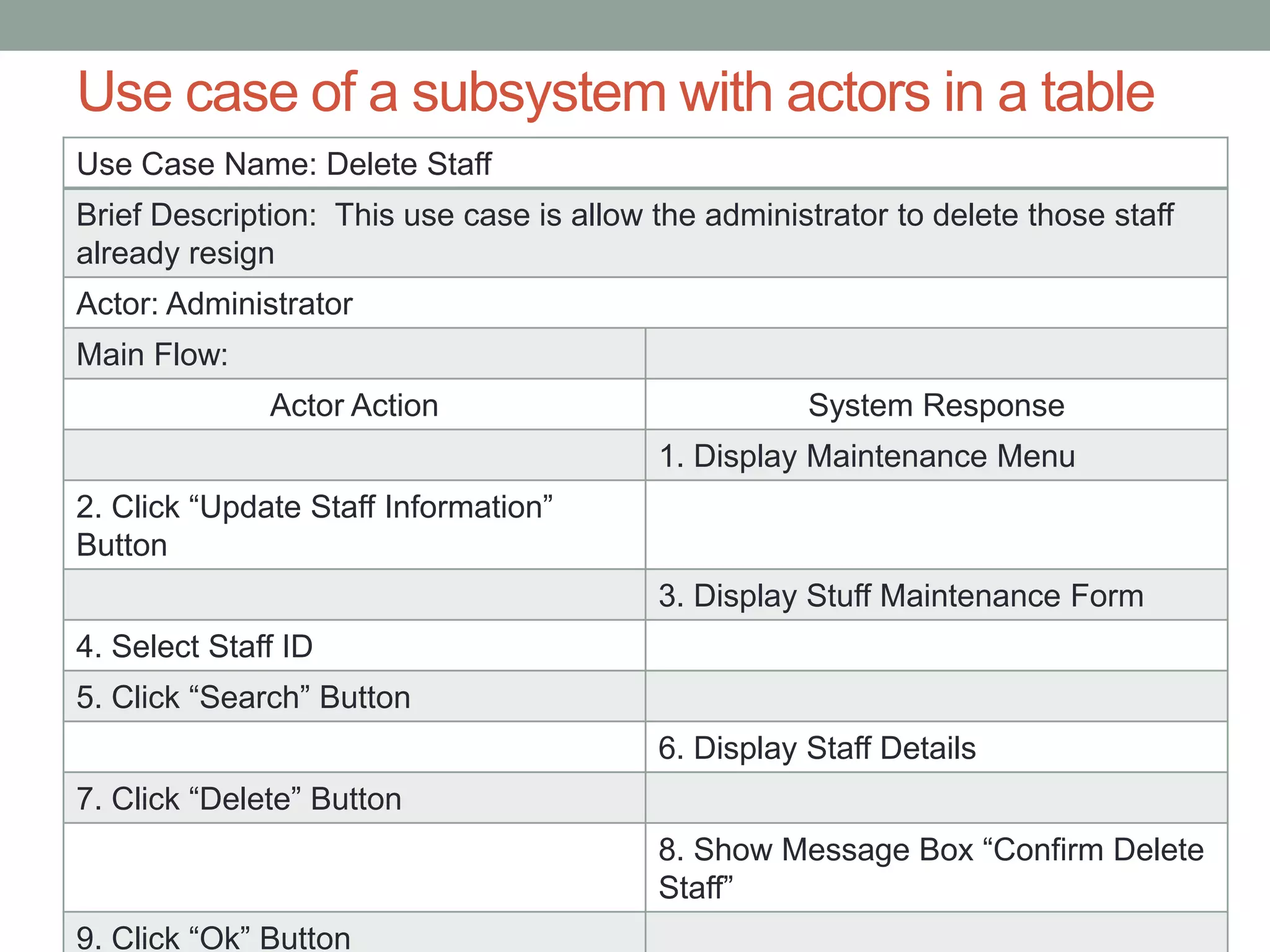
Use case of a subsystem with actors in a table
Use Case Name: Delete Staff
Brief Description: This use case is allow the administrator to delete those staff
already resign
Actor: Administrator
Main Flow:
Actor Action System Response
1. Display Maintenance Menu
2. Click “Update Staff Information”
Button
3. Display Stuff Maintenance Form
4. Select Staff ID
5. Click “Search” Button
6. Display Staff Details
7. Click “Delete” Button
8. Show Message Box “Confirm Delete
Staff”
9. Click “Ok” Button
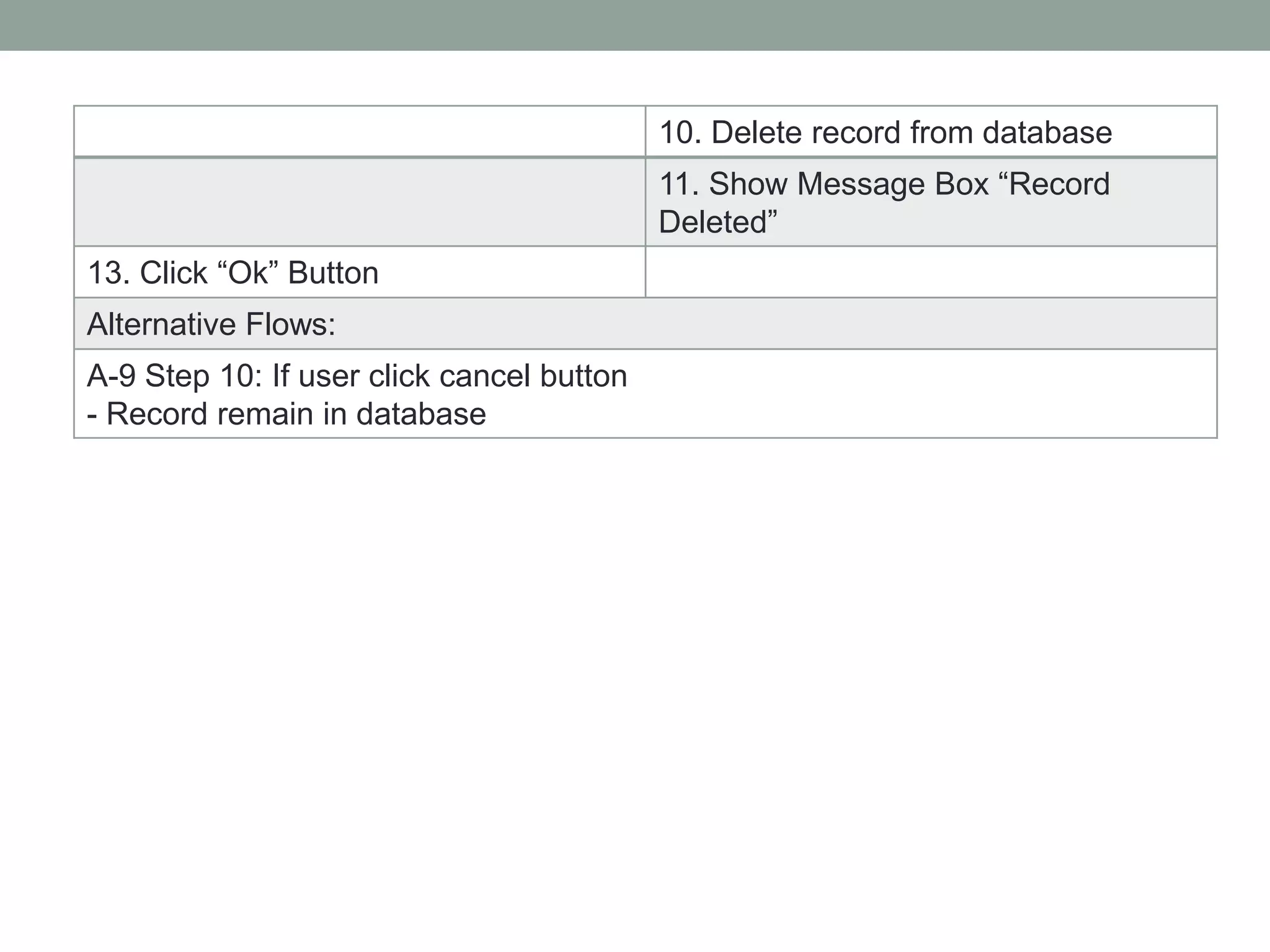
10. Delete record from database
11. Show Message Box “Record
Deleted”
13. Click “Ok” Button
Alternative Flows:
A-9 Step 10: If user click cancel button
- Record remain in database
Use case of a subsystem with actors in a table
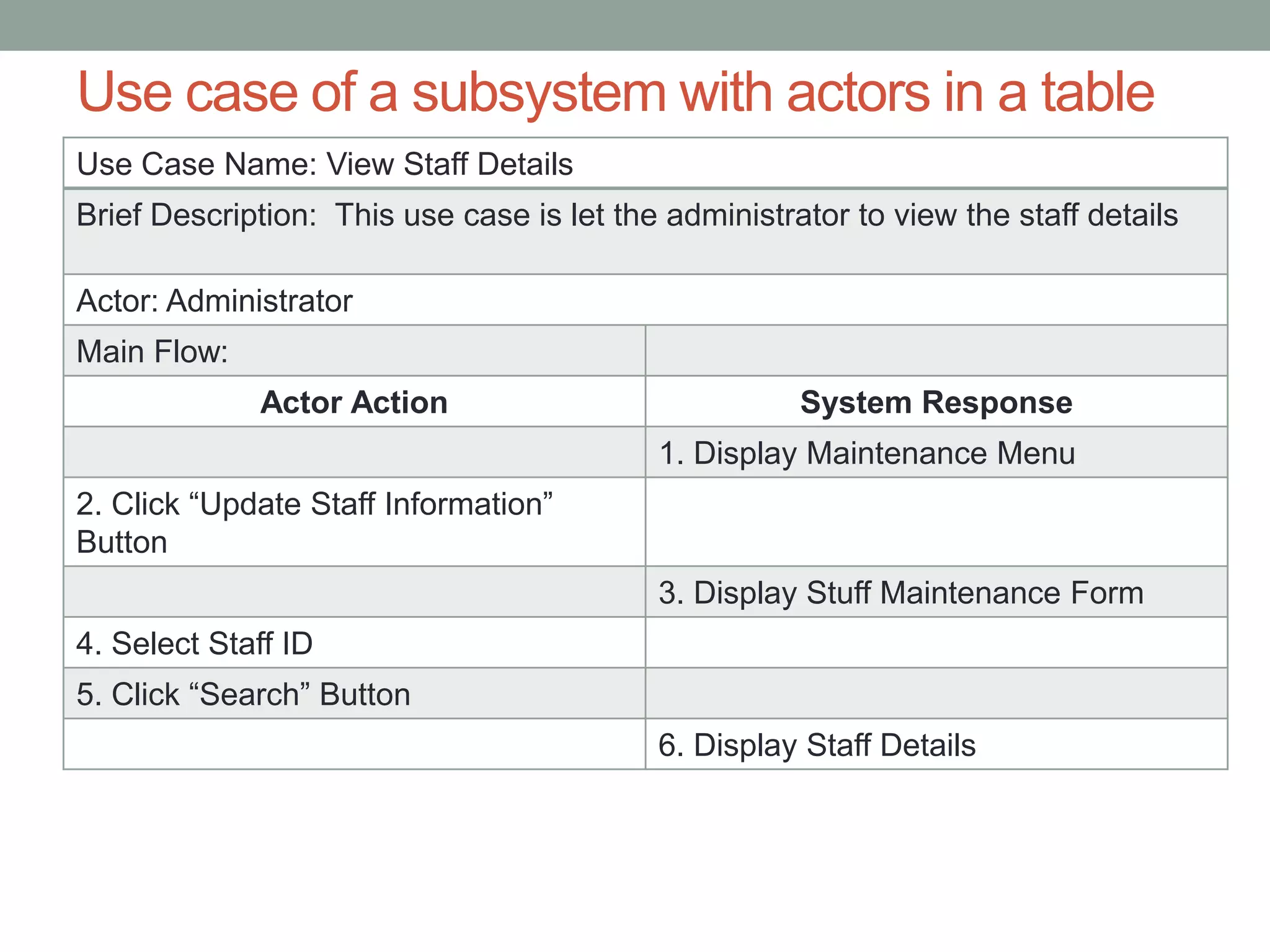
Use Case Name: View Staff Details
Brief Description: This use case is let the administrator to view the staff details
Actor: Administrator
Main Flow:
Actor Action System Response
1. Display Maintenance Menu
2. Click “Update Staff Information”
Button
3. Display Stuff Maintenance Form
4. Select Staff ID
5. Click “Search” Button
6. Display Staff Details
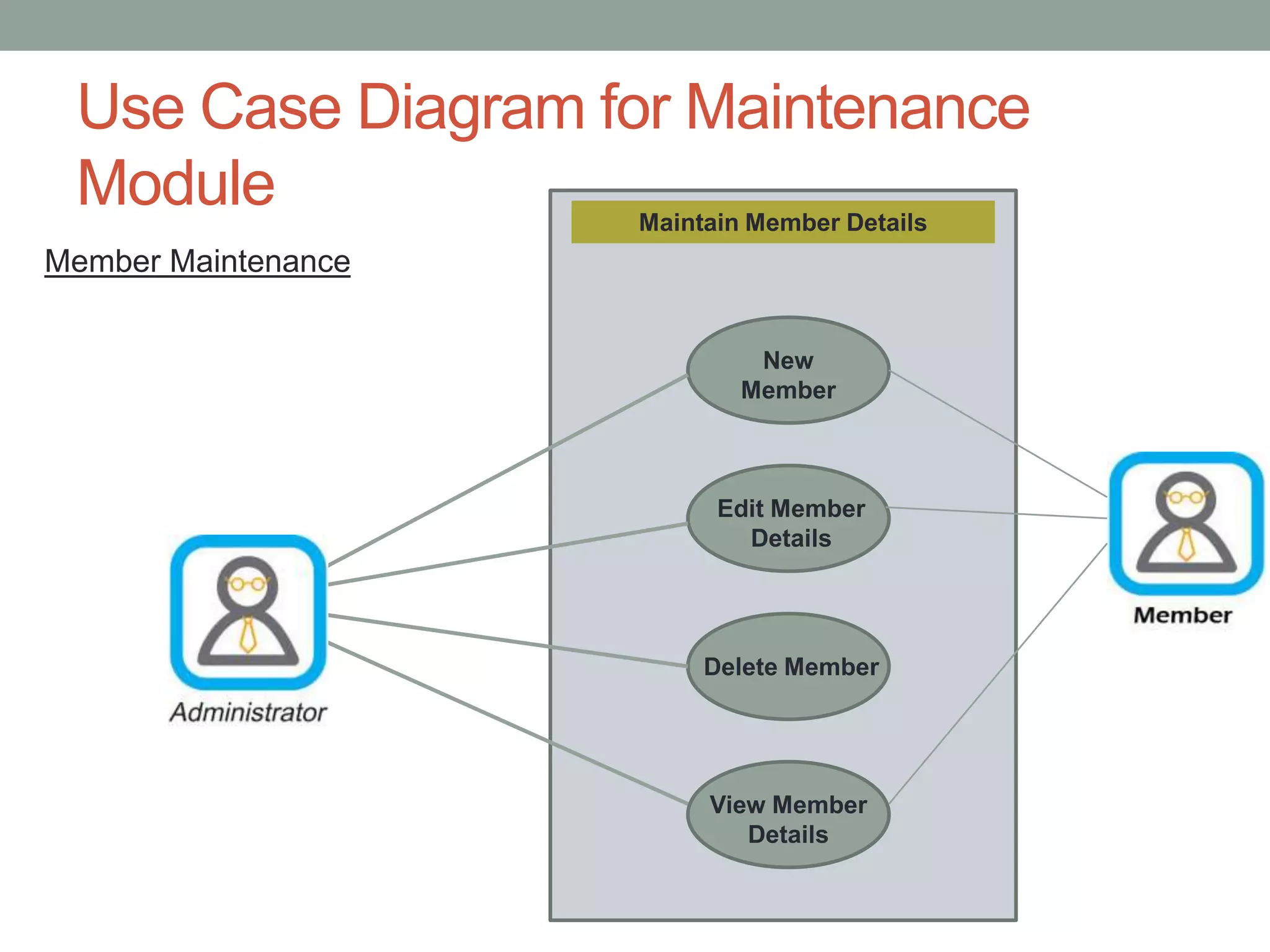
Use Case Diagram for Maintenance
Module Maintain Member Details
New
Member
Edit Member
Details
Delete Member
View Member
Details
Member Maintenance
Use case of a subsystem with actors in a table
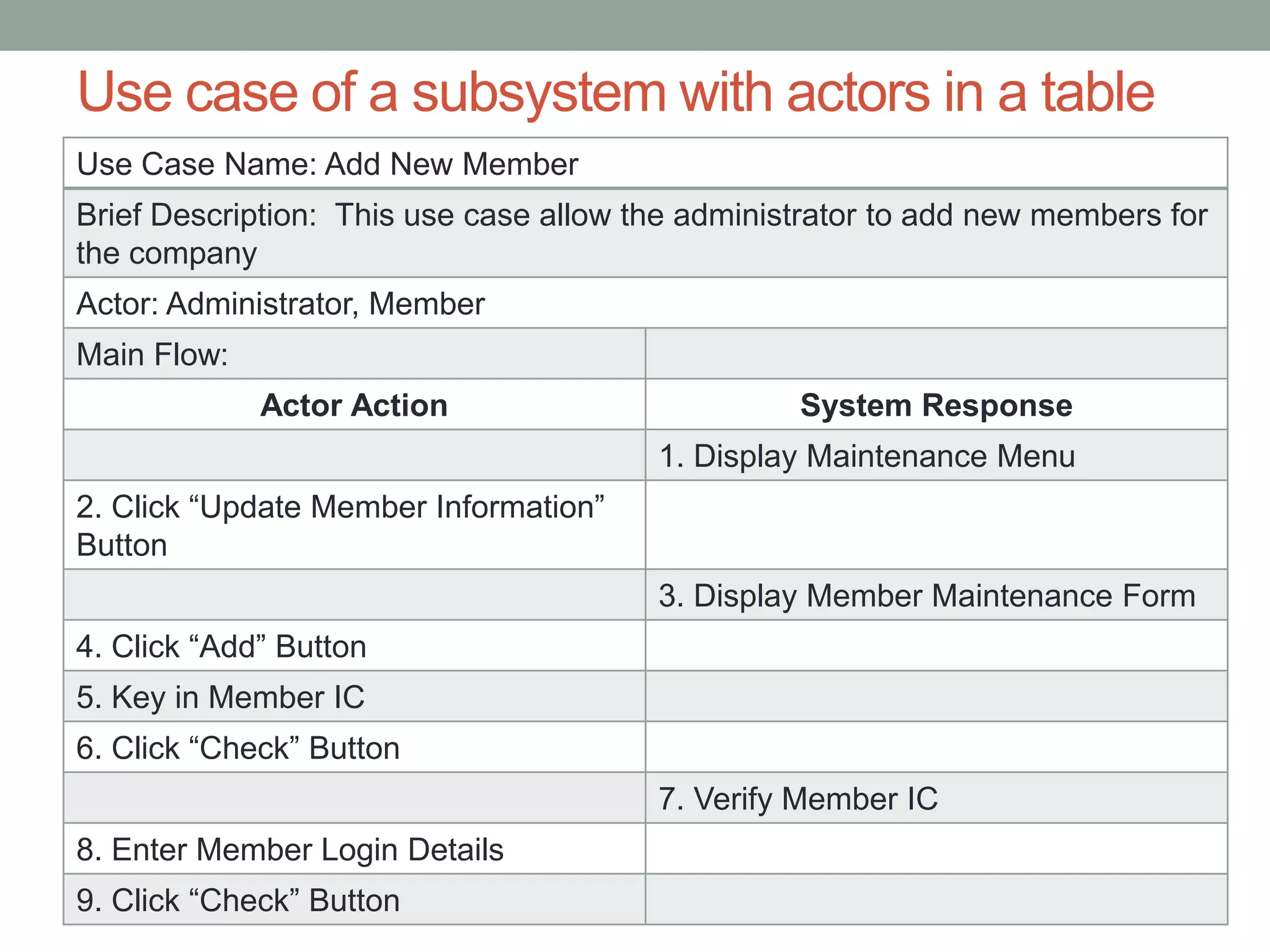
Use Case Name: Add New Member
Brief Description: This use case allow the administrator to add new members for
the company
Actor: Administrator, Member
Main Flow:
Actor Action System Response
1. Display Maintenance Menu
2. Click “Update Member Information”
Button
3. Display Member Maintenance Form
4. Click “Add” Button
5. Key in Member IC
6. Click “Check” Button
7. Verify Member IC
8. Enter Member Login Details
9. Click “Check” Button
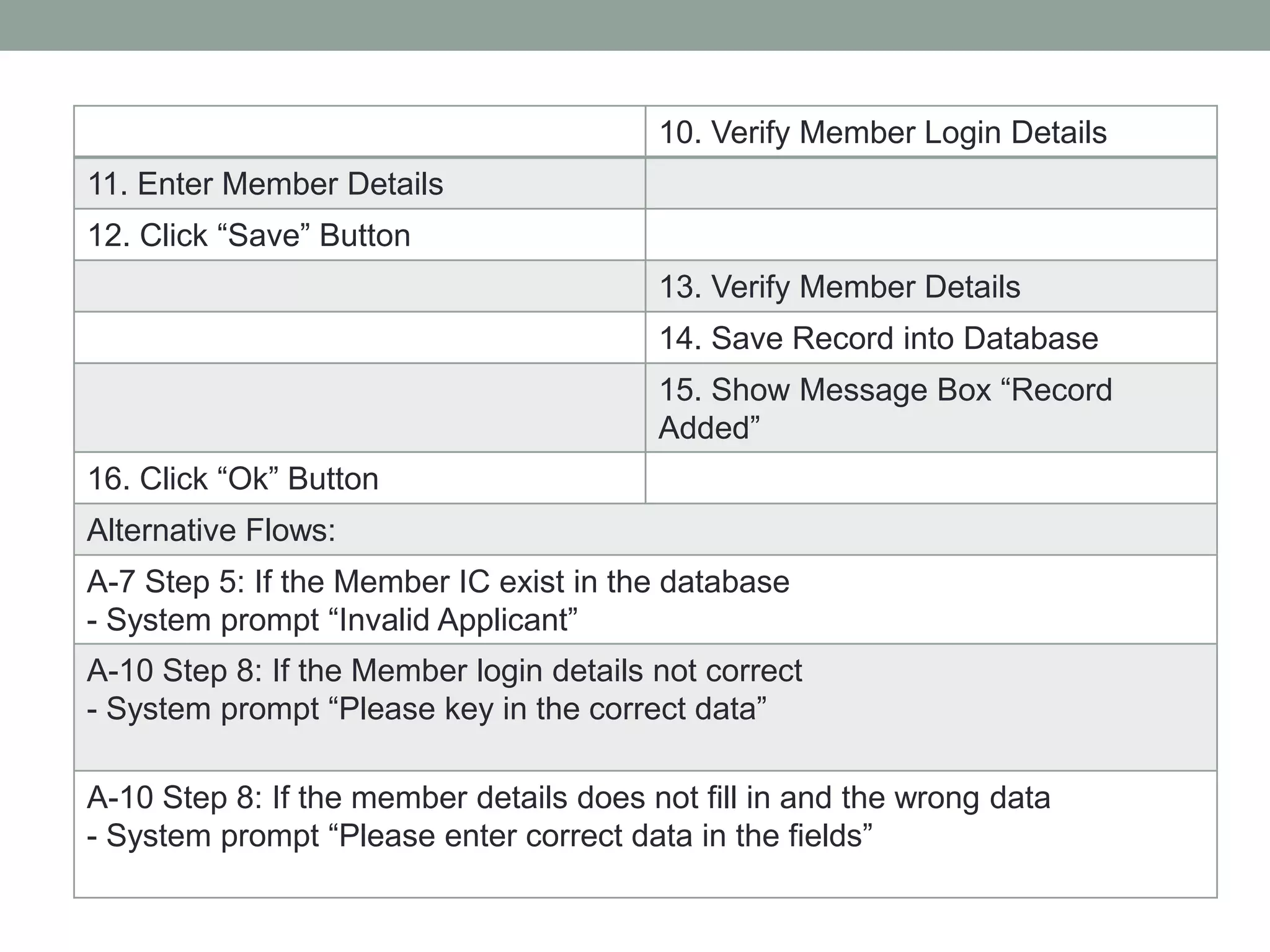
10. Verify Member Login Details
11. Enter Member Details
12. Click “Save” Button
13. Verify Member Details
14. Save Record into Database
15. Show Message Box “Record
Added”
16. Click “Ok” Button
Alternative Flows:
A-7 Step 5: If the Member IC exist in the database
- System prompt “Invalid Applicant”
A-10 Step 8: If the Member login details not correct
- System prompt “Please key in the correct data”
A-10 Step 8: If the member details does not fill in and the wrong data
- System prompt “Please enter correct data in the fields”
Use case of a subsystem with actors in a table
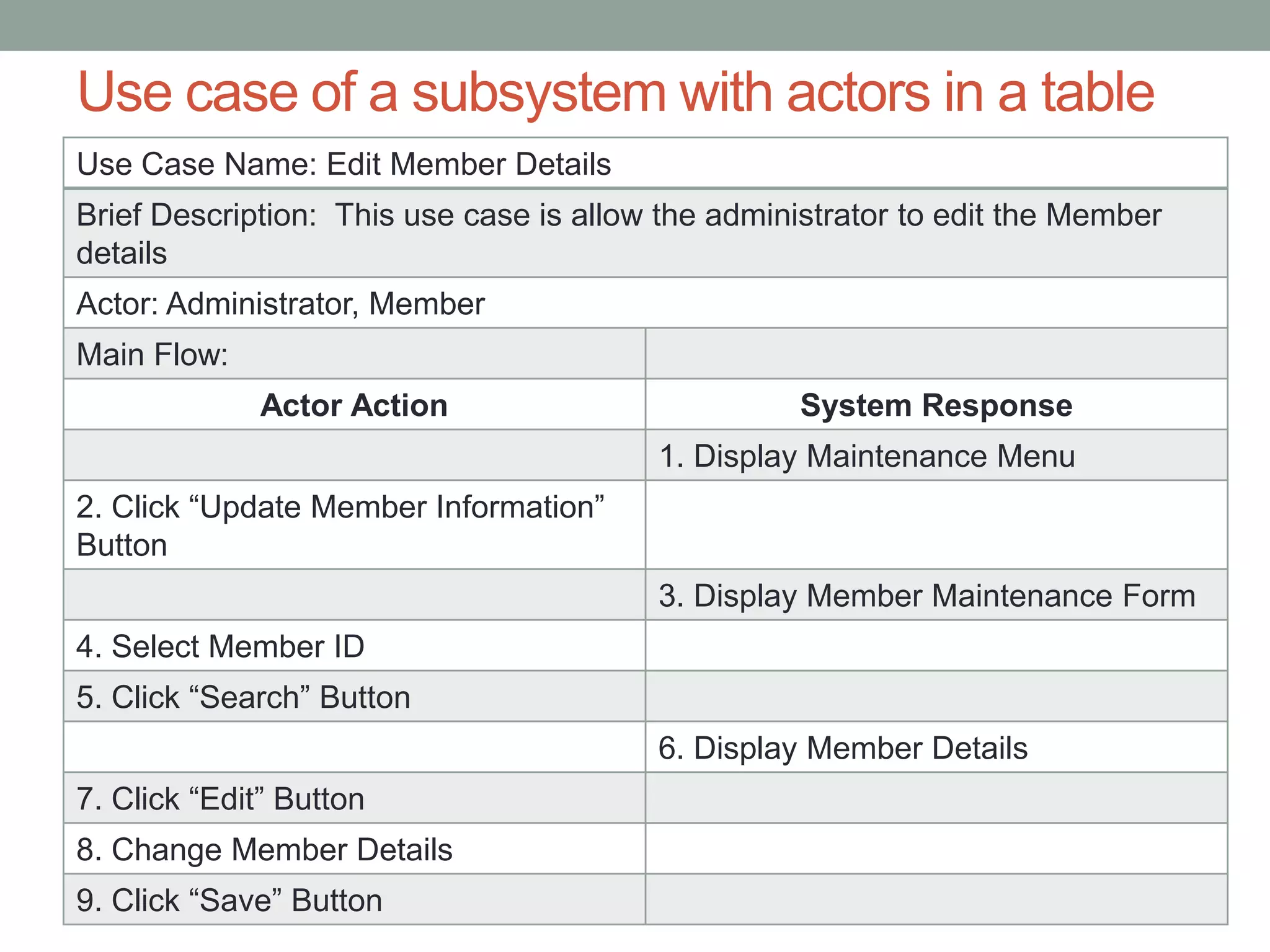
Use Case Name: Edit Member Details
Brief Description: This use case is allow the administrator to edit the Member
details
Actor: Administrator, Member
Main Flow:
Actor Action System Response
1. Display Maintenance Menu
2. Click “Update Member Information”
Button
3. Display Member Maintenance Form
4. Select Member ID
5. Click “Search” Button
6. Display Member Details
7. Click “Edit” Button
8. Change Member Details
9. Click “Save” Button
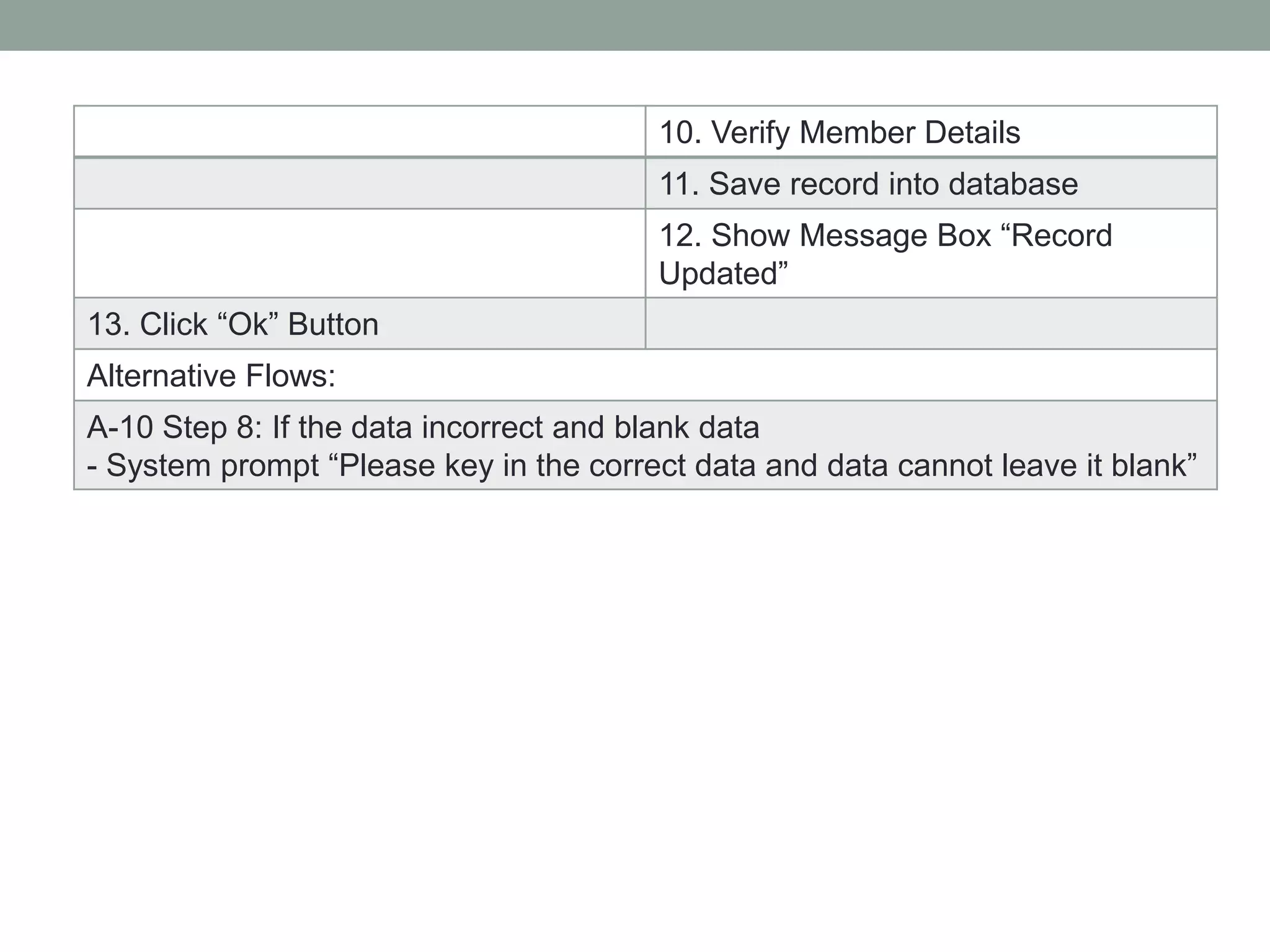
10. Verify Member Details
11. Save record into database
12. Show Message Box “Record
Updated”
13. Click “Ok” Button
Alternative Flows:
A-10 Step 8: If the data incorrect and blank data
- System prompt “Please key in the correct data and data cannot leave it blank”
Use case of a subsystem with actors in a table
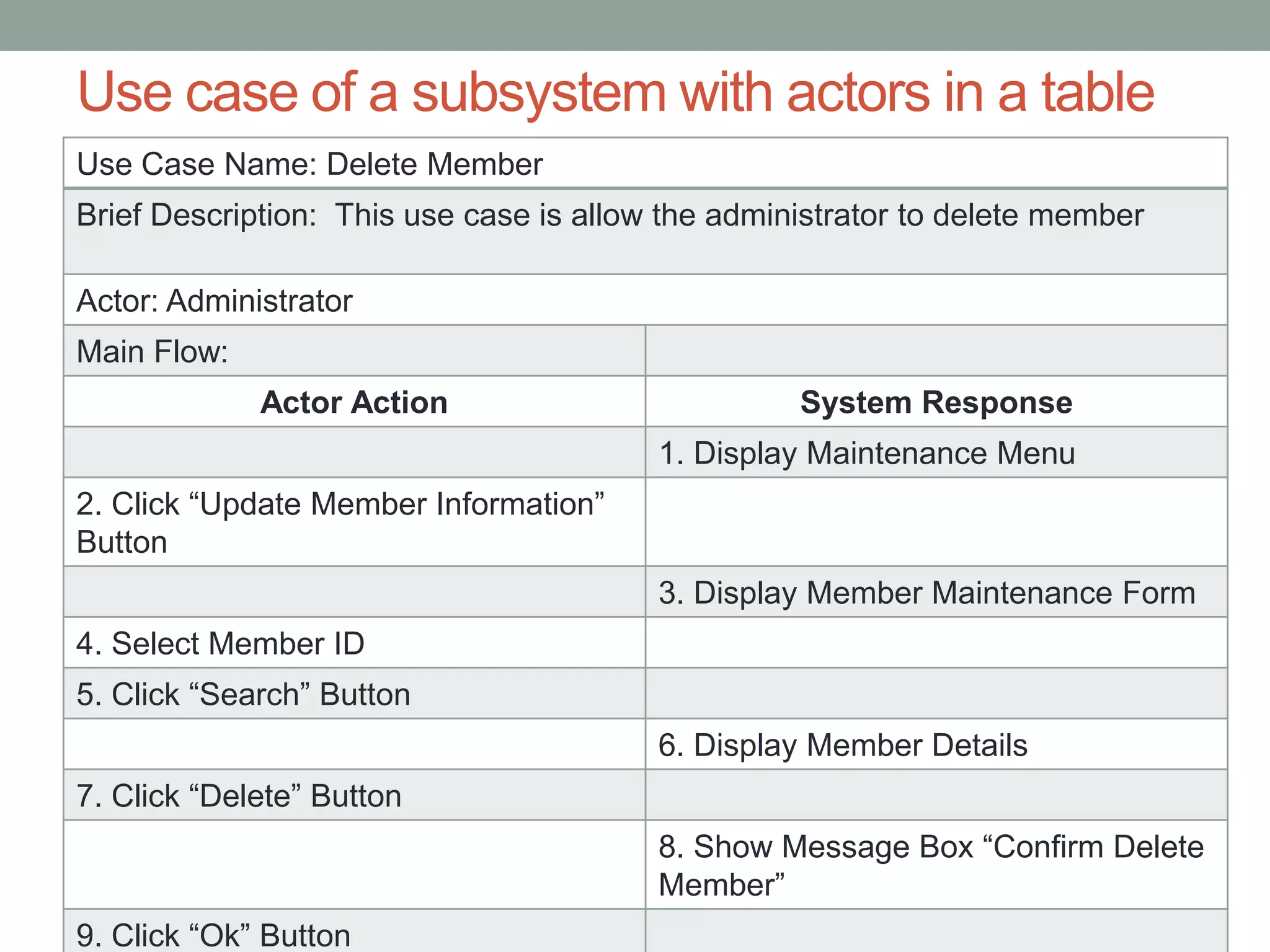
Use Case Name: Delete Member
Brief Description: This use case is allow the administrator to delete member
Actor: Administrator
Main Flow:
Actor Action System Response
1. Display Maintenance Menu
2. Click “Update Member Information”
Button
3. Display Member Maintenance Form
4. Select Member ID
5. Click “Search” Button
6. Display Member Details
7. Click “Delete” Button
8. Show Message Box “Confirm Delete
Member”
9. Click “Ok” Button
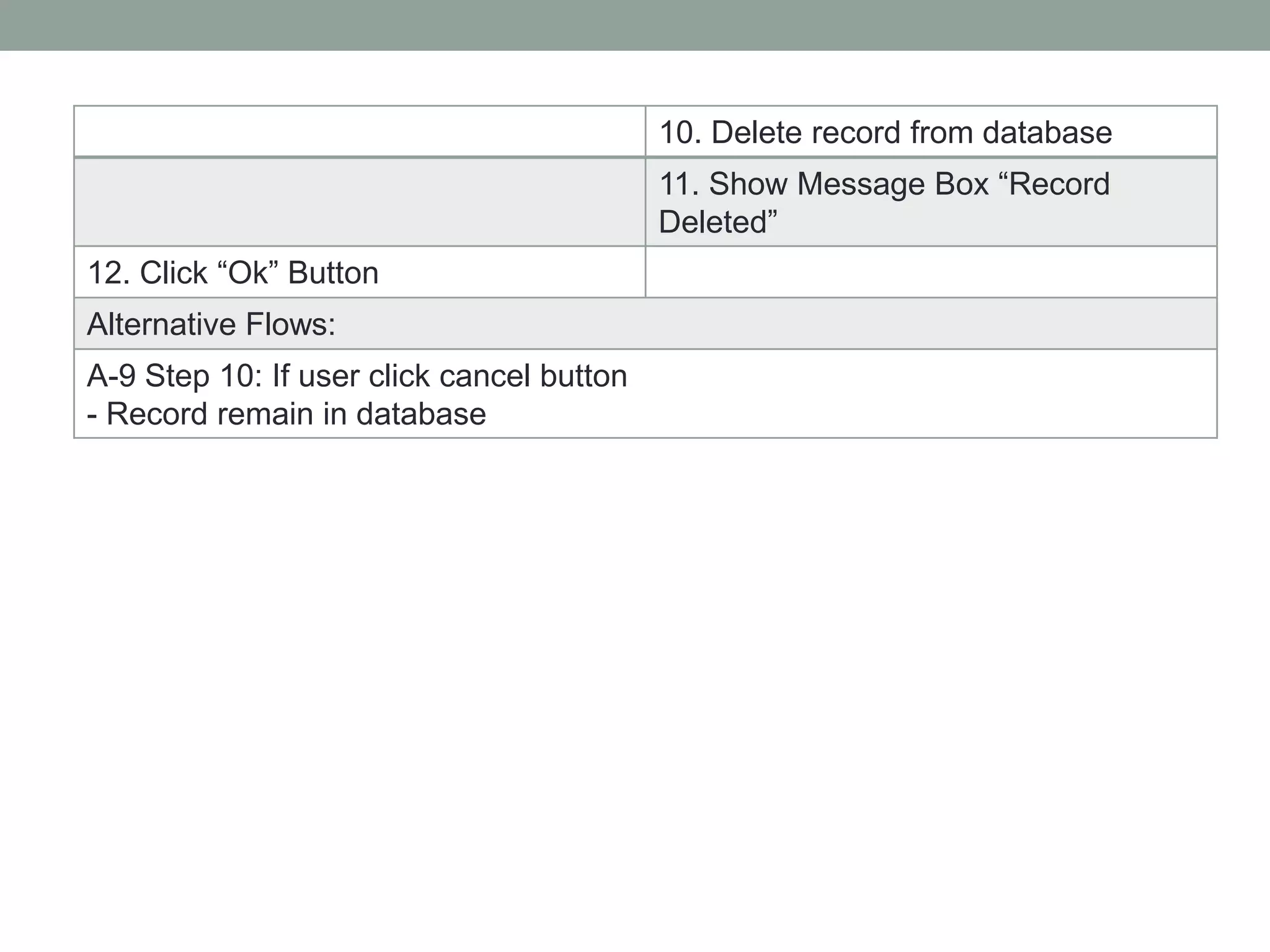
10. Delete record from database
11. Show Message Box “Record
Deleted”
12. Click “Ok” Button
Alternative Flows:
A-9 Step 10: If user click cancel button
- Record remain in database
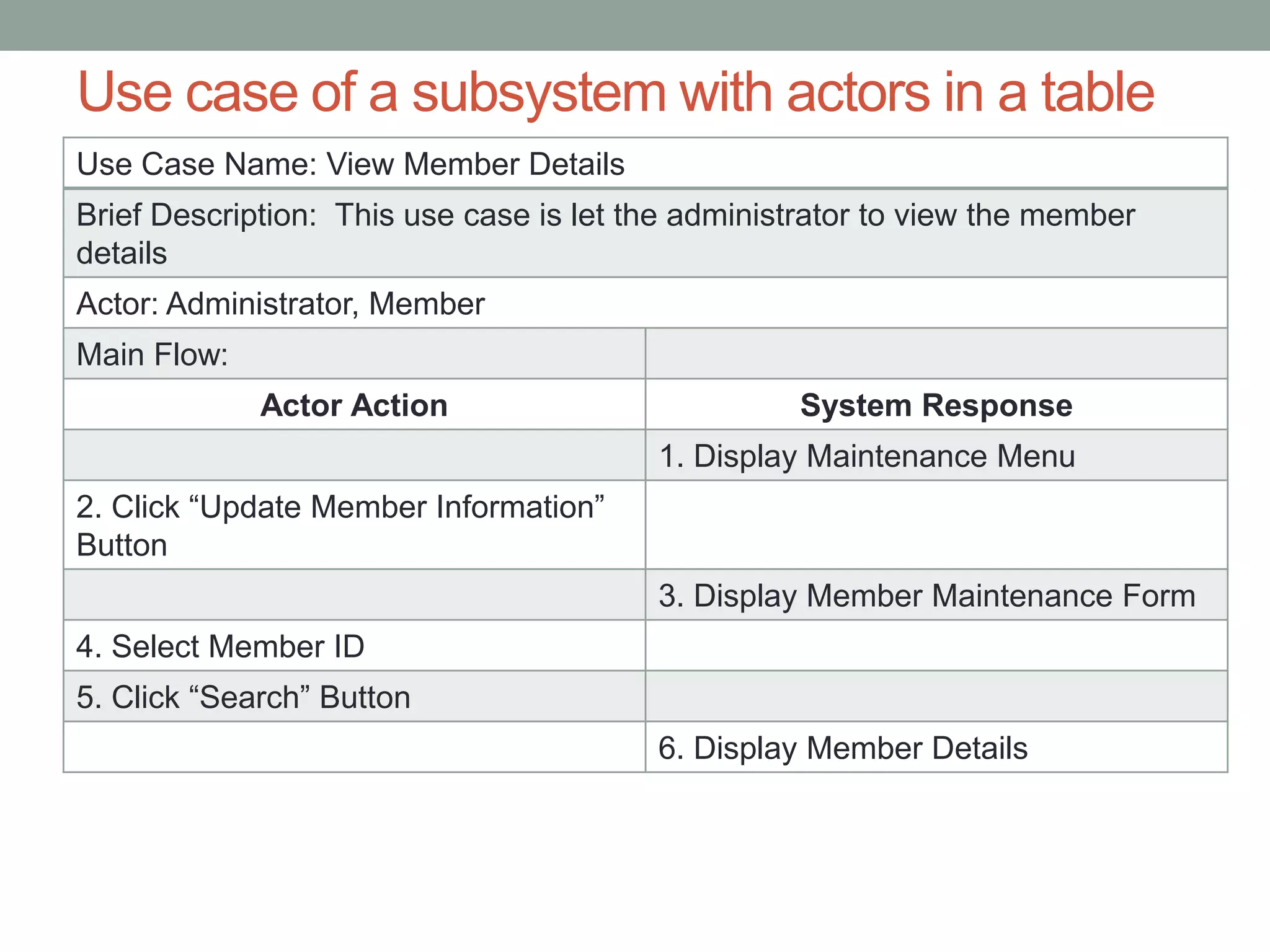
Use case of a subsystem with actors in a table
Use Case Name: View Member Details
Brief Description: This use case is let the administrator to view the member
details
Actor: Administrator, Member
Main Flow:
Actor Action System Response
1. Display Maintenance Menu
2. Click “Update Member Information”
Button
3. Display Member Maintenance Form
4. Select Member ID
5. Click “Search” Button
6. Display Member Details
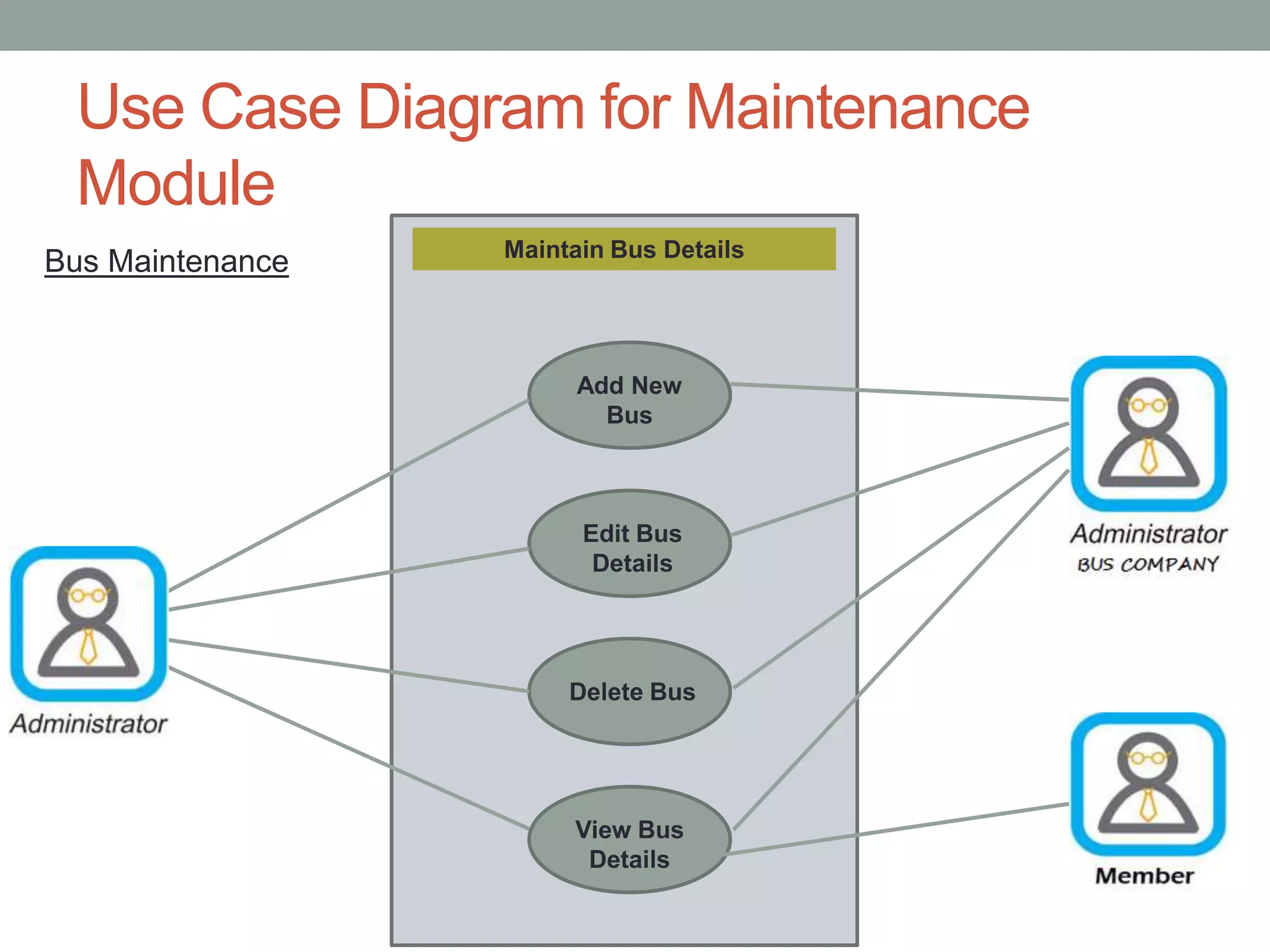
Use Case Diagram for Maintenance
Module
Maintain Bus Details
Add New
Bus
Edit Bus
Details
Delete Bus
View Bus
Details
Bus Maintenance
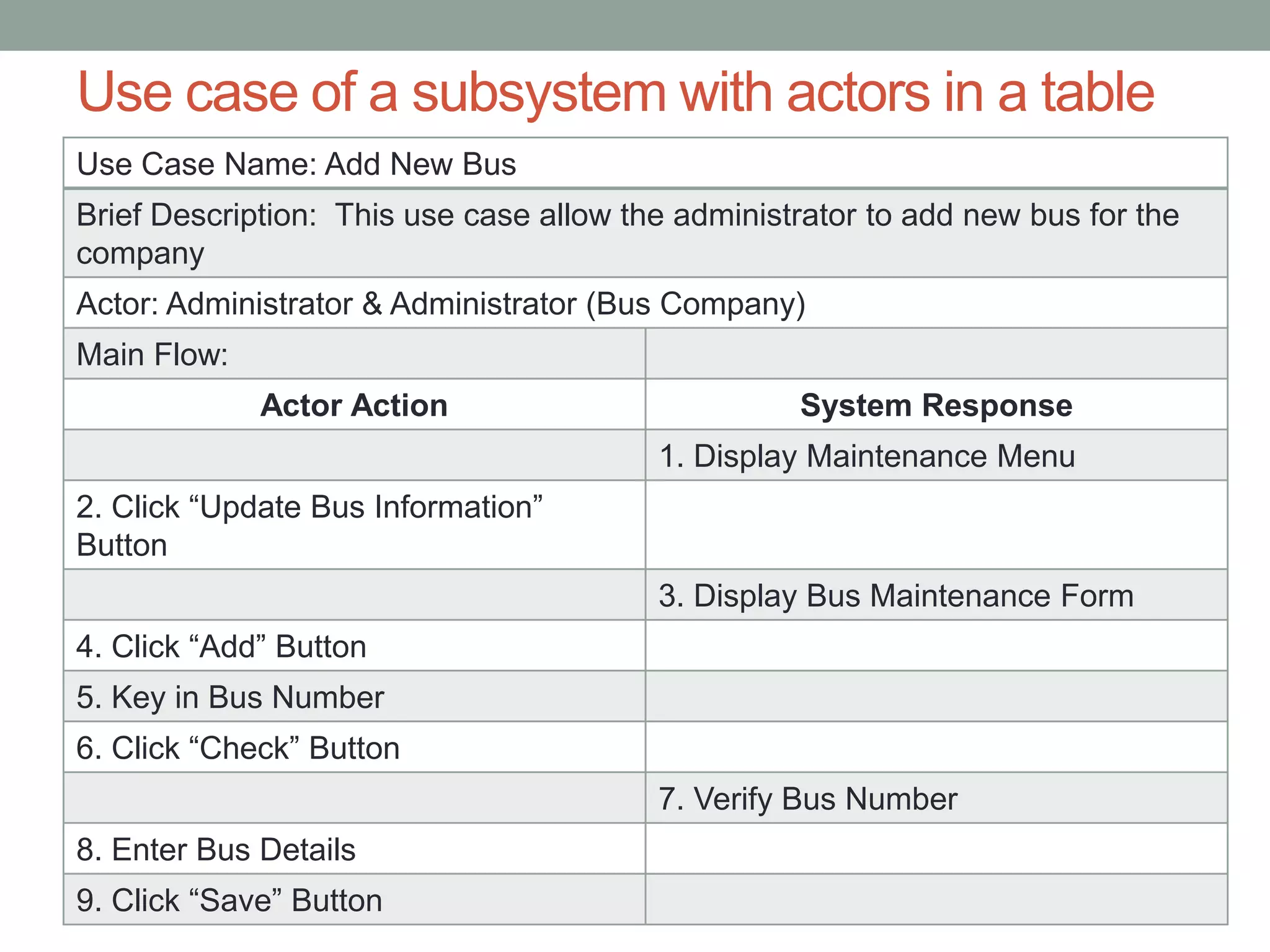
Use case of a subsystem with actors in a table
Use Case Name: Add New Bus
Brief Description: This use case allow the administrator to add new bus for the
company
Actor: Administrator & Administrator (Bus Company)
Main Flow:
Actor Action System Response
1. Display Maintenance Menu
2. Click “Update Bus Information”
Button
3. Display Bus Maintenance Form
4. Click “Add” Button
5. Key in Bus Number
6. Click “Check” Button
7. Verify Bus Number
8. Enter Bus Details
9. Click “Save” Button
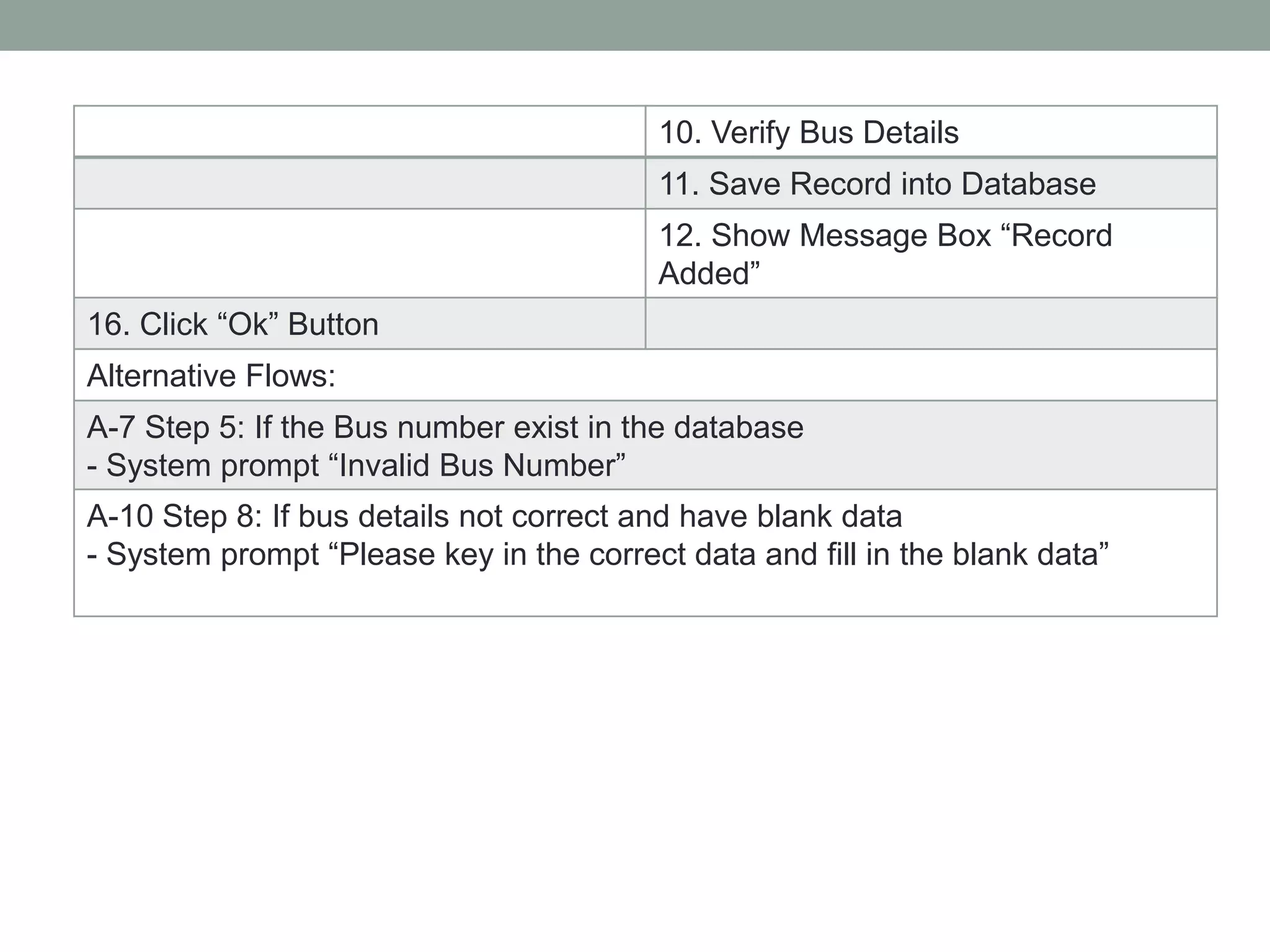
10. Verify Bus Details
11. Save Record into Database
12. Show Message Box “Record
Added”
16. Click “Ok” Button
Alternative Flows:
A-7 Step 5: If the Bus number exist in the database
- System prompt “Invalid Bus Number”
A-10 Step 8: If bus details not correct and have blank data
- System prompt “Please key in the correct data and fill in the blank data”
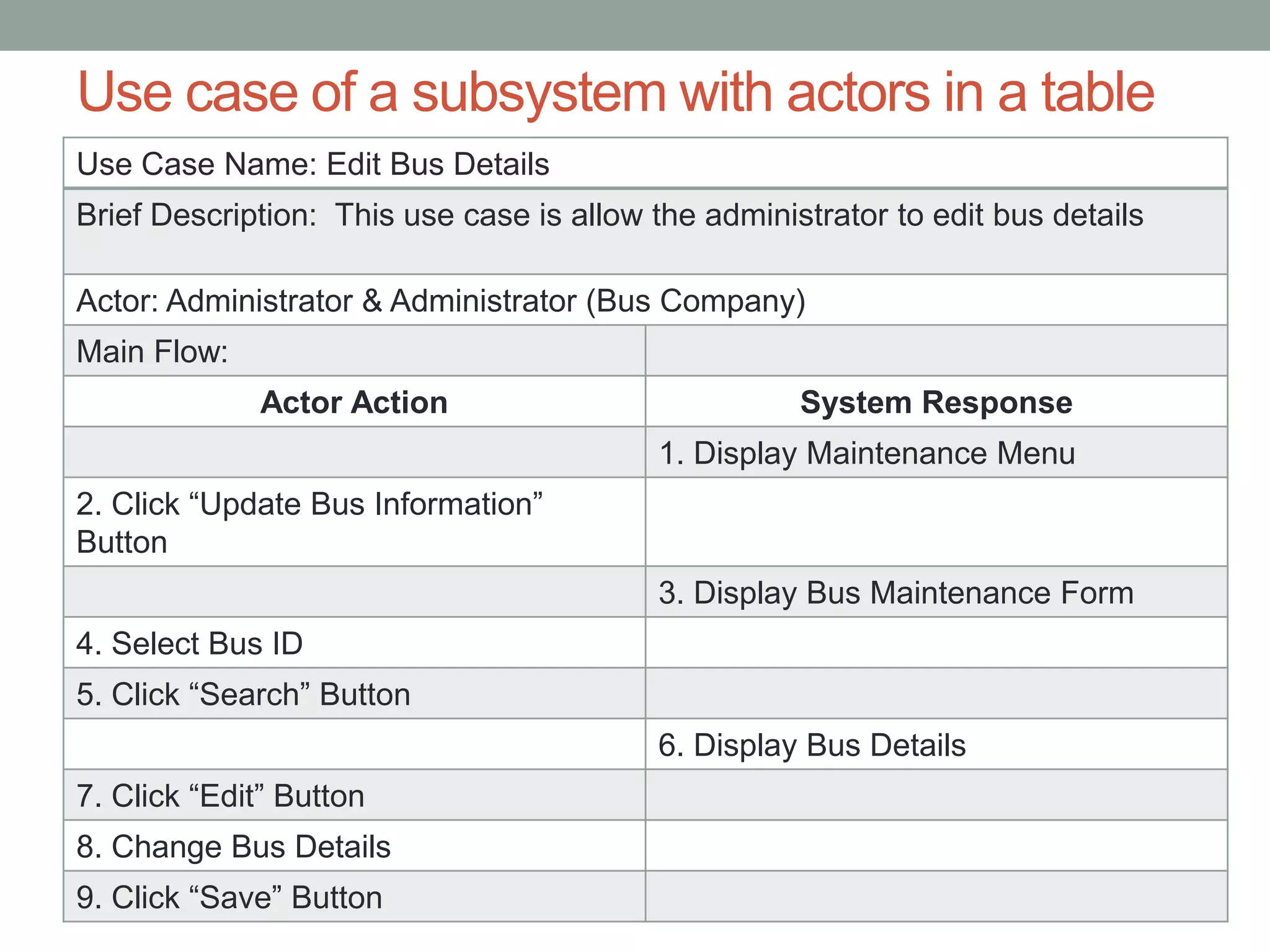
Use case of a subsystem with actors in a table
Use Case Name: Edit Bus Details
Brief Description: This use case is allow the administrator to edit bus details
Actor: Administrator & Administrator (Bus Company)
Main Flow:
Actor Action System Response
1. Display Maintenance Menu
2. Click “Update Bus Information”
Button
3. Display Bus Maintenance Form
4. Select Bus ID
5. Click “Search” Button
6. Display Bus Details
7. Click “Edit” Button
8. Change Bus Details
9. Click “Save” Button
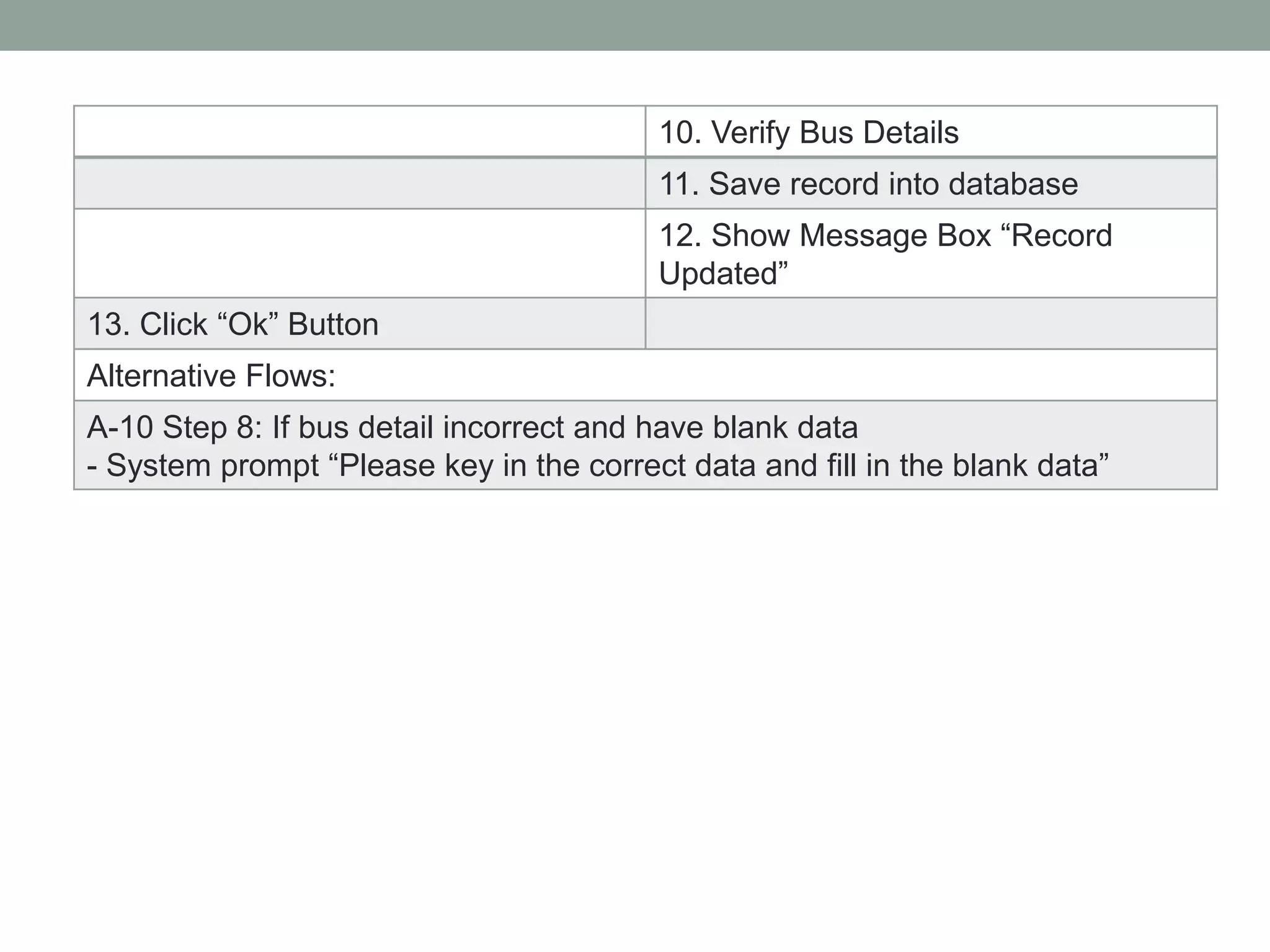
10. Verify Bus Details
11. Save record into database
12. Show Message Box “Record
Updated”
13. Click “Ok” Button
Alternative Flows:
A-10 Step 8: If bus detail incorrect and have blank data
- System prompt “Please key in the correct data and fill in the blank data”
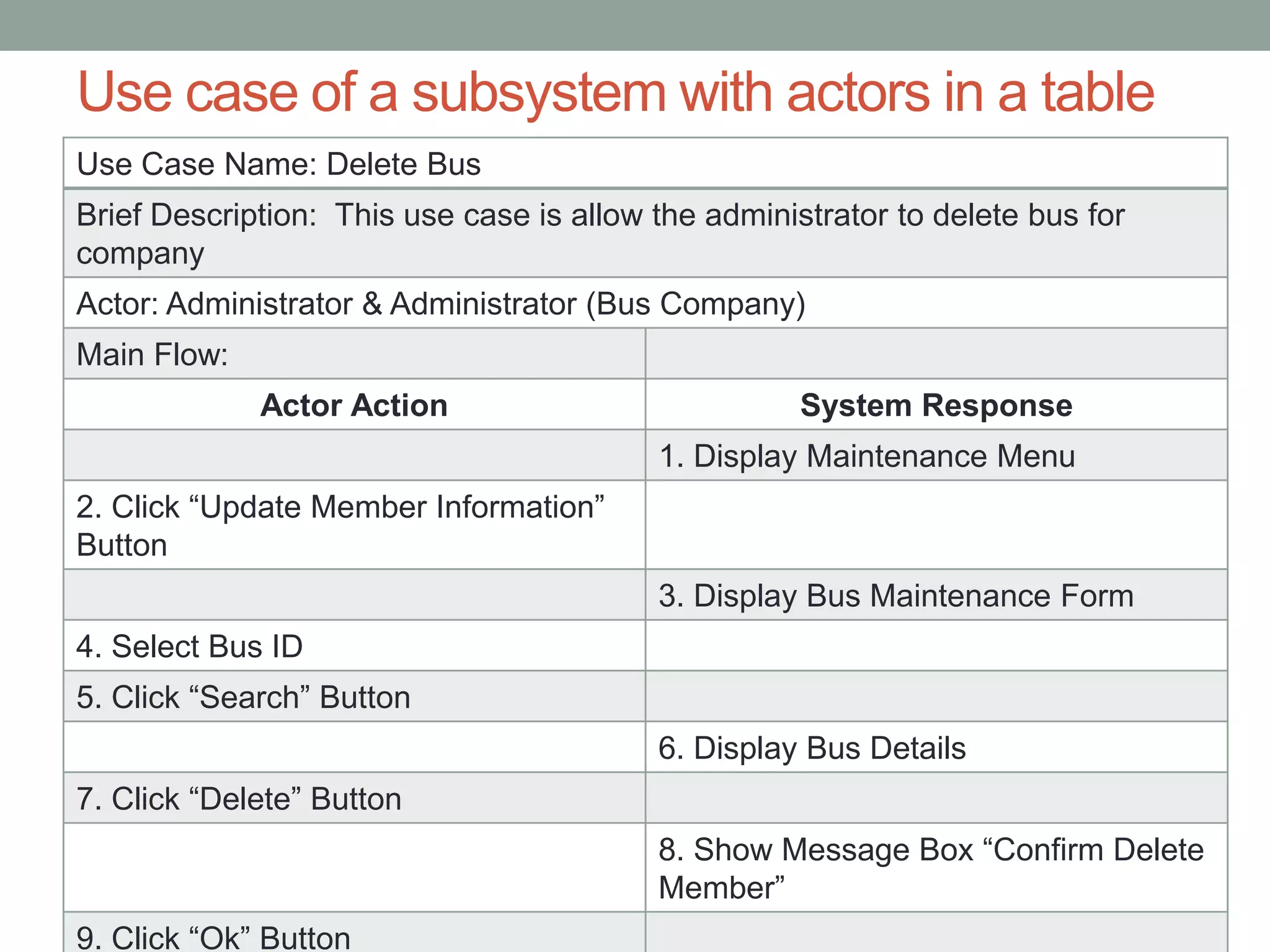
Use case of a subsystem with actors in a table
Use Case Name: Delete Bus
Brief Description: This use case is allow the administrator to delete bus for
company
Actor: Administrator & Administrator (Bus Company)
Main Flow:
Actor Action System Response
1. Display Maintenance Menu
2. Click “Update Member Information”
Button
3. Display Bus Maintenance Form
4. Select Bus ID
5. Click “Search” Button
6. Display Bus Details
7. Click “Delete” Button
8. Show Message Box “Confirm Delete
Member”
9. Click “Ok” Button
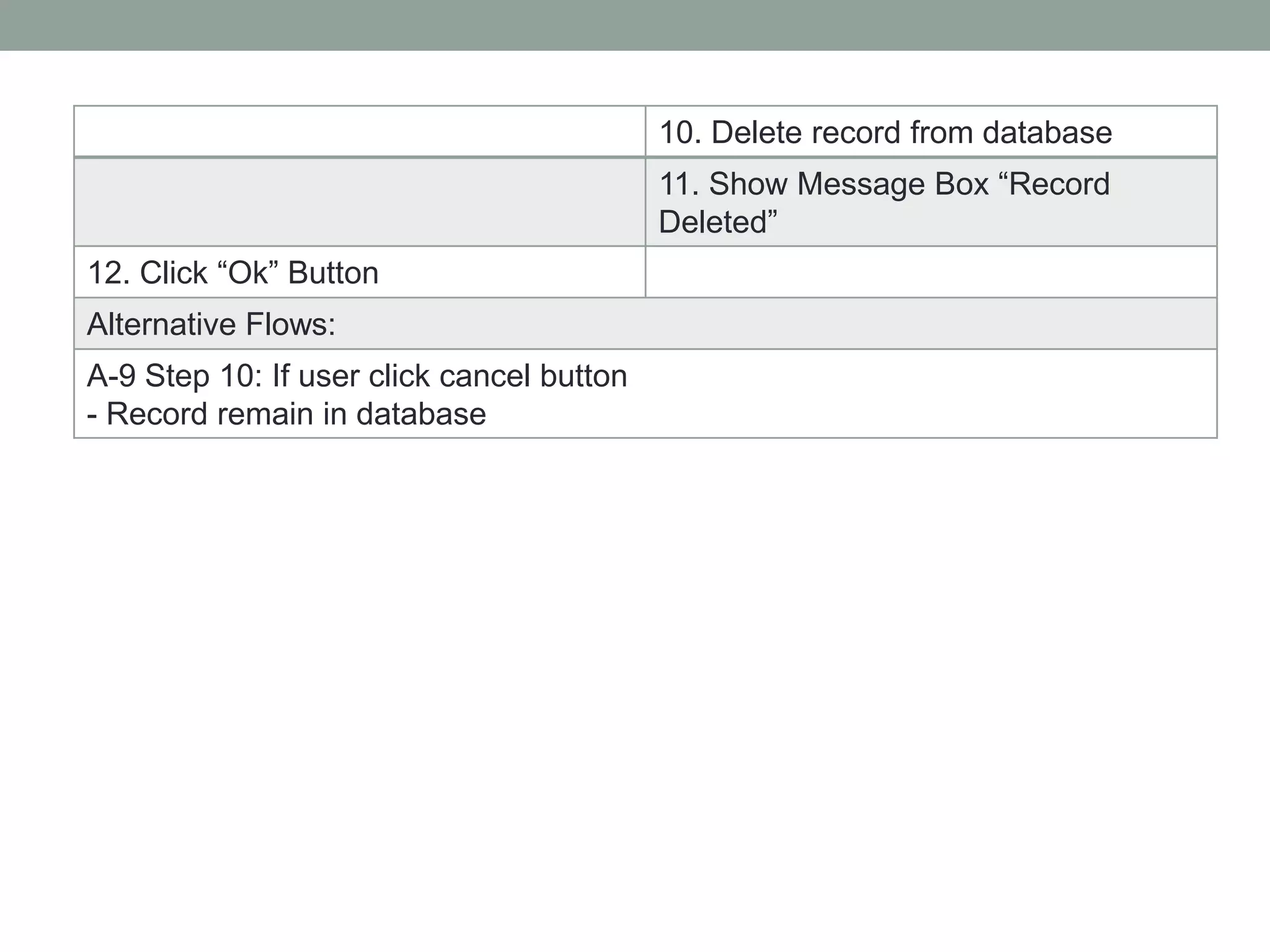
10. Delete record from database
11. Show Message Box “Record
Deleted”
12. Click “Ok” Button
Alternative Flows:
A-9 Step 10: If user click cancel button
- Record remain in database
Use case of a subsystem with actors in a table
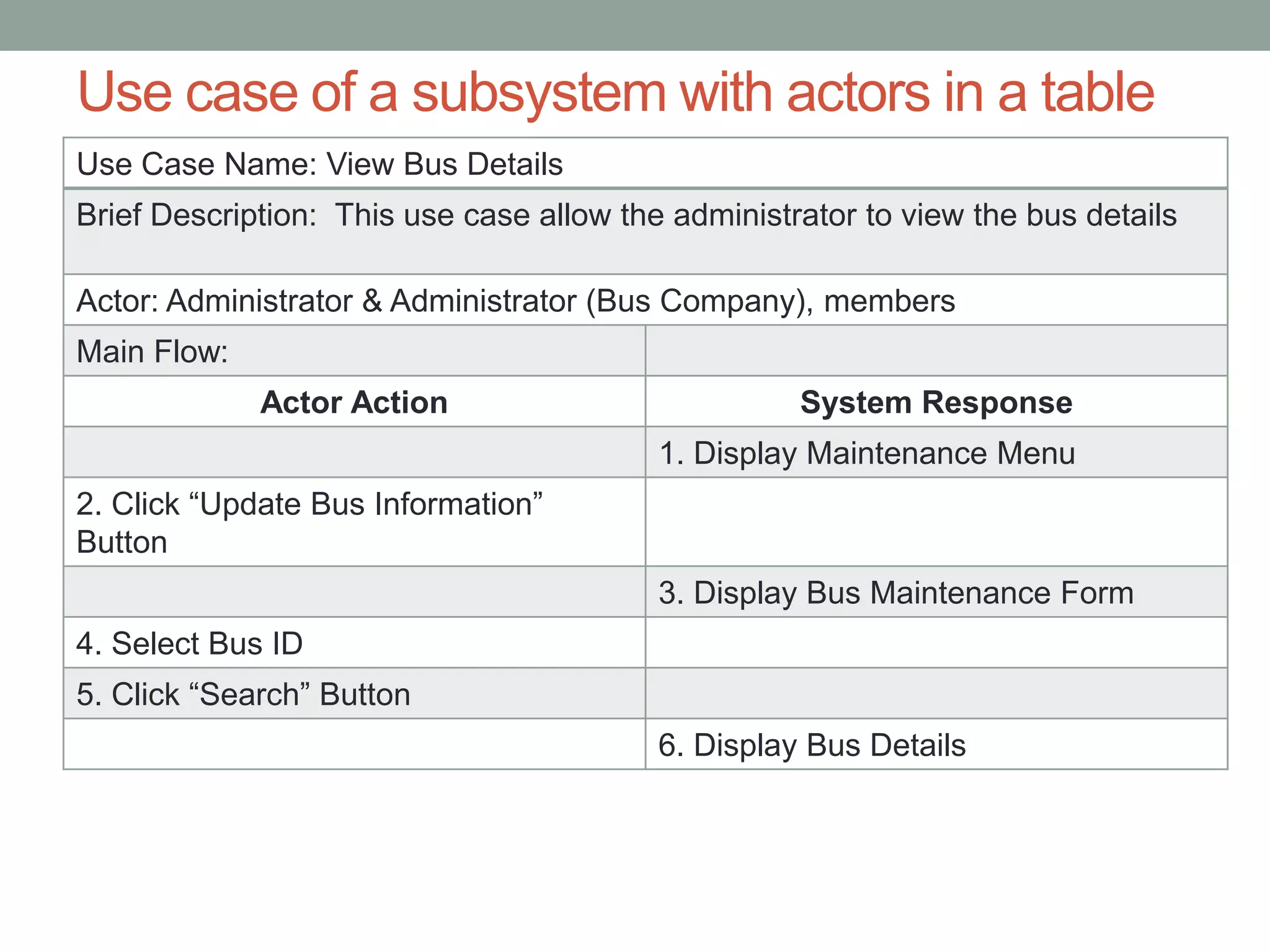
Use Case Name: View Bus Details
Brief Description: This use case allow the administrator to view the bus details
Actor: Administrator & Administrator (Bus Company), members
Main Flow:
Actor Action System Response
1. Display Maintenance Menu
2. Click “Update Bus Information”
Button
3. Display Bus Maintenance Form
4. Select Bus ID
5. Click “Search” Button
6. Display Bus Details
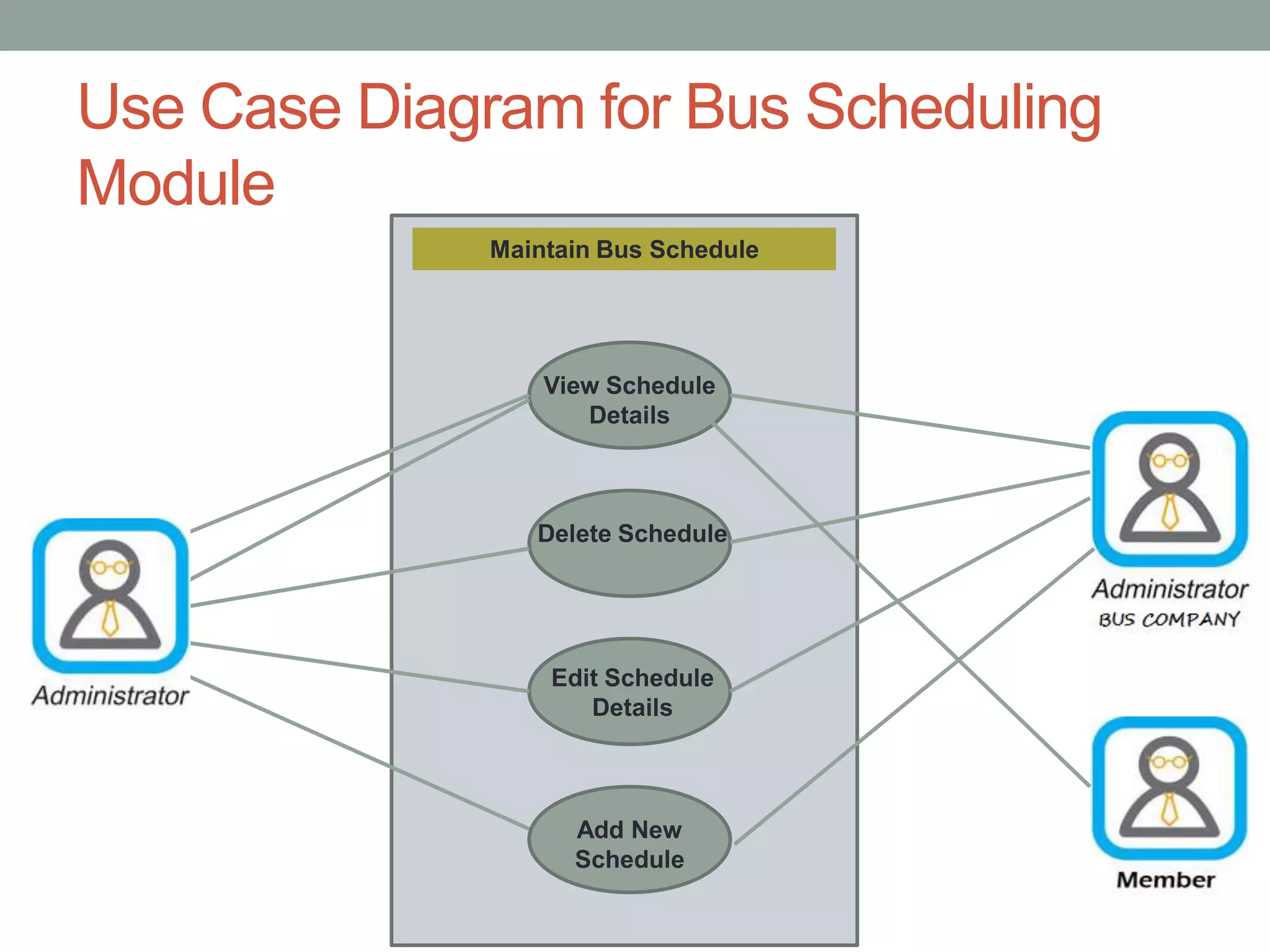
Use Case Diagram for Bus Scheduling
Module
Maintain Bus Schedule
View Schedule
Details
Delete Schedule
Edit Schedule
Details
Add New
Schedule
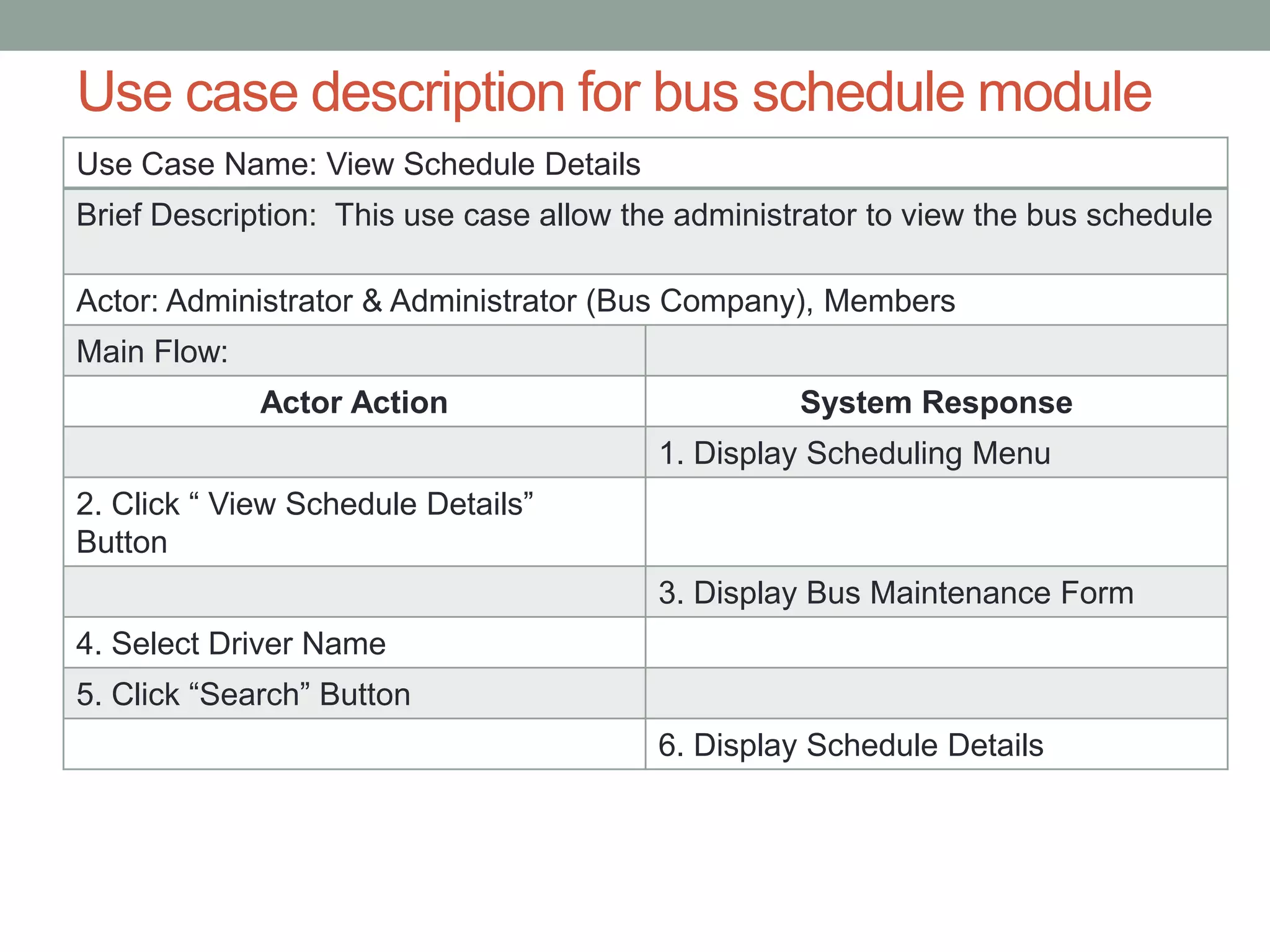
Use case description for bus schedule module
Use Case Name: View Schedule Details
Brief Description: This use case allow the administrator to view the bus schedule
Actor: Administrator & Administrator (Bus Company), Members
Main Flow:
Actor Action System Response
1. Display Scheduling Menu
2. Click “ View Schedule Details”
Button
3. Display Bus Maintenance Form
4. Select Driver Name
5. Click “Search” Button
6. Display Schedule Details
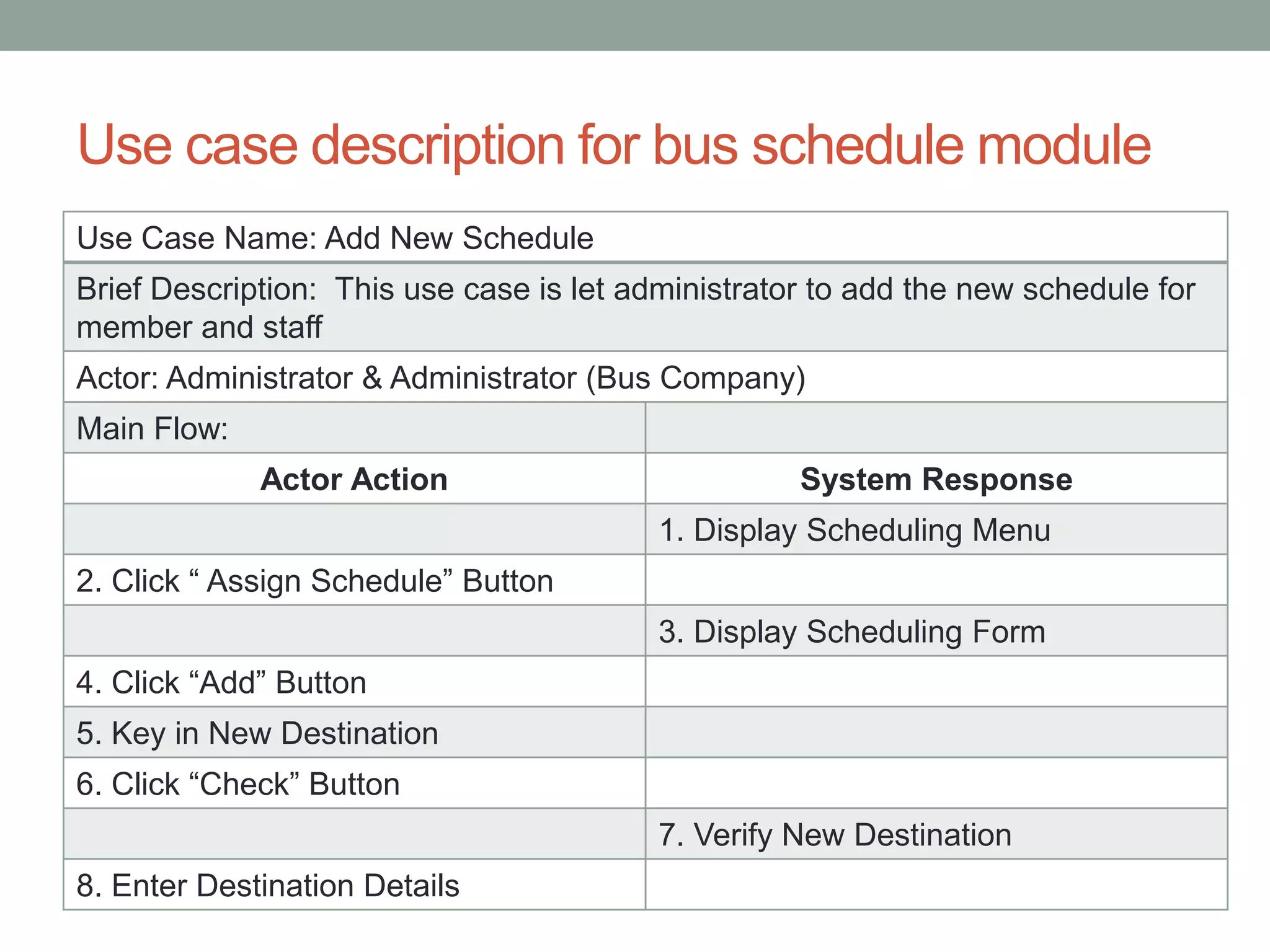
Use case description for bus schedule module
Use Case Name: Add New Schedule
Brief Description: This use case is let administrator to add the new schedule for
member and staff
Actor: Administrator & Administrator (Bus Company)
Main Flow:
Actor Action System Response
1. Display Scheduling Menu
2. Click “ Assign Schedule” Button
3. Display Scheduling Form
4. Click “Add” Button
5. Key in New Destination
6. Click “Check” Button
7. Verify New Destination
8. Enter Destination Details
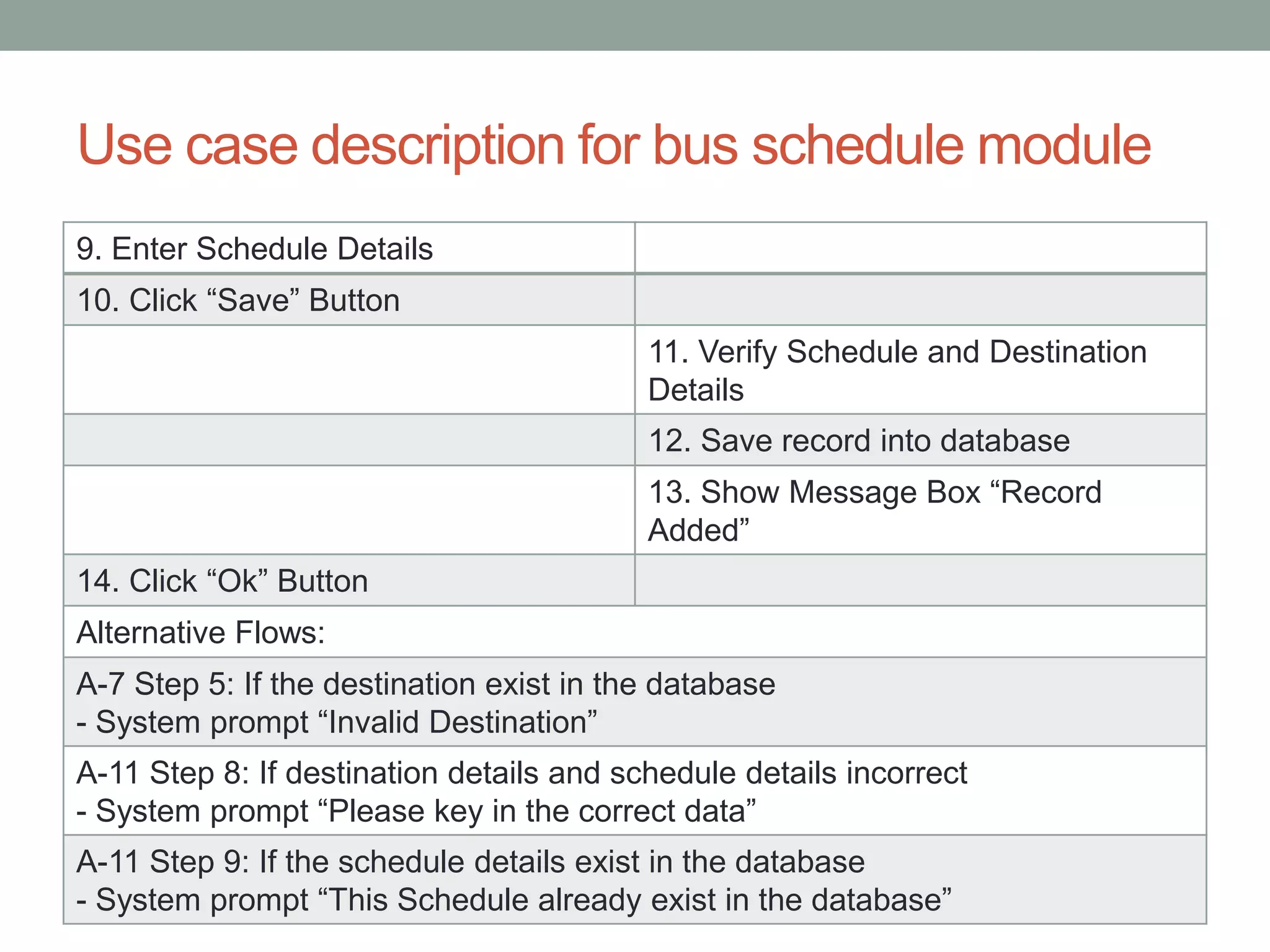
Use case description for bus schedule module
9. Enter Schedule Details
10. Click “Save” Button
11. Verify Schedule and Destination
Details
12. Save record into database
13. Show Message Box “Record
Added”
14. Click “Ok” Button
Alternative Flows:
A-7 Step 5: If the destination exist in the database
- System prompt “Invalid Destination”
A-11 Step 8: If destination details and schedule details incorrect
- System prompt “Please key in the correct data”
A-11 Step 9: If the schedule details exist in the database
- System prompt “This Schedule already exist in the database”
Use case description for bus schedule module
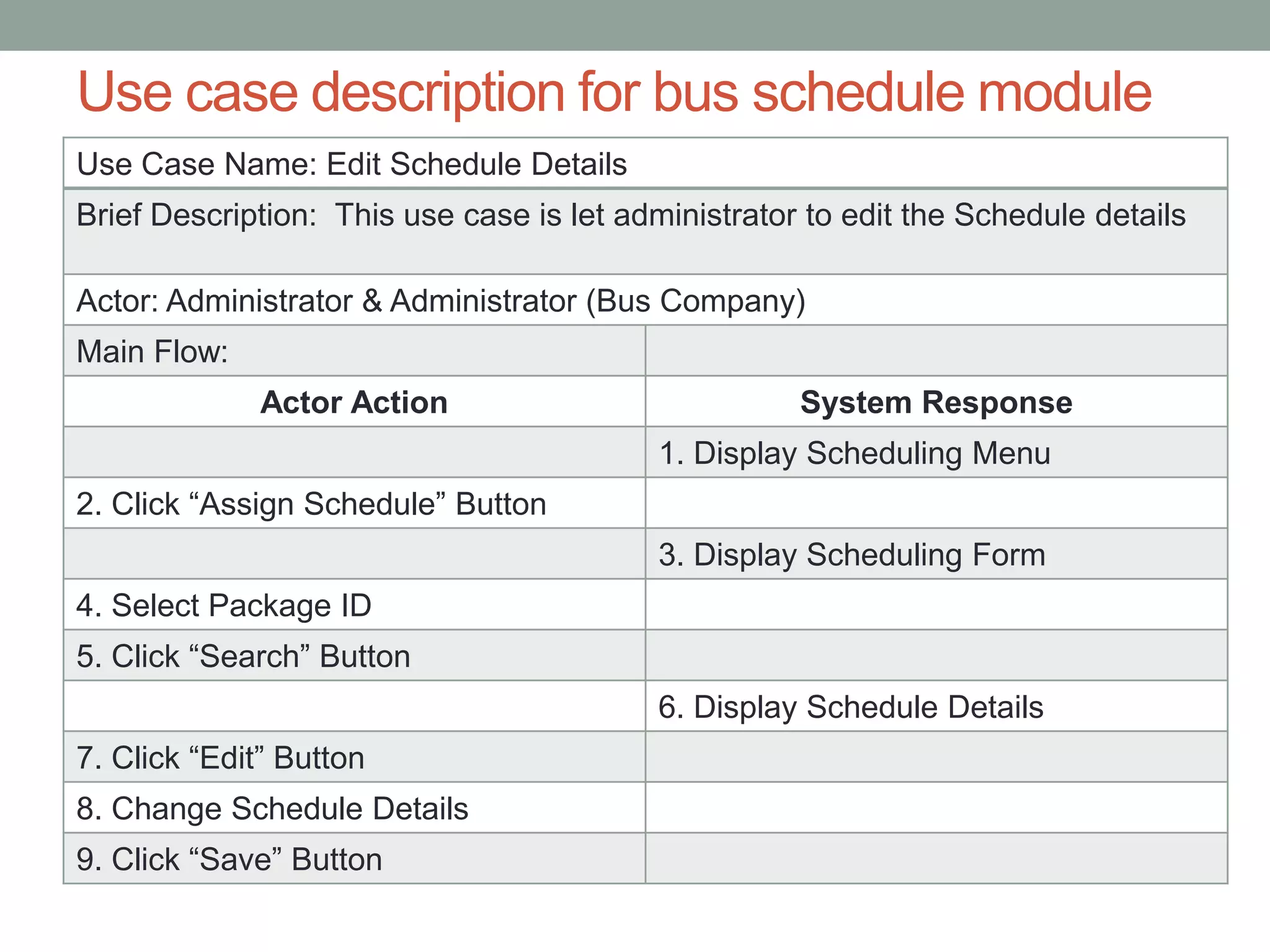
Use Case Name: Edit Schedule Details
Brief Description: This use case is let administrator to edit the Schedule details
Actor: Administrator & Administrator (Bus Company)
Main Flow:
Actor Action System Response
1. Display Scheduling Menu
2. Click “Assign Schedule” Button
3. Display Scheduling Form
4. Select Package ID
5. Click “Search” Button
6. Display Schedule Details
7. Click “Edit” Button
8. Change Schedule Details
9. Click “Save” Button
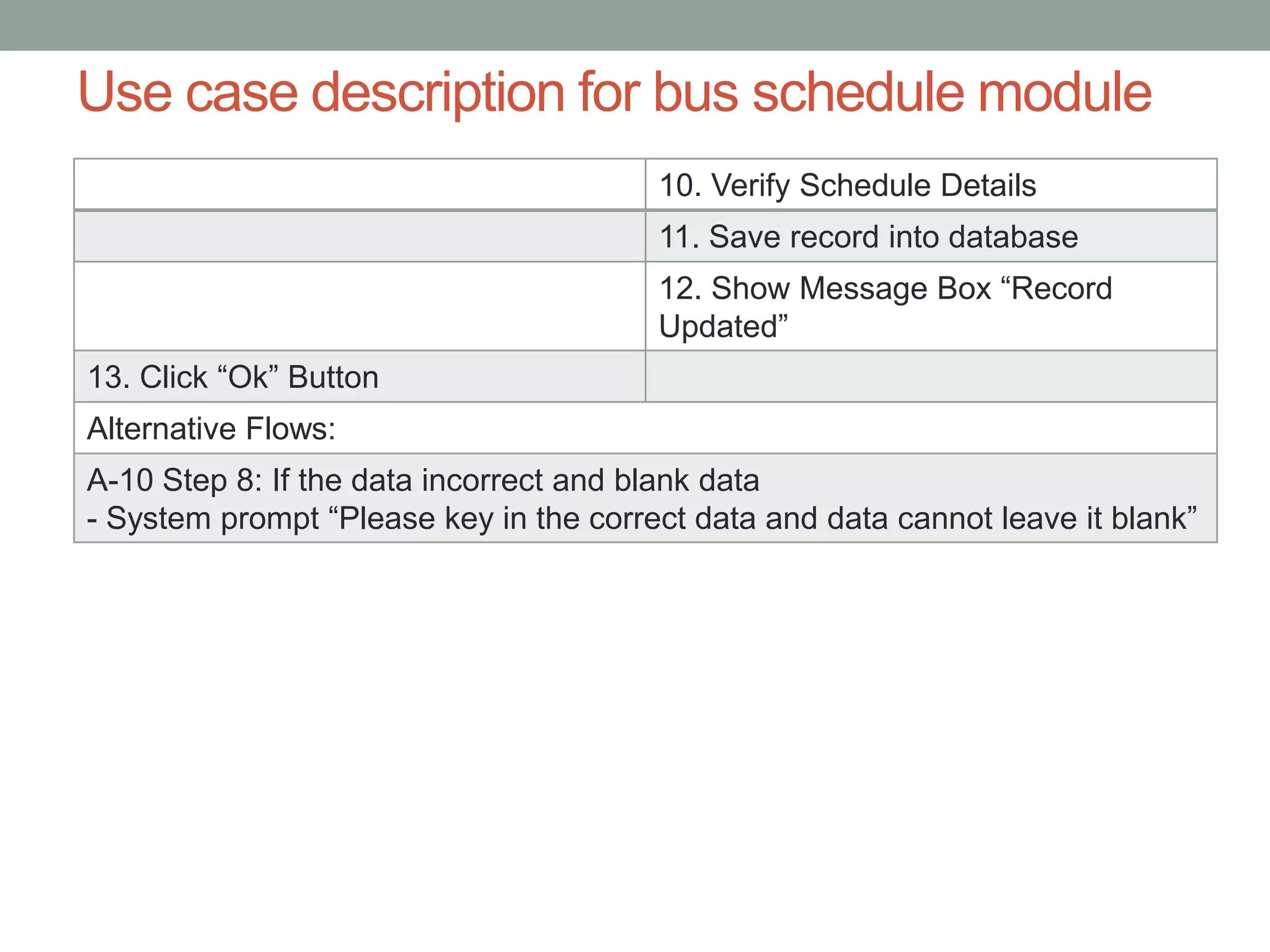
10. Verify Schedule Details
11. Save record into database
12. Show Message Box “Record
Updated”
13. Click “Ok” Button
Alternative Flows:
A-10 Step 8: If the data incorrect and blank data
- System prompt “Please key in the correct data and data cannot leave it blank”
Use case description for bus schedule module
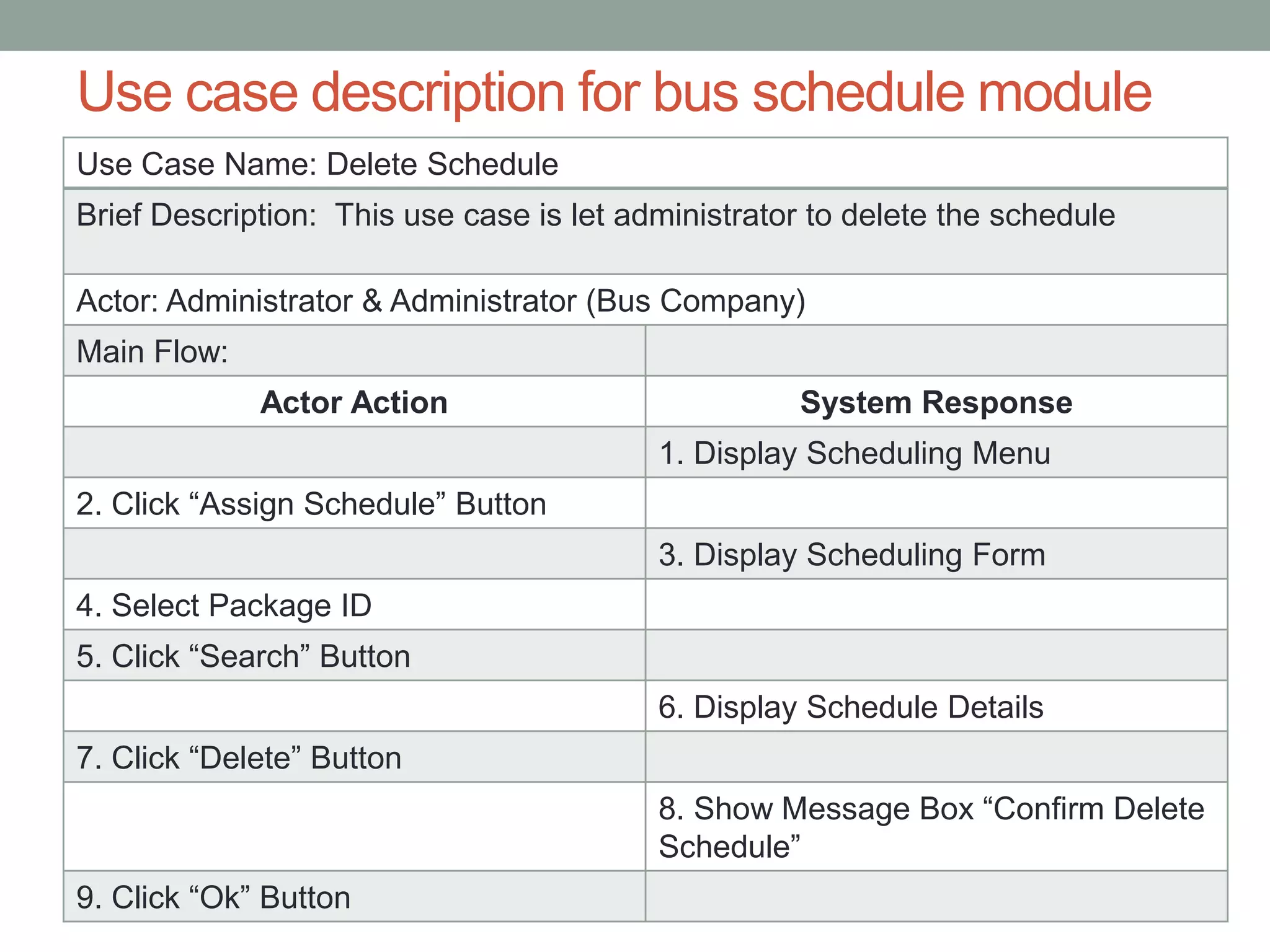
Use Case Name: Delete Schedule
Brief Description: This use case is let administrator to delete the schedule
Actor: Administrator & Administrator (Bus Company)
Main Flow:
Actor Action System Response
1. Display Scheduling Menu
2. Click “Assign Schedule” Button
3. Display Scheduling Form
4. Select Package ID
5. Click “Search” Button
6. Display Schedule Details
7. Click “Delete” Button
8. Show Message Box “Confirm Delete
Schedule”
9. Click “Ok” Button
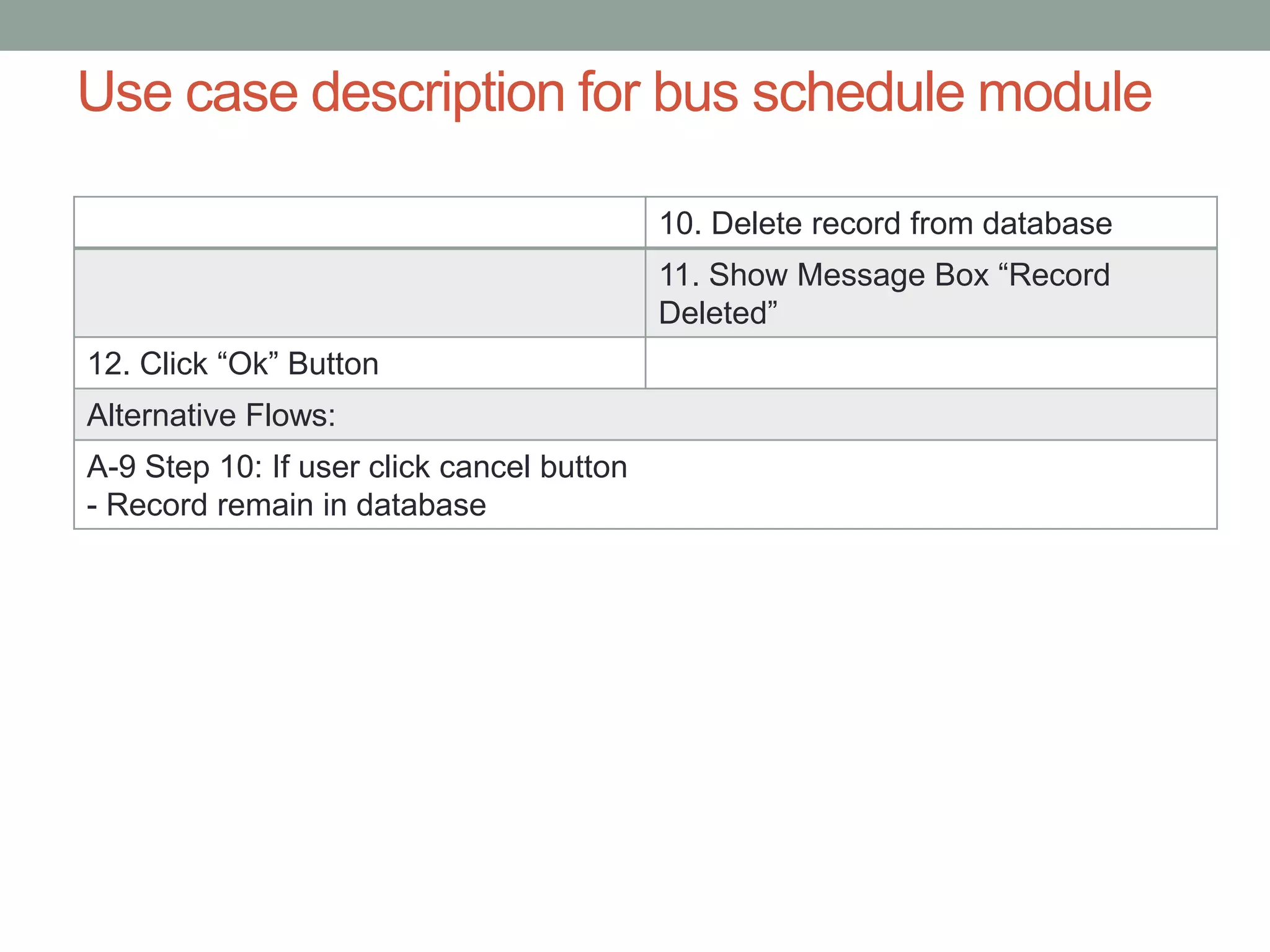
Use case description for bus schedule module
10. Delete record from database
11. Show Message Box “Record
Deleted”
12. Click “Ok” Button
Alternative Flows:
A-9 Step 10: If user click cancel button
- Record remain in database
Use case description for bus schedule module
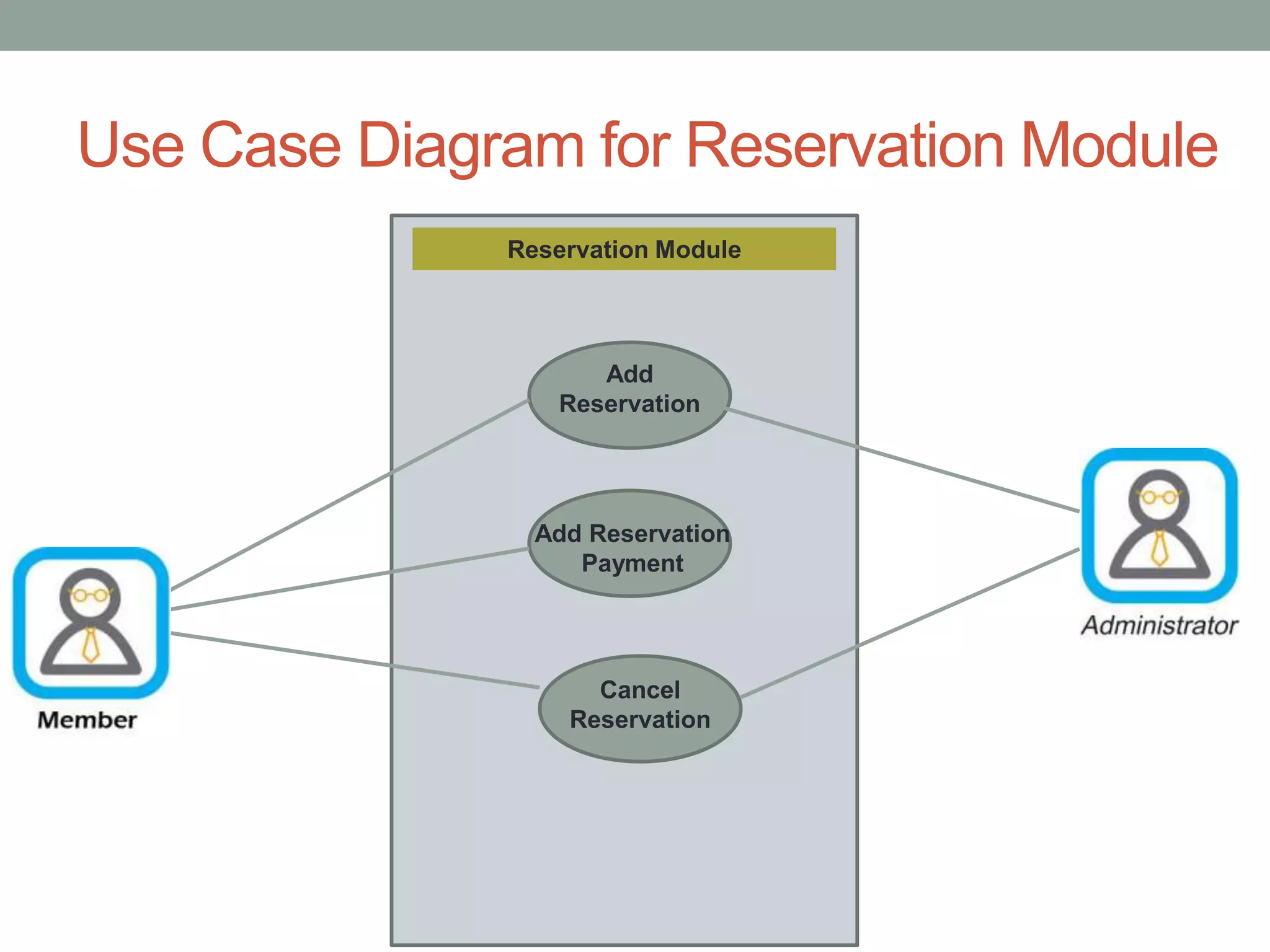
Use Case Diagram for Reservation Module
Reservation Module
Add
Reservation
Add Reservation
Payment
Cancel
Reservation
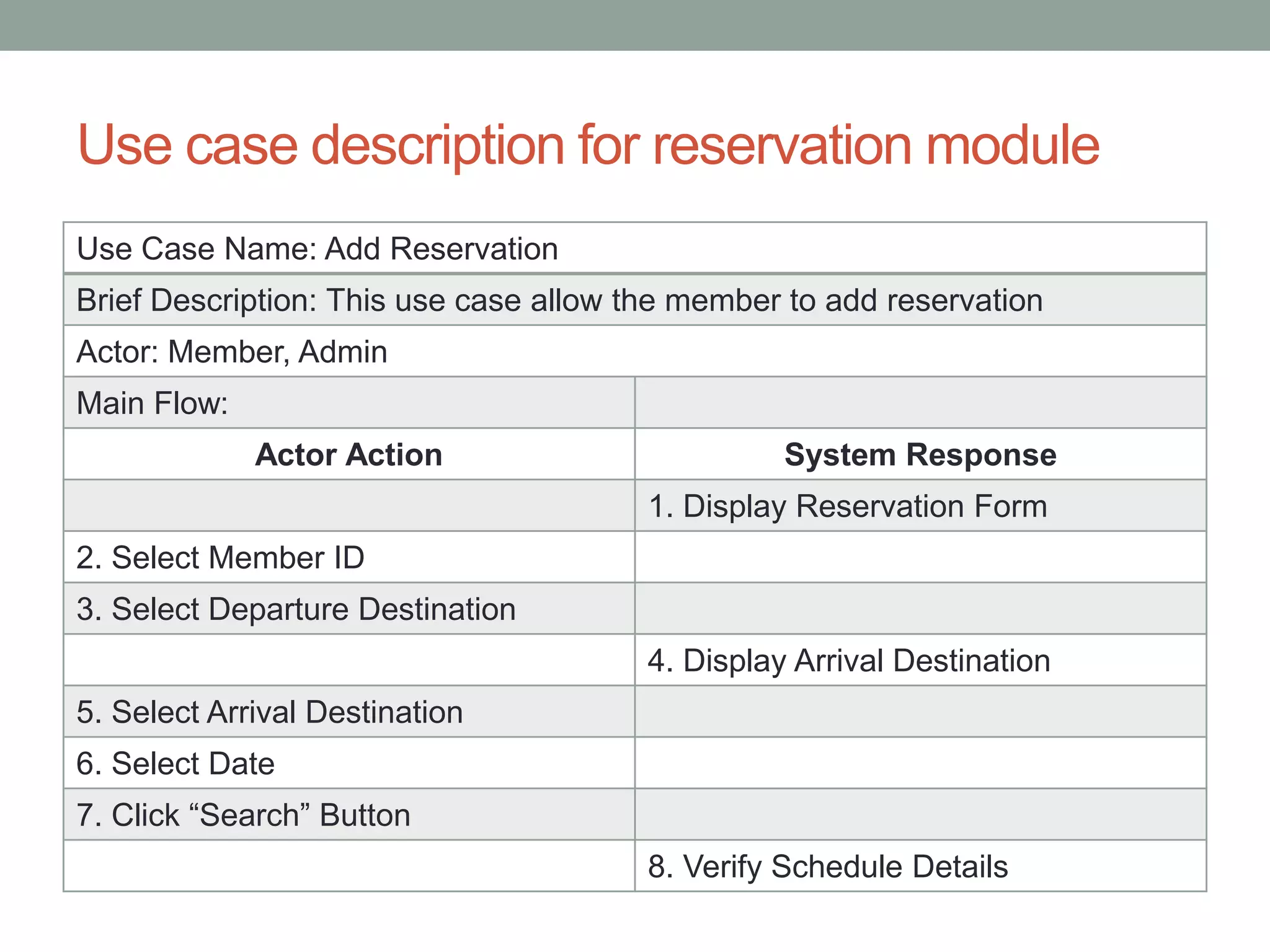
Use case description for reservation module
Use Case Name: Add Reservation
Brief Description: This use case allow the member to add reservation
Actor: Member, Admin
Main Flow:
Actor Action System Response
1. Display Reservation Form
2. Select Member ID
3. Select Departure Destination
4. Display Arrival Destination
5. Select Arrival Destination
6. Select Date
7. Click “Search” Button
8. Verify Schedule Details
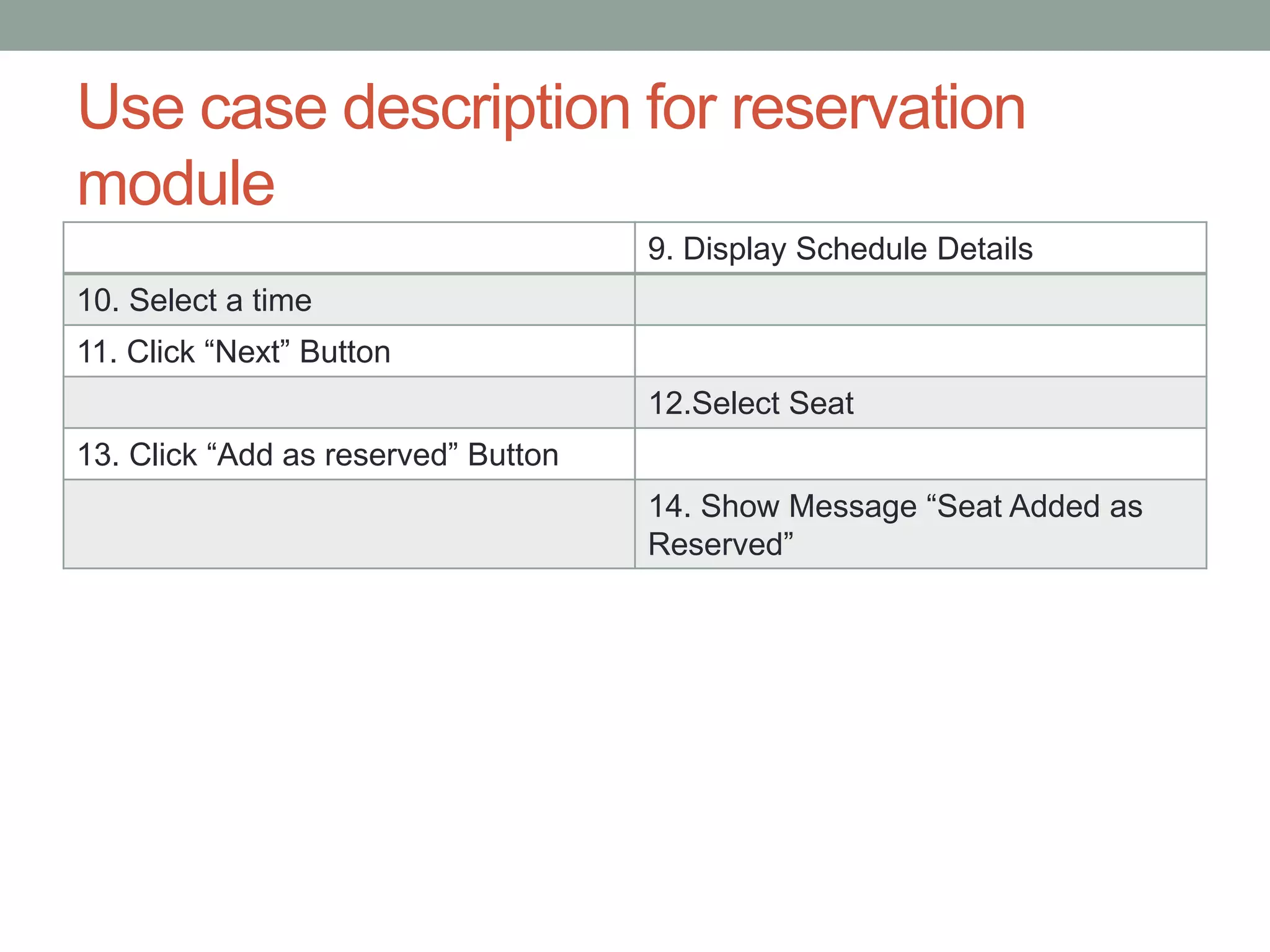
Use case description for reservation
module
9. Display Schedule Details
10. Select a time
11. Click “Next” Button
12.Select Seat
13. Click “Add as reserved” Button
14. Show Message “Seat Added as
Reserved”
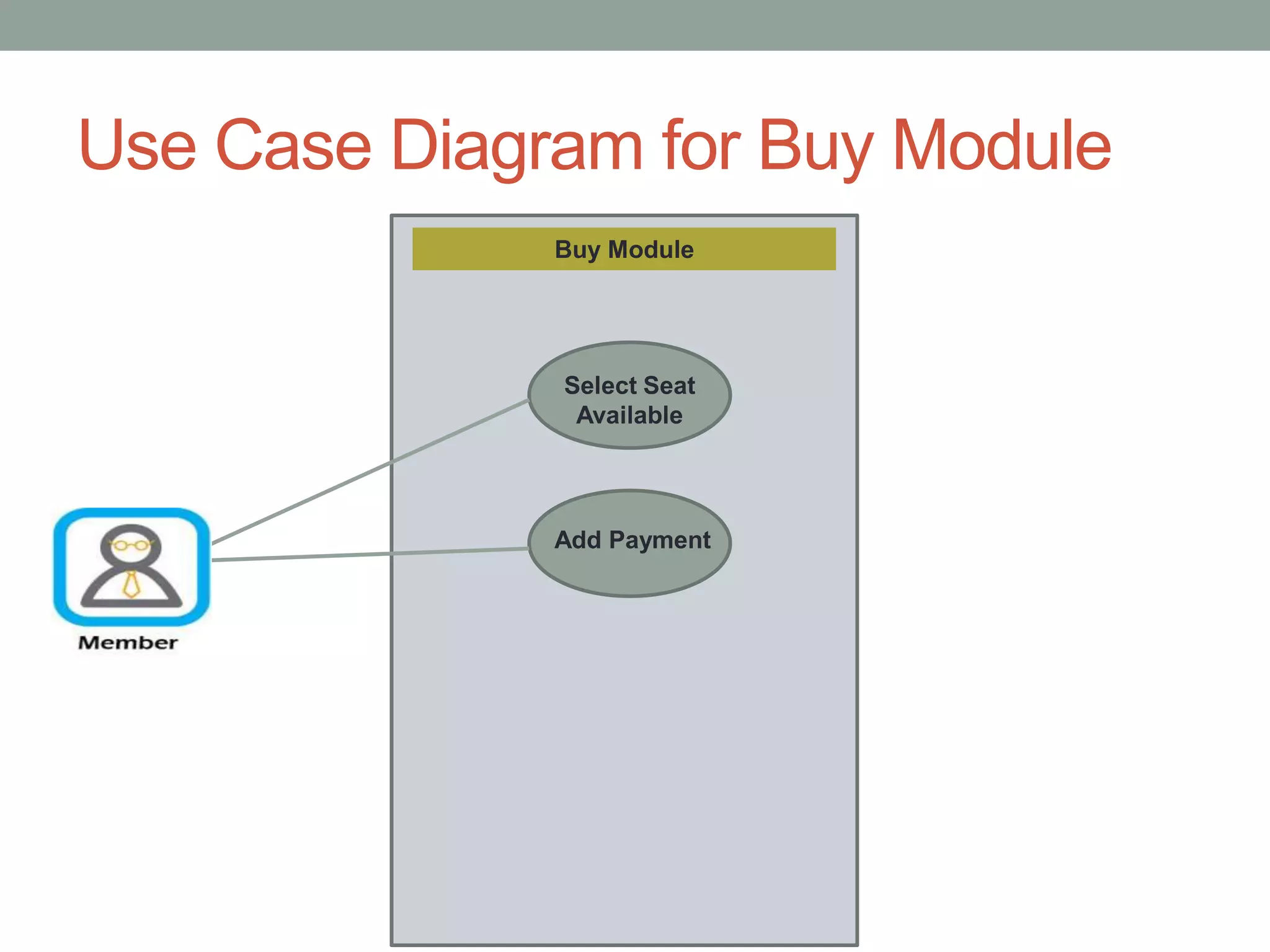
Use Case Diagram for Buy Module
Buy Module
Select Seat
Available
Add Payment
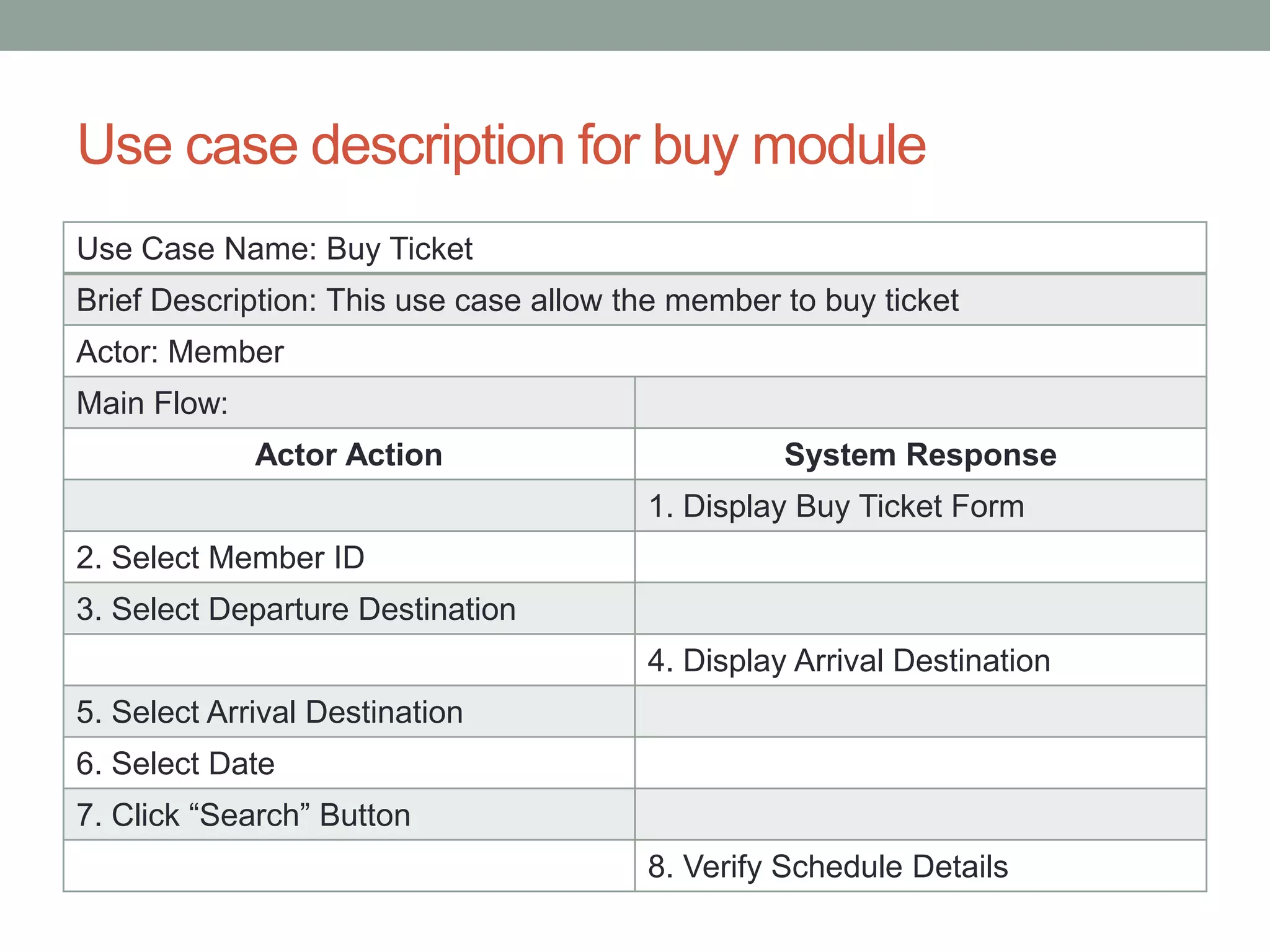
Use case description for buy module
Use Case Name: Buy Ticket
Brief Description: This use case allow the member to buy ticket
Actor: Member
Main Flow:
Actor Action System Response
1. Display Buy Ticket Form
2. Select Member ID
3. Select Departure Destination
4. Display Arrival Destination
5. Select Arrival Destination
6. Select Date
7. Click “Search” Button
8. Verify Schedule Details
Use case description for buy module
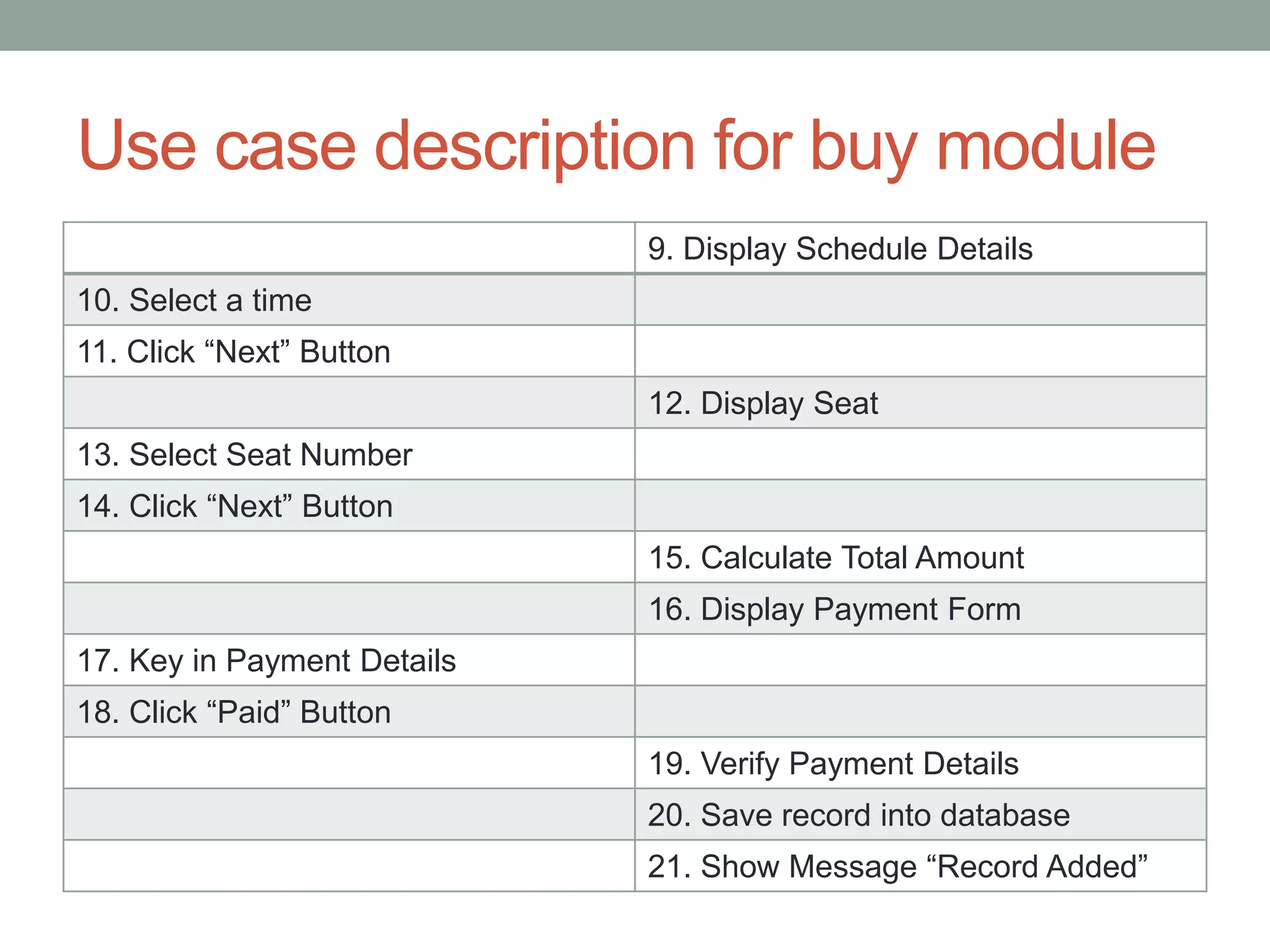
9. Display Schedule Details
10. Select a time
11. Click “Next” Button
12. Display Seat
13. Select Seat Number
14. Click “Next” Button
15. Calculate Total Amount
16. Display Payment Form
17. Key in Payment Details
18. Click “Paid” Button
19. Verify Payment Details
20. Save record into database
21. Show Message “Record Added”
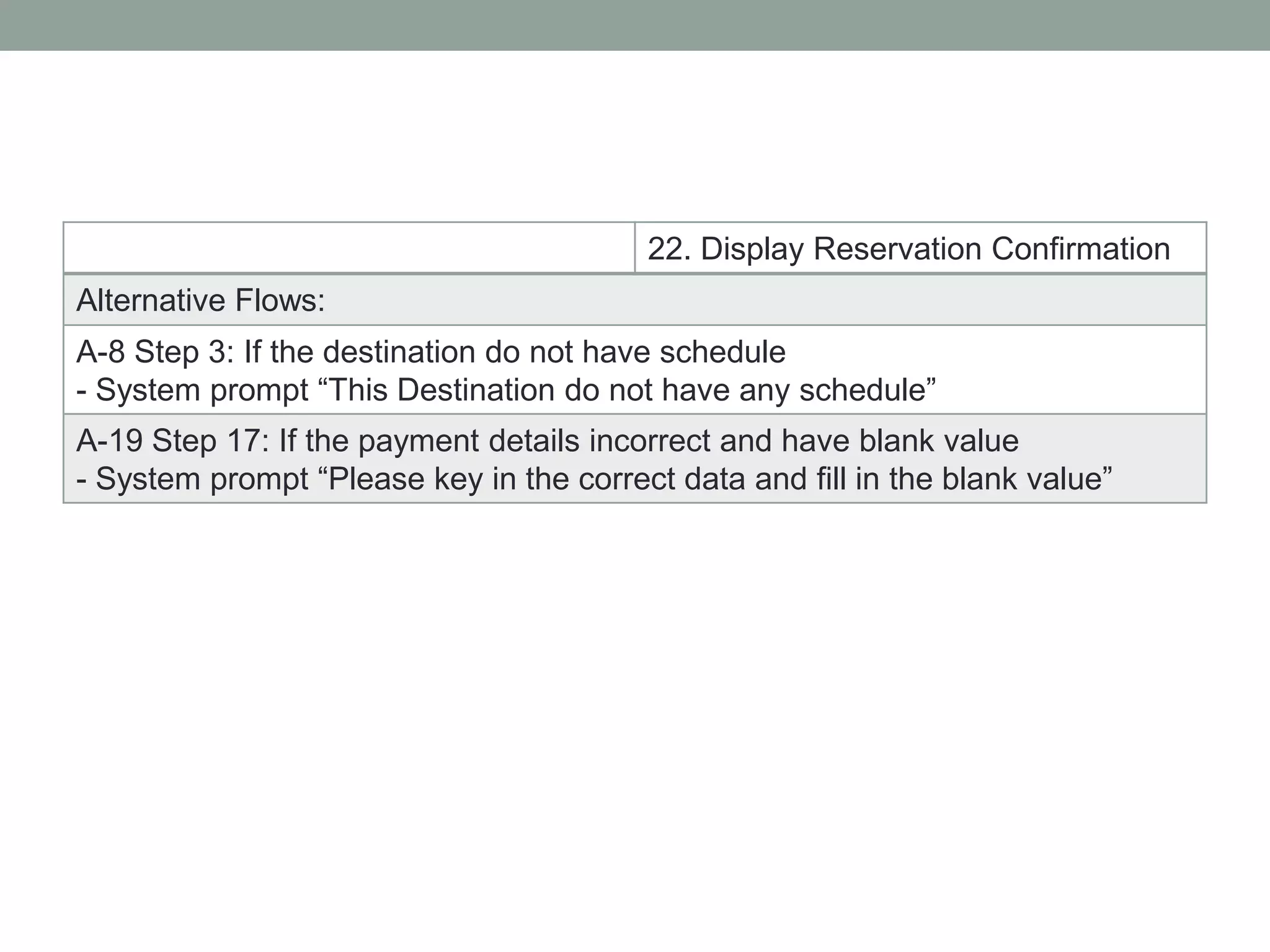
22. Display Reservation Confirmation
Alternative Flows:
A-8 Step 3: If the destination do not have schedule
- System prompt “This Destination do not have any schedule”
A-19 Step 17: If the payment details incorrect and have blank value
- System prompt “Please key in the correct data and fill in the blank value”
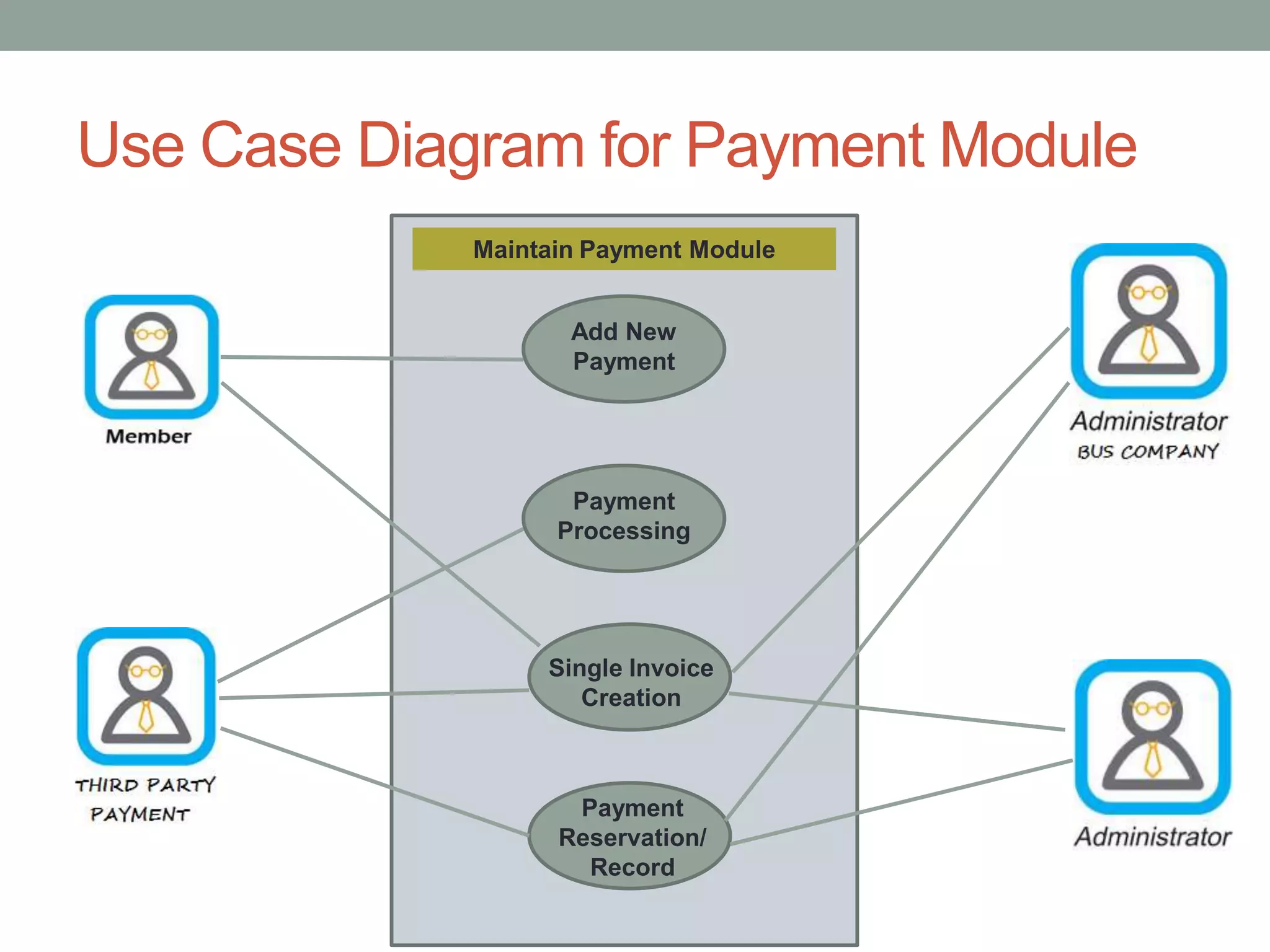
Use Case Diagram for Payment Module
Maintain Payment Module
Add New
Payment
Payment
Reservation/
Record
Payment
Processing
Single Invoice
Creation
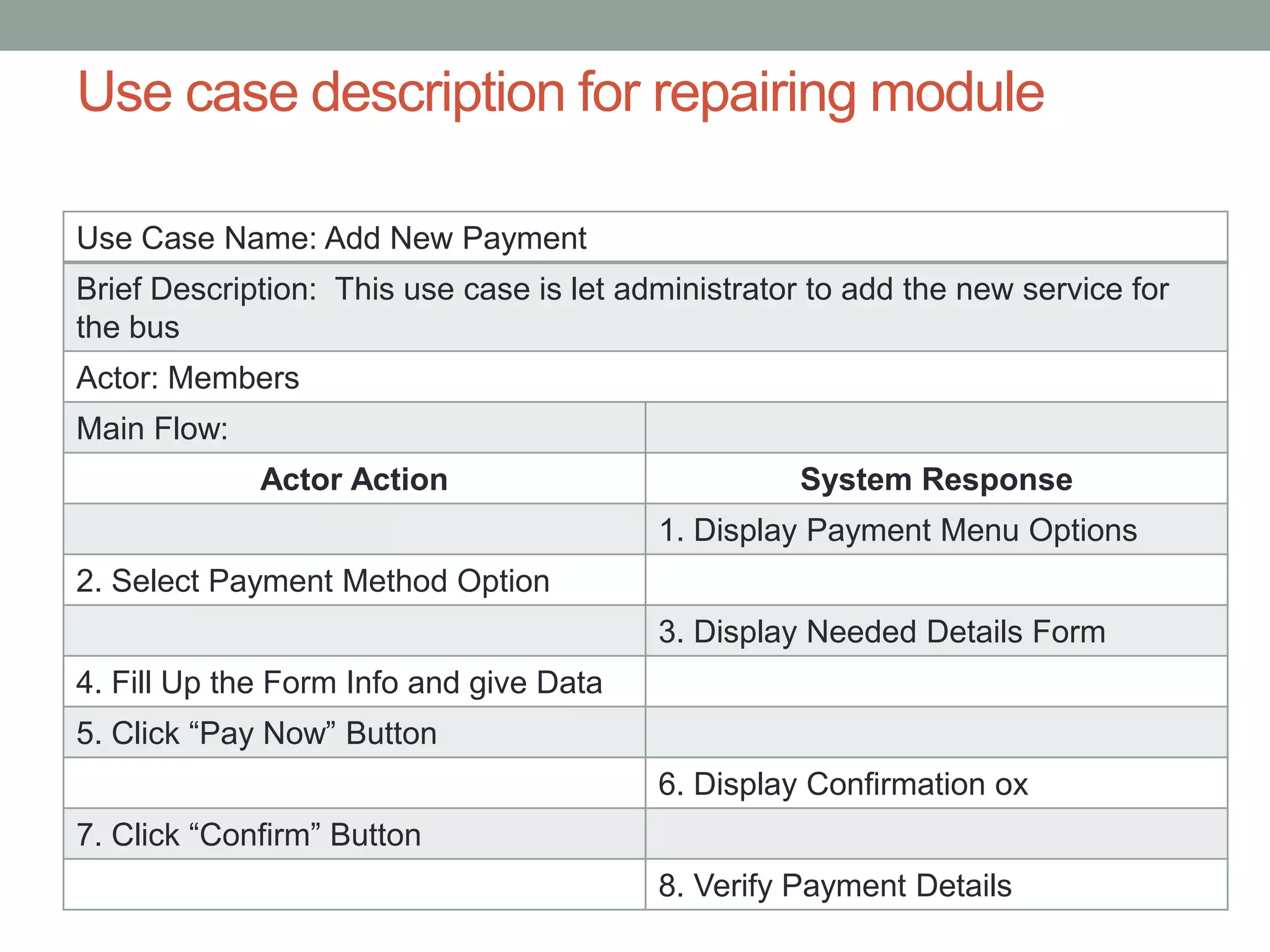
Use Case Name: Add New Payment
Brief Description: This use case is let administrator to add the new service for
the bus
Actor: Members
Main Flow:
Actor Action System Response
1. Display Payment Menu Options
2. Select Payment Method Option
3. Display Needed Details Form
4. Fill Up the Form Info and give Data
5. Click “Pay Now” Button
6. Display Confirmation ox
7. Click “Confirm” Button
8. Verify Payment Details
Use case description for repairing module
Use case description for bus schedule module
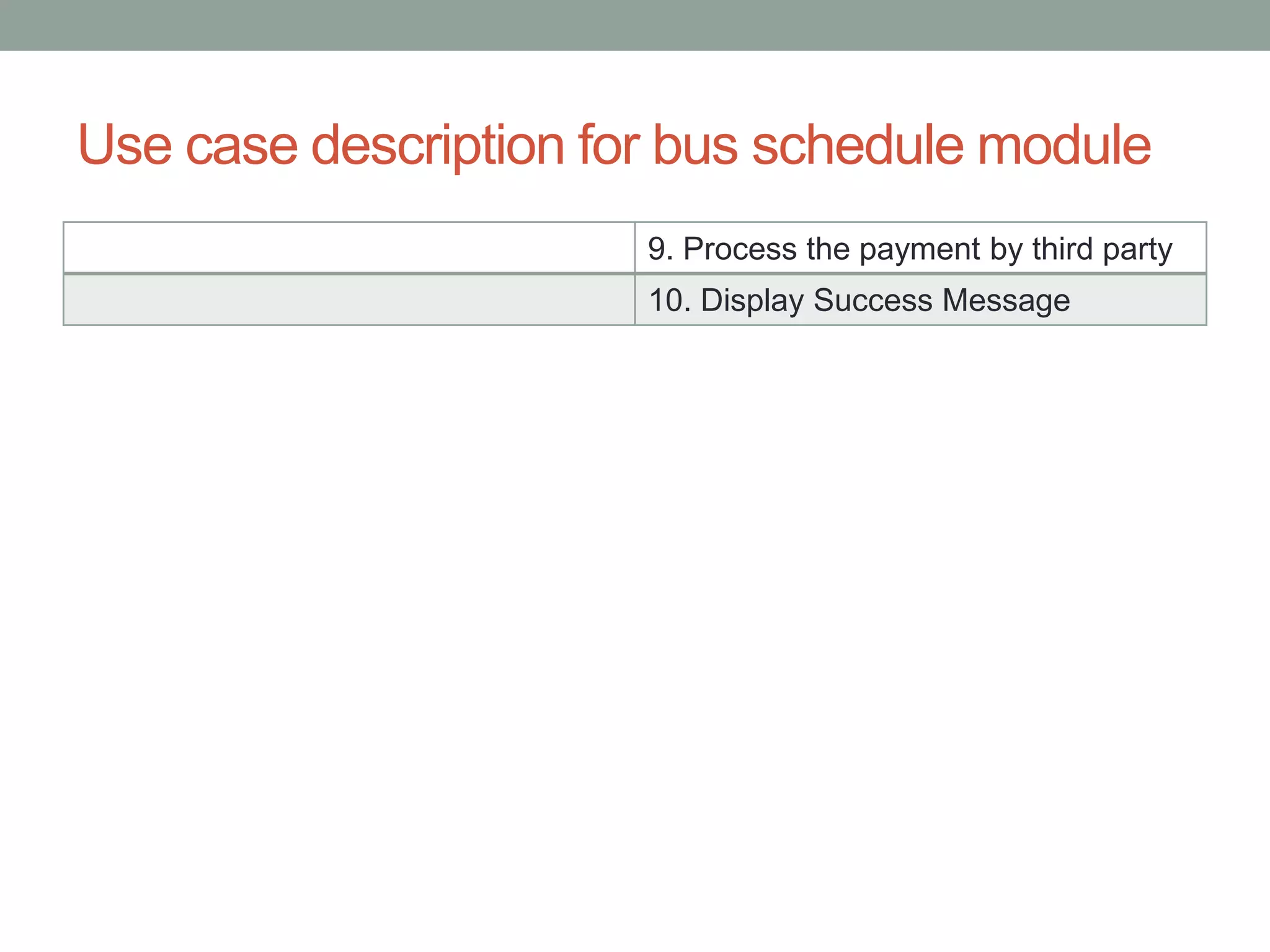
9. Process the payment by third party
10. Display Success Message
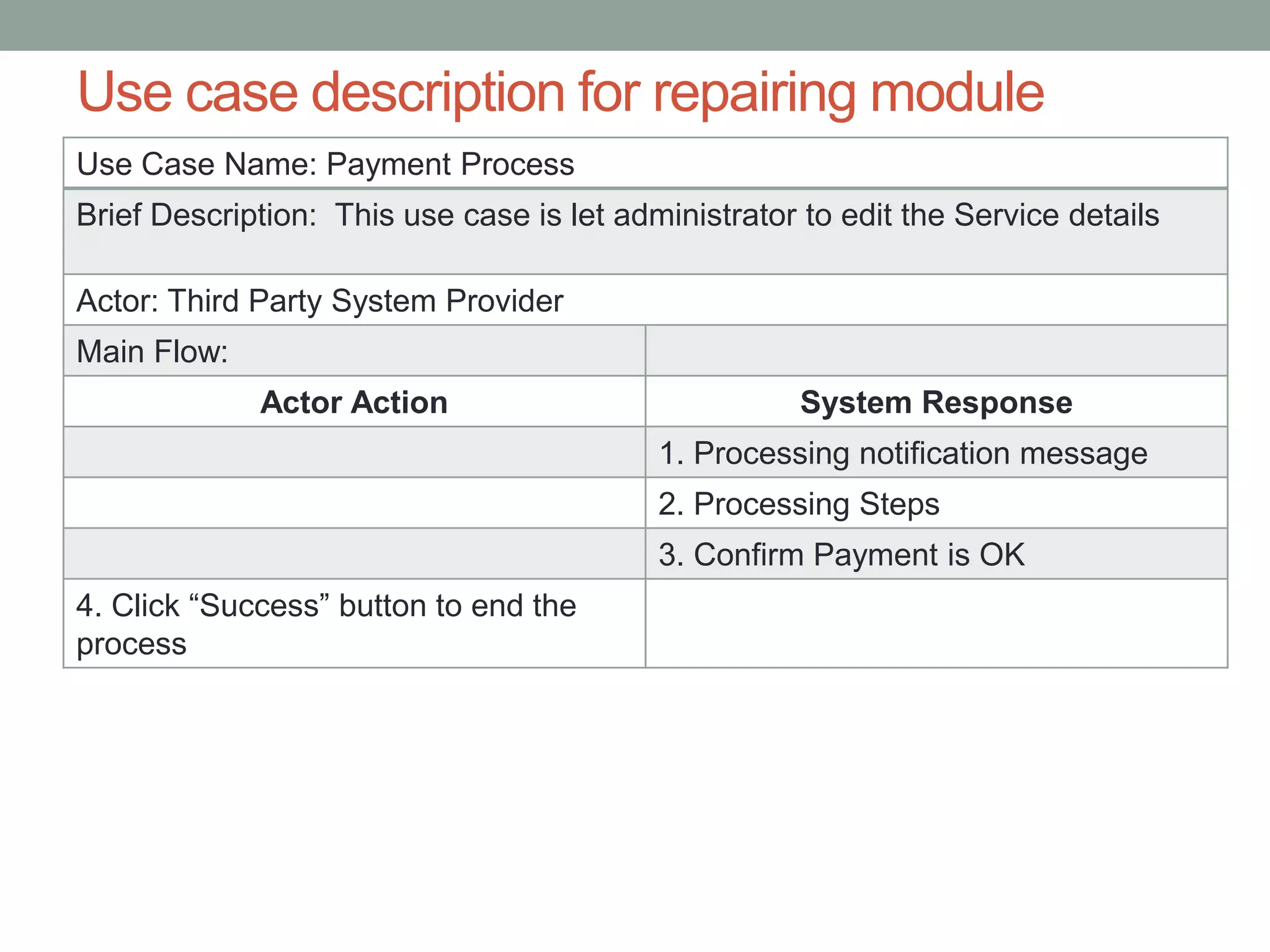
Use Case Name: Payment Process
Brief Description: This use case is let administrator to edit the Service details
Actor: Third Party System Provider
Main Flow:
Actor Action System Response
1. Processing notification message
2. Processing Steps
3. Confirm Payment is OK
4. Click “Success” button to end the
process
Use case description for repairing module
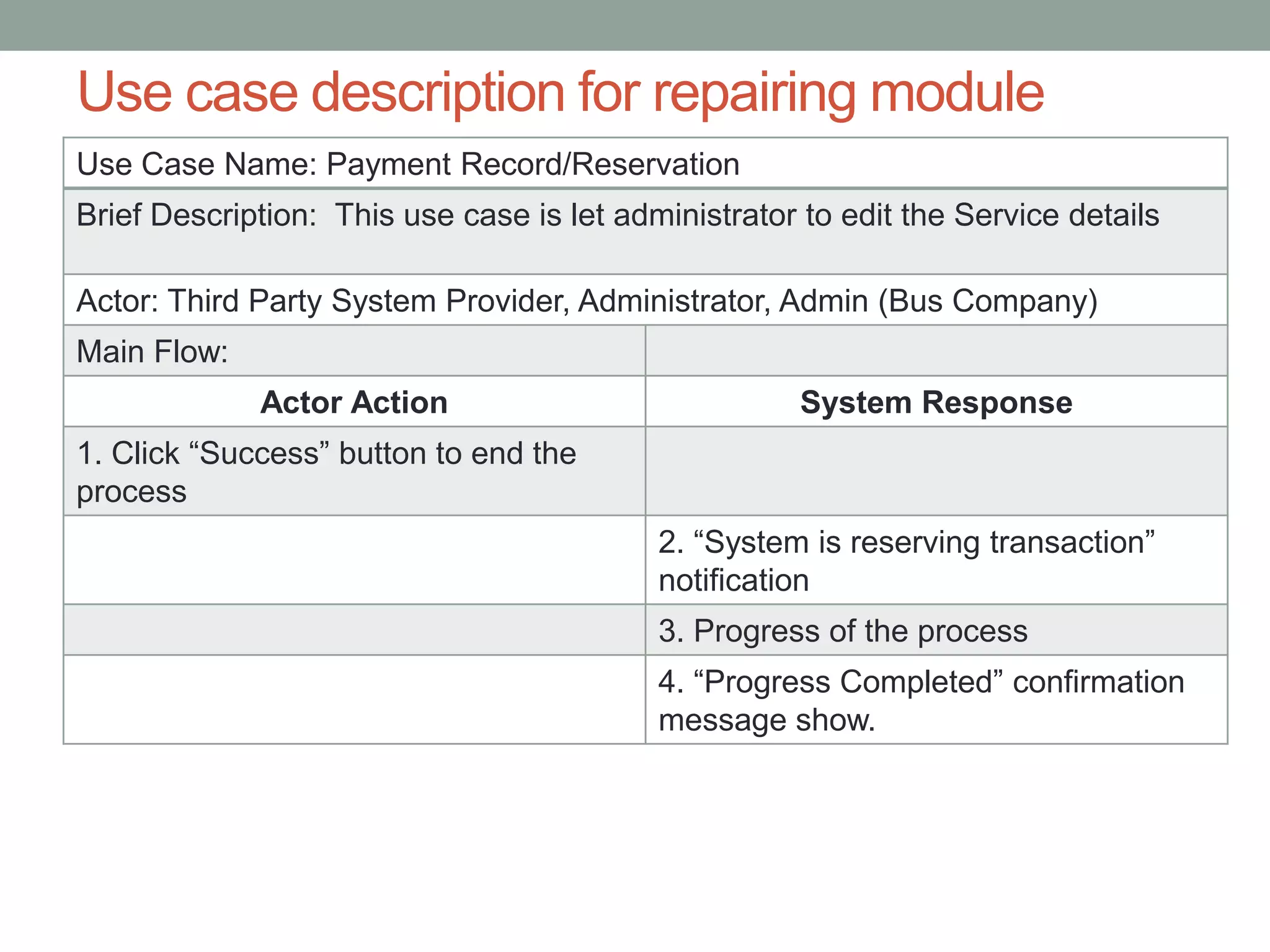
Use Case Name: Payment Record/Reservation
Brief Description: This use case is let administrator to edit the Service details
Actor: Third Party System Provider, Administrator, Admin (Bus Company)
Main Flow:
Actor Action System Response
1. Click “Success” button to end the
process
2. “System is reserving transaction”
notification
3. Progress of the process
4. “Progress Completed” confirmation
message show.
Use case description for repairing module
Thank You!

System Design of Online Ticketing System

  • 1.
    SYSTEM DESIGN USE CASEDESIGN AND ANALYSIS Ticketing Automation Bangladesh Team- Wild Spider
  • 2.
    This Presentation willcover I. All Actors of the System II. Subsystems of the system III. Use case with all actors with all subsystem IV. Separate use case diagram of all subsystems with all actors V. Separate table of all use case of all sub systems with actors VI. Define the action of actors and system response for all use case.
  • 3.
    Actors of theSystem Primary business actor Primary system actor External server actor External receiver actor
  • 4.
    Sub Systems ofthe system Sub Systems Maintenance Module Reservation Module Buy Module Payment Module Stuff Maintenance Member Maintenance Bus Maintenance Ticket Reservation Ticket confirmation Ticket Buy Make Payment Payment Process Payment Record Bus Schedule Module Add, Edit, View, Delet e Schedule
  • 5.
    Use cases forMaintenance Module Use Case Name Actor Stuff Maintenance - Add New Stuff - Delete Stuff - Edit Stuff - View Stuff System Administrator System Admin System Admin System Admin System Admin Member Maintenance - New Member - Edit Member Details - View Member Details - Delete Member System Admin, Members System Admin, Members System Admin, Members System Admin, Members System Admin Bus Maintenance - Add New Bus - Edit Bus Details - View Bus Details - Delete Bus Details System Admin, Bus Company Admin System Admin, Bus Company Admin System Admin, Bus Company Admin System Admin, Bus Company Admin, Members System Admin, Bus Company Admin
  • 6.
    Use cases forMaintenance Module Use Case Name Actor Schedule Maintenance - Add New Schedule - Delete Schedule - Edit Schedule - View Schedule System Admin, Bus Company Admin System Admin, Bus Company Admin System Admin, Bus Company Admin System Admin, Bus Company Admin System Admin, Bus Company Admin, Members
  • 7.
    Use cases forReservation Module Use Case Actors Add Reservation Member, System Admin Cancel Reservation Member, System Admin Add Reservation Payment Member, System Admin Use Case Actors Add Buy Order Member, System Admin Confirm Buy Member, System Admin Make Payment Member, System Admin Use cases for Buy Module
  • 8.
    Use cases forPayment Module Use Case Actors Add New Payment Member, System Admin Payment Processing Third party gateway Invoice Creation Gateway, System Admin Invoice Copy Delivery Member, System admin, Bus admin Payment Reservation/Record System Admin, Bus Admin, Gateway provider
  • 9.
    i. Use CaseDiagram for TAB Ticketing Automation Bangladesh Maintenance Module Reservation Module Buy Module Payment Module Bus Schedule Module
  • 10.
    Use Case Diagramfor Maintenance Module Maintain Stuff Details Add New Stuff Delete Stuff Edit Stuff Details View Stuff Details Staff Maintenance
  • 11.
    Use case ofa subsystem with actors in a table Use Case Name: Add new Staff Brief Description: This use case allow the administrator to add new stuff to the company Actor: Administrator Main Flow: Actor Action System Response 1. Display Maintenance Menu 2. Click “Update Staff Information” Button 3. Display Stuff Maintenance Form 4. Click “Add” Button 5. Key in Staff IC 6. Click “Check” Button 7. Verify Staff IC 8. Enter Staff Login Details 9. Click “Check” Button
  • 12.
    10. Verify StaffLogin Details 11. Enter Staff Details 12. Click “Save” Button 13. Verify Staff Details 14. Save Record into Database 15. Show Message Box “Record Added” 16. Click “Ok” Button Alternative Flows: A-7 Step 5: If the staff IC exist in the database - System prompt “Invalid Applicant” A-10 Step 8: If the staff login details not correct - System prompt “Please key in the correct data” A-10 Step 8: If the staff details does not fill in and the wrong data - System prompt “Please enter correct data in the fields”
  • 13.
    Use case ofa subsystem with actors in a table Use Case Name: Edit Staff Details Brief Description: This use case is allow the administrator to edit the staff details Actor: Administrator Main Flow: Actor Action System Response 1. Display Maintenance Menu 2. Click “Update Staff Information” Button 3. Display Stuff Maintenance Form 4. Select Staff ID 5. Click “Search” Button 6. Display Staff Details 7. Click “Edit” Button 8. Change Staff Details 9. Click “Save” Button
  • 14.
    10. Verify StaffDetails 11. Save record into database 12. Show Message Box “Record Updated” 13. Click “Ok” Button Alternative Flows: A-10 Step 8: If have empty field and the data not correct - System prompt “The field cannot leave it blank and key in the correct data”
  • 15.
    Use case ofa subsystem with actors in a table Use Case Name: Delete Staff Brief Description: This use case is allow the administrator to delete those staff already resign Actor: Administrator Main Flow: Actor Action System Response 1. Display Maintenance Menu 2. Click “Update Staff Information” Button 3. Display Stuff Maintenance Form 4. Select Staff ID 5. Click “Search” Button 6. Display Staff Details 7. Click “Delete” Button 8. Show Message Box “Confirm Delete Staff” 9. Click “Ok” Button
  • 16.
    10. Delete recordfrom database 11. Show Message Box “Record Deleted” 13. Click “Ok” Button Alternative Flows: A-9 Step 10: If user click cancel button - Record remain in database
  • 17.
    Use case ofa subsystem with actors in a table Use Case Name: View Staff Details Brief Description: This use case is let the administrator to view the staff details Actor: Administrator Main Flow: Actor Action System Response 1. Display Maintenance Menu 2. Click “Update Staff Information” Button 3. Display Stuff Maintenance Form 4. Select Staff ID 5. Click “Search” Button 6. Display Staff Details
  • 18.
    Use Case Diagramfor Maintenance Module Maintain Member Details New Member Edit Member Details Delete Member View Member Details Member Maintenance
  • 19.
    Use case ofa subsystem with actors in a table Use Case Name: Add New Member Brief Description: This use case allow the administrator to add new members for the company Actor: Administrator, Member Main Flow: Actor Action System Response 1. Display Maintenance Menu 2. Click “Update Member Information” Button 3. Display Member Maintenance Form 4. Click “Add” Button 5. Key in Member IC 6. Click “Check” Button 7. Verify Member IC 8. Enter Member Login Details 9. Click “Check” Button
  • 20.
    10. Verify MemberLogin Details 11. Enter Member Details 12. Click “Save” Button 13. Verify Member Details 14. Save Record into Database 15. Show Message Box “Record Added” 16. Click “Ok” Button Alternative Flows: A-7 Step 5: If the Member IC exist in the database - System prompt “Invalid Applicant” A-10 Step 8: If the Member login details not correct - System prompt “Please key in the correct data” A-10 Step 8: If the member details does not fill in and the wrong data - System prompt “Please enter correct data in the fields”
  • 21.
    Use case ofa subsystem with actors in a table Use Case Name: Edit Member Details Brief Description: This use case is allow the administrator to edit the Member details Actor: Administrator, Member Main Flow: Actor Action System Response 1. Display Maintenance Menu 2. Click “Update Member Information” Button 3. Display Member Maintenance Form 4. Select Member ID 5. Click “Search” Button 6. Display Member Details 7. Click “Edit” Button 8. Change Member Details 9. Click “Save” Button
  • 22.
    10. Verify MemberDetails 11. Save record into database 12. Show Message Box “Record Updated” 13. Click “Ok” Button Alternative Flows: A-10 Step 8: If the data incorrect and blank data - System prompt “Please key in the correct data and data cannot leave it blank”
  • 23.
    Use case ofa subsystem with actors in a table Use Case Name: Delete Member Brief Description: This use case is allow the administrator to delete member Actor: Administrator Main Flow: Actor Action System Response 1. Display Maintenance Menu 2. Click “Update Member Information” Button 3. Display Member Maintenance Form 4. Select Member ID 5. Click “Search” Button 6. Display Member Details 7. Click “Delete” Button 8. Show Message Box “Confirm Delete Member” 9. Click “Ok” Button
  • 24.
    10. Delete recordfrom database 11. Show Message Box “Record Deleted” 12. Click “Ok” Button Alternative Flows: A-9 Step 10: If user click cancel button - Record remain in database
  • 25.
    Use case ofa subsystem with actors in a table Use Case Name: View Member Details Brief Description: This use case is let the administrator to view the member details Actor: Administrator, Member Main Flow: Actor Action System Response 1. Display Maintenance Menu 2. Click “Update Member Information” Button 3. Display Member Maintenance Form 4. Select Member ID 5. Click “Search” Button 6. Display Member Details
  • 26.
    Use Case Diagramfor Maintenance Module Maintain Bus Details Add New Bus Edit Bus Details Delete Bus View Bus Details Bus Maintenance
  • 27.
    Use case ofa subsystem with actors in a table Use Case Name: Add New Bus Brief Description: This use case allow the administrator to add new bus for the company Actor: Administrator & Administrator (Bus Company) Main Flow: Actor Action System Response 1. Display Maintenance Menu 2. Click “Update Bus Information” Button 3. Display Bus Maintenance Form 4. Click “Add” Button 5. Key in Bus Number 6. Click “Check” Button 7. Verify Bus Number 8. Enter Bus Details 9. Click “Save” Button
  • 28.
    10. Verify BusDetails 11. Save Record into Database 12. Show Message Box “Record Added” 16. Click “Ok” Button Alternative Flows: A-7 Step 5: If the Bus number exist in the database - System prompt “Invalid Bus Number” A-10 Step 8: If bus details not correct and have blank data - System prompt “Please key in the correct data and fill in the blank data”
  • 29.
    Use case ofa subsystem with actors in a table Use Case Name: Edit Bus Details Brief Description: This use case is allow the administrator to edit bus details Actor: Administrator & Administrator (Bus Company) Main Flow: Actor Action System Response 1. Display Maintenance Menu 2. Click “Update Bus Information” Button 3. Display Bus Maintenance Form 4. Select Bus ID 5. Click “Search” Button 6. Display Bus Details 7. Click “Edit” Button 8. Change Bus Details 9. Click “Save” Button
  • 30.
    10. Verify BusDetails 11. Save record into database 12. Show Message Box “Record Updated” 13. Click “Ok” Button Alternative Flows: A-10 Step 8: If bus detail incorrect and have blank data - System prompt “Please key in the correct data and fill in the blank data”
  • 31.
    Use case ofa subsystem with actors in a table Use Case Name: Delete Bus Brief Description: This use case is allow the administrator to delete bus for company Actor: Administrator & Administrator (Bus Company) Main Flow: Actor Action System Response 1. Display Maintenance Menu 2. Click “Update Member Information” Button 3. Display Bus Maintenance Form 4. Select Bus ID 5. Click “Search” Button 6. Display Bus Details 7. Click “Delete” Button 8. Show Message Box “Confirm Delete Member” 9. Click “Ok” Button
  • 32.
    10. Delete recordfrom database 11. Show Message Box “Record Deleted” 12. Click “Ok” Button Alternative Flows: A-9 Step 10: If user click cancel button - Record remain in database
  • 33.
    Use case ofa subsystem with actors in a table Use Case Name: View Bus Details Brief Description: This use case allow the administrator to view the bus details Actor: Administrator & Administrator (Bus Company), members Main Flow: Actor Action System Response 1. Display Maintenance Menu 2. Click “Update Bus Information” Button 3. Display Bus Maintenance Form 4. Select Bus ID 5. Click “Search” Button 6. Display Bus Details
  • 34.
    Use Case Diagramfor Bus Scheduling Module Maintain Bus Schedule View Schedule Details Delete Schedule Edit Schedule Details Add New Schedule
  • 35.
    Use case descriptionfor bus schedule module Use Case Name: View Schedule Details Brief Description: This use case allow the administrator to view the bus schedule Actor: Administrator & Administrator (Bus Company), Members Main Flow: Actor Action System Response 1. Display Scheduling Menu 2. Click “ View Schedule Details” Button 3. Display Bus Maintenance Form 4. Select Driver Name 5. Click “Search” Button 6. Display Schedule Details
  • 36.
    Use case descriptionfor bus schedule module Use Case Name: Add New Schedule Brief Description: This use case is let administrator to add the new schedule for member and staff Actor: Administrator & Administrator (Bus Company) Main Flow: Actor Action System Response 1. Display Scheduling Menu 2. Click “ Assign Schedule” Button 3. Display Scheduling Form 4. Click “Add” Button 5. Key in New Destination 6. Click “Check” Button 7. Verify New Destination 8. Enter Destination Details
  • 37.
    Use case descriptionfor bus schedule module 9. Enter Schedule Details 10. Click “Save” Button 11. Verify Schedule and Destination Details 12. Save record into database 13. Show Message Box “Record Added” 14. Click “Ok” Button Alternative Flows: A-7 Step 5: If the destination exist in the database - System prompt “Invalid Destination” A-11 Step 8: If destination details and schedule details incorrect - System prompt “Please key in the correct data” A-11 Step 9: If the schedule details exist in the database - System prompt “This Schedule already exist in the database”
  • 38.
    Use case descriptionfor bus schedule module Use Case Name: Edit Schedule Details Brief Description: This use case is let administrator to edit the Schedule details Actor: Administrator & Administrator (Bus Company) Main Flow: Actor Action System Response 1. Display Scheduling Menu 2. Click “Assign Schedule” Button 3. Display Scheduling Form 4. Select Package ID 5. Click “Search” Button 6. Display Schedule Details 7. Click “Edit” Button 8. Change Schedule Details 9. Click “Save” Button
  • 39.
    10. Verify ScheduleDetails 11. Save record into database 12. Show Message Box “Record Updated” 13. Click “Ok” Button Alternative Flows: A-10 Step 8: If the data incorrect and blank data - System prompt “Please key in the correct data and data cannot leave it blank” Use case description for bus schedule module
  • 40.
    Use Case Name:Delete Schedule Brief Description: This use case is let administrator to delete the schedule Actor: Administrator & Administrator (Bus Company) Main Flow: Actor Action System Response 1. Display Scheduling Menu 2. Click “Assign Schedule” Button 3. Display Scheduling Form 4. Select Package ID 5. Click “Search” Button 6. Display Schedule Details 7. Click “Delete” Button 8. Show Message Box “Confirm Delete Schedule” 9. Click “Ok” Button Use case description for bus schedule module
  • 41.
    10. Delete recordfrom database 11. Show Message Box “Record Deleted” 12. Click “Ok” Button Alternative Flows: A-9 Step 10: If user click cancel button - Record remain in database Use case description for bus schedule module
  • 42.
    Use Case Diagramfor Reservation Module Reservation Module Add Reservation Add Reservation Payment Cancel Reservation
  • 43.
    Use case descriptionfor reservation module Use Case Name: Add Reservation Brief Description: This use case allow the member to add reservation Actor: Member, Admin Main Flow: Actor Action System Response 1. Display Reservation Form 2. Select Member ID 3. Select Departure Destination 4. Display Arrival Destination 5. Select Arrival Destination 6. Select Date 7. Click “Search” Button 8. Verify Schedule Details
  • 44.
    Use case descriptionfor reservation module 9. Display Schedule Details 10. Select a time 11. Click “Next” Button 12.Select Seat 13. Click “Add as reserved” Button 14. Show Message “Seat Added as Reserved”
  • 45.
    Use Case Diagramfor Buy Module Buy Module Select Seat Available Add Payment
  • 46.
    Use case descriptionfor buy module Use Case Name: Buy Ticket Brief Description: This use case allow the member to buy ticket Actor: Member Main Flow: Actor Action System Response 1. Display Buy Ticket Form 2. Select Member ID 3. Select Departure Destination 4. Display Arrival Destination 5. Select Arrival Destination 6. Select Date 7. Click “Search” Button 8. Verify Schedule Details
  • 47.
    Use case descriptionfor buy module 9. Display Schedule Details 10. Select a time 11. Click “Next” Button 12. Display Seat 13. Select Seat Number 14. Click “Next” Button 15. Calculate Total Amount 16. Display Payment Form 17. Key in Payment Details 18. Click “Paid” Button 19. Verify Payment Details 20. Save record into database 21. Show Message “Record Added”
  • 48.
    22. Display ReservationConfirmation Alternative Flows: A-8 Step 3: If the destination do not have schedule - System prompt “This Destination do not have any schedule” A-19 Step 17: If the payment details incorrect and have blank value - System prompt “Please key in the correct data and fill in the blank value”
  • 49.
    Use Case Diagramfor Payment Module Maintain Payment Module Add New Payment Payment Reservation/ Record Payment Processing Single Invoice Creation
  • 50.
    Use Case Name:Add New Payment Brief Description: This use case is let administrator to add the new service for the bus Actor: Members Main Flow: Actor Action System Response 1. Display Payment Menu Options 2. Select Payment Method Option 3. Display Needed Details Form 4. Fill Up the Form Info and give Data 5. Click “Pay Now” Button 6. Display Confirmation ox 7. Click “Confirm” Button 8. Verify Payment Details Use case description for repairing module
  • 51.
    Use case descriptionfor bus schedule module 9. Process the payment by third party 10. Display Success Message
  • 52.
    Use Case Name:Payment Process Brief Description: This use case is let administrator to edit the Service details Actor: Third Party System Provider Main Flow: Actor Action System Response 1. Processing notification message 2. Processing Steps 3. Confirm Payment is OK 4. Click “Success” button to end the process Use case description for repairing module
  • 53.
    Use Case Name:Payment Record/Reservation Brief Description: This use case is let administrator to edit the Service details Actor: Third Party System Provider, Administrator, Admin (Bus Company) Main Flow: Actor Action System Response 1. Click “Success” button to end the process 2. “System is reserving transaction” notification 3. Progress of the process 4. “Progress Completed” confirmation message show. Use case description for repairing module
  • 54.