System Design 
System Analysis And Design 
By:12BS(CS)02 
17th October 2014 
Computer Science Department , QUEST
Overview 
 System Design 
 Physical and Logical Design 
 Designing Database 
 Designing Form and Report 
 Designing Interface and Dialogue 
2 12bs(cs)02 System Analysis And Design 18 October 2014
Physical And Logical Design 
Physical Design is a graphical representation of a 
system showing the system’s internal and external 
entities, and the flows of data into and out of these 
entities. 
An internal entity is an entity (person, place, or thing) 
within the system that transforms data. Internal entities 
include, for example, accounting clerks (persons), 
departments (places), and computers (things). 
Whereas, an external entity is an entity (person, place, 
or thing) outside the system that transforms data. 
3 12bs(cs)02 System Analysis And Design 18 October 2014
Cont… 
The physical portion of systems design can generally 
be broken down into three sub-tasks 
User Interface Design is concerned with how users 
add information to the system and with how the 
system presents information back to them. 
Data Design is concerned with how the data is 
represented and stored within the system. 
Process Design is concerned with how data moves 
through the system, and with how and where it is 
validated, secured and/or transformed as it flows into, 
through and out of the system. 
4 12bs(cs)02 System Analysis And Design 18 October 2014
Cont… 
Logical Design is a graphical representation of a 
system showing the system’s processes and the flows 
of data into and out of the processes. We use logical 
design to document information systems because we 
can represent the logical nature of a system-what 
tasks the system is doing, without having to specify 
how, where or by whom the tasks are accomplished. 
To represent the logical design of a system we can use 
different diagrams like Entity- Relationship Diagram. 
5 12bs(cs)02 System Analysis And Design 18 October 2014
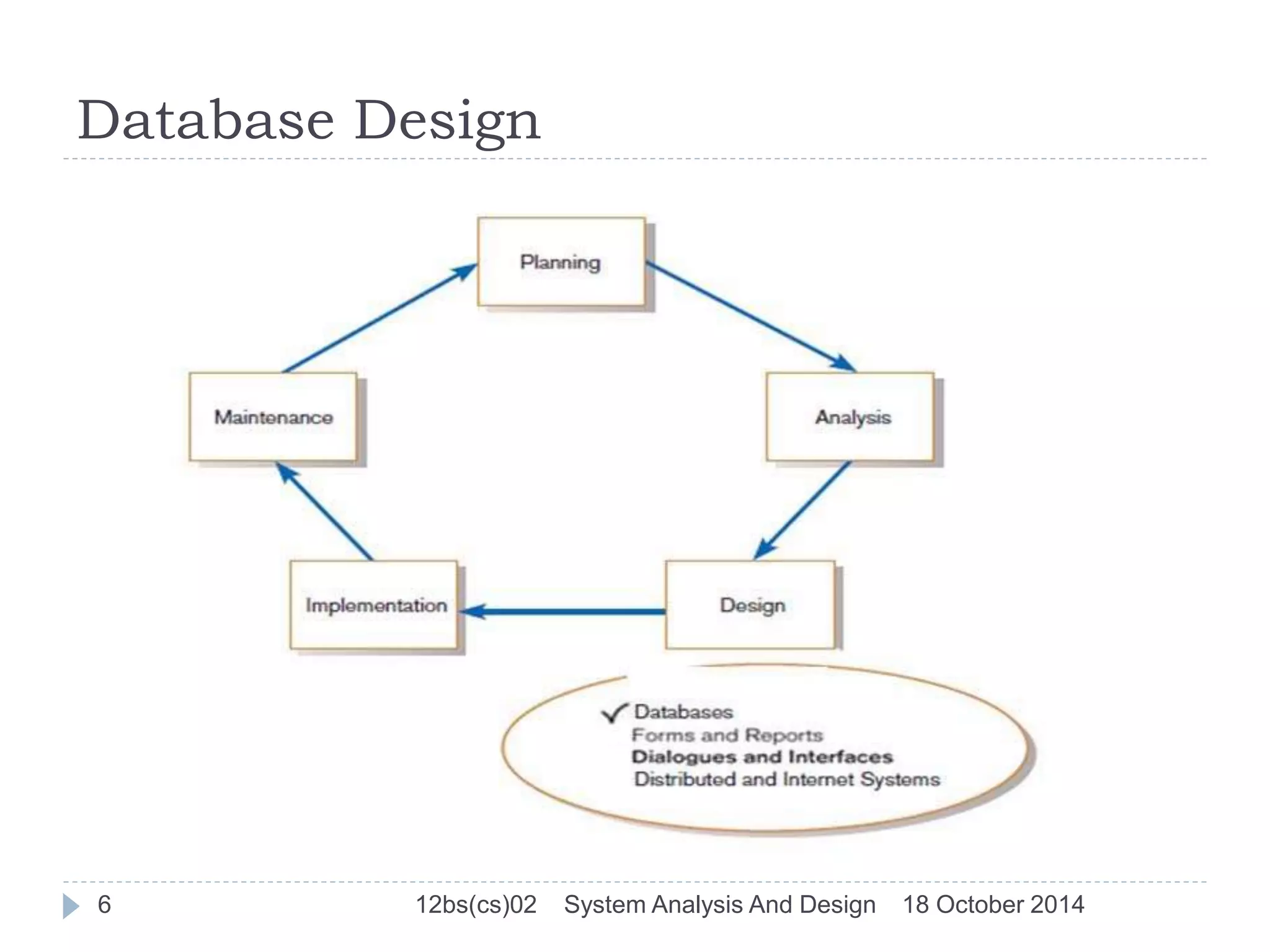
Database Design 
6 12bs(cs)02 System Analysis And Design 18 October 2014
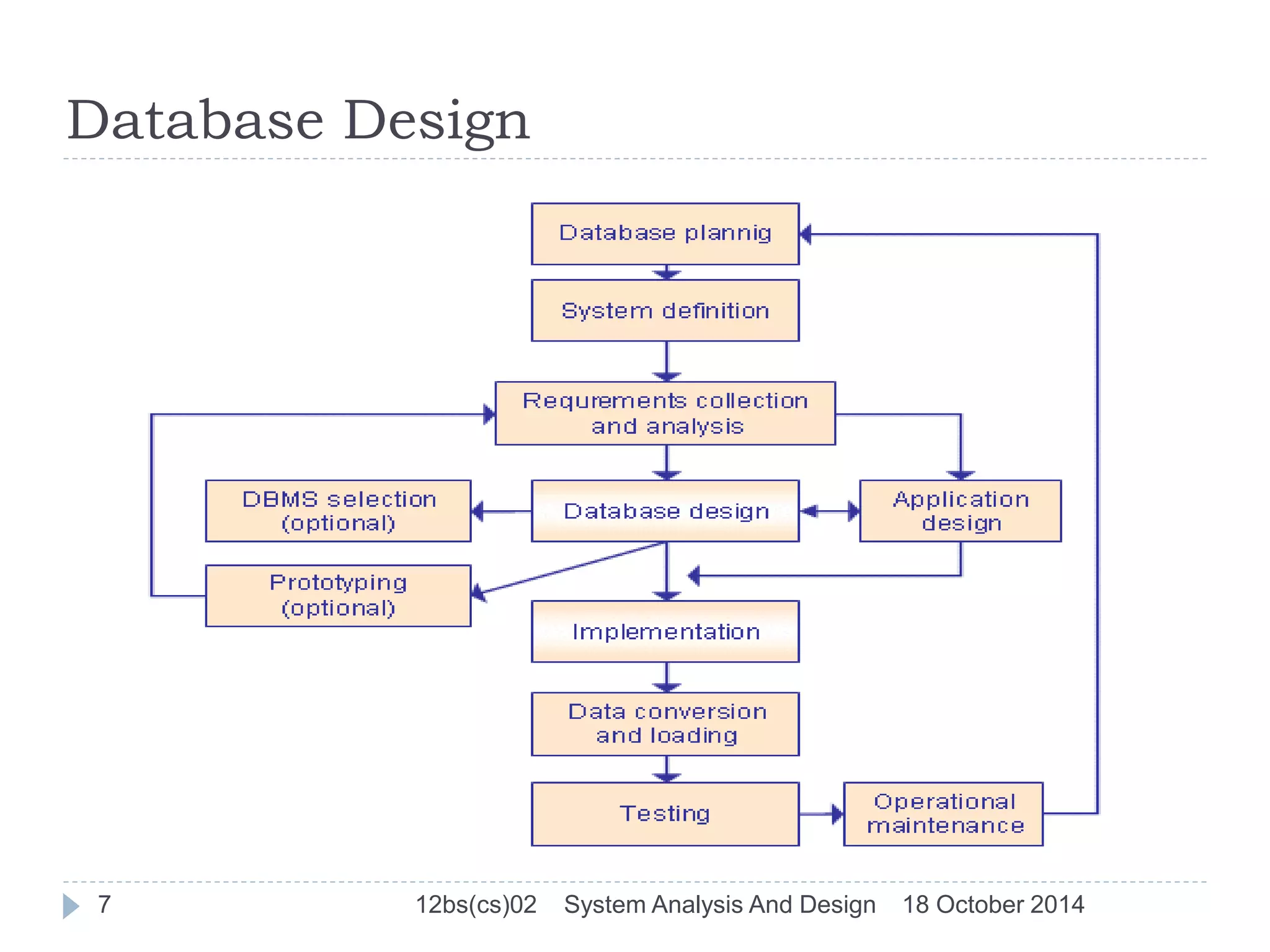
Database Design 
7 12bs(cs)02 System Analysis And Design 18 October 2014
Designing Database 
The database design phase is divided into three steps: 
1)conceptual database design 
2) logical database design 
3) physical database design 
Conceptual Database Design 
Once all the requirements have been collected and analyzed, 
the next step is to create a conceptual schema for the 
database, using a high level conceptual data model.The result 
of this phase is an Entity-Relationship (ER) diagram or UML 
class diagram. 
It describes how different entities (objects, items) are related 
to each other. It also describes what attributes (features) each 
entity has. It includes the definitions of all the concepts 
(entities, attributes) of the application area. 
8 12bs(cs)02 System Analysis And Design 18 October 2014
Database Design 
Logical Database Design 
The result of the logical design phase (or data model 
mapping phase) is a set of relation schemas. The ER 
diagram or class diagram is the basis for these relation 
schemas. 
There are rules how the ER model or class diagram is 
transferred to relation schemas. 
The relation schemas are the basis for table 
definitions. In this phase (if not done in previous 
phase) the primary keys and foreign keys are defined. 
9 12bs(cs)02 System Analysis And Design 18 October 2014
Database Design 
Normalization 
Normalization is the last part of the logical design. The goal 
of normalization is to eliminate redundancy and potential 
update anomalies. 
Redundancy means that the same data is saved more than 
once in a database. Update anomaly is a consequence of 
redundancy. If a piece of data is saved in more than one 
place, the same data must be updated in more than one 
place. 
Normalization is a technique by which one can modify the 
relation schema to reduce the redundancy. 
10 12bs(cs)02 System Analysis And Design 18 October 2014
Designing Database 
Physical Database Design 
The goal of the last phase of database design, 
physical design, is to implement the database. At this 
phase one must know which database management 
system (DBMS) is used. For example, different 
DBMS's have different names for data types and have 
different data types. 
The SQL clauses to create the database are written. 
The indexes, the integrity constraints (rules) and the 
users‘ access rights are defined. 
11 12bs(cs)02 System Analysis And Design 18 October 2014
Designing Database 
Application Design 
In the application design phase, the design of the user interface 
and the application programs that use and process the 
database are defined and designed. 
Prototyping 
The purpose of a prototype is to allow the users to use the 
prototype to identify the features of the system using the 
computer 
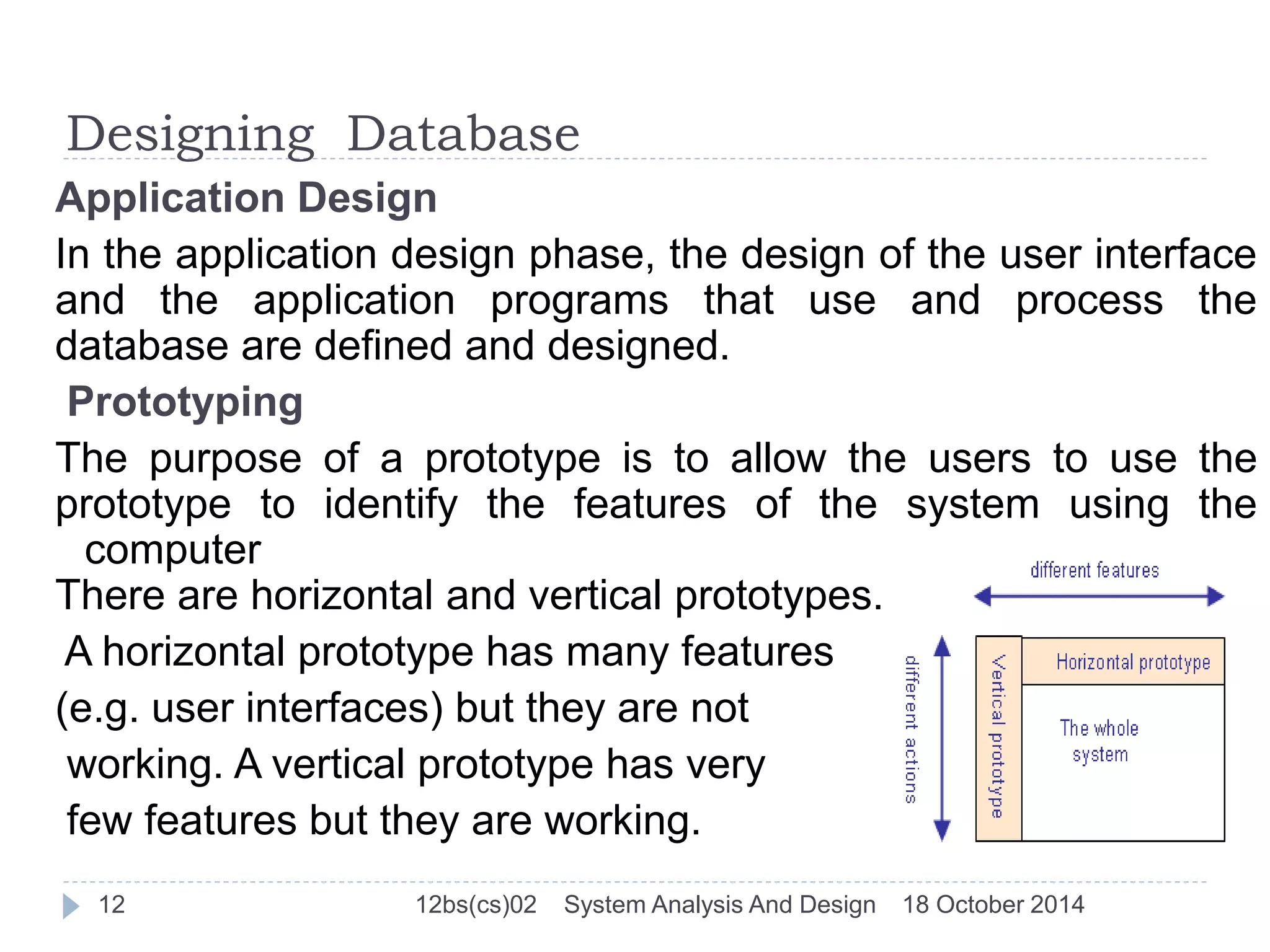
There are horizontal and vertical prototypes. 
A horizontal prototype has many features 
(e.g. user interfaces) but they are not 
working. A vertical prototype has very 
few features but they are working. 
12 12bs(cs)02 System Analysis And Design 18 October 2014
Designing Database 
Implementation 
During the implementation phase, the physical realization 
of the database and application designs are to be done. 
This is the programming phase of the systems 
development. 
Data Conversion and Loading 
This phase is needed when a new database is replacing an 
old system. During this phase the existing data will be 
transferred into the new database. 
Testing 
Before the new system is going to live, it should be 
thoroughly tested. The goal of testing is to find errors! The 
goal is not to prove the software is working well. 
13 12bs(cs)02 System Analysis And Design 18 October 2014
Designing Database 
Operational Maintenance 
The operational maintenance is the process of 
monitoring and maintaining the database system. 
Monitoring means that the performance of the system 
is observed. If the performance of the system falls 
below an acceptable level, tuning or reorganization of 
the database may be required. 
Maintaining and upgrading the database system 
means that, when new requirements arise, the new 
development lifecycle will be done. 
14 12bs(cs)02 System Analysis And Design 18 October 2014
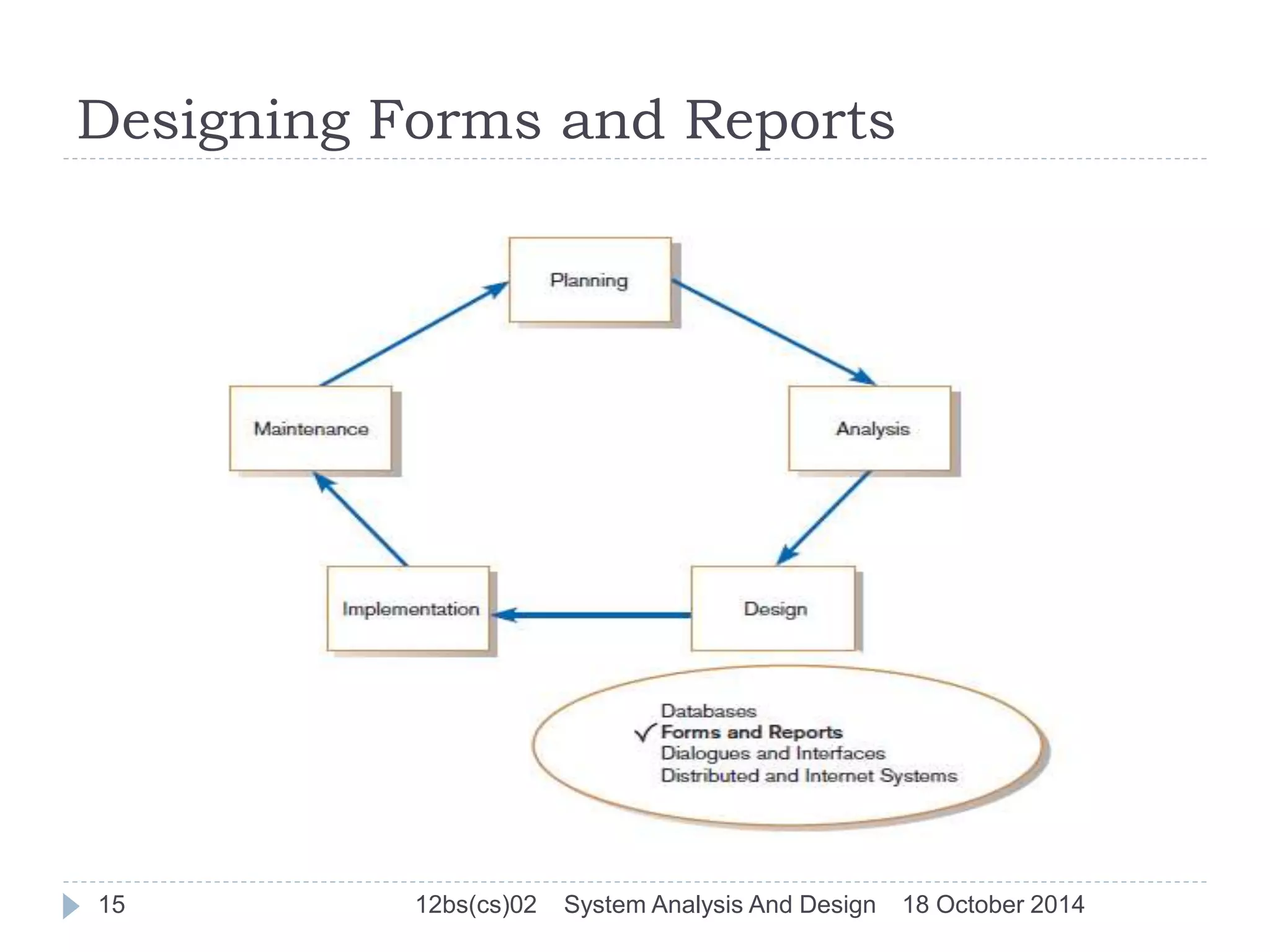
Designing Forms and Reports 
15 12bs(cs)02 System Analysis And Design 18 October 2014
Designing Forms and Reports(Cont… 
Form 
 A business document that contains some predefined 
data and may include some areas where additional 
data are to be filled in 
 An instance of a form is typically based on one 
database record 
Report 
 A business document that contains only predefined 
data. 
 A passive document for reading or viewing data. 
 Typically contains data from many database records or 
transactions. 
16 12bs(cs)02 System Analysis And Design 18 October 2014
Designing Forms and Reports(Cont… 
 Is user-focused activity that follows a prototyping 
approach 
 First steps are to gain an understanding of the 
intended user and task objectives by collecting initial 
requirements during requirements determination 
Requirement Determination 
 Who will use the form or report? 
 What is the purpose of the form or report? 
 When is the report needed or used? 
 Where does the form or report need to be delivered and 
used? 
 How many people need to use or view the form or report? 
17 12bs(cs)02 System Analysis And Design 18 October 2014
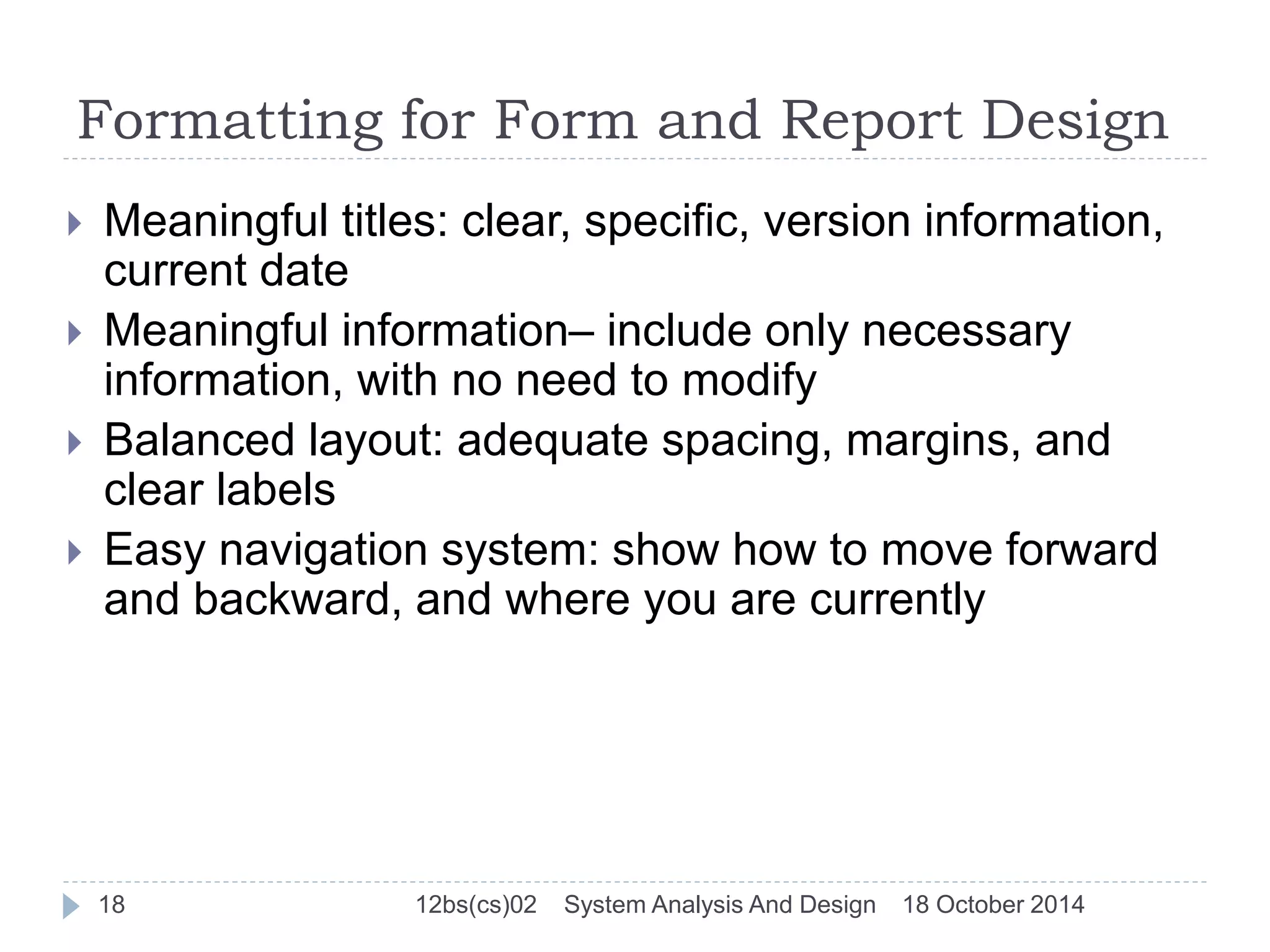
Formatting for Form and Report Design 
 Meaningful titles: clear, specific, version information, 
current date 
 Meaningful information– include only necessary 
information, with no need to modify 
 Balanced layout: adequate spacing, margins, and 
clear labels 
 Easy navigation system: show how to move forward 
and backward, and where you are currently 
18 12bs(cs)02 System Analysis And Design 18 October 2014
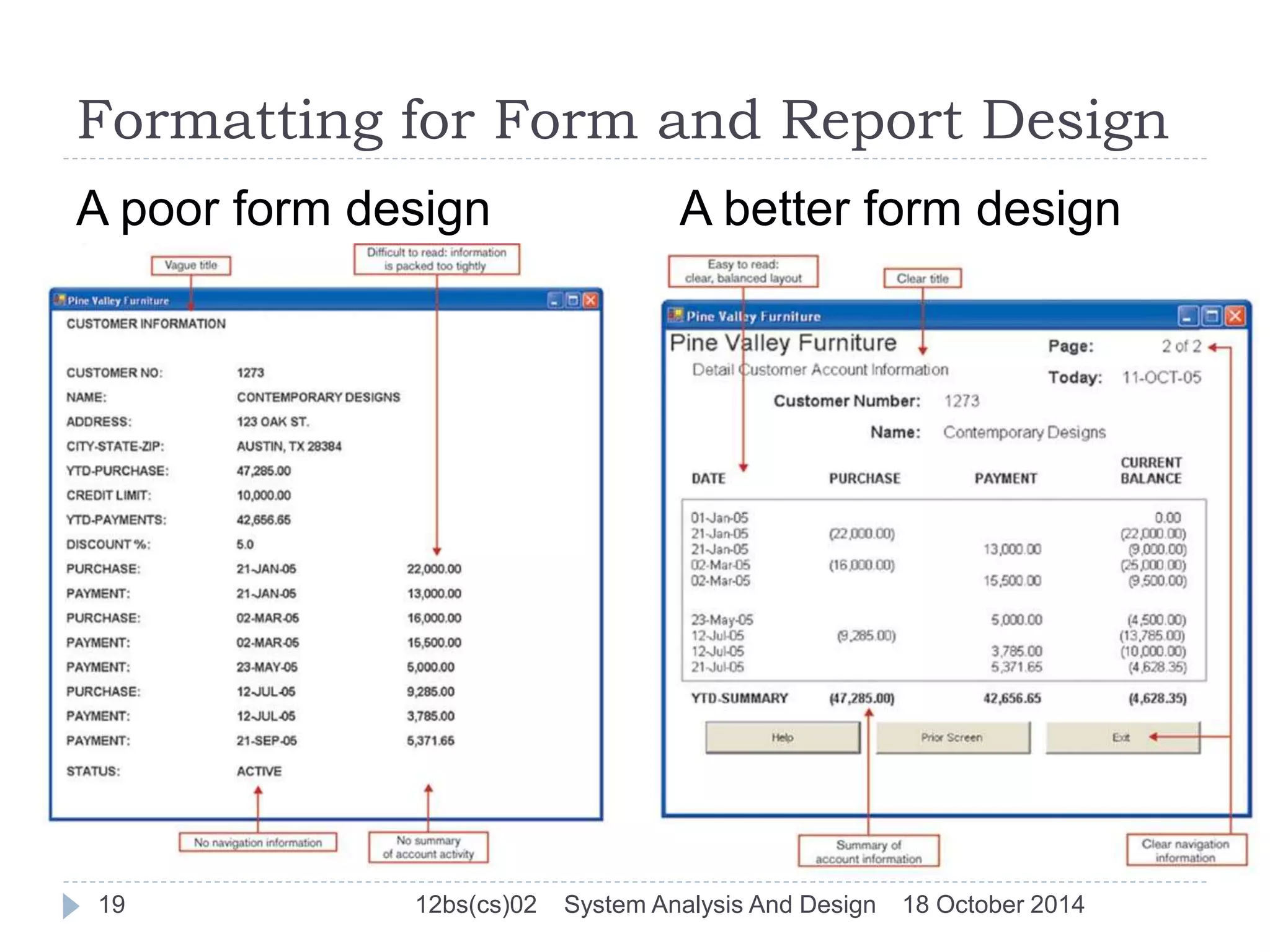
Formatting for Form and Report Design 
A poor form design A better form design 
19 12bs(cs)02 System Analysis And Design 18 October 2014
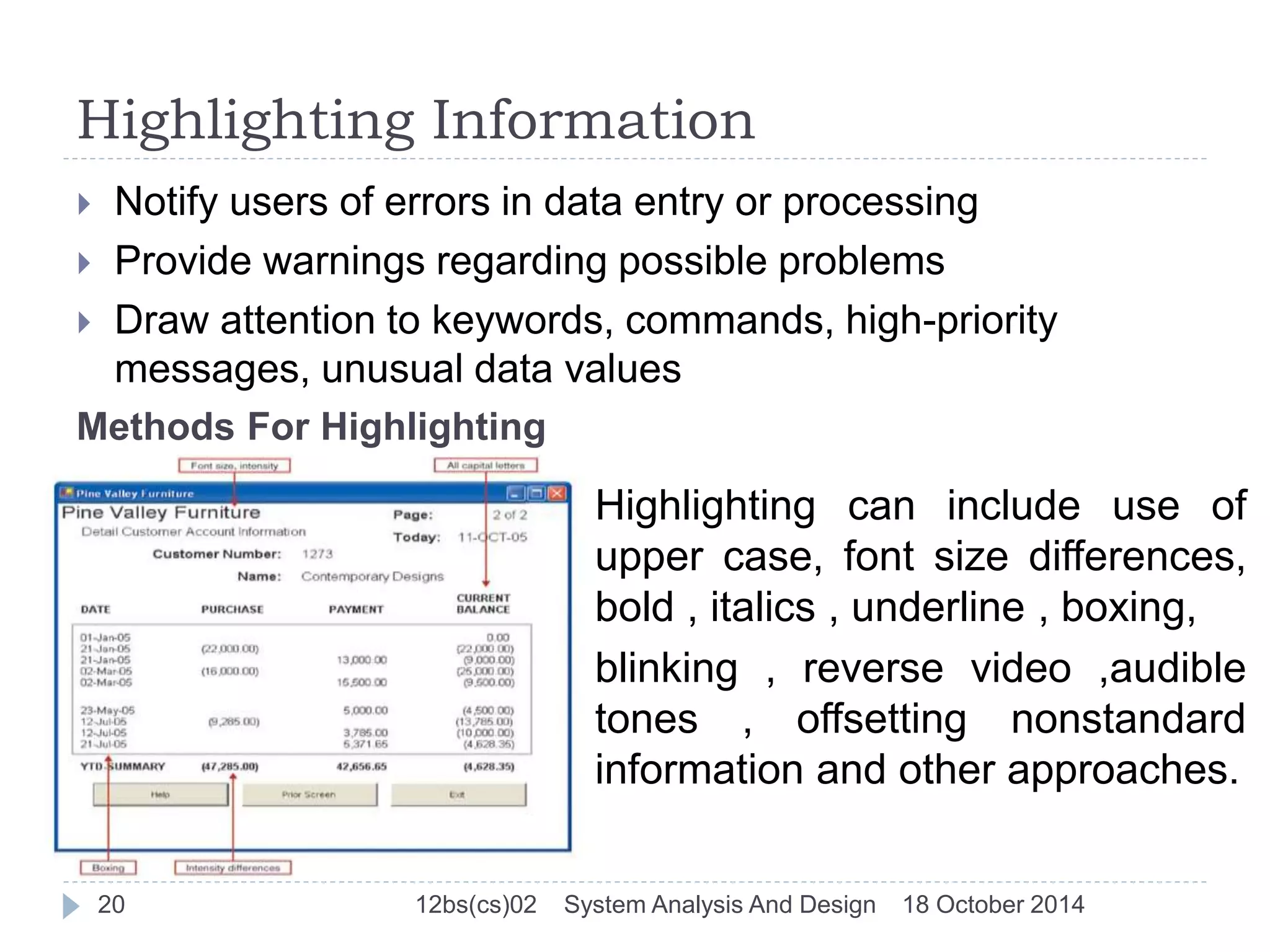
Highlighting Information 
 Notify users of errors in data entry or processing 
 Provide warnings regarding possible problems 
 Draw attention to keywords, commands, high-priority 
messages, unusual data values 
Methods For Highlighting 
Highlighting can include use of 
upper case, font size differences, 
bold , italics , underline , boxing, 
blinking , reverse video ,audible 
tones , offsetting nonstandard 
information and other approaches. 
20 12bs(cs)02 System Analysis And Design 18 October 2014
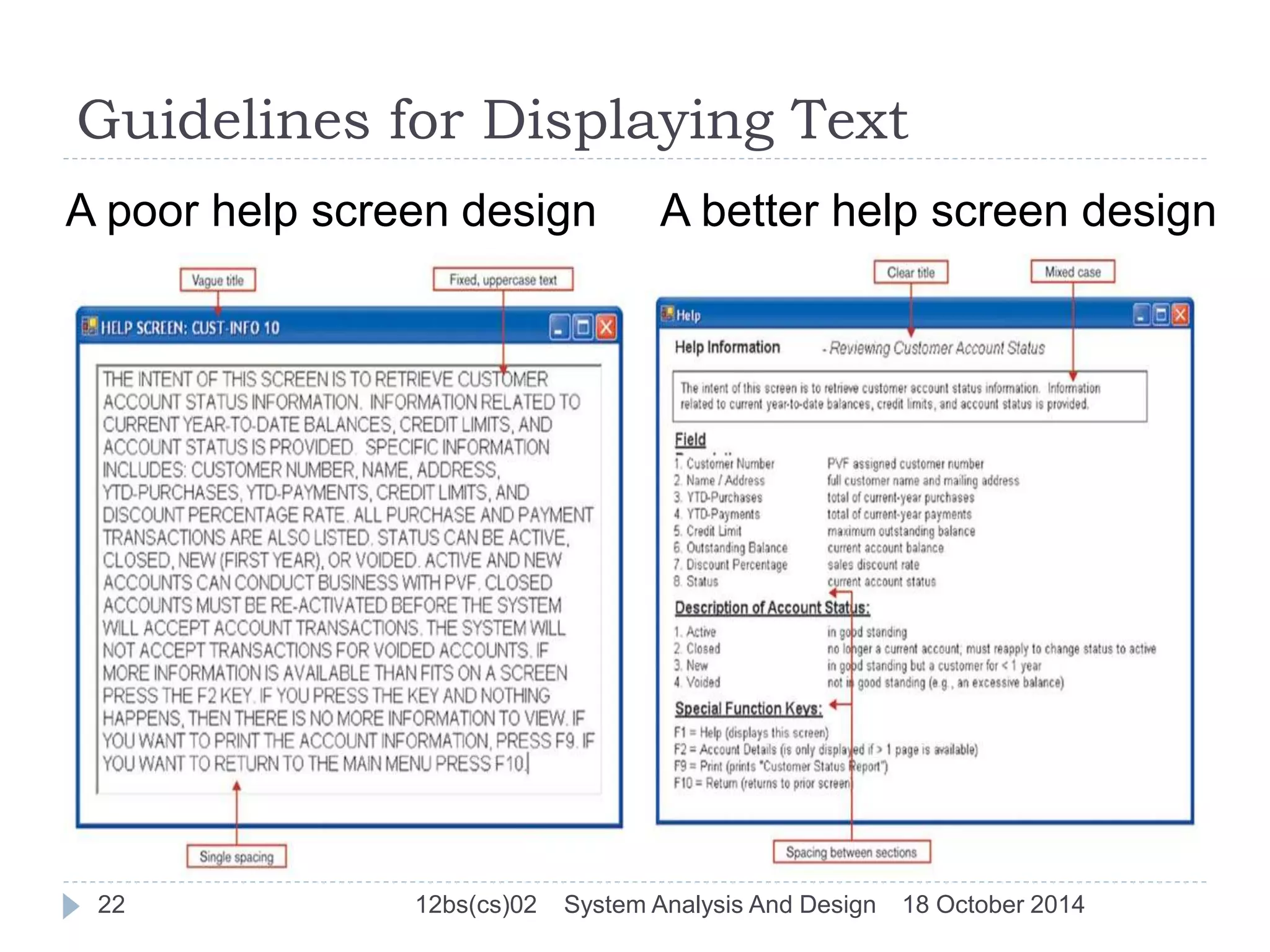
Guidelines for Displaying Text 
 Case: mixed upper and lower case, use conventional 
punctuation 
 Spacing: double spacing if possible, otherwise blank 
lines between paragraphs 
 Justification: left justify text, ragged right margins 
 Hyphenation: no hyphenated words between lines 
 Abbreviations: only when widely understood and 
significantly shorter than full text 
21 12bs(cs)02 System Analysis And Design 18 October 2014
Guidelines for Displaying Text 
A poor help screen design A better help screen design 
22 12bs(cs)02 System Analysis And Design 18 October 2014
Guidelines for Tables and Lists 
Labels 
 All columns and rows should have meaningful labels. 
 Labels should be separated from other information by 
using highlighting. 
 Redisplay labels when the data extend beyond a single 
screen or page. 
Formatting columns, rows and text 
 Sort in a meaningful order. 
 Place a blank line between every five rows in long columns. 
 Similar information displayed in multiple columns should be 
sorted vertically. 
 Columns should have at least two spaces between them. 
23 12bs(cs)02 System Analysis And Design 18 October 2014
Guidelines for Tables and Lists (cont.) 
 Allow white space on printed reports for user to write 
notes. 
 Use same family of typefaces within and across 
displays and reports. 
 Avoid overly fancy fonts. 
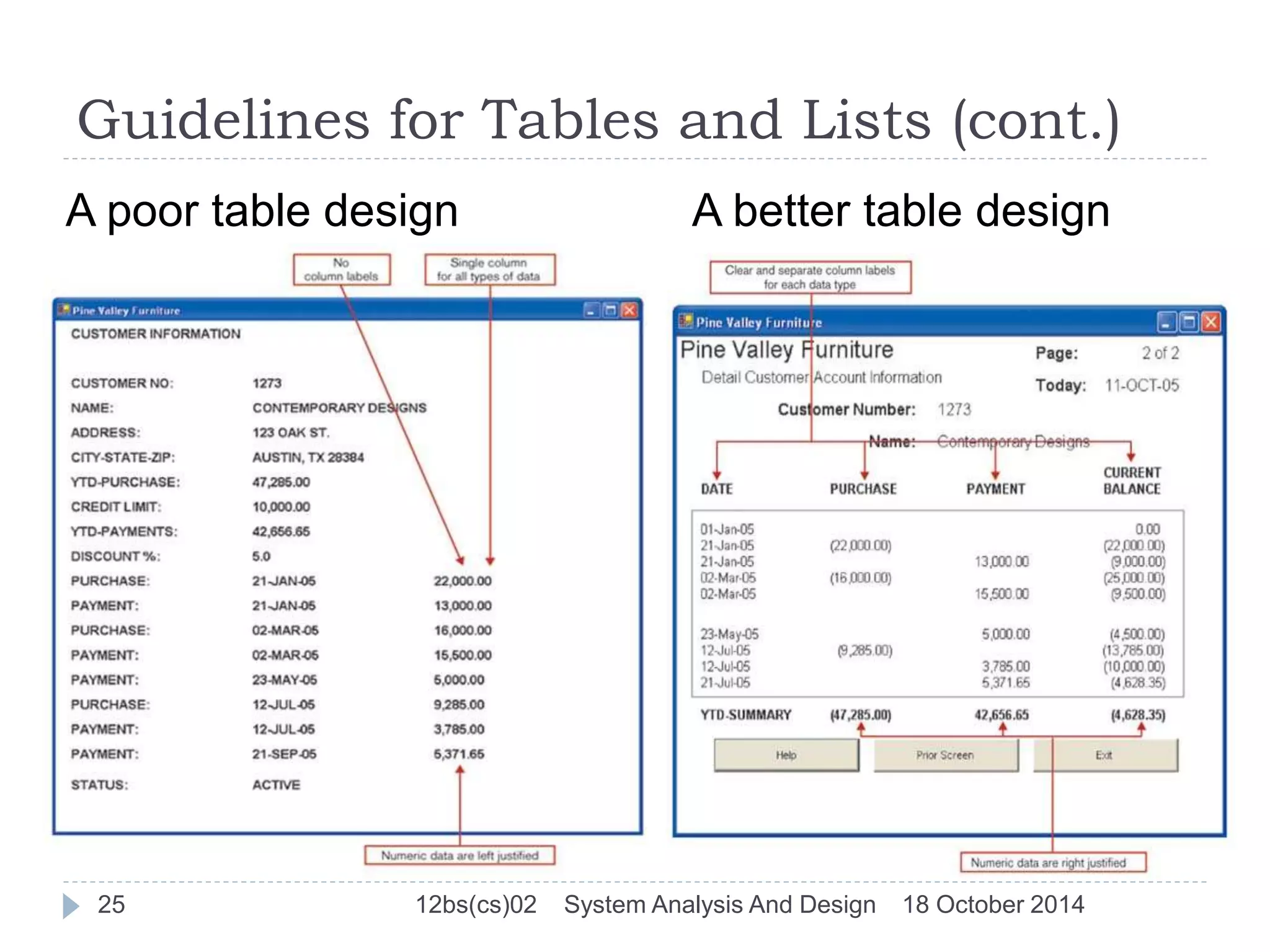
Formatting numeric, textual and alphanumeric data 
 Right justify numeric data and align columns by 
decimal points or other delimiter. 
 Left justify textual data. Use short line length, usually 
30 to 40 characters per line. 
 Break long sequences of alphanumeric data into small 
groups of three to four characters each. 
24 12bs(cs)02 System Analysis And Design 18 October 2014
Guidelines for Tables and Lists (cont.) 
A poor table design A better table design 
25 12bs(cs)02 System Analysis And Design 18 October 2014
Usability 
Overall evaluation of how a system performs in supporting 
a particular user for a particular task 
There are three characteristics 
 Speed 
 Accuracy 
 Satisfaction 
Guidelines for Maximizing Usability 
 Consistency: of terminology, formatting, titles, navigation, 
response time 
 Efficiency: minimize required user actions 
 Ease: self-explanatory outputs and labels 
 Format: appropriate display of data and symbols 
 Flexibility: maximize user options for data input according 
to preference 
26 12bs(cs)02 System Analysis And Design 18 October 2014
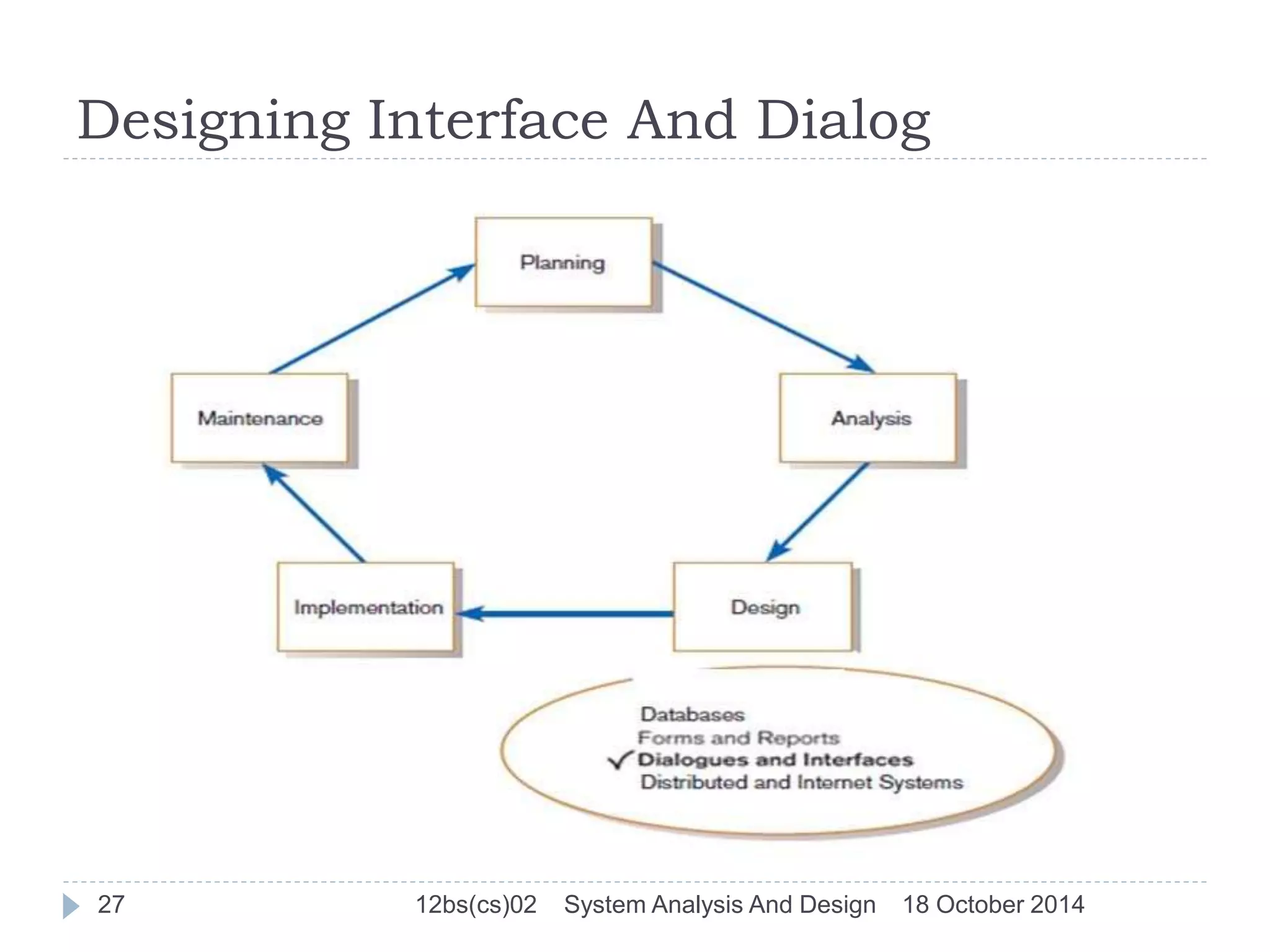
Designing Interface And Dialog 
27 12bs(cs)02 System Analysis And Design 18 October 2014
Designing Interface And Dialogue 
Interface design An interface is a method by which users 
interact with information systems. 
Dialogue design A dialogue reflects the sequence of 
interaction between a user and a system . 
 The design of interface and dialogues is the process of 
defining the manner in which human and computers 
exchange information. Similar to designing f&r, the process 
of designing I&d is user focused activity 
 To design usable i&d you must answer the same who, 
what, when, where and how 
28 12bs(cs)02 System Analysis And Design 18 October 2014
Methods of Interacting 
Command Language Interaction 
Users enter explicit statements into a system to invoke 
operations 
Example from MS DOS: 
COPY C:PAPER.DOC A:PAPER.DOC 
This copies a file from C: drive to A: drive 
Menu interaction 
List of system options is provided and a specific 
command is invoked by user selection of a menu 
option. 
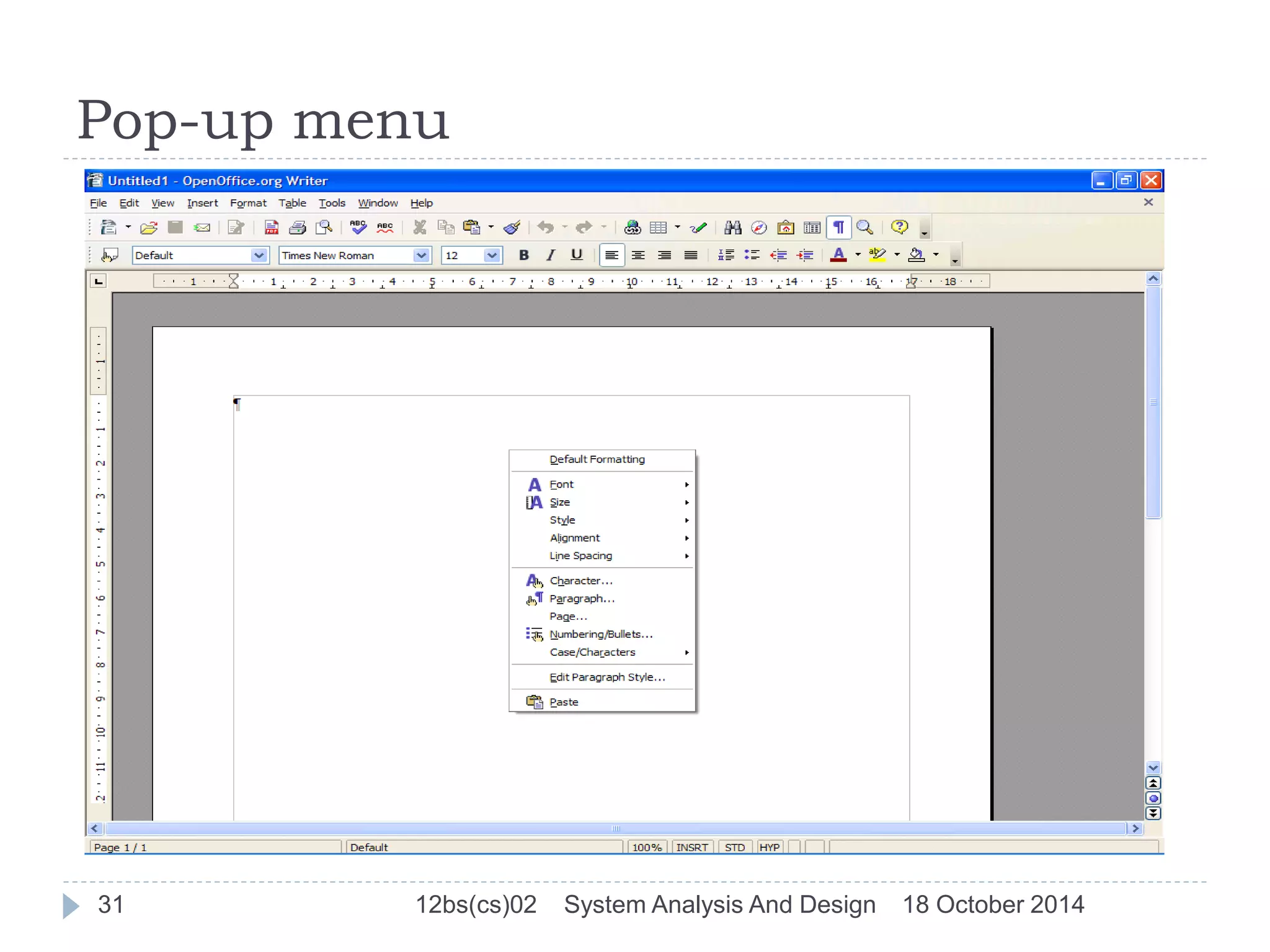
Pop-up menu: menu placed near the current cursor 
position. 
29 12bs(cs)02 System Analysis And Design 18 October 2014
Methods of Interacting(cont…) 
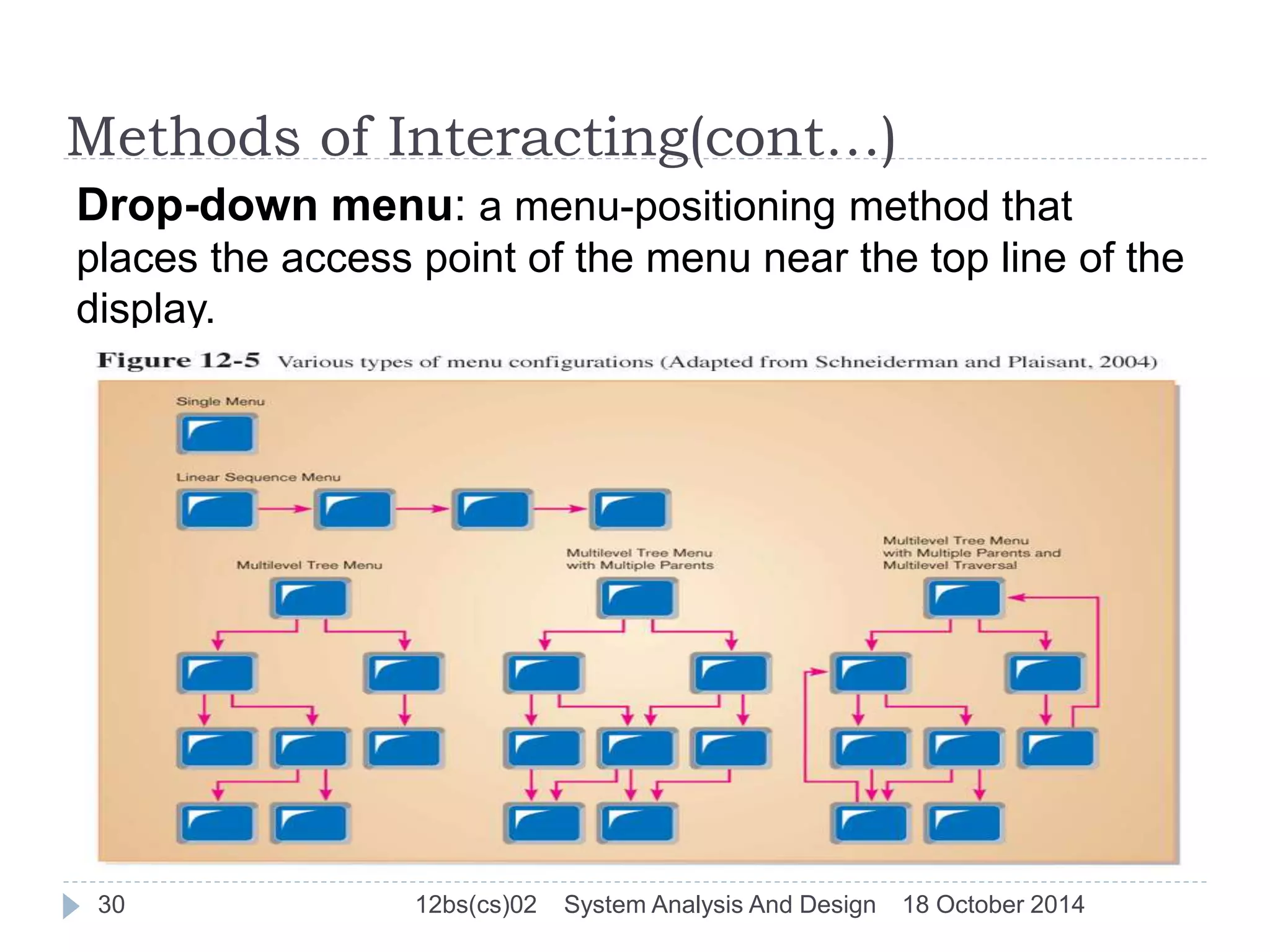
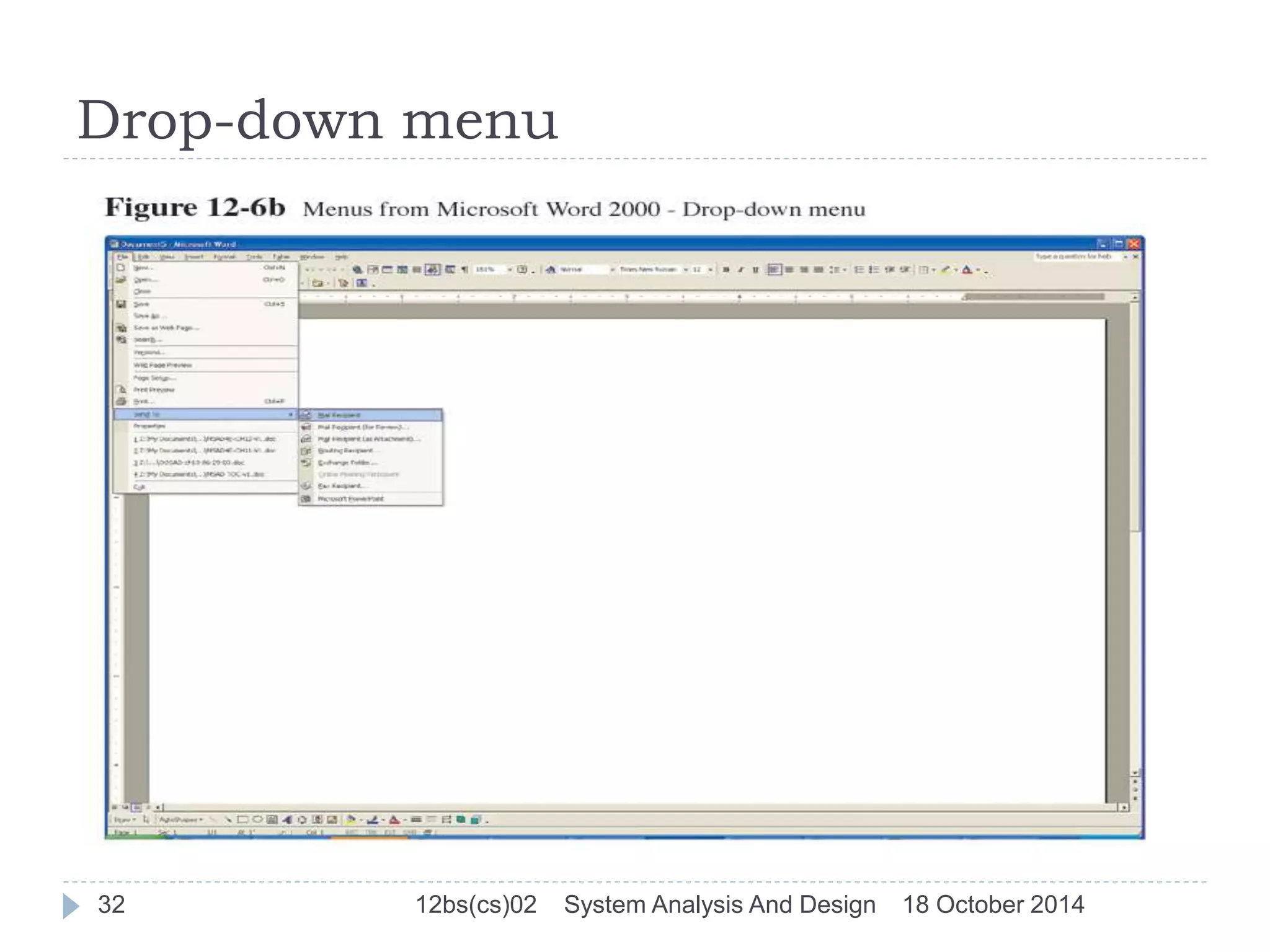
Drop-down menu: a menu-positioning method that 
places the access point of the menu near the top line of the 
display. 
30 12bs(cs)02 System Analysis And Design 18 October 2014
Pop-up menu 
31 12bs(cs)02 System Analysis And Design 18 October 2014
Drop-down menu 
32 12bs(cs)02 System Analysis And Design 18 October 2014
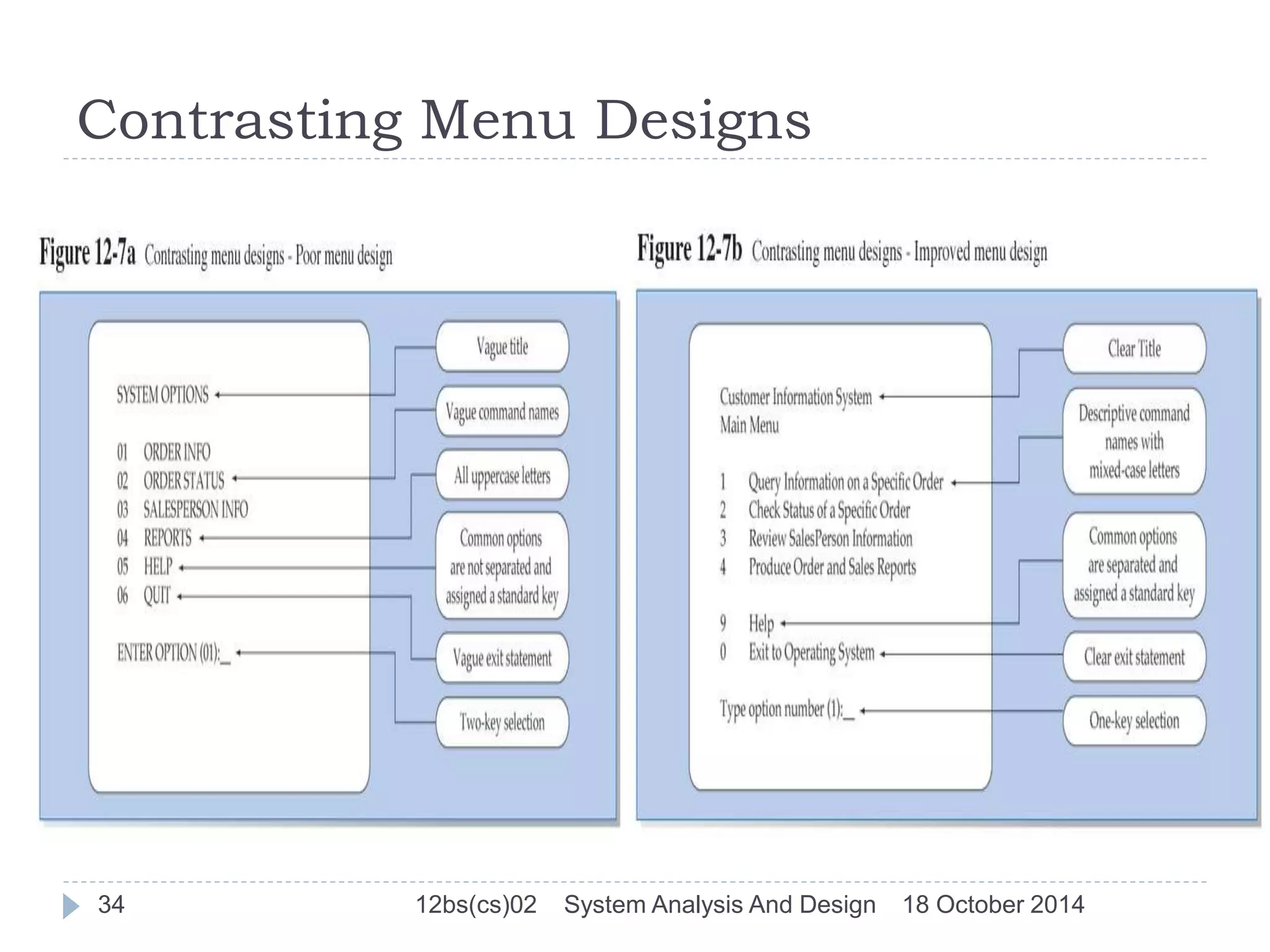
Guidelines for Menu Design 
 Wording: meaningful titles, clear command verbs, mixed 
upper/lower case. 
 Organization: consistent organizing principle. 
 Length: all choices fit within screen length. 
 Selection: consistent, clear and easy selection methods. 
 Highlighting: only for selected options or unavailable 
options. 
33 12bs(cs)02 System Analysis And Design 18 October 2014
Contrasting Menu Designs 
34 12bs(cs)02 System Analysis And Design 18 October 2014
Methods of Interacting(cont…) 
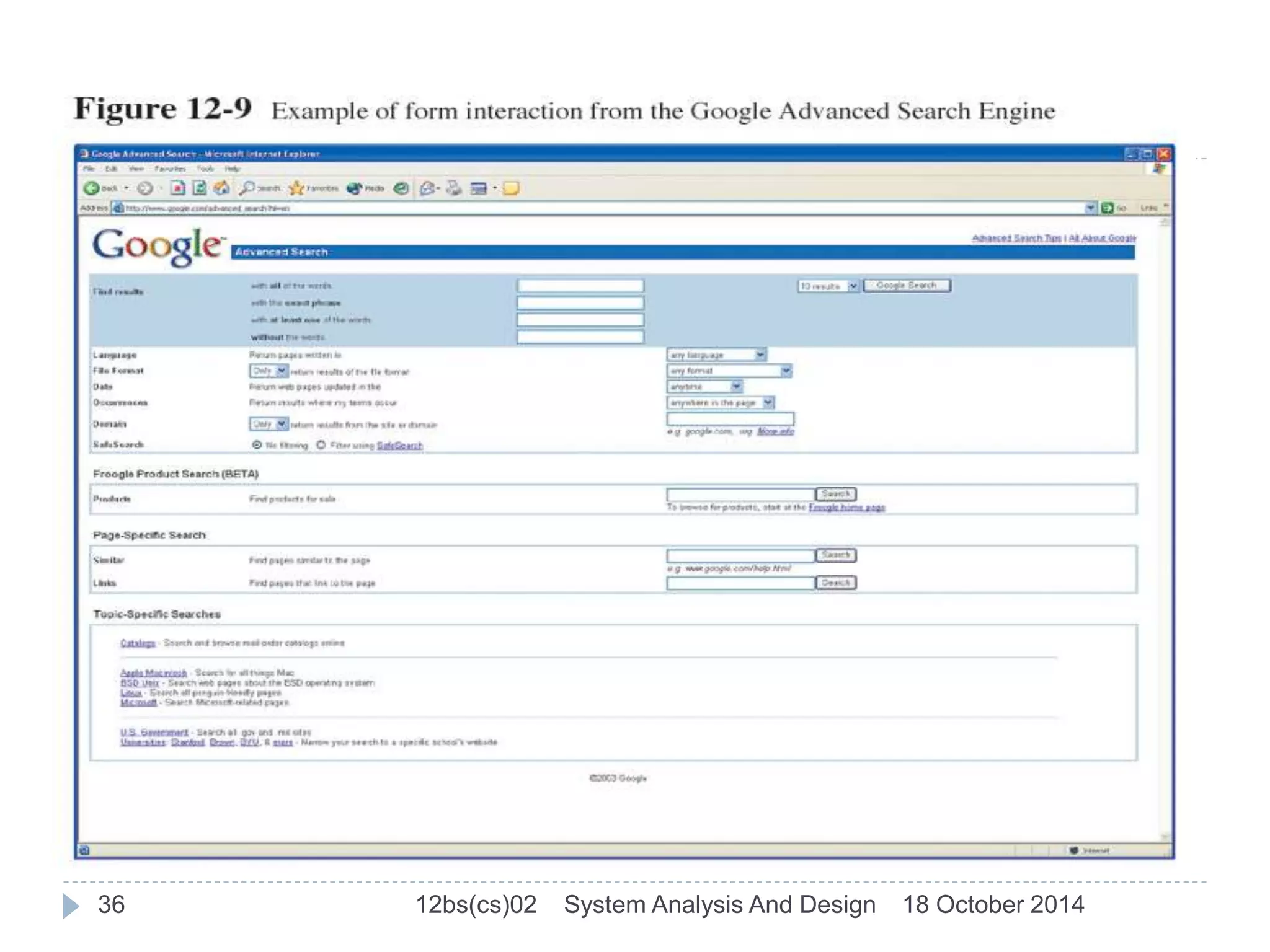
Form interaction: data fields are formatted in a 
manner similar to paper-based forms. 
Allows users to fill in the blanks when working with a 
system. 
Measures of an effective design: 
 Self-explanatory title and field headings 
 Fields organized into logical groupings 
 Distinctive boundaries 
 Default values 
 Displays appropriate field lengths 
 Minimizes the need to scroll windows 
35 12bs(cs)02 System Analysis And Design 18 October 2014
36 12bs(cs)02 System Analysis And Design 18 October 2014
Methods of Interacting(cont…) 
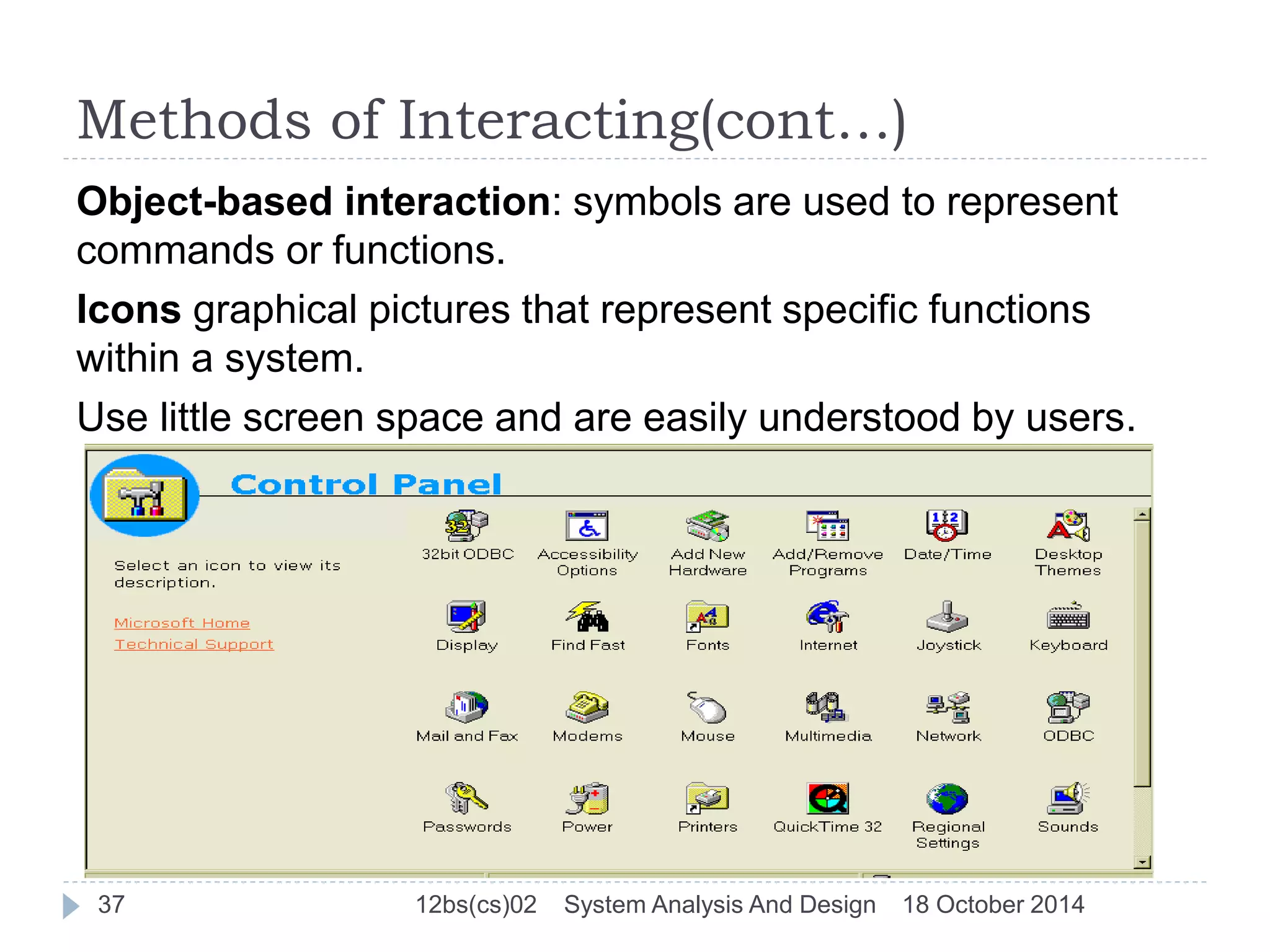
Object-based interaction: symbols are used to represent 
commands or functions. 
Icons graphical pictures that represent specific functions 
within a system. 
Use little screen space and are easily understood by users. 
37 12bs(cs)02 System Analysis And Design 18 October 2014
Methods of Interacting(cont…) 
Natural language interaction 
Inputs to and outputs from a computer-based 
application are in a conventional spoken language 
such as English. 
Both keyboard and voice entry 
38 12bs(cs)02 System Analysis And Design 18 October 2014
Designing Interfaces 
Use standard formats similar to paper-based forms 
and reports. 
Left-to-right, top-to-bottom navigation. 
Flexibility and consistency: 
 Free movement between fields 
 No permanent data storage until the user requests 
 Each key and command assigned to one function 
39 12bs(cs)02 System Analysis And Design 18 October 2014
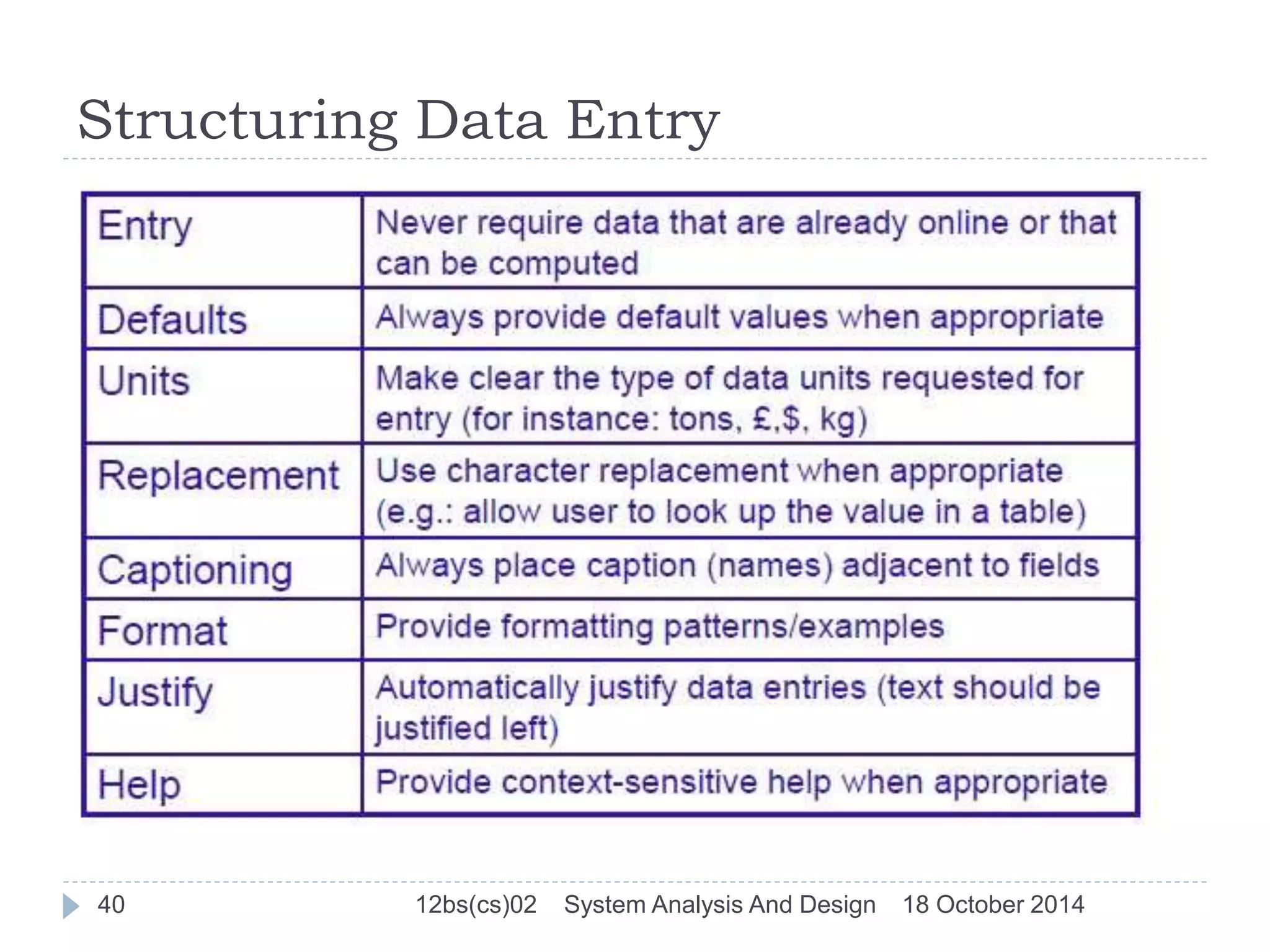
Structuring Data Entry 
40 12bs(cs)02 System Analysis And Design 18 October 2014
Controlling Data Input 
Objective: reduce data entry errors. 
Common sources data entry errors in a field: 
 Appending: adding additional characters 
 Truncating: losing characters 
 Transcripting : entering invalid data 
 Transposing: reversing sequence of characters 
41 12bs(cs)02 System Analysis And Design 18 October 2014
Providing Feedback & Help 
Three types of system feedback: 
 Status information: keep user informed of what’s 
going on, helpful when user has to wait for response 
 Prompting cues: tell user when input is needed, 
and how to provide the input 
 Error or warning messages: inform user that 
something is wrong, either with data entry or system 
operation 
Place yourself in user’s place when designing help. 
Guidelines for designing usable help: 
 Simplicity - Help messages should be short and to 
the point. 
 Organize - Information in help messages should be 
easily absorbed by users 
 Show - It is useful to explicitly show users how to 
perform an operation. 
42 12bs(cs)02 System Analysis And Design 18 October 2014
Designing Dialogues 
Dialogues: the sequence of interaction between a user and a 
system. Dialogue design involves: 
 Designing a dialogue sequence 
 Building a prototype 
 Assessing usability 
Guidelines for Dialgoue Design 
 Consistency (same terminology on all screens) 
 Shortcuts and Sequence (special keys can be used for advanced 
users) 
 Error Handling(errors should be detected and reported) 
 Reversal (reverse action) 
 Feedback (for very user action, eg: record is added) 
 Closure (e.g.: indication of first or last screen) 
 Control (consistent response time) 
 Ease (e.g.: transitions to first and last screen) 
43 12bs(cs)02 System Analysis And Design 18 October 2014
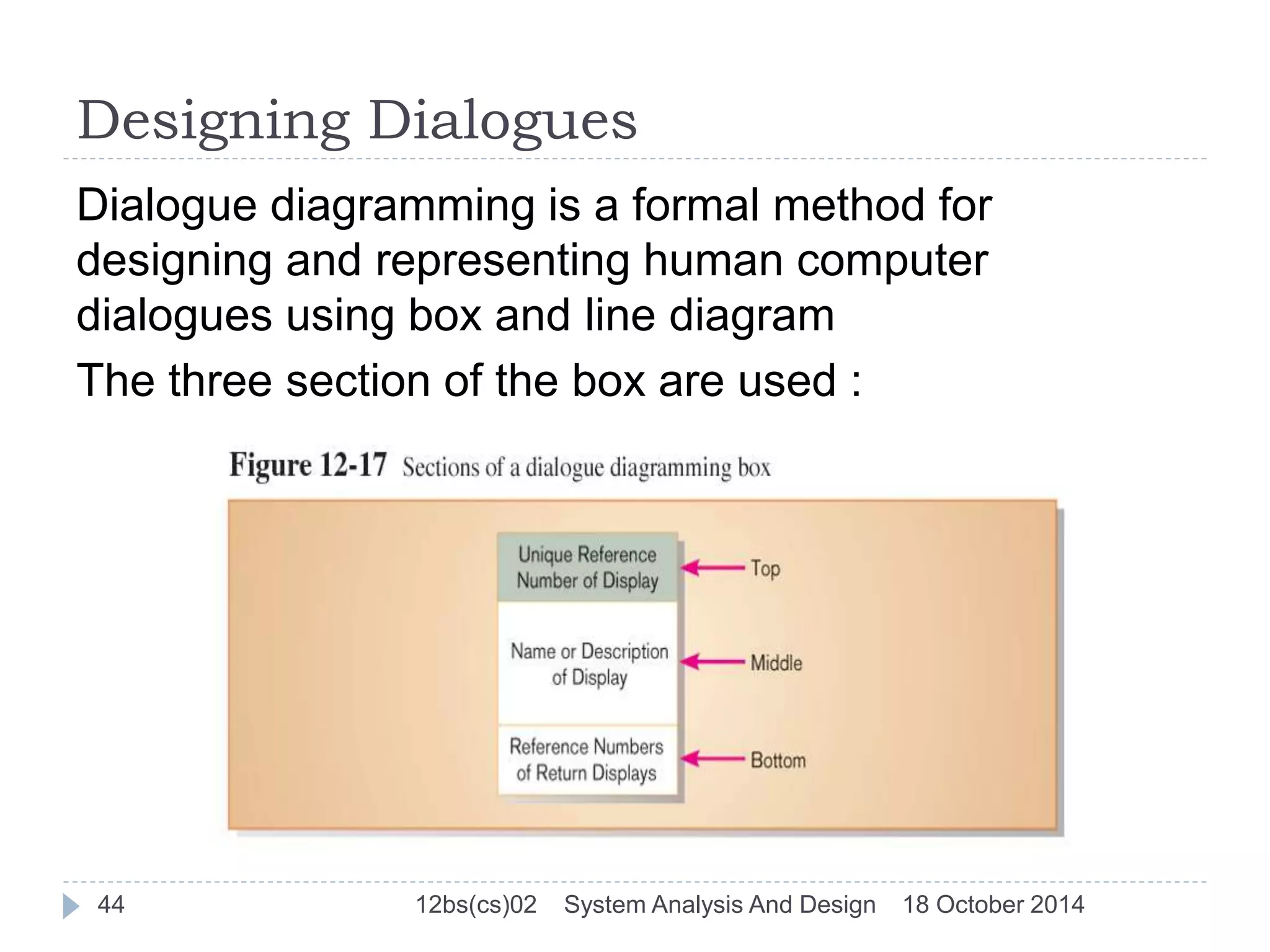
Designing Dialogues 
Dialogue diagramming is a formal method for 
designing and representing human computer 
dialogues using box and line diagram 
The three section of the box are used : 
44 12bs(cs)02 System Analysis And Design 18 October 2014
Designing Interfaces and Dialogues in 
Graphical Environments 
Two rules repeatedly emerge as comprising the first step to 
becoming an effective GUI designer : 
 Become an expert user of the GUI environment 
 Understand the available resources and how they can be 
used. 
Common properties of Windows and forms in GUI 
environment that can be active or inactive : 
 Modality 
 Resizable 
 Movable 
 Minimize 
 Maximize 
 System menu 
45 12bs(cs)02 System Analysis And Design 18 October 2014
Common Errors when designing the interface 
and dialogues of website 
 Opening new browser window 
 Breaking or slowing down the back button 
 Complex URLs 
 Orphan pages 
 Scrolling navigation pages 
 Lack of navigation support 
 Hidden links 
 Links that don’t provide enough information 
 Buttons that provide no click feedback 
46 12bs(cs)02 System Analysis And Design 18 October 2014
THANKYOU  
47 12bs(cs)02 System Analysis And Design 18 October 2014

System design

  • 1.
    System Design SystemAnalysis And Design By:12BS(CS)02 17th October 2014 Computer Science Department , QUEST
  • 2.
    Overview  SystemDesign  Physical and Logical Design  Designing Database  Designing Form and Report  Designing Interface and Dialogue 2 12bs(cs)02 System Analysis And Design 18 October 2014
  • 3.
    Physical And LogicalDesign Physical Design is a graphical representation of a system showing the system’s internal and external entities, and the flows of data into and out of these entities. An internal entity is an entity (person, place, or thing) within the system that transforms data. Internal entities include, for example, accounting clerks (persons), departments (places), and computers (things). Whereas, an external entity is an entity (person, place, or thing) outside the system that transforms data. 3 12bs(cs)02 System Analysis And Design 18 October 2014
  • 4.
    Cont… The physicalportion of systems design can generally be broken down into three sub-tasks User Interface Design is concerned with how users add information to the system and with how the system presents information back to them. Data Design is concerned with how the data is represented and stored within the system. Process Design is concerned with how data moves through the system, and with how and where it is validated, secured and/or transformed as it flows into, through and out of the system. 4 12bs(cs)02 System Analysis And Design 18 October 2014
  • 5.
    Cont… Logical Designis a graphical representation of a system showing the system’s processes and the flows of data into and out of the processes. We use logical design to document information systems because we can represent the logical nature of a system-what tasks the system is doing, without having to specify how, where or by whom the tasks are accomplished. To represent the logical design of a system we can use different diagrams like Entity- Relationship Diagram. 5 12bs(cs)02 System Analysis And Design 18 October 2014
  • 6.
    Database Design 612bs(cs)02 System Analysis And Design 18 October 2014
  • 7.
    Database Design 712bs(cs)02 System Analysis And Design 18 October 2014
  • 8.
    Designing Database Thedatabase design phase is divided into three steps: 1)conceptual database design 2) logical database design 3) physical database design Conceptual Database Design Once all the requirements have been collected and analyzed, the next step is to create a conceptual schema for the database, using a high level conceptual data model.The result of this phase is an Entity-Relationship (ER) diagram or UML class diagram. It describes how different entities (objects, items) are related to each other. It also describes what attributes (features) each entity has. It includes the definitions of all the concepts (entities, attributes) of the application area. 8 12bs(cs)02 System Analysis And Design 18 October 2014
  • 9.
    Database Design LogicalDatabase Design The result of the logical design phase (or data model mapping phase) is a set of relation schemas. The ER diagram or class diagram is the basis for these relation schemas. There are rules how the ER model or class diagram is transferred to relation schemas. The relation schemas are the basis for table definitions. In this phase (if not done in previous phase) the primary keys and foreign keys are defined. 9 12bs(cs)02 System Analysis And Design 18 October 2014
  • 10.
    Database Design Normalization Normalization is the last part of the logical design. The goal of normalization is to eliminate redundancy and potential update anomalies. Redundancy means that the same data is saved more than once in a database. Update anomaly is a consequence of redundancy. If a piece of data is saved in more than one place, the same data must be updated in more than one place. Normalization is a technique by which one can modify the relation schema to reduce the redundancy. 10 12bs(cs)02 System Analysis And Design 18 October 2014
  • 11.
    Designing Database PhysicalDatabase Design The goal of the last phase of database design, physical design, is to implement the database. At this phase one must know which database management system (DBMS) is used. For example, different DBMS's have different names for data types and have different data types. The SQL clauses to create the database are written. The indexes, the integrity constraints (rules) and the users‘ access rights are defined. 11 12bs(cs)02 System Analysis And Design 18 October 2014
  • 12.
    Designing Database ApplicationDesign In the application design phase, the design of the user interface and the application programs that use and process the database are defined and designed. Prototyping The purpose of a prototype is to allow the users to use the prototype to identify the features of the system using the computer There are horizontal and vertical prototypes. A horizontal prototype has many features (e.g. user interfaces) but they are not working. A vertical prototype has very few features but they are working. 12 12bs(cs)02 System Analysis And Design 18 October 2014
  • 13.
    Designing Database Implementation During the implementation phase, the physical realization of the database and application designs are to be done. This is the programming phase of the systems development. Data Conversion and Loading This phase is needed when a new database is replacing an old system. During this phase the existing data will be transferred into the new database. Testing Before the new system is going to live, it should be thoroughly tested. The goal of testing is to find errors! The goal is not to prove the software is working well. 13 12bs(cs)02 System Analysis And Design 18 October 2014
  • 14.
    Designing Database OperationalMaintenance The operational maintenance is the process of monitoring and maintaining the database system. Monitoring means that the performance of the system is observed. If the performance of the system falls below an acceptable level, tuning or reorganization of the database may be required. Maintaining and upgrading the database system means that, when new requirements arise, the new development lifecycle will be done. 14 12bs(cs)02 System Analysis And Design 18 October 2014
  • 15.
    Designing Forms andReports 15 12bs(cs)02 System Analysis And Design 18 October 2014
  • 16.
    Designing Forms andReports(Cont… Form  A business document that contains some predefined data and may include some areas where additional data are to be filled in  An instance of a form is typically based on one database record Report  A business document that contains only predefined data.  A passive document for reading or viewing data.  Typically contains data from many database records or transactions. 16 12bs(cs)02 System Analysis And Design 18 October 2014
  • 17.
    Designing Forms andReports(Cont…  Is user-focused activity that follows a prototyping approach  First steps are to gain an understanding of the intended user and task objectives by collecting initial requirements during requirements determination Requirement Determination  Who will use the form or report?  What is the purpose of the form or report?  When is the report needed or used?  Where does the form or report need to be delivered and used?  How many people need to use or view the form or report? 17 12bs(cs)02 System Analysis And Design 18 October 2014
  • 18.
    Formatting for Formand Report Design  Meaningful titles: clear, specific, version information, current date  Meaningful information– include only necessary information, with no need to modify  Balanced layout: adequate spacing, margins, and clear labels  Easy navigation system: show how to move forward and backward, and where you are currently 18 12bs(cs)02 System Analysis And Design 18 October 2014
  • 19.
    Formatting for Formand Report Design A poor form design A better form design 19 12bs(cs)02 System Analysis And Design 18 October 2014
  • 20.
    Highlighting Information Notify users of errors in data entry or processing  Provide warnings regarding possible problems  Draw attention to keywords, commands, high-priority messages, unusual data values Methods For Highlighting Highlighting can include use of upper case, font size differences, bold , italics , underline , boxing, blinking , reverse video ,audible tones , offsetting nonstandard information and other approaches. 20 12bs(cs)02 System Analysis And Design 18 October 2014
  • 21.
    Guidelines for DisplayingText  Case: mixed upper and lower case, use conventional punctuation  Spacing: double spacing if possible, otherwise blank lines between paragraphs  Justification: left justify text, ragged right margins  Hyphenation: no hyphenated words between lines  Abbreviations: only when widely understood and significantly shorter than full text 21 12bs(cs)02 System Analysis And Design 18 October 2014
  • 22.
    Guidelines for DisplayingText A poor help screen design A better help screen design 22 12bs(cs)02 System Analysis And Design 18 October 2014
  • 23.
    Guidelines for Tablesand Lists Labels  All columns and rows should have meaningful labels.  Labels should be separated from other information by using highlighting.  Redisplay labels when the data extend beyond a single screen or page. Formatting columns, rows and text  Sort in a meaningful order.  Place a blank line between every five rows in long columns.  Similar information displayed in multiple columns should be sorted vertically.  Columns should have at least two spaces between them. 23 12bs(cs)02 System Analysis And Design 18 October 2014
  • 24.
    Guidelines for Tablesand Lists (cont.)  Allow white space on printed reports for user to write notes.  Use same family of typefaces within and across displays and reports.  Avoid overly fancy fonts. Formatting numeric, textual and alphanumeric data  Right justify numeric data and align columns by decimal points or other delimiter.  Left justify textual data. Use short line length, usually 30 to 40 characters per line.  Break long sequences of alphanumeric data into small groups of three to four characters each. 24 12bs(cs)02 System Analysis And Design 18 October 2014
  • 25.
    Guidelines for Tablesand Lists (cont.) A poor table design A better table design 25 12bs(cs)02 System Analysis And Design 18 October 2014
  • 26.
    Usability Overall evaluationof how a system performs in supporting a particular user for a particular task There are three characteristics  Speed  Accuracy  Satisfaction Guidelines for Maximizing Usability  Consistency: of terminology, formatting, titles, navigation, response time  Efficiency: minimize required user actions  Ease: self-explanatory outputs and labels  Format: appropriate display of data and symbols  Flexibility: maximize user options for data input according to preference 26 12bs(cs)02 System Analysis And Design 18 October 2014
  • 27.
    Designing Interface AndDialog 27 12bs(cs)02 System Analysis And Design 18 October 2014
  • 28.
    Designing Interface AndDialogue Interface design An interface is a method by which users interact with information systems. Dialogue design A dialogue reflects the sequence of interaction between a user and a system .  The design of interface and dialogues is the process of defining the manner in which human and computers exchange information. Similar to designing f&r, the process of designing I&d is user focused activity  To design usable i&d you must answer the same who, what, when, where and how 28 12bs(cs)02 System Analysis And Design 18 October 2014
  • 29.
    Methods of Interacting Command Language Interaction Users enter explicit statements into a system to invoke operations Example from MS DOS: COPY C:PAPER.DOC A:PAPER.DOC This copies a file from C: drive to A: drive Menu interaction List of system options is provided and a specific command is invoked by user selection of a menu option. Pop-up menu: menu placed near the current cursor position. 29 12bs(cs)02 System Analysis And Design 18 October 2014
  • 30.
    Methods of Interacting(cont…) Drop-down menu: a menu-positioning method that places the access point of the menu near the top line of the display. 30 12bs(cs)02 System Analysis And Design 18 October 2014
  • 31.
    Pop-up menu 3112bs(cs)02 System Analysis And Design 18 October 2014
  • 32.
    Drop-down menu 3212bs(cs)02 System Analysis And Design 18 October 2014
  • 33.
    Guidelines for MenuDesign  Wording: meaningful titles, clear command verbs, mixed upper/lower case.  Organization: consistent organizing principle.  Length: all choices fit within screen length.  Selection: consistent, clear and easy selection methods.  Highlighting: only for selected options or unavailable options. 33 12bs(cs)02 System Analysis And Design 18 October 2014
  • 34.
    Contrasting Menu Designs 34 12bs(cs)02 System Analysis And Design 18 October 2014
  • 35.
    Methods of Interacting(cont…) Form interaction: data fields are formatted in a manner similar to paper-based forms. Allows users to fill in the blanks when working with a system. Measures of an effective design:  Self-explanatory title and field headings  Fields organized into logical groupings  Distinctive boundaries  Default values  Displays appropriate field lengths  Minimizes the need to scroll windows 35 12bs(cs)02 System Analysis And Design 18 October 2014
  • 36.
    36 12bs(cs)02 SystemAnalysis And Design 18 October 2014
  • 37.
    Methods of Interacting(cont…) Object-based interaction: symbols are used to represent commands or functions. Icons graphical pictures that represent specific functions within a system. Use little screen space and are easily understood by users. 37 12bs(cs)02 System Analysis And Design 18 October 2014
  • 38.
    Methods of Interacting(cont…) Natural language interaction Inputs to and outputs from a computer-based application are in a conventional spoken language such as English. Both keyboard and voice entry 38 12bs(cs)02 System Analysis And Design 18 October 2014
  • 39.
    Designing Interfaces Usestandard formats similar to paper-based forms and reports. Left-to-right, top-to-bottom navigation. Flexibility and consistency:  Free movement between fields  No permanent data storage until the user requests  Each key and command assigned to one function 39 12bs(cs)02 System Analysis And Design 18 October 2014
  • 40.
    Structuring Data Entry 40 12bs(cs)02 System Analysis And Design 18 October 2014
  • 41.
    Controlling Data Input Objective: reduce data entry errors. Common sources data entry errors in a field:  Appending: adding additional characters  Truncating: losing characters  Transcripting : entering invalid data  Transposing: reversing sequence of characters 41 12bs(cs)02 System Analysis And Design 18 October 2014
  • 42.
    Providing Feedback &Help Three types of system feedback:  Status information: keep user informed of what’s going on, helpful when user has to wait for response  Prompting cues: tell user when input is needed, and how to provide the input  Error or warning messages: inform user that something is wrong, either with data entry or system operation Place yourself in user’s place when designing help. Guidelines for designing usable help:  Simplicity - Help messages should be short and to the point.  Organize - Information in help messages should be easily absorbed by users  Show - It is useful to explicitly show users how to perform an operation. 42 12bs(cs)02 System Analysis And Design 18 October 2014
  • 43.
    Designing Dialogues Dialogues:the sequence of interaction between a user and a system. Dialogue design involves:  Designing a dialogue sequence  Building a prototype  Assessing usability Guidelines for Dialgoue Design  Consistency (same terminology on all screens)  Shortcuts and Sequence (special keys can be used for advanced users)  Error Handling(errors should be detected and reported)  Reversal (reverse action)  Feedback (for very user action, eg: record is added)  Closure (e.g.: indication of first or last screen)  Control (consistent response time)  Ease (e.g.: transitions to first and last screen) 43 12bs(cs)02 System Analysis And Design 18 October 2014
  • 44.
    Designing Dialogues Dialoguediagramming is a formal method for designing and representing human computer dialogues using box and line diagram The three section of the box are used : 44 12bs(cs)02 System Analysis And Design 18 October 2014
  • 45.
    Designing Interfaces andDialogues in Graphical Environments Two rules repeatedly emerge as comprising the first step to becoming an effective GUI designer :  Become an expert user of the GUI environment  Understand the available resources and how they can be used. Common properties of Windows and forms in GUI environment that can be active or inactive :  Modality  Resizable  Movable  Minimize  Maximize  System menu 45 12bs(cs)02 System Analysis And Design 18 October 2014
  • 46.
    Common Errors whendesigning the interface and dialogues of website  Opening new browser window  Breaking or slowing down the back button  Complex URLs  Orphan pages  Scrolling navigation pages  Lack of navigation support  Hidden links  Links that don’t provide enough information  Buttons that provide no click feedback 46 12bs(cs)02 System Analysis And Design 18 October 2014
  • 47.
    THANKYOU  4712bs(cs)02 System Analysis And Design 18 October 2014