SWG041
AUTOMATIC SOFTWARE SYSTEM


                            YYYAV123A
SHIMA SEIKI MFG.,LTD.
                   AUTOMATIC SOFTWARE SYSTEM
                            SWG 041
                          Second edition, May 2006


  Shima Seiki maintains a policy of continuous improvement for its products.
 Therefore, the content of this manual is subject to change without prior notice
                            and our obligation.
   Contact your Shima Seiki sales representative for the latest information.
No part of this document may be reprinted or reproduced in any form or by any
         means without the prior written permission of SHIMA SEIKI.
      This edition is intended for version [A]-49 of SDS-ONE Knit Pint.
INTRODUCTION


INTRODUCTION
This manual explains the automatic software system.


The automatic software system is for making knitting data (such as control data, pattern data,
pattern development data, yarn data, and economizer data) for knitting products.


Read this manual thoroughly in order to make the most efficient use of the system.


When you read through this manual, please keep it near SDS for reference.


                                                i
AGREEMENT OF THIS MANUAL


      AGREEMENT OF THIS MANUAL
       There are some agreements in order to read this manual correctly.
       Read the following agreement thoroughly before the content.


       (1) The system to perform knit and the system to perform transfer are indicated as shown below.

                                   K : Knit
                                     : Transfer (from back to front)
                     K               : Transfer (from front to back)


       (2) The relations between drawing pattern and control are indicated as shown below.


                     Line D                                   A                             A
                     Line C                                   B                             B
                     Line B                                   C                             C
                     Line A                                   D                             D


       (3) The way of transfer is indicated as shown below.


              : Transfer from the front to the back
              : Transfer from the back to the front
              : Diagonal transfer from the back to the front
              : Diagonal transfer from the front to the back
              : Transfer the loop on the front to the front by using the back or TRJ bed.
              : Transfer the loop on the back to the back by using the front or TRJ bed.


                                                        ii
CONTENTS
I. COLOR NOS. LIST ......................................................................... 1


II. FUNCTION OF EACH COLOR ..................................................... 3


III. COLOR NO. OF EACH KNIT METHOD ..................................... 4
 1) Knit ............................................................................................................................... 4
 2) Tuck .............................................................................................................................. 4
 3) Miss and No Needle Selection ...................................................................................... 5
 4) Miss .............................................................................................................................. 5
 5) Knit for Second Stitch .................................................................................................. 6
 6) Cross (cable) .................................................................................................................. 7
    A) Front stitch cross .................................................................................................. 7
    B) Front and back stitch cross ................................................................................... 8
    C) Relief knit .............................................................................................................. 8
    D) Special technique to cross the cable ...................................................................... 9
 7) Knit & Stitch Move .................................................................................................... 10
 8) Knit & Transfer ........................................................................................................... 11
    A) Knit & transfer to the right / left ......................................................................... 11
    B) Knit & transfer without racking ........................................................................... 11
    C) Knit & transfer without racking and return ....................................................... 12
    D) Transfer without racking & knit ......................................................................... 12
    E) Transfer without racking (without knit) .............................................................. 12
 9) Split Knit .................................................................................................................... 13
 10) Front / back move ..................................................................................................... 14
 11) Elastic raising cam tuck .......................................................................................... 15
 12) Auto yarn feeder point .............................................................................................. 16
 Transfer Direction .......................................................................................................... 17
 Start and End of Pattern ................................................................................................ 18


IV. LIST OF OPTION LINE FUNCTION .........................................19
 1) Option Line R ............................................................................................................. 19
 2) Option Line L ............................................................................................................. 20


V. SPECIFYING AND FUNCTION OF OPTION LINES .................22
 1) Before Specifying Color Nos. ......................................................................................               22
 2) R1, R2: Jump Economizer Command ........................................................................                          23
    R1 : Jump economizer (inside) ..................................................................................                  23
    R2 : Jump economizer (outside) .................................................................................                  23
 3) R3: Yarn Carrier Change Command ..........................................................................                        24
 4) R5: Knit Cancel Command .........................................................................................                 25
5) R6: Stitch / Leading Stitch No. Command ................................................................ 27
 6) R7: Sinker Reset ON Command................................................................................. 27
 7) R8: Yarn out Command .............................................................................................. 28
 8) R9: Links Process Ignore Command .......................................................................... 30
 9) R10: Yarn Holding Hook Command ........................................................................... 30
 10) R11: Fabric Presser Command................................................................................. 31
 11) R13: Stitch Range Command ................................................................................... 32
 12) R15: Yarn Inserting Hook Command ....................................................................... 33
 13) R16: Temporary mask fab. pile up err. Command, Cleaner Command, and Carriage
          air Command .................................................................................................... 37
 14) L2, L3, L4: Racking Command ................................................................................ 38
 15) L5: Carriage Speed Command (knit course) ............................................................ 45
 16) L6: Carriage Speed Command (transfer course) ...................................................... 45
 17) L7: Arm separation adjustment, Stop Command .................................................... 46
 18) L12: A miss Command .............................................................................................. 47
 19) L13: Transfer, Holding Command ............................................................................ 48
 20) L14: Elastic Yarn Advancing Amount Command .................................................... 50
 21) L17: Racking Adjustment Command ....................................................................... 50


VI. PATTERN DEVELOPMENT ASSIGNMENT .............................51
     (A) Data contents for pattern development ...............................................................                    51
     (B) Repeating times of basic pattern (when using color no. 2 on A) ..........................                                51
     (C) Starting needle no. for the first piece ..................................................................               52
     (D) Starting needle no. for the first piece ..................................................................               52


VII. AUTO PROCESS ........................................................................53
   SET ............................................................................................................................ 53
   YARN ......................................................................................................................... 54
   YARN HOLDING HOOK .......................................................................................... 56
   YARN INSERT .......................................................................................................... 58
   YF (carrier) ................................................................................................................ 63
 Synchronous/Independent Carrier Movement ............................................................... 64
I. COLOR NOS. LIST


I. COLOR NOS. LIST

 COLOR NO.                     CONTENTS                     COLOR NO.                           CONTENTS
                1 Front knit (jersey)                                              4 Normal stitch knit
                                                                                                           F ront s titc h
                2 Back knit (reversed jersey)                                      5 Normalstitch knit     c ros s (1 )


                                                            KNIT & CROSS
                3 Front/back knit (double jersey)                                 14 Front stitch knit     F ront s titc h
               51 Front knit                                                      15 Front stitch knit     c ros s (2 )
 KNIT


                  (w ithout links process)                                         5 Front stitch knit
                                                                                                           F ront-bac k
               52 Back knit                                                       10 Reverse stitch knit   s titc h c ros s (1 )
                  (w ithout links process)                                        15 Front stitch knit     Front- bac k
              118 Front knit (non auto-transfer)                                 100 Reverse stitch knit   s titc h c ros s (2 )

              119 Back knit (non auto-transfer)                                  150 Cable joint code
               11 Front tuck                                                       6 Front knit + move 1P left
               12 Back tuck                                                       61 Front knit + move 1P left
               41 Front knit / back tuck                                          62 Front knit + move 2P left
               42 Front tuck / back knit                                          63 Front knit + move 3P left
 TUCK


               88 Front/back tuck                                                 64 Front knit + move 4P left
              171 Front tuck (without links                                       65 Front knit + move 5P left
                  process)                                                        66 Front knit + move 6P left
              172 Back tuck (without links process)                               67 Front knit + move 7P left
              175 Front/back tuck (w ithout links                                  7 Front knit + move 1P right
                  process)                                                        71 Front knit + move 1P right
               27 Front knit for 2nd stitch (-)                                   72 Front knit + move 2P right
               28 Back knit for 2nd stitch (-)                                    73 Front knit + move 3P right
               89 Front/back tuck for 2nd stitch (-)                              74 Front knit + move 4P right
                                                            KNIT & STITCH MOVE


              111 Front tuck for 2nd stitch (-)                                   75 Front knit + move 5P right
              112 Back tuck for 2nd stitch (-)                                    76 Front knit + move 6P right
              137 Front knit / Back tuck for 2nd                                  77 Front knit + move 7P right
                  stitch (-) (w ithout links process)
 2nd STITCH


                                                                                   8 Back knit + move 1P left
              138 Front tuck for 2nd stitch (-) /                                 81 Back knit + move 1P left
                  Back knit (w ithout links process)                              82 Back knit + move 2P left
              139 Front/back knit for 2nd stitch (-)                              83 Back knit + move 3P left
              173 Front tuck for 2nd stitch (-)                                   84 Back knit + move 4P left
                  (w ithout links process)                                        85 Back knit + move 5P left
              174 Back tuck for 2nd stitch (-)                                    86 Back knit + move 6P left
                  (w ithout links process)                                        87 Back knit + move 7P left
              176 Front / back tuck for 2nd stitch                                 9 Back knit + move 1P right
                  (-) (w ithout links process)                                    91 Back knit + move 1P right
                0 Miss                                                            92 Back knit + move 2P right
               16 No needle selection                                             93 Back knit + move 3P right
              116 Front miss (w ith links process)                                94 Back knit + move 4P right
 MISS


              117 Back miss (w ith links process)                                 95 Back knit + move 5P right
              216 Front miss (w ith links process)                                96 Back knit + move 6P right
                  independent carrier movement                                    97 Back knit + move 7P right
              217 Back miss (w ith links process)
                  independent carrier movement
                                                                                                     (Continued on next page)


                                                        1
I. COLOR NOS. LIST

   (Continues from previous page)


   COLOR NO.                          CONTENTS                        COLOR NO.                                  CONTENTS
                      21 Front knit + transfer 1P left                                            131 Front / back knit + front move 1P
                      22 Front knit + transfer 2P left                                                left
                      23 Front knit + transfer 3P left                                            132 Front / back knit + front move 1P


                                                                       FRONT / BACK KNIT + MOVE
                      43 Front knit + transfer 4P left                                                right
                      44 Front knit + transfer 5P left                                            133 Front / back knit + back move 1P
                      45 Front knit + transfer 6P left                                                left
                      46 Front knit + transfer 7P left                                            134 Front / back knit + back move 1P
                      24 Front knit + transfer 1P right                                               right
                      25 Front knit + transfer 2P right                                           135 Front / back knit + front / back
                      26 Front knit + transfer 3P right                                               move 1P left
                      47 Front knit + transfer 4P right                                           136 Front / back knit + front / back
                      48 Front knit + transfer 5P right                                               move 1P right
                      49 Front knit + transfer 6P right                                           141 Elastic raising cam front tuck +


                                                                    ELASTIC RAISING
                      68 Front knit + transfer 7P right                                               front knit


                                                                       CAM TUCK
                      31 Back knit + transfer 1P left                                             142 Elastic raising cam back tuck +
                      32 Back knit + transfer 2P left                                                 back knit
   KNIT & TRANSFER


                      33 Back knit + transfer 3P left                                             143 Elastic raising cam front / back
                      53 Back knit + transfer 4P left                                                 knit
                      54 Back knit + transfer 5P left                                              13 Auto yarn feeder point
                                                                    AUTO YARN FEEDER


                      55 Back knit + transfer 6P left                                             121 Color no. 1 + Auto yarn feeder
                      56 Back knit + transfer 7P left                                                 point
                                                                          POINT


                      34 Back knit + transfer 1P right                                            122 Color no. 2 + Auto yarn feeder
                      35 Back knit + transfer 2P right                                                point
                      36 Back knit + transfer 3P right                                            123 Color no. 3 + Auto yarn feeder
                      57 Back knit + transfer 4P right                                                point
                      58 Back knit + transfer 5P right
                      59 Back knit + transfer 6P right
                      69 Back knit + transfer 7P right
                      20 Front knit + transfer
                      29 Front knit + transfer
                      30 Back knit + transfer
                      39 Back knit + transfer
                      40 Front knit + transfer
                      50 Back knit + transfer
                      60 Transfer    + front knit
                      70 Transfer    + back knit
                      80 Transfer    (without knit)
                      90 Transfer (without knit)
                     101 Front split knit
   SPLIT STITCH


                     102 Back split knit
                     106 Front split knit + transfer 1P left
                     107 Front split knit + transfer 1P right
                     108 Back split knit + transfer 1P left
                     109 Back split knit + transfer 1P right
                      99 Links process code


                                                                2
II. FUNCTION OF EACH COLOR


 II. FUNCTION OF EACH COLOR
Notes for Specifying Color Nos.

   ( NOTE 1 ) A knit line implies a carriage traverse (one way).


   ( NOTE 2 ) Do not specify only color no. 0 (miss) in a row.


   ( NOTE 3 ) The needle beds are automatically set in 1/2 pitch left position to knit single jersey and 1x1
              rib and set in the 1/4 pitch left position to knit double jersey with all needle.


                     Racking; 1/4 pitch left position       Racking; 1/2 pitch left position


   ( NOTE 4 ) When knit & cross, knit & stitch move, and knit & transfer are ordered, knit is performed
              first and then transfer, stitch move and cross follow.
              If many kinds of racking are required for a course, smaller racking then left racking have
              priority.


   ( NOTE 5 ) Links process (transfer) is automatically performed when two adjoining courses are knitted
              with the different needle beds. Note that some color nos. do not perform links process
              (transfer).


                                 2
                                                                                    Links process
                                 1


                                                        3
III. COLOR NO. OF EACH KNIT METHOD


 III. COLOR NO. OF EACH KNIT METHOD
1) Knit
        C OLOR NO.                               CONTENTS
            1        Front knit (jersey)
            2        Back knit (reversed jersey)
            3        Front/back knit (double jersey)

Point
  - Links process (transfer) is automatically performed when two adjoining courses are knitted with the
    different needle beds.
  - Links process is automatically performed when using front knit or back knit color (e.g. 4, 5, 6, 7 and
    so on).
  - Front/back knit (color no. 3) is performed with the needle beds in the 1/4 pitch left position.

        C OLOR NO.                                  CONTENTS
            51       Front knit (without links process)
            52       Back knit (without links process)


Purpose
  Use in case of knitting without links process.

        C OLOR NO.                                  CONTENTS
           118       Front knit (non auto-transfer)
           119       Back knit (non auto-transfer)


  - Use the color no. 118 together with the color nos. 32, 52, 82, and 92 on the option line L13, and use
    the color no. 119 together with the color nos. 31, 51, 81, and 91 on the option line L13 to knit without
    auto transfer process. (Knit for auto transfer)
  - Links process is performed with front or back line.


2) Tuck
        C OLOR NO.                                  CONTENTS
           11        Front tuck
           12        Back tuck
           41        Front knit / back tuck (without links process)
           42        Front tuck / back knit (without links process)
           88        Front/back tuck
           171       Front tuck (without links process)
           172       Back tuck (without links process)
           175       Front/back tuck (without links process)


Point
  - Do not specify the color nos. 11 and 12 or 111 and 112 in the same row.
  - The color nos. 41, 42 and 88 are performed with the needle beds in 1/4 pitch left position.


                                                     4
III. COLOR NO. OF EACH KNIT METHOD


3) Miss and No Needle Selection

        C OLOR NO.                                   CONTENTS
            0        Miss
            16       No needle selection


Point
  The function of the color no. 16 is the same as that of the color no. 0.
  Do not draw only the color no. 0 in a row. Draw color no. 16 instead.


        C OLOR NO.                                   CONTENTS
           116       Front miss (with links process)
           117       Back miss (with links process)

Point
  - The color nos. 116 and 117 perform the links process to the front or back line.


4) Miss

        C OLOR NO.                                   CONTENTS
           216       Front miss (with links process) independent carrier movement
           217       Back miss (with links process) independent carrier movement


Purpose
  You can move the carrier to the desired direction regardless of the carriage direction. For example, to
  move the carrier away from knitting range, carriage stroke is within the knitting range when selecting
  independent carrier movement. To move the carrier to the opposite direction of knitting direction,
  carriage course to move the carrier is unnecessary when selecting independent carrier movement.


Point
  - This color no. cannot be drawn in the same line as other color nos. (except for auto yarn feeder point)
  - Direction of independent carrier movement does not have relation with carriage direction.
  - Specify the direction of independent carrier movement on the option line R5. (See the option line
     R5=6 and 7)
  - When considering the knitting direction (carriage), independent carrier movement line is not
  included.
  - Though the last course of the pattern should be ended with left going, you do not have to include the
    independent carrier movement line.


  For the details of independent carrier movement, see “Synchronous/Independent Carrier Movement”
  described later.


                                                      5
III. COLOR NO. OF EACH KNIT METHOD


5) Knit for Second Stitch
        C OLOR NO.                                CONTENTS
           27        Front knit for 2nd stitch (-) (stitch value 0)
           28        Back knit for 2nd stitch (-) (stitch value 0)
           89        Front/back tuck for 2nd stitch (-) (stitch value 0)
           111       Front tuck for 2nd stitch (-) (stitch value 0)
           112       Back tuck for 2nd stitch (-) (stitch value 0)
                     Front knit / Back tuck for 2nd stitch (-) (stitch value 0) (without
           137
                     links process)
                     Front tuck for 2nd stitch (-) (stitch value 0) / Back knit (without
           138
                     links process)
           139       Front/back knit for 2nd stitch(-) (stitch value 0)
           173       Front tuck for 2nd stitch (-) (without links process)
           174       Back tuck for 2nd stitch (-) (without links process)
           176       Front/back tuck for 2nd stitch(-) (without links process)


Point
  - Note that the color nos. 27, 28, and 139 are knitted with stitch value 0.
  - Tuck and 2nd stitch cannot be used on the same side of bed in the same course.


                                                   6
III. COLOR NO. OF EACH KNIT METHOD


6) Cross (cable)

  The color nos. for a cable pattern are shown below.
  To make cross, these colors must be specified in pairs.
  Cross pairs and racking are automatically made up by color nos. and the no. of dots.


  A) Front stitch cross                             Cross of front stitches
  B) Front and back stitch cross                    Cross of front stitches and back stitches
  C) Relief knit                                    Knitting technique to make cross easily
  D) Special technique to cross the cable           Knitting technique to insert the relief knit in the middle
                                                    of cross.


A) Front stitch cross
        C OLOR NO.                                    CONTENTS
            4            Normal stitch knit (downside)
            5            Normal stitch knit (upside)
           14            Front stitch knit (downside)
           15            Front stitch knit (upside)
           150           Cable joint code

Purpose
  Cross of front stitches.


Point
  - The color nos. 14 and 15 are used for distinction of adjoining cross pairs.
  - Color no. 1 or 2 can be specified between cross pair colors.
  - There are 2 types of cross: Right cross (right stitches come upside) and left cross (left stitches come
    upside). Right cross and left cross can be replaced by exchanging color nos.

           4         5     15     14            4      1     5              4       5               5       4

                                                                           Right cross              Left cross
  - Draw the color no. 150 to connect the color no. 4 and color no. 4 or color no. 5 and color no. 5 with 1x1
    knitting.


  - See the Cross (cable) on “L13: Use Bed Command”.
                 - Drawing cable on front bed side and cable on back bed side
                 - Cross for tubular knitting


                                                                                         (Continued on next page)


                                                       7
III. COLOR NO. OF EACH KNIT METHOD

  (Continues from previous page)


B) Front and back stitch cross
        C OLOR NO.                                      CONTENTS
            5          Front stitch knit (upside)
           10          Reverse stitch knit (downside)
           15          Front stitch knit (upside)
           100         Reverse stitch knit (downside)
Purpose
  Cross of front stitches and back stitches.


Point
  Put color nos. 15 and 100 for distinction of cross pairs.


C) Relief knit

Purpose
  To make cross easily, relief knit is performed before cross. Relief knit is automatically performed when
  either of the cross pair has 3 or more pitch racking.


Point
  - When a stitch is inserted in the cross, relief knit is automatically performed even for 2 x 2 cable
    because racking is 3 pitch.
  - Relief knit is not automatically performed for 2 x 2 cable. When relief knit is required for 2 x 2 cable,
    a knit line is necessary under color no. 4, and knit cancel command on the line R5 has to be specified
    in the same row as cross. (See “R5: Knit Cancel Command” for details.)


          No relief knit

            2         1         2
            2     4        5    2
            2         1         2


           The rows marked with (   ) are relief knit


          1-system knit

            2         1         2
            0     4        5    0             1
            2     1        0    2
            2     1        0    2


                                              R5


                                                                                      (Continued on next page)


                                                        8
III. COLOR NO. OF EACH KNIT METHOD

  (Continues from previous page)


D) Special technique to cross the cable

  Relief knit is inserted in the middle of cross without assigning color nos. 4 and 5.

         Right cross

          2    36          0    2
          2    51          0    2
          2    20          63   2
          2            1        2


         Left cross

          2    0           33   2
          2    0           51   2
          2    73          20   2
          2            1        2


                                                     9
III. COLOR NO. OF EACH KNIT METHOD


7) Knit & Stitch Move

   C OLOR NO.         CONTENTS (move left)             C OLOR NO.         CONTENTS (move right)
     6, 61      Front knit + move 1P left                7, 71      Front knit + move 1P right
      62        Front knit + move 2P left                 72        Front knit + move 2P right
      63        Front knit + move 3P left                 73        Front knit + move 3P right
      64        Front knit + move 4P left                 74        Front knit + move 4P right
      65        Front knit + move 5P left                 75        Front knit + move 5P right
      66        Front knit + move 6P left                 76        Front knit + move 6P right
      67        Front knit + move 7P left                 77        Front knit + move 7P right
     8, 81      Back knit + move 1P left                 9, 91      Back knit + move 1P right
      82        Back knit + move 2P left                  92        Back knit + move 2P right
      83        Back knit + move 3P left                  93        Back knit + move 3P right
      84        Back knit + move 4P left                  94        Back knit + move 4P right
      85        Back knit + move 5P left                  95        Back knit + move 5P right
      86        Back knit + move 6P left                  96        Back knit + move 6P right
      87        Back knit + move 7P left                  97        Back knit + move 7P right


Purpose
  Stitch move is performed after performing the front or back knit and then racking.
  Lace pattern and narrowing are available by performing stitch move.


                                                  10
III. COLOR NO. OF EACH KNIT METHOD


8) Knit & Transfer

  Stitch move is performed after performing the front or back knit and then transferring.
  There are following 5 types.
           A) Knit & transfer to the right / left
           B) Knit & transfer without racking
           C) Knit & transfer without racking and return
           D) Transfer without racking & knit
           E) Transfer without racking (without knit)


A) Knit & transfer to the right / left

   C OLOR NO.            CONTENTS (move left)              C OLOR NO.         CONTENTS (move right)
        21        Front knit + transfer 1P left               24        Front knit + transfer 1P right
        22        Front knit + transfer 2P left               25        Front knit + transfer 2P right
        23        Front knit + transfer 3P left               26        Front knit + transfer 3P right
        43        Front knit + transfer 4P left               47        Front knit + transfer 4P right
        44        Front knit + transfer 5P left               48        Front knit + transfer 5P right
        45        Front knit + transfer 6P left               49        Front knit + transfer 6P right
        46        Front knit + transfer 7P left               68        Front knit + transfer 7P right
        31        Back knit + transfer 1P left                34        Back knit + transfer 1P right
        32        Back knit + transfer 2P left                35        Back knit + transfer 2P right
        33        Back knit + transfer 3P left                36        Back knit + transfer 3P right
        53        Back knit + transfer 4P left                57        Back knit + transfer 4P right
        54        Back knit + transfer 5P left                58        Back knit + transfer 5P right
        55        Back knit + transfer 6P left                59        Back knit + transfer 6P right
        56        Back knit + transfer 7P left                69        Back knit + transfer 7P right


B) Knit & transfer without racking
        C OLOR NO.                                    CONTENTS
             20         Front knit + transfer
             29         Front knit + transfer
             30         Back knit + transfer
             39         Back knit + transfer

Purpose
  Performs the transfer after the knitting process.


Point
  Links process from the previous course and to the next course is not performed.
  Color nos. 20, 29, 30, and 39 have priority of transfer to the other color nos. in the same row.


                                                      11
III. COLOR NO. OF EACH KNIT METHOD


C) Knit & transfer without racking and return
      C OLOR NO.                                    CONTENTS
          40         Front knit + transfer     + other transfer + transfer back
          50         Front knit + transfer     + other transfer + transfer back

Purpose
  After knit is performed, stitches are transferred to the opposite needle bed, and then returned to the
  original needle bed after other transfers in the same course are performed.


   Transfer
D) Transfer without racking & knit
      C OLOR NO.                                    CONTENTS
          60         Transfer   + front knit
          70         Transfer   + back knit

Purpose
  Transfer is performed before knitting.
  Links process is performed to the next course.


   Transfer
E) Transfer without racking (without knit)

      C OLOR NO.                                    CONTENTS
          80         Transfer   (without knit)
          90         Transfer   (without knit)

Purpose
  Knitting is not performed whereas transfer is performed.


                                                    12
III. COLOR NO. OF EACH KNIT METHOD


9) Split Knit
        C OLOR NO.                                          CONTENTS
           101             Front split knit + transfer
           102             Back split knit + transfer
           106             Front split knit + transfer 1P left
           107             Front split knit + transfer 1P right
           108             Back split knit + transfer 1P left
           109             Back split knit + transfer 1P right

Point
  - Split knit is used for starting double jersey or tubular knit from single jersey.
  - Draw the color nos. 101, 106, and 107 in the course going left.
  - Draw the color nos. 102, 108, and 109 in the course going right.
  - Draw only the color nos. for split stitch in the line with split stitch.
  - You can draw the color nos. for split stitch to fill the holes after stitch move. In this case, draw as
    shown below.
  - Stitch value becomes 0 regardless of the setting of stitch address when performing split stitch.


                                                  51
                                                  52
                                 51
                                          16
                                          106

                                          16
                                                51
                                                           16
                                                           107

                                                           16
                                                                                     3
                                                                      51
                                                                      52
                                                           16
                                                           109

                                                           16
                                                52
                                          16
                                          108

                                          16
                                 52
                                                                  7
                                                                  9
                       1                                                                  1    1
                                      6
                                      8
                                                  51
                                                                                     3
                                                  52

                       L13                                                           R3   R5   R9


  Front split stitch
                                                                           New front stitch               Transferred stitch


                                                                                  Front                           Back
            (Fig. 1)                            (Fig. 2)                                       (Fig. 3)


                                                             13
III. COLOR NO. OF EACH KNIT METHOD


10) Front / back move

        C OLOR NO.                                              CONTENTS
           131          Front     /   back   knit   + front   move 1P left
           132          Front     /   back   knit   + front   move 1P right
           133          Front     /   back   knit   + back    move 1P left
           134          Front     /   back   knit   + back    move 1P right
           135          Front     /   back   knit   + front   / back move 1P left
           136          Front     /   back   knit   + front   / back move 1P right

Purpose
  - Transfer using slider is performed after front/back knit.


Point
  - Draw on the knit cancel line to use for narrowing on tubular knitting.
  - Order to transfer is automatically changed according to the carriage direction for the color nos. 135
    and 136.


  (Drawing example)
                                                                                            52           4
                                                                          1             9
                                                                                    7
                                                                      1                                       1    1
                 52                   4             Same process               1                 8
     136   134        133   135              1                                                       6
                 51                                                                         51
                 52                   4                                                     52           4
                 51                                                                         51

                                      R3     R5                    L13    L4   L2                        R3   R5   R9


                                                                                            51
                                                                                                         4
                                                                                            52
                                                                               1    7
                 51                                                                     9
                                      4                               1                                       1    1
                 52                                 Same process          1                          6
     136   134        133   135              1                                                   8
                 51                                                                         51
                                      4                                                                  4
                 52                                                                         52

                                      R3     R5                    L13    L4   L2                        R3   R5   R9


                                                                 14
III. COLOR NO. OF EACH KNIT METHOD


11) Elastic raising cam tuck

        C OLOR NO.                                  CONTENTS
           141       Elastic raising cam front tuck + front knit
           142       Elastic raising cam back tuck + back knit
           143       Elastic raising cam front/back tuck + front/back knit


Point
  - Color nos. 141 and 142 can be used to knit with inserting elastic yarn in the wrist part of glove.
  - To draw this color no., 2 carriers are used in the same course.
  - Elastic raising cam tuck cannot be performed with the carrier no. 1 or 6. (only for 7G)


  For the procedure of specifying carrier, see “YARN” in “AUTO PROCESS.”


                                                          Tuck and knit are performed
                                                          with this needle.


                                                                          Ground yarn

                                                                          Elastic yarn


                                141   1   141   1   141     1   141   1


                                                    15
III. COLOR NO. OF EACH KNIT METHOD


12) Auto yarn feeder point

        C OLOR NO.                                    CONTENTS
           13        Auto yarn feeder point
           121       Color no. 1 + Auto yarn feeder point
           122       Color no. 2 + Auto yarn feeder point
           123       Color no. 3 + Auto yarn feeder point


Purpose
  - Auto yarn feeder point specifies the set and reset position of carrier. It is necessary for knit line.


Point
  - Use even number of auto yarn feeder point in the same line. (Maximum 16 points)
    If using odd number of auto yarn feeder point(s), error message is displayed when performing auto
    process and the position blinks.
  - Auto process cannot be performed correctly in the line only with auto yarn feeder point. If only auto
    yarn feeder point is necessary in the line for carrier move, draw the color no. 16 or 216, 217
    somewhere in the same line.


                                                      16
III. COLOR NO. OF EACH KNIT METHOD


Transfer Direction

Point
  - Transfer direction is decided by the carriage traverse direction.
  - Following transfer methods are available:
     - transfer from hook to hook (normal transfer)
     - transfer from hook to slider (holding)
     - transfer from slider to hook (return)


  (Normal transfer or holding)

        Going right                                      In case of going right, transfer is performed from
                                                         back to front.

                                                         In case of going left, transfer is performed from
        Going left
                                                         front to back.


  (Return)

                                                         In case of going right, return is performed from
        Going right
                                                         back to front.

                                                         In case of going left, return is performed from front
        Going left
                                                         to back.


  (Normal transfer or both holding and return)
                                                         In case of going right, return is performed from
        Going right                                      back to front, and transfer is performed from back
                                                         to front.
                                                         In case of going left, return is performed from front
        Going left
                                                         to back, and transfer is performed from front to
                                                         back.
  (Both knitting and transfer)
                                                         In case of going right, return is performed from
        Going right                   K                  back to front, and then knit is performed.

                                                         In case of going left, return is performed from front
        Going left                   K
                                                         to back, and then knit is performed.
                                 X
                                                         After knitting is performed, transfer cannot be
        Going right                  K
                                                         performed.

                                                         After knitting is performed, transfer cannot be
        Going left                    K
                                           X             performed.


  (Note)
  For the details on transfer (normal transfer, holding, and return), see the description for option line
   L13.


                                                    17
III. COLOR NO. OF EACH KNIT METHOD


Start and End of Pattern

Point
  - Carriage is placed on the left side while carriers are placed on the right side.
  - There is no fixed data.


  (Start of pattern)
     e.g. Tubular knitting


        8                    52
        7                    51
        6                    52                  3
        5                    3
        4                    16
        3                    3
        2                    3                  10 --> 0Yes
        1                    16

                                                R3

  1. Move to the right with no needle selection because carriers are placed on the right side.
  2. Cast off the fabric in case the fabric is on the needle bed.
  3. Same as 2.
  4. Move the carriers to the left to start knitting with going right.
  5. Knit the set up.
  6. Knit the tubular.
  7. Knit the tubular.
  8. Knit the tubular.


  (End of pattern)


        6                    16
        5                    3
        4                    3                  10 --> 0Yes
        3                    3
        2                    16                        50
        1                    K
                             K                   3
                             K

                                                R3     R6

  1. End the knitting with going right. To use yarn inserting hook, knitting ends with going right. (For
     the details, see the description for option line R15.)
  2. Draw 1 line with no needle selection. (Specify option line R6=50. Set 0 for stitch /leading stitch no.)
  3. Cast off the fabric on the needle bed.
  4. Cast off the fabric on the needle bed.
  5. Cast off the fabric on the needle bed.
  6. End with going left.


                                                     18
IV. LIST OF OPTION LINE FUNCTION


IV. LIST OF OPTION LINE FUNCTION
1) Option Line R
                                     1, 2     Repeat of pattern and control data
    R1 Jump economizer (inside)               Repeat of pattern and control data (Economizer
                                     11-41    no.)
                                     1, 2     Repeat of pattern and control data
         Jump economizer
    R2                                        Repeat of pattern and control data (Economizer
         (outside)                   11-41
                                              no.)
    R3 Yarn carrier change           1-127    Yarn carrier combination 1-127

         Knit cancel                   1      Knit cancel

    R5 Carriage move                   2      Carriage move
         Carrier direction             6      Independent carrier movement right
         (independent movement)        7      Independent carrier movement left
                                       0      No. 5 (knit course) / No. 1 (empty course)
    R6 Stitch / leading stitch no.   1-60     Nos. 1-60
                                     +100     Transfer stitch cam address
         Drop failure detection       11      Press off error ON
    R7
         Sinker reset                200      Sinker reset ON
    R8 Yarn-out                       31      Yarn-out
                                      1       Links process ignore
                                              (When selecting WG) Before/after knitting: auto
                                      11
                                              transfer process ignore
    R9 Links process ignore                   (When selecting WG) Only before knitting: auto
                                      12      transfer process ignore
                                              (When selecting WG) Only after knitting: auto
                                      13      transfer process ignore
    R10 Yarn holding hook            1-255    Yarn holding hook action pattern 1-255
    R11 Fabric presser               101      Fabric presser ON
                                     1 or 2   Stitch range
    R13 Stitch range
                                     +10      Fixed stitch course no.
                                      10      Only yarn inserting w hen starting knitting
                                              Yarn inserting w hen starting knitting + tuck pattern
                                     11-19    1-9
    R15 Yarn inserting hook
                                      20      Only yarn inserting w hen finishing knitting
                                              Yarn inserting w hen finishing knitting + tuck pattern
                                     21-29    1-9
         Temporary mask fab. pile
                                      74      Temporary mask fab. pile up error
         up error
                                      81      Cleaner ON
    R16 Cleaner
                                      82      Cleaner OFF
                                      91      Carriage air ON
         Carriage air
                                      92      Carriage air OFF


                                              19
IV. LIST OF OPTION LINE FUNCTION


2) Option Line L
       L2 Racking 0-4 (6) pitch           0-4 (6)    Racking 0-4 pitch (7G, 10G), 0-6 pitch (15G)
                                             0       Racking 1/2 pitch
       L3 Racking 1/2 and 1/4 pitch
                                            1        Racking 1/4 pitch
                                            0        Left
                                            1        Right
                                            10       Racking left (Patt. Pos. Front)
                                            11       Racking right (Patt. Pos. Front)
                                            20       Racking left (Patt. Pos. Back)
                                            21       Racking right (Patt. Pos. Back)
       L4 Racking left/right                30       Patt. Pos. Remain
                                           110       Racking left (Patt. Pos. Front) + Patt. Pos. Remain
                                                     Racking right (Patt. Pos. Front) + Patt. Pos.
                                           111       Remain
                                           120       Racking left (Patt. Pos. Back) + Patt. Pos. Remain
                                                     Racking right (Patt. Pos. Back) + Patt. Pos.
                                           121       Remain
          Carriage speed (knit              0        Speed 0
       L5 course)
                                          11-25      Speed 1-15
          Carriage speed (transfer          0        Speed 0
       L6 course)
                                          11-25      Speed 1-15
            Yarn reset adjustment         11-17      Yarn reset adjustment 1-7
                                            20       Optional stop
       L7                                   21       Pause 1
            Stop, pause
                                            22       Pause 2
                                            23       Pause 3

       L10 Sub roller No. (knit course)    1-31      Sub roller 1-31

           Sub roller No. (transfer
       L11 course)                         1-31      Sub roller 1-31

                                            20       A miss (front/back)
                                            21       A miss (front only)
                                            22       A miss (back only)
       L12 A miss
                                            30       A miss 2 (front/back)
                                            31       A miss 2 (front only)
                                            32       A miss 2 (back only)


                                                                                       (Continued on next page)


                                                    20
IV. LIST OF OPTION LINE FUNCTION

(Continues from previous page)


                                      0           Normal transfer (hook of needle to hook)
                                                  Transfer using slider (color no. of stitch move)
                                      1           Holding the loop on the slider of opposite bed
                                                  (color no. of transfer)
                                      3           Return (slider of needle to hook)
                                     31           Front    Back, (front body), Back Front
                                     32           Back    Front, (back body), Front Back
                                                  Front Back, (front body), Back Front/Stitch
                                     51
                                                  move code using HD
     L13 Transfer / holding                       Back Front, (back body), Front      Back/Stitch
                                     52
                                                  move code using HD
                                                  Front Back, (front body), Back Front
                                     81
                                                  [compulsive transfer]
                                                  Back Front, (back body), Front      Back
                                     82           [compulsive transfer]
                                                  Front Back, (front body), Back Front
                                     91           [compulsive transfer + stitch move w ith HD]
                                                  Back Front, (back body), Front Back
                                     92           [compulsive transfer + stitch move w ith HD]
           Elastic yarn advancing
     L14                            1-31          Elastic yarn advancing amount Nos.1-31
           amount
     L17 Racking adjustment         11, 12        Racking adjustment pages 1 and 2


                                             21
V. SPECIFYING AND FUNCTION OF OPTION LINE


 V. SPECIFYING AND FUNCTION OF OPTION LINES
1) Before Specifying Color Nos.

  After completing the pattern, specify color nos. on the option lines to decide how many systems are to
  be used or which pulldown no. and stitch no. is to be used, and so on.
  Note that there are some rules to specify commands on the option lines.


                                                                                                                                                                                                                                                                                                                                                                                                                                                                                                                                                 Pattern development


                                                                                                                                                                                                                                                                                                                                                                                                                                                                                                                                                                                                       Structure pattern area
                                                                                                                                                                                                                                                                                                                                                                                 Carriage speed (transfer course)
                                                                                                                                                                                Sub roller No. (transfer course)
                                                           Elastic yarn advancing amount


                                                                                                                                                                                                                                                                                                                                                                                                                                        Carriage speed (knit course)
                                                                                                                                                                                                                                 Sub roller No. (knit course)


                                                                                                                                                                                                                                                                                                                                                                                                                                                                                                             Racking 1/2 and 1/4 pitch
                                                                                                                                                                                                                                                                                                                                  Yarn reset adjustment
           Racking adjustment


                                                                                                                       Transfer / holding


                                                                                                                                                                                                                                                                                                                                                                                                                                                                                                                                                        Racking 0-6 pitch
                                                                                                                                                                                                                                                                                                                                                                                                                                                                                        Racking left/right
                                                                                                                                                                  A miss


  L19 L18 L17 L16 L15 L14 L13 L12 L11 L10                                                                                                                                                                                                                                                     L9                  L8              L7                                             L6                                                     L5                                              L4                   L3                                         L2                  L1


  After completing the pattern, assign color nos. on the option lines to decide how many systems are to
  be used or which pulldown no. and stitch no. is to be used...etc.
  Note that there are some rules to assign commands on the option lines.
                                                                                           Jump economizer (outside)
                                Jump economizer (inside)


                                                                                                                                                                                                                                                                Stitch / leading stitch no.


  (NOTE) When the fixed data is put in the first and second rows, do not assign any color no. for the two
                                                                                                                                                                                                                                                                                                                                                          Links process ignore
                                                                                                                                            Yarn carrier change


                                                                                                                                                                                                                                                                                                                                                                                                                                                                                                                                                                                 Yarn inserting hook
                                                                                                                                                                                                                                                                                                                                                                                                                    Yarn holding hook


          rows and cast-off pattern. (Some exception) After completing the pattern, assign color nos. on
                                                                                                                                                                                                                                                                                                                                                                                                                                                                       Fabric presser


                                                                                                                                                                                                                                                                                                                                                                                                                                                                                                                                         Stitch range
                                                                                                                                                                                                                                                                                                   Sinker reset


          the option lines to decide how many systems are to be used or which pulldown no. and stitch
                                                                                                                                                                                                                   Knit cancel


                                                                                                                                                                                                                                                                                                                       Yarn out


                                                                                                                                                                                                                                                                                                                                                                                                                                                                                                                                                                                                       Cleaner


          no. is to be used...etc.
  Note that there are some rules to assign commands on the option lines.
                                R1                                                         R2                                               R3                             R4                                      R5                                           R6                                 R7                  R8                                 R9                                               R10 R11 R12 R13 R14 R15 R16 R18 R19

  (NOTE) When the fixed data is put in the first and second rows, do not assign any color no. for the two
          rows and cast-off pattern. (Some exception) After completing the pattern, assign color nos. on
          the option lines to decide how many systems are to be used or which pulldown no. and stitch
          no. is to be used...etc.
  Note that there are some rules to assign commands on the option lines.


  (NOTE) When the fixed data is put in the first and second rows, do not assign any color no. for the two
         rows and cast-off pattern. (Some exception)


                                                                                                                                                                                                                                                                                                       22
V. SPECIFYING AND FUNCTION OF OPTION LINE


2) R1, R2: Jump Economizer Command

R1 : Jump economizer (inside)
R2 : Jump economizer (outside)

        C OLOR NO.                              CONTENTS
           1, 2      Repeat of pattern and control


Purpose
  The specification decides the range of the repeating part.
  When repeating parts are necessary inside of another repeating part, assign color nos. on the line R1
  for the inside repeat and specify color nos. on the line R2 for the outside repeat.
  Give the no. of the repeating times when answering the inquiry of the auto program.
  When two different repeating parts are adjacent, put color nos. 1 and 2 respectively.


Point
  - Do not put the specification on the last row of a pattern.
  - Specify color nos. in even no.
  - The first row of the jump economizer command and the next row of the command must have the same
    knitting structure.
  - The top row of specification on the R1 and R2 must not be the same.
  - This specification can be specified from the knit cancel line.


To specify the jump economizer no.

            COLOR NO.                                    CONTENTS
         R1, R2    11-41          Repeat of pattern and control (Economizer no.)


Purpose
  Specify the following color nos. for the jump block economizer no.
  When color nos. 11-41 are specified for economizer command on the line R1 and R2, color nos. belong to
  the jump economizer no.


Point
  Do not specify color nos. 1-4 together with color nos. 11-41.


                                                     23
V. SPECIFYING AND FUNCTION OF OPTION LINE


3) R3: Yarn Carrier Change Command

        C OLOR NO.                                  CONTENTS
          1-127      Yarn carrier combination 1-127


Purpose
  Specification for using some yarn carriers in a pattern.
  Combination of yarn carrier change can be made up to 127. (color nos. 1-127)
  Input yarn carrier no. in the inquiry in auto program processing.


Point
  - Yarn carrier change command must be specified in even no. of knitting rows in a pattern.
  - Specify color nos. (1-127) on the entire line if any yarn carrier change is required.
  - Do not have color no. 0 on the line R3 within the pattern (Except for the line with the knit cancel
    command.)
  - Decide the range of each combination concerning to the starting / stopping positions of carriers.


                                                    24
V. SPECIFYING AND FUNCTION OF OPTION LINE


4) R5: Knit Cancel Command

[Knit cancel command]
        C OLOR NO.                                 CONTENTS
            1        Knit cancel

Purpose
  Specification for omitting a knit process from knit & transfer, knit & stitch move, and knit & cross to
  perform only transfer.


Point
  - The row with knit cancel command is processed within even no. course.


[Carriage move command]

        C OLOR NO.                                 CONTENTS
            2        Carriage move

Purpose
  Specification for adding an empty traverse. Carriage moves to the opposite side of the machine before
  knitting the next course.


Point
  - Carriage move command activates before knitting the line in which the command is specified.
  - Carriage move command is specified to move the carriage to the opposite side when knit with other
    yarn is required but the carriage is on the opposite side.


                                                    25
V. SPECIFYING AND FUNCTION OF OPTION LINE


[Independent carrier movement]


        C OLOR NO.                             CONTENTS
            6        Independent carrier movement right
            7        Independent carrier movement left


Point
  - Specify on the line only with the color no. 216 or 217.
  - Specify the yarn carrier for independent carrier movement on the option line R3.
  - Specify the direction of carrier movement regardless of carriage direction.


  (Drawing example)


                                1
                                                                     3
                                    216                                    6
                                                         1
                                                                     4
                                                         1
                                    216                                    7
                                                                     3
                                1

                                                                     R3    R5


                                4                 3
          Independent carrier
           movement                               4


                                3                 4
          Independent carrier
           movement                               3


                       When the carrier moves independently, it moves before the
                       control block with independent carrier movement
                       command.


  For the details of independent carrier movement, see “Synchronous/Independent Carrier Movement”
  described later.


                                                  26
V. SPECIFYING AND FUNCTION OF OPTION LINE


5) R6: Stitch / Leading Stitch No. Command
        C OLOR NO.                                       CONTENTS
            0           No. 5 (knit course) / No. 1 (empty course)
           1-60         Nos. 1-60
           +100         Transfer stitch cam address

Purpose
  - Specification for stitch no. or leading stitch no.


Point
  - Stitch no. 1 is applied for the course which does not have knitting process.
  - On the course with +100, specified stitch no. is output on the knit and transfer courses.
  - Set the value on the controller of the knitting machine.


6) R7: Sinker Reset ON Command
        C OLOR NO.                                       CONTENTS
             11         Press off error ON
            200         Sinker reset ON

Purpose
  The specification prevents the loop on the slider from interfering with the sinker on the opposite bed.


Point
  (Color no. 11)
  - Specify on the line to cast off the fabric.
  - Press off error ON command is output on the specified line to check if the fabric drops in the course
  set on the “MACHINE TUNING” - “TUNING” on the operation screen of controller.


        (e.g.) In case of setting “5” for course no. on the operation screen of controller


                                           <--                      5th course
                                           -->                      4th course
          Start of 2nd piece
                                                                                             Check if 1st piece
                                                                                             drops in this period
           End of 1st piece
                                           <--                      3rd course
                                           -->                      2nd course
                     Cast off
                                           <--                11    1st course

                                                              R7


  (Color no. 200)
  Transfer may be unstable in case the loop on the slider interferes with the sinker on the opposite side
  when racking the back bed. In this case, specify this command in the line having transfer with option
  line L13 = 1 or 3.


                                                         27
V. SPECIFYING AND FUNCTION OF OPTION LINE


7) R8: Yarn out Command
        C OLOR NO.                                  CONTENTS
           31        Yarn-out


Purpose
  Normally, yarn-in and yarn-out is automatically output. Therefore, you do not have to specify.
  By specifying, however, you can output yarn-out in the desired course.


Point
  - Yarn-in and yarn-out is automatically output in the following conditions:
     - in the course where the carrier for knitting is used for the first time. (auto yarn in)
     - in the course where the carrier for knitting is used for the last time. (auto yarn out)
     - the yarn of the carrier to be held by the yarn holding hook (auto yarn out)
     - in the course where the yarn end is passed between yarn inserting hook and yarn holding hook
      (auto yarn in / yarn out)


  - When using the carrier performing yarn out on purpose again, yarn in command is output
    automatically in the first course.


  - Specifying yarn out on purpose means:
    when passing the yarn end from yarn holding hook to yarn inserting hook, sometimes the yarn is
    across the yarn of the carrier which stops in the middle of the starting position of knitting depending
    on the carrier position. In this case, you can perform yarn out to the right end by specifying the yarn
    out for the carrier which stops in the middle.


  (Bad example)

                                                     Yarn inserting hook
                                 Carrier no. 4                              Carrier no. 3


                                                                Carrier for yarn in using
                                                                yarn inserting hook


                                        Yarn is crossed.
                                        (NG)


                                                    28
V. SPECIFYING AND FUNCTION OF OPTION LINE


(Good example)


                                 Yarn inserting hook
                 Carrier no. 4                         Carrier no. 3


                                           Carrier for yarn in using
                                           yarn inserting hook


                                 29
V. SPECIFYING AND FUNCTION OF OPTION LINE


8) R9: Links Process Ignore Command
        C OLOR NO.                                  CONTENTS
            1        Links process ignore

Purpose
  - Color no. 1 makes links process not to be performed.
  - Color no. 1 makes links process of the specified line not to be performed.


        C OLOR NO.                             CONTENTS
                     (When selecting WG) Before/after knitting: auto transfer process
           11
                     ignore
                     (When selecting WG) Only before knitting: auto transfer process
           12
                     ignore
                     (When selecting WG) Only after knitting: auto transfer process
           13
                     ignore


Point
  - Color nos. 11-13 does not perform auto transfer process with each system. By specifying in the same
    line as WG auto transfer command on the option line L13, auto transfer process before/after knitting
    system is limited.


9) R10: Yarn Holding Hook Command

        C OLOR NO.                                  CONTENTS
          1-255      Holding hook action pattern 1-255


Purpose
  - Activates yarn holding hook or cutter after processing the specified line.


Point
  - You can specify the yarn holding hook action pattern for each specified color on the Auto Process
    Parameters. See “VII. AUTO PROCESS.”


                                                    30
V. SPECIFYING AND FUNCTION OF OPTION LINE


10) R11: Fabric Presser Command

        C OLOR NO.                                  CONTENTS
           101        Fabric presser ON


Purpose
  Prevents the loops from moving upward together with the needles.
  It may be effective when using on the tubular part after knitting the set up.


Point
  - Front fabric presser is attached on the front carriage. Back fabric presser is moved by using the same
    rail as yarn inserting hook. Therefore, back fabric presser cannot be used while yarn inserting hook is
    used.
  - Once the back fabric presser is used, it moves together with the carriage until yarn inserting hook is
    used or up to the end of the pattern.
  - Front fabric presser and back fabric presser cannot be output simultaneously.
    Considering the following conditions, fabric presser is output with auto process in case of transfer
    and split stitch.


    Command                            Direction                      Front fabric presser   Back fabric presser
                           Front -> back (color no. 20, etc)                   x                      O
Transfer    (L13=0)
                           Back -> front (color no. 30, etc)                   O                      x
     Transfer          Front -> back -> front (color no. 6, etc)             O *1)                    O
 (L13=1) (HD+RN)        Back -> front -> back (color no. 8, etc)               O                    O *2)
        HD+CNT             Front -> back (color no. 20, etc)                   x                      O
        (L13=1)            Back -> front (color no. 30, etc)                   O                      x
                           Front -> back (color no. 20, etc)                O *3)                   O *3)
    RN (L13=3)
                           Back -> front (color no. 30, etc)                O *3)                   O *3)
    Split stitch,            Front -> back (color no. 101)                     x                      O
  front and back             Back -> front (color no. 102)                     O                      x
    Split stitch,     Front -> back -> front (color no. 106, etc)            O *1)                    O
  lateral transfer     Back -> front -> back (color no. 108, etc)              O                    O *2)


                                                                                             O: available
                                                                                             x: not available


*1) In case of back -> front, transfer is performed at the position w ithout fabric presser. Therefore, you
cannot obtain the effect of fabric presser.
*2) In case of front -> back, transfer is performed at the position w ithout fabric presser. Therefore, you
cannot obtain the effect of fabric presser.
*3) "Return" is performed at the position w ithout fabric presser. Therefore, you cannot obtain the effect
of fabric presser.


                                                    31
V. SPECIFYING AND FUNCTION OF OPTION LINE


11) R13: Stitch Range Command
        C OLOR NO.                                   CONTENTS
          1 or 2      Stitch range
           +10        Fixed stitch course no.

Purpose
  Use this command to change the stitch value in the specified range gradually. By using this command,
  you do not have to specify with changing the stitch address (R6) for every course.


Point
  (1 or 2)
  - Use 1 and 2 to distinguish each range when 2 ranges are adjacent.
  - The address specified for option line R6 of the first line of the specified range becomes the starting
    address.
  - The address specified for option line R6 of the last line of the specified range becomes the ending
    address.
  - The specification of R6 of the lines except for the first and last line is ignored.
  - The specification is ignored even if specified on the knit cancel line.
  - Considering the economizer no. (R1), it is output with auto process to the corresponding courses in the
    specified range.
  (+10)
  - Specify in the range specified with 1 or 2. With the specification 1, specify 11. With the specification 2,
    specify 12.
  - Specify the range to change the stitch value within the specified range.
  - Without +10 specification, process is performed with unit of 2 courses on the controller.


  (e.g.)
  Knitting starts with stitch value set on R6 stitch address 5 on the starting line in the specified range,
  and ends with stitch value set on R6 stitch address 3 on the ending line in the specified range. Course
  no. within the specified range is automatically calculated. Stitch value changes with unit of 4 courses
  according to the specification of R13=11.


                     51                          3
                     52                                   1
                     51
                                          1
                     52
                     51
                                                       11
                     52
                     51
                     52                          5        1

                                         R1     R6     R13


  If changing the jump economizer no. specified in the line with stitch range on the controller, stitch may
  not be changed correctly in the specified range because the course no. in the stitch range and actual
  course no. are different.


                                                     32
V. SPECIFYING AND FUNCTION OF OPTION LINE


12) R15: Yarn Inserting Hook Command

        C OLOR NO.                                  CONTENTS
           10        Only yarn inserting when starting knitting
          11-19      Yarn inserting when starting knitting + tuck pattern 1-9
           20        Only yarn inserting when finishing knitting
          21-29      Yarn inserting when finishing knitting + tuck pattern 1-9


Purpose
  Assign to hide the yarn end of starting and ending knitting inside of the fabric with yarn inserting
  hook.


Point
  - Set the process on “YARN INSERT” in the Auto Process Parameters screen for the specification of
   option line R15. (For the details, see “YARN INSERT” in “AUTO PROCESS.”)
  - Specify the color no. 10 to hide the yarn end of staring knitting inside of the fabric. To hide the yarn
   end of set up inside of the fabric on finger tip, for example, normally specify option line R15=10. To
   hide the yarn end when changing the colors or after changing colors, specify 10 on the option line R15.
   To ensure to hide the yarn end inside, specify 11-19 on the option line R15.
  - To hide the yarn end when ending knitting, assign the color no. 20. To ensure to hide the yarn end
   inside, specify 21-29 on the option line R15 to assign the knitting contents for auto process.


Note
  To use the yarn inserting hook, make sure to set the stitch / leading stitch no. 50 to 0.


                                                     33
V. SPECIFYING AND FUNCTION OF OPTION LINE


  (Table 1)       Knitting position                   Original drawing                        Note

                                                      52
                                                      51
                                                      52                           Knitting can be started
                                                      51                           with going-left and going-
    Start                                             52
                                                      51                           right. (any direction)
                     When starting                    3               10
                     knitting
                                                                      R15


                                                                 52
                                                                                   When ending knitting,
                                                                 51
                 When finishing                                  52                specify the color nos. 21-
                 knitting                                        51                29 to insert yarn end
  From left                                                      52
                                                                                   after tuck knitting.
  finger to                     When starting                    51

  right                         knitting                    16
                                                                 3           10

                                                51                           21    Knitting can be started
  finger
                                                52                                 and ended with going-left
                                                51
                                                52                                 and going-right. (any
                                                                                   direction)
                                                                             R15


                                                 52                                When ending knitting,
                                                 51                                specify the color nos. 21-
                                                 52
                                                 51                                29 to insert yarn end
  From right                                     52                                after tuck knitting.
                                                 51
  finger to
                                                 3                          10
  left finger                                                51                    Knitting can be started
                When starting                                52
                                                                            21

                knitting                                     51                    and ended with going-left
                                                             52                    and going-right. (any
                                                                            R15
                                                                                   direction)


                                                                                   Specify the yarn inserting
                     When finishing
                     knitting                                                      in the going right course
                                                      52              20           for ending with holding
                                                      51
     End                                                                           the yarn in yarn inserting
                                                      52
                                                      51                           hook at the end.

                                                                      R15
                                                                                   (Note) Create the pattern
                                                                                   ending with going left.


                                                      34
V. SPECIFYING AND FUNCTION OF OPTION LINE


                  Knitting position                       Original drawing                                    Note


                                                     52
                                                     51
                                                     52

            Color When starting                      51                                   12

             B knitting
                                                                                 4                   (Note) When changing
                                                             16
                                                                       51                 22
                                                                       52
                                                                                                     colors or processing the
Changing          Waste                                                51                            yarn end, normally waste
yarn              knitting                                             52
                                                                       51                            knitting is required in
                                                                       52
                                                                       51
                                                                                                     between.
            Color When finishing                                       52        3        11
             A knitting                              51
                                                             16
                                                                                          22
                                                     52
                                                     51

                                                                                 R3       R15


                                                                                                     Yarn holding hook holds
                                                                                                     the yarn of the carrier no.
                                                                                                     4 directly from yarn
                                                51                                                   inserting hook without
                                                52
                                                51
                                                                                                     waste knitting after
                                                52                                             11
                                                                                                     knitting color A.
Changing Color
           B
                                                             16
                                                                             3
                                                                  52                           20    Specify “hold” for setting
yarn                           Yarn inserting
                                                                  51
                                                                  52                                 of A, and specify “release”
(with                          hook                               51                  B
                                                                  52                                 for carrier no. 3 for B.
waste                                   4       51                                    A        22
                                                52                           4
knitting) Color                                 51
           A                                                                                         To change to hold the
                                                                            R3        R10      R15   yarn end of the carrier
                         Yarn holding hook
                                                                                                     holding the yarn holding
                                                                                                     hook to yarn inserting
                                                                                                     hook, waste knitting is
                                                                                                     required. In this case,
                                                                                                     color B.

                                                                                                     Specify the yarn inserting
                                                                                                     in the going right course
                                                                       52                            for ending knitting with
              Waste
                                                                                          20
                                                                       51
              knitting                                                 52
                                                                       51
                                                                                 3
                                                                                                     waste knitting.
                                                                                                     (Note) When the carriers
Changing      When starting                                            52

hook
              knitting                                                 51
                                                                       52
                                                                                                     for starting and ending
                                                                       51                            knitting are not same,
(with                                                                  52        4        10
                                                                                                     waste knitting is required
waste        Color When finishing                            16


knitting)
              B knitting                             51
                                                     52
                                                                                          20         and yarn of the same
                                                     51                                              carrier as starting
                                                                                 R3       R15        knitting is required to be
                                                                                                     kept in yarn inserting
                                                                                                     hook.


                                                            35
V. SPECIFYING AND FUNCTION OF OPTION LINE


                Knitting position                Original drawing                        Note

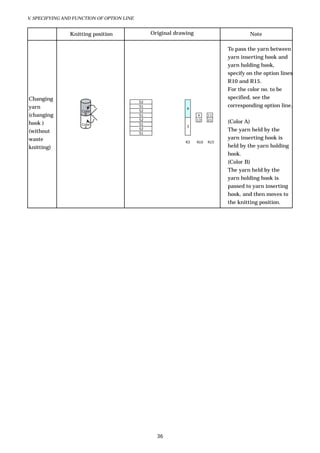
                                                                                To pass the yarn between
                                                                                yarn inserting hook and
                                                                                yarn holding hook,
                                                                                specify on the option lines
                                                                                R10 and R15.
                                                                                For the color no. to be
Changing                                                                        specified, see the
                                            52
yarn                                        51
                                                              4
                                                                                corresponding option line.
                    Color                   52
(changing            B                      51                      4     11
                                            52                      13    21
hook )              Color                   51
                                                                                (Color A)
                     A                                        3
(without
                                            52                                  The yarn held by the
                                            51
waste                                                                           yarn inserting hook is
                                                              R3    R10   R15
knitting)                                                                       held by the yarn holding
                                                                                hook.
                                                                                (Color B)
                                                                                The yarn held by the
                                                                                yarn holding hook is
                                                                                passed to yarn inserting
                                                                                hook, and then moves to
                                                                                the knitting position.


                                                   36
V. SPECIFYING AND FUNCTION OF OPTION LINE


13) R16: Temporary mask fab. pile up err. Command, Cleaner Command,
    and Carriage air Command

Temporary mask fab. pile up err. Command

        C OLOR NO.                                 CONTENTS
           74        Temporary mask fab. pile up err.


Purpose
  - Assign to turn ON/OFF the fabric pile up detection. (Default is ON.)


Point
  - You can assign in the knit cancel line as well.
  - Without specifying fabric pile up detection command on the option line, fabric pile up detection ON is
   set.


Cleaner Command
        C OLOR NO.                                 CONTENTS
           81        Cleaner ON
           82        Cleaner OFF


Point
  - Without specifying cleaner command on the option line, cleaner ON is set.


Carriage air Command
        C OLOR NO.                                 CONTENTS
           91        Carriage air ON
           92        Carriage air OFF


Point
  - Yarn end inserted by yarn inserting hook is pressed down by air.


                                                   37
V. ASSIGNING AND FUNCTION OF OPTION LINE


14) L2, L3, L4: Racking Command

L2:
  Racking 0-4 (6)P command

      C OLOR NO.                                CONTENTS
       0-4 (6)       Racking 0-4 pitch (7G, 10G), 0-6 pitch (15G)

L3:
  Racking 1/2 and 1/4P command


      C OLOR NO.                                    CONTENTS
           0         Racking 1/2 pitch
           1         Racking 1/4 pitch

L4:
  Racking left/right command


      C OLOR NO.                                   CONTENTS
           0       Left
           1       Right
          10       Racking left (Patt. Pos. Front)
          11       Racking right (Patt. Pos. Front)
          20       Racking left (Patt. Pos. Back)
          21       Racking right (Patt. Pos. Back)
          30       Patt. Pos. Remain
          110      Racking left (Patt. Pos. Front) + Patt. Pos. Remain
          111      Racking right (Patt. Pos. Front) + Patt. Pos. Remain
          120      Racking left (Patt. Pos. Back) + Patt. Pos. Remain
          121      Racking right (Patt. Pos. Back) + Patt. Pos. Remain

Purpose
  Normally knit is performed with 1/4 pitch left racking or with 1/2 pitch left racking.
  To knit with other racking pitches, specify this command.
  Without specification, 1/2 pitch right racking is performed.


                                                   38
V. ASSIGNING AND FUNCTION OF OPTION LINE


Relation between the color no. for transfer and holding command (option line L13)

                 1     9                             - Racking of color no. 6: L0.5P
                                              1
                                        6
      0    0                                         - Racking of color no. 9: L0.5P
                 2            51
                              52                     Specified racking is effective on the knit
     L13   L4    L2                          R5      course. Knit cancel course, however, is
                                                     ignored.


                                                     - Racking of color no. 6: L2.5P
                 1     9                             - Racking of color no. 9: L1.5P
                                              1
                                        6            With the specification of option line L13 = 1,
      1    0
                 2            51
                              52                     process starts with the specified racking for
                                                     knit course and knit cancel course.
     L13   L4    L2                          R5


                 1     9                             - Racking of color no. 6: L2.5P
                                              1
                 3                      6            - Racking of color no. 9: L2.5P
      1    110
                              51
                 2                                   With pattern position + pattern position
                              52
                                                     remain (stitch move color):
     L13   L4    L2                          R5
                                                     Pattern position command is output to knit
                                                     line. Therefore, knit cancel line is processed
                                                     with referring to the racking of the line with
                                                     the pattern position command. In case of the
                                                     pattern shown on the left, racking command
                                                     on the option line L2 of knit cancel line is
                                                     ignored.


                                                     - Racking of color no. 20: L1.5P
      3          3                 30
                                              1
      1    110
                 1                      20           - Racking of color no. 30: L3.5P
                              51
                 2
                              51
                                                     With pattern position or pattern position +
                                                     pattern position remain (transfer color
     L13   L4    L2                          R5
                                                     without racking):
                                                     Process starts with the specified racking.


                                                     - Racking of color no. 20: L1.5P
      3          3                      31
                                              1      - Racking of color no. 31: L2.5P
      1    110
                 1                      20
                 2
                              51                     With pattern position or pattern position +
                              51
                                                     pattern position remain (transfer color with
     L13   L4    L2                          R5      racking):
                                                     Process of color no. 31 starts with the racking
                                                     of the color no. based on the reference
                                                     racking of the pattern position remain in the
                                                     previous course.


                                             39
V. ASSIGNING AND FUNCTION OF OPTION LINE


Pattern Position Front / Back

Point
  Draw the needle selection on the position before racking because the needle selection is connected with
  the racking in the following examples.


e.g. 1


                 0       1       1       1       1       3       3       3       1       1    1   1
                L2
                             1       2       3       4       5       6       7       8       9 10 11


                         1       2       3       4       5       6       7       8       9 10 11


e.g. 2


          1     3        1 1 1 1 3                               3 3             1 1 1 1
          L3    L2
               1 2 3 4 5 6                           7 8 9 10 11


                         1 2 3                   4 5 6 7 8 9 10 11


e.g. 3


                 2       1       1       1       0       0       2       3       3       1    1   1

                L2
                 1 2     3       4       5       6       7       8       9 10 11


                         1       2       3       4       5       6       7       8       9 10 11


                                                                         40
V. ASSIGNING AND FUNCTION OF OPTION LINE


e.g. 4

                                              32 25 25 25                   1
                 2       1   1   1   0    0   2   3    3   1   1    1
                L2                                                        R5, 9
                 1 2     3   4   5   6    7   8   9 10 11


                         1   2   3   4    5   6   7    8   9 10 11


Point
  It may seem to be difficult to draw the pattern on the position before racking. However, when using the
  pattern position front / back, drawing becomes easier. (The needle selection of the reference side should
  be drawn on the position before racking.)


e.g. 5
                                                                    L4=10    Racking left Pat. Pos. Front


                                     30           20 20 20
         10      2
                         1   1   1   2    2   2   1    1   1   1    1

         L4     L2


                         1   2   3   4    5   6   7    8   9 10 11


  - The pattern can be drawn on the normal position because the racking is not performed on the front
    bed.
  - The racking is performed on the back bed, however, the pattern can be drawn referring to the same
    position as the needle selection of the front bed with the pattern position front command.


                                                      41
V. ASSIGNING AND FUNCTION OF OPTION LINE


e.g. 6
                                                         L4=10   Racking left    Pat. Pos. Front
                                                            11   Racking right   Pat. Pos. Front

                                                     1
                                                     1
         11    0                   30 30 30
               0                         30 30 30
         10    1                               30 30 30                 1
               2                                     30 30 30
         10    3                           20
                                           1
         L4    L2                          1                           R5


                                                                         L3.5


                                                                         L2.5


                                                                         L2.5


                                                                         L1.5


                                                                         L1.5


                                                                         L0.5


                                                                         L0.5


                                                                        R0.5


                                                                        R0.5


                                                42
V. ASSIGNING AND FUNCTION OF OPTION LINE


e.g. 7

                        2        1   1   1   1    1   1    1    1

                        L2
           1        2   3    4   5   6   7   8   9    10 11


                        1    2   3   4   5   6    7   8    9   10    11


  - Even if drawing “L4=10 Racking left Pat. Pos. Front”, the pattern can be drawn referring to the same
    position as the needle selection on the front bed.


e.g. 8


               20       2        1   1   1   1   1    1    1    1

               L4       L2
          1         2   3    4   5   6   7   8   9    10 11


 - The reference position of the pattern is the back bed because of inputting “L4=20 Racking left Pat. Pos.
   Back”. And the needle selection on the front bed is slid to the left side by 2 pitch because the back bed is
   slid to the left side by 2 pitch.


e.g. 9


               20       2        2   2   2   2   2    2    2    2

               L4       L2
          1         2   3    4   5   6   7   8   9    10 11


 - “L4=20 Racking left Pat. Pos. Back” is input. Without this command, procedure of drawing is the same.
   (Needle selection on the reference bed side should be drawn on the position before racking.)


                                                      43
V. ASSIGNING AND FUNCTION OF OPTION LINE


Pattern Position Remain command


           Patt. Pos. Remain is the command not to slide the needle no. developed by the "Patt.
           Pos." command even if the racking is performed.

                                            2                           5                                          2                           5
                         111                        1    6 2   1
                                                                                                 11                        1    6 2   1


                                   L4 L2                           R3                                     L4 L2                           R3
        Back bed                                                               Back bed
         racking   "Patt. Pos. Front" + Patt. Pos. Remain                       racking               Only "Patt. Pos. Front"


         2.5R                                                                   2.5R
                    1     2    3    4   5   6   7   8 9 10                                   1   2    3    4   5   6   7   8 9 10


                                                                                          Process of color no. for stitch move is performed
                                                                                          with specifying the racking 0.5L on the control data.

         2.5R                                                                   0.5L
                     1    2    3 4      5   6   7   8   9 10
                                                                                             1   2    3    4   5   6   7   8   9 10

                                                                    Not slid


         1.5R                                                                   1.5L
                    1     2    3    4   5   6   7   8   9 10                                 1   2    3 4      5   6   7   8   9 10


         1.5R                                                                   1.5L
                    1     2    3 4      5   6   7 8     9 10                                 1   2    3    4   5   6   7   8   9 10


Point
  - When drawing the color no. of transfer on the knit line, do not draw the pattern position remain
    command. (The color no. of the stitch move can be drawn.) In case of performing the transfer with the
    pattern position remain command, draw with using the knit cancel.


                                                                        44
V. ASSIGNING AND FUNCTION OF OPTION LINE


15) L5: Carriage Speed Command (knit course)
        C OLOR NO.                                  CONTENTS
            0        Speed 0
          11-25      Speed 1-15

Purpose
  Specification for carriage speed (knit course).


Point
  The carriage speed for knit course is used for the course which has knit and transfer.


16) L6: Carriage Speed Command (transfer course)
        C OLOR NO.                                  CONTENTS
            0        Speed 0
          11-25      Speed 1-15

Purpose
  Specification for carriage speed on the transfer course.


                                                    45
V. ASSIGNING AND FUNCTION OF OPTION LINE


17) L7: Yarn reset adjustment, Stop Command

Yarn reset adjustment

        C OLOR NO.                                  CONTENTS
          11-17      Yarn reset adjustment 1-7


Purpose
  Specifies the yarn reset page to decide the stop position of carrier based on auto yarn feeder point.


Point
  - This is continuous command.
  - Without any specification, yarn carrier reset adjustment page 1 is used.
  - Yarn carrier reset adjustment page 7 is automatically used when using yarn inserting hook. After
    using the yarn inserting hook, return to the original page before using yarn inserting hook.


Stop command

        C OLOR NO.                                  CONTENTS
           20        Optional stop
          21-23      Pause 1-3


Purpose
  The specification stops the carriage before the process of the row.


Point
  - Optional stop command needs restarting operation of the knitting machine.
  - Pause command automatically restarts knitting. The stopping time of pause 1, 2 and 3 is 0.5 second,
    1.0 second and 1.5 seconds respectively.


                                                   46
V. ASSIGNING AND FUNCTION OF OPTION LINE


18) L12: A miss Command
      C OLOR NO.                                       CONTENTS
           20         A   miss   (front/back)
           21         A   miss   (front only)
           22         A   miss   (back only)
           30         A   miss   2 (front/back)
           31         A   miss   2 (front only)
           32         A   miss   2 (back only)


Purpose
  - Miss is performed for the part of tuck needle selection of drawing color nos. 11, 12, 41, 42, and 88.
    The position of stitch cam is controlled by loop length/stitch value.
  - It is effective to pull the tight stitch, to regulate the stitches, and to pull the floating stitches down.
  - This command cannot be specified on knit cancel line.


  (Drawing example)


     20                    41
                           52
     20                    41
                           52
                                                  3
     20                    41
                           52
                           52
                           3

     L12                                      R3


                                                       47
V. ASSIGNING AND FUNCTION OF OPTION LINE


19) L13: Transfer, Holding Command
        C OLOR NO.                                  CONTENTS
              0       Normal transfer (hook of needle to hook)
                      Transfer using slider (color no. of stitch move)
              1
                      Holding the loop on the slider of opposite bed (color no. of transfer)
              3       Return    (slider of needle to hook)
              31      Front      Back, (front body), Back Front
              32      Back       Front, (back body), Front Back
              51      Front      Back, (front body), Back Front/Stitch move code using HD
              52      Back       Front, (back body), Front Back/Stitch move code using HD
              81      Front      Back, (front body), Back Front [compulsive transfer]
              82      Back       Front, (back body), Front Back [compulsive transfer]
                      Front  Back, (front body), Back Front
              91
                      [compulsive transfer + stitch move with HD]
                      Back Front, (back body), Front Back
              92
                      [compulsive transfer + stitch move with HD]


Purpose
  - Specify the procedure of transfer.


Point
  - Order of transfer: left racking with smaller racking has priority.
  (L13=1)
  - When specifying on the line of stitch move (color nos. 6, 7, 8, 9, etc.), transfer using slider is performed.
  - When specifying on the line of transfer (color nos. 20, 21, 30, 31, etc.), loop is kept on the slider on the bed
    of the opposite side. (It is called holding.)
  (L13=3)
  - Activates for the line with color no. of transfer (color nos. 20, 21, 30, 31, etc.). (only for the knit cancel
    line)
  - If having a loop with holding, knitting cannot be performed to all needles. Slider of the needle with
    holding and carrier may interfere. Perform “return (L13=3)” before knit.


  (e.g.) To draw the cable pattern for tubular knitting (without color nos. 4 and 5)


                           51
                           52
        3             35
                                               1       1
        1             20        62
                           51
                           52

        L13                                    R5     R9


                                                       48
V. ASSIGNING AND FUNCTION OF OPTION LINE


(L13 = 31, 32, 81, and 82)
- Mainly use for 1x1 pattern.
- This is the specification to perform necessary transfer automatically. (e.g. to knit front stitch for rear
  side).
- Transfer from hook to hook is performed.
- By combination of option line R9, auto transfer process can be limited.
- Links process is not performed on the border of the color nos. 0, 31, and 32.
- Auto transfer process is performed when knitting with color nos. 31 and 32.
- Auto transfer process is not performed when the color no. 31 or 32 continues. (Links process is
 performed.)
- Auto transfer process is performed when the color no. 81 or 82 continues.
  - The specification of the color nos. 11, 12, 13, 31, and 32 on the option line R9 are effective even when the
  color no. 31, 32, 81, or 82 is specified.


 (L13 = 51, 52, 91, and 92)
- For the process of auto transfer, same as above (L13 = 31, 32, 81, and 82).
The transfer method is the same as the process of L13=1.


(Split knit)
- You do not have to specify on the option line L13 in the line to draw the split knit color (color nos. 101,
  102, and 106-109).
    Color nos. 101 and 102: Split stitch is transferred to the hook on the bed of the opposite side.
    Color nos. 106-109: Split stitch is transferred to the slider on the bed of the opposite side and then
    transferred to the hook on the original side after racking the bed.


(Cross )
- Cross on the front bed side and cross on the back bed side can be processed by specifying the color nos. 31,
  32, 51, 52, 81, 82, 91, and 92 on the option line L13.


                 (In case of all needle tubular)


                       51           1           4               5           1
                       52           2           5               4           2
                       52                               1
                       51                               2

                       L13
                 (In case of 1x1 tubular)


                       31       1           2               4   150     4           5   150   5         2       1
                       32               2           1               5   150     5       4     150   4       1       2
                       31       1           2               1           1           1         1         2       1
                       32               2           1               2           2       2           2       1       3

                       L13


                                                                        49
V. ASSIGNING AND FUNCTION OF OPTION LINE


20) L14: Elastic Yarn Advancing Amount Command

        C OLOR NO.                              CONTENTS
          1-31       Elastic yarn advancing amount Nos.1-31


Purpose
  To use the elastic yarn, tension of the elastic yarn can be adjusted. Specify the address for adjustment.


Point
  Normally, set the value of about 70% in the specified address to use the elastic yarn for wrist of glove.


21) L17: Racking Adjustment Command

        C OLOR NO.                                  CONTENTS
           1-2       Racking adjustment 1-2


Purpose
  Specify the racking adjustment to be used.


                                                    50
VI. PATTERN DEVELOPMENT ASSIGNMENT


     PA
 VI. PATTERN DEVELOPMENT ASSIGNMENT
  Specify the pattern development.
  To specify the position, keep one line blank on the structure pattern (base pattern) and then start with
  the next line.
  Specify the color nos. for the function of data contents and repeating times as follows.
                    Starting needle no.

             C                 B (Repeating times)
             D                  A (Data contents)
                                                                                 1 line blank


                               Structure pattern


             L1                                                 R1   R2    R3


             Position A:               Data contents for pattern development
             Position B:               Repeating times of pattern
             Positions C and D:        Starting needle no. for the first piece


(A) Data contents for pattern development

        C OLOR NO.                             CONTENTS
           1         Increment: Development from the left end of a pattern
           2         Repeat: Repeat of basic pattern
           10        Center needle position: Specify the center of the needle bed

Point
  An empty row must be kept between the specification and the cast-off pattern, and the specification
  must reach the edge of the option line bars of R1 and L1 as shown above.
  Color no. 1 develops the pattern data from the left end.
  Color no. 2 repeats the specified range of the pattern. The repeating no. is specified in B.


(B) Repeating times of basic pattern (when using color no. 2 on A)

  Repeating times is specified with color no. Put the color no. on the color no. 2 of part A.
  The base pattern to be repeated is not included in repeating times.
  No. of pattern in the product = 1 + color no. B.


                                                      51
VI. PATTERN DEVELOPMENT ASSIGNMENT


(C) Starting needle no. for the first piece

        C OLOR NO.                             CONTENTS
             1-9     Needle no. for hundreds (100-900)


(D) Starting needle no. for the first piece

        C OLOR NO.                                CONTENTS
          10-90      Needle no. for second digit (10-90)
           1-9       Needle no. for first digit (1-9)

Purpose
   Color no. corresponds to needle no. except color no. 0.
   The knitting starts from the needle behind the space from L1 to the pattern.


Point
   - When specifying the center needle position in the data contents of the pattern development, starting
     needle no. is automatically calculated when processing.
   - Only with the data contents specification of the pattern development without the center position
     specification and the starting needle no., the center of the structure pattern area is automatically set
     as the center position.


                                1             10            1


                                    Structure pattern


        L2     L1                                                    R1    R2


                                                      52
VII. AUTO PROCESS


VII. AUTO PROCESS
SET


 (Gauge)
 Selects the gauge pitch to be used for knitting.


 (Bed Length)
 Selects the bed length to be used for knitting.


                                              7G                   10G                   15G
            40cm (16 inches)             120 needles          160 needles             240 needles

 (Type)
 This manual is for auto yarn carrier.


 (Subroutines [Max. 31])
 Specifies the maximum no. of sub routine. (Normal: 31)


 (Speed No. of Empty Course)
 Specifies the speed no. of course without knit or transfer. (Available data: 0-15)


                                                      53
VII. AUTO PROCESS


YARN


  - Specify the carrier for the color no. specified on option line R3.
  - Available color nos. are up to 127. Error is issued for the other color nos.


  (N, D, and T)


             N          Normally specify the carrier no. here.
             D          Specify the plating carrier. (For plating knitting)
                        Specify the carrier no. to perform tuck using elastic raising
             T          cam. This can be specified only on the line with the color nos.
                        141, 142, and 143.


  (In case of plating knitting)


                                                                                   Ground yarn
                                                                                   Plating yarn


                                                       54
VII. AUTO PROCESS


(In case of elastic raising cam tuck)


- Use the elastic raising cam tuck (color nos. 141, 142, and 143)

                                                        Carrier     Carrier
                                                        no. 6       no. 4


                                                                              Ground yarn

                                                                              Elastic yarn


 RE) Carrier no. 1 and 6 cannot be specified for 7G.


                                                   55
VII. AUTO PROCESS


YARN HOLDING HOOK


  (Type)
  Select the desired action from the pull down menu.


  (Carrier No.)
  If selecting “Y. Release” for Type, you do not have to specify the carrier no. here.


  (Y. Hold Hook No.)
  - Specify the yarn holding hook to be activated.
    You can specify plural yarn holding hooks.
  - Yarn holding hook is numbered 1 to 5 from the left side.

  (Manual)
  Without check mark here, yarn holding hook set in YF tab activates.
  With check mark here, yarn holding hook entered in Y. Hold Hook No. activates.


                                                     56
VII. AUTO PROCESS


Yarn holding hook activates as shown below.


                        Yarn holding hook no. set for carrier no. 1 in YF tab performs "yarn
         R10=1
                        release."
                        Yarn holding hook no. 2 performs "yarn release." At that time,
         R10=2
                        specified carrier evacuates to the needle bed side.

                        Yarn holding hook nos. 4 and 5 performs "yarn release." At that time,
                        maximum 2 carriers (except for carrier no. 4) performing yarn out and
         R10=3
                        not holding the yarn evacuate to the needle bed side. (Yarn holding
                        setting in YF tab is ignored.)

                        Yarn holding hook no. set for carrier nos. 3 and 4 in YF tab performs
        R10=13
                        "yarn release."
                        Yarn holding hook no. 3 performs "yarn release." (Yarn holding setting
        R10=34
                        in YF tab is ignored.)
                        Yarn holding hook no. set for carrier no. 3 in YF tab performs "yarn
        R10=56
                        hold + cut.")
                        Yarn holding hook no. 3 performs "yarn hold + cut" for the carrier
        R10=134
                        nos. 3 and 4.
                        Yarn holding hook no. 5 performs "yarn hold + cut" for the carrier no.
        R10=156         5, and yarn holding hook no. 6 performs "yarn hold + cut" for the
                        carrier no. 6.


(Note)
- To pass the yarn end between yarn holding hook and yarn inserting hook (option line R10 and R15), the
  setting to hold one carrier with the plural yarn holding hooks is not available.
- To pass the yarn end between yarn holding hook and yarn inserting hook with plating knitting, hold the
  main yarn and plating yarn with different yarn holding hook.


                                                 57
VII. AUTO PROCESS


YARN INSERT


                    [1]
                                               [3]            [5] [6] [7] [8]


                     [2]
                                      [9] [4]


                                                              [10]


  [1] Hide yarn end for start
  Hides the yarn end on the set up part and yarn end after changing the colors.

                                                     Yarn end of color B
                                     Color B

                                     Color A


  [2] Hide yarn end for end
  Hides the yarn end when finishing the knitting specified in a certain course.


                           Color B

                           Color A       Yarn end of color A


  [3] Draws the color no. to be knitted before “Hide yarn end for start.”
  Color nos. cannot be specified for the frame of 10. Only inserting is processed.
  Knitting before inserting yarn end can be drawn for the frame of 11-19.
  In the above example, 10 and 11 are the same. Set as shown above to change the value for Course
  (marked with [6]) without drawing for knitting.


                                                         58
VII. AUTO PROCESS


[4] Draws the color no. to be knitted before “Hide yarn end for end.”
Color nos. cannot be specified for the frame of 20. Only inserting is processed.
To make the other color nos. same as 20, draw the color no. 16 (color no. 0) for the frame of [4].
Knitting before inserting yarn end can be drawn for the frame of 21-29.


        Auto output only for pattern data


                    52                    21             Process is specified immediately above the
                    51                                   line of option line R15.
                    52
                    51

                                          R15

        (e.g.)


   21      11 16 12


                         No specification

           (Right-going course)                                        11 16 12   Data is converted to
                                    21                                            necessary pattern
                                                                                  code for pattern
                                                                                  data.

                                         After process

            (Original draw ing)     R15                       (Pattern data)


            (Left-going course)                             11 16 12
                                    21


                                         After process

            (Original draw ing)     R15                       (Pattern data)


[5] Stitch No.
Specify the stitch no. for knitting.
(NOTE)
When using the yarn inserting hook, make sure to set 0 for stitch value of Stitch no. 50.
On the part drawing tuck with [3] or [4], however, knitting can be performed with other stitch values.
In this case, specify other value and input the stitch value on the knitting machine.


                                                    59
VII. AUTO PROCESS


  [6] Specify how many courses after the line with R15=10 to insert the yarn end. You can specify the for
  starting yarn inserting.

       (To change “Course” for each knitting part)


                                                                                          Course
                      Inserting to 8th course
                                                     10                                      8


                                                  (R15=10)


                                                                                          Course     4

                      Inserting to 4th course        11


                                                  (R15=11) (No specification)


  When drawing the color no. to knit with [3], you cannot specify in the course to be inserted.
  (NOTE)
  You cannot specify the next yarn holding hook command (R15) in the line specified here + 2 courses.


                      You cannot specify on this line. Specify
                      on another line or change to "Course" 4.


           8                           21
           7
           6                                     (In case of "Course" 6)
                                                 Next yarn holding hook
           5
                                                 command (R15) is not
           4                                     available in this range.
           3
           2
           1
                                       10

                                       R15


                                                     60
VII. AUTO PROCESS


  [7] Type
  Normal                Hides the yarn end in the fabric.


  Outside               Makes the yarn end out of the fabric.


  Hold down             Hides the yarn end in the fabric.
                        Ensures to hides the yarn end in the fabric comparing to Normal.


                                          51
                           (B)            52
                           (A)            51
                                          52
                                          51
                                          52
                                         52
                                           3                 10


                                                             R15


  When setting “6” for “Course” to insert the yarn end, yarn end is inserted with line (B). Knitting to hide
  the yarn end in the fabric is automatically performed with the lines (A) and (B).


                                                             *                          52               (B)
                                                                             16                            (B)
Holds down the
                                                       )
                                                                             52                            (B)
yarn end with
                                                                                          51               (A)
prolongation
before inserting.
                                                                          Kick back is processed on the line
                                                                          (B) in case of auto process. (Internal
                                                                          process)


                                                     61
VII. AUTO PROCESS


  [8] Air
  Air is blown not to raise the yarn end when inserting the yarn. (only for hold down type)


  [9] Auto
  With check mark here, only the needles holding the loop are automatically selected to perform the
  knitting for the specified insertion.
  You can use for the pattern with all needle pattern and 1x1 pattern with the same specification.


  [10] Reverse
  With check mark here, knitting specified in “Hide edge yarn for start” and “Hide edge yarn for end” is
  performed in consideration of carriage direction. With only one setting, edge yarn process for left-going
  and right-going is automatically performed.

                         Hide edge yarn for start


                                                         4
                                                                                          4
    (Original drawing)
                                                         3
                                                                                          3

                                                        R3     R15                        R3   R15


                                                    Reverse
    (Edge yarn setting)                                       A B C D   …

                                                                                                     Reverse
                                                                                Reverse                        (No check mark)


    (Process image)               A B C D
                                                                             D C B A                           A B C D


                         Hide edge yarn for end


                                                         4
    (Original drawing)                                                                    4

                                                         3
                                                                                          3

                                                        R3     R15                        R3   R15


                                                    Reverse
    (Edge yarn setting)                                       A B C D   …

                                                                                                     Reverse
                                                                                Reverse                        (No check mark)


    (Process image)               A B C D
                                                                             D C B A                           A B C D


  [11] Deletes the color no. drawn for [3] and [4] with check mark here.


                                                                        62
VII. AUTO PROCESS


YF (carrier)


  - Specify the carrier to be used.


  - Y. Hold Hook
            Specify the number for yarn holding hook to hold the yarn. Specifying the number here enables
            you to check the number for yarn holding hook on the YARN FEEDER INITIAL SETTING
            screen as well when you set the yarn on the knitting machine. When holding the yarn with yarn
            inserting hook, you do not have to specify here.


  - Elastic yarn advance
             With check mark here, elastic yarn sending roller rotates when using the corresponding carrier.
             In this case, specify on the option line (L14=1-31).

  - ACT
            Select to move the carrier together with carriage or independently.


  For the details of independent carrier movement, see “Synchronous/Independent Carrier Movement”
  described later.


                                                     63
VII. AUTO PROCESS


Synchronous/Independent Carrier Movement

  Synchronous carrier movement: moves the carrier together with the carriage.
     (e.g.) When the carriage moves to the left, carrier also moves to the left.
  Independent carrier movement: moves the carrier regardless of the carriage movement.
  (How to set synchronous carrier movement/independent carrier movement)
                                         Going right


                               A                B                    C

  A) From carrier stop position to auto yarn feeder set point, the setting “INDP/SYNC” for ACT in Auto
      Process Parameters activates.
  B) With needle selection inside of auto yarn feeder points, carrier moves synchronously.
     Only with no needle selection inside of auto yarn feeder points, you can select synchronous carrier
     movement or independent carrier movement with color nos. 16, 216, and 217.
     The setting “INDP/SYNC” for ACT in Auto Process Parameters does not activate.
  C) For the yarn carrier reset adjustment from auto yarn feeder point set point, carrier moves independently
      regardless of the setting.


  In the following 4 cases, data is automatically created in the auto process.


  1) Color nos. for no needle selection (16, 216 and 217) and carrier preparation data
  No needle selection line (color nos. 16, 216, and 217) is automatically output to carrier preparation data
  during auto process regardless of synchronous carrier movement/independent carrier movement. Carrier
  preparation data address is output to control data.


  Synchronous Carrier Movement (Color no. 16)
                                                 1
                                         16                                3
                           1

                                                                          R3
          3
                      1                  Color no. 16

          2                              CARRIER PREPARATION

                                          CA START END ACT. POSITION DIR. I/O
          1
                      1                    3   13   11 SYNC LEADING L       -

                                          * Explanation on each item is shown below.


  Independent Carrier Movement (Color no. 216 and 217)
                                                 1                               2
                                         216                               3     7
                           1

                                                                          R3     R5
          3
                      1                  Color no. 216

          2                              CARRIER PREPARATION

                                          CA START END ACT. POSITION DIR. I/O
          1
                      1                    3   13   11 INDP    -      L     -

                                          * Explanation on each item is shown below.


                                                         64
VII. AUTO PROCESS


2) Setting for carrier preparation data

     CARRIER PREPARATION

      CA START END ACT. POSITION DIR. I/O
       3   13   11 INDP    -      L     -


CA (Carrier):               Sets the carrier no. to be moved.
START/END:                  Sets the position of auto yarn feeder point.
ACT:                        Switches synchronous and independent by drawing the color no. 16, 216, or 217 in
                            the original drawing.
DIR. (Direction):           Sets the direction to move the carrier.
I/O:                        Sets the yarn in/yarn out command.


3) Timing of synchronous/independent for no needle selection
(Synchronous carrier movement)


      Position of trail                     Position of leading
      elastic raising cam   Position of     elastic raising cam
                            normal knitting

- With no needle selection, carrier can be moved synchronously at the elastic raising cam position.
- At the position of leading elastic raising cam/trail elastic raising cam, one carrier for each can be moved
  synchronously.
- At the normal knitting position, maximum 2 carriers can be moved synchronously.


(Independent carrier movement)


       Position of trail                   Position of leading
       elastic raising cam Position of     elastic raising cam         Carrier moves independently immediately before
                           normal knitting
                                                                       processing the control block with carrier preparation
                                                                       data output. Maximum 6 carriers can be moved
                                                                       synchronously.

4) Limitation of synchronous carrier movement for transfer
Auto process is performed at the available positions shown below.

                                                                               Transfer from hook to slider,
                                                                               or transfer from hook to hook


                                                                               Transfer from slider to hook,
                                                                               or transfer from hook to hook


                                                                               Independent carrier movement: available


                                                                               Independent carrier movement: not available


                                                                  65

Swg041

  • 1.
  • 2.
    SHIMA SEIKI MFG.,LTD. AUTOMATIC SOFTWARE SYSTEM SWG 041 Second edition, May 2006 Shima Seiki maintains a policy of continuous improvement for its products. Therefore, the content of this manual is subject to change without prior notice and our obligation. Contact your Shima Seiki sales representative for the latest information. No part of this document may be reprinted or reproduced in any form or by any means without the prior written permission of SHIMA SEIKI. This edition is intended for version [A]-49 of SDS-ONE Knit Pint.
  • 3.
    INTRODUCTION INTRODUCTION This manual explainsthe automatic software system. The automatic software system is for making knitting data (such as control data, pattern data, pattern development data, yarn data, and economizer data) for knitting products. Read this manual thoroughly in order to make the most efficient use of the system. When you read through this manual, please keep it near SDS for reference. i
  • 4.
    AGREEMENT OF THISMANUAL AGREEMENT OF THIS MANUAL There are some agreements in order to read this manual correctly. Read the following agreement thoroughly before the content. (1) The system to perform knit and the system to perform transfer are indicated as shown below. K : Knit : Transfer (from back to front) K : Transfer (from front to back) (2) The relations between drawing pattern and control are indicated as shown below. Line D A A Line C B B Line B C C Line A D D (3) The way of transfer is indicated as shown below. : Transfer from the front to the back : Transfer from the back to the front : Diagonal transfer from the back to the front : Diagonal transfer from the front to the back : Transfer the loop on the front to the front by using the back or TRJ bed. : Transfer the loop on the back to the back by using the front or TRJ bed. ii
  • 5.
    CONTENTS I. COLOR NOS.LIST ......................................................................... 1 II. FUNCTION OF EACH COLOR ..................................................... 3 III. COLOR NO. OF EACH KNIT METHOD ..................................... 4 1) Knit ............................................................................................................................... 4 2) Tuck .............................................................................................................................. 4 3) Miss and No Needle Selection ...................................................................................... 5 4) Miss .............................................................................................................................. 5 5) Knit for Second Stitch .................................................................................................. 6 6) Cross (cable) .................................................................................................................. 7 A) Front stitch cross .................................................................................................. 7 B) Front and back stitch cross ................................................................................... 8 C) Relief knit .............................................................................................................. 8 D) Special technique to cross the cable ...................................................................... 9 7) Knit & Stitch Move .................................................................................................... 10 8) Knit & Transfer ........................................................................................................... 11 A) Knit & transfer to the right / left ......................................................................... 11 B) Knit & transfer without racking ........................................................................... 11 C) Knit & transfer without racking and return ....................................................... 12 D) Transfer without racking & knit ......................................................................... 12 E) Transfer without racking (without knit) .............................................................. 12 9) Split Knit .................................................................................................................... 13 10) Front / back move ..................................................................................................... 14 11) Elastic raising cam tuck .......................................................................................... 15 12) Auto yarn feeder point .............................................................................................. 16 Transfer Direction .......................................................................................................... 17 Start and End of Pattern ................................................................................................ 18 IV. LIST OF OPTION LINE FUNCTION .........................................19 1) Option Line R ............................................................................................................. 19 2) Option Line L ............................................................................................................. 20 V. SPECIFYING AND FUNCTION OF OPTION LINES .................22 1) Before Specifying Color Nos. ...................................................................................... 22 2) R1, R2: Jump Economizer Command ........................................................................ 23 R1 : Jump economizer (inside) .................................................................................. 23 R2 : Jump economizer (outside) ................................................................................. 23 3) R3: Yarn Carrier Change Command .......................................................................... 24 4) R5: Knit Cancel Command ......................................................................................... 25
  • 6.
    5) R6: Stitch/ Leading Stitch No. Command ................................................................ 27 6) R7: Sinker Reset ON Command................................................................................. 27 7) R8: Yarn out Command .............................................................................................. 28 8) R9: Links Process Ignore Command .......................................................................... 30 9) R10: Yarn Holding Hook Command ........................................................................... 30 10) R11: Fabric Presser Command................................................................................. 31 11) R13: Stitch Range Command ................................................................................... 32 12) R15: Yarn Inserting Hook Command ....................................................................... 33 13) R16: Temporary mask fab. pile up err. Command, Cleaner Command, and Carriage air Command .................................................................................................... 37 14) L2, L3, L4: Racking Command ................................................................................ 38 15) L5: Carriage Speed Command (knit course) ............................................................ 45 16) L6: Carriage Speed Command (transfer course) ...................................................... 45 17) L7: Arm separation adjustment, Stop Command .................................................... 46 18) L12: A miss Command .............................................................................................. 47 19) L13: Transfer, Holding Command ............................................................................ 48 20) L14: Elastic Yarn Advancing Amount Command .................................................... 50 21) L17: Racking Adjustment Command ....................................................................... 50 VI. PATTERN DEVELOPMENT ASSIGNMENT .............................51 (A) Data contents for pattern development ............................................................... 51 (B) Repeating times of basic pattern (when using color no. 2 on A) .......................... 51 (C) Starting needle no. for the first piece .................................................................. 52 (D) Starting needle no. for the first piece .................................................................. 52 VII. AUTO PROCESS ........................................................................53 SET ............................................................................................................................ 53 YARN ......................................................................................................................... 54 YARN HOLDING HOOK .......................................................................................... 56 YARN INSERT .......................................................................................................... 58 YF (carrier) ................................................................................................................ 63 Synchronous/Independent Carrier Movement ............................................................... 64
  • 7.
    I. COLOR NOS.LIST I. COLOR NOS. LIST COLOR NO. CONTENTS COLOR NO. CONTENTS 1 Front knit (jersey) 4 Normal stitch knit F ront s titc h 2 Back knit (reversed jersey) 5 Normalstitch knit c ros s (1 ) KNIT & CROSS 3 Front/back knit (double jersey) 14 Front stitch knit F ront s titc h 51 Front knit 15 Front stitch knit c ros s (2 ) KNIT (w ithout links process) 5 Front stitch knit F ront-bac k 52 Back knit 10 Reverse stitch knit s titc h c ros s (1 ) (w ithout links process) 15 Front stitch knit Front- bac k 118 Front knit (non auto-transfer) 100 Reverse stitch knit s titc h c ros s (2 ) 119 Back knit (non auto-transfer) 150 Cable joint code 11 Front tuck 6 Front knit + move 1P left 12 Back tuck 61 Front knit + move 1P left 41 Front knit / back tuck 62 Front knit + move 2P left 42 Front tuck / back knit 63 Front knit + move 3P left TUCK 88 Front/back tuck 64 Front knit + move 4P left 171 Front tuck (without links 65 Front knit + move 5P left process) 66 Front knit + move 6P left 172 Back tuck (without links process) 67 Front knit + move 7P left 175 Front/back tuck (w ithout links 7 Front knit + move 1P right process) 71 Front knit + move 1P right 27 Front knit for 2nd stitch (-) 72 Front knit + move 2P right 28 Back knit for 2nd stitch (-) 73 Front knit + move 3P right 89 Front/back tuck for 2nd stitch (-) 74 Front knit + move 4P right KNIT & STITCH MOVE 111 Front tuck for 2nd stitch (-) 75 Front knit + move 5P right 112 Back tuck for 2nd stitch (-) 76 Front knit + move 6P right 137 Front knit / Back tuck for 2nd 77 Front knit + move 7P right stitch (-) (w ithout links process) 2nd STITCH 8 Back knit + move 1P left 138 Front tuck for 2nd stitch (-) / 81 Back knit + move 1P left Back knit (w ithout links process) 82 Back knit + move 2P left 139 Front/back knit for 2nd stitch (-) 83 Back knit + move 3P left 173 Front tuck for 2nd stitch (-) 84 Back knit + move 4P left (w ithout links process) 85 Back knit + move 5P left 174 Back tuck for 2nd stitch (-) 86 Back knit + move 6P left (w ithout links process) 87 Back knit + move 7P left 176 Front / back tuck for 2nd stitch 9 Back knit + move 1P right (-) (w ithout links process) 91 Back knit + move 1P right 0 Miss 92 Back knit + move 2P right 16 No needle selection 93 Back knit + move 3P right 116 Front miss (w ith links process) 94 Back knit + move 4P right MISS 117 Back miss (w ith links process) 95 Back knit + move 5P right 216 Front miss (w ith links process) 96 Back knit + move 6P right independent carrier movement 97 Back knit + move 7P right 217 Back miss (w ith links process) independent carrier movement (Continued on next page) 1
  • 8.
    I. COLOR NOS.LIST (Continues from previous page) COLOR NO. CONTENTS COLOR NO. CONTENTS 21 Front knit + transfer 1P left 131 Front / back knit + front move 1P 22 Front knit + transfer 2P left left 23 Front knit + transfer 3P left 132 Front / back knit + front move 1P FRONT / BACK KNIT + MOVE 43 Front knit + transfer 4P left right 44 Front knit + transfer 5P left 133 Front / back knit + back move 1P 45 Front knit + transfer 6P left left 46 Front knit + transfer 7P left 134 Front / back knit + back move 1P 24 Front knit + transfer 1P right right 25 Front knit + transfer 2P right 135 Front / back knit + front / back 26 Front knit + transfer 3P right move 1P left 47 Front knit + transfer 4P right 136 Front / back knit + front / back 48 Front knit + transfer 5P right move 1P right 49 Front knit + transfer 6P right 141 Elastic raising cam front tuck + ELASTIC RAISING 68 Front knit + transfer 7P right front knit CAM TUCK 31 Back knit + transfer 1P left 142 Elastic raising cam back tuck + 32 Back knit + transfer 2P left back knit KNIT & TRANSFER 33 Back knit + transfer 3P left 143 Elastic raising cam front / back 53 Back knit + transfer 4P left knit 54 Back knit + transfer 5P left 13 Auto yarn feeder point AUTO YARN FEEDER 55 Back knit + transfer 6P left 121 Color no. 1 + Auto yarn feeder 56 Back knit + transfer 7P left point POINT 34 Back knit + transfer 1P right 122 Color no. 2 + Auto yarn feeder 35 Back knit + transfer 2P right point 36 Back knit + transfer 3P right 123 Color no. 3 + Auto yarn feeder 57 Back knit + transfer 4P right point 58 Back knit + transfer 5P right 59 Back knit + transfer 6P right 69 Back knit + transfer 7P right 20 Front knit + transfer 29 Front knit + transfer 30 Back knit + transfer 39 Back knit + transfer 40 Front knit + transfer 50 Back knit + transfer 60 Transfer + front knit 70 Transfer + back knit 80 Transfer (without knit) 90 Transfer (without knit) 101 Front split knit SPLIT STITCH 102 Back split knit 106 Front split knit + transfer 1P left 107 Front split knit + transfer 1P right 108 Back split knit + transfer 1P left 109 Back split knit + transfer 1P right 99 Links process code 2
  • 9.
    II. FUNCTION OFEACH COLOR II. FUNCTION OF EACH COLOR Notes for Specifying Color Nos. ( NOTE 1 ) A knit line implies a carriage traverse (one way). ( NOTE 2 ) Do not specify only color no. 0 (miss) in a row. ( NOTE 3 ) The needle beds are automatically set in 1/2 pitch left position to knit single jersey and 1x1 rib and set in the 1/4 pitch left position to knit double jersey with all needle. Racking; 1/4 pitch left position Racking; 1/2 pitch left position ( NOTE 4 ) When knit & cross, knit & stitch move, and knit & transfer are ordered, knit is performed first and then transfer, stitch move and cross follow. If many kinds of racking are required for a course, smaller racking then left racking have priority. ( NOTE 5 ) Links process (transfer) is automatically performed when two adjoining courses are knitted with the different needle beds. Note that some color nos. do not perform links process (transfer). 2 Links process 1 3
  • 10.
    III. COLOR NO.OF EACH KNIT METHOD III. COLOR NO. OF EACH KNIT METHOD 1) Knit C OLOR NO. CONTENTS 1 Front knit (jersey) 2 Back knit (reversed jersey) 3 Front/back knit (double jersey) Point - Links process (transfer) is automatically performed when two adjoining courses are knitted with the different needle beds. - Links process is automatically performed when using front knit or back knit color (e.g. 4, 5, 6, 7 and so on). - Front/back knit (color no. 3) is performed with the needle beds in the 1/4 pitch left position. C OLOR NO. CONTENTS 51 Front knit (without links process) 52 Back knit (without links process) Purpose Use in case of knitting without links process. C OLOR NO. CONTENTS 118 Front knit (non auto-transfer) 119 Back knit (non auto-transfer) - Use the color no. 118 together with the color nos. 32, 52, 82, and 92 on the option line L13, and use the color no. 119 together with the color nos. 31, 51, 81, and 91 on the option line L13 to knit without auto transfer process. (Knit for auto transfer) - Links process is performed with front or back line. 2) Tuck C OLOR NO. CONTENTS 11 Front tuck 12 Back tuck 41 Front knit / back tuck (without links process) 42 Front tuck / back knit (without links process) 88 Front/back tuck 171 Front tuck (without links process) 172 Back tuck (without links process) 175 Front/back tuck (without links process) Point - Do not specify the color nos. 11 and 12 or 111 and 112 in the same row. - The color nos. 41, 42 and 88 are performed with the needle beds in 1/4 pitch left position. 4
  • 11.
    III. COLOR NO.OF EACH KNIT METHOD 3) Miss and No Needle Selection C OLOR NO. CONTENTS 0 Miss 16 No needle selection Point The function of the color no. 16 is the same as that of the color no. 0. Do not draw only the color no. 0 in a row. Draw color no. 16 instead. C OLOR NO. CONTENTS 116 Front miss (with links process) 117 Back miss (with links process) Point - The color nos. 116 and 117 perform the links process to the front or back line. 4) Miss C OLOR NO. CONTENTS 216 Front miss (with links process) independent carrier movement 217 Back miss (with links process) independent carrier movement Purpose You can move the carrier to the desired direction regardless of the carriage direction. For example, to move the carrier away from knitting range, carriage stroke is within the knitting range when selecting independent carrier movement. To move the carrier to the opposite direction of knitting direction, carriage course to move the carrier is unnecessary when selecting independent carrier movement. Point - This color no. cannot be drawn in the same line as other color nos. (except for auto yarn feeder point) - Direction of independent carrier movement does not have relation with carriage direction. - Specify the direction of independent carrier movement on the option line R5. (See the option line R5=6 and 7) - When considering the knitting direction (carriage), independent carrier movement line is not included. - Though the last course of the pattern should be ended with left going, you do not have to include the independent carrier movement line. For the details of independent carrier movement, see “Synchronous/Independent Carrier Movement” described later. 5
  • 12.
    III. COLOR NO.OF EACH KNIT METHOD 5) Knit for Second Stitch C OLOR NO. CONTENTS 27 Front knit for 2nd stitch (-) (stitch value 0) 28 Back knit for 2nd stitch (-) (stitch value 0) 89 Front/back tuck for 2nd stitch (-) (stitch value 0) 111 Front tuck for 2nd stitch (-) (stitch value 0) 112 Back tuck for 2nd stitch (-) (stitch value 0) Front knit / Back tuck for 2nd stitch (-) (stitch value 0) (without 137 links process) Front tuck for 2nd stitch (-) (stitch value 0) / Back knit (without 138 links process) 139 Front/back knit for 2nd stitch(-) (stitch value 0) 173 Front tuck for 2nd stitch (-) (without links process) 174 Back tuck for 2nd stitch (-) (without links process) 176 Front/back tuck for 2nd stitch(-) (without links process) Point - Note that the color nos. 27, 28, and 139 are knitted with stitch value 0. - Tuck and 2nd stitch cannot be used on the same side of bed in the same course. 6
  • 13.
    III. COLOR NO.OF EACH KNIT METHOD 6) Cross (cable) The color nos. for a cable pattern are shown below. To make cross, these colors must be specified in pairs. Cross pairs and racking are automatically made up by color nos. and the no. of dots. A) Front stitch cross Cross of front stitches B) Front and back stitch cross Cross of front stitches and back stitches C) Relief knit Knitting technique to make cross easily D) Special technique to cross the cable Knitting technique to insert the relief knit in the middle of cross. A) Front stitch cross C OLOR NO. CONTENTS 4 Normal stitch knit (downside) 5 Normal stitch knit (upside) 14 Front stitch knit (downside) 15 Front stitch knit (upside) 150 Cable joint code Purpose Cross of front stitches. Point - The color nos. 14 and 15 are used for distinction of adjoining cross pairs. - Color no. 1 or 2 can be specified between cross pair colors. - There are 2 types of cross: Right cross (right stitches come upside) and left cross (left stitches come upside). Right cross and left cross can be replaced by exchanging color nos. 4 5 15 14 4 1 5 4 5 5 4 Right cross Left cross - Draw the color no. 150 to connect the color no. 4 and color no. 4 or color no. 5 and color no. 5 with 1x1 knitting. - See the Cross (cable) on “L13: Use Bed Command”. - Drawing cable on front bed side and cable on back bed side - Cross for tubular knitting (Continued on next page) 7
  • 14.
    III. COLOR NO.OF EACH KNIT METHOD (Continues from previous page) B) Front and back stitch cross C OLOR NO. CONTENTS 5 Front stitch knit (upside) 10 Reverse stitch knit (downside) 15 Front stitch knit (upside) 100 Reverse stitch knit (downside) Purpose Cross of front stitches and back stitches. Point Put color nos. 15 and 100 for distinction of cross pairs. C) Relief knit Purpose To make cross easily, relief knit is performed before cross. Relief knit is automatically performed when either of the cross pair has 3 or more pitch racking. Point - When a stitch is inserted in the cross, relief knit is automatically performed even for 2 x 2 cable because racking is 3 pitch. - Relief knit is not automatically performed for 2 x 2 cable. When relief knit is required for 2 x 2 cable, a knit line is necessary under color no. 4, and knit cancel command on the line R5 has to be specified in the same row as cross. (See “R5: Knit Cancel Command” for details.) No relief knit 2 1 2 2 4 5 2 2 1 2 The rows marked with ( ) are relief knit 1-system knit 2 1 2 0 4 5 0 1 2 1 0 2 2 1 0 2 R5 (Continued on next page) 8
  • 15.
    III. COLOR NO.OF EACH KNIT METHOD (Continues from previous page) D) Special technique to cross the cable Relief knit is inserted in the middle of cross without assigning color nos. 4 and 5. Right cross 2 36 0 2 2 51 0 2 2 20 63 2 2 1 2 Left cross 2 0 33 2 2 0 51 2 2 73 20 2 2 1 2 9
  • 16.
    III. COLOR NO.OF EACH KNIT METHOD 7) Knit & Stitch Move C OLOR NO. CONTENTS (move left) C OLOR NO. CONTENTS (move right) 6, 61 Front knit + move 1P left 7, 71 Front knit + move 1P right 62 Front knit + move 2P left 72 Front knit + move 2P right 63 Front knit + move 3P left 73 Front knit + move 3P right 64 Front knit + move 4P left 74 Front knit + move 4P right 65 Front knit + move 5P left 75 Front knit + move 5P right 66 Front knit + move 6P left 76 Front knit + move 6P right 67 Front knit + move 7P left 77 Front knit + move 7P right 8, 81 Back knit + move 1P left 9, 91 Back knit + move 1P right 82 Back knit + move 2P left 92 Back knit + move 2P right 83 Back knit + move 3P left 93 Back knit + move 3P right 84 Back knit + move 4P left 94 Back knit + move 4P right 85 Back knit + move 5P left 95 Back knit + move 5P right 86 Back knit + move 6P left 96 Back knit + move 6P right 87 Back knit + move 7P left 97 Back knit + move 7P right Purpose Stitch move is performed after performing the front or back knit and then racking. Lace pattern and narrowing are available by performing stitch move. 10
  • 17.
    III. COLOR NO.OF EACH KNIT METHOD 8) Knit & Transfer Stitch move is performed after performing the front or back knit and then transferring. There are following 5 types. A) Knit & transfer to the right / left B) Knit & transfer without racking C) Knit & transfer without racking and return D) Transfer without racking & knit E) Transfer without racking (without knit) A) Knit & transfer to the right / left C OLOR NO. CONTENTS (move left) C OLOR NO. CONTENTS (move right) 21 Front knit + transfer 1P left 24 Front knit + transfer 1P right 22 Front knit + transfer 2P left 25 Front knit + transfer 2P right 23 Front knit + transfer 3P left 26 Front knit + transfer 3P right 43 Front knit + transfer 4P left 47 Front knit + transfer 4P right 44 Front knit + transfer 5P left 48 Front knit + transfer 5P right 45 Front knit + transfer 6P left 49 Front knit + transfer 6P right 46 Front knit + transfer 7P left 68 Front knit + transfer 7P right 31 Back knit + transfer 1P left 34 Back knit + transfer 1P right 32 Back knit + transfer 2P left 35 Back knit + transfer 2P right 33 Back knit + transfer 3P left 36 Back knit + transfer 3P right 53 Back knit + transfer 4P left 57 Back knit + transfer 4P right 54 Back knit + transfer 5P left 58 Back knit + transfer 5P right 55 Back knit + transfer 6P left 59 Back knit + transfer 6P right 56 Back knit + transfer 7P left 69 Back knit + transfer 7P right B) Knit & transfer without racking C OLOR NO. CONTENTS 20 Front knit + transfer 29 Front knit + transfer 30 Back knit + transfer 39 Back knit + transfer Purpose Performs the transfer after the knitting process. Point Links process from the previous course and to the next course is not performed. Color nos. 20, 29, 30, and 39 have priority of transfer to the other color nos. in the same row. 11
  • 18.
    III. COLOR NO.OF EACH KNIT METHOD C) Knit & transfer without racking and return C OLOR NO. CONTENTS 40 Front knit + transfer + other transfer + transfer back 50 Front knit + transfer + other transfer + transfer back Purpose After knit is performed, stitches are transferred to the opposite needle bed, and then returned to the original needle bed after other transfers in the same course are performed. Transfer D) Transfer without racking & knit C OLOR NO. CONTENTS 60 Transfer + front knit 70 Transfer + back knit Purpose Transfer is performed before knitting. Links process is performed to the next course. Transfer E) Transfer without racking (without knit) C OLOR NO. CONTENTS 80 Transfer (without knit) 90 Transfer (without knit) Purpose Knitting is not performed whereas transfer is performed. 12
  • 19.
    III. COLOR NO.OF EACH KNIT METHOD 9) Split Knit C OLOR NO. CONTENTS 101 Front split knit + transfer 102 Back split knit + transfer 106 Front split knit + transfer 1P left 107 Front split knit + transfer 1P right 108 Back split knit + transfer 1P left 109 Back split knit + transfer 1P right Point - Split knit is used for starting double jersey or tubular knit from single jersey. - Draw the color nos. 101, 106, and 107 in the course going left. - Draw the color nos. 102, 108, and 109 in the course going right. - Draw only the color nos. for split stitch in the line with split stitch. - You can draw the color nos. for split stitch to fill the holes after stitch move. In this case, draw as shown below. - Stitch value becomes 0 regardless of the setting of stitch address when performing split stitch. 51 52 51 16 106 16 51 16 107 16 3 51 52 16 109 16 52 16 108 16 52 7 9 1 1 1 6 8 51 3 52 L13 R3 R5 R9 Front split stitch New front stitch Transferred stitch Front Back (Fig. 1) (Fig. 2) (Fig. 3) 13
  • 20.
    III. COLOR NO.OF EACH KNIT METHOD 10) Front / back move C OLOR NO. CONTENTS 131 Front / back knit + front move 1P left 132 Front / back knit + front move 1P right 133 Front / back knit + back move 1P left 134 Front / back knit + back move 1P right 135 Front / back knit + front / back move 1P left 136 Front / back knit + front / back move 1P right Purpose - Transfer using slider is performed after front/back knit. Point - Draw on the knit cancel line to use for narrowing on tubular knitting. - Order to transfer is automatically changed according to the carriage direction for the color nos. 135 and 136. (Drawing example) 52 4 1 9 7 1 1 1 52 4 Same process 1 8 136 134 133 135 1 6 51 51 52 4 52 4 51 51 R3 R5 L13 L4 L2 R3 R5 R9 51 4 52 1 7 51 9 4 1 1 1 52 Same process 1 6 136 134 133 135 1 8 51 51 4 4 52 52 R3 R5 L13 L4 L2 R3 R5 R9 14
  • 21.
    III. COLOR NO.OF EACH KNIT METHOD 11) Elastic raising cam tuck C OLOR NO. CONTENTS 141 Elastic raising cam front tuck + front knit 142 Elastic raising cam back tuck + back knit 143 Elastic raising cam front/back tuck + front/back knit Point - Color nos. 141 and 142 can be used to knit with inserting elastic yarn in the wrist part of glove. - To draw this color no., 2 carriers are used in the same course. - Elastic raising cam tuck cannot be performed with the carrier no. 1 or 6. (only for 7G) For the procedure of specifying carrier, see “YARN” in “AUTO PROCESS.” Tuck and knit are performed with this needle. Ground yarn Elastic yarn 141 1 141 1 141 1 141 1 15
  • 22.
    III. COLOR NO.OF EACH KNIT METHOD 12) Auto yarn feeder point C OLOR NO. CONTENTS 13 Auto yarn feeder point 121 Color no. 1 + Auto yarn feeder point 122 Color no. 2 + Auto yarn feeder point 123 Color no. 3 + Auto yarn feeder point Purpose - Auto yarn feeder point specifies the set and reset position of carrier. It is necessary for knit line. Point - Use even number of auto yarn feeder point in the same line. (Maximum 16 points) If using odd number of auto yarn feeder point(s), error message is displayed when performing auto process and the position blinks. - Auto process cannot be performed correctly in the line only with auto yarn feeder point. If only auto yarn feeder point is necessary in the line for carrier move, draw the color no. 16 or 216, 217 somewhere in the same line. 16
  • 23.
    III. COLOR NO.OF EACH KNIT METHOD Transfer Direction Point - Transfer direction is decided by the carriage traverse direction. - Following transfer methods are available: - transfer from hook to hook (normal transfer) - transfer from hook to slider (holding) - transfer from slider to hook (return) (Normal transfer or holding) Going right In case of going right, transfer is performed from back to front. In case of going left, transfer is performed from Going left front to back. (Return) In case of going right, return is performed from Going right back to front. In case of going left, return is performed from front Going left to back. (Normal transfer or both holding and return) In case of going right, return is performed from Going right back to front, and transfer is performed from back to front. In case of going left, return is performed from front Going left to back, and transfer is performed from front to back. (Both knitting and transfer) In case of going right, return is performed from Going right K back to front, and then knit is performed. In case of going left, return is performed from front Going left K to back, and then knit is performed. X After knitting is performed, transfer cannot be Going right K performed. After knitting is performed, transfer cannot be Going left K X performed. (Note) For the details on transfer (normal transfer, holding, and return), see the description for option line L13. 17
  • 24.
    III. COLOR NO.OF EACH KNIT METHOD Start and End of Pattern Point - Carriage is placed on the left side while carriers are placed on the right side. - There is no fixed data. (Start of pattern) e.g. Tubular knitting 8 52 7 51 6 52 3 5 3 4 16 3 3 2 3 10 --> 0Yes 1 16 R3 1. Move to the right with no needle selection because carriers are placed on the right side. 2. Cast off the fabric in case the fabric is on the needle bed. 3. Same as 2. 4. Move the carriers to the left to start knitting with going right. 5. Knit the set up. 6. Knit the tubular. 7. Knit the tubular. 8. Knit the tubular. (End of pattern) 6 16 5 3 4 3 10 --> 0Yes 3 3 2 16 50 1 K K 3 K R3 R6 1. End the knitting with going right. To use yarn inserting hook, knitting ends with going right. (For the details, see the description for option line R15.) 2. Draw 1 line with no needle selection. (Specify option line R6=50. Set 0 for stitch /leading stitch no.) 3. Cast off the fabric on the needle bed. 4. Cast off the fabric on the needle bed. 5. Cast off the fabric on the needle bed. 6. End with going left. 18
  • 25.
    IV. LIST OFOPTION LINE FUNCTION IV. LIST OF OPTION LINE FUNCTION 1) Option Line R 1, 2 Repeat of pattern and control data R1 Jump economizer (inside) Repeat of pattern and control data (Economizer 11-41 no.) 1, 2 Repeat of pattern and control data Jump economizer R2 Repeat of pattern and control data (Economizer (outside) 11-41 no.) R3 Yarn carrier change 1-127 Yarn carrier combination 1-127 Knit cancel 1 Knit cancel R5 Carriage move 2 Carriage move Carrier direction 6 Independent carrier movement right (independent movement) 7 Independent carrier movement left 0 No. 5 (knit course) / No. 1 (empty course) R6 Stitch / leading stitch no. 1-60 Nos. 1-60 +100 Transfer stitch cam address Drop failure detection 11 Press off error ON R7 Sinker reset 200 Sinker reset ON R8 Yarn-out 31 Yarn-out 1 Links process ignore (When selecting WG) Before/after knitting: auto 11 transfer process ignore R9 Links process ignore (When selecting WG) Only before knitting: auto 12 transfer process ignore (When selecting WG) Only after knitting: auto 13 transfer process ignore R10 Yarn holding hook 1-255 Yarn holding hook action pattern 1-255 R11 Fabric presser 101 Fabric presser ON 1 or 2 Stitch range R13 Stitch range +10 Fixed stitch course no. 10 Only yarn inserting w hen starting knitting Yarn inserting w hen starting knitting + tuck pattern 11-19 1-9 R15 Yarn inserting hook 20 Only yarn inserting w hen finishing knitting Yarn inserting w hen finishing knitting + tuck pattern 21-29 1-9 Temporary mask fab. pile 74 Temporary mask fab. pile up error up error 81 Cleaner ON R16 Cleaner 82 Cleaner OFF 91 Carriage air ON Carriage air 92 Carriage air OFF 19
  • 26.
    IV. LIST OFOPTION LINE FUNCTION 2) Option Line L L2 Racking 0-4 (6) pitch 0-4 (6) Racking 0-4 pitch (7G, 10G), 0-6 pitch (15G) 0 Racking 1/2 pitch L3 Racking 1/2 and 1/4 pitch 1 Racking 1/4 pitch 0 Left 1 Right 10 Racking left (Patt. Pos. Front) 11 Racking right (Patt. Pos. Front) 20 Racking left (Patt. Pos. Back) 21 Racking right (Patt. Pos. Back) L4 Racking left/right 30 Patt. Pos. Remain 110 Racking left (Patt. Pos. Front) + Patt. Pos. Remain Racking right (Patt. Pos. Front) + Patt. Pos. 111 Remain 120 Racking left (Patt. Pos. Back) + Patt. Pos. Remain Racking right (Patt. Pos. Back) + Patt. Pos. 121 Remain Carriage speed (knit 0 Speed 0 L5 course) 11-25 Speed 1-15 Carriage speed (transfer 0 Speed 0 L6 course) 11-25 Speed 1-15 Yarn reset adjustment 11-17 Yarn reset adjustment 1-7 20 Optional stop L7 21 Pause 1 Stop, pause 22 Pause 2 23 Pause 3 L10 Sub roller No. (knit course) 1-31 Sub roller 1-31 Sub roller No. (transfer L11 course) 1-31 Sub roller 1-31 20 A miss (front/back) 21 A miss (front only) 22 A miss (back only) L12 A miss 30 A miss 2 (front/back) 31 A miss 2 (front only) 32 A miss 2 (back only) (Continued on next page) 20
  • 27.
    IV. LIST OFOPTION LINE FUNCTION (Continues from previous page) 0 Normal transfer (hook of needle to hook) Transfer using slider (color no. of stitch move) 1 Holding the loop on the slider of opposite bed (color no. of transfer) 3 Return (slider of needle to hook) 31 Front Back, (front body), Back Front 32 Back Front, (back body), Front Back Front Back, (front body), Back Front/Stitch 51 move code using HD L13 Transfer / holding Back Front, (back body), Front Back/Stitch 52 move code using HD Front Back, (front body), Back Front 81 [compulsive transfer] Back Front, (back body), Front Back 82 [compulsive transfer] Front Back, (front body), Back Front 91 [compulsive transfer + stitch move w ith HD] Back Front, (back body), Front Back 92 [compulsive transfer + stitch move w ith HD] Elastic yarn advancing L14 1-31 Elastic yarn advancing amount Nos.1-31 amount L17 Racking adjustment 11, 12 Racking adjustment pages 1 and 2 21
  • 28.
    V. SPECIFYING ANDFUNCTION OF OPTION LINE V. SPECIFYING AND FUNCTION OF OPTION LINES 1) Before Specifying Color Nos. After completing the pattern, specify color nos. on the option lines to decide how many systems are to be used or which pulldown no. and stitch no. is to be used, and so on. Note that there are some rules to specify commands on the option lines. Pattern development Structure pattern area Carriage speed (transfer course) Sub roller No. (transfer course) Elastic yarn advancing amount Carriage speed (knit course) Sub roller No. (knit course) Racking 1/2 and 1/4 pitch Yarn reset adjustment Racking adjustment Transfer / holding Racking 0-6 pitch Racking left/right A miss L19 L18 L17 L16 L15 L14 L13 L12 L11 L10 L9 L8 L7 L6 L5 L4 L3 L2 L1 After completing the pattern, assign color nos. on the option lines to decide how many systems are to be used or which pulldown no. and stitch no. is to be used...etc. Note that there are some rules to assign commands on the option lines. Jump economizer (outside) Jump economizer (inside) Stitch / leading stitch no. (NOTE) When the fixed data is put in the first and second rows, do not assign any color no. for the two Links process ignore Yarn carrier change Yarn inserting hook Yarn holding hook rows and cast-off pattern. (Some exception) After completing the pattern, assign color nos. on Fabric presser Stitch range Sinker reset the option lines to decide how many systems are to be used or which pulldown no. and stitch Knit cancel Yarn out Cleaner no. is to be used...etc. Note that there are some rules to assign commands on the option lines. R1 R2 R3 R4 R5 R6 R7 R8 R9 R10 R11 R12 R13 R14 R15 R16 R18 R19 (NOTE) When the fixed data is put in the first and second rows, do not assign any color no. for the two rows and cast-off pattern. (Some exception) After completing the pattern, assign color nos. on the option lines to decide how many systems are to be used or which pulldown no. and stitch no. is to be used...etc. Note that there are some rules to assign commands on the option lines. (NOTE) When the fixed data is put in the first and second rows, do not assign any color no. for the two rows and cast-off pattern. (Some exception) 22
  • 29.
    V. SPECIFYING ANDFUNCTION OF OPTION LINE 2) R1, R2: Jump Economizer Command R1 : Jump economizer (inside) R2 : Jump economizer (outside) C OLOR NO. CONTENTS 1, 2 Repeat of pattern and control Purpose The specification decides the range of the repeating part. When repeating parts are necessary inside of another repeating part, assign color nos. on the line R1 for the inside repeat and specify color nos. on the line R2 for the outside repeat. Give the no. of the repeating times when answering the inquiry of the auto program. When two different repeating parts are adjacent, put color nos. 1 and 2 respectively. Point - Do not put the specification on the last row of a pattern. - Specify color nos. in even no. - The first row of the jump economizer command and the next row of the command must have the same knitting structure. - The top row of specification on the R1 and R2 must not be the same. - This specification can be specified from the knit cancel line. To specify the jump economizer no. COLOR NO. CONTENTS R1, R2 11-41 Repeat of pattern and control (Economizer no.) Purpose Specify the following color nos. for the jump block economizer no. When color nos. 11-41 are specified for economizer command on the line R1 and R2, color nos. belong to the jump economizer no. Point Do not specify color nos. 1-4 together with color nos. 11-41. 23
  • 30.
    V. SPECIFYING ANDFUNCTION OF OPTION LINE 3) R3: Yarn Carrier Change Command C OLOR NO. CONTENTS 1-127 Yarn carrier combination 1-127 Purpose Specification for using some yarn carriers in a pattern. Combination of yarn carrier change can be made up to 127. (color nos. 1-127) Input yarn carrier no. in the inquiry in auto program processing. Point - Yarn carrier change command must be specified in even no. of knitting rows in a pattern. - Specify color nos. (1-127) on the entire line if any yarn carrier change is required. - Do not have color no. 0 on the line R3 within the pattern (Except for the line with the knit cancel command.) - Decide the range of each combination concerning to the starting / stopping positions of carriers. 24
  • 31.
    V. SPECIFYING ANDFUNCTION OF OPTION LINE 4) R5: Knit Cancel Command [Knit cancel command] C OLOR NO. CONTENTS 1 Knit cancel Purpose Specification for omitting a knit process from knit & transfer, knit & stitch move, and knit & cross to perform only transfer. Point - The row with knit cancel command is processed within even no. course. [Carriage move command] C OLOR NO. CONTENTS 2 Carriage move Purpose Specification for adding an empty traverse. Carriage moves to the opposite side of the machine before knitting the next course. Point - Carriage move command activates before knitting the line in which the command is specified. - Carriage move command is specified to move the carriage to the opposite side when knit with other yarn is required but the carriage is on the opposite side. 25
  • 32.
    V. SPECIFYING ANDFUNCTION OF OPTION LINE [Independent carrier movement] C OLOR NO. CONTENTS 6 Independent carrier movement right 7 Independent carrier movement left Point - Specify on the line only with the color no. 216 or 217. - Specify the yarn carrier for independent carrier movement on the option line R3. - Specify the direction of carrier movement regardless of carriage direction. (Drawing example) 1 3 216 6 1 4 1 216 7 3 1 R3 R5 4 3 Independent carrier movement 4 3 4 Independent carrier movement 3 When the carrier moves independently, it moves before the control block with independent carrier movement command. For the details of independent carrier movement, see “Synchronous/Independent Carrier Movement” described later. 26
  • 33.
    V. SPECIFYING ANDFUNCTION OF OPTION LINE 5) R6: Stitch / Leading Stitch No. Command C OLOR NO. CONTENTS 0 No. 5 (knit course) / No. 1 (empty course) 1-60 Nos. 1-60 +100 Transfer stitch cam address Purpose - Specification for stitch no. or leading stitch no. Point - Stitch no. 1 is applied for the course which does not have knitting process. - On the course with +100, specified stitch no. is output on the knit and transfer courses. - Set the value on the controller of the knitting machine. 6) R7: Sinker Reset ON Command C OLOR NO. CONTENTS 11 Press off error ON 200 Sinker reset ON Purpose The specification prevents the loop on the slider from interfering with the sinker on the opposite bed. Point (Color no. 11) - Specify on the line to cast off the fabric. - Press off error ON command is output on the specified line to check if the fabric drops in the course set on the “MACHINE TUNING” - “TUNING” on the operation screen of controller. (e.g.) In case of setting “5” for course no. on the operation screen of controller <-- 5th course --> 4th course Start of 2nd piece Check if 1st piece drops in this period End of 1st piece <-- 3rd course --> 2nd course Cast off <-- 11 1st course R7 (Color no. 200) Transfer may be unstable in case the loop on the slider interferes with the sinker on the opposite side when racking the back bed. In this case, specify this command in the line having transfer with option line L13 = 1 or 3. 27
  • 34.
    V. SPECIFYING ANDFUNCTION OF OPTION LINE 7) R8: Yarn out Command C OLOR NO. CONTENTS 31 Yarn-out Purpose Normally, yarn-in and yarn-out is automatically output. Therefore, you do not have to specify. By specifying, however, you can output yarn-out in the desired course. Point - Yarn-in and yarn-out is automatically output in the following conditions: - in the course where the carrier for knitting is used for the first time. (auto yarn in) - in the course where the carrier for knitting is used for the last time. (auto yarn out) - the yarn of the carrier to be held by the yarn holding hook (auto yarn out) - in the course where the yarn end is passed between yarn inserting hook and yarn holding hook (auto yarn in / yarn out) - When using the carrier performing yarn out on purpose again, yarn in command is output automatically in the first course. - Specifying yarn out on purpose means: when passing the yarn end from yarn holding hook to yarn inserting hook, sometimes the yarn is across the yarn of the carrier which stops in the middle of the starting position of knitting depending on the carrier position. In this case, you can perform yarn out to the right end by specifying the yarn out for the carrier which stops in the middle. (Bad example) Yarn inserting hook Carrier no. 4 Carrier no. 3 Carrier for yarn in using yarn inserting hook Yarn is crossed. (NG) 28
  • 35.
    V. SPECIFYING ANDFUNCTION OF OPTION LINE (Good example) Yarn inserting hook Carrier no. 4 Carrier no. 3 Carrier for yarn in using yarn inserting hook 29
  • 36.
    V. SPECIFYING ANDFUNCTION OF OPTION LINE 8) R9: Links Process Ignore Command C OLOR NO. CONTENTS 1 Links process ignore Purpose - Color no. 1 makes links process not to be performed. - Color no. 1 makes links process of the specified line not to be performed. C OLOR NO. CONTENTS (When selecting WG) Before/after knitting: auto transfer process 11 ignore (When selecting WG) Only before knitting: auto transfer process 12 ignore (When selecting WG) Only after knitting: auto transfer process 13 ignore Point - Color nos. 11-13 does not perform auto transfer process with each system. By specifying in the same line as WG auto transfer command on the option line L13, auto transfer process before/after knitting system is limited. 9) R10: Yarn Holding Hook Command C OLOR NO. CONTENTS 1-255 Holding hook action pattern 1-255 Purpose - Activates yarn holding hook or cutter after processing the specified line. Point - You can specify the yarn holding hook action pattern for each specified color on the Auto Process Parameters. See “VII. AUTO PROCESS.” 30
  • 37.
    V. SPECIFYING ANDFUNCTION OF OPTION LINE 10) R11: Fabric Presser Command C OLOR NO. CONTENTS 101 Fabric presser ON Purpose Prevents the loops from moving upward together with the needles. It may be effective when using on the tubular part after knitting the set up. Point - Front fabric presser is attached on the front carriage. Back fabric presser is moved by using the same rail as yarn inserting hook. Therefore, back fabric presser cannot be used while yarn inserting hook is used. - Once the back fabric presser is used, it moves together with the carriage until yarn inserting hook is used or up to the end of the pattern. - Front fabric presser and back fabric presser cannot be output simultaneously. Considering the following conditions, fabric presser is output with auto process in case of transfer and split stitch. Command Direction Front fabric presser Back fabric presser Front -> back (color no. 20, etc) x O Transfer (L13=0) Back -> front (color no. 30, etc) O x Transfer Front -> back -> front (color no. 6, etc) O *1) O (L13=1) (HD+RN) Back -> front -> back (color no. 8, etc) O O *2) HD+CNT Front -> back (color no. 20, etc) x O (L13=1) Back -> front (color no. 30, etc) O x Front -> back (color no. 20, etc) O *3) O *3) RN (L13=3) Back -> front (color no. 30, etc) O *3) O *3) Split stitch, Front -> back (color no. 101) x O front and back Back -> front (color no. 102) O x Split stitch, Front -> back -> front (color no. 106, etc) O *1) O lateral transfer Back -> front -> back (color no. 108, etc) O O *2) O: available x: not available *1) In case of back -> front, transfer is performed at the position w ithout fabric presser. Therefore, you cannot obtain the effect of fabric presser. *2) In case of front -> back, transfer is performed at the position w ithout fabric presser. Therefore, you cannot obtain the effect of fabric presser. *3) "Return" is performed at the position w ithout fabric presser. Therefore, you cannot obtain the effect of fabric presser. 31
  • 38.
    V. SPECIFYING ANDFUNCTION OF OPTION LINE 11) R13: Stitch Range Command C OLOR NO. CONTENTS 1 or 2 Stitch range +10 Fixed stitch course no. Purpose Use this command to change the stitch value in the specified range gradually. By using this command, you do not have to specify with changing the stitch address (R6) for every course. Point (1 or 2) - Use 1 and 2 to distinguish each range when 2 ranges are adjacent. - The address specified for option line R6 of the first line of the specified range becomes the starting address. - The address specified for option line R6 of the last line of the specified range becomes the ending address. - The specification of R6 of the lines except for the first and last line is ignored. - The specification is ignored even if specified on the knit cancel line. - Considering the economizer no. (R1), it is output with auto process to the corresponding courses in the specified range. (+10) - Specify in the range specified with 1 or 2. With the specification 1, specify 11. With the specification 2, specify 12. - Specify the range to change the stitch value within the specified range. - Without +10 specification, process is performed with unit of 2 courses on the controller. (e.g.) Knitting starts with stitch value set on R6 stitch address 5 on the starting line in the specified range, and ends with stitch value set on R6 stitch address 3 on the ending line in the specified range. Course no. within the specified range is automatically calculated. Stitch value changes with unit of 4 courses according to the specification of R13=11. 51 3 52 1 51 1 52 51 11 52 51 52 5 1 R1 R6 R13 If changing the jump economizer no. specified in the line with stitch range on the controller, stitch may not be changed correctly in the specified range because the course no. in the stitch range and actual course no. are different. 32
  • 39.
    V. SPECIFYING ANDFUNCTION OF OPTION LINE 12) R15: Yarn Inserting Hook Command C OLOR NO. CONTENTS 10 Only yarn inserting when starting knitting 11-19 Yarn inserting when starting knitting + tuck pattern 1-9 20 Only yarn inserting when finishing knitting 21-29 Yarn inserting when finishing knitting + tuck pattern 1-9 Purpose Assign to hide the yarn end of starting and ending knitting inside of the fabric with yarn inserting hook. Point - Set the process on “YARN INSERT” in the Auto Process Parameters screen for the specification of option line R15. (For the details, see “YARN INSERT” in “AUTO PROCESS.”) - Specify the color no. 10 to hide the yarn end of staring knitting inside of the fabric. To hide the yarn end of set up inside of the fabric on finger tip, for example, normally specify option line R15=10. To hide the yarn end when changing the colors or after changing colors, specify 10 on the option line R15. To ensure to hide the yarn end inside, specify 11-19 on the option line R15. - To hide the yarn end when ending knitting, assign the color no. 20. To ensure to hide the yarn end inside, specify 21-29 on the option line R15 to assign the knitting contents for auto process. Note To use the yarn inserting hook, make sure to set the stitch / leading stitch no. 50 to 0. 33
  • 40.
    V. SPECIFYING ANDFUNCTION OF OPTION LINE (Table 1) Knitting position Original drawing Note 52 51 52 Knitting can be started 51 with going-left and going- Start 52 51 right. (any direction) When starting 3 10 knitting R15 52 When ending knitting, 51 When finishing 52 specify the color nos. 21- knitting 51 29 to insert yarn end From left 52 after tuck knitting. finger to When starting 51 right knitting 16 3 10 51 21 Knitting can be started finger 52 and ended with going-left 51 52 and going-right. (any direction) R15 52 When ending knitting, 51 specify the color nos. 21- 52 51 29 to insert yarn end From right 52 after tuck knitting. 51 finger to 3 10 left finger 51 Knitting can be started When starting 52 21 knitting 51 and ended with going-left 52 and going-right. (any R15 direction) Specify the yarn inserting When finishing knitting in the going right course 52 20 for ending with holding 51 End the yarn in yarn inserting 52 51 hook at the end. R15 (Note) Create the pattern ending with going left. 34
  • 41.
    V. SPECIFYING ANDFUNCTION OF OPTION LINE Knitting position Original drawing Note 52 51 52 Color When starting 51 12 B knitting 4 (Note) When changing 16 51 22 52 colors or processing the Changing Waste 51 yarn end, normally waste yarn knitting 52 51 knitting is required in 52 51 between. Color When finishing 52 3 11 A knitting 51 16 22 52 51 R3 R15 Yarn holding hook holds the yarn of the carrier no. 4 directly from yarn 51 inserting hook without 52 51 waste knitting after 52 11 knitting color A. Changing Color B 16 3 52 20 Specify “hold” for setting yarn Yarn inserting 51 52 of A, and specify “release” (with hook 51 B 52 for carrier no. 3 for B. waste 4 51 A 22 52 4 knitting) Color 51 A To change to hold the R3 R10 R15 yarn end of the carrier Yarn holding hook holding the yarn holding hook to yarn inserting hook, waste knitting is required. In this case, color B. Specify the yarn inserting in the going right course 52 for ending knitting with Waste 20 51 knitting 52 51 3 waste knitting. (Note) When the carriers Changing When starting 52 hook knitting 51 52 for starting and ending 51 knitting are not same, (with 52 4 10 waste knitting is required waste Color When finishing 16 knitting) B knitting 51 52 20 and yarn of the same 51 carrier as starting R3 R15 knitting is required to be kept in yarn inserting hook. 35
  • 42.
    V. SPECIFYING ANDFUNCTION OF OPTION LINE Knitting position Original drawing Note To pass the yarn between yarn inserting hook and yarn holding hook, specify on the option lines R10 and R15. For the color no. to be Changing specified, see the 52 yarn 51 4 corresponding option line. Color 52 (changing B 51 4 11 52 13 21 hook ) Color 51 (Color A) A 3 (without 52 The yarn held by the 51 waste yarn inserting hook is R3 R10 R15 knitting) held by the yarn holding hook. (Color B) The yarn held by the yarn holding hook is passed to yarn inserting hook, and then moves to the knitting position. 36
  • 43.
    V. SPECIFYING ANDFUNCTION OF OPTION LINE 13) R16: Temporary mask fab. pile up err. Command, Cleaner Command, and Carriage air Command Temporary mask fab. pile up err. Command C OLOR NO. CONTENTS 74 Temporary mask fab. pile up err. Purpose - Assign to turn ON/OFF the fabric pile up detection. (Default is ON.) Point - You can assign in the knit cancel line as well. - Without specifying fabric pile up detection command on the option line, fabric pile up detection ON is set. Cleaner Command C OLOR NO. CONTENTS 81 Cleaner ON 82 Cleaner OFF Point - Without specifying cleaner command on the option line, cleaner ON is set. Carriage air Command C OLOR NO. CONTENTS 91 Carriage air ON 92 Carriage air OFF Point - Yarn end inserted by yarn inserting hook is pressed down by air. 37
  • 44.
    V. ASSIGNING ANDFUNCTION OF OPTION LINE 14) L2, L3, L4: Racking Command L2: Racking 0-4 (6)P command C OLOR NO. CONTENTS 0-4 (6) Racking 0-4 pitch (7G, 10G), 0-6 pitch (15G) L3: Racking 1/2 and 1/4P command C OLOR NO. CONTENTS 0 Racking 1/2 pitch 1 Racking 1/4 pitch L4: Racking left/right command C OLOR NO. CONTENTS 0 Left 1 Right 10 Racking left (Patt. Pos. Front) 11 Racking right (Patt. Pos. Front) 20 Racking left (Patt. Pos. Back) 21 Racking right (Patt. Pos. Back) 30 Patt. Pos. Remain 110 Racking left (Patt. Pos. Front) + Patt. Pos. Remain 111 Racking right (Patt. Pos. Front) + Patt. Pos. Remain 120 Racking left (Patt. Pos. Back) + Patt. Pos. Remain 121 Racking right (Patt. Pos. Back) + Patt. Pos. Remain Purpose Normally knit is performed with 1/4 pitch left racking or with 1/2 pitch left racking. To knit with other racking pitches, specify this command. Without specification, 1/2 pitch right racking is performed. 38
  • 45.
    V. ASSIGNING ANDFUNCTION OF OPTION LINE Relation between the color no. for transfer and holding command (option line L13) 1 9 - Racking of color no. 6: L0.5P 1 6 0 0 - Racking of color no. 9: L0.5P 2 51 52 Specified racking is effective on the knit L13 L4 L2 R5 course. Knit cancel course, however, is ignored. - Racking of color no. 6: L2.5P 1 9 - Racking of color no. 9: L1.5P 1 6 With the specification of option line L13 = 1, 1 0 2 51 52 process starts with the specified racking for knit course and knit cancel course. L13 L4 L2 R5 1 9 - Racking of color no. 6: L2.5P 1 3 6 - Racking of color no. 9: L2.5P 1 110 51 2 With pattern position + pattern position 52 remain (stitch move color): L13 L4 L2 R5 Pattern position command is output to knit line. Therefore, knit cancel line is processed with referring to the racking of the line with the pattern position command. In case of the pattern shown on the left, racking command on the option line L2 of knit cancel line is ignored. - Racking of color no. 20: L1.5P 3 3 30 1 1 110 1 20 - Racking of color no. 30: L3.5P 51 2 51 With pattern position or pattern position + pattern position remain (transfer color L13 L4 L2 R5 without racking): Process starts with the specified racking. - Racking of color no. 20: L1.5P 3 3 31 1 - Racking of color no. 31: L2.5P 1 110 1 20 2 51 With pattern position or pattern position + 51 pattern position remain (transfer color with L13 L4 L2 R5 racking): Process of color no. 31 starts with the racking of the color no. based on the reference racking of the pattern position remain in the previous course. 39
  • 46.
    V. ASSIGNING ANDFUNCTION OF OPTION LINE Pattern Position Front / Back Point Draw the needle selection on the position before racking because the needle selection is connected with the racking in the following examples. e.g. 1 0 1 1 1 1 3 3 3 1 1 1 1 L2 1 2 3 4 5 6 7 8 9 10 11 1 2 3 4 5 6 7 8 9 10 11 e.g. 2 1 3 1 1 1 1 3 3 3 1 1 1 1 L3 L2 1 2 3 4 5 6 7 8 9 10 11 1 2 3 4 5 6 7 8 9 10 11 e.g. 3 2 1 1 1 0 0 2 3 3 1 1 1 L2 1 2 3 4 5 6 7 8 9 10 11 1 2 3 4 5 6 7 8 9 10 11 40
  • 47.
    V. ASSIGNING ANDFUNCTION OF OPTION LINE e.g. 4 32 25 25 25 1 2 1 1 1 0 0 2 3 3 1 1 1 L2 R5, 9 1 2 3 4 5 6 7 8 9 10 11 1 2 3 4 5 6 7 8 9 10 11 Point It may seem to be difficult to draw the pattern on the position before racking. However, when using the pattern position front / back, drawing becomes easier. (The needle selection of the reference side should be drawn on the position before racking.) e.g. 5 L4=10 Racking left Pat. Pos. Front 30 20 20 20 10 2 1 1 1 2 2 2 1 1 1 1 1 L4 L2 1 2 3 4 5 6 7 8 9 10 11 - The pattern can be drawn on the normal position because the racking is not performed on the front bed. - The racking is performed on the back bed, however, the pattern can be drawn referring to the same position as the needle selection of the front bed with the pattern position front command. 41
  • 48.
    V. ASSIGNING ANDFUNCTION OF OPTION LINE e.g. 6 L4=10 Racking left Pat. Pos. Front 11 Racking right Pat. Pos. Front 1 1 11 0 30 30 30 0 30 30 30 10 1 30 30 30 1 2 30 30 30 10 3 20 1 L4 L2 1 R5 L3.5 L2.5 L2.5 L1.5 L1.5 L0.5 L0.5 R0.5 R0.5 42
  • 49.
    V. ASSIGNING ANDFUNCTION OF OPTION LINE e.g. 7 2 1 1 1 1 1 1 1 1 L2 1 2 3 4 5 6 7 8 9 10 11 1 2 3 4 5 6 7 8 9 10 11 - Even if drawing “L4=10 Racking left Pat. Pos. Front”, the pattern can be drawn referring to the same position as the needle selection on the front bed. e.g. 8 20 2 1 1 1 1 1 1 1 1 L4 L2 1 2 3 4 5 6 7 8 9 10 11 - The reference position of the pattern is the back bed because of inputting “L4=20 Racking left Pat. Pos. Back”. And the needle selection on the front bed is slid to the left side by 2 pitch because the back bed is slid to the left side by 2 pitch. e.g. 9 20 2 2 2 2 2 2 2 2 2 L4 L2 1 2 3 4 5 6 7 8 9 10 11 - “L4=20 Racking left Pat. Pos. Back” is input. Without this command, procedure of drawing is the same. (Needle selection on the reference bed side should be drawn on the position before racking.) 43
  • 50.
    V. ASSIGNING ANDFUNCTION OF OPTION LINE Pattern Position Remain command Patt. Pos. Remain is the command not to slide the needle no. developed by the "Patt. Pos." command even if the racking is performed. 2 5 2 5 111 1 6 2 1 11 1 6 2 1 L4 L2 R3 L4 L2 R3 Back bed Back bed racking "Patt. Pos. Front" + Patt. Pos. Remain racking Only "Patt. Pos. Front" 2.5R 2.5R 1 2 3 4 5 6 7 8 9 10 1 2 3 4 5 6 7 8 9 10 Process of color no. for stitch move is performed with specifying the racking 0.5L on the control data. 2.5R 0.5L 1 2 3 4 5 6 7 8 9 10 1 2 3 4 5 6 7 8 9 10 Not slid 1.5R 1.5L 1 2 3 4 5 6 7 8 9 10 1 2 3 4 5 6 7 8 9 10 1.5R 1.5L 1 2 3 4 5 6 7 8 9 10 1 2 3 4 5 6 7 8 9 10 Point - When drawing the color no. of transfer on the knit line, do not draw the pattern position remain command. (The color no. of the stitch move can be drawn.) In case of performing the transfer with the pattern position remain command, draw with using the knit cancel. 44
  • 51.
    V. ASSIGNING ANDFUNCTION OF OPTION LINE 15) L5: Carriage Speed Command (knit course) C OLOR NO. CONTENTS 0 Speed 0 11-25 Speed 1-15 Purpose Specification for carriage speed (knit course). Point The carriage speed for knit course is used for the course which has knit and transfer. 16) L6: Carriage Speed Command (transfer course) C OLOR NO. CONTENTS 0 Speed 0 11-25 Speed 1-15 Purpose Specification for carriage speed on the transfer course. 45
  • 52.
    V. ASSIGNING ANDFUNCTION OF OPTION LINE 17) L7: Yarn reset adjustment, Stop Command Yarn reset adjustment C OLOR NO. CONTENTS 11-17 Yarn reset adjustment 1-7 Purpose Specifies the yarn reset page to decide the stop position of carrier based on auto yarn feeder point. Point - This is continuous command. - Without any specification, yarn carrier reset adjustment page 1 is used. - Yarn carrier reset adjustment page 7 is automatically used when using yarn inserting hook. After using the yarn inserting hook, return to the original page before using yarn inserting hook. Stop command C OLOR NO. CONTENTS 20 Optional stop 21-23 Pause 1-3 Purpose The specification stops the carriage before the process of the row. Point - Optional stop command needs restarting operation of the knitting machine. - Pause command automatically restarts knitting. The stopping time of pause 1, 2 and 3 is 0.5 second, 1.0 second and 1.5 seconds respectively. 46
  • 53.
    V. ASSIGNING ANDFUNCTION OF OPTION LINE 18) L12: A miss Command C OLOR NO. CONTENTS 20 A miss (front/back) 21 A miss (front only) 22 A miss (back only) 30 A miss 2 (front/back) 31 A miss 2 (front only) 32 A miss 2 (back only) Purpose - Miss is performed for the part of tuck needle selection of drawing color nos. 11, 12, 41, 42, and 88. The position of stitch cam is controlled by loop length/stitch value. - It is effective to pull the tight stitch, to regulate the stitches, and to pull the floating stitches down. - This command cannot be specified on knit cancel line. (Drawing example) 20 41 52 20 41 52 3 20 41 52 52 3 L12 R3 47
  • 54.
    V. ASSIGNING ANDFUNCTION OF OPTION LINE 19) L13: Transfer, Holding Command C OLOR NO. CONTENTS 0 Normal transfer (hook of needle to hook) Transfer using slider (color no. of stitch move) 1 Holding the loop on the slider of opposite bed (color no. of transfer) 3 Return (slider of needle to hook) 31 Front Back, (front body), Back Front 32 Back Front, (back body), Front Back 51 Front Back, (front body), Back Front/Stitch move code using HD 52 Back Front, (back body), Front Back/Stitch move code using HD 81 Front Back, (front body), Back Front [compulsive transfer] 82 Back Front, (back body), Front Back [compulsive transfer] Front Back, (front body), Back Front 91 [compulsive transfer + stitch move with HD] Back Front, (back body), Front Back 92 [compulsive transfer + stitch move with HD] Purpose - Specify the procedure of transfer. Point - Order of transfer: left racking with smaller racking has priority. (L13=1) - When specifying on the line of stitch move (color nos. 6, 7, 8, 9, etc.), transfer using slider is performed. - When specifying on the line of transfer (color nos. 20, 21, 30, 31, etc.), loop is kept on the slider on the bed of the opposite side. (It is called holding.) (L13=3) - Activates for the line with color no. of transfer (color nos. 20, 21, 30, 31, etc.). (only for the knit cancel line) - If having a loop with holding, knitting cannot be performed to all needles. Slider of the needle with holding and carrier may interfere. Perform “return (L13=3)” before knit. (e.g.) To draw the cable pattern for tubular knitting (without color nos. 4 and 5) 51 52 3 35 1 1 1 20 62 51 52 L13 R5 R9 48
  • 55.
    V. ASSIGNING ANDFUNCTION OF OPTION LINE (L13 = 31, 32, 81, and 82) - Mainly use for 1x1 pattern. - This is the specification to perform necessary transfer automatically. (e.g. to knit front stitch for rear side). - Transfer from hook to hook is performed. - By combination of option line R9, auto transfer process can be limited. - Links process is not performed on the border of the color nos. 0, 31, and 32. - Auto transfer process is performed when knitting with color nos. 31 and 32. - Auto transfer process is not performed when the color no. 31 or 32 continues. (Links process is performed.) - Auto transfer process is performed when the color no. 81 or 82 continues. - The specification of the color nos. 11, 12, 13, 31, and 32 on the option line R9 are effective even when the color no. 31, 32, 81, or 82 is specified. (L13 = 51, 52, 91, and 92) - For the process of auto transfer, same as above (L13 = 31, 32, 81, and 82). The transfer method is the same as the process of L13=1. (Split knit) - You do not have to specify on the option line L13 in the line to draw the split knit color (color nos. 101, 102, and 106-109). Color nos. 101 and 102: Split stitch is transferred to the hook on the bed of the opposite side. Color nos. 106-109: Split stitch is transferred to the slider on the bed of the opposite side and then transferred to the hook on the original side after racking the bed. (Cross ) - Cross on the front bed side and cross on the back bed side can be processed by specifying the color nos. 31, 32, 51, 52, 81, 82, 91, and 92 on the option line L13. (In case of all needle tubular) 51 1 4 5 1 52 2 5 4 2 52 1 51 2 L13 (In case of 1x1 tubular) 31 1 2 4 150 4 5 150 5 2 1 32 2 1 5 150 5 4 150 4 1 2 31 1 2 1 1 1 1 2 1 32 2 1 2 2 2 2 1 3 L13 49
  • 56.
    V. ASSIGNING ANDFUNCTION OF OPTION LINE 20) L14: Elastic Yarn Advancing Amount Command C OLOR NO. CONTENTS 1-31 Elastic yarn advancing amount Nos.1-31 Purpose To use the elastic yarn, tension of the elastic yarn can be adjusted. Specify the address for adjustment. Point Normally, set the value of about 70% in the specified address to use the elastic yarn for wrist of glove. 21) L17: Racking Adjustment Command C OLOR NO. CONTENTS 1-2 Racking adjustment 1-2 Purpose Specify the racking adjustment to be used. 50
  • 57.
    VI. PATTERN DEVELOPMENTASSIGNMENT PA VI. PATTERN DEVELOPMENT ASSIGNMENT Specify the pattern development. To specify the position, keep one line blank on the structure pattern (base pattern) and then start with the next line. Specify the color nos. for the function of data contents and repeating times as follows. Starting needle no. C B (Repeating times) D A (Data contents) 1 line blank Structure pattern L1 R1 R2 R3 Position A: Data contents for pattern development Position B: Repeating times of pattern Positions C and D: Starting needle no. for the first piece (A) Data contents for pattern development C OLOR NO. CONTENTS 1 Increment: Development from the left end of a pattern 2 Repeat: Repeat of basic pattern 10 Center needle position: Specify the center of the needle bed Point An empty row must be kept between the specification and the cast-off pattern, and the specification must reach the edge of the option line bars of R1 and L1 as shown above. Color no. 1 develops the pattern data from the left end. Color no. 2 repeats the specified range of the pattern. The repeating no. is specified in B. (B) Repeating times of basic pattern (when using color no. 2 on A) Repeating times is specified with color no. Put the color no. on the color no. 2 of part A. The base pattern to be repeated is not included in repeating times. No. of pattern in the product = 1 + color no. B. 51
  • 58.
    VI. PATTERN DEVELOPMENTASSIGNMENT (C) Starting needle no. for the first piece C OLOR NO. CONTENTS 1-9 Needle no. for hundreds (100-900) (D) Starting needle no. for the first piece C OLOR NO. CONTENTS 10-90 Needle no. for second digit (10-90) 1-9 Needle no. for first digit (1-9) Purpose Color no. corresponds to needle no. except color no. 0. The knitting starts from the needle behind the space from L1 to the pattern. Point - When specifying the center needle position in the data contents of the pattern development, starting needle no. is automatically calculated when processing. - Only with the data contents specification of the pattern development without the center position specification and the starting needle no., the center of the structure pattern area is automatically set as the center position. 1 10 1 Structure pattern L2 L1 R1 R2 52
  • 59.
    VII. AUTO PROCESS VII.AUTO PROCESS SET (Gauge) Selects the gauge pitch to be used for knitting. (Bed Length) Selects the bed length to be used for knitting. 7G 10G 15G 40cm (16 inches) 120 needles 160 needles 240 needles (Type) This manual is for auto yarn carrier. (Subroutines [Max. 31]) Specifies the maximum no. of sub routine. (Normal: 31) (Speed No. of Empty Course) Specifies the speed no. of course without knit or transfer. (Available data: 0-15) 53
  • 60.
    VII. AUTO PROCESS YARN - Specify the carrier for the color no. specified on option line R3. - Available color nos. are up to 127. Error is issued for the other color nos. (N, D, and T) N Normally specify the carrier no. here. D Specify the plating carrier. (For plating knitting) Specify the carrier no. to perform tuck using elastic raising T cam. This can be specified only on the line with the color nos. 141, 142, and 143. (In case of plating knitting) Ground yarn Plating yarn 54
  • 61.
    VII. AUTO PROCESS (Incase of elastic raising cam tuck) - Use the elastic raising cam tuck (color nos. 141, 142, and 143) Carrier Carrier no. 6 no. 4 Ground yarn Elastic yarn RE) Carrier no. 1 and 6 cannot be specified for 7G. 55
  • 62.
    VII. AUTO PROCESS YARNHOLDING HOOK (Type) Select the desired action from the pull down menu. (Carrier No.) If selecting “Y. Release” for Type, you do not have to specify the carrier no. here. (Y. Hold Hook No.) - Specify the yarn holding hook to be activated. You can specify plural yarn holding hooks. - Yarn holding hook is numbered 1 to 5 from the left side. (Manual) Without check mark here, yarn holding hook set in YF tab activates. With check mark here, yarn holding hook entered in Y. Hold Hook No. activates. 56
  • 63.
    VII. AUTO PROCESS Yarnholding hook activates as shown below. Yarn holding hook no. set for carrier no. 1 in YF tab performs "yarn R10=1 release." Yarn holding hook no. 2 performs "yarn release." At that time, R10=2 specified carrier evacuates to the needle bed side. Yarn holding hook nos. 4 and 5 performs "yarn release." At that time, maximum 2 carriers (except for carrier no. 4) performing yarn out and R10=3 not holding the yarn evacuate to the needle bed side. (Yarn holding setting in YF tab is ignored.) Yarn holding hook no. set for carrier nos. 3 and 4 in YF tab performs R10=13 "yarn release." Yarn holding hook no. 3 performs "yarn release." (Yarn holding setting R10=34 in YF tab is ignored.) Yarn holding hook no. set for carrier no. 3 in YF tab performs "yarn R10=56 hold + cut.") Yarn holding hook no. 3 performs "yarn hold + cut" for the carrier R10=134 nos. 3 and 4. Yarn holding hook no. 5 performs "yarn hold + cut" for the carrier no. R10=156 5, and yarn holding hook no. 6 performs "yarn hold + cut" for the carrier no. 6. (Note) - To pass the yarn end between yarn holding hook and yarn inserting hook (option line R10 and R15), the setting to hold one carrier with the plural yarn holding hooks is not available. - To pass the yarn end between yarn holding hook and yarn inserting hook with plating knitting, hold the main yarn and plating yarn with different yarn holding hook. 57
  • 64.
    VII. AUTO PROCESS YARNINSERT [1] [3] [5] [6] [7] [8] [2] [9] [4] [10] [1] Hide yarn end for start Hides the yarn end on the set up part and yarn end after changing the colors. Yarn end of color B Color B Color A [2] Hide yarn end for end Hides the yarn end when finishing the knitting specified in a certain course. Color B Color A Yarn end of color A [3] Draws the color no. to be knitted before “Hide yarn end for start.” Color nos. cannot be specified for the frame of 10. Only inserting is processed. Knitting before inserting yarn end can be drawn for the frame of 11-19. In the above example, 10 and 11 are the same. Set as shown above to change the value for Course (marked with [6]) without drawing for knitting. 58
  • 65.
    VII. AUTO PROCESS [4]Draws the color no. to be knitted before “Hide yarn end for end.” Color nos. cannot be specified for the frame of 20. Only inserting is processed. To make the other color nos. same as 20, draw the color no. 16 (color no. 0) for the frame of [4]. Knitting before inserting yarn end can be drawn for the frame of 21-29. Auto output only for pattern data 52 21 Process is specified immediately above the 51 line of option line R15. 52 51 R15 (e.g.) 21 11 16 12 No specification (Right-going course) 11 16 12 Data is converted to 21 necessary pattern code for pattern data. After process (Original draw ing) R15 (Pattern data) (Left-going course) 11 16 12 21 After process (Original draw ing) R15 (Pattern data) [5] Stitch No. Specify the stitch no. for knitting. (NOTE) When using the yarn inserting hook, make sure to set 0 for stitch value of Stitch no. 50. On the part drawing tuck with [3] or [4], however, knitting can be performed with other stitch values. In this case, specify other value and input the stitch value on the knitting machine. 59
  • 66.
    VII. AUTO PROCESS [6] Specify how many courses after the line with R15=10 to insert the yarn end. You can specify the for starting yarn inserting. (To change “Course” for each knitting part) Course Inserting to 8th course 10 8 (R15=10) Course 4 Inserting to 4th course 11 (R15=11) (No specification) When drawing the color no. to knit with [3], you cannot specify in the course to be inserted. (NOTE) You cannot specify the next yarn holding hook command (R15) in the line specified here + 2 courses. You cannot specify on this line. Specify on another line or change to "Course" 4. 8 21 7 6 (In case of "Course" 6) Next yarn holding hook 5 command (R15) is not 4 available in this range. 3 2 1 10 R15 60
  • 67.
    VII. AUTO PROCESS [7] Type Normal Hides the yarn end in the fabric. Outside Makes the yarn end out of the fabric. Hold down Hides the yarn end in the fabric. Ensures to hides the yarn end in the fabric comparing to Normal. 51 (B) 52 (A) 51 52 51 52 52 3 10 R15 When setting “6” for “Course” to insert the yarn end, yarn end is inserted with line (B). Knitting to hide the yarn end in the fabric is automatically performed with the lines (A) and (B). * 52 (B) 16 (B) Holds down the ) 52 (B) yarn end with 51 (A) prolongation before inserting. Kick back is processed on the line (B) in case of auto process. (Internal process) 61
  • 68.
    VII. AUTO PROCESS [8] Air Air is blown not to raise the yarn end when inserting the yarn. (only for hold down type) [9] Auto With check mark here, only the needles holding the loop are automatically selected to perform the knitting for the specified insertion. You can use for the pattern with all needle pattern and 1x1 pattern with the same specification. [10] Reverse With check mark here, knitting specified in “Hide edge yarn for start” and “Hide edge yarn for end” is performed in consideration of carriage direction. With only one setting, edge yarn process for left-going and right-going is automatically performed. Hide edge yarn for start 4 4 (Original drawing) 3 3 R3 R15 R3 R15 Reverse (Edge yarn setting) A B C D … Reverse Reverse (No check mark) (Process image) A B C D D C B A A B C D Hide edge yarn for end 4 (Original drawing) 4 3 3 R3 R15 R3 R15 Reverse (Edge yarn setting) A B C D … Reverse Reverse (No check mark) (Process image) A B C D D C B A A B C D [11] Deletes the color no. drawn for [3] and [4] with check mark here. 62
  • 69.
    VII. AUTO PROCESS YF(carrier) - Specify the carrier to be used. - Y. Hold Hook Specify the number for yarn holding hook to hold the yarn. Specifying the number here enables you to check the number for yarn holding hook on the YARN FEEDER INITIAL SETTING screen as well when you set the yarn on the knitting machine. When holding the yarn with yarn inserting hook, you do not have to specify here. - Elastic yarn advance With check mark here, elastic yarn sending roller rotates when using the corresponding carrier. In this case, specify on the option line (L14=1-31). - ACT Select to move the carrier together with carriage or independently. For the details of independent carrier movement, see “Synchronous/Independent Carrier Movement” described later. 63
  • 70.
    VII. AUTO PROCESS Synchronous/IndependentCarrier Movement Synchronous carrier movement: moves the carrier together with the carriage. (e.g.) When the carriage moves to the left, carrier also moves to the left. Independent carrier movement: moves the carrier regardless of the carriage movement. (How to set synchronous carrier movement/independent carrier movement) Going right A B C A) From carrier stop position to auto yarn feeder set point, the setting “INDP/SYNC” for ACT in Auto Process Parameters activates. B) With needle selection inside of auto yarn feeder points, carrier moves synchronously. Only with no needle selection inside of auto yarn feeder points, you can select synchronous carrier movement or independent carrier movement with color nos. 16, 216, and 217. The setting “INDP/SYNC” for ACT in Auto Process Parameters does not activate. C) For the yarn carrier reset adjustment from auto yarn feeder point set point, carrier moves independently regardless of the setting. In the following 4 cases, data is automatically created in the auto process. 1) Color nos. for no needle selection (16, 216 and 217) and carrier preparation data No needle selection line (color nos. 16, 216, and 217) is automatically output to carrier preparation data during auto process regardless of synchronous carrier movement/independent carrier movement. Carrier preparation data address is output to control data. Synchronous Carrier Movement (Color no. 16) 1 16 3 1 R3 3 1 Color no. 16 2 CARRIER PREPARATION CA START END ACT. POSITION DIR. I/O 1 1 3 13 11 SYNC LEADING L - * Explanation on each item is shown below. Independent Carrier Movement (Color no. 216 and 217) 1 2 216 3 7 1 R3 R5 3 1 Color no. 216 2 CARRIER PREPARATION CA START END ACT. POSITION DIR. I/O 1 1 3 13 11 INDP - L - * Explanation on each item is shown below. 64
  • 71.
    VII. AUTO PROCESS 2)Setting for carrier preparation data CARRIER PREPARATION CA START END ACT. POSITION DIR. I/O 3 13 11 INDP - L - CA (Carrier): Sets the carrier no. to be moved. START/END: Sets the position of auto yarn feeder point. ACT: Switches synchronous and independent by drawing the color no. 16, 216, or 217 in the original drawing. DIR. (Direction): Sets the direction to move the carrier. I/O: Sets the yarn in/yarn out command. 3) Timing of synchronous/independent for no needle selection (Synchronous carrier movement) Position of trail Position of leading elastic raising cam Position of elastic raising cam normal knitting - With no needle selection, carrier can be moved synchronously at the elastic raising cam position. - At the position of leading elastic raising cam/trail elastic raising cam, one carrier for each can be moved synchronously. - At the normal knitting position, maximum 2 carriers can be moved synchronously. (Independent carrier movement) Position of trail Position of leading elastic raising cam Position of elastic raising cam Carrier moves independently immediately before normal knitting processing the control block with carrier preparation data output. Maximum 6 carriers can be moved synchronously. 4) Limitation of synchronous carrier movement for transfer Auto process is performed at the available positions shown below. Transfer from hook to slider, or transfer from hook to hook Transfer from slider to hook, or transfer from hook to hook Independent carrier movement: available Independent carrier movement: not available 65