Sup.py
ping like functionality for higher up the stack
chasemp@gmail.com
https://github.com/chasemp
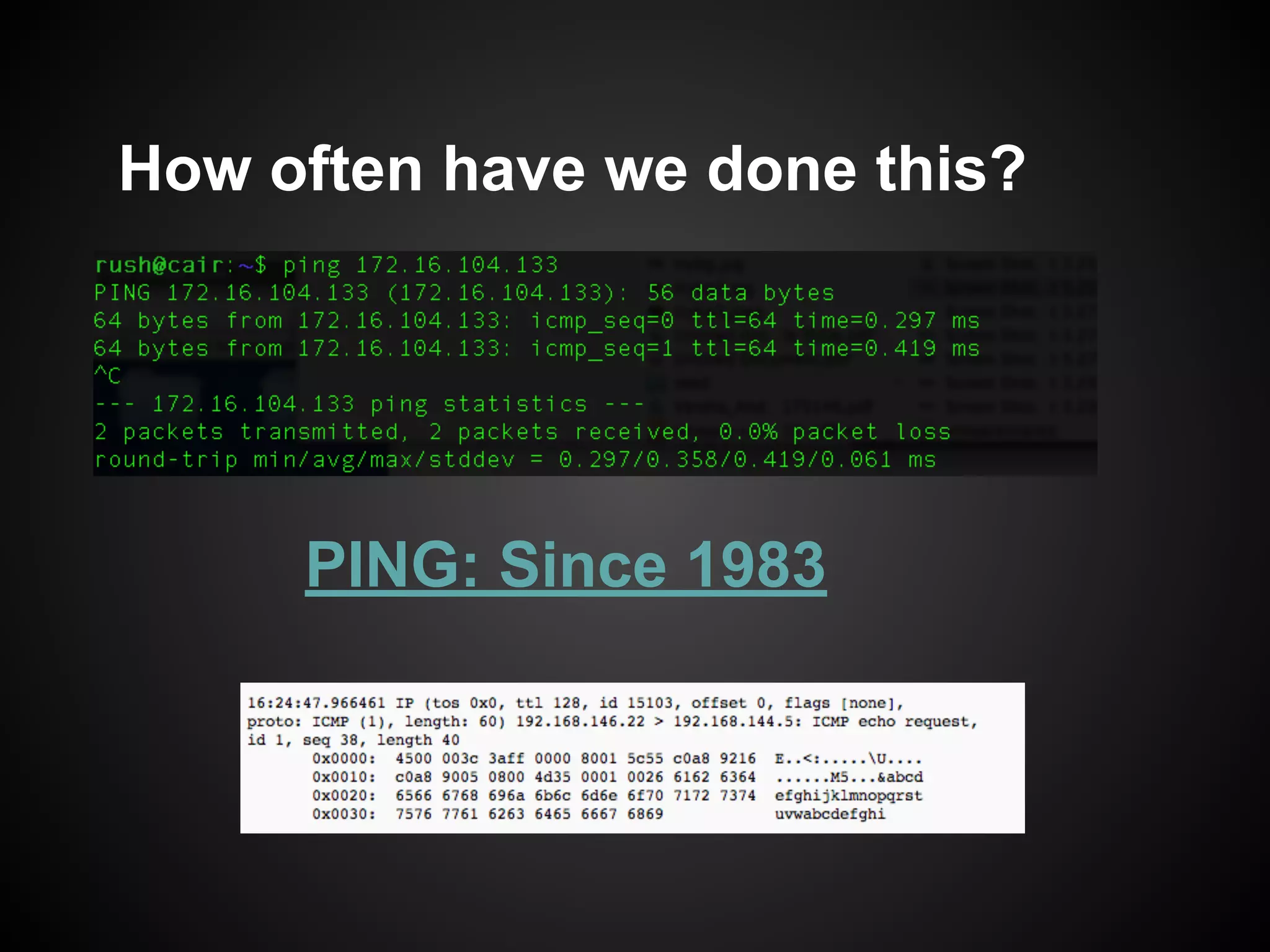
PING: Since 1983
How often have we done this?
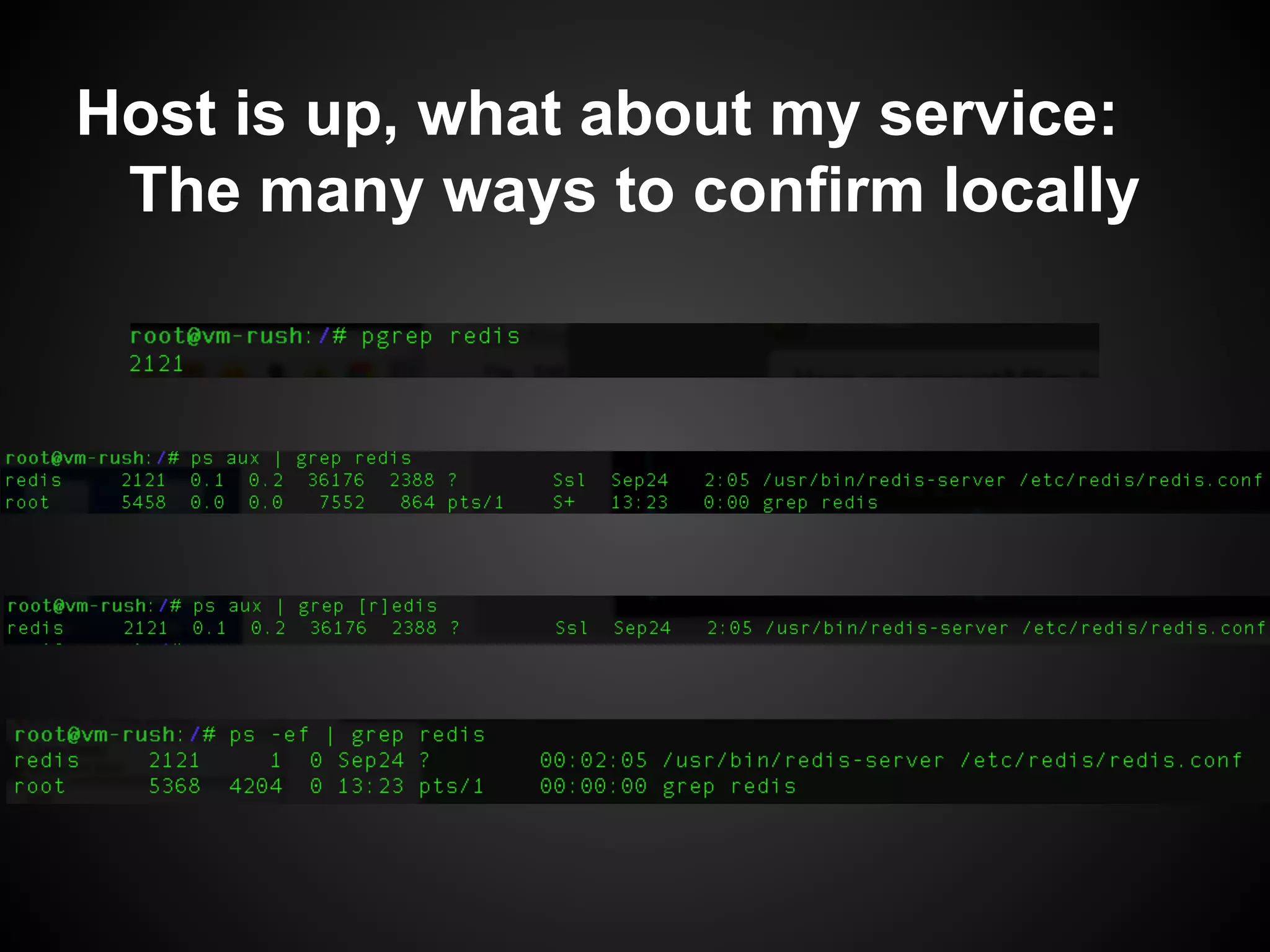
Host is up, what about my service:
The many ways to confirm locally
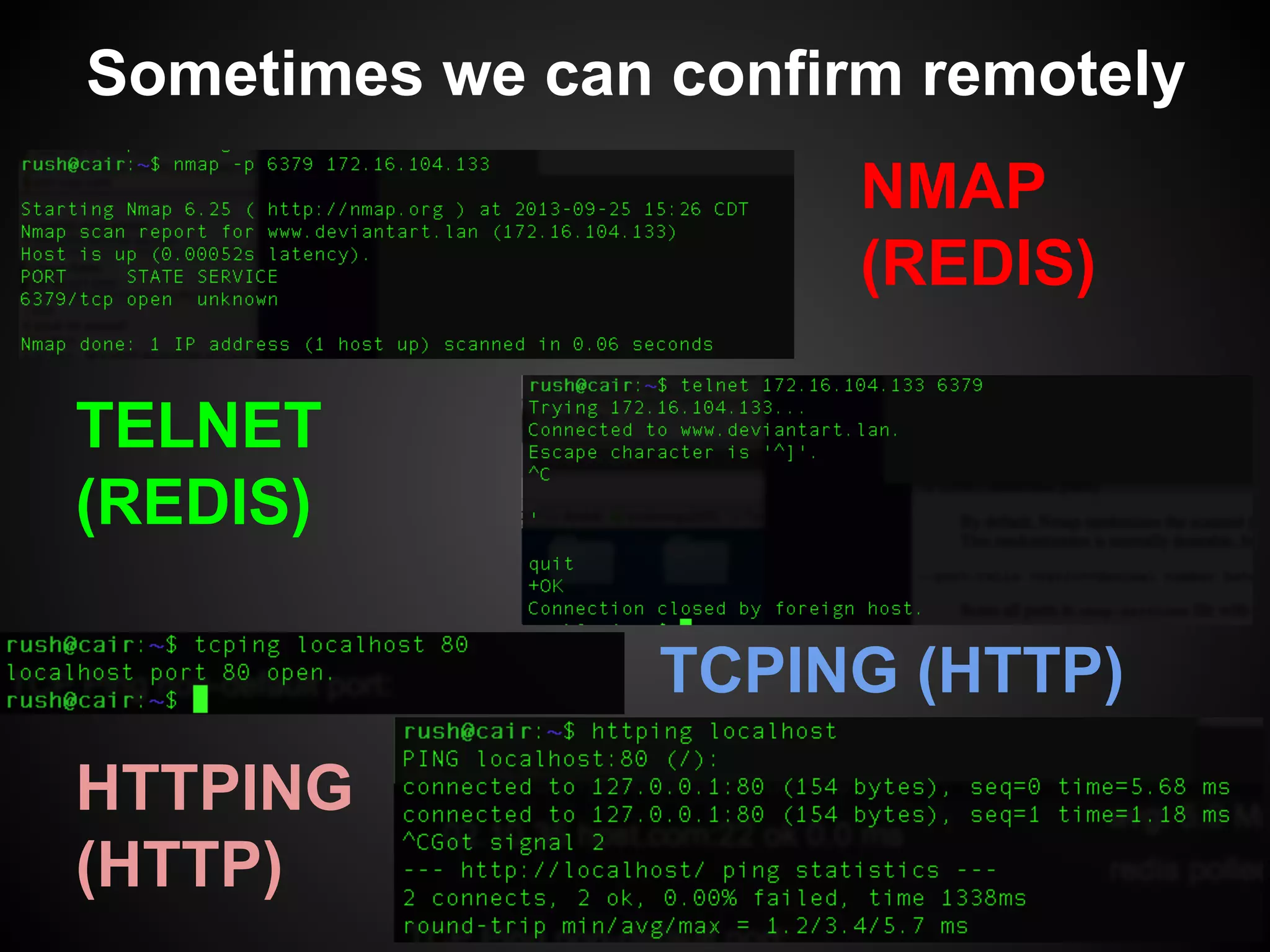
NMAP
(REDIS)
Sometimes we can confirm remotely
TELNET
(REDIS)
TCPING (HTTP)
HTTPING
(HTTP)
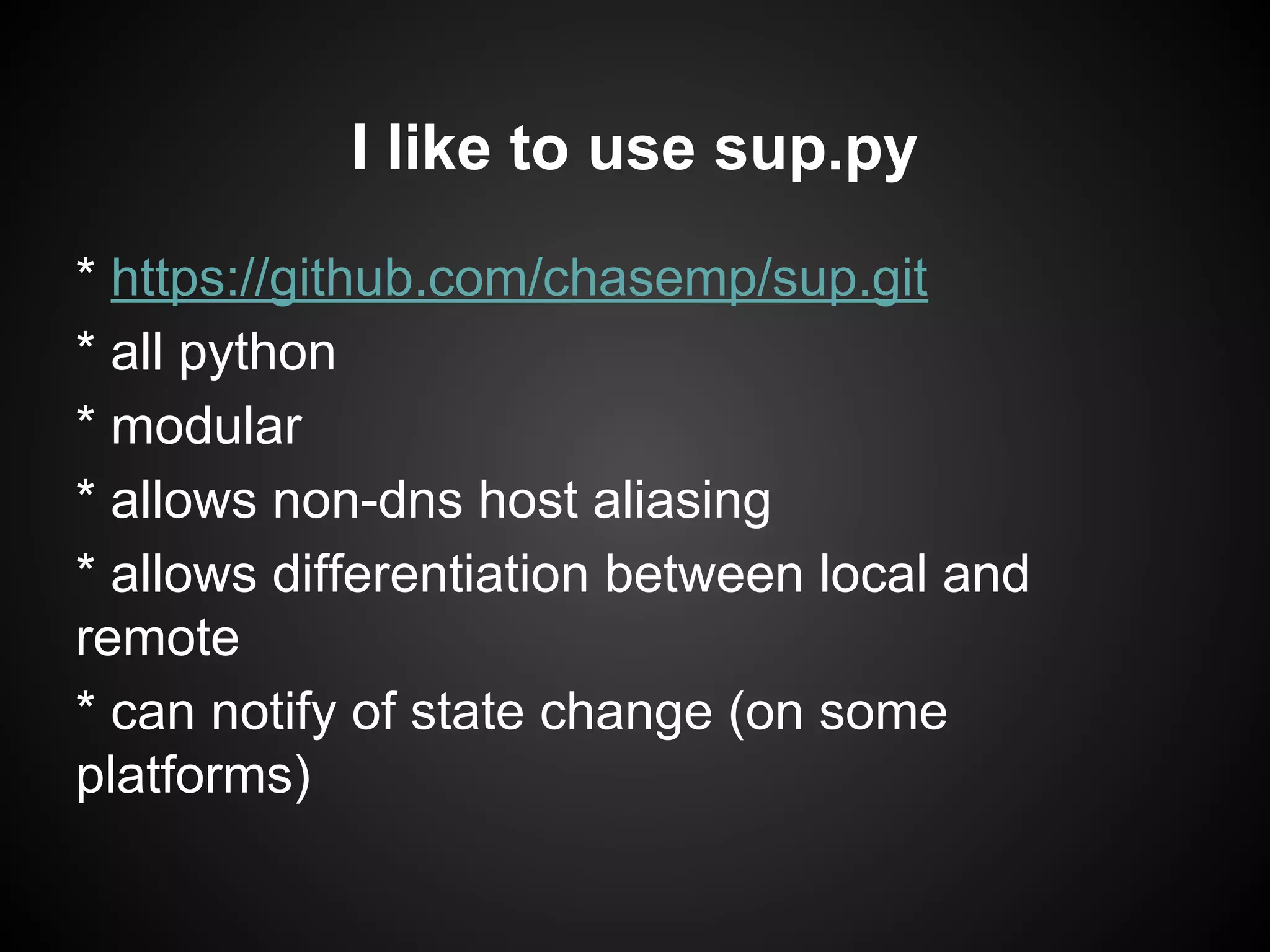
I like to use sup.py
* https://github.com/chasemp/sup.git
* all python
* modular
* allows non-dns host aliasing
* allows differentiation between local and
remote
* can notify of state change (on some
platforms)
squint for usage
like ping but for higher up the stack
usage: sup [-h] [-p] [-b] [-v] [-f] [-vv] [-c COUNT] [-t TIMEOUT]
[-i INTERVAL] [-m MODE]
site
ping up the stack
positional arguments:
site url or ip of site to manage
optional arguments:
-h, --help show this help message and exit
-p show popups
-b broadcast messages
-v verbose
-f flood as many requests as possible
-vv very verbose
-c COUNT set count
-t TIMEOUT main timeout
-i INTERVAL interval between polls
-m MODE Check type to use. Available: tcp http smtp ntp memcached icmp
redis
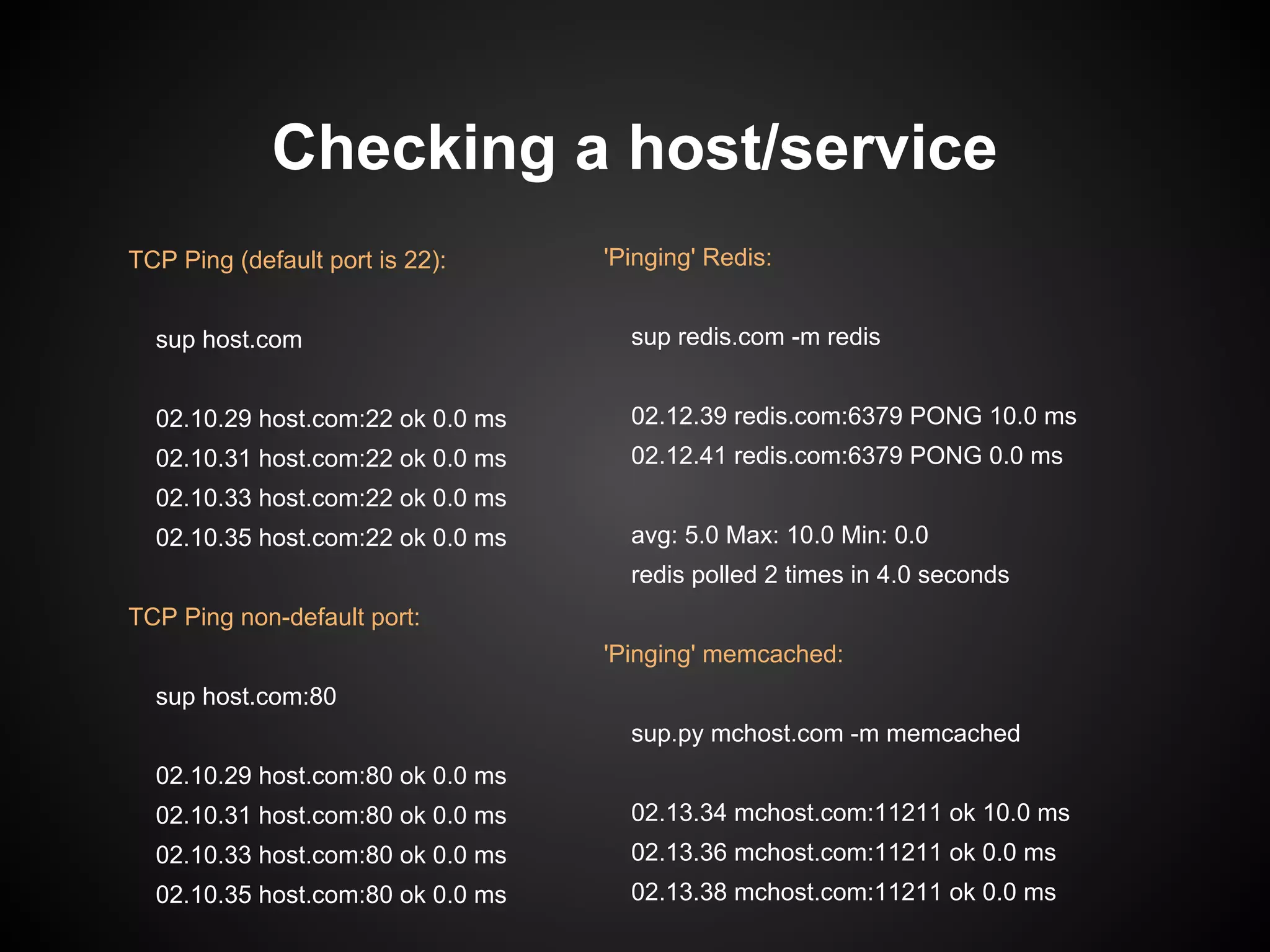
Checking a host/service
'Pinging' Redis:
sup redis.com -m redis
02.12.39 redis.com:6379 PONG 10.0 ms
02.12.41 redis.com:6379 PONG 0.0 ms
avg: 5.0 Max: 10.0 Min: 0.0
redis polled 2 times in 4.0 seconds
'Pinging' memcached:
sup.py mchost.com -m memcached
02.13.34 mchost.com:11211 ok 10.0 ms
02.13.36 mchost.com:11211 ok 0.0 ms
02.13.38 mchost.com:11211 ok 0.0 ms
TCP Ping (default port is 22):
sup host.com
02.10.29 host.com:22 ok 0.0 ms
02.10.31 host.com:22 ok 0.0 ms
02.10.33 host.com:22 ok 0.0 ms
02.10.35 host.com:22 ok 0.0 ms
TCP Ping non-default port:
sup host.com:80
02.10.29 host.com:80 ok 0.0 ms
02.10.31 host.com:80 ok 0.0 ms
02.10.33 host.com:80 ok 0.0 ms
02.10.35 host.com:80 ok 0.0 ms
sup can notify you of state changes.
Run sup tcping in background with 'broadcast'
enabled:
sup host.com -b &
[1] 25420
02.14.50 host.com:22 ok 0.0 ms
02.14.52 host.com:22 ok 0.0 ms
Broadcast Message from root@idle34
(/dev/pts/0) at 14:14 ...
02.14.54 host.com:22 timeout 0.0 ms
sup can also do a GUI popup if X is installed:
sup host.com -p &
90’s INI file: ✓
[default]
localnet = 192.,10. #all 192 and 10 addresses use local monitor
localmon = tcp #all local use this monitor
remotemon = http #all non-local use this monitor
[subs]
google = www.google.com
l = localhost
[tcp]
port = 80
sup l
05.06.58 localhost:22 failed 0.265 ms
05.06.59 localhost:22 failed 0.792 ms
sup google
05.21.27 www.google.com:80 200 OK 5.664 ms
05.21.29 www.google.com:80 200 OK 6.117 ms
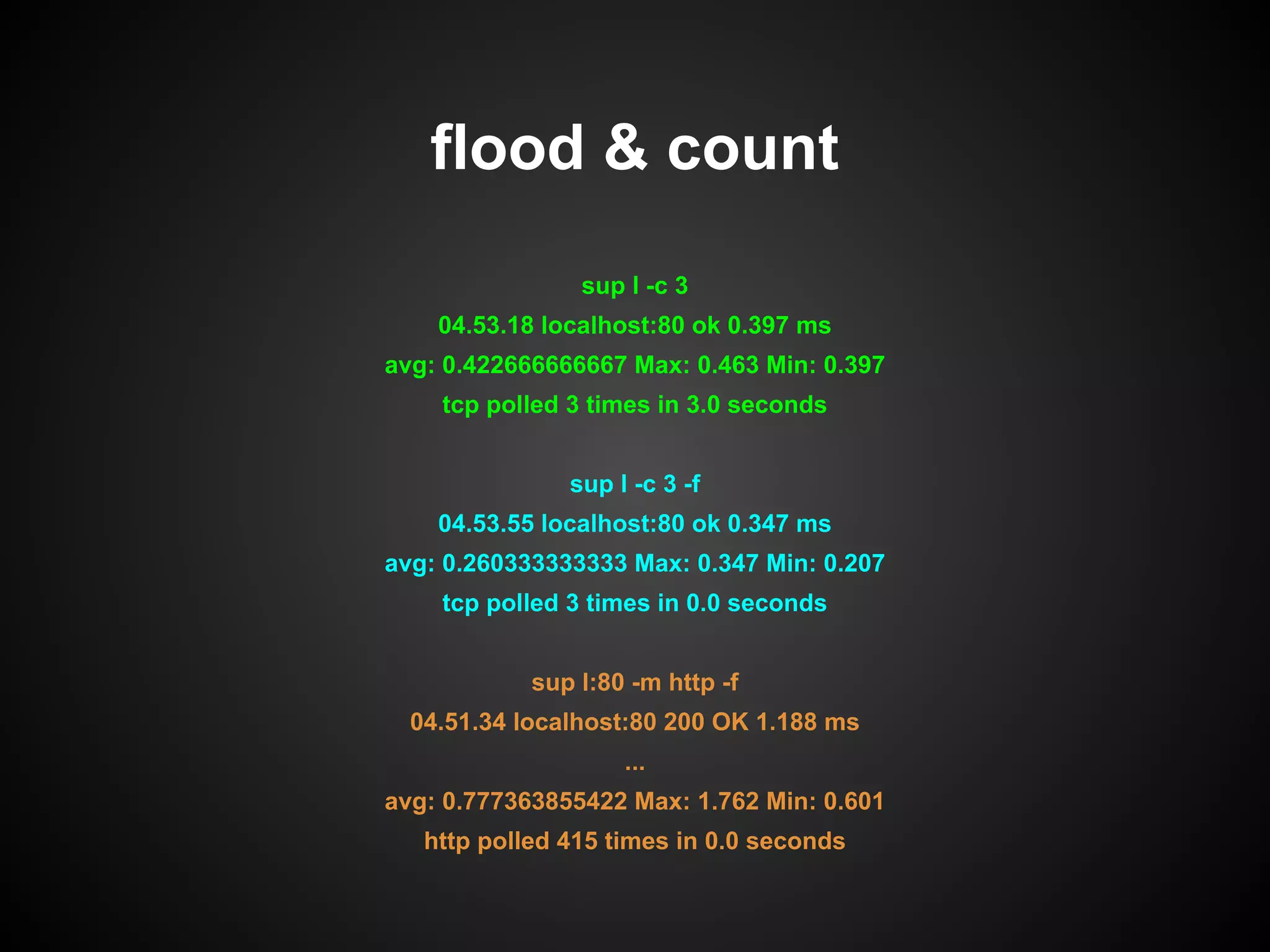
flood & count
sup l -c 3
04.53.18 localhost:80 ok 0.397 ms
avg: 0.422666666667 Max: 0.463 Min: 0.397
tcp polled 3 times in 3.0 seconds
sup l -c 3 -f
04.53.55 localhost:80 ok 0.347 ms
avg: 0.260333333333 Max: 0.347 Min: 0.207
tcp polled 3 times in 0.0 seconds
sup l:80 -m http -f
04.51.34 localhost:80 200 OK 1.188 ms
...
avg: 0.777363855422 Max: 1.762 Min: 0.601
http polled 415 times in 0.0 seconds
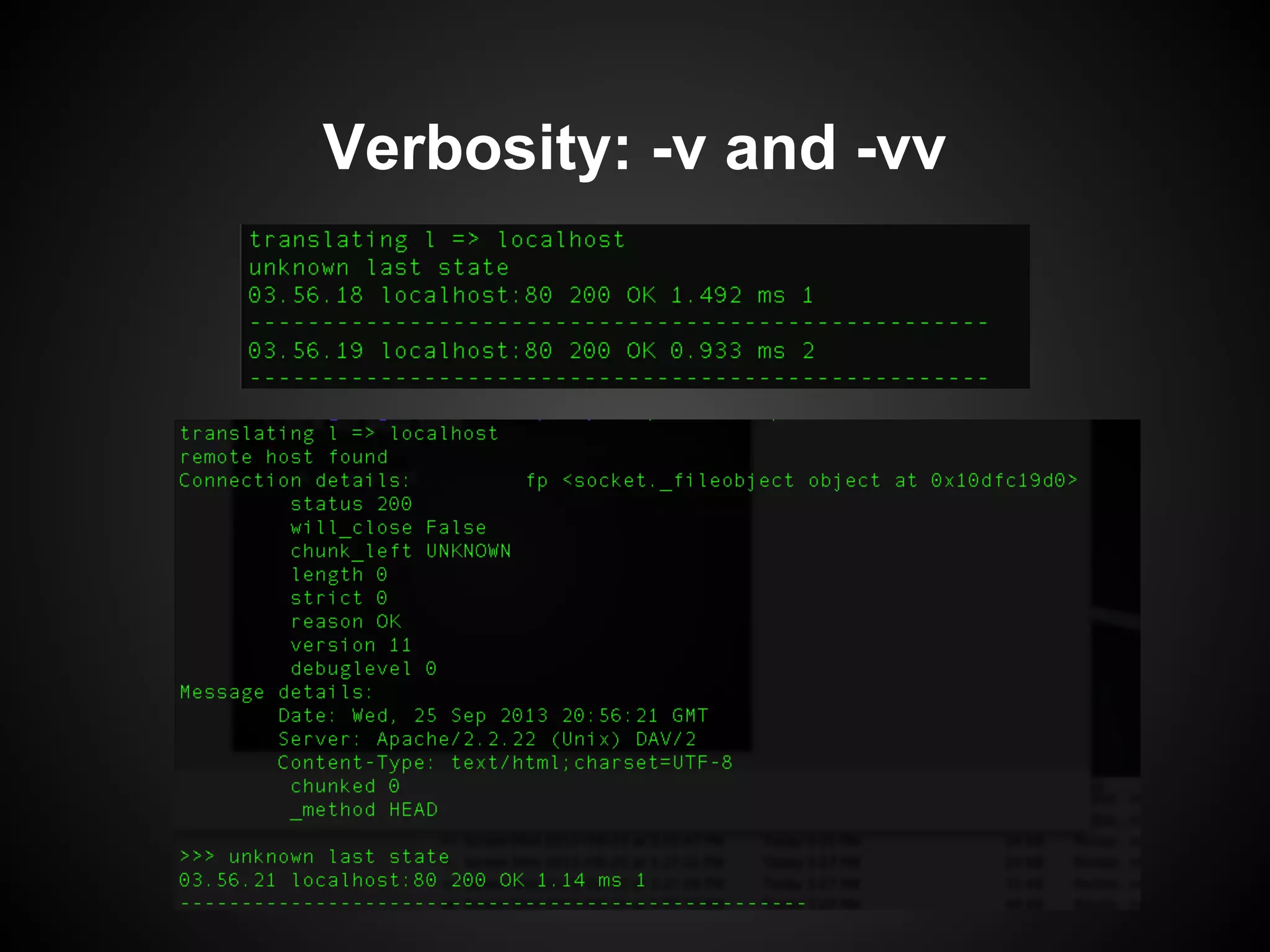
Verbosity: -v and -vv
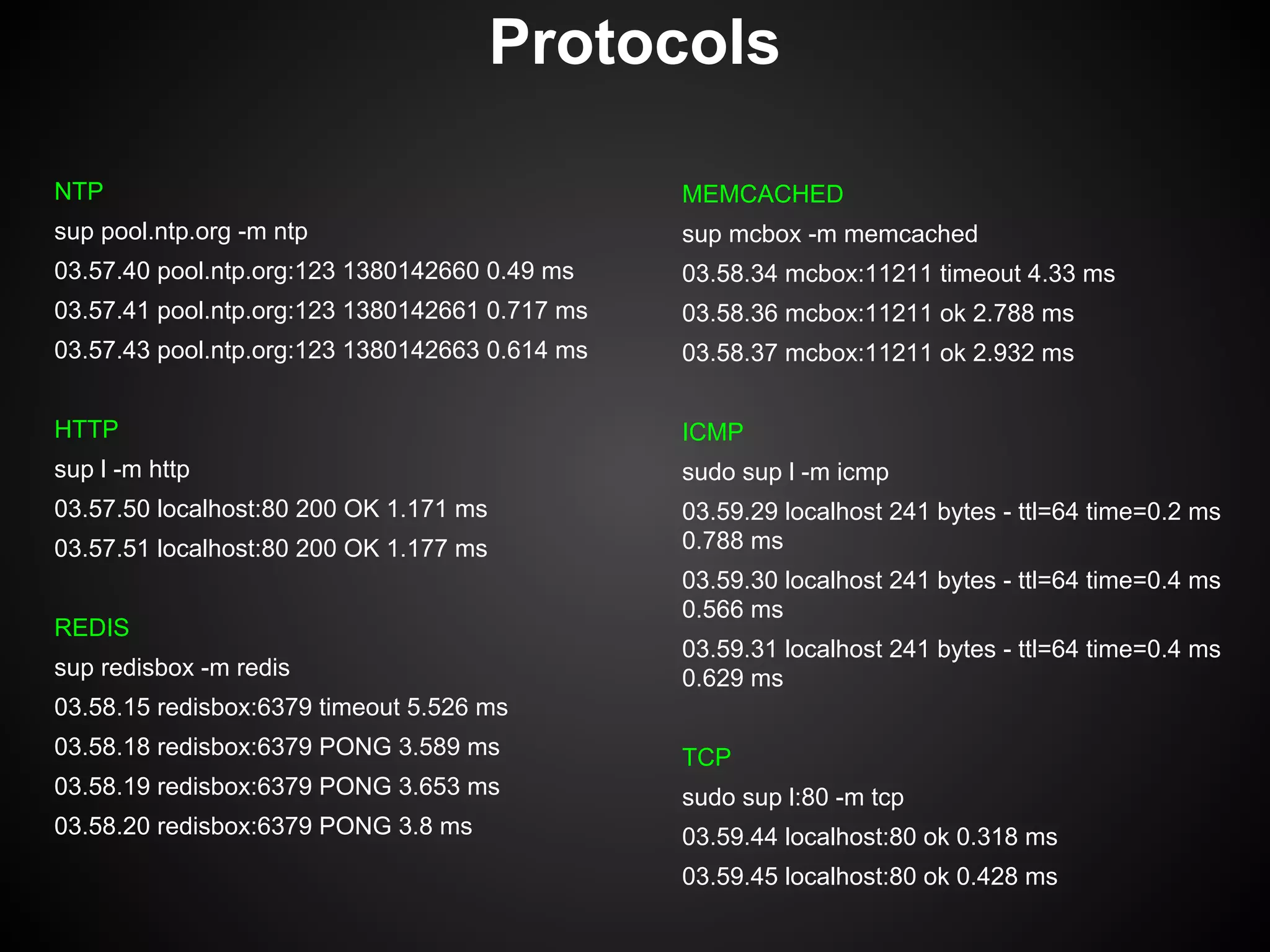
Protocols
NTP
sup pool.ntp.org -m ntp
03.57.40 pool.ntp.org:123 1380142660 0.49 ms
03.57.41 pool.ntp.org:123 1380142661 0.717 ms
03.57.43 pool.ntp.org:123 1380142663 0.614 ms
HTTP
sup l -m http
03.57.50 localhost:80 200 OK 1.171 ms
03.57.51 localhost:80 200 OK 1.177 ms
REDIS
sup redisbox -m redis
03.58.15 redisbox:6379 timeout 5.526 ms
03.58.18 redisbox:6379 PONG 3.589 ms
03.58.19 redisbox:6379 PONG 3.653 ms
03.58.20 redisbox:6379 PONG 3.8 ms
MEMCACHED
sup mcbox -m memcached
03.58.34 mcbox:11211 timeout 4.33 ms
03.58.36 mcbox:11211 ok 2.788 ms
03.58.37 mcbox:11211 ok 2.932 ms
ICMP
sudo sup l -m icmp
03.59.29 localhost 241 bytes - ttl=64 time=0.2 ms
0.788 ms
03.59.30 localhost 241 bytes - ttl=64 time=0.4 ms
0.566 ms
03.59.31 localhost 241 bytes - ttl=64 time=0.4 ms
0.629 ms
TCP
sudo sup l:80 -m tcp
03.59.44 localhost:80 ok 0.318 ms
03.59.45 localhost:80 ok 0.428 ms

Sup intro

  • 1.
    Sup.py ping like functionalityfor higher up the stack chasemp@gmail.com https://github.com/chasemp
  • 2.
    PING: Since 1983 Howoften have we done this?
  • 3.
    Host is up,what about my service: The many ways to confirm locally
  • 4.
    NMAP (REDIS) Sometimes we canconfirm remotely TELNET (REDIS) TCPING (HTTP) HTTPING (HTTP)
  • 5.
    I like touse sup.py * https://github.com/chasemp/sup.git * all python * modular * allows non-dns host aliasing * allows differentiation between local and remote * can notify of state change (on some platforms)
  • 6.
    squint for usage likeping but for higher up the stack usage: sup [-h] [-p] [-b] [-v] [-f] [-vv] [-c COUNT] [-t TIMEOUT] [-i INTERVAL] [-m MODE] site ping up the stack positional arguments: site url or ip of site to manage optional arguments: -h, --help show this help message and exit -p show popups -b broadcast messages -v verbose -f flood as many requests as possible -vv very verbose -c COUNT set count -t TIMEOUT main timeout -i INTERVAL interval between polls -m MODE Check type to use. Available: tcp http smtp ntp memcached icmp redis
  • 7.
    Checking a host/service 'Pinging'Redis: sup redis.com -m redis 02.12.39 redis.com:6379 PONG 10.0 ms 02.12.41 redis.com:6379 PONG 0.0 ms avg: 5.0 Max: 10.0 Min: 0.0 redis polled 2 times in 4.0 seconds 'Pinging' memcached: sup.py mchost.com -m memcached 02.13.34 mchost.com:11211 ok 10.0 ms 02.13.36 mchost.com:11211 ok 0.0 ms 02.13.38 mchost.com:11211 ok 0.0 ms TCP Ping (default port is 22): sup host.com 02.10.29 host.com:22 ok 0.0 ms 02.10.31 host.com:22 ok 0.0 ms 02.10.33 host.com:22 ok 0.0 ms 02.10.35 host.com:22 ok 0.0 ms TCP Ping non-default port: sup host.com:80 02.10.29 host.com:80 ok 0.0 ms 02.10.31 host.com:80 ok 0.0 ms 02.10.33 host.com:80 ok 0.0 ms 02.10.35 host.com:80 ok 0.0 ms
  • 8.
    sup can notifyyou of state changes. Run sup tcping in background with 'broadcast' enabled: sup host.com -b & [1] 25420 02.14.50 host.com:22 ok 0.0 ms 02.14.52 host.com:22 ok 0.0 ms Broadcast Message from root@idle34 (/dev/pts/0) at 14:14 ... 02.14.54 host.com:22 timeout 0.0 ms sup can also do a GUI popup if X is installed: sup host.com -p &
  • 9.
    90’s INI file:✓ [default] localnet = 192.,10. #all 192 and 10 addresses use local monitor localmon = tcp #all local use this monitor remotemon = http #all non-local use this monitor [subs] google = www.google.com l = localhost [tcp] port = 80 sup l 05.06.58 localhost:22 failed 0.265 ms 05.06.59 localhost:22 failed 0.792 ms sup google 05.21.27 www.google.com:80 200 OK 5.664 ms 05.21.29 www.google.com:80 200 OK 6.117 ms
  • 10.
    flood & count supl -c 3 04.53.18 localhost:80 ok 0.397 ms avg: 0.422666666667 Max: 0.463 Min: 0.397 tcp polled 3 times in 3.0 seconds sup l -c 3 -f 04.53.55 localhost:80 ok 0.347 ms avg: 0.260333333333 Max: 0.347 Min: 0.207 tcp polled 3 times in 0.0 seconds sup l:80 -m http -f 04.51.34 localhost:80 200 OK 1.188 ms ... avg: 0.777363855422 Max: 1.762 Min: 0.601 http polled 415 times in 0.0 seconds
  • 11.
  • 12.
    Protocols NTP sup pool.ntp.org -mntp 03.57.40 pool.ntp.org:123 1380142660 0.49 ms 03.57.41 pool.ntp.org:123 1380142661 0.717 ms 03.57.43 pool.ntp.org:123 1380142663 0.614 ms HTTP sup l -m http 03.57.50 localhost:80 200 OK 1.171 ms 03.57.51 localhost:80 200 OK 1.177 ms REDIS sup redisbox -m redis 03.58.15 redisbox:6379 timeout 5.526 ms 03.58.18 redisbox:6379 PONG 3.589 ms 03.58.19 redisbox:6379 PONG 3.653 ms 03.58.20 redisbox:6379 PONG 3.8 ms MEMCACHED sup mcbox -m memcached 03.58.34 mcbox:11211 timeout 4.33 ms 03.58.36 mcbox:11211 ok 2.788 ms 03.58.37 mcbox:11211 ok 2.932 ms ICMP sudo sup l -m icmp 03.59.29 localhost 241 bytes - ttl=64 time=0.2 ms 0.788 ms 03.59.30 localhost 241 bytes - ttl=64 time=0.4 ms 0.566 ms 03.59.31 localhost 241 bytes - ttl=64 time=0.4 ms 0.629 ms TCP sudo sup l:80 -m tcp 03.59.44 localhost:80 ok 0.318 ms 03.59.45 localhost:80 ok 0.428 ms