Contact us on :
http://vibranttechnologies.co.in/
Contact us on :
http://vibranttechnologies.co.in/
 Introduction
◦ What is Apache Struts?
◦ Overview of traditional JSP/Servlet web applications
 The Model-View-Controller Design Pattern
 Struts’ implementation of the MVC Pattern
◦ ActionServlet
 struts-config.xml
◦ Action Classes
◦ ActionForms
 Validating user input
◦ JSPs and Struts TagLibs
◦ The Model
 Control flow of a typical request to a Struts application
 Additional features
 Summary

Contact us on:
http://vibranttechnologies.co.in/
 Struts is an open-source framework for building more flexible,
maintainable and structured front-ends in Java web applications
 There are two key components in a web application:
◦the data and business logic performed on this data
◦the presentation of data
 Struts
◦helps structuring these components in a Java web app.
◦controls the flow of the web application, strictly
separating these components
◦unifies the interaction between them
 This separation between presentation, business logic and control is
achieved by implementing the Model-View-Controller (MVC)
Design Pattern
Contact us on :
http://vibranttechnologies.co.in/
 Traditionally, there are 3 ways to generate dynamic output (typically HTML or XML) in
Java web applications:
◦ Servlets
 Java classes with some special methods (doGet(), doPost(), …)
 Example: out.println("<H1>" + myString + "</H1>");
 no separation between code and presentation!
◦ JSPs (Java Server Pages)
 HTML (or other) code with embedded Java code (Scriptlets)
 compiled to Servlets when used for the first time
 Example: <H1><% out.println(myString); %></H1>
 better, but still no separation between code and presentation!
◦ JSPs with JSTL (JSP Standard Tag Library)
 JSTL defines a set of tags that can be used within the JSPs
 There are tags for iterations, using JavaBeans, printing
expressions…
 Example: <H1><c:out value="${myBean.myString}"/></H1>
 better readable and thus better maintainability
Contact us on :
http://vibranttechnologies.co.in/
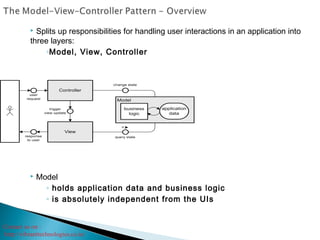
 Splits up responsibilities for handling user interactions in an application into
three layers:
◦Model, View, Controller
 Model
◦ holds application data and business logic
◦ is absolutely independent from the UIs
Contact us on :
http://vibranttechnologies.co.in/
 View
◦ presentation of parts of the Model to the user
◦ independent from the internal implementation of the Model
◦ there can be different Views presenting the same Model data
 Controller
◦ “bridge” between Model and View
◦ controls the flow of the application
 receives/interprets user input
 performs operations on the Model
 triggers View update
 Benefits:
◦ better maintainability and testability of applications
◦ ability to easily develop different kinds of UIs (e.g. console,
GUI, …)
◦ separation of different tasks in development
◦ code reusability
Contact us on :
http://vibranttechnologies.co.in/
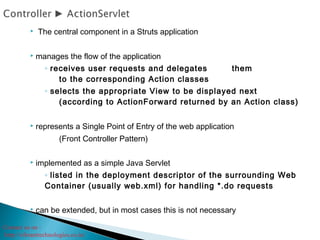
 The central component in a Struts application
 manages the flow of the application
◦ receives user requests and delegates them
to the corresponding Action classes
◦ selects the appropriate View to be displayed next
(according to ActionForward returned by an Action class)
 represents a Single Point of Entry of the web application
(Front Controller Pattern)
 implemented as a simple Java Servlet
◦ listed in the deployment descriptor of the surrounding Web
Container (usually web.xml) for handling *.do requests
 can be extended, but in most cases this is not necessary
Contact us on :
http://vibranttechnologies.co.in/
 Struts’ main configuration file
◦used by the ActionServlet
 defines the control flow, the mapping between
components and other global options:
◦ action-mappings
◦ form-beans
◦ forwards
◦ plug-ins
◦…
 can be considered a Struts
internal deployment descriptor
Example:
<struts-config>
<!– [...] -->
<action-mappings>
<action path="/login"
type="app.LoginAction">
<forward name="failure"
path="/login.jsp" />
<forward name="success"
path="/welcome.jsp" />
</action>
</action-mappings>
<!– [...] -->
</struts-config>
Contact us on :
http://vibranttechnologies.co.in/
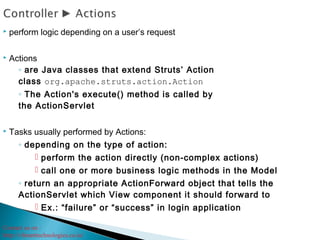
 perform logic depending on a user’s request
 Actions
◦ are Java classes that extend Struts’ Action
class org.apache.struts.action.Action
◦ The Action's execute() method is called by
the ActionServlet
 Tasks usually performed by Actions:
◦ depending on the type of action:
 perform the action directly (non-complex actions)
 call one or more business logic methods in the Model
◦ return an appropriate ActionForward object that tells the
ActionServlet which View component it should forward to
 Ex.: “failure” or “success” in login application
Contact us on :
http://vibranttechnologies.co.in/
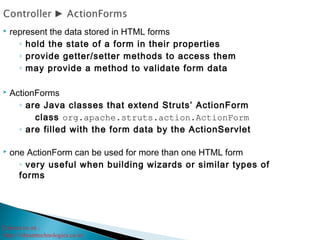
 represent the data stored in HTML forms
◦ hold the state of a form in their properties
◦ provide getter/setter methods to access them
◦ may provide a method to validate form data
 ActionForms
◦ are Java classes that extend Struts’ ActionForm
class org.apache.struts.action.ActionForm
◦ are filled with the form data by the ActionServlet
 one ActionForm can be used for more than one HTML form
◦ very useful when building wizards or similar types of
forms
Contact us on :
http://vibranttechnologies.co.in/
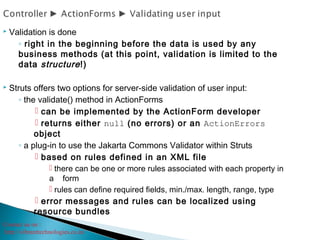
 Validation is done
◦ right in the beginning before the data is used by any
business methods (at this point, validation is limited to the
data structure!)
 Struts offers two options for server-side validation of user input:
◦ the validate() method in ActionForms
 can be implemented by the ActionForm developer
 returns either null (no errors) or an ActionErrors
object
◦ a plug-in to use the Jakarta Commons Validator within Struts
 based on rules defined in an XML file
 there can be one or more rules associated with each property in
a form
 rules can define required fields, min./max. length, range, type
 error messages and rules can be localized using
resource bundles
Contact us on :
http://vibranttechnologies.co.in/
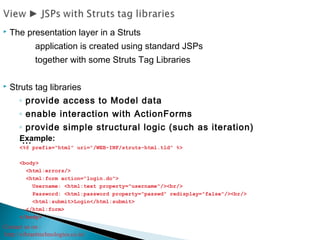
 The presentation layer in a Struts
application is created using standard JSPs
together with some Struts Tag Libraries
 Struts tag libraries
◦ provide access to Model data
◦ enable interaction with ActionForms
◦ provide simple structural logic (such as iteration)
◦...Example:
<%@ prefix="html" uri="/WEB-INF/struts-html.tld" %>
<body>
<html:errors/>
<html:form action="login.do">
Username: <html:text property="username"/><br/>
Password: <html:password property="passwd" redisplay="false"/><br/>
<html:submit>Login</html:submit>
</html:form>
</body>
Contact us on :
http://vibranttechnologies.co.in/
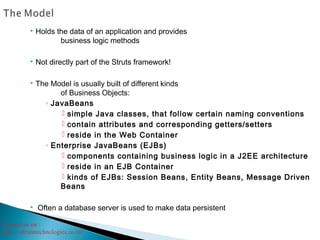
 Holds the data of an application and provides
business logic methods
 Not directly part of the Struts framework!
 The Model is usually built of different kinds
of Business Objects:
◦ JavaBeans
 simple Java classes, that follow certain naming conventions
 contain attributes and corresponding getters/setters
 reside in the Web Container
◦ Enterprise JavaBeans (EJBs)
 components containing business logic in a J2EE architecture
 reside in an EJB Container
 kinds of EJBs: Session Beans, Entity Beans, Message Driven
Beans
 Often a database server is used to make data persistent
Contact us on :
http://vibranttechnologies.co.in/
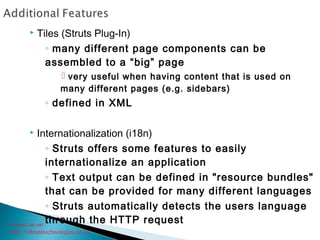
 Tiles (Struts Plug-In)
◦ many different page components can be
assembled to a “big” page
 very useful when having content that is used on
many different pages (e.g. sidebars)
◦ defined in XML
 Internationalization (i18n)
◦ Struts offers some features to easily
internationalize an application
◦ Text output can be defined in "resource bundles"
that can be provided for many different languages
◦ Struts automatically detects the users language
through the HTTP request
Contact us on :
http://vibranttechnologies.co.in/
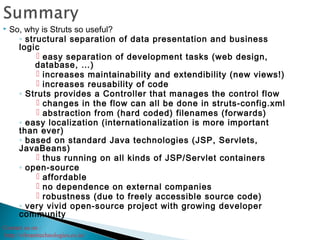
 So, why is Struts so useful?
◦ structural separation of data presentation and business
logic
 easy separation of development tasks (web design,
database, …)
 increases maintainability and extendibility (new views!)
 increases reusability of code
◦ Struts provides a Controller that manages the control flow
 changes in the flow can all be done in struts-config.xml
 abstraction from (hard coded) filenames (forwards)
◦ easy localization (internationalization is more important
than ever)
◦ based on standard Java technologies (JSP, Servlets,
JavaBeans)
 thus running on all kinds of JSP/Servlet containers
◦ open-source
 affordable
 no dependence on external companies
 robustness (due to freely accessible source code)
◦ very vivid open-source project with growing developer
community
Contact us on :
http://vibranttechnologies.co.in/

Struts course material

  • 2.
    Contact us on: http://vibranttechnologies.co.in/
  • 3.
    Contact us on: http://vibranttechnologies.co.in/  Introduction ◦ What is Apache Struts? ◦ Overview of traditional JSP/Servlet web applications  The Model-View-Controller Design Pattern  Struts’ implementation of the MVC Pattern ◦ ActionServlet  struts-config.xml ◦ Action Classes ◦ ActionForms  Validating user input ◦ JSPs and Struts TagLibs ◦ The Model  Control flow of a typical request to a Struts application  Additional features  Summary 
  • 4.
    Contact us on: http://vibranttechnologies.co.in/ Struts is an open-source framework for building more flexible, maintainable and structured front-ends in Java web applications  There are two key components in a web application: ◦the data and business logic performed on this data ◦the presentation of data  Struts ◦helps structuring these components in a Java web app. ◦controls the flow of the web application, strictly separating these components ◦unifies the interaction between them  This separation between presentation, business logic and control is achieved by implementing the Model-View-Controller (MVC) Design Pattern
  • 5.
    Contact us on: http://vibranttechnologies.co.in/  Traditionally, there are 3 ways to generate dynamic output (typically HTML or XML) in Java web applications: ◦ Servlets  Java classes with some special methods (doGet(), doPost(), …)  Example: out.println("<H1>" + myString + "</H1>");  no separation between code and presentation! ◦ JSPs (Java Server Pages)  HTML (or other) code with embedded Java code (Scriptlets)  compiled to Servlets when used for the first time  Example: <H1><% out.println(myString); %></H1>  better, but still no separation between code and presentation! ◦ JSPs with JSTL (JSP Standard Tag Library)  JSTL defines a set of tags that can be used within the JSPs  There are tags for iterations, using JavaBeans, printing expressions…  Example: <H1><c:out value="${myBean.myString}"/></H1>  better readable and thus better maintainability
  • 6.
    Contact us on: http://vibranttechnologies.co.in/  Splits up responsibilities for handling user interactions in an application into three layers: ◦Model, View, Controller  Model ◦ holds application data and business logic ◦ is absolutely independent from the UIs
  • 7.
    Contact us on: http://vibranttechnologies.co.in/  View ◦ presentation of parts of the Model to the user ◦ independent from the internal implementation of the Model ◦ there can be different Views presenting the same Model data  Controller ◦ “bridge” between Model and View ◦ controls the flow of the application  receives/interprets user input  performs operations on the Model  triggers View update  Benefits: ◦ better maintainability and testability of applications ◦ ability to easily develop different kinds of UIs (e.g. console, GUI, …) ◦ separation of different tasks in development ◦ code reusability
  • 8.
    Contact us on: http://vibranttechnologies.co.in/  The central component in a Struts application  manages the flow of the application ◦ receives user requests and delegates them to the corresponding Action classes ◦ selects the appropriate View to be displayed next (according to ActionForward returned by an Action class)  represents a Single Point of Entry of the web application (Front Controller Pattern)  implemented as a simple Java Servlet ◦ listed in the deployment descriptor of the surrounding Web Container (usually web.xml) for handling *.do requests  can be extended, but in most cases this is not necessary
  • 9.
    Contact us on: http://vibranttechnologies.co.in/  Struts’ main configuration file ◦used by the ActionServlet  defines the control flow, the mapping between components and other global options: ◦ action-mappings ◦ form-beans ◦ forwards ◦ plug-ins ◦…  can be considered a Struts internal deployment descriptor Example: <struts-config> <!– [...] --> <action-mappings> <action path="/login" type="app.LoginAction"> <forward name="failure" path="/login.jsp" /> <forward name="success" path="/welcome.jsp" /> </action> </action-mappings> <!– [...] --> </struts-config>
  • 10.
    Contact us on: http://vibranttechnologies.co.in/  perform logic depending on a user’s request  Actions ◦ are Java classes that extend Struts’ Action class org.apache.struts.action.Action ◦ The Action's execute() method is called by the ActionServlet  Tasks usually performed by Actions: ◦ depending on the type of action:  perform the action directly (non-complex actions)  call one or more business logic methods in the Model ◦ return an appropriate ActionForward object that tells the ActionServlet which View component it should forward to  Ex.: “failure” or “success” in login application
  • 11.
    Contact us on: http://vibranttechnologies.co.in/  represent the data stored in HTML forms ◦ hold the state of a form in their properties ◦ provide getter/setter methods to access them ◦ may provide a method to validate form data  ActionForms ◦ are Java classes that extend Struts’ ActionForm class org.apache.struts.action.ActionForm ◦ are filled with the form data by the ActionServlet  one ActionForm can be used for more than one HTML form ◦ very useful when building wizards or similar types of forms
  • 12.
    Contact us on: http://vibranttechnologies.co.in/  Validation is done ◦ right in the beginning before the data is used by any business methods (at this point, validation is limited to the data structure!)  Struts offers two options for server-side validation of user input: ◦ the validate() method in ActionForms  can be implemented by the ActionForm developer  returns either null (no errors) or an ActionErrors object ◦ a plug-in to use the Jakarta Commons Validator within Struts  based on rules defined in an XML file  there can be one or more rules associated with each property in a form  rules can define required fields, min./max. length, range, type  error messages and rules can be localized using resource bundles
  • 13.
    Contact us on: http://vibranttechnologies.co.in/  The presentation layer in a Struts application is created using standard JSPs together with some Struts Tag Libraries  Struts tag libraries ◦ provide access to Model data ◦ enable interaction with ActionForms ◦ provide simple structural logic (such as iteration) ◦...Example: <%@ prefix="html" uri="/WEB-INF/struts-html.tld" %> <body> <html:errors/> <html:form action="login.do"> Username: <html:text property="username"/><br/> Password: <html:password property="passwd" redisplay="false"/><br/> <html:submit>Login</html:submit> </html:form> </body>
  • 14.
    Contact us on: http://vibranttechnologies.co.in/  Holds the data of an application and provides business logic methods  Not directly part of the Struts framework!  The Model is usually built of different kinds of Business Objects: ◦ JavaBeans  simple Java classes, that follow certain naming conventions  contain attributes and corresponding getters/setters  reside in the Web Container ◦ Enterprise JavaBeans (EJBs)  components containing business logic in a J2EE architecture  reside in an EJB Container  kinds of EJBs: Session Beans, Entity Beans, Message Driven Beans  Often a database server is used to make data persistent
  • 15.
    Contact us on: http://vibranttechnologies.co.in/  Tiles (Struts Plug-In) ◦ many different page components can be assembled to a “big” page  very useful when having content that is used on many different pages (e.g. sidebars) ◦ defined in XML  Internationalization (i18n) ◦ Struts offers some features to easily internationalize an application ◦ Text output can be defined in "resource bundles" that can be provided for many different languages ◦ Struts automatically detects the users language through the HTTP request
  • 16.
    Contact us on: http://vibranttechnologies.co.in/  So, why is Struts so useful? ◦ structural separation of data presentation and business logic  easy separation of development tasks (web design, database, …)  increases maintainability and extendibility (new views!)  increases reusability of code ◦ Struts provides a Controller that manages the control flow  changes in the flow can all be done in struts-config.xml  abstraction from (hard coded) filenames (forwards) ◦ easy localization (internationalization is more important than ever) ◦ based on standard Java technologies (JSP, Servlets, JavaBeans)  thus running on all kinds of JSP/Servlet containers ◦ open-source  affordable  no dependence on external companies  robustness (due to freely accessible source code) ◦ very vivid open-source project with growing developer community
  • 18.
    Contact us on: http://vibranttechnologies.co.in/