Introduction to
Java Server Faces(JSF)
Deepak Goyal
Vikas Varma
Sun Microsystems
2
Objective
Understand the basic concepts of
Java Server™ Faces[JSF]
Technology.
 What is and why JSF?
 Architecture Overview
 UI Component Model
 Development Steps
Agenda
4
JavaServer™ Faces (JSF)
Framework Is…
A server side user interface
component framework for Java™
technology-based web applications
5
What is JSF?
● A specification and reference
implementation for a web application
development framework
– Components
– Events
– Validators & converters
– Navigation
– Back-end-data integration
6
Why JSF? (page 1)
● MVC for web applications
● Clean separation of roles
● Easy to use
● Extendable Component and Rendering
architecture
● Support for client device independence
● Standard
● Huge vendor and industry support
7
Why JSF? (page 2)
● JSP and Servlet
– No built-in UI component model
● Struts (I am not saying you should not use Struts)
– No built-in UI component model
– No built-in event model for UI components
– No built-in state management for UI components
– No built-in support of multiple renderers
– Not a standard (despite its popularity)
● Struts and JSF can be used together
8
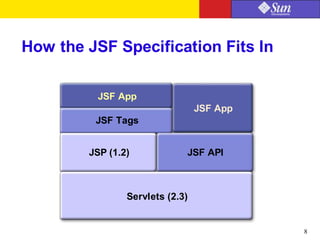
How the JSF Specification Fits In
JSF App
Servlets (2.3)
JSP (1.2) JSF API
JSF Tags
JSF App
 What is and why JSF?
 Architecture Overview
 UI Component Model
 Development Steps
Agenda
10
JSF Architecture [MVC]
HTML
RenderKit
App
Backend
Desktop
Browser
Phone
Front
ctrl
JSF Page
JSF Page
WML
HTML
Server
WML
RenderKit
Request processing Lifecycle
FacesServlet
FacesContext
1.Creates FacesContext
Lifecycle
2.Passes controls to Lifecycle
3. Process FacesContext in various phase
12
Request Processing Lifecycle Phases
Faces
Request Reconstitute
Component
Tree
Apply
Request
Values
Process
Validations
Faces
Response Render
Response
Invoke
Application
Update
Model
Values
13
Request Processing Lifecycle
Faces
Request Reconstitute
Component
Tree
Apply
Request
Values
Process
Events
Process
Validations
Process
Events
Response
Complete
Response
Complete
Render Response
Response
Complete
Response
Complete
Faces
Response Render
Responder
Invoke
Application
Update
Model
Values
Process
Events
Process
Events
Conversion Errors /
Render Response
Validation / Conversion
Errors / Render Response
14
Request Processing Lifecycle
Phases
1.Reconstitute component tree phase
2.Apply request values phase
3.Process validations phase
4.Update model values phase
5.Invoke application phase
6.Render response phase
 What is and why JSF?
 Architecture Overview
 UI Component Model
 Development Steps
Agenda
16
User Interface Component Model
● UI components
● Event handling model
● Conversion and Validation model
● Rendering model
● Page navigation support
UI Components
 UIComponent/UIComponentBase
 Base class for all user interface components
 Standard UIComponent Subclasses
 UICommand, UIForm, UIOutput
 UIGraphic, UIInput, UIPanel, UIParameter
 UISelectBoolean, UISelectMany, UISelectOne
 Example:
<h:inputText id="userNo"
value="#{UserNumberBean.userNumber}"/>
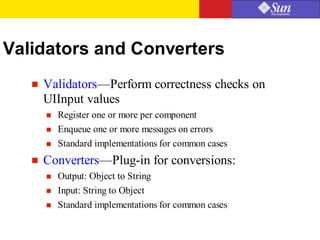
Validators and Converters
 Validators—Perform correctness checks on
UIInput values
 Register one or more per component
 Enqueue one or more messages on errors
 Standard implementations for common cases
 Converters—Plug-in for conversions:
 Output: Object to String
 Input: String to Object
 Standard implementations for common cases
Converters and Validators
Example:
Converters:
<h:input_text valueRef=”testingBean.today”
convertor=”DateTime”/>
Validators:
<h:input_text valueRef=”testingBean.today”
<f:validator_length minimum=”6” maximum='10” />
Rendering Model
 Renderers-Adapt components to a specific markup
language
 Decoding
 Encoding
 RenderKits—Library of Renderers
 Map component classes to component tags
 Is a custom tag library
 Basic HTML RenderKit
Events and Listeners
 Follows JavaBeans™ Specification design and
naming patterns
 Standard events and listeners
 ActionEvent—UICommand component activated
by the user
 ValueChangedEvent—UIInput component whose
value was just changed
Navigation Model
 Application developer responsibility
 Defined in Application configuration file
(Facesconfig.xml)
 Navigation rules
 Determine which page to go.
 Navigation case
Navigation Model
<navigation-rule>
<from-tree-id>/login.jsp</from-tree-id>
<navigation-case>
<from-outcome>success</from-outcome>
<to-tree-id>/menu.jsp</to-tree-id>
</navigation-case>
<navigation-case>
<from-outcome>failed</from-outcome>
<to-tree-id>/error.jsp</to-tree-id>
</navigation-case>
</navigation-rule>
 What is and why JSF?
 Architecture Overview
 UI Component Model
 Development Steps
Agenda
Steps in Development Process
1. Develop model objects which hold the data
2. Add model objects (managed bean) declarations to
Application Configuration File faces-config.xml
3. Create Pages using UI component and core tags
4. Define Page Navigation in faces-config.xml
5. Configure web.xml
Step1: Develop model Objects
(Managed Bean)
 The model (M) in MVC
 A regular JavaBeans with read/write properties
 May contain application methods and event handlers
 Use to hold data from a UI (page)
 Creation and lifetime is managed by JSF runtime
 application, session, request
 JSF keeps the bean's data in sync with the UI
Step 2. Managed Bean Declaration
(Faces-config.xml)
01 <managed-bean>
02 <managed-bean-name>
03 LoginFormBean
04 </managed-bean-name>
05 <managed-bean-class>
06 myapp.LoginFormBean
07 </managed-bean-class>
08 <managed-bean-scope>
09 request
10 </managed-bean-scope>
11 </managed-bean>
Step 3: Create JSF Pages
 Must include JSF tag library
 HTML and core tags
 All JSF tags must enclosed between a set of view tag
 Use JSF form and form component tags
 <h:input_text> not <input type=”text”>
 <h:command_button> not <input type=”submit”>
 May include validators and event listeners on any form
components
Sample JSF™ Page (login.jsp)
01 <f:view>
02 <f:form formName=”logonForm”>
03 <h:panel_grid columns=”2”>
04 <h:output_text value=”Username:”/>
05 <h:input_text id=”username” length=”16”
06 valueRef=”logonBean.username”/>
07 <h:output_text value=”Password:”/>
08 <h:input_secret id=”password” length=”16”
09 valueRef=”logonBean.password”/>
10 <h:command_button type=”submit”
11 label=”Log On”
12 actionRef=”logonBean.logon”/>
13 <h:command_button type=”reset”
14 label=”Reset”/>
15 </h:panel_grid>
16 </f:form>
17 </f:view>
Binding UI to Managed Bean
<h:input_text id=”userName”
valueRef=”LoginFormBean.userName”/>
<managed-bean>
<managed-bean-name>
LoginFormBean
</managed-bean-name>
<managed-bean-class>
myapp.LoginFormBean
</managed-bean-class>
public class LoginFormBean
...
public void
setUserName(...) {
public String
getUserName(...) {
faces-config.xml
login.jsp
LoginFormBean.java
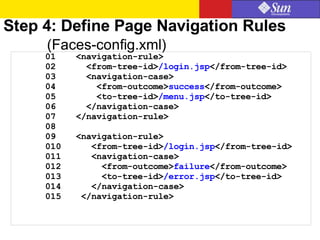
Step 4: Define Page Navigation Rules
(Faces-config.xml)
01 <navigation-rule>
02 <from-tree-id>/login.jsp</from-tree-id>
03 <navigation-case>
04 <from-outcome>success</from-outcome>
05 <to-tree-id>/menu.jsp</to-tree-id>
06 </navigation-case>
07 </navigation-rule>
08
09 <navigation-rule>
010 <from-tree-id>/login.jsp</from-tree-id>
011 <navigation-case>
012 <from-outcome>failure</from-outcome>
013 <to-tree-id>/error.jsp</to-tree-id>
014 </navigation-case>
015 </navigation-rule>
Step 5: Configure (web.xml)
01 <context-param>
02 <param-name>
03 javax.faces.application.CONFIG_FILES
04 </param-name>
05 <param-value>/WEB-INF/faces-config.xml
06 </param-value>
07 </context-param>
08 <servlet>
09 <servlet-name>Faces Servlet</servlet-name>
10 <servlet-class>
11 javax.faces.webapp.FacesServlet</servlet-class>
12 <load-on-startup> 1 </load-on-startup>
13 </servlet>
14 <!-- Faces Servlet Mapping -->
15 <servlet-mapping>
16 <servlet-name>Faces Servlet</servlet-name>
17 <url-pattern>/faces/*</url-pattern>
18 </servlet-mapping>
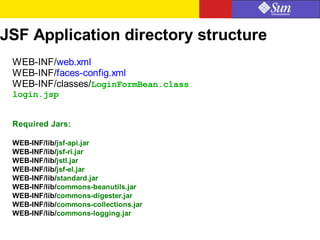
JSF Application directory structure
WEB-INF/web.xml
WEB-INF/faces-config.xml
WEB-INF/classes/LoginFormBean.class
login.jsp
Required Jars:
WEB-INF/lib/jsf-api.jar
WEB-INF/lib/jsf-ri.jar
WEB-INF/lib/jstl.jar
WEB-INF/lib/jsf-el.jar
WEB-INF/lib/standard.jar
WEB-INF/lib/commons-beanutils.jar
WEB-INF/lib/commons-digester.jar
WEB-INF/lib/commons-collections.jar
WEB-INF/lib/commons-logging.jar
 JSF: Server side UI component framework
 MVC
 Developing application in JSF
Summary
Reference
 http://www.jsfcentral.com/reading/index.html
 http://java.sun.com/j2ee/javaserverfaces/
 http://www.jcp.org/en/jsr/detail?id=127
Q&A
deepak.goyal@sun.com
vikas.varma@sun.com

Java server faces

  • 1.
    Introduction to Java ServerFaces(JSF) Deepak Goyal Vikas Varma Sun Microsystems
  • 2.
    2 Objective Understand the basicconcepts of Java Server™ Faces[JSF] Technology.
  • 3.
     What isand why JSF?  Architecture Overview  UI Component Model  Development Steps Agenda
  • 4.
    4 JavaServer™ Faces (JSF) FrameworkIs… A server side user interface component framework for Java™ technology-based web applications
  • 5.
    5 What is JSF? ●A specification and reference implementation for a web application development framework – Components – Events – Validators & converters – Navigation – Back-end-data integration
  • 6.
    6 Why JSF? (page1) ● MVC for web applications ● Clean separation of roles ● Easy to use ● Extendable Component and Rendering architecture ● Support for client device independence ● Standard ● Huge vendor and industry support
  • 7.
    7 Why JSF? (page2) ● JSP and Servlet – No built-in UI component model ● Struts (I am not saying you should not use Struts) – No built-in UI component model – No built-in event model for UI components – No built-in state management for UI components – No built-in support of multiple renderers – Not a standard (despite its popularity) ● Struts and JSF can be used together
  • 8.
    8 How the JSFSpecification Fits In JSF App Servlets (2.3) JSP (1.2) JSF API JSF Tags JSF App
  • 9.
     What isand why JSF?  Architecture Overview  UI Component Model  Development Steps Agenda
  • 10.
  • 11.
    Request processing Lifecycle FacesServlet FacesContext 1.CreatesFacesContext Lifecycle 2.Passes controls to Lifecycle 3. Process FacesContext in various phase
  • 12.
    12 Request Processing LifecyclePhases Faces Request Reconstitute Component Tree Apply Request Values Process Validations Faces Response Render Response Invoke Application Update Model Values
  • 13.
    13 Request Processing Lifecycle Faces RequestReconstitute Component Tree Apply Request Values Process Events Process Validations Process Events Response Complete Response Complete Render Response Response Complete Response Complete Faces Response Render Responder Invoke Application Update Model Values Process Events Process Events Conversion Errors / Render Response Validation / Conversion Errors / Render Response
  • 14.
    14 Request Processing Lifecycle Phases 1.Reconstitutecomponent tree phase 2.Apply request values phase 3.Process validations phase 4.Update model values phase 5.Invoke application phase 6.Render response phase
  • 15.
     What isand why JSF?  Architecture Overview  UI Component Model  Development Steps Agenda
  • 16.
    16 User Interface ComponentModel ● UI components ● Event handling model ● Conversion and Validation model ● Rendering model ● Page navigation support
  • 17.
    UI Components  UIComponent/UIComponentBase Base class for all user interface components  Standard UIComponent Subclasses  UICommand, UIForm, UIOutput  UIGraphic, UIInput, UIPanel, UIParameter  UISelectBoolean, UISelectMany, UISelectOne  Example: <h:inputText id="userNo" value="#{UserNumberBean.userNumber}"/>
  • 18.
    Validators and Converters Validators—Perform correctness checks on UIInput values  Register one or more per component  Enqueue one or more messages on errors  Standard implementations for common cases  Converters—Plug-in for conversions:  Output: Object to String  Input: String to Object  Standard implementations for common cases
  • 19.
    Converters and Validators Example: Converters: <h:input_textvalueRef=”testingBean.today” convertor=”DateTime”/> Validators: <h:input_text valueRef=”testingBean.today” <f:validator_length minimum=”6” maximum='10” />
  • 20.
    Rendering Model  Renderers-Adaptcomponents to a specific markup language  Decoding  Encoding  RenderKits—Library of Renderers  Map component classes to component tags  Is a custom tag library  Basic HTML RenderKit
  • 21.
    Events and Listeners Follows JavaBeans™ Specification design and naming patterns  Standard events and listeners  ActionEvent—UICommand component activated by the user  ValueChangedEvent—UIInput component whose value was just changed
  • 22.
    Navigation Model  Applicationdeveloper responsibility  Defined in Application configuration file (Facesconfig.xml)  Navigation rules  Determine which page to go.  Navigation case
  • 23.
  • 24.
     What isand why JSF?  Architecture Overview  UI Component Model  Development Steps Agenda
  • 25.
    Steps in DevelopmentProcess 1. Develop model objects which hold the data 2. Add model objects (managed bean) declarations to Application Configuration File faces-config.xml 3. Create Pages using UI component and core tags 4. Define Page Navigation in faces-config.xml 5. Configure web.xml
  • 26.
    Step1: Develop modelObjects (Managed Bean)  The model (M) in MVC  A regular JavaBeans with read/write properties  May contain application methods and event handlers  Use to hold data from a UI (page)  Creation and lifetime is managed by JSF runtime  application, session, request  JSF keeps the bean's data in sync with the UI
  • 27.
    Step 2. ManagedBean Declaration (Faces-config.xml) 01 <managed-bean> 02 <managed-bean-name> 03 LoginFormBean 04 </managed-bean-name> 05 <managed-bean-class> 06 myapp.LoginFormBean 07 </managed-bean-class> 08 <managed-bean-scope> 09 request 10 </managed-bean-scope> 11 </managed-bean>
  • 28.
    Step 3: CreateJSF Pages  Must include JSF tag library  HTML and core tags  All JSF tags must enclosed between a set of view tag  Use JSF form and form component tags  <h:input_text> not <input type=”text”>  <h:command_button> not <input type=”submit”>  May include validators and event listeners on any form components
  • 29.
    Sample JSF™ Page(login.jsp) 01 <f:view> 02 <f:form formName=”logonForm”> 03 <h:panel_grid columns=”2”> 04 <h:output_text value=”Username:”/> 05 <h:input_text id=”username” length=”16” 06 valueRef=”logonBean.username”/> 07 <h:output_text value=”Password:”/> 08 <h:input_secret id=”password” length=”16” 09 valueRef=”logonBean.password”/> 10 <h:command_button type=”submit” 11 label=”Log On” 12 actionRef=”logonBean.logon”/> 13 <h:command_button type=”reset” 14 label=”Reset”/> 15 </h:panel_grid> 16 </f:form> 17 </f:view>
  • 30.
    Binding UI toManaged Bean <h:input_text id=”userName” valueRef=”LoginFormBean.userName”/> <managed-bean> <managed-bean-name> LoginFormBean </managed-bean-name> <managed-bean-class> myapp.LoginFormBean </managed-bean-class> public class LoginFormBean ... public void setUserName(...) { public String getUserName(...) { faces-config.xml login.jsp LoginFormBean.java
  • 31.
    Step 4: DefinePage Navigation Rules (Faces-config.xml) 01 <navigation-rule> 02 <from-tree-id>/login.jsp</from-tree-id> 03 <navigation-case> 04 <from-outcome>success</from-outcome> 05 <to-tree-id>/menu.jsp</to-tree-id> 06 </navigation-case> 07 </navigation-rule> 08 09 <navigation-rule> 010 <from-tree-id>/login.jsp</from-tree-id> 011 <navigation-case> 012 <from-outcome>failure</from-outcome> 013 <to-tree-id>/error.jsp</to-tree-id> 014 </navigation-case> 015 </navigation-rule>
  • 32.
    Step 5: Configure(web.xml) 01 <context-param> 02 <param-name> 03 javax.faces.application.CONFIG_FILES 04 </param-name> 05 <param-value>/WEB-INF/faces-config.xml 06 </param-value> 07 </context-param> 08 <servlet> 09 <servlet-name>Faces Servlet</servlet-name> 10 <servlet-class> 11 javax.faces.webapp.FacesServlet</servlet-class> 12 <load-on-startup> 1 </load-on-startup> 13 </servlet> 14 <!-- Faces Servlet Mapping --> 15 <servlet-mapping> 16 <servlet-name>Faces Servlet</servlet-name> 17 <url-pattern>/faces/*</url-pattern> 18 </servlet-mapping>
  • 33.
    JSF Application directorystructure WEB-INF/web.xml WEB-INF/faces-config.xml WEB-INF/classes/LoginFormBean.class login.jsp Required Jars: WEB-INF/lib/jsf-api.jar WEB-INF/lib/jsf-ri.jar WEB-INF/lib/jstl.jar WEB-INF/lib/jsf-el.jar WEB-INF/lib/standard.jar WEB-INF/lib/commons-beanutils.jar WEB-INF/lib/commons-digester.jar WEB-INF/lib/commons-collections.jar WEB-INF/lib/commons-logging.jar
  • 34.
     JSF: Serverside UI component framework  MVC  Developing application in JSF Summary
  • 35.
  • 36.