Apache Spark
Streaming Processing with Kafka
Please introduce yourselves using the Q&A window that
appears on the right while others join us.
â—Ź Session - 3 hours Duration (due to high demand increased it from 2:30 hrs)
â—Ź First Half: Apache Spark Introduction & Streaming basics
â—Ź 10 mins. break
â—Ź Second Half: Hands-on demo using CloudxLab
â—Ź Session is being recorded. Recording & presentation will be shared after
the session
â—Ź Asking Questions?
â—Ź Every one except the instructor is muted
â—Ź Please ask questions by typing in the Q&A window (requires logging
in to google+)
â—Ź Instructor will read out the question before answering
â—Ź To get better answers, keep your messages short and avoid chat
language
WELCOME TO THE SESSION
WELCOME TO CLOUDxLAB SESSION
A cloud based lab for
students to gain hands-on experience in Big Data Technologies
such as Hadoop and Spark
â—Ź Learn Through Practice
â—Ź Real Environment
â—Ź Connect From Anywhere
â—Ź Connect From Any Device
â—Ź Centralized Data sets
â—Ź No Installation
â—Ź No Compatibility Issues
â—Ź 24x7 Support
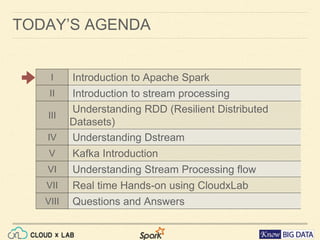
TODAY’S AGENDA
I Introduction to Apache Spark
II Introduction to stream processing
III Understanding RDD (Resilient Distributed Datasets)
IV Understanding Dstream
V Kafka Introduction
VI Understanding Stream Processing flow
VII Real time Hands-on using CloudxLab
VIII Questions and Answers
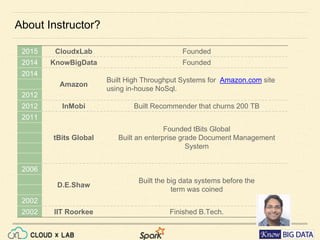
About Instructor?
2015 CloudxLab Founded
2014 KnowBigData Founded
2014
Amazon
Built High Throughput Systems for Amazon.com site using
in-house NoSql.
2012
2012 InMobi Built Recommender that churns 200 TB
2011
tBits Global
Founded tBits Global
Built an enterprise grade Document Management System
2006
D.E.Shaw
Built the big data systems before the
term was coined
2002
2002 IIT Roorkee Finished B.Tech.
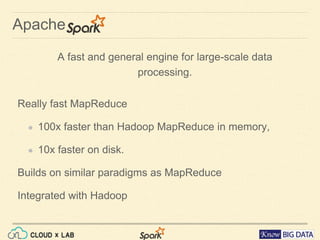
Apache
A fast and general engine for large-scale data
processing.
â—Ź Really fast MapReduce
â—Ź 100x faster than Hadoop MapReduce in memory,
â—Ź 10x faster on disk.
â—Ź Builds on similar paradigms as MapReduce
â—Ź Integrated with Hadoop
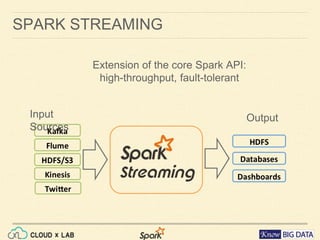
SPARK STREAMING
Extension of the core Spark API:
high-throughput, fault-tolerant
Input Sources Output
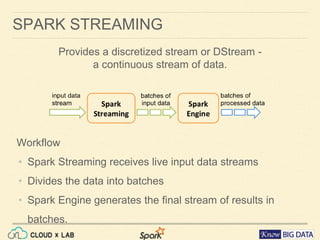
SPARK STREAMING
Workflow
• Spark Streaming receives live input data streams
• Divides the data into batches
• Spark Engine generates the final stream of results in batches.
Provides a discretized stream or DStream -
a continuous stream of data.
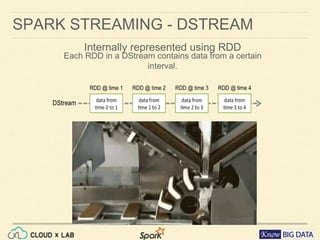
SPARK STREAMING - DSTREAM
Internally represented using RDD
Each RDD in a DStream contains data from a certain interval.
SPARK STREAMING - EXAMPLE
Problem: do the word count every second.
Step 1:
Create a connection to the service
from pyspark import SparkContext
from pyspark.streaming import StreamingContext
# Create a local StreamingContext with two working thread and
# batch interval of 1 second
sc = SparkContext("local[2]", "NetworkWordCount")
ssc = StreamingContext(sc, 1)
# Create a DStream that will connect to hostname:port,
# like localhost:9999
lines = ssc.socketTextStream("localhost", 9999)
SPARK STREAMING - EXAMPLE
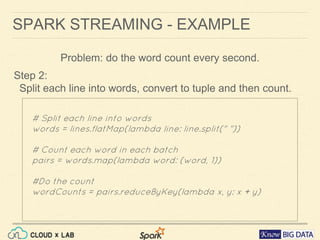
Step 2:
Split each line into words, convert to tuple and then count.
# Split each line into words
words = lines.flatMap(lambda line: line.split(" "))
# Count each word in each batch
pairs = words.map(lambda word: (word, 1))
#Do the count
wordCounts = pairs.reduceByKey(lambda x, y: x + y)
Problem: do the word count every second.
SPARK STREAMING - EXAMPLE
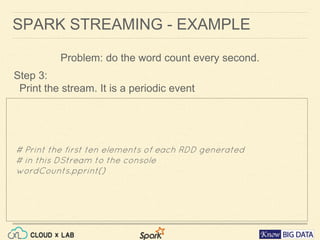
Step 3:
Print the stream. It is a periodic event
# Print the first ten elements of each RDD generated
# in this DStream to the console
wordCounts.pprint()
Problem: do the word count every second.
SPARK STREAMING - EXAMPLE
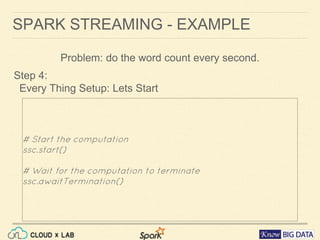
Step 4:
Every Thing Setup: Lets Start
# Start the computation
ssc.start()
# Wait for the computation to terminate
ssc.awaitTermination()
Problem: do the word count every second.
SPARK STREAMING - EXAMPLE
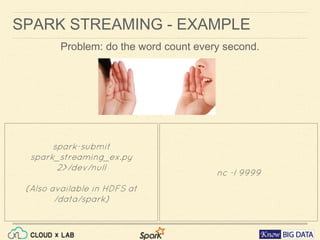
Problem: do the word count every second.
spark-submit spark_streaming_ex.
py
2>/dev/null
(Also available in HDFS at
/data/spark)
nc -l 9999
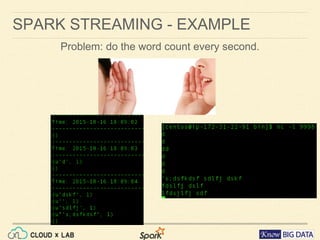
SPARK STREAMING - EXAMPLE
Problem: do the word count every second.
SPARK STREAMING - EXAMPLE
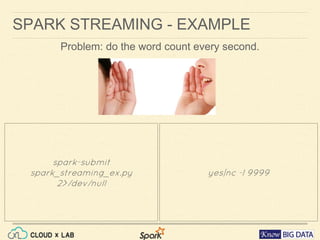
Problem: do the word count every second.
spark-submit spark_streaming_ex.
py
2>/dev/null
yes|nc -l 9999
Spark Streaming + Kafka Integration
Apache Kafka
â—Ź Publish-subscribe messaging
â—Ź A distributed, partitioned, replicated commit log service.
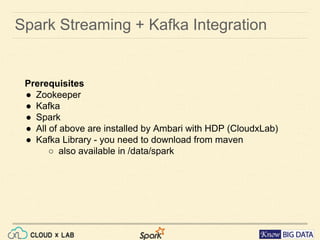
Spark Streaming + Kafka Integration
Prerequisites
â—Ź Zookeeper
â—Ź Kafka
â—Ź Spark
â—Ź All of above are installed by Ambari with HDP (CloudxLab)
â—Ź Kafka Library - you need to download from maven
â—‹ also available in /data/spark
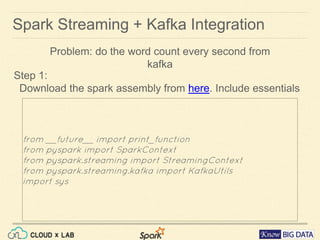
Spark Streaming + Kafka Integration
Step 1:
Download the spark assembly from here. Include essentials
from __future__ import print_function
from pyspark import SparkContext
from pyspark.streaming import StreamingContext
from pyspark.streaming.kafka import KafkaUtils
import sys
Problem: do the word count every second from kafka
Spark Streaming + Kafka Integration
Step 2:
Create the streaming objects
Problem: do the word count every second from kafka
sc = SparkContext(appName="KafkaWordCount")
ssc = StreamingContext(sc, 1)
#Read name of zk from arguments
zkQuorum, topic = sys.argv[1:]
#Listen to the topic
kvs = KafkaUtils.createStream(ssc, zkQuorum, "spark-
streaming-consumer", {topic: 1})
Spark Streaming + Kafka Integration
Step 3:
Create the RDDs by Transformations & Actions
Problem: do the word count every second from kafka
#read lines from stream
lines = kvs.map(lambda x: x[1])
# Split lines into words, words to tuples, reduce
counts = lines.flatMap(lambda line: line.split(" ")) 
.map(lambda word: (word, 1)) 
.reduceByKey(lambda a, b: a+b)
#Do the print
counts.pprint()
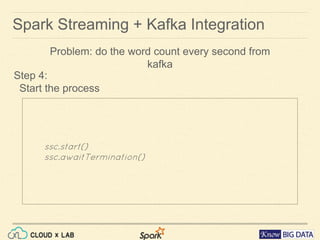
Spark Streaming + Kafka Integration
Step 4:
Start the process
Problem: do the word count every second from kafka
ssc.start()
ssc.awaitTermination()
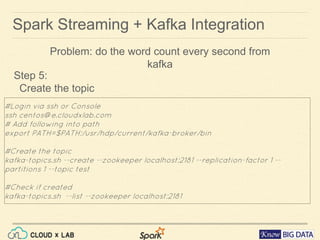
Spark Streaming + Kafka Integration
Step 5:
Create the topic
Problem: do the word count every second from kafka
#Login via ssh or Console
ssh centos@e.cloudxlab.com
# Add following into path
export PATH=$PATH:/usr/hdp/current/kafka-broker/bin
#Create the topic
kafka-topics.sh --create --zookeeper localhost:2181 --replication-factor 1 --
partitions 1 --topic test
#Check if created
kafka-topics.sh --list --zookeeper localhost:2181
Spark Streaming + Kafka Integration
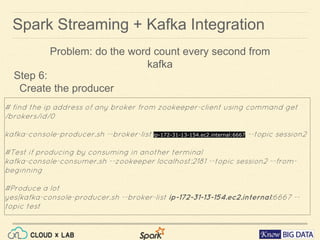
Step 6:
Create the producer
# find the ip address of any broker from zookeeper-client using command get
/brokers/id/0
kafka-console-producer.sh --broker-list ip-172-31-13-154.ec2.internal:6667 --topic session2
#Test if producing by consuming in another terminal
kafka-console-consumer.sh --zookeeper localhost:2181 --topic session2 --from-
beginning
#Produce a lot
yes|kafka-console-producer.sh --broker-list ip-172-31-13-154.ec2.internal:6667 --
topic test
Problem: do the word count every second from kafka
Spark Streaming + Kafka Integration
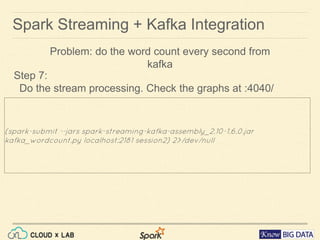
Step 7:
Do the stream processing. Check the graphs at :4040/
Problem: do the word count every second from kafka
(spark-submit --jars spark-streaming-kafka-assembly_2.10-1.6.0.jar
kafka_wordcount.py localhost:2181 session2) 2>/dev/null
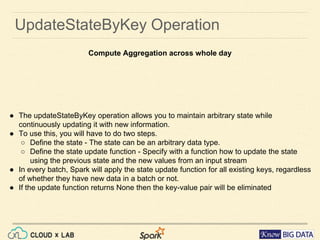
â—Ź The updateStateByKey operation allows you to maintain arbitrary state while
continuously updating it with new information.
â—Ź To use this, you will have to do two steps.
â—‹ Define the state - The state can be an arbitrary data type.
â—‹ Define the state update function - Specify with a function how to update the state
using the previous state and the new values from an input stream
â—Ź In every batch, Spark will apply the state update function for all existing keys, regardless
of whether they have new data in a batch or not.
â—Ź If the update function returns None then the key-value pair will be eliminated
UpdateStateByKey Operation
Compute Aggregation across whole day
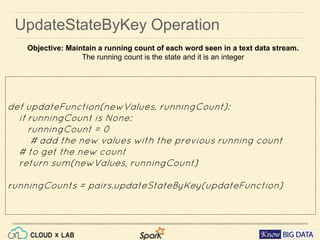
UpdateStateByKey Operation
def updateFunction(newValues, runningCount):
if runningCount is None:
runningCount = 0
# add the new values with the previous running count
# to get the new count
return sum(newValues, runningCount)
runningCounts = pairs.updateStateByKey(updateFunction)
Objective: Maintain a running count of each word seen in a text data stream.
The running count is the state and it is an integer
Feedback
http://bit.ly/1ZQwUAn
Help us improve
Apache Spark
Thank you.
reachus@cloudxlab.com
+1 412 568 3901 (US)
+91 803 951 3513 (IN)
Subscribe to our Youtube channel for latest videos - https://www.
youtube.com/channel/UCxugRFe5wETYA7nMH6VGyEA

Stream Processing using Apache Spark and Apache Kafka

  • 1.
    Apache Spark Streaming Processingwith Kafka Please introduce yourselves using the Q&A window that appears on the right while others join us.
  • 2.
    â—Ź Session -3 hours Duration (due to high demand increased it from 2:30 hrs) â—Ź First Half: Apache Spark Introduction & Streaming basics â—Ź 10 mins. break â—Ź Second Half: Hands-on demo using CloudxLab â—Ź Session is being recorded. Recording & presentation will be shared after the session â—Ź Asking Questions? â—Ź Every one except the instructor is muted â—Ź Please ask questions by typing in the Q&A window (requires logging in to google+) â—Ź Instructor will read out the question before answering â—Ź To get better answers, keep your messages short and avoid chat language WELCOME TO THE SESSION
  • 3.
    WELCOME TO CLOUDxLABSESSION A cloud based lab for students to gain hands-on experience in Big Data Technologies such as Hadoop and Spark â—Ź Learn Through Practice â—Ź Real Environment â—Ź Connect From Anywhere â—Ź Connect From Any Device â—Ź Centralized Data sets â—Ź No Installation â—Ź No Compatibility Issues â—Ź 24x7 Support
  • 4.
    TODAY’S AGENDA I Introductionto Apache Spark II Introduction to stream processing III Understanding RDD (Resilient Distributed Datasets) IV Understanding Dstream V Kafka Introduction VI Understanding Stream Processing flow VII Real time Hands-on using CloudxLab VIII Questions and Answers
  • 5.
    About Instructor? 2015 CloudxLabFounded 2014 KnowBigData Founded 2014 Amazon Built High Throughput Systems for Amazon.com site using in-house NoSql. 2012 2012 InMobi Built Recommender that churns 200 TB 2011 tBits Global Founded tBits Global Built an enterprise grade Document Management System 2006 D.E.Shaw Built the big data systems before the term was coined 2002 2002 IIT Roorkee Finished B.Tech.
  • 6.
    Apache A fast andgeneral engine for large-scale data processing. â—Ź Really fast MapReduce â—Ź 100x faster than Hadoop MapReduce in memory, â—Ź 10x faster on disk. â—Ź Builds on similar paradigms as MapReduce â—Ź Integrated with Hadoop
  • 7.
    SPARK STREAMING Extension ofthe core Spark API: high-throughput, fault-tolerant Input Sources Output
  • 8.
    SPARK STREAMING Workflow • SparkStreaming receives live input data streams • Divides the data into batches • Spark Engine generates the final stream of results in batches. Provides a discretized stream or DStream - a continuous stream of data.
  • 9.
    SPARK STREAMING -DSTREAM Internally represented using RDD Each RDD in a DStream contains data from a certain interval.
  • 10.
    SPARK STREAMING -EXAMPLE Problem: do the word count every second. Step 1: Create a connection to the service from pyspark import SparkContext from pyspark.streaming import StreamingContext # Create a local StreamingContext with two working thread and # batch interval of 1 second sc = SparkContext("local[2]", "NetworkWordCount") ssc = StreamingContext(sc, 1) # Create a DStream that will connect to hostname:port, # like localhost:9999 lines = ssc.socketTextStream("localhost", 9999)
  • 11.
    SPARK STREAMING -EXAMPLE Step 2: Split each line into words, convert to tuple and then count. # Split each line into words words = lines.flatMap(lambda line: line.split(" ")) # Count each word in each batch pairs = words.map(lambda word: (word, 1)) #Do the count wordCounts = pairs.reduceByKey(lambda x, y: x + y) Problem: do the word count every second.
  • 12.
    SPARK STREAMING -EXAMPLE Step 3: Print the stream. It is a periodic event # Print the first ten elements of each RDD generated # in this DStream to the console wordCounts.pprint() Problem: do the word count every second.
  • 13.
    SPARK STREAMING -EXAMPLE Step 4: Every Thing Setup: Lets Start # Start the computation ssc.start() # Wait for the computation to terminate ssc.awaitTermination() Problem: do the word count every second.
  • 14.
    SPARK STREAMING -EXAMPLE Problem: do the word count every second. spark-submit spark_streaming_ex. py 2>/dev/null (Also available in HDFS at /data/spark) nc -l 9999
  • 15.
    SPARK STREAMING -EXAMPLE Problem: do the word count every second.
  • 16.
    SPARK STREAMING -EXAMPLE Problem: do the word count every second. spark-submit spark_streaming_ex. py 2>/dev/null yes|nc -l 9999
  • 17.
    Spark Streaming +Kafka Integration Apache Kafka â—Ź Publish-subscribe messaging â—Ź A distributed, partitioned, replicated commit log service.
  • 18.
    Spark Streaming +Kafka Integration Prerequisites â—Ź Zookeeper â—Ź Kafka â—Ź Spark â—Ź All of above are installed by Ambari with HDP (CloudxLab) â—Ź Kafka Library - you need to download from maven â—‹ also available in /data/spark
  • 19.
    Spark Streaming +Kafka Integration Step 1: Download the spark assembly from here. Include essentials from __future__ import print_function from pyspark import SparkContext from pyspark.streaming import StreamingContext from pyspark.streaming.kafka import KafkaUtils import sys Problem: do the word count every second from kafka
  • 20.
    Spark Streaming +Kafka Integration Step 2: Create the streaming objects Problem: do the word count every second from kafka sc = SparkContext(appName="KafkaWordCount") ssc = StreamingContext(sc, 1) #Read name of zk from arguments zkQuorum, topic = sys.argv[1:] #Listen to the topic kvs = KafkaUtils.createStream(ssc, zkQuorum, "spark- streaming-consumer", {topic: 1})
  • 21.
    Spark Streaming +Kafka Integration Step 3: Create the RDDs by Transformations & Actions Problem: do the word count every second from kafka #read lines from stream lines = kvs.map(lambda x: x[1]) # Split lines into words, words to tuples, reduce counts = lines.flatMap(lambda line: line.split(" ")) .map(lambda word: (word, 1)) .reduceByKey(lambda a, b: a+b) #Do the print counts.pprint()
  • 22.
    Spark Streaming +Kafka Integration Step 4: Start the process Problem: do the word count every second from kafka ssc.start() ssc.awaitTermination()
  • 23.
    Spark Streaming +Kafka Integration Step 5: Create the topic Problem: do the word count every second from kafka #Login via ssh or Console ssh centos@e.cloudxlab.com # Add following into path export PATH=$PATH:/usr/hdp/current/kafka-broker/bin #Create the topic kafka-topics.sh --create --zookeeper localhost:2181 --replication-factor 1 -- partitions 1 --topic test #Check if created kafka-topics.sh --list --zookeeper localhost:2181
  • 24.
    Spark Streaming +Kafka Integration Step 6: Create the producer # find the ip address of any broker from zookeeper-client using command get /brokers/id/0 kafka-console-producer.sh --broker-list ip-172-31-13-154.ec2.internal:6667 --topic session2 #Test if producing by consuming in another terminal kafka-console-consumer.sh --zookeeper localhost:2181 --topic session2 --from- beginning #Produce a lot yes|kafka-console-producer.sh --broker-list ip-172-31-13-154.ec2.internal:6667 -- topic test Problem: do the word count every second from kafka
  • 25.
    Spark Streaming +Kafka Integration Step 7: Do the stream processing. Check the graphs at :4040/ Problem: do the word count every second from kafka (spark-submit --jars spark-streaming-kafka-assembly_2.10-1.6.0.jar kafka_wordcount.py localhost:2181 session2) 2>/dev/null
  • 26.
    â—Ź The updateStateByKeyoperation allows you to maintain arbitrary state while continuously updating it with new information. â—Ź To use this, you will have to do two steps. â—‹ Define the state - The state can be an arbitrary data type. â—‹ Define the state update function - Specify with a function how to update the state using the previous state and the new values from an input stream â—Ź In every batch, Spark will apply the state update function for all existing keys, regardless of whether they have new data in a batch or not. â—Ź If the update function returns None then the key-value pair will be eliminated UpdateStateByKey Operation Compute Aggregation across whole day
  • 27.
    UpdateStateByKey Operation def updateFunction(newValues,runningCount): if runningCount is None: runningCount = 0 # add the new values with the previous running count # to get the new count return sum(newValues, runningCount) runningCounts = pairs.updateStateByKey(updateFunction) Objective: Maintain a running count of each word seen in a text data stream. The running count is the state and it is an integer
  • 28.
  • 29.
    Apache Spark Thank you. reachus@cloudxlab.com +1412 568 3901 (US) +91 803 951 3513 (IN) Subscribe to our Youtube channel for latest videos - https://www. youtube.com/channel/UCxugRFe5wETYA7nMH6VGyEA