


1
How Do I Know My SQL & Virtual
Environments Are Ready for SSD?
© 2014, SolarWinds Worldwide, LLC. All rights reserved.
2
Considering SSDs for your IT Environment?
» Solid State Disks (SSD) are the new high performance
alternatives to existing physical disks
» SSDs offer significant improvements to storage performance
– although it is an expensive alternative
» To determine if your IT environment is worthy of deploying
SSDs then you need to look at specific workloads that are
related to your IT environment
 One reason is operating system tools may not be able to manage
storage performance because all the servers (virtual and physical) are
accessing the same storage at the same time
HOW DO I KNOW MY SQL & VIRTUAL ENVIRONMENTS ARE READY FOR
SSD?
2
In this presentation, we are going to look at a couple of important environments and
assess whether you need SSDs to improve their performance
3
Importance of SQL Server®
» One of the many critical applications that must be monitored closely
» Although SQL databases no longer represent the largest capacity
requirement in the datacenter, it should be noted that these databases
can still represent applications with high performance requirements
 For this reason, IT pros usually place SQL data on high performance storage
systems that can support hundreds of high-speed hard drives
 Therefore, some datacenters are considering flash based storage to improve
performance of SQL Server based applications
» It’s more than performance – scale reduces cost
 Flash based storage enables more than performance – it enables scale
 With SSDs, a single datacenter instance can achieve much higher user count
and application scale than it could with hard disk technology
» Storage I/O is a common SQL performance culprit, so leveraging SSDs can
potentially save cost of having to buy more RAM and processing power
and it eliminates the complexity of database clustering
3
HOW DO I KNOW MY SQL & VIRTUAL ENVIRONMENTS ARE READY FOR
SSD?
1
4
Metrics to Determine if your SQL Environment
is SSD Ready | CPU Utilization
4
HOW DO I KNOW MY SQL & VIRTUAL ENVIRONMENTS ARE READY FOR
SSD?
» First item to look for when determining SQL Server storage
environment’s SSD readiness is CPU utilization
 CPU utilization should be fairly low (< 30%) for SSD to provide
performance improvements
 Low CPU may indicate it’s waiting on something, like the storage
system
 High CPU indicates issues with the code or an underpowered
processing system
• Both cases have to be fixed before considering SSDs
 It’s essential to capture CPU utilization metrics prior, during, and after
a performance problem becomes apparent to users, in order to
establish a baseline
» If CPU activity is low during a performance issue, then it’s
most likely that storage performance was the culprit
5
Metrics to Determine if your SQL Environment
is SSD Ready | Storage Statistics
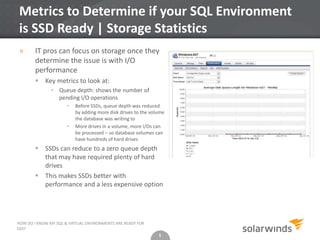
» IT pros can focus on storage once they
determine the issue is with I/O
performance
 Key metrics to look at:
• Queue depth: shows the number of
pending I/O operations
• Before SSDs, queue depth was reduced
by adding more disk drives to the volume
the database was writing to
• More drives in a volume, more I/Os can
be processed – so database volumes can
have hundreds of hard drives
 SSDs can reduce to a zero queue depth
that may have required plenty of hard
drives
 This makes SSDs better with
performance and a less expensive option
5
HOW DO I KNOW MY SQL & VIRTUAL ENVIRONMENTS ARE READY FOR
SSD?
6
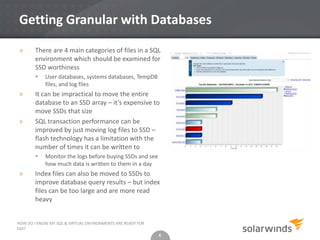
Getting Granular with Databases
» There are 4 main categories of files in a SQL
environment which should be examined for
SSD worthiness
 User databases, systems databases, TempDB
files, and log files
» It can be impractical to move the entire
database to an SSD array – it’s expensive to
move SSDs that size
» SQL transaction performance can be
improved by just moving log files to SSD –
flash technology has a limitation with the
number of times it can be written to
 Monitor the logs before buying SSDs and see
how much data is written to them in a day
» Index files can also be moved to SSDs to
improve database query results – but index
files can be too large and are more read
heavy
6
HOW DO I KNOW MY SQL & VIRTUAL ENVIRONMENTS ARE READY FOR
SSD?
7
SSDs for your SQL Environment
» Databases of any size should be considered for SSD
integration
 Due to the granularity of the database structure, you can consider
moving small components of the database to SSD
• This reduces overall SSD investment
» Having proper monitoring tools can help identify
components which may have issues
» Finally, a small amount of SSD can provide a cost-effective,
more scalable, and higher performing database for the entire
environment
7
HOW DO I KNOW MY SQL & VIRTUAL ENVIRONMENTS ARE READY FOR
SSD?
8
Importance of the Virtual Environment
» Hundreds of virtual machines, (VM) across several virtual
hosts, accessing the same storage volume at the same time
may lead to performance bottlenecks
 Having flash based SSD technology in your environment may answer
this problem
» In a virtualized world, almost every host component is shared
with at least a few other VMs. In addition, every storage
component is shared across dozens of physical hosts, making
it much more difficult to identify performance issues
» Before you determine if you really need SSDs, here are a
couple things to remember:
 How should you implement this investment
 Essential metrics you should track to determine SSD readiness
8
HOW DO I KNOW MY SQL & VIRTUAL ENVIRONMENTS ARE READY FOR
SSD?
2
9
What you Need to Track | Storage Controller
Utilization
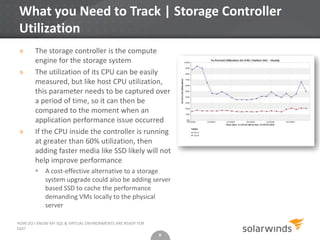
» The storage controller is the compute
engine for the storage system
» The utilization of its CPU can be easily
measured, but like host CPU utilization,
this parameter needs to be captured over
a period of time, so it can then be
compared to the moment when an
application performance issue occurred
» If the CPU inside the controller is running
at greater than 60% utilization, then
adding faster media like SSD likely will not
help improve performance
 A cost-effective alternative to a storage
system upgrade could also be adding server
based SSD to cache the performance
demanding VMs locally to the physical
server
9
HOW DO I KNOW MY SQL & VIRTUAL ENVIRONMENTS ARE READY FOR
SSD?
10
What you Need to Track | Storage Media
Utilization
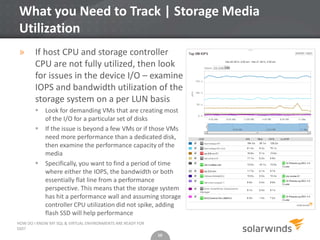
» If host CPU and storage controller
CPU are not fully utilized, then look
for issues in the device I/O – examine
IOPS and bandwidth utilization of the
storage system on a per LUN basis
 Look for demanding VMs that are creating most
of the I/O for a particular set of disks
 If the issue is beyond a few VMs or if those VMs
need more performance than a dedicated disk,
then examine the performance capacity of the
media
 Specifically, you want to find a period of time
where either the IOPS, the bandwidth or both
essentially flat line from a performance
perspective. This means that the storage system
has hit a performance wall and assuming storage
controller CPU utilization did not spike, adding
flash SSD will help performance
10
HOW DO I KNOW MY SQL & VIRTUAL ENVIRONMENTS ARE READY FOR
SSD?
11
What you Need to Track | Storage Network
Utilization
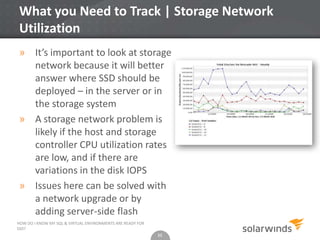
» It’s important to look at storage
network because it will better
answer where SSD should be
deployed – in the server or in
the storage system
» A storage network problem is
likely if the host and storage
controller CPU utilization rates
are low, and if there are
variations in the disk IOPS
» Issues here can be solved with
a network upgrade or by
adding server-side flash
11
HOW DO I KNOW MY SQL & VIRTUAL ENVIRONMENTS ARE READY FOR
SSD?
12
SSDs for your Virtual Environment
» Since IT is stretched so much, the default answer to
performance issues is to add more hardware to the
environment
» In the modern datacenter, performance issues are often
addressed with flash
» Flash technology offers high performance and low latency –
often fixes the problem
» What you need is more than a fix – a targeted analysis that
offers better results and lower cash expenditure
12
HOW DO I KNOW MY SQL & VIRTUAL ENVIRONMENTS ARE READY FOR
SSD?
13
How Do I Know My SQL & Virtual Environments
Are Ready for SSD?
» Solid State Disks (SSD) offer
tremendous performance when
compared to existing physical disks.
SSDs will definitely make life easier for
a storage admin. But before making
the switch by replacing your existing
disks with SSDs, IT and storage admins
should consider a few key areas.
13
HOW DO I KNOW MY SQL & VIRTUAL ENVIRONMENTS ARE READY FOR
SSD?
Download this whitepaper and learn how
your organization can understand when
your SQL & virtual environments are ready
for SSD
14
SolarWinds Tools to Monitor Storage, Virtual,
and Database Environments
» Storage Manager
 Monitors storage performance, maps VMs to physical storage, automates
storage capacity, and reporting – monitor storage arrays from EMC®, NetApp®,
HP®, IBM®, Hitachi Data Systems®, and more
» Virtualization Manager
 SolarWinds® Virtualization Manager delivers integrated VMware® and
Microsoft® Hyper-V® capacity planning, performance monitoring, VM sprawl
control, configuration management, and chargeback automation; all in one
awesomely affordable product that’s easy to download, deploy, and use
» Database Performance Analyzer for SQL Server
 SolarWinds Database Performance Analyzer for SQL Server is a comprehensive database
performance monitoring and analysis solution for DBAs, IT management, and application
developers. Additionally, it eliminates performance bottlenecks, improves application
service, and reduces overall cost of SQL Server operations
14
HOW DO I KNOW MY SQL & VIRTUAL ENVIRONMENTS ARE READY FOR
SSD?
15
Thank you!
HOW DO I KNOW MY SQL & VIRTUAL ENVIRONMENTS ARE READY FOR
SSD?

How Do I Know My SQL & Virtual Environments Are Ready for SSD?

  • 1.
    1 How Do IKnow My SQL & Virtual Environments Are Ready for SSD? © 2014, SolarWinds Worldwide, LLC. All rights reserved.
  • 2.
    2 Considering SSDs foryour IT Environment? » Solid State Disks (SSD) are the new high performance alternatives to existing physical disks » SSDs offer significant improvements to storage performance – although it is an expensive alternative » To determine if your IT environment is worthy of deploying SSDs then you need to look at specific workloads that are related to your IT environment  One reason is operating system tools may not be able to manage storage performance because all the servers (virtual and physical) are accessing the same storage at the same time HOW DO I KNOW MY SQL & VIRTUAL ENVIRONMENTS ARE READY FOR SSD? 2 In this presentation, we are going to look at a couple of important environments and assess whether you need SSDs to improve their performance
  • 3.
    3 Importance of SQLServer® » One of the many critical applications that must be monitored closely » Although SQL databases no longer represent the largest capacity requirement in the datacenter, it should be noted that these databases can still represent applications with high performance requirements  For this reason, IT pros usually place SQL data on high performance storage systems that can support hundreds of high-speed hard drives  Therefore, some datacenters are considering flash based storage to improve performance of SQL Server based applications » It’s more than performance – scale reduces cost  Flash based storage enables more than performance – it enables scale  With SSDs, a single datacenter instance can achieve much higher user count and application scale than it could with hard disk technology » Storage I/O is a common SQL performance culprit, so leveraging SSDs can potentially save cost of having to buy more RAM and processing power and it eliminates the complexity of database clustering 3 HOW DO I KNOW MY SQL & VIRTUAL ENVIRONMENTS ARE READY FOR SSD? 1
  • 4.
    4 Metrics to Determineif your SQL Environment is SSD Ready | CPU Utilization 4 HOW DO I KNOW MY SQL & VIRTUAL ENVIRONMENTS ARE READY FOR SSD? » First item to look for when determining SQL Server storage environment’s SSD readiness is CPU utilization  CPU utilization should be fairly low (< 30%) for SSD to provide performance improvements  Low CPU may indicate it’s waiting on something, like the storage system  High CPU indicates issues with the code or an underpowered processing system • Both cases have to be fixed before considering SSDs  It’s essential to capture CPU utilization metrics prior, during, and after a performance problem becomes apparent to users, in order to establish a baseline » If CPU activity is low during a performance issue, then it’s most likely that storage performance was the culprit
  • 5.
    5 Metrics to Determineif your SQL Environment is SSD Ready | Storage Statistics » IT pros can focus on storage once they determine the issue is with I/O performance  Key metrics to look at: • Queue depth: shows the number of pending I/O operations • Before SSDs, queue depth was reduced by adding more disk drives to the volume the database was writing to • More drives in a volume, more I/Os can be processed – so database volumes can have hundreds of hard drives  SSDs can reduce to a zero queue depth that may have required plenty of hard drives  This makes SSDs better with performance and a less expensive option 5 HOW DO I KNOW MY SQL & VIRTUAL ENVIRONMENTS ARE READY FOR SSD?
  • 6.
    6 Getting Granular withDatabases » There are 4 main categories of files in a SQL environment which should be examined for SSD worthiness  User databases, systems databases, TempDB files, and log files » It can be impractical to move the entire database to an SSD array – it’s expensive to move SSDs that size » SQL transaction performance can be improved by just moving log files to SSD – flash technology has a limitation with the number of times it can be written to  Monitor the logs before buying SSDs and see how much data is written to them in a day » Index files can also be moved to SSDs to improve database query results – but index files can be too large and are more read heavy 6 HOW DO I KNOW MY SQL & VIRTUAL ENVIRONMENTS ARE READY FOR SSD?
  • 7.
    7 SSDs for yourSQL Environment » Databases of any size should be considered for SSD integration  Due to the granularity of the database structure, you can consider moving small components of the database to SSD • This reduces overall SSD investment » Having proper monitoring tools can help identify components which may have issues » Finally, a small amount of SSD can provide a cost-effective, more scalable, and higher performing database for the entire environment 7 HOW DO I KNOW MY SQL & VIRTUAL ENVIRONMENTS ARE READY FOR SSD?
  • 8.
    8 Importance of theVirtual Environment » Hundreds of virtual machines, (VM) across several virtual hosts, accessing the same storage volume at the same time may lead to performance bottlenecks  Having flash based SSD technology in your environment may answer this problem » In a virtualized world, almost every host component is shared with at least a few other VMs. In addition, every storage component is shared across dozens of physical hosts, making it much more difficult to identify performance issues » Before you determine if you really need SSDs, here are a couple things to remember:  How should you implement this investment  Essential metrics you should track to determine SSD readiness 8 HOW DO I KNOW MY SQL & VIRTUAL ENVIRONMENTS ARE READY FOR SSD? 2
  • 9.
    9 What you Needto Track | Storage Controller Utilization » The storage controller is the compute engine for the storage system » The utilization of its CPU can be easily measured, but like host CPU utilization, this parameter needs to be captured over a period of time, so it can then be compared to the moment when an application performance issue occurred » If the CPU inside the controller is running at greater than 60% utilization, then adding faster media like SSD likely will not help improve performance  A cost-effective alternative to a storage system upgrade could also be adding server based SSD to cache the performance demanding VMs locally to the physical server 9 HOW DO I KNOW MY SQL & VIRTUAL ENVIRONMENTS ARE READY FOR SSD?
  • 10.
    10 What you Needto Track | Storage Media Utilization » If host CPU and storage controller CPU are not fully utilized, then look for issues in the device I/O – examine IOPS and bandwidth utilization of the storage system on a per LUN basis  Look for demanding VMs that are creating most of the I/O for a particular set of disks  If the issue is beyond a few VMs or if those VMs need more performance than a dedicated disk, then examine the performance capacity of the media  Specifically, you want to find a period of time where either the IOPS, the bandwidth or both essentially flat line from a performance perspective. This means that the storage system has hit a performance wall and assuming storage controller CPU utilization did not spike, adding flash SSD will help performance 10 HOW DO I KNOW MY SQL & VIRTUAL ENVIRONMENTS ARE READY FOR SSD?
  • 11.
    11 What you Needto Track | Storage Network Utilization » It’s important to look at storage network because it will better answer where SSD should be deployed – in the server or in the storage system » A storage network problem is likely if the host and storage controller CPU utilization rates are low, and if there are variations in the disk IOPS » Issues here can be solved with a network upgrade or by adding server-side flash 11 HOW DO I KNOW MY SQL & VIRTUAL ENVIRONMENTS ARE READY FOR SSD?
  • 12.
    12 SSDs for yourVirtual Environment » Since IT is stretched so much, the default answer to performance issues is to add more hardware to the environment » In the modern datacenter, performance issues are often addressed with flash » Flash technology offers high performance and low latency – often fixes the problem » What you need is more than a fix – a targeted analysis that offers better results and lower cash expenditure 12 HOW DO I KNOW MY SQL & VIRTUAL ENVIRONMENTS ARE READY FOR SSD?
  • 13.
    13 How Do IKnow My SQL & Virtual Environments Are Ready for SSD? » Solid State Disks (SSD) offer tremendous performance when compared to existing physical disks. SSDs will definitely make life easier for a storage admin. But before making the switch by replacing your existing disks with SSDs, IT and storage admins should consider a few key areas. 13 HOW DO I KNOW MY SQL & VIRTUAL ENVIRONMENTS ARE READY FOR SSD? Download this whitepaper and learn how your organization can understand when your SQL & virtual environments are ready for SSD
  • 14.
    14 SolarWinds Tools toMonitor Storage, Virtual, and Database Environments » Storage Manager  Monitors storage performance, maps VMs to physical storage, automates storage capacity, and reporting – monitor storage arrays from EMC®, NetApp®, HP®, IBM®, Hitachi Data Systems®, and more » Virtualization Manager  SolarWinds® Virtualization Manager delivers integrated VMware® and Microsoft® Hyper-V® capacity planning, performance monitoring, VM sprawl control, configuration management, and chargeback automation; all in one awesomely affordable product that’s easy to download, deploy, and use » Database Performance Analyzer for SQL Server  SolarWinds Database Performance Analyzer for SQL Server is a comprehensive database performance monitoring and analysis solution for DBAs, IT management, and application developers. Additionally, it eliminates performance bottlenecks, improves application service, and reduces overall cost of SQL Server operations 14 HOW DO I KNOW MY SQL & VIRTUAL ENVIRONMENTS ARE READY FOR SSD?
  • 15.
    15 Thank you! HOW DOI KNOW MY SQL & VIRTUAL ENVIRONMENTS ARE READY FOR SSD?