


STEAM Human
Robots
Teacher Guide
Amy Zschaber
azschaber@stancoe.org
Robots in the World
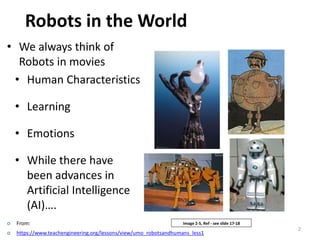
• We always think of
Robots in movies
• Human Characteristics
• Learning
• Emotions
• While there have
been advances in
Artificial Intelligence
(AI)….
2
Image 2-5, Ref - see slide 17-18 From:
 https://www.teachengineering.org/lessons/view/umo_robotsandhumans_less1
Robots in the World
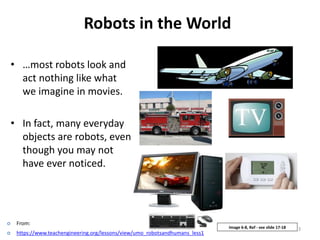
• …most robots look and
act nothing like what
we imagine in movies.
• In fact, many everyday
objects are robots, even
though you may not
have ever noticed.
3Image 6-8, Ref - see slide 17-18
 From:
 https://www.teachengineering.org/lessons/view/umo_robotsandhumans_less1
History of Robots
http://goo.gl/tKYh7q (2:37 mins)
5
What is a robot?
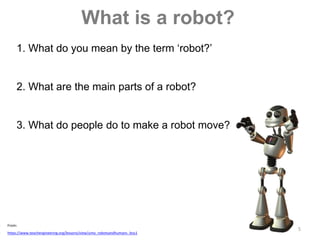
1. What do you mean by the term ‘robot?’
2. What are the main parts of a robot?
3. What do people do to make a robot move?
 From:
 https://www.teachengineering.org/lessons/view/umo_robotsandhumans_less1
6
What is a robot?
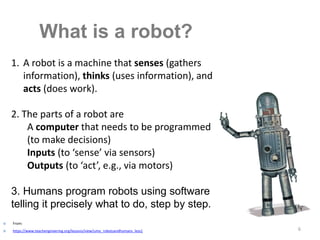
1. A robot is a machine that senses (gathers
information), thinks (uses information), and
acts (does work).
2. The parts of a robot are
A computer that needs to be programmed
(to make decisions)
Inputs (to ‘sense’ via sensors)
Outputs (to ‘act’, e.g., via motors)
3. Humans program robots using software
telling it precisely what to do, step by step.
 From:
 https://www.teachengineering.org/lessons/view/umo_robotsandhumans_less1
What Makes Something a Robot? #1:
A Computer (to help it ‘make decisions’)
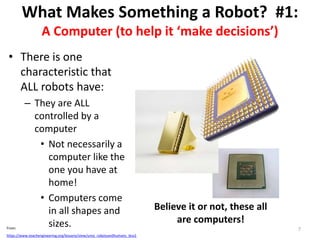
• There is one
characteristic that
ALL robots have:
– They are ALL
controlled by a
computer
• Not necessarily a
computer like the
one you have at
home!
• Computers come
in all shapes and
sizes.
Believe it or not, these all
are computers!
7From:
https://www.teachengineering.org/lessons/view/umo_robotsandhumans_less1
What Makes Something a Robot? #2:
Inputs (to help it ‘sense information’)
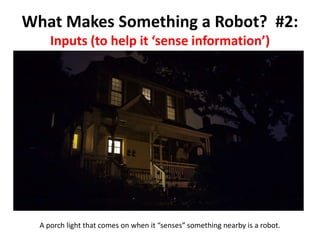
A porch light that comes on when it “senses” something nearby is a robot.
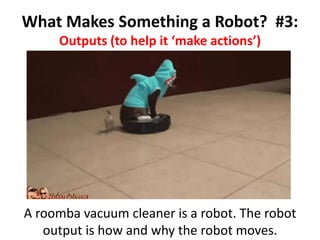
A roomba vacuum cleaner is a robot. The robot
output is how and why the robot moves.
What Makes Something a Robot? #3:
Outputs (to help it ‘make actions’)
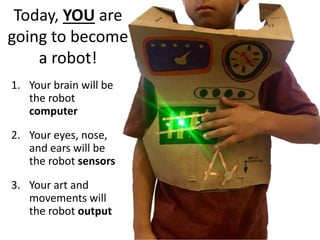
Today, YOU are
going to become
a robot!
1. Your brain will be
the robot
computer
2. Your eyes, nose,
and ears will be
the robot sensors
3. Your art and
movements will
the robot output
Place your
paper bag in
front you like
this:
Text side up
Opening at
bottom
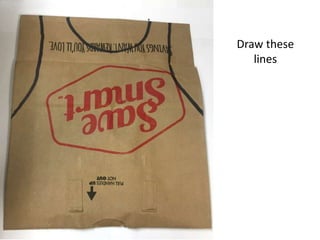
Draw these
lines
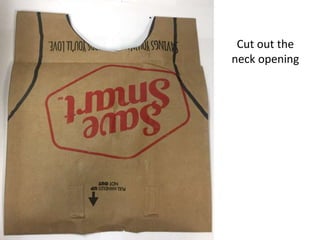
Cut out the
neck opening
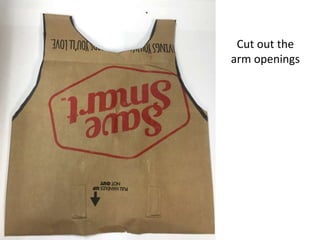
Cut out the
arm openings
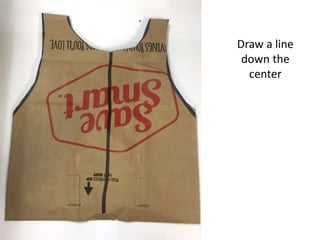
Draw a line
down the
center
Cut only the
top side of
the bag
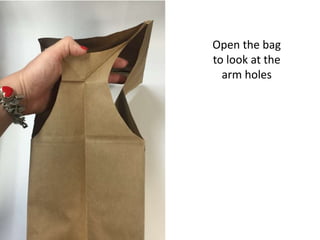
Open the bag
to look at the
arm holes
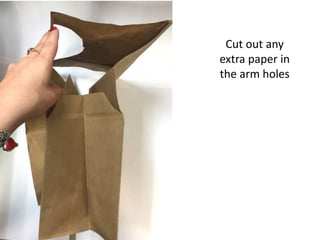
Cut out any
extra paper in
the arm holes
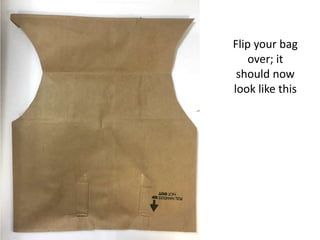
Flip your bag
over; it
should now
look like this
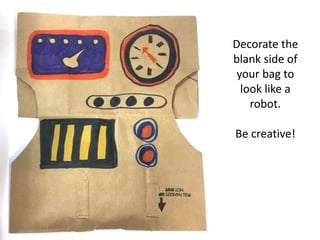
Decorate the
blank side of
your bag to
look like a
robot.
Be creative!
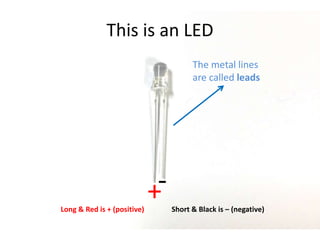
This is an LED
The metal lines
are called leads
+-
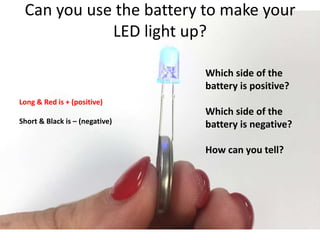
Long & Red is + (positive) Short & Black is – (negative)
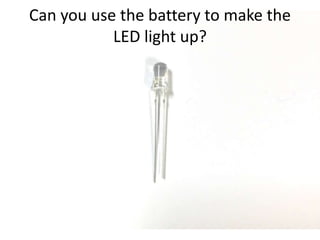
Can you use the battery to make the
LED light up?
Can you use the battery to make your
LED light up?
Long & Red is + (positive)
Short & Black is – (negative)
Which side of the
battery is positive?
Which side of the
battery is negative?
How can you tell?
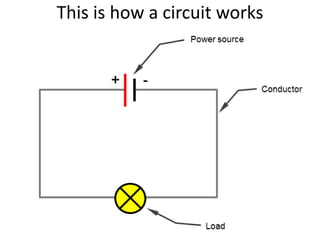
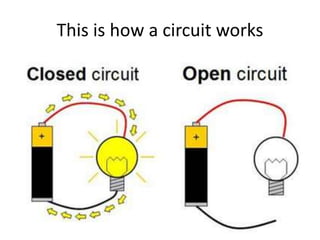
This is how a circuit works
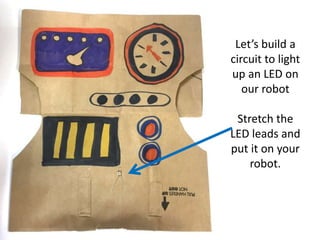
Let’s build a
circuit to light
up an LED on
our robot
Stretch the
LED leads and
put it on your
robot.
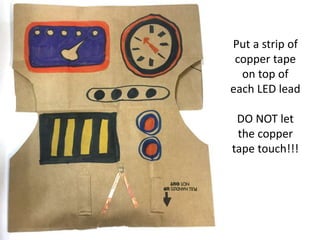
Put a strip of
copper tape
on top of
each LED lead
DO NOT let
the copper
tape touch!!!
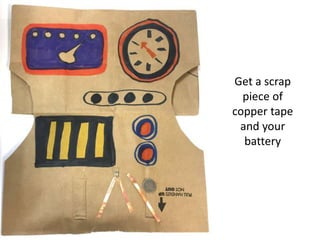
Get a scrap
piece of
copper tape
and your
battery
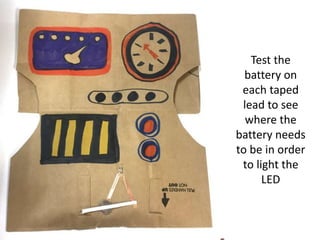
Test the
battery on
each taped
lead to see
where the
battery needs
to be in order
to light the
LED
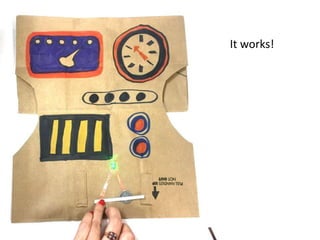
It works!
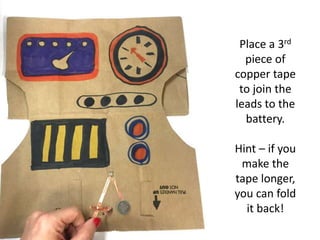
Place a 3rd
piece of
copper tape
to join the
leads to the
battery.
Hint – if you
make the
tape longer,
you can fold
it back!
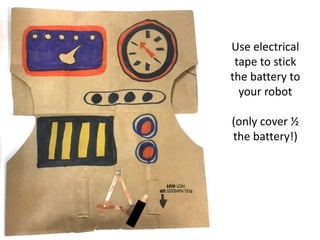
Use electrical
tape to stick
the battery to
your robot
(only cover ½
the battery!)
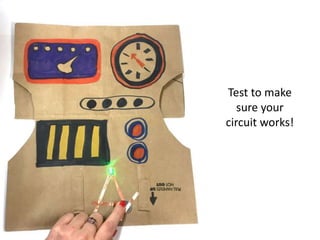
Test to make
sure your
circuit works!
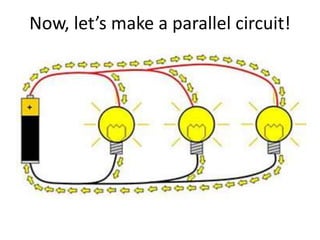
Now, let’s make a parallel circuit!
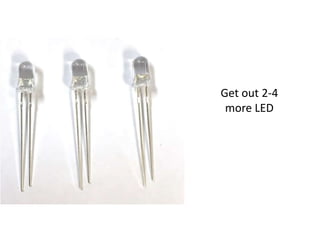
Get out 2-4
more LED
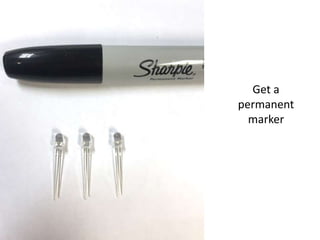
Get a
permanent
marker
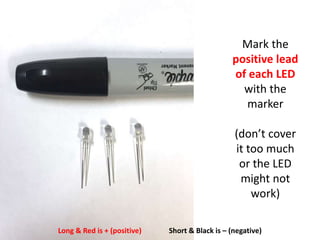
Mark the
positive lead
of each LED
with the
marker
(don’t cover
it too much
or the LED
might not
work)
Long & Red is + (positive) Short & Black is – (negative)
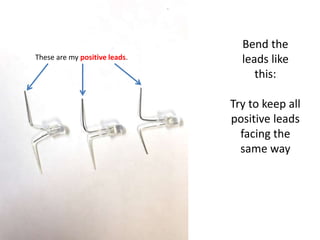
Bend the
leads like
this:
Try to keep all
positive leads
facing the
same way
These are my positive leads.
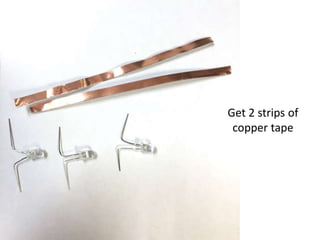
Get 2 strips of
copper tape
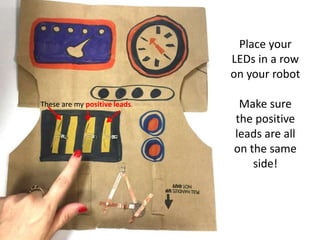
Place your
LEDs in a row
on your robot
Make sure
the positive
leads are all
on the same
side!
These are my positive leads.
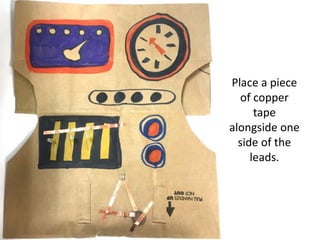
Place a piece
of copper
tape
alongside one
side of the
leads.
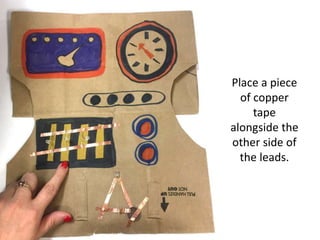
Place a piece
of copper
tape
alongside the
other side of
the leads.
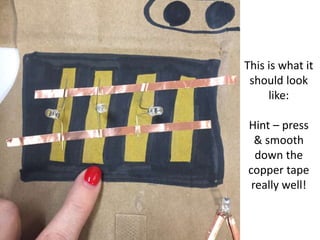
This is what it
should look
like:
Hint – press
& smooth
down the
copper tape
really well!
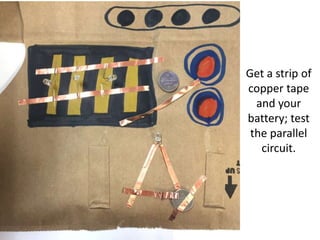
Get a strip of
copper tape
and your
battery; test
the parallel
circuit.
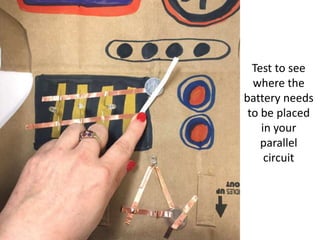
Test to see
where the
battery needs
to be placed
in your
parallel
circuit
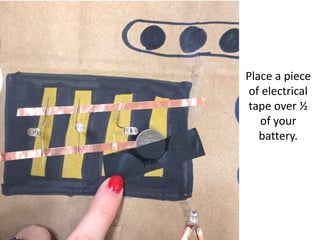
Place a piece
of electrical
tape over ½
of your
battery.
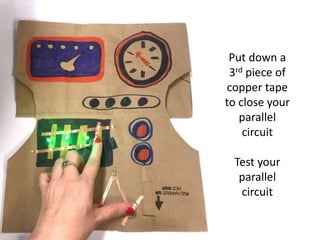
Put down a
3rd piece of
copper tape
to close your
parallel
circuit
Test your
parallel
circuit
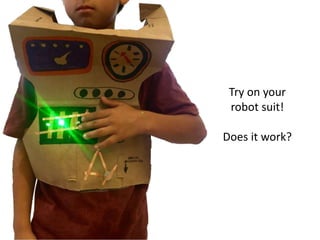
Try on your
robot suit!
Does it work?
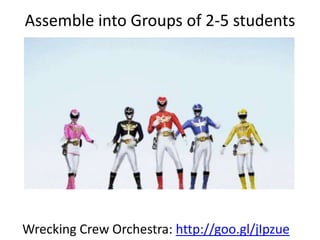
Assemble into Groups of 2-5 students
Wrecking Crew Orchestra: http://goo.gl/jIpzue
Design a beat using Incredibox
Incredibox: http://www.incredibox.com/
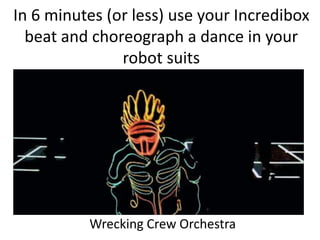
In 6 minutes (or less) use your Incredibox
beat and choreograph a dance in your
robot suits
Wrecking Crew Orchestra
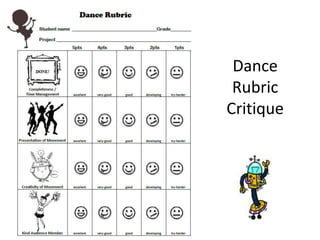
Dance
Rubric
Critique

STEAM Human Robots Teacher Guide

  • 1.
    STEAM Human Robots Teacher Guide AmyZschaber azschaber@stancoe.org
  • 2.
    Robots in theWorld • We always think of Robots in movies • Human Characteristics • Learning • Emotions • While there have been advances in Artificial Intelligence (AI)…. 2 Image 2-5, Ref - see slide 17-18 From:  https://www.teachengineering.org/lessons/view/umo_robotsandhumans_less1
  • 3.
    Robots in theWorld • …most robots look and act nothing like what we imagine in movies. • In fact, many everyday objects are robots, even though you may not have ever noticed. 3Image 6-8, Ref - see slide 17-18  From:  https://www.teachengineering.org/lessons/view/umo_robotsandhumans_less1
  • 4.
  • 5.
    5 What is arobot? 1. What do you mean by the term ‘robot?’ 2. What are the main parts of a robot? 3. What do people do to make a robot move?  From:  https://www.teachengineering.org/lessons/view/umo_robotsandhumans_less1
  • 6.
    6 What is arobot? 1. A robot is a machine that senses (gathers information), thinks (uses information), and acts (does work). 2. The parts of a robot are A computer that needs to be programmed (to make decisions) Inputs (to ‘sense’ via sensors) Outputs (to ‘act’, e.g., via motors) 3. Humans program robots using software telling it precisely what to do, step by step.  From:  https://www.teachengineering.org/lessons/view/umo_robotsandhumans_less1
  • 7.
    What Makes Somethinga Robot? #1: A Computer (to help it ‘make decisions’) • There is one characteristic that ALL robots have: – They are ALL controlled by a computer • Not necessarily a computer like the one you have at home! • Computers come in all shapes and sizes. Believe it or not, these all are computers! 7From: https://www.teachengineering.org/lessons/view/umo_robotsandhumans_less1
  • 8.
    What Makes Somethinga Robot? #2: Inputs (to help it ‘sense information’) A porch light that comes on when it “senses” something nearby is a robot.
  • 9.
    A roomba vacuumcleaner is a robot. The robot output is how and why the robot moves. What Makes Something a Robot? #3: Outputs (to help it ‘make actions’)
  • 10.
    Today, YOU are goingto become a robot! 1. Your brain will be the robot computer 2. Your eyes, nose, and ears will be the robot sensors 3. Your art and movements will the robot output
  • 11.
    Place your paper bagin front you like this: Text side up Opening at bottom
  • 12.
  • 13.
  • 14.
  • 15.
    Draw a line downthe center
  • 16.
    Cut only the topside of the bag
  • 17.
    Open the bag tolook at the arm holes
  • 18.
    Cut out any extrapaper in the arm holes
  • 19.
    Flip your bag over;it should now look like this
  • 20.
    Decorate the blank sideof your bag to look like a robot. Be creative!
  • 21.
    This is anLED The metal lines are called leads +- Long & Red is + (positive) Short & Black is – (negative)
  • 22.
    Can you usethe battery to make the LED light up?
  • 23.
    Can you usethe battery to make your LED light up? Long & Red is + (positive) Short & Black is – (negative) Which side of the battery is positive? Which side of the battery is negative? How can you tell?
  • 24.
    This is howa circuit works
  • 25.
    This is howa circuit works
  • 26.
    Let’s build a circuitto light up an LED on our robot Stretch the LED leads and put it on your robot.
  • 27.
    Put a stripof copper tape on top of each LED lead DO NOT let the copper tape touch!!!
  • 28.
    Get a scrap pieceof copper tape and your battery
  • 29.
    Test the battery on eachtaped lead to see where the battery needs to be in order to light the LED
  • 30.
  • 31.
    Place a 3rd pieceof copper tape to join the leads to the battery. Hint – if you make the tape longer, you can fold it back!
  • 32.
    Use electrical tape tostick the battery to your robot (only cover ½ the battery!)
  • 33.
    Test to make sureyour circuit works!
  • 34.
    Now, let’s makea parallel circuit!
  • 35.
  • 36.
  • 37.
    Mark the positive lead ofeach LED with the marker (don’t cover it too much or the LED might not work) Long & Red is + (positive) Short & Black is – (negative)
  • 38.
    Bend the leads like this: Tryto keep all positive leads facing the same way These are my positive leads.
  • 39.
    Get 2 stripsof copper tape
  • 40.
    Place your LEDs ina row on your robot Make sure the positive leads are all on the same side! These are my positive leads.
  • 41.
    Place a piece ofcopper tape alongside one side of the leads.
  • 42.
    Place a piece ofcopper tape alongside the other side of the leads.
  • 43.
    This is whatit should look like: Hint – press & smooth down the copper tape really well!
  • 44.
    Get a stripof copper tape and your battery; test the parallel circuit.
  • 45.
    Test to see wherethe battery needs to be placed in your parallel circuit
  • 46.
    Place a piece ofelectrical tape over ½ of your battery.
  • 47.
    Put down a 3rdpiece of copper tape to close your parallel circuit Test your parallel circuit
  • 48.
    Try on your robotsuit! Does it work?
  • 49.
    Assemble into Groupsof 2-5 students Wrecking Crew Orchestra: http://goo.gl/jIpzue
  • 50.
    Design a beatusing Incredibox Incredibox: http://www.incredibox.com/
  • 51.
    In 6 minutes(or less) use your Incredibox beat and choreograph a dance in your robot suits Wrecking Crew Orchestra
  • 52.