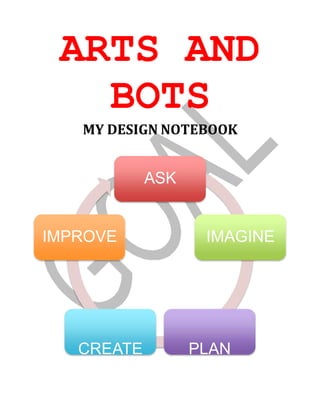
ARTS AND
BOTS
MY DESIGN NOTEBOOK
ASK
IMPROVE IMAGINE
CREATE PLAN
THIS DESIGN NOTEBOOK BELONGS TO:
--·-----------------------
Allison Richards
ARTS AND
BOTS
MY DESIGN NOTEBOOK
ASK
IMPROVE IMAGINE
CREATE PLAN
THIS DESIGN NOTEBOOK BELONGS TO:
--·-----------------------
Allison Richards
Arts & Bots Quick Reference
Outputs - Light
Name and Image What does it do? Plug it in Icon
LED
It is a single color
light source with
controllable
brightness.
 Color  +Positive
 Black  - Ground
The colored wire of the LED indicates the
color of its light!
Tri-Color LED
It is a red-green-blue
(RGB) light source
which can produce
many light-based
colors.
 Red  RRed
 Green  GGreen
 Blue  BBlue
 Black  -Ground
Outputs - Motion
Name and Image What does it do? Plug it in Icon
Servo
It is a limited range
motor with controls
for specific angular
positions.
 Yellow  SSignal
 Red  +Positive
 Black  -Ground
Motor
It is an electric
motor with speed
control that can
rotate in either
direction
indefinitely.
 Yellow  +and -
Since both wires are the same color, the
motor can be plugged in two ways.
Switching them just changes which direction
is “forward”.
Vibration Motor
It is a small motor
that causes a
shaking motion
where you can
control the intensity
of shaking.
 Yellow  +and -
Since both wires are the same color, the
vibration motor can be plugged in two ways.
Switching them just changes which direction
the weight spins.
Inputs (Sensors)
Name and Image What does it do? Plug it in Icon
Distance Sensor
It is a sensor that
detects how far
away something is.
 Yellow  SSignal
 Red  +Positive
 Black  -Ground
Light Sensor
It is a sensor that
detects how bright
the ambient light is.
 Yellow  SSignal
 Red  +Positive
 Black  -Ground
Temperature Sensor
It is a sensor that
detects the
temperature.
 Yellow  SSignal
 Red  +Positive
 Black  -Ground
Potentiometer
It is a sensor that
detects how it has
been rotated.
 Yellow  SSignal
 Red  +Positive
 Black  -Ground
Notes:
Version 1.1 – March 2012
AS
WHAT DO YOU WANT YOUR
ROBOT TO LOOK LIKE?
WHAT DO YOU WANT YOUR
ROBOT TO BE ABLE TO DO?
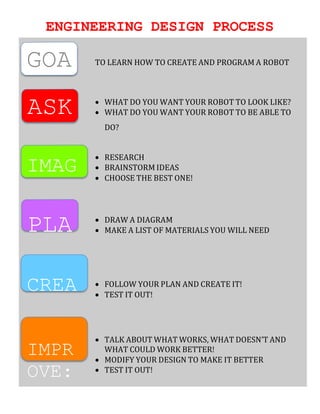
ENGINEERING DESIGN PROCESS
GOA
ASK
TO LEARN HOW TO CREATE AND PROGRAM A ROBOT
 WHAT DO YOU WANT YOUR ROBOT TO LOOK LIKE?
 WHAT DO YOU WANT YOUR ROBOT TO BE ABLE TO
DO?
IMAG
 RESEARCH
 BRAINSTORM IDEAS
 CHOOSE THE BEST ONE!
PLA  DRAW A DIAGRAM
 MAKE A LIST OF MATERIALS YOU WILL NEED
CREA  FOLLOW YOUR PLAN AND CREATE IT!
 TEST IT OUT!
IMPR
OVE:
 TALK ABOUT WHAT WORKS, WHAT DOESN’T AND
WHAT COULD WORK BETTER!
 MODIFY YOUR DESIGN TO MAKE IT BETTER
 TEST IT OUT!
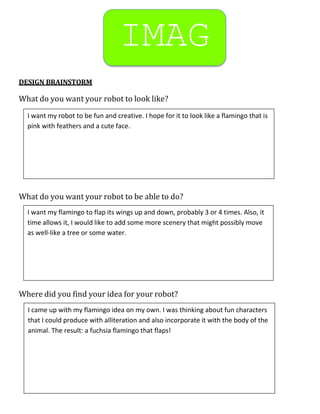
IMAG
DESIGN BRAINSTORM
What do you want your robot to look like?
What do you want your robot to be able to do?
Where did you find your idea for your robot?
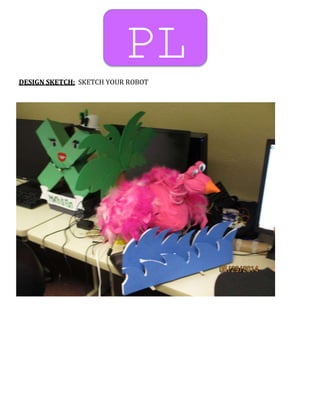
I want my robot to be fun and creative. I hope for it to look like a flamingo that is
pink with feathers and a cute face.
I want my flamingo to flap its wings up and down, probably 3 or 4 times. Also, it
time allows it, I would like to add some more scenery that might possibly move
as well-like a tree or some water.
I came up with my flamingo idea on my own. I was thinking about fun characters
that I could produce with alliteration and also incorporate it with the body of the
animal. The result: a fuchsia flamingo that flaps!
OTHER QUESTIONS YOU WOULD LIKE TO ASK YOUR PARTNER ABOUT THEIR
ROBOT DESIGN
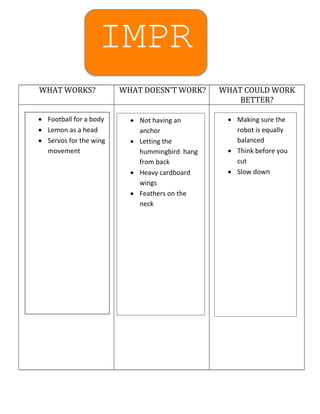
IMPR
WHAT WORKS? WHAT DOESN’T WORK? WHAT COULD WORK
BETTER?
 Football for a body
 Lemon as a head
 Servos for the wing
movement
 Not having an
anchor
 Letting the
hummingbird hang
from back
 Heavy cardboard
wings
 Feathers on the
neck
 Making sure the
robot is equally
balanced
 Think before you
cut
 Slow down
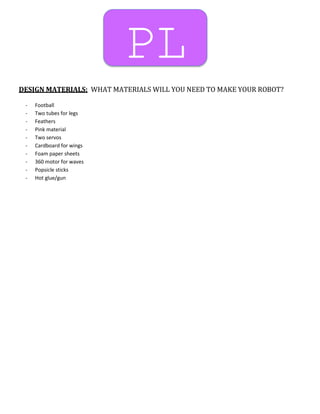
PL
DESIGN MATERIALS: WHAT MATERIALS WILL YOU NEED TO MAKE YOUR ROBOT?
- Football
- Two tubes for legs
- Feathers
- Pink material
- Two servos
- Cardboard for wings
- Foam paper sheets
- 360 motor for waves
- Popsicle sticks
- Hot glue/gun
PL
DESIGN SKETCH: SKETCH YOUR ROBOT
Arts and Bots Project Development Worksheet
Project Title: Alliteration Bot
Project Leader/Liaison:
Participating Teachers:
The Purpose and Main Features of the Project
Preparing the launch
Curricular objectives and scope of the project
Learning activities
Learning outcomes and assessment
Resources and support
Project Showcase
Harold Blanco
Students will learn alliteration and apply it to a fun, creative project involving a building a robot
that works off of their command.
In preparing for this task, I did a lot of research and brainstormed for ideas. I liked the idea of
creating something fun and interesting, and a flamingo bot was the way to go. I did a little
research and gathered my materials before even starting.
Students will no doubt remember what and how to use alliteration after spending several days
working toward creating a “dog that digs” or a “colorful cow”. This project is meant to be fun and
to break the mold of the generalized lecture classroom.
This is not only an English lesson. I hope for this project to be one that challenges them to break
out of their comfort zone and word towards being confident in their abilities. Of course, I want t
them to learn alliteration, but I hope they gain a lot more than just that from this experience.
I will look at the robots and assess them based on their creativity and knowledge of alliteration,
and also their effort that was put forth in creating this. The grade will not be based on the look of
their robot, but more so on their understanding of the topic and personal growth.
Arts and Bots, Carnegie Mellon, CI350 at Marshall University
ARTS and BOTS Interview Questions
To identify the "story" behind each robot, try to cover the following points, and
develop the ones that sound more interesting for each specific interviewee. Of
course, if anything else comes up in the conversation that is interesting and not
part of these points - dig deeper.
 Tell me about how your robot works – what electronic parts did you use and
what do they do?
 Identify decisions made (materials, technology, programming, story)
 What did you enjoy the most about this process, what was the most
rewarding part of the experience? Why? How so?
 What was the most challenging part of this assignment for you? Why? How
did you overcome / resolve it?
 What did you learn from this project (about robotics and the curricular topic)?
 Show / describe the robot doing its thing (+ the assignment if relevant)

Bot binder

  • 1.
    ARTS AND BOTS MY DESIGNNOTEBOOK ASK IMPROVE IMAGINE CREATE PLAN
  • 2.
    THIS DESIGN NOTEBOOKBELONGS TO: --·----------------------- Allison Richards
  • 3.
    ARTS AND BOTS MY DESIGNNOTEBOOK ASK IMPROVE IMAGINE CREATE PLAN
  • 4.
    THIS DESIGN NOTEBOOKBELONGS TO: --·----------------------- Allison Richards
  • 5.
    Arts & BotsQuick Reference Outputs - Light Name and Image What does it do? Plug it in Icon LED It is a single color light source with controllable brightness.  Color  +Positive  Black  - Ground The colored wire of the LED indicates the color of its light! Tri-Color LED It is a red-green-blue (RGB) light source which can produce many light-based colors.  Red  RRed  Green  GGreen  Blue  BBlue  Black  -Ground Outputs - Motion Name and Image What does it do? Plug it in Icon Servo It is a limited range motor with controls for specific angular positions.  Yellow  SSignal  Red  +Positive  Black  -Ground Motor It is an electric motor with speed control that can rotate in either direction indefinitely.  Yellow  +and - Since both wires are the same color, the motor can be plugged in two ways. Switching them just changes which direction is “forward”. Vibration Motor It is a small motor that causes a shaking motion where you can control the intensity of shaking.  Yellow  +and - Since both wires are the same color, the vibration motor can be plugged in two ways. Switching them just changes which direction the weight spins.
  • 6.
    Inputs (Sensors) Name andImage What does it do? Plug it in Icon Distance Sensor It is a sensor that detects how far away something is.  Yellow  SSignal  Red  +Positive  Black  -Ground Light Sensor It is a sensor that detects how bright the ambient light is.  Yellow  SSignal  Red  +Positive  Black  -Ground Temperature Sensor It is a sensor that detects the temperature.  Yellow  SSignal  Red  +Positive  Black  -Ground Potentiometer It is a sensor that detects how it has been rotated.  Yellow  SSignal  Red  +Positive  Black  -Ground Notes: Version 1.1 – March 2012
  • 7.
    AS WHAT DO YOUWANT YOUR ROBOT TO LOOK LIKE? WHAT DO YOU WANT YOUR ROBOT TO BE ABLE TO DO?
  • 8.
    ENGINEERING DESIGN PROCESS GOA ASK TOLEARN HOW TO CREATE AND PROGRAM A ROBOT  WHAT DO YOU WANT YOUR ROBOT TO LOOK LIKE?  WHAT DO YOU WANT YOUR ROBOT TO BE ABLE TO DO? IMAG  RESEARCH  BRAINSTORM IDEAS  CHOOSE THE BEST ONE! PLA  DRAW A DIAGRAM  MAKE A LIST OF MATERIALS YOU WILL NEED CREA  FOLLOW YOUR PLAN AND CREATE IT!  TEST IT OUT! IMPR OVE:  TALK ABOUT WHAT WORKS, WHAT DOESN’T AND WHAT COULD WORK BETTER!  MODIFY YOUR DESIGN TO MAKE IT BETTER  TEST IT OUT!
  • 10.
    IMAG DESIGN BRAINSTORM What doyou want your robot to look like? What do you want your robot to be able to do? Where did you find your idea for your robot? I want my robot to be fun and creative. I hope for it to look like a flamingo that is pink with feathers and a cute face. I want my flamingo to flap its wings up and down, probably 3 or 4 times. Also, it time allows it, I would like to add some more scenery that might possibly move as well-like a tree or some water. I came up with my flamingo idea on my own. I was thinking about fun characters that I could produce with alliteration and also incorporate it with the body of the animal. The result: a fuchsia flamingo that flaps!
  • 11.
    OTHER QUESTIONS YOUWOULD LIKE TO ASK YOUR PARTNER ABOUT THEIR ROBOT DESIGN
  • 12.
    IMPR WHAT WORKS? WHATDOESN’T WORK? WHAT COULD WORK BETTER?  Football for a body  Lemon as a head  Servos for the wing movement  Not having an anchor  Letting the hummingbird hang from back  Heavy cardboard wings  Feathers on the neck  Making sure the robot is equally balanced  Think before you cut  Slow down
  • 14.
    PL DESIGN MATERIALS: WHATMATERIALS WILL YOU NEED TO MAKE YOUR ROBOT? - Football - Two tubes for legs - Feathers - Pink material - Two servos - Cardboard for wings - Foam paper sheets - 360 motor for waves - Popsicle sticks - Hot glue/gun
  • 15.
  • 16.
    Arts and BotsProject Development Worksheet Project Title: Alliteration Bot Project Leader/Liaison: Participating Teachers: The Purpose and Main Features of the Project Preparing the launch Curricular objectives and scope of the project Learning activities Learning outcomes and assessment Resources and support Project Showcase Harold Blanco Students will learn alliteration and apply it to a fun, creative project involving a building a robot that works off of their command. In preparing for this task, I did a lot of research and brainstormed for ideas. I liked the idea of creating something fun and interesting, and a flamingo bot was the way to go. I did a little research and gathered my materials before even starting. Students will no doubt remember what and how to use alliteration after spending several days working toward creating a “dog that digs” or a “colorful cow”. This project is meant to be fun and to break the mold of the generalized lecture classroom. This is not only an English lesson. I hope for this project to be one that challenges them to break out of their comfort zone and word towards being confident in their abilities. Of course, I want t them to learn alliteration, but I hope they gain a lot more than just that from this experience. I will look at the robots and assess them based on their creativity and knowledge of alliteration, and also their effort that was put forth in creating this. The grade will not be based on the look of their robot, but more so on their understanding of the topic and personal growth. Arts and Bots, Carnegie Mellon, CI350 at Marshall University
  • 17.
    ARTS and BOTSInterview Questions To identify the "story" behind each robot, try to cover the following points, and develop the ones that sound more interesting for each specific interviewee. Of course, if anything else comes up in the conversation that is interesting and not part of these points - dig deeper.  Tell me about how your robot works – what electronic parts did you use and what do they do?  Identify decisions made (materials, technology, programming, story)  What did you enjoy the most about this process, what was the most rewarding part of the experience? Why? How so?  What was the most challenging part of this assignment for you? Why? How did you overcome / resolve it?  What did you learn from this project (about robotics and the curricular topic)?  Show / describe the robot doing its thing (+ the assignment if relevant)