STATE UNIVERSITY DATA CENTER
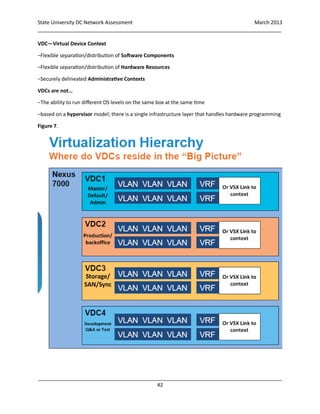
Data Center Network Assessment
MARCH 1, 2013
APPLIED METHODOLOGIES, INC
State University DC Network Assessment March 2013
_____________________________________________________________________________________
_____________________________________________________________________________________
1
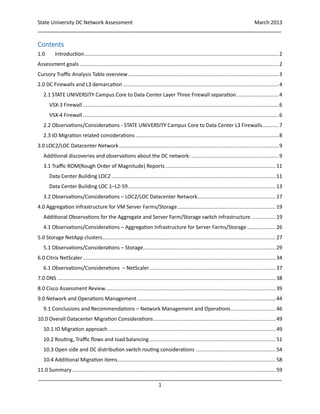
Contents
1.0 Introduction.................................................................................................................................2
Assessment goals ....................................................................................................................................2
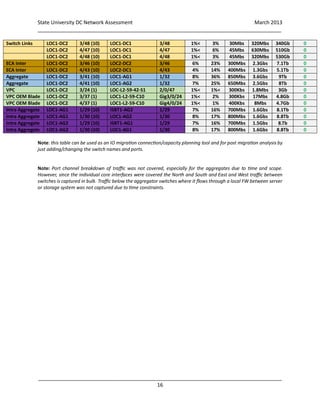
Cursory Traffic Analysis Table overview....................................................................................................3
2.0 DC Firewalls and L3 demarcation .......................................................................................................4
2.1 STATE UNIVERSITY Campus Core to Data Center Layer Three Firewall separation............................4
VSX-3 Firewall..................................................................................................................................6
VSX-4 Firewall..................................................................................................................................6
2.2 Observations/Considerations - STATE UNIVERSITY Campus Core to Data Center L3 Firewalls...........7
2.3 IO Migration related considerations ...............................................................................................8
3.0 LOC2/LOC Datacenter Network..........................................................................................................9
Additional discoveries and observations about the DC network: ..........................................................9
3.1 Traffic ROM(Rough Order of Magnitude) Reports .........................................................................11
Data Center Building LOC2 .............................................................................................................11
Data Center Building LOC 1–L2-59..................................................................................................13
3.2 Observations/Considerations – LOC2/LOC Datacenter Network....................................................17
4.0 Aggregation Infrastructure for VM Server Farms/Storage .................................................................19
Additional Observations for the Aggregate and Server Farm/Storage switch infrastructure ................19
4.1 Observations/Considerations – Aggregation Infrastructure for Server Farms/Storage...................26
5.0 Storage NetApp clusters...................................................................................................................27
5.1 Observations/Considerations – Storage........................................................................................29
6.0 Citrix NetScaler................................................................................................................................34
6.1 Observations/Considerations – NetScaler....................................................................................37
7.0 DNS .................................................................................................................................................38
8.0 Cisco Assessment Review.................................................................................................................39
9.0 Network and Operations Management............................................................................................44
9.1 Conclusions and Recommendations – Network Management and Operations..............................46
10.0 Overall Datacenter Migration Considerations.................................................................................49
10.1 IO Migration approach ...............................................................................................................49
10.2 Routing, Traffic flows and load balancing....................................................................................51
10.3 Open side and DC distribution switch routing considerations .....................................................54
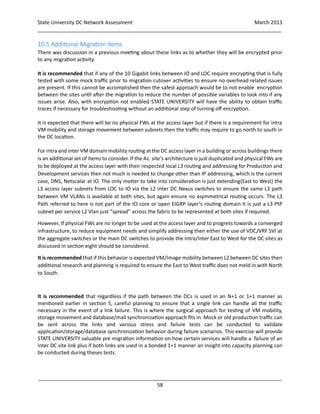
10.4 Additional Migration items.........................................................................................................58
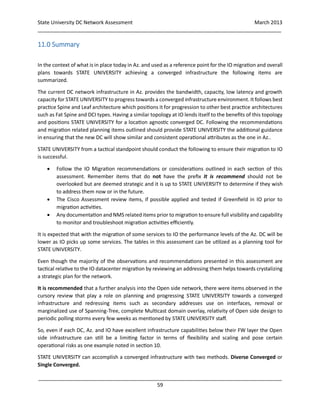
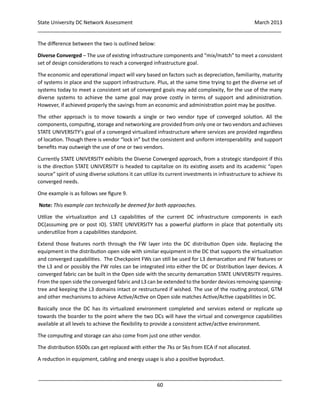
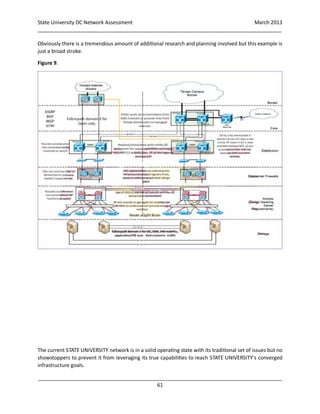
11.0 Summary .......................................................................................................................................59
State University DC Network Assessment March 2013
_____________________________________________________________________________________
_____________________________________________________________________________________
2
1.0 Introduction
STATE UNIVERSITY requested OEM Advanced Services to provide a high level assessment of its Data Center(DC)
network in anticipation of a migration from a section of its data center from the AZ. campus to a new hosted location.
The new data center provides premium power protection and location diversity. One of the reasons for the new data
center is to provide a DR and business continuity capability in the event of power outages or any other type of failure
on the Az. campus.
The new data center is expected to mirror what STATE UNIVERSITY has in its Az. campus in terms of hardware and
design. The current data center is spread between two building in close proximity on the campus LOC2a and LOC1.
The LOC1 portion will remain as the LOC2 will be deprecated. The eventual platform of STATE UNIVERSITY’s data
center will be between LOC1(Az.) and the location referred to as IO. Keep in mind that not all of the services hosted
in LOC2 will move to IO, some will stay in LOC1. Az. will contain many of the commodity services and the premium
services, those that require the more expensive services that IO provides (quality power and secure housing) will
reside at that location.
This network assessment is part of a broader OEM assessment of the migration with covers, application classification,
storage, servers and VM migration to provide information to STATE UNIVERSITY that assists in progressing towards
an overall converged infrastructure.
Assessment goals
The network assessment’s goal is to review the capacity, performance and traffic levels of the networking related
components in the ECA and LOC buildings relative to the DC. It is also to identify any issues related to the migration
to the new IO D.C The networking and WAN infrastructure outside the data center that link the DC to the STATE
UNIVERSITY campus core referred to as the “open” side was not fully covered due to time constraints, focus and
size/complexity involved to cover that section.
A cursory review of the DC infrastructure components was conducted. Due to time constraints a deeper analysis was
not conducted due to the size, complexity and interrelationship of the network and its components to acquire an in-
depth set of results. The following activities were conducted by OEM during the course of this assessment:
 Interviews and ongoing dialog were conducted with STATE UNIVERSITY network support personnel about
the network and migration plans
 A review of diagrams and documentation
 A review of the support, operations provisioning plus basic process and tools used
 A review of DC switch configurations for link validation
 Conduct a high level review of DC traffic, traffic flows and operational behavior of core DC components
 Outline any observations relative to general health of the network and capture any issues related to the
migration
 Review of network management and operations process for improvement suggestions
 Review of Cisco conducted assessment on behalf of STATE UNIVERSITY as second set of “eyes”
State University DC Network Assessment March 2013
_____________________________________________________________________________________
_____________________________________________________________________________________
3
This assessment provides information for STATE UNIVERSITY to utilize as a road map or tactical IO migration planning
tool as well as an initial strategic reference to assist STATE UNIVERSITY in progressing towards a converged
infrastructure. The sections covered are listed below:
 Section 2.0 DC Firewalls and L3 demarcation – firewalls that separate the STATE UNIVERSITY campus and
DC networks
 Section 3.0 DC network infrastructure – the main or “core” DC infrastructure components that support the
Server, Virtual Machine(VM) and storage subsystems in the DC
 Section 4.0 Aggregate switches – supporting infrastructure of Server farms
 Section 5.0 NetApp storage –brief analysis of the Fabric Metrocluster traffic from interfaces connecting to
core DC switches
 Section 6.0 Netscalar – a brief analysis of NS device performance and traffic from interface connecting to
the appliances
 Section 7.0 DNS – brief review of Infoblox appliances
 Section 8.0 - Independent review of Cisco draft Assessment provided to STATE UNIVERSITY
 Section 9.0 Network Management/Operations review
 Section 10.0 Migration to IO and Converged Infrastructure related caveats, recommendations and ideas
 Summary
Each area will outline their respective observations, issues identified, and any migration related caveats ideas and
recommendations.
Tactical recommendations are prefixed by the following “It is recommended”. Any other statements,
recommendations and ideas presented are outlined for strategic consideration.
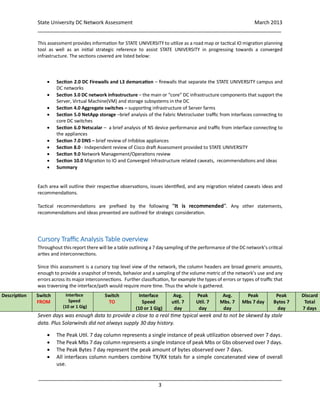
Cursory Traffic Analysis Table overview
Throughout this report there will be a table outlining a 7 day sampling of the performance of the DC network’s critical
arties and interconnections.
Since this assessment is a cursory top level view of the network, the column headers are broad generic amounts,
enough to provide a snapshot of trends, behavior and a sampling of the volume metric of the network’s use and any
errors across its major interconnections. Further classification, for example the types of errors or types of traffic that
was traversing the interface/path would require more time. Thus the whole is gathered.
Seven days was enough data to provide a close to a real time typical week and to not be skewed by stale
data. Plus Solarwinds did not always supply 30 day history.
 The Peak Util. 7 day column represents a single instance of peak utilization observed over 7 days.
 The Peak Mbs 7 day column represents a single instance of peak Mbs or Gbs observed over 7 days.
 The Peak Bytes 7 day represent the peak amount of bytes observed over 7 days.
 All interfaces column numbers combine TX/RX totals for a simple concatenated view of overall
use.
Description Switch
FROM
Interface
Speed
(10 or 1 Gig)
Switch
TO
Interface
Speed
(10 or 1 Gig)
Avg.
util. 7
day
Peak
Util. 7
day
Avg.
Mbs. 7
day
Peak
Mbs 7 day
Peak
Bytes 7
day
Discard
Total
7 days
State University DC Network Assessment March 2013
_____________________________________________________________________________________
_____________________________________________________________________________________
4
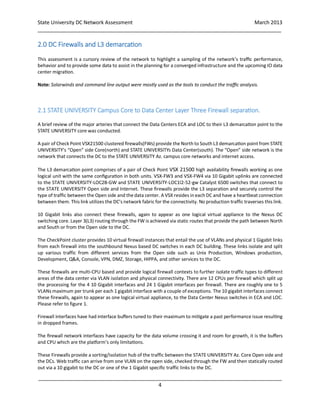
2.0 DC Firewalls and L3 demarcation
This assessment is a cursory review of the network to highlight a sampling of the network’s traffic performance,
behavior and to provide some data to assist in the planning for a converged infrastructure and the upcoming IO data
center migration.
Note: Solarwinds and command line output were mostly used as the tools to conduct the traffic analysis.
2.1 STATE UNIVERSITY Campus Core to Data Center Layer Three Firewall separation.
A brief review of the major arteries that connect the Data Centers ECA and LOC to their L3 demarcation point to the
STATE UNIVERSITY core was conducted.
A pair of Check Point VSX21500 clustered firewalls(FWs) provide the North to South L3 demarcation point from STATE
UNIVERSITY’s “Open” side Core(north) and STATE UNIVERSITYs Data Center(south). The “Open” side network is the
network that connects the DC to the STATE UNIVERSITY Az. campus core networks and internet access.
The L3 demarcation point comprises of a pair of Check Point VSX 21500 high availability firewalls working as one
logical unit with the same configuration in both units. VSX-FW3 and VSX-FW4 via 10 Gigabit uplinks are connected
to the STATE UNIVERSITY-LOC2B-GW and STATE UNIVERSITY-LOC1l2-52-gw Catalyst 6500 switches that connect to
the STATE UNIVERSITY Open side and Internet. These firewalls provide the L3 separation and securely control the
type of traffic between the Open side and the data center. A VSX resides in each DC and have a heartbeat connection
between them. This link utilizes the DC’s network fabric for the connectivity. No production traffic traverses this link.
10 Gigabit links also connect these firewalls, again to appear as one logical virtual appliance to the Nexus DC
switching core. Layer 3(L3) routing through the FW is achieved via static routes that provide the path between North
and South or from the Open side to the DC.
The CheckPoint cluster provides 10 virtual firewall instances that entail the use of VLANs and physical 1 Gigabit links
from each firewall into the southbound Nexus based DC switches in each DC building. These links isolate and split
up various traffic from different services from the Open side such as Unix Production, Windows production,
Development, Q&A, Console, VPN, DMZ, Storage, HIPPA, and other services to the DC.
These firewalls are multi-CPU based and provide logical firewall contexts to further isolate traffic types to different
areas of the data center via VLAN isolation and physical connectivity. There are 12 CPUs per firewall which split up
the processing for the 4 10 Gigabit interfaces and 24 1 Gigabit interfaces per firewall. There are roughly one to 5
VLANs maximum per trunk per each 1 gigabit interface with a couple of exceptions. The 10 gigabit interfaces connect
these firewalls, again to appear as one logical virtual appliance, to the Data Center Nexus switches in ECA and LOC.
Please refer to figure 1.
Firewall interfaces have had interface buffers tuned to their maximum to mitigate a past performance issue resulting
in dropped frames.
The firewall network interfaces have capacity for the data volume crossing it and room for growth, it is the buffers
and CPU which are the platform’s only limitations.
These Firewalls provide a sorting/isolation hub of the traffic between the STATE UNIVERSITY Az. Core Open side and
the DCs. Web traffic can arrive from one VLAN on the open side, checked through the FW and then statically routed
out via a 10 gigabit to the DC or one of the 1 Gigabit specific traffic links to the DC.
State University DC Network Assessment March 2013
_____________________________________________________________________________________
_____________________________________________________________________________________
5
This virtual appliance approach is flexible and scalable. Routing is kept simple and clean via static routes, topology
changes in the Az. Open side infrastructure does not ripple down to the Southern DC infrastructure. The DC’s routing
is kept simple, utilizing a fast L2 protocol with L3 capabilities for equal cost multipath selection which utilizes all
interfaces and without the need to employ Spanning-Tree or maintain SVIs, routing protocol or static route table in
the DC switches.
This FW architecture has proven to be reliable and works well with STATE UNIVERSITY’s evolving network. In relation
to STATE UNIVERSITY’s data center migration this architecture will be duplicated at the IO site. A pair of data center
firewalls will also provide the same function at the IO facility. This section covers the utilization and capacity
performance of the FWs in the current environment to assist in planning and outline any considerations that may
be present for the migration.
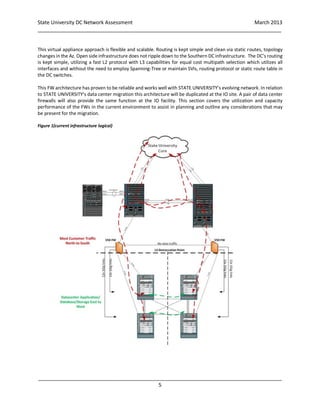
Figure 1(current infrastructure logical)
State University DC Network Assessment March 2013
_____________________________________________________________________________________
_____________________________________________________________________________________
6
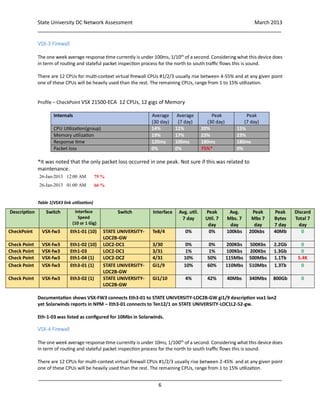
VSX-3 Firewall
The one week average response time currently is under 100ms, 1/10th
of a second. Considering what this device does
in term of routing and stateful packet inspection process for the north to south traffic flows this is sound.
There are 12 CPUs for multi-context virtual firewall CPUs #1/2/3 usually rise between 4-55% and at any given point
one of these CPUs will be heavily used than the rest. The remaining CPUs, range from 1 to 15% utilization.
Profile – CheckPoint VSX 21500-ECA 12 CPUs, 12 gigs of Memory
Internals Average
(30 day)
Average
(7 day)
Peak
(30 day)
Peak
(7 day)
CPU Utilization(group) 14% 12% 20% 15%
Memory utilization 19% 17% 23% 23%
Response time 120ms 100ms 180ms 180ms
Packet loss 0% 0% 75%* 0%
**&**
*It was noted that the only packet loss occurred in one peak. Not sure if this was related to
maintenance.
26-Jan-2013 12:00 AM 75 %
26-Jan-2013 01:00 AM 66 %
Table 1(VSX3 link utilization)
Documentation shows VSX-FW3 connects Eth3-01 to STATE UNIVERSITY-LOC2B-GW gi1/9 description vsx1 lan2
yet Solarwinds reports in NPM – Eth3-01 connects to Ten12/1 on STATE UNIVERSITY-LOC1L2-52-gw.
Eth-1-03 was listed as configured for 10Mbs in Solarwinds.
VSX-4 Firewall
The one week average response time currently is under 10ms, 1/100th
of a second. Considering what this device does
in term of routing and stateful packet inspection process for the north to south traffic flows this is sound.
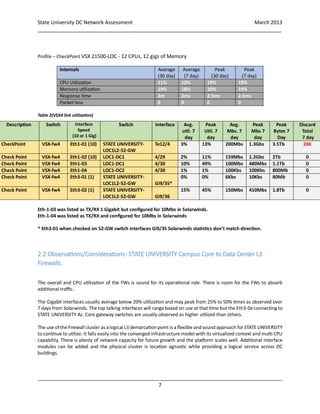
There are 12 CPUs for multi-context virtual firewall CPUs #1/2/3 usually rise between 2-45% and at any given point
one of these CPUs will be heavily used than the rest. The remaining CPUs, range from 1 to 15% utilization.
Description Switch Interface
Speed
(10 or 1 Gig)
Switch Interface Avg. util.
7 day
Peak
Util. 7
day
Avg.
Mbs. 7
day
Peak
Mbs 7
day
Peak
Bytes
7 day
Discard
Total 7
day
CheckPoint VSX-fw3 Eth1-01 (10) STATE UNIVERSITY-
LOC2B-GW
Te8/4 0% 0% 100kbs 200kbs 40Mb 0
Check Point VSX-fw3 Eth1-02 (10) LOC2-DC1 3/30 0% 0% 200Kbs 500Kbs 2.2Gb 0
Check Point VSX-fw3 Eth1-03 LOC2-DC1 3/31 1% 1% 100Kbs 200Kbs 1.3Gb 0
Check Point VSX-fw3 Eth1-04 (1) LOC2-DC2 4/31 10% 50% 115Mbs 500Mbs 1.1Tb 5.4K
Check Point VSX-fw3 Eth3-01 (1) STATE UNIVERSITY-
LOC2B-GW
Gi1/9 10% 60% 110Mbs 510Mbs 1.3Tb 0
Check Point VSX-fw3 Eth3-02 (1) STATE UNIVERSITY-
LOC2B-GW
Gi1/10 4% 42% 40Mbs 340Mbs 800Gb 0
State University DC Network Assessment March 2013
_____________________________________________________________________________________
_____________________________________________________________________________________
7
Profile – CheckPoint VSX 21500-LOC - 12 CPUs, 12 gigs of Memory
Internals Average
(30 day)
Average
(7 day)
Peak
(30 day)
Peak
(7 day)
CPU Utilization 11% 12% 19% 19%
Memory utilization 19% 18% 20% 19%
Response time 2m 2ms 2.5ms 2.5ms
Packet loss 0 0 0 0
Table 2(VSX4 link utilization)
Eth-1-03 was listed as TX/RX 1 Gigabit but configured for 10Mbs in Solarwinds.
Eth-1-04 was listed as TX/RX and configured for 10Mbs in Solarwinds
* Eth3-01 when checked on 52-GW switch interfaces Gi9/35 Solarwinds statistics don’t match direction.
2.2 Observations/Considerations- STATE UNIVERSITY Campus Core to Data Center L3
Firewalls.
The overall and CPU utilization of the FWs is sound for its operational role. There is room for the FWs to absorb
additional traffic.
The Gigabit interfaces usually average below 20% utilization and may peak from 25% to 50% times as observed over
7 days from Solarwinds. The top talking interfaces will range based on use at that time but the Eth3-0x connecting to
STATE UNIVERSITY Az. Core gateway switches are usually observed as higher utilized than others.
The use of the Firewall cluster as alogical L3 demarcation point is a flexible and sound approach for STATE UNIVERSITY
to continue to utilize. It falls easily into the converged infrastructure model with its virtualized context and multi CPU
capability. There is plenty of network capacity for future growth and the platform scales well. Additional interface
modules can be added and the physical cluster is location agnostic while providing a logical service across DC
buildings.
Description Switch Interface
Speed
(10 or 1 Gig)
Switch Interface Avg.
util. 7
day
Peak
Util. 7
day
Avg.
Mbs. 7
day
Peak
Mbs 7
day
Peak
Bytes 7
Day
Discard
Total
7 day
CheckPoint VSX-fw4 Eth1-01 (10) STATE UNIVERSITY-
LOC1L2-52-GW
Te12/4 3% 13% 200Mbs 1.3Gbs 3.5Tb 20K
Check Point VSX-fw4 Eth1-02 (10) LOC1-DC1 4/29 2% 11% 159Mbs 1.2Gbs 2Tb 0
Check Point VSX-fw4 Eth1-03 LOC1-DC1 4/30 10% 49% 100Mbs 480Mbs 1.1Tb 0
Check Point VSX-fw4 Eth1-04 LOC1-DC2 4/30 1% 1% 100Kbs 100Kbs 800Mb 0
Check Point VSX-fw4 Eth3-01 (1) STATE UNIVERSITY-
LOC1L2-52-GW Gi9/35*
0% 0% 6Kbs 10Kbs 80Mb 0
Check Point VSX-fw4 Eth3-02 (1) STATE UNIVERSITY-
LOC1L2-52-GW Gi9/36
15% 45% 150Mbs 410Mbs 1.8Tb 0
State University DC Network Assessment March 2013
_____________________________________________________________________________________
_____________________________________________________________________________________
8
2.3 IO Migration related considerations
Management of static routes for documentation and planning use:
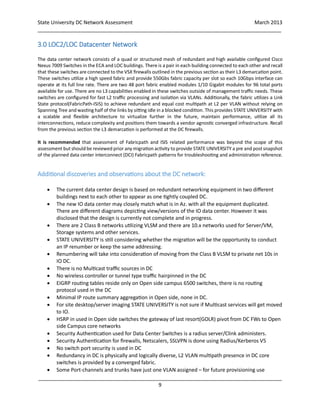
It is recommended to Export VSX static route table to a matrix for documentation of the routes listed from north to
south VLANs. This can be added to the documentation already in place in the VSX 21500 Firewall Cluster Planning
spreadsheet. Having this extra documentation also aids in the planning for IO migration configuration for the VSX
cluster planned at that site.
Sample route flow matrix
Direction Dest VLAN via FW inteface
Next
hop Next Hop Int Metric if applicable
Core subnet
DC subnet
If possible the consideration of using the 10 Gigabit interfaces and logically splitting off the physical Eth0-2/3/4-x
interface based L3 VLANs into trunks as opposed to using individual 1Gigabit trunked interfaces. This approach
reduces cabling and energy requirements in the DC and converge the physical configuration into an easier to manage
logical one. However, this approach changes the configuration on the switch and FWs so for overall migration
simplicity and reducing the number of changes during the migration STATE UNIVERSITY can decide best when to take
this approach. It can be applied post migration and follows a converged infrastructure byproduct of reducing cabling
and power requirements in the DC.
The IO DC is expected to have an infrastructure that mirrors what is in ECA/LOC1 thus IO will look similar to the
current DC. However, instead of a pair of firewalls split between ECA/LOC1 acting a logical FW between buildings a
new pair will reside in each building.
The difference here is that a second pair with a similar configuration to that of LOC will reside in IO conducting the
north to south L3 demarcation and control independently. The FW clusters in IO will not communicate or be clustered
to those in Az..
It was mention tuning of buffers for all CPUs will be conducted for the new FWs prior to deployment in IO. Also, keep
in mind that the FWs in IO though possibly similar in platform configuration and provisioning may have less traffic
crossing them thus their overall utilization and workload may be less of the current pair today. The current pair today
will also see a shift in workload as they will be just supporting LOC1 resources.
It is recommended that updated or added Interface descriptions in switches connected to the Firewalls would help
greatly especially in tools such as Solarwinds so identification is easier without having to refer to switch port
descriptions on CLI or a spreadsheet. All FW interface descriptions and statistics should appear in any NMS platform
used.
State University DC Network Assessment March 2013
_____________________________________________________________________________________
_____________________________________________________________________________________
9
3.0 LOC2/LOC Datacenter Network
The data center network consists of a quad or structured mesh of redundant and high available configured Cisco
Nexus 7009 Switches in the ECA and LOC buildings. There is a pair in each building connected to each other and recall
that these switches are connected to the VSX firewalls outlined in the previous section as their L3 demarcation point.
These switches utilize a high speed fabric and provide 550Gbs fabric capacity per slot so each 10Gbps interface can
operate at its full line rate. There are two 48 port fabric enabled modules 1/10 Gigabit modules for 96 total ports
available for use. There are no L3 capabilities enabled in these switches outside of management traffic needs. These
switches are configured for fast L2 traffic processing and isolation via VLANs. Additionally, the fabric utilizes a Link
State protocol(FabricPath-ISIS) to achieve redundant and equal cost multipath at L2 per VLAN without relying on
Spanning Tree and wasting half of the links by sitting idle in a blocked condition. This provides STATE UNIVERSITY with
a scalable and flexible architecture to virtualize further in the future, maintain performance, utilize all its
interconnections, reduce complexity and positions them towards a vendor agnostic converged infrastructure. Recall
from the previous section the L3 demarcation is performed at the DC firewalls.
It is recommended that assessment of Fabricpath and ISIS related performance was beyond the scope of this
assessment but should be reviewed prior any migration activity to provide STATE UNIVERSITY a pre and post snapshot
of the planned data center interconnect (DCI) Fabricpath patterns for troubleshooting and administration reference.
Additional discoveries and observations about the DC network:
 The current data center design is based on redundant networking equipment in two different
buildings next to each other to appear as one tightly coupled DC.
 The new IO data center may closely match what is in Az. with all the equipment duplicated.
There are different diagrams depicting view/versions of the IO data center. However it was
disclosed that the design is currently not complete and in progress.
 There are 2 Class B networks utilizing VLSM and there are 10.x networks used for Server/VM,
Storage systems and other services.
 STATE UNIVERSITY is still considering whether the migration will be the opportunity to conduct
an IP renumber or keep the same addressing.
 Renumbering will take into consideration of moving from the Class B VLSM to private net 10s in
IO DC.
 There is no Multicast traffic sources in DC
 No wireless controller or tunnel type traffic hairpinned in the DC
 EIGRP routing tables reside only on Open side campus 6500 switches, there is no routing
protocol used in the DC
 Minimal IP route summary aggregation in Open side, none in DC.
 For site desktop/server imaging STATE UNIVERSITY is not sure if Multicast services will get moved
to IO.
 HSRP in used in Open side switches the gateway of last resort(GOLR) pivot from DC FWs to Open
side Campus core networks
 Security Authentication used for Data Center Switches is a radius server/Clink administers.
 Security Authentication for firewalls, Netscalers, SSLVPN is done using Radius/Kerberos V5
 No switch port security is used in DC
 Redundancy in DC is physically and logically diverse, L2 VLAN multipath presence in DC core
switches is provided by a converged fabric.
 Some Port-channels and trunks have just one VLAN assigned – for future provisioning use
State University DC Network Assessment March 2013
_____________________________________________________________________________________
_____________________________________________________________________________________
10
 For server links all VLANs are trunked to cover Zen VM related move add changes(MACs)
 Jumbo frames are enabled in the DC core switches
 MTU is set to 1500 for all interfaces
 Spanning-Tree is pushed down to the access-layer port channels.
 VPC+ is enabled on the 7ks and 5k aggregates thus positioning STATE UNIVERSITY to utilize the
converged fabric for service redundancy and bandwidth scalability.
The following section covers the utilization of these switches and their interconnecting interfaces in
relation to the migration to the new data center.
To avoid providing redundant information a report from Cisco provided additional details about the DC
Nexus switches, their connectivity and best practices. This OEM assessment also covers a review of Cisco’s
report in the spirit of vendor neutrality and offers direction regarding their recommendations as well at
the end of this section and in section 8.
Note: Sine this assessment is a cursory review of the DC network to determine the impact of moving to the IO data
center the capacity data analyzed was from STATE UNIVERSITY’s Solarwinds systems.
State University DC Network Assessment March 2013
_____________________________________________________________________________________
_____________________________________________________________________________________
11
3.1 Traffic ROM(Rough Order of Magnitude) Reports
Data Center Building LOC2
LOC2-DC1
Cisco Nexus7000 C7009 (9 Slot) Chassis ("Supervisor module-1X")
Intel(R) Xeon(R) CPU with 8251588 kB of memory.
OS version 6.1(2)
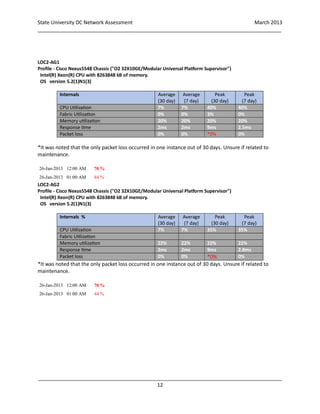
Internals Average
(30 day)
Average
(7 day)
Peak
(30 day)
Peak
(7 day)
CPU Utilization 55% 60% 85% 75%
Fabric Utilization – from show tech 0% 0% 3% 0%
Memory utilization 25% 25% 25% 25%
Response time 2.5ms 2.5ms 9.0ms 7.5ms
Packet loss 0% 0% *0% 0%
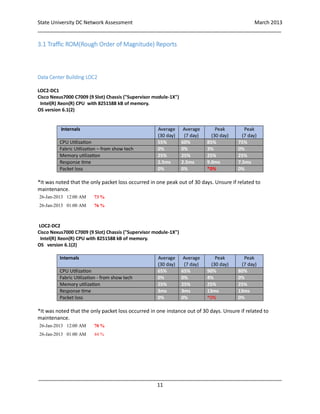
*It was noted that the only packet loss occurred in one peak out of 30 days. Unsure if related to
maintenance.
26-Jan-2013 12:00 AM 73 %
26-Jan-2013 01:00 AM 76 %
LOC2-DC2
Cisco Nexus7000 C7009 (9 Slot) Chassis ("Supervisor module-1X")
Intel(R) Xeon(R) CPU with 8251588 kB of memory.
OS version 6.1(2)
Internals Average
(30 day)
Average
(7 day)
Peak
(30 day)
Peak
(7 day)
CPU Utilization 65% 65% 90% 80%
Fabric Utilization - from show tech 0% 0% 4% 0%
Memory utilization 25% 25% 25% 25%
Response time 3ms 3ms 13ms 13ms
Packet loss 0% 0% *0% 0%
*It was noted that the only packet loss occurred in one instance out of 30 days. Unsure if related to
maintenance.
26-Jan-2013 12:00 AM 70 %
26-Jan-2013 01:00 AM 44 %
State University DC Network Assessment March 2013
_____________________________________________________________________________________
_____________________________________________________________________________________
12
LOC2-AG1
Profile - Cisco Nexus5548 Chassis ("O2 32X10GE/Modular Universal Platform Supervisor")
Intel(R) Xeon(R) CPU with 8263848 kB of memory.
OS version 5.2(1)N1(3)
Internals Average
(30 day)
Average
(7 day)
Peak
(30 day)
Peak
(7 day)
CPU Utilization 7% 7% 40% 40%
Fabric Utilization 0% 0% 3% 0%
Memory utilization 20% 20% 20% 20%
Response time 2ms 2ms 9ms 2.5ms
Packet loss 0% 0% *0% 0%
*It was noted that the only packet loss occurred in one instance out of 30 days. Unsure if related to
maintenance.
26-Jan-2013 12:00 AM 70 %
26-Jan-2013 01:00 AM 44 %
LOC2-AG2
Profile - Cisco Nexus5548 Chassis ("O2 32X10GE/Modular Universal Platform Supervisor")
Intel(R) Xeon(R) CPU with 8263848 kB of memory.
OS version 5.2(1)N1(3)
Internals % Average
(30 day)
Average
(7 day)
Peak
(30 day)
Peak
(7 day)
CPU Utilization 7% 7% 35% 35%
Fabric Utilization
Memory utilization 22% 22% 22% 22%
Response time 2ms 2ms 9ms 2.8ms
Packet loss 0% 0% *0% 0%
*It was noted that the only packet loss occurred in one instance out of 30 days. Unsure if related to
maintenance.
26-Jan-2013 12:00 AM 70 %
26-Jan-2013 01:00 AM 44 %
State University DC Network Assessment March 2013
_____________________________________________________________________________________
_____________________________________________________________________________________
13
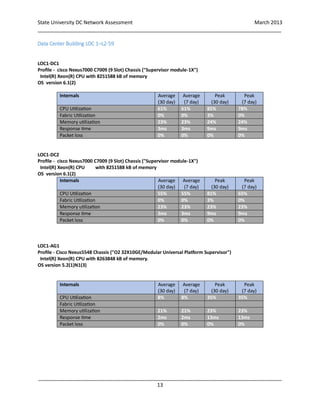
Data Center Building LOC 1–L2-59
LOC1-DC1
Profile - cisco Nexus7000 C7009 (9 Slot) Chassis ("Supervisor module-1X")
Intel(R) Xeon(R) CPU with 8251588 kB of memory
OS version 6.1(2)
Internals Average
(30 day)
Average
(7 day)
Peak
(30 day)
Peak
(7 day)
CPU Utilization 61% 61% 85% 78%
Fabric Utilization 0% 0% 3% 0%
Memory utilization 23% 23% 24% 24%
Response time 3ms 3ms 9ms 9ms
Packet loss 0% 0% 0% 0%
LOC1-DC2
Profile - cisco Nexus7000 C7009 (9 Slot) Chassis ("Supervisor module-1X")
Intel(R) Xeon(R) CPU with 8251588 kB of memory
OS version 6.1(2)
Internals Average
(30 day)
Average
(7 day)
Peak
(30 day)
Peak
(7 day)
CPU Utilization 55% 55% 81% 65%
Fabric Utilization 0% 0% 3% 0%
Memory utilization 23% 23% 23% 23%
Response time 3ms 3ms 9ms 9ms
Packet loss 0% 0% 0% 0%
LOC1-AG1
Profile - Cisco Nexus5548 Chassis ("O2 32X10GE/Modular Universal Platform Supervisor")
Intel(R) Xeon(R) CPU with 8263848 kB of memory.
OS version 5.2(1)N1(3)
Internals Average
(30 day)
Average
(7 day)
Peak
(30 day)
Peak
(7 day)
CPU Utilization 8% 8% 35% 35%
Fabric Utilization
Memory utilization 21% 21% 23% 23%
Response time 2ms 2ms 13ms 13ms
Packet loss 0% 0% 0% 0%
State University DC Network Assessment March 2013
_____________________________________________________________________________________
_____________________________________________________________________________________
14
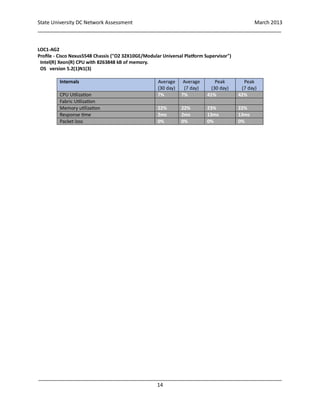
LOC1-AG2
Profile - Cisco Nexus5548 Chassis ("O2 32X10GE/Modular Universal Platform Supervisor")
Intel(R) Xeon(R) CPU with 8263848 kB of memory.
OS version 5.2(1)N1(3)
Internals Average
(30 day)
Average
(7 day)
Peak
(30 day)
Peak
(7 day)
CPU Utilization 7% 7% 41% 42%
Fabric Utilization
Memory utilization 22% 22% 23% 22%
Response time 2ms 2ms 13ms 13ms
Packet loss 0% 0% 0% 0%
State University DC Network Assessment March 2013
_____________________________________________________________________________________
_____________________________________________________________________________________
15
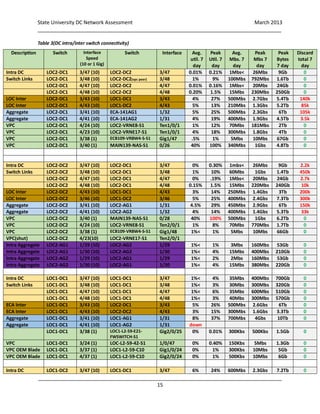
Table 3(DC intra/inter switch connectivity)
Description Switch Interface
Speed
(10 or 1 Gig)
Switch Interface Avg.
util. 7
day
Peak
Util. 7
day
Avg.
Mbs. 7
day
Peak
Mbs 7
day
Peak
Bytes
7 day
Discard
total 7
day
Intra DC LOC2-DC1 3/47 (10) LOC2-DC2 3/47 0.01% 0.21% 1Mbs< 26Mbs 9Gb 0
Switch Links LOC2-DC1 3/48 (10) LOC2-DC2(vpc peer) 3/48 1% 9% 100Mbs 792Mbs 1.6Tb 0
LOC2-DC1 4/47 (10) LOC2-DC2 4/47 0.01% 0.16% 1Mbs< 20Mbs 24Gb 0
LOC2-DC1 4/48 (10) LOC2-DC2 4/48 0.20% 1.5% 15Mbs 230Mbs 250Gb 0
LOC Inter LOC2-DC1 3/43 (10) LOC1-DC1 3/43 4% 27% 500Mbs 2.7Gbs 5.4Tb 140k
LOC Inter LOC2-DC1 4/43 (10) LOC1-DC2 4/43 5% 13% 210Mbs 1.3Gbs 5.2Tb 85k
Aggregate LOC2-DC1 3/41 (10) ECA-141AG1 1/32 5% 25% 500Mbs 2.3Gbs 6Tb 105k
Aggregate LOC2-DC1 4/41 (10) ECA-141AG2 1/31 4% 19% 400Mbs 1.9Gbs 4.5Tb 3.5k
VPC LOC2-DC1 4/24 (10) LOC2-VRNE8-S1 Ten1/0/1 1% 12% 70Mbs 181Mbs 2Tb 0
VPC LOC2-DC1 4/23 (10) LOC2-VRNE17-S1 Ten1/0/1 4% 18% 300Mbs 1.8Gbs 4Tb 0
VPC LOC2-DC1 3/38 (1) ECB109-VRBW4-S-S1 Gig1/47 .5% 1% 5Mbs 10Mbs 67Gb 0
VPC LOC2-DC1 3/40 (1) MAIN139-NAS-S1 0/26 40% 100% 340Mbs 1Gbs 4.8Tb 0
Intra DC LOC2-DC2 3/47 (10) LOC2-DC1 3/47 0% 0.30% 1mbs< 26Mbs 9Gb 2.2k
Switch Links LOC2-DC2 3/48 (10) LOC2-DC1 3/48 1% 10% 60Mbs 1Gbs 1.4Tb 450k
LOC2-DC2 4/47 (10) LOC2-DC1 4/47 0% .19% 1Mbs< 20Mbs 24Gb 2.7k
LOC2-DC2 4/48 (10) LOC2-DC1 4/48 0.15% 1.5% 15Mbs 220Mbs 240Gb 10k
LOC Inter LOC2-DC2 4/43 (10) LOC1-DC1 4/43 3% 14% 250Mbs 1.4Gbs 3Tb 200k
LOC Inter LOC2-DC2 3/46 (10) LOC1-DC2 3/46 5% 25% 400Mbs 2.4Gbs 7.3Tb 300k
Aggregate LOC2-DC2 3/41 (10) LOC2-AG1 1/31 4.5% 29% 450Mbs 2.9Gbs 6Tb 150k
Aggregate LOC2-DC2 4/41 (10) LOC2-AG2 1/32 4% 14% 400Mbs 1.4Gbs 5.3Tb 33k
VPC LOC2-DC2 3/40 (1) MAIN139-NAS-S1 0/28 40% 100% 500Mbs 1Gbs 6.2Tb 0
VPC LOC2-DC2 4/24 (10) LOC2-VRNE8-S1 Ten2/0/1 1% 8% 70Mbs 770Mbs 1.7Tb 0
VPC LOC2-DC2 3/38 (1) ECB109-VRBW4-S-S1 Gig1/48 1%< 1% 5Mbs 10Mbs 66Gb 0
VPC(shut) LOC2-DC2 4/23(10) LOC2-VRNE17-S1 Ten2/0/1
Intra Aggregate LOC2-AG1 1/29 (10) LOC2-AG2 1/29 1%< 1% 3Mbs 160Mbs 53Gb 0
Intra Aggregate LOC2-AG1 1/30 (10) LOC2-AG2 1/30 1%< 4% 15Mbs 400Mbs 210Gb 0
Intra Aggregate LOC2-AG2 1/29 (10) LOC2-AG1 1/29 1%< 2% 2Mbs 160Mbs 53Gb 0
Intra Aggregate LOC2-AG2 1/30 (10) LOC2-AG1 1/30 1%< 4% 15Mbs 380Mbs 220Gb 0
Intra DC LOC1-DC1 3/47 (10) LOC1-DC1 3/47 1%< 4% 35Mbs 400Mbs 700Gb 0
Switch Links LOC1-DC1 3/48 (10) LOC1-DC1 3/48 1%< 3% 30Mbs 300Mbs 320Gb 0
LOC1-DC1 4/47 (10) LOC1-DC1 4/47 1%< 6% 35Mbs 600Mbs 510Gb 0
LOC1-DC1 4/48 (10) LOC1-DC1 4/48 1%< 3% 40Mbs 300Mbs 570Gb 0
ECA Inter LOC1-DC1 3/43 (10) LOC2-DC1 3/43 5% 26% 500Mbs 2.6Gbs 6Tb 0
ECA Inter LOC1-DC1 4/43 (10) LOC2-DC2 4/43 3% 15% 300Mbs 1.6Gbs 3.3Tb 0
Aggregate LOC1-DC1 3/41 (10) LOC1-AG1 1/31 8% 37% 700Mbs 4Gbs 10Tb 0
Aggregate LOC1-DC1 4/41 (10) LOC1-AG2 1/31 down
LOC1-DC1 3/38 (1) LOC1-L2-59-E21-
FWSWITCH-S1
Gig2/0/25 0% 0.01% 300Kbs 500Kbs 1.5Gb 0
VPC LOC1-DC1 3/24 (1) LOC-L2-59-42-S1 1/0/47 0% 0.40% 150Kbs 5Mbs 1.3Gb 0
VPC OEM Blade LOC1-DC1 3/37 (1) LOC1-L2-59-C10 Gig1/0/24 0% 1% 300Kbs 10Mbs 5Gb 0
VPC OEM Blade LOC1-DC1 4/37 (1) LOC1-L2-59-C10 Gig2/0/24 0% 1% 500Kbs 10Mbs 6Gb 0
Intra DC LOC1-DC2 3/47 (10) LOC1-DC1 3/47 6% 24% 600Mbs 2.3Gbs 7.2Tb 0
State University DC Network Assessment March 2013
_____________________________________________________________________________________
_____________________________________________________________________________________
16
Note: this table can be used as an IO migration connection/capacity planning tool and for post migration analysis by
just adding/changing the switch names and ports.
Note: Port channel breakdown of traffic was not covered, especially for the aggregates due to time and scope.
However, since the individual core interfaces were covered the North and South and East and West traffic between
switches is captured in bulk. Traffic below the aggregator switches where it flows through a local FW between server
or storage system was not captured due to time constraints.
Switch Links LOC1-DC2 3/48 (10) LOC1-DC1 3/48 1%< 3% 30Mbs 320Mbs 340Gb 0
LOC1-DC2 4/47 (10) LOC1-DC1 4/47 1%< 6% 45Mbs 630Mbs 510Gb 0
LOC1-DC2 4/48 (10) LOC1-DC1 4/48 1%< 3% 45Mbs 320Mbs 530Gb 0
ECA Inter LOC1-DC2 3/46 (10) LOC2-DC2 3/46 6% 23% 300Mbs 2.3Gbs 7.1Tb 0
ECA Inter LOC1-DC2 4/43 (10) LOC2-DC1 4/43 4% 14% 400Mbs 1.3Gbs 5.1Tb 0
Aggregate LOC1-DC2 3/41 (10) LOC1-AG1 1/32 8% 36% 850Mbs 3.6Gbs 9Tb 0
Aggregate LOC1-DC2 4/41 (10) LOC1-AG2 1/32 7% 25% 650Mbs 2.5Gbs 8Tb 0
VPC LOC1-DC2 3/24 (1) LOC-L2-59-42-S1 2/0/47 1%< 1%< 300Kbs 1.8Mbs 3Gb 0
VPC OEM Blade LOC1-DC2 3/37 (1) LOC1-L2-59-C10 Gig3/0/24 1%< 2% 300Kbs 17Mbs 4.8Gb 0
VPC OEM Blade LOC1-DC2 4/37 (1) LOC1-L2-59-C10 Gig4/0/24 1%< 1% 400Kbs 8Mbs 4.7Gb 0
Intra Aggregate LOC1-AG1 1/29 (10) ISBT1-AG2 1/29 7% 16% 700Mbs 1.6Gbs 8.1Tb 0
Intra Aggregate LOC1-AG1 1/30 (10) LOC1-AG2 1/30 8% 17% 800Mbs 1.6Gbs 8.8Tb 0
Intra Aggregate LOC1-AG2 1/29 (10) ISBT1-AG1 1/29 7% 16% 700Mbs 1.5Gbs 8.Tb 0
Intra Aggregate LOC1-AG2 1/30 (10) LOC1-AG1 1/30 8% 17% 800Mbs 1.6Gbs 8.8Tb 0
State University DC Network Assessment March 2013
_____________________________________________________________________________________
_____________________________________________________________________________________
17
3.2 Observations/Considerations – LOC2/LOC Datacenter Network
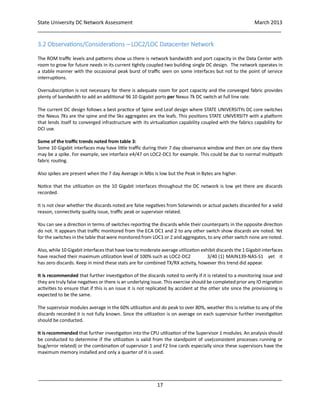
The ROM traffic levels and patterns show us there is network bandwidth and port capacity in the Data Center with
room to grow for future needs in its current tightly coupled two building single DC design. The network operates in
a stable manner with the occasional peak burst of traffic seen on some interfaces but not to the point of service
interruptions.
Oversubscription is not necessary for there is adequate room for port capacity and the converged fabric provides
plenty of bandwidth to add an additional 96 10 Gigabit ports per Nexus 7k DC switch at full line rate.
The current DC design follows a best practice of Spine and Leaf design where STATE UNIVERSITYs DC core switches
the Nexus 7Ks are the spine and the 5ks aggregates are the leafs. This positions STATE UNIVERSITY with a platform
that lends itself to converged infrastructure with its virtualization capability coupled with the fabrics capability for
DCI use.
Some of the traffic trends noted from table 3:
Some 10 Gigabit interfaces may have little traffic during their 7 day observance window and then on one day there
may be a spike. For example, see interface e4/47 on LOC2-DC1 for example. This could be due to normal multipath
fabric routing.
Also spikes are present when the 7 day Average in Mbs is low but the Peak in Bytes are higher.
Notice that the utilization on the 10 Gigabit interfaces throughout the DC network is low yet there are discards
recorded.
It is not clear whether the discards noted are false negatives from Solarwinds or actual packets discarded for a valid
reason, connectivity quality issue, traffic peak or supervisor related.
You can see a direction in terms of switches reporting the discards while their counterparts in the opposite direction
do not. It appears that traffic monitored from the ECA DC1 and 2 to any other switch show discards are noted. Yet
for the switches in the table that were monitored from LOC1 or 2 and aggregates, to any other switch none are noted.
Also, while 10 Gigabit interfaces that have lowto moderate average utilization exhibit discards the 1 Gigabitinterfaces
have reached their maximum utilization level of 100% such as LOC2-DC2 3/40 (1) MAIN139-NAS-S1 yet it
has zero discards. Keep in mind these stats are for combined TX/RX activity, however this trend did appear.
It is recommended that further investigation of the discards noted to verify if it is related to a monitoring issue and
they are truly false negatives or there is an underlying issue. This exercise should be completed prior any IO migration
activities to ensure that if this is an issue it is not replicated by accident at the other site since the provisioning is
expected to be the same.
The supervisor modules average in the 60% utilization and do peak to over 80%, weather this is relative to any of the
discards recorded it is not fully known. Since the utilization is on average on each supervisor further investigation
should be conducted.
It is recommended that further investigation into the CPU utilization of the Supervisor 1 modules. An analysis should
be conducted to determine if the utilization is valid from the standpoint of use(consistent processes running or
bug/error related) or the combination of supervisor 1 and F2 line cards especially since these supervisors have the
maximum memory installed and only a quarter of it is used.
State University DC Network Assessment March 2013
_____________________________________________________________________________________
_____________________________________________________________________________________
18
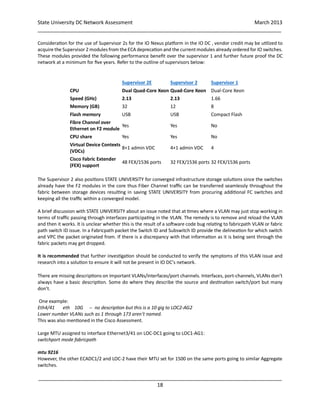
Consideration for the use of Supervisor 2s for the IO Nexus platform in the IO DC , vendor credit may be utilized to
acquire the Supervisor 2 modules from theECA deprecation and the currentmodules already ordered for IO switches.
These modules provided the following performance benefit over the supervisor 1 and further future proof the DC
network at a minimum for five years. Refer to the outline of supervisors below:
Supervisor 2E Supervisor 2 Supervisor 1
CPU Dual Quad-Core Xeon Quad-Core Xeon Dual-Core Xeon
Speed (GHz) 2.13 2.13 1.66
Memory (GB) 32 12 8
Flash memory USB USB Compact Flash
Fibre Channel over
Ethernet on F2 module
Yes Yes No
CPU share Yes Yes No
Virtual Device Contexts
(VDCs)
8+1 admin VDC 4+1 admin VDC 4
Cisco Fabric Extender
(FEX) support
48 FEX/1536 ports 32 FEX/1536 ports 32 FEX/1536 ports
The Supervisor 2 also positions STATE UNIVERSITY for converged infrastructure storage solutions since the switches
already have the F2 modules in the core thus Fiber Channel traffic can be transferred seamlessly throughout the
fabric between storage devices resulting in saving STATE UNIVERSITY from procuring additional FC switches and
keeping all the traffic within a converged model.
A brief discussion with STATE UNIVERSITY about an issue noted that at times where a VLAN may just stop working in
terms of traffic passing through interfaces participating in the VLAN. The remedy is to remove and reload the VLAN
and then it works. It is unclear whether this is the result of a software code bug relating to fabricpath VLAN or fabric
path switch ID issue. In a Fabricpath packet the Switch ID and Subswitch ID provide the delineation for which switch
and VPC the packet originated from. If there is a discrepancy with that information as it is being sent through the
fabric packets may get dropped.
It is recommended that further investigation should be conducted to verify the symptoms of this VLAN issue and
research into a solution to ensure it will not be present in IO DC’s network.
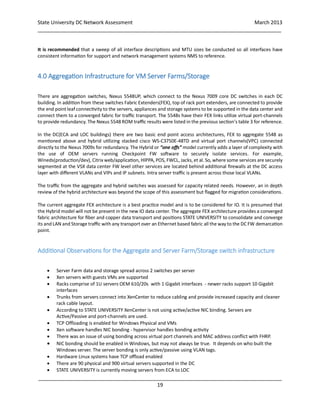
There are missing descriptions on important VLANs/interfaces/port channels. Interfaces, port-channels, VLANs don’t
always have a basic description. Some do where they describe the source and destination switch/port but many
don’t.
One example:
Eth4/41 eth 10G -- no description but this is a 10 gig to LOC2-AG2
Lower number VLANs such as 1 through 173 aren’t named.
This was also mentioned in the Cisco Assessment.
Large MTU assigned to interface Ethernet3/41 on LOC-DC1 going to LOC1-AG1:
switchport mode fabricpath
mtu 9216
However, the other ECADC1/2 and LOC-2 have their MTU set for 1500 on the same ports going to similar Aggregate
switches.
State University DC Network Assessment March 2013
_____________________________________________________________________________________
_____________________________________________________________________________________
19
It is recommended that a sweep of all interface descriptions and MTU sizes be conducted so all interfaces have
consistent information for support and network management systems NMS to reference.
4.0 Aggregation Infrastructure for VM Server Farms/Storage
There are aggregation switches, Nexus 5548UP, which connect to the Nexus 7009 core DC switches in each DC
building. In addition from these switches Fabric Extenders(FEX), top of rack port extenders, are connected to provide
the end point leaf connectivity to the servers, appliances and storage systems to be supported in the data center and
connect them to a converged fabric for traffic transport. The 5548s have their FEX links utilize virtual port-channels
to provide redundancy. The Nexus 5548 ROM traffic results were listed in the previous section’s table 3 for reference.
In the DC(ECA and LOC buildings) there are two basic end point access architectures, FEX to aggregate 5548 as
mentioned above and hybrid utilizing stacked cisco WS-C3750E-48TD and virtual port channels(VPC) connected
directly to the Nexus 7009s for redundancy. The Hybrid or “one offs” model currently adds a layer of complexity with
the use of OEM servers running Checkpoint FW software to securely isolate services. For example,
Wineds(production/dev), Citrix web/application, HIPPA, POS, FWCL, Jacks, et al. So, where some services are securely
segmented at the VSX data center FW level other services are located behind additional firewalls at the DC access
layer with different VLANs and VIPs and IP subnets. Intra server traffic is present across those local VLANs.
The traffic from the aggregate and hybrid switches was assessed for capacity related needs. However, an in depth
review of the hybrid architecture was beyond the scope of this assessment but flagged for migration considerations.
The current aggregate FEX architecture is a best practice model and is to be considered for IO. It is presumed that
the Hybrid model will not be present in the new IO data center. The aggregate FEX architecture provides a converged
fabric architecture for fiber and copper data transport and positions STATE UNIVERSITY to consolidate and converge
its and LAN and Storage traffic with any transport over an Ethernet based fabric all the way to the DC FW demarcation
point.
Additional Observations for the Aggregate and Server Farm/Storage switch infrastructure
 Server Farm data and storage spread across 2 switches per server
 Xen servers with guests VMs are supported
 Racks comprise of 1U servers OEM 610/20s with 1 Gigabit interfaces - newer racks support 10 Gigabit
interfaces
 Trunks from servers connect into XenCenter to reduce cabling and provide increased capacity and cleaner
rack cable layout.
 According to STATE UNIVERSITY XenCenter is not using active/active NIC binding. Servers are
Active/Passive and port-channels are used.
 TCP Offloading is enabled for Windows Physical and VMs
 Xen software handles NIC bonding - hypervisor handles bonding activity
 There was an issue of using bonding across virtual port channels and MAC address conflict with FHRP.
 NIC bonding should be enabled in Windows, but may not always be true. It depends on who built the
Windows server. The server bonding is only active/passive using VLAN tags.
 Hardware Linux systems have TCP offload enabled
 There are 90 physical and 900 virtual servers supported in the DC
 STATE UNIVERSITY is currently moving servers from ECA to LOC
State University DC Network Assessment March 2013
_____________________________________________________________________________________
_____________________________________________________________________________________
20
 WINNES from ECA to will go to the IO DC
 There will be some physical moves of servers from LOC to IO DC
 VMs will be moved to IO
 Department FWs will not be moved to IO
 5548UP provides 32x10Gb ports and increased network capacity
The main applications serviced are
 Web presence
 MS Exchange CAS
 MySTATE UNIVERSITY portal
 General WEB
 Back office applications
 Oracle DB and other SQL database systems, MY Sql, Sybase, MS SQL
Many of the servers, virtual firewall and storage subsystems are located southbound off the Aggregation/FEX
switches or off of the hybrid or “one off” switch stacks in the DCs. Monitoring at this granular level for switches would
require additional time and was not in scope. Any Intra storage or server traffic present beyond the aggregation layer
was not captured as well due to time requirements.
Listing Port-channels and VLANs was not necessary due to scope of the assessment.
There are 17 active FEXs connected to the LOC2-AG1 and 2 Aggregate switches.
Port-channels and VPC is enabled for redundancy.
There are 12 active FEXs connected to the LOC1-AG1 and 2 Aggregate switches.
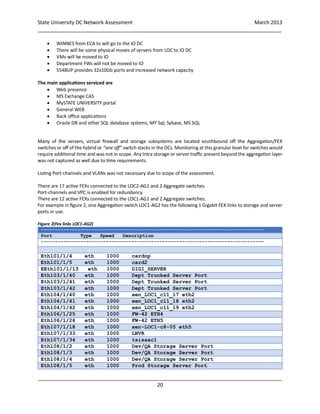
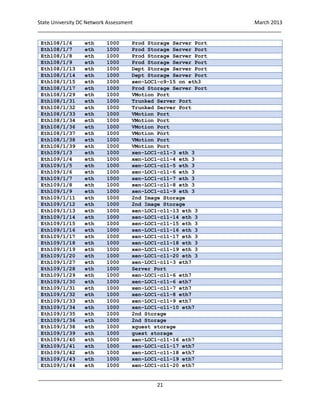
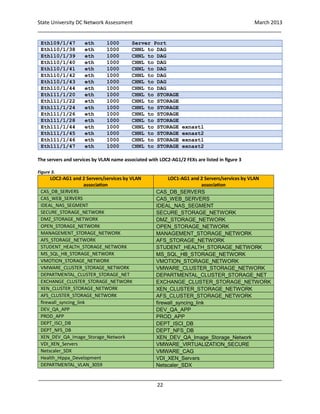
For example in figure 2, one Aggregation switch LOC1-AG2 has the following 1 Gigabit FEX links to storage and server
ports in use.
Figure 2(Fex links LOC1-AG2)
-------------------------------------------------------------------------------
Port Type Speed Description
-------------------------------------------------------------------------------
Eth101/1/4 eth 1000 cardnp
Eth101/1/5 eth 1000 card2
EEth101/1/13 eth 1000 DIGI_SERVER
Eth103/1/40 eth 1000 Dept Trunked Server Port
Eth103/1/41 eth 1000 Dept Trunked Server Port
Eth103/1/42 eth 1000 Dept Trunked Server Port
Eth104/1/40 eth 1000 xen_LOC1_c11_17 eth2
Eth104/1/41 eth 1000 xen_LOC1_c11_18 eth2
Eth104/1/42 eth 1000 xen_LOC1_c11_19 eth2
Eth106/1/25 eth 1000 FW-42 ETH4
Eth106/1/26 eth 1000 FW-42 ETH5
Eth107/1/18 eth 1000 xen-LOC1-c8-05 eth5
Eth107/1/33 eth 1000 LNVR
Eth107/1/34 eth 1000 tsisaac1
Eth108/1/2 eth 1000 Dev/QA Storage Server Port
Eth108/1/3 eth 1000 Dev/QA Storage Server Port
Eth108/1/4 eth 1000 Dev/QA Storage Server Port
Eth108/1/5 eth 1000 Prod Storage Server Port
State University DC Network Assessment March 2013
_____________________________________________________________________________________
_____________________________________________________________________________________
21
Eth108/1/6 eth 1000 Prod Storage Server Port
Eth108/1/7 eth 1000 Prod Storage Server Port
Eth108/1/8 eth 1000 Prod Storage Server Port
Eth108/1/9 eth 1000 Prod Storage Server Port
Eth108/1/13 eth 1000 Dept Storage Server Port
Eth108/1/14 eth 1000 Dept Storage Server Port
Eth108/1/15 eth 1000 xen-LOC1-c9-15 on eth3
Eth108/1/17 eth 1000 Prod Storage Server Port
Eth108/1/29 eth 1000 VMotion Port
Eth108/1/31 eth 1000 Trunked Server Port
Eth108/1/32 eth 1000 Trunked Server Port
Eth108/1/33 eth 1000 VMotion Port
Eth108/1/34 eth 1000 VMotion Port
Eth108/1/36 eth 1000 VMotion Port
Eth108/1/37 eth 1000 VMotion Port
Eth108/1/38 eth 1000 VMotion Port
Eth108/1/39 eth 1000 VMotion Port
Eth109/1/3 eth 1000 xen-LOC1-c11-3 eth 3
Eth109/1/4 eth 1000 xen-LOC1-c11-4 eth 3
Eth109/1/5 eth 1000 xen-LOC1-c11-5 eth 3
Eth109/1/6 eth 1000 xen-LOC1-c11-6 eth 3
Eth109/1/7 eth 1000 xen-LOC1-c11-7 eth 3
Eth109/1/8 eth 1000 xen-LOC1-c11-8 eth 3
Eth109/1/9 eth 1000 xen-LOC1-c11-9 eth 3
Eth109/1/11 eth 1000 2nd Image Storage
Eth109/1/12 eth 1000 2nd Image Storage
Eth109/1/13 eth 1000 xen-LOC1-c11-13 eth 3
Eth109/1/14 eth 1000 xen-LOC1-c11-14 eth 3
Eth109/1/15 eth 1000 xen-LOC1-c11-15 eth 3
Eth109/1/16 eth 1000 xen-LOC1-c11-16 eth 3
Eth109/1/17 eth 1000 xen-LOC1-c11-17 eth 3
Eth109/1/18 eth 1000 xen-LOC1-c11-18 eth 3
Eth109/1/19 eth 1000 xen-LOC1-c11-19 eth 3
Eth109/1/20 eth 1000 xen-LOC1-c11-20 eth 3
Eth109/1/27 eth 1000 xen-LOC1-c11-3 eth7
Eth109/1/28 eth 1000 Server Port
Eth109/1/29 eth 1000 xen-LOC1-c11-6 eth7
Eth109/1/30 eth 1000 xen-LOC1-c11-6 eth7
Eth109/1/31 eth 1000 xen-LOC1-c11-7 eth7
Eth109/1/32 eth 1000 xen-LOC1-c11-8 eth7
Eth109/1/33 eth 1000 xen-LOC1-c11-9 eth7
Eth109/1/34 eth 1000 xen-LOC1-c11-10 eth7
Eth109/1/35 eth 1000 2nd Storage
Eth109/1/36 eth 1000 2nd Storage
Eth109/1/38 eth 1000 xguest storage
Eth109/1/39 eth 1000 guest storage
Eth109/1/40 eth 1000 xen-LOC1-c11-16 eth7
Eth109/1/41 eth 1000 xen-LOC1-c11-17 eth7
Eth109/1/42 eth 1000 xen-LOC1-c11-18 eth7
Eth109/1/43 eth 1000 xen-LOC1-c11-19 eth7
Eth109/1/44 eth 1000 xen-LOC1-c11-20 eth7
State University DC Network Assessment March 2013
_____________________________________________________________________________________
_____________________________________________________________________________________
22
Eth109/1/47 eth 1000 Server Port
Eth110/1/38 eth 1000 CHNL to DAG
Eth110/1/39 eth 1000 CHNL to DAG
Eth110/1/40 eth 1000 CHNL to DAG
Eth110/1/41 eth 1000 CHNL to DAG
Eth110/1/42 eth 1000 CHNL to DAG
Eth110/1/43 eth 1000 CHNL to DAG
Eth110/1/44 eth 1000 CHNL to DAG
Eth111/1/20 eth 1000 CHNL to STORAGE
Eth111/1/22 eth 1000 CHNL to STORAGE
Eth111/1/24 eth 1000 CHNL to STORAGE
Eth111/1/26 eth 1000 CHNL to STORAGE
Eth111/1/28 eth 1000 CHNL to STORAGE
Eth111/1/44 eth 1000 CHNL to STORAGE exnast1
Eth111/1/45 eth 1000 CHNL to STORAGE exnast2
Eth111/1/46 eth 1000 CHNL to STORAGE exnast1
Eth111/1/47 eth 1000 CHNL to STORAGE exnast2
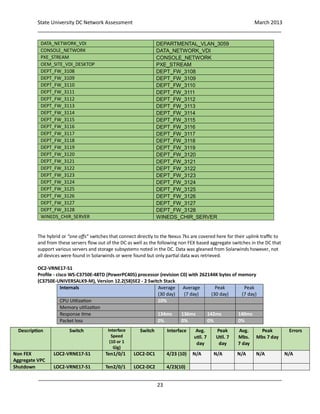
The servers and services by VLAN name associated with LOC2-AG1/2 FEXs are listed in figure 3
Figure 3.
LOC2-AG1 and 2 Servers/services by VLAN
association
LOC1-AG1 and 2 Servers/services by VLAN
association
CAS_DB_SERVERS CAS_DB_SERVERS
CAS_WEB_SERVERS CAS_WEB_SERVERS
IDEAL_NAS_SEGMENT IDEAL_NAS_SEGMENT
SECURE_STORAGE_NETWORK SECURE_STORAGE_NETWORK
DMZ_STORAGE_NETWORK DMZ_STORAGE_NETWORK
OPEN_STORAGE_NETWORK OPEN_STORAGE_NETWORK
MANAGEMENT_STORAGE_NETWORK MANAGEMENT_STORAGE_NETWORK
AFS_STORAGE_NETWORK AFS_STORAGE_NETWORK
STUDENT_HEALTH_STORAGE_NETWORK STUDENT_HEALTH_STORAGE_NETWORK
MS_SQL_HB_STORAGE_NETWORK MS_SQL_HB_STORAGE_NETWORK
VMOTION_STORAGE_NETWORK VMOTION_STORAGE_NETWORK
VMWARE_CLUSTER_STORAGE_NETWORK VMWARE_CLUSTER_STORAGE_NETWORK
DEPARTMENTAL_CLUSTER_STORAGE_NET DEPARTMENTAL_CLUSTER_STORAGE_NET
EXCHANGE_CLUSTER_STORAGE_NETWORK EXCHANGE_CLUSTER_STORAGE_NETWORK
XEN_CLUSTER_STORAGE_NETWORK XEN_CLUSTER_STORAGE_NETWORK
AFS_CLUSTER_STORAGE_NETWORK AFS_CLUSTER_STORAGE_NETWORK
firewall_syncing_link firewall_syncing_link
DEV_QA_APP DEV_QA_APP
PROD_APP PROD_APP
DEPT_ISCI_DB DEPT_ISCI_DB
DEPT_NFS_DB DEPT_NFS_DB
XEN_DEV_QA_Image_Storage_Network XEN_DEV_QA_Image_Storage_Network
VDI_XEN_Servers VMWARE_VIRTUALIZATION_SECURE
Netscaler_SDX VMWARE_CAG
Health_Hippa_Development VDI_XEN_Servers
DEPARTMENTAL_VLAN_3059 Netscaler_SDX
State University DC Network Assessment March 2013
_____________________________________________________________________________________
_____________________________________________________________________________________
23
DATA_NETWORK_VDI DEPARTMENTAL_VLAN_3059
CONSOLE_NETWORK DATA_NETWORK_VDI
PXE_STREAM CONSOLE_NETWORK
OEM_SITE_VDI_DESKTOP PXE_STREAM
DEPT_FW_3108 DEPT_FW_3108
DEPT_FW_3109 DEPT_FW_3109
DEPT_FW_3110 DEPT_FW_3110
DEPT_FW_3111 DEPT_FW_3111
DEPT_FW_3112 DEPT_FW_3112
DEPT_FW_3113 DEPT_FW_3113
DEPT_FW_3114 DEPT_FW_3114
DEPT_FW_3115 DEPT_FW_3115
DEPT_FW_3116 DEPT_FW_3116
DEPT_FW_3117 DEPT_FW_3117
DEPT_FW_3118 DEPT_FW_3118
DEPT_FW_3119 DEPT_FW_3119
DEPT_FW_3120 DEPT_FW_3120
DEPT_FW_3121 DEPT_FW_3121
DEPT_FW_3122 DEPT_FW_3122
DEPT_FW_3123 DEPT_FW_3123
DEPT_FW_3124 DEPT_FW_3124
DEPT_FW_3125 DEPT_FW_3125
DEPT_FW_3126 DEPT_FW_3126
DEPT_FW_3127 DEPT_FW_3127
DEPT_FW_3128 DEPT_FW_3128
WINEDS_CHIR_SERVER WINEDS_CHIR_SERVER
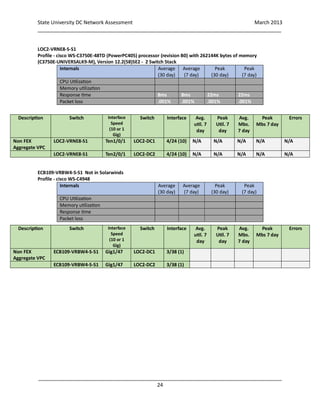
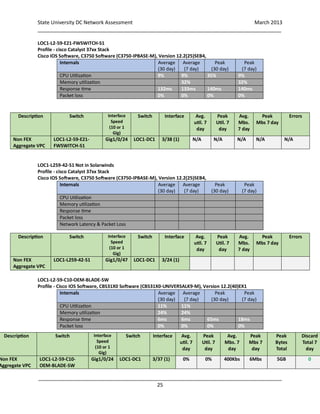
The hybrid or “one offs” switches that connect directly to the Nexus 7ks are covered here for their uplink traffic to
and from these servers flow out of the DC as well as the following non FEX based aggregate switches in the DC that
support various servers and storage subsystems noted in the DC. Data was gleaned from Solarwinds however, not
all devices were found in Solarwinds or were found but only partial data was retrieved.
OC2-VRNE17-S1
Profile - cisco WS-C3750E-48TD (PowerPC405) processor (revision C0) with 262144K bytes of memory
(C3750E-UNIVERSALK9-M), Version 12.2(58)SE2 - 2 Switch Stack
Internals Average
(30 day)
Average
(7 day)
Peak
(30 day)
Peak
(7 day)
CPU Utilization 10%
Memory utilization
Response time 134ms 136ms 142ms 140ms
Packet loss 0% 0% 0% 0%
Description Switch Interface
Speed
(10 or 1
Gig)
Switch Interface Avg.
util. 7
day
Peak
Util. 7
day
Avg.
Mbs.
7 day
Peak
Mbs 7 day
Errors
Non FEX
Aggregate VPC
LOC2-VRNE17-S1 Ten1/0/1 LOC2-DC1 4/23 (10) N/A N/A N/A N/A N/A
Shutdown LOC2-VRNE17-S1 Ten2/0/1 LOC2-DC2 4/23(10)
State University DC Network Assessment March 2013
_____________________________________________________________________________________
_____________________________________________________________________________________
24
LOC2-VRNE8-S-S1
Profile - cisco WS-C3750E-48TD (PowerPC405) processor (revision B0) with 262144K bytes of memory
(C3750E-UNIVERSALK9-M), Version 12.2(58)SE2 - 2 Switch Stack
Internals Average
(30 day)
Average
(7 day)
Peak
(30 day)
Peak
(7 day)
CPU Utilization
Memory utilization
Response time 8ms 8ms 22ms 22ms
Packet loss .001% .001% .001% .001%
ECB109-VRBW4-S-S1 Not in Solarwinds
Profile - cisco WS-C4948
Internals Average
(30 day)
Average
(7 day)
Peak
(30 day)
Peak
(7 day)
CPU Utilization
Memory utilization
Response time
Packet loss
Description Switch Interface
Speed
(10 or 1
Gig)
Switch Interface Avg.
util. 7
day
Peak
Util. 7
day
Avg.
Mbs.
7 day
Peak
Mbs 7 day
Errors
Non FEX
Aggregate VPC
LOC2-VRNE8-S1 Ten1/0/1 LOC2-DC1 4/24 (10) N/A N/A N/A N/A N/A
LOC2-VRNE8-S1 Ten2/0/1 LOC2-DC2 4/24 (10) N/A N/A N/A N/A N/A
Description Switch Interface
Speed
(10 or 1
Gig)
Switch Interface Avg.
util. 7
day
Peak
Util. 7
day
Avg.
Mbs.
7 day
Peak
Mbs 7 day
Errors
Non FEX
Aggregate VPC
ECB109-VRBW4-S-S1 Gig1/47 LOC2-DC1 3/38 (1)
ECB109-VRBW4-S-S1 Gig1/47 LOC2-DC2 3/38 (1)
State University DC Network Assessment March 2013
_____________________________________________________________________________________
_____________________________________________________________________________________
25
LOC1-L2-59-E21-FWSWITCH-S1
Profile - cisco Catalyst 37xx Stack
Cisco IOS Software, C3750 Software (C3750-IPBASE-M), Version 12.2(25)SEB4,
Internals Average
(30 day)
Average
(7 day)
Peak
(30 day)
Peak
(7 day)
CPU Utilization 9% 9% 35% 9%
Memory utilization 32% 32%
Response time 132ms 133ms 140ms 140ms
Packet loss 0% 0% 0% 0%
LOC1-L259-42-S1 Not in Solarwinds
Profile - cisco Catalyst 37xx Stack
Cisco IOS Software, C3750 Software (C3750-IPBASE-M), Version 12.2(25)SEB4,
Internals Average
(30 day)
Average
(7 day)
Peak
(30 day)
Peak
(7 day)
CPU Utilization
Memory utilization
Response time
Packet loss
Network Latency & Packet Loss
LOC1-L2-59-C10-OEM-BLADE-SW
Profile - Cisco IOS Software, CBS31X0 Software (CBS31X0-UNIVERSALK9-M), Version 12.2(40)EX1
Internals Average
(30 day)
Average
(7 day)
Peak
(30 day)
Peak
(7 day)
CPU Utilization 11% 11%
Memory utilization 24% 24%
Response time 6ms 6ms 65ms 18ms
Packet loss 0% 0% 0% 0%
Description Switch Interface
Speed
(10 or 1
Gig)
Switch Interface Avg.
util. 7
day
Peak
Util. 7
day
Avg.
Mbs.
7 day
Peak
Mbs 7 day
Errors
Non FEX
Aggregate VPC
LOC1-L2-59-E21-
FWSWITCH-S1
Gig1/0/24 LOC1-DC1 3/38 (1) N/A N/A N/A N/A N/A
Description Switch Interface
Speed
(10 or 1
Gig)
Switch Interface Avg.
util. 7
day
Peak
Util. 7
day
Avg.
Mbs.
7 day
Peak
Mbs 7 day
Errors
Non FEX
Aggregate VPC
LOC1-L259-42-S1 Gig1/0/47 LOC1-DC1 3/24 (1)
Description Switch Interface
Speed
(10 or 1
Gig)
Switch Interface Avg.
util. 7
day
Peak
Util. 7
day
Avg.
Mbs. 7
day
Peak
Mbs 7
day
Peak
Bytes
Total
Discard
Total 7
day
Non FEX
Aggregate VPC
LOC1-L2-59-C10-
OEM-BLADE-SW
Gig1/0/24 LOC1-DC1 3/37 (1) 0% 0% 400Kbs 6Mbs 5GB 0
State University DC Network Assessment March 2013
_____________________________________________________________________________________
_____________________________________________________________________________________
26
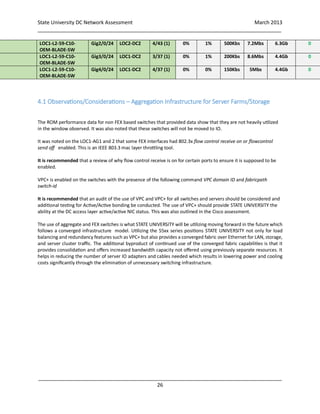
4.1 Observations/Considerations – Aggregation Infrastructure for Server Farms/Storage
The ROM performance data for non FEX based switches that provided data show that they are not heavily utilized
in the window observed. It was also noted that these switches will not be moved to IO.
It was noted on the LOC1-AG1 and 2 that some FEX interfaces had 802.3x flow control receive on or flowcontrol
send off enabled. This is an IEEE 803.3 mac layer throttling tool.
It is recommended that a review of why flow control receive is on for certain ports to ensure it is supposed to be
enabled.
VPC+ is enabled on the switches with the presence of the following command VPC domain ID and fabricpath
switch-id
It is recommended that an audit of the use of VPC and VPC+ for all switches and servers should be considered and
additional testing for Active/Active bonding be conducted. The use of VPC+ should provide STATE UNIVERSITY the
ability at the DC access layer active/active NIC status. This was also outlined in the Cisco assessment.
The use of aggregate and FEX switches is what STATE UNIVERSITY will be utilizing moving forward in the future which
follows a converged infrastructure model. Utilizing the 55xx series positions STATE UNIVERSITY not only for load
balancing and redundancy features such as VPC+ but also provides a converged fabric over Ethernet for LAN, storage,
and server cluster traffic. The additional byproduct of continued use of the converged fabric capabilities is that it
provides consolidation and offers increased bandwidth capacity not offered using previously separate resources. It
helps in reducing the number of server IO adapters and cables needed which results in lowering power and cooling
costs significantly through the elimination of unnecessary switching infrastructure.
LOC1-L2-59-C10-
OEM-BLADE-SW
Gig2/0/24 LOC2-DC2 4/43 (1) 0% 1% 500Kbs 7.2Mbs 6.3Gb 0
LOC1-L2-59-C10-
OEM-BLADE-SW
Gig3/0/24 LOC1-DC2 3/37 (1) 0% 1% 200Kbs 8.6Mbs 4.4Gb 0
LOC1-L2-59-C10-
OEM-BLADE-SW
Gig4/0/24 LOC1-DC2 4/37 (1) 0% 0% 150Kbs 5Mbs 4.4Gb 0
State University DC Network Assessment March 2013
_____________________________________________________________________________________
_____________________________________________________________________________________
27
5.0 Storage NetApp clusters
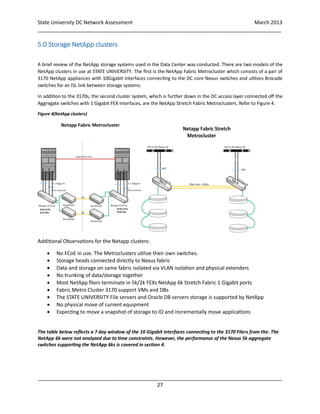
A brief review of the NetApp storage systems used in the Data Center was conducted. There are two models of the
NetApp clusters in use at STATE UNIVERSITY. The first is the NetApp Fabric Metrocluster which consists of a pair of
3170 NetApp appliances with 10Gigabit interfaces connecting to the DC core Nexus switches and utilizes Brocade
switches for an ISL link between storage systems.
In addition to the 3170s, the second cluster system, which is further down in the DC access layer connected off the
Aggregate switches with 1 Gigabit FEX interfaces, are the NetApp Stretch Fabric Metroclusters. Refer to Figure 4.
Figure 4(NetApp clusters)
Additional Observations for the Netapp clusters:
 No FCoE in use. The Metroclusters utilize their own switches.
 Storage heads connected directly to Nexus fabric
 Data and storage on same fabric isolated via VLAN isolation and physical extenders
 No trunking of data/storage together
 Most NetApp filers terminate in 5k/2k FEXs NetApp 6k Stretch Fabric 1 Gigabit ports
 Fabric Metro Cluster 3170 support VMs and DBs
 The STATE UNIVERSITY File servers and Oracle DB servers storage is supported by NetApp
 No physical move of current equipment
 Expecting to move a snapshot of storage to IO and incrementally move applications
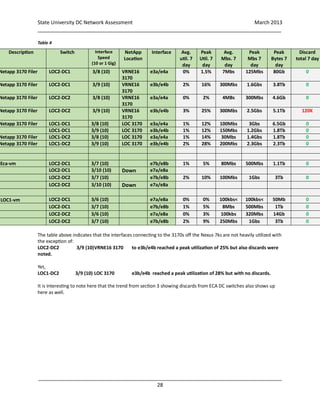
The table below reflects a 7 day window of the 10 Gigabit interfaces connecting to the 3170 Filers from the. The
NetApp 6k were not analyzed due to time constraints. However, the performance of the Nexus 5k aggregate
switches supporting the NetApp 6ks is covered in section 4.
State University DC Network Assessment March 2013
_____________________________________________________________________________________
_____________________________________________________________________________________
28
Table 4
The table above indicates that the interfaces connecting to the 3170s off the Nexus 7ks are not heavily utilized with
the exception of:
LOC2-DC2 3/9 (10)VRNE16 3170 to e3b/e4b reached a peak utilization of 25% but also discards were
noted.
Yet,
LOC1-DC2 3/9 (10) LOC 3170 e3b/e4b reached a peak utilization of 28% but with no discards.
It is interesting to note here that the trend from section 3 showing discards from ECA DC switches also shows up
here as well.
Description Switch Interface
Speed
(10 or 1 Gig)
NetApp
Location
Interface Avg.
util. 7
day
Peak
Util. 7
day
Avg.
Mbs. 7
day
Peak
Mbs 7
day
Peak
Bytes 7
day
Discard
total 7 day
Netapp 3170 Filer LOC2-DC1 3/8 (10) VRNE16
3170
e3a/e4a 0% 1.5% 7Mbs 125Mbs 80Gb 0
Netapp 3170 Filer LOC2-DC1 3/9 (10) VRNE16
3170
e3b/e4b 2% 16% 300Mbs 1.6Gbs 3.8Tb 0
Netapp 3170 Filer LOC2-DC2 3/8 (10) VRNE16
3170
e3a/e4a 0% 2% 4MBs 300Mbs 4.6Gb 0
Netapp 3170 Filer LOC2-DC2 3/9 (10) VRNE16
3170
e3b/e4b 3% 25% 300Mbs 2.5Gbs 5.1Tb 120K
Netapp 3170 Filer LOC1-DC1 3/8 (10) LOC 3170 e3a/e4a 1% 12% 100Mbs 3Gbs 6.5Gb 0
LOC1-DC1 3/9 (10) LOC 3170 e3b/e4b 1% 12% 150Mbs 1.2Gbs 1.8Tb 0
Netapp 3170 Filer LOC1-DC2 3/8 (10) LOC 3170 e3a/e4a 1% 14% 30Mbs 1.4Gbs 1.8Tb 0
Netapp 3170 Filer LOC1-DC2 3/9 (10) LOC 3170 e3b/e4b 2% 28% 200Mbs 2.3Gbs 2.3Tb 0
Eca-vm LOC2-DC1 3/7 (10) e7b/e8b 1% 5% 80Mbs 500Mbs 1.1Tb 0
LOC2-DC1 3/10 (10) Down e7a/e8a
LOC2-DC2 3/7 (10) e7b/e8b 2% 10% 100Mbs 1Gbs 3Tb 0
LOC2-DC2 3/10 (10) Down e7a/e8a
ILOC1-vm LOC2-DC1 3/6 (10) e7a/e8a 0% 0% 100kbs< 100kbs< 50Mb 0
LOC2-DC1 3/7 (10) e7b/e8b 1% 5% 8Mbs 500Mbs 1Tb 0
LOC2-DC2 3/6 (10) e7a/e8a 0% 3% 100kbs 320Mbs 14Gb 0
LOC2-DC2 3/7 (10) e7b/e8b 2% 9% 250Mbs 1Gbs 3Tb 0
State University DC Network Assessment March 2013
_____________________________________________________________________________________
_____________________________________________________________________________________
29
5.1 Observations/Considerations – Storage
It was mentioned that STATE UNIVERSITY is expecting to just duplicate NetApp 3170s and 6k in IO – This is
the simplest approach since the provisioning and platform requirements are known, it is just a mirror in
terms of hardware. If the traffic flows for storage access remain North to South, client accessing data in
IO and east to west in IO then there is little to expect in changes. The dual DC switch 10 Gigabit links
between IO and LOC1 can serve as a transport for data between storage pools as needed. Basically each
DC will have its own storage subsystem and operate independently and can be replicated to either DCs
when needed.
It is recommended that if storage is to be synchronized to support real time application and storage 1+1
active/active availability across two data centers (IO and Az. operate as one large virtual DC for storage)
then additional research into utilizing data center interconnection protocols DCI, to provide a converged
path for storage protocols to seamless connect to their clusters for synchronization. This activity would
include the review of global traffic managing from the Az. DC between the IO and DCs.
Current presumption is that L3 DCI solutions are not considered and the use of the converged fabric
capabilities at L2 will be used.
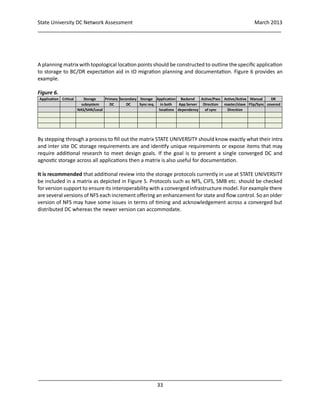
For Business continuity and Disaster Recovery considerations for planning should cover:
 Remote disk replication – continuous copying of data to each location.
 Cold site – transfer data from one site to new site IO – if active/passive
 Duplicated hot site – replicate data remotely, ready for operation resumption.
 Application sensitivity to delay - Synchronous vs. asynchronous
 Distance requirements
Propagation delays (5μs per Km / 8 μs per Mile)
 Service availability at IO site
 Bandwidth requirements
 DCI VLAN extension challenges
Broadcasts - throttling
Path diversity
L2 domain scalability
Split brain scenarios
Synchronous Data replication:
The Application receives the acknowledgement for IO complete when both
primary and remote disks are updated.
Asynchronous Data replication:
The Application receives the acknowledgement for IO complete as soon as
the primary disk is updated while the copy continues to the remote disk.
State University DC Network Assessment March 2013
_____________________________________________________________________________________
_____________________________________________________________________________________
30
It is recommended for either approach a traffic analysis of storage expectations for those inter DC links
should be conducted to verify storage volumes required to validate if a single 10 Gigabit link will suffice.
Two 10 Gigabit links are planned and can be bonded but if the links are diverse for redundancy it is
expected that in the event of a link failures between IO and Az. the remaining link should provide the
support needed without change in throughput and capacity expectation. Also, to be included in this if any
compression will be used.
It is recommended that consideration towards utilizing the STATE UNIVERSITYs investment in its current
networking equipment’s converged fabric capabilities for storage IO communication thus reducing the
need for additional switches, cabling and power required to support STATE UNIVERSITYs storage
subsystems within each DC.
The platform provides additional support for Lossless Ethernet and DCI enhancements such as:.
 Priority based flow control 802.1Qbb to for lossless support of SAN related traffic
 Enhanced transmission selection IEEE 801.Qaz for 1gigabit service partition needs
 Congestion notification IEE202.1Qau – similar to FECN and BECN
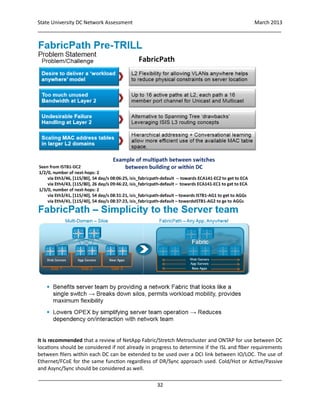
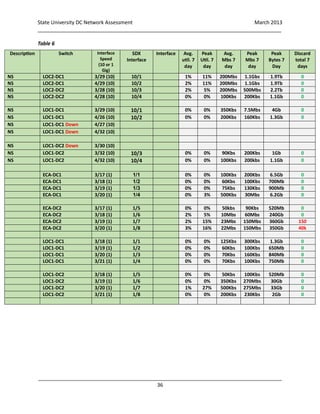
 FCoE – which provides a converged IO transport between storage subsystems.
As mentioned in section 4 regarding the Aggregate switches for the server farms and storage with the
support for native FCoE in both the servers (FCoE initiators) and the NetApp storage system (FCoE target),
the converged fabric provides the capability to consolidate the SAN and LAN without risking any negative
effect on the storage environment. The capability of converged infrastructure components to provide
lossless behavior and guaranteed capacity for the storage traffic helps ensure that the storage IO is
protected and has the necessary capacity and low latencies to meet critical data center requirements.
NetApp has conducted tests and is in partnership with Cisco regarding a converged storage solution, refer
to figure 5 on the following page for an illustration NetApp’s protocol support.
State University DC Network Assessment March 2013
_____________________________________________________________________________________
_____________________________________________________________________________________
31
Figure 5
It is currently planned that STATE UNIVERSITY will utilize for IO to Az. data center interconnect the
existing Neuxs 7k equipment and take advantage of Fabricpath to support a converged infrastructure
solution that meets STATE UNIVERSITYs needs. A summary of Fabricpath’s points is below.
State University DC Network Assessment March 2013
_____________________________________________________________________________________
_____________________________________________________________________________________
32
It is recommended that a review of NetApp Fabric/Stretch Metrocluster and ONTAP for use between DC
locations should be considered if not already in progress to determine if the ISL and fiber requirements
between filers within each DC can be extended to be used over a DCI link between IO/LOC. The use of
Ethernet/FCoE for the same function regardless of DR/Sync approach used. Cold/Hot or Active/Passive
and Async/Sync should be considered as well.
State University DC Network Assessment March 2013
_____________________________________________________________________________________
_____________________________________________________________________________________
33
A planning matrix with topological location points should be constructed to outline the specific application
to storage to BC/DR expectation aid in IO migration planning and documentation. Figure 6 provides an
example.
Figure 6.
By stepping through a process to fill out the matrix STATE UNIVERSITY should know exactly what their intra
and inter site DC storage requirements are and identify unique requirements or expose items that may
require additional research to meet design goals. If the goal is to present a single converged DC and
agnostic storage across all applications then a matrix is also useful for documentation.
It is recommended that additional review into the storage protocols currently in use at STATE UNIVERSITY
be included in a matrix as depicted in Figure 5. Protocols such as NFS, CIFS, SMB etc. should be checked
for version support to ensure its interoperability with a converged infrastructure model. For example there
are several versions of NFS each increment offering an enhancement for state and flow control. So an older
version of NFS may have some issues in terms of timing and acknowledgement across a converged but
distributed DC whereas the newer version can accommodate.
Application Critical Storage Primary Secondary Storage Application Backend Active/Pass Active/Active Manual DR
subsystem DC DC Sync req. in both App Server Direction master/slave Flip/Sync covered
NAS/SAN/Local locations dependency of sync Direction
State University DC Network Assessment March 2013
_____________________________________________________________________________________
_____________________________________________________________________________________
34
6.0 Citrix NetScaler
 There is a pair of NetScalar SDX 11500 load balancing appliances – one in each building
 GSLB failover is used for MS exchange CAS servers
 Backend storage duplicated for exchange CAS, it was mentioned that STATE UNIVERSITY is unsure
if Exchange will move to IO.
 Most of the production traffic resides on the ECA building DC side.
 Each NetScaler SDX 11500 is provided with 10 Platinum NetScaler VPX instances.
 Each VPX instance configured in ECA has a HA partner in LOC1.
 Traffic flows from FW through switch to Netscaler for direction to hosts for Intra host
communication.
 Citrix virtual NetScaler instances have a built in rate limiter which will drop packets after 1000 or
(1Gbs) is reached per interface.
The Netscalars provide load balancing support to the following STATE UNIVERSITY services.
Table 5. (STATE UNIVERSITY DC services)
Unix DMZ Unix Web Sakai (Old BB)
.NET Windows DEV/QA APP Servers Windows Pub Citrix (Back) APP
DEV/QA UNIX DMZ Windows Pub Citrix (Front) IIS QA IIS/CAG
QA APP Server SITE VDI (SERVER HOSTS) SITE VDI (PXE/STREAM NET)
Exchange Server Segment Unix Web VDI NetScaler Front End
SITE VDI (VDI Hosts) DEV/QA APP Servers Sakai (Old BB)
VDI DEV/QA UNIX DMZ DEV/QA APP Servers
Unix DMZ .NET Windows DEV/QA UNIX DMZ
AS STATE UNIVERSITY adds Netscalars into the environment the complexity rises with each addition thus
requiring a Citrix engineer to assist STATE UNIVERSITY each time for configuration tasks.
State University DC Network Assessment March 2013
_____________________________________________________________________________________
_____________________________________________________________________________________
35
Profile – uprodns1 NetScaler NetScaler NS9.3: Build 58.5.nc (remaining not in Solarwinds)
Internals Average
(30 day)
Average
(7 day)
Peak
(30 day)
Peak
(7 day)
CPU Utilization
Fabric Utilization
Memory utilization
Response time 3ms 3ms 5ms 5ms
Packet loss 0% 0% *0% 0%
*It was noted that the only packet loss occurred in one instance out of 30 days. Not sure if related to
maintenance.
26-Jan-2013 12:00 AM 75 %
26-Jan-2013 01:00 AM 73 %
Profile – NetScaler wprodns1 NetScaler NS9.3: Build 50.3.nc,
Internals Average
(30 day)
Average
(7 day)
Peak
(30 day)
Peak
(7 day)
CPU Utilization
Fabric Utilization
Memory utilization
Response time 3ms 3ms 140ms 140ms
Packet loss 0% 0% *0% 0%
*It was noted that the only packet loss occurred in one instance out of 30 days. Not sure if related to
maintenance.
26-Jan-2013 12:00 AM 75 %
26-Jan-2013 01:00 AM 73 %
Note: Information was not found on switch interfaces so the STATE UNIVERSITY supporting
documentation Netscaler physical to SDX Migration PLAN spreadsheet was used to reference.
Each Netscalar has 10 Gigabit interfaces connecting into the DC core switches and several 1 Gigabit
interfaces for the load balancing instances per application category. Refer to Table 6 on next page.
State University DC Network Assessment March 2013
_____________________________________________________________________________________
_____________________________________________________________________________________
36
Table 6
Description Switch Interface
Speed
(10 or 1
Gig)
SDX
Interface
Interface Avg.
util. 7
day
Peak
Util. 7
day
Avg.
Mbs 7
day
Peak
Mbs 7
day
Peak
Bytes 7
Day
Discard
total 7
days
NS LOC2-DC1 3/29 (10) 10/1 1% 11% 200Mbs 1.1Gbs 1.9Tb 0
NS LOC2-DC1 4/29 (10) 10/2 2% 11% 200Mbs 1.1Gbs 1.9Tb 0
NS LOC2-DC2 3/28 (10) 10/3 2% 5% 200Mbs 500Mbs 2.2Tb 0
NS LOC2-DC2 4/28 (10) 10/4 0% 0% 100Kbs 200Kbs 1.1Gb 0
NS LOC1-DC1 3/29 (10) 10/1 0% 0% 350Kbs 7.5Mbs 4Gb 0
NS LOC1-DC1 4/26 (10) 10/2 0% 0% 200Kbs 160Kbs 1.3Gb 0
NS LOC1-DC1 Down 4/27 (10)
NS LOC1-DC1 Down 4/32 (10)
NS LOC1-DC2 Down 3/30 (10)
NS LOC1-DC2 3/32 (10) 10/3 0% 0% 90Kbs 200Kbs 1Gb 0
NS LOC1-DC2 4/32 (10) 10/4 0% 0% 100Kbs 200kbs 1.1Gb 0
ECA-DC1 3/17 (1) 1/1 0% 0% 100Kbs 200Kbs 6.5Gb 0
ECA-DC1 3/18 (1) 1/2 0% 0% 60Kbs 100Kbs 700Mb 0
ECA-DC1 3/19 (1) 1/3 0% 0% 75Kbs 130Kbs 900Mb 0
ECA-DC1 3/20 (1) 1/4 0% 3% 500Kbs 30Mbs 6.2Gb 0
ECA-DC2 3/17 (1) 1/5 0% 0% 50kbs 90Kbs 520Mb 0
ECA-DC2 3/18 (1) 1/6 2% 5% 10Mbs 60Mbs 240Gb 0
ECA-DC2 3/19 (1) 1/7 2% 15% 23Mbs 150Mbs 360Gb 150
ECA-DC2 3/20 (1) 1/8 3% 16% 22Mbs 150Mbs 350Gb 40k
LOC1-DC1 3/18 (1) 1/1 0% 0% 125Kbs 300Kbs 1.3Gb 0
LOC1-DC1 3/19 (1) 1/2 0% 0% 60Kbs 100Kbs 650Mb 0
LOC1-DC1 3/20 (1) 1/3 0% 0% 70Kbs 160Kbs 840Mb 0
LOC1-DC1 3/21 (1) 1/4 0% 0% 70Kbs 100Kbs 750Mb 0
LOC1-DC2 3/18 (1) 1/5 0% 0% 50Kbs 100Kbs 520Mb 0
LOC1-DC2 3/19 (1) 1/6 0% 0% 350Kbs 270Mbs 30Gb 0
LOC1-DC2 3/20 (1) 1/7 1% 27% 500Kbs 275Mbs 33Gb 0
LOC1-DC2 3/21 (1) 1/8 0% 0% 200Kbs 230Kbs 2Gb 0
State University DC Network Assessment March 2013
_____________________________________________________________________________________
_____________________________________________________________________________________
37
6.1 Observations/Considerations – NetScaler
We could not glean all the information from Solarwinds for Netscalar for information was not in
Solarwinds. Due to time constraints we were unable to glean the appliance performance information from
the Citrix console directly. But this is an example of a disjointed network management systems in place
today at STATE UNIVERSITY.
It appears that the Individual 1 Gigabit links per SDX instance does not show a significant amount of traffic.
It is interesting to note that once again any interface discards come from the ECA switches.
State University DC Network Assessment March 2013
_____________________________________________________________________________________
_____________________________________________________________________________________
38
7.0 DNS
STATE UNIVERSITY utilizes Infoblox 1550s as Grid Masters and 1050 for grid members for its DNS and IPAM
platform.
SUDNS1/2/3 are the three main server members with a separate Colorado DNS server.
It was mentioned that there will be a new Infoblox HA cluster in IO to serve IO and weather it will be a
master or slave to LOC1’s servers is currently not decided.
DNS performance sometimes ranges from 600ms resulting from query floods by students opening up their
laptops/tablets/phones between classes thus causing some reconnect thrashing. STATE UNIVERSITY
monitors SLA statistics for DNS response time.
Note: there is no DHCP used in DC except for the VDI environment.
STATE UNIVERSITYDNS1 – Profile 2Gb of Ram Dual CPU
Internals Average
(30 day)
Average
(7 day)
Peak
(30 day)
Peak
(7 day)
CPU Utilization 22% 21% 100% 100%
Memory utilization 29% 29% 29% 29%
Response time 2ms 2ms 2.6ms 2.6ms
Packet loss 0% 0% 0% 0%
STATE UNIVERSITYDNS2 – Profile 8Gb of Ram Dual CPU
Internals Average
(30 day)
Average
(7 day)
Peak
(30 day)
Peak
(7 day)
CPU Utilization 55% 55% 100% 100%
Memory utilization 24% 24% 27% 27%
Response time 2ms 2ms 2.6ms 2.7ms
Packet loss 0% 0% 0% 0%
STATE UNIVERSITYDNS3 – Profile 2Gb of Ram Dual CPU
Internals Average
(30 day)
Average
(7 day)
Peak
(30 day)
Peak
(7 day)
CPU Utilization 20% 20% 75% 75%
Memory utilization 29% 29% 29% 29%
Response time 3ms 3ms 24ms 3.3ms
Packet loss 0% 0% 0% 0%
There were observed peaks of 100% CPU utilization and physical memory utilization over both sampling periods.
STATE UNIVERSITY is currently working withInfoblox on proposed designs to include additional cache servers to offset
performance.
Note: For all 3 DNS servers Solarwinds reports in one section that memory utilization is lower yet in another section
for the same physical memory it reports it almost fully used.
Consideration to utilizing the IO HA pair to also participate or take the workload off the other DNS servers once the
migration is completed.
State University DC Network Assessment March 2013
_____________________________________________________________________________________
_____________________________________________________________________________________
39
8.0 Cisco Assessment Review
OEM was asked to review the recent Nexus Design and Configuration review as a second set of eyes and
to also identify any considerations related to the IO data center migration project. Table 7 below from the
Cisco assessment highlights their recommendations as well as our included comments and
recommendations in the green shaded column.
Table 7
Best Practice Status Comments OEM Comment
Configure default Dense CoPP Orange Recommended when
using only F2 cards
Either test on Pre IO deployed switches
with pre migration data. Otherwise plan
for future consideration when needed.
No need to introduce variables during
migration.
Manually configure SW-ID Green Including vPC sw-id,
one switch ID differs
from the rest (LOC1-
AG1 with id 25)
OEM concurs and this should also be
applied on LOC1-DC1 and 2 and LOC2-
DC1 and 2.
Manually configure Multidestination
root priority
Red No deterministic roots
are configured for
FTAG1. Root, backup
and a third best priority
OEM concurs but it should be applied and
tested on greenfield IO Nexus switches
first.
If STP enable devices or switches are
connected to the FP cloud ensure all FP
edge devices are configured as STP
roots and with the same spanning-tree
domain id.
Red OEM concurs but it should be applied and
tested on greenfield IO Nexus switches
first.
Configure pseudo-information Red Used in vPC+
environments.
OEM concurs but it should be applied and
tested on greenfield IO Nexus switches
first.
Spanning tree path cost method long Red OEM concurs but it should be applied and
tested on greenfield IO Nexus switches
first.
Enable spanning-tree port type Edge or
spanning-tree port type edge trunk and
Enable BPDU Guard for host facing
interfaces
Red Not only applicable to
access ports but to
trunk ports connected
to host. Configuration
is not uniform. Ex
portchannel 1514
OEM concurs but it should be applied and
tested on greenfield IO Nexus switches
first.
Configure FP IS-IS authentication: Hello
PDU’s, LSP and SNP
Red No authentication is
being used on FP
OEM concurs but it should be applied and
tested on greenfield IO Nexus switches
first. Or after migration, no need to
introduce variable that affects all traffic.
State University DC Network Assessment March 2013
_____________________________________________________________________________________
_____________________________________________________________________________________
40
Enable globally or on a port basis
“logging for trunk status”
Orange Specially for host
connections
OEM concurs but it should be applied and
tested on greenfield IO Nexus switches
first.
Configure aaa for authentication based
with tacacs+ as opposed to RBAC
Orange Provides a more
granular and secure
management access
OEM concurs but it should be applied and
tested on greenfield IO Nexus switches
first. Plus provides logging and
accounting for STATE UNIVERSITY staff.
Use secure Protocol if possible. Ex SSH
instead of telnet
Orange This is already in place
Disable unused Services Orange Example LLDP and CDP Keep enabled for migration for
troubleshooting needs. Turn off post
migration after security posture analysis.
Disable ICMP redirect Message on
mgmt0 interface
Red Security threat OEM concurs but it should be applied and
tested on greenfield IO Nexus switches
first.
Disable IP Source Routing Orange Not applicable but where IP is on for
Mgmt. interfaces it should be turned off.
Shutdown Unused Ports and configure
with unused VLAN
Orange OEM concurs but it should be applied and
tested on greenfield IO Nexus switches
first. Can be done easily with script.
Disable loopguard on vPC PortChannels Orange Ex. Portchannel 38 on
ECA DC1
OEM concurs but it should be applied and
tested on greenfield IO Nexus switches
first.
Nexus virtualization features Yellow VDC, VRF’s
consideration for
future growth and
security. Pag 20
OEM concurs but it should be applied and
tested on greenfield IO Nexus switches
first. See upcoming VDC considerations.
Configure CMP port on SUP1 N7k Yellow OEM concurs but it should be applied and
tested on greenfield IO Nexus switches
first. Relative to Mgmt. VDC
consideration.
Configure LACP active Red Absent “active”
parameter
OEM concurs but it should be applied and
tested on greenfield IO Nexus switches
first.
Custom Native VLAN Yellow Some trunks not
configured with native
VLAN
OEM concurs but it should be applied
and tested on greenfield IO Nexus
switches first. An IO migration VLAN
assignment review sweep can cover this.
Description on Interfaces Orange Make management
easier.
A major must do. Also recommended in
Network Management section
Clear or clean configuration of ports
not in use
Orange Ports that are
shutdown preserver
old configuration.
OEM concurs but it should be applied
and tested on greenfield IO Nexus
switches first the used post migration on
Az. switches.
Define standard for access and trunk
port configuration
Orange Various configurations
deployed. Suggestion
provided on
OEM concurs but it should be applied
and tested on greenfield IO Nexus
switches first. Needed consistency for
State University DC Network Assessment March 2013
_____________________________________________________________________________________
_____________________________________________________________________________________
41
Configuration
Suggestion section.
ongoing administration and
troubleshooting. Ensures STATE
UNIVERSITY is more efficient working
from one standard set of configurations
or configuration profiles. Configuration
profiles can be defined in infrastructure
components for reuse. Improves
consistency and efficiency of
administration.
Cisco recommends using static switch-ids when configuring the FabricPath switches. This scheme gives
STATE UNIVERSITY deterministic and meaningful values that should aid to the operation and
troubleshooting of the FabricPath network.
OEM concurs with Cisco’s assessment and recommendation of VDC usage. Refer to page 18 of the ARIZONA
STATE UNIVERSITY Nexus Design Review.
In addition consideration towards the use of a network management VDC to separate the management
plane traffic from production and add flexibility in administration of the management systems without
affecting production.
The use of VDC follows in line with a converged infrastructure model. Separation of traffic logically for
performance,scaling and flexible managementof traffic flows especially for VM mobility utilizing a physical
converged infrastructure platform. Some examples are an Admin VDC/Management VDC, Production
traffic VDC, Storage VDC, Test QA VDC. Refer to figure 7.
OEM concurs with switch-ids especially when future testing and troubleshooting commands will identify Fabricpath
routes based on Switch-ID value.
From the following Fabricpath route table we can now determine route vector details.
FabricPath Unicast Route Table
'a/b/c' denotes ftag/switch-id/subswitch-id – Keep in mind that subswitch-id refers to VPC+ routed packets.
'[x/y]' denotes [admin distance/metric]
1/2/0, number of next-hops: 2
via Eth3/46, [115/80], 54 day/s 08:06:25, isis_fabricpath-default
via Eth4/43, [115/80], 26 day/s 09:46:22, isis_fabricpath-default
0/1/12, number of next-hops: 1
via Po6, [80/0], 54 day/s 09:04:17, vpcm
State University DC Network Assessment March 2013
_____________________________________________________________________________________
_____________________________________________________________________________________
42
VDC—Virtual Device Context
‒Flexible separation/distribution of Software Components
‒Flexible separation/distribution of Hardware Resources
‒Securely delineated Administrative Contexts
VDCs are not…
‒The ability to run different OS levels on the same box at the same time
‒based on a hypervisor model; there is a single infrastructure layer that handles hardware programming
Figure 7.
State University DC Network Assessment March 2013
_____________________________________________________________________________________
_____________________________________________________________________________________
43
Keep in mind that Nexus 7k Supervisor 2 or 2e would be required for the increased VDC count if the model
above is used.
The consideration of VDC positions STATE UNIVERSITY towards a converged infrastructure by utilizing an
existing asset to consolidate services which also reduces power and cooling requirements. One example
is to migrate the L3 function off the Checkpoint VSX into the Nexus and provide the L3 demarcation point
at the DC’s core devices which were designed for this. Subsequently each VDC can have L3 Inter and Intra
DC routing, use of separate private addressing can be considered to simplify addressing, simple static
routes or a routing protocol can be used with policies to tag routes for identification and control. The VSXs
are relieved of routing for intra DC functions and just focus on North to South traffic passing and security.
This is just an additional option for the VSX currently do an excellent job of providing routing and L3
demarcation currently.
The Access layer switches at each DC can be relieved of their physical FWs and L3 functions between VM
VLANs by using either L3 capabilities at the aggregate switches or in the per site DC core switches. This
approach reduces cabling and equipment in the DC andprovides intra DC VM mobility between VM VLANs.
This same approach can be duplicated between DCs so the same L2 VM VLANs can route between each
other from either site. Additional planning and testing would be required for this approach.
The management VDC can support the OOB network components for Digilink terminal servers, DRACs,
and consoles relative to managing DC assets separately or connect to the Az. core OOB network(via FW of
course) as another example of utilizing the converged infrastructure capabilities currently in place today.
State University DC Network Assessment March 2013
_____________________________________________________________________________________
_____________________________________________________________________________________
44
9.0 Network and Operations Management
A review of some of the tools and processes involved with managing STATE UNIVERSITY network was
conducted. OEM met with STATE UNIVERSITY network engineers and operation staff to discuss how
provisioning and troubleshooting processes occur with the tools they use today. The goal was to identify
any issues and provide any improvements for moving forward and that may be implemented prior to the
IO migration to enhance support for migration activities.
The Operations group utilizes 5main tools for their day to day monitoring and escalation of network/server
related issues.
Solarwinds is their main tool for monitoring of devices, checking status and post change configurations of
devices. It provides additional capabilities than CiscoWorks such as a VM component and also a Netflow
collector.
CiscoWorks LMS 4.0.1 is not often used outside of Ciscoview to view a status of a network device. The
reason is due to duplication of function with Solarwinds and CiscoWorks is not as intuitive or scalable to
use than Solarwinds. Operators cannot push changes to devices due to access rights.
Spork for device polling and server alerts. Sometimes the system does not work when the alert comes in
but they cannot click to further drill down on the device from Spork, so the operator must then conduct a
PING or TRACEROUTE of the DNS name to check the devices availability. Spork is a homegrown STATE
UNIVERSITY solution. Spork provides some easy to follow details but sometime if the backend database is
not available no information is available.
Microsoft Systems Center is not used much but is expected to be a major tool for STATE UNIVERSITY.
Currently an asset inventory process is in progress withthis tool. STATE UNIVERSITY is currently using SCSM
2010 while 2012 is being tested and validated.
Truesite is used to monitor Blackboard service activity and alerts are email based.
Parature – a flexible, customizable customer service system with reporting tools, mobile components,
ticketing system and flexible API that helps organization manage how it handles customer service.
Email is not as part of the ticketing process except to follow-up with CenturyLink
Out of Band Network access:
The out of band network infrastructure to access and support the IO networking devices comprises of
access from the internet to redundant Cisco ASA Fws an Check point FWs. These FWs in turn connect to
an OOB switch and Digi Terminal Server which will connect to the IO CheckPoint, Netscalar and Cisco Nexus
devices for console access. This approach provides a common and familiar service without introducing any
changes during and post migration. A review of the OOB network in and of itself to determine any design
changes towards a converged version to overlay across all DCs was not conducted due to time limitations.
State University DC Network Assessment March 2013
_____________________________________________________________________________________
_____________________________________________________________________________________
45
General Process
 When an issue/alert is noticed operators will act but can only just verify, then escalate to
CenturyLink if network related or related to an STATE UNIVERSITY owner.
 For network related alerts the operator just escalates to CenturyLink by opening a ticket and also
sending an email if ticket is not read in a timely manner.
 For Firewalls and other services operators escalate with ticket or email/call directly to STATE
UNIVERSITY service owner.
 Change requests from customers are forwarded to CentrulyLink and Operations just verifies the
result.
General observations
 STATE UNIVERSITY can send design provisioning changes to CenturyLink to configure.
 CenturyLink only handles Layer 2 related changes and manages L3 routing. STATE UNIVERSITY and
CenturyLink split the responsibilities however at times changes are not self-documented or synced
with each organization’s staff.
It is recommended that a review of the process should occur to determine how best to utilize CenturyLink
with STATE UNIVERSITY staff.
One example is an issue will occur and all operations can do is just escalate to CenturyLink. But, sometimes
STATE UNIVERSITY operations knows about the problem before CenturyLink and when CenturyLink
informs operations, operations is already aware but cannot act further.
Other instances for example are an STATE UNIVERSITY service(application/database etc.) will just cease on
a Windows server and Operations will have to escalate to the owner whereas they could have conducted
a reset procedure to save a step.
STATE UNIVERSITY cannot self-document network interface descriptions or other items to show up in the
current NMS systems. They must supply information to CenturyLink. Then CenturyLink will make the
changes but they don’t always appear.
Pushing configuration changes out through the systems is not utilized fully and relied for CenturyLink to
handle for networking devices.
In Solarwinds there are instances where discarded or error frames show up on interfaces but those are
false negatives or information is incomplete either due to product support of end device or information is
missing in the device to be reported to Solarwinds.
Operators would like the capability to drill further down from the alert to verify the devices status in detail.
It is recommended that a review of the process between operations and CenturyLink should be conducted
for overlapping or under lapping use. For example, one question is would it be more efficient for STATE
UNIVERSITY if STATE UNIVERSITY operations were trained to conduct the Level one or troubleshooting to
provided increased problem isolation, improved discovery and possible resolution before handing it to
CenturyLink or STATE UNIVERSITY service owner.
State University DC Network Assessment March 2013
_____________________________________________________________________________________
_____________________________________________________________________________________
46
This approach may save the time/process/expense of the escalation to CenturyLink. When CenturyLink
gets the escalation it is fully vetted by operations and CenturyLink saves time by not having to conduct the
Level 1 or two troubleshooting. The same applies to STATE UNIVERSITY service owner support such as the
network, server and firewall teams. Operations know the network, history and stakeholders which adds
an element of efficiency with troubleshooting and escalation.
There appears to be a redundancy of operational and support capability between STATE UNIVERSITY and
CenturyLink and the efficiency of roles should be reviewed for tuning.
The network management tools in use today are disjointed in terms of functionality. Solarwinds may not
provide all the information consistently. For example the operator can gain information about a Nexus
switch, memory, cpu utilization yet for a Netscalar unit only the interface, packet response and loss
information is available. Is this because Solarwinds was not configured to glean additional information
from these devices or they are not fully supported?
Redundant in terms of function - same functions are present in CiscoWorks and Sloarwinds thus
CiscoWorks sits underutilized and must be maintained while Solarwinds carries the brunt of the
monitoring, reporting and verification use. Systems Manager too may have overlapping inventory related
process with CiscoWorks and Solarwinds.
Spork is a home grown STATE UNIVERSITY open source tool which can be customized to their needs
however, this approach is difficult to maintain at the enterprise level due to commitments of Spork
developers to the project, moving on, leaving et al. Thus the system becomes stale, difficult to expand and
support over time.
Parachute is another tool which is very useful for ticketing and has mobile capabilities but it too has to be
integrated externally to other systems and maintained separately.
9.1 Conclusions and Recommendations – Network Management and Operations
It is recommend that a Self-documentation of network components practice start. By adding detailed
descriptions/remarks to interfaces, policies, ACLs et al. in all device configurations for
routers/switches/appliances, STATE UNIVERSITY will have a self-documented network to ease in
management and troubleshooting activities. These descriptions and remarks can flow into the NMS
systems used and improve the visibility and identity of the network elements being managed resulting in
improved efficiency of the operator and network support personnel.
Providing STATE UNIVERSITY staff ability to update network component description information with
CenturyLink to ensure self-documentation of networking activities continue weather via SNMP on
Solarwinds or through CLI with limited AAA change capability should be considered.
As noted earlier in previous sections in the report some devices do not have their operational details
provided in Solarwinds and may require their native support tool or another to glean statistics, which that
process alone, is not efficient for the operator or STATE UNIVERSITY support personnel.
It is recommended that a Documentation project to update/refresh all network related documentation
should be conducted.
State University DC Network Assessment March 2013
_____________________________________________________________________________________
_____________________________________________________________________________________
47
There is a tremendous amount of documentation that the engineer sifts through sometimes noting their
own diagrams are incorrect, outdated or requires time to search for.
If STATE UNIVERSITY is considering plans on moving to a Converged Infrastructure system in the DC the
management system that comes with that system can cover most of the functionality of the separate
systems STATE UNIVERSITY utilizes today. A cost and function analysis must be conducted on the feasibility
of a converged management system the DC vs. a separate vendor(s) solutions that strive to be managed
with multiple products as one “system”.
If a Datacenter converged infrastructure solution is not immediately on the roadmap then STATE
UNIVERSITY should consider looking into some of the following systems that can provide a near converged
NMS across all devices physical and virtual
A separate detailed sweep of STATE UNIVERSITY’s NMS should be conducted after the IO project to redress
and identify what solution would match STATE UNIVERSITY’s needs. With a datacenter migration and all
the changes that accompany it would be prudent to follow through with a documentation and NMS update
project to properly reflect the new landscape and add enhanced tools to increase the productivity of STATE
UNIVERSITY support personnel.
A review of the use of Solarwinds suite platform to scale across STATE UNIVERSITY vendor solutions for
virtualization, network, storage, logging and reporting should be conducted.
Solarwinds is a mature product that is vendor agnostic and flexible. STATE UNIVERSITY operations and
engineering staff are already familiar with it thus learning curve costs for additional features is low and
productivity in using the tool is stable. However, not all devices are reflected in Solarwinds or a device is
present but not all of its data is available to use. Additional time and resources should be allocated to
extract the full capability of Solarwinds for STATE UNIVERSITY’s needs. Customized reports and alarms are
two areas that should be considered first.
False negatives appear in SW at times on interfaces in the form of packet discards.
It is recommended that a resource is assigned to investigate and redress. Continuing to live with these
issues makes it difficult for new support personnel to grasp a problem or lead in the wrong direction when
troubleshooting.
CISCO DCNM for the Nexus DC cores should be considered to be used if multiple tools are continued to be
employed to provide overall management.
Cisco Prime is Cisco next generation network management tool that leverages its products management
capabilities beyond that of other vendor neutral solutions. For the DC, wireless and virtualization this one
solution and management portal may provide STATE UNIVERSITY the management capabilities without
the need for multiple and redundant systems.
Cisco Prime would require additional CAPEX investment initially for deployment and training however the
benefits in a single solution that manages a virtualized DC may outweigh the costs in terms of efficiency
of have using and maintaining one system.
State University DC Network Assessment March 2013
_____________________________________________________________________________________
_____________________________________________________________________________________
48
http://www.cisco.com/en/US/products/sw/netmgtsw/products.html
IBMs Tivoli is an all encompassing system to manage multi-vendor systems
http://www-01.ibm.com/software/tivoli/
It is recommended that a separate project to deploy Netflow in the DC should be pursued for STATE
UNIVERSITY regardless of NMS or converged management solution used. Netflow provides enhanced
visibility of traffic type, levels, capacity, and behavior of the network plus enhances STATE UNIVERSITY’s
ability to plan, troubleshoot and document their network. Their current Solarwinds implementation is
Netflow collecting and reporting capable as is the networking components in the DC thus this capability
should be taken advantage of.
It is recommended that the use of a more flexible terminal emulation program is recommended. The use
of putty is difficult in a virtual environment when multiple session needs to be established at once. Zoc
from Emtec was recommended to STATE UNIVERSITY and a trial version was downloaded and tested. It
enables the STATE UNIVERSITY support staff to create a host directory of commonly accessed devices with
login credential already added. This enables the STATE UNIVERSITY staff to sort out in a tabbed window
devices by site, type or custom selection. Multiple devices can be opened and sessions started at once to
facilitate productivity in troubleshooting.
REXX recording of common command line configuration or validation steps can be saved, re-used and
edited without having to cut and paste. A library of common scripts/macros can be shared among STATE
UNIVERSITY support staff. Zoc has many fully customizable features that lend itself to the STATE
UNIVERSITY’s environment.
State University DC Network Assessment March 2013
_____________________________________________________________________________________
_____________________________________________________________________________________
49
10.0 Overall Datacenter Migration Considerations
10.1 IO Migration approach
The STATE UNIVERSITY data center landscape from a networking perspective will change as the DC evolves
from a classical version to a converged Spine/Leaf Clos Fabric based infrastructure to support virtual
services in a location agnostic manner. In such an evolution the process requires an understanding of not
only its planned availability capabilities but also its major traffic flow patterns should be outlined and
documented.
One of this assessment’s goals is to identify any issues and also provide ideas relating to the migration to
the IO data center. The planning is still ongoing for this migrationat the time of this writing so requirements
may change. For example will the IO and LOC1 DC act as one converged DC to the customers? Will the
converged DC provide 1+1 active/active across all services? Will there be some services in IO as active and
LOC as passive or the reverse but never active/active? Will there be N+1 active/passive services between
the sites but different synching requirements of applications and servers?
Have shared fate risk points been identified in the overall design?
It was expressed during this assessment that the ECA DC components will be deprecated and a similar
configuration will be available at the IO data center. One approach mentioned was to simply mirror what
was in ECA and provide it in IO and just provide the inter site connectivity. With this approach the
configurations, logical definitions such as IP addressing and DNS, FW rules et al. will have little change. All
STATE UNIVERSITY has to do is pre stage similar equipment and just “copy” images of configurations and
then schedule a cut over. Though this approach can be considered the simplest and safest there are some
caveats that STATE UNIVERSITY should be aware of. Based on possible changing design considerations if
the same IP addressing is to be present in IO(to cover the old ECA or mix ECA/LOC entities) there will be a
point where IPs will be defined in two places at once and careful consideration in terms of when to test
and migration(surgical or big bang) increase.
If a different new IP addressing scheme is applied to IO to merge with LOC then this provides STATE
UNIVERSITY some flexibility in terms of testing of route availability and migration for the old and “new”
can coexist at the same time to facilitate an ordered migration.
State University DC Network Assessment March 2013
_____________________________________________________________________________________
_____________________________________________________________________________________
50
10.2 – Big Bang Approach
Will this approach be handled in a “big bang” or surgical manner?
The big bang approach is described as every last technical item has been addressed, planned and staged
and present in IO ready to be turned up in one instance or over a day or weekend. This requires increased
planning initially but the migration will actually be shorter for turn up to production.
The positives with this approach are:
 If similar designs/configurations are used, and nothing new is introduced outside of the inter DC
connectivity, and new addressing is that the turn up phase is done quickly and customers can start
using the IO DC resources and LOC2 can be evacuated, after a point of no return rollback window
if ECA is to stay as the rollback infrastructure of course.
The negatives with this approach are:
 If issues arise there may be many if not too many to handle all at once across all STATE UNIVERSITY
support disciplines. The STATE UNIVERSITY team can be flooded with troubleshooting many
interrelated issues and not have the bandwidth to respond.
 Cannot provide a full roll back window or window may take longer by rolling into production
availability time resulting in users being affected.
 Even after IO is up and issues arise will LOC provide some of the rollback functionality?(Pick up a
service that IO handled and hold it until IO issue is resolved) Sections of VMs not working in IO
but are they ready in LOC1 as an example.
 The resulting DC may still inherent the same issues from ECA/LOC1 and will be redressed post
migration or never.
State University DC Network Assessment March 2013
_____________________________________________________________________________________
_____________________________________________________________________________________
51
10.3 – Surgical Approach
Will this approach be handled in surgical manner?
IO will be staged in similar manner to the big bang approach but services are provisioned and turned up
sequentially(depending on dependency) at IO at a controlled pace. This is the safest yet time consuming
in terms of planning and execution.
The positives with this approach are:
 Stage IO and provision service sequentially and individually - time- impact is lessened and any
resulting issues are identifiable and related to just one change. Rollback is also easier toimplement
either back to ECA or LOC1 if services is hot/cold – hot/hot.
 Can address old issues during migration – new configurations and designs for improved or
converged use can be applied at a controlled pace. In other words introduction of new items to
solve old issues can be applied at each stage tested and then implemented.
The negatives with this approach are:
 Time - requires similar planning time if mirrored configuration is used or more time if new or
redressed designs are used. Additional time will be required for the controlled pace of changes.
 Rollback infrastructure in ECA may still be required thus affecting other plans. Or, rollback
infrastructure may be required to be present in LOC1 prior any surgical activities.
 The “big bang” is the riskiest approach in terms of impact sphere whereas the surgical is less risker
for the impact sphere is distributed over time.
 A planning matrix should be drafted with the different scenarios so whichever approach is used
STATE UNIVERSITY can map and identify their risk to resources to exposure visibility and plan
accordingly.
10.2 Routing, Traffic flows and load balancing
This section covers current design plans STATE UNIVERSITY is considering related to the “open” side
network which connects the DC to STATE UNIVERSITY’s core campus network and internet. Keep in mind
the plans outlined as of this writing may be subject to change during ongoing migration planning.
This is a L3 review of the open side planning for inter DC connectivity, however detailed review of the
infrastructure, connectivity, redundancy and STP, traffic levels, errors and device utilization was not
covered due to scope and time considerations.
The following diagram was presented to OEM as an illustration of a draft IO migration design. A clear
understanding of the expected traffic flows should be outlined prior to any migration activity. This assists
STATE UNIVERSITY staff in monitoring and troubleshooting activities and provides a success indicator for
post migration. Some sample flows are outlined in figure 8 on the following page:
State University DC Network Assessment March 2013
_____________________________________________________________________________________
_____________________________________________________________________________________
52
Figure 8.
Figure 8 refers to traffic coming in from just one gateway point, Az. Border, however this applies to the
redundant Hosted Internet access path on the left side of the figure. Depicting both would have made the
figure too busy.
State University DC Network Assessment March 2013
_____________________________________________________________________________________
_____________________________________________________________________________________
53
The IO site is planned to have a BGP peer to a hosted internet provider for the purpose of handling IO
directed traffic and providing a redundant path for the Az. Core internet access. There will be a single
Ethernet connection from the IO distribution layer GWs to the hosted provider running BGP and peering
with the provider as part of STATE UNIVERSITYs current Internet Autonomous System(AS). The same STATE
UNIVERSITY public addresses already advertised from Az. will be advertised from IO’s BGP peer but with
additional AS hops(path prepend).
The IO site will provide the primary connection for all public ranges hosted out of IO and act as the
redundant connection for all other STATE UNIVERSITY prefixes. The Az. and IO ISP peer connections are
expected to back each other up fully in the event of a failure. The N+1 for ISP connectivity to the open side
towards each DC provides a salt and pepper type of redundancy. This type of peering is the simplest and
most common and provides STATE UNIVERSITY the ability to control each path statically by dictating
routing policy to the providers.
The basic outline of traffic and ISP redundancy
Traffic vector Intended PAC Vector behavior normal Failure path
Traffic destined for Az. Uses current Border Az.
ISP
Bidirectional/Symmetry –
response traffic should
never leave from IO
Upon Az. failure( open side or
ISP) available traffic will come
in via IO
Traffic destined for IO Uses Managed host
provider ISP connected
to IO
Bidirectional/Symmetry –
response traffic should
never leave from Az.
Upon IO failure(ISP) traffic will
come in via Az.
Risk:
If Az. losses its STATE UNIVERSITY-Core GW switches how is that signaled to the ISP to move traffic to IO?
Remember, Az.’s ISP peers may still be up.
It is simpler for IO, for their DC distribution switches peer directly with the ISP according to figure 6. But
again even if the signaling of the Core GWs failure in Az. reaches the ISP and traffic for Az. is routed through
IO the is no way to get to the Az. DC distribution switches since, in this scenario both STATE UNIVERSITY-
Core GWs are failed. Granted the chances of both STATE UNIVERSITY-Core switches failing is remote.
The goal at this level is that the two DC sites will each back each other up in active/passive or hot/cold
state. However, this is dependent on proper signaling of the failure and provisions at the ISPs to ensure
the hot/cold flips occur properly.
In a hot/cold environment to remain consistent one other issue may be present if not planned for. L type
traffic patterns, This is the condition where traffic, for example, destined for a service in Az. comes in the
correct path, flows down through the DC but crosses the access layer path to IO for a service located there.
State University DC Network Assessment March 2013
_____________________________________________________________________________________
_____________________________________________________________________________________
54
If services are to be hot/cold then it should be reflected down into DC as well. Not including any inter DC
syncing services for applications and storage, but customer requests where they originated from should
be serviced from the same location. Until an active/active global traffic directed type of environment is in
place and services are present at either site at the same time this type of traffic flow should not be present.
It is recommended that research into the consideration towards either providing a set of utility links
between the distribution switch at each site. And that further research to including EIGRP as additional
successors/feasible succors or the use of tracking objects to bring the up interfaces when needed.
For advance internet load balancing STATE UNIVERSITY may require the use of IBGP peers between the
sites however this would require additional research since the BGP peers on the Az. border side are not
directly accessible from IO and may require engineering for the IBGP peers connection, crossing routing
boundaries, FWs etc. An IBGP connection is currently not planned between the DCs.
Additionally the use of ANYCAST FHRP or a global traffic manger deployed at each site can provide the
active/active load balancing required with the requisite DNS planning and staging at the ISP. But the L
traffic pattern consideration should be addressed at the same time.
Note: Traffic flow patterns or determination of service locations and failover plans are not defined yet
according to CenturyLink.
Note: The ISP has not been selected and only customer routes will be advertised towards the IO BGP peer.
10.4 Open side and DC distribution switch routing considerations
In some respects at this level it is easier to provide redundancy due to the routing protocol’s capabilities.
EIGRP is an excellent protocol that has capability to support equal and unequal cost load balancing and
very quick convergence. Adding other features such as BFD as suggested later in this section, improves
failure detection and convergence.
The current plan is to use a weighted default route that will be advertised into IOs EIGRP AS from the IO
ISP BGP peer so traffic originating from IO to outside customers cross over to the Az. GWs to head out to
the internet unless there is a failure and the IO ISP provided default route will become the preference for
traffic to flow out of its ISP peer. Traffic destined to IO will come in through the new ISP link and leave
using the same path. But traffic originating from IO to customers will take the Az. default route out of the
campus border and not the new ISP due to the weight? Correct? Is reverse is expected if Az.’s default route
is not available will traffic be heading out towards IO’s ISP?
A pre migration traffic and performance analysis of the STATE UNIVERSITY-Core and Distribution GW
switches was not conducted as was for the DC components due to time.
It is recommend that one be conducted prior to any migration activity to provide STATE UNIVERSITY a
baseline to compare any MyState University traffic drop off levels and changes once IO migration activities
progress.
State University DC Network Assessment March 2013
_____________________________________________________________________________________
_____________________________________________________________________________________
55
It is recommended that STATE UNIVERSITY verifies this plan to ensure no asymmetrical traffic flows occur.
It is recommended that STATE UNIVERSITY apply route maps and tag routes from each peer or at least the
IO internet customer routes to provide Operations and support staff an easier method to identify and
classify routes from peer and DC location in EIGRP. This option provides STATE UNIVERSITY additional
capabilities to filter, or apply any policy routing when needed based on a simple tag without having to look
at prefixes to determine origin.
If new IP addressing is applied at IO there are going to be new(foreign) prefixes in the Open side’s EIGRP
topology table and routing tables so an easier method to identify help in support and administration
efforts.
The IO site is planned to connect to the same STATE UNIVERSITY Core GWs IO STATE UNIVERSITY-GW1/2
and is planned to participate in the same EIGRP AS.
The IO distribution layer 6500s GWs will not form EIGRP neighbor relationships with the Az. distribution
layer 6500 GWs. It was mentioned the possibility of “utility” links between the two based on the remote
risk discussed earlier.
EIGRP will provide the routing visibility and pivoting between the sites from the Az. STATE UNIVERSITY
Core GW1 and 2 routers. There will be successors and feasible successors for each site in each STATE
UNIVERSITY Core GW1 and GW2 routers. As of this writing the current plan is for IO to have unique IP
prefixes advertised out of IO in EIGRP.
If IO uses new IP addressing the use of unique(new) prefixes lends itself well to a surgical migration
approach, for IO devices/services can have a pre-staged IP addressed assigned and its current ECA/LOC
one. The IO service can be tested independently and when ready to be turned up at new site several
“Swtich Flipping” mechanisms can be present such as just adding and removing of redistributed static
routes on either side to make new prefix present. Of course any flipping mechanism will require the
respective relationship with DNS and Netscalar.
It is planned to have All IO subnets advertised from both IO distribution gateways to both STATE
UNIVERSITY-Core1 and STATE UNIVERSITY-Core2. Load balancing from Az. to IO to these subnets will be
done by EIGRP.
With this approach there will be an unequal load balancing at the prefix level. If IO’s connections were on
a single device Core1 for example then IOS will per destination load balance across equal coast interfaces
automatically. But with the inter STATE UNIVERSITY-Core1/2 links adding to the prefix’s metric based on
direction this may get skewed and traffic is not truly balanced based on what STATE UNIVERSITY-Core GW
it came in on towards an IO destination. Was this expected/planned? Or is a variance planned for EIGRP?
For the DC routes to be advertised from the IO gateway new static routes in IO’s distribution GWs will be
added and redistributed into EIGRP, the same practice currently in the ECA/LOC distribution layer GWs.
State University DC Network Assessment March 2013
_____________________________________________________________________________________
_____________________________________________________________________________________
56
This approach is sound and can be deployed in a staged and controlled manner as services are deployed
in IO and can be easily rolled back during migration activities.
It is recommended that EIGRP, ACLs and static routes to be reused but with different IP address and next
hops for IO use should be reviewed for any “gotcha” items that are related to any additional utility services
such as DNS, NTP etc. For example in STATE UNIVERSITY-LOC1L2-52-gw there is an OSPF process related
to Infoblox. Will the same be required in IO to support IO’s Infoblox? Also, STATE UNIVERSITY-LOC1L2-52-
gw has a specific EIGRP default metric defined whereas STATE UNIVERSITY-LOC2B-gw does not. Will this
be required for the IO distribution GWs?
It is recommended that prior or during migration activities that the EIGRP and routing tables be captured
or inventoried from STATE UNIVERSITY Open switches involved so STATE UNIVERSITY will know their pre
and post routing picture in case of any redistribution issues. Having a “before” snapshot of the routing
environment prior to any major changes helps in troubleshooting and possible rollback for STATE
UNIVERSITY will have look back capability for comparison needs.
It is recommended that the same route map and route tagging approach used for the internet and
customer routes be applied to the Open side EIGRP AS prefixes to easily determine IO DC redistributed
routes in EIGRP topology tables for troubleshooting and administration purposes.
Any asymmetrical paths resulting from the L2 path(10 Gigabit links in the access layer) should be verified.
Application and data requests should never come in one DC site and responses comes from the other but
back through the L3 FW. This is where the route tagging helps especially if an error in a deployed static
route was added.
It is recommended that a corresponding DR and topology failure matrix be created to aid STATE
UNIVERSITY in planning. This is critical for migration planning for STATE UNIVERSITY should conduct fail
over testing at each layer in IO for failure and recovery topology snapshots. In short STATE UNIVERSITY
should know exactly how their network topology will behave and appear physical/logically in each failure
scenario for the converged IO/LOC and how each side across applications, servers, storage, utility(DNS)
reacts to infrastructure failure. Testing of each failure scenario should occur once the IO facility network
infrastructure is built. This provides STATE UNIVERSITY a real experience to how, at a minimum, the IO
site’s components will behave in failure scenarios. To test with the links and “logical” ties to the Az. site
additional planning and time will be required to ensure no testing ripples affect Az..
Having this information provides STATE UNIVERSITY operations and support staff ability to become more
proactive when symptoms or potential weather concerns arise that relate to power and flooding. It also
improves STATE UNIVERSITY response and handling of any DC issue is more efficient for they know the
critical behavior of the main components of their infrastructure.
Conducting this exercise also provides the ability to manipulate each DC at a Macro and Micro level – if for
example, STATE UNIVERSITY needed to turn down an inter DC circuit for testing they know the expected
result. If STATE UNIVERSITY needed to shut a site down for power testing and DR they know the expected
result.
State University DC Network Assessment March 2013
_____________________________________________________________________________________
_____________________________________________________________________________________
57
A sample topology failure matrix for the L3 Open side is provided below:
Table 8
Component Failure What happened
/resultant
topology
Shared
fate/single
point
Returns
to
service
What happened
/resultant
topology
IO Hosted Internet ISP
Prefixes lost
IO Dist GW 1
IO Dist GW 2
IO Dist FW 1
IO Dist FW 2
Az. ISP
Prefixes lost
Az. Core GW 1
Az. Core GW 2
Az. LOC Dist 1
Az. LOC Dist 2
Az. Dist FW 1
Az. Dist FW 2
It is recommended that failure notification timing of protocols should be reviewed, from carrier delay,
Debounce timers, HSRP and EIGRP neighbor timers of the 10Gigabit L3 interface links from each site’s GWs
at the distribution layer to the GWs at the Core layer. All inter DC and site interfaces should be synchronized
for pre and post convergence consistency.
The use of Bidirectional Forwarding detection use with STATE UNIVERSITY’s routing protocol, again
presuming it is used in both distribution locations for enhanced SONET like failover and recovery
determination at the 10Gigabit PtP level. Use of this protocol is also relative on how STATE UNIVERSITY
defines their DC services availability profile, Active/active or active/passive.
At the access lawyer it is planned that a pair of 10 Gigabit links will also connect IO and LOC but from an
East to West perspective, no use of EIGRP. It was not sure whether these links will be used for just DR N+1
only and failover and provision use for VM and storage image movement between the sites. Again this is
dependent on STATE UNIVERSITYs design goal to progress towards a 1+1 active/active or active/passive
N+1 converged infrastructure.
State University DC Network Assessment March 2013
_____________________________________________________________________________________
_____________________________________________________________________________________
58
10.5 Additional Migration items
There was discussion in a previous meeting about these links as to whether they will be encrypted prior
to any migration activity.
It is recommended that if any of the 10 Gigabit links between IO and LOC require encrypting that is fully
tested with some mock traffic prior to migration cutover activities to ensure no overhead related issues
are present. If this cannot be accomplished then the safest approach would be to not enable encryption
between the sites until after the migration to reduce the number of possible variables to look into if any
issues arise. Also, with encryption not enabled STATE UNIVERSITY will have the ability to obtain traffic
traces if necessary for troubleshooting without an additional step of turning off encryption.
It is expected that there will be no physical FWs at the access layer but if there is a requirement for intra
VM mobility and storage movement between subnets then the traffic may require to go north to south in
the DC location.
For intra and inter VM domain mobility routing at the DC access layer in a building or across buildings there
is an additional set of items to consider. If the Az. site’s architecture is just duplicated and physical FWs are
to be deployed at the access layer with their respected local L3 routing and addressing for Production and
Development services then not much is needed to change other than IP addressing, which is the current
case, DNS, Netscalar at IO. The only matter to take into consideration is just extending(East to West) the
L3 access layer subnets from LOC to IO via the L2 inter DC Nexus switches to ensure the same L3 path
between VM VLANs is available at both sites, but again ensure no asymmetrical routing occurs. The L3
Path referred to here is not part of the IO core or open EIGRP layer’s routing domain it is just a L3 PtP
subnet per service L2 Vlan just “spread” across the fabric to be represented at both sites if required.
However, If physical FWs are no longer to be used at the access layer and to progress towards a converged
infrastructure, to reduce equipment needs and simplify addressing then either the use of VDC/VRF SVI at
the aggregate switches or the main DC switches to provide the Intra/Inter East to West for the DC sites as
discussed in section eight should be considered.
It is recommended that if this behavior is expected VM/Image mobility between L2 between DC sites then
additional research and planning is required to ensure the East to West traffic does not meld in with North
to South.
It is recommended that regardless if the path between the DCs is used in an N+1 or 1+1 manner as
mentioned earlier in section 5, careful planning to ensure that a single link can handle all the traffic
necessary in the event of a link failure. This is where the surgical approach for testing of VM mobility,
storage movement and database/mail synchronization approach fits in. Mock or old production traffic can
be sent across the links and various stress and failure tests can be conducted to validate
application/storage/database synchronization behavior during failure scenarios. This exercise will provide
STATE UNIVERSITY valuable pre migration information on how certain services will handle a failure of an
inter DC site link plus if both links are used in a bonded 1+1 manner an insight into capacity planning can
be conducted during theses tests.
State University DC Network Assessment March 2013
_____________________________________________________________________________________
_____________________________________________________________________________________
59
11.0 Summary
In the context of what is in place today in Az. and used as a reference point for the IO migration and overall
plans towards STATE UNIVERSITY achieving a converged infrastructure the following items are
summarized.
The current DC network infrastructure in Az. provides the bandwidth, capacity, low latency and growth
capacity for STATE UNIVERSITY to progress towards a converged infrastructure environment. It follows best
practice Spine and Leaf architecture which positions it for progression to other best practice architectures
such as Fat Spine and DCI types. Having a similar topology at IO lends itself to the benefits of this topology
and positions STATE UNIVERSITY for a location agnostic converged DC. Following the recommendations
and migration related planning items outlined should provide STATE UNIVERSITY the additional guidance
in ensuring that the new DC will show similar and consistent operational attributes as the one in Az..
STATE UNIVERSITY from a tactical standpoint should conduct the following to ensure their migration to IO
is successful.
 Follow the IO Migration recommendations or considerations outlined in each section of this
assessment. Remember items that do not have the prefix It is recommend should not be
overlooked but are deemed strategic and it is up to STATE UNIVERSITY to determine if they wish
to address them now or in the future.
 The Cisco Assessment review items, if possible applied and tested if Greenfield in IO prior to
migration activities.
 Any documentation and NMS related items prior to migration to ensure full visibility and capability
to monitor and troubleshoot migration activities efficiently.
It is expected that with the migration of some services to IO the performance levels of the Az. DC will be
lower as IO picks up some services. The tables in this assessment can be utilized as a planning tool for
STATE UNIVERSITY.
Even though the majority of the observations and recommendations presented in this assessment are
tactical relative to the IO datacenter migration by reviewing an addressing them helps towards crystalizing
a strategic plan for the network.
It is recommended that a further analysis into the Open side network, there were items observed in the
cursory review that play a role on planning and progressing STATE UNIVERSITY towards a converged
infrastructure and redressing items such as secondary addresses use on interfaces, removal or
marginalized use of Spanning-Tree, complete Multicast domain overlay, relativity of Open side design to
periodic polling storms every few weeks as mentioned by STATE UNIVERSITY staff.
So, even if each DC, Az. and IO have excellent infrastructure capabilities below their FW layer the Open
side infrastructure can still be a limiting factor in terms of flexibility and scaling and pose certain
operational risks as one example noted in section 10.
STATE UNIVERSITY can accomplish a converged infrastructure with two methods. Diverse Converged or
Single Converged.
State University DC Network Assessment March 2013
_____________________________________________________________________________________
_____________________________________________________________________________________
60
The difference between the two is outlined below:
Diverse Converged – The use of existing infrastructure components and “mix/match” to meet a consistent
set of design considerations to reach a converged infrastructure goal.
The economic and operational impact will vary based on factors such as depreciation, familiarity, maturity
of systems in place and the support infrastructure. Plus, at the same time trying to get the diverse set of
systems today to meet a consistent set of converged goals may add complexity, for the use of the many
diverse systems to achieve the same goal may prove costly in terms of support and administration.
However, if achieved properly the savings from an economic and administration point may be positive.
The other approach is to move towards a single or two vendor type of converged solution. All the
components, computing, storage and networking are provided from only one or two vendors and achieves
STATE UNIVERSITY’s goal of a converged virtualized infrastructure where services are provided regardless
of location. Though there is vendor “lock in” but the consistent and uniform interoperability and support
benefits may outweigh the use of one or two vendors.
Currently STATE UNIVERSITY exhibits the Diverse Converged approach, from a strategic standpoint if this
is the direction STATE UNIVERSITY is headed to capitalize on its existing assets and its academic “open
source” spirit of using diverse solutions it can utilize its current investments in infrastructure to achieve its
converged needs.
One example is as follows see figure 9.
Note: This example can technically be deemed for both approaches.
Utilize the virtualization and L3 capabilities of the current DC infrastructure components in each
DC(assuming pre or post IO). STATE UNIVERSITY has a powerful platform in place that potentially sits
underutilize from a capabilities standpoint.
Extend those features north through the FW layer into the DC distribution Open side. Replacing the
equipment in the distribution open side with similar equipment in the DC that supports the virtualization
and converged capabilities. The Checkpoint FWs can still be used for L3 demarcation and FW features or
the L3 and or possibly the FW roles can be integrated into either the DC or Distribution layer devices. A
converged fabric can be built in the Open side with the security demarcation STATE UNIVERSITY requires.
From the open side the converged fabric and L3 can be extended to the border devices removing spanning-
tree and keeping the L3 domains intact or restructured if wished. The use of the routing protocol, GTM
and other mechanisms to achieve Active/Active on Open side matches Active/Active capabilities in DC.
Basically once the DC has its virtualized environment completed and services extend or replicate up
towards the boarder to the point where the two DCs will have the virtual and convergence capabilities
available at all levels to achieve the flexibility to provide a consistent active/active environment.
The computing and storage can also come from just one other vendor.
The distribution 6500s can get replaced with either the 7ks or 5ks from ECA if not allocated.
A reduction in equipment, cabling and energy usage is also a positive byproduct.
State University DC Network Assessment March 2013
_____________________________________________________________________________________
_____________________________________________________________________________________
61
Obviously there is a tremendous amount of additional research and planning involved but this example is
just a broad stroke.
Figure 9.
The current STATE UNIVERSITY network is in a solid operating state with its traditional set of issues but no
showstoppers to prevent it from leveraging its true capabilities to reach STATE UNIVERSITY’s converged
infrastructure goals.

State Univeristy Data Center Assessment

  • 1.
    STATE UNIVERSITY DATACENTER Data Center Network Assessment MARCH 1, 2013 APPLIED METHODOLOGIES, INC
  • 2.
    State University DCNetwork Assessment March 2013 _____________________________________________________________________________________ _____________________________________________________________________________________ 1 Contents 1.0 Introduction.................................................................................................................................2 Assessment goals ....................................................................................................................................2 Cursory Traffic Analysis Table overview....................................................................................................3 2.0 DC Firewalls and L3 demarcation .......................................................................................................4 2.1 STATE UNIVERSITY Campus Core to Data Center Layer Three Firewall separation............................4 VSX-3 Firewall..................................................................................................................................6 VSX-4 Firewall..................................................................................................................................6 2.2 Observations/Considerations - STATE UNIVERSITY Campus Core to Data Center L3 Firewalls...........7 2.3 IO Migration related considerations ...............................................................................................8 3.0 LOC2/LOC Datacenter Network..........................................................................................................9 Additional discoveries and observations about the DC network: ..........................................................9 3.1 Traffic ROM(Rough Order of Magnitude) Reports .........................................................................11 Data Center Building LOC2 .............................................................................................................11 Data Center Building LOC 1–L2-59..................................................................................................13 3.2 Observations/Considerations – LOC2/LOC Datacenter Network....................................................17 4.0 Aggregation Infrastructure for VM Server Farms/Storage .................................................................19 Additional Observations for the Aggregate and Server Farm/Storage switch infrastructure ................19 4.1 Observations/Considerations – Aggregation Infrastructure for Server Farms/Storage...................26 5.0 Storage NetApp clusters...................................................................................................................27 5.1 Observations/Considerations – Storage........................................................................................29 6.0 Citrix NetScaler................................................................................................................................34 6.1 Observations/Considerations – NetScaler....................................................................................37 7.0 DNS .................................................................................................................................................38 8.0 Cisco Assessment Review.................................................................................................................39 9.0 Network and Operations Management............................................................................................44 9.1 Conclusions and Recommendations – Network Management and Operations..............................46 10.0 Overall Datacenter Migration Considerations.................................................................................49 10.1 IO Migration approach ...............................................................................................................49 10.2 Routing, Traffic flows and load balancing....................................................................................51 10.3 Open side and DC distribution switch routing considerations .....................................................54 10.4 Additional Migration items.........................................................................................................58 11.0 Summary .......................................................................................................................................59
  • 3.
    State University DCNetwork Assessment March 2013 _____________________________________________________________________________________ _____________________________________________________________________________________ 2 1.0 Introduction STATE UNIVERSITY requested OEM Advanced Services to provide a high level assessment of its Data Center(DC) network in anticipation of a migration from a section of its data center from the AZ. campus to a new hosted location. The new data center provides premium power protection and location diversity. One of the reasons for the new data center is to provide a DR and business continuity capability in the event of power outages or any other type of failure on the Az. campus. The new data center is expected to mirror what STATE UNIVERSITY has in its Az. campus in terms of hardware and design. The current data center is spread between two building in close proximity on the campus LOC2a and LOC1. The LOC1 portion will remain as the LOC2 will be deprecated. The eventual platform of STATE UNIVERSITY’s data center will be between LOC1(Az.) and the location referred to as IO. Keep in mind that not all of the services hosted in LOC2 will move to IO, some will stay in LOC1. Az. will contain many of the commodity services and the premium services, those that require the more expensive services that IO provides (quality power and secure housing) will reside at that location. This network assessment is part of a broader OEM assessment of the migration with covers, application classification, storage, servers and VM migration to provide information to STATE UNIVERSITY that assists in progressing towards an overall converged infrastructure. Assessment goals The network assessment’s goal is to review the capacity, performance and traffic levels of the networking related components in the ECA and LOC buildings relative to the DC. It is also to identify any issues related to the migration to the new IO D.C The networking and WAN infrastructure outside the data center that link the DC to the STATE UNIVERSITY campus core referred to as the “open” side was not fully covered due to time constraints, focus and size/complexity involved to cover that section. A cursory review of the DC infrastructure components was conducted. Due to time constraints a deeper analysis was not conducted due to the size, complexity and interrelationship of the network and its components to acquire an in- depth set of results. The following activities were conducted by OEM during the course of this assessment:  Interviews and ongoing dialog were conducted with STATE UNIVERSITY network support personnel about the network and migration plans  A review of diagrams and documentation  A review of the support, operations provisioning plus basic process and tools used  A review of DC switch configurations for link validation  Conduct a high level review of DC traffic, traffic flows and operational behavior of core DC components  Outline any observations relative to general health of the network and capture any issues related to the migration  Review of network management and operations process for improvement suggestions  Review of Cisco conducted assessment on behalf of STATE UNIVERSITY as second set of “eyes”
  • 4.
    State University DCNetwork Assessment March 2013 _____________________________________________________________________________________ _____________________________________________________________________________________ 3 This assessment provides information for STATE UNIVERSITY to utilize as a road map or tactical IO migration planning tool as well as an initial strategic reference to assist STATE UNIVERSITY in progressing towards a converged infrastructure. The sections covered are listed below:  Section 2.0 DC Firewalls and L3 demarcation – firewalls that separate the STATE UNIVERSITY campus and DC networks  Section 3.0 DC network infrastructure – the main or “core” DC infrastructure components that support the Server, Virtual Machine(VM) and storage subsystems in the DC  Section 4.0 Aggregate switches – supporting infrastructure of Server farms  Section 5.0 NetApp storage –brief analysis of the Fabric Metrocluster traffic from interfaces connecting to core DC switches  Section 6.0 Netscalar – a brief analysis of NS device performance and traffic from interface connecting to the appliances  Section 7.0 DNS – brief review of Infoblox appliances  Section 8.0 - Independent review of Cisco draft Assessment provided to STATE UNIVERSITY  Section 9.0 Network Management/Operations review  Section 10.0 Migration to IO and Converged Infrastructure related caveats, recommendations and ideas  Summary Each area will outline their respective observations, issues identified, and any migration related caveats ideas and recommendations. Tactical recommendations are prefixed by the following “It is recommended”. Any other statements, recommendations and ideas presented are outlined for strategic consideration. Cursory Traffic Analysis Table overview Throughout this report there will be a table outlining a 7 day sampling of the performance of the DC network’s critical arties and interconnections. Since this assessment is a cursory top level view of the network, the column headers are broad generic amounts, enough to provide a snapshot of trends, behavior and a sampling of the volume metric of the network’s use and any errors across its major interconnections. Further classification, for example the types of errors or types of traffic that was traversing the interface/path would require more time. Thus the whole is gathered. Seven days was enough data to provide a close to a real time typical week and to not be skewed by stale data. Plus Solarwinds did not always supply 30 day history.  The Peak Util. 7 day column represents a single instance of peak utilization observed over 7 days.  The Peak Mbs 7 day column represents a single instance of peak Mbs or Gbs observed over 7 days.  The Peak Bytes 7 day represent the peak amount of bytes observed over 7 days.  All interfaces column numbers combine TX/RX totals for a simple concatenated view of overall use. Description Switch FROM Interface Speed (10 or 1 Gig) Switch TO Interface Speed (10 or 1 Gig) Avg. util. 7 day Peak Util. 7 day Avg. Mbs. 7 day Peak Mbs 7 day Peak Bytes 7 day Discard Total 7 days
  • 5.
    State University DCNetwork Assessment March 2013 _____________________________________________________________________________________ _____________________________________________________________________________________ 4 2.0 DC Firewalls and L3 demarcation This assessment is a cursory review of the network to highlight a sampling of the network’s traffic performance, behavior and to provide some data to assist in the planning for a converged infrastructure and the upcoming IO data center migration. Note: Solarwinds and command line output were mostly used as the tools to conduct the traffic analysis. 2.1 STATE UNIVERSITY Campus Core to Data Center Layer Three Firewall separation. A brief review of the major arteries that connect the Data Centers ECA and LOC to their L3 demarcation point to the STATE UNIVERSITY core was conducted. A pair of Check Point VSX21500 clustered firewalls(FWs) provide the North to South L3 demarcation point from STATE UNIVERSITY’s “Open” side Core(north) and STATE UNIVERSITYs Data Center(south). The “Open” side network is the network that connects the DC to the STATE UNIVERSITY Az. campus core networks and internet access. The L3 demarcation point comprises of a pair of Check Point VSX 21500 high availability firewalls working as one logical unit with the same configuration in both units. VSX-FW3 and VSX-FW4 via 10 Gigabit uplinks are connected to the STATE UNIVERSITY-LOC2B-GW and STATE UNIVERSITY-LOC1l2-52-gw Catalyst 6500 switches that connect to the STATE UNIVERSITY Open side and Internet. These firewalls provide the L3 separation and securely control the type of traffic between the Open side and the data center. A VSX resides in each DC and have a heartbeat connection between them. This link utilizes the DC’s network fabric for the connectivity. No production traffic traverses this link. 10 Gigabit links also connect these firewalls, again to appear as one logical virtual appliance to the Nexus DC switching core. Layer 3(L3) routing through the FW is achieved via static routes that provide the path between North and South or from the Open side to the DC. The CheckPoint cluster provides 10 virtual firewall instances that entail the use of VLANs and physical 1 Gigabit links from each firewall into the southbound Nexus based DC switches in each DC building. These links isolate and split up various traffic from different services from the Open side such as Unix Production, Windows production, Development, Q&A, Console, VPN, DMZ, Storage, HIPPA, and other services to the DC. These firewalls are multi-CPU based and provide logical firewall contexts to further isolate traffic types to different areas of the data center via VLAN isolation and physical connectivity. There are 12 CPUs per firewall which split up the processing for the 4 10 Gigabit interfaces and 24 1 Gigabit interfaces per firewall. There are roughly one to 5 VLANs maximum per trunk per each 1 gigabit interface with a couple of exceptions. The 10 gigabit interfaces connect these firewalls, again to appear as one logical virtual appliance, to the Data Center Nexus switches in ECA and LOC. Please refer to figure 1. Firewall interfaces have had interface buffers tuned to their maximum to mitigate a past performance issue resulting in dropped frames. The firewall network interfaces have capacity for the data volume crossing it and room for growth, it is the buffers and CPU which are the platform’s only limitations. These Firewalls provide a sorting/isolation hub of the traffic between the STATE UNIVERSITY Az. Core Open side and the DCs. Web traffic can arrive from one VLAN on the open side, checked through the FW and then statically routed out via a 10 gigabit to the DC or one of the 1 Gigabit specific traffic links to the DC.
  • 6.
    State University DCNetwork Assessment March 2013 _____________________________________________________________________________________ _____________________________________________________________________________________ 5 This virtual appliance approach is flexible and scalable. Routing is kept simple and clean via static routes, topology changes in the Az. Open side infrastructure does not ripple down to the Southern DC infrastructure. The DC’s routing is kept simple, utilizing a fast L2 protocol with L3 capabilities for equal cost multipath selection which utilizes all interfaces and without the need to employ Spanning-Tree or maintain SVIs, routing protocol or static route table in the DC switches. This FW architecture has proven to be reliable and works well with STATE UNIVERSITY’s evolving network. In relation to STATE UNIVERSITY’s data center migration this architecture will be duplicated at the IO site. A pair of data center firewalls will also provide the same function at the IO facility. This section covers the utilization and capacity performance of the FWs in the current environment to assist in planning and outline any considerations that may be present for the migration. Figure 1(current infrastructure logical)
  • 7.
    State University DCNetwork Assessment March 2013 _____________________________________________________________________________________ _____________________________________________________________________________________ 6 VSX-3 Firewall The one week average response time currently is under 100ms, 1/10th of a second. Considering what this device does in term of routing and stateful packet inspection process for the north to south traffic flows this is sound. There are 12 CPUs for multi-context virtual firewall CPUs #1/2/3 usually rise between 4-55% and at any given point one of these CPUs will be heavily used than the rest. The remaining CPUs, range from 1 to 15% utilization. Profile – CheckPoint VSX 21500-ECA 12 CPUs, 12 gigs of Memory Internals Average (30 day) Average (7 day) Peak (30 day) Peak (7 day) CPU Utilization(group) 14% 12% 20% 15% Memory utilization 19% 17% 23% 23% Response time 120ms 100ms 180ms 180ms Packet loss 0% 0% 75%* 0% **&** *It was noted that the only packet loss occurred in one peak. Not sure if this was related to maintenance. 26-Jan-2013 12:00 AM 75 % 26-Jan-2013 01:00 AM 66 % Table 1(VSX3 link utilization) Documentation shows VSX-FW3 connects Eth3-01 to STATE UNIVERSITY-LOC2B-GW gi1/9 description vsx1 lan2 yet Solarwinds reports in NPM – Eth3-01 connects to Ten12/1 on STATE UNIVERSITY-LOC1L2-52-gw. Eth-1-03 was listed as configured for 10Mbs in Solarwinds. VSX-4 Firewall The one week average response time currently is under 10ms, 1/100th of a second. Considering what this device does in term of routing and stateful packet inspection process for the north to south traffic flows this is sound. There are 12 CPUs for multi-context virtual firewall CPUs #1/2/3 usually rise between 2-45% and at any given point one of these CPUs will be heavily used than the rest. The remaining CPUs, range from 1 to 15% utilization. Description Switch Interface Speed (10 or 1 Gig) Switch Interface Avg. util. 7 day Peak Util. 7 day Avg. Mbs. 7 day Peak Mbs 7 day Peak Bytes 7 day Discard Total 7 day CheckPoint VSX-fw3 Eth1-01 (10) STATE UNIVERSITY- LOC2B-GW Te8/4 0% 0% 100kbs 200kbs 40Mb 0 Check Point VSX-fw3 Eth1-02 (10) LOC2-DC1 3/30 0% 0% 200Kbs 500Kbs 2.2Gb 0 Check Point VSX-fw3 Eth1-03 LOC2-DC1 3/31 1% 1% 100Kbs 200Kbs 1.3Gb 0 Check Point VSX-fw3 Eth1-04 (1) LOC2-DC2 4/31 10% 50% 115Mbs 500Mbs 1.1Tb 5.4K Check Point VSX-fw3 Eth3-01 (1) STATE UNIVERSITY- LOC2B-GW Gi1/9 10% 60% 110Mbs 510Mbs 1.3Tb 0 Check Point VSX-fw3 Eth3-02 (1) STATE UNIVERSITY- LOC2B-GW Gi1/10 4% 42% 40Mbs 340Mbs 800Gb 0
  • 8.
    State University DCNetwork Assessment March 2013 _____________________________________________________________________________________ _____________________________________________________________________________________ 7 Profile – CheckPoint VSX 21500-LOC - 12 CPUs, 12 gigs of Memory Internals Average (30 day) Average (7 day) Peak (30 day) Peak (7 day) CPU Utilization 11% 12% 19% 19% Memory utilization 19% 18% 20% 19% Response time 2m 2ms 2.5ms 2.5ms Packet loss 0 0 0 0 Table 2(VSX4 link utilization) Eth-1-03 was listed as TX/RX 1 Gigabit but configured for 10Mbs in Solarwinds. Eth-1-04 was listed as TX/RX and configured for 10Mbs in Solarwinds * Eth3-01 when checked on 52-GW switch interfaces Gi9/35 Solarwinds statistics don’t match direction. 2.2 Observations/Considerations- STATE UNIVERSITY Campus Core to Data Center L3 Firewalls. The overall and CPU utilization of the FWs is sound for its operational role. There is room for the FWs to absorb additional traffic. The Gigabit interfaces usually average below 20% utilization and may peak from 25% to 50% times as observed over 7 days from Solarwinds. The top talking interfaces will range based on use at that time but the Eth3-0x connecting to STATE UNIVERSITY Az. Core gateway switches are usually observed as higher utilized than others. The use of the Firewall cluster as alogical L3 demarcation point is a flexible and sound approach for STATE UNIVERSITY to continue to utilize. It falls easily into the converged infrastructure model with its virtualized context and multi CPU capability. There is plenty of network capacity for future growth and the platform scales well. Additional interface modules can be added and the physical cluster is location agnostic while providing a logical service across DC buildings. Description Switch Interface Speed (10 or 1 Gig) Switch Interface Avg. util. 7 day Peak Util. 7 day Avg. Mbs. 7 day Peak Mbs 7 day Peak Bytes 7 Day Discard Total 7 day CheckPoint VSX-fw4 Eth1-01 (10) STATE UNIVERSITY- LOC1L2-52-GW Te12/4 3% 13% 200Mbs 1.3Gbs 3.5Tb 20K Check Point VSX-fw4 Eth1-02 (10) LOC1-DC1 4/29 2% 11% 159Mbs 1.2Gbs 2Tb 0 Check Point VSX-fw4 Eth1-03 LOC1-DC1 4/30 10% 49% 100Mbs 480Mbs 1.1Tb 0 Check Point VSX-fw4 Eth1-04 LOC1-DC2 4/30 1% 1% 100Kbs 100Kbs 800Mb 0 Check Point VSX-fw4 Eth3-01 (1) STATE UNIVERSITY- LOC1L2-52-GW Gi9/35* 0% 0% 6Kbs 10Kbs 80Mb 0 Check Point VSX-fw4 Eth3-02 (1) STATE UNIVERSITY- LOC1L2-52-GW Gi9/36 15% 45% 150Mbs 410Mbs 1.8Tb 0
  • 9.
    State University DCNetwork Assessment March 2013 _____________________________________________________________________________________ _____________________________________________________________________________________ 8 2.3 IO Migration related considerations Management of static routes for documentation and planning use: It is recommended to Export VSX static route table to a matrix for documentation of the routes listed from north to south VLANs. This can be added to the documentation already in place in the VSX 21500 Firewall Cluster Planning spreadsheet. Having this extra documentation also aids in the planning for IO migration configuration for the VSX cluster planned at that site. Sample route flow matrix Direction Dest VLAN via FW inteface Next hop Next Hop Int Metric if applicable Core subnet DC subnet If possible the consideration of using the 10 Gigabit interfaces and logically splitting off the physical Eth0-2/3/4-x interface based L3 VLANs into trunks as opposed to using individual 1Gigabit trunked interfaces. This approach reduces cabling and energy requirements in the DC and converge the physical configuration into an easier to manage logical one. However, this approach changes the configuration on the switch and FWs so for overall migration simplicity and reducing the number of changes during the migration STATE UNIVERSITY can decide best when to take this approach. It can be applied post migration and follows a converged infrastructure byproduct of reducing cabling and power requirements in the DC. The IO DC is expected to have an infrastructure that mirrors what is in ECA/LOC1 thus IO will look similar to the current DC. However, instead of a pair of firewalls split between ECA/LOC1 acting a logical FW between buildings a new pair will reside in each building. The difference here is that a second pair with a similar configuration to that of LOC will reside in IO conducting the north to south L3 demarcation and control independently. The FW clusters in IO will not communicate or be clustered to those in Az.. It was mention tuning of buffers for all CPUs will be conducted for the new FWs prior to deployment in IO. Also, keep in mind that the FWs in IO though possibly similar in platform configuration and provisioning may have less traffic crossing them thus their overall utilization and workload may be less of the current pair today. The current pair today will also see a shift in workload as they will be just supporting LOC1 resources. It is recommended that updated or added Interface descriptions in switches connected to the Firewalls would help greatly especially in tools such as Solarwinds so identification is easier without having to refer to switch port descriptions on CLI or a spreadsheet. All FW interface descriptions and statistics should appear in any NMS platform used.
  • 10.
    State University DCNetwork Assessment March 2013 _____________________________________________________________________________________ _____________________________________________________________________________________ 9 3.0 LOC2/LOC Datacenter Network The data center network consists of a quad or structured mesh of redundant and high available configured Cisco Nexus 7009 Switches in the ECA and LOC buildings. There is a pair in each building connected to each other and recall that these switches are connected to the VSX firewalls outlined in the previous section as their L3 demarcation point. These switches utilize a high speed fabric and provide 550Gbs fabric capacity per slot so each 10Gbps interface can operate at its full line rate. There are two 48 port fabric enabled modules 1/10 Gigabit modules for 96 total ports available for use. There are no L3 capabilities enabled in these switches outside of management traffic needs. These switches are configured for fast L2 traffic processing and isolation via VLANs. Additionally, the fabric utilizes a Link State protocol(FabricPath-ISIS) to achieve redundant and equal cost multipath at L2 per VLAN without relying on Spanning Tree and wasting half of the links by sitting idle in a blocked condition. This provides STATE UNIVERSITY with a scalable and flexible architecture to virtualize further in the future, maintain performance, utilize all its interconnections, reduce complexity and positions them towards a vendor agnostic converged infrastructure. Recall from the previous section the L3 demarcation is performed at the DC firewalls. It is recommended that assessment of Fabricpath and ISIS related performance was beyond the scope of this assessment but should be reviewed prior any migration activity to provide STATE UNIVERSITY a pre and post snapshot of the planned data center interconnect (DCI) Fabricpath patterns for troubleshooting and administration reference. Additional discoveries and observations about the DC network:  The current data center design is based on redundant networking equipment in two different buildings next to each other to appear as one tightly coupled DC.  The new IO data center may closely match what is in Az. with all the equipment duplicated. There are different diagrams depicting view/versions of the IO data center. However it was disclosed that the design is currently not complete and in progress.  There are 2 Class B networks utilizing VLSM and there are 10.x networks used for Server/VM, Storage systems and other services.  STATE UNIVERSITY is still considering whether the migration will be the opportunity to conduct an IP renumber or keep the same addressing.  Renumbering will take into consideration of moving from the Class B VLSM to private net 10s in IO DC.  There is no Multicast traffic sources in DC  No wireless controller or tunnel type traffic hairpinned in the DC  EIGRP routing tables reside only on Open side campus 6500 switches, there is no routing protocol used in the DC  Minimal IP route summary aggregation in Open side, none in DC.  For site desktop/server imaging STATE UNIVERSITY is not sure if Multicast services will get moved to IO.  HSRP in used in Open side switches the gateway of last resort(GOLR) pivot from DC FWs to Open side Campus core networks  Security Authentication used for Data Center Switches is a radius server/Clink administers.  Security Authentication for firewalls, Netscalers, SSLVPN is done using Radius/Kerberos V5  No switch port security is used in DC  Redundancy in DC is physically and logically diverse, L2 VLAN multipath presence in DC core switches is provided by a converged fabric.  Some Port-channels and trunks have just one VLAN assigned – for future provisioning use
  • 11.
    State University DCNetwork Assessment March 2013 _____________________________________________________________________________________ _____________________________________________________________________________________ 10  For server links all VLANs are trunked to cover Zen VM related move add changes(MACs)  Jumbo frames are enabled in the DC core switches  MTU is set to 1500 for all interfaces  Spanning-Tree is pushed down to the access-layer port channels.  VPC+ is enabled on the 7ks and 5k aggregates thus positioning STATE UNIVERSITY to utilize the converged fabric for service redundancy and bandwidth scalability. The following section covers the utilization of these switches and their interconnecting interfaces in relation to the migration to the new data center. To avoid providing redundant information a report from Cisco provided additional details about the DC Nexus switches, their connectivity and best practices. This OEM assessment also covers a review of Cisco’s report in the spirit of vendor neutrality and offers direction regarding their recommendations as well at the end of this section and in section 8. Note: Sine this assessment is a cursory review of the DC network to determine the impact of moving to the IO data center the capacity data analyzed was from STATE UNIVERSITY’s Solarwinds systems.
  • 12.
    State University DCNetwork Assessment March 2013 _____________________________________________________________________________________ _____________________________________________________________________________________ 11 3.1 Traffic ROM(Rough Order of Magnitude) Reports Data Center Building LOC2 LOC2-DC1 Cisco Nexus7000 C7009 (9 Slot) Chassis ("Supervisor module-1X") Intel(R) Xeon(R) CPU with 8251588 kB of memory. OS version 6.1(2) Internals Average (30 day) Average (7 day) Peak (30 day) Peak (7 day) CPU Utilization 55% 60% 85% 75% Fabric Utilization – from show tech 0% 0% 3% 0% Memory utilization 25% 25% 25% 25% Response time 2.5ms 2.5ms 9.0ms 7.5ms Packet loss 0% 0% *0% 0% *It was noted that the only packet loss occurred in one peak out of 30 days. Unsure if related to maintenance. 26-Jan-2013 12:00 AM 73 % 26-Jan-2013 01:00 AM 76 % LOC2-DC2 Cisco Nexus7000 C7009 (9 Slot) Chassis ("Supervisor module-1X") Intel(R) Xeon(R) CPU with 8251588 kB of memory. OS version 6.1(2) Internals Average (30 day) Average (7 day) Peak (30 day) Peak (7 day) CPU Utilization 65% 65% 90% 80% Fabric Utilization - from show tech 0% 0% 4% 0% Memory utilization 25% 25% 25% 25% Response time 3ms 3ms 13ms 13ms Packet loss 0% 0% *0% 0% *It was noted that the only packet loss occurred in one instance out of 30 days. Unsure if related to maintenance. 26-Jan-2013 12:00 AM 70 % 26-Jan-2013 01:00 AM 44 %
  • 13.
    State University DCNetwork Assessment March 2013 _____________________________________________________________________________________ _____________________________________________________________________________________ 12 LOC2-AG1 Profile - Cisco Nexus5548 Chassis ("O2 32X10GE/Modular Universal Platform Supervisor") Intel(R) Xeon(R) CPU with 8263848 kB of memory. OS version 5.2(1)N1(3) Internals Average (30 day) Average (7 day) Peak (30 day) Peak (7 day) CPU Utilization 7% 7% 40% 40% Fabric Utilization 0% 0% 3% 0% Memory utilization 20% 20% 20% 20% Response time 2ms 2ms 9ms 2.5ms Packet loss 0% 0% *0% 0% *It was noted that the only packet loss occurred in one instance out of 30 days. Unsure if related to maintenance. 26-Jan-2013 12:00 AM 70 % 26-Jan-2013 01:00 AM 44 % LOC2-AG2 Profile - Cisco Nexus5548 Chassis ("O2 32X10GE/Modular Universal Platform Supervisor") Intel(R) Xeon(R) CPU with 8263848 kB of memory. OS version 5.2(1)N1(3) Internals % Average (30 day) Average (7 day) Peak (30 day) Peak (7 day) CPU Utilization 7% 7% 35% 35% Fabric Utilization Memory utilization 22% 22% 22% 22% Response time 2ms 2ms 9ms 2.8ms Packet loss 0% 0% *0% 0% *It was noted that the only packet loss occurred in one instance out of 30 days. Unsure if related to maintenance. 26-Jan-2013 12:00 AM 70 % 26-Jan-2013 01:00 AM 44 %
  • 14.
    State University DCNetwork Assessment March 2013 _____________________________________________________________________________________ _____________________________________________________________________________________ 13 Data Center Building LOC 1–L2-59 LOC1-DC1 Profile - cisco Nexus7000 C7009 (9 Slot) Chassis ("Supervisor module-1X") Intel(R) Xeon(R) CPU with 8251588 kB of memory OS version 6.1(2) Internals Average (30 day) Average (7 day) Peak (30 day) Peak (7 day) CPU Utilization 61% 61% 85% 78% Fabric Utilization 0% 0% 3% 0% Memory utilization 23% 23% 24% 24% Response time 3ms 3ms 9ms 9ms Packet loss 0% 0% 0% 0% LOC1-DC2 Profile - cisco Nexus7000 C7009 (9 Slot) Chassis ("Supervisor module-1X") Intel(R) Xeon(R) CPU with 8251588 kB of memory OS version 6.1(2) Internals Average (30 day) Average (7 day) Peak (30 day) Peak (7 day) CPU Utilization 55% 55% 81% 65% Fabric Utilization 0% 0% 3% 0% Memory utilization 23% 23% 23% 23% Response time 3ms 3ms 9ms 9ms Packet loss 0% 0% 0% 0% LOC1-AG1 Profile - Cisco Nexus5548 Chassis ("O2 32X10GE/Modular Universal Platform Supervisor") Intel(R) Xeon(R) CPU with 8263848 kB of memory. OS version 5.2(1)N1(3) Internals Average (30 day) Average (7 day) Peak (30 day) Peak (7 day) CPU Utilization 8% 8% 35% 35% Fabric Utilization Memory utilization 21% 21% 23% 23% Response time 2ms 2ms 13ms 13ms Packet loss 0% 0% 0% 0%
  • 15.
    State University DCNetwork Assessment March 2013 _____________________________________________________________________________________ _____________________________________________________________________________________ 14 LOC1-AG2 Profile - Cisco Nexus5548 Chassis ("O2 32X10GE/Modular Universal Platform Supervisor") Intel(R) Xeon(R) CPU with 8263848 kB of memory. OS version 5.2(1)N1(3) Internals Average (30 day) Average (7 day) Peak (30 day) Peak (7 day) CPU Utilization 7% 7% 41% 42% Fabric Utilization Memory utilization 22% 22% 23% 22% Response time 2ms 2ms 13ms 13ms Packet loss 0% 0% 0% 0%
  • 16.
    State University DCNetwork Assessment March 2013 _____________________________________________________________________________________ _____________________________________________________________________________________ 15 Table 3(DC intra/inter switch connectivity) Description Switch Interface Speed (10 or 1 Gig) Switch Interface Avg. util. 7 day Peak Util. 7 day Avg. Mbs. 7 day Peak Mbs 7 day Peak Bytes 7 day Discard total 7 day Intra DC LOC2-DC1 3/47 (10) LOC2-DC2 3/47 0.01% 0.21% 1Mbs< 26Mbs 9Gb 0 Switch Links LOC2-DC1 3/48 (10) LOC2-DC2(vpc peer) 3/48 1% 9% 100Mbs 792Mbs 1.6Tb 0 LOC2-DC1 4/47 (10) LOC2-DC2 4/47 0.01% 0.16% 1Mbs< 20Mbs 24Gb 0 LOC2-DC1 4/48 (10) LOC2-DC2 4/48 0.20% 1.5% 15Mbs 230Mbs 250Gb 0 LOC Inter LOC2-DC1 3/43 (10) LOC1-DC1 3/43 4% 27% 500Mbs 2.7Gbs 5.4Tb 140k LOC Inter LOC2-DC1 4/43 (10) LOC1-DC2 4/43 5% 13% 210Mbs 1.3Gbs 5.2Tb 85k Aggregate LOC2-DC1 3/41 (10) ECA-141AG1 1/32 5% 25% 500Mbs 2.3Gbs 6Tb 105k Aggregate LOC2-DC1 4/41 (10) ECA-141AG2 1/31 4% 19% 400Mbs 1.9Gbs 4.5Tb 3.5k VPC LOC2-DC1 4/24 (10) LOC2-VRNE8-S1 Ten1/0/1 1% 12% 70Mbs 181Mbs 2Tb 0 VPC LOC2-DC1 4/23 (10) LOC2-VRNE17-S1 Ten1/0/1 4% 18% 300Mbs 1.8Gbs 4Tb 0 VPC LOC2-DC1 3/38 (1) ECB109-VRBW4-S-S1 Gig1/47 .5% 1% 5Mbs 10Mbs 67Gb 0 VPC LOC2-DC1 3/40 (1) MAIN139-NAS-S1 0/26 40% 100% 340Mbs 1Gbs 4.8Tb 0 Intra DC LOC2-DC2 3/47 (10) LOC2-DC1 3/47 0% 0.30% 1mbs< 26Mbs 9Gb 2.2k Switch Links LOC2-DC2 3/48 (10) LOC2-DC1 3/48 1% 10% 60Mbs 1Gbs 1.4Tb 450k LOC2-DC2 4/47 (10) LOC2-DC1 4/47 0% .19% 1Mbs< 20Mbs 24Gb 2.7k LOC2-DC2 4/48 (10) LOC2-DC1 4/48 0.15% 1.5% 15Mbs 220Mbs 240Gb 10k LOC Inter LOC2-DC2 4/43 (10) LOC1-DC1 4/43 3% 14% 250Mbs 1.4Gbs 3Tb 200k LOC Inter LOC2-DC2 3/46 (10) LOC1-DC2 3/46 5% 25% 400Mbs 2.4Gbs 7.3Tb 300k Aggregate LOC2-DC2 3/41 (10) LOC2-AG1 1/31 4.5% 29% 450Mbs 2.9Gbs 6Tb 150k Aggregate LOC2-DC2 4/41 (10) LOC2-AG2 1/32 4% 14% 400Mbs 1.4Gbs 5.3Tb 33k VPC LOC2-DC2 3/40 (1) MAIN139-NAS-S1 0/28 40% 100% 500Mbs 1Gbs 6.2Tb 0 VPC LOC2-DC2 4/24 (10) LOC2-VRNE8-S1 Ten2/0/1 1% 8% 70Mbs 770Mbs 1.7Tb 0 VPC LOC2-DC2 3/38 (1) ECB109-VRBW4-S-S1 Gig1/48 1%< 1% 5Mbs 10Mbs 66Gb 0 VPC(shut) LOC2-DC2 4/23(10) LOC2-VRNE17-S1 Ten2/0/1 Intra Aggregate LOC2-AG1 1/29 (10) LOC2-AG2 1/29 1%< 1% 3Mbs 160Mbs 53Gb 0 Intra Aggregate LOC2-AG1 1/30 (10) LOC2-AG2 1/30 1%< 4% 15Mbs 400Mbs 210Gb 0 Intra Aggregate LOC2-AG2 1/29 (10) LOC2-AG1 1/29 1%< 2% 2Mbs 160Mbs 53Gb 0 Intra Aggregate LOC2-AG2 1/30 (10) LOC2-AG1 1/30 1%< 4% 15Mbs 380Mbs 220Gb 0 Intra DC LOC1-DC1 3/47 (10) LOC1-DC1 3/47 1%< 4% 35Mbs 400Mbs 700Gb 0 Switch Links LOC1-DC1 3/48 (10) LOC1-DC1 3/48 1%< 3% 30Mbs 300Mbs 320Gb 0 LOC1-DC1 4/47 (10) LOC1-DC1 4/47 1%< 6% 35Mbs 600Mbs 510Gb 0 LOC1-DC1 4/48 (10) LOC1-DC1 4/48 1%< 3% 40Mbs 300Mbs 570Gb 0 ECA Inter LOC1-DC1 3/43 (10) LOC2-DC1 3/43 5% 26% 500Mbs 2.6Gbs 6Tb 0 ECA Inter LOC1-DC1 4/43 (10) LOC2-DC2 4/43 3% 15% 300Mbs 1.6Gbs 3.3Tb 0 Aggregate LOC1-DC1 3/41 (10) LOC1-AG1 1/31 8% 37% 700Mbs 4Gbs 10Tb 0 Aggregate LOC1-DC1 4/41 (10) LOC1-AG2 1/31 down LOC1-DC1 3/38 (1) LOC1-L2-59-E21- FWSWITCH-S1 Gig2/0/25 0% 0.01% 300Kbs 500Kbs 1.5Gb 0 VPC LOC1-DC1 3/24 (1) LOC-L2-59-42-S1 1/0/47 0% 0.40% 150Kbs 5Mbs 1.3Gb 0 VPC OEM Blade LOC1-DC1 3/37 (1) LOC1-L2-59-C10 Gig1/0/24 0% 1% 300Kbs 10Mbs 5Gb 0 VPC OEM Blade LOC1-DC1 4/37 (1) LOC1-L2-59-C10 Gig2/0/24 0% 1% 500Kbs 10Mbs 6Gb 0 Intra DC LOC1-DC2 3/47 (10) LOC1-DC1 3/47 6% 24% 600Mbs 2.3Gbs 7.2Tb 0
  • 17.
    State University DCNetwork Assessment March 2013 _____________________________________________________________________________________ _____________________________________________________________________________________ 16 Note: this table can be used as an IO migration connection/capacity planning tool and for post migration analysis by just adding/changing the switch names and ports. Note: Port channel breakdown of traffic was not covered, especially for the aggregates due to time and scope. However, since the individual core interfaces were covered the North and South and East and West traffic between switches is captured in bulk. Traffic below the aggregator switches where it flows through a local FW between server or storage system was not captured due to time constraints. Switch Links LOC1-DC2 3/48 (10) LOC1-DC1 3/48 1%< 3% 30Mbs 320Mbs 340Gb 0 LOC1-DC2 4/47 (10) LOC1-DC1 4/47 1%< 6% 45Mbs 630Mbs 510Gb 0 LOC1-DC2 4/48 (10) LOC1-DC1 4/48 1%< 3% 45Mbs 320Mbs 530Gb 0 ECA Inter LOC1-DC2 3/46 (10) LOC2-DC2 3/46 6% 23% 300Mbs 2.3Gbs 7.1Tb 0 ECA Inter LOC1-DC2 4/43 (10) LOC2-DC1 4/43 4% 14% 400Mbs 1.3Gbs 5.1Tb 0 Aggregate LOC1-DC2 3/41 (10) LOC1-AG1 1/32 8% 36% 850Mbs 3.6Gbs 9Tb 0 Aggregate LOC1-DC2 4/41 (10) LOC1-AG2 1/32 7% 25% 650Mbs 2.5Gbs 8Tb 0 VPC LOC1-DC2 3/24 (1) LOC-L2-59-42-S1 2/0/47 1%< 1%< 300Kbs 1.8Mbs 3Gb 0 VPC OEM Blade LOC1-DC2 3/37 (1) LOC1-L2-59-C10 Gig3/0/24 1%< 2% 300Kbs 17Mbs 4.8Gb 0 VPC OEM Blade LOC1-DC2 4/37 (1) LOC1-L2-59-C10 Gig4/0/24 1%< 1% 400Kbs 8Mbs 4.7Gb 0 Intra Aggregate LOC1-AG1 1/29 (10) ISBT1-AG2 1/29 7% 16% 700Mbs 1.6Gbs 8.1Tb 0 Intra Aggregate LOC1-AG1 1/30 (10) LOC1-AG2 1/30 8% 17% 800Mbs 1.6Gbs 8.8Tb 0 Intra Aggregate LOC1-AG2 1/29 (10) ISBT1-AG1 1/29 7% 16% 700Mbs 1.5Gbs 8.Tb 0 Intra Aggregate LOC1-AG2 1/30 (10) LOC1-AG1 1/30 8% 17% 800Mbs 1.6Gbs 8.8Tb 0
  • 18.
    State University DCNetwork Assessment March 2013 _____________________________________________________________________________________ _____________________________________________________________________________________ 17 3.2 Observations/Considerations – LOC2/LOC Datacenter Network The ROM traffic levels and patterns show us there is network bandwidth and port capacity in the Data Center with room to grow for future needs in its current tightly coupled two building single DC design. The network operates in a stable manner with the occasional peak burst of traffic seen on some interfaces but not to the point of service interruptions. Oversubscription is not necessary for there is adequate room for port capacity and the converged fabric provides plenty of bandwidth to add an additional 96 10 Gigabit ports per Nexus 7k DC switch at full line rate. The current DC design follows a best practice of Spine and Leaf design where STATE UNIVERSITYs DC core switches the Nexus 7Ks are the spine and the 5ks aggregates are the leafs. This positions STATE UNIVERSITY with a platform that lends itself to converged infrastructure with its virtualization capability coupled with the fabrics capability for DCI use. Some of the traffic trends noted from table 3: Some 10 Gigabit interfaces may have little traffic during their 7 day observance window and then on one day there may be a spike. For example, see interface e4/47 on LOC2-DC1 for example. This could be due to normal multipath fabric routing. Also spikes are present when the 7 day Average in Mbs is low but the Peak in Bytes are higher. Notice that the utilization on the 10 Gigabit interfaces throughout the DC network is low yet there are discards recorded. It is not clear whether the discards noted are false negatives from Solarwinds or actual packets discarded for a valid reason, connectivity quality issue, traffic peak or supervisor related. You can see a direction in terms of switches reporting the discards while their counterparts in the opposite direction do not. It appears that traffic monitored from the ECA DC1 and 2 to any other switch show discards are noted. Yet for the switches in the table that were monitored from LOC1 or 2 and aggregates, to any other switch none are noted. Also, while 10 Gigabit interfaces that have lowto moderate average utilization exhibit discards the 1 Gigabitinterfaces have reached their maximum utilization level of 100% such as LOC2-DC2 3/40 (1) MAIN139-NAS-S1 yet it has zero discards. Keep in mind these stats are for combined TX/RX activity, however this trend did appear. It is recommended that further investigation of the discards noted to verify if it is related to a monitoring issue and they are truly false negatives or there is an underlying issue. This exercise should be completed prior any IO migration activities to ensure that if this is an issue it is not replicated by accident at the other site since the provisioning is expected to be the same. The supervisor modules average in the 60% utilization and do peak to over 80%, weather this is relative to any of the discards recorded it is not fully known. Since the utilization is on average on each supervisor further investigation should be conducted. It is recommended that further investigation into the CPU utilization of the Supervisor 1 modules. An analysis should be conducted to determine if the utilization is valid from the standpoint of use(consistent processes running or bug/error related) or the combination of supervisor 1 and F2 line cards especially since these supervisors have the maximum memory installed and only a quarter of it is used.
  • 19.
    State University DCNetwork Assessment March 2013 _____________________________________________________________________________________ _____________________________________________________________________________________ 18 Consideration for the use of Supervisor 2s for the IO Nexus platform in the IO DC , vendor credit may be utilized to acquire the Supervisor 2 modules from theECA deprecation and the currentmodules already ordered for IO switches. These modules provided the following performance benefit over the supervisor 1 and further future proof the DC network at a minimum for five years. Refer to the outline of supervisors below: Supervisor 2E Supervisor 2 Supervisor 1 CPU Dual Quad-Core Xeon Quad-Core Xeon Dual-Core Xeon Speed (GHz) 2.13 2.13 1.66 Memory (GB) 32 12 8 Flash memory USB USB Compact Flash Fibre Channel over Ethernet on F2 module Yes Yes No CPU share Yes Yes No Virtual Device Contexts (VDCs) 8+1 admin VDC 4+1 admin VDC 4 Cisco Fabric Extender (FEX) support 48 FEX/1536 ports 32 FEX/1536 ports 32 FEX/1536 ports The Supervisor 2 also positions STATE UNIVERSITY for converged infrastructure storage solutions since the switches already have the F2 modules in the core thus Fiber Channel traffic can be transferred seamlessly throughout the fabric between storage devices resulting in saving STATE UNIVERSITY from procuring additional FC switches and keeping all the traffic within a converged model. A brief discussion with STATE UNIVERSITY about an issue noted that at times where a VLAN may just stop working in terms of traffic passing through interfaces participating in the VLAN. The remedy is to remove and reload the VLAN and then it works. It is unclear whether this is the result of a software code bug relating to fabricpath VLAN or fabric path switch ID issue. In a Fabricpath packet the Switch ID and Subswitch ID provide the delineation for which switch and VPC the packet originated from. If there is a discrepancy with that information as it is being sent through the fabric packets may get dropped. It is recommended that further investigation should be conducted to verify the symptoms of this VLAN issue and research into a solution to ensure it will not be present in IO DC’s network. There are missing descriptions on important VLANs/interfaces/port channels. Interfaces, port-channels, VLANs don’t always have a basic description. Some do where they describe the source and destination switch/port but many don’t. One example: Eth4/41 eth 10G -- no description but this is a 10 gig to LOC2-AG2 Lower number VLANs such as 1 through 173 aren’t named. This was also mentioned in the Cisco Assessment. Large MTU assigned to interface Ethernet3/41 on LOC-DC1 going to LOC1-AG1: switchport mode fabricpath mtu 9216 However, the other ECADC1/2 and LOC-2 have their MTU set for 1500 on the same ports going to similar Aggregate switches.
  • 20.
    State University DCNetwork Assessment March 2013 _____________________________________________________________________________________ _____________________________________________________________________________________ 19 It is recommended that a sweep of all interface descriptions and MTU sizes be conducted so all interfaces have consistent information for support and network management systems NMS to reference. 4.0 Aggregation Infrastructure for VM Server Farms/Storage There are aggregation switches, Nexus 5548UP, which connect to the Nexus 7009 core DC switches in each DC building. In addition from these switches Fabric Extenders(FEX), top of rack port extenders, are connected to provide the end point leaf connectivity to the servers, appliances and storage systems to be supported in the data center and connect them to a converged fabric for traffic transport. The 5548s have their FEX links utilize virtual port-channels to provide redundancy. The Nexus 5548 ROM traffic results were listed in the previous section’s table 3 for reference. In the DC(ECA and LOC buildings) there are two basic end point access architectures, FEX to aggregate 5548 as mentioned above and hybrid utilizing stacked cisco WS-C3750E-48TD and virtual port channels(VPC) connected directly to the Nexus 7009s for redundancy. The Hybrid or “one offs” model currently adds a layer of complexity with the use of OEM servers running Checkpoint FW software to securely isolate services. For example, Wineds(production/dev), Citrix web/application, HIPPA, POS, FWCL, Jacks, et al. So, where some services are securely segmented at the VSX data center FW level other services are located behind additional firewalls at the DC access layer with different VLANs and VIPs and IP subnets. Intra server traffic is present across those local VLANs. The traffic from the aggregate and hybrid switches was assessed for capacity related needs. However, an in depth review of the hybrid architecture was beyond the scope of this assessment but flagged for migration considerations. The current aggregate FEX architecture is a best practice model and is to be considered for IO. It is presumed that the Hybrid model will not be present in the new IO data center. The aggregate FEX architecture provides a converged fabric architecture for fiber and copper data transport and positions STATE UNIVERSITY to consolidate and converge its and LAN and Storage traffic with any transport over an Ethernet based fabric all the way to the DC FW demarcation point. Additional Observations for the Aggregate and Server Farm/Storage switch infrastructure  Server Farm data and storage spread across 2 switches per server  Xen servers with guests VMs are supported  Racks comprise of 1U servers OEM 610/20s with 1 Gigabit interfaces - newer racks support 10 Gigabit interfaces  Trunks from servers connect into XenCenter to reduce cabling and provide increased capacity and cleaner rack cable layout.  According to STATE UNIVERSITY XenCenter is not using active/active NIC binding. Servers are Active/Passive and port-channels are used.  TCP Offloading is enabled for Windows Physical and VMs  Xen software handles NIC bonding - hypervisor handles bonding activity  There was an issue of using bonding across virtual port channels and MAC address conflict with FHRP.  NIC bonding should be enabled in Windows, but may not always be true. It depends on who built the Windows server. The server bonding is only active/passive using VLAN tags.  Hardware Linux systems have TCP offload enabled  There are 90 physical and 900 virtual servers supported in the DC  STATE UNIVERSITY is currently moving servers from ECA to LOC
  • 21.
    State University DCNetwork Assessment March 2013 _____________________________________________________________________________________ _____________________________________________________________________________________ 20  WINNES from ECA to will go to the IO DC  There will be some physical moves of servers from LOC to IO DC  VMs will be moved to IO  Department FWs will not be moved to IO  5548UP provides 32x10Gb ports and increased network capacity The main applications serviced are  Web presence  MS Exchange CAS  MySTATE UNIVERSITY portal  General WEB  Back office applications  Oracle DB and other SQL database systems, MY Sql, Sybase, MS SQL Many of the servers, virtual firewall and storage subsystems are located southbound off the Aggregation/FEX switches or off of the hybrid or “one off” switch stacks in the DCs. Monitoring at this granular level for switches would require additional time and was not in scope. Any Intra storage or server traffic present beyond the aggregation layer was not captured as well due to time requirements. Listing Port-channels and VLANs was not necessary due to scope of the assessment. There are 17 active FEXs connected to the LOC2-AG1 and 2 Aggregate switches. Port-channels and VPC is enabled for redundancy. There are 12 active FEXs connected to the LOC1-AG1 and 2 Aggregate switches. For example in figure 2, one Aggregation switch LOC1-AG2 has the following 1 Gigabit FEX links to storage and server ports in use. Figure 2(Fex links LOC1-AG2) ------------------------------------------------------------------------------- Port Type Speed Description ------------------------------------------------------------------------------- Eth101/1/4 eth 1000 cardnp Eth101/1/5 eth 1000 card2 EEth101/1/13 eth 1000 DIGI_SERVER Eth103/1/40 eth 1000 Dept Trunked Server Port Eth103/1/41 eth 1000 Dept Trunked Server Port Eth103/1/42 eth 1000 Dept Trunked Server Port Eth104/1/40 eth 1000 xen_LOC1_c11_17 eth2 Eth104/1/41 eth 1000 xen_LOC1_c11_18 eth2 Eth104/1/42 eth 1000 xen_LOC1_c11_19 eth2 Eth106/1/25 eth 1000 FW-42 ETH4 Eth106/1/26 eth 1000 FW-42 ETH5 Eth107/1/18 eth 1000 xen-LOC1-c8-05 eth5 Eth107/1/33 eth 1000 LNVR Eth107/1/34 eth 1000 tsisaac1 Eth108/1/2 eth 1000 Dev/QA Storage Server Port Eth108/1/3 eth 1000 Dev/QA Storage Server Port Eth108/1/4 eth 1000 Dev/QA Storage Server Port Eth108/1/5 eth 1000 Prod Storage Server Port
  • 22.
    State University DCNetwork Assessment March 2013 _____________________________________________________________________________________ _____________________________________________________________________________________ 21 Eth108/1/6 eth 1000 Prod Storage Server Port Eth108/1/7 eth 1000 Prod Storage Server Port Eth108/1/8 eth 1000 Prod Storage Server Port Eth108/1/9 eth 1000 Prod Storage Server Port Eth108/1/13 eth 1000 Dept Storage Server Port Eth108/1/14 eth 1000 Dept Storage Server Port Eth108/1/15 eth 1000 xen-LOC1-c9-15 on eth3 Eth108/1/17 eth 1000 Prod Storage Server Port Eth108/1/29 eth 1000 VMotion Port Eth108/1/31 eth 1000 Trunked Server Port Eth108/1/32 eth 1000 Trunked Server Port Eth108/1/33 eth 1000 VMotion Port Eth108/1/34 eth 1000 VMotion Port Eth108/1/36 eth 1000 VMotion Port Eth108/1/37 eth 1000 VMotion Port Eth108/1/38 eth 1000 VMotion Port Eth108/1/39 eth 1000 VMotion Port Eth109/1/3 eth 1000 xen-LOC1-c11-3 eth 3 Eth109/1/4 eth 1000 xen-LOC1-c11-4 eth 3 Eth109/1/5 eth 1000 xen-LOC1-c11-5 eth 3 Eth109/1/6 eth 1000 xen-LOC1-c11-6 eth 3 Eth109/1/7 eth 1000 xen-LOC1-c11-7 eth 3 Eth109/1/8 eth 1000 xen-LOC1-c11-8 eth 3 Eth109/1/9 eth 1000 xen-LOC1-c11-9 eth 3 Eth109/1/11 eth 1000 2nd Image Storage Eth109/1/12 eth 1000 2nd Image Storage Eth109/1/13 eth 1000 xen-LOC1-c11-13 eth 3 Eth109/1/14 eth 1000 xen-LOC1-c11-14 eth 3 Eth109/1/15 eth 1000 xen-LOC1-c11-15 eth 3 Eth109/1/16 eth 1000 xen-LOC1-c11-16 eth 3 Eth109/1/17 eth 1000 xen-LOC1-c11-17 eth 3 Eth109/1/18 eth 1000 xen-LOC1-c11-18 eth 3 Eth109/1/19 eth 1000 xen-LOC1-c11-19 eth 3 Eth109/1/20 eth 1000 xen-LOC1-c11-20 eth 3 Eth109/1/27 eth 1000 xen-LOC1-c11-3 eth7 Eth109/1/28 eth 1000 Server Port Eth109/1/29 eth 1000 xen-LOC1-c11-6 eth7 Eth109/1/30 eth 1000 xen-LOC1-c11-6 eth7 Eth109/1/31 eth 1000 xen-LOC1-c11-7 eth7 Eth109/1/32 eth 1000 xen-LOC1-c11-8 eth7 Eth109/1/33 eth 1000 xen-LOC1-c11-9 eth7 Eth109/1/34 eth 1000 xen-LOC1-c11-10 eth7 Eth109/1/35 eth 1000 2nd Storage Eth109/1/36 eth 1000 2nd Storage Eth109/1/38 eth 1000 xguest storage Eth109/1/39 eth 1000 guest storage Eth109/1/40 eth 1000 xen-LOC1-c11-16 eth7 Eth109/1/41 eth 1000 xen-LOC1-c11-17 eth7 Eth109/1/42 eth 1000 xen-LOC1-c11-18 eth7 Eth109/1/43 eth 1000 xen-LOC1-c11-19 eth7 Eth109/1/44 eth 1000 xen-LOC1-c11-20 eth7
  • 23.
    State University DCNetwork Assessment March 2013 _____________________________________________________________________________________ _____________________________________________________________________________________ 22 Eth109/1/47 eth 1000 Server Port Eth110/1/38 eth 1000 CHNL to DAG Eth110/1/39 eth 1000 CHNL to DAG Eth110/1/40 eth 1000 CHNL to DAG Eth110/1/41 eth 1000 CHNL to DAG Eth110/1/42 eth 1000 CHNL to DAG Eth110/1/43 eth 1000 CHNL to DAG Eth110/1/44 eth 1000 CHNL to DAG Eth111/1/20 eth 1000 CHNL to STORAGE Eth111/1/22 eth 1000 CHNL to STORAGE Eth111/1/24 eth 1000 CHNL to STORAGE Eth111/1/26 eth 1000 CHNL to STORAGE Eth111/1/28 eth 1000 CHNL to STORAGE Eth111/1/44 eth 1000 CHNL to STORAGE exnast1 Eth111/1/45 eth 1000 CHNL to STORAGE exnast2 Eth111/1/46 eth 1000 CHNL to STORAGE exnast1 Eth111/1/47 eth 1000 CHNL to STORAGE exnast2 The servers and services by VLAN name associated with LOC2-AG1/2 FEXs are listed in figure 3 Figure 3. LOC2-AG1 and 2 Servers/services by VLAN association LOC1-AG1 and 2 Servers/services by VLAN association CAS_DB_SERVERS CAS_DB_SERVERS CAS_WEB_SERVERS CAS_WEB_SERVERS IDEAL_NAS_SEGMENT IDEAL_NAS_SEGMENT SECURE_STORAGE_NETWORK SECURE_STORAGE_NETWORK DMZ_STORAGE_NETWORK DMZ_STORAGE_NETWORK OPEN_STORAGE_NETWORK OPEN_STORAGE_NETWORK MANAGEMENT_STORAGE_NETWORK MANAGEMENT_STORAGE_NETWORK AFS_STORAGE_NETWORK AFS_STORAGE_NETWORK STUDENT_HEALTH_STORAGE_NETWORK STUDENT_HEALTH_STORAGE_NETWORK MS_SQL_HB_STORAGE_NETWORK MS_SQL_HB_STORAGE_NETWORK VMOTION_STORAGE_NETWORK VMOTION_STORAGE_NETWORK VMWARE_CLUSTER_STORAGE_NETWORK VMWARE_CLUSTER_STORAGE_NETWORK DEPARTMENTAL_CLUSTER_STORAGE_NET DEPARTMENTAL_CLUSTER_STORAGE_NET EXCHANGE_CLUSTER_STORAGE_NETWORK EXCHANGE_CLUSTER_STORAGE_NETWORK XEN_CLUSTER_STORAGE_NETWORK XEN_CLUSTER_STORAGE_NETWORK AFS_CLUSTER_STORAGE_NETWORK AFS_CLUSTER_STORAGE_NETWORK firewall_syncing_link firewall_syncing_link DEV_QA_APP DEV_QA_APP PROD_APP PROD_APP DEPT_ISCI_DB DEPT_ISCI_DB DEPT_NFS_DB DEPT_NFS_DB XEN_DEV_QA_Image_Storage_Network XEN_DEV_QA_Image_Storage_Network VDI_XEN_Servers VMWARE_VIRTUALIZATION_SECURE Netscaler_SDX VMWARE_CAG Health_Hippa_Development VDI_XEN_Servers DEPARTMENTAL_VLAN_3059 Netscaler_SDX
  • 24.
    State University DCNetwork Assessment March 2013 _____________________________________________________________________________________ _____________________________________________________________________________________ 23 DATA_NETWORK_VDI DEPARTMENTAL_VLAN_3059 CONSOLE_NETWORK DATA_NETWORK_VDI PXE_STREAM CONSOLE_NETWORK OEM_SITE_VDI_DESKTOP PXE_STREAM DEPT_FW_3108 DEPT_FW_3108 DEPT_FW_3109 DEPT_FW_3109 DEPT_FW_3110 DEPT_FW_3110 DEPT_FW_3111 DEPT_FW_3111 DEPT_FW_3112 DEPT_FW_3112 DEPT_FW_3113 DEPT_FW_3113 DEPT_FW_3114 DEPT_FW_3114 DEPT_FW_3115 DEPT_FW_3115 DEPT_FW_3116 DEPT_FW_3116 DEPT_FW_3117 DEPT_FW_3117 DEPT_FW_3118 DEPT_FW_3118 DEPT_FW_3119 DEPT_FW_3119 DEPT_FW_3120 DEPT_FW_3120 DEPT_FW_3121 DEPT_FW_3121 DEPT_FW_3122 DEPT_FW_3122 DEPT_FW_3123 DEPT_FW_3123 DEPT_FW_3124 DEPT_FW_3124 DEPT_FW_3125 DEPT_FW_3125 DEPT_FW_3126 DEPT_FW_3126 DEPT_FW_3127 DEPT_FW_3127 DEPT_FW_3128 DEPT_FW_3128 WINEDS_CHIR_SERVER WINEDS_CHIR_SERVER The hybrid or “one offs” switches that connect directly to the Nexus 7ks are covered here for their uplink traffic to and from these servers flow out of the DC as well as the following non FEX based aggregate switches in the DC that support various servers and storage subsystems noted in the DC. Data was gleaned from Solarwinds however, not all devices were found in Solarwinds or were found but only partial data was retrieved. OC2-VRNE17-S1 Profile - cisco WS-C3750E-48TD (PowerPC405) processor (revision C0) with 262144K bytes of memory (C3750E-UNIVERSALK9-M), Version 12.2(58)SE2 - 2 Switch Stack Internals Average (30 day) Average (7 day) Peak (30 day) Peak (7 day) CPU Utilization 10% Memory utilization Response time 134ms 136ms 142ms 140ms Packet loss 0% 0% 0% 0% Description Switch Interface Speed (10 or 1 Gig) Switch Interface Avg. util. 7 day Peak Util. 7 day Avg. Mbs. 7 day Peak Mbs 7 day Errors Non FEX Aggregate VPC LOC2-VRNE17-S1 Ten1/0/1 LOC2-DC1 4/23 (10) N/A N/A N/A N/A N/A Shutdown LOC2-VRNE17-S1 Ten2/0/1 LOC2-DC2 4/23(10)
  • 25.
    State University DCNetwork Assessment March 2013 _____________________________________________________________________________________ _____________________________________________________________________________________ 24 LOC2-VRNE8-S-S1 Profile - cisco WS-C3750E-48TD (PowerPC405) processor (revision B0) with 262144K bytes of memory (C3750E-UNIVERSALK9-M), Version 12.2(58)SE2 - 2 Switch Stack Internals Average (30 day) Average (7 day) Peak (30 day) Peak (7 day) CPU Utilization Memory utilization Response time 8ms 8ms 22ms 22ms Packet loss .001% .001% .001% .001% ECB109-VRBW4-S-S1 Not in Solarwinds Profile - cisco WS-C4948 Internals Average (30 day) Average (7 day) Peak (30 day) Peak (7 day) CPU Utilization Memory utilization Response time Packet loss Description Switch Interface Speed (10 or 1 Gig) Switch Interface Avg. util. 7 day Peak Util. 7 day Avg. Mbs. 7 day Peak Mbs 7 day Errors Non FEX Aggregate VPC LOC2-VRNE8-S1 Ten1/0/1 LOC2-DC1 4/24 (10) N/A N/A N/A N/A N/A LOC2-VRNE8-S1 Ten2/0/1 LOC2-DC2 4/24 (10) N/A N/A N/A N/A N/A Description Switch Interface Speed (10 or 1 Gig) Switch Interface Avg. util. 7 day Peak Util. 7 day Avg. Mbs. 7 day Peak Mbs 7 day Errors Non FEX Aggregate VPC ECB109-VRBW4-S-S1 Gig1/47 LOC2-DC1 3/38 (1) ECB109-VRBW4-S-S1 Gig1/47 LOC2-DC2 3/38 (1)
  • 26.
    State University DCNetwork Assessment March 2013 _____________________________________________________________________________________ _____________________________________________________________________________________ 25 LOC1-L2-59-E21-FWSWITCH-S1 Profile - cisco Catalyst 37xx Stack Cisco IOS Software, C3750 Software (C3750-IPBASE-M), Version 12.2(25)SEB4, Internals Average (30 day) Average (7 day) Peak (30 day) Peak (7 day) CPU Utilization 9% 9% 35% 9% Memory utilization 32% 32% Response time 132ms 133ms 140ms 140ms Packet loss 0% 0% 0% 0% LOC1-L259-42-S1 Not in Solarwinds Profile - cisco Catalyst 37xx Stack Cisco IOS Software, C3750 Software (C3750-IPBASE-M), Version 12.2(25)SEB4, Internals Average (30 day) Average (7 day) Peak (30 day) Peak (7 day) CPU Utilization Memory utilization Response time Packet loss Network Latency & Packet Loss LOC1-L2-59-C10-OEM-BLADE-SW Profile - Cisco IOS Software, CBS31X0 Software (CBS31X0-UNIVERSALK9-M), Version 12.2(40)EX1 Internals Average (30 day) Average (7 day) Peak (30 day) Peak (7 day) CPU Utilization 11% 11% Memory utilization 24% 24% Response time 6ms 6ms 65ms 18ms Packet loss 0% 0% 0% 0% Description Switch Interface Speed (10 or 1 Gig) Switch Interface Avg. util. 7 day Peak Util. 7 day Avg. Mbs. 7 day Peak Mbs 7 day Errors Non FEX Aggregate VPC LOC1-L2-59-E21- FWSWITCH-S1 Gig1/0/24 LOC1-DC1 3/38 (1) N/A N/A N/A N/A N/A Description Switch Interface Speed (10 or 1 Gig) Switch Interface Avg. util. 7 day Peak Util. 7 day Avg. Mbs. 7 day Peak Mbs 7 day Errors Non FEX Aggregate VPC LOC1-L259-42-S1 Gig1/0/47 LOC1-DC1 3/24 (1) Description Switch Interface Speed (10 or 1 Gig) Switch Interface Avg. util. 7 day Peak Util. 7 day Avg. Mbs. 7 day Peak Mbs 7 day Peak Bytes Total Discard Total 7 day Non FEX Aggregate VPC LOC1-L2-59-C10- OEM-BLADE-SW Gig1/0/24 LOC1-DC1 3/37 (1) 0% 0% 400Kbs 6Mbs 5GB 0
  • 27.
    State University DCNetwork Assessment March 2013 _____________________________________________________________________________________ _____________________________________________________________________________________ 26 4.1 Observations/Considerations – Aggregation Infrastructure for Server Farms/Storage The ROM performance data for non FEX based switches that provided data show that they are not heavily utilized in the window observed. It was also noted that these switches will not be moved to IO. It was noted on the LOC1-AG1 and 2 that some FEX interfaces had 802.3x flow control receive on or flowcontrol send off enabled. This is an IEEE 803.3 mac layer throttling tool. It is recommended that a review of why flow control receive is on for certain ports to ensure it is supposed to be enabled. VPC+ is enabled on the switches with the presence of the following command VPC domain ID and fabricpath switch-id It is recommended that an audit of the use of VPC and VPC+ for all switches and servers should be considered and additional testing for Active/Active bonding be conducted. The use of VPC+ should provide STATE UNIVERSITY the ability at the DC access layer active/active NIC status. This was also outlined in the Cisco assessment. The use of aggregate and FEX switches is what STATE UNIVERSITY will be utilizing moving forward in the future which follows a converged infrastructure model. Utilizing the 55xx series positions STATE UNIVERSITY not only for load balancing and redundancy features such as VPC+ but also provides a converged fabric over Ethernet for LAN, storage, and server cluster traffic. The additional byproduct of continued use of the converged fabric capabilities is that it provides consolidation and offers increased bandwidth capacity not offered using previously separate resources. It helps in reducing the number of server IO adapters and cables needed which results in lowering power and cooling costs significantly through the elimination of unnecessary switching infrastructure. LOC1-L2-59-C10- OEM-BLADE-SW Gig2/0/24 LOC2-DC2 4/43 (1) 0% 1% 500Kbs 7.2Mbs 6.3Gb 0 LOC1-L2-59-C10- OEM-BLADE-SW Gig3/0/24 LOC1-DC2 3/37 (1) 0% 1% 200Kbs 8.6Mbs 4.4Gb 0 LOC1-L2-59-C10- OEM-BLADE-SW Gig4/0/24 LOC1-DC2 4/37 (1) 0% 0% 150Kbs 5Mbs 4.4Gb 0
  • 28.
    State University DCNetwork Assessment March 2013 _____________________________________________________________________________________ _____________________________________________________________________________________ 27 5.0 Storage NetApp clusters A brief review of the NetApp storage systems used in the Data Center was conducted. There are two models of the NetApp clusters in use at STATE UNIVERSITY. The first is the NetApp Fabric Metrocluster which consists of a pair of 3170 NetApp appliances with 10Gigabit interfaces connecting to the DC core Nexus switches and utilizes Brocade switches for an ISL link between storage systems. In addition to the 3170s, the second cluster system, which is further down in the DC access layer connected off the Aggregate switches with 1 Gigabit FEX interfaces, are the NetApp Stretch Fabric Metroclusters. Refer to Figure 4. Figure 4(NetApp clusters) Additional Observations for the Netapp clusters:  No FCoE in use. The Metroclusters utilize their own switches.  Storage heads connected directly to Nexus fabric  Data and storage on same fabric isolated via VLAN isolation and physical extenders  No trunking of data/storage together  Most NetApp filers terminate in 5k/2k FEXs NetApp 6k Stretch Fabric 1 Gigabit ports  Fabric Metro Cluster 3170 support VMs and DBs  The STATE UNIVERSITY File servers and Oracle DB servers storage is supported by NetApp  No physical move of current equipment  Expecting to move a snapshot of storage to IO and incrementally move applications The table below reflects a 7 day window of the 10 Gigabit interfaces connecting to the 3170 Filers from the. The NetApp 6k were not analyzed due to time constraints. However, the performance of the Nexus 5k aggregate switches supporting the NetApp 6ks is covered in section 4.
  • 29.
    State University DCNetwork Assessment March 2013 _____________________________________________________________________________________ _____________________________________________________________________________________ 28 Table 4 The table above indicates that the interfaces connecting to the 3170s off the Nexus 7ks are not heavily utilized with the exception of: LOC2-DC2 3/9 (10)VRNE16 3170 to e3b/e4b reached a peak utilization of 25% but also discards were noted. Yet, LOC1-DC2 3/9 (10) LOC 3170 e3b/e4b reached a peak utilization of 28% but with no discards. It is interesting to note here that the trend from section 3 showing discards from ECA DC switches also shows up here as well. Description Switch Interface Speed (10 or 1 Gig) NetApp Location Interface Avg. util. 7 day Peak Util. 7 day Avg. Mbs. 7 day Peak Mbs 7 day Peak Bytes 7 day Discard total 7 day Netapp 3170 Filer LOC2-DC1 3/8 (10) VRNE16 3170 e3a/e4a 0% 1.5% 7Mbs 125Mbs 80Gb 0 Netapp 3170 Filer LOC2-DC1 3/9 (10) VRNE16 3170 e3b/e4b 2% 16% 300Mbs 1.6Gbs 3.8Tb 0 Netapp 3170 Filer LOC2-DC2 3/8 (10) VRNE16 3170 e3a/e4a 0% 2% 4MBs 300Mbs 4.6Gb 0 Netapp 3170 Filer LOC2-DC2 3/9 (10) VRNE16 3170 e3b/e4b 3% 25% 300Mbs 2.5Gbs 5.1Tb 120K Netapp 3170 Filer LOC1-DC1 3/8 (10) LOC 3170 e3a/e4a 1% 12% 100Mbs 3Gbs 6.5Gb 0 LOC1-DC1 3/9 (10) LOC 3170 e3b/e4b 1% 12% 150Mbs 1.2Gbs 1.8Tb 0 Netapp 3170 Filer LOC1-DC2 3/8 (10) LOC 3170 e3a/e4a 1% 14% 30Mbs 1.4Gbs 1.8Tb 0 Netapp 3170 Filer LOC1-DC2 3/9 (10) LOC 3170 e3b/e4b 2% 28% 200Mbs 2.3Gbs 2.3Tb 0 Eca-vm LOC2-DC1 3/7 (10) e7b/e8b 1% 5% 80Mbs 500Mbs 1.1Tb 0 LOC2-DC1 3/10 (10) Down e7a/e8a LOC2-DC2 3/7 (10) e7b/e8b 2% 10% 100Mbs 1Gbs 3Tb 0 LOC2-DC2 3/10 (10) Down e7a/e8a ILOC1-vm LOC2-DC1 3/6 (10) e7a/e8a 0% 0% 100kbs< 100kbs< 50Mb 0 LOC2-DC1 3/7 (10) e7b/e8b 1% 5% 8Mbs 500Mbs 1Tb 0 LOC2-DC2 3/6 (10) e7a/e8a 0% 3% 100kbs 320Mbs 14Gb 0 LOC2-DC2 3/7 (10) e7b/e8b 2% 9% 250Mbs 1Gbs 3Tb 0
  • 30.
    State University DCNetwork Assessment March 2013 _____________________________________________________________________________________ _____________________________________________________________________________________ 29 5.1 Observations/Considerations – Storage It was mentioned that STATE UNIVERSITY is expecting to just duplicate NetApp 3170s and 6k in IO – This is the simplest approach since the provisioning and platform requirements are known, it is just a mirror in terms of hardware. If the traffic flows for storage access remain North to South, client accessing data in IO and east to west in IO then there is little to expect in changes. The dual DC switch 10 Gigabit links between IO and LOC1 can serve as a transport for data between storage pools as needed. Basically each DC will have its own storage subsystem and operate independently and can be replicated to either DCs when needed. It is recommended that if storage is to be synchronized to support real time application and storage 1+1 active/active availability across two data centers (IO and Az. operate as one large virtual DC for storage) then additional research into utilizing data center interconnection protocols DCI, to provide a converged path for storage protocols to seamless connect to their clusters for synchronization. This activity would include the review of global traffic managing from the Az. DC between the IO and DCs. Current presumption is that L3 DCI solutions are not considered and the use of the converged fabric capabilities at L2 will be used. For Business continuity and Disaster Recovery considerations for planning should cover:  Remote disk replication – continuous copying of data to each location.  Cold site – transfer data from one site to new site IO – if active/passive  Duplicated hot site – replicate data remotely, ready for operation resumption.  Application sensitivity to delay - Synchronous vs. asynchronous  Distance requirements Propagation delays (5μs per Km / 8 μs per Mile)  Service availability at IO site  Bandwidth requirements  DCI VLAN extension challenges Broadcasts - throttling Path diversity L2 domain scalability Split brain scenarios Synchronous Data replication: The Application receives the acknowledgement for IO complete when both primary and remote disks are updated. Asynchronous Data replication: The Application receives the acknowledgement for IO complete as soon as the primary disk is updated while the copy continues to the remote disk.
  • 31.
    State University DCNetwork Assessment March 2013 _____________________________________________________________________________________ _____________________________________________________________________________________ 30 It is recommended for either approach a traffic analysis of storage expectations for those inter DC links should be conducted to verify storage volumes required to validate if a single 10 Gigabit link will suffice. Two 10 Gigabit links are planned and can be bonded but if the links are diverse for redundancy it is expected that in the event of a link failures between IO and Az. the remaining link should provide the support needed without change in throughput and capacity expectation. Also, to be included in this if any compression will be used. It is recommended that consideration towards utilizing the STATE UNIVERSITYs investment in its current networking equipment’s converged fabric capabilities for storage IO communication thus reducing the need for additional switches, cabling and power required to support STATE UNIVERSITYs storage subsystems within each DC. The platform provides additional support for Lossless Ethernet and DCI enhancements such as:.  Priority based flow control 802.1Qbb to for lossless support of SAN related traffic  Enhanced transmission selection IEEE 801.Qaz for 1gigabit service partition needs  Congestion notification IEE202.1Qau – similar to FECN and BECN  FCoE – which provides a converged IO transport between storage subsystems. As mentioned in section 4 regarding the Aggregate switches for the server farms and storage with the support for native FCoE in both the servers (FCoE initiators) and the NetApp storage system (FCoE target), the converged fabric provides the capability to consolidate the SAN and LAN without risking any negative effect on the storage environment. The capability of converged infrastructure components to provide lossless behavior and guaranteed capacity for the storage traffic helps ensure that the storage IO is protected and has the necessary capacity and low latencies to meet critical data center requirements. NetApp has conducted tests and is in partnership with Cisco regarding a converged storage solution, refer to figure 5 on the following page for an illustration NetApp’s protocol support.
  • 32.
    State University DCNetwork Assessment March 2013 _____________________________________________________________________________________ _____________________________________________________________________________________ 31 Figure 5 It is currently planned that STATE UNIVERSITY will utilize for IO to Az. data center interconnect the existing Neuxs 7k equipment and take advantage of Fabricpath to support a converged infrastructure solution that meets STATE UNIVERSITYs needs. A summary of Fabricpath’s points is below.
  • 33.
    State University DCNetwork Assessment March 2013 _____________________________________________________________________________________ _____________________________________________________________________________________ 32 It is recommended that a review of NetApp Fabric/Stretch Metrocluster and ONTAP for use between DC locations should be considered if not already in progress to determine if the ISL and fiber requirements between filers within each DC can be extended to be used over a DCI link between IO/LOC. The use of Ethernet/FCoE for the same function regardless of DR/Sync approach used. Cold/Hot or Active/Passive and Async/Sync should be considered as well.
  • 34.
    State University DCNetwork Assessment March 2013 _____________________________________________________________________________________ _____________________________________________________________________________________ 33 A planning matrix with topological location points should be constructed to outline the specific application to storage to BC/DR expectation aid in IO migration planning and documentation. Figure 6 provides an example. Figure 6. By stepping through a process to fill out the matrix STATE UNIVERSITY should know exactly what their intra and inter site DC storage requirements are and identify unique requirements or expose items that may require additional research to meet design goals. If the goal is to present a single converged DC and agnostic storage across all applications then a matrix is also useful for documentation. It is recommended that additional review into the storage protocols currently in use at STATE UNIVERSITY be included in a matrix as depicted in Figure 5. Protocols such as NFS, CIFS, SMB etc. should be checked for version support to ensure its interoperability with a converged infrastructure model. For example there are several versions of NFS each increment offering an enhancement for state and flow control. So an older version of NFS may have some issues in terms of timing and acknowledgement across a converged but distributed DC whereas the newer version can accommodate. Application Critical Storage Primary Secondary Storage Application Backend Active/Pass Active/Active Manual DR subsystem DC DC Sync req. in both App Server Direction master/slave Flip/Sync covered NAS/SAN/Local locations dependency of sync Direction
  • 35.
    State University DCNetwork Assessment March 2013 _____________________________________________________________________________________ _____________________________________________________________________________________ 34 6.0 Citrix NetScaler  There is a pair of NetScalar SDX 11500 load balancing appliances – one in each building  GSLB failover is used for MS exchange CAS servers  Backend storage duplicated for exchange CAS, it was mentioned that STATE UNIVERSITY is unsure if Exchange will move to IO.  Most of the production traffic resides on the ECA building DC side.  Each NetScaler SDX 11500 is provided with 10 Platinum NetScaler VPX instances.  Each VPX instance configured in ECA has a HA partner in LOC1.  Traffic flows from FW through switch to Netscaler for direction to hosts for Intra host communication.  Citrix virtual NetScaler instances have a built in rate limiter which will drop packets after 1000 or (1Gbs) is reached per interface. The Netscalars provide load balancing support to the following STATE UNIVERSITY services. Table 5. (STATE UNIVERSITY DC services) Unix DMZ Unix Web Sakai (Old BB) .NET Windows DEV/QA APP Servers Windows Pub Citrix (Back) APP DEV/QA UNIX DMZ Windows Pub Citrix (Front) IIS QA IIS/CAG QA APP Server SITE VDI (SERVER HOSTS) SITE VDI (PXE/STREAM NET) Exchange Server Segment Unix Web VDI NetScaler Front End SITE VDI (VDI Hosts) DEV/QA APP Servers Sakai (Old BB) VDI DEV/QA UNIX DMZ DEV/QA APP Servers Unix DMZ .NET Windows DEV/QA UNIX DMZ AS STATE UNIVERSITY adds Netscalars into the environment the complexity rises with each addition thus requiring a Citrix engineer to assist STATE UNIVERSITY each time for configuration tasks.
  • 36.
    State University DCNetwork Assessment March 2013 _____________________________________________________________________________________ _____________________________________________________________________________________ 35 Profile – uprodns1 NetScaler NetScaler NS9.3: Build 58.5.nc (remaining not in Solarwinds) Internals Average (30 day) Average (7 day) Peak (30 day) Peak (7 day) CPU Utilization Fabric Utilization Memory utilization Response time 3ms 3ms 5ms 5ms Packet loss 0% 0% *0% 0% *It was noted that the only packet loss occurred in one instance out of 30 days. Not sure if related to maintenance. 26-Jan-2013 12:00 AM 75 % 26-Jan-2013 01:00 AM 73 % Profile – NetScaler wprodns1 NetScaler NS9.3: Build 50.3.nc, Internals Average (30 day) Average (7 day) Peak (30 day) Peak (7 day) CPU Utilization Fabric Utilization Memory utilization Response time 3ms 3ms 140ms 140ms Packet loss 0% 0% *0% 0% *It was noted that the only packet loss occurred in one instance out of 30 days. Not sure if related to maintenance. 26-Jan-2013 12:00 AM 75 % 26-Jan-2013 01:00 AM 73 % Note: Information was not found on switch interfaces so the STATE UNIVERSITY supporting documentation Netscaler physical to SDX Migration PLAN spreadsheet was used to reference. Each Netscalar has 10 Gigabit interfaces connecting into the DC core switches and several 1 Gigabit interfaces for the load balancing instances per application category. Refer to Table 6 on next page.
  • 37.
    State University DCNetwork Assessment March 2013 _____________________________________________________________________________________ _____________________________________________________________________________________ 36 Table 6 Description Switch Interface Speed (10 or 1 Gig) SDX Interface Interface Avg. util. 7 day Peak Util. 7 day Avg. Mbs 7 day Peak Mbs 7 day Peak Bytes 7 Day Discard total 7 days NS LOC2-DC1 3/29 (10) 10/1 1% 11% 200Mbs 1.1Gbs 1.9Tb 0 NS LOC2-DC1 4/29 (10) 10/2 2% 11% 200Mbs 1.1Gbs 1.9Tb 0 NS LOC2-DC2 3/28 (10) 10/3 2% 5% 200Mbs 500Mbs 2.2Tb 0 NS LOC2-DC2 4/28 (10) 10/4 0% 0% 100Kbs 200Kbs 1.1Gb 0 NS LOC1-DC1 3/29 (10) 10/1 0% 0% 350Kbs 7.5Mbs 4Gb 0 NS LOC1-DC1 4/26 (10) 10/2 0% 0% 200Kbs 160Kbs 1.3Gb 0 NS LOC1-DC1 Down 4/27 (10) NS LOC1-DC1 Down 4/32 (10) NS LOC1-DC2 Down 3/30 (10) NS LOC1-DC2 3/32 (10) 10/3 0% 0% 90Kbs 200Kbs 1Gb 0 NS LOC1-DC2 4/32 (10) 10/4 0% 0% 100Kbs 200kbs 1.1Gb 0 ECA-DC1 3/17 (1) 1/1 0% 0% 100Kbs 200Kbs 6.5Gb 0 ECA-DC1 3/18 (1) 1/2 0% 0% 60Kbs 100Kbs 700Mb 0 ECA-DC1 3/19 (1) 1/3 0% 0% 75Kbs 130Kbs 900Mb 0 ECA-DC1 3/20 (1) 1/4 0% 3% 500Kbs 30Mbs 6.2Gb 0 ECA-DC2 3/17 (1) 1/5 0% 0% 50kbs 90Kbs 520Mb 0 ECA-DC2 3/18 (1) 1/6 2% 5% 10Mbs 60Mbs 240Gb 0 ECA-DC2 3/19 (1) 1/7 2% 15% 23Mbs 150Mbs 360Gb 150 ECA-DC2 3/20 (1) 1/8 3% 16% 22Mbs 150Mbs 350Gb 40k LOC1-DC1 3/18 (1) 1/1 0% 0% 125Kbs 300Kbs 1.3Gb 0 LOC1-DC1 3/19 (1) 1/2 0% 0% 60Kbs 100Kbs 650Mb 0 LOC1-DC1 3/20 (1) 1/3 0% 0% 70Kbs 160Kbs 840Mb 0 LOC1-DC1 3/21 (1) 1/4 0% 0% 70Kbs 100Kbs 750Mb 0 LOC1-DC2 3/18 (1) 1/5 0% 0% 50Kbs 100Kbs 520Mb 0 LOC1-DC2 3/19 (1) 1/6 0% 0% 350Kbs 270Mbs 30Gb 0 LOC1-DC2 3/20 (1) 1/7 1% 27% 500Kbs 275Mbs 33Gb 0 LOC1-DC2 3/21 (1) 1/8 0% 0% 200Kbs 230Kbs 2Gb 0
  • 38.
    State University DCNetwork Assessment March 2013 _____________________________________________________________________________________ _____________________________________________________________________________________ 37 6.1 Observations/Considerations – NetScaler We could not glean all the information from Solarwinds for Netscalar for information was not in Solarwinds. Due to time constraints we were unable to glean the appliance performance information from the Citrix console directly. But this is an example of a disjointed network management systems in place today at STATE UNIVERSITY. It appears that the Individual 1 Gigabit links per SDX instance does not show a significant amount of traffic. It is interesting to note that once again any interface discards come from the ECA switches.
  • 39.
    State University DCNetwork Assessment March 2013 _____________________________________________________________________________________ _____________________________________________________________________________________ 38 7.0 DNS STATE UNIVERSITY utilizes Infoblox 1550s as Grid Masters and 1050 for grid members for its DNS and IPAM platform. SUDNS1/2/3 are the three main server members with a separate Colorado DNS server. It was mentioned that there will be a new Infoblox HA cluster in IO to serve IO and weather it will be a master or slave to LOC1’s servers is currently not decided. DNS performance sometimes ranges from 600ms resulting from query floods by students opening up their laptops/tablets/phones between classes thus causing some reconnect thrashing. STATE UNIVERSITY monitors SLA statistics for DNS response time. Note: there is no DHCP used in DC except for the VDI environment. STATE UNIVERSITYDNS1 – Profile 2Gb of Ram Dual CPU Internals Average (30 day) Average (7 day) Peak (30 day) Peak (7 day) CPU Utilization 22% 21% 100% 100% Memory utilization 29% 29% 29% 29% Response time 2ms 2ms 2.6ms 2.6ms Packet loss 0% 0% 0% 0% STATE UNIVERSITYDNS2 – Profile 8Gb of Ram Dual CPU Internals Average (30 day) Average (7 day) Peak (30 day) Peak (7 day) CPU Utilization 55% 55% 100% 100% Memory utilization 24% 24% 27% 27% Response time 2ms 2ms 2.6ms 2.7ms Packet loss 0% 0% 0% 0% STATE UNIVERSITYDNS3 – Profile 2Gb of Ram Dual CPU Internals Average (30 day) Average (7 day) Peak (30 day) Peak (7 day) CPU Utilization 20% 20% 75% 75% Memory utilization 29% 29% 29% 29% Response time 3ms 3ms 24ms 3.3ms Packet loss 0% 0% 0% 0% There were observed peaks of 100% CPU utilization and physical memory utilization over both sampling periods. STATE UNIVERSITY is currently working withInfoblox on proposed designs to include additional cache servers to offset performance. Note: For all 3 DNS servers Solarwinds reports in one section that memory utilization is lower yet in another section for the same physical memory it reports it almost fully used. Consideration to utilizing the IO HA pair to also participate or take the workload off the other DNS servers once the migration is completed.
  • 40.
    State University DCNetwork Assessment March 2013 _____________________________________________________________________________________ _____________________________________________________________________________________ 39 8.0 Cisco Assessment Review OEM was asked to review the recent Nexus Design and Configuration review as a second set of eyes and to also identify any considerations related to the IO data center migration project. Table 7 below from the Cisco assessment highlights their recommendations as well as our included comments and recommendations in the green shaded column. Table 7 Best Practice Status Comments OEM Comment Configure default Dense CoPP Orange Recommended when using only F2 cards Either test on Pre IO deployed switches with pre migration data. Otherwise plan for future consideration when needed. No need to introduce variables during migration. Manually configure SW-ID Green Including vPC sw-id, one switch ID differs from the rest (LOC1- AG1 with id 25) OEM concurs and this should also be applied on LOC1-DC1 and 2 and LOC2- DC1 and 2. Manually configure Multidestination root priority Red No deterministic roots are configured for FTAG1. Root, backup and a third best priority OEM concurs but it should be applied and tested on greenfield IO Nexus switches first. If STP enable devices or switches are connected to the FP cloud ensure all FP edge devices are configured as STP roots and with the same spanning-tree domain id. Red OEM concurs but it should be applied and tested on greenfield IO Nexus switches first. Configure pseudo-information Red Used in vPC+ environments. OEM concurs but it should be applied and tested on greenfield IO Nexus switches first. Spanning tree path cost method long Red OEM concurs but it should be applied and tested on greenfield IO Nexus switches first. Enable spanning-tree port type Edge or spanning-tree port type edge trunk and Enable BPDU Guard for host facing interfaces Red Not only applicable to access ports but to trunk ports connected to host. Configuration is not uniform. Ex portchannel 1514 OEM concurs but it should be applied and tested on greenfield IO Nexus switches first. Configure FP IS-IS authentication: Hello PDU’s, LSP and SNP Red No authentication is being used on FP OEM concurs but it should be applied and tested on greenfield IO Nexus switches first. Or after migration, no need to introduce variable that affects all traffic.
  • 41.
    State University DCNetwork Assessment March 2013 _____________________________________________________________________________________ _____________________________________________________________________________________ 40 Enable globally or on a port basis “logging for trunk status” Orange Specially for host connections OEM concurs but it should be applied and tested on greenfield IO Nexus switches first. Configure aaa for authentication based with tacacs+ as opposed to RBAC Orange Provides a more granular and secure management access OEM concurs but it should be applied and tested on greenfield IO Nexus switches first. Plus provides logging and accounting for STATE UNIVERSITY staff. Use secure Protocol if possible. Ex SSH instead of telnet Orange This is already in place Disable unused Services Orange Example LLDP and CDP Keep enabled for migration for troubleshooting needs. Turn off post migration after security posture analysis. Disable ICMP redirect Message on mgmt0 interface Red Security threat OEM concurs but it should be applied and tested on greenfield IO Nexus switches first. Disable IP Source Routing Orange Not applicable but where IP is on for Mgmt. interfaces it should be turned off. Shutdown Unused Ports and configure with unused VLAN Orange OEM concurs but it should be applied and tested on greenfield IO Nexus switches first. Can be done easily with script. Disable loopguard on vPC PortChannels Orange Ex. Portchannel 38 on ECA DC1 OEM concurs but it should be applied and tested on greenfield IO Nexus switches first. Nexus virtualization features Yellow VDC, VRF’s consideration for future growth and security. Pag 20 OEM concurs but it should be applied and tested on greenfield IO Nexus switches first. See upcoming VDC considerations. Configure CMP port on SUP1 N7k Yellow OEM concurs but it should be applied and tested on greenfield IO Nexus switches first. Relative to Mgmt. VDC consideration. Configure LACP active Red Absent “active” parameter OEM concurs but it should be applied and tested on greenfield IO Nexus switches first. Custom Native VLAN Yellow Some trunks not configured with native VLAN OEM concurs but it should be applied and tested on greenfield IO Nexus switches first. An IO migration VLAN assignment review sweep can cover this. Description on Interfaces Orange Make management easier. A major must do. Also recommended in Network Management section Clear or clean configuration of ports not in use Orange Ports that are shutdown preserver old configuration. OEM concurs but it should be applied and tested on greenfield IO Nexus switches first the used post migration on Az. switches. Define standard for access and trunk port configuration Orange Various configurations deployed. Suggestion provided on OEM concurs but it should be applied and tested on greenfield IO Nexus switches first. Needed consistency for
  • 42.
    State University DCNetwork Assessment March 2013 _____________________________________________________________________________________ _____________________________________________________________________________________ 41 Configuration Suggestion section. ongoing administration and troubleshooting. Ensures STATE UNIVERSITY is more efficient working from one standard set of configurations or configuration profiles. Configuration profiles can be defined in infrastructure components for reuse. Improves consistency and efficiency of administration. Cisco recommends using static switch-ids when configuring the FabricPath switches. This scheme gives STATE UNIVERSITY deterministic and meaningful values that should aid to the operation and troubleshooting of the FabricPath network. OEM concurs with Cisco’s assessment and recommendation of VDC usage. Refer to page 18 of the ARIZONA STATE UNIVERSITY Nexus Design Review. In addition consideration towards the use of a network management VDC to separate the management plane traffic from production and add flexibility in administration of the management systems without affecting production. The use of VDC follows in line with a converged infrastructure model. Separation of traffic logically for performance,scaling and flexible managementof traffic flows especially for VM mobility utilizing a physical converged infrastructure platform. Some examples are an Admin VDC/Management VDC, Production traffic VDC, Storage VDC, Test QA VDC. Refer to figure 7. OEM concurs with switch-ids especially when future testing and troubleshooting commands will identify Fabricpath routes based on Switch-ID value. From the following Fabricpath route table we can now determine route vector details. FabricPath Unicast Route Table 'a/b/c' denotes ftag/switch-id/subswitch-id – Keep in mind that subswitch-id refers to VPC+ routed packets. '[x/y]' denotes [admin distance/metric] 1/2/0, number of next-hops: 2 via Eth3/46, [115/80], 54 day/s 08:06:25, isis_fabricpath-default via Eth4/43, [115/80], 26 day/s 09:46:22, isis_fabricpath-default 0/1/12, number of next-hops: 1 via Po6, [80/0], 54 day/s 09:04:17, vpcm
  • 43.
    State University DCNetwork Assessment March 2013 _____________________________________________________________________________________ _____________________________________________________________________________________ 42 VDC—Virtual Device Context ‒Flexible separation/distribution of Software Components ‒Flexible separation/distribution of Hardware Resources ‒Securely delineated Administrative Contexts VDCs are not… ‒The ability to run different OS levels on the same box at the same time ‒based on a hypervisor model; there is a single infrastructure layer that handles hardware programming Figure 7.
  • 44.
    State University DCNetwork Assessment March 2013 _____________________________________________________________________________________ _____________________________________________________________________________________ 43 Keep in mind that Nexus 7k Supervisor 2 or 2e would be required for the increased VDC count if the model above is used. The consideration of VDC positions STATE UNIVERSITY towards a converged infrastructure by utilizing an existing asset to consolidate services which also reduces power and cooling requirements. One example is to migrate the L3 function off the Checkpoint VSX into the Nexus and provide the L3 demarcation point at the DC’s core devices which were designed for this. Subsequently each VDC can have L3 Inter and Intra DC routing, use of separate private addressing can be considered to simplify addressing, simple static routes or a routing protocol can be used with policies to tag routes for identification and control. The VSXs are relieved of routing for intra DC functions and just focus on North to South traffic passing and security. This is just an additional option for the VSX currently do an excellent job of providing routing and L3 demarcation currently. The Access layer switches at each DC can be relieved of their physical FWs and L3 functions between VM VLANs by using either L3 capabilities at the aggregate switches or in the per site DC core switches. This approach reduces cabling and equipment in the DC andprovides intra DC VM mobility between VM VLANs. This same approach can be duplicated between DCs so the same L2 VM VLANs can route between each other from either site. Additional planning and testing would be required for this approach. The management VDC can support the OOB network components for Digilink terminal servers, DRACs, and consoles relative to managing DC assets separately or connect to the Az. core OOB network(via FW of course) as another example of utilizing the converged infrastructure capabilities currently in place today.
  • 45.
    State University DCNetwork Assessment March 2013 _____________________________________________________________________________________ _____________________________________________________________________________________ 44 9.0 Network and Operations Management A review of some of the tools and processes involved with managing STATE UNIVERSITY network was conducted. OEM met with STATE UNIVERSITY network engineers and operation staff to discuss how provisioning and troubleshooting processes occur with the tools they use today. The goal was to identify any issues and provide any improvements for moving forward and that may be implemented prior to the IO migration to enhance support for migration activities. The Operations group utilizes 5main tools for their day to day monitoring and escalation of network/server related issues. Solarwinds is their main tool for monitoring of devices, checking status and post change configurations of devices. It provides additional capabilities than CiscoWorks such as a VM component and also a Netflow collector. CiscoWorks LMS 4.0.1 is not often used outside of Ciscoview to view a status of a network device. The reason is due to duplication of function with Solarwinds and CiscoWorks is not as intuitive or scalable to use than Solarwinds. Operators cannot push changes to devices due to access rights. Spork for device polling and server alerts. Sometimes the system does not work when the alert comes in but they cannot click to further drill down on the device from Spork, so the operator must then conduct a PING or TRACEROUTE of the DNS name to check the devices availability. Spork is a homegrown STATE UNIVERSITY solution. Spork provides some easy to follow details but sometime if the backend database is not available no information is available. Microsoft Systems Center is not used much but is expected to be a major tool for STATE UNIVERSITY. Currently an asset inventory process is in progress withthis tool. STATE UNIVERSITY is currently using SCSM 2010 while 2012 is being tested and validated. Truesite is used to monitor Blackboard service activity and alerts are email based. Parature – a flexible, customizable customer service system with reporting tools, mobile components, ticketing system and flexible API that helps organization manage how it handles customer service. Email is not as part of the ticketing process except to follow-up with CenturyLink Out of Band Network access: The out of band network infrastructure to access and support the IO networking devices comprises of access from the internet to redundant Cisco ASA Fws an Check point FWs. These FWs in turn connect to an OOB switch and Digi Terminal Server which will connect to the IO CheckPoint, Netscalar and Cisco Nexus devices for console access. This approach provides a common and familiar service without introducing any changes during and post migration. A review of the OOB network in and of itself to determine any design changes towards a converged version to overlay across all DCs was not conducted due to time limitations.
  • 46.
    State University DCNetwork Assessment March 2013 _____________________________________________________________________________________ _____________________________________________________________________________________ 45 General Process  When an issue/alert is noticed operators will act but can only just verify, then escalate to CenturyLink if network related or related to an STATE UNIVERSITY owner.  For network related alerts the operator just escalates to CenturyLink by opening a ticket and also sending an email if ticket is not read in a timely manner.  For Firewalls and other services operators escalate with ticket or email/call directly to STATE UNIVERSITY service owner.  Change requests from customers are forwarded to CentrulyLink and Operations just verifies the result. General observations  STATE UNIVERSITY can send design provisioning changes to CenturyLink to configure.  CenturyLink only handles Layer 2 related changes and manages L3 routing. STATE UNIVERSITY and CenturyLink split the responsibilities however at times changes are not self-documented or synced with each organization’s staff. It is recommended that a review of the process should occur to determine how best to utilize CenturyLink with STATE UNIVERSITY staff. One example is an issue will occur and all operations can do is just escalate to CenturyLink. But, sometimes STATE UNIVERSITY operations knows about the problem before CenturyLink and when CenturyLink informs operations, operations is already aware but cannot act further. Other instances for example are an STATE UNIVERSITY service(application/database etc.) will just cease on a Windows server and Operations will have to escalate to the owner whereas they could have conducted a reset procedure to save a step. STATE UNIVERSITY cannot self-document network interface descriptions or other items to show up in the current NMS systems. They must supply information to CenturyLink. Then CenturyLink will make the changes but they don’t always appear. Pushing configuration changes out through the systems is not utilized fully and relied for CenturyLink to handle for networking devices. In Solarwinds there are instances where discarded or error frames show up on interfaces but those are false negatives or information is incomplete either due to product support of end device or information is missing in the device to be reported to Solarwinds. Operators would like the capability to drill further down from the alert to verify the devices status in detail. It is recommended that a review of the process between operations and CenturyLink should be conducted for overlapping or under lapping use. For example, one question is would it be more efficient for STATE UNIVERSITY if STATE UNIVERSITY operations were trained to conduct the Level one or troubleshooting to provided increased problem isolation, improved discovery and possible resolution before handing it to CenturyLink or STATE UNIVERSITY service owner.
  • 47.
    State University DCNetwork Assessment March 2013 _____________________________________________________________________________________ _____________________________________________________________________________________ 46 This approach may save the time/process/expense of the escalation to CenturyLink. When CenturyLink gets the escalation it is fully vetted by operations and CenturyLink saves time by not having to conduct the Level 1 or two troubleshooting. The same applies to STATE UNIVERSITY service owner support such as the network, server and firewall teams. Operations know the network, history and stakeholders which adds an element of efficiency with troubleshooting and escalation. There appears to be a redundancy of operational and support capability between STATE UNIVERSITY and CenturyLink and the efficiency of roles should be reviewed for tuning. The network management tools in use today are disjointed in terms of functionality. Solarwinds may not provide all the information consistently. For example the operator can gain information about a Nexus switch, memory, cpu utilization yet for a Netscalar unit only the interface, packet response and loss information is available. Is this because Solarwinds was not configured to glean additional information from these devices or they are not fully supported? Redundant in terms of function - same functions are present in CiscoWorks and Sloarwinds thus CiscoWorks sits underutilized and must be maintained while Solarwinds carries the brunt of the monitoring, reporting and verification use. Systems Manager too may have overlapping inventory related process with CiscoWorks and Solarwinds. Spork is a home grown STATE UNIVERSITY open source tool which can be customized to their needs however, this approach is difficult to maintain at the enterprise level due to commitments of Spork developers to the project, moving on, leaving et al. Thus the system becomes stale, difficult to expand and support over time. Parachute is another tool which is very useful for ticketing and has mobile capabilities but it too has to be integrated externally to other systems and maintained separately. 9.1 Conclusions and Recommendations – Network Management and Operations It is recommend that a Self-documentation of network components practice start. By adding detailed descriptions/remarks to interfaces, policies, ACLs et al. in all device configurations for routers/switches/appliances, STATE UNIVERSITY will have a self-documented network to ease in management and troubleshooting activities. These descriptions and remarks can flow into the NMS systems used and improve the visibility and identity of the network elements being managed resulting in improved efficiency of the operator and network support personnel. Providing STATE UNIVERSITY staff ability to update network component description information with CenturyLink to ensure self-documentation of networking activities continue weather via SNMP on Solarwinds or through CLI with limited AAA change capability should be considered. As noted earlier in previous sections in the report some devices do not have their operational details provided in Solarwinds and may require their native support tool or another to glean statistics, which that process alone, is not efficient for the operator or STATE UNIVERSITY support personnel. It is recommended that a Documentation project to update/refresh all network related documentation should be conducted.
  • 48.
    State University DCNetwork Assessment March 2013 _____________________________________________________________________________________ _____________________________________________________________________________________ 47 There is a tremendous amount of documentation that the engineer sifts through sometimes noting their own diagrams are incorrect, outdated or requires time to search for. If STATE UNIVERSITY is considering plans on moving to a Converged Infrastructure system in the DC the management system that comes with that system can cover most of the functionality of the separate systems STATE UNIVERSITY utilizes today. A cost and function analysis must be conducted on the feasibility of a converged management system the DC vs. a separate vendor(s) solutions that strive to be managed with multiple products as one “system”. If a Datacenter converged infrastructure solution is not immediately on the roadmap then STATE UNIVERSITY should consider looking into some of the following systems that can provide a near converged NMS across all devices physical and virtual A separate detailed sweep of STATE UNIVERSITY’s NMS should be conducted after the IO project to redress and identify what solution would match STATE UNIVERSITY’s needs. With a datacenter migration and all the changes that accompany it would be prudent to follow through with a documentation and NMS update project to properly reflect the new landscape and add enhanced tools to increase the productivity of STATE UNIVERSITY support personnel. A review of the use of Solarwinds suite platform to scale across STATE UNIVERSITY vendor solutions for virtualization, network, storage, logging and reporting should be conducted. Solarwinds is a mature product that is vendor agnostic and flexible. STATE UNIVERSITY operations and engineering staff are already familiar with it thus learning curve costs for additional features is low and productivity in using the tool is stable. However, not all devices are reflected in Solarwinds or a device is present but not all of its data is available to use. Additional time and resources should be allocated to extract the full capability of Solarwinds for STATE UNIVERSITY’s needs. Customized reports and alarms are two areas that should be considered first. False negatives appear in SW at times on interfaces in the form of packet discards. It is recommended that a resource is assigned to investigate and redress. Continuing to live with these issues makes it difficult for new support personnel to grasp a problem or lead in the wrong direction when troubleshooting. CISCO DCNM for the Nexus DC cores should be considered to be used if multiple tools are continued to be employed to provide overall management. Cisco Prime is Cisco next generation network management tool that leverages its products management capabilities beyond that of other vendor neutral solutions. For the DC, wireless and virtualization this one solution and management portal may provide STATE UNIVERSITY the management capabilities without the need for multiple and redundant systems. Cisco Prime would require additional CAPEX investment initially for deployment and training however the benefits in a single solution that manages a virtualized DC may outweigh the costs in terms of efficiency of have using and maintaining one system.
  • 49.
    State University DCNetwork Assessment March 2013 _____________________________________________________________________________________ _____________________________________________________________________________________ 48 http://www.cisco.com/en/US/products/sw/netmgtsw/products.html IBMs Tivoli is an all encompassing system to manage multi-vendor systems http://www-01.ibm.com/software/tivoli/ It is recommended that a separate project to deploy Netflow in the DC should be pursued for STATE UNIVERSITY regardless of NMS or converged management solution used. Netflow provides enhanced visibility of traffic type, levels, capacity, and behavior of the network plus enhances STATE UNIVERSITY’s ability to plan, troubleshoot and document their network. Their current Solarwinds implementation is Netflow collecting and reporting capable as is the networking components in the DC thus this capability should be taken advantage of. It is recommended that the use of a more flexible terminal emulation program is recommended. The use of putty is difficult in a virtual environment when multiple session needs to be established at once. Zoc from Emtec was recommended to STATE UNIVERSITY and a trial version was downloaded and tested. It enables the STATE UNIVERSITY support staff to create a host directory of commonly accessed devices with login credential already added. This enables the STATE UNIVERSITY staff to sort out in a tabbed window devices by site, type or custom selection. Multiple devices can be opened and sessions started at once to facilitate productivity in troubleshooting. REXX recording of common command line configuration or validation steps can be saved, re-used and edited without having to cut and paste. A library of common scripts/macros can be shared among STATE UNIVERSITY support staff. Zoc has many fully customizable features that lend itself to the STATE UNIVERSITY’s environment.
  • 50.
    State University DCNetwork Assessment March 2013 _____________________________________________________________________________________ _____________________________________________________________________________________ 49 10.0 Overall Datacenter Migration Considerations 10.1 IO Migration approach The STATE UNIVERSITY data center landscape from a networking perspective will change as the DC evolves from a classical version to a converged Spine/Leaf Clos Fabric based infrastructure to support virtual services in a location agnostic manner. In such an evolution the process requires an understanding of not only its planned availability capabilities but also its major traffic flow patterns should be outlined and documented. One of this assessment’s goals is to identify any issues and also provide ideas relating to the migration to the IO data center. The planning is still ongoing for this migrationat the time of this writing so requirements may change. For example will the IO and LOC1 DC act as one converged DC to the customers? Will the converged DC provide 1+1 active/active across all services? Will there be some services in IO as active and LOC as passive or the reverse but never active/active? Will there be N+1 active/passive services between the sites but different synching requirements of applications and servers? Have shared fate risk points been identified in the overall design? It was expressed during this assessment that the ECA DC components will be deprecated and a similar configuration will be available at the IO data center. One approach mentioned was to simply mirror what was in ECA and provide it in IO and just provide the inter site connectivity. With this approach the configurations, logical definitions such as IP addressing and DNS, FW rules et al. will have little change. All STATE UNIVERSITY has to do is pre stage similar equipment and just “copy” images of configurations and then schedule a cut over. Though this approach can be considered the simplest and safest there are some caveats that STATE UNIVERSITY should be aware of. Based on possible changing design considerations if the same IP addressing is to be present in IO(to cover the old ECA or mix ECA/LOC entities) there will be a point where IPs will be defined in two places at once and careful consideration in terms of when to test and migration(surgical or big bang) increase. If a different new IP addressing scheme is applied to IO to merge with LOC then this provides STATE UNIVERSITY some flexibility in terms of testing of route availability and migration for the old and “new” can coexist at the same time to facilitate an ordered migration.
  • 51.
    State University DCNetwork Assessment March 2013 _____________________________________________________________________________________ _____________________________________________________________________________________ 50 10.2 – Big Bang Approach Will this approach be handled in a “big bang” or surgical manner? The big bang approach is described as every last technical item has been addressed, planned and staged and present in IO ready to be turned up in one instance or over a day or weekend. This requires increased planning initially but the migration will actually be shorter for turn up to production. The positives with this approach are:  If similar designs/configurations are used, and nothing new is introduced outside of the inter DC connectivity, and new addressing is that the turn up phase is done quickly and customers can start using the IO DC resources and LOC2 can be evacuated, after a point of no return rollback window if ECA is to stay as the rollback infrastructure of course. The negatives with this approach are:  If issues arise there may be many if not too many to handle all at once across all STATE UNIVERSITY support disciplines. The STATE UNIVERSITY team can be flooded with troubleshooting many interrelated issues and not have the bandwidth to respond.  Cannot provide a full roll back window or window may take longer by rolling into production availability time resulting in users being affected.  Even after IO is up and issues arise will LOC provide some of the rollback functionality?(Pick up a service that IO handled and hold it until IO issue is resolved) Sections of VMs not working in IO but are they ready in LOC1 as an example.  The resulting DC may still inherent the same issues from ECA/LOC1 and will be redressed post migration or never.
  • 52.
    State University DCNetwork Assessment March 2013 _____________________________________________________________________________________ _____________________________________________________________________________________ 51 10.3 – Surgical Approach Will this approach be handled in surgical manner? IO will be staged in similar manner to the big bang approach but services are provisioned and turned up sequentially(depending on dependency) at IO at a controlled pace. This is the safest yet time consuming in terms of planning and execution. The positives with this approach are:  Stage IO and provision service sequentially and individually - time- impact is lessened and any resulting issues are identifiable and related to just one change. Rollback is also easier toimplement either back to ECA or LOC1 if services is hot/cold – hot/hot.  Can address old issues during migration – new configurations and designs for improved or converged use can be applied at a controlled pace. In other words introduction of new items to solve old issues can be applied at each stage tested and then implemented. The negatives with this approach are:  Time - requires similar planning time if mirrored configuration is used or more time if new or redressed designs are used. Additional time will be required for the controlled pace of changes.  Rollback infrastructure in ECA may still be required thus affecting other plans. Or, rollback infrastructure may be required to be present in LOC1 prior any surgical activities.  The “big bang” is the riskiest approach in terms of impact sphere whereas the surgical is less risker for the impact sphere is distributed over time.  A planning matrix should be drafted with the different scenarios so whichever approach is used STATE UNIVERSITY can map and identify their risk to resources to exposure visibility and plan accordingly. 10.2 Routing, Traffic flows and load balancing This section covers current design plans STATE UNIVERSITY is considering related to the “open” side network which connects the DC to STATE UNIVERSITY’s core campus network and internet. Keep in mind the plans outlined as of this writing may be subject to change during ongoing migration planning. This is a L3 review of the open side planning for inter DC connectivity, however detailed review of the infrastructure, connectivity, redundancy and STP, traffic levels, errors and device utilization was not covered due to scope and time considerations. The following diagram was presented to OEM as an illustration of a draft IO migration design. A clear understanding of the expected traffic flows should be outlined prior to any migration activity. This assists STATE UNIVERSITY staff in monitoring and troubleshooting activities and provides a success indicator for post migration. Some sample flows are outlined in figure 8 on the following page:
  • 53.
    State University DCNetwork Assessment March 2013 _____________________________________________________________________________________ _____________________________________________________________________________________ 52 Figure 8. Figure 8 refers to traffic coming in from just one gateway point, Az. Border, however this applies to the redundant Hosted Internet access path on the left side of the figure. Depicting both would have made the figure too busy.
  • 54.
    State University DCNetwork Assessment March 2013 _____________________________________________________________________________________ _____________________________________________________________________________________ 53 The IO site is planned to have a BGP peer to a hosted internet provider for the purpose of handling IO directed traffic and providing a redundant path for the Az. Core internet access. There will be a single Ethernet connection from the IO distribution layer GWs to the hosted provider running BGP and peering with the provider as part of STATE UNIVERSITYs current Internet Autonomous System(AS). The same STATE UNIVERSITY public addresses already advertised from Az. will be advertised from IO’s BGP peer but with additional AS hops(path prepend). The IO site will provide the primary connection for all public ranges hosted out of IO and act as the redundant connection for all other STATE UNIVERSITY prefixes. The Az. and IO ISP peer connections are expected to back each other up fully in the event of a failure. The N+1 for ISP connectivity to the open side towards each DC provides a salt and pepper type of redundancy. This type of peering is the simplest and most common and provides STATE UNIVERSITY the ability to control each path statically by dictating routing policy to the providers. The basic outline of traffic and ISP redundancy Traffic vector Intended PAC Vector behavior normal Failure path Traffic destined for Az. Uses current Border Az. ISP Bidirectional/Symmetry – response traffic should never leave from IO Upon Az. failure( open side or ISP) available traffic will come in via IO Traffic destined for IO Uses Managed host provider ISP connected to IO Bidirectional/Symmetry – response traffic should never leave from Az. Upon IO failure(ISP) traffic will come in via Az. Risk: If Az. losses its STATE UNIVERSITY-Core GW switches how is that signaled to the ISP to move traffic to IO? Remember, Az.’s ISP peers may still be up. It is simpler for IO, for their DC distribution switches peer directly with the ISP according to figure 6. But again even if the signaling of the Core GWs failure in Az. reaches the ISP and traffic for Az. is routed through IO the is no way to get to the Az. DC distribution switches since, in this scenario both STATE UNIVERSITY- Core GWs are failed. Granted the chances of both STATE UNIVERSITY-Core switches failing is remote. The goal at this level is that the two DC sites will each back each other up in active/passive or hot/cold state. However, this is dependent on proper signaling of the failure and provisions at the ISPs to ensure the hot/cold flips occur properly. In a hot/cold environment to remain consistent one other issue may be present if not planned for. L type traffic patterns, This is the condition where traffic, for example, destined for a service in Az. comes in the correct path, flows down through the DC but crosses the access layer path to IO for a service located there.
  • 55.
    State University DCNetwork Assessment March 2013 _____________________________________________________________________________________ _____________________________________________________________________________________ 54 If services are to be hot/cold then it should be reflected down into DC as well. Not including any inter DC syncing services for applications and storage, but customer requests where they originated from should be serviced from the same location. Until an active/active global traffic directed type of environment is in place and services are present at either site at the same time this type of traffic flow should not be present. It is recommended that research into the consideration towards either providing a set of utility links between the distribution switch at each site. And that further research to including EIGRP as additional successors/feasible succors or the use of tracking objects to bring the up interfaces when needed. For advance internet load balancing STATE UNIVERSITY may require the use of IBGP peers between the sites however this would require additional research since the BGP peers on the Az. border side are not directly accessible from IO and may require engineering for the IBGP peers connection, crossing routing boundaries, FWs etc. An IBGP connection is currently not planned between the DCs. Additionally the use of ANYCAST FHRP or a global traffic manger deployed at each site can provide the active/active load balancing required with the requisite DNS planning and staging at the ISP. But the L traffic pattern consideration should be addressed at the same time. Note: Traffic flow patterns or determination of service locations and failover plans are not defined yet according to CenturyLink. Note: The ISP has not been selected and only customer routes will be advertised towards the IO BGP peer. 10.4 Open side and DC distribution switch routing considerations In some respects at this level it is easier to provide redundancy due to the routing protocol’s capabilities. EIGRP is an excellent protocol that has capability to support equal and unequal cost load balancing and very quick convergence. Adding other features such as BFD as suggested later in this section, improves failure detection and convergence. The current plan is to use a weighted default route that will be advertised into IOs EIGRP AS from the IO ISP BGP peer so traffic originating from IO to outside customers cross over to the Az. GWs to head out to the internet unless there is a failure and the IO ISP provided default route will become the preference for traffic to flow out of its ISP peer. Traffic destined to IO will come in through the new ISP link and leave using the same path. But traffic originating from IO to customers will take the Az. default route out of the campus border and not the new ISP due to the weight? Correct? Is reverse is expected if Az.’s default route is not available will traffic be heading out towards IO’s ISP? A pre migration traffic and performance analysis of the STATE UNIVERSITY-Core and Distribution GW switches was not conducted as was for the DC components due to time. It is recommend that one be conducted prior to any migration activity to provide STATE UNIVERSITY a baseline to compare any MyState University traffic drop off levels and changes once IO migration activities progress.
  • 56.
    State University DCNetwork Assessment March 2013 _____________________________________________________________________________________ _____________________________________________________________________________________ 55 It is recommended that STATE UNIVERSITY verifies this plan to ensure no asymmetrical traffic flows occur. It is recommended that STATE UNIVERSITY apply route maps and tag routes from each peer or at least the IO internet customer routes to provide Operations and support staff an easier method to identify and classify routes from peer and DC location in EIGRP. This option provides STATE UNIVERSITY additional capabilities to filter, or apply any policy routing when needed based on a simple tag without having to look at prefixes to determine origin. If new IP addressing is applied at IO there are going to be new(foreign) prefixes in the Open side’s EIGRP topology table and routing tables so an easier method to identify help in support and administration efforts. The IO site is planned to connect to the same STATE UNIVERSITY Core GWs IO STATE UNIVERSITY-GW1/2 and is planned to participate in the same EIGRP AS. The IO distribution layer 6500s GWs will not form EIGRP neighbor relationships with the Az. distribution layer 6500 GWs. It was mentioned the possibility of “utility” links between the two based on the remote risk discussed earlier. EIGRP will provide the routing visibility and pivoting between the sites from the Az. STATE UNIVERSITY Core GW1 and 2 routers. There will be successors and feasible successors for each site in each STATE UNIVERSITY Core GW1 and GW2 routers. As of this writing the current plan is for IO to have unique IP prefixes advertised out of IO in EIGRP. If IO uses new IP addressing the use of unique(new) prefixes lends itself well to a surgical migration approach, for IO devices/services can have a pre-staged IP addressed assigned and its current ECA/LOC one. The IO service can be tested independently and when ready to be turned up at new site several “Swtich Flipping” mechanisms can be present such as just adding and removing of redistributed static routes on either side to make new prefix present. Of course any flipping mechanism will require the respective relationship with DNS and Netscalar. It is planned to have All IO subnets advertised from both IO distribution gateways to both STATE UNIVERSITY-Core1 and STATE UNIVERSITY-Core2. Load balancing from Az. to IO to these subnets will be done by EIGRP. With this approach there will be an unequal load balancing at the prefix level. If IO’s connections were on a single device Core1 for example then IOS will per destination load balance across equal coast interfaces automatically. But with the inter STATE UNIVERSITY-Core1/2 links adding to the prefix’s metric based on direction this may get skewed and traffic is not truly balanced based on what STATE UNIVERSITY-Core GW it came in on towards an IO destination. Was this expected/planned? Or is a variance planned for EIGRP? For the DC routes to be advertised from the IO gateway new static routes in IO’s distribution GWs will be added and redistributed into EIGRP, the same practice currently in the ECA/LOC distribution layer GWs.
  • 57.
    State University DCNetwork Assessment March 2013 _____________________________________________________________________________________ _____________________________________________________________________________________ 56 This approach is sound and can be deployed in a staged and controlled manner as services are deployed in IO and can be easily rolled back during migration activities. It is recommended that EIGRP, ACLs and static routes to be reused but with different IP address and next hops for IO use should be reviewed for any “gotcha” items that are related to any additional utility services such as DNS, NTP etc. For example in STATE UNIVERSITY-LOC1L2-52-gw there is an OSPF process related to Infoblox. Will the same be required in IO to support IO’s Infoblox? Also, STATE UNIVERSITY-LOC1L2-52- gw has a specific EIGRP default metric defined whereas STATE UNIVERSITY-LOC2B-gw does not. Will this be required for the IO distribution GWs? It is recommended that prior or during migration activities that the EIGRP and routing tables be captured or inventoried from STATE UNIVERSITY Open switches involved so STATE UNIVERSITY will know their pre and post routing picture in case of any redistribution issues. Having a “before” snapshot of the routing environment prior to any major changes helps in troubleshooting and possible rollback for STATE UNIVERSITY will have look back capability for comparison needs. It is recommended that the same route map and route tagging approach used for the internet and customer routes be applied to the Open side EIGRP AS prefixes to easily determine IO DC redistributed routes in EIGRP topology tables for troubleshooting and administration purposes. Any asymmetrical paths resulting from the L2 path(10 Gigabit links in the access layer) should be verified. Application and data requests should never come in one DC site and responses comes from the other but back through the L3 FW. This is where the route tagging helps especially if an error in a deployed static route was added. It is recommended that a corresponding DR and topology failure matrix be created to aid STATE UNIVERSITY in planning. This is critical for migration planning for STATE UNIVERSITY should conduct fail over testing at each layer in IO for failure and recovery topology snapshots. In short STATE UNIVERSITY should know exactly how their network topology will behave and appear physical/logically in each failure scenario for the converged IO/LOC and how each side across applications, servers, storage, utility(DNS) reacts to infrastructure failure. Testing of each failure scenario should occur once the IO facility network infrastructure is built. This provides STATE UNIVERSITY a real experience to how, at a minimum, the IO site’s components will behave in failure scenarios. To test with the links and “logical” ties to the Az. site additional planning and time will be required to ensure no testing ripples affect Az.. Having this information provides STATE UNIVERSITY operations and support staff ability to become more proactive when symptoms or potential weather concerns arise that relate to power and flooding. It also improves STATE UNIVERSITY response and handling of any DC issue is more efficient for they know the critical behavior of the main components of their infrastructure. Conducting this exercise also provides the ability to manipulate each DC at a Macro and Micro level – if for example, STATE UNIVERSITY needed to turn down an inter DC circuit for testing they know the expected result. If STATE UNIVERSITY needed to shut a site down for power testing and DR they know the expected result.
  • 58.
    State University DCNetwork Assessment March 2013 _____________________________________________________________________________________ _____________________________________________________________________________________ 57 A sample topology failure matrix for the L3 Open side is provided below: Table 8 Component Failure What happened /resultant topology Shared fate/single point Returns to service What happened /resultant topology IO Hosted Internet ISP Prefixes lost IO Dist GW 1 IO Dist GW 2 IO Dist FW 1 IO Dist FW 2 Az. ISP Prefixes lost Az. Core GW 1 Az. Core GW 2 Az. LOC Dist 1 Az. LOC Dist 2 Az. Dist FW 1 Az. Dist FW 2 It is recommended that failure notification timing of protocols should be reviewed, from carrier delay, Debounce timers, HSRP and EIGRP neighbor timers of the 10Gigabit L3 interface links from each site’s GWs at the distribution layer to the GWs at the Core layer. All inter DC and site interfaces should be synchronized for pre and post convergence consistency. The use of Bidirectional Forwarding detection use with STATE UNIVERSITY’s routing protocol, again presuming it is used in both distribution locations for enhanced SONET like failover and recovery determination at the 10Gigabit PtP level. Use of this protocol is also relative on how STATE UNIVERSITY defines their DC services availability profile, Active/active or active/passive. At the access lawyer it is planned that a pair of 10 Gigabit links will also connect IO and LOC but from an East to West perspective, no use of EIGRP. It was not sure whether these links will be used for just DR N+1 only and failover and provision use for VM and storage image movement between the sites. Again this is dependent on STATE UNIVERSITYs design goal to progress towards a 1+1 active/active or active/passive N+1 converged infrastructure.
  • 59.
    State University DCNetwork Assessment March 2013 _____________________________________________________________________________________ _____________________________________________________________________________________ 58 10.5 Additional Migration items There was discussion in a previous meeting about these links as to whether they will be encrypted prior to any migration activity. It is recommended that if any of the 10 Gigabit links between IO and LOC require encrypting that is fully tested with some mock traffic prior to migration cutover activities to ensure no overhead related issues are present. If this cannot be accomplished then the safest approach would be to not enable encryption between the sites until after the migration to reduce the number of possible variables to look into if any issues arise. Also, with encryption not enabled STATE UNIVERSITY will have the ability to obtain traffic traces if necessary for troubleshooting without an additional step of turning off encryption. It is expected that there will be no physical FWs at the access layer but if there is a requirement for intra VM mobility and storage movement between subnets then the traffic may require to go north to south in the DC location. For intra and inter VM domain mobility routing at the DC access layer in a building or across buildings there is an additional set of items to consider. If the Az. site’s architecture is just duplicated and physical FWs are to be deployed at the access layer with their respected local L3 routing and addressing for Production and Development services then not much is needed to change other than IP addressing, which is the current case, DNS, Netscalar at IO. The only matter to take into consideration is just extending(East to West) the L3 access layer subnets from LOC to IO via the L2 inter DC Nexus switches to ensure the same L3 path between VM VLANs is available at both sites, but again ensure no asymmetrical routing occurs. The L3 Path referred to here is not part of the IO core or open EIGRP layer’s routing domain it is just a L3 PtP subnet per service L2 Vlan just “spread” across the fabric to be represented at both sites if required. However, If physical FWs are no longer to be used at the access layer and to progress towards a converged infrastructure, to reduce equipment needs and simplify addressing then either the use of VDC/VRF SVI at the aggregate switches or the main DC switches to provide the Intra/Inter East to West for the DC sites as discussed in section eight should be considered. It is recommended that if this behavior is expected VM/Image mobility between L2 between DC sites then additional research and planning is required to ensure the East to West traffic does not meld in with North to South. It is recommended that regardless if the path between the DCs is used in an N+1 or 1+1 manner as mentioned earlier in section 5, careful planning to ensure that a single link can handle all the traffic necessary in the event of a link failure. This is where the surgical approach for testing of VM mobility, storage movement and database/mail synchronization approach fits in. Mock or old production traffic can be sent across the links and various stress and failure tests can be conducted to validate application/storage/database synchronization behavior during failure scenarios. This exercise will provide STATE UNIVERSITY valuable pre migration information on how certain services will handle a failure of an inter DC site link plus if both links are used in a bonded 1+1 manner an insight into capacity planning can be conducted during theses tests.
  • 60.
    State University DCNetwork Assessment March 2013 _____________________________________________________________________________________ _____________________________________________________________________________________ 59 11.0 Summary In the context of what is in place today in Az. and used as a reference point for the IO migration and overall plans towards STATE UNIVERSITY achieving a converged infrastructure the following items are summarized. The current DC network infrastructure in Az. provides the bandwidth, capacity, low latency and growth capacity for STATE UNIVERSITY to progress towards a converged infrastructure environment. It follows best practice Spine and Leaf architecture which positions it for progression to other best practice architectures such as Fat Spine and DCI types. Having a similar topology at IO lends itself to the benefits of this topology and positions STATE UNIVERSITY for a location agnostic converged DC. Following the recommendations and migration related planning items outlined should provide STATE UNIVERSITY the additional guidance in ensuring that the new DC will show similar and consistent operational attributes as the one in Az.. STATE UNIVERSITY from a tactical standpoint should conduct the following to ensure their migration to IO is successful.  Follow the IO Migration recommendations or considerations outlined in each section of this assessment. Remember items that do not have the prefix It is recommend should not be overlooked but are deemed strategic and it is up to STATE UNIVERSITY to determine if they wish to address them now or in the future.  The Cisco Assessment review items, if possible applied and tested if Greenfield in IO prior to migration activities.  Any documentation and NMS related items prior to migration to ensure full visibility and capability to monitor and troubleshoot migration activities efficiently. It is expected that with the migration of some services to IO the performance levels of the Az. DC will be lower as IO picks up some services. The tables in this assessment can be utilized as a planning tool for STATE UNIVERSITY. Even though the majority of the observations and recommendations presented in this assessment are tactical relative to the IO datacenter migration by reviewing an addressing them helps towards crystalizing a strategic plan for the network. It is recommended that a further analysis into the Open side network, there were items observed in the cursory review that play a role on planning and progressing STATE UNIVERSITY towards a converged infrastructure and redressing items such as secondary addresses use on interfaces, removal or marginalized use of Spanning-Tree, complete Multicast domain overlay, relativity of Open side design to periodic polling storms every few weeks as mentioned by STATE UNIVERSITY staff. So, even if each DC, Az. and IO have excellent infrastructure capabilities below their FW layer the Open side infrastructure can still be a limiting factor in terms of flexibility and scaling and pose certain operational risks as one example noted in section 10. STATE UNIVERSITY can accomplish a converged infrastructure with two methods. Diverse Converged or Single Converged.
  • 61.
    State University DCNetwork Assessment March 2013 _____________________________________________________________________________________ _____________________________________________________________________________________ 60 The difference between the two is outlined below: Diverse Converged – The use of existing infrastructure components and “mix/match” to meet a consistent set of design considerations to reach a converged infrastructure goal. The economic and operational impact will vary based on factors such as depreciation, familiarity, maturity of systems in place and the support infrastructure. Plus, at the same time trying to get the diverse set of systems today to meet a consistent set of converged goals may add complexity, for the use of the many diverse systems to achieve the same goal may prove costly in terms of support and administration. However, if achieved properly the savings from an economic and administration point may be positive. The other approach is to move towards a single or two vendor type of converged solution. All the components, computing, storage and networking are provided from only one or two vendors and achieves STATE UNIVERSITY’s goal of a converged virtualized infrastructure where services are provided regardless of location. Though there is vendor “lock in” but the consistent and uniform interoperability and support benefits may outweigh the use of one or two vendors. Currently STATE UNIVERSITY exhibits the Diverse Converged approach, from a strategic standpoint if this is the direction STATE UNIVERSITY is headed to capitalize on its existing assets and its academic “open source” spirit of using diverse solutions it can utilize its current investments in infrastructure to achieve its converged needs. One example is as follows see figure 9. Note: This example can technically be deemed for both approaches. Utilize the virtualization and L3 capabilities of the current DC infrastructure components in each DC(assuming pre or post IO). STATE UNIVERSITY has a powerful platform in place that potentially sits underutilize from a capabilities standpoint. Extend those features north through the FW layer into the DC distribution Open side. Replacing the equipment in the distribution open side with similar equipment in the DC that supports the virtualization and converged capabilities. The Checkpoint FWs can still be used for L3 demarcation and FW features or the L3 and or possibly the FW roles can be integrated into either the DC or Distribution layer devices. A converged fabric can be built in the Open side with the security demarcation STATE UNIVERSITY requires. From the open side the converged fabric and L3 can be extended to the border devices removing spanning- tree and keeping the L3 domains intact or restructured if wished. The use of the routing protocol, GTM and other mechanisms to achieve Active/Active on Open side matches Active/Active capabilities in DC. Basically once the DC has its virtualized environment completed and services extend or replicate up towards the boarder to the point where the two DCs will have the virtual and convergence capabilities available at all levels to achieve the flexibility to provide a consistent active/active environment. The computing and storage can also come from just one other vendor. The distribution 6500s can get replaced with either the 7ks or 5ks from ECA if not allocated. A reduction in equipment, cabling and energy usage is also a positive byproduct.
  • 62.
    State University DCNetwork Assessment March 2013 _____________________________________________________________________________________ _____________________________________________________________________________________ 61 Obviously there is a tremendous amount of additional research and planning involved but this example is just a broad stroke. Figure 9. The current STATE UNIVERSITY network is in a solid operating state with its traditional set of issues but no showstoppers to prevent it from leveraging its true capabilities to reach STATE UNIVERSITY’s converged infrastructure goals.