

Start your
Adventure
with Docker
WHY WE NEED DOCKER
WHY WE NEED DOCKER
When comes to deploy app in server
we have to install various resources or
packages for the app configuration.
On the other side you have another
team build a app under node js,
maybe you hire a freelancer who
would make app by php but another
version and so on …
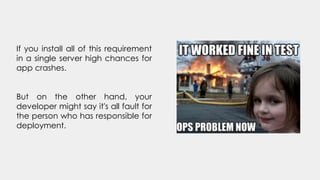
If you install all of this requirement
in a single server high chances for
app crashes.
But on the other hand, your
developer might say it's all fault for
the person who has responsible for
deployment.
That’s where came
WHAT CAN IT DO
Docker is a tool designed to make it easier
to create, deploy, and run applications by
using containers. Containers allow a
developer to package up an application
with all of the parts it needs, such as
libraries and other dependencies, and
deploy it as one package.
WHAT CAN IT DO
By doing so, thanks to the container, the
developer can rest assured that the
application will run on any other Linux
machine regardless of any customized
settings that machine might have that
could differ from the machine used for
writing and testing the code.
Source: https://opensource.com/resources/what-docker
WHAT CAN IT DO
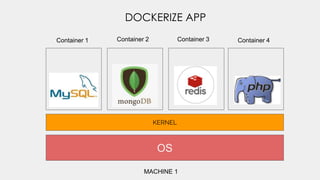
It's like a virtual machine but
really a virtual machine. Its
virtualize the application using
same kernel making isolated
environment.
How it can perform
OS
KERNEL
MACHINE 1
DOCKERIZE APP
Container 1 Container 2 Container 3 Container 4
DROP THE INSTANCE WHEN YOU DON'T
NEED IT
BUT I AM STILL CONFUSED
WHY I NEED THIS
Scenario 1
Maybe you have a which run php 5.5
and you have php 5.5 installed in your
system. Suddenly your supervisor asks
you to deploy a laravel 5.6 app which
supports php 7.1
But you can’t update php version your
existing might have stop working or your
apache lib might stop working.
BUT I AM STILL CONFUSED
WHY I NEED THIS
Scenario 2
Maybe your application is not working
with other application because both
application share same network
configuration, same port number etc
BUT I AM STILL CONFUSED
WHY I NEED THIS
Scenario 3
Maybe your DevOps team have little
knowledge about code or the platform
you used in your application.
BUT I AM STILL CONFUSED
WHY I NEED THIS
Scenario 4
Maybe DevOps team don't have that
much time for deploying app from
scratch.
BUT I AM STILL CONFUSED
WHY I NEED THIS
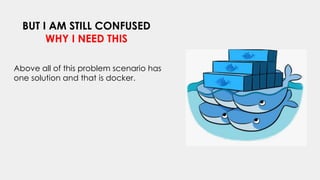
Above all of this problem scenario has
one solution and that is docker.
OS
KERNEL
OS
KERNEL
MACHINE 1 MACHINE 2
MULTIPLE DOCKERIZE
Q1. So it's more like Virtual
machine, right? If not what
is the difference between
docker and virtual
machine.
Ans. No, it's not like virtual
machine. Discussion in next
slide...
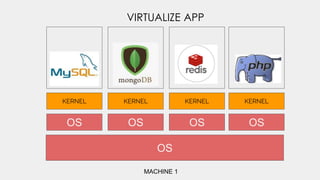
OS
KERNEL
MACHINE 1
VIRTUALIZE APP
KERNEL KERNEL KERNEL
OS OS OS OS
Size
Startup
Integration
Let’s begin
Basic Docker Command
https://labs.play-with-docker.com/
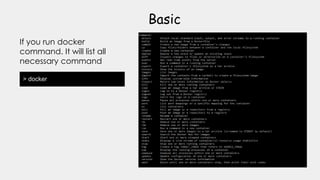
> docker
Basic
If you run docker
command. It will list all
necessary command
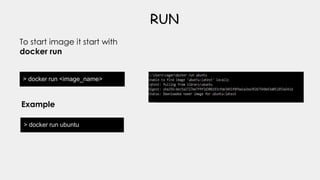
> docker run <image_name>
RUN
To start image it start with
docker run
> docker run ubuntu
Example
> docker run <image_name>:10
Version
Also specify the version of
the image
> docker run node:10
Example
> docker run -it <image_name>:10
I/O
You can use I/O by
specify the -it
> docker run -it ubuntu /bin/bash
Example
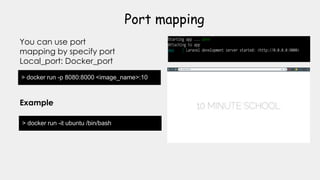
> docker run -p 8080:8000 <image_name>:10
Port mapping
You can use port
mapping by specify port
Local_port: Docker_port
> docker run -it ubuntu /bin/bash
Example
Volume mapping
You can map volume to source code to
container source code
> docker run -p 3306:3306 mysql -v opt/dataDir:/var/lib/mysql
Volume mapping
> docker run -d -p 8080:8000 <image_name>
Run app detach mode
You will run application in
background mode by using -d
> docker run -d -p 8080:8080 web_app
Example
> docker run <image_name> php artisan serve
Run command inside image
Run bash command after the
image name
> docker run web_app php artisan serve
Example
> docker run -h
Others option
You can get others command by
using --help after docker run
> docker run -h
Example
DOCKER FILE
What is docker file
It's like a instruction file for building
image. Like if want to deploy an app,
you have to run many bash
command to install package and
extensions.
It looks like this. Where all the instruction
written.
Also there have certain requirement for
write this file.
You can find this from HERE
Dockerfile
DOCKER COMPOSE
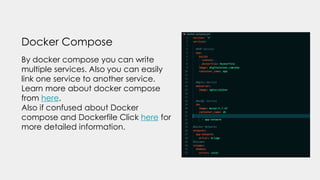
Docker Compose
By docker compose you can write
multiple services. Also you can easily
link one service to another service.
Learn more about docker compose
from here.
Also if confused about Docker
compose and Dockerfile Click here for
more detailed information.
LETS DEPLOY A APP USING
DOCKER
package.json
Make a package.json file
and add this code to
there.
{
"name": "docker_web_app",
"version": "1.0.0",
"description": "Node.js on Docker",
"author": "First Last",
"main": "server.js",
"scripts": {
"start": "node server.js"
},
"dependencies": {
"express": "^4.16.1"
}
}
server.js
Make a server.js file
and add this code
to there.
'use strict';
const express = require('express');
// Constants
const PORT = 8080;
const HOST = '0.0.0.0';
// App
const app = express();
app.get('/', (req, res) => {
res.send('Hello World');
});
app.listen(PORT, HOST);
console.log(`Running http://${HOST}:${PORT}`);
Dockerfile
Make a Dockerfile
file and add this
code to there.
FROM node:10
# Create app directory
WORKDIR /usr/src/app
# Install app dependencies
# A wildcard is used to ensure both package.json
AND package-lock.json are copied
# where available (npm@5+)
COPY package*.json ./
RUN npm install
# If you are building your code for production
# RUN npm ci --only=production
# Bundle app source
COPY . .
EXPOSE 8080
CMD [ "node", "server.js" ]
Build image
Build image by running this command
docker build -t node-web-app .
Build image
Run app detach mode with map port 49160
docker run -p 49160:8080 -d node-web-app node server.js
More useful link
● https://kodekloud.com/
● https://www.youtube.com/watch?v=wi-MGFhrad0&list=PLhW3qG5bs-L99pQsZ74f-LC-
tOEsBp2rK
● https://medium.com/free-code-camp/a-beginner-friendly-introduction-to-containers-vms-and-
docker-79a9e3e119b
● https://medium.com/@cramirez92/build-a-nodejs-cinema-microservice-and-deploying-it-with-
docker-part-1-7e28e25bfa8b
● https://docs.docker.com/get-started/
● https://www.youtube.com/watch?v=DgoKjlDteEA&list=PLea0WJq13cnDsF4MrbNaw3b4jI0GT9yKt
Thank You
#stayhome #staysafe

Start your adventure with docker

  • 1.
  • 2.
  • 3.
    WHY WE NEEDDOCKER When comes to deploy app in server we have to install various resources or packages for the app configuration. On the other side you have another team build a app under node js, maybe you hire a freelancer who would make app by php but another version and so on …
  • 4.
    If you installall of this requirement in a single server high chances for app crashes. But on the other hand, your developer might say it's all fault for the person who has responsible for deployment.
  • 5.
  • 6.
  • 7.
    Docker is atool designed to make it easier to create, deploy, and run applications by using containers. Containers allow a developer to package up an application with all of the parts it needs, such as libraries and other dependencies, and deploy it as one package. WHAT CAN IT DO
  • 8.
    By doing so,thanks to the container, the developer can rest assured that the application will run on any other Linux machine regardless of any customized settings that machine might have that could differ from the machine used for writing and testing the code. Source: https://opensource.com/resources/what-docker WHAT CAN IT DO
  • 9.
    It's like avirtual machine but really a virtual machine. Its virtualize the application using same kernel making isolated environment. How it can perform
  • 10.
    OS KERNEL MACHINE 1 DOCKERIZE APP Container1 Container 2 Container 3 Container 4
  • 11.
    DROP THE INSTANCEWHEN YOU DON'T NEED IT
  • 12.
    BUT I AMSTILL CONFUSED WHY I NEED THIS Scenario 1 Maybe you have a which run php 5.5 and you have php 5.5 installed in your system. Suddenly your supervisor asks you to deploy a laravel 5.6 app which supports php 7.1 But you can’t update php version your existing might have stop working or your apache lib might stop working.
  • 13.
    BUT I AMSTILL CONFUSED WHY I NEED THIS Scenario 2 Maybe your application is not working with other application because both application share same network configuration, same port number etc
  • 14.
    BUT I AMSTILL CONFUSED WHY I NEED THIS Scenario 3 Maybe your DevOps team have little knowledge about code or the platform you used in your application.
  • 15.
    BUT I AMSTILL CONFUSED WHY I NEED THIS Scenario 4 Maybe DevOps team don't have that much time for deploying app from scratch.
  • 16.
    BUT I AMSTILL CONFUSED WHY I NEED THIS Above all of this problem scenario has one solution and that is docker.
  • 17.
  • 18.
    Q1. So it'smore like Virtual machine, right? If not what is the difference between docker and virtual machine. Ans. No, it's not like virtual machine. Discussion in next slide...
  • 19.
  • 20.
  • 21.
  • 22.
  • 23.
    > docker Basic If yourun docker command. It will list all necessary command
  • 24.
    > docker run<image_name> RUN To start image it start with docker run > docker run ubuntu Example
  • 25.
    > docker run<image_name>:10 Version Also specify the version of the image > docker run node:10 Example
  • 26.
    > docker run-it <image_name>:10 I/O You can use I/O by specify the -it > docker run -it ubuntu /bin/bash Example
  • 27.
    > docker run-p 8080:8000 <image_name>:10 Port mapping You can use port mapping by specify port Local_port: Docker_port > docker run -it ubuntu /bin/bash Example
  • 28.
    Volume mapping You canmap volume to source code to container source code > docker run -p 3306:3306 mysql -v opt/dataDir:/var/lib/mysql
  • 29.
  • 30.
    > docker run-d -p 8080:8000 <image_name> Run app detach mode You will run application in background mode by using -d > docker run -d -p 8080:8080 web_app Example
  • 31.
    > docker run<image_name> php artisan serve Run command inside image Run bash command after the image name > docker run web_app php artisan serve Example
  • 32.
    > docker run-h Others option You can get others command by using --help after docker run > docker run -h Example
  • 33.
  • 34.
  • 35.
    It's like ainstruction file for building image. Like if want to deploy an app, you have to run many bash command to install package and extensions.
  • 36.
    It looks likethis. Where all the instruction written. Also there have certain requirement for write this file. You can find this from HERE Dockerfile
  • 37.
  • 38.
    Docker Compose By dockercompose you can write multiple services. Also you can easily link one service to another service. Learn more about docker compose from here. Also if confused about Docker compose and Dockerfile Click here for more detailed information.
  • 39.
    LETS DEPLOY AAPP USING DOCKER
  • 40.
    package.json Make a package.jsonfile and add this code to there. { "name": "docker_web_app", "version": "1.0.0", "description": "Node.js on Docker", "author": "First Last", "main": "server.js", "scripts": { "start": "node server.js" }, "dependencies": { "express": "^4.16.1" } }
  • 41.
    server.js Make a server.jsfile and add this code to there. 'use strict'; const express = require('express'); // Constants const PORT = 8080; const HOST = '0.0.0.0'; // App const app = express(); app.get('/', (req, res) => { res.send('Hello World'); }); app.listen(PORT, HOST); console.log(`Running http://${HOST}:${PORT}`);
  • 42.
    Dockerfile Make a Dockerfile fileand add this code to there. FROM node:10 # Create app directory WORKDIR /usr/src/app # Install app dependencies # A wildcard is used to ensure both package.json AND package-lock.json are copied # where available (npm@5+) COPY package*.json ./ RUN npm install # If you are building your code for production # RUN npm ci --only=production # Bundle app source COPY . . EXPOSE 8080 CMD [ "node", "server.js" ]
  • 43.
    Build image Build imageby running this command docker build -t node-web-app .
  • 44.
    Build image Run appdetach mode with map port 49160 docker run -p 49160:8080 -d node-web-app node server.js
  • 45.
    More useful link ●https://kodekloud.com/ ● https://www.youtube.com/watch?v=wi-MGFhrad0&list=PLhW3qG5bs-L99pQsZ74f-LC- tOEsBp2rK ● https://medium.com/free-code-camp/a-beginner-friendly-introduction-to-containers-vms-and- docker-79a9e3e119b ● https://medium.com/@cramirez92/build-a-nodejs-cinema-microservice-and-deploying-it-with- docker-part-1-7e28e25bfa8b ● https://docs.docker.com/get-started/ ● https://www.youtube.com/watch?v=DgoKjlDteEA&list=PLea0WJq13cnDsF4MrbNaw3b4jI0GT9yKt
  • 46.