
SQL Server on Linux Engineering Town Hall Webinar Series
SQL Server in DevOps
SQL Server v.Next CTP 1.4
April 6, 2017
Travis Wright, Luis Bosquez Gonzalez
Program Managers
SQL Server Engineering Team
@radtravis, @_lbosq
Announcing vNext CTP 1.4!
2
Release date: March 17, 2017
Version number: 14.0.405.198
What’s new?
• SQL Server Agent
• Mssql-tools (sqlcmd, bcp) now included in the mssql-server-linux Docker image
• VDI interface for backups
• Performance improvements
• Bug fixes
Agenda
3
• Background on SQL Server, DevOps, Containers, and Container Management
Platforms
• Demos
• Lessons Learned
• What’s Next
• Get Involved
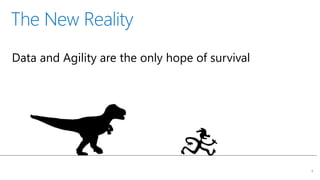
The New Reality
4
Data and Agility are the only hope of survival
5
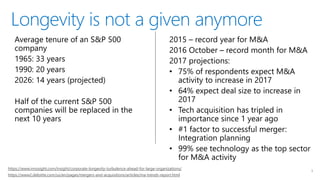
https://www.innosight.com/insight/corporate-longevity-turbulence-ahead-for-large-organizations/
https://www2.deloitte.com/us/en/pages/mergers-and-acquisitions/articles/ma-trends-report.html
Longevity is not a given anymore
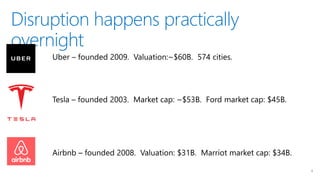
Disruption happens practically
overnight
6
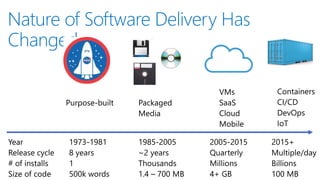
Nature of Software Delivery Has
Changed
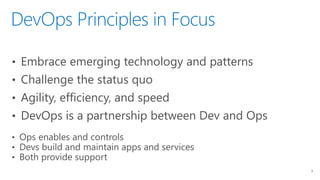
DevOps Principles in Focus
8
• Embrace emerging technology and patterns
• Challenge the status quo
• Agility, efficiency, and speed
• DevOps is a partnership between Dev and Ops
• Ops enables and controls
• Devs build and maintain apps and services
• Both provide support
Containers:
Fad
or
Fundamental Transformation?
9
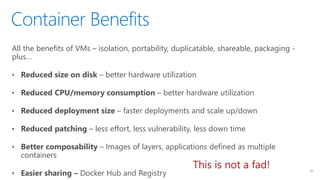
Container Benefits
10
All the benefits of VMs – isolation, portability, duplicatable, shareable, packaging -
plus…
• Reduced size on disk – better hardware utilization
• Reduced CPU/memory consumption – better hardware utilization
• Reduced deployment size – faster deployments and scale up/down
• Reduced patching – less effort, less vulnerability, less down time
• Better composability – Images of layers, applications defined as multiple
containers
• Easier sharing – Docker Hub and Registry
This is not a fad!
…but wait…
11
• “Containers are emphemeral”
• “Containers aren’t for anything critical”
• “Containers aren’t for databases”
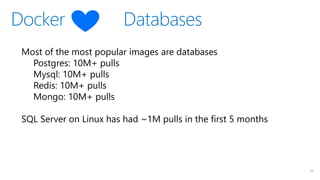
Docker Databases
12
Most of the most popular images are databases
Postgres: 10M+ pulls
Mysql: 10M+ pulls
Redis: 10M+ pulls
Mongo: 10M+ pulls
SQL Server on Linux has had ~1M pulls in the first 5 months
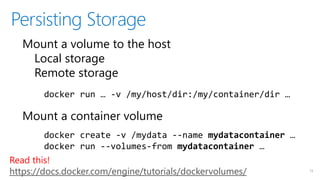
Persisting Storage
13
Mount a volume to the host
Local storage
Remote storage
Mount a container volume
docker run … -v /my/host/dir:/my/container/dir …
docker create -v /mydata --name mydatacontainer …
docker run --volumes-from mydatacontainer …
Read this!
https://docs.docker.com/engine/tutorials/dockervolumes/
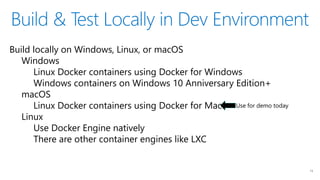
Build & Test Locally in Dev Environment
14
Build locally on Windows, Linux, or macOS
Windows
Linux Docker containers using Docker for Windows
Windows containers on Windows 10 Anniversary Edition+
macOS
Linux Docker containers using Docker for Mac
Linux
Use Docker Engine natively
There are other container engines like LXC
Use for demo today
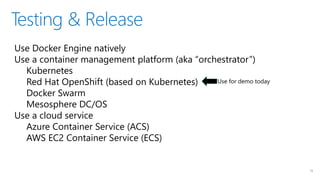
Testing & Release
15
Use Docker Engine natively
Use a container management platform (aka “orchestrator”)
Kubernetes
Red Hat OpenShift (based on Kubernetes)
Docker Swarm
Mesosphere DC/OS
Use a cloud service
Azure Container Service (ACS)
AWS EC2 Container Service (ECS)
Use for demo today
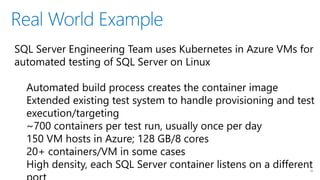
Real World Example
16
SQL Server Engineering Team uses Kubernetes in Azure VMs for
automated testing of SQL Server on Linux
Automated build process creates the container image
Extended existing test system to handle provisioning and test
execution/targeting
~700 containers per test run, usually once per day
150 VM hosts in Azure; 128 GB/8 cores
20+ containers/VM in some cases
High density, each SQL Server container listens on a different
Key Docker Terminology and
Commands
17
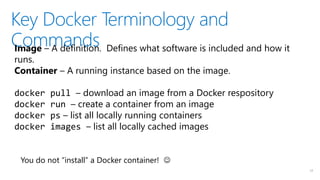
Image – A definition. Defines what software is included and how it
runs.
Container – A running instance based on the image.
docker pull – download an image from a Docker respository
docker run – create a container from an image
docker ps – list all locally running containers
docker images – list all locally cached images
You do not “install” a Docker container! 
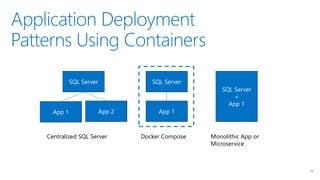
Application Deployment
Patterns Using Containers
18
SQL Server
App 1 App 2
SQL Server
App 1
SQL Server
+
App 1
Centralized SQL Server Docker Compose Monolithic App or
Microservice
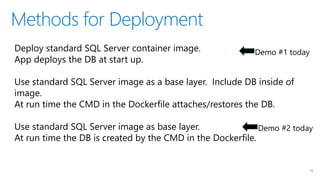
Methods for Deployment
19
Deploy standard SQL Server container image.
App deploys the DB at start up.
Use standard SQL Server image as a base layer. Include DB inside of
image.
At run time the CMD in the Dockerfile attaches/restores the DB.
Use standard SQL Server image as base layer.
At run time the DB is created by the CMD in the Dockerfile.
Demo #1 today
Demo #2 today
Demo #1 Docker-Compose App
9
Demo #2 Deploy a Microservice App to
OpenShift
9
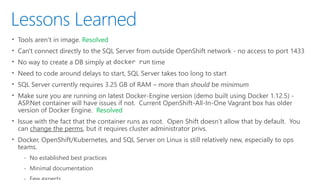
Lessons Learned
• Tools aren’t in image. Resolved
• Can't connect directly to the SQL Server from outside OpenShift network - no access to port 1433
• No way to create a DB simply at docker run time
• Need to code around delays to start, SQL Server takes too long to start
• SQL Server currently requires 3.25 GB of RAM – more than should be minimum
• Make sure you are running on latest Docker-Engine version (demo built using Docker 1.12.5) -
ASP.Net container will have issues if not. Current OpenShift-All-In-One Vagrant box has older
version of Docker Engine. Resolved
• Issue with the fact that the container runs as root. Open Shift doesn’t allow that by default. You
can change the perms, but it requires cluster administrator privs.
• Docker, OpenShift/Kubernetes, and SQL Server on Linux is still relatively new, especially to ops
teams.
‐ No established best practices
‐ Minimal documentation
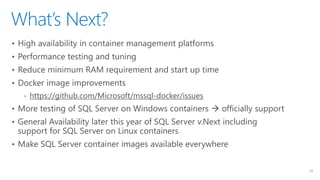
What’s Next?
23
• High availability in container management platforms
• Performance testing and tuning
• Reduce minimum RAM requirement and start up time
• Docker image improvements
‐ https://github.com/Microsoft/mssql-docker/issues
• More testing of SQL Server on Windows containers  officially support
• General Availability later this year of SQL Server v.Next including
support for SQL Server on Linux containers
• Make SQL Server container images available everywhere
Get Involved
24
• Get the SQL Server container images
‐ hub.docker.com/r/microsoft/mssql-server-linux (v.Next)
‐ hub.docker.com/r/microsoft/mssql-server-windows (v.Next)
‐ https://hub.docker.com/r/microsoft/mssql-server-windows-express/ (2016 SP1)
‐ Mesosphere DC/OS Universe image
• Provide feedback
‐ https://github.com/Microsoft/mssql-docker/issues
• Get samples from today
‐ https://github.com/twright-msft/mssql-node-docker-demo-app
‐ https://github.com/twright-msft/mssql-aspnet-docker-demo-app
• Contact me if you want to work on cool stuff together!
Questions?
Thank you!
9
twright@microsoft.com
twitter.com/radtravis
linkedin.com/in/radtravis

SQL Server in DevOps Town Hall Webinar

  • 1.
    SQL Server onLinux Engineering Town Hall Webinar Series SQL Server in DevOps SQL Server v.Next CTP 1.4 April 6, 2017 Travis Wright, Luis Bosquez Gonzalez Program Managers SQL Server Engineering Team @radtravis, @_lbosq
  • 2.
    Announcing vNext CTP1.4! 2 Release date: March 17, 2017 Version number: 14.0.405.198 What’s new? • SQL Server Agent • Mssql-tools (sqlcmd, bcp) now included in the mssql-server-linux Docker image • VDI interface for backups • Performance improvements • Bug fixes
  • 3.
    Agenda 3 • Background onSQL Server, DevOps, Containers, and Container Management Platforms • Demos • Lessons Learned • What’s Next • Get Involved
  • 4.
    The New Reality 4 Dataand Agility are the only hope of survival
  • 5.
  • 6.
  • 7.
    Nature of SoftwareDelivery Has Changed
  • 8.
    DevOps Principles inFocus 8 • Embrace emerging technology and patterns • Challenge the status quo • Agility, efficiency, and speed • DevOps is a partnership between Dev and Ops • Ops enables and controls • Devs build and maintain apps and services • Both provide support
  • 9.
  • 10.
    Container Benefits 10 All thebenefits of VMs – isolation, portability, duplicatable, shareable, packaging - plus… • Reduced size on disk – better hardware utilization • Reduced CPU/memory consumption – better hardware utilization • Reduced deployment size – faster deployments and scale up/down • Reduced patching – less effort, less vulnerability, less down time • Better composability – Images of layers, applications defined as multiple containers • Easier sharing – Docker Hub and Registry This is not a fad!
  • 11.
    …but wait… 11 • “Containersare emphemeral” • “Containers aren’t for anything critical” • “Containers aren’t for databases”
  • 12.
    Docker Databases 12 Most ofthe most popular images are databases Postgres: 10M+ pulls Mysql: 10M+ pulls Redis: 10M+ pulls Mongo: 10M+ pulls SQL Server on Linux has had ~1M pulls in the first 5 months
  • 13.
    Persisting Storage 13 Mount avolume to the host Local storage Remote storage Mount a container volume docker run … -v /my/host/dir:/my/container/dir … docker create -v /mydata --name mydatacontainer … docker run --volumes-from mydatacontainer … Read this! https://docs.docker.com/engine/tutorials/dockervolumes/
  • 14.
    Build & TestLocally in Dev Environment 14 Build locally on Windows, Linux, or macOS Windows Linux Docker containers using Docker for Windows Windows containers on Windows 10 Anniversary Edition+ macOS Linux Docker containers using Docker for Mac Linux Use Docker Engine natively There are other container engines like LXC Use for demo today
  • 15.
    Testing & Release 15 UseDocker Engine natively Use a container management platform (aka “orchestrator”) Kubernetes Red Hat OpenShift (based on Kubernetes) Docker Swarm Mesosphere DC/OS Use a cloud service Azure Container Service (ACS) AWS EC2 Container Service (ECS) Use for demo today
  • 16.
    Real World Example 16 SQLServer Engineering Team uses Kubernetes in Azure VMs for automated testing of SQL Server on Linux Automated build process creates the container image Extended existing test system to handle provisioning and test execution/targeting ~700 containers per test run, usually once per day 150 VM hosts in Azure; 128 GB/8 cores 20+ containers/VM in some cases High density, each SQL Server container listens on a different
  • 17.
    Key Docker Terminologyand Commands 17 Image – A definition. Defines what software is included and how it runs. Container – A running instance based on the image. docker pull – download an image from a Docker respository docker run – create a container from an image docker ps – list all locally running containers docker images – list all locally cached images You do not “install” a Docker container! 
  • 18.
    Application Deployment Patterns UsingContainers 18 SQL Server App 1 App 2 SQL Server App 1 SQL Server + App 1 Centralized SQL Server Docker Compose Monolithic App or Microservice
  • 19.
    Methods for Deployment 19 Deploystandard SQL Server container image. App deploys the DB at start up. Use standard SQL Server image as a base layer. Include DB inside of image. At run time the CMD in the Dockerfile attaches/restores the DB. Use standard SQL Server image as base layer. At run time the DB is created by the CMD in the Dockerfile. Demo #1 today Demo #2 today
  • 20.
  • 21.
    Demo #2 Deploya Microservice App to OpenShift 9
  • 22.
    Lessons Learned • Toolsaren’t in image. Resolved • Can't connect directly to the SQL Server from outside OpenShift network - no access to port 1433 • No way to create a DB simply at docker run time • Need to code around delays to start, SQL Server takes too long to start • SQL Server currently requires 3.25 GB of RAM – more than should be minimum • Make sure you are running on latest Docker-Engine version (demo built using Docker 1.12.5) - ASP.Net container will have issues if not. Current OpenShift-All-In-One Vagrant box has older version of Docker Engine. Resolved • Issue with the fact that the container runs as root. Open Shift doesn’t allow that by default. You can change the perms, but it requires cluster administrator privs. • Docker, OpenShift/Kubernetes, and SQL Server on Linux is still relatively new, especially to ops teams. ‐ No established best practices ‐ Minimal documentation
  • 23.
    What’s Next? 23 • Highavailability in container management platforms • Performance testing and tuning • Reduce minimum RAM requirement and start up time • Docker image improvements ‐ https://github.com/Microsoft/mssql-docker/issues • More testing of SQL Server on Windows containers  officially support • General Availability later this year of SQL Server v.Next including support for SQL Server on Linux containers • Make SQL Server container images available everywhere
  • 24.
    Get Involved 24 • Getthe SQL Server container images ‐ hub.docker.com/r/microsoft/mssql-server-linux (v.Next) ‐ hub.docker.com/r/microsoft/mssql-server-windows (v.Next) ‐ https://hub.docker.com/r/microsoft/mssql-server-windows-express/ (2016 SP1) ‐ Mesosphere DC/OS Universe image • Provide feedback ‐ https://github.com/Microsoft/mssql-docker/issues • Get samples from today ‐ https://github.com/twright-msft/mssql-node-docker-demo-app ‐ https://github.com/twright-msft/mssql-aspnet-docker-demo-app • Contact me if you want to work on cool stuff together!
  • 25.