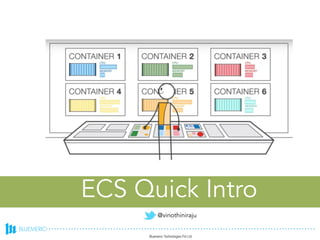
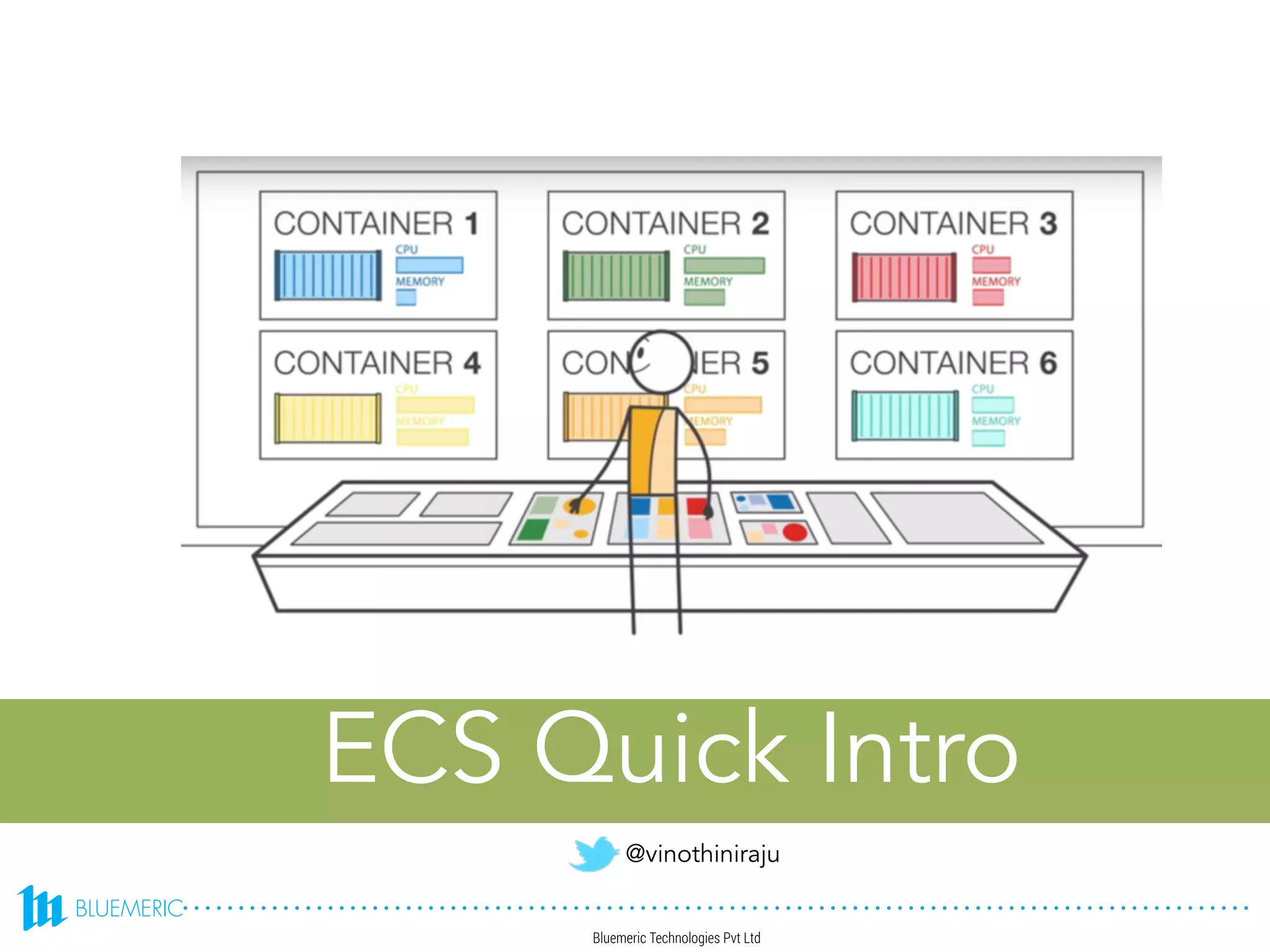
ECS Quick Intro
@vinothiniraju
For the next 30 mins..
• ECR
• Intro & Components
• Architecture at high level
• Launch Process
• Scheduling a service
• Service Load Balancing
• Multi-task Deployment Demo
No covered:
• Autoscaling
• CI/CD
• Advanced scheduling
• Advanced task definitions
Intro & Components
• Intro
• Docker containers on a cluster of Amazon EC2 instances
• Components
• CLUSTER : Logical grouping of container instances, tasks are placed here
• CONTAINER INSTANCE : EC2 instance, requires ECS agent & registered with a cluster
• TASK DEFINITION : Application blueprints/compositions with 1 or more container definitions
• SCHEDULER : Method to place tasks on container instances.
• SERVICE : 1 or more running instances of applications
• TASK : single container task instance
• CONTAINER : Linux container
Task Definition
• Family (version controlled name)
• Container Definitions
• basic
• name *
• image *
• memory *
• portMappings [hostPort, containerPort, protocol tcp/udp]
• advanced
• Volumes
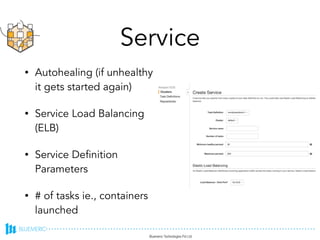
Service
• Autohealing (if unhealthy
it gets started again)
• Service Load Balancing
(ELB)
• Service Definition
Parameters
• # of tasks ie., containers
launched
Scheduling a service
• RunTask (ideal for batch jobs, evenly distributes the
tasks)
• StartTask
• All of the containers that are launched in a single
task definition are always placed on the same
container instance
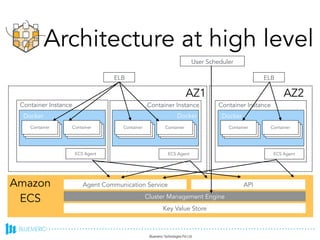
Architecture at high level
Container Container
Docker
Container Instance
ECS Agent
Container Container
Docker
Container Instance
ECS Agent
Container Container
Docker
Container Instance
ECS Agent
AZ1 AZ2
ELB ELB
Amazon
ECS
Agent Communication Service API
Cluster Management Engine
Key Value Store
User Scheduler
Launch Process
STEP 1 : Security Group
STEP 2 : IAM User + Permissions : Amazon ECS First Run Wizard
[permissions]
STEP 3: Launch your container instances in a VPC
STEP 4: Create container cluster / ECR
STEP 5: Create task definition
STEP 6: Create service instance
STEP 7: Configure repository and Build, tag, and push Docker image
Service Load Balancing
Service LB configs
• It is not possible to map the load balancer port 80 to port 3030 on one container
instance and port 4040 on another container instance.
• You may choose to put two different containers behind the same load balancer
by defining multiple host ports in the service definition and adding those listener
ports to the load
• There is a limit of one load balancer per service.
• Your load balancer subnet configuration must include all subnets that your
container instances reside in.
• If a service's task fails the load balancer health check criteria, the task is killed
and restarted. This process continues until your service reaches the number of
desired running tasks.
Ref: http://docs.aws.amazon.com/AmazonECS/latest/developerguide/service-load-balancing.html
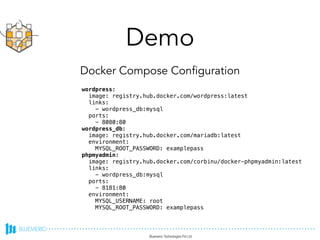
Demo
wordpress:
image: registry.hub.docker.com/wordpress:latest
links:
- wordpress_db:mysql
ports:
- 8080:80
wordpress_db:
image: registry.hub.docker.com/mariadb:latest
environment:
MYSQL_ROOT_PASSWORD: examplepass
phpmyadmin:
image: registry.hub.docker.com/corbinu/docker-phpmyadmin:latest
links:
- wordpress_db:mysql
ports:
- 8181:80
environment:
MYSQL_USERNAME: root
MYSQL_ROOT_PASSWORD: examplepass
Docker Compose Configuration
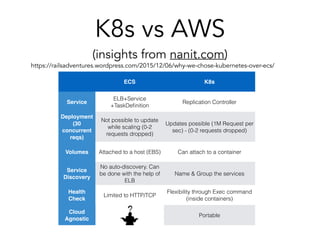
K8s vs AWS
(insights from nanit.com)
ECS K8s
Service
ELB+Service
+TaskDefinition
Replication Controller
Deployment
(30
concurrent
reqs)
More dropped update
requests while scaling
(9-14 requests dropped)
Less dropped update requests
while scaling (1M Request per
sec) - (0-2 requests dropped)
Volumes Attached to a host (EBS) Can attach to a container
Service
Discovery
No auto-discovery. Can
be done with the help of
ELB
Name & Group the services
Health
Check
Limited to HTTP/TCP
Flexibility through Exec command
(inside containers)
Cloud
Agnostic
No Portable
https://railsadventures.wordpress.com/2015/12/06/why-we-chose-kubernetes-over-ecs/
Thanks !

AWS ECS Quick Introduction

  • 1.
  • 2.
    For the next30 mins.. • ECR • Intro & Components • Architecture at high level • Launch Process • Scheduling a service • Service Load Balancing • Multi-task Deployment Demo No covered: • Autoscaling • CI/CD • Advanced scheduling • Advanced task definitions
  • 3.
    Intro & Components •Intro • Docker containers on a cluster of Amazon EC2 instances • Components • CLUSTER : Logical grouping of container instances, tasks are placed here • CONTAINER INSTANCE : EC2 instance, requires ECS agent & registered with a cluster • TASK DEFINITION : Application blueprints/compositions with 1 or more container definitions • SCHEDULER : Method to place tasks on container instances. • SERVICE : 1 or more running instances of applications • TASK : single container task instance • CONTAINER : Linux container
  • 4.
    Task Definition • Family(version controlled name) • Container Definitions • basic • name * • image * • memory * • portMappings [hostPort, containerPort, protocol tcp/udp] • advanced • Volumes
  • 5.
    Service • Autohealing (ifunhealthy it gets started again) • Service Load Balancing (ELB) • Service Definition Parameters • # of tasks ie., containers launched
  • 6.
    Scheduling a service •RunTask (ideal for batch jobs, evenly distributes the tasks) • StartTask • All of the containers that are launched in a single task definition are always placed on the same container instance
  • 7.
    Architecture at highlevel Container Container Docker Container Instance ECS Agent Container Container Docker Container Instance ECS Agent Container Container Docker Container Instance ECS Agent AZ1 AZ2 ELB ELB Amazon ECS Agent Communication Service API Cluster Management Engine Key Value Store User Scheduler
  • 8.
    Launch Process STEP 1: Security Group STEP 2 : IAM User + Permissions : Amazon ECS First Run Wizard [permissions] STEP 3: Launch your container instances in a VPC STEP 4: Create container cluster / ECR STEP 5: Create task definition STEP 6: Create service instance STEP 7: Configure repository and Build, tag, and push Docker image
  • 9.
  • 10.
    Service LB configs •It is not possible to map the load balancer port 80 to port 3030 on one container instance and port 4040 on another container instance. • You may choose to put two different containers behind the same load balancer by defining multiple host ports in the service definition and adding those listener ports to the load • There is a limit of one load balancer per service. • Your load balancer subnet configuration must include all subnets that your container instances reside in. • If a service's task fails the load balancer health check criteria, the task is killed and restarted. This process continues until your service reaches the number of desired running tasks. Ref: http://docs.aws.amazon.com/AmazonECS/latest/developerguide/service-load-balancing.html
  • 11.
    Demo wordpress: image: registry.hub.docker.com/wordpress:latest links: - wordpress_db:mysql ports: -8080:80 wordpress_db: image: registry.hub.docker.com/mariadb:latest environment: MYSQL_ROOT_PASSWORD: examplepass phpmyadmin: image: registry.hub.docker.com/corbinu/docker-phpmyadmin:latest links: - wordpress_db:mysql ports: - 8181:80 environment: MYSQL_USERNAME: root MYSQL_ROOT_PASSWORD: examplepass Docker Compose Configuration
  • 12.
    K8s vs AWS (insightsfrom nanit.com) ECS K8s Service ELB+Service +TaskDefinition Replication Controller Deployment (30 concurrent reqs) More dropped update requests while scaling (9-14 requests dropped) Less dropped update requests while scaling (1M Request per sec) - (0-2 requests dropped) Volumes Attached to a host (EBS) Can attach to a container Service Discovery No auto-discovery. Can be done with the help of ELB Name & Group the services Health Check Limited to HTTP/TCP Flexibility through Exec command (inside containers) Cloud Agnostic No Portable https://railsadventures.wordpress.com/2015/12/06/why-we-chose-kubernetes-over-ecs/
  • 13.