Basic SQL Commands
In MYSQL
MR. HIMANSHU SAXENA
PGT – CS
CITY INTERNATIONAL SCHOOL, MANAS CITY,
LUCKNOW
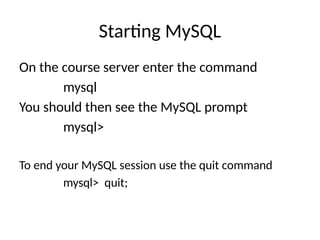
Starting MySQL
On the course server enter the command
mysql
You should then see the MySQL prompt
mysql>
To end your MySQL session use the quit command
mysql> quit;
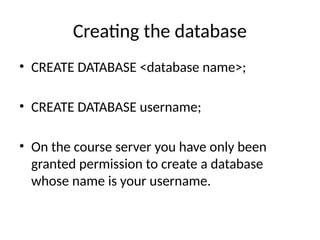
Creating the database
• CREATE DATABASE <database name>;
• CREATE DATABASE username;
• On the course server you have only been
granted permission to create a database
whose name is your username.
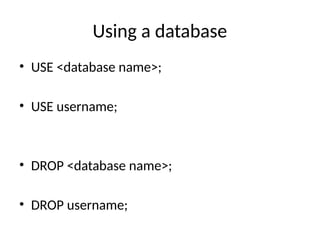
Using a database
• USE <database name>;
• USE username;
• DROP <database name>;
• DROP username;
Deleting a database
• DROP DATABASE [IF EXISTS] <databasename>;
• DROP DATABASE username;
• This deletes the database and all tables and
contents. Use with caution.
Create Table
Backus Naur Form (BNF) Notation
<table definition>::=
CREATE [TEMPORARY] TABLE [IF NOT EXISTS] <table name>
(<table element> [{, <table element>}...])
[<table option> [<table option>...]]
<table element>::=
<column definition>
| {[CONSTRAINT <constraint name>] PRIMARY KEY
(<column name> [{, <column name>}...])}
| {[CONSTRAINT <constraint name>] FOREIGN KEY [<index name>]
(<column name> [{, <column name>}...]) <reference definition>}
| {[CONSTRAINT <constraint name>] UNIQUE [INDEX] [<index name>]
(<column name> [{, <column name>}...])}
| {{INDEX | KEY} [<index name>] (<column name> [{, <column name>}...])}
| {FULLTEXT [INDEX] [<index name>] (<column name> [{, <column name>}...])}
Create Table (cont)
Backus Naur Form (BNF) Notation
• <column definition>::=
• <column name> <type> [NOT NULL | NULL] [DEFAULT <value>] [AUTO_INCREMENT]
• [PRIMARY KEY] [COMMENT '<string>'] [<reference definition>]
• <type>::=
• <numeric data type>
• | <string data type>
• | <data/time data type>
• <reference definition>::=
• REFERENCES <table name> [(<column name> [{, <column name>}...])]
• [ON DELETE {RESTRICT | CASCADE | SET NULL | NO ACTION | SET DEFAULT }]
• [ON UPDATE {RESTRICT | CASCADE | SET NULL | NO ACTION | SET DEFAULT }]
• [MATCH FULL | MATCH PARTIAL]
• <table option>::=
• {ENGINE = {BDB | MEMORY | ISAM | INNODB | MERGE | MYISAM}}
• | <additional table options>
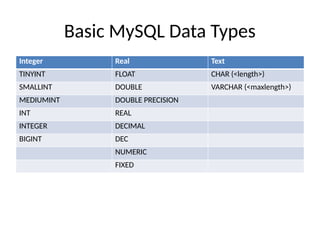
Basic MySQL Data Types
Integer Real Text
TINYINT FLOAT CHAR (<length>)
SMALLINT DOUBLE VARCHAR (<maxlength>)
MEDIUMINT DOUBLE PRECISION
INT REAL
INTEGER DECIMAL
BIGINT DEC
NUMERIC
FIXED
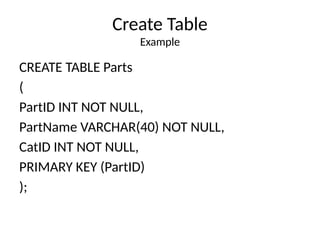
Create Table
Example
CREATE TABLE Parts
(
PartID INT NOT NULL,
PartName VARCHAR(40) NOT NULL,
CatID INT NOT NULL,
PRIMARY KEY (PartID)
);
Special Note
• If you are using Putty you can copy & paste
the SQL commands from the PowerPoint
slides into MySQL.
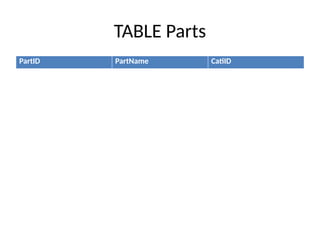
TABLE Parts
PartID PartName CatiID
Inserting elements
Backus Naur Form (BNF) Notation
<insert statement>::=
INSERT [LOW_PRIORITY | DELAYED] [IGNORE] [INTO]
{<values option> | <set option> | <select option>}
<values option>::=
<table name> [(<column name> [{, <column name>}...])]
VALUES ({<expression> | DEFAULT} [{, {<expression> | DEFAULT}}...])
[{, ({<expression> | DEFAULT} [{, {<expression> | DEFAULT}}...])}...]
<set option>::=
<table name>
SET <column name>={<expression> | DEFAULT}
[{, <column name>={<expression> | DEFAULT}}...]
<select option>::=
<table name> [(<column name> [{, <column name>}...])]
<select statement>
Inserting elements
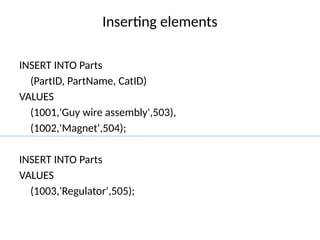
INSERT INTO Parts
(PartID, PartName, CatID)
VALUES
(1001,'Guy wire assembly',503),
(1002,'Magnet',504);
INSERT INTO Parts
VALUES
(1003,'Regulator',505);
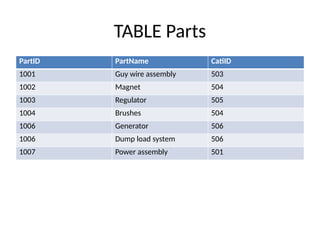
TABLE Parts
PartID PartName CatiID
1001 Guy wire assembly 503
1002 Magnet 504
1003 Regulator 505
1004 Brushes 504
1006 Generator 506
1006 Dump load system 506
1007 Power assembly 501
Select Statement
Backus Naur Form (BNF) Notation
<select statement>::=
SELECT
[<select option> [<select option>...]]
{* | <select list>}
[<export definition>]
[
FROM <table reference> [{, <table reference>}...]
[WHERE <expression> [{<operator> <expression>}...]]
[GROUP BY <group by definition>]
[HAVING <expression> [{<operator> <expression>}...]]
[ORDER BY <order by definition>]
[LIMIT [<offset>,] <row count>]
[PROCEDURE <procedure name> [(<argument> [{, <argument>}...])]]
[{FOR UPDATE} | {LOCK IN SHARE MODE}]
]
Select Statement (cont)
Backus Naur Form (BNF) Notation
<select option>::=
{ALL | DISTINCT | DISTINCTROW}
| HIGH_PRIORITY
| {SQL_BIG_RESULT | SQL_SMALL_RESULT}
| SQL_BUFFER_RESULT
| {SQL_CACHE | SQL_NO_CACHE}
| SQL_CALC_FOUND_ROWS
| STRAIGHT_JOIN
<select list>::=
{<column name> | <expression>} [[AS] <alias>]
[{, {<column name> | <expression>} [[AS] <alias>]}...]
<export definition>::=
INTO OUTFILE '<filename>' [<export option> [<export option>]]
| INTO DUMPFILE '<filename>'
<export option>::=
{FIELDS
[TERMINATED BY '<value>']
[[OPTIONALLY] ENCLOSED BY '<value>']
[ESCAPED BY '<value>']}
| {LINES
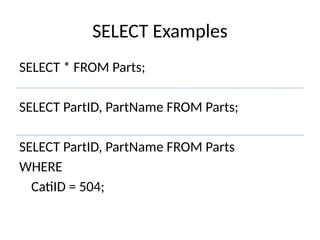
SELECT Examples
SELECT * FROM Parts;
SELECT PartID, PartName FROM Parts;
SELECT PartID, PartName FROM Parts
WHERE
CatiID = 504;
Joining Tables with SELECT
Backus Naur Form (BNF) Notation
<select statement>::=
SELECT
[<select option> [<select option>...]]
{* | <select list>}
[
FROM {<table reference> | <join definition>}
[WHERE <expression> [{<operator> <expression>}...]]
[GROUP BY <group by definition>]
[HAVING <expression> [{<operator> <expression>}...]]
[ORDER BY <order by definition>]
[LIMIT [<offset>,] <row count>]
]
<join definition>::=
{<table reference>, <table reference> [{, <table reference>}...]}
| {<table reference> [INNER | CROSS ] JOIN <table reference> [<join condition>]}
| {<table reference> STRAIGHT_JOIN <table reference>}
| {<table reference> LEFT [OUTER] JOIN <table reference> [<join condition>]}
| {<table reference> RIGHT [OUTER] JOIN <table reference> [<join condition>]}
| {<table reference> NATURAL [{LEFT | RIGHT} [OUTER]] JOIN <table reference>}
<table reference>::=
<table name> [[AS] <alias>]
[{USE | IGNORE | FORCE} INDEX <index name> [{, <index name>}...]]
<join condition>::=
ON <expression> [{<operator> <expression>}...]
| USING (<column> [{, <column>}...])
Create Books Table
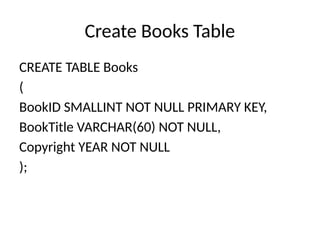
CREATE TABLE Books
(
BookID SMALLINT NOT NULL PRIMARY KEY,
BookTitle VARCHAR(60) NOT NULL,
Copyright YEAR NOT NULL
);
Create Example Tables
• Books
• Authors
• AuthorBook
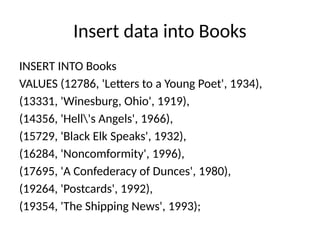
Insert data into Books
INSERT INTO Books
VALUES (12786, 'Letters to a Young Poet', 1934),
(13331, 'Winesburg, Ohio', 1919),
(14356, 'Hell's Angels', 1966),
(15729, 'Black Elk Speaks', 1932),
(16284, 'Noncomformity', 1996),
(17695, 'A Confederacy of Dunces', 1980),
(19264, 'Postcards', 1992),
(19354, 'The Shipping News', 1993);
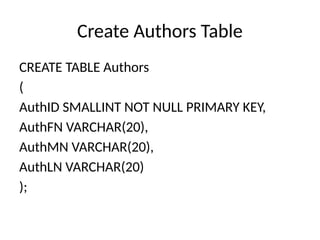
Create Authors Table
CREATE TABLE Authors
(
AuthID SMALLINT NOT NULL PRIMARY KEY,
AuthFN VARCHAR(20),
AuthMN VARCHAR(20),
AuthLN VARCHAR(20)
);
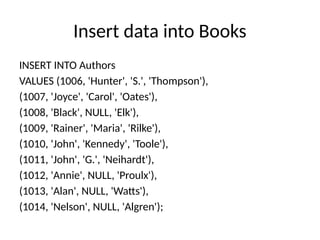
Insert data into Books
INSERT INTO Authors
VALUES (1006, 'Hunter', 'S.', 'Thompson'),
(1007, 'Joyce', 'Carol', 'Oates'),
(1008, 'Black', NULL, 'Elk'),
(1009, 'Rainer', 'Maria', 'Rilke'),
(1010, 'John', 'Kennedy', 'Toole'),
(1011, 'John', 'G.', 'Neihardt'),
(1012, 'Annie', NULL, 'Proulx'),
(1013, 'Alan', NULL, 'Watts'),
(1014, 'Nelson', NULL, 'Algren');
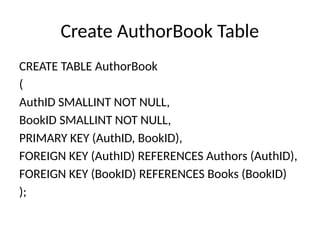
Create AuthorBook Table
CREATE TABLE AuthorBook
(
AuthID SMALLINT NOT NULL,
BookID SMALLINT NOT NULL,
PRIMARY KEY (AuthID, BookID),
FOREIGN KEY (AuthID) REFERENCES Authors (AuthID),
FOREIGN KEY (BookID) REFERENCES Books (BookID)
);
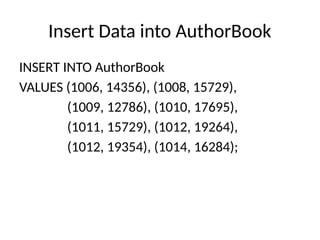
Insert Data into AuthorBook
INSERT INTO AuthorBook
VALUES (1006, 14356), (1008, 15729),
(1009, 12786), (1010, 17695),
(1011, 15729), (1012, 19264),
(1012, 19354), (1014, 16284);
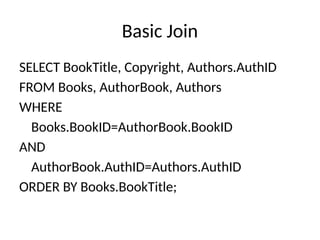
Basic Join
SELECT BookTitle, Copyright, Authors.AuthID
FROM Books, AuthorBook, Authors
WHERE
Books.BookID=AuthorBook.BookID
AND
AuthorBook.AuthID=Authors.AuthID
ORDER BY Books.BookTitle;
Basic Join
SELECT BookTitle, Copyright, Authors.AuthID
FROM Books, AuthorBook, Authors
ORDER BY BookTitle;
What happens when we leave off the WHERE
clause?
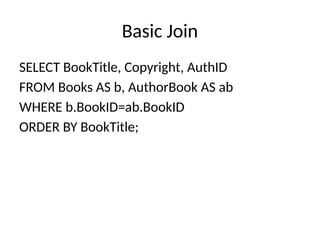
Basic Join
SELECT BookTitle, Copyright, AuthID
FROM Books AS b, AuthorBook AS ab
WHERE b.BookID=ab.BookID
ORDER BY BookTitle;

SQL Basics Commands for Class XII Students

  • 1.
    Basic SQL Commands InMYSQL MR. HIMANSHU SAXENA PGT – CS CITY INTERNATIONAL SCHOOL, MANAS CITY, LUCKNOW
  • 2.
    Starting MySQL On thecourse server enter the command mysql You should then see the MySQL prompt mysql> To end your MySQL session use the quit command mysql> quit;
  • 3.
    Creating the database •CREATE DATABASE <database name>; • CREATE DATABASE username; • On the course server you have only been granted permission to create a database whose name is your username.
  • 4.
    Using a database •USE <database name>; • USE username; • DROP <database name>; • DROP username;
  • 5.
    Deleting a database •DROP DATABASE [IF EXISTS] <databasename>; • DROP DATABASE username; • This deletes the database and all tables and contents. Use with caution.
  • 6.
    Create Table Backus NaurForm (BNF) Notation <table definition>::= CREATE [TEMPORARY] TABLE [IF NOT EXISTS] <table name> (<table element> [{, <table element>}...]) [<table option> [<table option>...]] <table element>::= <column definition> | {[CONSTRAINT <constraint name>] PRIMARY KEY (<column name> [{, <column name>}...])} | {[CONSTRAINT <constraint name>] FOREIGN KEY [<index name>] (<column name> [{, <column name>}...]) <reference definition>} | {[CONSTRAINT <constraint name>] UNIQUE [INDEX] [<index name>] (<column name> [{, <column name>}...])} | {{INDEX | KEY} [<index name>] (<column name> [{, <column name>}...])} | {FULLTEXT [INDEX] [<index name>] (<column name> [{, <column name>}...])}
  • 7.
    Create Table (cont) BackusNaur Form (BNF) Notation • <column definition>::= • <column name> <type> [NOT NULL | NULL] [DEFAULT <value>] [AUTO_INCREMENT] • [PRIMARY KEY] [COMMENT '<string>'] [<reference definition>] • <type>::= • <numeric data type> • | <string data type> • | <data/time data type> • <reference definition>::= • REFERENCES <table name> [(<column name> [{, <column name>}...])] • [ON DELETE {RESTRICT | CASCADE | SET NULL | NO ACTION | SET DEFAULT }] • [ON UPDATE {RESTRICT | CASCADE | SET NULL | NO ACTION | SET DEFAULT }] • [MATCH FULL | MATCH PARTIAL] • <table option>::= • {ENGINE = {BDB | MEMORY | ISAM | INNODB | MERGE | MYISAM}} • | <additional table options>
  • 8.
    Basic MySQL DataTypes Integer Real Text TINYINT FLOAT CHAR (<length>) SMALLINT DOUBLE VARCHAR (<maxlength>) MEDIUMINT DOUBLE PRECISION INT REAL INTEGER DECIMAL BIGINT DEC NUMERIC FIXED
  • 9.
    Create Table Example CREATE TABLEParts ( PartID INT NOT NULL, PartName VARCHAR(40) NOT NULL, CatID INT NOT NULL, PRIMARY KEY (PartID) );
  • 10.
    Special Note • Ifyou are using Putty you can copy & paste the SQL commands from the PowerPoint slides into MySQL.
  • 11.
  • 12.
    Inserting elements Backus NaurForm (BNF) Notation <insert statement>::= INSERT [LOW_PRIORITY | DELAYED] [IGNORE] [INTO] {<values option> | <set option> | <select option>} <values option>::= <table name> [(<column name> [{, <column name>}...])] VALUES ({<expression> | DEFAULT} [{, {<expression> | DEFAULT}}...]) [{, ({<expression> | DEFAULT} [{, {<expression> | DEFAULT}}...])}...] <set option>::= <table name> SET <column name>={<expression> | DEFAULT} [{, <column name>={<expression> | DEFAULT}}...] <select option>::= <table name> [(<column name> [{, <column name>}...])] <select statement>
  • 13.
    Inserting elements INSERT INTOParts (PartID, PartName, CatID) VALUES (1001,'Guy wire assembly',503), (1002,'Magnet',504); INSERT INTO Parts VALUES (1003,'Regulator',505);
  • 14.
    TABLE Parts PartID PartNameCatiID 1001 Guy wire assembly 503 1002 Magnet 504 1003 Regulator 505 1004 Brushes 504 1006 Generator 506 1006 Dump load system 506 1007 Power assembly 501
  • 15.
    Select Statement Backus NaurForm (BNF) Notation <select statement>::= SELECT [<select option> [<select option>...]] {* | <select list>} [<export definition>] [ FROM <table reference> [{, <table reference>}...] [WHERE <expression> [{<operator> <expression>}...]] [GROUP BY <group by definition>] [HAVING <expression> [{<operator> <expression>}...]] [ORDER BY <order by definition>] [LIMIT [<offset>,] <row count>] [PROCEDURE <procedure name> [(<argument> [{, <argument>}...])]] [{FOR UPDATE} | {LOCK IN SHARE MODE}] ]
  • 16.
    Select Statement (cont) BackusNaur Form (BNF) Notation <select option>::= {ALL | DISTINCT | DISTINCTROW} | HIGH_PRIORITY | {SQL_BIG_RESULT | SQL_SMALL_RESULT} | SQL_BUFFER_RESULT | {SQL_CACHE | SQL_NO_CACHE} | SQL_CALC_FOUND_ROWS | STRAIGHT_JOIN <select list>::= {<column name> | <expression>} [[AS] <alias>] [{, {<column name> | <expression>} [[AS] <alias>]}...] <export definition>::= INTO OUTFILE '<filename>' [<export option> [<export option>]] | INTO DUMPFILE '<filename>' <export option>::= {FIELDS [TERMINATED BY '<value>'] [[OPTIONALLY] ENCLOSED BY '<value>'] [ESCAPED BY '<value>']} | {LINES
  • 17.
    SELECT Examples SELECT *FROM Parts; SELECT PartID, PartName FROM Parts; SELECT PartID, PartName FROM Parts WHERE CatiID = 504;
  • 18.
    Joining Tables withSELECT Backus Naur Form (BNF) Notation <select statement>::= SELECT [<select option> [<select option>...]] {* | <select list>} [ FROM {<table reference> | <join definition>} [WHERE <expression> [{<operator> <expression>}...]] [GROUP BY <group by definition>] [HAVING <expression> [{<operator> <expression>}...]] [ORDER BY <order by definition>] [LIMIT [<offset>,] <row count>] ] <join definition>::= {<table reference>, <table reference> [{, <table reference>}...]} | {<table reference> [INNER | CROSS ] JOIN <table reference> [<join condition>]} | {<table reference> STRAIGHT_JOIN <table reference>} | {<table reference> LEFT [OUTER] JOIN <table reference> [<join condition>]} | {<table reference> RIGHT [OUTER] JOIN <table reference> [<join condition>]} | {<table reference> NATURAL [{LEFT | RIGHT} [OUTER]] JOIN <table reference>} <table reference>::= <table name> [[AS] <alias>] [{USE | IGNORE | FORCE} INDEX <index name> [{, <index name>}...]] <join condition>::= ON <expression> [{<operator> <expression>}...] | USING (<column> [{, <column>}...])
  • 19.
    Create Books Table CREATETABLE Books ( BookID SMALLINT NOT NULL PRIMARY KEY, BookTitle VARCHAR(60) NOT NULL, Copyright YEAR NOT NULL );
  • 20.
    Create Example Tables •Books • Authors • AuthorBook
  • 21.
    Insert data intoBooks INSERT INTO Books VALUES (12786, 'Letters to a Young Poet', 1934), (13331, 'Winesburg, Ohio', 1919), (14356, 'Hell's Angels', 1966), (15729, 'Black Elk Speaks', 1932), (16284, 'Noncomformity', 1996), (17695, 'A Confederacy of Dunces', 1980), (19264, 'Postcards', 1992), (19354, 'The Shipping News', 1993);
  • 22.
    Create Authors Table CREATETABLE Authors ( AuthID SMALLINT NOT NULL PRIMARY KEY, AuthFN VARCHAR(20), AuthMN VARCHAR(20), AuthLN VARCHAR(20) );
  • 23.
    Insert data intoBooks INSERT INTO Authors VALUES (1006, 'Hunter', 'S.', 'Thompson'), (1007, 'Joyce', 'Carol', 'Oates'), (1008, 'Black', NULL, 'Elk'), (1009, 'Rainer', 'Maria', 'Rilke'), (1010, 'John', 'Kennedy', 'Toole'), (1011, 'John', 'G.', 'Neihardt'), (1012, 'Annie', NULL, 'Proulx'), (1013, 'Alan', NULL, 'Watts'), (1014, 'Nelson', NULL, 'Algren');
  • 24.
    Create AuthorBook Table CREATETABLE AuthorBook ( AuthID SMALLINT NOT NULL, BookID SMALLINT NOT NULL, PRIMARY KEY (AuthID, BookID), FOREIGN KEY (AuthID) REFERENCES Authors (AuthID), FOREIGN KEY (BookID) REFERENCES Books (BookID) );
  • 25.
    Insert Data intoAuthorBook INSERT INTO AuthorBook VALUES (1006, 14356), (1008, 15729), (1009, 12786), (1010, 17695), (1011, 15729), (1012, 19264), (1012, 19354), (1014, 16284);
  • 26.
    Basic Join SELECT BookTitle,Copyright, Authors.AuthID FROM Books, AuthorBook, Authors WHERE Books.BookID=AuthorBook.BookID AND AuthorBook.AuthID=Authors.AuthID ORDER BY Books.BookTitle;
  • 27.
    Basic Join SELECT BookTitle,Copyright, Authors.AuthID FROM Books, AuthorBook, Authors ORDER BY BookTitle; What happens when we leave off the WHERE clause?
  • 28.
    Basic Join SELECT BookTitle,Copyright, AuthID FROM Books AS b, AuthorBook AS ab WHERE b.BookID=ab.BookID ORDER BY BookTitle;