Er. Nawaraj Bhandari
Topic 8
SQL 2
Data Definition - 1
Create table departments
(dept_no integer not null,
department_name varchar(30),
location varchar2(3)
primary key dept_no);
Data Definition - 2
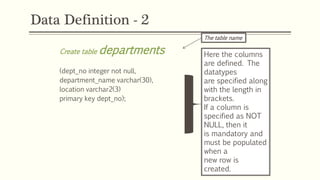
Create table departments
(dept_no integer not null,
department_name varchar(30),
location varchar2(3)
primary key dept_no);
The table name
Here the columns
are defined. The
datatypes
are specified along
with the length in
brackets.
If a column is
specified as NOT
NULL, then it
is mandatory and
must be populated
when a
new row is
created.
Primary Key
Create table departments
(dept_no integer not null,
department_name
varchar(30),
location varchar2(3)
primary key dept_no);
Primary Key
defined in
different
places
Create table departments
(dept_no integer not null primary
key,
department_name varchar(30),
location varchar(3));
Foreign Key
Create table workers
(emp_no number(5) not null,
first_name varchar(30),
last_name varchar(30),
job_title varchar(30),
age number(3),
dept_no number(5),
primary key emp_no,
foreign key (dept_no) references departments(dept_no));
Modifying Tables Using SQL
 Add an extra column
 Drop a column from a table
 Modify the maximum length of the table
 Add a new constraint
 Drop a constraint
 Set a default for a column
 Drop a default for a column
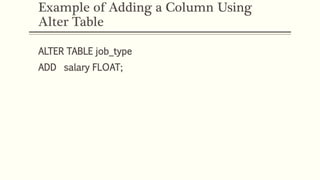
Example of Adding a Column Using
Alter Table
ALTER TABLE job_type
ADD salary FLOAT;
Data Manipulation
 Select
 Order By
 Aggregate functions
 Group by
 Subqueries
 Joins
Select
 SELECT first_name
 FROM Students
 WHERE Student_type = ‘Overseas’;
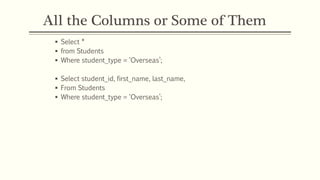
All the Columns or Some of Them
 Select *
 from Students
 Where student_type = ‘Overseas’;
 Select student_id, first_name, last_name,
 From Students
 Where student_type = ‘Overseas’;
Order By - 1
 Select first_name, last_name, stu_id
 From Students
 Where student_type = ‘Overseas’
 Order by last_name;
Order By - 2
 Select first_name, last_name, stu_id
 From Students
 Where student_type = ‘Overseas’
 Order by last_name desc;
Aggregate Functions - 1
 Count
 Sum
 Avg
 Min
 Max
Aggregate Functions - 2
 Count – returns number of values in a column
 Sum – returns the sum total of values of a column
 Avg – returns the mean average of values in column
 Min – returns the lowest value in a column
 Max – returns the highest value in a column
Example of Aggregate Function
Select branchID, Count(staff_id)
From workers
Where branchType = ‘Main’
Group by branchID
Having Count (staff_id) > 1
Order by branchID
• This counts the number of members of staff in main
branches where there are more than 1 staff member.
It groups them by the branchID.
Group By
 As shown it the previous slide...
 This clause is used with an aggregate function and groups the results
by some attribute.
Having Clause
 Modifies the group by clause
Select branchID, Count(staff_id)
From workers
Where branchType = ‘Main’
Group by branchID
Having Count (staff_id) > 1
Order by branchID
 In this case, only select groups where it has been calculated by the
count function that there are more than one member of staff.
Sub-Queries
Select d.department_name, d.location
From departments d, workers w
Where d.dept_no = w.dept_no
And w.age =
(select max(w2.age)
From workers w2);
Joins
Select d.department_name, w.first_name, w.last_name
From departments d, workers w
Where d.dept_no = w.dept_no;
Fixing Errors
 Not specifying join condition properly
 Syntax errors
 Spelling errors for keywords
 Columns not existing on tables
 Data-types being mixed up
Query Optimisation
 Making sure a query runs as efficiently and as quickly as possible
 Performance
 Examining path a query takes through a database
TOAD
 Tools that are used to help optimise queries
 Available at http://www.quest.com/toad/
Just Do It!
 Like driving a car...
 The best way to become proficient with SQL is to use it.
 Laboratory sessions
 Assignment
Learning Outcomes – Have We Met Them?
 By the end of this topic, students will be able to:
 Understand the syntax of the create statement
 Understand the construction of more complex selections
 Recognise the issues around error messaging and query optimisation
References
 Benyon-Davis, P. (2003). Database Systems, 3rd
edition. Palgrave Macmillan. Chapters 11, 12 & 13.
 Connolly, T. & Begg, C. (2004). Database Systems: A
Practical Approach to Design, Implementation, and
Management, 4th Edition. Addison Wesley. Chapters 5,
6 & 7.
 Dietrich, S. W. (2001). Understanding Relational
Database Query Languages, 1st edition. Prentice Hall.
Chapter 5.
 TOAD website http://www.quest.com/toad/
ANY QUESTIONS?

SQL

  • 1.
  • 2.
    Data Definition -1 Create table departments (dept_no integer not null, department_name varchar(30), location varchar2(3) primary key dept_no);
  • 3.
    Data Definition -2 Create table departments (dept_no integer not null, department_name varchar(30), location varchar2(3) primary key dept_no); The table name Here the columns are defined. The datatypes are specified along with the length in brackets. If a column is specified as NOT NULL, then it is mandatory and must be populated when a new row is created.
  • 4.
    Primary Key Create tabledepartments (dept_no integer not null, department_name varchar(30), location varchar2(3) primary key dept_no); Primary Key defined in different places Create table departments (dept_no integer not null primary key, department_name varchar(30), location varchar(3));
  • 5.
    Foreign Key Create tableworkers (emp_no number(5) not null, first_name varchar(30), last_name varchar(30), job_title varchar(30), age number(3), dept_no number(5), primary key emp_no, foreign key (dept_no) references departments(dept_no));
  • 6.
    Modifying Tables UsingSQL  Add an extra column  Drop a column from a table  Modify the maximum length of the table  Add a new constraint  Drop a constraint  Set a default for a column  Drop a default for a column
  • 7.
    Example of Addinga Column Using Alter Table ALTER TABLE job_type ADD salary FLOAT;
  • 8.
    Data Manipulation  Select Order By  Aggregate functions  Group by  Subqueries  Joins
  • 9.
    Select  SELECT first_name FROM Students  WHERE Student_type = ‘Overseas’;
  • 10.
    All the Columnsor Some of Them  Select *  from Students  Where student_type = ‘Overseas’;  Select student_id, first_name, last_name,  From Students  Where student_type = ‘Overseas’;
  • 11.
    Order By -1  Select first_name, last_name, stu_id  From Students  Where student_type = ‘Overseas’  Order by last_name;
  • 12.
    Order By -2  Select first_name, last_name, stu_id  From Students  Where student_type = ‘Overseas’  Order by last_name desc;
  • 13.
    Aggregate Functions -1  Count  Sum  Avg  Min  Max
  • 14.
    Aggregate Functions -2  Count – returns number of values in a column  Sum – returns the sum total of values of a column  Avg – returns the mean average of values in column  Min – returns the lowest value in a column  Max – returns the highest value in a column
  • 15.
    Example of AggregateFunction Select branchID, Count(staff_id) From workers Where branchType = ‘Main’ Group by branchID Having Count (staff_id) > 1 Order by branchID • This counts the number of members of staff in main branches where there are more than 1 staff member. It groups them by the branchID.
  • 16.
    Group By  Asshown it the previous slide...  This clause is used with an aggregate function and groups the results by some attribute.
  • 17.
    Having Clause  Modifiesthe group by clause Select branchID, Count(staff_id) From workers Where branchType = ‘Main’ Group by branchID Having Count (staff_id) > 1 Order by branchID  In this case, only select groups where it has been calculated by the count function that there are more than one member of staff.
  • 18.
    Sub-Queries Select d.department_name, d.location Fromdepartments d, workers w Where d.dept_no = w.dept_no And w.age = (select max(w2.age) From workers w2);
  • 19.
    Joins Select d.department_name, w.first_name,w.last_name From departments d, workers w Where d.dept_no = w.dept_no;
  • 20.
    Fixing Errors  Notspecifying join condition properly  Syntax errors  Spelling errors for keywords  Columns not existing on tables  Data-types being mixed up
  • 21.
    Query Optimisation  Makingsure a query runs as efficiently and as quickly as possible  Performance  Examining path a query takes through a database
  • 22.
    TOAD  Tools thatare used to help optimise queries  Available at http://www.quest.com/toad/
  • 23.
    Just Do It! Like driving a car...  The best way to become proficient with SQL is to use it.  Laboratory sessions  Assignment
  • 24.
    Learning Outcomes –Have We Met Them?  By the end of this topic, students will be able to:  Understand the syntax of the create statement  Understand the construction of more complex selections  Recognise the issues around error messaging and query optimisation
  • 25.
    References  Benyon-Davis, P.(2003). Database Systems, 3rd edition. Palgrave Macmillan. Chapters 11, 12 & 13.  Connolly, T. & Begg, C. (2004). Database Systems: A Practical Approach to Design, Implementation, and Management, 4th Edition. Addison Wesley. Chapters 5, 6 & 7.  Dietrich, S. W. (2001). Understanding Relational Database Query Languages, 1st edition. Prentice Hall. Chapter 5.  TOAD website http://www.quest.com/toad/
  • 26.