
Creation, Manipulation, and Management


Jerome Locson
Developer, Ariba Tech Solutions
me@jeromelocson.com
   Graduate from ADZU, BSCS
   PhilNITS FE Passer
   GTUG PH, Zamboanga Chapter Community
    Manager
   Technopreneur, Ariba Tech Solutions
   Blog: www.jeromelocson.com
   Relational Database Concept
   Structure Query Language (SQL)
    ◦ DDL, DML and DCL
   Database Normalization
   ACID Property
   Relational Database Management Systems
    (RDBMS), MySQL
   Example of MySQL Queries (PhpMyAdmin)
   SQL Injection Prevention
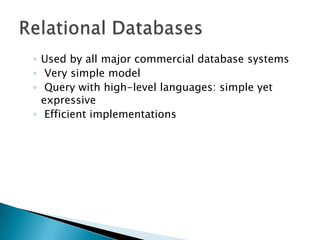
◦ Used by all major commercial database systems
◦ Very simple model
◦ Query with high-level languages: simple yet
  expressive
◦ Efficient implementations
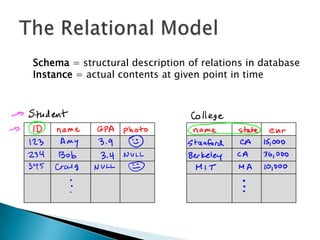
Schema = structural description of relations in database
Instance = actual contents at given point in time
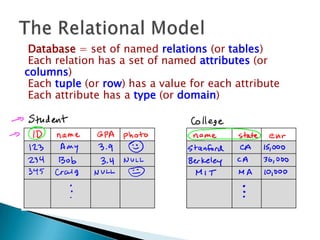
Database = set of named relations (or tables)
 Each relation has a set of named attributes (or
columns)
 Each tuple (or row) has a value for each attribute
 Each attribute has a type (or domain)
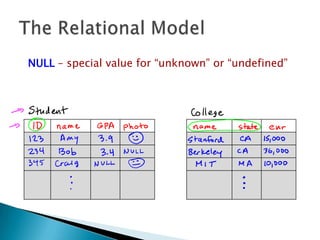
NULL – special value for “unknown” or “undefined”
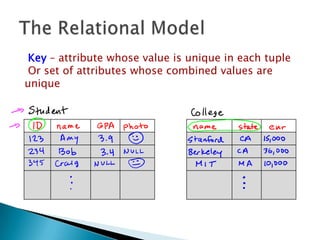
Key – attribute whose value is unique in each tuple
 Or set of attributes whose combined values are
unique
◦ Used by all major commercial database systems
◦ Very simple model
◦ Query with high-level languages: simple yet
  expressive
◦ Efficient implementations
   Standard/dominant language for accessing
    databases and processing
   Steady improvements in reliability,
    performance and security
   Applicable to many database systems
   It can define a database (DDL)
   It can manipulate database (DML)
   and, can control a database (DCL)
   defining the structure and contents of a
    relational database
   Metadata (data about the data)
   defines the mapping of database to physical
    hardware and devices
   Basic Syntax:
    ◦ Create Table, Alter Table, Drop Table, Create View,
      Create User, etc.
   specifies how queries and updates are to be
    done
   Basic Syntax:
    ◦ Select, Insert, Delete, Update
   involves configuring and controlling the
    database - permission, roles, and referential
    integrity
   Basic Syntax:
    ◦ Grant, Check, Constraint, Primary Key, Foreign Key
   Process of efficiently organizing data in a
    database (1NF-5NF)
   Too: Entity-Relationship Diagram (ERD)
   Goals:
    ◦ eliminating redundant data
    ◦ ensuring data dependencies make sense
   Forms:
    ◦ 1NF (First Normal Form)
    ◦ 2NF (Second Normal Form)
    ◦ 3NF (Third Normal Form)
   First normal form (1NF) sets the very basic
    rules for an organized database:

    ◦ Eliminate duplicative columns from the same table.
    ◦ Create separate tables for each group of related
      data and identify each row with a unique column or
      set of columns (the primary key).
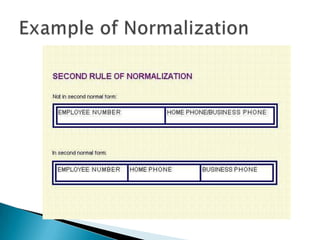
   Second normal form (2NF) further addresses
    the concept of removing duplicative data:

    ◦ Meet all the requirements of the first normal form.
    ◦ Remove subsets of data that apply to multiple rows
      of a table and place them in separate tables.
    ◦ Create relationships between these new tables and
      their predecessors through the use of foreign keys.
   Third normal form (3NF) goes one large step
    further:
    ◦ Meet all the requirements of the second normal
      form.
    ◦ Remove columns that are not dependent upon the
      primary key.
   Stands for atomicity, consistency, isolation,
    durability
   set of properties that guarantee database
    transactions are processed reliably
   Atomicity (atomic)
    ◦ requires that database modifications must follow an
      "all or nothing" rule
    ◦ If one part of the transaction fails, the entire
      transaction fails and the database state is left
      unchanged.
   Consistency
    ◦ ensures that any transaction the database performs
      will take it from one consistent state to another
    ◦ only consistent (valid according to all the rules
      defined) data will be written to the database
    ◦ whatever rows will be affected by the transaction
      will remain consistent with each and every rule
   Isolation
    ◦ no transaction should be able to interfere with
      another transaction at all
    ◦ use a serial model where no two transactions can
      occur on the same data at the same time
   Durability
    ◦ once a transaction has been committed, it will
      remain so
    ◦ every committed transaction is protected against
      power loss/crash/errors and cannot be lost by the
      system and can thus be guaranteed to be
      completed
   RDBMS is the basis for SQL, and for all
    modern database systems like MS SQL Server,
    IBM DB2, Oracle, MySQL, and Microsoft
    Access.
   MySQL database is the world's most popular
    open source database for the Web
   Supports different languages,
       environment, etc.
   www.mysql.com
•   mysql_connect(host, username
    [,password]);
    ◦ Connects to a MySQL server on the specified host
      using the given username and/or password.
      Returns a MySQL link identifier on success, or FALSE
      on failure.
•   mysql_select_db(db_name [,resource])
    ◦ Selects a database from the database server.
•   mysql_query(SQL, resource);
    ◦ Sends the specified SQL query to the database
      specified by the resource identifier. The retrieved data
      are returned by the function as a MySQL result set.
•   mysql_result(result, row [,field]);
    ◦ Returns the contents of one cell from a MySQL result
      set. The field argument can be the field name or the
      field’s offset.
•   mysql_fetch_array(result [,result_type])
    ◦ Fetch a result row as an associative array, a numeric
      array, or both. The result type can take the constants
      MYSQL_ASSOC, MYSQL_NUM, and MYSQL_BOTH.
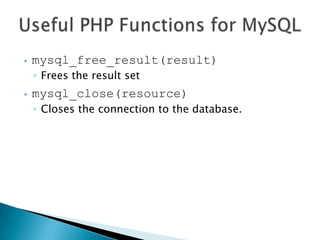
•   mysql_free_result(result)
    ◦ Frees the result set
•   mysql_close(resource)
    ◦ Closes the connection to the database.
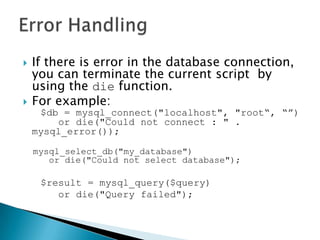
   If there is error in the database connection,
    you can terminate the current script by
    using the die function.
   For example:
     $db = mysql_connect("localhost", "root“, “”)
        or die("Could not connect : " .
    mysql_error());

    mysql_select_db("my_database")
       or die("Could not select database");

     $result = mysql_query($query)
        or die("Query failed");
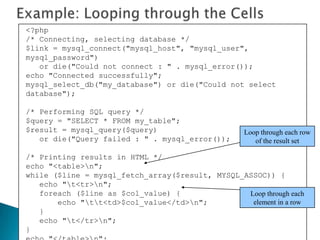
<?php
/* Connecting, selecting database */
$link = mysql_connect("mysql_host", "mysql_user",
mysql_password")
   or die("Could not connect : " . mysql_error());
echo "Connected successfully";
mysql_select_db("my_database") or die("Could not select
database");

/* Performing SQL query */
$query = "SELECT * FROM my_table";
$result = mysql_query($query)                      Loop through each row
   or die("Query failed : " . mysql_error());         of the result set

/* Printing results in HTML */
echo "<table>n";
while ($line = mysql_fetch_array($result, MYSQL_ASSOC)) {
   echo "t<tr>n";
   foreach ($line as $col_value) {               Loop through each
       echo "tt<td>$col_value</td>n";          element in a row
   }
   echo "t</tr>n";
}
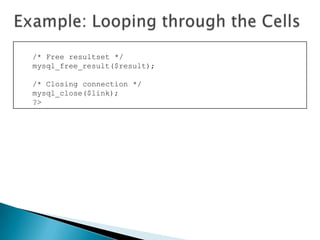
/* Free resultset */
mysql_free_result($result);

/* Closing connection */
mysql_close($link);
?>
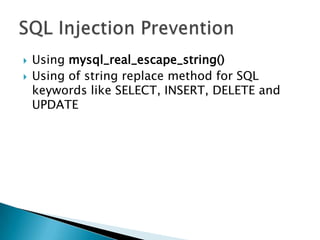
   Using mysql_real_escape_string()
   Using of string replace method for SQL
    keywords like SELECT, INSERT, DELETE and
    UPDATE
Database Basics and MySQL

Database Basics and MySQL

  • 1.
    Creation, Manipulation, andManagement Jerome Locson Developer, Ariba Tech Solutions me@jeromelocson.com
  • 2.
    Graduate from ADZU, BSCS  PhilNITS FE Passer  GTUG PH, Zamboanga Chapter Community Manager  Technopreneur, Ariba Tech Solutions  Blog: www.jeromelocson.com
  • 3.
    Relational Database Concept  Structure Query Language (SQL) ◦ DDL, DML and DCL  Database Normalization  ACID Property  Relational Database Management Systems (RDBMS), MySQL  Example of MySQL Queries (PhpMyAdmin)  SQL Injection Prevention
  • 4.
    ◦ Used byall major commercial database systems ◦ Very simple model ◦ Query with high-level languages: simple yet expressive ◦ Efficient implementations
  • 5.
    Schema = structuraldescription of relations in database Instance = actual contents at given point in time
  • 6.
    Database = setof named relations (or tables) Each relation has a set of named attributes (or columns) Each tuple (or row) has a value for each attribute Each attribute has a type (or domain)
  • 7.
    NULL – specialvalue for “unknown” or “undefined”
  • 8.
    Key – attributewhose value is unique in each tuple Or set of attributes whose combined values are unique
  • 9.
    ◦ Used byall major commercial database systems ◦ Very simple model ◦ Query with high-level languages: simple yet expressive ◦ Efficient implementations
  • 10.
    Standard/dominant language for accessing databases and processing  Steady improvements in reliability, performance and security  Applicable to many database systems
  • 11.
    It can define a database (DDL)  It can manipulate database (DML)  and, can control a database (DCL)
  • 12.
    defining the structure and contents of a relational database  Metadata (data about the data)  defines the mapping of database to physical hardware and devices  Basic Syntax: ◦ Create Table, Alter Table, Drop Table, Create View, Create User, etc.
  • 13.
    specifies how queries and updates are to be done  Basic Syntax: ◦ Select, Insert, Delete, Update
  • 14.
    involves configuring and controlling the database - permission, roles, and referential integrity  Basic Syntax: ◦ Grant, Check, Constraint, Primary Key, Foreign Key
  • 15.
    Process of efficiently organizing data in a database (1NF-5NF)  Too: Entity-Relationship Diagram (ERD)  Goals: ◦ eliminating redundant data ◦ ensuring data dependencies make sense  Forms: ◦ 1NF (First Normal Form) ◦ 2NF (Second Normal Form) ◦ 3NF (Third Normal Form)
  • 16.
    First normal form (1NF) sets the very basic rules for an organized database: ◦ Eliminate duplicative columns from the same table. ◦ Create separate tables for each group of related data and identify each row with a unique column or set of columns (the primary key).
  • 17.
    Second normal form (2NF) further addresses the concept of removing duplicative data: ◦ Meet all the requirements of the first normal form. ◦ Remove subsets of data that apply to multiple rows of a table and place them in separate tables. ◦ Create relationships between these new tables and their predecessors through the use of foreign keys.
  • 18.
    Third normal form (3NF) goes one large step further: ◦ Meet all the requirements of the second normal form. ◦ Remove columns that are not dependent upon the primary key.
  • 22.
    Stands for atomicity, consistency, isolation, durability  set of properties that guarantee database transactions are processed reliably
  • 23.
    Atomicity (atomic) ◦ requires that database modifications must follow an "all or nothing" rule ◦ If one part of the transaction fails, the entire transaction fails and the database state is left unchanged.
  • 24.
    Consistency ◦ ensures that any transaction the database performs will take it from one consistent state to another ◦ only consistent (valid according to all the rules defined) data will be written to the database ◦ whatever rows will be affected by the transaction will remain consistent with each and every rule
  • 25.
    Isolation ◦ no transaction should be able to interfere with another transaction at all ◦ use a serial model where no two transactions can occur on the same data at the same time
  • 26.
    Durability ◦ once a transaction has been committed, it will remain so ◦ every committed transaction is protected against power loss/crash/errors and cannot be lost by the system and can thus be guaranteed to be completed
  • 27.
    RDBMS is the basis for SQL, and for all modern database systems like MS SQL Server, IBM DB2, Oracle, MySQL, and Microsoft Access.  MySQL database is the world's most popular open source database for the Web  Supports different languages, environment, etc.  www.mysql.com
  • 28.
    mysql_connect(host, username [,password]); ◦ Connects to a MySQL server on the specified host using the given username and/or password. Returns a MySQL link identifier on success, or FALSE on failure. • mysql_select_db(db_name [,resource]) ◦ Selects a database from the database server.
  • 29.
    mysql_query(SQL, resource); ◦ Sends the specified SQL query to the database specified by the resource identifier. The retrieved data are returned by the function as a MySQL result set. • mysql_result(result, row [,field]); ◦ Returns the contents of one cell from a MySQL result set. The field argument can be the field name or the field’s offset. • mysql_fetch_array(result [,result_type]) ◦ Fetch a result row as an associative array, a numeric array, or both. The result type can take the constants MYSQL_ASSOC, MYSQL_NUM, and MYSQL_BOTH.
  • 30.
    mysql_free_result(result) ◦ Frees the result set • mysql_close(resource) ◦ Closes the connection to the database.
  • 31.
    If there is error in the database connection, you can terminate the current script by using the die function.  For example: $db = mysql_connect("localhost", "root“, “”) or die("Could not connect : " . mysql_error()); mysql_select_db("my_database") or die("Could not select database"); $result = mysql_query($query) or die("Query failed");
  • 32.
    <?php /* Connecting, selectingdatabase */ $link = mysql_connect("mysql_host", "mysql_user", mysql_password") or die("Could not connect : " . mysql_error()); echo "Connected successfully"; mysql_select_db("my_database") or die("Could not select database"); /* Performing SQL query */ $query = "SELECT * FROM my_table"; $result = mysql_query($query) Loop through each row or die("Query failed : " . mysql_error()); of the result set /* Printing results in HTML */ echo "<table>n"; while ($line = mysql_fetch_array($result, MYSQL_ASSOC)) { echo "t<tr>n"; foreach ($line as $col_value) { Loop through each echo "tt<td>$col_value</td>n"; element in a row } echo "t</tr>n"; }
  • 33.
    /* Free resultset*/ mysql_free_result($result); /* Closing connection */ mysql_close($link); ?>
  • 34.
    Using mysql_real_escape_string()  Using of string replace method for SQL keywords like SELECT, INSERT, DELETE and UPDATE