MODULE 8: VIEWS AND (.)DOT COMMANDS
SQL and Scripting Training
(C) 2020-2021 Highervista, LLC 1
2
TOPICS
Creating views
Modifying existing views
Views and joins
Removing views
DML
DDL
Inserting Data
(.) dot commands
Scripting commands
CSV Import/Export
Cryptography
Database self checks
Summary
12/12/20 (C) 2020-2021 Highervista, LLC 2
CREATING VIEWS
SQL and Scripting
Training
12/12/20 (C) 2020-2021 Highervista, LLC 3
4
VIEW
A View is referred to as a virtual table.
It is a SQL query that is saved and can be executed repeatedly
or referenced as a subquery by other queries.
Views are helpful when you find yourself repeatedly
constructing the same query (especially if the same query is
complex).
For example, in generating a quarterly or annual report, we
can prepare a View that is pre-calculated.
12/12/20 (C) 2020-2021 Highervista, LLC 4
5
TURNING PREVIOUS QUERIES INTO
VIEWS
SELECT
ROUND (AVG (Total), 2) AS [Average
Total]
FROM
invoices
NOTE: This is a previous query we built. NOTE: You can turn a previous query into a
View
CREATE VIEW V_AvgTotal AS
SELECT
ROUND (AVG (Total), 2) AS [Average
Total]
FROM
invoices
NOTE: Naming views beginning with V_ is meaningful (not required), because
it lets anyone reading your code know that they are dealing with a View.
12/12/20 (C) 2020-2021 Highervista, LLC 5
6
TURNING PREVIOUS QUERIES INTO
VIEWS• When we execute this View statement,
we get a message that states "Query
executed successfully: CREATE
V_AvgTotal AS."
• In the SQLite browser, we can see our
Views listed.
CREATE VIEW V_AvgTotal AS
SELECT
ROUND (AVG (Total), 2) AS [Average
Total]
FROM
invoices
12/12/20 (C) 2020-2021 Highervista, LLC 6
7
TURNING PREVIOUS QUERIES INTO
VIEWS
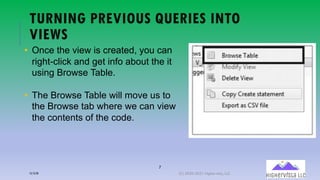
• Once the view is created, you can
right-click and get info about the it
using Browse Table.
• The Browse Table will move us to
the Browse tab where we can view
the contents of the code.
12/12/20 (C) 2020-2021 Highervista, LLC 7
8
WHY USE VIEWS?
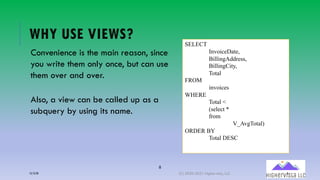
Convenience is the main reason, since
you write them only once, but can use
them over and over.
Also, a view can be called up as a
subquery by using its name.
SELECT
InvoiceDate,
BillingAddress,
BillingCity,
Total
FROM
invoices
WHERE
Total <
(select *
from
V_AvgTotal)
ORDER BY
Total DESC
12/12/20 (C) 2020-2021 Highervista, LLC 8
MODIFYING EXISTING VIEWS
SQL and Scripting
Training
12/12/20 (C) 2020-2021 Highervista, LLC 9
10
MODIFYING VIEWS: AN ALTERNATIVE
The current iteration of DB Browser does not support modifying existing views.
As a workaround in SQLite, create a new view and give it a new name, or
delete the existing view first and use the same name.
Before deleting, though, you could
­Open the old view
­Open a new item
­Paste the contents of the old into the new one
­Delete the old view
­Continue to modify the new item until it′s saved
12/12/20 (C) 2020-2021 Highervista, LLC 10
VIEWS AND JOINS
SQL and Scripting
Training
12/12/20 (C) 2020-2021 Highervista, LLC 11
12
CREATING A VIEW FROM JOINS
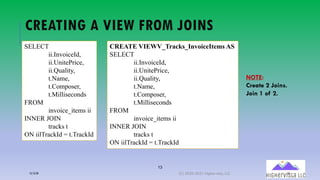
Joins are excellent candidates to add as Views because they
help you visualize the relationships between tables.
Joins are often more extensive queries.
You can continue using short aliases for Joins when creating a
View that contains a Join.
12/12/20 (C) 2020-2021 Highervista, LLC 12
13
CREATING A VIEW FROM JOINS
SELECT
ii.InvoiceId,
ii.UnitePrice,
ii.Quality,
t.Name,
t.Composer,
t.Milliseconds
FROM
invoice_items ii
INNER JOIN
tracks t
ON iilTrackId = t.TrackId
CREATE VIEWV_Tracks_InvoiceItems AS
SELECT
ii.InvoiceId,
ii.UnitePrice,
ii.Quality,
t.Name,
t.Composer,
t.Milliseconds
FROM
invoice_items ii
INNER JOIN
tracks t
ON iilTrackId = t.TrackId
NOTE:
Create 2 Joins.
Join 1 of 2.
12/12/20 (C) 2020-2021 Highervista, LLC 13
14
CREATING A VIEW FROM JOINS
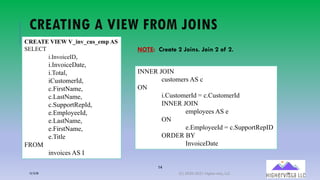
CREATE VIEW V_inv_cus_emp AS
SELECT
i.InvoiceID,
i.InvoiceDate,
i.Total,
iCustomerId,
c.FirstName,
c.LastName,
c.SupportRepId,
e.EmployeeId,
e.LastName,
e.FirstName,
e.Title
FROM
invoices AS I
INNER JOIN
customers AS c
ON
i.CustomerId = c.CustomerId
INNER JOIN
employees AS e
ON
e.EmployeeId = c.SupportRepID
ORDER BY
InvoiceDate
NOTE: Create 2 Joins. Join 2 of 2.
12/12/20 (C) 2020-2021 Highervista, LLC 14
15
USING TWO VIEWS IN ONE QUERY
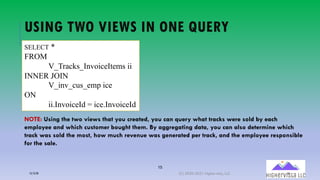
SELECT *
FROM
V_Tracks_InvoiceItems ii
INNER JOIN
V_inv_cus_emp ice
ON
ii.InvoiceId = ice.InvoiceId
NOTE: Using the two views that you created, you can query what tracks were sold by each
employee and which customer bought them. By aggregating data, you can also determine which
track was sold the most, how much revenue was generated per track, and the employee responsible
for the sale.
12/12/20 (C) 2020-2021 Highervista, LLC 15
REMOVING VIEWS
SQL and Scripting
Training
12/12/20 (C) 2020-2021 Highervista, LLC 16
17
REMOVING A VIEW USING THE DROP STATEMENT
In the SQLite Browser, you can remove a view by right-clicking
ton the view name and selecting DROP.
However, in the CLI, you can drop a view by:
DROP VIEW
V_AvgTotal
12/12/20 (C) 2020-2021 Highervista, LLC 17
18
QUERY TO BE USED IN THE TRY THIS
EXERCISE (NEXT)
SELECT
BillingCity,
AVG(Total) AS [City Average],
(select
avg(total)
from
invoices) AS [Global Average]
FROM
invoices
GROUP BY
BillingCity
ORDER BY
BillingCIty
12/12/20 (C) 2020-2021 Highervista, LLC 18
THE ROLE OF DML
SQL and Scripting
Training
12/12/20 (C) 2020-2021 Highervista, LLC 19
20
DATA MANIPULATION LANGUAGE (DML)
DML is used to change or alter the data that is stored in the tables of the
database (as noted previously).
DML (and DDL, or Data Definition Language) is often thought of as a
language separate from SQL, so it’s good to refresh your understanding of
DML.
DML involves INSERT, UPDATE, and DELETE.
DML can be applied through the SQLite Browser or (as done before) through
the CLI interface of SQLite.
DML is often used with a scripting and/or a programming language like JSON
or Python to modify data in a database.
12/12/20 (C) 2020-2021 Highervista, LLC 20
INSERTING DATA
SQL and Scripting
Training
12/12/20 (C) 2020-2021 Highervista, LLC 21
22
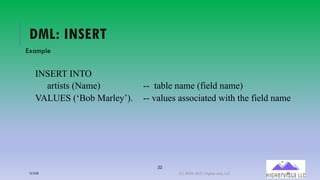
DML: INSERT
Example
INSERT INTO
artists (Name) -- table name (field name)
VALUES (‘Bob Marley’). -- values associated with the field name
12/12/20 (C) 2020-2021 Highervista, LLC 22
23
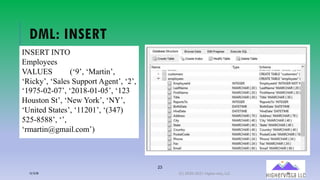
DML: INSERT
INSERT INTO
Employees
VALUES (‘9’, ‘Martin’,
‘Ricky’, ‘Sales Support Agent’, ‘2’,
‘1975-02-07’, ‘2018-01-05’, ‘123
Houston St’, ‘New York’, ‘NY’,
‘United States’, ‘11201’, ‘(347)
525-8588’, ‘’,
‘rmartin@gmail.com’)
12/12/20 (C) 2020-2021 Highervista, LLC 23
UPDATING DATA
SQL and Scripting
Training
12/12/20 (C) 2020-2021 Highervista, LLC 24
25
UPDATING DATA AND THE SET KEYWORD
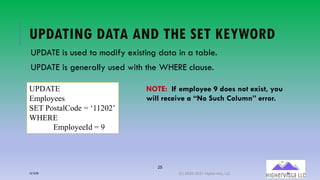
UPDATE is used to modify existing data in a table.
UPDATE is generally used with the WHERE clause.
UPDATE
Employees
SET PostalCode = ‘11202’
WHERE
EmployeeId = 9
NOTE: If employee 9 does not exist, you
will receive a “No Such Column” error.
12/12/20 (C) 2020-2021 Highervista, LLC 25
DELETING DATA
SQL and Scripting
Training
12/12/20 (C) 2020-2021 Highervista, LLC 26
27
DELETING DATA
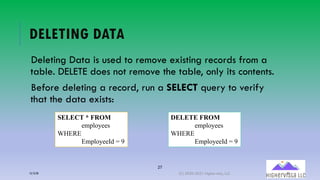
Deleting Data is used to remove existing records from a
table. DELETE does not remove the table, only its contents.
Before deleting a record, run a SELECT query to verify
that the data exists:
SELECT * FROM
employees
WHERE
EmployeeId = 9
DELETE FROM
employees
WHERE
EmployeeId = 9
12/12/20 (C) 2020-2021 Highervista, LLC 27
SCRIPTING AND COMMANDS SQL and Scripting
Training
12/12/20 (C) 2020-2021 Highervista, LLC 28
29
TOPICS
Dot Commands
Changing Output Formats
Writing Results to a File
File I/O Functions
Querying the Database
Schema
CSV Import
CSV Export
Converting an Entire Database
to an ASCII Text File
Cryptographic Hashes of
Database Content
Database Content Self-Tests
12/12/20 (C) 2020-2021 Highervista, LLC 29
DOT COMMANDS SQL and Scripting
Training
12/12/20 (C) 2020-2021 Highervista, LLC 30
31
DOT COMMANDS – CONTROL COMMANDS
(NOT SQL)
A few of these were covered previously.
Ordinary SQL statements are free-form, can be spread across
multiple lines, and can have whitespace and comments
anywhere. Dot-commands are more restrictive:
­A dot-command must begin with "." at the left margin with no
preceding whitespace.
­A dot-command must be entirely contained on a single input
line.
12/12/20 (C) 2020-2021 Highervista, LLC 31
32
DOT COMMANDS – CONTROL COMMANDS
(NOT SQL)
A dot-command cannot occur in the middle of an ordinary SQL
statement. In other words, a dot-command cannot occur at a
continuation prompt.
Dot-commands do not recognize comments.
The dot-commands are interpreted by the sqlite3.exe
command-line program, not by SQLite itself.
Unlike SQL statements, dot commands do not end with a
semicolon.
12/12/20 (C) 2020-2021 Highervista, LLC 32
CHANGING OUTPUT FORMATS SQL and Scripting
Training
12/12/20 (C) 2020-2021 Highervista, LLC 33
34
SQLITE
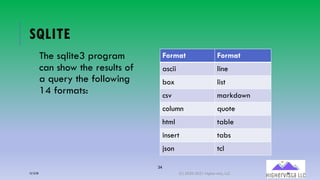
The sqlite3 program
can show the results of
a query the following
14 formats:
Format Format
ascii line
box list
csv markdown
column quote
html table
insert tabs
json tcl
12/12/20 (C) 2020-2021 Highervista, LLC 34
35
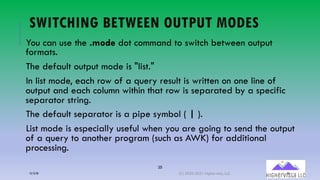
SWITCHING BETWEEN OUTPUT MODES
You can use the .mode dot command to switch between output
formats.
The default output mode is "list."
In list mode, each row of a query result is written on one line of
output and each column within that row is separated by a specific
separator string.
The default separator is a pipe symbol ( | ).
List mode is especially useful when you are going to send the output
of a query to another program (such as AWK) for additional
processing.
12/12/20 (C) 2020-2021 Highervista, LLC 35
36
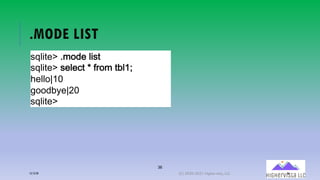
.MODE LIST
!"#$%&'()*+,&(#$!%
!"#$%&'(!&#&-%(.(/0+*(%1#23
4&##+526
7++,18&596
!"#$%&'
12/12/20 (C) 2020-2021 Highervista, LLC 36
37
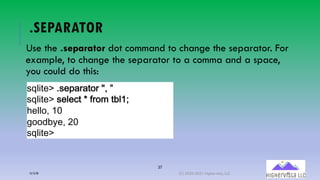
.SEPARATOR
Use the .separator dot command to change the separator. For
example, to change the separator to a comma and a space,
you could do this:
!"#$%&'()!&:;0;%+0(<=(>
!"#$%&'(!&#&-%(.(/0+*(%1#23
4&##+=(26
7++,18&=(96
!"#$%&'
12/12/20 (C) 2020-2021 Highervista, LLC 37
38
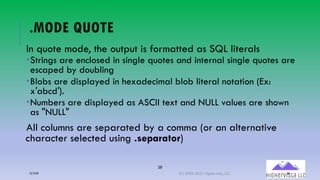
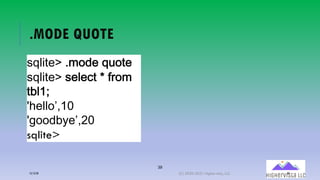
.MODE QUOTE
In quote mode, the output is formatted as SQL literals
­Strings are enclosed in single quotes and internal single quotes are
escaped by doubling
­Blobs are displayed in hexadecimal blob literal notation (Ex:
x′abcd′).
­Numbers are displayed as ASCII text and NULL values are shown
as "NULL"
All columns are separated by a comma (or an alternative
character selected using .separator)
12/12/20 (C) 2020-2021 Highervista, LLC 38
39
.MODE QUOTE
!"#$%&'()*+,&("-+%&
!"#$%&'(!&#&.%(/(01+*(
%2#34
56&##+7839
5:++,2;&78<9
sqlite>
12/12/20 (C) 2020-2021 Highervista, LLC 39
40
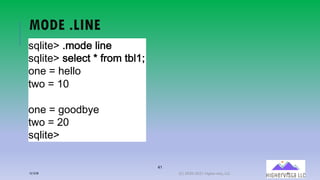
MODE .LINE
In line mode, each column in a row of the database is shown on
its own line.
Each line consists of the column name, an equal sign, and the
column data.
Successive records are separated by a blank line.
12/12/20 (C) 2020-2021 Highervista, LLC 40
41
MODE .LINE
!"#$%&'()*+,&(#$-&
!"#$%&'(!&#&.%(/(01+*(%2#34
+-&(5(6&##+
%7+(5(38
+-&(5(9++,2:&
%7+(5(;8
!"#$%&'
12/12/20 (C) 2020-2021 Highervista, LLC 41
42
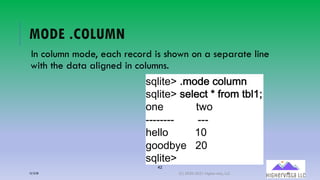
MODE .COLUMN
In column mode, each record is shown on a separate line
with the data aligned in columns.
!"#$%&'()*+,&(.+#<*-
!"#$%&'(!&#&.%(/(01+*(%2#34
+-&(((((((((((%7+(((((((
======== ===
6&##+(((((((((38((((((((
9++,2:&(((;8((((((((
!"#$%&'
12/12/20 (C) 2020-2021 Highervista, LLC 42
43
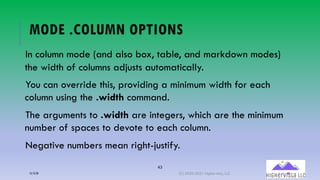
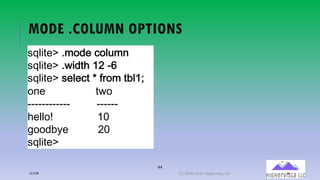
MODE .COLUMN OPTIONS
In column mode (and also box, table, and markdown modes)
the width of columns adjusts automatically.
You can override this, providing a minimum width for each
column using the .width command.
The arguments to .width are integers, which are the minimum
number of spaces to devote to each column.
Negative numbers mean right-justify.
12/12/20 (C) 2020-2021 Highervista, LLC 43
44
MODE .COLUMN OPTIONS
!"#$%&'()*+,&(.+#<*-
!"#$%&'()7$,%6(3;(=>
!"#$%&'(!&#&.%(/(01+*(%2#34
+-&(((((((((((((((((%7+
============ ======
6&##+?((((((((((( 38
9++,2:&((((((((((;8
!"#$%&'
12/12/20 (C) 2020-2021 Highervista, LLC 44
45
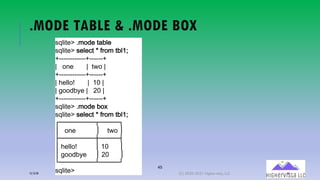
.MODE TABLE & .MODE BOX
!"#$%&'()*+,&(%-.#&
!"#$%&'(!&#&/%(0(12+*(%.#34
566666666666656666665
7(((+8&(((((((7((%9+(7
566666666666656666665
7(:&##+;(((((((7((3<(7
7(=++,.>&(7(((?<(7
566666666666656666665
!"#$%&'()*+,&(.+@
!"#$%&'(!&#&/%(0(12+*(%.#34
ABBBBBBBBBCBBBBBD
E(((+8&(((((((((((E((((%9+(E
FBBBBBBBBBGBBBBBH
E(:&##+;((((((((((E(3<((((((E
E(=++,.>&(((((E(?<((((((E
IBBBBBBBBBJBBBBBK
!"#$%&'12/12/20 (C) 2020-2021 Highervista, LLC 45
46
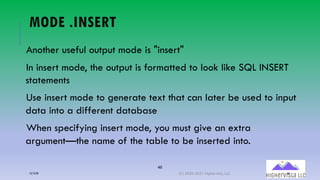
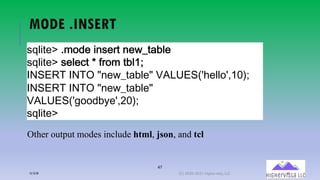
MODE .INSERT
Another useful output mode is "insert"
In insert mode, the output is formatted to look like SQL INSERT
statements
Use insert mode to generate text that can later be used to input
data into a different database
When specifying insert mode, you must give an extra
argument—the name of the table to be inserted into.
12/12/20 (C) 2020-2021 Highervista, LLC 46
47
MODE .INSERT
!"#$%&'()*+,&($-!&1%(-&7@%A2#&
!"#$%&'(!&#&.%(/(01+*(%2#34
BCDEFG(BCGH(I-&7@%A2#&I(JKLMEDNO6&##+OP38Q4
BCDEFG(BCGH(I-&7@%A2#&I(
JKLMEDNO9++,2:&OP;8Q4
!"#$%&'
Other output modes include html, json, and tcl
12/12/20 (C) 2020-2021 Highervista, LLC 47
WRITING RESULTS TO A FILE SQL and Scripting
Training
12/12/20 (C) 2020-2021 Highervista, LLC 48
49
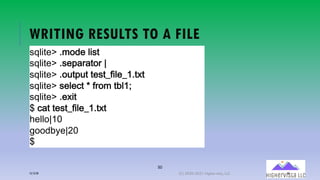
WRITING RESULTS TO A FILE
By default, sqlite3 sends query results to standard output or stdout.
You can change this using the .output and .once commands.
Just put the name of an output file as an argument to .output and all
subsequent query results will be written to that file.
Or use the .once command instead of .output and output will only be
redirected for the next command before reverting to the console.
Use .output with no arguments to begin writing to standard output again.
12/12/20 (C) 2020-2021 Highervista, LLC 49
50
WRITING RESULTS TO A FILE
!"#$%&'()*+,&(#$!%
!"#$%&'()!&:;0;%+0(5
!"#$%&'()+?%:?%(%&!%@/$#&@2)%A%
!"#$%&'(!&#&-%(.(/0+*(%1#23
!"#$%&'()&A$%
B(-;%(%&!%@/$#&@2)%A%
4&##+526
7++,18&596
B
12/12/20 (C) 2020-2021 Highervista, LLC 50
51
WRITING RESULTS TO A FILE
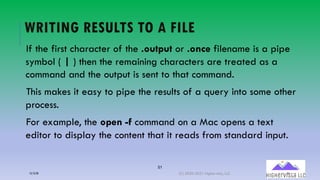
If the first character of the .output or .once filename is a pipe
symbol ( | ) then the remaining characters are treated as a
command and the output is sent to that command.
This makes it easy to pipe the results of a query into some other
process.
For example, the open -f command on a Mac opens a text
editor to display the content that it reads from standard input.
12/12/20 (C) 2020-2021 Highervista, LLC 51
52
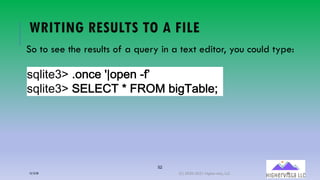
WRITING RESULTS TO A FILE
So to see the results of a query in a text editor, you could type:
!"#$%&='()+>.&(5?+@&>(A07
!"#$%&='(BCDCEF(/(GHIJ(2$:FK2#&4
12/12/20 (C) 2020-2021 Highervista, LLC 52
53
WRITING RESULTS TO A FILE
In cases where the .output or .once commands have an
argument of -e the output is collected into a temporary file and
the system text editor is invoked on that text file.
Thus, the command .once -e achieves the same result as .once
'|open -f' but with the benefit of being portable across all
systems.
12/12/20 (C) 2020-2021 Highervista, LLC 53
54
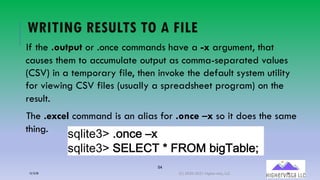
WRITING RESULTS TO A FILE
If the .output or .once commands have a -x argument, that
causes them to accumulate output as comma-separated values
(CSV) in a temporary file, then invoke the default system utility
for viewing CSV files (usually a spreadsheet program) on the
result.
The .excel command is an alias for .once –x so it does the same
thing.
!"#$%&='()+>.&(LM
!"#$%&='(BCDCEF(/(GHIJ(2$:FK2#&4
12/12/20 (C) 2020-2021 Highervista, LLC 54
FILE I/O FUNCTIONS SQL and Scripting
Training
12/12/20 (C) 2020-2021 Highervista, LLC 55
56
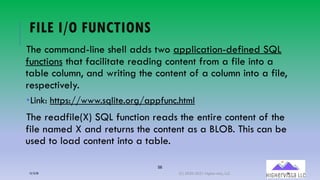
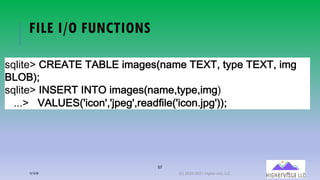
FILE I/O FUNCTIONS
The command-line shell adds two application-defined SQL
functions that facilitate reading content from a file into a
table column, and writing the content of a column into a file,
respectively.
­Link: https://www.sqlite.org/appfunc.html
The readfile(X) SQL function reads the entire content of the
file named X and returns the content as a BLOB. This can be
used to load content into a table.
12/12/20 (C) 2020-2021 Highervista, LLC 56
57
FILE I/O FUNCTIONS
!"#$%&'(RFEKGE(GKSLE($*A9&!N-A*&(GETGP(%:U&(GETGP($*9
SLHSQ4
!"#$%&'(BCDEFG(BCGH($*A9&!N-A*&P%:U&P$*9Q
)))'( JKLMEDNO$.+-OPOVU&9OP1&A,0$#&NO$.+-)VU9OQQ4
12/12/20 (C) 2020-2021 Highervista, LLC 57
58
FILE I/O FUNCTIONS
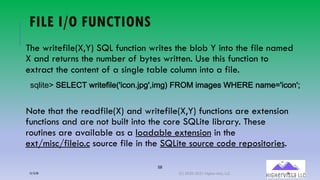
The writefile(X,Y) SQL function writes the blob Y into the file named
X and returns the number of bytes written. Use this function to
extract the content of a single table column into a file.
Note that the readfile(X) and writefile(X,Y) functions are extension
functions and are not built into the core SQLite library. These
routines are available as a loadable extension in the
ext/misc/fileio.c source file in the SQLite source code repositories.
!"#$%&'()*+*,-(./$%&0$#&12$34567892:$;9<(=>?@($;A9&!(BC*>*(5A;&D2$3452E
12/12/20 (C) 2020-2021 Highervista, LLC 58
59
THE EDIT( ) SQL FUNCTION
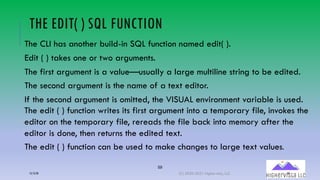
The CLI has another build-in SQL function named edit( ).
Edit ( ) takes one or two arguments.
The first argument is a value—usually a large multiline string to be edited.
The second argument is the name of a text editor.
If the second argument is omitted, the VISUAL environment variable is used.
The edit ( ) function writes its first argument into a temporary file, invokes the
editor on the temporary file, rereads the file back into memory after the
editor is done, then returns the edited text.
The edit ( ) function can be used to make changes to large text values.
12/12/20 (C) 2020-2021 Highervista, LLC 59
60
THE EDIT ( ) SQL FUNCTION
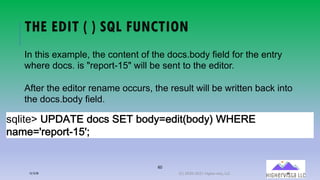
!"#$%&'(MWXKGE(,+.!(DEG(2+,:5&,$%N2+,:Q(YZEFE(
-A*&5O1&U+1%=3[O4
In this example, the content of the docs.body field for the entry
where docs. is "report-15" will be sent to the editor.
After the editor rename occurs, the result will be written back into
the docs.body field.
12/12/20 (C) 2020-2021 Highervista, LLC 60
QUERYING THE DATABASE
SCHEMA
SQL and Scripting
Training
12/12/20 (C) 2020-2021 Highervista, LLC 61
62
QUERYING THE DATABASE SCHEMA
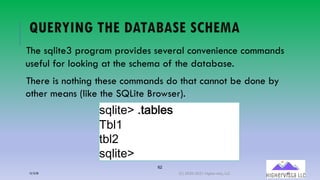
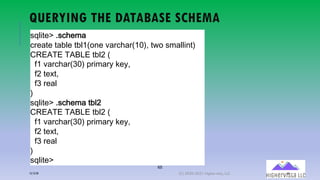
The sqlite3 program provides several convenience commands
useful for looking at the schema of the database.
There is nothing these commands do that cannot be done by
other means (like the SQLite Browser).
!"#$%&'()%K2#&!
F2#3
%2#<
!"#$%&'
12/12/20 (C) 2020-2021 Highervista, LLC 62
63
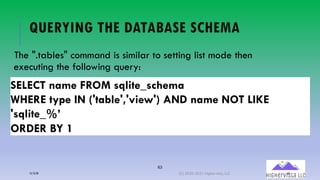
QUERYING THE DATABASE SCHEMA
The ".tables" command is similar to setting list mode then
executing the following query:
SELECT name FROM sqlite_schema
WHERE type IN ('table','view') AND name NOT LIKE
'sqlite_%’
ORDER BY 1
12/12/20 (C) 2020-2021 Highervista, LLC 63
64
QUERYING THE DATABASE SCHEMA
The ".tables" command does more. It queries the sqlite_schema table
for all attached databases, not just the primary database. And it
arranges its output into neat columns.
The ".indexes" command works in a similar way to list all of the
indexes. If the ".indexes" command is given an argument which is the
name of a table, then it shows just indexes on that table.
The ".schema" command shows the complete schema for the database,
or for a single table if an optional tablename argument is provided
12/12/20 (C) 2020-2021 Highervista, LLC 64
65
QUERYING THE DATABASE SCHEMA
!"#$%&'(6!3F&;A
3/&A%&(%AG#&(%G#H145&(IA/3FA/1HJ<:(%.4(!;A##$5%<
,>*K-*(-KL+*(%G#M(1
0H(IA/3FA/1NJ<(8/$;A/O(P&O:((
0M(%&Q%:((
0N(/&A#
<
!"#$%&'(6!3F&;A(%G#M
,>*K-*(-KL+*(%G#M(1
0H(IA/3FA/1NJ<(8/$;A/O(P&O:((
0M(%&Q%:((
0N(/&A#
<
!"#$%&'
12/12/20 (C) 2020-2021 Highervista, LLC 65
CSV IMPORT SQL and Scripting
Training
12/12/20 (C) 2020-2021 Highervista, LLC 66
67
CSV IMPORT
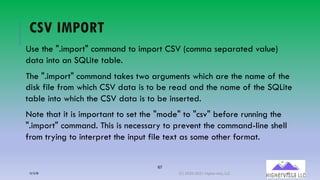
Use the ".import" command to import CSV (comma separated value)
data into an SQLite table.
The ".import" command takes two arguments which are the name of the
disk file from which CSV data is to be read and the name of the SQLite
table into which the CSV data is to be inserted.
Note that it is important to set the "mode" to "csv" before running the
".import" command. This is necessary to prevent the command-line shell
from trying to interpret the input file text as some other format.
12/12/20 (C) 2020-2021 Highervista, LLC 67
68
CSV IMPORT
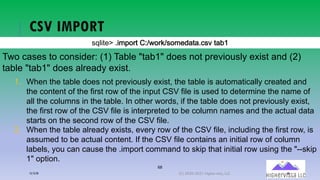
!"#$%&'()$*+,-%(./01,-20!,*&34%4)5!6 %478
Two cases to consider: (1) Table "tab1" does not previously exist and (2)
table "tab1" does already exist.
1. When the table does not previously exist, the table is automatically created and
the content of the first row of the input CSV file is used to determine the name of
all the columns in the table. In other words, if the table does not previously exist,
the first row of the CSV file is interpreted to be column names and the actual data
starts on the second row of the CSV file.
2. When the table already exists, every row of the CSV file, including the first row, is
assumed to be actual content. If the CSV file contains an initial row of column
labels, you can cause the .import command to skip that initial row using the "--skip
1" option.
12/12/20 (C) 2020-2021 Highervista, LLC 68
CSV EXPORT SQL and Scripting
Training
12/12/20 (C) 2020-2021 Highervista, LLC 69
70
CSV EXPORT
To export an SQLite table (or part of a table) as CSV, simply
set the "mode" to "csv" and then run a query to extract the
desired rows of the table (Windows).
!"#$%&'()6&A,&1!(+-
!"#$%&'()*+,&(.!
!"#$%&'()+-.&(.]^7+1_^,A%A+<%).!
!"#$%&'(DELERG(/(`FHa(%A234
!"#$%&'()!:!%&*(.]^7+1_^,A%A+<%).!
12/12/20 (C) 2020-2021 Highervista, LLC 70
71
CSV EXPORT
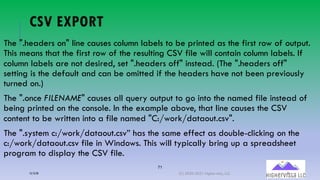
The ".headers on" line causes column labels to be printed as the first row of output.
This means that the first row of the resulting CSV file will contain column labels. If
column labels are not desired, set ".headers off" instead. (The ".headers off"
setting is the default and can be omitted if the headers have not been previously
turned on.)
The ".once FILENAME" causes all query output to go into the named file instead of
being printed on the console. In the example above, that line causes the CSV
content to be written into a file named "C:/work/dataout.csv".
The ".system c:/work/dataout.csv” has the same effect as double-clicking on the
c:/work/dataout.csv file in Windows. This will typically bring up a spreadsheet
program to display the CSV file.
12/12/20 (C) 2020-2021 Highervista, LLC 71
72
CSV EXPORT
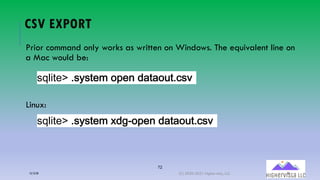
Prior command only works as written on Windows. The equivalent line on
a Mac would be:
Linux:
!"#$%&'()!:!%&*(+U&-(,A%A+<%).!
!"#$%&'()!:!%&*(b,9=+U&-(,A%A+<%).!
12/12/20 (C) 2020-2021 Highervista, LLC 72
CONVERTING AN ENTIRE
DATABASE TO AN ASCII TEXT FILE
SQL and Scripting
Training
12/12/20 (C) 2020-2021 Highervista, LLC 73
74
CONVERTING AN ENTIRE DATABASE TO AN
ASCII TEXT FILE
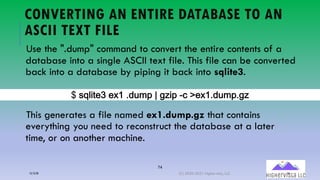
Use the ".dump" command to convert the entire contents of a
database into a single ASCII text file. This file can be converted
back into a database by piping it back into sqlite3.
This generates a file named ex1.dump.gz that contains
everything you need to reconstruct the database at a later
time, or on another machine.
B(!"#$%&C(&A2(),?*:(5(7D$: E-('&A2),?*:)7D
12/12/20 (C) 2020-2021 Highervista, LLC 74
75
CONVERTING AN ENTIRE DATABASE TO AN
ASCII TEXT FILE
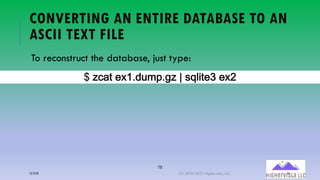
To reconstruct the database, just type:
c(d.A% &b3),<*U)9d(e(!"#$%&f(&b;
12/12/20 (C) 2020-2021 Highervista, LLC 75
76
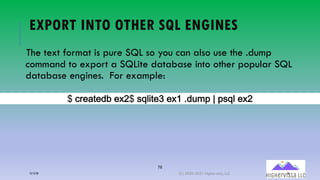
EXPORT INTO OTHER SQL ENGINES
The text format is pure SQL so you can also use the .dump
command to export a SQLite database into other popular SQL
database engines. For example:
B(-0&;%&,1 &A9B(!"#$%&C(&A2(),?*:(5(:!"# &A9
12/12/20 (C) 2020-2021 Highervista, LLC 76
CRYPTOGRAPHIC HASHES
OF DATABASE CONTENT
SQL and Scripting
Training
12/12/20 (C) 2020-2021 Highervista, LLC 77
78
CRYPTOGRAPHIC HASHES OF DATABASE CONTENT
The ".sha3sum" dot-command computes a SHA3 hash of the
content of the database.
To be clear, the hash is computed over the database content,
not its representation on disk.
This means, for example, that a VACUUM or similar data-
preserving transformation does not change the hash.
12/12/20 (C) 2020-2021 Highervista, LLC 78
79
CRYPTOGRAPHIC HASHES OF DATABASE CONTENT
The ".sha3sum" command supports options "--sha3-224", "--
sha3-256", "--sha3-384", and "--sha3-512" to define which
variety of SHA3 to use for the hash. The default is SHA3-256.
The database schema (in the sqlite_schema table) is not
normally included in the hash, but can be added by the "--
schema" option.
12/12/20 (C) 2020-2021 Highervista, LLC 79
80
CRYPTOGRAPHIC HASHES OF DATABASE CONTENT
The ".sha3sum" command takes a single optional argument
which is a LIKE pattern. If this option is present, only tables
whose names match the LIKE pattern will be hashed.
The ".sha3sum" command is implemented with the help of the
extension function "sha3_query()" that is included with the
command-line shell.
12/12/20 (C) 2020-2021 Highervista, LLC 80
DATABASE CONTENT SELF-
TESTS
SQL and Scripting
Training
12/12/20 (C) 2020-2021 Highervista, LLC 81
82
DATABASE CONTENT SELF-TESTS
The ".selftest" command attempts to verify that a database is
intact and is not corrupt. The .selftest command looks for a table
in schema named "selftest" and defined as follows:
,>*K-*(-KL+*(!&#0%&!%1((
%54 RS-*T*>(U>R@K>V(W*V:((XX -&!%(5Y;G&/
48(-*Z-:(((((((((((((((((((((((((((((((((((XX 2/Y52(4/(2;&;4[((
3; -*Z-:((((((((((((((((((((((((((((((((XX )]+(34;;A5(%4(/Y5:(4/(%&Q%(40(^;&;4_
A5! -*Z-((((((((((((((((((((((((((((((((((66 L@M&/%&,(2&!N#%(+1(%:&(OPQ(/+**-8,R4
12/12/20 (C) 2020-2021 Highervista, LLC 82
83
DATABASE CONTENT SELF-TESTS
The .selftest command reads the rows of the selftest table in selftest.tno
order.
For each 'memo' row, it writes the text in 'cmd' to the output. For each 'run'
row, it runs the 'cmd' text as SQL and compares the result to the value in
'ans', and shows an error message if the results differ.
If there is no selftest table, the ".selftest" command runs PRAGMA
integrity_check.
STLUVL(VUWQL(!&#1%&!%X((
%8+ YZVL[LT(TY]UT^(_L^`((66 V&!%(8N*.&2
+M(VLaV`(((((((((((((((((((((((((((((((((((66 b2N8b(+2(b*&*+c((
/*, VLaV`((((((((((((((((((((((((((((((((66 OPQ(/+**-8,(%+(2N8`(+2(%&@%(+1(d*&*+e
-8! VLaV((((((((((((((((((((((((((((((((((66 L@M&/%&,(2&!N#%(+1(%:&(OPQ(/+**-8,R4
12/12/20 (C) 2020-2021 Highervista, LLC 83
84
DATABASE CONTENT SELF-TESTS
The ".selftest --init" command creates the selftest table if it does not already exists,
then appends entries that check the SHA3 hash of the content of all tables.
Subsequent runs of ".selftest" will verify that the database has not been changed in
any way.
To generates tests to verify that a subset of the tables are unchanged, simply run
".selftest --init" then DELETE the selftest rows that refer to tables that are not constant.
STLUVL(VUWQL(!&#1%&!%X((
%8+ YZVL[LT(TY]UT^(_L^`((66 V&!%(8N*.&2
+M(VLaV`(((((((((((((((((((((((((((((((((((66 b2N8b(+2(b*&*+c((
/*, VLaV`((((((((((((((((((((((((((((((((66 OPQ(/+**-8,(%+(2N8`(+2(%&@%(+1(d*&*+e
-8! VLaV((((((((((((((((((((((((((((((((((66 L@M&/%&,(2&!N#%(+1(%:&(OPQ(/+**-8,R4
12/12/20 (C) 2020-2021 Highervista, LLC 84
85
SUMMARY
Functions allow you to alter, reformat, and perform calculations on the data in your tables.
Queries containing numerical data can be manipulated with arithmetic operations and aggregate functions
Queries containing text can be split, concatenated, capitalized, etc.
Once data is aggregated with functions, it can be further sorted by the GROUP BY and HAVING Clauses.
The HAVING Clause does for aggregate fields what the WHERE clause does for non-aggregate fields.
The HAVING clause can be used in a query only if a GROUP BY clause is also present.
You can use GROUP BY with multiple fields to further narrow down your aggregated data.
12/12/20 (C) 2020-2021 Highervista, LLC 85
86
SUMMARY
DML refers to the collection of clauses capable of creating and manipulating existing data in a database.
The INSERT statement is used to add new records to a database
The UPDATE statement is used to add new records to a database
The DELETE statement removes records entirely.
DML is often used in conjunction with a scripting and/or a programming language like JSON or Python.
12/12/20 (C) 2020-2021 Highervista, LLC 86
87
REFERENCES
Allen, G., & Owens, M. (2010). The definitive guide to SQLite: / Grant Allen; Michael Owens.
Apress. (provided in .pdf format)
Shields, W. (2019). Sql quickstart guide: the simplified beginner's guide to managing,
analyzing, and manipulating data with Sql. Clydebank Media.
Tutorialspoint SQLite: https://www.tutorialspoint.com/sqlite/index.htm
12/12/20 (C) 2020-2021 Highervista, LLC 87
88
INTRODUCTION
Ron McFarland
Technologist, Educator
Source: Microsoft Images
89
ABOUT THIS COURSE
This course is distributed free. I use several
sources. But importantly, I use the book noted
on the next slide.
If you are using these PowerPoints, please
attribute Highervista, LLC and me (Ron
McFarland). IN ADDITION, please attribute
the author noted on the next slide, as the
author’s textbook provides essential
information for this course.
Source: Microsoft Images
90
INTRODUCTION
This course is offered to you free. HOWEVER, please
purchase the following book, as it is a primary resource for
this course. I do not make any $ from this course or this
book. So, since a handful of good content is derived from the
following text, please support this author!
Title: SQL Quickstart Guide
Author: Walter Shields
Available: Amazon, B&N, and through ClydeBank media
website at:
https://www.clydebankmedia.com/books/programming-
tech/sql-quickstart-guide

Sq lite module8

  • 1.
    MODULE 8: VIEWSAND (.)DOT COMMANDS SQL and Scripting Training (C) 2020-2021 Highervista, LLC 1
  • 2.
    2 TOPICS Creating views Modifying existingviews Views and joins Removing views DML DDL Inserting Data (.) dot commands Scripting commands CSV Import/Export Cryptography Database self checks Summary 12/12/20 (C) 2020-2021 Highervista, LLC 2
  • 3.
    CREATING VIEWS SQL andScripting Training 12/12/20 (C) 2020-2021 Highervista, LLC 3
  • 4.
    4 VIEW A View isreferred to as a virtual table. It is a SQL query that is saved and can be executed repeatedly or referenced as a subquery by other queries. Views are helpful when you find yourself repeatedly constructing the same query (especially if the same query is complex). For example, in generating a quarterly or annual report, we can prepare a View that is pre-calculated. 12/12/20 (C) 2020-2021 Highervista, LLC 4
  • 5.
    5 TURNING PREVIOUS QUERIESINTO VIEWS SELECT ROUND (AVG (Total), 2) AS [Average Total] FROM invoices NOTE: This is a previous query we built. NOTE: You can turn a previous query into a View CREATE VIEW V_AvgTotal AS SELECT ROUND (AVG (Total), 2) AS [Average Total] FROM invoices NOTE: Naming views beginning with V_ is meaningful (not required), because it lets anyone reading your code know that they are dealing with a View. 12/12/20 (C) 2020-2021 Highervista, LLC 5
  • 6.
    6 TURNING PREVIOUS QUERIESINTO VIEWS• When we execute this View statement, we get a message that states "Query executed successfully: CREATE V_AvgTotal AS." • In the SQLite browser, we can see our Views listed. CREATE VIEW V_AvgTotal AS SELECT ROUND (AVG (Total), 2) AS [Average Total] FROM invoices 12/12/20 (C) 2020-2021 Highervista, LLC 6
  • 7.
    7 TURNING PREVIOUS QUERIESINTO VIEWS • Once the view is created, you can right-click and get info about the it using Browse Table. • The Browse Table will move us to the Browse tab where we can view the contents of the code. 12/12/20 (C) 2020-2021 Highervista, LLC 7
  • 8.
    8 WHY USE VIEWS? Convenienceis the main reason, since you write them only once, but can use them over and over. Also, a view can be called up as a subquery by using its name. SELECT InvoiceDate, BillingAddress, BillingCity, Total FROM invoices WHERE Total < (select * from V_AvgTotal) ORDER BY Total DESC 12/12/20 (C) 2020-2021 Highervista, LLC 8
  • 9.
    MODIFYING EXISTING VIEWS SQLand Scripting Training 12/12/20 (C) 2020-2021 Highervista, LLC 9
  • 10.
    10 MODIFYING VIEWS: ANALTERNATIVE The current iteration of DB Browser does not support modifying existing views. As a workaround in SQLite, create a new view and give it a new name, or delete the existing view first and use the same name. Before deleting, though, you could ­Open the old view ­Open a new item ­Paste the contents of the old into the new one ­Delete the old view ­Continue to modify the new item until it′s saved 12/12/20 (C) 2020-2021 Highervista, LLC 10
  • 11.
    VIEWS AND JOINS SQLand Scripting Training 12/12/20 (C) 2020-2021 Highervista, LLC 11
  • 12.
    12 CREATING A VIEWFROM JOINS Joins are excellent candidates to add as Views because they help you visualize the relationships between tables. Joins are often more extensive queries. You can continue using short aliases for Joins when creating a View that contains a Join. 12/12/20 (C) 2020-2021 Highervista, LLC 12
  • 13.
    13 CREATING A VIEWFROM JOINS SELECT ii.InvoiceId, ii.UnitePrice, ii.Quality, t.Name, t.Composer, t.Milliseconds FROM invoice_items ii INNER JOIN tracks t ON iilTrackId = t.TrackId CREATE VIEWV_Tracks_InvoiceItems AS SELECT ii.InvoiceId, ii.UnitePrice, ii.Quality, t.Name, t.Composer, t.Milliseconds FROM invoice_items ii INNER JOIN tracks t ON iilTrackId = t.TrackId NOTE: Create 2 Joins. Join 1 of 2. 12/12/20 (C) 2020-2021 Highervista, LLC 13
  • 14.
    14 CREATING A VIEWFROM JOINS CREATE VIEW V_inv_cus_emp AS SELECT i.InvoiceID, i.InvoiceDate, i.Total, iCustomerId, c.FirstName, c.LastName, c.SupportRepId, e.EmployeeId, e.LastName, e.FirstName, e.Title FROM invoices AS I INNER JOIN customers AS c ON i.CustomerId = c.CustomerId INNER JOIN employees AS e ON e.EmployeeId = c.SupportRepID ORDER BY InvoiceDate NOTE: Create 2 Joins. Join 2 of 2. 12/12/20 (C) 2020-2021 Highervista, LLC 14
  • 15.
    15 USING TWO VIEWSIN ONE QUERY SELECT * FROM V_Tracks_InvoiceItems ii INNER JOIN V_inv_cus_emp ice ON ii.InvoiceId = ice.InvoiceId NOTE: Using the two views that you created, you can query what tracks were sold by each employee and which customer bought them. By aggregating data, you can also determine which track was sold the most, how much revenue was generated per track, and the employee responsible for the sale. 12/12/20 (C) 2020-2021 Highervista, LLC 15
  • 16.
    REMOVING VIEWS SQL andScripting Training 12/12/20 (C) 2020-2021 Highervista, LLC 16
  • 17.
    17 REMOVING A VIEWUSING THE DROP STATEMENT In the SQLite Browser, you can remove a view by right-clicking ton the view name and selecting DROP. However, in the CLI, you can drop a view by: DROP VIEW V_AvgTotal 12/12/20 (C) 2020-2021 Highervista, LLC 17
  • 18.
    18 QUERY TO BEUSED IN THE TRY THIS EXERCISE (NEXT) SELECT BillingCity, AVG(Total) AS [City Average], (select avg(total) from invoices) AS [Global Average] FROM invoices GROUP BY BillingCity ORDER BY BillingCIty 12/12/20 (C) 2020-2021 Highervista, LLC 18
  • 19.
    THE ROLE OFDML SQL and Scripting Training 12/12/20 (C) 2020-2021 Highervista, LLC 19
  • 20.
    20 DATA MANIPULATION LANGUAGE(DML) DML is used to change or alter the data that is stored in the tables of the database (as noted previously). DML (and DDL, or Data Definition Language) is often thought of as a language separate from SQL, so it’s good to refresh your understanding of DML. DML involves INSERT, UPDATE, and DELETE. DML can be applied through the SQLite Browser or (as done before) through the CLI interface of SQLite. DML is often used with a scripting and/or a programming language like JSON or Python to modify data in a database. 12/12/20 (C) 2020-2021 Highervista, LLC 20
  • 21.
    INSERTING DATA SQL andScripting Training 12/12/20 (C) 2020-2021 Highervista, LLC 21
  • 22.
    22 DML: INSERT Example INSERT INTO artists(Name) -- table name (field name) VALUES (‘Bob Marley’). -- values associated with the field name 12/12/20 (C) 2020-2021 Highervista, LLC 22
  • 23.
    23 DML: INSERT INSERT INTO Employees VALUES(‘9’, ‘Martin’, ‘Ricky’, ‘Sales Support Agent’, ‘2’, ‘1975-02-07’, ‘2018-01-05’, ‘123 Houston St’, ‘New York’, ‘NY’, ‘United States’, ‘11201’, ‘(347) 525-8588’, ‘’, ‘rmartin@gmail.com’) 12/12/20 (C) 2020-2021 Highervista, LLC 23
  • 24.
    UPDATING DATA SQL andScripting Training 12/12/20 (C) 2020-2021 Highervista, LLC 24
  • 25.
    25 UPDATING DATA ANDTHE SET KEYWORD UPDATE is used to modify existing data in a table. UPDATE is generally used with the WHERE clause. UPDATE Employees SET PostalCode = ‘11202’ WHERE EmployeeId = 9 NOTE: If employee 9 does not exist, you will receive a “No Such Column” error. 12/12/20 (C) 2020-2021 Highervista, LLC 25
  • 26.
    DELETING DATA SQL andScripting Training 12/12/20 (C) 2020-2021 Highervista, LLC 26
  • 27.
    27 DELETING DATA Deleting Datais used to remove existing records from a table. DELETE does not remove the table, only its contents. Before deleting a record, run a SELECT query to verify that the data exists: SELECT * FROM employees WHERE EmployeeId = 9 DELETE FROM employees WHERE EmployeeId = 9 12/12/20 (C) 2020-2021 Highervista, LLC 27
  • 28.
    SCRIPTING AND COMMANDSSQL and Scripting Training 12/12/20 (C) 2020-2021 Highervista, LLC 28
  • 29.
    29 TOPICS Dot Commands Changing OutputFormats Writing Results to a File File I/O Functions Querying the Database Schema CSV Import CSV Export Converting an Entire Database to an ASCII Text File Cryptographic Hashes of Database Content Database Content Self-Tests 12/12/20 (C) 2020-2021 Highervista, LLC 29
  • 30.
    DOT COMMANDS SQLand Scripting Training 12/12/20 (C) 2020-2021 Highervista, LLC 30
  • 31.
    31 DOT COMMANDS –CONTROL COMMANDS (NOT SQL) A few of these were covered previously. Ordinary SQL statements are free-form, can be spread across multiple lines, and can have whitespace and comments anywhere. Dot-commands are more restrictive: ­A dot-command must begin with "." at the left margin with no preceding whitespace. ­A dot-command must be entirely contained on a single input line. 12/12/20 (C) 2020-2021 Highervista, LLC 31
  • 32.
    32 DOT COMMANDS –CONTROL COMMANDS (NOT SQL) A dot-command cannot occur in the middle of an ordinary SQL statement. In other words, a dot-command cannot occur at a continuation prompt. Dot-commands do not recognize comments. The dot-commands are interpreted by the sqlite3.exe command-line program, not by SQLite itself. Unlike SQL statements, dot commands do not end with a semicolon. 12/12/20 (C) 2020-2021 Highervista, LLC 32
  • 33.
    CHANGING OUTPUT FORMATSSQL and Scripting Training 12/12/20 (C) 2020-2021 Highervista, LLC 33
  • 34.
    34 SQLITE The sqlite3 program canshow the results of a query the following 14 formats: Format Format ascii line box list csv markdown column quote html table insert tabs json tcl 12/12/20 (C) 2020-2021 Highervista, LLC 34
  • 35.
    35 SWITCHING BETWEEN OUTPUTMODES You can use the .mode dot command to switch between output formats. The default output mode is "list." In list mode, each row of a query result is written on one line of output and each column within that row is separated by a specific separator string. The default separator is a pipe symbol ( | ). List mode is especially useful when you are going to send the output of a query to another program (such as AWK) for additional processing. 12/12/20 (C) 2020-2021 Highervista, LLC 35
  • 36.
  • 37.
    37 .SEPARATOR Use the .separatordot command to change the separator. For example, to change the separator to a comma and a space, you could do this: !"#$%&'()!&:;0;%+0(<=(> !"#$%&'(!&#&-%(.(/0+*(%1#23 4&##+=(26 7++,18&=(96 !"#$%&' 12/12/20 (C) 2020-2021 Highervista, LLC 37
  • 38.
    38 .MODE QUOTE In quotemode, the output is formatted as SQL literals ­Strings are enclosed in single quotes and internal single quotes are escaped by doubling ­Blobs are displayed in hexadecimal blob literal notation (Ex: x′abcd′). ­Numbers are displayed as ASCII text and NULL values are shown as "NULL" All columns are separated by a comma (or an alternative character selected using .separator) 12/12/20 (C) 2020-2021 Highervista, LLC 38
  • 39.
  • 40.
    40 MODE .LINE In linemode, each column in a row of the database is shown on its own line. Each line consists of the column name, an equal sign, and the column data. Successive records are separated by a blank line. 12/12/20 (C) 2020-2021 Highervista, LLC 40
  • 41.
  • 42.
    42 MODE .COLUMN In columnmode, each record is shown on a separate line with the data aligned in columns. !"#$%&'()*+,&(.+#<*- !"#$%&'(!&#&.%(/(01+*(%2#34 +-&(((((((((((%7+((((((( ======== === 6&##+(((((((((38(((((((( 9++,2:&(((;8(((((((( !"#$%&' 12/12/20 (C) 2020-2021 Highervista, LLC 42
  • 43.
    43 MODE .COLUMN OPTIONS Incolumn mode (and also box, table, and markdown modes) the width of columns adjusts automatically. You can override this, providing a minimum width for each column using the .width command. The arguments to .width are integers, which are the minimum number of spaces to devote to each column. Negative numbers mean right-justify. 12/12/20 (C) 2020-2021 Highervista, LLC 43
  • 44.
    44 MODE .COLUMN OPTIONS !"#$%&'()*+,&(.+#<*- !"#$%&'()7$,%6(3;(=> !"#$%&'(!&#&.%(/(01+*(%2#34 +-&(((((((((((((((((%7+ ================== 6&##+?((((((((((( 38 9++,2:&((((((((((;8 !"#$%&' 12/12/20 (C) 2020-2021 Highervista, LLC 44
  • 45.
    45 .MODE TABLE &.MODE BOX !"#$%&'()*+,&(%-.#& !"#$%&'(!&#&/%(0(12+*(%.#34 566666666666656666665 7(((+8&(((((((7((%9+(7 566666666666656666665 7(:&##+;(((((((7((3<(7 7(=++,.>&(7(((?<(7 566666666666656666665 !"#$%&'()*+,&(.+@ !"#$%&'(!&#&/%(0(12+*(%.#34 ABBBBBBBBBCBBBBBD E(((+8&(((((((((((E((((%9+(E FBBBBBBBBBGBBBBBH E(:&##+;((((((((((E(3<((((((E E(=++,.>&(((((E(?<((((((E IBBBBBBBBBJBBBBBK !"#$%&'12/12/20 (C) 2020-2021 Highervista, LLC 45
  • 46.
    46 MODE .INSERT Another usefuloutput mode is "insert" In insert mode, the output is formatted to look like SQL INSERT statements Use insert mode to generate text that can later be used to input data into a different database When specifying insert mode, you must give an extra argument—the name of the table to be inserted into. 12/12/20 (C) 2020-2021 Highervista, LLC 46
  • 47.
  • 48.
    WRITING RESULTS TOA FILE SQL and Scripting Training 12/12/20 (C) 2020-2021 Highervista, LLC 48
  • 49.
    49 WRITING RESULTS TOA FILE By default, sqlite3 sends query results to standard output or stdout. You can change this using the .output and .once commands. Just put the name of an output file as an argument to .output and all subsequent query results will be written to that file. Or use the .once command instead of .output and output will only be redirected for the next command before reverting to the console. Use .output with no arguments to begin writing to standard output again. 12/12/20 (C) 2020-2021 Highervista, LLC 49
  • 50.
    50 WRITING RESULTS TOA FILE !"#$%&'()*+,&(#$!% !"#$%&'()!&:;0;%+0(5 !"#$%&'()+?%:?%(%&!%@/$#&@2)%A% !"#$%&'(!&#&-%(.(/0+*(%1#23 !"#$%&'()&A$% B(-;%(%&!%@/$#&@2)%A% 4&##+526 7++,18&596 B 12/12/20 (C) 2020-2021 Highervista, LLC 50
  • 51.
    51 WRITING RESULTS TOA FILE If the first character of the .output or .once filename is a pipe symbol ( | ) then the remaining characters are treated as a command and the output is sent to that command. This makes it easy to pipe the results of a query into some other process. For example, the open -f command on a Mac opens a text editor to display the content that it reads from standard input. 12/12/20 (C) 2020-2021 Highervista, LLC 51
  • 52.
    52 WRITING RESULTS TOA FILE So to see the results of a query in a text editor, you could type: !"#$%&='()+>.&(5?+@&>(A07 !"#$%&='(BCDCEF(/(GHIJ(2$:FK2#&4 12/12/20 (C) 2020-2021 Highervista, LLC 52
  • 53.
    53 WRITING RESULTS TOA FILE In cases where the .output or .once commands have an argument of -e the output is collected into a temporary file and the system text editor is invoked on that text file. Thus, the command .once -e achieves the same result as .once '|open -f' but with the benefit of being portable across all systems. 12/12/20 (C) 2020-2021 Highervista, LLC 53
  • 54.
    54 WRITING RESULTS TOA FILE If the .output or .once commands have a -x argument, that causes them to accumulate output as comma-separated values (CSV) in a temporary file, then invoke the default system utility for viewing CSV files (usually a spreadsheet program) on the result. The .excel command is an alias for .once –x so it does the same thing. !"#$%&='()+>.&(LM !"#$%&='(BCDCEF(/(GHIJ(2$:FK2#&4 12/12/20 (C) 2020-2021 Highervista, LLC 54
  • 55.
    FILE I/O FUNCTIONSSQL and Scripting Training 12/12/20 (C) 2020-2021 Highervista, LLC 55
  • 56.
    56 FILE I/O FUNCTIONS Thecommand-line shell adds two application-defined SQL functions that facilitate reading content from a file into a table column, and writing the content of a column into a file, respectively. ­Link: https://www.sqlite.org/appfunc.html The readfile(X) SQL function reads the entire content of the file named X and returns the content as a BLOB. This can be used to load content into a table. 12/12/20 (C) 2020-2021 Highervista, LLC 56
  • 57.
    57 FILE I/O FUNCTIONS !"#$%&'(RFEKGE(GKSLE($*A9&!N-A*&(GETGP(%:U&(GETGP($*9 SLHSQ4 !"#$%&'(BCDEFG(BCGH($*A9&!N-A*&P%:U&P$*9Q )))'(JKLMEDNO$.+-OPOVU&9OP1&A,0$#&NO$.+-)VU9OQQ4 12/12/20 (C) 2020-2021 Highervista, LLC 57
  • 58.
    58 FILE I/O FUNCTIONS Thewritefile(X,Y) SQL function writes the blob Y into the file named X and returns the number of bytes written. Use this function to extract the content of a single table column into a file. Note that the readfile(X) and writefile(X,Y) functions are extension functions and are not built into the core SQLite library. These routines are available as a loadable extension in the ext/misc/fileio.c source file in the SQLite source code repositories. !"#$%&'()*+*,-(./$%&0$#&12$34567892:$;9<(=>?@($;A9&!(BC*>*(5A;&D2$3452E 12/12/20 (C) 2020-2021 Highervista, LLC 58
  • 59.
    59 THE EDIT( )SQL FUNCTION The CLI has another build-in SQL function named edit( ). Edit ( ) takes one or two arguments. The first argument is a value—usually a large multiline string to be edited. The second argument is the name of a text editor. If the second argument is omitted, the VISUAL environment variable is used. The edit ( ) function writes its first argument into a temporary file, invokes the editor on the temporary file, rereads the file back into memory after the editor is done, then returns the edited text. The edit ( ) function can be used to make changes to large text values. 12/12/20 (C) 2020-2021 Highervista, LLC 59
  • 60.
    60 THE EDIT () SQL FUNCTION !"#$%&'(MWXKGE(,+.!(DEG(2+,:5&,$%N2+,:Q(YZEFE( -A*&5O1&U+1%=3[O4 In this example, the content of the docs.body field for the entry where docs. is "report-15" will be sent to the editor. After the editor rename occurs, the result will be written back into the docs.body field. 12/12/20 (C) 2020-2021 Highervista, LLC 60
  • 61.
    QUERYING THE DATABASE SCHEMA SQLand Scripting Training 12/12/20 (C) 2020-2021 Highervista, LLC 61
  • 62.
    62 QUERYING THE DATABASESCHEMA The sqlite3 program provides several convenience commands useful for looking at the schema of the database. There is nothing these commands do that cannot be done by other means (like the SQLite Browser). !"#$%&'()%K2#&! F2#3 %2#< !"#$%&' 12/12/20 (C) 2020-2021 Highervista, LLC 62
  • 63.
    63 QUERYING THE DATABASESCHEMA The ".tables" command is similar to setting list mode then executing the following query: SELECT name FROM sqlite_schema WHERE type IN ('table','view') AND name NOT LIKE 'sqlite_%’ ORDER BY 1 12/12/20 (C) 2020-2021 Highervista, LLC 63
  • 64.
    64 QUERYING THE DATABASESCHEMA The ".tables" command does more. It queries the sqlite_schema table for all attached databases, not just the primary database. And it arranges its output into neat columns. The ".indexes" command works in a similar way to list all of the indexes. If the ".indexes" command is given an argument which is the name of a table, then it shows just indexes on that table. The ".schema" command shows the complete schema for the database, or for a single table if an optional tablename argument is provided 12/12/20 (C) 2020-2021 Highervista, LLC 64
  • 65.
    65 QUERYING THE DATABASESCHEMA !"#$%&'(6!3F&;A 3/&A%&(%AG#&(%G#H145&(IA/3FA/1HJ<:(%.4(!;A##$5%< ,>*K-*(-KL+*(%G#M(1 0H(IA/3FA/1NJ<(8/$;A/O(P&O:(( 0M(%&Q%:(( 0N(/&A# < !"#$%&'(6!3F&;A(%G#M ,>*K-*(-KL+*(%G#M(1 0H(IA/3FA/1NJ<(8/$;A/O(P&O:(( 0M(%&Q%:(( 0N(/&A# < !"#$%&' 12/12/20 (C) 2020-2021 Highervista, LLC 65
  • 66.
    CSV IMPORT SQLand Scripting Training 12/12/20 (C) 2020-2021 Highervista, LLC 66
  • 67.
    67 CSV IMPORT Use the".import" command to import CSV (comma separated value) data into an SQLite table. The ".import" command takes two arguments which are the name of the disk file from which CSV data is to be read and the name of the SQLite table into which the CSV data is to be inserted. Note that it is important to set the "mode" to "csv" before running the ".import" command. This is necessary to prevent the command-line shell from trying to interpret the input file text as some other format. 12/12/20 (C) 2020-2021 Highervista, LLC 67
  • 68.
    68 CSV IMPORT !"#$%&'()$*+,-%(./01,-20!,*&34%4)5!6 %478 Twocases to consider: (1) Table "tab1" does not previously exist and (2) table "tab1" does already exist. 1. When the table does not previously exist, the table is automatically created and the content of the first row of the input CSV file is used to determine the name of all the columns in the table. In other words, if the table does not previously exist, the first row of the CSV file is interpreted to be column names and the actual data starts on the second row of the CSV file. 2. When the table already exists, every row of the CSV file, including the first row, is assumed to be actual content. If the CSV file contains an initial row of column labels, you can cause the .import command to skip that initial row using the "--skip 1" option. 12/12/20 (C) 2020-2021 Highervista, LLC 68
  • 69.
    CSV EXPORT SQLand Scripting Training 12/12/20 (C) 2020-2021 Highervista, LLC 69
  • 70.
    70 CSV EXPORT To exportan SQLite table (or part of a table) as CSV, simply set the "mode" to "csv" and then run a query to extract the desired rows of the table (Windows). !"#$%&'()6&A,&1!(+- !"#$%&'()*+,&(.! !"#$%&'()+-.&(.]^7+1_^,A%A+<%).! !"#$%&'(DELERG(/(`FHa(%A234 !"#$%&'()!:!%&*(.]^7+1_^,A%A+<%).! 12/12/20 (C) 2020-2021 Highervista, LLC 70
  • 71.
    71 CSV EXPORT The ".headerson" line causes column labels to be printed as the first row of output. This means that the first row of the resulting CSV file will contain column labels. If column labels are not desired, set ".headers off" instead. (The ".headers off" setting is the default and can be omitted if the headers have not been previously turned on.) The ".once FILENAME" causes all query output to go into the named file instead of being printed on the console. In the example above, that line causes the CSV content to be written into a file named "C:/work/dataout.csv". The ".system c:/work/dataout.csv” has the same effect as double-clicking on the c:/work/dataout.csv file in Windows. This will typically bring up a spreadsheet program to display the CSV file. 12/12/20 (C) 2020-2021 Highervista, LLC 71
  • 72.
    72 CSV EXPORT Prior commandonly works as written on Windows. The equivalent line on a Mac would be: Linux: !"#$%&'()!:!%&*(+U&-(,A%A+<%).! !"#$%&'()!:!%&*(b,9=+U&-(,A%A+<%).! 12/12/20 (C) 2020-2021 Highervista, LLC 72
  • 73.
    CONVERTING AN ENTIRE DATABASETO AN ASCII TEXT FILE SQL and Scripting Training 12/12/20 (C) 2020-2021 Highervista, LLC 73
  • 74.
    74 CONVERTING AN ENTIREDATABASE TO AN ASCII TEXT FILE Use the ".dump" command to convert the entire contents of a database into a single ASCII text file. This file can be converted back into a database by piping it back into sqlite3. This generates a file named ex1.dump.gz that contains everything you need to reconstruct the database at a later time, or on another machine. B(!"#$%&C(&A2(),?*:(5(7D$: E-('&A2),?*:)7D 12/12/20 (C) 2020-2021 Highervista, LLC 74
  • 75.
    75 CONVERTING AN ENTIREDATABASE TO AN ASCII TEXT FILE To reconstruct the database, just type: c(d.A% &b3),<*U)9d(e(!"#$%&f(&b; 12/12/20 (C) 2020-2021 Highervista, LLC 75
  • 76.
    76 EXPORT INTO OTHERSQL ENGINES The text format is pure SQL so you can also use the .dump command to export a SQLite database into other popular SQL database engines. For example: B(-0&;%&,1 &A9B(!"#$%&C(&A2(),?*:(5(:!"# &A9 12/12/20 (C) 2020-2021 Highervista, LLC 76
  • 77.
    CRYPTOGRAPHIC HASHES OF DATABASECONTENT SQL and Scripting Training 12/12/20 (C) 2020-2021 Highervista, LLC 77
  • 78.
    78 CRYPTOGRAPHIC HASHES OFDATABASE CONTENT The ".sha3sum" dot-command computes a SHA3 hash of the content of the database. To be clear, the hash is computed over the database content, not its representation on disk. This means, for example, that a VACUUM or similar data- preserving transformation does not change the hash. 12/12/20 (C) 2020-2021 Highervista, LLC 78
  • 79.
    79 CRYPTOGRAPHIC HASHES OFDATABASE CONTENT The ".sha3sum" command supports options "--sha3-224", "-- sha3-256", "--sha3-384", and "--sha3-512" to define which variety of SHA3 to use for the hash. The default is SHA3-256. The database schema (in the sqlite_schema table) is not normally included in the hash, but can be added by the "-- schema" option. 12/12/20 (C) 2020-2021 Highervista, LLC 79
  • 80.
    80 CRYPTOGRAPHIC HASHES OFDATABASE CONTENT The ".sha3sum" command takes a single optional argument which is a LIKE pattern. If this option is present, only tables whose names match the LIKE pattern will be hashed. The ".sha3sum" command is implemented with the help of the extension function "sha3_query()" that is included with the command-line shell. 12/12/20 (C) 2020-2021 Highervista, LLC 80
  • 81.
    DATABASE CONTENT SELF- TESTS SQLand Scripting Training 12/12/20 (C) 2020-2021 Highervista, LLC 81
  • 82.
    82 DATABASE CONTENT SELF-TESTS The".selftest" command attempts to verify that a database is intact and is not corrupt. The .selftest command looks for a table in schema named "selftest" and defined as follows: ,>*K-*(-KL+*(!&#0%&!%1(( %54 RS-*T*>(U>R@K>V(W*V:((XX -&!%(5Y;G&/ 48(-*Z-:(((((((((((((((((((((((((((((((((((XX 2/Y52(4/(2;&;4[(( 3; -*Z-:((((((((((((((((((((((((((((((((XX )]+(34;;A5(%4(/Y5:(4/(%&Q%(40(^;&;4_ A5! -*Z-((((((((((((((((((((((((((((((((((66 L@M&/%&,(2&!N#%(+1(%:&(OPQ(/+**-8,R4 12/12/20 (C) 2020-2021 Highervista, LLC 82
  • 83.
    83 DATABASE CONTENT SELF-TESTS The.selftest command reads the rows of the selftest table in selftest.tno order. For each 'memo' row, it writes the text in 'cmd' to the output. For each 'run' row, it runs the 'cmd' text as SQL and compares the result to the value in 'ans', and shows an error message if the results differ. If there is no selftest table, the ".selftest" command runs PRAGMA integrity_check. STLUVL(VUWQL(!&#1%&!%X(( %8+ YZVL[LT(TY]UT^(_L^`((66 V&!%(8N*.&2 +M(VLaV`(((((((((((((((((((((((((((((((((((66 b2N8b(+2(b*&*+c(( /*, VLaV`((((((((((((((((((((((((((((((((66 OPQ(/+**-8,(%+(2N8`(+2(%&@%(+1(d*&*+e -8! VLaV((((((((((((((((((((((((((((((((((66 L@M&/%&,(2&!N#%(+1(%:&(OPQ(/+**-8,R4 12/12/20 (C) 2020-2021 Highervista, LLC 83
  • 84.
    84 DATABASE CONTENT SELF-TESTS The".selftest --init" command creates the selftest table if it does not already exists, then appends entries that check the SHA3 hash of the content of all tables. Subsequent runs of ".selftest" will verify that the database has not been changed in any way. To generates tests to verify that a subset of the tables are unchanged, simply run ".selftest --init" then DELETE the selftest rows that refer to tables that are not constant. STLUVL(VUWQL(!&#1%&!%X(( %8+ YZVL[LT(TY]UT^(_L^`((66 V&!%(8N*.&2 +M(VLaV`(((((((((((((((((((((((((((((((((((66 b2N8b(+2(b*&*+c(( /*, VLaV`((((((((((((((((((((((((((((((((66 OPQ(/+**-8,(%+(2N8`(+2(%&@%(+1(d*&*+e -8! VLaV((((((((((((((((((((((((((((((((((66 L@M&/%&,(2&!N#%(+1(%:&(OPQ(/+**-8,R4 12/12/20 (C) 2020-2021 Highervista, LLC 84
  • 85.
    85 SUMMARY Functions allow youto alter, reformat, and perform calculations on the data in your tables. Queries containing numerical data can be manipulated with arithmetic operations and aggregate functions Queries containing text can be split, concatenated, capitalized, etc. Once data is aggregated with functions, it can be further sorted by the GROUP BY and HAVING Clauses. The HAVING Clause does for aggregate fields what the WHERE clause does for non-aggregate fields. The HAVING clause can be used in a query only if a GROUP BY clause is also present. You can use GROUP BY with multiple fields to further narrow down your aggregated data. 12/12/20 (C) 2020-2021 Highervista, LLC 85
  • 86.
    86 SUMMARY DML refers tothe collection of clauses capable of creating and manipulating existing data in a database. The INSERT statement is used to add new records to a database The UPDATE statement is used to add new records to a database The DELETE statement removes records entirely. DML is often used in conjunction with a scripting and/or a programming language like JSON or Python. 12/12/20 (C) 2020-2021 Highervista, LLC 86
  • 87.
    87 REFERENCES Allen, G., &Owens, M. (2010). The definitive guide to SQLite: / Grant Allen; Michael Owens. Apress. (provided in .pdf format) Shields, W. (2019). Sql quickstart guide: the simplified beginner's guide to managing, analyzing, and manipulating data with Sql. Clydebank Media. Tutorialspoint SQLite: https://www.tutorialspoint.com/sqlite/index.htm 12/12/20 (C) 2020-2021 Highervista, LLC 87
  • 88.
  • 89.
    89 ABOUT THIS COURSE Thiscourse is distributed free. I use several sources. But importantly, I use the book noted on the next slide. If you are using these PowerPoints, please attribute Highervista, LLC and me (Ron McFarland). IN ADDITION, please attribute the author noted on the next slide, as the author’s textbook provides essential information for this course. Source: Microsoft Images
  • 90.
    90 INTRODUCTION This course isoffered to you free. HOWEVER, please purchase the following book, as it is a primary resource for this course. I do not make any $ from this course or this book. So, since a handful of good content is derived from the following text, please support this author! Title: SQL Quickstart Guide Author: Walter Shields Available: Amazon, B&N, and through ClydeBank media website at: https://www.clydebankmedia.com/books/programming- tech/sql-quickstart-guide