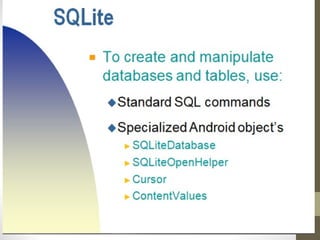
SQLite
Database
ANDROID
HistoryOfSQLiteDatabase
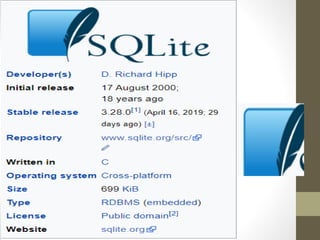
•SQLite was designed originally on August
2000.
•It is named SQLite because it is very light
weight (less than 500Kb size) unlike other
database management systems like SQL
Server or Oracle.
•SQLite was designed by D. Richard Hipp
for the purpose of no administration required
for operating a program.
WhatisSQLITE???
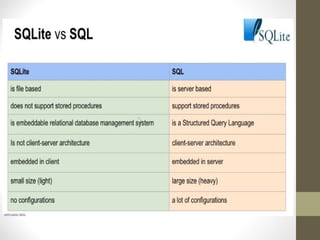
•SQLite is a software library that provides a
relational database management
system(RDMS). The lite in SQLite means
light weight in terms of setup, database
administration, and required resource.
•RDBMS use NORMALIZATION,
•SECURITY INTEGRITY CONSTARINTS
ON TRANSACTION ACID
•SAVED ON ROWS AND COLUMS
• SQlite is an open source embedded database
• it is a relational database.
• The Android SQLite Database requires very little
memory (around 250kb), which is available on all
android devices.
•The resulting design goals of SQLite were to allow
the program to be operated without a database
installation or administration.
WhatIsSQLiteDatabase
Continue….
•It’s a light weight database
•Requires very little memory
•An Automatically managed database
The Basic Advantages of
SQLite:
•Text(like string) – for storing data type
store
•Integer(like int) – for storing integer
primary key
•Real(like double)- for storing long
values
The SQLite supports only 3
Datatypes:
FeaturesOfSQLite
SQLite has the following noticeable
features:
•self-contained(SQLite is a Self
Contained System. SQLite is "stand-alone" or "self-
contained" in the sense that it has very few
dependencies. ... The entire SQLite library is
encapsulated in a single source code file that requires
no special facilities or tools to build.
• server less(No need of Server)
•zero-configuration
• Transactional(SQlite is a transactional database that
all changes and queries are (ACID).
Disadvantages
Huge datasets – DB file can’t exceed file
system limit or 2TB.
Access control – we don’t have any user
interface to operate Sqlite database objects
as in MYSQL / SQL Server /Oracle. All the
objects are virtual.
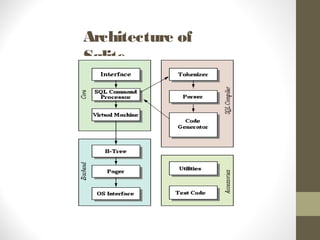
SQLite database architecture split into two different
sections named as core and backend.
•Core section contains Interface, Tokenizer,
Parser, Code generator, and the virtual machine,
which create an execution order for database
transactions.
•Backend contains B-tree, Pager and OS interface
to access the file system. Tokenizer, Parser and
code generator altogether named as the compiler
which generates a set of opcodes that runs on a
virtual machine.
Architecture of
Sqlite
Architecture of
Sqlite
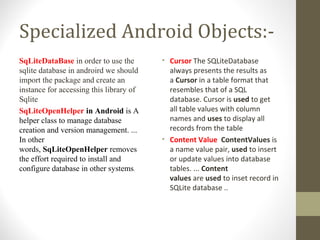
Specialized Android Objects:-
SqLiteDataBase in order to use the
sqlite database in androird we should
import the package and create an
instance for accessing this library of
Sqlite
SqLiteOpenHelper in Android is A
helper class to manage database
creation and version management. ...
In other
words, SqLiteOpenHelper removes
the effort required to install and
configure database in other systems.
• Cursor The SQLiteDatabase
always presents the results as
a Cursor in a table format that
resembles that of a SQL
database. Cursor is used to get
all table values with column
names and uses to display all
records from the table
• Content Value ContentValues is
a name value pair, used to insert
or update values into database
tables. ... Content
values are used to inset record in
SQLite database ..
SQLITE
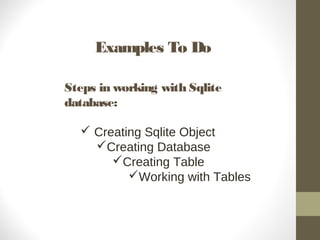
Examples To Do
Steps in working with Sqlite
database:
 Creating Sqlite Object
Creating Database
Creating Table
Working with Tables
Examples To Do
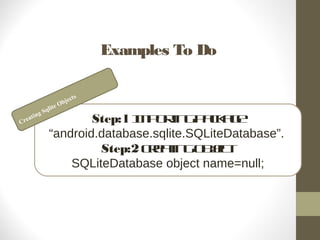
Step:1 Importingpackage
“android.database.sqlite.SQLiteDatabase”.
Step:2 Creatingobject
SQLiteDatabase object name=null;
Creating Sqlite Objects
Examples To Do
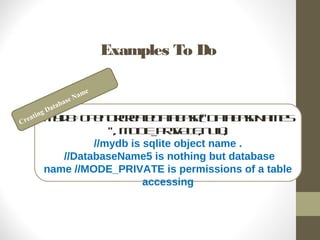
mydb=openOrCreateDatabase("DatabaseName5
", MODE_PRIVATE,null);
//mydb is sqlite object name .
//DatabaseName5 is nothing but database
name //MODE_PRIVATE is permissions of a table
accessing
Creating Database Name
Examples To Do
mydb.execSQL("CREATETABLEIFNOT
EXISTS“ +TableName+" (ColumnName
DataType);");
Creating Table
Examples To Do
Create: mydb.execSQL("CREATE TABLE IF NOT
EXISTS “ +TableName+" (ColumnName
DataType);");
Alter: ALTER TABLE TableName RENAME TO
new-table-name
Drop: DROP TABLE TableName
DDL(Create,Alter,Drop)
Examples To Do
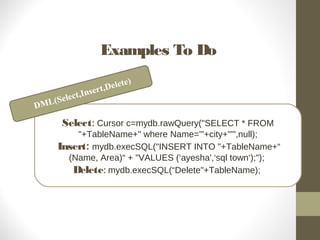
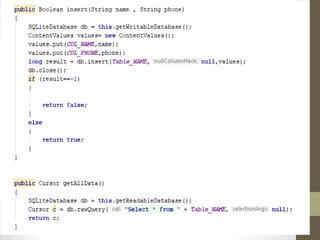
Select: Cursor c=mydb.rawQuery("SELECT * FROM
"+TableName+" where Name='"+city+"'",null);
Insert: mydb.execSQL("INSERT INTO "+TableName+“
(Name, Area)“ + "VALUES (‘ayesha',‘sql town‘);");
Delete: mydb.execSQL(“Delete"+TableName);
DML(Select,Insert,Delete)
Simple Queries
• SQL - "SELECT * FROM ABC;"
SQLite - Cursor c = mdb.query(abc,null,null,null,null,null,null);
• SQL - "SELECT * FROM ABC WHERE C1=5"
SQLite - Cursor c = mdb.query(
abc,null,"c1=?" , new String[ ] {"5"},null,null,null);
• SQL – "SELECT title,id FROM BOOKS ORDER BY title ASC"
SQLite – String colsToReturn [ ] {"title","id"};
String sortOrder = "title ASC";
Cursor c = mdb.query("books",colsToReturn,
null,null,null,null,sortOrder);
Sq lite database
Sq lite database
Sq lite database
Sq lite database
Sq lite database
Sq lite database
Sq lite database
Sq lite database
Sq lite database

Sq lite database

  • 1.
  • 3.
    HistoryOfSQLiteDatabase •SQLite was designedoriginally on August 2000. •It is named SQLite because it is very light weight (less than 500Kb size) unlike other database management systems like SQL Server or Oracle. •SQLite was designed by D. Richard Hipp for the purpose of no administration required for operating a program.
  • 5.
    WhatisSQLITE??? •SQLite is asoftware library that provides a relational database management system(RDMS). The lite in SQLite means light weight in terms of setup, database administration, and required resource. •RDBMS use NORMALIZATION, •SECURITY INTEGRITY CONSTARINTS ON TRANSACTION ACID •SAVED ON ROWS AND COLUMS
  • 6.
    • SQlite isan open source embedded database • it is a relational database. • The Android SQLite Database requires very little memory (around 250kb), which is available on all android devices. •The resulting design goals of SQLite were to allow the program to be operated without a database installation or administration. WhatIsSQLiteDatabase Continue….
  • 7.
    •It’s a lightweight database •Requires very little memory •An Automatically managed database The Basic Advantages of SQLite:
  • 8.
    •Text(like string) –for storing data type store •Integer(like int) – for storing integer primary key •Real(like double)- for storing long values The SQLite supports only 3 Datatypes:
  • 9.
    FeaturesOfSQLite SQLite has thefollowing noticeable features: •self-contained(SQLite is a Self Contained System. SQLite is "stand-alone" or "self- contained" in the sense that it has very few dependencies. ... The entire SQLite library is encapsulated in a single source code file that requires no special facilities or tools to build. • server less(No need of Server) •zero-configuration • Transactional(SQlite is a transactional database that all changes and queries are (ACID).
  • 10.
    Disadvantages Huge datasets –DB file can’t exceed file system limit or 2TB. Access control – we don’t have any user interface to operate Sqlite database objects as in MYSQL / SQL Server /Oracle. All the objects are virtual.
  • 11.
    SQLite database architecturesplit into two different sections named as core and backend. •Core section contains Interface, Tokenizer, Parser, Code generator, and the virtual machine, which create an execution order for database transactions. •Backend contains B-tree, Pager and OS interface to access the file system. Tokenizer, Parser and code generator altogether named as the compiler which generates a set of opcodes that runs on a virtual machine. Architecture of Sqlite
  • 12.
  • 14.
    Specialized Android Objects:- SqLiteDataBasein order to use the sqlite database in androird we should import the package and create an instance for accessing this library of Sqlite SqLiteOpenHelper in Android is A helper class to manage database creation and version management. ... In other words, SqLiteOpenHelper removes the effort required to install and configure database in other systems. • Cursor The SQLiteDatabase always presents the results as a Cursor in a table format that resembles that of a SQL database. Cursor is used to get all table values with column names and uses to display all records from the table • Content Value ContentValues is a name value pair, used to insert or update values into database tables. ... Content values are used to inset record in SQLite database ..
  • 15.
  • 16.
    Examples To Do Stepsin working with Sqlite database:  Creating Sqlite Object Creating Database Creating Table Working with Tables
  • 17.
    Examples To Do Step:1Importingpackage “android.database.sqlite.SQLiteDatabase”. Step:2 Creatingobject SQLiteDatabase object name=null; Creating Sqlite Objects
  • 18.
    Examples To Do mydb=openOrCreateDatabase("DatabaseName5 ",MODE_PRIVATE,null); //mydb is sqlite object name . //DatabaseName5 is nothing but database name //MODE_PRIVATE is permissions of a table accessing Creating Database Name
  • 19.
    Examples To Do mydb.execSQL("CREATETABLEIFNOT EXISTS“+TableName+" (ColumnName DataType);"); Creating Table
  • 20.
    Examples To Do Create:mydb.execSQL("CREATE TABLE IF NOT EXISTS “ +TableName+" (ColumnName DataType);"); Alter: ALTER TABLE TableName RENAME TO new-table-name Drop: DROP TABLE TableName DDL(Create,Alter,Drop)
  • 21.
    Examples To Do Select:Cursor c=mydb.rawQuery("SELECT * FROM "+TableName+" where Name='"+city+"'",null); Insert: mydb.execSQL("INSERT INTO "+TableName+“ (Name, Area)“ + "VALUES (‘ayesha',‘sql town‘);"); Delete: mydb.execSQL(“Delete"+TableName); DML(Select,Insert,Delete)
  • 23.
    Simple Queries • SQL- "SELECT * FROM ABC;" SQLite - Cursor c = mdb.query(abc,null,null,null,null,null,null); • SQL - "SELECT * FROM ABC WHERE C1=5" SQLite - Cursor c = mdb.query( abc,null,"c1=?" , new String[ ] {"5"},null,null,null); • SQL – "SELECT title,id FROM BOOKS ORDER BY title ASC" SQLite – String colsToReturn [ ] {"title","id"}; String sortOrder = "title ASC"; Cursor c = mdb.query("books",colsToReturn, null,null,null,null,sortOrder);

Editor's Notes

  • #3 In revision control systems, a repository[1] is a data structure which stores metadata for a set of files or directory structure In computing, cross-platform software (also multi-platform software or platform-independent software) is computer software that is implemented on multiple computing platforms.[
  • #5 SQLite stores the entire database (definitions, tables, indices, and the data itself) as a single cross-platform file on a host machine. It implements this simple design by locking the entire database file during writing. A stored procedure is a set of Structured Query Language (SQL) statements with an assigned name, which are stored in a relational database management system as a group, so it can be reused and shared by multiple programs.
  • #7 Comes with a standalone command-line interface (CLI) client that can be used to administer SQLite databases.
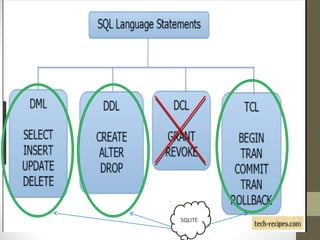
  • #18 Data Definition Language (DDL)  data manipulation language (DML) data control language (DCL) Transaction Control Language(TCL) In the context of databases, a sequence of database operations that satisfies the ACID properties (and these can be perceived as a single logical operation on the data) is called a transaction. 
  • #24 Runs the provided SQL and returns a Cursor over the result set.(rawquery)
  • #33 The main purpose CardView serves in the Material Design universe is to provide a unified look to all of the card based UIs making it easier for developers to create seamless interfaces. In this post, we will see what opportunities CardView provides on Android platform and how to use it properly in our application