 What is Client-side Rendering
Client-side rendering provides a mechanism that you can use to produce
your own output for a set of controls that are hosted in a SharePoint page.
 This mechanism enables you to use well-known technologies, such
as HTML and JavaScript, to define the rendering logic of certain
SharePoint objects.
Content types, List views, Web parts, List forms
 In client-side rendering you can specify your own JavaScript
resources and host them in the data storage options available to your
farm solution, such as the _layouts folder.
 What is JSLink
JSLink is a new property introduced in SharePoint 2013 that is available in
Webparts, List views, fields and content types. This property points to a
JavaScript file which can be used to manipulate the object.
 Advantages
 Performance – Rendering is done in Client Side and the burden is taken
away from the server. This means that the pages can load faster when
using CSR.
 Minimum Learning Curve – CSR uses standard technologies like HTML5,
CSS3 and JavaScript which developers are already familiar with.
 Ease of Development – SharePoint developers are already familiar
standard technologies like HTML5, CSS3 and JavaScript. This should
reduce development time, and less bugs.
 Flexibility – It is very easy to target and overwrite just specific objects
and parts of the object. For example, a particular field, the header,
footer, or the entire view. You also can use any JS plugins such as
jQuery.
 Disadvantages
 Compatibility– Since the scripts are executed in the client browser, the
functionality is subject to browser restrictions. With XSLT, this was not
the case as XSL is executed in the server-side.
 Performance – This was noted as an advantage as well. However, if the
user machine is older and does not have the latest browser versions, the
JS files will not be executed properly and will be very slow causing
browser crashes.
 High Level Steps Involved in implementing JSLink
solution…….
 Create JavaScript file – this can be done using VS or
any other text editor.
 Deploy that to _layouts folder(in case of server side
deployment) or upload it to a any document
library(_catalogs or Site Assets library)
 Point your SharePoint object JSLink property to the JS
file
 Configuring JSLink property to a field
◦ On the Sever
 Set the SPField.JSLink property in the Field XML
definition
 Using Server OM in feature activation event
 Set the SPField.JSLink property in with powershell
 Configuring JSLink property to a field
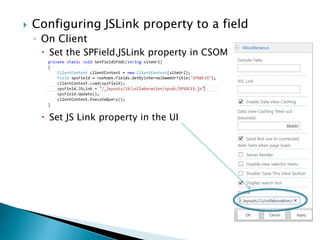
◦ On Client
 Set the SPField.JSLink property in CSOM
 Set JS Link property in the UI
Demo
 The code sample can be found at
https://drive.google.com/file/d/0Bw0N9uMGU_kyLU13RVZxTFpQeDQ/view
Only have a web browser?
http://lanyrd.com/2015/spsdc/
SharePoint Saturday bmore2015

SharePoint Saturday bmore2015

  • 3.
     What isClient-side Rendering Client-side rendering provides a mechanism that you can use to produce your own output for a set of controls that are hosted in a SharePoint page.  This mechanism enables you to use well-known technologies, such as HTML and JavaScript, to define the rendering logic of certain SharePoint objects. Content types, List views, Web parts, List forms  In client-side rendering you can specify your own JavaScript resources and host them in the data storage options available to your farm solution, such as the _layouts folder.  What is JSLink JSLink is a new property introduced in SharePoint 2013 that is available in Webparts, List views, fields and content types. This property points to a JavaScript file which can be used to manipulate the object.
  • 4.
     Advantages  Performance– Rendering is done in Client Side and the burden is taken away from the server. This means that the pages can load faster when using CSR.  Minimum Learning Curve – CSR uses standard technologies like HTML5, CSS3 and JavaScript which developers are already familiar with.  Ease of Development – SharePoint developers are already familiar standard technologies like HTML5, CSS3 and JavaScript. This should reduce development time, and less bugs.  Flexibility – It is very easy to target and overwrite just specific objects and parts of the object. For example, a particular field, the header, footer, or the entire view. You also can use any JS plugins such as jQuery.
  • 5.
     Disadvantages  Compatibility–Since the scripts are executed in the client browser, the functionality is subject to browser restrictions. With XSLT, this was not the case as XSL is executed in the server-side.  Performance – This was noted as an advantage as well. However, if the user machine is older and does not have the latest browser versions, the JS files will not be executed properly and will be very slow causing browser crashes.
  • 6.
     High LevelSteps Involved in implementing JSLink solution…….  Create JavaScript file – this can be done using VS or any other text editor.  Deploy that to _layouts folder(in case of server side deployment) or upload it to a any document library(_catalogs or Site Assets library)  Point your SharePoint object JSLink property to the JS file
  • 7.
     Configuring JSLinkproperty to a field ◦ On the Sever  Set the SPField.JSLink property in the Field XML definition  Using Server OM in feature activation event  Set the SPField.JSLink property in with powershell
  • 8.
     Configuring JSLinkproperty to a field ◦ On Client  Set the SPField.JSLink property in CSOM  Set JS Link property in the UI
  • 9.
  • 10.
     The codesample can be found at https://drive.google.com/file/d/0Bw0N9uMGU_kyLU13RVZxTFpQeDQ/view
  • 11.
    Only have aweb browser? http://lanyrd.com/2015/spsdc/