


File Types, Using Streams and Manipulating Files
Streams, Files and Directories
Software University
http://softuni.bg
SoftUni Team
Technical Trainers
1. What are Streams?
2. Readers and Writers
3. File Streams
4. File Class
5. Directory Class
Table of Contents
2
sli.do
#fund-csharp
Have a Question?
3
What Is a Stream?
Basic Concepts
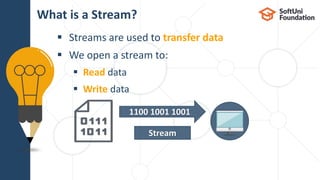
 Streams are used to transfer data
 We open a stream to:
 Read data
 Write data
What is a Stream?
5
1100 1001 1001
Stream
 Streams are means for transferring (reading and writing) data
 Streams are ordered sequences of bytes
 Provide sequential access to its elements
 Different types of streams are available to
access different data sources:
 File access, network access, memory streams and others
 Streams are opened before using them and closed after that
Stream Basics
6
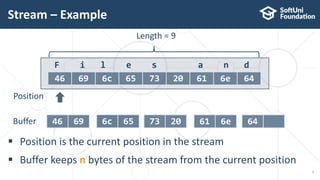
 Position is the current position in the stream
 Buffer keeps n bytes of the stream from the current position
Stream – Example
7
F i l e s a n d
46 69 6c 65 73 20 61 6e 64
Length = 9
Position
46 69Buffer 6c 65 73 20 61 6e 64
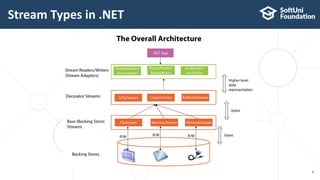
Stream Types in .NET
8
Readers and Writers
Text and Binary Readers/Writers
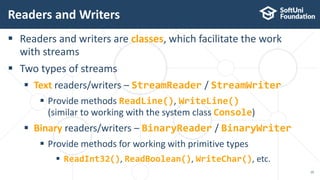
 Readers and writers are classes, which facilitate the work
with streams
 Two types of streams
 Text readers/writers – StreamReader / StreamWriter
 Provide methods ReadLine(), WriteLine()
(similar to working with the system class Console)
 Binary readers/writers – BinaryReader / BinaryWriter
 Provide methods for working with primitive types
 ReadInt32(), ReadBoolean(), WriteChar(), etc.
Readers and Writers
10
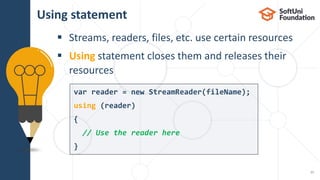
 Streams, readers, files, etc. use certain resources
 Using statement closes them and releases their
resources
Using statement
11
var reader = new StreamReader(fileName);
using (reader)
{
// Use the reader here
}
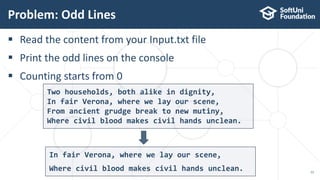
 Read the content from your Input.txt file
 Print the odd lines on the console
 Counting starts from 0
Problem: Odd Lines
12
Two households, both alike in dignity,
In fair Verona, where we lay our scene,
From ancient grudge break to new mutiny,
Where civil blood makes civil hands unclean.
In fair Verona, where we lay our scene,
Where civil blood makes civil hands unclean.
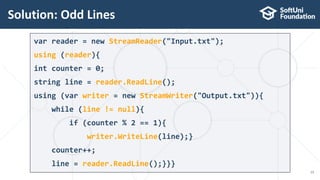
Solution: Odd Lines
13
var reader = new StreamReader("Input.txt");
using (reader){
int counter = 0;
string line = reader.ReadLine();
using (var writer = new StreamWriter("Output.txt")){
while (line != null){
if (counter % 2 == 1){
writer.WriteLine(line);}
counter++;
line = reader.ReadLine();}}}
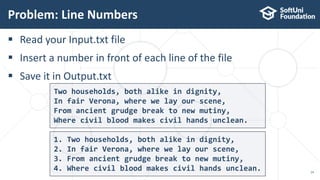
 Read your Input.txt file
 Insert a number in front of each line of the file
 Save it in Output.txt
Problem: Line Numbers
14
Two households, both alike in dignity,
In fair Verona, where we lay our scene,
From ancient grudge break to new mutiny,
Where civil blood makes civil hands unclean.
1. Two households, both alike in dignity,
2. In fair Verona, where we lay our scene,
3. From ancient grudge break to new mutiny,
4. Where civil blood makes civil hands unclean.
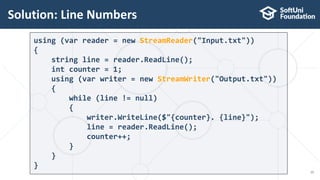
Solution: Line Numbers
15
using (var reader = new StreamReader("Input.txt"))
{
string line = reader.ReadLine();
int counter = 1;
using (var writer = new StreamWriter("Output.txt"))
{
while (line != null)
{
writer.WriteLine($"{counter}. {line}");
line = reader.ReadLine();
counter++;
}
}
}
Base Streams
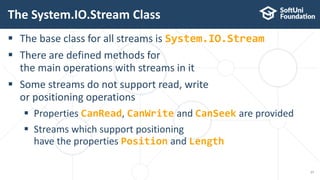
 The base class for all streams is System.IO.Stream
 There are defined methods for
the main operations with streams in it
 Some streams do not support read, write
or positioning operations
 Properties CanRead, CanWrite and CanSeek are provided
 Streams which support positioning
have the properties Position and Length
The System.IO.Stream Class
17
 int Read(byte[] buffer, int offset, int count)
 Read as many as count bytes from input stream,
starting from the given offset position
 Returns the number of read bytes or 0
if end of stream is reached
 Can freeze for undefined time while reading at least 1 byte
 Can read less than the claimed number of bytes
Methods of System.IO.Stream Class
18
F i l e s a n d
46 69 6c 65 73 20 61 6e 64
 Write(byte[] buffer, int offset, int count)
 Writes a sequence of count bytes to an output stream,
starting from the given offset position
 Can freeze for undefined time,
until it sends all bytes to their destination
 Flush()
 Sends the internal buffers data to its destination
(data storage, I/O device, etc.)
Methods of System.IO.Stream Class (2)
19
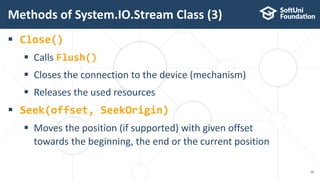
 Close()
 Calls Flush()
 Closes the connection to the device (mechanism)
 Releases the used resources
 Seek(offset, SeekOrigin)
 Moves the position (if supported) with given offset
towards the beginning, the end or the current position
Methods of System.IO.Stream Class (3)
20
File Stream
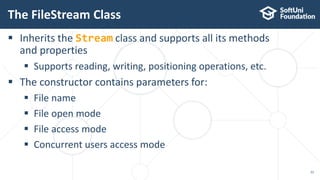
 Inherits the Stream class and supports all its methods
and properties
 Supports reading, writing, positioning operations, etc.
 The constructor contains parameters for:
 File name
 File open mode
 File access mode
 Concurrent users access mode
The FileStream Class
22
 FileMode – opening file mode
 Open, Append, Create,
CreateNew, OpenOrCreate, Truncate
 FileAccess – operations mode for the file
 Read, Write, ReadWrite
 FileShare – access rules for other users while file is opened
 None, Read, Write, ReadWrite
The FileStream Class (2)
23
Optional parameters
var fs = new FileStream(string fileName, FileMode,
[FileAccess], [FileShare]);
Writing Text to File – Example
24
string text = "Кирилица";
var fileStream = new FileStream("../../log.txt",
FileMode.Create);
try {
byte[] bytes = Encoding.UTF8.GetBytes(text);
fileStream.Write(bytes, 0, bytes.Length);
}
finally
{ fileStream.Close(); }
try-finally guarantees the
stream will always close
Encoding.UTF8.GetBytes() returns
the underlying bytes of the character
 Slice the file sliceMe.txt in 4 equal parts
 Name them
 Part-1.txt
 Part-2.txt
 Part-3.txt
 Part-4.txt
Problem: Slice File
25
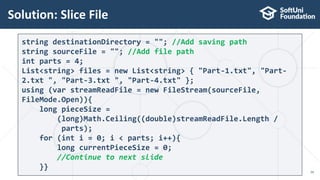
Solution: Slice File
26
string destinationDirectory = ""; //Add saving path
string sourceFile = ""; //Add file path
int parts = 4;
List<string> files = new List<string> { "Part-1.txt", "Part-
2.txt ", "Part-3.txt ", "Part-4.txt" };
using (var streamReadFile = new FileStream(sourceFile,
FileMode.Open)){
long pieceSize =
(long)Math.Ceiling((double)streamReadFile.Length /
parts);
for (int i = 0; i < parts; i++){
long currentPieceSize = 0;
//Continue to next slide
}}
Solution: Slice File(2)
27
using (var streamCreateFile = new FileStream(files[i],
FileMode.Create)){
byte[] buffer = new byte[4096];
while ((streamReadFile.Read(buffer, 0,
buffer.Length)) == buffer.Length){
currentPieceSize += buffer.Length;
streamCreateFile.Write(buffer, 0,
buffer.Length);
if (currentPieceSize >= pieceSize){break;}
}
}
File Class in .NET
.NET API for Easily Working with Files
 File.ReadAllText()  string – reads a text file at once
 File.ReadAllLines()  string[] – reads a text file's lines
Reading Text Files
29
using System.IO;
…
string text = File.ReadAllText("file.txt");
using System.IO;
…
string[] lines = File.ReadAllLines("file.txt");
 Writing a string to a text file:
 Writing a sequence of strings to a text file, at separate lines:
 Appending additional text to an existing file:
Writing Text Files
30
string[] names = { "peter", "irina", "george", "maria" };
File.WriteAllLines("output.txt", names);
File.WriteAllText("output.txt", "Files are fun :)");
File.AppendAllText("output.txt", "nMore textn");
Directory Class in .NET
.NET API for Working with Directories
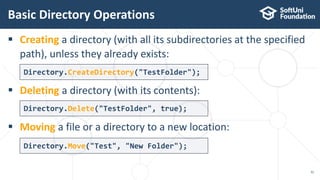
 Creating a directory (with all its subdirectories at the specified
path), unless they already exists:
 Deleting a directory (with its contents):
 Moving a file or a directory to a new location:
Basic Directory Operations
32
Directory.CreateDirectory("TestFolder");
Directory.Delete("TestFolder", true);
Directory.Move("Test", "New Folder");
 GetFiles() – returns the names of the files (including their
paths) in the specified directory
 GetDirectories() – returns the names of the subdirectories
(including their paths) in the specified directory
Listing Directory Contents
33
string[] filesInDir =
Directory.GetFiles("TestFolder");
string[] subDirs =
Directory.GetDirectories("TestFolder");
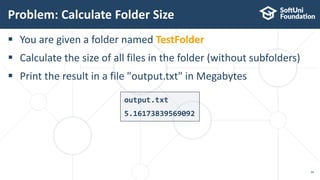
 You are given a folder named TestFolder
 Calculate the size of all files in the folder (without subfolders)
 Print the result in a file "output.txt" in Megabytes
Problem: Calculate Folder Size
34
output.txt
5.16173839569092
Solution: Calculate Folder Size
35
string[] files = Directory.GetFiles("TestFolder");
double sum = 0;
foreach (string file in files)
{
FileInfo fileInfo = new FileInfo(file);
sum += fileInfo.Length;
}
sum = sum / 1024 / 1024;
File.WriteAllText("оutput.txt", sum.ToString());
Live Exercises
 …
 …
 …
Summary
37
 Streams are ordered sequences of bytes
 Serve as I/O mechanisms
 Can be read or written to (or both)
 Always close streams by using
try-finally or using(…)
 Use the File class to work with files
 Use the Directory class to work with
directories
 https://softuni.bg/trainings/courses
SoftUni Diamond Partners
SoftUni Organizational Partners
 Software University – High-Quality Education and
Employment Opportunities
 softuni.bg
 Software University Foundation
 http://softuni.foundation/
 Software University @ Facebook
 facebook.com/SoftwareUniversity
 Software University Forums
 forum.softuni.bg
Trainings @ Software University (SoftUni)
 This course (slides, examples, demos, videos, homework, etc.)
is licensed under the "Creative Commons Attribution-NonCom
mercial-ShareAlike 4.0 International" license
License
42

15. Streams Files and Directories

  • 1.
    File Types, UsingStreams and Manipulating Files Streams, Files and Directories Software University http://softuni.bg SoftUni Team Technical Trainers
  • 2.
    1. What areStreams? 2. Readers and Writers 3. File Streams 4. File Class 5. Directory Class Table of Contents 2
  • 3.
  • 4.
    What Is aStream? Basic Concepts
  • 5.
     Streams areused to transfer data  We open a stream to:  Read data  Write data What is a Stream? 5 1100 1001 1001 Stream
  • 6.
     Streams aremeans for transferring (reading and writing) data  Streams are ordered sequences of bytes  Provide sequential access to its elements  Different types of streams are available to access different data sources:  File access, network access, memory streams and others  Streams are opened before using them and closed after that Stream Basics 6
  • 7.
     Position isthe current position in the stream  Buffer keeps n bytes of the stream from the current position Stream – Example 7 F i l e s a n d 46 69 6c 65 73 20 61 6e 64 Length = 9 Position 46 69Buffer 6c 65 73 20 61 6e 64
  • 8.
  • 9.
    Readers and Writers Textand Binary Readers/Writers
  • 10.
     Readers andwriters are classes, which facilitate the work with streams  Two types of streams  Text readers/writers – StreamReader / StreamWriter  Provide methods ReadLine(), WriteLine() (similar to working with the system class Console)  Binary readers/writers – BinaryReader / BinaryWriter  Provide methods for working with primitive types  ReadInt32(), ReadBoolean(), WriteChar(), etc. Readers and Writers 10
  • 11.
     Streams, readers,files, etc. use certain resources  Using statement closes them and releases their resources Using statement 11 var reader = new StreamReader(fileName); using (reader) { // Use the reader here }
  • 12.
     Read thecontent from your Input.txt file  Print the odd lines on the console  Counting starts from 0 Problem: Odd Lines 12 Two households, both alike in dignity, In fair Verona, where we lay our scene, From ancient grudge break to new mutiny, Where civil blood makes civil hands unclean. In fair Verona, where we lay our scene, Where civil blood makes civil hands unclean.
  • 13.
    Solution: Odd Lines 13 varreader = new StreamReader("Input.txt"); using (reader){ int counter = 0; string line = reader.ReadLine(); using (var writer = new StreamWriter("Output.txt")){ while (line != null){ if (counter % 2 == 1){ writer.WriteLine(line);} counter++; line = reader.ReadLine();}}}
  • 14.
     Read yourInput.txt file  Insert a number in front of each line of the file  Save it in Output.txt Problem: Line Numbers 14 Two households, both alike in dignity, In fair Verona, where we lay our scene, From ancient grudge break to new mutiny, Where civil blood makes civil hands unclean. 1. Two households, both alike in dignity, 2. In fair Verona, where we lay our scene, 3. From ancient grudge break to new mutiny, 4. Where civil blood makes civil hands unclean.
  • 15.
    Solution: Line Numbers 15 using(var reader = new StreamReader("Input.txt")) { string line = reader.ReadLine(); int counter = 1; using (var writer = new StreamWriter("Output.txt")) { while (line != null) { writer.WriteLine($"{counter}. {line}"); line = reader.ReadLine(); counter++; } } }
  • 16.
  • 17.
     The baseclass for all streams is System.IO.Stream  There are defined methods for the main operations with streams in it  Some streams do not support read, write or positioning operations  Properties CanRead, CanWrite and CanSeek are provided  Streams which support positioning have the properties Position and Length The System.IO.Stream Class 17
  • 18.
     int Read(byte[]buffer, int offset, int count)  Read as many as count bytes from input stream, starting from the given offset position  Returns the number of read bytes or 0 if end of stream is reached  Can freeze for undefined time while reading at least 1 byte  Can read less than the claimed number of bytes Methods of System.IO.Stream Class 18 F i l e s a n d 46 69 6c 65 73 20 61 6e 64
  • 19.
     Write(byte[] buffer,int offset, int count)  Writes a sequence of count bytes to an output stream, starting from the given offset position  Can freeze for undefined time, until it sends all bytes to their destination  Flush()  Sends the internal buffers data to its destination (data storage, I/O device, etc.) Methods of System.IO.Stream Class (2) 19
  • 20.
     Close()  CallsFlush()  Closes the connection to the device (mechanism)  Releases the used resources  Seek(offset, SeekOrigin)  Moves the position (if supported) with given offset towards the beginning, the end or the current position Methods of System.IO.Stream Class (3) 20
  • 21.
  • 22.
     Inherits theStream class and supports all its methods and properties  Supports reading, writing, positioning operations, etc.  The constructor contains parameters for:  File name  File open mode  File access mode  Concurrent users access mode The FileStream Class 22
  • 23.
     FileMode –opening file mode  Open, Append, Create, CreateNew, OpenOrCreate, Truncate  FileAccess – operations mode for the file  Read, Write, ReadWrite  FileShare – access rules for other users while file is opened  None, Read, Write, ReadWrite The FileStream Class (2) 23 Optional parameters var fs = new FileStream(string fileName, FileMode, [FileAccess], [FileShare]);
  • 24.
    Writing Text toFile – Example 24 string text = "Кирилица"; var fileStream = new FileStream("../../log.txt", FileMode.Create); try { byte[] bytes = Encoding.UTF8.GetBytes(text); fileStream.Write(bytes, 0, bytes.Length); } finally { fileStream.Close(); } try-finally guarantees the stream will always close Encoding.UTF8.GetBytes() returns the underlying bytes of the character
  • 25.
     Slice thefile sliceMe.txt in 4 equal parts  Name them  Part-1.txt  Part-2.txt  Part-3.txt  Part-4.txt Problem: Slice File 25
  • 26.
    Solution: Slice File 26 stringdestinationDirectory = ""; //Add saving path string sourceFile = ""; //Add file path int parts = 4; List<string> files = new List<string> { "Part-1.txt", "Part- 2.txt ", "Part-3.txt ", "Part-4.txt" }; using (var streamReadFile = new FileStream(sourceFile, FileMode.Open)){ long pieceSize = (long)Math.Ceiling((double)streamReadFile.Length / parts); for (int i = 0; i < parts; i++){ long currentPieceSize = 0; //Continue to next slide }}
  • 27.
    Solution: Slice File(2) 27 using(var streamCreateFile = new FileStream(files[i], FileMode.Create)){ byte[] buffer = new byte[4096]; while ((streamReadFile.Read(buffer, 0, buffer.Length)) == buffer.Length){ currentPieceSize += buffer.Length; streamCreateFile.Write(buffer, 0, buffer.Length); if (currentPieceSize >= pieceSize){break;} } }
  • 28.
    File Class in.NET .NET API for Easily Working with Files
  • 29.
     File.ReadAllText() string – reads a text file at once  File.ReadAllLines()  string[] – reads a text file's lines Reading Text Files 29 using System.IO; … string text = File.ReadAllText("file.txt"); using System.IO; … string[] lines = File.ReadAllLines("file.txt");
  • 30.
     Writing astring to a text file:  Writing a sequence of strings to a text file, at separate lines:  Appending additional text to an existing file: Writing Text Files 30 string[] names = { "peter", "irina", "george", "maria" }; File.WriteAllLines("output.txt", names); File.WriteAllText("output.txt", "Files are fun :)"); File.AppendAllText("output.txt", "nMore textn");
  • 31.
    Directory Class in.NET .NET API for Working with Directories
  • 32.
     Creating adirectory (with all its subdirectories at the specified path), unless they already exists:  Deleting a directory (with its contents):  Moving a file or a directory to a new location: Basic Directory Operations 32 Directory.CreateDirectory("TestFolder"); Directory.Delete("TestFolder", true); Directory.Move("Test", "New Folder");
  • 33.
     GetFiles() –returns the names of the files (including their paths) in the specified directory  GetDirectories() – returns the names of the subdirectories (including their paths) in the specified directory Listing Directory Contents 33 string[] filesInDir = Directory.GetFiles("TestFolder"); string[] subDirs = Directory.GetDirectories("TestFolder");
  • 34.
     You aregiven a folder named TestFolder  Calculate the size of all files in the folder (without subfolders)  Print the result in a file "output.txt" in Megabytes Problem: Calculate Folder Size 34 output.txt 5.16173839569092
  • 35.
    Solution: Calculate FolderSize 35 string[] files = Directory.GetFiles("TestFolder"); double sum = 0; foreach (string file in files) { FileInfo fileInfo = new FileInfo(file); sum += fileInfo.Length; } sum = sum / 1024 / 1024; File.WriteAllText("оutput.txt", sum.ToString());
  • 36.
  • 37.
     …  … … Summary 37  Streams are ordered sequences of bytes  Serve as I/O mechanisms  Can be read or written to (or both)  Always close streams by using try-finally or using(…)  Use the File class to work with files  Use the Directory class to work with directories
  • 38.
  • 39.
  • 40.
  • 41.
     Software University– High-Quality Education and Employment Opportunities  softuni.bg  Software University Foundation  http://softuni.foundation/  Software University @ Facebook  facebook.com/SoftwareUniversity  Software University Forums  forum.softuni.bg Trainings @ Software University (SoftUni)
  • 42.
     This course(slides, examples, demos, videos, homework, etc.) is licensed under the "Creative Commons Attribution-NonCom mercial-ShareAlike 4.0 International" license License 42

Editor's Notes

  • #3 (c) 2007 National Academy for Software Development - http://academy.devbg.org. All rights reserved. Unauthorized copying or re-distribution is strictly prohibited.*
  • #6 Icons by Chanut is Industries / Pixel perfect at http://www.flaticon.com/
  • #18 (c) 2005 National Academy for Software Development - http://academy.devbg.org. All rights reserved. Unauthorized copying or re-distribution is strictly prohibited.*
  • #19 (c) 2005 National Academy for Software Development - http://academy.devbg.org. All rights reserved. Unauthorized copying or re-distribution is strictly prohibited.*
  • #20 (c) 2005 National Academy for Software Development - http://academy.devbg.org. All rights reserved. Unauthorized copying or re-distribution is strictly prohibited.*
  • #21 (c) 2005 National Academy for Software Development - http://academy.devbg.org. All rights reserved. Unauthorized copying or re-distribution is strictly prohibited.*
  • #23 (c) 2005 National Academy for Software Development - http://academy.devbg.org. All rights reserved. Unauthorized copying or re-distribution is strictly prohibited.*
  • #24 (c) 2005 National Academy for Software Development - http://academy.devbg.org. All rights reserved. Unauthorized copying or re-distribution is strictly prohibited.*
  • #25 (c) 2005 National Academy for Software Development - http://academy.devbg.org. All rights reserved. Unauthorized copying or re-distribution is strictly prohibited.*
  • #27 (c) 2005 National Academy for Software Development - http://academy.devbg.org. All rights reserved. Unauthorized copying or re-distribution is strictly prohibited.*