C# Basics
Fahmi KALLEL
ERPConsultant and Project Manager at EDI
MCSA / CCNA Certified .NET Fullstack Developer
2.
Course Outline
Basics
Types of data
Arrays
Loop / Conditions …
Class
Object class
Exception
Some examples of classes
Converting Data Types (Casting)
Collections
Semicolon, block, white
Each statement ends with semicolon ";" like:
Declaration: int x, y; string name;
Assignment: x = 5; name = "Mohamed";
Invoking Method: Console.WriteLine("My First Program");
A block of statements is delimited by curly braces "{" and "}" like:
Namespace: StudentManagement namespace {.....}
Class : class Program{…… }
Concrete method: public void display(int p) { ...... }
Control instruction: if(x<y) {......}
Blanks (space, tab, and line feed) are used between elements of the source
code
Caution: Do not use space for variable or method names
id client idClient
Show total invoice(); ShowTotalInvoice( );
5.
Operators
Assignment operators:
x=3;x receives 3
x=y=z=w+9; Z receives W+9, y eceives z et x receives y
Arithmetic operators with two operands:
+ : addition
- : subtraction
X : multiplication
/ : division
% : modulo (remainder of Euclidean division)
Shortcuts
X+=3; where x=x+3
X*=3; or x=x*3
6.
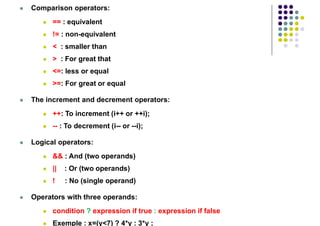
Comparison operators:
== : equivalent
!= : non-equivalent
< : smaller than
> : For great that
<=: less or equal
>=: For great or equal
The increment and decrement operators:
++: To increment (i++ or ++i);
-- : To decrement (i-- or --i);
Logical operators:
&& : And (two operands)
|| : Or (two operands)
! : No (single operand)
Operators with three operands:
condition ? expression if true : expression if false
Exemple : x=(y<7) ? 4*y : 3*y ;
7.
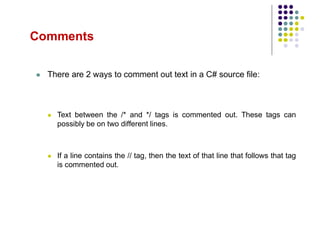
Comments
There are2 ways to comment out text in a C# source file:
Text between the /* and */ tags is commented out. These tags can
possibly be on two different lines.
If a line contains the // tag, then the text of that line that follows that tag
is commented out.
8.
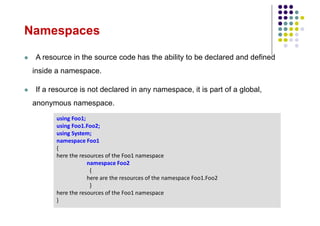
Namespaces
A resourcein the source code has the ability to be declared and defined
inside a namespace.
If a resource is not declared in any namespace, it is part of a global,
anonymous namespace.
using Foo1;
using Foo1.Foo2;
using System;
namespace Foo1
{
here the resources of the Foo1 namespace
namespace Foo2
{
here are the resources of the namespace Foo1.Foo2
}
here the resources of the Foo1 namespace
}
Value Type
Directly indicates data
Cannot be null
Example: primitive: int, float, bool, etc.
Reference Type
Contains references (address) to objects
Can be null
Example: Class: String, Console....
Array: String [ ] tab=new String [10];
int i = 123;
string s = "Hello world";
123
i
s "Hello world"
11.
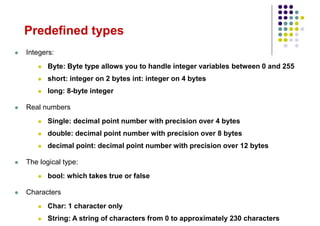
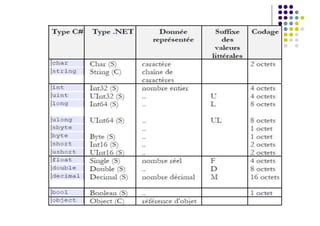
Predefined types
Integers:
Byte: Byte type allows you to handle integer variables between 0 and 255
short: integer on 2 bytes int: integer on 4 bytes
long: 8-byte integer
Real numbers
Single: decimal point number with precision over 4 bytes
double: decimal point number with precision over 8 bytes
decimal point: decimal point number with precision over 12 bytes
The logical type:
bool: which takes true or false
Characters
Char: 1 character only
String: A string of characters from 0 to approximately 230 characters
13.
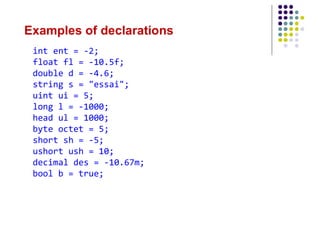
Examples of declarations
intent = -2;
float fl = -10.5f;
double d = -4.6;
string s = "essai";
uint ui = 5;
long l = -1000;
head ul = 1000;
byte octet = 5;
short sh = -5;
ushort ush = 10;
decimal des = -10.67m;
bool b = true;
14.
Array
An arrayis an object that allows data of the same type to be grouped under a
single identifier
Before using a table, you must:
1. Declare: int [ ] tab;
2. Create an instantiation: tab= new int[10];
2nd creation and initialization method
int [ ] tab2;
tab2 = new int[ ]{5,7,8,9,2,0,3};
3rd Creation and Initialization Method
int [ ] tab3 = {5,7,8,9,2,0,3};
tab
null
tab
0
0
0
0
0
0
0
0
0
0
tab2 3
0
2
9
8
7
5
15.
Array Characteristics
Anarray can have multiple dimensions, for example a double-dimensional array:
int [ , ] tab= new int[ n, m ];
n : number of rows and m : number of columns
int [ , ] tab= new int[ 4, 6 ]; Integer matrix of 4 rows and 6 columns
Length property: Contains the size of an array in total number of cells
int [ ] tab1= new int[ 8 ]; // tab1. Length = 8
int [ , ] tab2= new int[ 4, 6 ]; // tab2. Length = 4 * 6 = 24
Console.WriteLine("The size of tab2 =" + tab2 . Length );
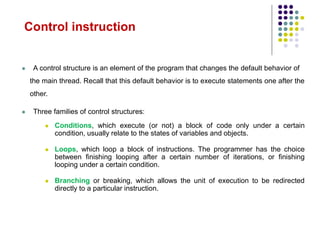
A controlstructure is an element of the program that changes the default behavior of
the main thread. Recall that this default behavior is to execute statements one after the
other.
Three families of control structures:
Conditions, which execute (or not) a block of code only under a certain
condition, usually relate to the states of variables and objects.
Loops, which loop a block of instructions. The programmer has the choice
between finishing looping after a certain number of iterations, or finishing
looping under a certain condition.
Branching or breaking, which allows the unit of execution to be redirected
directly to a particular instruction.
Control instruction
18.
Conditions
• if( b== true ) // if b is true then...
• if( i >= 4 & i<= 6) // if i in the closed interval [4,6]
then...
• if( i < 4 || i > 6) // if i outside the closed interval
[4,6] then...
...
• string s = i<j ? "hi" : "hello";
s="hello" if i is strictly less than j, otherwise s="hello"
• switch(i)
{
case 1: Console.WriteLine("i equals 1"); break;
case 6: Console.WriteLine("i equals 6"); break;
default: Console.WriteLine("i is neither 1 nor 6"); break;
}
Three types of condition: if/else - switch
The ternary operator ? :
19.
Loops
Four types ofloop: while - do/while - for - foreach
you i=0; you j=8;
while( i < 6 && j > 9 )
{
i++; j--;
}
you i=0; you j=8;
of the
{
i++; j--;
}
while( i < 6 && j > 9);
• for(int i = 1; i<=6 ; i++) ...
• int i = 3; int j=5;
for(; i<7&& j>1 ; i++ , j--)...
• for( int i =6 ; i<9 ; ) { ... i++;}
int [] tab = {1,3,4,8,2};
Calculating the sum of the elements in
the array.
int Sum = 0;
foreach(int i in tab )
Sum += i;
Sum is: 1+3+4+8+2 = 18
20.
A. while &&do … while
• while
while ( condition)
{
Instruction block;
}
• do … while
do
{
Instruction block;
} while ( condition) ;
21.
B. for &&foreach
• The for loop
for (initialisation ; test ; incrémentation)
{
Instruction block;
}
• The foreach loop
foreach (VariableType va in collection)
{
Instruction block;
}
Example:
for ( int i=2 ; i<10 ; i++ )
{
Console.WriteLine("I = " + i) ;
}
Example:
string [ ] amis= { "A" , "B" , "C" , "D" } ;
foreach ( string nom in amis )
{
Console.WriteLine (name);
}
A classis a construct that allows you to create your own custom types by grouping
the data and behavior of a new type.
A class defines a type of object, but it is not an object in itself. An object, which is a
concrete entity based on a class, is sometimes referred to as a class instance.
What is a Class?
24.
Members of aclass
public class Student
{
Here are placed the
attributes of students
private int age= 10;
private string firstName;
private String LastName;
public int[] grades;
Student’s methods
public String ToString()
{ return "FirstName :
"+firstName+"LastName
:"+lastName;}
}
Members of a class are entities declared in the
class, the main types of members:
The field ( attribute ) that defines
a piece of data (type value) or -->
A reference to a piece of data (reference type)
that exists for any instance of the --> class or
and array [ ]. -->
Methods used to process the data of an
object.
25.
Constructors
A methodis automatically called when the object is constructed. This type of method is
called a constructor.
In C#, syntactically, a constructor method has the name of the class, and doesn't return
anything (not even the void type).
For each class there can be:
No constructors: In this case, the compiler automatically provides a default
constructor, which does not accept any arguments.
Only one constructor: in this case, it will always be the one who will be
called. The compiler does not provide a default constructor.
Several constructors: in this case they differ according to their signatures
(i.e. number and type of arguments). The compiler does not provide a
default constructor.
When a constructor method returns, it is imperative that all value fields in the class
have been initialized.
26.
Example of Constructors
publicclass Article
{
private int Prix;
Builder 1
public Article(int Price)
{ this. Prix = Prix; }
Builder 2
public Article(double Prix)
{ this. Prix = (int) Prix;}
Builder 3
public Article( )
{ Prix = 0; }
} //end of class Article
public class Program
{
static void Main(string[] args)
{
Call the ctor 3.
Article A = new Article();
Call the ctor 1.
Article B = new Article(6);
Call the ctor 2.
Article C = new Article(6.3); }
}
27.
Encapsulation isan information-masking mechanism that makes code easy to keep
up to date and understand.
Allows you to restrict access to a class or its members to hide design decisions that
are subject to change.
Encapsulation gives class designers flexibility to modify a section of code if
necessary without changing everything else in the code
ENCAPSULATION
17
28.
Access modifiers
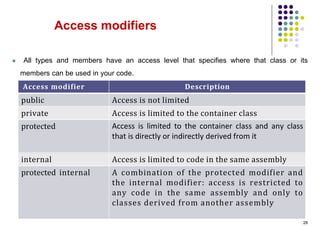
Alltypes and members have an access level that specifies where that class or its
members can be used in your code.
28
Description
Access modifier
Access is not limited
public
Access is limited to the container class
private
Access is limited to the container class and any class
that is directly or indirectly derived from it
protected
Access is limited to code in the same assembly
internal
A combination of the protected modifier and
the internal modifier: access is restricted to
any code in the same assembly and only to
classes derived from another assembly
protected internal
29.
Property
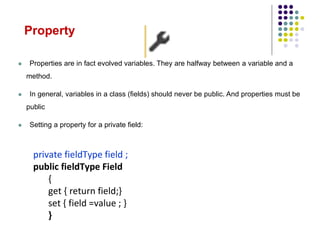
Properties arein fact evolved variables. They are halfway between a variable and a
method.
In general, variables in a class (fields) should never be public. And properties must be
public
Setting a property for a private field:
private fieldType field ;
public fieldType Field
{
get { return field;}
set { field =value ; }
}
30.
public class Client
{int cin,age; // the fields
string nom;
bool woman;
public String Name
{ get { return nom; }
set { nom = value; }
}
public int Age
{ get {if (woman == false) return age;
else return 20;
}
set { age = value; }
}
Public Customer(int cin,int age,String name,bool
woman)
{ this.cin = cin;
this.age = age;
this.name = name;
this.femme = femme;
}
public int GetAge() // getter accessor
{ return age; }
public void SetAge(int age) // setter
accessor
{ this.age=age; }
}
public class GestionClient
{
static void Main(String arg[])
{
Client cl = new Client(555555,35,
"Fatma Ben", true);
Console.WriteLine("the age of
"+cl.Name+" is "+cl.GetAge());
Fatma Ben's age is 35
Console.WriteLine("the age of " +
cl.Name + " is " + cl.Age);
Fatma Ben's age is 20
}
}
31.
Static members
Astatic field (or class attribute) is a field declared with the reserved word static. The
existence of this attribute does not depend on the instances of the class. If there has been
an instantiation, only one copy of this attribute is shared by all instances.
Generally, it is initialized when declaring:
static int staticfield = 1;
It is used with the class name: ClassName.Staticfield;
A static method does not work with the non-static members (fields or methods) of its class.
It is a class method (independent of objects):
It is used without instantiation of the class
It is called with the class name: ClassName.methodeStatic();
32.
Inheritance (1/2)
Often,in an application, classes have similar members because they are semantically
close:
The Secretary, Technician and Executive classes may have in common
Name, Age, Address, and Salary fields
and the Evaluate() and Increase() methods.
Square, Triangle, and Circle classes can have in common
the LineColor and LineSize fields
and the Draw(), Translation(), and Rotation() methods.
It is clear that this is because:
A secretary, technician or manager is an employee (i.e. a specialization of the concept
of Employee).
A square, triangle or circle is a geometric shape.
A button, combo-box or edit-box is a graphic control.
33.
The ideaof reuse is to identify these similarities, and encapsulate them in a class called a
base class (e.g. Employee, GeometricFigure, or Control).
Base classes are sometimes referred to as super classes.
A derived class is a class that inherits from the members of the base class.
Concretely, if Technician inherits from Employee: Technician inherits the
Name, Age, Address, and Salary fields and the Evaluate() and Increase()
methods.
The derived class is also said to be a specialization of the base class.
Declaring a subclass is done using : followed by the name of the parent class.
class DerivatedClass: BaseClass
{ ….}
Inheritance (2/2)
34.
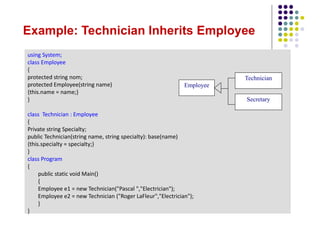
Example: Technician InheritsEmployee
using System;
class Employee
{
protected string nom;
protected Employee(string name)
{this.name = name;}
}
class Technician : Employee
{
Private string Specialty;
public Technician(string name, string specialty): base(name)
{this.specialty = specialty;}
}
class Program
{
public static void Main()
{
Employee e1 = new Technician("Pascal ","Electrician");
Employee e2 = new Technician ("Roger LaFleur","Electrician");
}
}
Employee
Technician
Secretary
All typesinherit from the object class
Everything is an object: int, float, string, Client, Rectangle ....
The object class provides several useful methods:
ToString(): Converts the current instance to a string
Equals(): Returns a boolean value to check the
equivalence of the current object and the object as a
parameter
CompareTo(): Compares the current object and the
parameter object. It returns 0, 1 or -1;
Stream
MemoryStream FileStream
….. double
int
object
String
int n1=5, n2=7;
String ch=n1. ToString();
bool test=n1. Equals(n2);
// test=false
int sup=n1. CompareTo(n2);
sup=-1
Object class
static void Main(string[]args)
{ int nb1, nb2, div;
Console.WriteLine("Give first number:");
String ch1 = Console.ReadLine();
nb1 = Convert.ToInt32(ch1);
Console.WriteLine("Give second number:");
String ch2 = Console.ReadLine();
nb2 = Convert.ToInt32(ch2);
div = nb1 / nb2;
Console.WriteLine("The result: " + nb1 +
" / " + nb2 + " = " + div);
Console.ReadKey();
}
1st case
2nd case
Exceptions are errors that occur when something goes wrong at runtime. When an
unhandled exception occurs, it usually causes the program to close.
Exception
39.
Exception Manager
Anexception handler has a try block and it can contain one or more catch clauses,
and/or a finally clause.
try{ ... } for monitoring statements that might throw these exception objects
catch(Exception ex) { ... } for capturing each exception object thrown in a block
appropriate to the type of the exception
finally{ } is always executed, regardless of the outcome.
In the case of multiple catch blocks (i.e. handling multiple exceptions), they must be
ordered from the most specific exception to the most general
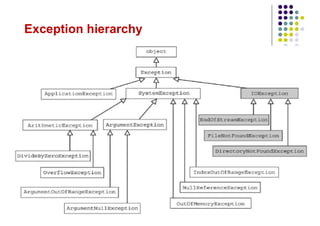
If the class derived D from base class B that is an exception:
then the catch(D ex) clause will be before the catch(B ex) clause.
The catch(System.Exception) clause catches up for all exceptions since all
exception classes derive from the System.Exception class
40.
Example of ExceptionHandling
static void Main(string[] args)
{ int nb1, nb2, div;
Console.WriteLine("Give first number:");
String ch1 = Console.ReadLine();
try
{
nb1 = Convert.ToInt32(ch1);
Console.WriteLine("Give second number:");
String ch2 = Console.ReadLine();
nb2 = Convert.ToInt32(ch2);
div = nb1 / nb2;
Console.WriteLine("The result: " + nb1 + " / " + nb2 + " = " + div);
}
catch (FormatException e)
{ Console.WriteLine("Pay attention to the type of data:" + e.Message); }
catch (DivideByZeroException e)
{ Console.WriteLine("Attention to the divider:" + e.Message); }
finally
{ Console.WriteLine("Thanks block executed in all cases");
Console.ReadKey();}
}
Some exceptions
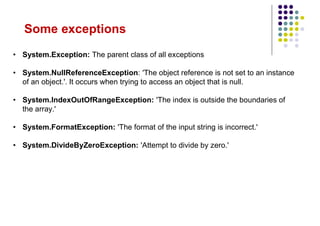
• System.Exception:The parent class of all exceptions
• System.NullReferenceException: 'The object reference is not set to an instance
of an object.'. It occurs when trying to access an object that is null.
• System.IndexOutOfRangeException: 'The index is outside the boundaries of
the array.'
• System.FormatException: 'The format of the input string is incorrect.'
• System.DivideByZeroException: 'Attempt to divide by zero.'
The indexof a string starts with 0
The Length property gives the number of characters in a string: String ch="csharp";
int tail=ch. Length;
Exemple
Méthode
String ch1="csharp";
String ch2=ch1.ToUpper(); //ch2="CSHARP"
String ToUpper()
Returns the current string in uppercase
String ch3=ch2.ToUpper(); //ch3="csharp"
String ToLower()
Returns the current string in lowercase
ch2=" programme scharp "
ch3=ch2.Trim(); //ch3="programme scharp"
ch3=ch2.Trim(‘p’); //ch3="rogramme schar"
String Trim()
Remove starting and ending spaces
String Trim(char c)
Remove starting and ending c character
bool trouve= ch2.Contains("@"); //ch3=false
bool Contains(String rech)
Allows you to know if one string is in another.
Return true or false
String (1/2)
45.
String (2/2)
Exemple
Méthode
String ch1="05-10-2017";
Stringch2=ch1.Substring(6,4); //ch2="2017"
String Substring (int deb, int nbreCar)
Extract part of the current string
String ch3=ch1.Remove(0,6); //ch3="2017"
String Remove(int deb, int nbreCar)
Remove characters from a position
ch3=ch1.Replace("-", "/"); //ch3="05/10/2017"
String Replace(String intia, String nouv)
Replace one string with another
char car= ch1.ElementAt(3); //car=‘6’
char ElementAt(int position)
Return the character in the given position
ch3=ch1.Insert(6, "2017");
//ch3= "scharp2017"
String Insert()
Insert one string into another and return a new
string
String []tab=ch1.Split(‘-’);
//tab[0]= "05", tab[1]= "10", tab[2]= "2017",
String [] Split(String text)
split a starting string into several substrings using a
separator
46.
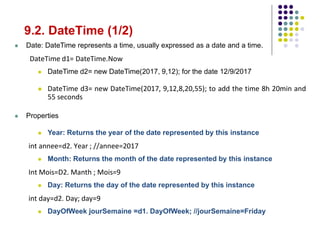
9.2. DateTime (1/2)
Date: DateTime represents a time, usually expressed as a date and a time.
DateTime d1= DateTime.Now
DateTime d2= new DateTime(2017, 9,12); for the date 12/9/2017
DateTime d3= new DateTime(2017, 9,12,8,20,55); to add the time 8h 20min and
55 seconds
Properties
Year: Returns the year of the date represented by this instance
int annee=d2. Year ; //annee=2017
Month: Returns the month of the date represented by this instance
Int Mois=D2. Manth ; Mois=9
Day: Returns the day of the date represented by this instance
int day=d2. Day; day=9
DayOfWeek jourSemaine =d1. DayOfWeek; //jourSemaine=Friday
47.
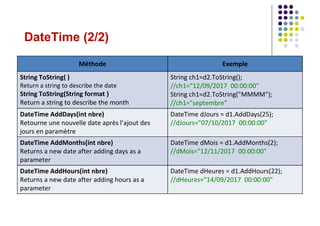
DateTime (2/2)
Exemple
Méthode
String ch1=d2.ToString();
//ch1="12/09/201700:00:00"
String ch1=d2.ToString("MMMM");
//ch1="septembre"
String ToString( )
Return a string to describe the date
String ToString(String format )
Return a string to describe the month
DateTime dJours = d1.AddDays(25);
//dJours="07/10/2017 00:00:00"
DateTime AddDays(int nbre)
Retourne une nouvelle date après l’ajout des
jours en paramètre
DateTime dMois = d1.AddMonths(2);
//dMois="12/11/2017 00:00:00"
DateTime AddMonths(int nbre)
Returns a new date after adding days as a
parameter
DateTime dHeures = d1.AddHours(22);
//dHeures="14/09/2017 00:00:00"
DateTime AddHours(int nbre)
Returns a new date after adding hours as a
parameter
48.
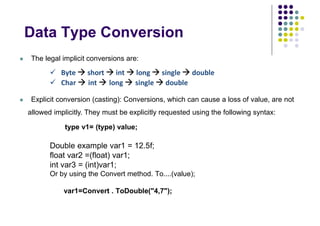
Data Type Conversion
The legal implicit conversions are:
Byte short int long single double
Char int long single double
Explicit conversion (casting): Conversions, which can cause a loss of value, are not
allowed implicitly. They must be explicitly requested using the following syntax:
type v1= (type) value;
Double example var1 = 12.5f;
float var2 =(float) var1;
int var3 = (int)var1;
Or by using the Convert method. To....(value);
var1=Convert . ToDouble("4,7");
49.
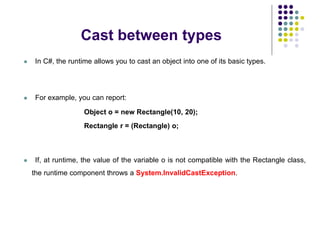
Cast between types
33
In C#, the runtime allows you to cast an object into one of its basic types.
For example, you can report:
Object o = new Rectangle(10, 20);
Rectangle r = (Rectangle) o;
If, at runtime, the value of the variable o is not compatible with the Rectangle class,
the runtime component throws a System.InvalidCastException.
50.
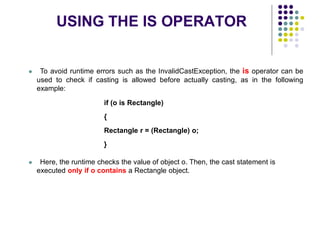
USING THE ISOPERATOR
34
To avoid runtime errors such as the InvalidCastException, the is operator can be
used to check if casting is allowed before actually casting, as in the following
example:
if (o is Rectangle)
{
Rectangle r = (Rectangle) o;
}
Here, the runtime checks the value of object o. Then, the cast statement is
executed only if o contains a Rectangle object.
51.
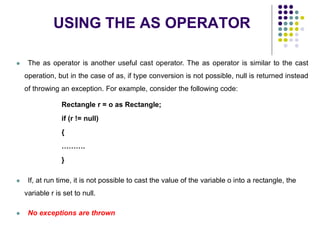
USING THE ASOPERATOR
35
The as operator is another useful cast operator. The as operator is similar to the cast
operation, but in the case of as, if type conversion is not possible, null is returned instead
of throwing an exception. For example, consider the following code:
Rectangle r = o as Rectangle;
if (r != null)
{
……….
}
If, at run time, it is not possible to cast the value of the variable o into a rectangle, the
variable r is set to null.
No exceptions are thrown
Typical structureddata is represented in the .Net framework by directly usable classes
from the System.Collections namespace.
These classes provide methods to make it easier to manipulate a group of objects:
Add(object ob): To add an item ob to the collection
AddRange(ICollection col): To add multiple col items to the collection
Remove(object ob): To remove an ob item from the collection
RemoveAt(int ind): To remove an item from the collection in the ind index
ToArray(): Copy the collection to a new object array
They offer the property
Count: The number of items in the collection
[ ] : Indexing property of the class, it is used as a tab[ i ] operator accesses the
element whose key is i.
There are two types of collection: generic and non-generic
A collection
54.
Non-generic collection
ArrayList
DynamicSizing
Object elements
Requires conversion to original
type
In the namespace:
System.Collections;
Example:
ArrayList ar1=new ArrayList();
or1. Add(1);
int x=(int) ar1[0];
Generic Collection
List
Dynamic Sizing
The elements of the same type that
must be fixed with the declaration
More optimized
In the namespace:
System.Collections.Generic;
Example:
List<String> lst1=new List<String>();
List<int> lst2=new List<int>();
lst2. Add(1);
int y= lst2[0];
55.
using System.Collections;//ArrayList
static voidMain(string[] args)
{ArrayList tabDyn = new ArrayList();
tabDyn.Add("Lundi");
tabDyn.Add(10);
tabDyn.Add(20);
tabDyn.Add("Mercredi");
View Collection Channels
foreach (object t in tabDyn)
if (t is String)
Console.WriteLine(t.ToString());
Show Uppercase Strings
foreach (object t in tabDyn)
if (t is String)
{ String ch = ((String)t). ToUpper();
//ch=t.ToUpper(); compilation error
Console.WriteLine(ch);
}
}
using System.Collections.Generic;//List
static void Main(string[] args)
{ List <String>list1 = new List<String>();
list1. Add("Lundi");
list1. Add("Mercredi");
// list. Add(20); compilation error
View Collection Channels in Uppercase
Without Casting
foreach (String l in list1)
Console.WriteLine(l.ToUpper());
}
Examples of Collection


![ Value Type
Directly indicates data
Cannot be null
Example: primitive: int, float, bool, etc.
Reference Type
Contains references (address) to objects
Can be null
Example: Class: String, Console....
Array: String [ ] tab=new String [10];
int i = 123;
string s = "Hello world";
123
i
s "Hello world"](https://image.slidesharecdn.com/netdevelopment-chapter2-250914113058-1368a6d3/85/Net-Development-chaptfaegeagegtezaqgttaer2-pdf-10-320.jpg)
![Array
An array is an object that allows data of the same type to be grouped under a
single identifier
Before using a table, you must:
1. Declare: int [ ] tab;
2. Create an instantiation: tab= new int[10];
2nd creation and initialization method
int [ ] tab2;
tab2 = new int[ ]{5,7,8,9,2,0,3};
3rd Creation and Initialization Method
int [ ] tab3 = {5,7,8,9,2,0,3};
tab
null
tab
0
0
0
0
0
0
0
0
0
0
tab2 3
0
2
9
8
7
5](https://image.slidesharecdn.com/netdevelopment-chapter2-250914113058-1368a6d3/85/Net-Development-chaptfaegeagegtezaqgttaer2-pdf-14-320.jpg)
![Array Characteristics
An array can have multiple dimensions, for example a double-dimensional array:
int [ , ] tab= new int[ n, m ];
n : number of rows and m : number of columns
int [ , ] tab= new int[ 4, 6 ]; Integer matrix of 4 rows and 6 columns
Length property: Contains the size of an array in total number of cells
int [ ] tab1= new int[ 8 ]; // tab1. Length = 8
int [ , ] tab2= new int[ 4, 6 ]; // tab2. Length = 4 * 6 = 24
Console.WriteLine("The size of tab2 =" + tab2 . Length );](https://image.slidesharecdn.com/netdevelopment-chapter2-250914113058-1368a6d3/85/Net-Development-chaptfaegeagegtezaqgttaer2-pdf-15-320.jpg)
![Conditions
• if( b == true ) // if b is true then...
• if( i >= 4 & i<= 6) // if i in the closed interval [4,6]
then...
• if( i < 4 || i > 6) // if i outside the closed interval
[4,6] then...
...
• string s = i<j ? "hi" : "hello";
s="hello" if i is strictly less than j, otherwise s="hello"
• switch(i)
{
case 1: Console.WriteLine("i equals 1"); break;
case 6: Console.WriteLine("i equals 6"); break;
default: Console.WriteLine("i is neither 1 nor 6"); break;
}
Three types of condition: if/else - switch
The ternary operator ? :](https://image.slidesharecdn.com/netdevelopment-chapter2-250914113058-1368a6d3/85/Net-Development-chaptfaegeagegtezaqgttaer2-pdf-18-320.jpg)
![Loops
Four types of loop: while - do/while - for - foreach
you i=0; you j=8;
while( i < 6 && j > 9 )
{
i++; j--;
}
you i=0; you j=8;
of the
{
i++; j--;
}
while( i < 6 && j > 9);
• for(int i = 1; i<=6 ; i++) ...
• int i = 3; int j=5;
for(; i<7&& j>1 ; i++ , j--)...
• for( int i =6 ; i<9 ; ) { ... i++;}
int [] tab = {1,3,4,8,2};
Calculating the sum of the elements in
the array.
int Sum = 0;
foreach(int i in tab )
Sum += i;
Sum is: 1+3+4+8+2 = 18](https://image.slidesharecdn.com/netdevelopment-chapter2-250914113058-1368a6d3/85/Net-Development-chaptfaegeagegtezaqgttaer2-pdf-19-320.jpg)

![B. for && foreach
• The for loop
for (initialisation ; test ; incrémentation)
{
Instruction block;
}
• The foreach loop
foreach (VariableType va in collection)
{
Instruction block;
}
Example:
for ( int i=2 ; i<10 ; i++ )
{
Console.WriteLine("I = " + i) ;
}
Example:
string [ ] amis= { "A" , "B" , "C" , "D" } ;
foreach ( string nom in amis )
{
Console.WriteLine (name);
}](https://image.slidesharecdn.com/netdevelopment-chapter2-250914113058-1368a6d3/85/Net-Development-chaptfaegeagegtezaqgttaer2-pdf-21-320.jpg)


![Members of a class
public class Student
{
Here are placed the
attributes of students
private int age= 10;
private string firstName;
private String LastName;
public int[] grades;
Student’s methods
public String ToString()
{ return "FirstName :
"+firstName+"LastName
:"+lastName;}
}
Members of a class are entities declared in the
class, the main types of members:
The field ( attribute ) that defines
a piece of data (type value) or -->
A reference to a piece of data (reference type)
that exists for any instance of the --> class or
and array [ ]. -->
Methods used to process the data of an
object.](https://image.slidesharecdn.com/netdevelopment-chapter2-250914113058-1368a6d3/85/Net-Development-chaptfaegeagegtezaqgttaer2-pdf-24-320.jpg)
![Example of Constructors
public class Article
{
private int Prix;
Builder 1
public Article(int Price)
{ this. Prix = Prix; }
Builder 2
public Article(double Prix)
{ this. Prix = (int) Prix;}
Builder 3
public Article( )
{ Prix = 0; }
} //end of class Article
public class Program
{
static void Main(string[] args)
{
Call the ctor 3.
Article A = new Article();
Call the ctor 1.
Article B = new Article(6);
Call the ctor 2.
Article C = new Article(6.3); }
}](https://image.slidesharecdn.com/netdevelopment-chapter2-250914113058-1368a6d3/85/Net-Development-chaptfaegeagegtezaqgttaer2-pdf-26-320.jpg)
![public class Client
{ int cin,age; // the fields
string nom;
bool woman;
public String Name
{ get { return nom; }
set { nom = value; }
}
public int Age
{ get {if (woman == false) return age;
else return 20;
}
set { age = value; }
}
Public Customer(int cin,int age,String name,bool
woman)
{ this.cin = cin;
this.age = age;
this.name = name;
this.femme = femme;
}
public int GetAge() // getter accessor
{ return age; }
public void SetAge(int age) // setter
accessor
{ this.age=age; }
}
public class GestionClient
{
static void Main(String arg[])
{
Client cl = new Client(555555,35,
"Fatma Ben", true);
Console.WriteLine("the age of
"+cl.Name+" is "+cl.GetAge());
Fatma Ben's age is 35
Console.WriteLine("the age of " +
cl.Name + " is " + cl.Age);
Fatma Ben's age is 20
}
}](https://image.slidesharecdn.com/netdevelopment-chapter2-250914113058-1368a6d3/85/Net-Development-chaptfaegeagegtezaqgttaer2-pdf-30-320.jpg)


![static void Main(string[] args)
{ int nb1, nb2, div;
Console.WriteLine("Give first number:");
String ch1 = Console.ReadLine();
nb1 = Convert.ToInt32(ch1);
Console.WriteLine("Give second number:");
String ch2 = Console.ReadLine();
nb2 = Convert.ToInt32(ch2);
div = nb1 / nb2;
Console.WriteLine("The result: " + nb1 +
" / " + nb2 + " = " + div);
Console.ReadKey();
}
1st case
2nd case
Exceptions are errors that occur when something goes wrong at runtime. When an
unhandled exception occurs, it usually causes the program to close.
Exception](https://image.slidesharecdn.com/netdevelopment-chapter2-250914113058-1368a6d3/85/Net-Development-chaptfaegeagegtezaqgttaer2-pdf-38-320.jpg)

![Example of Exception Handling
static void Main(string[] args)
{ int nb1, nb2, div;
Console.WriteLine("Give first number:");
String ch1 = Console.ReadLine();
try
{
nb1 = Convert.ToInt32(ch1);
Console.WriteLine("Give second number:");
String ch2 = Console.ReadLine();
nb2 = Convert.ToInt32(ch2);
div = nb1 / nb2;
Console.WriteLine("The result: " + nb1 + " / " + nb2 + " = " + div);
}
catch (FormatException e)
{ Console.WriteLine("Pay attention to the type of data:" + e.Message); }
catch (DivideByZeroException e)
{ Console.WriteLine("Attention to the divider:" + e.Message); }
finally
{ Console.WriteLine("Thanks block executed in all cases");
Console.ReadKey();}
}](https://image.slidesharecdn.com/netdevelopment-chapter2-250914113058-1368a6d3/85/Net-Development-chaptfaegeagegtezaqgttaer2-pdf-40-320.jpg)


![String (2/2)
Exemple
Méthode
String ch1="05-10-2017";
String ch2=ch1.Substring(6,4); //ch2="2017"
String Substring (int deb, int nbreCar)
Extract part of the current string
String ch3=ch1.Remove(0,6); //ch3="2017"
String Remove(int deb, int nbreCar)
Remove characters from a position
ch3=ch1.Replace("-", "/"); //ch3="05/10/2017"
String Replace(String intia, String nouv)
Replace one string with another
char car= ch1.ElementAt(3); //car=‘6’
char ElementAt(int position)
Return the character in the given position
ch3=ch1.Insert(6, "2017");
//ch3= "scharp2017"
String Insert()
Insert one string into another and return a new
string
String []tab=ch1.Split(‘-’);
//tab[0]= "05", tab[1]= "10", tab[2]= "2017",
String [] Split(String text)
split a starting string into several substrings using a
separator](https://image.slidesharecdn.com/netdevelopment-chapter2-250914113058-1368a6d3/85/Net-Development-chaptfaegeagegtezaqgttaer2-pdf-45-320.jpg)
![ Typical structured data is represented in the .Net framework by directly usable classes
from the System.Collections namespace.
These classes provide methods to make it easier to manipulate a group of objects:
Add(object ob): To add an item ob to the collection
AddRange(ICollection col): To add multiple col items to the collection
Remove(object ob): To remove an ob item from the collection
RemoveAt(int ind): To remove an item from the collection in the ind index
ToArray(): Copy the collection to a new object array
They offer the property
Count: The number of items in the collection
[ ] : Indexing property of the class, it is used as a tab[ i ] operator accesses the
element whose key is i.
There are two types of collection: generic and non-generic
A collection](https://image.slidesharecdn.com/netdevelopment-chapter2-250914113058-1368a6d3/85/Net-Development-chaptfaegeagegtezaqgttaer2-pdf-53-320.jpg)
![Non-generic collection
ArrayList
Dynamic Sizing
Object elements
Requires conversion to original
type
In the namespace:
System.Collections;
Example:
ArrayList ar1=new ArrayList();
or1. Add(1);
int x=(int) ar1[0];
Generic Collection
List
Dynamic Sizing
The elements of the same type that
must be fixed with the declaration
More optimized
In the namespace:
System.Collections.Generic;
Example:
List<String> lst1=new List<String>();
List<int> lst2=new List<int>();
lst2. Add(1);
int y= lst2[0];](https://image.slidesharecdn.com/netdevelopment-chapter2-250914113058-1368a6d3/85/Net-Development-chaptfaegeagegtezaqgttaer2-pdf-54-320.jpg)
![using System.Collections;//ArrayList
static void Main(string[] args)
{ArrayList tabDyn = new ArrayList();
tabDyn.Add("Lundi");
tabDyn.Add(10);
tabDyn.Add(20);
tabDyn.Add("Mercredi");
View Collection Channels
foreach (object t in tabDyn)
if (t is String)
Console.WriteLine(t.ToString());
Show Uppercase Strings
foreach (object t in tabDyn)
if (t is String)
{ String ch = ((String)t). ToUpper();
//ch=t.ToUpper(); compilation error
Console.WriteLine(ch);
}
}
using System.Collections.Generic;//List
static void Main(string[] args)
{ List <String>list1 = new List<String>();
list1. Add("Lundi");
list1. Add("Mercredi");
// list. Add(20); compilation error
View Collection Channels in Uppercase
Without Casting
foreach (String l in list1)
Console.WriteLine(l.ToUpper());
}
Examples of Collection](https://image.slidesharecdn.com/netdevelopment-chapter2-250914113058-1368a6d3/85/Net-Development-chaptfaegeagegtezaqgttaer2-pdf-55-320.jpg)


