Speak Up Participation 101:
An introduction for school and district leaders
Hosted by:
Julie A. Evans, Ed.D.
CEO, Project Tomorrow
@JulieEvans_PT
jevans@tomorrow.org
10/15/18
Today’s discussion topics
 Introducing Project Tomorrow
 About the Speak Up Research Project
 Value of “stakeholder feedback” data: sampling of Speak Up data
that is used by schools and districts to inform their local policies,
programs, funding, and community engagement
 Easy step by step process - how your school or district can be part
of Speak Up 2018
 Your questions, comments, thoughts
 Nonprofit education organization supporting K-12 education since 1996
 Mission is to ensure today’s students are well prepared for the future
 Programs and research focus on role of digital tools within the
education ecosystem – believe in power of STEAM to support student
preparation for college and career success
o Speak Up Research Project on Digital Learning: collecting
& reporting on the authentic feedback of K-12 stakeholders to
inform federal, state & local programs and policies
About Project Tomorrow
www.tomorrow.org
About the Speak Up Project (www.tomorrow.org/speakup)
 Annual research project since 2003
 Facilitated 100% through schools and districts
 We design and provide education leaders with a
suite of online surveys they can use to collect
feedback from their K-12 stakeholders
 All K-12 schools – public, private, parochial,
charter, virtual - are eligible to participate
 Schools get summary report with all locally
collected data + state and national data for
benchmarks
 Project Tomorrow manages all data collection and
reporting for schools - 100% free service
We share national data with federal, state and local policymakers to inform programs and
funding
About the Speak Up Project (www.tomorrow.org/speakup)
 K-12 students – age
appropriate, reading level
appropriate, group
versions for K-5
 Teachers
 Librarians and Media
Specialists
 Parents – in English and
Spanish + group format
Online surveys available for these stakeholder groups:
 School Site
Administrators
 District Administrators
 Technology Leaders
 Community Members –
in group format also
About the Speak Up Project (www.tomorrow.org/speakup)
Survey question topics include:
Use of technology to support learning
School climate for innovation
College and career ready skill development/interest
Leadership challenges
Teachers’ needs for professional learning
How do different stakeholders value digital learning
Emerging trends w/digital tools, content and resources
New classroom models: mobile, blended, flipped
School to home communications
Parent concerns – safety issues
Designing the ultimate school
Since 2003, over 5.4 million K-12 stakeholders have submitted a Speak Up survey
Survey questions cover three vectors:
Activities:
how are education stakeholders using
technology?
Attitudes:
how do they value those learning experiences?
Aspirations:
how would they like to use technology for learning?
About the Speak Up Project (www.tomorrow.org/speakup)
Activities:
how are education
stakeholders using
technology?
Attitudes:
how do they value
those learning
experiences?
Aspirations:
how would they like to
use technology for
learning?
About the Speak Up Project (www.tomorrow.org/speakup)
 How are you using mobile devices for learning?
 How often do you use videos in your classroom?
 What is your home Internet status?
 What are the benefits of digital learning for you?
 What determines quality in digital content?
 What concerns you about your child’s technology use?
 What tech is essential for your dream school?
 What is on your wish list for PD this year?
 What is best way for child to learn C/CR skills?
Reports and resources available to you as a Speak Up participant:
About the Speak Up Project (www.tomorrow.org/speakup)
 All local data – every survey – every question – every audience
 District level + School level comparative data
 Other comparatives: County / State / National
 Templates for PowerPoints
 Templates for infographics
 Access to national reports and other data assets
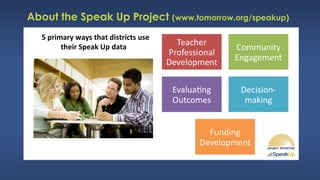
5 primary ways that districts use
their Speak Up data
About the Speak Up Project (www.tomorrow.org/speakup)
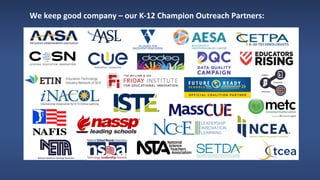
We keep good company – our K-12 Champion Outreach Partners:
About the Speak Up Project (www.tomorrow.org/speakup)
Why Speak Up is an important and valuable service for districts?
 Criticality of appreciating and understanding the diverse perspectives of
your stakeholders
 Schools and districts face new demands and challenges – need for timely
input to inform plans, policies, programs, funding etc.
 Value of building local leadership capacity around using stakeholder
feedback
 Education funding should be focused 100% on educational outcomes
 Technology use is a metaphor for educational transformation today
@Project Tomorrow 2017
What do you see?
Are we all seeing the
same thing?
What do your students,
parents and educators
see?
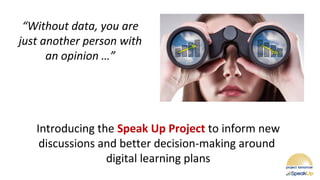
“Without data, you are
just another person with
an opinion …”
Introducing the Speak Up Project to inform new
discussions and better decision-making around
digital learning plans
Today’s discussion topics
 Introducing Project Tomorrow
 About the Speak Up Research Project
 Value of “stakeholder feedback” data: sampling of Speak Up
data that is used by schools and districts to inform their local
policies, programs, funding, and community engagement
 Easy step by step process - how your school or district can be part
of Speak Up 2018
 Your questions, comments, thoughts
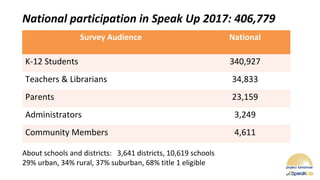
Survey Audience National
K-12 Students 340,927
Teachers & Librarians 34,833
Parents 23,159
Administrators 3,249
Community Members 4,611
About schools and districts: 3,641 districts, 10,619 schools
29% urban, 34% rural, 37% suburban, 68% title 1 eligible
National participation in Speak Up 2017: 406,779
Speak Up 2017 Research Findings
Classroom Teachers
and the
Digital Classroom
@Project Tomorrow 2017
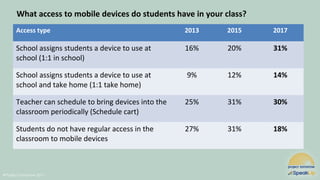
Access type 2013 2015 2017
School assigns students a device to use at
school (1:1 in school)
16% 20% 31%
School assigns students a device to use at
school and take home (1:1 take home)
9% 12% 14%
Teacher can schedule to bring devices into the
classroom periodically (Schedule cart)
25% 31% 30%
Students do not have regular access in the
classroom to mobile devices
27% 31% 18%
What access to mobile devices do students have in your class?
@Project Tomorrow 2017
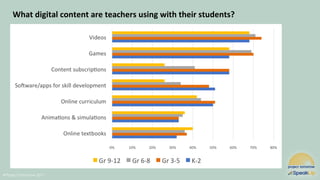
What digital content are teachers using with their students?
@Project Tomorrow 2017
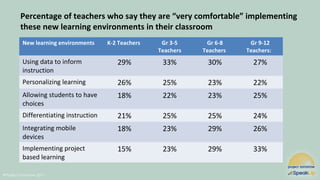
Percentage of teachers who say they are “very comfortable” implementing
these new learning environments in their classroom
New learning environments K-2 Teachers Gr 3-5
Teachers
Gr 6-8
Teachers
Gr 9-12
Teachers:
Using data to inform
instruction
29% 33% 30% 27%
Personalizing learning 26% 25% 23% 22%
Allowing students to have
choices
18% 22% 23% 25%
Differentiating instruction 21% 25% 25% 24%
Integrating mobile
devices
18% 23% 29% 26%
Implementing project
based learning
15% 23% 29% 33%
@Project Tomorrow 2017
Resources and Support % of Teachers
 Planning time with colleagues 65%
 Just in time technology support 55%
 Consistent, reliable Internet access 55%
 Professional development 53%
 Class set of mobile devices 58%
 Assurance that students have out of school digital and
Internet access
53%
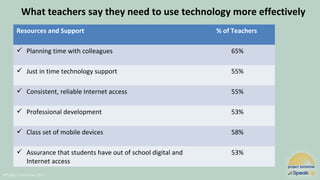
What teachers say they need to use technology more effectively
@Project Tomorrow 2017
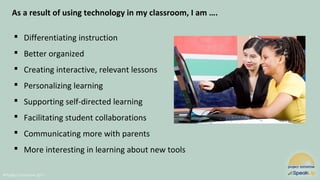
As a result of using technology in my classroom, I am ….
 Differentiating instruction
 Better organized
 Creating interactive, relevant lessons
 Personalizing learning
 Supporting self-directed learning
 Facilitating student collaborations
 Communicating more with parents
 More interesting in learning about new tools
Speak Up 2017 Research Findings
Parents and
the Digital Classroom
@Project Tomorrow 2017
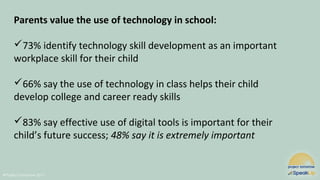
Parents value the use of technology in school:
73% identify technology skill development as an important
workplace skill for their child
66% say the use of technology in class helps their child
develop college and career ready skills
83% say effective use of digital tools is important for their
child’s future success; 48% say it is extremely important
@Project Tomorrow 2017
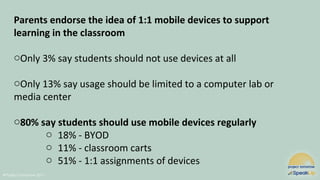
Parents endorse the idea of 1:1 mobile devices to support
learning in the classroom
oOnly 3% say students should not use devices at all
oOnly 13% say usage should be limited to a computer lab or
media center
o80% say students should use mobile devices regularly
o 18% - BYOD
o 11% - classroom carts
o 51% - 1:1 assignments of devices
@Project Tomorrow 2017
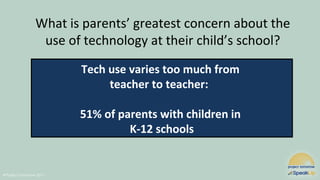
Tech use varies too much from
teacher to teacher:
51% of parents with children in
K-12 schools
What is parents’ greatest concern about the
use of technology at their child’s school?
@Project Tomorrow 2017
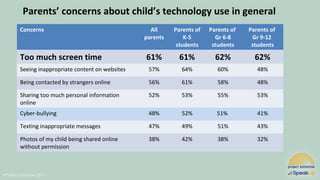
Parents’ concerns about child’s technology use in general
Concerns All
parents
Parents of
K-5
students
Parents of
Gr 6-8
students
Parents of
Gr 9-12
students
Too much screen time 61% 61% 62% 62%
Seeing inappropriate content on websites 57% 64% 60% 48%
Being contacted by strangers online 56% 61% 58% 48%
Sharing too much personal information
online
52% 53% 55% 53%
Cyber-bullying 48% 52% 51% 41%
Texting inappropriate messages 47% 49% 51% 43%
Photos of my child being shared online
without permission
38% 42% 38% 32%
@Project Tomorrow 2017
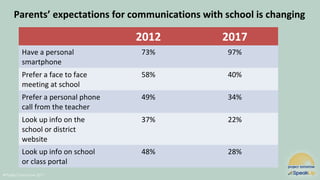
Parents’ expectations for communications with school is changing
2012 2017
Have a personal
smartphone
73% 97%
Prefer a face to face
meeting at school
58% 40%
Prefer a personal phone
call from the teacher
49% 34%
Look up info on the
school or district
website
37% 22%
Look up info on school
or class portal
48% 28%
@Project Tomorrow 2017
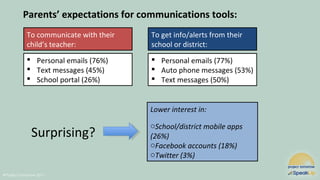
Parents’ expectations for communications tools:
To communicate with their
child’s teacher:
 Personal emails (76%)
 Text messages (45%)
 School portal (26%)
To get info/alerts from their
school or district:
 Personal emails (77%)
 Auto phone messages (53%)
 Text messages (50%)
Lower interest in:
oSchool/district mobile apps
(26%)
oFacebook accounts (18%)
oTwitter (3%)
Surprising?
Speak Up 2017 Research Findings
K-12 Students and
the Digital Classroom
@Project Tomorrow 2017
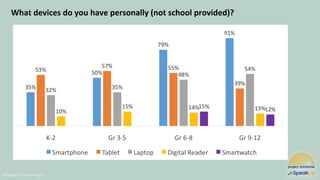
What devices do you have personally (not school provided)?
@Project Tomorrow 2017
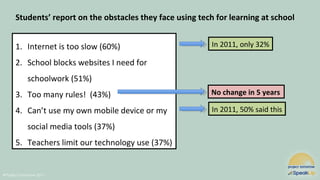
1. Internet is too slow (60%)
2. School blocks websites I need for
schoolwork (51%)
3. Too many rules! (43%)
4. Can’t use my own mobile device or my
social media tools (37%)
5. Teachers limit our technology use (37%)
In 2011, only 32%
In 2011, 50% said this
No change in 5 years
Students’ report on the obstacles they face using tech for learning at school
@Project Tomorrow 2017
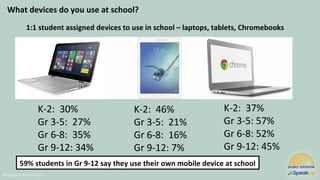
1:1 student assigned devices to use in school – laptops, tablets, Chromebooks
K-2: 30%
Gr 3-5: 27%
Gr 6-8: 35%
Gr 9-12: 34%
K-2: 46%
Gr 3-5: 21%
Gr 6-8: 16%
Gr 9-12: 7%
K-2: 37%
Gr 3-5: 57%
Gr 6-8: 52%
Gr 9-12: 45%
What devices do you use at school?
59% students in Gr 9-12 say they use their own mobile device at school
@Project Tomorrow 2017
How are students using mobile devices for learning?
Teacher-directed activities:
Do Internet research
Play education games
Take online tests
Creating docs to share
Work on projects w/classmates
Read online articles
Use online textbooks
Student self-directed activities:
Check grades
Look up class info
Using online dictionary
Email teacher w/questions
Take notes
Receive reminders re tests, projects
Watch videos to support learning
@Project Tomorrow 2017
A pixel preference for reading:
Who says they would prefer to read digitally?
@Project Tomorrow 2017
Students say these are the impacts of using technology within learning:
Better outcomes
Better grades and test scores: 54% of Gr 6-8 students
Collaborating more with other students: 44%
Skill development
Developing creativity skills: 50%
Personalized learning environment
I’m learning at my own pace: 53%
I’m in control of my learning: 46%
I understand what I am learning in class better: 45%
This fits my learning style: 43%
Note: only 39%
of students report
increased
engagement
as the biggest
impact
@Project Tomorrow 2017
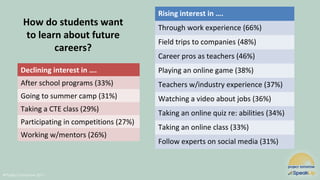
How do students want
to learn about future
careers?
Declining interest in ….
After school programs (33%)
Going to summer camp (31%)
Taking a CTE class (29%)
Participating in competitions (27%)
Working w/mentors (26%)
Rising interest in ….
Through work experience (66%)
Field trips to companies (48%)
Career pros as teachers (46%)
Playing an online game (38%)
Teachers w/industry experience (37%)
Watching a video about jobs (36%)
Taking an online quiz re: abilities (34%)
Taking an online class (33%)
Follow experts on social media (31%)
Participating in Speak Up
can help you improve
your “visibility” into the
different perspectives of
your stakeholders
Today’s discussion topics
 Introducing Project Tomorrow
 About the Speak Up Research Project
 Value of “stakeholder feedback” data: sampling of Speak Up data
that is used by schools and districts to inform their local policies,
programs, funding, and community engagement
 Easy step by step process - how your school or district can be
part of Speak Up 2018
 Your questions, comments, thoughts
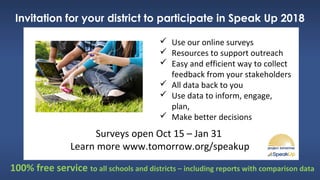
Invitation for your district to participate in Speak Up 2018
Surveys open Oct 15 – Jan 31
Learn more www.tomorrow.org/speakup
100% free service to all schools and districts – including reports with comparison data
 Use our online surveys
 Resources to support outreach
 Easy and efficient way to collect
feedback from your stakeholders
 All data back to you
 Use data to inform, engage,
plan,
 Make better decisions
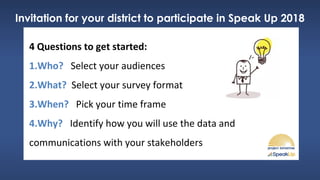
Invitation for your district to participate in Speak Up 2018
4 Questions to get started:
1.Who? Select your audiences
2.What? Select your survey format
3.When? Pick your time frame
4.Why? Identify how you will use the data and
communications with your stakeholders
About the Speak Up Project (www.tomorrow.org/speakup)
 K-12 students – age
appropriate, reading level
appropriate, group
versions for K-5
 Teachers
 Librarians and Media
Specialists
 Parents – in English and
Spanish + group format
Audience options: Which stakeholder groups do you want to poll?
 School Site
Administrators
 District Administrators
 Technology Leaders
 Community Members –
in group format also
About the Speak Up Project (www.tomorrow.org/speakup)
Survey format options: New formats for 2018
oUse the national surveys – 2018 version
oUse the national 2017 or 2016 versions
oUse our new 1:1 Mobile Learning Impact Snapshot Surveys
• Focused surveys for students and teachers
oUse our new Professional Development Needs Analysis Survey
• Focused survey for teachers
About the Speak Up Project (www.tomorrow.org/speakup)
What is your time period for the data collection process?
oSurveys are open today through January 31
oSome districts select a more focused timeframe (“Speak Up” day,
week, two weeks)
oWant your data by early January? Participate prior to your winter
break in December
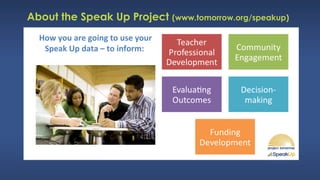
How you are going to use your
Speak Up data – to inform:
About the Speak Up Project (www.tomorrow.org/speakup)
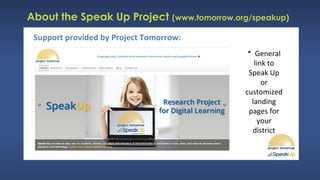
Support provided by Project Tomorrow:
* General
link to
Speak Up
or
customized
landing
pages for
your
district
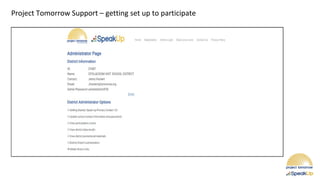
Project Tomorrow Support – getting set up to participate
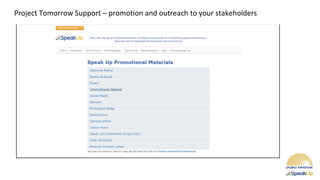
Project Tomorrow Support – promotion and outreach to your stakeholders
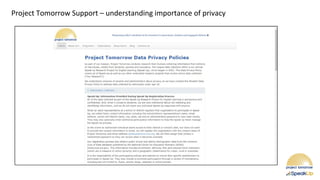
Project Tomorrow Support – understanding importance of privacy
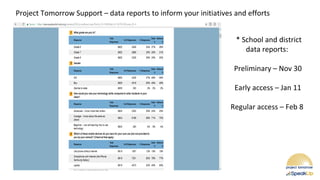
Project Tomorrow Support – data reports to inform your initiatives and efforts
* School and district
data reports:
Preliminary – Nov 30
Early access – Jan 11
Regular access – Feb 8
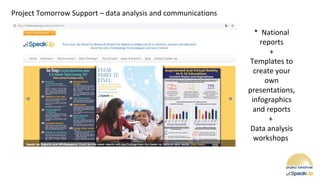
Project Tomorrow Support – data analysis and communications
* National
reports
+
Templates to
create your
own
presentations,
infographics
and reports
+
Data analysis
workshops
About the Speak Up Project (www.tomorrow.org/speakup)
Why Speak Up is an important and valuable service for districts?
 Criticality of appreciating and understanding the diverse perspectives of
your stakeholders
 Schools and districts face new demands and challenges – need for timely
input to inform plans, policies, programs, funding etc.
 Value of building local leadership capacity around using stakeholder
feedback
 Education funding should be focused 100% on educational outcomes
 Technology use is a metaphor for educational transformation today
More resources available at www.tomorrow.org
National Speak Up reports and infographics
Targeted and thematic reports
Digital learning trends
Community engagement
Mobile learning
Games in the classroom
Blended learning outcomes
Presentations, podcasts and webinars
Services: consulting, workshops, evaluation and efficacy studies
 We have expertise in the evaluation of mobile implementations, new
classroom models and digital content usage
Read our blog: http://blog.tomorrow.org/
Your questions,
comments,
thoughts
Speak Up Participation 101:
An introduction for school and district leaders
Julie A. Evans, Ed.D.
CEO, Project Tomorrow
949-609-4660 voice
@JulieEvans_PT
jevans@tomorrow.org
10/15/18
Thank you for your participation today!
Please let us know how we can help you.

Speak Up Participation 101

  • 1.
    Speak Up Participation101: An introduction for school and district leaders Hosted by: Julie A. Evans, Ed.D. CEO, Project Tomorrow @JulieEvans_PT jevans@tomorrow.org 10/15/18
  • 2.
    Today’s discussion topics Introducing Project Tomorrow  About the Speak Up Research Project  Value of “stakeholder feedback” data: sampling of Speak Up data that is used by schools and districts to inform their local policies, programs, funding, and community engagement  Easy step by step process - how your school or district can be part of Speak Up 2018  Your questions, comments, thoughts
  • 3.
     Nonprofit educationorganization supporting K-12 education since 1996  Mission is to ensure today’s students are well prepared for the future  Programs and research focus on role of digital tools within the education ecosystem – believe in power of STEAM to support student preparation for college and career success o Speak Up Research Project on Digital Learning: collecting & reporting on the authentic feedback of K-12 stakeholders to inform federal, state & local programs and policies About Project Tomorrow www.tomorrow.org
  • 4.
    About the SpeakUp Project (www.tomorrow.org/speakup)  Annual research project since 2003  Facilitated 100% through schools and districts  We design and provide education leaders with a suite of online surveys they can use to collect feedback from their K-12 stakeholders  All K-12 schools – public, private, parochial, charter, virtual - are eligible to participate  Schools get summary report with all locally collected data + state and national data for benchmarks  Project Tomorrow manages all data collection and reporting for schools - 100% free service We share national data with federal, state and local policymakers to inform programs and funding
  • 5.
    About the SpeakUp Project (www.tomorrow.org/speakup)  K-12 students – age appropriate, reading level appropriate, group versions for K-5  Teachers  Librarians and Media Specialists  Parents – in English and Spanish + group format Online surveys available for these stakeholder groups:  School Site Administrators  District Administrators  Technology Leaders  Community Members – in group format also
  • 6.
    About the SpeakUp Project (www.tomorrow.org/speakup) Survey question topics include: Use of technology to support learning School climate for innovation College and career ready skill development/interest Leadership challenges Teachers’ needs for professional learning How do different stakeholders value digital learning Emerging trends w/digital tools, content and resources New classroom models: mobile, blended, flipped School to home communications Parent concerns – safety issues Designing the ultimate school Since 2003, over 5.4 million K-12 stakeholders have submitted a Speak Up survey
  • 7.
    Survey questions coverthree vectors: Activities: how are education stakeholders using technology? Attitudes: how do they value those learning experiences? Aspirations: how would they like to use technology for learning? About the Speak Up Project (www.tomorrow.org/speakup)
  • 8.
    Activities: how are education stakeholdersusing technology? Attitudes: how do they value those learning experiences? Aspirations: how would they like to use technology for learning? About the Speak Up Project (www.tomorrow.org/speakup)  How are you using mobile devices for learning?  How often do you use videos in your classroom?  What is your home Internet status?  What are the benefits of digital learning for you?  What determines quality in digital content?  What concerns you about your child’s technology use?  What tech is essential for your dream school?  What is on your wish list for PD this year?  What is best way for child to learn C/CR skills?
  • 9.
    Reports and resourcesavailable to you as a Speak Up participant: About the Speak Up Project (www.tomorrow.org/speakup)  All local data – every survey – every question – every audience  District level + School level comparative data  Other comparatives: County / State / National  Templates for PowerPoints  Templates for infographics  Access to national reports and other data assets
  • 10.
    5 primary waysthat districts use their Speak Up data About the Speak Up Project (www.tomorrow.org/speakup)
  • 11.
    We keep goodcompany – our K-12 Champion Outreach Partners:
  • 12.
    About the SpeakUp Project (www.tomorrow.org/speakup) Why Speak Up is an important and valuable service for districts?  Criticality of appreciating and understanding the diverse perspectives of your stakeholders  Schools and districts face new demands and challenges – need for timely input to inform plans, policies, programs, funding etc.  Value of building local leadership capacity around using stakeholder feedback  Education funding should be focused 100% on educational outcomes  Technology use is a metaphor for educational transformation today
  • 13.
  • 14.
    What do yousee? Are we all seeing the same thing? What do your students, parents and educators see?
  • 15.
    “Without data, youare just another person with an opinion …” Introducing the Speak Up Project to inform new discussions and better decision-making around digital learning plans
  • 16.
    Today’s discussion topics Introducing Project Tomorrow  About the Speak Up Research Project  Value of “stakeholder feedback” data: sampling of Speak Up data that is used by schools and districts to inform their local policies, programs, funding, and community engagement  Easy step by step process - how your school or district can be part of Speak Up 2018  Your questions, comments, thoughts
  • 17.
    Survey Audience National K-12Students 340,927 Teachers & Librarians 34,833 Parents 23,159 Administrators 3,249 Community Members 4,611 About schools and districts: 3,641 districts, 10,619 schools 29% urban, 34% rural, 37% suburban, 68% title 1 eligible National participation in Speak Up 2017: 406,779
  • 18.
    Speak Up 2017Research Findings Classroom Teachers and the Digital Classroom
  • 19.
    @Project Tomorrow 2017 Accesstype 2013 2015 2017 School assigns students a device to use at school (1:1 in school) 16% 20% 31% School assigns students a device to use at school and take home (1:1 take home) 9% 12% 14% Teacher can schedule to bring devices into the classroom periodically (Schedule cart) 25% 31% 30% Students do not have regular access in the classroom to mobile devices 27% 31% 18% What access to mobile devices do students have in your class?
  • 20.
    @Project Tomorrow 2017 Whatdigital content are teachers using with their students?
  • 21.
    @Project Tomorrow 2017 Percentageof teachers who say they are “very comfortable” implementing these new learning environments in their classroom New learning environments K-2 Teachers Gr 3-5 Teachers Gr 6-8 Teachers Gr 9-12 Teachers: Using data to inform instruction 29% 33% 30% 27% Personalizing learning 26% 25% 23% 22% Allowing students to have choices 18% 22% 23% 25% Differentiating instruction 21% 25% 25% 24% Integrating mobile devices 18% 23% 29% 26% Implementing project based learning 15% 23% 29% 33%
  • 22.
    @Project Tomorrow 2017 Resourcesand Support % of Teachers  Planning time with colleagues 65%  Just in time technology support 55%  Consistent, reliable Internet access 55%  Professional development 53%  Class set of mobile devices 58%  Assurance that students have out of school digital and Internet access 53% What teachers say they need to use technology more effectively
  • 23.
    @Project Tomorrow 2017 Asa result of using technology in my classroom, I am ….  Differentiating instruction  Better organized  Creating interactive, relevant lessons  Personalizing learning  Supporting self-directed learning  Facilitating student collaborations  Communicating more with parents  More interesting in learning about new tools
  • 24.
    Speak Up 2017Research Findings Parents and the Digital Classroom
  • 25.
    @Project Tomorrow 2017 Parentsvalue the use of technology in school: 73% identify technology skill development as an important workplace skill for their child 66% say the use of technology in class helps their child develop college and career ready skills 83% say effective use of digital tools is important for their child’s future success; 48% say it is extremely important
  • 26.
    @Project Tomorrow 2017 Parentsendorse the idea of 1:1 mobile devices to support learning in the classroom oOnly 3% say students should not use devices at all oOnly 13% say usage should be limited to a computer lab or media center o80% say students should use mobile devices regularly o 18% - BYOD o 11% - classroom carts o 51% - 1:1 assignments of devices
  • 27.
    @Project Tomorrow 2017 Techuse varies too much from teacher to teacher: 51% of parents with children in K-12 schools What is parents’ greatest concern about the use of technology at their child’s school?
  • 28.
    @Project Tomorrow 2017 Parents’concerns about child’s technology use in general Concerns All parents Parents of K-5 students Parents of Gr 6-8 students Parents of Gr 9-12 students Too much screen time 61% 61% 62% 62% Seeing inappropriate content on websites 57% 64% 60% 48% Being contacted by strangers online 56% 61% 58% 48% Sharing too much personal information online 52% 53% 55% 53% Cyber-bullying 48% 52% 51% 41% Texting inappropriate messages 47% 49% 51% 43% Photos of my child being shared online without permission 38% 42% 38% 32%
  • 29.
    @Project Tomorrow 2017 Parents’expectations for communications with school is changing 2012 2017 Have a personal smartphone 73% 97% Prefer a face to face meeting at school 58% 40% Prefer a personal phone call from the teacher 49% 34% Look up info on the school or district website 37% 22% Look up info on school or class portal 48% 28%
  • 30.
    @Project Tomorrow 2017 Parents’expectations for communications tools: To communicate with their child’s teacher:  Personal emails (76%)  Text messages (45%)  School portal (26%) To get info/alerts from their school or district:  Personal emails (77%)  Auto phone messages (53%)  Text messages (50%) Lower interest in: oSchool/district mobile apps (26%) oFacebook accounts (18%) oTwitter (3%) Surprising?
  • 31.
    Speak Up 2017Research Findings K-12 Students and the Digital Classroom
  • 32.
    @Project Tomorrow 2017 Whatdevices do you have personally (not school provided)?
  • 33.
    @Project Tomorrow 2017 1.Internet is too slow (60%) 2. School blocks websites I need for schoolwork (51%) 3. Too many rules! (43%) 4. Can’t use my own mobile device or my social media tools (37%) 5. Teachers limit our technology use (37%) In 2011, only 32% In 2011, 50% said this No change in 5 years Students’ report on the obstacles they face using tech for learning at school
  • 34.
    @Project Tomorrow 2017 1:1student assigned devices to use in school – laptops, tablets, Chromebooks K-2: 30% Gr 3-5: 27% Gr 6-8: 35% Gr 9-12: 34% K-2: 46% Gr 3-5: 21% Gr 6-8: 16% Gr 9-12: 7% K-2: 37% Gr 3-5: 57% Gr 6-8: 52% Gr 9-12: 45% What devices do you use at school? 59% students in Gr 9-12 say they use their own mobile device at school
  • 35.
    @Project Tomorrow 2017 Howare students using mobile devices for learning? Teacher-directed activities: Do Internet research Play education games Take online tests Creating docs to share Work on projects w/classmates Read online articles Use online textbooks Student self-directed activities: Check grades Look up class info Using online dictionary Email teacher w/questions Take notes Receive reminders re tests, projects Watch videos to support learning
  • 36.
    @Project Tomorrow 2017 Apixel preference for reading: Who says they would prefer to read digitally?
  • 37.
    @Project Tomorrow 2017 Studentssay these are the impacts of using technology within learning: Better outcomes Better grades and test scores: 54% of Gr 6-8 students Collaborating more with other students: 44% Skill development Developing creativity skills: 50% Personalized learning environment I’m learning at my own pace: 53% I’m in control of my learning: 46% I understand what I am learning in class better: 45% This fits my learning style: 43% Note: only 39% of students report increased engagement as the biggest impact
  • 38.
    @Project Tomorrow 2017 Howdo students want to learn about future careers? Declining interest in …. After school programs (33%) Going to summer camp (31%) Taking a CTE class (29%) Participating in competitions (27%) Working w/mentors (26%) Rising interest in …. Through work experience (66%) Field trips to companies (48%) Career pros as teachers (46%) Playing an online game (38%) Teachers w/industry experience (37%) Watching a video about jobs (36%) Taking an online quiz re: abilities (34%) Taking an online class (33%) Follow experts on social media (31%)
  • 39.
    Participating in SpeakUp can help you improve your “visibility” into the different perspectives of your stakeholders
  • 40.
    Today’s discussion topics Introducing Project Tomorrow  About the Speak Up Research Project  Value of “stakeholder feedback” data: sampling of Speak Up data that is used by schools and districts to inform their local policies, programs, funding, and community engagement  Easy step by step process - how your school or district can be part of Speak Up 2018  Your questions, comments, thoughts
  • 41.
    Invitation for yourdistrict to participate in Speak Up 2018 Surveys open Oct 15 – Jan 31 Learn more www.tomorrow.org/speakup 100% free service to all schools and districts – including reports with comparison data  Use our online surveys  Resources to support outreach  Easy and efficient way to collect feedback from your stakeholders  All data back to you  Use data to inform, engage, plan,  Make better decisions
  • 42.
    Invitation for yourdistrict to participate in Speak Up 2018 4 Questions to get started: 1.Who? Select your audiences 2.What? Select your survey format 3.When? Pick your time frame 4.Why? Identify how you will use the data and communications with your stakeholders
  • 43.
    About the SpeakUp Project (www.tomorrow.org/speakup)  K-12 students – age appropriate, reading level appropriate, group versions for K-5  Teachers  Librarians and Media Specialists  Parents – in English and Spanish + group format Audience options: Which stakeholder groups do you want to poll?  School Site Administrators  District Administrators  Technology Leaders  Community Members – in group format also
  • 44.
    About the SpeakUp Project (www.tomorrow.org/speakup) Survey format options: New formats for 2018 oUse the national surveys – 2018 version oUse the national 2017 or 2016 versions oUse our new 1:1 Mobile Learning Impact Snapshot Surveys • Focused surveys for students and teachers oUse our new Professional Development Needs Analysis Survey • Focused survey for teachers
  • 45.
    About the SpeakUp Project (www.tomorrow.org/speakup) What is your time period for the data collection process? oSurveys are open today through January 31 oSome districts select a more focused timeframe (“Speak Up” day, week, two weeks) oWant your data by early January? Participate prior to your winter break in December
  • 46.
    How you aregoing to use your Speak Up data – to inform: About the Speak Up Project (www.tomorrow.org/speakup)
  • 47.
    About the SpeakUp Project (www.tomorrow.org/speakup) Support provided by Project Tomorrow: * General link to Speak Up or customized landing pages for your district
  • 48.
    Project Tomorrow Support– getting set up to participate
  • 49.
    Project Tomorrow Support– promotion and outreach to your stakeholders
  • 50.
    Project Tomorrow Support– understanding importance of privacy
  • 51.
    Project Tomorrow Support– data reports to inform your initiatives and efforts * School and district data reports: Preliminary – Nov 30 Early access – Jan 11 Regular access – Feb 8
  • 52.
    Project Tomorrow Support– data analysis and communications * National reports + Templates to create your own presentations, infographics and reports + Data analysis workshops
  • 53.
    About the SpeakUp Project (www.tomorrow.org/speakup) Why Speak Up is an important and valuable service for districts?  Criticality of appreciating and understanding the diverse perspectives of your stakeholders  Schools and districts face new demands and challenges – need for timely input to inform plans, policies, programs, funding etc.  Value of building local leadership capacity around using stakeholder feedback  Education funding should be focused 100% on educational outcomes  Technology use is a metaphor for educational transformation today
  • 54.
    More resources availableat www.tomorrow.org National Speak Up reports and infographics Targeted and thematic reports Digital learning trends Community engagement Mobile learning Games in the classroom Blended learning outcomes Presentations, podcasts and webinars Services: consulting, workshops, evaluation and efficacy studies  We have expertise in the evaluation of mobile implementations, new classroom models and digital content usage Read our blog: http://blog.tomorrow.org/
  • 55.
  • 56.
    Speak Up Participation101: An introduction for school and district leaders Julie A. Evans, Ed.D. CEO, Project Tomorrow 949-609-4660 voice @JulieEvans_PT jevans@tomorrow.org 10/15/18 Thank you for your participation today! Please let us know how we can help you.