Flex Messeging Services Using BlazeDSAdobe Meet Oct 2009
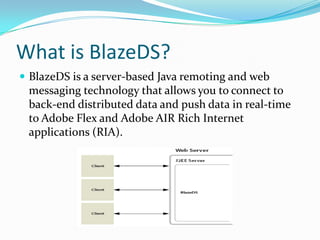
What is BlazeDS?BlazeDS is a server-based Java remoting and web messaging technology that allows you to connect to back-end distributed data and push data in real-time to Adobe Flex and Adobe AIR Rich Internet applications (RIA).
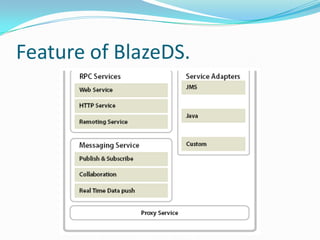
Services of BlazeDSThe Remoting Service allows your Flex application to directly invoke methods of Java objects deployed in your application server. The Message Service provides a publish/subscribe infrastructure that allows your Flex application to publish messages and subscribe to a messaging destination, enabling the development of real-time data push and collaborative applications. The Proxy Service allows your Flex application to make cross-domain service requests in a secure and controlled manner. It allows your Flex application to access a service available on a different domain than the domain from where the application was downloaded (without having to deploy a crossdomain.xml policy file on the target domain).
Feature of BlazeDS.
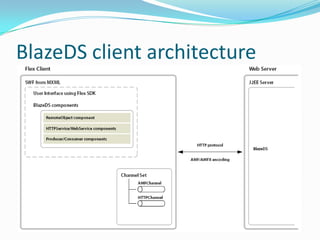
BlazeDS client architecture
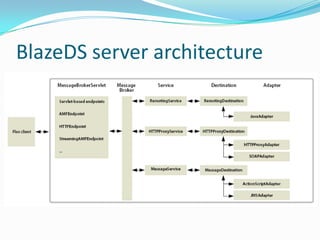
BlazeDS server architecture
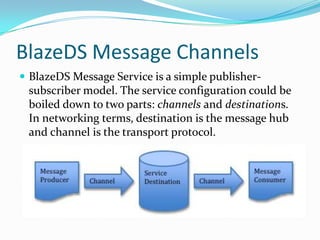
BlazeDS Message ChannelsBlazeDS Message Service is a simple publisher-subscriber model. The service configuration could be boiled down to two parts: channels and destinations. In networking terms, destination is the message hub and channel is the transport protocol.
Messaging Flex componentProducer:You use the Producer component in a Flex application to enable the application to send messages. You can create Producer components in MXML or ActionScript.Consumer:You can create Consumer components in MXML or ActionScript. To subscribe to a destination, you call the Consumer.subscribe() method.
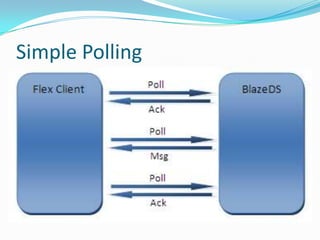
Simple PollingPolling is the fool-proof messaging protocol that’s guaranteed to work in most scenarios, but it’s also the slowest and least efficient. The default messaging protocol in BlazeDS uses the simple polling technique. The client pings the server on a regular interval. An empty acknowledgment is returned if there’re no messages for the client,
Simple Polling
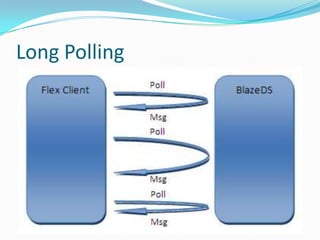
Long PollingTo achieve near-real-time messaging, there’s a option called “long polling”. Instead of acknowledging right away, the server could hold the polling request until there’s a message for the client. This ensure the messages are delivered to the client as soon as they become available,
Long Polling
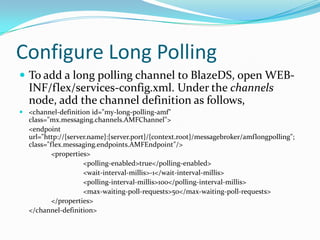
Configure Long PollingTo add a long polling channel to BlazeDS, open WEB-INF/flex/services-config.xml. Under the channels node, add the channel definition as follows, <channel-definition id="my-long-polling-amf" class="mx.messaging.channels.AMFChannel">	<endpoint url="http://{server.name}:{server.port}/{context.root}/messagebroker/amflongpolling"; class="flex.messaging.endpoints.AMFEndpoint"/>		<properties>			<polling-enabled>true</polling-enabled>			<wait-interval-millis>-1</wait-interval-millis>			<polling-interval-millis>100</polling-interval-millis>			<max-waiting-poll-requests>50</max-waiting-poll-requests>		</properties>	</channel-definition>
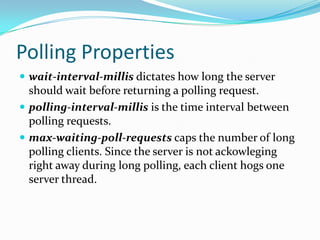
Polling Propertieswait-interval-millis dictates how long the server should wait before returning a polling request.polling-interval-millis is the time interval between polling requests. max-waiting-poll-requests caps the number of long polling clients. Since the server is not ackowleging right away during long polling, each client hogs one server thread.
StreamingBlazeDS supports real-time message streaming over AMF and HTTP. Unlike long polling, which closes and reopens the connection upon receiving a message, streaming keep the connection open at all times.<channel-definition id="my-streaming-amf" class="mx.messaging.channels.StreamingAMFChannel">	<endpoint url="http://{server.name}:{server.port}/{context.root}/messagebroker/amfstreaming"; class="flex.messaging.endpoints.StreamingAMFEndpoint"/>		<properties>			<idle-timeout-minutes>0</idle-timeout-minutes>			<max-streaming-clients>10</max-streaming-clients>			<server-to-client-heartbeat-millis>5000</server-to-client-heartbeat-millis>		</properties></channel-definition>
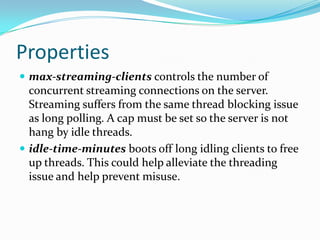
Propertiesmax-streaming-clientscontrols the number of concurrent streaming connections on the server. Streaming suffers from the same thread blocking issue as long polling. A cap must be set so the server is not hang by idle threads. idle-time-minutes boots off long idling clients to free up threads. This could help alleviate the threading issue and help prevent misuse.
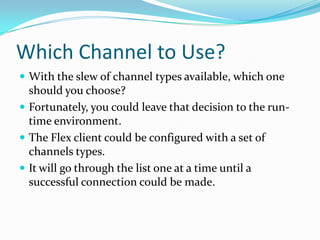
Which Channel to Use?With the slew of channel types available, which one should you choose? Fortunately, you could leave that decision to the run-time environment. The Flex client could be configured with a set of channels types. It will go through the list one at a time until a successful connection could be made.
ClerificationOne last thing I need to clear up is the terminology confusion over the AMF channels and HTTP channels. In the context of BlazeDS channels, AMF refers to binary RPC protocol. HTTP refers to XML RPC protocol. They BOTH run on top of HTTP.
Demo
Q & A

Flex Messeging Services

  • 1.
    Flex Messeging ServicesUsing BlazeDSAdobe Meet Oct 2009
  • 2.
    What is BlazeDS?BlazeDSis a server-based Java remoting and web messaging technology that allows you to connect to back-end distributed data and push data in real-time to Adobe Flex and Adobe AIR Rich Internet applications (RIA).
  • 3.
    Services of BlazeDSTheRemoting Service allows your Flex application to directly invoke methods of Java objects deployed in your application server. The Message Service provides a publish/subscribe infrastructure that allows your Flex application to publish messages and subscribe to a messaging destination, enabling the development of real-time data push and collaborative applications. The Proxy Service allows your Flex application to make cross-domain service requests in a secure and controlled manner. It allows your Flex application to access a service available on a different domain than the domain from where the application was downloaded (without having to deploy a crossdomain.xml policy file on the target domain).
  • 4.
  • 5.
  • 6.
  • 7.
    BlazeDS Message ChannelsBlazeDSMessage Service is a simple publisher-subscriber model. The service configuration could be boiled down to two parts: channels and destinations. In networking terms, destination is the message hub and channel is the transport protocol.
  • 8.
    Messaging Flex componentProducer:Youuse the Producer component in a Flex application to enable the application to send messages. You can create Producer components in MXML or ActionScript.Consumer:You can create Consumer components in MXML or ActionScript. To subscribe to a destination, you call the Consumer.subscribe() method.
  • 9.
    Simple PollingPolling isthe fool-proof messaging protocol that’s guaranteed to work in most scenarios, but it’s also the slowest and least efficient. The default messaging protocol in BlazeDS uses the simple polling technique. The client pings the server on a regular interval. An empty acknowledgment is returned if there’re no messages for the client,
  • 10.
  • 11.
    Long PollingTo achievenear-real-time messaging, there’s a option called “long polling”. Instead of acknowledging right away, the server could hold the polling request until there’s a message for the client. This ensure the messages are delivered to the client as soon as they become available,
  • 12.
  • 13.
    Configure Long PollingToadd a long polling channel to BlazeDS, open WEB-INF/flex/services-config.xml. Under the channels node, add the channel definition as follows, <channel-definition id="my-long-polling-amf" class="mx.messaging.channels.AMFChannel"> <endpoint url="http://{server.name}:{server.port}/{context.root}/messagebroker/amflongpolling"; class="flex.messaging.endpoints.AMFEndpoint"/> <properties> <polling-enabled>true</polling-enabled> <wait-interval-millis>-1</wait-interval-millis> <polling-interval-millis>100</polling-interval-millis> <max-waiting-poll-requests>50</max-waiting-poll-requests> </properties> </channel-definition>
  • 14.
    Polling Propertieswait-interval-millis dictateshow long the server should wait before returning a polling request.polling-interval-millis is the time interval between polling requests. max-waiting-poll-requests caps the number of long polling clients. Since the server is not ackowleging right away during long polling, each client hogs one server thread.
  • 15.
    StreamingBlazeDS supports real-timemessage streaming over AMF and HTTP. Unlike long polling, which closes and reopens the connection upon receiving a message, streaming keep the connection open at all times.<channel-definition id="my-streaming-amf" class="mx.messaging.channels.StreamingAMFChannel"> <endpoint url="http://{server.name}:{server.port}/{context.root}/messagebroker/amfstreaming"; class="flex.messaging.endpoints.StreamingAMFEndpoint"/> <properties> <idle-timeout-minutes>0</idle-timeout-minutes> <max-streaming-clients>10</max-streaming-clients> <server-to-client-heartbeat-millis>5000</server-to-client-heartbeat-millis> </properties></channel-definition>
  • 16.
    Propertiesmax-streaming-clientscontrols the numberof concurrent streaming connections on the server. Streaming suffers from the same thread blocking issue as long polling. A cap must be set so the server is not hang by idle threads. idle-time-minutes boots off long idling clients to free up threads. This could help alleviate the threading issue and help prevent misuse.
  • 17.
    Which Channel toUse?With the slew of channel types available, which one should you choose? Fortunately, you could leave that decision to the run-time environment. The Flex client could be configured with a set of channels types. It will go through the list one at a time until a successful connection could be made.
  • 18.
    ClerificationOne last thingI need to clear up is the terminology confusion over the AMF channels and HTTP channels. In the context of BlazeDS channels, AMF refers to binary RPC protocol. HTTP refers to XML RPC protocol. They BOTH run on top of HTTP.
  • 19.
  • 20.