SolidWorks Standard
• Lorem ipsum Lorem ipsum
• Lorem ipsum
• Lorem ipsum
• Lorem ipsum
• Lorem ipsum
• Lorem ipsum
• Lorem ipsum
• Lorem ipsum
• Lorem ipsum
SolidWorks Overview
Ihdal Husnayain
Account Executive Solidworks
Working with PT Arisma Data Setia (ADS)
• ADS experience for more than 19 years
• ADS training and implementation base on project
• ADS support and post sales profile certification
• ADS customer base now more than 300 companies
Jakarta Office :
ADS Courtyard, Jl. Srengseng Raya No. 156
Kembangan – Jakarta Barat
Rep. Office :
Graha Anggrek Mas Blok B3 No. 1, Pagerwojo
Sidoarjo – Jawa Timur
Coming Soon :
Cikarang Central City Block F17-18 Jl. Raya Cibarusah KM.10, Cikarang, Bekasi
Who We Are
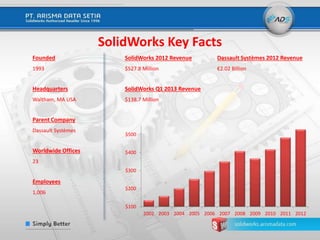
SolidWorks Key Facts
$100
$200
$300
$400
$500
2002 2003 2004 2005 2006 2007 2008 2009 2010 2011 2012
SolidWorks 2012 Revenue Dassault Systèmes 2012 Revenue
$527.8 Million €2.02 Billion
SolidWorks Q1 2013 Revenue
$138.7 Million
Founded
1993
Headquarters
Waltham, MA USA
Parent Company
Dassault Systèmes
Worldwide Offices
23
Employees
1,006
Million
Year
SolidWorks Today2,000,000+ users178,100 customers80 countries1 Passion...
2,103,400 users 178,100 customers 80 countries
Teamline Your Development Process
Project Data Management
Preliminary
Project and
Concepts
Technical
Communication
Operations
Design
Validation
Mechanical Design
Electrical Design
Typical Serial Process
Preliminary
Project and
Concepts
Technical
Communication
Design Validation
Operations
Integrated Electrical and
Mechanical Design
SolidWorks Proposal
SAVE MONEY
Make better decisions earlier
Intuitive Solutions For Every Stage of Your Design
Inspiring Innovation
SOLIDWORKS 2015
• Improve Your Everyday Productivity
– Get your work done faster and easier
• Optimize Your Work Process
– Share project information across your global team
• Reduce Operations Costs
– Integrate design processes with downstream operations
• Solve More Design Challenges
– Address industry-specific engineering and design tasks
Get your work done faster and easier
Improve Your Everyday Productivity
• Focus on design, not CAD
• Get the information you need, faster
• Work quickly and easily with an
enhanced user experience
• Simulate Multiple Design Scenarios
Share project information across your global team
Optimize Your Work Process
• Manage product structures up front
• Access information everywhere
• Document designs for manufacturing
Integrate design processes with downstream operations
Reduce Operations Costs
• Calculate product costs as you design
• Create detailed manufacturing information
• Improve understanding of design intent
• Integrated electrical systems up front
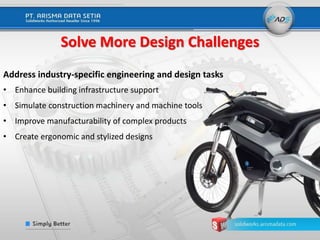
Address industry-specific engineering and design tasks
Solve More Design Challenges
• Enhance building infrastructure support
• Simulate construction machinery and machine tools
• Improve manufacturability of complex products
• Create ergonomic and stylized designs
Industry Challenges
Safety and environmental impacts
Efficient production & energy
management
Widely varying operating conditions
Project scheduling & commissioning
Large scale, high cost system
What Solidworks Offering?
Capability Implication Impact
Realistic Modeling See and understand project details
before construction begins (from
component level through whole
plant layout)
More contract wins, reduced bid & proposal cycle
times, increased quality
Design Simulation &
Analysis
Understand real-life performance
without need for physical
prototypes or over-design
Optimize designs, more reliable up-time
Compliance
Integrated Apps Single Environment for design,
piping, structures, simulation,
documentation
Lower IT cost, easier to learn
Eliminate Construction issues caused by poor
design
Seamless Product &
Project Data
Management
Standardization, Collaboration,
Open Architecture
Lower capital costs
Eliminate errors that cause construction delays
Fits within your IT infrastructure
• General purpose fluid flow and heat transfer simulation tool integrated with
SolidWorks 3D CAD
• Powerful 3D Design simulation tool
• Enable for true concurrent engineering
• Brings the designed Fluid Flow analysis coupled with Heat Transfer simulation
What is SolidWorks Flow Simulation?
What is SolidWorks Simulation?
• it is a design analysis software that is fully integrated in
SolidWorks.
• it simulates the testing of your model’s prototype in its working
environment
• it can help you answer questions like: how safe, efficient, and
economical is your design? will it bend? will it break?
General Advantages
 Prototypes
 On average, our customers using SolidWorks Simulation have reduced the number
of prototypes by 50%.
 Simulation Outsourcing :
 More control over design, including time and annual costs
 Alternative Materials :
 Optimized the design by reducing the amount of materials used
 Design Options
 With simulation you can decide which is the best design alternative
 Cost of Warranty
 Improve maintenance services and improve quality and reliability about their
products
Weight reduction: 34%
SolidWorks Electrical Schematic
Solidorks Electrical Product Offerings
SolidWorks Electrical Professional
SolidWorks Electrical 3D
Simplifies development of embedded
electrical systems
Electrical Design – SolidWorks Electrical
• Real time collaboration between
electrical and mechanical design teams
– Automated 2D electrical schematics
– Bi-directional link between 2D
schematics and SolidWorks 3D model
• Intuitive and easy to use
• Multi-user design capability
• Powerful design and project
management tools
“Generic 2D CAD” Electrical Design Processes"
DRAW
•Logical definition
•Part selection
•Cable drawings
DOCUMENT
•Create BOM
•Wire/cable list
•From/To list
AUDIT
•Audit drawings
•Audit BOM
•Verify connections
SolidWorks Electrical
Makes this easier with
more efficient tools for
design
SolidWorks Electrical fully automates
these error-prone and time-consuming
processes
A Community Of Support At Your Side
2 Million+ Community of users
Local certified support and training
Educational organizations and graduates
SolidWorks User Group
1. Bekasi Area SolidWorks User Group
2. Bogor Area SolidWorks User Group
3. Tangerang City SolidWorks User Group
4. Surabaya Area SolidWorks User Group
Transforming Innovation into Your Success
SOLIDWORKS Solution

SOLIDWORKS Solution

  • 1.
    SolidWorks Standard • Loremipsum Lorem ipsum • Lorem ipsum • Lorem ipsum • Lorem ipsum • Lorem ipsum • Lorem ipsum • Lorem ipsum • Lorem ipsum • Lorem ipsum SolidWorks Overview Ihdal Husnayain Account Executive Solidworks
  • 2.
    Working with PTArisma Data Setia (ADS) • ADS experience for more than 19 years • ADS training and implementation base on project • ADS support and post sales profile certification • ADS customer base now more than 300 companies Jakarta Office : ADS Courtyard, Jl. Srengseng Raya No. 156 Kembangan – Jakarta Barat Rep. Office : Graha Anggrek Mas Blok B3 No. 1, Pagerwojo Sidoarjo – Jawa Timur Coming Soon : Cikarang Central City Block F17-18 Jl. Raya Cibarusah KM.10, Cikarang, Bekasi Who We Are
  • 3.
    SolidWorks Key Facts $100 $200 $300 $400 $500 20022003 2004 2005 2006 2007 2008 2009 2010 2011 2012 SolidWorks 2012 Revenue Dassault Systèmes 2012 Revenue $527.8 Million €2.02 Billion SolidWorks Q1 2013 Revenue $138.7 Million Founded 1993 Headquarters Waltham, MA USA Parent Company Dassault Systèmes Worldwide Offices 23 Employees 1,006 Million Year
  • 4.
    SolidWorks Today2,000,000+ users178,100customers80 countries1 Passion... 2,103,400 users 178,100 customers 80 countries
  • 5.
    Teamline Your DevelopmentProcess Project Data Management Preliminary Project and Concepts Technical Communication Operations Design Validation Mechanical Design Electrical Design Typical Serial Process Preliminary Project and Concepts Technical Communication Design Validation Operations Integrated Electrical and Mechanical Design SolidWorks Proposal SAVE MONEY Make better decisions earlier
  • 6.
    Intuitive Solutions ForEvery Stage of Your Design
  • 7.
    Inspiring Innovation SOLIDWORKS 2015 •Improve Your Everyday Productivity – Get your work done faster and easier • Optimize Your Work Process – Share project information across your global team • Reduce Operations Costs – Integrate design processes with downstream operations • Solve More Design Challenges – Address industry-specific engineering and design tasks
  • 8.
    Get your workdone faster and easier Improve Your Everyday Productivity • Focus on design, not CAD • Get the information you need, faster • Work quickly and easily with an enhanced user experience • Simulate Multiple Design Scenarios
  • 9.
    Share project informationacross your global team Optimize Your Work Process • Manage product structures up front • Access information everywhere • Document designs for manufacturing
  • 10.
    Integrate design processeswith downstream operations Reduce Operations Costs • Calculate product costs as you design • Create detailed manufacturing information • Improve understanding of design intent • Integrated electrical systems up front
  • 11.
    Address industry-specific engineeringand design tasks Solve More Design Challenges • Enhance building infrastructure support • Simulate construction machinery and machine tools • Improve manufacturability of complex products • Create ergonomic and stylized designs
  • 12.
    Industry Challenges Safety andenvironmental impacts Efficient production & energy management Widely varying operating conditions Project scheduling & commissioning Large scale, high cost system
  • 13.
    What Solidworks Offering? CapabilityImplication Impact Realistic Modeling See and understand project details before construction begins (from component level through whole plant layout) More contract wins, reduced bid & proposal cycle times, increased quality Design Simulation & Analysis Understand real-life performance without need for physical prototypes or over-design Optimize designs, more reliable up-time Compliance Integrated Apps Single Environment for design, piping, structures, simulation, documentation Lower IT cost, easier to learn Eliminate Construction issues caused by poor design Seamless Product & Project Data Management Standardization, Collaboration, Open Architecture Lower capital costs Eliminate errors that cause construction delays Fits within your IT infrastructure
  • 14.
    • General purposefluid flow and heat transfer simulation tool integrated with SolidWorks 3D CAD • Powerful 3D Design simulation tool • Enable for true concurrent engineering • Brings the designed Fluid Flow analysis coupled with Heat Transfer simulation What is SolidWorks Flow Simulation?
  • 15.
    What is SolidWorksSimulation? • it is a design analysis software that is fully integrated in SolidWorks. • it simulates the testing of your model’s prototype in its working environment • it can help you answer questions like: how safe, efficient, and economical is your design? will it bend? will it break?
  • 16.
    General Advantages  Prototypes On average, our customers using SolidWorks Simulation have reduced the number of prototypes by 50%.  Simulation Outsourcing :  More control over design, including time and annual costs  Alternative Materials :  Optimized the design by reducing the amount of materials used  Design Options  With simulation you can decide which is the best design alternative  Cost of Warranty  Improve maintenance services and improve quality and reliability about their products Weight reduction: 34%
  • 17.
    SolidWorks Electrical Schematic SolidorksElectrical Product Offerings SolidWorks Electrical Professional SolidWorks Electrical 3D
  • 18.
    Simplifies development ofembedded electrical systems Electrical Design – SolidWorks Electrical • Real time collaboration between electrical and mechanical design teams – Automated 2D electrical schematics – Bi-directional link between 2D schematics and SolidWorks 3D model • Intuitive and easy to use • Multi-user design capability • Powerful design and project management tools
  • 19.
    “Generic 2D CAD”Electrical Design Processes" DRAW •Logical definition •Part selection •Cable drawings DOCUMENT •Create BOM •Wire/cable list •From/To list AUDIT •Audit drawings •Audit BOM •Verify connections SolidWorks Electrical Makes this easier with more efficient tools for design SolidWorks Electrical fully automates these error-prone and time-consuming processes
  • 20.
    A Community OfSupport At Your Side 2 Million+ Community of users Local certified support and training Educational organizations and graduates SolidWorks User Group 1. Bekasi Area SolidWorks User Group 2. Bogor Area SolidWorks User Group 3. Tangerang City SolidWorks User Group 4. Surabaya Area SolidWorks User Group Transforming Innovation into Your Success

Editor's Notes

  • #3 SLIDE FOR SW VAR USE. Slide Message : Add a slide to differentiate your VAR organization, experience and qualifications to assist the prospect in achieving their goals. You won’t let them down and you know SolidWorks tools better than anyone. Main Points: Skill Set/Certified Staff Experience Customer base Speaker Notes: Now, I do want to tell you about <VAR Name Here>. We have over XX experienced engineers and YY years in the industry to support the SolidWorks portfolio and answer your phone calls.   Our engineers are SolidWorks Certified to be able to handle your calls.   Our customer base extends across <My Territory> and above all, our customer satisfaction levels are monitored and measured by SolidWorks so that you can be sure to get the best support available for your investment.
  • #4 Slide Message: SolidWorks is a growing, global, financially stable organization and part of Dassault Systèmes a $2 billion company. Main Points: In business for 19 years Strong history of growth Financially healthy DS 2012 revenues were €2.028 billion ($2.64 billion) (DS results are reported in EUROS) SolidWorks 2012 Revenues - $527.8 million SolidWorks Q4 2012 Revenues - 132.4 million, Y/Y % Growth Revenue - 11% (15% in constant currency in 3DS release), Commercial Seats Sold - 13,844, Y/Y % Commercial Seat Growth - 16% Speaker Notes: To start off, let’s take a look at a few facts about SolidWorks. We’re a global organization. We’ve been in business for over 18 years. We’re headquartered in Massachusetts in the USA, and we’re part of Dassault Systèmes, one of the biggest technology providers to engineering with a turnover of €1.78 billion annually.   A solid start to 2012 with 16% revenue growth Y.O.Y and $125m send a good message about the SolidWorks business. Good 14% seat growth from Q1 2011. The solution products also contributed over 20% of revenue. As always let our numbers do the talking ! So that’s a little about us, but what I would like to do is move on to where we are today and why it’s relevant to you.
  • #5 Slide Message : The SolidWorks community today encompasses more than 2 million people in 80 countries with one common passion - DESIGN. Speaker Notes: Today, we have over one million users worldwide in ~ 170,000 commercial companies in 80 countries, resulting in a huge base of people working with our products. They're innovative people who all have one thing in common—a passion for design. This passion means customers push us to support them across many different disciplines.
  • #6 Solve new problems What is our approach from process perspective? Change the engineering and design process to work in parallel instead of serial Why:? Make better business decisions, earlier Create better designs
  • #7 Slide Message : SolidWorks is more than just CAD. We have a complete toolset to design, simulate, publish, and manage data. We can even help you assess the environmental impact of your products. Speaker Notes:   The core of SolidWorks is 3D design software but SolidWorks is more than just CAD. We have a complete toolset that helps you be more efficient and productive in your product development through every step of the design process.  Our relentless focus on simplicity has been instrumental in helping a number of customers be successful: Makes it easy to learn and adopt SolidWorks in school and in the workplace, positioning SolidWorks as the de facto standard for 3D design Creates a ready-made community and potential hiring pool of SolidWorks professionals Ensures design and engineering professionals can take advantage of the benefits of 3D today with a fast learning curve and underscores the opportunity costs of not using SolidWorks today to gain greater productivity Allows for lower total cost of ownership   Our solution includes 5 distinct product lines:   Design tools to create models and assemblies Simulation tools to test the design and ensure it is the best it can be Tools to assess the environmental impact of your design through its product lifecycle Tools to repurpose 3D CAD data to simplify the way companies create, maintain, and consume content for technical communication. and… All of these tools are underpinned by SolidWorks Enterprise PDM to manage and securely control your data, keeping a single source of the true data for your designs   All of these solutions work together to allow your company to make your products better, faster, and at a lower cost. Let’s take a closer look at these elements, starting with the design tools.
  • #8 SOLIDWORKS 2015 is the 23rd release of our flagship 3D CAD software – an exciting release packed with new features and new productivity enhancements that translate into real benefits. Each year, we receive thousands of enhancement requests from the growing community of SOLIDWORKS users, suggesting ways to automate common tasks, streamline design processes, or provide custom tools for specific industries. This is valuable feedback and provides insight into how our products are used and ways in which we can provide real process improvements and real business benefits, for you. SOLIDWORKS 2015 builds upon the production proven technology used by thousands of designers and engineers every day. There are hundreds of enhancements across the entire product line Over 90% of these enhancements were requested directly by customers SOLIDWORKS 2015 helps you speed through your designs with powerful new features, substantial performance boosts, and an enhanced user experience. Easily manage product structures up front, quickly document your designs for manufacturing and assembly, and share project information across your global team with minimal effort. Integrate your design processes with downstream production operations to help lower costs and accelerate time-to-market. And new tailored solutions help you overcome many of the industry-specific design challenges you face every day. SOLIDWORKS 2015 – Inspiring Innovation.
  • #9 SOLIDWORKS 2015 is packed with engineering and design performance boosts to help you get your work done faster and easier. The user experience puts your focus on design, not “CAD overhead” to get you the information you need, in record time.   Focus on design, not the modelling software for faster design iterations - new features accelerate your design process with reduced geometry creation steps.  Get the information you need, faster - improved overall general performance, faster analysis, and streamlined approaches give you the data you need to make decisions and keep designing. Work quickly and easily with the enhanced user experience - improved graphical interface presents a clear view of critical data to help you focus on design. Simulate Multiple Design Scenarios - quickly evaluate the effects of various load combinations on your model. MySolidWorks Professional – with access to extensive online training, the new MySolidWorks Professional subscription level delivers improved product skills and a centralized technical reference resource for all things SOLIDWORKS.
  • #10 Share project information across your global team with minimal effort. Easily manage product structures up front in the design process, and then quickly document designs for manufacturing and assembly. With access to information from everywhere, all stakeholders stay connected to quickly move product development forward. Easily access social collaboration and online data management tools for faster development and decision-making. Enable top-down design by visually creating assemblies and managing product structures upfront with SOLIDWORKS Treehouse Access your design information from any device - connect to SOLIDWORKS Enterprise PDM from any location with Web2; browse folders, view file information, search, and change file states.
  • #11 SOLIDWORKS 2015 helps speed up your production, integrate design processes with downstream manufacturing, lower costs, and accelerate time-to-market. Enhanced cost analysis for better upfront estimates across many manufacturing methods, including weldments, plastics, castings, and 3D printing. Integrated inspection simplifies the process of creating documentation and performing in-process or receiving inspection for quality assurance. Improve communication between your design and manufacturing teams by enabling them to communicate product and manufacturing information (PMI) directly in 3D. Quickly develop electrical schematics and incorporate them into the 3D model to ensure full cable harness and system integration prior to production.
  • #12 SOLIDWORKS 2015 delivers new technical capabilities that support a wide array of industries and markets. These tailored solutions help you overcome the industry-specific engineering and design challenges that your company faces on a daily basis. Create HVAC and cable tray layouts and manage digital models for Building Information Modelling (BIM) to enhance building infrastructure support. Accurately simulate construction machinery and machine tools to help ensure operation and usability Improve manufacturability of products with compound curvature to identify materials and manufacturing issues. Enhance product aesthetics and usability with increased surfacing flexibility to model more ergonomic and stylized designs  
  • #15 <Note for presenter> Click on the ‘Plus’ symbol to detail more this capability Speaker Notes : SolidWorks Flow Simulation software is a powerful computational fluid dynamics (CFD) tool that enables designers to quickly and easily simulate fluid flow, heat transfer, and fluid forces that are critical to the success of the design. CLICK SolidWorks Flow Simulation is fully integrated within SolidWorks 3D CAD software, so you can use all the benefits of a fluid flow simulation to design your products with better insight. Design variations can be compared to make better decisions, resulting in products with superior performance. You can, for example, simulate the water flow inside a valve to dimension it (pressure drop, velocity, turbulences), test the air flow inside an electronic enclosure to optimize the cooling process, or check the air flow around vehicles, among a broad range of applications. CLICK Concurrent engineering helps detect design flaws early in the design cycle, and helps compare design scenarios before going further in the design process. CLICK With SolidWorks Flow Simulation and the wide range of technical capabilities that you can see on the slide, you can gain an understanding of the impact of flow on the design before it’s built. <Next Slide>
  • #20 Before we start talking about SolidWorks Electrical specifically, I’d like to share with you what we’ve observed over the past couple years, after working with hundreds of companies around the world. We’ve seen that electrical designers, regardless of their company size or products designed, generally follow a three-step process in electrical systems design: First, they draw their systems to establish the logical definition; They select parts from online and printed catalogs; and draw any special cables or other components needing fabrication Next, they have to document their system in a way that is useful to different audiences. For example, a designer may scan through their drawings to construct a BOM, or document each wire connection to make a from/to list. This task typically results in many manually-created spreadsheets by the time all wiring lists, BOMs and other reports are completed. Finally, since the spreadsheets are in no way linked to the CAD files, all documents must be regularly audited. The problem of ensuring these documents are accurate becomes exponentially more complex as more designers collaborate on a project. The purpose of SolidWorks Electrical is twofold: With powerful schematic creation tools, SolidWorks Electrical helps designers work more efficiently than they can in general-purpose CAD systems. SolidWorks Electrical features time-saving tools that help designers get the job done faster. Also, SolidWorks Electrical includes powerful project management tools that keep track of all the project details and updates. Any change made in one area of a project will be reflected in all other relevant areas. For example, if we substitute a switch on a schematic for an alternate part, any references to that switch in the BOM, wiring list or other documentation will reflect the change. Effectively, we’re fully automating the time-consuming and error-prone process of creating, updating, and checking many separate project documents.
  • #21 Slide Message : Our solutions help your people unleash their creativity without getting in the way. There is a massive community of support to help you along the way, and rest assured, that your feedback will continue to drive our investments in the tools you use every day. Main Points: Focus on design (not CAD) Community of support Your success is our success Speaker Notes: The intuitive tools we have make it simpler for you to design your products, simulate them, check the environmental impact, and then publish them. This is all backed up by the power to manage your data so you can focus on what you need to do.   But we’re not just software … our community is what sets us apart and will be at your side every step of the way. If it’s localized training and support from <VAR Name Here> or if you are looking for graduate engineers at local schools and colleges, SolidWorks will be there.   And, finally we focus on what you need to walk away from this room with today – a vision of how you can realize your success to meet your goals. We listen and use that knowledge in the tools sitting on your desk.