Solidworks
SlideMake.com
Introduction to SolidWorks
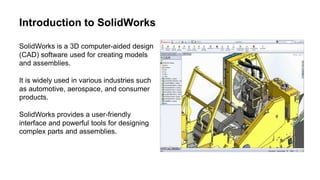
SolidWorks is a 3D computer-aided design
(CAD) software used for creating models
and assemblies.
It is widely used in various industries such
as automotive, aerospace, and consumer
products.
SolidWorks provides a user-friendly
interface and powerful tools for designing
complex parts and assemblies.
Key Features of SolidWorks
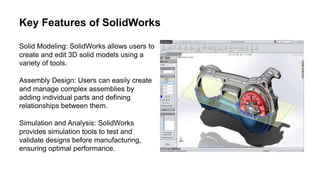
Solid Modeling: SolidWorks allows users to
create and edit 3D solid models using a
variety of tools.
Assembly Design: Users can easily create
and manage complex assemblies by
adding individual parts and defining
relationships between them.
Simulation and Analysis: SolidWorks
provides simulation tools to test and
validate designs before manufacturing,
ensuring optimal performance.
Benefits of Using SolidWorks
Accelerated Design Process: SolidWorks
streamlines the design process by allowing
users to quickly create, modify, and
visualize their designs.
Improved Collaboration: SolidWorks
facilitates collaboration between team
members through its ability to share and
communicate design data easily.
Cost and Time Savings: By identifying
design flaws early on and optimizing
designs, SolidWorks helps save costs and
reduce time-to-market.
SolidWorks File Types
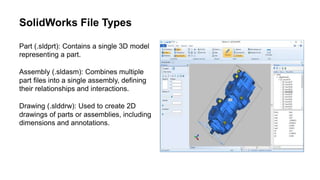
Part (.sldprt): Contains a single 3D model
representing a part.
Assembly (.sldasm): Combines multiple
part files into a single assembly, defining
their relationships and interactions.
Drawing (.slddrw): Used to create 2D
drawings of parts or assemblies, including
dimensions and annotations.
SolidWorks Design Library
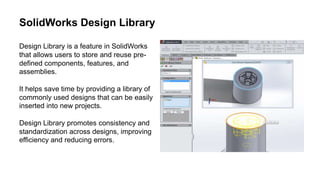
Design Library is a feature in SolidWorks
that allows users to store and reuse pre-
defined components, features, and
assemblies.
It helps save time by providing a library of
commonly used designs that can be easily
inserted into new projects.
Design Library promotes consistency and
standardization across designs, improving
efficiency and reducing errors.
SolidWorks Simulation
SolidWorks Simulation is a powerful tool for
virtual testing and analysis of designs.
It enables engineers to evaluate product
performance under various conditions,
such as stress, heat transfer, and fluid flow.
SolidWorks Simulation helps identify
potential design issues and optimize
designs for better performance and
reliability.
SolidWorks Electrical
SolidWorks Electrical is a module within
SolidWorks that enables the design and
documentation of electrical systems.
It provides tools for schematic creation, 3D
cabinet layout, and wire harness design,
ensuring accurate and efficient electrical
design.
SolidWorks Electrical integrates seamlessly
with other SolidWorks modules, allowing for
a unified design environment.
SolidWorks CAM
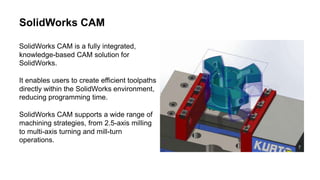
SolidWorks CAM is a fully integrated,
knowledge-based CAM solution for
SolidWorks.
It enables users to create efficient toolpaths
directly within the SolidWorks environment,
reducing programming time.
SolidWorks CAM supports a wide range of
machining strategies, from 2.5-axis milling
to multi-axis turning and mill-turn
operations.
SolidWorks Visualize
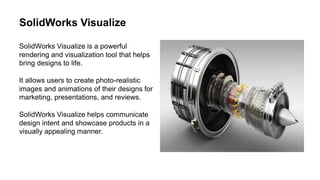
SolidWorks Visualize is a powerful
rendering and visualization tool that helps
bring designs to life.
It allows users to create photo-realistic
images and animations of their designs for
marketing, presentations, and reviews.
SolidWorks Visualize helps communicate
design intent and showcase products in a
visually appealing manner.
Conclusion
SolidWorks is a versatile and powerful CAD
software used in various industries for
design and engineering purposes.
With its intuitive interface, extensive
features, and integration capabilities,
SolidWorks enables users to bring their
ideas to life efficiently.
By utilizing SolidWorks, companies can
improve design quality, reduce costs, and
accelerate the product development
process.

Solidworks.pptx

  • 1.
  • 2.
    Introduction to SolidWorks SolidWorksis a 3D computer-aided design (CAD) software used for creating models and assemblies. It is widely used in various industries such as automotive, aerospace, and consumer products. SolidWorks provides a user-friendly interface and powerful tools for designing complex parts and assemblies.
  • 3.
    Key Features ofSolidWorks Solid Modeling: SolidWorks allows users to create and edit 3D solid models using a variety of tools. Assembly Design: Users can easily create and manage complex assemblies by adding individual parts and defining relationships between them. Simulation and Analysis: SolidWorks provides simulation tools to test and validate designs before manufacturing, ensuring optimal performance.
  • 4.
    Benefits of UsingSolidWorks Accelerated Design Process: SolidWorks streamlines the design process by allowing users to quickly create, modify, and visualize their designs. Improved Collaboration: SolidWorks facilitates collaboration between team members through its ability to share and communicate design data easily. Cost and Time Savings: By identifying design flaws early on and optimizing designs, SolidWorks helps save costs and reduce time-to-market.
  • 5.
    SolidWorks File Types Part(.sldprt): Contains a single 3D model representing a part. Assembly (.sldasm): Combines multiple part files into a single assembly, defining their relationships and interactions. Drawing (.slddrw): Used to create 2D drawings of parts or assemblies, including dimensions and annotations.
  • 6.
    SolidWorks Design Library DesignLibrary is a feature in SolidWorks that allows users to store and reuse pre- defined components, features, and assemblies. It helps save time by providing a library of commonly used designs that can be easily inserted into new projects. Design Library promotes consistency and standardization across designs, improving efficiency and reducing errors.
  • 7.
    SolidWorks Simulation SolidWorks Simulationis a powerful tool for virtual testing and analysis of designs. It enables engineers to evaluate product performance under various conditions, such as stress, heat transfer, and fluid flow. SolidWorks Simulation helps identify potential design issues and optimize designs for better performance and reliability.
  • 8.
    SolidWorks Electrical SolidWorks Electricalis a module within SolidWorks that enables the design and documentation of electrical systems. It provides tools for schematic creation, 3D cabinet layout, and wire harness design, ensuring accurate and efficient electrical design. SolidWorks Electrical integrates seamlessly with other SolidWorks modules, allowing for a unified design environment.
  • 9.
    SolidWorks CAM SolidWorks CAMis a fully integrated, knowledge-based CAM solution for SolidWorks. It enables users to create efficient toolpaths directly within the SolidWorks environment, reducing programming time. SolidWorks CAM supports a wide range of machining strategies, from 2.5-axis milling to multi-axis turning and mill-turn operations.
  • 10.
    SolidWorks Visualize SolidWorks Visualizeis a powerful rendering and visualization tool that helps bring designs to life. It allows users to create photo-realistic images and animations of their designs for marketing, presentations, and reviews. SolidWorks Visualize helps communicate design intent and showcase products in a visually appealing manner.
  • 11.
    Conclusion SolidWorks is aversatile and powerful CAD software used in various industries for design and engineering purposes. With its intuitive interface, extensive features, and integration capabilities, SolidWorks enables users to bring their ideas to life efficiently. By utilizing SolidWorks, companies can improve design quality, reduce costs, and accelerate the product development process.

Editor's Notes

  • #3 Image source: https://www.solidapps.co.uk/blog/2013/07/large-assemblies-made-easy-with-solidworks/
  • #4 Image source: https://www.youtube.com/watch?v=nB5O3P7jnfo
  • #5 Image source: https://blogs.solidworks.com/solidworksblog/2017/07/benefits-solidworks-visualize-boost.html
  • #6 Image source: https://3d-viewers.com/sldprt-viewer.html
  • #7 Image source: https://www.innova-systems.co.uk/creating-a-library-feature-in-solidworks/
  • #8 Image source: https://www.cad-vision.com.sg/solidworks-simulation-cae/
  • #9 Image source: https://www.javelin-tech.com/3d/technology/solidworks-electrical/
  • #10 Image source: https://www.javelin-tech.com/3d/solidworks-cam-milling/
  • #11 Image source: https://www.javelin-tech.com/blog/2018/04/solidworks-visualize-professional-features/
  • #12 Image source: https://www.javelin-tech.com/site/solidworks-bundle/solidworks-software/