1
NetScaler	SD-WAN	
Product	Overview
2
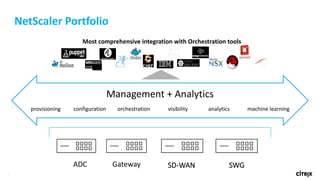
Most	comprehensive	integration	with	Orchestration	tools
NetScaler	Portfolio
SD-WANADC Gateway
Management	+	Analytics
provisioning configuration orchestration visibility analytics machine	learning
SWG
3
​Creates	a	software	defined	wide	area	network	and	cloud	
access	network	that	is	secure,	reliable	and	ensures	high	
application	quality
4
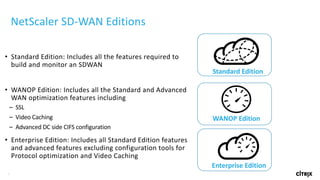
NetScaler	SD-WAN	Editions
• Standard	Edition:	Includes	all	the	features	required	to	
build	and	monitor	an	SDWAN
• WANOP	Edition:	Includes	all	the	Standard	and	Advanced	
WAN	optimization	features	including
– SSL	
– Video	Caching
– Advanced	DC	side	CIFS	configuration
• Enterprise	Edition:	Includes	all	Standard	Edition	features	
and	advanced	features	excluding	configuration	tools	for	
Protocol	optimization	and	Video	Caching
Standard	Edition
WANOP	Edition
Enterprise	Edition
5
NetScaler	SD-WAN	Standard	Edition	Fundamentals
The	Very	Basics
• Bonds	Multiple	WAN	Circuits	into	a	single	logical	circuit
• Monitors	on	a	packet	by	packet	basis	the	condition	of	each	WAN	link	for	quality	and	
condition
• Delivers	applications	on	the	best	circuit	based	on	application	requirements	and	circuit	
state.
• Central	Configuration	and	Monitoring.
Public
MPLS
Other
SDWAN
6
SD-WAN	center,	MCN	Role	
and	Architecture
Building	a	Meshed	SDWAN
7
Datacenter
Cloud/SaaS
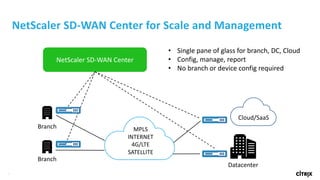
NetScaler	SD-WAN	Center	for	Scale	and	Management
Branch
Branch MPLS
INTERNET
4G/LTE
SATELLITE
NetScaler	SD-WAN	Center
• Single	pane	of	glass	for	branch,	DC,	Cloud
• Config,	manage,	report
• No	branch	or	device	config required
8
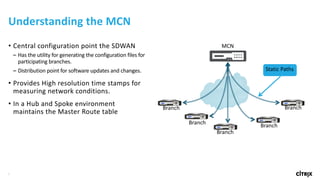
• Central	configuration	point	the	SDWAN
– Has	the	utility	for	generating	the	configuration	files	for	
participating	branches.
– Distribution	point	for	software	updates	and	changes.
• Provides	High	resolution	time	stamps	for	
measuring	network	conditions.
• In	a	Hub	and	Spoke	environment	
maintains	the	Master	Route	table
Understanding	the	MCN
MCN
Branch
Branch
Branch
Branch
Branch
Static	Paths
9
• Dynamic	Paths	
– Connect	Hub	or	Branch	sites	directly	based	on	
• LAN	to	WAN	or	WAN	to	LAN	kbps
• LAN	to	WAN	or	WAN	to	LAN	kpbs
– Route	Tables	on	the	participating	systems	are	updated
– There	is	a	limit	in	each	appliance	for	the	number	of	
dynamic	paths.
• When	the	limit	is	reached	static	paths	will	be	used
– Provisioning	manages	allocation	of	capacity
– Rule	and	Class	traffic	management	policies	are	honored
SD-WAN	Meshing	With	Dynamic	Paths
MCN
Branch
Branch
Branch
Branch
Branch
10
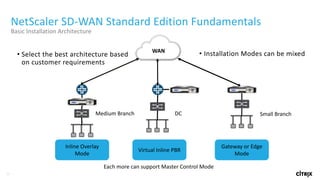
NetScaler	SD-WAN	Standard	Edition	Fundamentals
Basic	Installation	Architecture
• Installation	Modes	can	be	mixed	
DC Small	BranchMedium	Branch
Inline	Overlay	
Mode
Virtual	Inline	PBR
Gateway	or	Edge	
Mode
WAN
• Select	the	best	architecture	based	
on	customer	requirements
Each	more	can	support	Master	Control	Mode
11
NetScaler SD-WAN
Product Overview
12
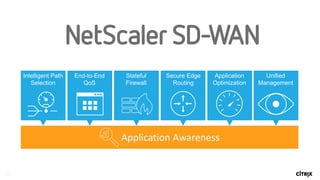
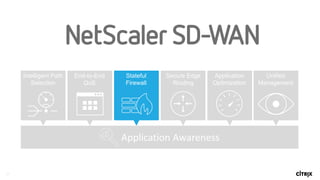
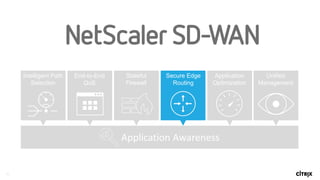
Secure Edge
Routing
Application
Optimization
Unified
Management
End-to-End
QoS
Intelligent Path
Selection
Stateful
Firewall
Application	Awareness
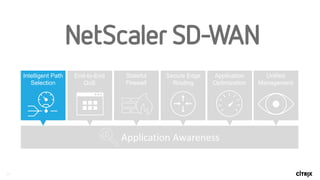
13
Secure Edge
Routing
Application
Optimization
Unified
Management
End-to-End
QoS
Intelligent Path
Selection
Stateful
Firewall
Application	Awareness
14
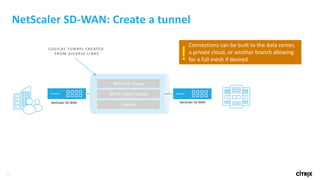
NetScaler	SD-WAN:	Create	a	tunnel
MPLS EF Queue
MPLS Default Queue
Internet
NetScaler	SD-WAN NetScaler	SD-WAN
Logical	tunnel	created	by	encapsulating	in	UDP
LOGICAL	TUNNEL	CREATED	
FROM	DIVERSE	LINKS
Connections	can	be	built	to	the	data	center,		
a	private	cloud,	or	another	branch	allowing	
for	a	full	mesh	if	desired!
15
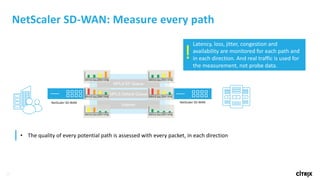
NetScaler	SD-WAN:	Measure	every	path
MPLS EF Queue
MPLS Default Queue
Internet
NetScaler	SD-WAN NetScaler	SD-WAN
Logical	tunnel	created	by	encapsulating	in	UDP
latency loss jitter cong.
• The	quality	of	every	potential	path	is	assessed	with	every	packet,	in	each	direction
Latency,	loss,	jitter,	congestion	and	
availability	are	monitored	for	each	path	and	
in	each	direction.	And	real	traffic	is	used	for	
the	measurement,	not	probe	data.
!
16
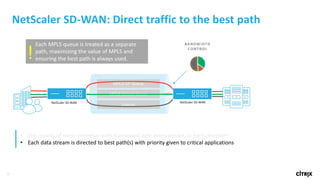
NetScaler	SD-WAN:	Direct	traffic	to	the	best	path
MPLS EF Queue
MPLS Default Queue
Internet
NetScaler	SD-WAN NetScaler	SD-WAN
Logical	tunnel	created	by	encapsulating	in	UDP
• The	quality	of	every	potential	path	is	assessed	with	every	packet,	in	each	direction
• Each	data	stream	is	directed	to	best	path(s)	with	priority	given	to	critical	applications
BANDWIDTH	
CONTROL
Each	MPLS	queue	is	treated	as	a	separate	
path,	maximizing	the	value	of	MPLS	and	
ensuring	the	best	path	is	always	used.!
17
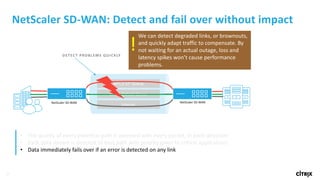
NetScaler	SD-WAN:	Detect	and	fail	over	without	impact
MPLS EF Queue
MPLS Default Queue
Internet
NetScaler	SD-WAN NetScaler	SD-WAN
Logical	tunnel	created	by	encapsulating	in	UDP
• The	quality	of	every	potential	path	is	assessed	with	every	packet,	in	each	direction
• Each	data	stream	is	directed	to	best	path	with	priority	given	to	critical	applications
• Data	immediately	fails	over	if	an	error	is	detected	on	any	link
DETECT	PROBLEMS	QUICKLY
We	can	detect	degraded	links,	or	brownouts,	
and	quickly	adapt	traffic	to	compensate.	By	
not	waiting	for	an	actual	outage,	loss	and	
latency	spikes	won’t	cause	performance	
problems.
!
18
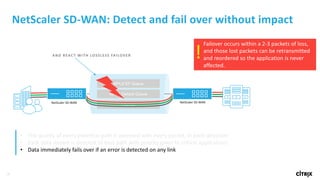
NetScaler	SD-WAN:	Detect	and	fail	over	without	impact
MPLS EF Queue
MPLS Default Queue
Internet
NetScaler	SD-WAN NetScaler	SD-WAN
Logical	tunnel	created	by	encapsulating	in	UDPFailover	occurs	within	a	2-3	packets	of	loss,	
and	those	lost	packets	can	be	retransmitted	
and	reordered	so	the	application	is	never	
affected.
!AND	REACT	WITH	LOSSLESS	FAILOVER
• The	quality	of	every	potential	path	is	assessed	with	every	packet,	in	each	direction
• Each	data	stream	is	directed	to	best	path	with	priority	given	to	critical	applications
• Data	immediately	fails	over	if	an	error	is	detected	on	any	link
19
NetScaler	SD-WAN:	Optionally	duplicate	real-time	traffic
MPLS EF Queue
MPLS Default Queue
Internet
NetScaler	SD-WAN NetScaler	SD-WAN
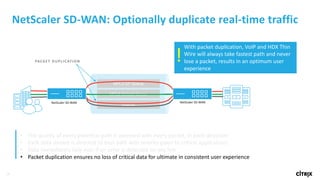
Logical	tunnel	created	by	encapsulating	in	UDPWith	packet	duplication,	VoIP	and	HDX	Thin	
Wire	will	always	take	fastest	path	and	never	
lose	a	packet,	results	in	an	optimum	user	
experience
!
• The	quality	of	every	potential	path	is	assessed	with	every	packet,	in	each	direction
• Each	data	stream	is	directed	to	best	path	with	priority	given	to	critical	applications
• Data	immediately	fails	over	if	an	error	is	detected	on	any	link
• Packet	duplication	ensures	no	loss	of	critical	data	for	ultimate	in	consistent	user	experience
PACKET	DUPLICATION
20
NetScaler	SD-WAN:	Use	multiple	links	for	one	session
MPLS EF Queue
MPLS Default Queue
Internet
NetScaler	SD-WAN NetScaler	SD-WAN
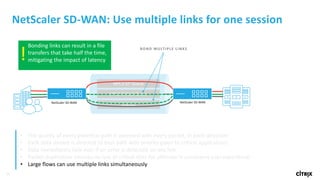
Logical	tunnel	created	by	encapsulating	in	UDPBonding	links	can	result	in	a	file	
transfers	that	take	half	the	time,	
mitigating	the	impact	of	latency!
• The	quality	of	every	potential	path	is	assessed	with	every	packet,	in	each	direction
• Each	data	stream	is	directed	to	best	path	with	priority	given	to	critical	applications
• Data	immediately	fails	over	if	an	error	is	detected	on	any	link
• Packet	duplication	ensures	no	loss	of	critical	data	for	ultimate	in	consistent	user	experience
• Large	flows	can	use	multiple	links	simultaneously
BOND	MULTIPLE	LINKS
21
NetScaler	SD-WAN:	Breakout	Internet	at	the	Branch
MPLS EF Queue
MPLS Default Queue
Internet
NetScaler	SD-WAN NetScaler	SD-WAN
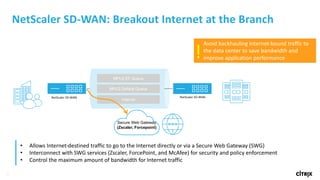
Avoid	backhauling	Internet-bound	traffic	to	
the	data	center	to	save	bandwidth	and	
improve	application	performance!
• Allows	Internet-destined	traffic	to	go	to	the	Internet	directly	or	via	a	Secure	Web	Gateway	(SWG)
• Interconnect	with	SWG	services	(Zscaler,	ForcePoint,	and	McAfee)	for	security	and	policy	enforcement
• Control	the	maximum	amount	of	bandwidth	for	Internet	traffic	
Secure Web Gateway
(Zscaler, Forcepoint)
22
Deep	Understanding	of	HDX	Enables	Better	Delivery
Client	Host
Clipboard
File	Transfer
Mobile	sensors
Clipboard
HDX
Printing
Smartcard
Audio
Graphics
Media
Citrix	XenApp
Citrix	XenDesktop
MPLS EF Queue
MPLS Default Queue
Internet
NetScaler	SD-WAN NetScaler	SD-WAN
BANDWIDTH
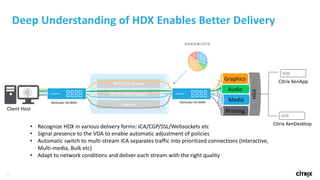
• Recognize	HDX	in	various	delivery	forms:	ICA/CGP/SSL/Websockets etc
• Signal	presence	to	the	VDA	to	enable	automatic	adjustment	of	policies
• Automatic	switch	to	multi-stream	ICA	separates	traffic	into	prioritized	connections	(Interactive,	
Multi-media,	Bulk	etc)
• Adapt	to	network	conditions	and	deliver	each	stream	with	the	right	quality
23
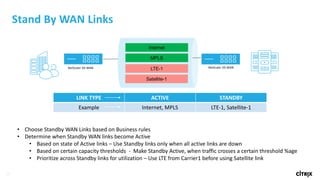
Stand	By	WAN	Links	
Internet
MPLS
LTE-1NetScaler	SD-WAN NetScaler	SD-WAN
Satellite-1
LINK	TYPE ACTIVE STANDBY
Example Internet, MPLS LTE-1,	Satellite-1
• Choose	Standby	WAN	Links	based	on	Business	rules
• Determine	when	Standby	WAN	links	become	Active
• Based	on	state	of	Active	links	– Use	Standby	links	only	when	all	active	links	are	down
• Based	on	certain	capacity	thresholds		- Make	Standby	Active,	when	traffic	crosses	a	certain	threshold	%age
• Prioritize	across	Standby	links	for	utilization	– Use	LTE	from	Carrier1	before	using	Satellite	link
24
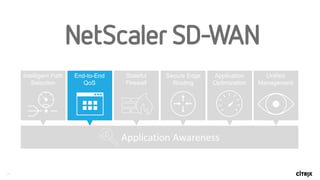
Secure Edge
Routing
Application
Optimization
Unified
Management
End-to-End
QoS
Intelligent Path
Selection
Stateful
Firewall
Application	Awareness
25
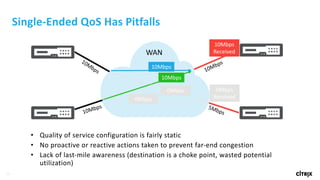
Single-Ended	QoS Has	Pitfalls
• Quality	of	service	configuration	is	fairly	static
• No	proactive	or	reactive	actions	taken	to	prevent	far-end	congestion
• Lack	of	last-mile	awareness	(destination	is	a	choke	point,	wasted	potential	
utilization)
WAN
10Mbps
Received
10Mbps
10Mbps
0Mbps
0Mbps
0Mbps
Received
26
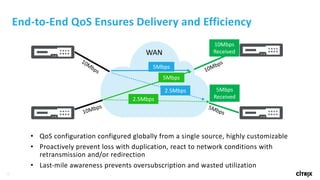
End-to-End	QoS Ensures	Delivery	and	Efficiency
• QoS configuration	configured	globally	from	a	single	source,	highly	customizable
• Proactively	prevent	loss	with	duplication,	react	to	network	conditions	with	
retransmission	and/or	redirection
• Last-mile	awareness	prevents	oversubscription	and	wasted	utilization
WAN
10Mbps
Received
5Mbps
5Mbps
2.5Mbps
2.5Mbps
5Mbps
Received
27
Secure Edge
Routing
Application
Optimization
Unified
Management
End-to-End
QoS
Intelligent Path
Selection
Stateful
Firewall
Application	Awareness
28
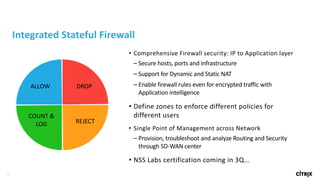
Integrated	Stateful Firewall
• Comprehensive	Firewall	security:	IP	to	Application	layer
– Secure	hosts,	ports	and	infrastructure
– Support	for	Dynamic	and	Static	NAT
– Enable	firewall	rules	even	for	encrypted	traffic	with	
Application	intelligence
• Define	zones	to	enforce	different	policies	for	
different	users
• Single	Point	of	Management	across	Network
– Provision,	troubleshoot	and	analyze	Routing	and	Security	
through	SD-WAN	center
• NSS	Labs	certification	coming	in	3Q…
ALLOW
REJECT
COUNT	&
LOG
DROP
29
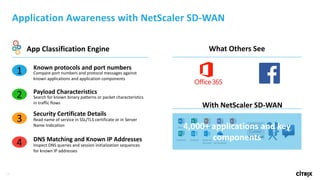
Application	Awareness	with	NetScaler	SD-WAN
Known	protocols	and	port	numbers
Compare	port	numbers	and	protocol	messages	against	
known	applications	and	application	components	
1
2 Search	for	known	binary	patterns	or	packet	characteristics	
in	traffic	flows
Payload	Characteristics
Read	name	of	service	in	SSL/TLS	certificate	or	in	Server	
Name	Indication
Security	Certificate	Details
3
DNS	Matching	and	Known	IP	Addresses
Inspect	DNS	queries	and	session	initialization	sequences	
for	known	IP	addresses
4
App	Classification	Engine What	Others	See
With	NetScaler	SD-WAN
4,000+	applications	and	key	
components
30
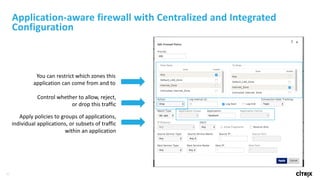
Application-aware	firewall	with	Centralized	and	Integrated	
Configuration
You	can	restrict	which	zones	this	
application	can	come	from	and	to
Control	whether	to	allow,	reject,	
or	drop	this	traffic
Apply	policies	to	groups	of	applications,	
individual	applications,	or	subsets	of	traffic	
within	an	application
31
Secure Edge
Routing
Application
Optimization
Unified
Management
End-to-End
QoS
Intelligent Path
Selection
Stateful
Firewall
Application	Awareness
32
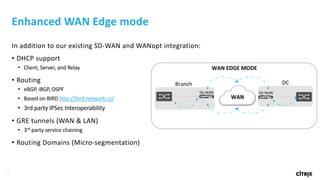
Enhanced	WAN	Edge	mode
In	addition	to	our	existing	SD-WAN	and	WANopt integration:
• DHCP	support
• Client,	Server,	and	Relay
• Routing	
• eBGP,	iBGP,	OSPF
• Based	on	BIRD	http://bird.network.cz/
• 3rd	party	IPSec Interoperability
• GRE	tunnels	(WAN	&	LAN)
• 3rd party	service	chaining
• Routing	Domains	(Micro-segmentation)
Branch DC
WAN
SD-WAN SD-WAN
WAN	EDGE	MODE
33
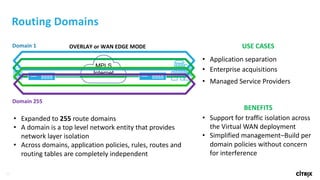
OVERLAY	or	WAN	EDGE	MODE
Routing	Domains
• Expanded	to	255 route	domains	
• A	domain	is	a	top	level	network	entity	that	provides
network	layer	isolation
• Across	domains,	application	policies,	rules,	routes	and	
routing	tables	are	completely	independent
USE	CASES
• Application separation
• Enterprise	acquisitions
• Managed	Service	Providers
BENEFITS
• Support	for	traffic	isolation	across	
the	Virtual	WAN	deployment
• Simplified	management–Build	per	
domain	policies	without	concern	
for	interference
Domain	1
Domain	255
MPLS
Internet
34
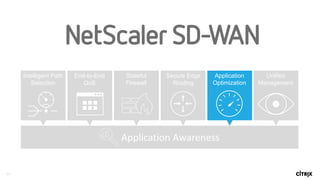
Secure Edge
Routing
Application
Optimization
Unified
Management
End-to-End
QoS
Intelligent Path
Selection
Stateful
Firewall
Application	Awareness
35
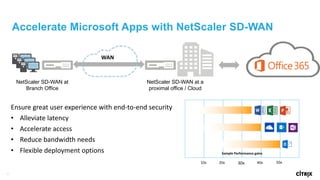
Accelerate Microsoft Apps with NetScaler SD-WAN
NetScaler SD-WAN at
Branch Office
NetScaler SD-WAN at a
proximal office / Cloud
WAN
Ensure	great	user	experience	with	end-to-end	security
• Alleviate	latency
• Accelerate	access
• Reduce	bandwidth	needs
• Flexible	deployment	options
10x 20x 30x 40x 50x
Sample	Performance	gains
36
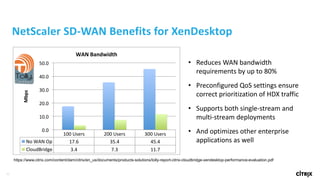
100#Users# 200#Users# 300#Users#
No#WAN#Op# 17.6# 35.4# 45.4#
CloudBridge# 3.4# 7.3# 11.7#
0.0#
10.0#
20.0#
30.0#
40.0#
50.0#
Mbps%
WAN%Bandwidth%
Tolly.Tolly.
https://www.citrix.com/content/dam/citrix/en_us/documents/products-solutions/tolly-report-citrix-cloudbridge-xendesktop-performance-evaluation.pdf
• Reduces	WAN	bandwidth	
requirements	by	up	to	80%
• Preconfigured	QoS settings	ensure	
correct	prioritization	of	HDX	traffic
• Supports	both	single-stream	and	
multi-stream	deployments
• And	optimizes	other	enterprise	
applications	as	well
NetScaler	SD-WAN	Benefits	for	XenDesktop
37
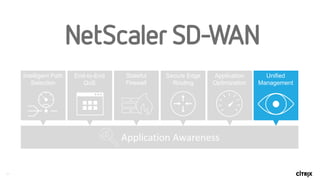
Secure Edge
Routing
Application
Optimization
Unified
Management
End-to-End
QoS
Intelligent Path
Selection
Stateful
Firewall
Application	Awareness
38
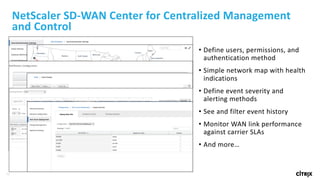
NetScaler	SD-WAN	Center	for	Centralized	Management	
and	Control
• Define	users,	permissions,	and	
authentication	method
• Simple	network	map	with	health	
indications
• Define	event	severity	and	
alerting	methods
• See	and	filter	event	history
• Monitor	WAN	link	performance	
against	carrier	SLAs
• And	more…
39
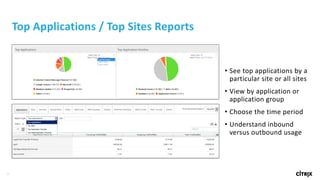
Top	Applications	/	Top	Sites	Reports
• See	top	applications	by	a	
particular	site	or	all	sites
• View	by	application	or	
application	group
• Choose	the	time	period
• Understand	inbound	
versus	outbound	usage
40
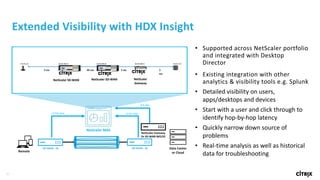
Data	Center	
or	CloudRemote
NetScaler	MAS
L4	Per-Hop
SD-WAN	- SESD-WAN	- SE
NetScaler	Gateway
Or	SD-WAN	WO/EE
ICA	Info
L4	Per-Hop
• Supported	across	NetScaler	portfolio	
and	integrated	with	Desktop	
Director	
• Existing	integration	with	other	
analytics	&	visibility	tools	e.g.	Splunk
• Detailed	visibility	on	users,	
apps/desktops	and	devices
• Start	with	a	user	and	click	through	to	
identify	hop-by-hop	latency
• Quickly	narrow	down	source	of	
problems
• Real-time	analysis	as	well	as	historical	
data	for	troubleshooting
Extended	Visibility	with	HDX	Insight
NetScaler
Gateway
NetScaler SD-WANNetScaler SD-WAN
41
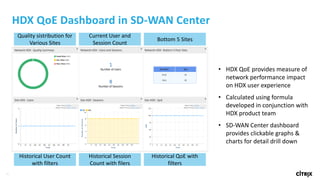
HDX	QoE Dashboard	in	SD-WAN	Center
Quality	sistribution for	
Various	Sites
Current	User	and	
Session	Count
Bottom	5	Sites	
Historical	User	Count	
with	filters
Historical	Session	
Count	with	filers
Historical	QoE with	
filters
• HDX	QoE provides	measure	of	
network	performance	impact	
on	HDX	user	experience
• Calculated	using	formula	
developed	in	conjunction	with	
HDX	product	team
• SD-WAN	Center	dashboard	
provides	clickable	graphs	&	
charts	for	detail	drill	down
42
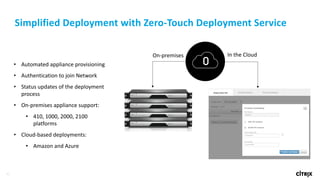
Simplified	Deployment	with	Zero-Touch	Deployment	Service
• Automated	appliance	provisioning
• Authentication	to	join	Network
• Status	updates	of	the	deployment	
process
• On-premises	appliance	support:
• 410, 1000,	2000,	2100
platforms
• Cloud-based deployments:
• Amazon and	Azure
On-premises In	the	Cloud
43

Software Defined WAN – SD-WAN