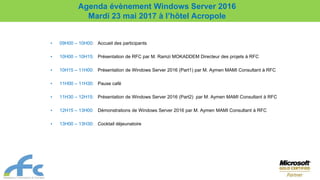

• 09H00 – 10H00: Accueil des participants
• 10H00 – 10H15: Présentation de RFC par M. Ramzi MOKADDEM Directeur des projets à RFC
• 10H15 – 11H00: Présentation de Windows Server 2016 (Part1) par M. Aymen MAMI Consultant à RFC
• 11H00 – 11H30: Pause café
• 11H30 – 12H15: Présentation de Windows Server 2016 (Part2) par M. Aymen MAMI Consultant à RFC
• 12H15 – 13H00: Démonstrations de Windows Server 2016 par M. Aymen MAMI Consultant à RFC
• 13H00 – 13H30: Cocktail déjeunatoire
Agenda évènement Windows Server 2016
Mardi 23 mai 2017 à l’hôtel Acropole
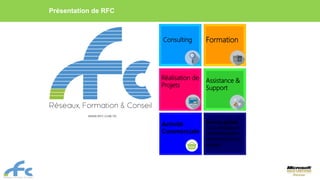
Présentation de RFC
Consulting Formation
Réalisation de
Projets
Assistance &
Support
Service global
de la stratégie à
l'implémentation
technologique au
support
Activité
Commerciale
WWW.RFC.COM.TN
3
Nos Partenaires
Nos Références Services Financiers
Autres Références…
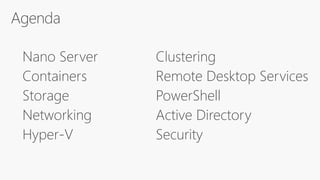
Hyper-V
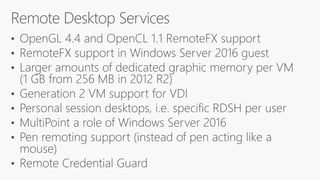
Remote Desktop Services
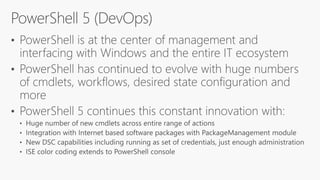
PowerShell
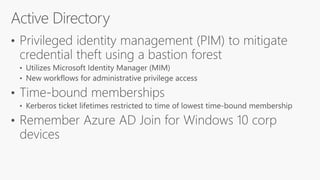
Active Directory
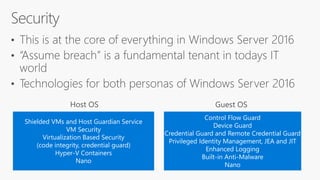
Security
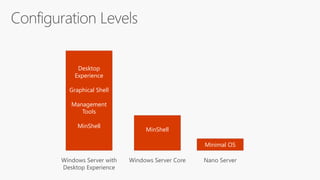
Desktop
Experience
Graphical Shell
Management
Tools
MinShell
Windows Server with
Desktop Experience
MinShell
Windows Server Core
Minimal OS
Nano Server
Host OS
Host OS Kernel
User Mode
Binaries/Libraries
Container
App 1
Container
App 2
Binaries/Libraries
Container
App 3
Container
App 4
Container
App 5
Docker Pull App 1
App 1
Host OS
Bins/Libs
Dependency
Dependency
Host OS Host OS Kernel
User Mode
Binaries/Libraries
Container
App 1
Container
App 2
Binaries/Libraries
Container
App 3
Container
App 4
Container
App 5
Base Image 1
Kernel
User Mode
Bins/Libs
Container
App 6
Hyper-V VM
Base Image 2
Kernel
User Mode
Bins/Libs
Container
App 7
Hyper-V VM
Windows Containers Hyper-V Containers
SAS SAS SAS SAS
Cluster
SMB3
Data Log Data Log
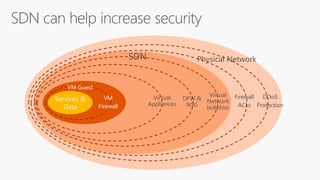
Physical Network
DDoS
Protection
Firewall
ACLs
VM
Firewall
VM Guest
Virtual
Network
Isolation
DFW &
NSG
Virtual
Appliances
SDN
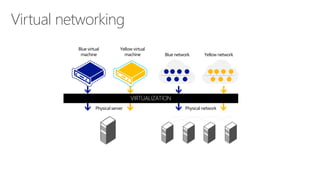
Virtual networking
Physical server Physical network
Blue virtual
machine
Yellow virtual
machine Blue network Yellow network
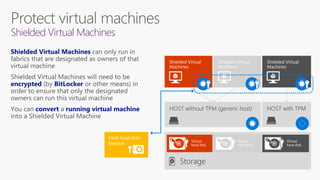
Shielded Virtual Machines
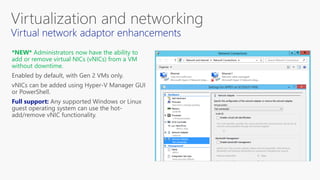
*NEW* Administrators now have the ability to
add or remove virtual NICs (vNICs) from a VM
without downtime.
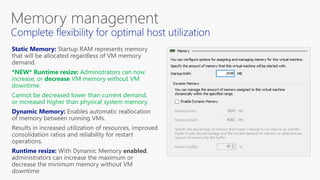
*NEW* Runtime resize: Administrators can now
increase, or decrease VM memory without VM
downtime.
Cannot be decreased lower than current demand,
or increased higher than physical system memory.
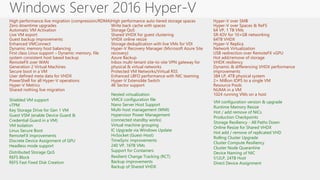
Windows Server 2016 Hyper-V
High performance live migration (compression/RDMA)
Zero downtime upgrades
Automatic VM Activation
Live VM export
Guest backup improvements
Enhanced VMConnect
Dynamic memory host balancing
First class Linux support – Dynamic memory, file
system consistent host based backup
RemoteFX over WAN
Generation 2 Virtual Machines
Secure boot in a VM
User defined meta data for VHDX
PowerShell for all Hyper-V operations
Hyper-V Metrics
Shared nothing live migration
High performance auto tiered storage spaces
Write back cache with spaces
Storage QoS
Shared VHDX for guest clustering
VHDX online resize
Storage deduplication with live VMs for VDI
Hyper-V Recovery Manager (Microsoft Azure Site
recovery)
Azure Backup
Inbox multi-tenant site-to-site VPN gateway for
physical & virtual networks
Protected VM Networks/Virtual RSS
Enhanced LBFO performance with NIC teaming
Hyper-V Extensible Switch
4K Sector support
Hyper-V over SMB
Hyper-V over Spaces & ReFS
64 VP, 1 TB VMs
SR-IOV for 10+GB networking
64TB VHDX
Hyper-V Replica
Network Virtualization
USB redirection over RemoteFX vGPU
Hot add/remove of storage
VHDX resiliency
Dynamic & differencing VHDX performance
improvements
384 LP, 4TB physical system
2+ Million IOPS to a single VM
Resource Pools
NUMA in a VM
1024 running VMs on a host
Shielded VM support
vTPM
Key Storage Drive for Gen 1 VM
Guest VSM (enable Device Guard &
Credential Guard in a VM)
VM Isolation
Linux Secure Boot
Distributed Storage QoS
REFS Block
REFS Fast Fixed Disk Creation
RemoteFX improvements
Discrete Device Assignment of GPU
Headless mode support
Resilient Change Tracking (RCT)
Backup improvements
Backup of Shared VHDX
Nested virtualization
VMCX configuration file
Nano Server Host Support
Multi-host management (WMI)
Hypervisor Power Management
(connected standby works)
Virtual machine grouping
IC Upgrade via Windows Update
HvSocket (Guest-Host)
TimeSync improvements
240 VP, 16TB VMs
Support for Containers
VM configuration version & upgrade
Runtime Memory Resize
Hot / add remove of NICs
Production Checkpoints
Storage Resiliency - All Paths Down
Online Resize for Shared VHDX
Hot add / remove of replicated VHD
Rolling Cluster Upgrade
Cluster Compute Resiliency
Cluster Node Quarantine
Device Naming of NIC
512LP, 24TB Host
Direct Device Assignment
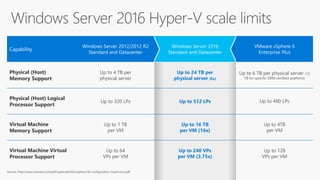
Capability
Windows Server 2012/2012 R2
Standard and Datacenter
Windows Server 2016
Standard and Datacenter
VMware vSphere 6
Enterprise Plus
Physical (Host)
Memory Support
Up to 4 TB per
physical server
Up to 24 TB per
physical server (6x)
Up to 6 TB per physical server (12
TB for specific OEM certified platform)
Physical (Host) Logical
Processor Support
Up to 320 LPs Up to 512 LPs Up to 480 LPs
Virtual Machine
Memory Support
Up to 1 TB
per VM
Up to 16 TB
per VM (16x)
Up to 4TB
per VM
Virtual Machine Virtual
Processor Support
Up to 64
VPs per VM
Up to 240 VPs
per VM (3.75x)
Up to 128
VPs per VM
Source: http://www.vmware.com/pdf/vsphere6/r60/vsphere-60-configuration-maximums.pdf
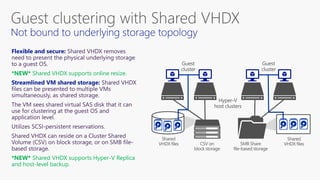
*NEW* Shared VHDX supports online resize.
*NEW* Shared VHDX supports Hyper-V Replica
and host-level backup.
1.
2.
3.
3 02 11 20 3
Shielded VMs and Host Guardian Service
VM Security
Virtualization Based Security
(code integrity, credential guard)
Hyper-V Containers
Nano
Control Flow Guard
Device Guard
Credential Guard and Remote Credential Guard
Privileged Identity Management, JEA and JIT
Enhanced Logging
Built-in Anti-Malware
Nano
10 reasons you'll like Windows Server 2016

10 reasons you'll like Windows Server 2016

  • 1.
    • 09H00 –10H00: Accueil des participants • 10H00 – 10H15: Présentation de RFC par M. Ramzi MOKADDEM Directeur des projets à RFC • 10H15 – 11H00: Présentation de Windows Server 2016 (Part1) par M. Aymen MAMI Consultant à RFC • 11H00 – 11H30: Pause café • 11H30 – 12H15: Présentation de Windows Server 2016 (Part2) par M. Aymen MAMI Consultant à RFC • 12H15 – 13H00: Démonstrations de Windows Server 2016 par M. Aymen MAMI Consultant à RFC • 13H00 – 13H30: Cocktail déjeunatoire Agenda évènement Windows Server 2016 Mardi 23 mai 2017 à l’hôtel Acropole
  • 2.
    Présentation de RFC ConsultingFormation Réalisation de Projets Assistance & Support Service global de la stratégie à l'implémentation technologique au support Activité Commerciale WWW.RFC.COM.TN
  • 3.
  • 4.
  • 5.
  • 7.
  • 10.
    Desktop Experience Graphical Shell Management Tools MinShell Windows Serverwith Desktop Experience MinShell Windows Server Core Minimal OS Nano Server
  • 15.
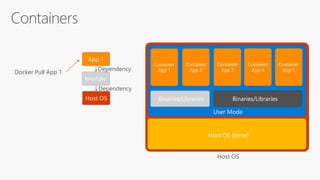
    Host OS Host OSKernel User Mode Binaries/Libraries Container App 1 Container App 2 Binaries/Libraries Container App 3 Container App 4 Container App 5 Docker Pull App 1 App 1 Host OS Bins/Libs Dependency Dependency
  • 16.
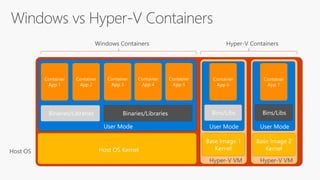
    Host OS HostOS Kernel User Mode Binaries/Libraries Container App 1 Container App 2 Binaries/Libraries Container App 3 Container App 4 Container App 5 Base Image 1 Kernel User Mode Bins/Libs Container App 6 Hyper-V VM Base Image 2 Kernel User Mode Bins/Libs Container App 7 Hyper-V VM Windows Containers Hyper-V Containers
  • 19.
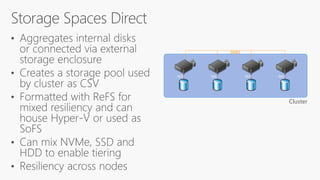
    SAS SAS SASSAS Cluster SMB3
  • 20.
  • 23.
  • 24.
    Virtual networking Physical serverPhysical network Blue virtual machine Yellow virtual machine Blue network Yellow network
  • 26.
  • 27.
    *NEW* Administrators nowhave the ability to add or remove virtual NICs (vNICs) from a VM without downtime.
  • 28.
    *NEW* Runtime resize:Administrators can now increase, or decrease VM memory without VM downtime. Cannot be decreased lower than current demand, or increased higher than physical system memory.
  • 31.
    Windows Server 2016Hyper-V High performance live migration (compression/RDMA) Zero downtime upgrades Automatic VM Activation Live VM export Guest backup improvements Enhanced VMConnect Dynamic memory host balancing First class Linux support – Dynamic memory, file system consistent host based backup RemoteFX over WAN Generation 2 Virtual Machines Secure boot in a VM User defined meta data for VHDX PowerShell for all Hyper-V operations Hyper-V Metrics Shared nothing live migration High performance auto tiered storage spaces Write back cache with spaces Storage QoS Shared VHDX for guest clustering VHDX online resize Storage deduplication with live VMs for VDI Hyper-V Recovery Manager (Microsoft Azure Site recovery) Azure Backup Inbox multi-tenant site-to-site VPN gateway for physical & virtual networks Protected VM Networks/Virtual RSS Enhanced LBFO performance with NIC teaming Hyper-V Extensible Switch 4K Sector support Hyper-V over SMB Hyper-V over Spaces & ReFS 64 VP, 1 TB VMs SR-IOV for 10+GB networking 64TB VHDX Hyper-V Replica Network Virtualization USB redirection over RemoteFX vGPU Hot add/remove of storage VHDX resiliency Dynamic & differencing VHDX performance improvements 384 LP, 4TB physical system 2+ Million IOPS to a single VM Resource Pools NUMA in a VM 1024 running VMs on a host Shielded VM support vTPM Key Storage Drive for Gen 1 VM Guest VSM (enable Device Guard & Credential Guard in a VM) VM Isolation Linux Secure Boot Distributed Storage QoS REFS Block REFS Fast Fixed Disk Creation RemoteFX improvements Discrete Device Assignment of GPU Headless mode support Resilient Change Tracking (RCT) Backup improvements Backup of Shared VHDX Nested virtualization VMCX configuration file Nano Server Host Support Multi-host management (WMI) Hypervisor Power Management (connected standby works) Virtual machine grouping IC Upgrade via Windows Update HvSocket (Guest-Host) TimeSync improvements 240 VP, 16TB VMs Support for Containers VM configuration version & upgrade Runtime Memory Resize Hot / add remove of NICs Production Checkpoints Storage Resiliency - All Paths Down Online Resize for Shared VHDX Hot add / remove of replicated VHD Rolling Cluster Upgrade Cluster Compute Resiliency Cluster Node Quarantine Device Naming of NIC 512LP, 24TB Host Direct Device Assignment
  • 32.
    Capability Windows Server 2012/2012R2 Standard and Datacenter Windows Server 2016 Standard and Datacenter VMware vSphere 6 Enterprise Plus Physical (Host) Memory Support Up to 4 TB per physical server Up to 24 TB per physical server (6x) Up to 6 TB per physical server (12 TB for specific OEM certified platform) Physical (Host) Logical Processor Support Up to 320 LPs Up to 512 LPs Up to 480 LPs Virtual Machine Memory Support Up to 1 TB per VM Up to 16 TB per VM (16x) Up to 4TB per VM Virtual Machine Virtual Processor Support Up to 64 VPs per VM Up to 240 VPs per VM (3.75x) Up to 128 VPs per VM Source: http://www.vmware.com/pdf/vsphere6/r60/vsphere-60-configuration-maximums.pdf
  • 35.
    *NEW* Shared VHDXsupports online resize. *NEW* Shared VHDX supports Hyper-V Replica and host-level backup.
  • 36.
  • 45.
    Shielded VMs andHost Guardian Service VM Security Virtualization Based Security (code integrity, credential guard) Hyper-V Containers Nano Control Flow Guard Device Guard Credential Guard and Remote Credential Guard Privileged Identity Management, JEA and JIT Enhanced Logging Built-in Anti-Malware Nano