SOFTWARESOFTWARE
 Computer instructions that when executed
provide desired function and performance.
 Data structures that enable programs to
adequately manipulate information.
 Documents that describe the operation and use of
programs.
COMPONENTS OF SOFTWARECOMPONENTS OF SOFTWARE
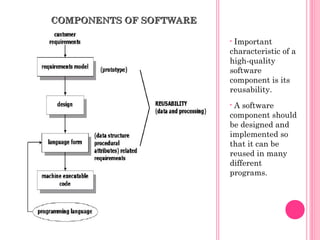
• Important
characteristic of a
high-quality
software
component is its
reusability.
• A software
component should
be designed and
implemented so
that it can be
reused in many
different
programs.
SOFTWARE CHARACTERISTICSSOFTWARE CHARACTERISTICS
 Software is developed or engineered, it is not
manufactured in the classical sense.
 Software doesn’t “wear out.”
 Most software is custom-built, rather than
being assembled from existing components.
SOFTWARE LIFE-CYCLESOFTWARE LIFE-CYCLE
MODELSMODELS
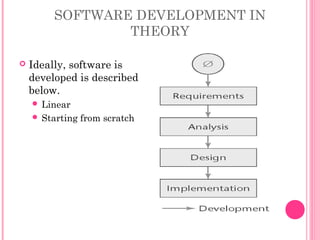
SOFTWARE DEVELOPMENT IN
THEORY
 Ideally, software is
developed is described
below.
 Linear
 Starting from scratch
SOFTWARE DEVELOPMENT IN
PRACTICE
 In the real world, software development is totally
different
 We make mistakes
 The client’s requirements change while the software
product is being developed
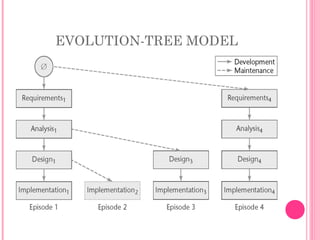
EVOLUTION-TREE MODEL
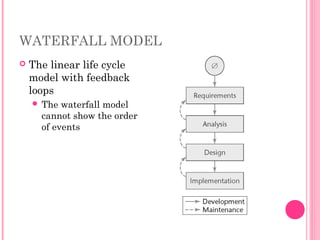
WATERFALL MODEL
 The linear life cycle
model with feedback
loops
 The waterfall model
cannot show the order
of events
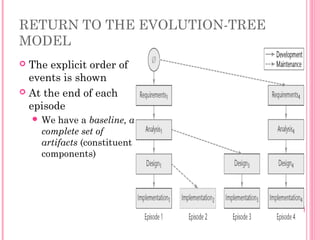
RETURN TO THE EVOLUTION-TREE
MODEL
 The explicit order of
events is shown
 At the end of each
episode
 We have a baseline, a
complete set of
artifacts (constituent
components)
MOVING TARGET PROBLEM
• A change in the requirements while the software
product is being developed
• Even if the reasons for the change are good, the
software product can be adversely impacted
– Dependencies will be induced
• Any change made to a software product can potentially
cause a regression fault
– A fault in an apparently unrelated part of the software
• If there are too many changes
– The entire product may have to be redesigned and
reimplemented
• Change is inevitable
• There is no solution to the moving target problem
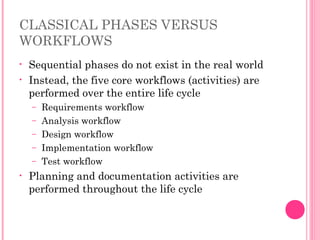
CLASSICAL PHASES VERSUS
WORKFLOWS
• Sequential phases do not exist in the real world
• Instead, the five core workflows (activities) are
performed over the entire life cycle
– Requirements workflow
– Analysis workflow
– Design workflow
– Implementation workflow
– Test workflow
• Planning and documentation activities are
performed throughout the life cycle
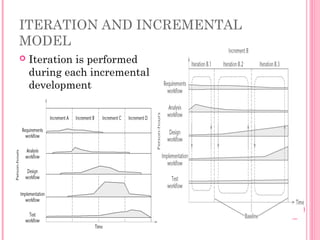
ITERATION AND INCREMENTAL
MODEL
 Iteration is performed
during each incremental
development
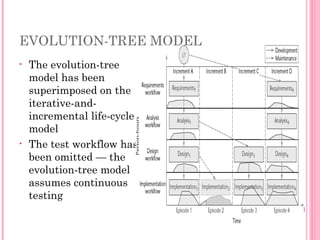
EVOLUTION-TREE MODEL
• The evolution-tree
model has been
superimposed on the
iterative-and-
incremental life-cycle
model
• The test workflow has
been omitted — the
evolution-tree model
assumes continuous
testing
RISKS AND OTHER ASPECTS OF
ITERATION AND INCREMENTAL
MODEL
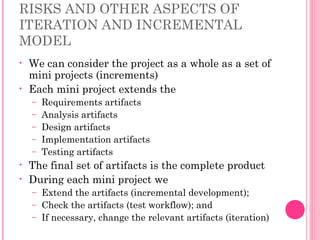
• We can consider the project as a whole as a set of
mini projects (increments)
• Each mini project extends the
– Requirements artifacts
– Analysis artifacts
– Design artifacts
– Implementation artifacts
– Testing artifacts
• The final set of artifacts is the complete product
• During each mini project we
– Extend the artifacts (incremental development);
– Check the artifacts (test workflow); and
– If necessary, change the relevant artifacts (iteration)
RISKS AND OTHER ASPECTS OF
ITERATION AND INCREMENTAL
MODEL
• Each iteration can be viewed as a small but
complete waterfall life-cycle model
• During each iteration we select a portion of the
software product
• On that portion we perform the
– Classical requirements phase
– Classical analysis phase
– Classical design phase
– Classical implementation phase
STRENGTHS OF THE ITERATIVE-
AND-INCREMENTAL MODEL
• There are multiple opportunities for checking
that the software product is correct
– Faults can be detected and corrected early
• The robustness of the architecture can be
determined early in the life cycle
– Architecture — the various component modules and
how they fit together
– Robustness — the property of being able to handle
extensions and changes without falling apart
STRENGTHS OF THE ITERATIVE-
AND-INCREMENTAL MODEL
• We can mitigate (resolve) risks early
– Risks are invariably involved in software
development and maintenance
• We have a working version of the software
product from the start
– The client and users can experiment with this
version to determine what changes are needed
• Variation: Deliver partial versions to smooth the
introduction of the new product in the client
organization
• There is empirical evidence that the life-cycle
model works
MANAGING ITERATION AND
INCREMENTAL MODEL
 The iterative-and-incremental life-cycle model is
as regimented as the waterfall model …
 … because the iterative-and-incremental life-
cycle model is the waterfall model, applied
successively
 Each increment is a waterfall mini project
OTHER LIFE-CYCLE MODELS
 The following life-cycle models are presented and
compared:
• Code-and-fix life-cycle model
• Waterfall life-cycle model
• Rapid prototyping life-cycle model
• Open-source life-cycle model
• Agile processes
• Synchronize-and-stabilize life-cycle model
• Spiral life-cycle model
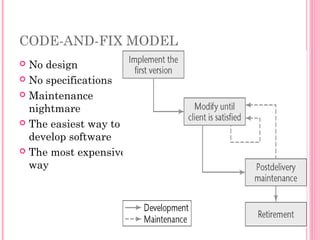
CODE-AND-FIX MODEL
 No design
 No specifications
 Maintenance
nightmare
 The easiest way to
develop software
 The most expensive
way
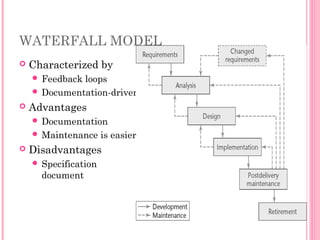
WATERFALL MODEL
 Characterized by
 Feedback loops
 Documentation-driven
 Advantages
 Documentation
 Maintenance is easier
 Disadvantages
 Specification
document
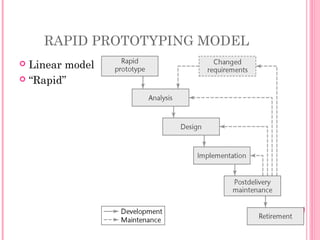
RAPID PROTOTYPING MODEL
 Linear model
 “Rapid”
OPEN-SOURCE LIFE-CYCLE MODEL
• First, one individual builds an
initial version
– Made available via the Internet
(e.g., SourceForge.net)
• Then, if there is sufficient interest
in the project
– The initial version is widely
downloaded
– Users become co-developers
– The product is extended
• Key point: Individuals generally
work voluntarily on an open-source
project in their spare time
• Reporting and correcting defects
– Corrective maintenance
• Adding additional functionality
– Perfective maintenance
• Porting the program to a new
environment
– Adaptive maintenance
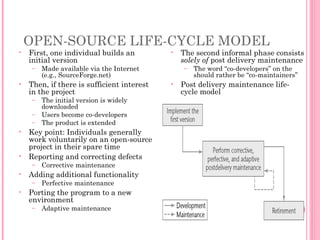
• The second informal phase consists
solely of post delivery maintenance
– The word “co-developers” on the
should rather be “co-maintainers”
• Post delivery maintenance life-
cycle model
OPEN-SOURCE LIFE-CYCLE MODEL
 Closed-source software is maintained and tested
by employees
 Users can submit failure reports but never fault
reports (the source code is not available)
 Open-source software is generally maintained by
unpaid volunteers
 Users are strongly encouraged to submit defect
reports, both failure reports and fault reports
OPEN-SOURCE LIFE-CYCLE MODEL
 Core group
 Small number of dedicated maintainers with the
inclination, the time, and the necessary skills to
submit fault reports (“fixes”)
 They take responsibility for managing the project
 They have the authority to install fixes
 Peripheral group
 Users who choose to submit defect reports from time
to time
OPEN-SOURCE LIFE-CYCLE MODEL
 The core group releases a new version of an open-
source product as soon as it is ready
 Perhaps a month or even a day after the previous
version was released
 The core group performs minimal testing
 Extensive testing is performed by the members of the
peripheral group in the course of utilizing the
software
 “Release early and often”
OPEN-SOURCE LIFE-CYCLE MODEL
• An initial working version is produced when
using
– The rapid-prototyping model;
– The code-and-fix model; and
– The open-source life-cycle model
• Then:
– Rapid-prototyping model
• The initial version is discarded
– Code-and-fix model and open-source life-cycle model
• The initial version becomes the target product
• Consequently, in an open-source project, there
are generally no specifications and no design
AGILE PROCESSES
 Somewhat controversial new approach
 Stories (features client wants)
 Estimate duration and cost of each story
 Select stories for next build
 Each build is divided into tasks
 Test cases for a task are drawn up first
 Pair programming
 Continuous integration of tasks
AGILE PROCESSES
• Agile processes are a collection of new paradigms
characterized by
– Less emphasis on analysis and design
– Earlier implementation (working software is
considered more important than documentation)
– Responsiveness to change
– Close collaboration with the client
• A principle in the Manifesto is
– Deliver working software frequently
– Ideally every 2 or 3 weeks
• One way of achieving this is to use timeboxing
– Used for many years as a time-management
technique
AGILE PROCESSES
• A specific amount of time is set aside for a task
– Typically 3 weeks for each iteration
– The team members then do the best job they can
during that time
• It gives the client confidence to know that a new
version with additional functionality will arrive
every 3 weeks
• The developers know that they will have 3 weeks
(but no more) to deliver a new iteration
– Without client interference of any kind
• If it is impossible to complete the entire task in
the timebox, the work may be reduced
– Agile processes demand fixed time, not fixed features
AGILE PROCESSES
• Another common feature of agile processes is
stand-up meetings
– Short meetings held at a regular time each day
– Attendance is required
• Participants stand in a circle
– They do not sit around a table
– To ensure the meeting lasts no more than 15 minutes
• The aim of a stand-up meeting is
– To raise problems
– Not solve them
• Solutions are found at follow-up meetings,
preferably held directly after the stand-up
meeting
AGILE PROCESSES
 Stand-up meetings and timeboxing are both
 Successful management techniques
 Now utilized within the context of agile processes
 Both techniques are instances of two basic
principles that underlie all agile methods:
 Communication; and
 Satisfying the client’s needs as quickly as possible
EVALUATING AGILE PROCESSES
• Agile processes have had some successes with small-
scale software development
– However, medium- and large-scale software development is
very different
• The key decider: the impact of agile processes on post
delivery maintenance
– Refactoring is an essential component of agile processes
– Refactoring continues during maintenance
• Agile processes are good when requirements are
vague or changing
• It is too soon to evaluate agile processes
– There are not enough data yet
• Even if agile processes prove to be disappointing
– Some features (such as pair programming) may be adopted
as mainstream software engineering practices
SYNCHRONIZE-AND STABILIZE
MODEL
• Microsoft’s life-cycle model
• Requirements analysis — interview potential
customers
• Draw up specifications
• Divide project into 3 or 4 builds
• Each build is carried out by small teams working in
parallel
• At the end of the day — synchronize (test and debug)
• At the end of the build — stabilize (freeze the build)
• Components always work together
– Get early insights into the operation of the product
SPIRAL MODEL
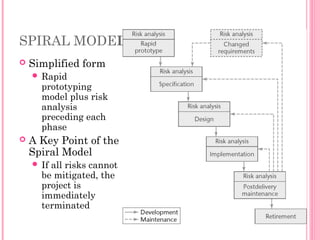
 Simplified form
 Rapid
prototyping
model plus risk
analysis
preceding each
phase
 A Key Point of the
Spiral Model
 If all risks cannot
be mitigated, the
project is
immediately
terminated
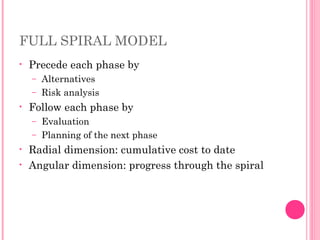
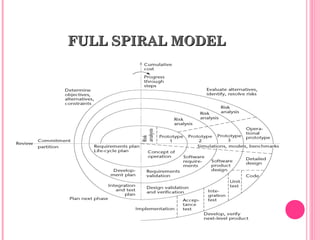
FULL SPIRAL MODEL
• Precede each phase by
– Alternatives
– Risk analysis
• Follow each phase by
– Evaluation
– Planning of the next phase
• Radial dimension: cumulative cost to date
• Angular dimension: progress through the spiral
FULLFULL SPIRALSPIRAL MODELMODEL
ANALYSIS OF THE SPIRAL MODEL
 Strengths
 It is easy to judge how much to test
 No distinction is made between development and
maintenance
 Weaknesses
 For large-scale software only
 For internal (in-house) software only
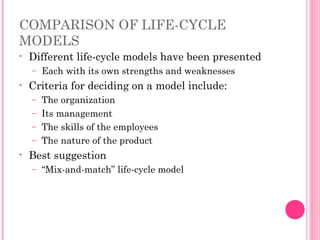
COMPARISON OF LIFE-CYCLE
MODELS
• Different life-cycle models have been presented
– Each with its own strengths and weaknesses
• Criteria for deciding on a model include:
– The organization
– Its management
– The skills of the employees
– The nature of the product
• Best suggestion
– “Mix-and-match” life-cycle model
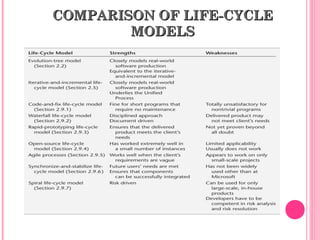
COMPARISON OF LIFE-CYCLECOMPARISON OF LIFE-CYCLE
MODELSMODELS

Softeng

  • 1.
    SOFTWARESOFTWARE  Computer instructionsthat when executed provide desired function and performance.  Data structures that enable programs to adequately manipulate information.  Documents that describe the operation and use of programs.
  • 2.
    COMPONENTS OF SOFTWARECOMPONENTSOF SOFTWARE • Important characteristic of a high-quality software component is its reusability. • A software component should be designed and implemented so that it can be reused in many different programs.
  • 3.
    SOFTWARE CHARACTERISTICSSOFTWARE CHARACTERISTICS Software is developed or engineered, it is not manufactured in the classical sense.  Software doesn’t “wear out.”  Most software is custom-built, rather than being assembled from existing components.
  • 4.
  • 5.
    SOFTWARE DEVELOPMENT IN THEORY Ideally, software is developed is described below.  Linear  Starting from scratch
  • 6.
    SOFTWARE DEVELOPMENT IN PRACTICE In the real world, software development is totally different  We make mistakes  The client’s requirements change while the software product is being developed
  • 7.
  • 8.
    WATERFALL MODEL  Thelinear life cycle model with feedback loops  The waterfall model cannot show the order of events
  • 9.
    RETURN TO THEEVOLUTION-TREE MODEL  The explicit order of events is shown  At the end of each episode  We have a baseline, a complete set of artifacts (constituent components)
  • 10.
    MOVING TARGET PROBLEM •A change in the requirements while the software product is being developed • Even if the reasons for the change are good, the software product can be adversely impacted – Dependencies will be induced • Any change made to a software product can potentially cause a regression fault – A fault in an apparently unrelated part of the software • If there are too many changes – The entire product may have to be redesigned and reimplemented • Change is inevitable • There is no solution to the moving target problem
  • 11.
    CLASSICAL PHASES VERSUS WORKFLOWS •Sequential phases do not exist in the real world • Instead, the five core workflows (activities) are performed over the entire life cycle – Requirements workflow – Analysis workflow – Design workflow – Implementation workflow – Test workflow • Planning and documentation activities are performed throughout the life cycle
  • 12.
    ITERATION AND INCREMENTAL MODEL Iteration is performed during each incremental development
  • 13.
    EVOLUTION-TREE MODEL • Theevolution-tree model has been superimposed on the iterative-and- incremental life-cycle model • The test workflow has been omitted — the evolution-tree model assumes continuous testing
  • 14.
    RISKS AND OTHERASPECTS OF ITERATION AND INCREMENTAL MODEL • We can consider the project as a whole as a set of mini projects (increments) • Each mini project extends the – Requirements artifacts – Analysis artifacts – Design artifacts – Implementation artifacts – Testing artifacts • The final set of artifacts is the complete product • During each mini project we – Extend the artifacts (incremental development); – Check the artifacts (test workflow); and – If necessary, change the relevant artifacts (iteration)
  • 15.
    RISKS AND OTHERASPECTS OF ITERATION AND INCREMENTAL MODEL • Each iteration can be viewed as a small but complete waterfall life-cycle model • During each iteration we select a portion of the software product • On that portion we perform the – Classical requirements phase – Classical analysis phase – Classical design phase – Classical implementation phase
  • 16.
    STRENGTHS OF THEITERATIVE- AND-INCREMENTAL MODEL • There are multiple opportunities for checking that the software product is correct – Faults can be detected and corrected early • The robustness of the architecture can be determined early in the life cycle – Architecture — the various component modules and how they fit together – Robustness — the property of being able to handle extensions and changes without falling apart
  • 17.
    STRENGTHS OF THEITERATIVE- AND-INCREMENTAL MODEL • We can mitigate (resolve) risks early – Risks are invariably involved in software development and maintenance • We have a working version of the software product from the start – The client and users can experiment with this version to determine what changes are needed • Variation: Deliver partial versions to smooth the introduction of the new product in the client organization • There is empirical evidence that the life-cycle model works
  • 18.
    MANAGING ITERATION AND INCREMENTALMODEL  The iterative-and-incremental life-cycle model is as regimented as the waterfall model …  … because the iterative-and-incremental life- cycle model is the waterfall model, applied successively  Each increment is a waterfall mini project
  • 19.
    OTHER LIFE-CYCLE MODELS The following life-cycle models are presented and compared: • Code-and-fix life-cycle model • Waterfall life-cycle model • Rapid prototyping life-cycle model • Open-source life-cycle model • Agile processes • Synchronize-and-stabilize life-cycle model • Spiral life-cycle model
  • 20.
    CODE-AND-FIX MODEL  Nodesign  No specifications  Maintenance nightmare  The easiest way to develop software  The most expensive way
  • 21.
    WATERFALL MODEL  Characterizedby  Feedback loops  Documentation-driven  Advantages  Documentation  Maintenance is easier  Disadvantages  Specification document
  • 22.
    RAPID PROTOTYPING MODEL Linear model  “Rapid”
  • 23.
    OPEN-SOURCE LIFE-CYCLE MODEL •First, one individual builds an initial version – Made available via the Internet (e.g., SourceForge.net) • Then, if there is sufficient interest in the project – The initial version is widely downloaded – Users become co-developers – The product is extended • Key point: Individuals generally work voluntarily on an open-source project in their spare time • Reporting and correcting defects – Corrective maintenance • Adding additional functionality – Perfective maintenance • Porting the program to a new environment – Adaptive maintenance • The second informal phase consists solely of post delivery maintenance – The word “co-developers” on the should rather be “co-maintainers” • Post delivery maintenance life- cycle model
  • 24.
    OPEN-SOURCE LIFE-CYCLE MODEL Closed-source software is maintained and tested by employees  Users can submit failure reports but never fault reports (the source code is not available)  Open-source software is generally maintained by unpaid volunteers  Users are strongly encouraged to submit defect reports, both failure reports and fault reports
  • 25.
    OPEN-SOURCE LIFE-CYCLE MODEL Core group  Small number of dedicated maintainers with the inclination, the time, and the necessary skills to submit fault reports (“fixes”)  They take responsibility for managing the project  They have the authority to install fixes  Peripheral group  Users who choose to submit defect reports from time to time
  • 26.
    OPEN-SOURCE LIFE-CYCLE MODEL The core group releases a new version of an open- source product as soon as it is ready  Perhaps a month or even a day after the previous version was released  The core group performs minimal testing  Extensive testing is performed by the members of the peripheral group in the course of utilizing the software  “Release early and often”
  • 27.
    OPEN-SOURCE LIFE-CYCLE MODEL •An initial working version is produced when using – The rapid-prototyping model; – The code-and-fix model; and – The open-source life-cycle model • Then: – Rapid-prototyping model • The initial version is discarded – Code-and-fix model and open-source life-cycle model • The initial version becomes the target product • Consequently, in an open-source project, there are generally no specifications and no design
  • 28.
    AGILE PROCESSES  Somewhatcontroversial new approach  Stories (features client wants)  Estimate duration and cost of each story  Select stories for next build  Each build is divided into tasks  Test cases for a task are drawn up first  Pair programming  Continuous integration of tasks
  • 29.
    AGILE PROCESSES • Agileprocesses are a collection of new paradigms characterized by – Less emphasis on analysis and design – Earlier implementation (working software is considered more important than documentation) – Responsiveness to change – Close collaboration with the client • A principle in the Manifesto is – Deliver working software frequently – Ideally every 2 or 3 weeks • One way of achieving this is to use timeboxing – Used for many years as a time-management technique
  • 30.
    AGILE PROCESSES • Aspecific amount of time is set aside for a task – Typically 3 weeks for each iteration – The team members then do the best job they can during that time • It gives the client confidence to know that a new version with additional functionality will arrive every 3 weeks • The developers know that they will have 3 weeks (but no more) to deliver a new iteration – Without client interference of any kind • If it is impossible to complete the entire task in the timebox, the work may be reduced – Agile processes demand fixed time, not fixed features
  • 31.
    AGILE PROCESSES • Anothercommon feature of agile processes is stand-up meetings – Short meetings held at a regular time each day – Attendance is required • Participants stand in a circle – They do not sit around a table – To ensure the meeting lasts no more than 15 minutes • The aim of a stand-up meeting is – To raise problems – Not solve them • Solutions are found at follow-up meetings, preferably held directly after the stand-up meeting
  • 32.
    AGILE PROCESSES  Stand-upmeetings and timeboxing are both  Successful management techniques  Now utilized within the context of agile processes  Both techniques are instances of two basic principles that underlie all agile methods:  Communication; and  Satisfying the client’s needs as quickly as possible
  • 33.
    EVALUATING AGILE PROCESSES •Agile processes have had some successes with small- scale software development – However, medium- and large-scale software development is very different • The key decider: the impact of agile processes on post delivery maintenance – Refactoring is an essential component of agile processes – Refactoring continues during maintenance • Agile processes are good when requirements are vague or changing • It is too soon to evaluate agile processes – There are not enough data yet • Even if agile processes prove to be disappointing – Some features (such as pair programming) may be adopted as mainstream software engineering practices
  • 34.
    SYNCHRONIZE-AND STABILIZE MODEL • Microsoft’slife-cycle model • Requirements analysis — interview potential customers • Draw up specifications • Divide project into 3 or 4 builds • Each build is carried out by small teams working in parallel • At the end of the day — synchronize (test and debug) • At the end of the build — stabilize (freeze the build) • Components always work together – Get early insights into the operation of the product
  • 35.
    SPIRAL MODEL  Simplifiedform  Rapid prototyping model plus risk analysis preceding each phase  A Key Point of the Spiral Model  If all risks cannot be mitigated, the project is immediately terminated
  • 36.
    FULL SPIRAL MODEL •Precede each phase by – Alternatives – Risk analysis • Follow each phase by – Evaluation – Planning of the next phase • Radial dimension: cumulative cost to date • Angular dimension: progress through the spiral
  • 37.
  • 38.
    ANALYSIS OF THESPIRAL MODEL  Strengths  It is easy to judge how much to test  No distinction is made between development and maintenance  Weaknesses  For large-scale software only  For internal (in-house) software only
  • 39.
    COMPARISON OF LIFE-CYCLE MODELS •Different life-cycle models have been presented – Each with its own strengths and weaknesses • Criteria for deciding on a model include: – The organization – Its management – The skills of the employees – The nature of the product • Best suggestion – “Mix-and-match” life-cycle model
  • 40.
    COMPARISON OF LIFE-CYCLECOMPARISONOF LIFE-CYCLE MODELSMODELS