Using Social Networking to Promote your PTA
Rick HardmanContact Infohardmanrc@gmail.comtwitter.com/rickhardman
What's the Goal??
What's the Goal??Connect!! Simply put, social media gives you an opportunity to connect with and engage more people in you school and community. In the end, the better we can work together as parents the better experience and education our children will get at school.
National PTA Says:PTA Social MediaCommunications among members of the PTA family have undergone a major revolution. PTA leaders, members, and others interested in education and child welfare can connect and mobilize through online social media. The National PTA is fully engaged in social media and invites you to connect with us on Facebook and Twitter, where we share and discuss headline news and current events; view our public service announcements and videos on YouTube; and enjoy our photos and slideshows from national events on Fotki. You can read and comment on the articles our leadership and ambassadors post on the PTA Blog, and listen to them and other guests discuss compelling topics via our PTA Radio podcasts. PTA’s social media network makes it easy for you to connect with your peers across the country and around the world! PTA social-media sites:• www.facebook.com/ParentTeacherAssociation• www.public.fotki.com/pta• www.twitter.com/ptaeditor• www.youtube.com/nationalpta`• http://www.ptanewsroom.org/pta_radio.html• http://www.pta-blog.org/
Social Media –Good or Bad??GoodEfficient communicationBuilds a sense of communityMore useful feedbackSharing of experiencesReach more peopleEverything is “on the record”BADHeat of the moment communicationBad experiences magnifiedOut of control negative feedbackEverything is “on the record”It all depends on how social media accounts are handled!!
Personal Experience of a simple social media mishap
Because it will happen to you…How will you handle an unhappy parent engaging you on Facebook in front of Everyone????????????
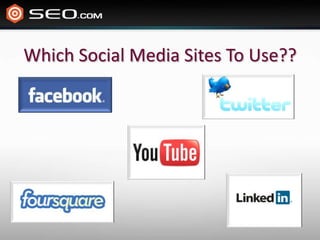
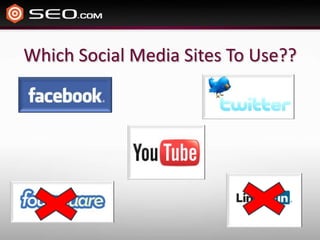
Which Social Media Sites To Use??
-When I polled parents Facebook was by far the most common social media site they used.
How To Setup a PTA Facebook AccountDetermine who is going to setup & monitor the Facebook accountSet up a Facebook Page account  (not a group or person)Network with your PTA board to get the necessary “likes” so you can set a personalized “Vanity” url. (keep it simple – name of school +pta: http://www.facebook.com/LindonElementaryPTAFill in the profile information, including a link to the school website, phone number, address, etc. (use school logo as the profile pic to make it easy to recognize)Wait to publicize the Facebook page until you have the vanity url.Brand all of your fliers, emails, etc with the PTA Facebook URL.
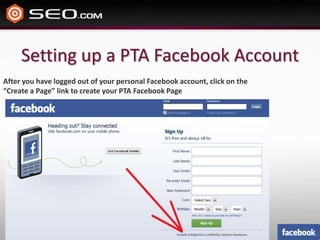
Setting up a PTA Facebook AccountAfter you have logged out of your personal Facebook account, click on the “Create a Page” link to create your PTA Facebook Page
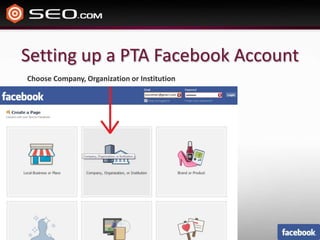
Setting up a PTA Facebook AccountChoose Company, Organization or Institution
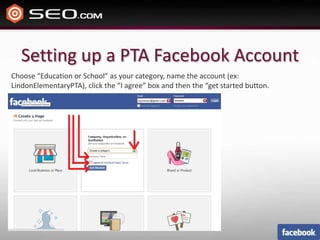
Setting up a PTA Facebook AccountChoose “Education or School” as your category, name the account (ex: LindonElementaryPTA), click the “I agree” box and then the “get started button.
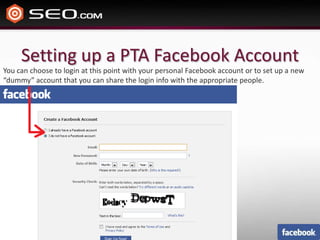
Setting up a PTA Facebook AccountYou can choose to login at this point with your personal Facebook account or to set up a new “dummy” account that you can share the login info with the appropriate people.
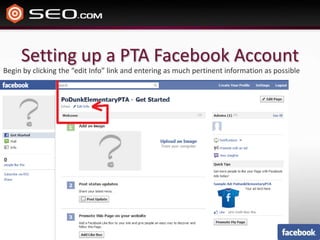
Setting up a PTA Facebook AccountBegin by clicking the “edit Info” link and entering as much pertinent information as possible
How To Utilize the Facebook accountRemind parents of upcoming eventsAnswer questions from parentsGet feedback on events, programs, etcBuild community among parentsEducate parents on how the PTA is benefiting the schoolEngage the community in PTA sponsored eventsMobilize parents on legislative issues Monitor, Monitor, Monitor!!
Keys To Success With FacebookIncentivize “likes” -Most check Facebook religiously. When someone “likes” your PTA page, your updates will show up in their news feeds. (perhaps reward students whose parents “like” the PTA Facebook page)Regular Updates / Current Information -If you are not answering questions, posting regularly or information is out of date, it will die quickly. Stay current and interact with others on the page and it will be utilized by them and become an effective tool for you. Address Negative Feedback –When negative feedback comes, don’t delete it or ignore it – address it. This is your chance to answer questions and concerns.
- When I polled parents they said that they did not understand twitter, but many teens get it.
How to Setup a PTA Twitter AccountDetermine who will set up and manage the twitter accountName the account the school name + PTA 			 ie - twitter.com/lindonelementarypta)Be sure to link to the Facebook page from your twitter profileUse the school logo as the profile image so that students recognize it easilyFind parents or staff that use twitter and “follow” them. This will help get the word out that the PTA is on TwitterBrand all of your fliers, emails, etc with the PTA Twitter URL
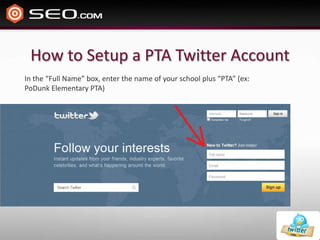
How to Setup a PTA Twitter AccountIn the “Full Name” box, enter the name of your school plus “PTA” (ex: PoDunk Elementary PTA)
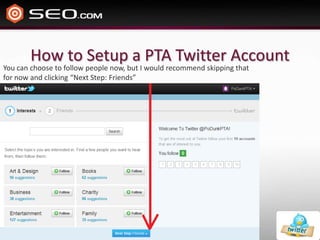
How to Setup a PTA Twitter AccountYou can choose to follow people now, but I would recommend skipping that for now and clicking “Next Step: Friends”
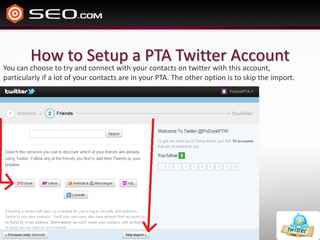
How to Setup a PTA Twitter AccountYou can choose to try and connect with your contacts on twitter with this account, particularly if a lot of your contacts are in your PTA. The other option is to skip the import.
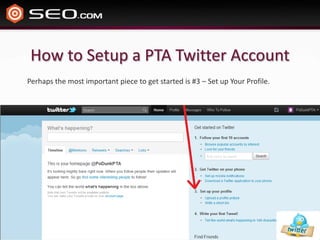
How to Setup a PTA Twitter AccountPerhaps the most important piece to get started is #3 – Set up Your Profile.
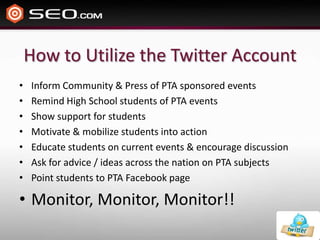
How to Utilize the Twitter AccountInform Community & Press of PTA sponsored eventsRemind High School students of PTA eventsShow support for studentsMotivate & mobilize students into actionEducate students on current events & encourage discussionAsk for advice / ideas across the nation on PTA subjectsPoint students to PTA Facebook pageMonitor, Monitor, Monitor!!
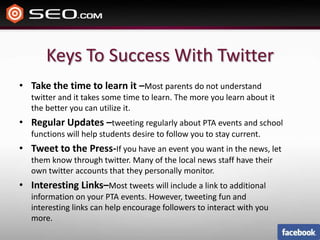
Keys To Success With TwitterTake the time to learn it –Most parents do not understand twitter and it takes some time to learn. The more you learn about it the better you can utilize it.Regular Updates –tweeting regularly about PTA events and school functions will help students desire to follow you to stay current.Tweet to the Press-If you have an event you want in the news, let them know through twitter. Many of the local news staff have their own twitter accounts that they personally monitor.Interesting Links–Most tweets will include a link to additional information on your PTA events. However, tweeting fun and interesting links can help encourage followers to interact with you more.
QuestionsThis slide presentation will be uploaded and found on utahpta.org

Social media & the PTA

  • 1.
    Using Social Networkingto Promote your PTA
  • 2.
  • 3.
  • 4.
    What's the Goal??Connect!!Simply put, social media gives you an opportunity to connect with and engage more people in you school and community. In the end, the better we can work together as parents the better experience and education our children will get at school.
  • 5.
    National PTA Says:PTASocial MediaCommunications among members of the PTA family have undergone a major revolution. PTA leaders, members, and others interested in education and child welfare can connect and mobilize through online social media. The National PTA is fully engaged in social media and invites you to connect with us on Facebook and Twitter, where we share and discuss headline news and current events; view our public service announcements and videos on YouTube; and enjoy our photos and slideshows from national events on Fotki. You can read and comment on the articles our leadership and ambassadors post on the PTA Blog, and listen to them and other guests discuss compelling topics via our PTA Radio podcasts. PTA’s social media network makes it easy for you to connect with your peers across the country and around the world! PTA social-media sites:• www.facebook.com/ParentTeacherAssociation• www.public.fotki.com/pta• www.twitter.com/ptaeditor• www.youtube.com/nationalpta`• http://www.ptanewsroom.org/pta_radio.html• http://www.pta-blog.org/
  • 6.
    Social Media –Goodor Bad??GoodEfficient communicationBuilds a sense of communityMore useful feedbackSharing of experiencesReach more peopleEverything is “on the record”BADHeat of the moment communicationBad experiences magnifiedOut of control negative feedbackEverything is “on the record”It all depends on how social media accounts are handled!!
  • 7.
    Personal Experience ofa simple social media mishap
  • 8.
    Because it willhappen to you…How will you handle an unhappy parent engaging you on Facebook in front of Everyone????????????
  • 9.
    Which Social MediaSites To Use??
  • 10.
    Which Social MediaSites To Use??
  • 11.
    -When I polledparents Facebook was by far the most common social media site they used.
  • 12.
    How To Setupa PTA Facebook AccountDetermine who is going to setup & monitor the Facebook accountSet up a Facebook Page account (not a group or person)Network with your PTA board to get the necessary “likes” so you can set a personalized “Vanity” url. (keep it simple – name of school +pta: http://www.facebook.com/LindonElementaryPTAFill in the profile information, including a link to the school website, phone number, address, etc. (use school logo as the profile pic to make it easy to recognize)Wait to publicize the Facebook page until you have the vanity url.Brand all of your fliers, emails, etc with the PTA Facebook URL.
  • 13.
    Setting up aPTA Facebook AccountAfter you have logged out of your personal Facebook account, click on the “Create a Page” link to create your PTA Facebook Page
  • 14.
    Setting up aPTA Facebook AccountChoose Company, Organization or Institution
  • 15.
    Setting up aPTA Facebook AccountChoose “Education or School” as your category, name the account (ex: LindonElementaryPTA), click the “I agree” box and then the “get started button.
  • 16.
    Setting up aPTA Facebook AccountYou can choose to login at this point with your personal Facebook account or to set up a new “dummy” account that you can share the login info with the appropriate people.
  • 17.
    Setting up aPTA Facebook AccountBegin by clicking the “edit Info” link and entering as much pertinent information as possible
  • 18.
    How To Utilizethe Facebook accountRemind parents of upcoming eventsAnswer questions from parentsGet feedback on events, programs, etcBuild community among parentsEducate parents on how the PTA is benefiting the schoolEngage the community in PTA sponsored eventsMobilize parents on legislative issues Monitor, Monitor, Monitor!!
  • 19.
    Keys To SuccessWith FacebookIncentivize “likes” -Most check Facebook religiously. When someone “likes” your PTA page, your updates will show up in their news feeds. (perhaps reward students whose parents “like” the PTA Facebook page)Regular Updates / Current Information -If you are not answering questions, posting regularly or information is out of date, it will die quickly. Stay current and interact with others on the page and it will be utilized by them and become an effective tool for you. Address Negative Feedback –When negative feedback comes, don’t delete it or ignore it – address it. This is your chance to answer questions and concerns.
  • 20.
    - When Ipolled parents they said that they did not understand twitter, but many teens get it.
  • 21.
    How to Setupa PTA Twitter AccountDetermine who will set up and manage the twitter accountName the account the school name + PTA ie - twitter.com/lindonelementarypta)Be sure to link to the Facebook page from your twitter profileUse the school logo as the profile image so that students recognize it easilyFind parents or staff that use twitter and “follow” them. This will help get the word out that the PTA is on TwitterBrand all of your fliers, emails, etc with the PTA Twitter URL
  • 22.
    How to Setupa PTA Twitter AccountIn the “Full Name” box, enter the name of your school plus “PTA” (ex: PoDunk Elementary PTA)
  • 23.
    How to Setupa PTA Twitter AccountYou can choose to follow people now, but I would recommend skipping that for now and clicking “Next Step: Friends”
  • 24.
    How to Setupa PTA Twitter AccountYou can choose to try and connect with your contacts on twitter with this account, particularly if a lot of your contacts are in your PTA. The other option is to skip the import.
  • 25.
    How to Setupa PTA Twitter AccountPerhaps the most important piece to get started is #3 – Set up Your Profile.
  • 26.
    How to Utilizethe Twitter AccountInform Community & Press of PTA sponsored eventsRemind High School students of PTA eventsShow support for studentsMotivate & mobilize students into actionEducate students on current events & encourage discussionAsk for advice / ideas across the nation on PTA subjectsPoint students to PTA Facebook pageMonitor, Monitor, Monitor!!
  • 27.
    Keys To SuccessWith TwitterTake the time to learn it –Most parents do not understand twitter and it takes some time to learn. The more you learn about it the better you can utilize it.Regular Updates –tweeting regularly about PTA events and school functions will help students desire to follow you to stay current.Tweet to the Press-If you have an event you want in the news, let them know through twitter. Many of the local news staff have their own twitter accounts that they personally monitor.Interesting Links–Most tweets will include a link to additional information on your PTA events. However, tweeting fun and interesting links can help encourage followers to interact with you more.
  • 28.
    QuestionsThis slide presentationwill be uploaded and found on utahpta.org