SOCIAL MEDIA
CODES AND
CONVENTIONS
A D A D Z A M I C
LAYOUT AND DESIGN -
GENERAL
 Usability - Easy to use, with clear areas for navigation around
the pages.
 Grid System - Separate sections of a page to present
information in small, easy to access segments.
 Centre of Page - Used for main content with navigation tools
on the left and/or across the top of the page and links to
more information on the right.
 Background and Font Colour - Used to separate different
types of information.
 Images - Used to illustrate as much as possible to add visual
interest.
MULTIMEDIA
There almost isn’t a media format that social media pages cannot use! Most prominent ones
are video, photos and text, but some also have an option to upload audio, video animations
and collages, presentations and other documents…
Posts often allow for different media formats to be uploaded in the same post, e.g. a video
accompanied by a photo collage and an image (e.g. infographic)
All social media pages work on most digital screens, mobile phone being the dominant, but
a lot of users also use desktop and tablets for that. Usually, the younger the audience, the
more mobile phone is used as the main device for accessing social media.
SHAREABILITY
This is the reason for the name: social media.
Everything on these platforms could be shared
with other users (and often to other platforms
as well).
Sharing tends to create groups of people
interested in similar content and helps a lot of
users discover media content they may like,
but are not aware of.
However, this can also cause problems and
lock people into groups based on racism,
misogynism and similar bad aspects of the
behaviour.
Key thing with social media - and for an
aspiring artist – is that shareability of the
social media turns the users into media
themselves, as they can be used to share the
content to their friends etc.
INTERACTIVITY
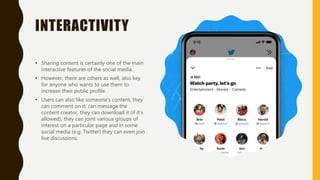
• Sharing content is certainly one of the main
interactive features of the social media.
• However, there are others as well, also key
for anyone who wants to use them to
increase their public profile.
• Users can also like someone’s content, they
can comment on it, can message the
content creator, they can download it (if it’s
allowed), they can joint various groups of
interest on a particular page and in some
social media (e.g. Twitter) they can even join
live discussions.
PROMOTION – ADS
& INFLUENCERS
• The best ways for content to be discovered in
social media is to use paid ads (‘boosted posts’)
and to engage with various influencers. Influencers
are quickly becoming the main way for the
individuals, artists and smaller companies to cut
through the enormous noise that exists in all social
media.
• Most influencers demand payment for talking
about other people’s content or products, but
some of them are willing to promote something if
they like it. This goes especially for art influencers,
including music, as they like to get credit for
‘discovering’ a new artist.

Social Media Page Codes and Conventions.pptx

  • 1.
  • 2.
    LAYOUT AND DESIGN- GENERAL  Usability - Easy to use, with clear areas for navigation around the pages.  Grid System - Separate sections of a page to present information in small, easy to access segments.  Centre of Page - Used for main content with navigation tools on the left and/or across the top of the page and links to more information on the right.  Background and Font Colour - Used to separate different types of information.  Images - Used to illustrate as much as possible to add visual interest.
  • 3.
    MULTIMEDIA There almost isn’ta media format that social media pages cannot use! Most prominent ones are video, photos and text, but some also have an option to upload audio, video animations and collages, presentations and other documents… Posts often allow for different media formats to be uploaded in the same post, e.g. a video accompanied by a photo collage and an image (e.g. infographic) All social media pages work on most digital screens, mobile phone being the dominant, but a lot of users also use desktop and tablets for that. Usually, the younger the audience, the more mobile phone is used as the main device for accessing social media.
  • 4.
    SHAREABILITY This is thereason for the name: social media. Everything on these platforms could be shared with other users (and often to other platforms as well). Sharing tends to create groups of people interested in similar content and helps a lot of users discover media content they may like, but are not aware of. However, this can also cause problems and lock people into groups based on racism, misogynism and similar bad aspects of the behaviour. Key thing with social media - and for an aspiring artist – is that shareability of the social media turns the users into media themselves, as they can be used to share the content to their friends etc.
  • 5.
    INTERACTIVITY • Sharing contentis certainly one of the main interactive features of the social media. • However, there are others as well, also key for anyone who wants to use them to increase their public profile. • Users can also like someone’s content, they can comment on it, can message the content creator, they can download it (if it’s allowed), they can joint various groups of interest on a particular page and in some social media (e.g. Twitter) they can even join live discussions.
  • 6.
    PROMOTION – ADS &INFLUENCERS • The best ways for content to be discovered in social media is to use paid ads (‘boosted posts’) and to engage with various influencers. Influencers are quickly becoming the main way for the individuals, artists and smaller companies to cut through the enormous noise that exists in all social media. • Most influencers demand payment for talking about other people’s content or products, but some of them are willing to promote something if they like it. This goes especially for art influencers, including music, as they like to get credit for ‘discovering’ a new artist.