










Trish Basanyi
Terry Daniel
Dave Courvoisier
All available on:
http://www.socialmediavo.com
Twitter
Facebook
LinkedIn
Google +
Do's & Don'ts
Tips 'n' Tricks
•Finding leads
•Researching prospects
•Social Media Branding
•What to say
•Managing your time
•New trends
Google +
G+ Hangouts and HIRLs
Pinterest
Cross-posting
Automated Posting
Do’s
Stay positive
Friend other Voice Talent
Mix business-related status updates with personal
People need to know you’re human!!!
FaceBook
The Greatest Party in the World!!!
Don’ts
Avoid arguing back ‘n’ forth
Don’t tag people on pics without permission
Don’t spam people’s walls with links to your stuff
Don’t send mass private messages
Don’t overpost
FaceBook
The Greatest Party in the World!!!
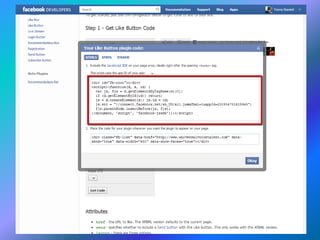
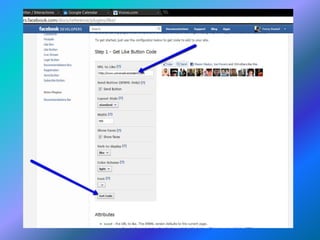
Add Like and recommend buttons on your
website.
This is how to get website visitors to advertise
FOR YOU
on FaceBook!
FaceBook TimeLine
is a
MONSTER
BUILDING AN EFFECTIVE
BRAND PAGE
Give people a reason to become fans
Stay on topic
People who like your brand on FB, expect your posts to
be at least somewhat related to your VO business
Write about a current event and tie
it to your brand
Find and share a funny YouTube
Video
Ask your audience to post
questions
Celebrate your milestones
Run a FaceBook Contest
Include pictures in your FB
updates, This always draws more
attention than just writing a status
update
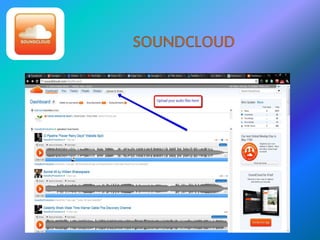
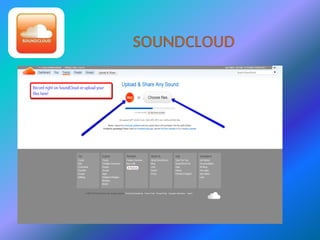
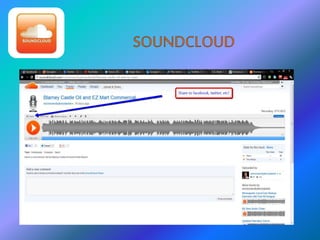
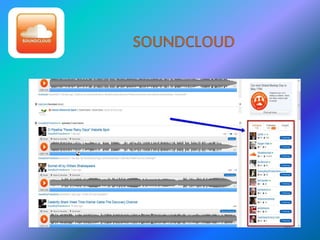
•Post your demos
•Audio clips of cool projects you are working on.
•Podcasts.
•Follow others in the creative industry.
•Post to Facebook and Twitter automatically!
•Record right on SoundCloud!
The Twitter Relationship
140 characters, that’s it! It’s a simple
concept. People fear it but it’s not hard
once you get started.
Think of Twitter as going to a party. It’s a
2 way street! Start conversations.
Create relationships, listen to people!
Be patient
Say “Thanks” a lot!
Have fun!
What to tweet?
Anything interactive….no “commercials”. Asking
questions is a great way to start a conversation.
Hashtags (#voiceover, #voiceovers, #voicetalent are most
popular, usually at the end of tweets)
No repeats, keep in mind that people can see your page
(all your outgoing tweets!) If it’s the same tweet all the
time, people get turned off. Even if it means tweeting
LESS, don’t do automated tweets. Go organic! 
Polls
What to tweet? (cont’d)
Business as well as some personal, about a
70/30 split.
RT’s (Retweets) – important or interesting info
you see, or to get a client’s attention RT
something interesting or funny they tweeted
Use “buzz” words to grab attention at the
beginning of a tweet “wow!” or “w00t!”
“amazing!” “crazy!” “Yay!” On the other hand
also use dry humor…..if people see too many
exclamation points they’ll find it spammy. (i.e.
My dog just ate my script. Greaaaat.)
Twitter Apps/Tools
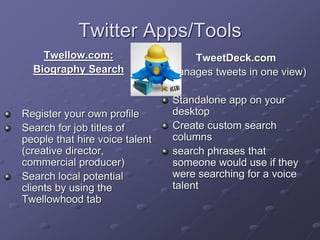
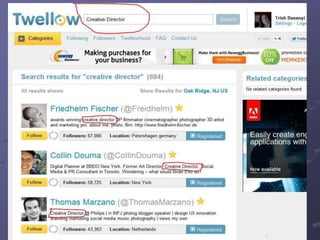
Twellow.com:
Biography Search
Register your own profile
Search for job titles of
people that hire voice talent
(creative director,
commercial producer)
Search local potential
clients by using the
Twellowhood tab
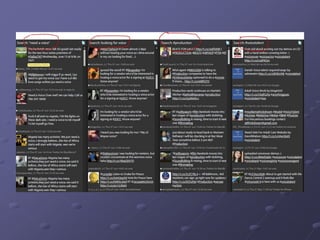
TweetDeck.com
(Manages tweets in one view)
Standalone app on your
desktop
Create custom search
columns
search phrases that
someone would use if they
were searching for a voice
talent
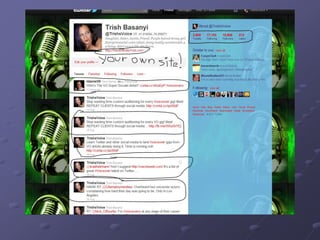
Your Profile
Pic of YOU, not your logo
Mix it up: Tweets, replies, and RT’s
Your OWN website’s url (pay-to-play
profile links make you look like an
amateur)
Spend a little time on the background
design of you profile page
Lists
Make your own to help group the people
you follow
Getting listed on someone else’s list is
GOOD
You can follow whole lists if you have a
particular interest
Add your own list to search engines or
look for other lists on Listorious.com
Hashtags (#)
Simply a way of grouping categories and
interests. They look intimidating but (like
Twitter) are a very simple concept! Again,
look at what other folks are using and
follow suit. Always feel free to go to my
page at any given time:
(http://twitter.com/TrishsVoice) for
inspiration and examples.
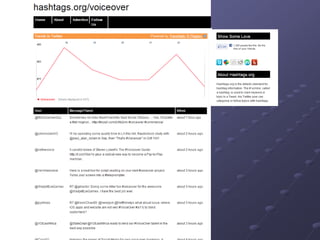
Hashtag.org
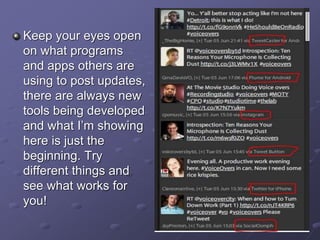
Keep your eyes open
on what programs
and apps others are
using to post updates,
there are always new
tools being developed
and what I’m showing
here is just the
beginning. Try
different things and
see what works for
you!
Getting in there and trying it is the best way to
learn. I wasn’t a pro at this when I first started
either; I learned as I went! Try one thing at a
time or you’ll get overwhelmed. Remember, the
key is for it to be FUN!
If you’re not having fun, it’s ok to
decide NOT to do this. It’s only
going to be effective if you ENJOY
it.
Some Final Thoughts
If you want to learn how to do something new,
or learn more about it, GOOGLE IT!
Search in videos on the web and chances are
there is a 2-3 minute video explaining it in
detail, with on-screen instructions. This
includes any apps or features.
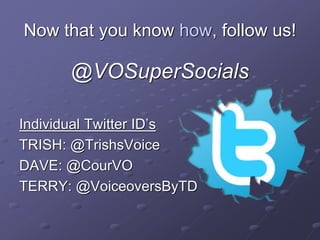
Now that you know how, follow us!
@VOSuperSocials
Individual Twitter ID’s
TRISH: @TrishsVoice
DAVE: @CourVO
TERRY: @VoiceoversByTD
DAVE COURVOISIER
 LinkedIn
 YouTube
 Google Plus
 Pinterest
 Blogging
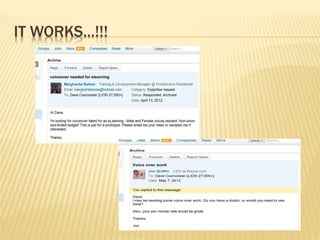
IT WORKS…!!!
160-Million Members
650,000+ groups
Business Network
Free or Tiered pay plan
Profile Intensive
Recommendations
Apps: http://www.linkedin.com/static?key=application_directory&trk=hb_side_apps
Integrated with other Social Media
PROFILE
 Include a picture
 Complete your profile to 100%
 Choose your words carefully
 Seek recommendations
 Give recommendations
 Add apps
 Box.net
 Social Media cross-posts
 THIS IS THE SINGLE-MOST IMPORTANT FEATURE THAT SETS
LINKEDIN APART FROM IT’S COMPETITORS!!!
 PARAMETERS:
 Name
 Region
 Industry
 Relationship
 Connections
SEARCH
 USE GROUPS TO MEET PEOPLE NOT IN
YOUR IMMEDIATE 1st-order CONNECTIONS
 650,000 groups
 Join up to 50
 Start your own group
 Visit, contribute, start discussions
 Form relationships
GROUPS
 PROMINENT
VOICE-OVER GROUPS:
 Ed Victor’s
“Working Voice Actor Group” (3000)
 Lee Gordon’s
Voice Over Professionals (4800+)
Dave Courvoisier’s
“Setting Voice-Over Rates
 Dave Courvoisier’s
“Social Media for Voice Actors”
GROUPS
Join groups that might be populated with
people who could be in the business of
hiring you:
E-learning groups
Audio Production Types
AudioBook Publishers
Post all your demos through the Box.net
app on LinkedIn.
TIPS
YOUTUBE
 2nd most-used Search engine in the world
(….and yes, Google owns this one, too!)
 Stats 20 hours of video uploaded every
minute
 Create your own Channel
 http://www.oncamtips.com
 Bill DeWees Voiceovers
YOUTUBE
 YouTube is also hands-down the best place
to hear how to pronounce a word that you
may have come across in your work. A
search for that word will usually lead to a
video where the word is pronounced.
 Caution: YT is also the biggest time-suck of
the social media platforms, so go in with an
agenda, and don’t get caught wasting time!
YOUTUBE
 Compose a video presentation to go with your
demo on YouTube
link to it
share it
email it
post on FaceBook
post it on Twitter
post it on LinkedIn
link it to your Website
load it on your blog
GOOGLE PLUS (G+)
 FaceBook Challenger?
 Previous failures:
 GoogleWave
GoogleBuzz
Helps to have: Chrome Browser
Google Gmail account
GOOGLE PLUS (G+)
 Its allure lies in the potential for G+
to tieinto a HUGE family ofGoogle products:
Docs,Calendar, Gmail, Search,Chrome,
Reader, etc.,
(not to mention the users ofall those products)
GOOGLE PLUS (G+)
 Circles
 Hangouts
 Huddles
 Sparks
 Timeline
 Instant Upload (Android device)
 Games
 (my fave: you can edit an entry, or choose whether
you even want someone to comment on it)
GOOGLE PLUS (G+)
 YOUR NAME
 BUSINESS ACCOUNTS and PAGES
 Add-ons, plug-ins, extensions galore

New: Games (no Farmville!)
GOOGLE PLUS (G+)
 HANGOUTS
 Instantaneously video
conference with up to 10 people at once.
HUDDLES
 This is basically Google Chat. You get to invite, accept, join, and reject
people for your chat as you please.
SPARKS
 Focus on areas of your interest. Google suggests topics, but
 you can search for your favorites.
PINTEREST
Exploding growth if this site is getting everyone’s attention.
It’s a PinBoard, whereyou post stuff that interests you, re-pinstuff others have
posted, and comment, create relationships, and follow/be followed like other sites.
Notable: this site is predominantly female-oriented and populated…at least it was at
first. Advertisers,and particularly visually-oriented content is hot.
You can create categories of topic interest, and fill thosecategories with things that
pertain to that topic.
PINTEREST
Since it’s so visual, this site servesyour logo and branding materials well.
This is a site to watch for huge growth potential, and in my estimation, should not be
ignored.
Be sure tofill outyour profile fully, and whetheryou like it or not, provide a picture.
Important: install the bookmarklet, so while you’re browsing, you can easily “Pin”
stuff to your page that interests you, and hopefully others.
0.0
1.0
2.0
3.0
4.0
5.0
6.0
Category 1Category 3
Trish
Dave
Terry
Ralph
http://www.SocialVO.com

Social media for Voice-Actors

  • 3.
  • 4.
  • 5.
  • 6.
    •Finding leads •Researching prospects •SocialMedia Branding •What to say •Managing your time •New trends
  • 7.
    Google + G+ Hangoutsand HIRLs Pinterest Cross-posting Automated Posting
  • 10.
    Do’s Stay positive Friend otherVoice Talent Mix business-related status updates with personal People need to know you’re human!!! FaceBook The Greatest Party in the World!!!
  • 11.
    Don’ts Avoid arguing back‘n’ forth Don’t tag people on pics without permission Don’t spam people’s walls with links to your stuff Don’t send mass private messages Don’t overpost FaceBook The Greatest Party in the World!!!
  • 12.
    Add Like andrecommend buttons on your website. This is how to get website visitors to advertise FOR YOU on FaceBook!
  • 15.
  • 16.
    BUILDING AN EFFECTIVE BRANDPAGE Give people a reason to become fans Stay on topic People who like your brand on FB, expect your posts to be at least somewhat related to your VO business
  • 17.
    Write about acurrent event and tie it to your brand Find and share a funny YouTube Video Ask your audience to post questions Celebrate your milestones Run a FaceBook Contest Include pictures in your FB updates, This always draws more attention than just writing a status update
  • 19.
    •Post your demos •Audioclips of cool projects you are working on. •Podcasts. •Follow others in the creative industry. •Post to Facebook and Twitter automatically! •Record right on SoundCloud!
  • 26.
    The Twitter Relationship 140characters, that’s it! It’s a simple concept. People fear it but it’s not hard once you get started. Think of Twitter as going to a party. It’s a 2 way street! Start conversations. Create relationships, listen to people! Be patient Say “Thanks” a lot! Have fun!
  • 27.
    What to tweet? Anythinginteractive….no “commercials”. Asking questions is a great way to start a conversation. Hashtags (#voiceover, #voiceovers, #voicetalent are most popular, usually at the end of tweets) No repeats, keep in mind that people can see your page (all your outgoing tweets!) If it’s the same tweet all the time, people get turned off. Even if it means tweeting LESS, don’t do automated tweets. Go organic!  Polls
  • 28.
    What to tweet?(cont’d) Business as well as some personal, about a 70/30 split. RT’s (Retweets) – important or interesting info you see, or to get a client’s attention RT something interesting or funny they tweeted Use “buzz” words to grab attention at the beginning of a tweet “wow!” or “w00t!” “amazing!” “crazy!” “Yay!” On the other hand also use dry humor…..if people see too many exclamation points they’ll find it spammy. (i.e. My dog just ate my script. Greaaaat.)
  • 29.
    Twitter Apps/Tools Twellow.com: Biography Search Registeryour own profile Search for job titles of people that hire voice talent (creative director, commercial producer) Search local potential clients by using the Twellowhood tab TweetDeck.com (Manages tweets in one view) Standalone app on your desktop Create custom search columns search phrases that someone would use if they were searching for a voice talent
  • 32.
    Your Profile Pic ofYOU, not your logo Mix it up: Tweets, replies, and RT’s Your OWN website’s url (pay-to-play profile links make you look like an amateur) Spend a little time on the background design of you profile page
  • 34.
    Lists Make your ownto help group the people you follow Getting listed on someone else’s list is GOOD You can follow whole lists if you have a particular interest Add your own list to search engines or look for other lists on Listorious.com
  • 35.
    Hashtags (#) Simply away of grouping categories and interests. They look intimidating but (like Twitter) are a very simple concept! Again, look at what other folks are using and follow suit. Always feel free to go to my page at any given time: (http://twitter.com/TrishsVoice) for inspiration and examples.
  • 36.
  • 37.
    Keep your eyesopen on what programs and apps others are using to post updates, there are always new tools being developed and what I’m showing here is just the beginning. Try different things and see what works for you!
  • 38.
    Getting in thereand trying it is the best way to learn. I wasn’t a pro at this when I first started either; I learned as I went! Try one thing at a time or you’ll get overwhelmed. Remember, the key is for it to be FUN! If you’re not having fun, it’s ok to decide NOT to do this. It’s only going to be effective if you ENJOY it.
  • 39.
    Some Final Thoughts Ifyou want to learn how to do something new, or learn more about it, GOOGLE IT! Search in videos on the web and chances are there is a 2-3 minute video explaining it in detail, with on-screen instructions. This includes any apps or features.
  • 40.
    Now that youknow how, follow us! @VOSuperSocials Individual Twitter ID’s TRISH: @TrishsVoice DAVE: @CourVO TERRY: @VoiceoversByTD
  • 41.
    DAVE COURVOISIER  LinkedIn YouTube  Google Plus  Pinterest  Blogging
  • 42.
  • 43.
    160-Million Members 650,000+ groups BusinessNetwork Free or Tiered pay plan Profile Intensive Recommendations Apps: http://www.linkedin.com/static?key=application_directory&trk=hb_side_apps Integrated with other Social Media
  • 44.
    PROFILE  Include apicture  Complete your profile to 100%  Choose your words carefully  Seek recommendations  Give recommendations  Add apps  Box.net  Social Media cross-posts
  • 45.
     THIS ISTHE SINGLE-MOST IMPORTANT FEATURE THAT SETS LINKEDIN APART FROM IT’S COMPETITORS!!!  PARAMETERS:  Name  Region  Industry  Relationship  Connections SEARCH
  • 46.
     USE GROUPSTO MEET PEOPLE NOT IN YOUR IMMEDIATE 1st-order CONNECTIONS  650,000 groups  Join up to 50  Start your own group  Visit, contribute, start discussions  Form relationships GROUPS
  • 47.
     PROMINENT VOICE-OVER GROUPS: Ed Victor’s “Working Voice Actor Group” (3000)  Lee Gordon’s Voice Over Professionals (4800+) Dave Courvoisier’s “Setting Voice-Over Rates  Dave Courvoisier’s “Social Media for Voice Actors” GROUPS
  • 48.
    Join groups thatmight be populated with people who could be in the business of hiring you: E-learning groups Audio Production Types AudioBook Publishers Post all your demos through the Box.net app on LinkedIn. TIPS
  • 49.
    YOUTUBE  2nd most-usedSearch engine in the world (….and yes, Google owns this one, too!)  Stats 20 hours of video uploaded every minute  Create your own Channel  http://www.oncamtips.com  Bill DeWees Voiceovers
  • 50.
    YOUTUBE  YouTube isalso hands-down the best place to hear how to pronounce a word that you may have come across in your work. A search for that word will usually lead to a video where the word is pronounced.  Caution: YT is also the biggest time-suck of the social media platforms, so go in with an agenda, and don’t get caught wasting time!
  • 51.
    YOUTUBE  Compose avideo presentation to go with your demo on YouTube link to it share it email it post on FaceBook post it on Twitter post it on LinkedIn link it to your Website load it on your blog
  • 52.
    GOOGLE PLUS (G+) FaceBook Challenger?  Previous failures:  GoogleWave GoogleBuzz Helps to have: Chrome Browser Google Gmail account
  • 53.
    GOOGLE PLUS (G+) Its allure lies in the potential for G+ to tieinto a HUGE family ofGoogle products: Docs,Calendar, Gmail, Search,Chrome, Reader, etc., (not to mention the users ofall those products)
  • 54.
    GOOGLE PLUS (G+) Circles  Hangouts  Huddles  Sparks  Timeline  Instant Upload (Android device)  Games  (my fave: you can edit an entry, or choose whether you even want someone to comment on it)
  • 55.
    GOOGLE PLUS (G+) YOUR NAME  BUSINESS ACCOUNTS and PAGES  Add-ons, plug-ins, extensions galore  New: Games (no Farmville!)
  • 56.
    GOOGLE PLUS (G+) HANGOUTS  Instantaneously video conference with up to 10 people at once. HUDDLES  This is basically Google Chat. You get to invite, accept, join, and reject people for your chat as you please. SPARKS  Focus on areas of your interest. Google suggests topics, but  you can search for your favorites.
  • 57.
    PINTEREST Exploding growth ifthis site is getting everyone’s attention. It’s a PinBoard, whereyou post stuff that interests you, re-pinstuff others have posted, and comment, create relationships, and follow/be followed like other sites. Notable: this site is predominantly female-oriented and populated…at least it was at first. Advertisers,and particularly visually-oriented content is hot. You can create categories of topic interest, and fill thosecategories with things that pertain to that topic.
  • 58.
    PINTEREST Since it’s sovisual, this site servesyour logo and branding materials well. This is a site to watch for huge growth potential, and in my estimation, should not be ignored. Be sure tofill outyour profile fully, and whetheryou like it or not, provide a picture. Important: install the bookmarklet, so while you’re browsing, you can easily “Pin” stuff to your page that interests you, and hopefully others.
  • 59.
  • 60.