Social Media for Attorneys 101

  San Fernando Valley Bar Association
 Irma Mejia, Member Services Coordinator
           November 10, 2011
Today’s Program
• Overview of social media options
• Benefits for attorneys
• Features and Privacy Settings for major social
  networks
  – Twitter
  – LinkedIn
  – Facebook
  – Google+
What is social media?
Social media is a platform for online interaction.

• Use of the platform is defined by goals
• Set of tools
• Two-way street

With social media, you are curating an exhibition
                   of your life
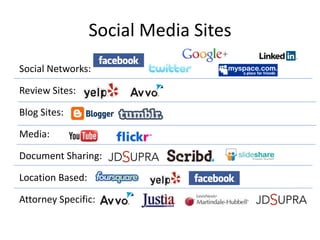
Social Media Sites
Social Networks:

Review Sites:

Blog Sites:

Media:

Document Sharing:

Location Based:

Attorney Specific:
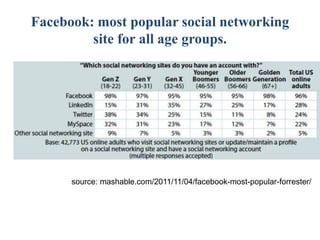
Facebook: most popular social networking
         site for all age groups.


      source: mashable.com/2011/11/04/facebook-most-popular-forrester/
Why should you care?


Manage Online Reputation
What are the benefits of social media
               for attorneys?
•   Professional Development
•   Networking
•   Marketing
•   Legal Research
•   Establishing your Expertise
•   Personal Entertainment
•   “Water Cooler”
•   Very Informal
•   Sharing is limited to 140 characters
•   More than 100 million active users
•   250 million daily tweets
•   50% of active users log in every day
                  Source: mashable.com/2011/10/17/twitter-costolo-stats/
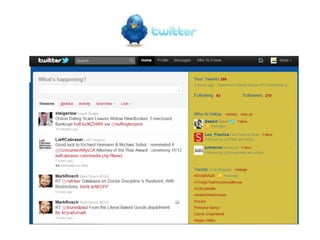
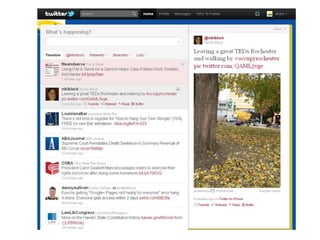
Hashtags #
Lists
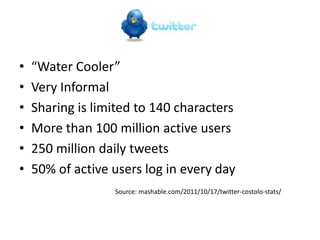
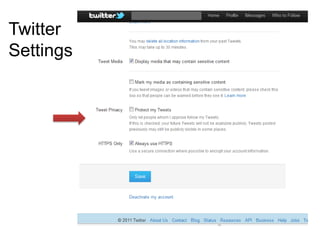
Twitter
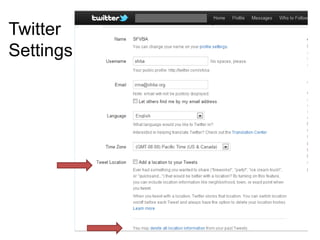
Settings
Twitter
Settings
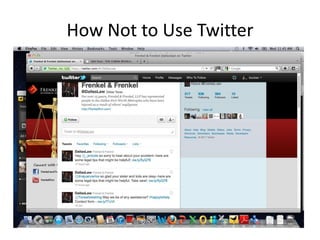
How Not to Use Twitter
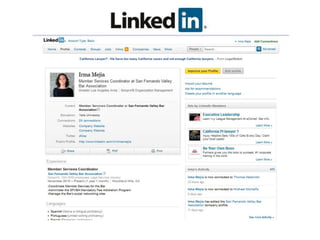
•   Most formal
•   Professional Development
•   Networking
•   Job Hunting

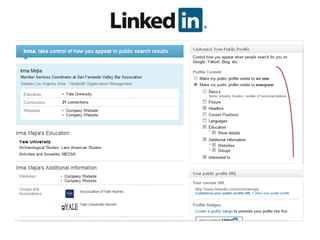
• More than 135 million members in over 200
  countries and territories
• New sign ups at a rate of 2 new members per
  second

                   source: http://press.linkedin.com/about
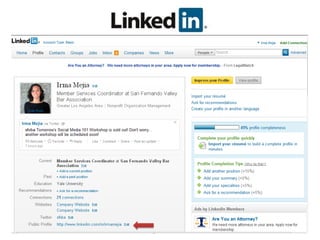
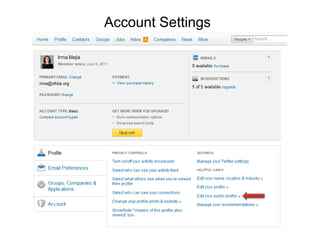
Account Settings
• “High School Online”
• More than 800 million active users worldwide
• 50% of users log on everyday
• Average user has 130 friends
• More than 2 billion posts are liked or commented on every
  day and 250 million photos uploaded every day
• Average user spends 7 hours and 46 minutes a month on
  Facebook
• More than 350 million active users access FB through mobile
  devices
                            sources:
                            facebook.com/press/info.php?factsheet
                            mashable.com/2011/10/21/facebook-infographic
Settings
     • Privacy is possible
     • Many settings available
     • Tedious but worthwhile to review

           1. Profile Settings
           2. Account Settings
           3. Privacy Settings
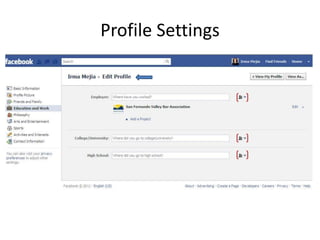
Profile Settings
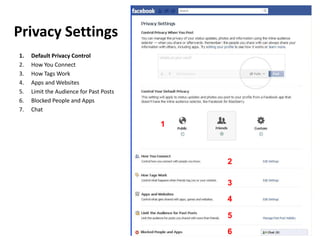
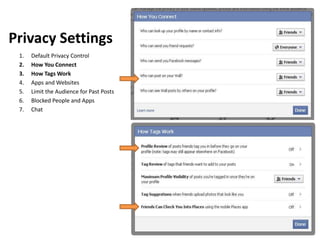
Privacy Settings
1.   Default Privacy Control
2.   How You Connect
3.   How Tags Work
4.   Apps and Websites
5.   Limit the Audience for Past Posts
6.   Blocked People and Apps
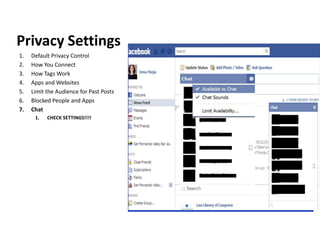
7.   Chat

                                         1


                                             2

                                             3

                                             4

                                             5

                                             6
Privacy Settings
 1.   Default Privacy Control
 2.   How You Connect
 3.   How Tags Work
 4.   Apps and Websites
 5.   Limit the Audience for Past Posts
 6.   Blocked People and Apps
 7.   Chat
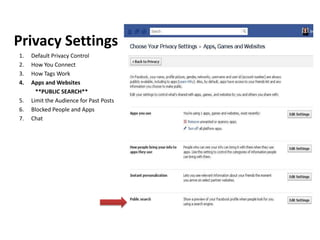
Privacy Settings
1.   Default Privacy Control
2.   How You Connect
3.   How Tags Work
4.   Apps and Websites
       **PUBLIC SEARCH**
5.   Limit the Audience for Past Posts
6.   Blocked People and Apps
7.   Chat
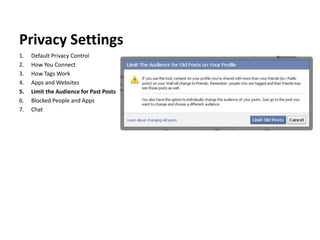
Privacy Settings
1.   Default Privacy Control
2.   How You Connect
3.   How Tags Work
4.   Apps and Websites
5.   Limit the Audience for Past Posts
6.   Blocked People and Apps
7.   Chat
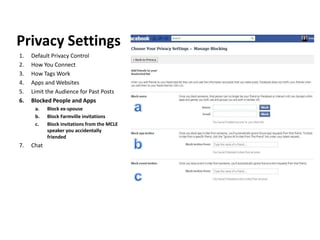
Privacy Settings
1.   Default Privacy Control
2.   How You Connect
3.   How Tags Work
4.   Apps and Websites
5.   Limit the Audience for Past Posts
6.   Blocked People and Apps
      a.    Block ex-spouse
      b.    Block Farmville invitations
      c.    Block invitations from the MCLE
            speaker you accidentally
            friended
7.   Chat
Privacy Settings
1.   Default Privacy Control
2.   How You Connect
3.   How Tags Work
4.   Apps and Websites
5.   Limit the Audience for Past Posts
6.   Blocked People and Apps
7.   Chat
      1.   CHECK SETTINGS!!!!
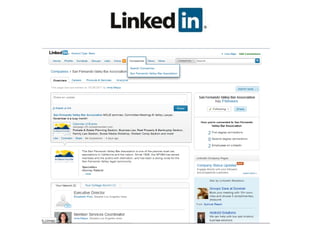
Personal Profile v. Company Page
Personal Profile                                   Company/Firm Page
•   Your personal page on Facebook                 •   Public page for your company/firm on Facebook
•   Friends                                        •   Fans who “Like” you as a company
•   Your voice                                     •   The Company voice
           •   Jane Doe Likes Disneyland                –   The Law Offices of Jane Doe likes Disneyland
           •   Jane Does commented on John Doe’s        –   The Law Offices of Jane Doe is in a relationship
               Picture                                      with John Doe
•   Personal connections                           •   An online storefront
•   Informal                                            –   Less formal than your website
•   Privacy settings should be checked regularly        –   Not a replacement for a website
                                                   •   Administrators
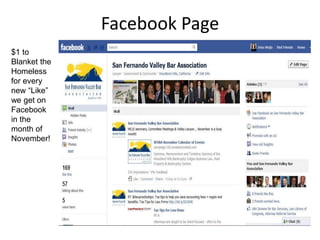
Facebook Page
$1 to
Blanket the
Homeless
for every
new “Like”
we get on
Facebook
in the
month of
November!
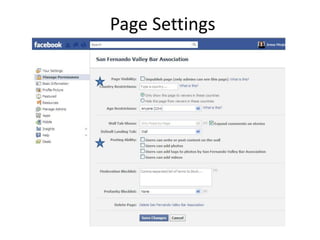
Page Settings
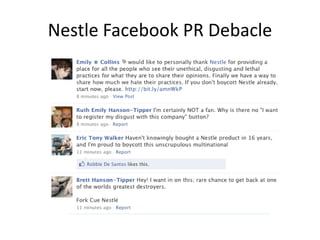
Nestle Facebook PR Debacle

     Greenpeace vs. Nesetle

              "To repeat: we welcome your
              comments, but please don't post
              using an altered version of any of
              our logos as your profile pic--they
              will be deleted."
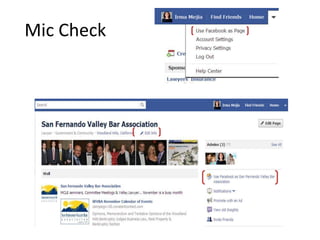
Mic Check
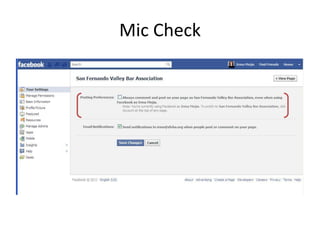
Mic Check
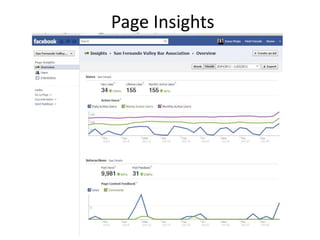
Page Insights
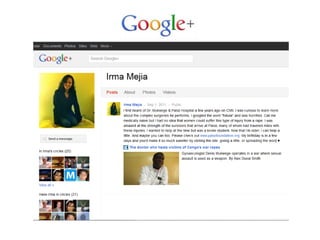
•   Launched beta early 2011
•   Opened to the public September 20
•   25 million unique visitors
•   Fastest growing social network
•   Brand Pages allowed November 7
•   Neat features:
    – Circles       – Hangouts    – Editable Posts
    – Public / Non-Public Posts   – Locked Posts
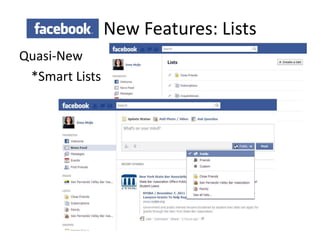
New Features: Lists
Quasi-New
 *Smart Lists
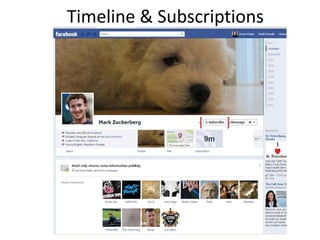
Timeline & Subscriptions
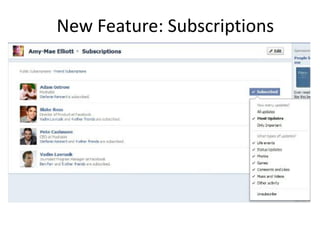
New Feature: Subscriptions
Managing Networks
• Schedule time for social media
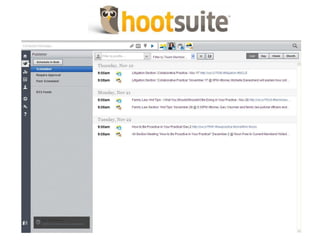
• Do not outsource your tweets
• If necessary, use a social network
  managing tool
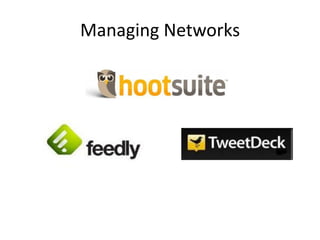
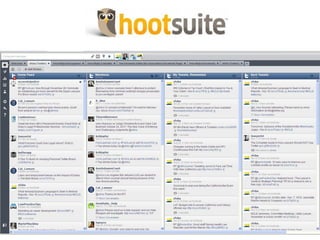
Managing Networks
Social Media Workshop Recap
1.   Set Goals
2.   Choose Preferred Platform
3.   Optimize Privacy Settings for Your Audience
4.   Use Tools to Manage Social Media Efforts
5.   Set Aside Time for Social Media
Resources
• Mashable.com
• Lawyerist.com
• nylawblog.typepad.com
• myshingle.com
• Social Media for Lawyers: The Next Frontier
  (2010). Carolyn Elefant and Nicole Black.
  ABA Law Practice Management Section.
• “Ethical Hotspots for Attorneys Using Social
  Media.” Brian Hemsworth. Valley Lawyer.
  October 2011.
Social media for attorneys 101

Social media for attorneys 101

  • 1.
    Social Media forAttorneys 101 San Fernando Valley Bar Association Irma Mejia, Member Services Coordinator November 10, 2011
  • 2.
    Today’s Program • Overviewof social media options • Benefits for attorneys • Features and Privacy Settings for major social networks – Twitter – LinkedIn – Facebook – Google+
  • 3.
    What is socialmedia? Social media is a platform for online interaction. • Use of the platform is defined by goals • Set of tools • Two-way street With social media, you are curating an exhibition of your life
  • 4.
    Social Media Sites SocialNetworks: Review Sites: Blog Sites: Media: Document Sharing: Location Based: Attorney Specific:
  • 5.
    Facebook: most popularsocial networking site for all age groups. source: mashable.com/2011/11/04/facebook-most-popular-forrester/
  • 6.
    Why should youcare? Manage Online Reputation
  • 7.
    What are thebenefits of social media for attorneys? • Professional Development • Networking • Marketing • Legal Research • Establishing your Expertise • Personal Entertainment
  • 8.
    “Water Cooler” • Very Informal • Sharing is limited to 140 characters • More than 100 million active users • 250 million daily tweets • 50% of active users log in every day Source: mashable.com/2011/10/17/twitter-costolo-stats/
  • 11.
  • 12.
  • 13.
  • 14.
  • 15.
    How Not toUse Twitter
  • 16.
    Most formal • Professional Development • Networking • Job Hunting • More than 135 million members in over 200 countries and territories • New sign ups at a rate of 2 new members per second source: http://press.linkedin.com/about
  • 18.
  • 22.
    • “High SchoolOnline” • More than 800 million active users worldwide • 50% of users log on everyday • Average user has 130 friends • More than 2 billion posts are liked or commented on every day and 250 million photos uploaded every day • Average user spends 7 hours and 46 minutes a month on Facebook • More than 350 million active users access FB through mobile devices sources: facebook.com/press/info.php?factsheet mashable.com/2011/10/21/facebook-infographic
  • 23.
    Settings • Privacy is possible • Many settings available • Tedious but worthwhile to review 1. Profile Settings 2. Account Settings 3. Privacy Settings
  • 24.
  • 25.
    Privacy Settings 1. Default Privacy Control 2. How You Connect 3. How Tags Work 4. Apps and Websites 5. Limit the Audience for Past Posts 6. Blocked People and Apps 7. Chat 1 2 3 4 5 6
  • 26.
    Privacy Settings 1. Default Privacy Control 2. How You Connect 3. How Tags Work 4. Apps and Websites 5. Limit the Audience for Past Posts 6. Blocked People and Apps 7. Chat
  • 27.
    Privacy Settings 1. Default Privacy Control 2. How You Connect 3. How Tags Work 4. Apps and Websites **PUBLIC SEARCH** 5. Limit the Audience for Past Posts 6. Blocked People and Apps 7. Chat
  • 28.
    Privacy Settings 1. Default Privacy Control 2. How You Connect 3. How Tags Work 4. Apps and Websites 5. Limit the Audience for Past Posts 6. Blocked People and Apps 7. Chat
  • 29.
    Privacy Settings 1. Default Privacy Control 2. How You Connect 3. How Tags Work 4. Apps and Websites 5. Limit the Audience for Past Posts 6. Blocked People and Apps a. Block ex-spouse b. Block Farmville invitations c. Block invitations from the MCLE speaker you accidentally friended 7. Chat
  • 30.
    Privacy Settings 1. Default Privacy Control 2. How You Connect 3. How Tags Work 4. Apps and Websites 5. Limit the Audience for Past Posts 6. Blocked People and Apps 7. Chat 1. CHECK SETTINGS!!!!
  • 31.
    Personal Profile v.Company Page Personal Profile Company/Firm Page • Your personal page on Facebook • Public page for your company/firm on Facebook • Friends • Fans who “Like” you as a company • Your voice • The Company voice • Jane Doe Likes Disneyland – The Law Offices of Jane Doe likes Disneyland • Jane Does commented on John Doe’s – The Law Offices of Jane Doe is in a relationship Picture with John Doe • Personal connections • An online storefront • Informal – Less formal than your website • Privacy settings should be checked regularly – Not a replacement for a website • Administrators
  • 32.
    Facebook Page $1 to Blanketthe Homeless for every new “Like” we get on Facebook in the month of November!
  • 33.
  • 34.
    Nestle Facebook PRDebacle Greenpeace vs. Nesetle "To repeat: we welcome your comments, but please don't post using an altered version of any of our logos as your profile pic--they will be deleted."
  • 35.
  • 36.
  • 37.
  • 38.
    Launched beta early 2011 • Opened to the public September 20 • 25 million unique visitors • Fastest growing social network • Brand Pages allowed November 7 • Neat features: – Circles – Hangouts – Editable Posts – Public / Non-Public Posts – Locked Posts
  • 40.
  • 41.
  • 42.
  • 43.
    Managing Networks • Scheduletime for social media • Do not outsource your tweets • If necessary, use a social network managing tool
  • 44.
  • 47.
    Social Media WorkshopRecap 1. Set Goals 2. Choose Preferred Platform 3. Optimize Privacy Settings for Your Audience 4. Use Tools to Manage Social Media Efforts 5. Set Aside Time for Social Media
  • 48.
    Resources • Mashable.com • Lawyerist.com •nylawblog.typepad.com • myshingle.com • Social Media for Lawyers: The Next Frontier (2010). Carolyn Elefant and Nicole Black. ABA Law Practice Management Section. • “Ethical Hotspots for Attorneys Using Social Media.” Brian Hemsworth. Valley Lawyer. October 2011.