Building Social
Media For Educators
Meredith Cohen
FInal Presentation
So many Ways to
connect
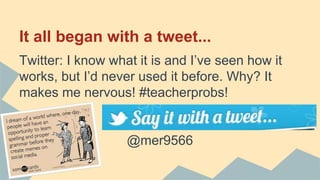
It all began with a tweet...
Twitter: I know what it is and I’ve seen how it
works, but I’d never used it before. Why? It
makes me nervous! #teacherprobs!
@mer9566
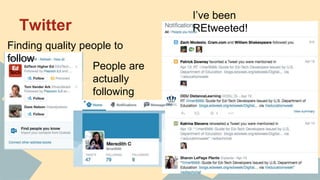
Twitter
Finding quality people to
follow
People are
actually
following
ME?!
I’ve been
REtweeted!
Challenges
1. Getting over my fear of a “teacher on
Twitter.”
2. Finding worthwhile/quality people or
communities to follow on social media sites.
3. Remembering the numerous account
names, log-ins, and passwords!
4. Going back to check on previous posts or
comments to respond to others who
continued the conversation.
Most useful tool...
How Pinterest changed the way I teach:
1. So many young, enthusiastic, and creative teachers post their work and love
sharing via Pinterest.
2. I can see friends and follow people or boards specific to my interests.
3. I can access my Pinterest account while I’m at school, so I can find great
resources I’ve already pinned and prepare them at school.
4. It’s a great way to organize links I’ve found with a visual representation of
exactly what the link/resource I pinned is.,
5. I discovered interactive notebooking, which I’ve used to completely revamp
my curriculum, through Pinterest last year.
6. I can make as many boards as I want that can be as specific or general as the
things I pin.
7. Since it’s also a social site, I can comment and read others’ comments about
pins.
8. It’s constantly evolving and items are updated or repinned.
9. It’s FREE!
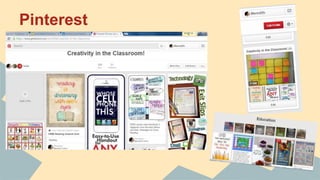
Pinterest
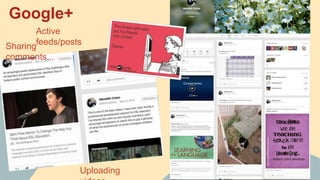
Google+
Sharing
comments...
Uploading
Active
feeds/posts
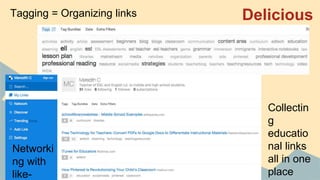
DeliciousTagging = Organizing links
Collectin
g
educatio
nal links
all in one
place
Networki
ng with
like-
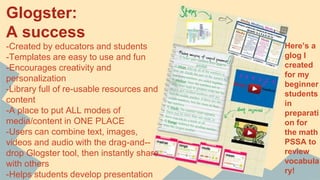
Glogster:
A success
-Created by educators and students
-Templates are easy to use and fun
-Encourages creativity and
personalization
-Library full of re-usable resources and
content
-A place to put ALL modes of
media/content in ONE PLACE
-Users can combine text, images,
videos and audio with the drag-and--
drop Glogster tool, then instantly share
with others
-Helps students develop presentation
Here’s a
glog I
created
for my
beginner
students
in
preparati
on for
the math
PSSA to
review
vocabula
ry!
Moodle and Online learning
Just as I learned how to use a variety of social media
and web 2.0 tools to help me run my classroom and stay
organized through technology, I think Moodle does the
same for educators whose classes are run entirely
online. Since this is my third course using Moodle, I was
comfortable navigating the site, and I liked how I could
keep track of everything occurring in the course--from
when I submitted assignments, to my grades and
assignment feedback. I’m glad that I’ve had the
opportunity to use an online learning platform since I
It’s all about
becoming a global
community

Social media for educators

  • 1.
    Building Social Media ForEducators Meredith Cohen FInal Presentation
  • 2.
    So many Waysto connect
  • 3.
    It all beganwith a tweet... Twitter: I know what it is and I’ve seen how it works, but I’d never used it before. Why? It makes me nervous! #teacherprobs! @mer9566
  • 4.
    Twitter Finding quality peopleto follow People are actually following ME?! I’ve been REtweeted!
  • 5.
    Challenges 1. Getting overmy fear of a “teacher on Twitter.” 2. Finding worthwhile/quality people or communities to follow on social media sites. 3. Remembering the numerous account names, log-ins, and passwords! 4. Going back to check on previous posts or comments to respond to others who continued the conversation.
  • 6.
    Most useful tool... HowPinterest changed the way I teach: 1. So many young, enthusiastic, and creative teachers post their work and love sharing via Pinterest. 2. I can see friends and follow people or boards specific to my interests. 3. I can access my Pinterest account while I’m at school, so I can find great resources I’ve already pinned and prepare them at school. 4. It’s a great way to organize links I’ve found with a visual representation of exactly what the link/resource I pinned is., 5. I discovered interactive notebooking, which I’ve used to completely revamp my curriculum, through Pinterest last year. 6. I can make as many boards as I want that can be as specific or general as the things I pin. 7. Since it’s also a social site, I can comment and read others’ comments about pins. 8. It’s constantly evolving and items are updated or repinned. 9. It’s FREE!
  • 7.
  • 8.
  • 9.
    DeliciousTagging = Organizinglinks Collectin g educatio nal links all in one place Networki ng with like-
  • 10.
    Glogster: A success -Created byeducators and students -Templates are easy to use and fun -Encourages creativity and personalization -Library full of re-usable resources and content -A place to put ALL modes of media/content in ONE PLACE -Users can combine text, images, videos and audio with the drag-and-- drop Glogster tool, then instantly share with others -Helps students develop presentation Here’s a glog I created for my beginner students in preparati on for the math PSSA to review vocabula ry!
  • 11.
    Moodle and Onlinelearning Just as I learned how to use a variety of social media and web 2.0 tools to help me run my classroom and stay organized through technology, I think Moodle does the same for educators whose classes are run entirely online. Since this is my third course using Moodle, I was comfortable navigating the site, and I liked how I could keep track of everything occurring in the course--from when I submitted assignments, to my grades and assignment feedback. I’m glad that I’ve had the opportunity to use an online learning platform since I
  • 12.
    It’s all about becominga global community